ignition FORD BRONCO SPORT 2022 Manual PDF
[x] Cancel search | Manufacturer: FORD, Model Year: 2022, Model line: BRONCO SPORT, Model: FORD BRONCO SPORT 2022Pages: 494, PDF Size: 8.74 MB
Page 379 of 494
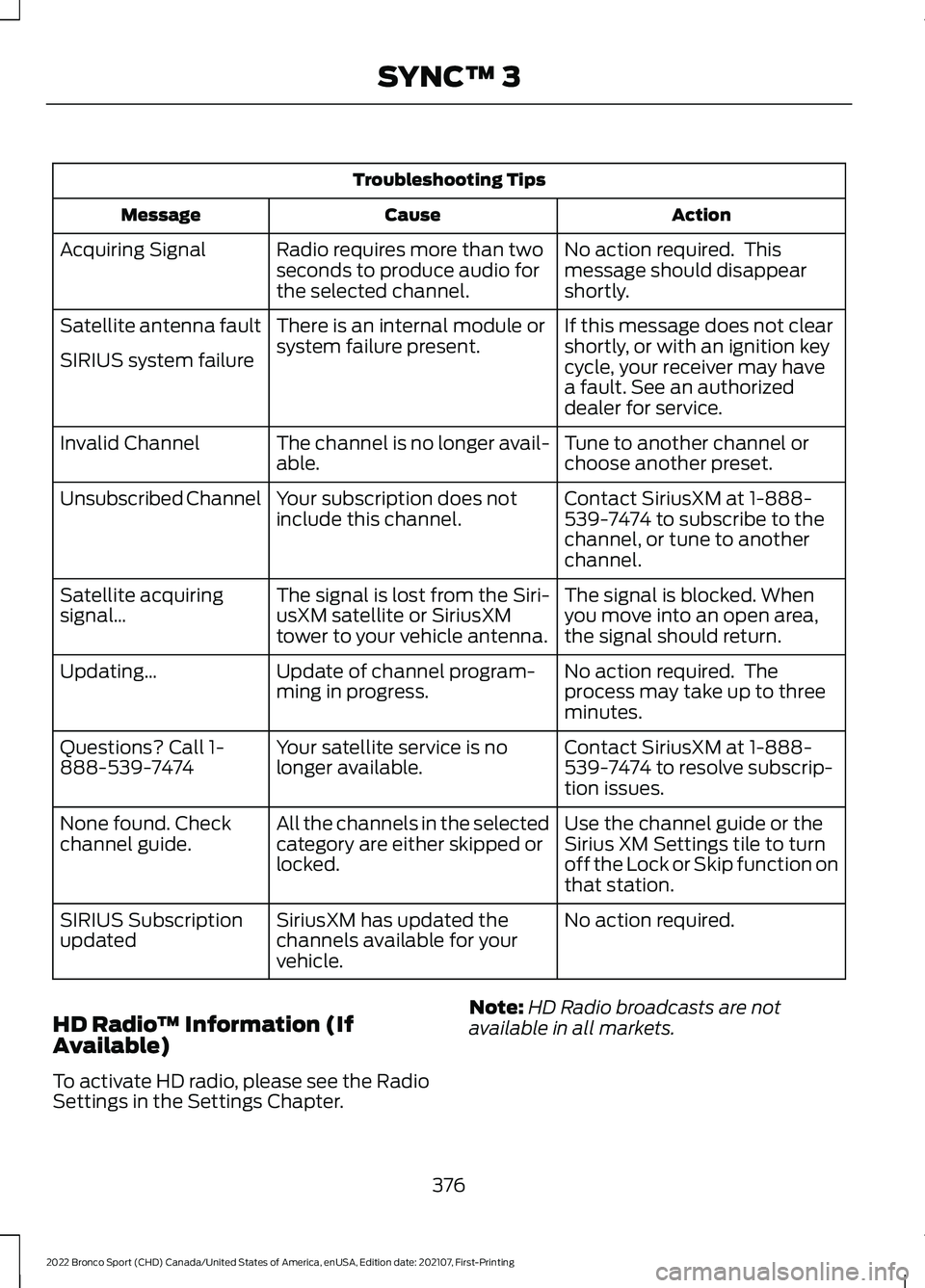
Troubleshooting Tips
Action
Cause
Message
No action required. This
message should disappear
shortly.
Radio requires more than two
seconds to produce audio for
the selected channel.
Acquiring Signal
If this message does not clear
shortly, or with an ignition key
cycle, your receiver may have
a fault. See an authorized
dealer for service.
There is an internal module or
system failure present.
Satellite antenna fault
SIRIUS system failure
Tune to another channel or
choose another preset.
The channel is no longer avail-
able.
Invalid Channel
Contact SiriusXM at 1-888-
539-7474 to subscribe to the
channel, or tune to another
channel.
Your subscription does not
include this channel.
Unsubscribed Channel
The signal is blocked. When
you move into an open area,
the signal should return.
The signal is lost from the Siri-
usXM satellite or SiriusXM
tower to your vehicle antenna.
Satellite acquiring
signal…
No action required. The
process may take up to three
minutes.
Update of channel program-
ming in progress.
Updating…
Contact SiriusXM at 1-888-
539-7474 to resolve subscrip-
tion issues.
Your satellite service is no
longer available.
Questions? Call 1-
888-539-7474
Use the channel guide or the
Sirius XM Settings tile to turn
off the Lock or Skip function on
that station.
All the channels in the selected
category are either skipped or
locked.
None found. Check
channel guide.
No action required.
SiriusXM has updated the
channels available for your
vehicle.
SIRIUS Subscription
updated
HD Radio ™ Information (If
Available)
To activate HD radio, please see the Radio
Settings in the Settings Chapter. Note:
HD Radio broadcasts are not
available in all markets.
376
2022 Bronco Sport (CHD) Canada/United States of America, enUSA, Edition date: 202107, First-Printing SYNC™ 3
Page 400 of 494
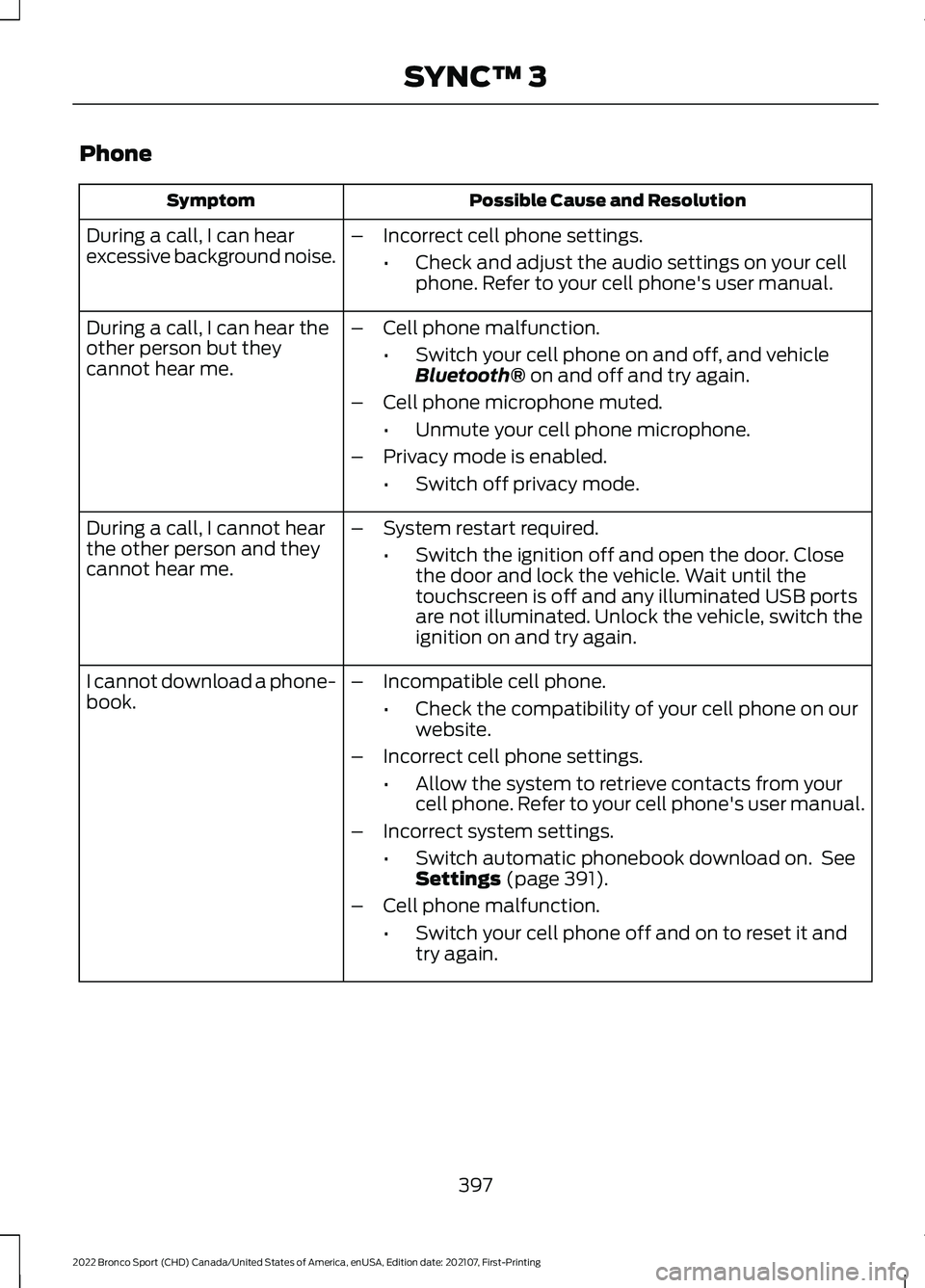
Phone
Possible Cause and Resolution
Symptom
During a call, I can hear
excessive background noise. –
Incorrect cell phone settings.
•Check and adjust the audio settings on your cell
phone. Refer to your cell phone's user manual.
During a call, I can hear the
other person but they
cannot hear me. –
Cell phone malfunction.
•Switch your cell phone on and off, and vehicle
Bluetooth® on and off and try again.
– Cell phone microphone muted.
•Unmute your cell phone microphone.
– Privacy mode is enabled.
•Switch off privacy mode.
During a call, I cannot hear
the other person and they
cannot hear me. –
System restart required.
•Switch the ignition off and open the door. Close
the door and lock the vehicle. Wait until the
touchscreen is off and any illuminated USB ports
are not illuminated. Unlock the vehicle, switch the
ignition on and try again.
I cannot download a phone-
book. –
Incompatible cell phone.
•Check the compatibility of your cell phone on our
website.
– Incorrect cell phone settings.
•Allow the system to retrieve contacts from your
cell phone. Refer to your cell phone's user manual.
– Incorrect system settings.
•Switch automatic phonebook download on. See
Settings
(page 391).
– Cell phone malfunction.
•Switch your cell phone off and on to reset it and
try again.
397
2022 Bronco Sport (CHD) Canada/United States of America, enUSA, Edition date: 202107, First-Printing SYNC™ 3
Page 406 of 494
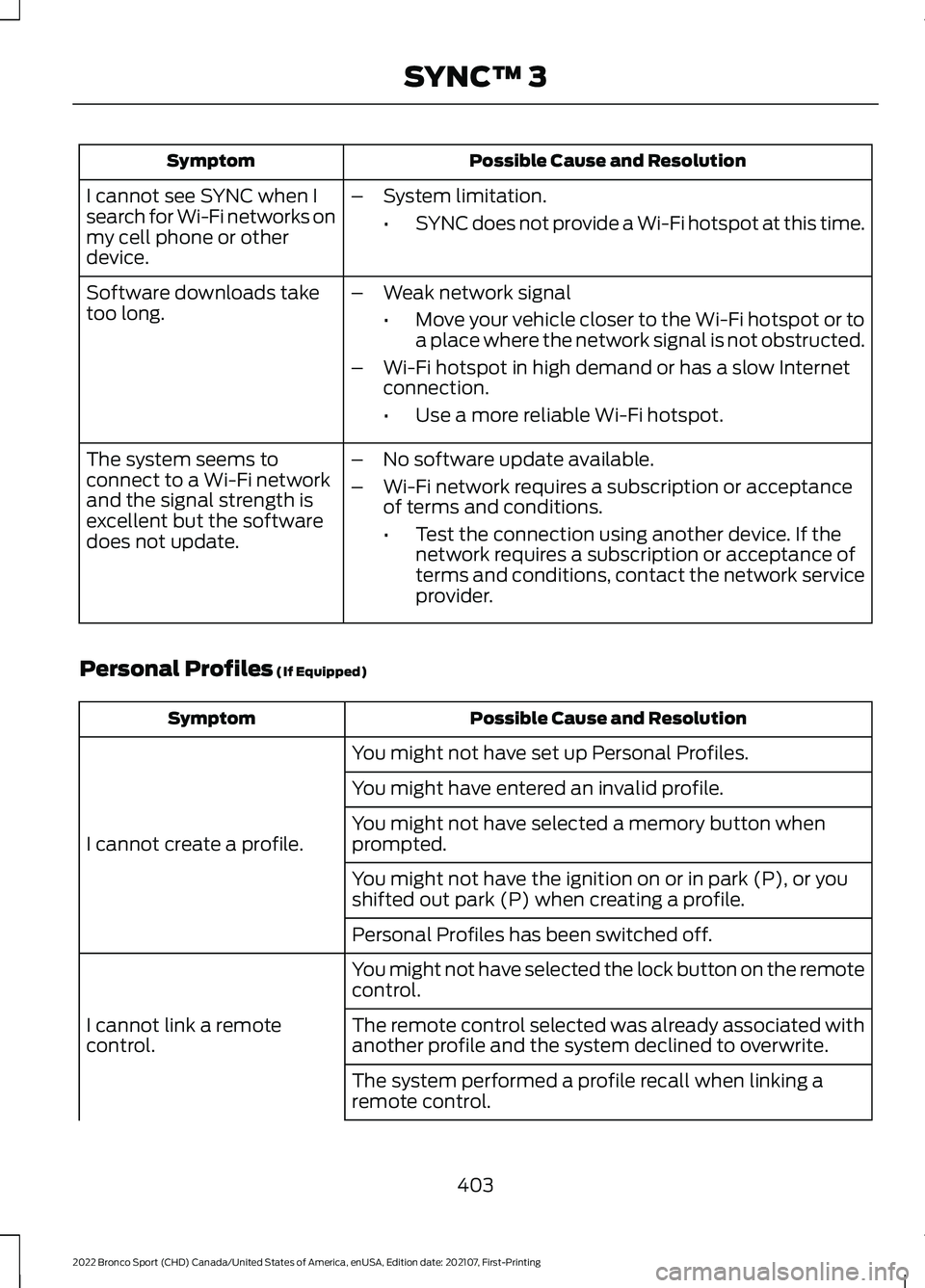
Possible Cause and Resolution
Symptom
I cannot see SYNC when I
search for Wi-Fi networks on
my cell phone or other
device. –
System limitation.
•SYNC does not provide a Wi-Fi hotspot at this time.
– Weak network signal
•Move your vehicle closer to the Wi-Fi hotspot or to
a place where the network signal is not obstructed.
– Wi-Fi hotspot in high demand or has a slow Internet
connection.
•Use a more reliable Wi-Fi hotspot.
Software downloads take
too long.
–No software update available.
– Wi-Fi network requires a subscription or acceptance
of terms and conditions.
•Test the connection using another device. If the
network requires a subscription or acceptance of
terms and conditions, contact the network service
provider.
The system seems to
connect to a Wi-Fi network
and the signal strength is
excellent but the software
does not update.
Personal Profiles (If Equipped) Possible Cause and Resolution
Symptom
You might not have set up Personal Profiles.
I cannot create a profile. You might have entered an invalid profile.
You might not have selected a memory button when
prompted.
You might not have the ignition on or in park (P), or you
shifted out park (P) when creating a profile.
Personal Profiles has been switched off.
You might not have selected the lock button on the remote
control.
I cannot link a remote
control. The remote control selected was already associated with
another profile and the system declined to overwrite.
The system performed a profile recall when linking a
remote control.
403
2022 Bronco Sport (CHD) Canada/United States of America, enUSA, Edition date: 202107, First-Printing SYNC™ 3
Page 407 of 494
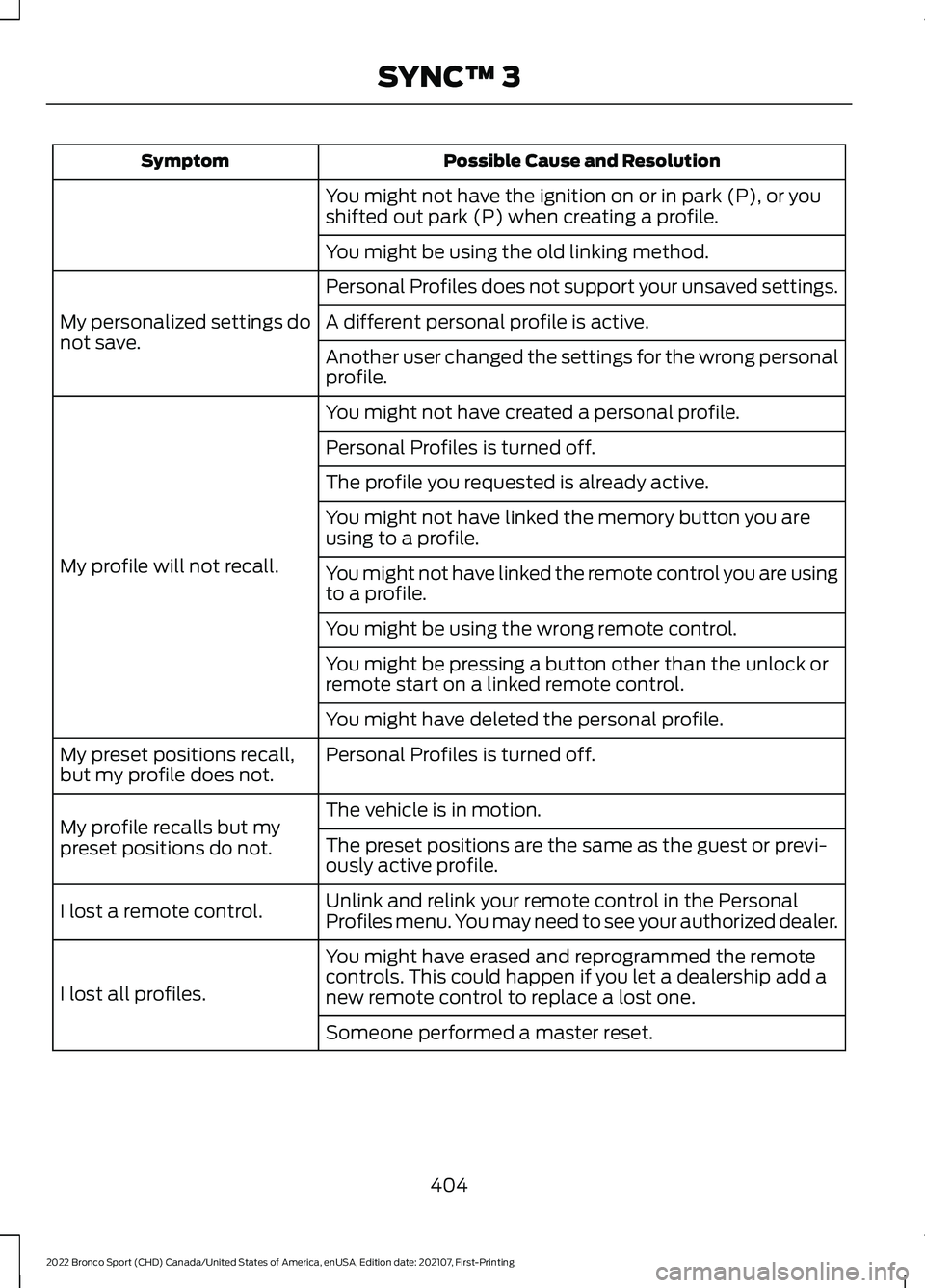
Possible Cause and Resolution
Symptom
You might not have the ignition on or in park (P), or you
shifted out park (P) when creating a profile.
You might be using the old linking method.
Personal Profiles does not support your unsaved settings.
My personalized settings do
not save. A different personal profile is active.
Another user changed the settings for the wrong personal
profile.
You might not have created a personal profile.
My profile will not recall. Personal Profiles is turned off.
The profile you requested is already active.
You might not have linked the memory button you are
using to a profile.
You might not have linked the remote control you are using
to a profile.
You might be using the wrong remote control.
You might be pressing a button other than the unlock or
remote start on a linked remote control.
You might have deleted the personal profile.
Personal Profiles is turned off.
My preset positions recall,
but my profile does not.
The vehicle is in motion.
My profile recalls but my
preset positions do not. The preset positions are the same as the guest or previ-
ously active profile.
Unlink and relink your remote control in the Personal
Profiles menu. You may need to see your authorized dealer.
I lost a remote control.
You might have erased and reprogrammed the remote
controls. This could happen if you let a dealership add a
new remote control to replace a lost one.
I lost all profiles.
Someone performed a master reset.
404
2022 Bronco Sport (CHD) Canada/United States of America, enUSA, Edition date: 202107, First-Printing SYNC™ 3
Page 489 of 494
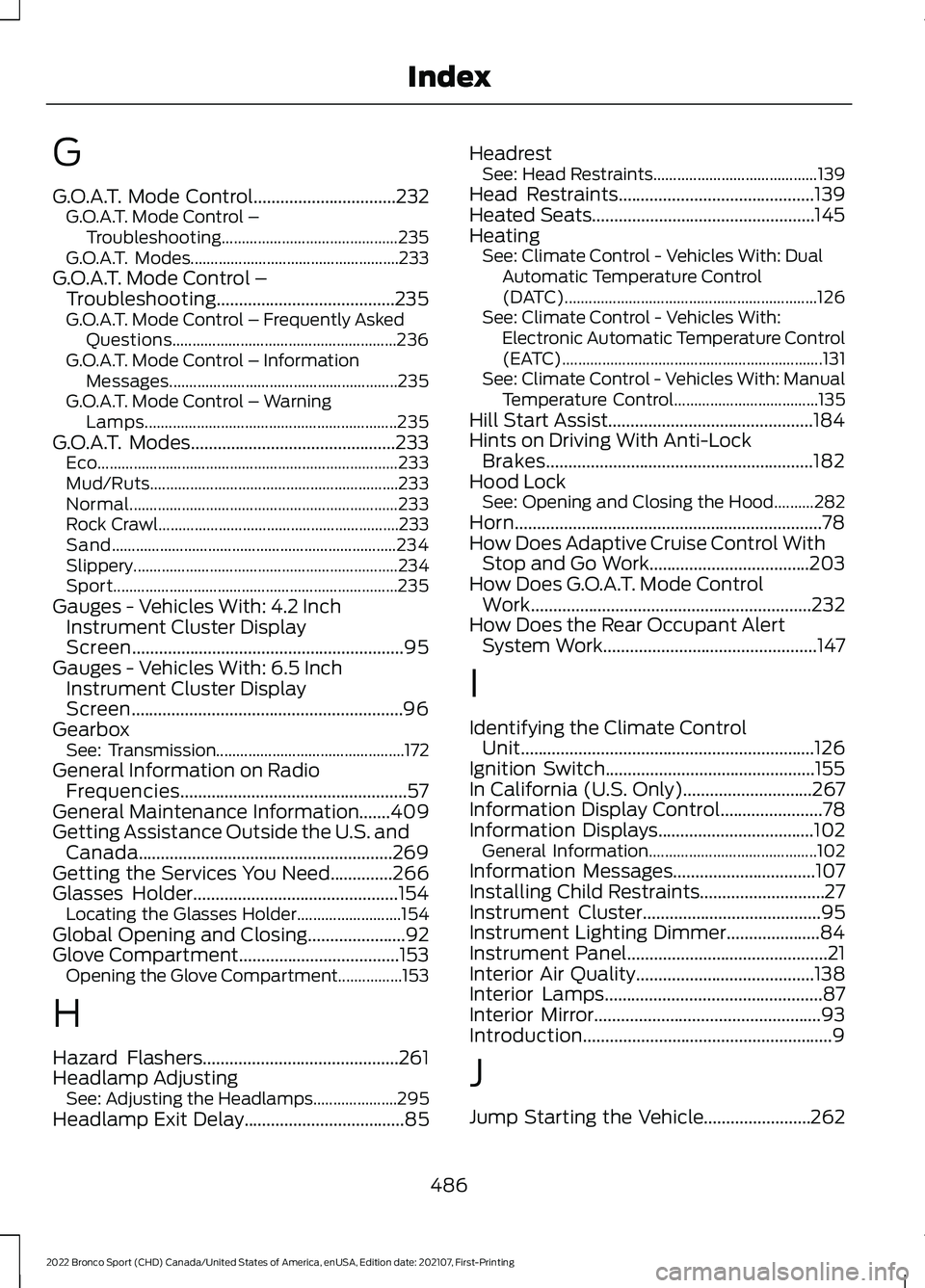
G
G.O.A.T. Mode Control................................232
G.O.A.T. Mode Control –
Troubleshooting............................................ 235
G.O.A.T. Modes.................................................... 233
G.O.A.T. Mode Control – Troubleshooting........................................235
G.O.A.T. Mode Control – Frequently Asked Questions........................................................ 236
G.O.A.T. Mode Control – Information Messages......................................................... 235
G.O.A.T. Mode Control – Warning Lamps............................................................... 235
G.O.A.T. Modes..............................................233 Eco........................................................................\
... 233
Mud/Ruts.............................................................. 233
Normal................................................................... 233
Rock Crawl............................................................ 233
Sand....................................................................... 234
Slippery.................................................................. 234
Sport....................................................................... 235
Gauges - Vehicles With: 4.2 Inch Instrument Cluster Display
Screen.............................................................95
Gauges - Vehicles With: 6.5 Inch Instrument Cluster Display
Screen.............................................................96
Gearbox See: Transmission............................................... 172
General Information on Radio Frequencies...................................................57
General Maintenance Information.......409
Getting Assistance Outside the U.S. and Canada.........................................................269
Getting the Services You Need..............266
Glasses Holder..............................................154 Locating the Glasses Holder.......................... 154
Global Opening and Closing......................92
Glove Compartment
....................................153
Opening the Glove Compartment................153
H
Hazard Flashers
............................................261
Headlamp Adjusting See: Adjusting the Headlamps..................... 295
Headlamp Exit Delay
....................................85 Headrest
See: Head Restraints......................................... 139
Head Restraints
............................................139
Heated Seats..................................................145
Heating See: Climate Control - Vehicles With: Dual
Automatic Temperature Control
(DATC)............................................................... 126
See: Climate Control - Vehicles With: Electronic Automatic Temperature Control
(EATC) ................................................................. 131
See: Climate Control - Vehicles With: Manual Temperature Control.................................... 135
Hill Start Assist..............................................184
Hints on Driving With Anti-Lock Brakes............................................................182
Hood Lock See: Opening and Closing the Hood..........282
Horn.....................................................................78
How Does Adaptive Cruise Control With Stop and Go Work....................................203
How Does G.O.A.T. Mode Control Work...............................................................232
How Does the Rear Occupant Alert System Work
................................................147
I
Identifying the Climate Control Unit..................................................................126
Ignition Switch...............................................155
In California (U.S. Only).............................267
Information Display Control
.......................78
Information Displays...................................102 General Information.......................................... 102
Information Messages................................107
Installing Child Restraints............................27
Instrument Cluster
........................................95
Instrument Lighting Dimmer.....................84
Instrument Panel
.............................................21
Interior Air Quality........................................138
Interior Lamps
.................................................87
Interior Mirror...................................................93
Introduction........................................................9
J
Jump Starting the Vehicle........................262
486
2022 Bronco Sport (CHD) Canada/United States of America, enUSA, Edition date: 202107, First-Printing Index
Page 492 of 494
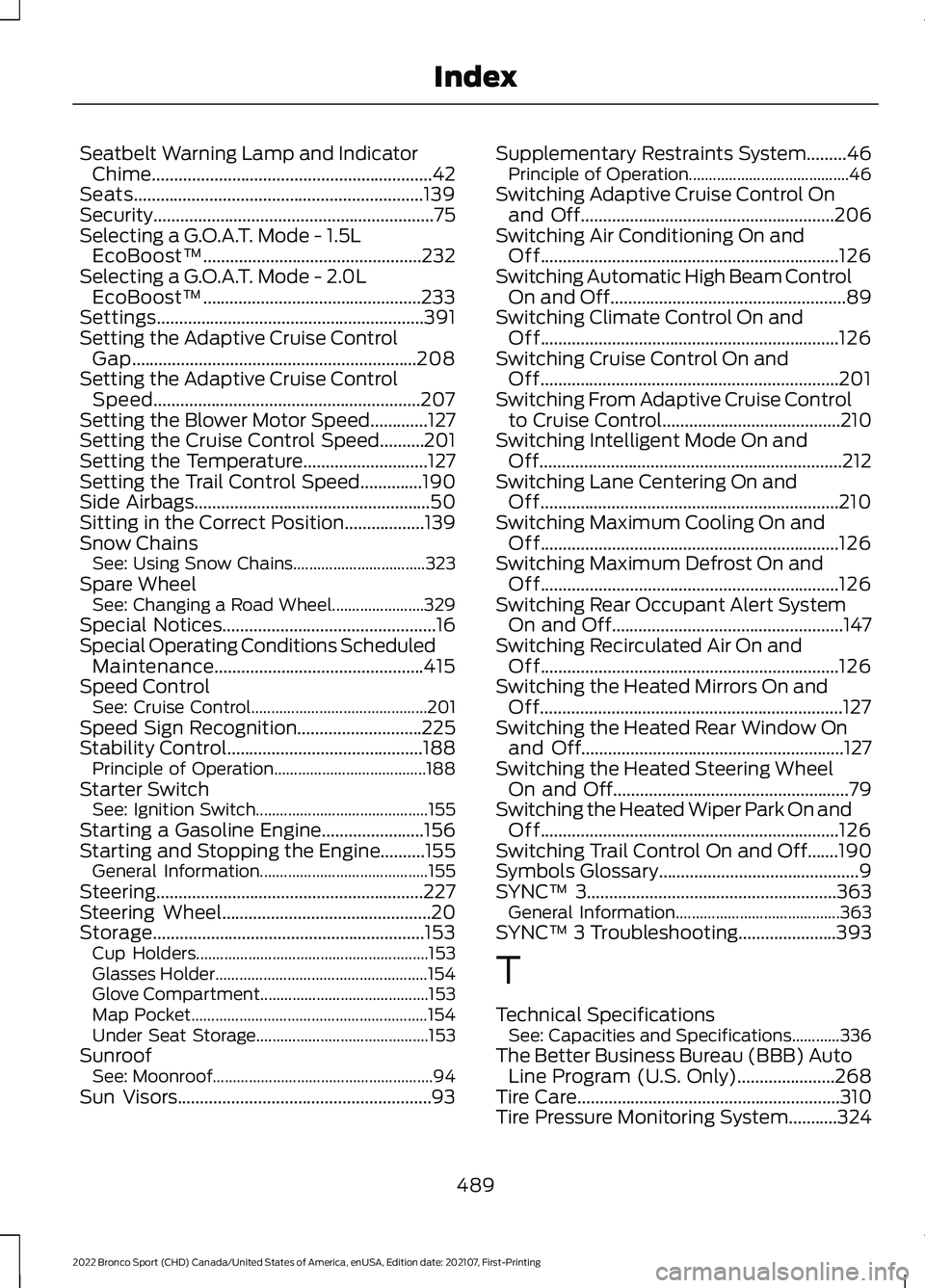
Seatbelt Warning Lamp and Indicator
Chime...............................................................42
Seats.................................................................139
Security...............................................................75
Selecting a G.O.A.T. Mode - 1.5L EcoBoost™.................................................232
Selecting a G.O.A.T. Mode - 2.0L EcoBoost™.................................................233
Settings............................................................391
Setting the Adaptive Cruise Control Gap................................................................208
Setting the Adaptive Cruise Control Speed............................................................207
Setting the Blower Motor Speed.............127
Setting the Cruise Control Speed..........201
Setting the Temperature............................127
Setting the Trail Control Speed..............190
Side Airbags.....................................................50
Sitting in the Correct Position..................139
Snow Chains See: Using Snow Chains................................. 323
Spare Wheel See: Changing a Road Wheel....................... 329
Special Notices
................................................16
Special Operating Conditions Scheduled Maintenance...............................................415
Speed Control See: Cruise Control............................................ 201
Speed Sign Recognition
............................225
Stability Control............................................188
Principle of Operation...................................... 188
Starter Switch See: Ignition Switch........................................... 155
Starting a Gasoline Engine
.......................156
Starting and Stopping the Engine..........155 General Information.......................................... 155
Steering............................................................227
Steering Wheel
...............................................20
Storage.............................................................153 Cup Holders.......................................................... 153
Glasses Holder..................................................... 154
Glove Compartment.......................................... 153
Map Pocket........................................................... 154
Under Seat Storage........................................... 153
Sunroof See: Moonroof....................................................... 94
Sun Visors.........................................................93 Supplementary Restraints System.........46
Principle of Operation........................................ 46
Switching Adaptive Cruise Control On and Off
.........................................................206
Switching Air Conditioning On and Off...................................................................126
Switching Automatic High Beam Control On and Off
.....................................................89
Switching Climate Control On and Off...................................................................126
Switching Cruise Control On and Off...................................................................201
Switching From Adaptive Cruise Control to Cruise Control........................................210
Switching Intelligent Mode On and Off
....................................................................212
Switching Lane Centering On and Off...................................................................210
Switching Maximum Cooling On and Off...................................................................126
Switching Maximum Defrost On and Off...................................................................126
Switching Rear Occupant Alert System On and Off....................................................147
Switching Recirculated Air On and Off...................................................................126
Switching the Heated Mirrors On and Off....................................................................127
Switching the Heated Rear Window On and Off...........................................................127
Switching the Heated Steering Wheel On and Off
.....................................................79
Switching the Heated Wiper Park On and Off...................................................................126
Switching Trail Control On and Off.......190
Symbols Glossary
.............................................9
SYNC™ 3........................................................363
General Information......................................... 363
SYNC™ 3 Troubleshooting
......................393
T
Technical Specifications See: Capacities and Specifications............336
The Better Business Bureau (BBB) Auto Line Program (U.S. Only)......................268
Tire Care
...........................................................310
Tire Pressure Monitoring System...........324
489
2022 Bronco Sport (CHD) Canada/United States of America, enUSA, Edition date: 202107, First-Printing Index