Disable FORD BRONCO SPORT 2022 Owners Manual
[x] Cancel search | Manufacturer: FORD, Model Year: 2022, Model line: BRONCO SPORT, Model: FORD BRONCO SPORT 2022Pages: 494, PDF Size: 8.74 MB
Page 17 of 494
Entertainment Data
Data recorded includes, for example:
•
Music, videos or album art.
• Contacts and corresponding address
book entries.
• Navigation destinations.
Services That We Provide
If you use our services, we collect and use
data, for example, account information,
vehicle location and driving characteristics,
that could identify you. We transmit this
data through a dedicated, protected
connection. We only collect and use data
to enable your use of our services to which
you have subscribed, with your consent or
where permitted by law. For additional
information, see the terms and conditions
of the services to which you have
subscribed.
Services That Third Parties
Provide
We recommend that you review the terms
and conditions and data privacy
information for any services to which you
subscribe. We take no responsibility for
services that third parties provide.
Vehicles With a Modem (If Equipped) The modem has a SIM. The
modem was enabled when your
vehicle was built and periodically
sends messages to stay connected to the
cell phone network, receive automatic
software updates and send vehicle-related
information to us, for example, diagnostic
information. These messages could
include information that identifies your
vehicle, the SIM and the electronic serial
number of the modem. Cell phone network service providers could have access to
additional information, for example, cell
phone network tower identification. For
additional information about our privacy
policy, visit
www .For dC onne c t e d . c om or
refer to your local Ford website.
Note: The modem continues to send this
information unless you disable the modem
or stop the modem from sharing vehicle
data by changing the modem settings. See
Connected Vehicle
(page 349).
Note: The service can be unavailable or
interrupted for a number of reasons, for
example, environmental or topographical
conditions and data plan coverage.
Note: To find out if your vehicle has a
modem, visit
www .For dC onne c t e d . c om .
Vehicles With SYNC
Mobile Device Data
If you connect a mobile device to your
vehicle, you can display data from your
device on the touchscreen for example,
music and album art. You can share your
vehicle data with mobile apps on your
device through the system. See
Apps
(page 389).
The mobile apps function operates by your
connected device sending data to us in the
United States. The data is encrypted and
includes, for example, the vehicle
identification number of your vehicle,
odometer, SYNC module number,
anonymous usage statistics and debugging
information. We retain it only as long as
necessary to provide the service, to
troubleshoot, for continuous improvement
and to offer you products and services that
may be of interest to you according to your
preferences and where allowed by law.
14
2022 Bronco Sport (CHD) Canada/United States of America, enUSA, Edition date: 202107, First-Printing Introduction
Page 52 of 494
The front passenger sensing system uses
passenger airbag status indicators that
illuminate indicating that the front
passenger frontal airbag is either on or off.
Note:
The indicators briefly illuminate when
you first switch the ignition on to confirm
they are functional.
The front passenger sensing system is
designed to disable the front passenger
frontal airbag under these conditions:
• The front passenger seat is
unoccupied.
• The system determines an infant is
present in a child restraint.
• A passenger takes their weight off of
the seat for a period of time.
• If there is a problem with the airbag
system or the passenger sensing
system.
Even with this technology, parents are
strongly encouraged to always properly
restrain children in the rear seat.
• When the front passenger sensing
system disables the front passenger
frontal airbag, the passenger airbag
status off indicator illuminates and
stays lit to remind you that the front
passenger frontal airbag is disabled.
• If you have installed the child restraint
and the passenger airbag status on
indicator illuminates, switch the vehicle
off, remove the child restraint from the
vehicle and reinstall the restraint
following the child restraint
manufacturer's instructions. The front passenger sensing system is
designed to enable the front passenger
frontal airbag anytime the system senses
that a person of adult size is sitting
properly in the front passenger seat.
•
When the front passenger sensing
system enables the front passenger
frontal airbag, the passenger airbag
status on indicator illuminates.
If a person of adult size is sitting in the front
passenger seat, but the passenger airbag
is disabled, it is possible that the person is
not sitting properly in the seat. If this
happens:
• Switch the vehicle off and ask the
person to place the seat backrest in an
upright position.
• Have the person sit upright in the seat,
centered on the seat cushion, with the
person's legs comfortably extended.
• Restart the vehicle and have the person
remain in this position for about two
minutes. This allows the system to
detect that person and enables the
passenger frontal airbag.
• If the passenger airbag status off
indicator remains illuminated even
after this, advise the person to ride in
the rear seat. Passenger Airbag
Passenger Airbag Status
Indicator
Occupant
Disabled
OFF: Illuminated
Empty ON: Not illuminated
Disabled
OFF: Illuminated
Child
49
2022 Bronco Sport (CHD) Canada/United States of America, enUSA, Edition date: 202107, First-Printing Supplementary Restraints System
Page 67 of 494
Note:
Not every feature applies to every
vehicle in every market. When they are
available for your vehicle, then they appear
in your information display, providing
choices to switch them on or off, or to select
a more specific setting.
• Various vehicle speed limits so the
MyKey driver cannot exceed certain
speeds. The information display shows
warnings followed by an audible tone
when the MyKey driver reaches the set
speed. You cannot override the set
speed by fully depressing the
accelerator pedal. WARNING: Do not set MyKey
maximum speed limit to a limit that will
prevent the driver from maintaining a
safe speed considering posted speed
limits and prevailing road conditions. The
driver is always responsible to drive in
accordance with local laws and
prevailing conditions. Failure to do so
could result in accident or injury. •
Various vehicle speed reminders so
MyKey drivers know when their vehicle
speed approaches the limits. Warnings
appear in your information display and
a tone sounds when the MyKey drivers
exceed the set vehicle speed.
• The audio system's maximum volume
limits to 45% so MyKey drivers can
concentrate on the road. A message
appears in the information display
when MyKey drivers attempt to exceed
the limited volume. MyKey also
disables the automatic volume control.
Note:
If your vehicle includes an
AM/FM radio or a very basic audio
system, then the radio may not limit.
• Always on setting. This setting forces
certain features to remain on and
active for MyKey drivers. For example,
E911 or emergency assistance and the
do not disturb features stay on even if
a MyKey driver uses the feature's
control to switch it off. When selected,
you will not be able to turn off Advance
Trac or traction control (if your vehicle
has this feature).
CREATING A MYKEY
Use the touchscreen to create a MyKey:
1. Insert the key you want to program into
the ignition. If your vehicle has a
push-button start, place the remote
control into the backup slot. See
Starting a Gasoline Engine
(page
156).
2. Switch the ignition on.
3. Access the main menu in the touchscreen and then scroll through
the menus to change the settings of
your MyKey. From the MyKey menu,
select the option Create MyKey. See
Settings
(page 391).
64
2022 Bronco Sport (CHD) Canada/United States of America, enUSA, Edition date: 202107, First-Printing MyKey
™
Page 69 of 494
Number of MyKeys
Indicates the number of MyKeys you have
programmed to your vehicle. Use this
feature to detect how many MyKeys you
have for your vehicle and determine when
you have deleted all MyKeys.
Number of Admin Keys
Indicates how many admin keys you have
programmed to your vehicle. Use this
feature to determine how many admin
keys you have for your vehicle, and detect
if an additional MyKey has been
programmed.
USING MYKEY WITH REMOTE
START SYSTEMS
MyKey is not compatible with non
Ford-approved, aftermarket remote start
systems. If you choose to install a remote
start system, see an authorized dealer for
a Ford-approved remote start system.
MYKEY – TROUBLESHOOTING Potential Causes
Condition
· The key or remote control used to start
the vehicle does not have admin privileges.
I cannot create a MyKey.
· Vehicles with keyless start: Make sure you
place the remote control into the backup
slot. See Starting a Gasoline Engine
(page 156).
· The key or remote control used to start
the vehicle is the only admin key. You
always need at least one admin key.
· The SecuriLock passive anti-theft system
is disabled or in unlimited mode.
· The key or remote control used to start
the vehicle does not have admin privileges.
I cannot program the configurable settings.
· There are no MyKeys programmed to the
vehicle.
See Creating a MyKey (page 64).
· The key or remote control used to start
the vehicle does not have admin privileges.
I cannot clear the MyKeys.
· You do not have any MyKeys created. See
Creating a MyKey
(page 64).
66
2022 Bronco Sport (CHD) Canada/United States of America, enUSA, Edition date: 202107, First-Printing MyKey
™
Page 73 of 494
•
You shift into any gear putting your
vehicle in motion.
• Your vehicle reaches a speed greater
than 4 mph (7 km/h).
Autolock repeats when:
• You open, then close any door while
the ignition is on and your vehicle speed
is
4 mph (7 km/h) or lower.
• Your vehicle reaches a speed greater
than
4 mph (7 km/h).
Autounlock
Autounlock unlocks all the doors when:
• The ignition is on, all the doors are
closed, and your vehicle has been
moving at a speed greater than
7 mph
(12 km/h).
• Your vehicle comes to a stop and you
switch the ignition off or to the
accessory position.
• You open the driver door within 10
minutes of switching the ignition off or
to accessory.
Note: The doors do not autounlock if you
electronically lock your vehicle after you
switch the ignition off and before you open
the driver door.
Enabling or Disabling Autounlock
To enable or disable autounlock, see an
authorized dealer.
Auto Relock
If you press the unlock button on the
remote control and do not open a door
within 45 seconds, your vehicle locks and
the alarm arms.
Illuminated Entry
The interior lamps and some exterior
lamps illuminate when you unlock the
doors with the remote control. The illuminated entry system turns off the
lights if:
•
The ignition is on.
• You press the remote control lock
button.
• After 25 seconds of illumination.
The lights do not turn off if:
• You turn them on with the lamp
control.
• Any door is open.
Illuminated Exit
The interior lamps and some exterior
lamps illuminate when all doors are closed
and you switch the ignition off.
The lamps turn off if all the doors remain
closed and:
• More than 25 seconds have elapsed.
• You lock your vehicle from the outside.
Battery Saver
If you leave the courtesy lamps, interior
lamps or headlamps on, the battery saver
shuts them off 10 minutes after you switch
the ignition off.
Accessory Mode Battery Saver for
Passive Keys
If you leave the ignition on after leaving
your vehicle, it turns off 15 minutes after
you close all of the doors.
KEYLESS ENTRY
(IF EQUIPPED)
SECURICODE™ KEYLESS ENTRY
KEYPAD
The keypad is located near the driver
window. It is invisible until touched and
then it lights up so you can see and touch
the appropriate buttons.
70
2022 Bronco Sport (CHD) Canada/United States of America, enUSA, Edition date: 202107, First-Printing Doors and Locks
Page 75 of 494
Erasing a Personal Entry Code Using
the Keypad
1. Enter the factory-set five-digit code.
2. Press and release 1·2 on the keypad
within five seconds.
3. Press and hold 1·2 for two seconds. Do
this within five seconds of completing
Step 2.
All personal codes erase and only the
factory-set five-digit code works.
Creating a Personal Entry Codes Using
the Touchscreen
You can create or erase your own personal
entry code through the touchscreen
settings. See
Settings (page 391).
Anti-Scan Feature
The keypad goes into an anti-scan mode
if you enter the wrong code 7 times, or 35
button presses. This mode disables the
keypad for one minute and the keypad
lamp flashes.
The anti-scan feature turns off after:
• One minute of keypad inactivity.
• Pressing the unlock button on the
remote control.
• Switching the ignition on.
• Unlocking the vehicle using intelligent
access.
Unlocking and Locking the Doors
To Unlock the Driver Door
Enter the factory-set five-digit code or your
personal code. You must press each
number within five seconds of each other.
The interior lamps illuminate.
Note: All doors unlock if you disable the
two-stage unlocking feature. See
Locking
and Unlocking (page 68). To Unlock All Doors
Enter the factory-set code or your personal
code, then press
3·4 within five seconds.
To Lock All Doors
Press and hold
7·8 and 9·0 at the same
time with the driver door closed. You do
not need to enter the keypad code first.
72
2022 Bronco Sport (CHD) Canada/United States of America, enUSA, Edition date: 202107, First-Printing Doors and Locks
Page 95 of 494
3.
Lift and hold the switch again for a few
seconds.
4. Release the switch.
5. Lift and hold the switch again for a few
seconds.
6. Release the switch.
7. Press and hold the switch until the window is fully open.
8. Lift and hold the switch until the window is fully closed.
9. Release the switch.
10. Open the window and then try to close it using one-touch close.
Note: Repeat the procedure if the window
does not close when you use one-touch.
Accessory Delay
You can use the window controls for
several minutes after switching off the
ignition or until opening either front door.
GLOBAL OPENING AND
CLOSING (IF EQUIPPED)
You can use the remote control to open
the windows with the ignition off.
Note: You can enable or disable this feature
in the information display or see an
authorized dealer. See
General
Information (page 102).
Note: To operate this feature, accessory
delay must not be active.
Opening the Windows
You can only open the windows for a short
time after you unlock your vehicle with the
remote control. After you unlock your
vehicle, press and hold the remote control
unlock button to open the windows.
Release the button once movement starts.
Press the lock or unlock button to stop
movement. Closing the Windows WARNING:
When closing the
power windows, verify they are free of
obstruction and make sure that children
and pets are not in the proximity of the
window openings.
To close the windows, press and hold the
remote control lock button. Release the
button once movement starts. Press the
lock or unlock button to stop movement.
EXTERIOR MIRRORS
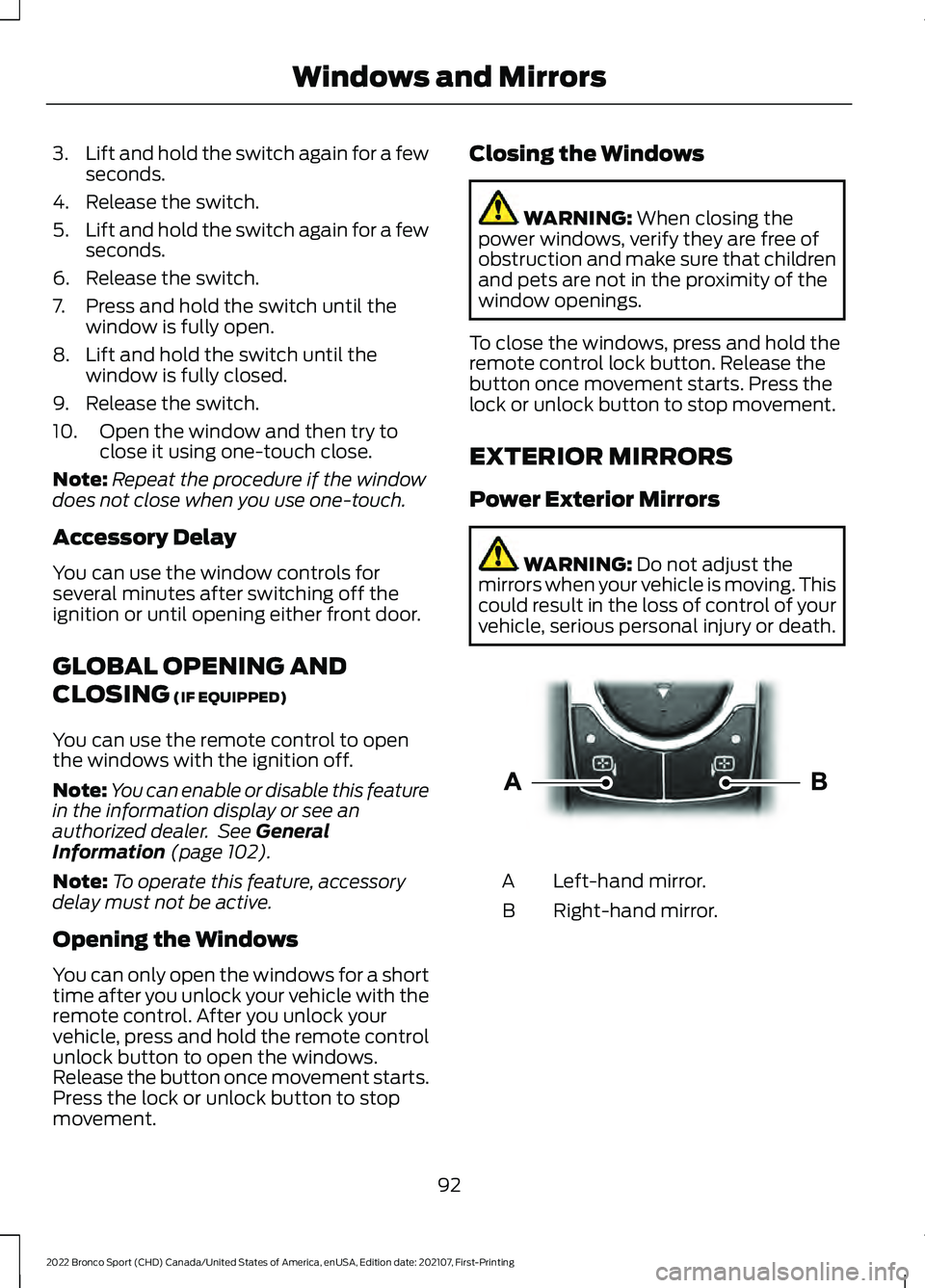
Power Exterior Mirrors WARNING:
Do not adjust the
mirrors when your vehicle is moving. This
could result in the loss of control of your
vehicle, serious personal injury or death. Left-hand mirror.
A
Right-hand mirror.
B
92
2022 Bronco Sport (CHD) Canada/United States of America, enUSA, Edition date: 202107, First-Printing Windows and MirrorsE303926
Page 110 of 494
Note:
When viewing this screen you can
reset your average fuel economy. Hold OK
to reset fuel history and average fuel
economy.
Trip 1 and 2
Provides trip timer, trip average fuel
economy and total trip distance traveled.
For hybrid vehicles, the trip also shows the
distance traveled on electric power only.
INFORMATION MESSAGES
Depending on your vehicle options and
instrument cluster type, not all messages
display or are available. Note:
The system abbreviates or shortens
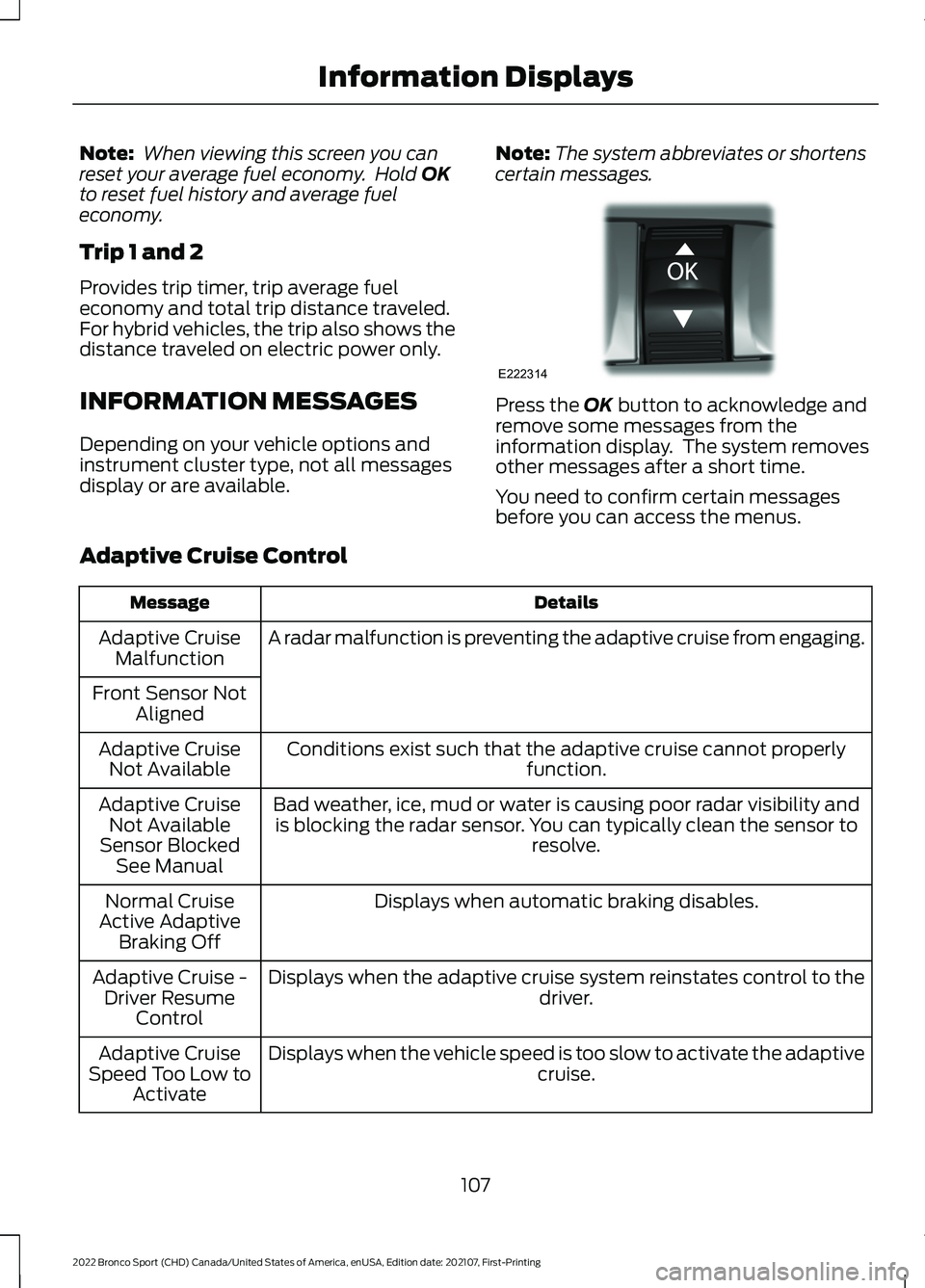
certain messages. Press the
OK button to acknowledge and
remove some messages from the
information display. The system removes
other messages after a short time.
You need to confirm certain messages
before you can access the menus.
Adaptive Cruise Control Details
Message
A radar malfunction is preventing the adaptive cruise from engaging.
Adaptive Cruise
Malfunction
Front Sensor Not Aligned
Conditions exist such that the adaptive cruise cannot properly function.
Adaptive Cruise
Not Available
Bad weather, ice, mud or water is causing poor radar visibility andis blocking the radar sensor. You can typically clean the sensor to resolve.
Adaptive Cruise
Not Available
Sensor Blocked See Manual
Displays when automatic braking disables.
Normal Cruise
Active Adaptive Braking Off
Displays when the adaptive cruise system reinstates control to the driver.
Adaptive Cruise -
Driver Resume Control
Displays when the vehicle speed is too slow to activate the adaptive cruise.
Adaptive Cruise
Speed Too Low to Activate
107
2022 Bronco Sport (CHD) Canada/United States of America, enUSA, Edition date: 202107, First-Printing Information DisplaysE222314
Page 114 of 494
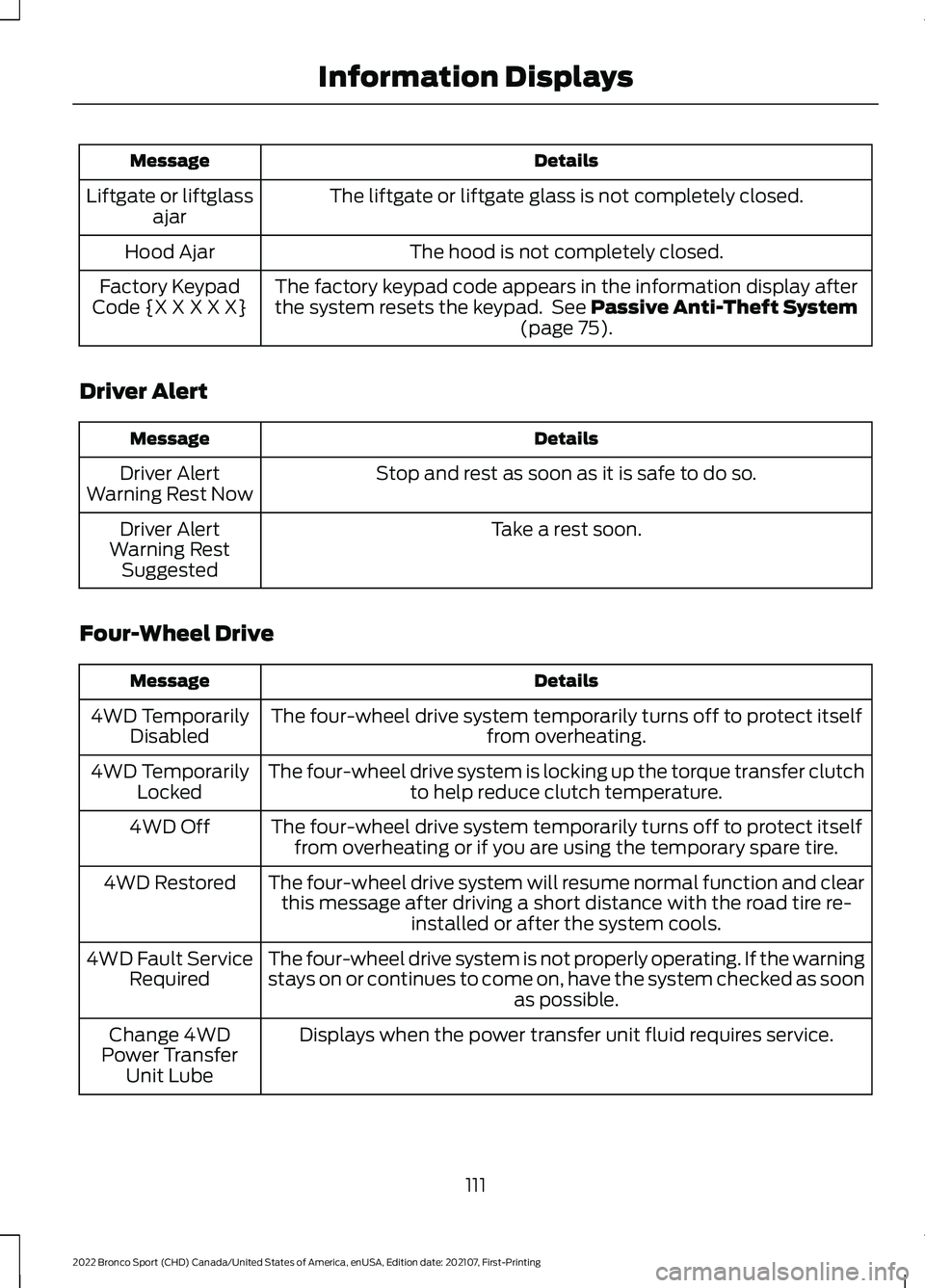
Details
Message
The liftgate or liftgate glass is not completely closed.
Liftgate or liftglass
ajar
The hood is not completely closed.
Hood Ajar
The factory keypad code appears in the information display after
the system resets the keypad. See Passive Anti-Theft System
(page 75).
Factory Keypad
Code {X X X X X}
Driver Alert Details
Message
Stop and rest as soon as it is safe to do so.
Driver Alert
Warning Rest Now
Take a rest soon.
Driver Alert
Warning Rest Suggested
Four-Wheel Drive Details
Message
The four-wheel drive system temporarily turns off to protect itself from overheating.
4WD Temporarily
Disabled
The four-wheel drive system is locking up the torque transfer clutch to help reduce clutch temperature.
4WD Temporarily
Locked
The four-wheel drive system temporarily turns off to protect itselffrom overheating or if you are using the temporary spare tire.
4WD Off
The four-wheel drive system will resume normal function and clearthis message after driving a short distance with the road tire re- installed or after the system cools.
4WD Restored
The four-wheel drive system is not properly operating. If the warning
stays on or continues to come on, have the system checked as soon as possible.
4WD Fault Service
Required
Displays when the power transfer unit fluid requires service.
Change 4WD
Power Transfer Unit Lube
111
2022 Bronco Sport (CHD) Canada/United States of America, enUSA, Edition date: 202107, First-Printing Information Displays
Page 185 of 494
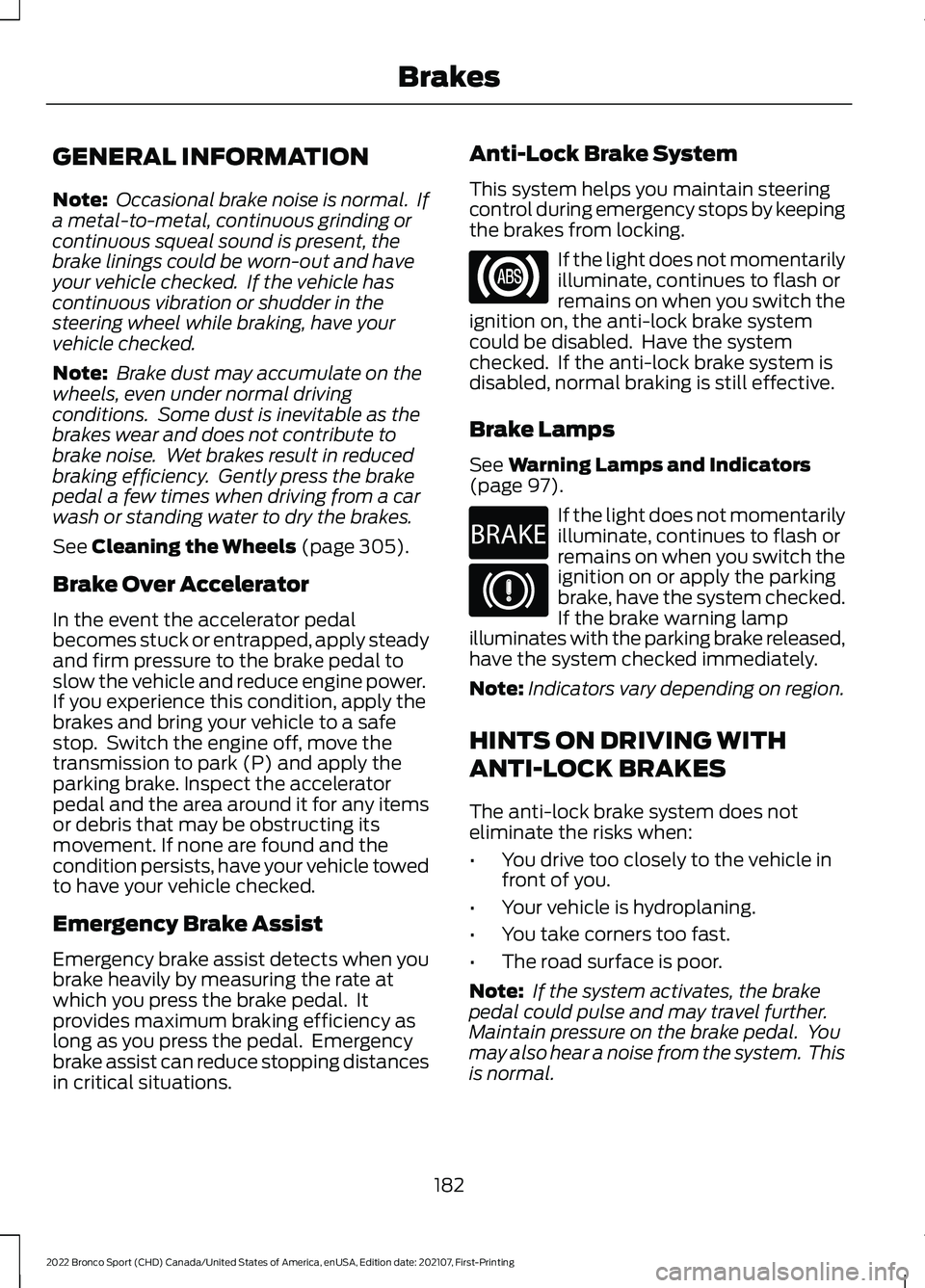
GENERAL INFORMATION
Note:
Occasional brake noise is normal. If
a metal-to-metal, continuous grinding or
continuous squeal sound is present, the
brake linings could be worn-out and have
your vehicle checked. If the vehicle has
continuous vibration or shudder in the
steering wheel while braking, have your
vehicle checked.
Note: Brake dust may accumulate on the
wheels, even under normal driving
conditions. Some dust is inevitable as the
brakes wear and does not contribute to
brake noise. Wet brakes result in reduced
braking efficiency. Gently press the brake
pedal a few times when driving from a car
wash or standing water to dry the brakes.
See Cleaning the Wheels (page 305).
Brake Over Accelerator
In the event the accelerator pedal
becomes stuck or entrapped, apply steady
and firm pressure to the brake pedal to
slow the vehicle and reduce engine power.
If you experience this condition, apply the
brakes and bring your vehicle to a safe
stop. Switch the engine off, move the
transmission to park (P) and apply the
parking brake. Inspect the accelerator
pedal and the area around it for any items
or debris that may be obstructing its
movement. If none are found and the
condition persists, have your vehicle towed
to have your vehicle checked.
Emergency Brake Assist
Emergency brake assist detects when you
brake heavily by measuring the rate at
which you press the brake pedal. It
provides maximum braking efficiency as
long as you press the pedal. Emergency
brake assist can reduce stopping distances
in critical situations. Anti-Lock Brake System
This system helps you maintain steering
control during emergency stops by keeping
the brakes from locking. If the light does not momentarily
illuminate, continues to flash or
remains on when you switch the
ignition on, the anti-lock brake system
could be disabled. Have the system
checked. If the anti-lock brake system is
disabled, normal braking is still effective.
Brake Lamps
See
Warning Lamps and Indicators
(page 97). If the light does not momentarily
illuminate, continues to flash or
remains on when you switch the
ignition on or apply the parking
brake, have the system checked.
If the brake warning lamp
illuminates with the parking brake released,
have the system checked immediately.
Note: Indicators vary depending on region.
HINTS ON DRIVING WITH
ANTI-LOCK BRAKES
The anti-lock brake system does not
eliminate the risks when:
• You drive too closely to the vehicle in
front of you.
• Your vehicle is hydroplaning.
• You take corners too fast.
• The road surface is poor.
Note: If the system activates, the brake
pedal could pulse and may travel further.
Maintain pressure on the brake pedal. You
may also hear a noise from the system. This
is normal.
182
2022 Bronco Sport (CHD) Canada/United States of America, enUSA, Edition date: 202107, First-Printing Brakes E270480