ECO mode FORD BRONCO SPORT 2022 Owners Manual
[x] Cancel search | Manufacturer: FORD, Model Year: 2022, Model line: BRONCO SPORT, Model: FORD BRONCO SPORT 2022Pages: 494, PDF Size: 8.74 MB
Page 9 of 494

Switching Lane Centering On and Off
........................................................................\
.210
Switching Intelligent Mode On and Off ........................................................................\
.
212
Adjusting the Set Speed Tolerance .......
212
Adaptive Cruise Control – Troubleshooting .......................................
212
Driving Aids
Driver Alert ......................................................
215
Lane Keeping System ................................
216
Blind Spot Information System ............
220
Cross Traffic Alert ........................................
222
Speed Sign Recognition ...........................
225
Steering ...........................................................
227
Pre-Collision Assist .....................................
227
G.O.A.T. Mode Control
What Is G.O.A.T. Mode Control ...............
232
How Does G.O.A.T. Mode Control Work ........................................................................\
232
Selecting a G.O.A.T. Mode - 1.5L EcoBoost™ ...............................................
232
Selecting a G.O.A.T. Mode - 2.0L EcoBoost™ ...............................................
233
G.O.A.T. Modes .............................................
233
G.O.A.T. Mode Control – Troubleshooting ........................................................................\
235
Load Carrying
Roof Racks and Load Carriers ................
237
Load Limit ......................................................
237
Luggage Compartment
Adjusting the Luggage Compartment Load Floor .................................................
243
Adjusting the Luggage Compartment Divider .........................................................
243
Towing
Towing a Trailer ...........................................
245
Trailer Sway Control ..................................
246Recommended Towing Weights
..........
246
Essential Towing Checks ..........................
247
Towing the Vehicle on Four Wheels .....
249
Driving Hints
Off-Road Driving ..........................................
251
Breaking-In ....................................................
258
Driving Economically .................................
258
Floor Mats .....................................................
258
Roadside Emergencies
Roadside Assistance ................................
260
Hazard Flashers ...........................................
261
Fuel Shutoff ...................................................
261
Jump Starting the Vehicle .......................
262
Post-Crash Alert System .........................
263
Transporting the Vehicle ..........................
263
Towing Points - 1.5L EcoBoost™ ..........
264
Towing Points - 2.0L EcoBoost™ .........
265
Customer Assistance
Getting the Services You Need .............
266
In California (U.S. Only) ............................
267
The Better Business Bureau (BBB) Auto Line Program (U.S. Only) ....................
268
Utilizing the Mediation/Arbitration Program (Canada Only) ......................
269
Getting Assistance Outside the U.S. and Canada .......................................................
269
Ordering Additional Owner's Literature ........................................................................\
..
271
Reporting Safety Defects (U.S. Only) ........................................................................\
..
271
Reporting Safety Defects (Canada Only) ........................................................................\
..
271
Fuses
Fuse Box Locations ....................................
273
Fuse Specification Chart ..........................
273
Changing a Fuse .........................................
280
6
2022 Bronco Sport (CHD) Canada/United States of America, enUSA, Edition date: 202107, First-Printing Table of Contents
Page 11 of 494
Connected Vehicle Limitations
.............349
Connecting the Vehicle to a Mobile Network - Vehicles With: Modem .....
349
Connecting the Vehicle to a Wi-Fi Network - Vehicles With: SYNC 3 .....
349
Connected Vehicle – Troubleshooting - Vehicles With: Modem .........................
350
Connected Vehicle – Troubleshooting - Vehicles With: SYNC 3 ...........................
351
Vehicle Wi-Fi Hotspot
Creating a Vehicle Wi-Fi Hotspot .........
353
Changing the Vehicle Wi-Fi Hotspot Name or Password ................................
353
Audio System
General Information ..................................
354
Audio Unit ......................................................
354
Digital Radio .................................................
356
Satellite Radio .............................................
358
USB Port .........................................................
361
SYNC™ 3
General Information ..................................
363
Using Voice Recognition ..........................
365
Entertainment ..............................................
372
Phone ..............................................................
382
Navigation .....................................................
384
Apps ................................................................
389
Settings ...........................................................
391
SYNC™ 3 Troubleshooting .....................
393
Accessories
Accessories ..................................................
406
Ford Protect
Ford Protect ..................................................
407
Scheduled Maintenance
General Maintenance Information ......
409
Normal Scheduled Maintenance ..........
412Special Operating Conditions Scheduled
Maintenance .............................................
415
Customer Information
Radio Frequency Certification Labels ........................................................................\
.
418
Appendices
Electromagnetic Compatibility .............
454
End User License Agreement .................
457
8
2022 Bronco Sport (CHD) Canada/United States of America, enUSA, Edition date: 202107, First-Printing Table of Contents
Page 12 of 494
ABOUT THIS MANUAL
Thank you for choosing Ford. We
recommend that you take some time to
get to know your vehicle by reading this
manual. The more that you know about
your vehicle, the greater the safety and
pleasure you will get from driving it.
WARNING: Driving while
distracted can result in loss of vehicle
control, crash and injury. We strongly
recommend that you use extreme
caution when using any device that may
take your focus off the road. Your
primary responsibility is the safe
operation of your vehicle. We
recommend against the use of any
hand-held device while driving and
encourage the use of voice-operated
systems when possible. Make sure you
are aware of all applicable local laws
that may affect the use of electronic
devices while driving.
Note: This manual describes product
features and options available throughout
the range of available models, sometimes
even before they are generally available. It
may describe options not fitted to the
vehicle you have purchased.
Note: Some of the illustrations in this
manual may show features as used in
different models, so may appear different
to you on your vehicle.
Note: Always use and operate your vehicle
in line with all applicable laws and
regulations.
Note: Pass on this manual when selling
your vehicle. It is an integral part of your
vehicle.
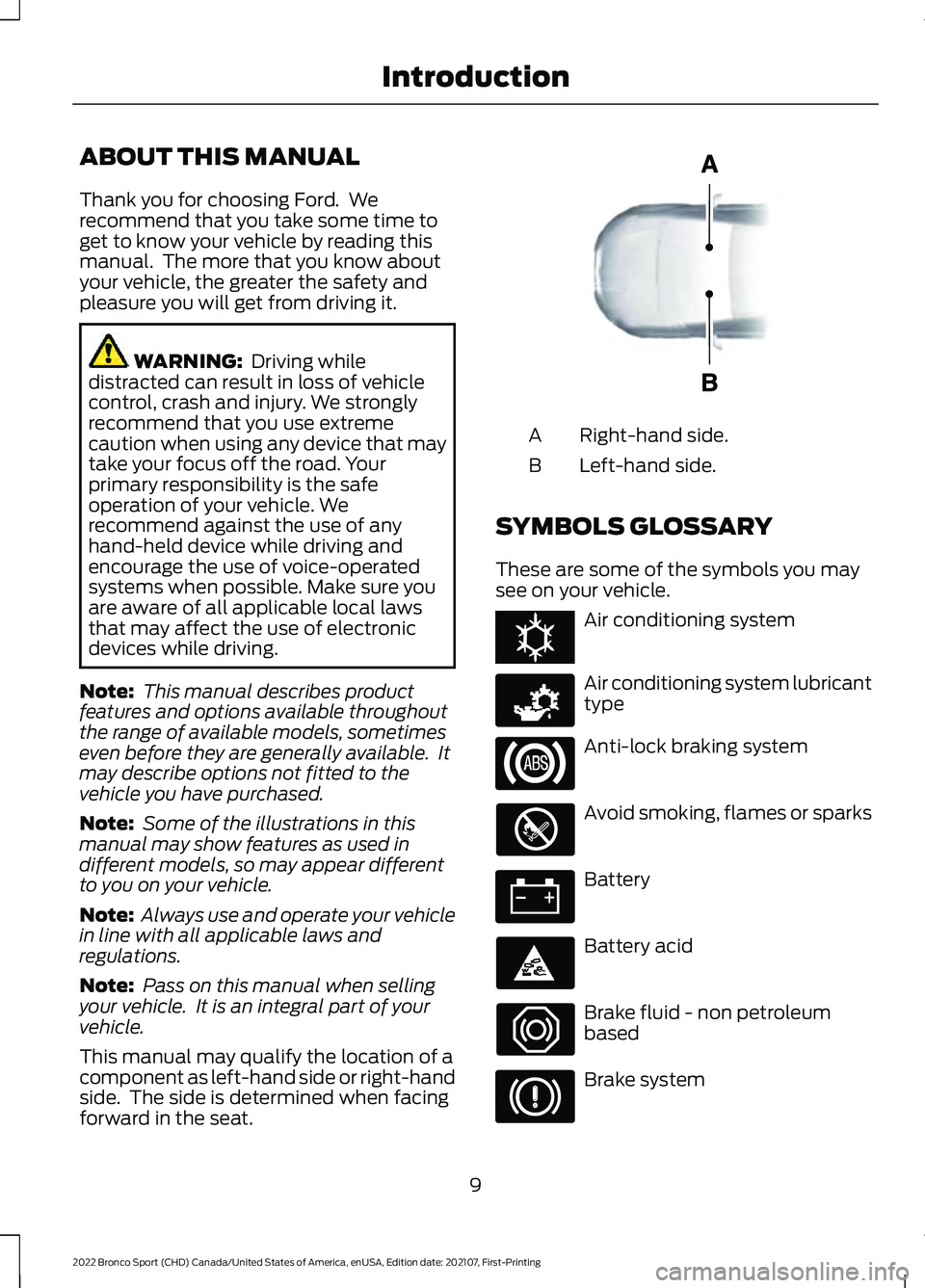
This manual may qualify the location of a
component as left-hand side or right-hand
side. The side is determined when facing
forward in the seat. Right-hand side.
A
Left-hand side.
B
SYMBOLS GLOSSARY
These are some of the symbols you may
see on your vehicle. Air conditioning system
Air conditioning system lubricant
type
Anti-lock braking system
Avoid smoking, flames or sparks
Battery
Battery acid
Brake fluid - non petroleum
based
Brake system
9
2022 Bronco Sport (CHD) Canada/United States of America, enUSA, Edition date: 202107, First-Printing IntroductionE154903 E162384 E231157
Page 17 of 494
Entertainment Data
Data recorded includes, for example:
•
Music, videos or album art.
• Contacts and corresponding address
book entries.
• Navigation destinations.
Services That We Provide
If you use our services, we collect and use
data, for example, account information,
vehicle location and driving characteristics,
that could identify you. We transmit this
data through a dedicated, protected
connection. We only collect and use data
to enable your use of our services to which
you have subscribed, with your consent or
where permitted by law. For additional
information, see the terms and conditions
of the services to which you have
subscribed.
Services That Third Parties
Provide
We recommend that you review the terms
and conditions and data privacy
information for any services to which you
subscribe. We take no responsibility for
services that third parties provide.
Vehicles With a Modem (If Equipped) The modem has a SIM. The
modem was enabled when your
vehicle was built and periodically
sends messages to stay connected to the
cell phone network, receive automatic
software updates and send vehicle-related
information to us, for example, diagnostic
information. These messages could
include information that identifies your
vehicle, the SIM and the electronic serial
number of the modem. Cell phone network service providers could have access to
additional information, for example, cell
phone network tower identification. For
additional information about our privacy
policy, visit
www .For dC onne c t e d . c om or
refer to your local Ford website.
Note: The modem continues to send this
information unless you disable the modem
or stop the modem from sharing vehicle
data by changing the modem settings. See
Connected Vehicle
(page 349).
Note: The service can be unavailable or
interrupted for a number of reasons, for
example, environmental or topographical
conditions and data plan coverage.
Note: To find out if your vehicle has a
modem, visit
www .For dC onne c t e d . c om .
Vehicles With SYNC
Mobile Device Data
If you connect a mobile device to your
vehicle, you can display data from your
device on the touchscreen for example,
music and album art. You can share your
vehicle data with mobile apps on your
device through the system. See
Apps
(page 389).
The mobile apps function operates by your
connected device sending data to us in the
United States. The data is encrypted and
includes, for example, the vehicle
identification number of your vehicle,
odometer, SYNC module number,
anonymous usage statistics and debugging
information. We retain it only as long as
necessary to provide the service, to
troubleshoot, for continuous improvement
and to offer you products and services that
may be of interest to you according to your
preferences and where allowed by law.
14
2022 Bronco Sport (CHD) Canada/United States of America, enUSA, Edition date: 202107, First-Printing Introduction
Page 32 of 494
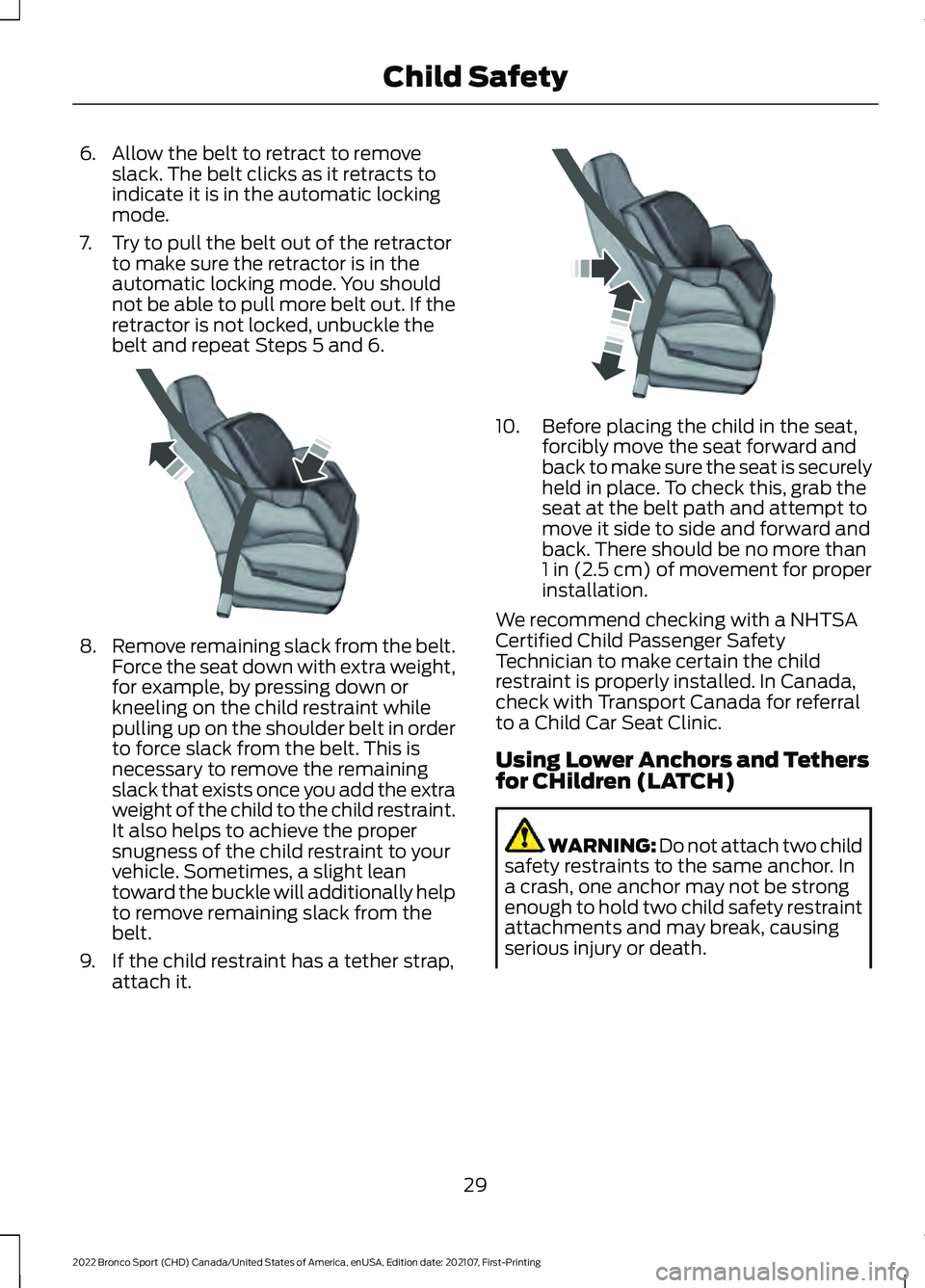
6. Allow the belt to retract to remove
slack. The belt clicks as it retracts to
indicate it is in the automatic locking
mode.
7. Try to pull the belt out of the retractor to make sure the retractor is in the
automatic locking mode. You should
not be able to pull more belt out. If the
retractor is not locked, unbuckle the
belt and repeat Steps 5 and 6. 8.
Remove remaining slack from the belt.
Force the seat down with extra weight,
for example, by pressing down or
kneeling on the child restraint while
pulling up on the shoulder belt in order
to force slack from the belt. This is
necessary to remove the remaining
slack that exists once you add the extra
weight of the child to the child restraint.
It also helps to achieve the proper
snugness of the child restraint to your
vehicle. Sometimes, a slight lean
toward the buckle will additionally help
to remove remaining slack from the
belt.
9. If the child restraint has a tether strap, attach it. 10. Before placing the child in the seat,
forcibly move the seat forward and
back to make sure the seat is securely
held in place. To check this, grab the
seat at the belt path and attempt to
move it side to side and forward and
back. There should be no more than
1 in (2.5 cm) of movement for proper
installation.
We recommend checking with a NHTSA
Certified Child Passenger Safety
Technician to make certain the child
restraint is properly installed. In Canada,
check with Transport Canada for referral
to a Child Car Seat Clinic.
Using Lower Anchors and Tethers
for CHildren (LATCH) WARNING: Do not attach two child
safety restraints to the same anchor. In
a crash, one anchor may not be strong
enough to hold two child safety restraint
attachments and may break, causing
serious injury or death.
29
2022 Bronco Sport (CHD) Canada/United States of America, enUSA, Edition date: 202107, First-Printing Child SafetyE142533 E142534
Page 41 of 494
PRINCIPLE OF OPERATION
WARNING: Always drive and ride
with your seatback upright and the lap
belt snug and low across the hips. WARNING:
Children must always
be properly restrained. WARNING:
Do not allow a
passenger to hold a child on their lap
when your vehicle is moving. Failure to
follow this instruction could result in
personal injury or death in the event of a
sudden stop or crash. WARNING:
All occupants of your
vehicle, including the driver, should
always properly wear their seatbelts,
even when an airbag supplemental
restraint system is provided. Failure to
properly wear your seatbelt could
seriously increase the risk of injury or
death. WARNING:
It is extremely
dangerous to ride in a cargo area, inside
or outside of a vehicle. In a crash, people
riding in these areas are more likely to be
seriously injured or killed. Do not allow
people to ride in any area of your vehicle
that is not equipped with seats and
seatbelts. Make sure everyone in your
vehicle is in a seat and properly using a
seatbelt. Failure to follow this warning
could result in serious personal injury or
death. WARNING:
In a rollover crash, an
unbelted person is significantly more
likely to die than a person wearing a
seatbelt. WARNING:
Each seating position
in your vehicle has a specific seatbelt
assembly made up of one buckle and
one tongue designed to be used as a pair.
Use the shoulder belt on the outside
shoulder only. Never wear the shoulder
belt under the arm. Never use a single
seatbelt for more than one person. WARNING:
Even with advanced
restraints systems, properly restrain
children 12 and under in a rear seating
position. Failure to follow this could
seriously increase the risk of injury or
death. WARNING:
Seatbelts and seats
may be hot in a vehicle that is in the
sunshine. The hot seatbelts or seats may
burn a small child. Check seat covers and
buckles before you place a child
anywhere near them.
All seating positions in your vehicle have
lap and shoulder seatbelts. All occupants
of the vehicle should always properly wear
their seatbelts, even when an airbag
supplemental restraint system is provided.
The seatbelt system consists of:
• Lap and shoulder seatbelts.
• Shoulder seatbelt with automatic
locking mode, (except driver seatbelt).
• Height adjuster at the front outermost
seating positions.
• Seatbelt pretensioners at the front
outermost and second row outermost
seating positions.
• Belt tension sensor at the front
outermost passenger seating position. •
Seatbelt warning light and chime.
38
2022 Bronco Sport (CHD) Canada/United States of America, enUSA, Edition date: 202107, First-Printing SeatbeltsE71880
Page 46 of 494
Note:
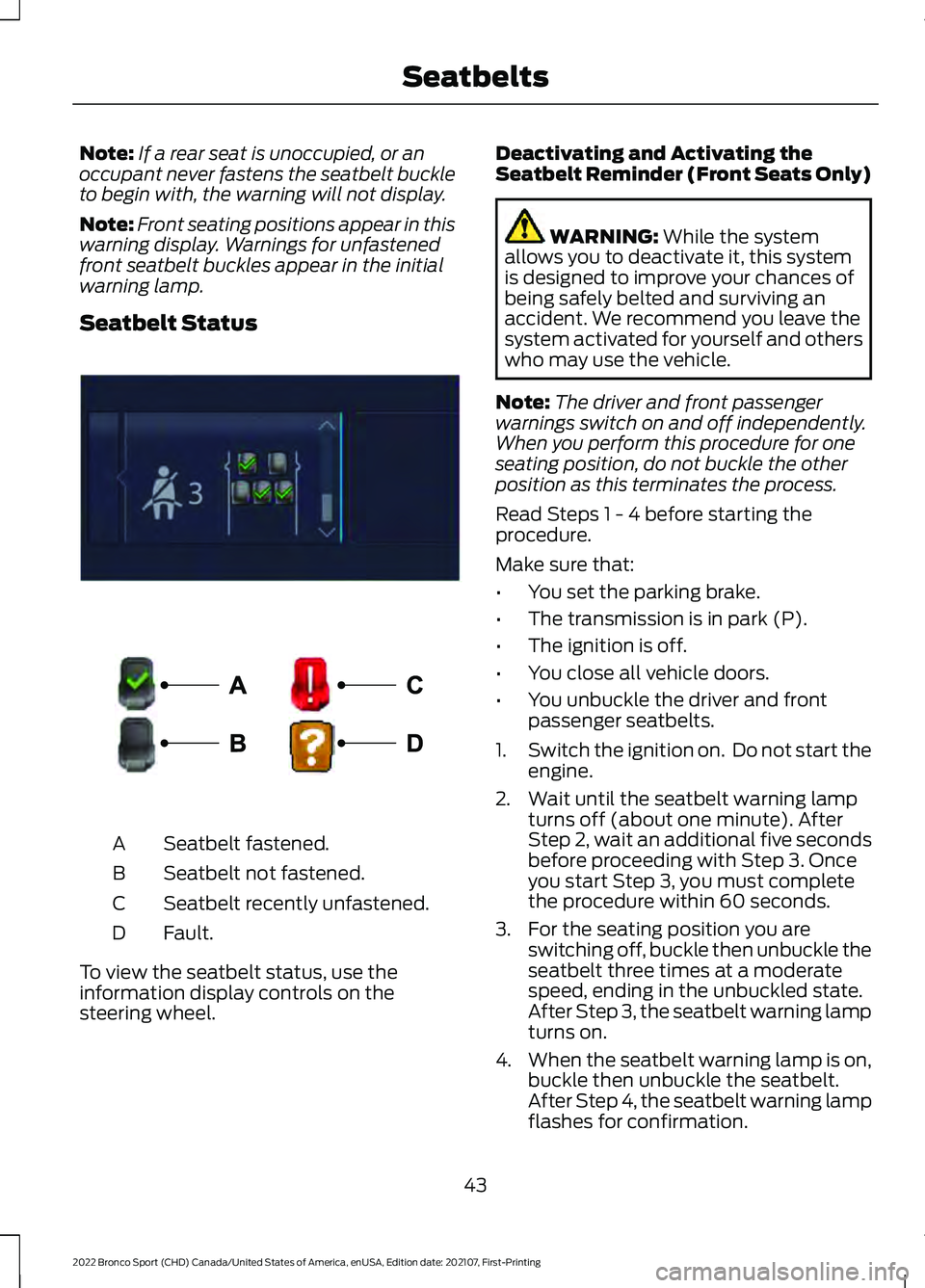
If a rear seat is unoccupied, or an
occupant never fastens the seatbelt buckle
to begin with, the warning will not display.
Note: Front seating positions appear in this
warning display. Warnings for unfastened
front seatbelt buckles appear in the initial
warning lamp.
Seatbelt Status Seatbelt fastened.
A
Seatbelt not fastened.
B
Seatbelt recently unfastened.
C
Fault.
D
To view the seatbelt status, use the
information display controls on the
steering wheel. Deactivating and Activating the
Seatbelt Reminder (Front Seats Only) WARNING: While the system
allows you to deactivate it, this system
is designed to improve your chances of
being safely belted and surviving an
accident. We recommend you leave the
system activated for yourself and others
who may use the vehicle.
Note: The driver and front passenger
warnings switch on and off independently.
When you perform this procedure for one
seating position, do not buckle the other
position as this terminates the process.
Read Steps 1 - 4 before starting the
procedure.
Make sure that:
• You set the parking brake.
• The transmission is in park (P).
• The ignition is off.
• You close all vehicle doors.
• You unbuckle the driver and front
passenger seatbelts.
1. Switch the ignition on. Do not start the
engine.
2. Wait until the seatbelt warning lamp turns off (about one minute). After
Step 2, wait an additional five seconds
before proceeding with Step 3. Once
you start Step 3, you must complete
the procedure within 60 seconds.
3. For the seating position you are switching off, buckle then unbuckle the
seatbelt three times at a moderate
speed, ending in the unbuckled state.
After Step 3, the seatbelt warning lamp
turns on.
4. When the seatbelt warning lamp is on,
buckle then unbuckle the seatbelt.
After Step 4, the seatbelt warning lamp
flashes for confirmation.
43
2022 Bronco Sport (CHD) Canada/United States of America, enUSA, Edition date: 202107, First-Printing SeatbeltsE281361 E274703
Page 47 of 494
•
This switches the feature off if it is
currently on.
• This switches the feature on if it is
currently off.
CHILD RESTRAINT AND
SEATBELT MAINTENANCE
Inspect the vehicle seatbelts and child
safety seat systems periodically to make
sure they work properly and are not
damaged. Inspect the vehicle and child
restraint seatbelts to make sure there are
no nicks, tears or cuts. Replace if
necessary. All vehicle seatbelt assemblies,
including retractors, buckles, front seatbelt
buckle assemblies, buckle support
assemblies (slide bar-if equipped),
shoulder belt height adjusters (if
equipped), shoulder belt guide on seat
backrest (if equipped), child safety seat
LATCH and tether anchors, and attaching
hardware, should be inspected after a
crash. Read the child restraint
manufacturer's instructions for additional
inspection and maintenance information
specific to the child restraint.
We recommend that all seatbelt
assemblies in use in vehicles involved in a
crash be replaced. However, if the crash
was minor and an authorized dealer finds
that the belts do not show damage and
continue to operate properly, they do not
need to be replaced. Seatbelt assemblies
not in use during a crash should also be
inspected and replaced if either damage
or improper operation is noted.
Properly care for seatbelts. See Vehicle
Care (page 300). SEATBELT EXTENSIONS WARNING:
Persons who fit into
the vehicle's seatbelt should not use an
extension. Unnecessary use could result
in serious personal injury in the event of
a crash. WARNING:
Only use extensions
provided free of charge by our dealers.
The dealer will provide an extension
designed specifically for this vehicle,
model year and seating position. The use
of an extension intended for another
vehicle, model year or seating position
may not offer you the full protection of
your vehicle's seatbelt restraint system. WARNING:
Never use seatbelt
extensions to install child restraints. WARNING:
Do not use a seatbelt
extension with an inflatable seatbelt. WARNING:
Do not use extensions
to change the way the seatbelt fits
across the torso, over the lap or to make
the seatbelt buckle easier to reach.
If, because of body size or driving position,
it is not possible to properly fasten the
seatbelt over your lap and shoulder, an
extension that is compatible with the
seatbelts is available free of charge from
our dealers. Only use our seatbelt
extensions made by the original equipment
seatbelt manufacturer with our seatbelts.
Ask your authorized dealer if your extension
is compatible with your vehicle restraint
system.
44
2022 Bronco Sport (CHD) Canada/United States of America, enUSA, Edition date: 202107, First-Printing Seatbelts
Page 66 of 494
PRINCIPLE OF OPERATION
MyKey allows you to program keys with
restricted driving modes to promote good
driving habits. You can program the
restrictions to all keys except one. Any keys
that you did not program are administrator
keys or admin keys.
You can use admin keys to:
•
Create a MyKey with certain vehicle
restrictions.
• Program certain MyKey settings.
• Clear all MyKey restrictions.
After you program a MyKey, you can view
the following information through the
information display:
• The total number of admin keys and
MyKeys for your vehicle.
• The total distance a MyKey driver
traveled with your vehicle.
Note: Every MyKey receives the same
restrictions and settings. You cannot
program them individually.
Note: For vehicles equipped with a
push-button start switch: When both a
MyKey and an admin key are present when
you start your vehicle, the system recognizes
the admin key only. Standard Settings
Not every vehicle includes the features
listed below. If your vehicle has this
equipment, then you cannot change the
following settings when using a MyKey:
•
Seatbelt reminder or Belt-Minder™.
MyKey mutes the audio system until
drivers, and in some instances,
passengers, fasten their seatbelts.
Note: If your vehicle includes an
AM/FM radio or a very basic audio
system, then the radio may not mute.
• Earlier low-fuel warning. The low-fuel
warning activates earlier for MyKey
drivers, giving them more time to refuel.
• Certain driver alerts, stability systems
or parking aids turn on automatically
when you use the MyKey system. For
example, Blind Spot Information
System (BLIS), cross traffic alert, lane
departure warning or forward collision
warning. Note:
MyKey drivers may be
able to turn the lane departure warning
feature off, but this feature turns back
on automatically with every new key
cycle.
• Restricted touchscreen operation in
some markets. For example, MyKey
may prevent manual navigation
destination input while the vehicle is in
any gear other than park (P) or when
the vehicle reaches a certain rate of
speed.
• Satellite radio adult content
restrictions, if this feature is available
in your market.
Optional Settings
You can configure certain vehicle feature
settings when you first create a MyKey. You
can also change the settings afterward
with an admin key.
63
2022 Bronco Sport (CHD) Canada/United States of America, enUSA, Edition date: 202107, First-Printing MyKey
™
Page 71 of 494
LOCKING AND UNLOCKING
You can use the power door lock control
or the remote control to lock and unlock
your vehicle.
Note:
Do not use the door latch assembly
to attach any accessory, such as handles or
steps, as this can cause damage to your
vehicle.
Note: Always take your keys and lock all
doors when leaving your vehicle.
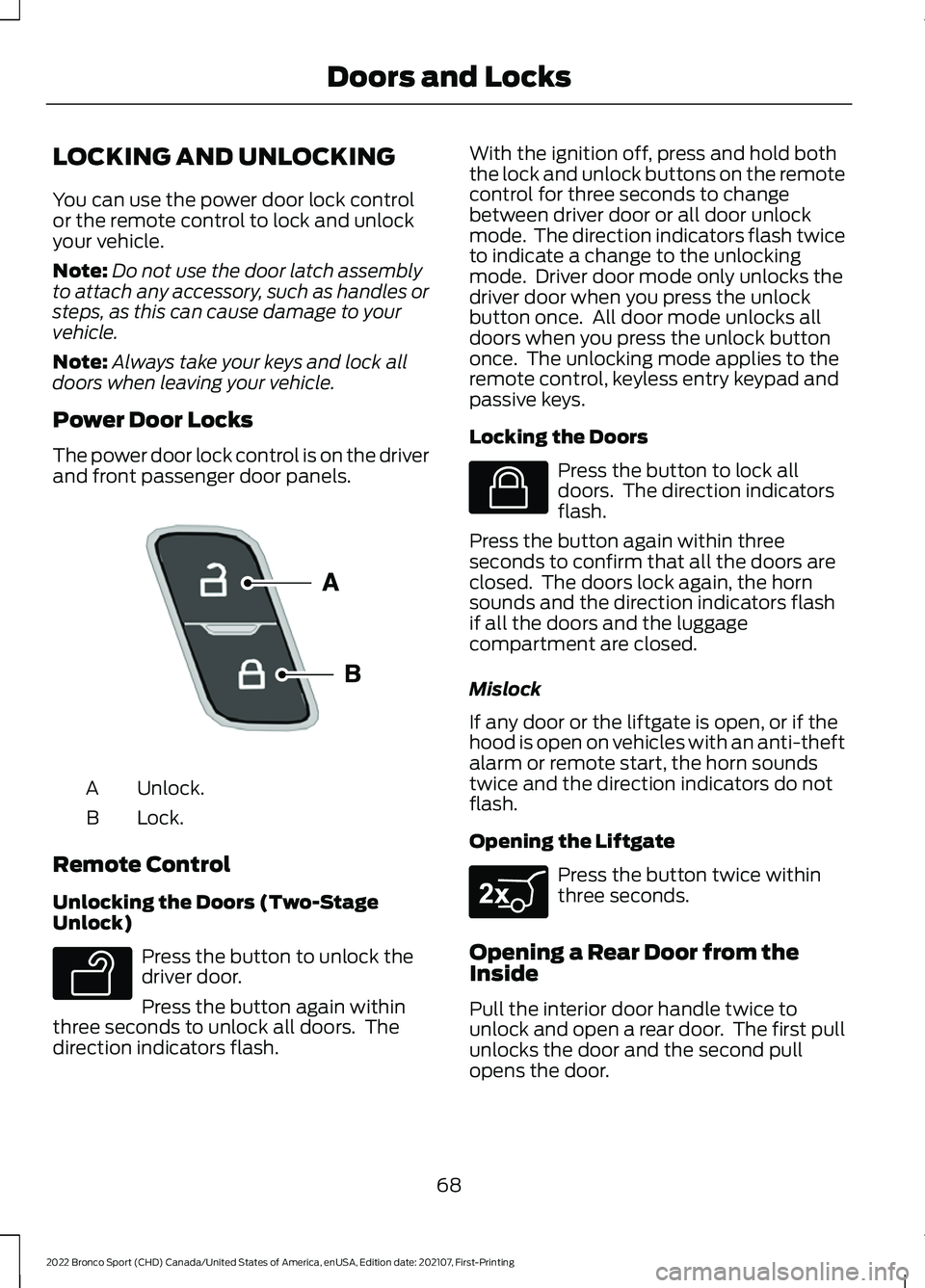
Power Door Locks
The power door lock control is on the driver
and front passenger door panels. Unlock.
A
Lock.
B
Remote Control
Unlocking the Doors (Two-Stage
Unlock) Press the button to unlock the
driver door.
Press the button again within
three seconds to unlock all doors. The
direction indicators flash. With the ignition off, press and hold both
the lock and unlock buttons on the remote
control for three seconds to change
between driver door or all door unlock
mode. The direction indicators flash twice
to indicate a change to the unlocking
mode. Driver door mode only unlocks the
driver door when you press the unlock
button once. All door mode unlocks all
doors when you press the unlock button
once. The unlocking mode applies to the
remote control, keyless entry keypad and
passive keys.
Locking the Doors
Press the button to lock all
doors. The direction indicators
flash.
Press the button again within three
seconds to confirm that all the doors are
closed. The doors lock again, the horn
sounds and the direction indicators flash
if all the doors and the luggage
compartment are closed.
Mislock
If any door or the liftgate is open, or if the
hood is open on vehicles with an anti-theft
alarm or remote start, the horn sounds
twice and the direction indicators do not
flash.
Opening the Liftgate Press the button twice within
three seconds.
Opening a Rear Door from the
Inside
Pull the interior door handle twice to
unlock and open a rear door. The first pull
unlocks the door and the second pull
opens the door.
68
2022 Bronco Sport (CHD) Canada/United States of America, enUSA, Edition date: 202107, First-Printing Doors and LocksE196954 E138629 E138623 E267940