Radar FORD BRONCO SPORT 2022 Owners Manual
[x] Cancel search | Manufacturer: FORD, Model Year: 2022, Model line: BRONCO SPORT, Model: FORD BRONCO SPORT 2022Pages: 494, PDF Size: 8.74 MB
Page 110 of 494
Note:
When viewing this screen you can
reset your average fuel economy. Hold OK
to reset fuel history and average fuel
economy.
Trip 1 and 2
Provides trip timer, trip average fuel
economy and total trip distance traveled.
For hybrid vehicles, the trip also shows the
distance traveled on electric power only.
INFORMATION MESSAGES
Depending on your vehicle options and
instrument cluster type, not all messages
display or are available. Note:
The system abbreviates or shortens
certain messages. Press the
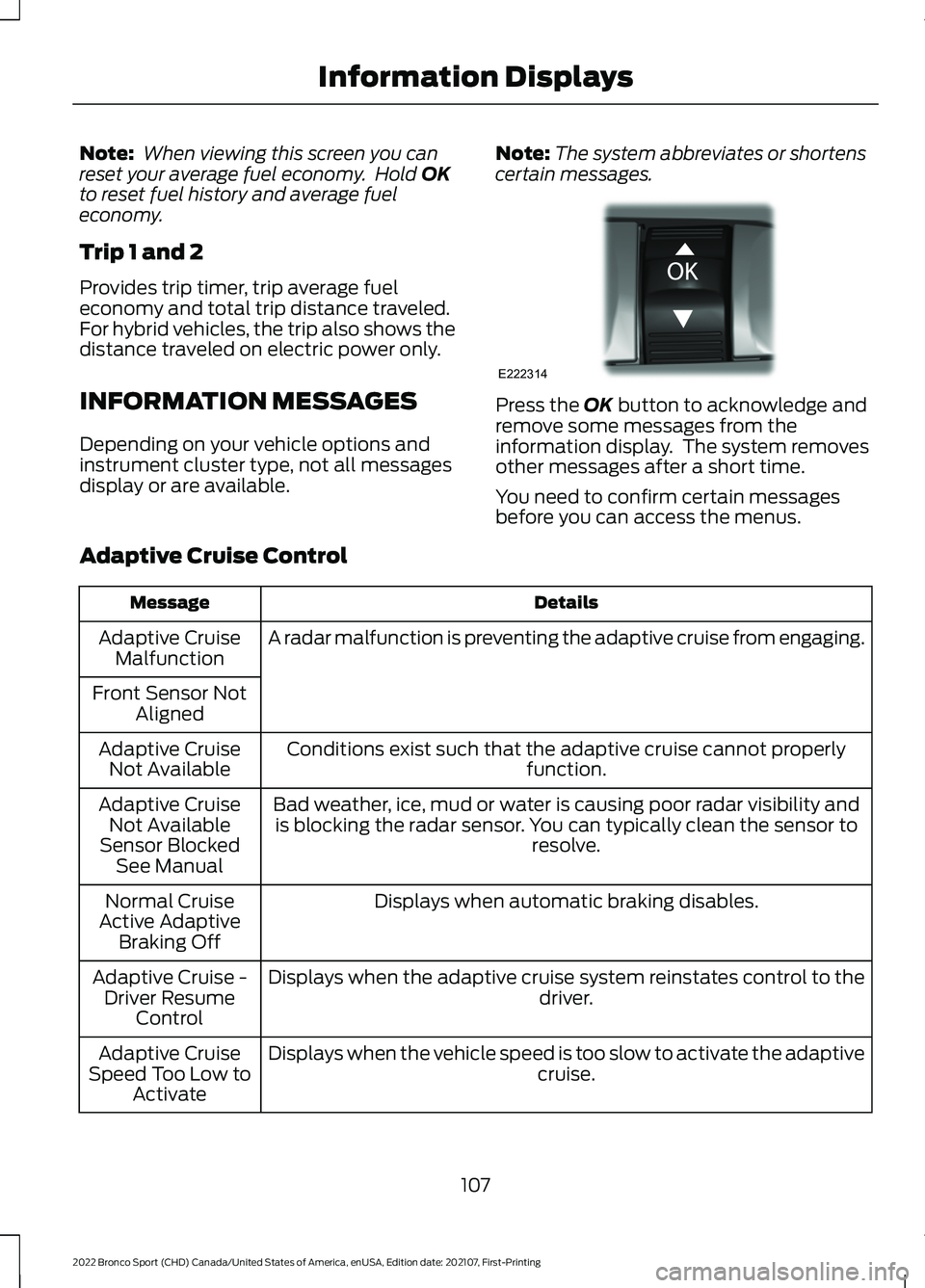
OK button to acknowledge and
remove some messages from the
information display. The system removes
other messages after a short time.
You need to confirm certain messages
before you can access the menus.
Adaptive Cruise Control Details
Message
A radar malfunction is preventing the adaptive cruise from engaging.
Adaptive Cruise
Malfunction
Front Sensor Not Aligned
Conditions exist such that the adaptive cruise cannot properly function.
Adaptive Cruise
Not Available
Bad weather, ice, mud or water is causing poor radar visibility andis blocking the radar sensor. You can typically clean the sensor to resolve.
Adaptive Cruise
Not Available
Sensor Blocked See Manual
Displays when automatic braking disables.
Normal Cruise
Active Adaptive Braking Off
Displays when the adaptive cruise system reinstates control to the driver.
Adaptive Cruise -
Driver Resume Control
Displays when the vehicle speed is too slow to activate the adaptive cruise.
Adaptive Cruise
Speed Too Low to Activate
107
2022 Bronco Sport (CHD) Canada/United States of America, enUSA, Edition date: 202107, First-Printing Information DisplaysE222314
Page 119 of 494
Details
Message
With a MyKey in use, traction control turns on.
Traction Control
On - MyKeySetting
With a MyKey in use, park aid is always on.
MyKey Park Aid
Cannot be Deactiv- ated
With a MyKey in use, lane keeping alert turns on.
Lane Keeping Alert
On MyKey Setting
Park Aid Details
Message
The system has detected a fault that requires service. Have thesystem checked as soon as possible.
Check Rear Park
Aid
The radar is blocked due to bad weather, ice, mud or water in frontof radar. You can typically clean the sensor to resolve. See Rear
Parking Aid (page 193).
Rear Park Aid Not
Available Sensor Blocked See Manual
The radar is blocked due to bad weather, ice, mud or water in frontof radar. You can typically clean the sensor to resolve. See
Prin-
ciple of Operation (page 192).
Park Aid Not Avail-
able Sensor
Blocked See Manual
Displays the park aid status.
Rear Park Aid On
Off
Park Brake Details
Message
The parking brake is set, the engine is running and you drive your
vehicle more than 3 mph (5 km/h). If the warning stays on after the parking brake is released, Have the system checked as soon as possible.
Park Brake
Engaged
The electric parking brake is set and a manual release is attemptedwithout the brake pedal being pressed.
To Release: Press
Brake and Switch
The electric parking brake is set and an automatic release is
attempted but cannot be performed. Perform a manual release.
Park Brake Use
Switch to Release
116
2022 Bronco Sport (CHD) Canada/United States of America, enUSA, Edition date: 202107, First-Printing Information Displays
Page 121 of 494
Pre-Collision Assist
Details
Message
You have a blocked sensor due to bad weather, ice, mud or water
in front of the radar sensor. You can typically clean the sensor to
resolve.
Pre-Collision
Assist Not Avail- able SensorBlocked
A fault with the system has occurred. Have the system checked as
soon as possible.
Pre-Collision
Assist Not Avail- able
Remote Start Details
Message
Displays as a reminder to apply the brake and push the gear shiftbutton to drive the vehicle after a remote start.
To Drive: Press
Brake and Gear Shift Button
Seats Details
Message
Objects are by the passenger seat. After the objects are moved
away from the seat, if the warning stays on or continues to come on have the system checked as soon as possible.
Occupant Sensor
BLOCKED Remove Objects Near
Passenger Seat
Displays as a reminder that memory seats are not available when driving.
Memory Recall Not
Permitted While Driving
Displays to show where your memory setting has been saved.
Memory {0} Saved
118
2022 Bronco Sport (CHD) Canada/United States of America, enUSA, Edition date: 202107, First-Printing Information Displays
Page 206 of 494
HOW DOES ADAPTIVE CRUISE
CONTROL WITH STOP AND GO
WORK
Adaptive cruise control with stop and go
uses radar and camera sensors to adjust
the speed of your vehicle to maintain a set
gap from the vehicle in front of you in the
same lane while following it to a complete
stop. You can also engage the system to
follow a vehicle in front of you and adjust
set speed while stopped.
WHAT IS ADAPTIVE CRUISE
CONTROL WITH LANE
CENTERING
Adaptive cruise control with lane centering
uses radar and camera sensors to help
keep your vehicle in the lane by applying
continuous assistance steering torque
input toward the lane center on highways.
Note:
The adaptive cruise control gap
setting operates normally.
WHAT IS INTELLIGENT
ADAPTIVE CRUISE CONTROL
Intelligent adaptive cruise control
combines speed sign recognition with
adaptive cruise control to adjust the cruise
set speed to the speed limit detected by
the speed sign recognition system. For
example, if the speed sign recognition
system detects a 50 mph (80 km/h)
speed limit, the cruise set speed is updated
to
50 mph (80 km/h) +/- the driver's
selected speed offset.
Note: The adaptive cruise control gap
setting operates normally. ADAPTIVE CRUISE CONTROL
PRECAUTIONS WARNING: You are responsible for
controlling your vehicle at all times. The
system is designed to be an aid and does
not relieve you of your responsibility to
drive with due care and attention. Failure
to follow this instruction could result in
the loss of control of your vehicle,
personal injury or death. WARNING:
Pay close attention to
changing road conditions such as
entering or leaving a highway, on roads
with intersections or roundabouts, roads
without visible lanes of travel, roads that
are winding, slippery, unpaved, or steep
slopes. WARNING:
The system does not
control speed in low traction conditions
or extremely steep slopes. The system
is designed to be an aid and does not
relieve you of your responsibility to drive
with due care and attention. Failure to
follow this instruction could result in
personal injury. WARNING:
The system is not a
crash warning or avoidance system. WARNING:
Do not use the system
when towing a trailer that has
aftermarket electronic trailer brake
controls. Failure to follow this instruction
could result in the loss of control of your
vehicle, personal injury or death. WARNING:
Do not use tire sizes
other than those recommended because
this can affect the normal operation of
the system. Failure to do so may result
in a loss of vehicle control, which could
result in serious injury.
203
2022 Bronco Sport (CHD) Canada/United States of America, enUSA, Edition date: 202107, First-Printing Adaptive Cruise Control
(If Equipped)
Page 208 of 494
WARNING: The system only warns
of vehicles detected by the radar and
camera sensors. In some cases there
may be no warning or a delayed warning.
Apply the brakes when necessary. Failure
to follow this instruction could result in
personal injury or death. WARNING:
The system may not
detect stationary or slow moving
vehicles below
6 mph (10 km/h). WARNING:
The system does not
detect pedestrians or objects in the road. WARNING:
The system does not
detect oncoming vehicles in the same
lane. WARNING:
The system may not
operate properly if the sensor is blocked.
Keep the windshield free from
obstruction. WARNING:
The sensor may
incorrectly track lane markings as other
structures or objects. This can result in
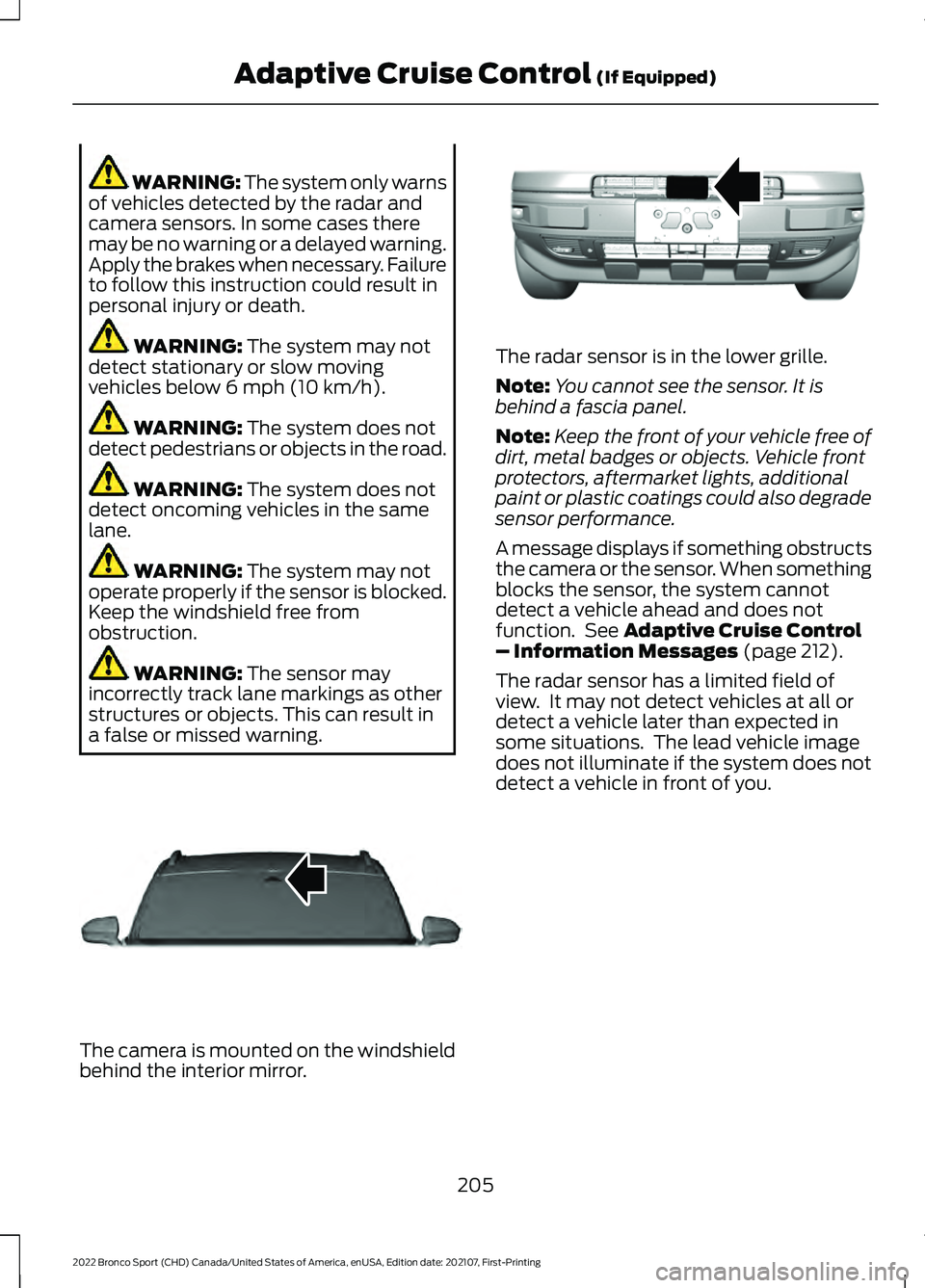
a false or missed warning. The camera is mounted on the windshield
behind the interior mirror. The radar sensor is in the lower grille.
Note:
You cannot see the sensor. It is
behind a fascia panel.
Note: Keep the front of your vehicle free of
dirt, metal badges or objects. Vehicle front
protectors, aftermarket lights, additional
paint or plastic coatings could also degrade
sensor performance.
A message displays if something obstructs
the camera or the sensor. When something
blocks the sensor, the system cannot
detect a vehicle ahead and does not
function. See
Adaptive Cruise Control
– Information Messages (page 212).
The radar sensor has a limited field of
view. It may not detect vehicles at all or
detect a vehicle later than expected in
some situations. The lead vehicle image
does not illuminate if the system does not
detect a vehicle in front of you.
205
2022 Bronco Sport (CHD) Canada/United States of America, enUSA, Edition date: 202107, First-Printing Adaptive Cruise Control
(If Equipped)E307893 E321483
Page 209 of 494
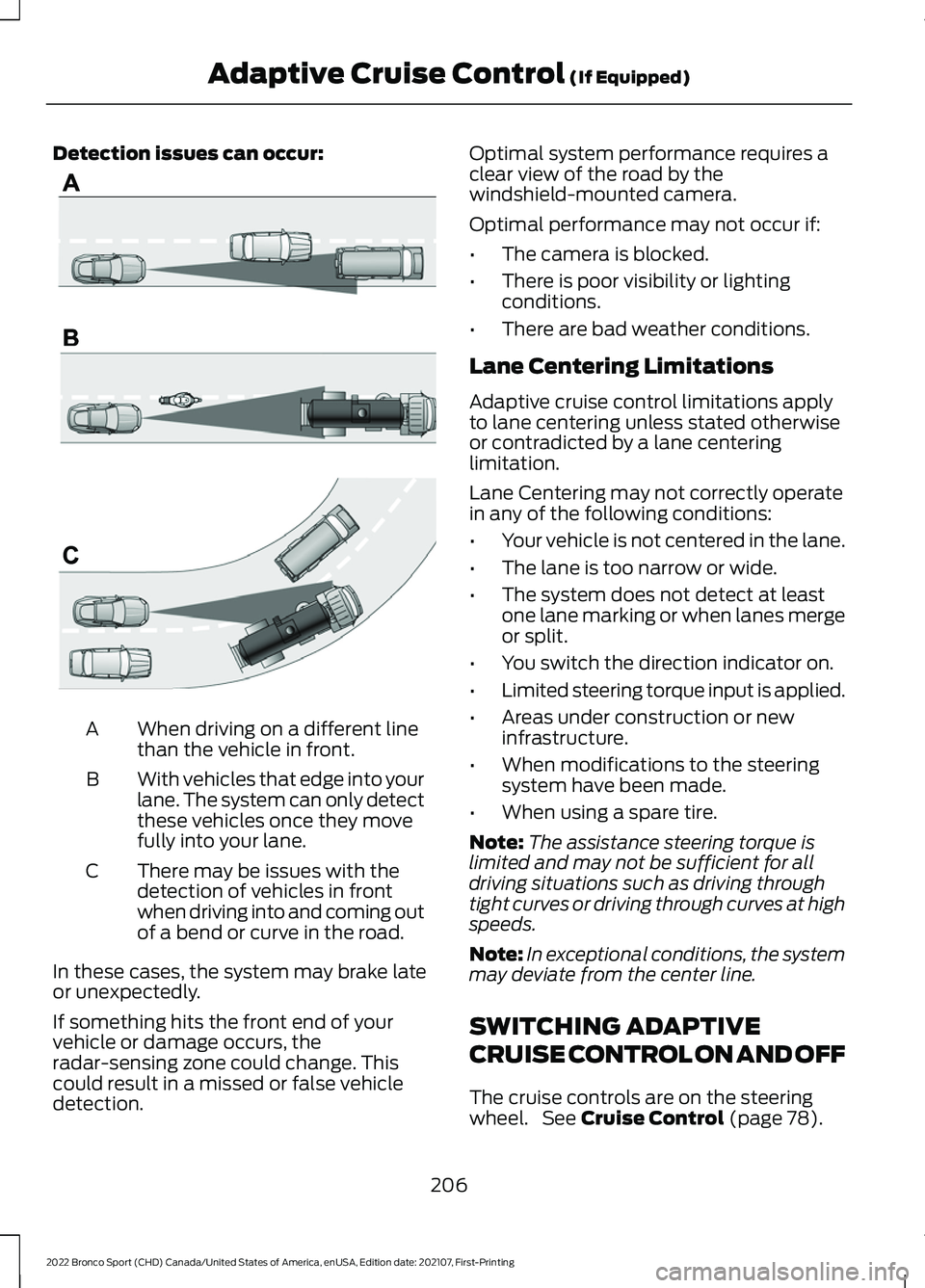
Detection issues can occur:
When driving on a different line
than the vehicle in front.
A
With vehicles that edge into your
lane. The system can only detect
these vehicles once they move
fully into your lane.
B
There may be issues with the
detection of vehicles in front
when driving into and coming out
of a bend or curve in the road.
C
In these cases, the system may brake late
or unexpectedly.
If something hits the front end of your
vehicle or damage occurs, the
radar-sensing zone could change. This
could result in a missed or false vehicle
detection. Optimal system performance requires a
clear view of the road by the
windshield-mounted camera.
Optimal performance may not occur if:
•
The camera is blocked.
• There is poor visibility or lighting
conditions.
• There are bad weather conditions.
Lane Centering Limitations
Adaptive cruise control limitations apply
to lane centering unless stated otherwise
or contradicted by a lane centering
limitation.
Lane Centering may not correctly operate
in any of the following conditions:
• Your vehicle is not centered in the lane.
• The lane is too narrow or wide.
• The system does not detect at least
one lane marking or when lanes merge
or split.
• You switch the direction indicator on.
• Limited steering torque input is applied.
• Areas under construction or new
infrastructure.
• When modifications to the steering
system have been made.
• When using a spare tire.
Note: The assistance steering torque is
limited and may not be sufficient for all
driving situations such as driving through
tight curves or driving through curves at high
speeds.
Note: In exceptional conditions, the system
may deviate from the center line.
SWITCHING ADAPTIVE
CRUISE CONTROL ON AND OFF
The cruise controls are on the steering
wheel. See Cruise Control (page 78).
206
2022 Bronco Sport (CHD) Canada/United States of America, enUSA, Edition date: 202107, First-Printing Adaptive Cruise Control
(If Equipped)E71621
Page 216 of 494
Action
Message
A malfunction is preventing the adaptive cruise from engaging.
Adaptive Cruise
Malfunction
Front Sensor Not Aligned Contact an authorized dealer to have the radar checked for
proper coverage and operation.
Conditions exist preventing the system from being available.
Adaptive Cruise Not
Available
The radar is blocked because of poor radar visibility due to
inclement weather or ice, mud, or water in front of the radar. You can typically clean the sensor to resolve this.
Adaptive Cruise Not
Available Sensor
Blocked See Manual Due to the nature of radar technology, it is possible to get ablockage warning with no actual block. This happens, for
example, when driving in sparse rural or desert environments.
A false blocked condition either self clears, or clears after you restart your vehicle.
You have selected normal cruise control. The system does not brake or react to traffic.
Normal Cruise Active
Adaptive Braking Off
Displays when the adaptive cruise is going to cancel and youmust take control.
Adaptive Cruise - Driver
Resume Control
Displays when the vehicle speed is too slow to activate theadaptive cruise and there is no lead vehicle in range.
Adaptive Cruise Speed
Too Low to Activate
Lane Centering Information Messages Action
Message
Make sure you return your hands to the steering wheel andprovide steering input.
Keep Hands on Steering
Wheel
Conditions exist preventing the system from being available.
Lane Centering Assist
Not Available
Adaptive cruise control must be on before lane centering can be switched on.
For Lane Centering
Assist to work Turn On Adaptive Cruise
213
2022 Bronco Sport (CHD) Canada/United States of America, enUSA, Edition date: 202107, First-Printing Adaptive Cruise Control (If Equipped)
Page 231 of 494
WARNING: The system may fail or
operate with reduced function during
cold and severe weather conditions.
Snow, ice, rain, spray and fog can
adversely affect the system. Keep the
front camera and radar free of snow and
ice. Failure to take care may result in the
loss of control of your vehicle, serious
personal injury or death. WARNING: Some situations and
objects prevent hazard detection. For
example low or direct sunlight, inclement
weather, unconventional vehicle types,
and pedestrians. Apply the brakes when
necessary. Failure to follow this
instruction could result in the loss of
control of your vehicle, personal injury or
death. WARNING:
The system cannot
help prevent all crashes. Do not rely on
this system to replace driver judgment
and the need to maintain a safe distance
and speed.
Using the Pre-Collision Assist
System
The system is active at speeds above
3 mph (5 km/h) and pedestrian detection
is active at speeds up to
50 mph
(80 km/h). If your vehicle is rapidly approaching
another stationary vehicle, a vehicle
traveling in the same direction as yours, or
a pedestrian within your driving path, the
system provides three levels of
functionality:
1. Alert.
2. Brake support. 3. Active braking.
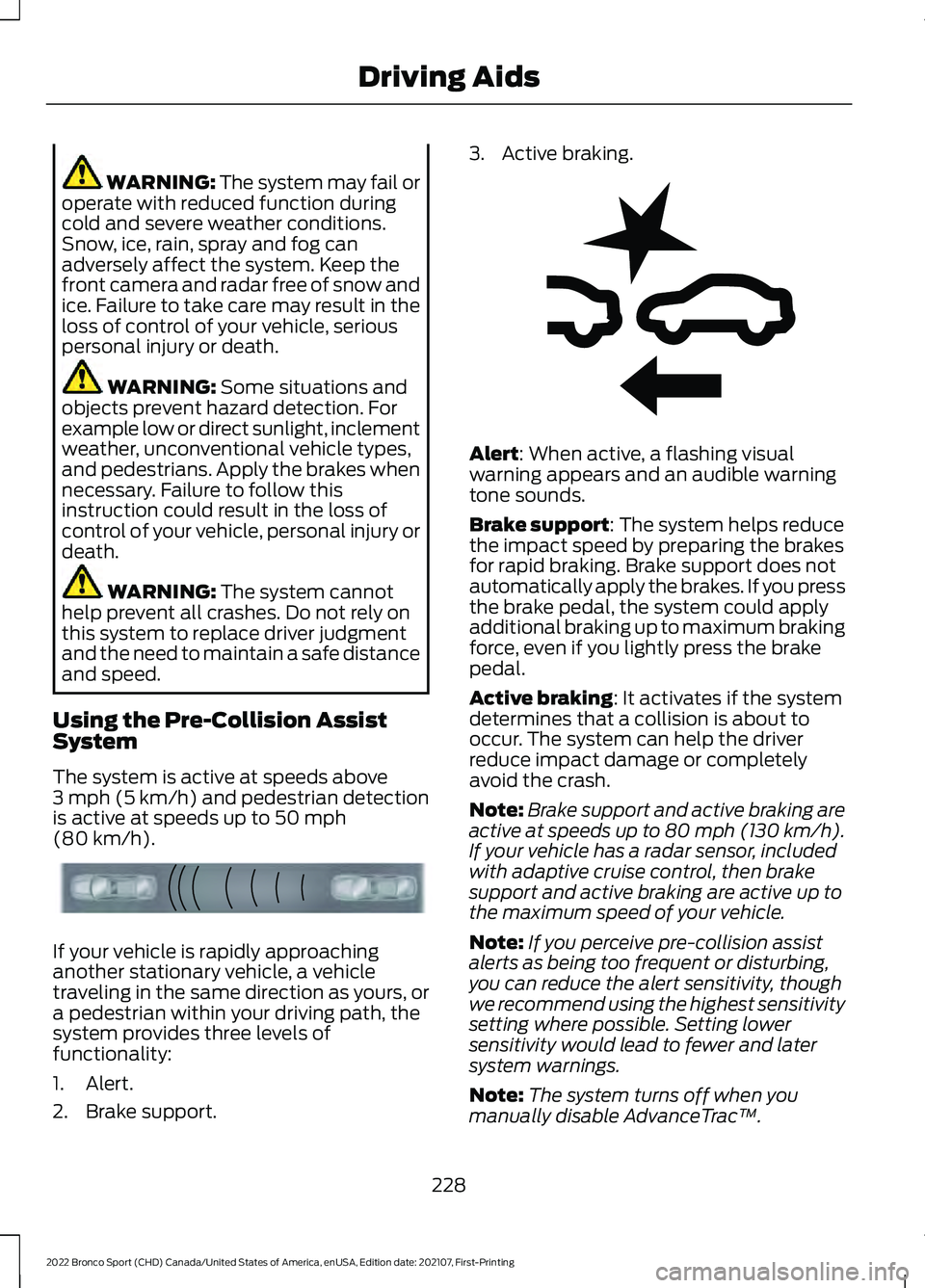
Alert
: When active, a flashing visual
warning appears and an audible warning
tone sounds.
Brake support
: The system helps reduce
the impact speed by preparing the brakes
for rapid braking. Brake support does not
automatically apply the brakes. If you press
the brake pedal, the system could apply
additional braking up to maximum braking
force, even if you lightly press the brake
pedal.
Active braking
: It activates if the system
determines that a collision is about to
occur. The system can help the driver
reduce impact damage or completely
avoid the crash.
Note: Brake support and active braking are
active at speeds up to 80 mph (130 km/h).
If your vehicle has a radar sensor, included
with adaptive cruise control, then brake
support and active braking are active up to
the maximum speed of your vehicle.
Note: If you perceive pre-collision assist
alerts as being too frequent or disturbing,
you can reduce the alert sensitivity, though
we recommend using the highest sensitivity
setting where possible. Setting lower
sensitivity would lead to fewer and later
system warnings.
Note: The system turns off when you
manually disable AdvanceTrac ™.
228
2022 Bronco Sport (CHD) Canada/United States of America, enUSA, Edition date: 202107, First-Printing Driving AidsE156130 E255268
Page 233 of 494
After you turn the steering wheel, the
system applies additional steering torque
to help you steer around the vehicle. After
you pass the vehicle, the system applies
steering torque in the opposite direction to
encourage you to steer back into the lane.
The system deactivates after you fully pass
the vehicle.
Note:
The system does not automatically
steer around a vehicle. If you do not turn the
steering wheel, the system does not
activate.
Note: The system does not activate if the
distance to the vehicle ahead is too small
and you cannot avoid a crash.
Adjusting the Pre-Collision Assist
Settings
Depending on your vehicle options, the
pre-collision assist settings can be in the
following:
• Information display. See General
Information (page 102).
• Touchscreen. See
Settings (page 391).
You can adjust the following settings:
• Change alert and distance alert
sensitivity to one of three possible
settings.
• Switch distance indication and alert on
or off.
• If required, switch active braking on or
off.
• If required, switch evasive steering
assist on or off.
Note: Active braking and evasive steering
assist turn on every time you switch the
ignition on. Note:
If you switch active braking off,
evasive steering assist turns off.
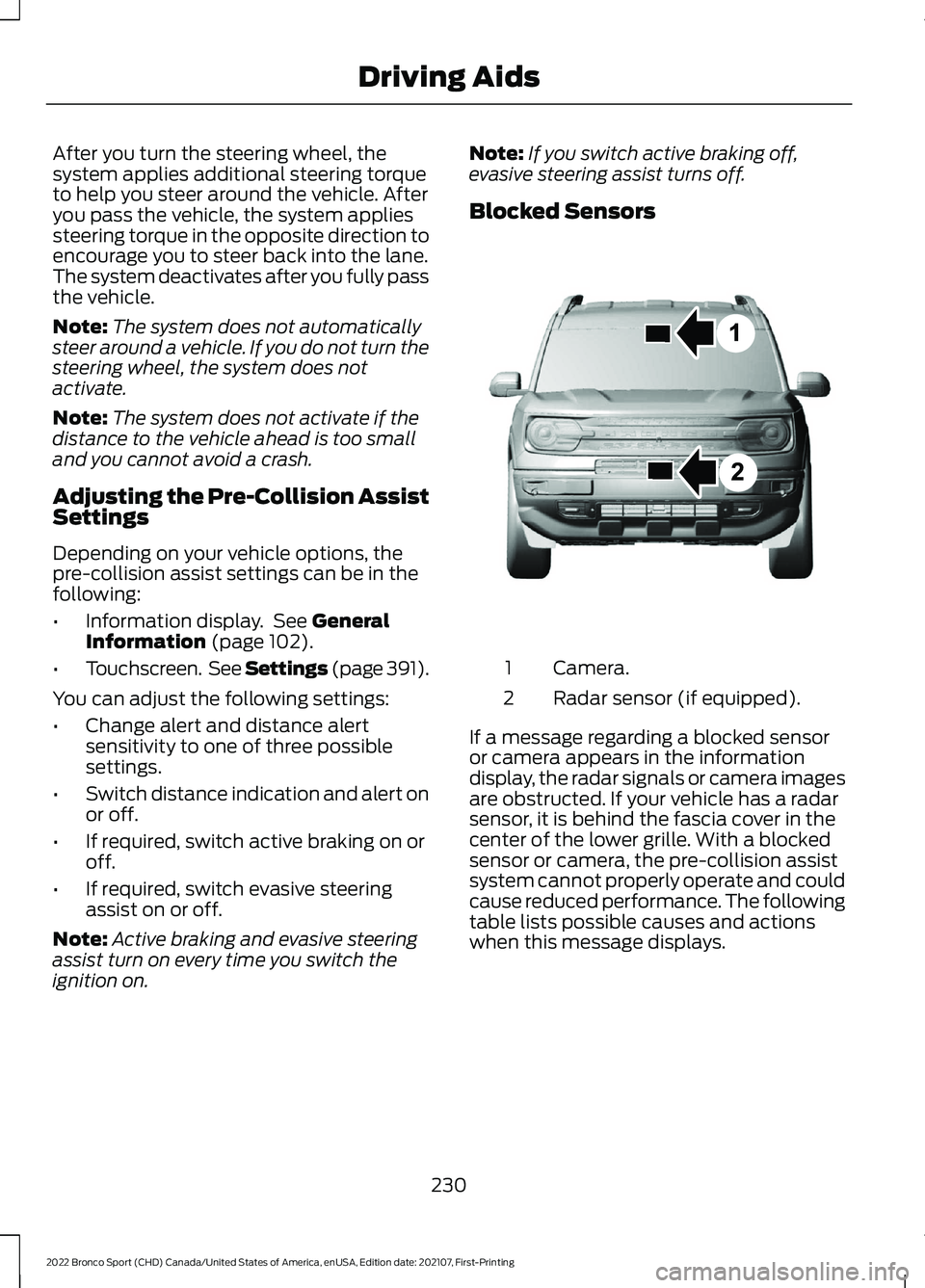
Blocked Sensors Camera.
1
Radar sensor (if equipped).
2
If a message regarding a blocked sensor
or camera appears in the information
display, the radar signals or camera images
are obstructed. If your vehicle has a radar
sensor, it is behind the fascia cover in the
center of the lower grille. With a blocked
sensor or camera, the pre-collision assist
system cannot properly operate and could
cause reduced performance. The following
table lists possible causes and actions
when this message displays.
230
2022 Bronco Sport (CHD) Canada/United States of America, enUSA, Edition date: 202107, First-Printing Driving AidsE325781
Page 234 of 494
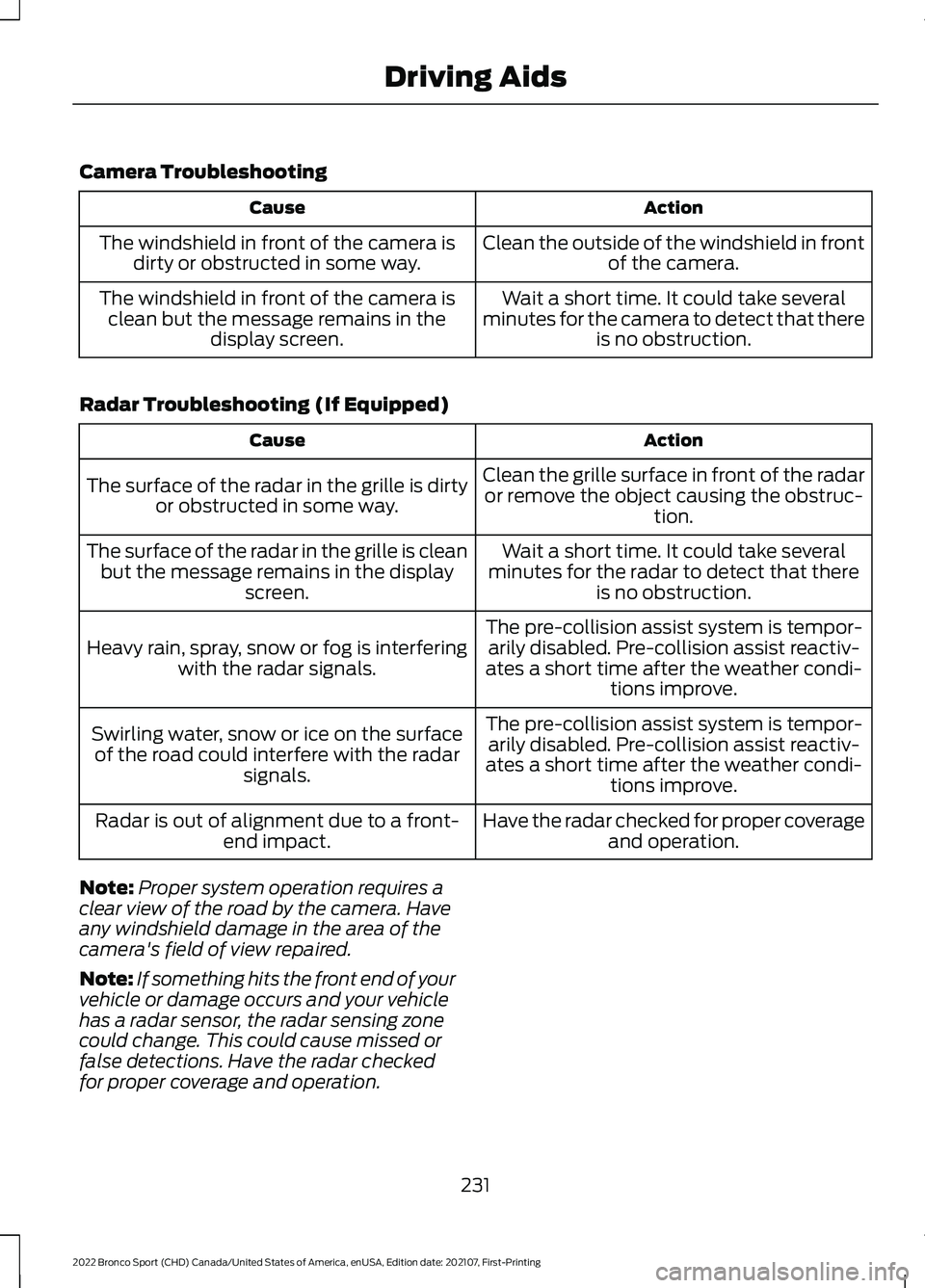
Camera Troubleshooting
Action
Cause
Clean the outside of the windshield in frontof the camera.
The windshield in front of the camera is
dirty or obstructed in some way.
Wait a short time. It could take several
minutes for the camera to detect that there is no obstruction.
The windshield in front of the camera is
clean but the message remains in the display screen.
Radar Troubleshooting (If Equipped) Action
Cause
Clean the grille surface in front of the radaror remove the object causing the obstruc- tion.
The surface of the radar in the grille is dirty
or obstructed in some way.
Wait a short time. It could take several
minutes for the radar to detect that there is no obstruction.
The surface of the radar in the grille is clean
but the message remains in the display screen.
The pre-collision assist system is tempor-arily disabled. Pre-collision assist reactiv-
ates a short time after the weather condi- tions improve.
Heavy rain, spray, snow or fog is interfering
with the radar signals.
The pre-collision assist system is tempor-arily disabled. Pre-collision assist reactiv-
ates a short time after the weather condi- tions improve.
Swirling water, snow or ice on the surface
of the road could interfere with the radar signals.
Have the radar checked for proper coverageand operation.
Radar is out of alignment due to a front-
end impact.
Note: Proper system operation requires a
clear view of the road by the camera. Have
any windshield damage in the area of the
camera's field of view repaired.
Note: If something hits the front end of your
vehicle or damage occurs and your vehicle
has a radar sensor, the radar sensing zone
could change. This could cause missed or
false detections. Have the radar checked
for proper coverage and operation.
231
2022 Bronco Sport (CHD) Canada/United States of America, enUSA, Edition date: 202107, First-Printing Driving Aids