trans FORD BRONCO SPORT 2022 Owners Manual
[x] Cancel search | Manufacturer: FORD, Model Year: 2022, Model line: BRONCO SPORT, Model: FORD BRONCO SPORT 2022Pages: 494, PDF Size: 8.74 MB
Page 2 of 494
The information contained in this publication was correct at the time of going to print. In the interest of
continuous development, we reserve the right to change specifications, design or equipment at any time
without notice or obligation. No part of this publication may be reproduced, transmitted, stored in a
retrieval system or translated into any language in any form by any means without our written permission.
Errors and omissions excepted.
© Ford Motor Company 2021
All rights reserved.
Part Number: 202107 20210730165500
California Proposition 65
WARNING: Operating, servicing and
maintaining a passenger vehicle or off-highway
motor vehicle can expose you to chemicals
including engine exhaust, carbon monoxide,
phthalates, and lead, which are known to the
State of California to cause cancer and birth
defects or other reproductive harm. To minimize
exposure, avoid breathing exhaust, do not idle the
engine except as necessary, service your vehicle
in a well-ventilated area and wear gloves or wash
your hands frequently when servicing your vehicle.
For more information go to
www.P65Warnings.ca.gov/passenger-vehicle. WARNING:
Battery posts, terminals and
related accessories contain lead and lead
compounds, chemicals known to the State of
California to cause cancer and reproductive harm.
Wash your hands after handling
.
Page 8 of 494
Fuel Quality
....................................................162
Fuel Filler Funnel Location .......................
163
Running Out of Fuel ...................................
163
Refueling .........................................................
165
Fuel Consumption .......................................
167
Engine Emission Control
Emission Law ................................................
168
Catalytic Converter .....................................
169
Transmission
Automatic Transmission ...........................
172
Four-Wheel Drive
Principle of Operation ................................
178
Using Four-Wheel Drive ............................
178
Brakes
General Information ...................................
182
Hints on Driving With Anti-Lock Brakes ........................................................................\
.
182
Electric Parking Brake ................................
183
Hill Start Assist .............................................
184
Auto Hold .......................................................
185
Traction Control
Principle of Operation ................................
187
Using Traction Control ...............................
187
Stability Control
Principle of Operation ...............................
188
Using Stability Control ..............................
189
Trail Control
What Is Trail Control ..................................
190
Switching Trail Control On and Off ......
190
Setting the Trail Control Speed .............
190
Canceling the Set Speed ...........................
191
Trail Control Indicators ...............................
191Trail Control – Troubleshooting
..............
191
Parking Aids
Principle of Operation ................................
192
Rear Parking Aid ...........................................
193
Front Parking Aid .........................................
194
Rear View Camera ......................................
196
180 Degree Camera ....................................
199
Cruise Control
What Is Cruise Control ...............................
201
Switching Cruise Control On and Off ........................................................................\
.
201
Setting the Cruise Control Speed .........
201
Canceling the Set Speed .........................
202
Resuming the Set Speed .........................
202
Cruise Control Indicators .........................
202
Adaptive Cruise Control
How Does Adaptive Cruise Control With Stop and Go Work ..................................
203
What Is Adaptive Cruise Control With Lane Centering ........................................
203
What Is Intelligent Adaptive Cruise Control ........................................................
203
Adaptive Cruise Control Precautions ........................................................................\
203
Adaptive Cruise Control Limitations ........................................................................\
204
Switching Adaptive Cruise Control On and Off .......................................................
206
Setting the Adaptive Cruise Control Speed ..........................................................
207
Setting the Adaptive Cruise Control Gap .......................................................................
208
Canceling the Set Speed ........................
209
Resuming the Set Speed ........................
209
Overriding the Set Speed ........................
209
Adaptive Cruise Control Indicators ......
209
Switching From Adaptive Cruise Control to Cruise Control ......................................
210
5
2022 Bronco Sport (CHD) Canada/United States of America, enUSA, Edition date: 202107, First-Printing Table of Contents
Page 9 of 494

Switching Lane Centering On and Off
........................................................................\
.210
Switching Intelligent Mode On and Off ........................................................................\
.
212
Adjusting the Set Speed Tolerance .......
212
Adaptive Cruise Control – Troubleshooting .......................................
212
Driving Aids
Driver Alert ......................................................
215
Lane Keeping System ................................
216
Blind Spot Information System ............
220
Cross Traffic Alert ........................................
222
Speed Sign Recognition ...........................
225
Steering ...........................................................
227
Pre-Collision Assist .....................................
227
G.O.A.T. Mode Control
What Is G.O.A.T. Mode Control ...............
232
How Does G.O.A.T. Mode Control Work ........................................................................\
232
Selecting a G.O.A.T. Mode - 1.5L EcoBoost™ ...............................................
232
Selecting a G.O.A.T. Mode - 2.0L EcoBoost™ ...............................................
233
G.O.A.T. Modes .............................................
233
G.O.A.T. Mode Control – Troubleshooting ........................................................................\
235
Load Carrying
Roof Racks and Load Carriers ................
237
Load Limit ......................................................
237
Luggage Compartment
Adjusting the Luggage Compartment Load Floor .................................................
243
Adjusting the Luggage Compartment Divider .........................................................
243
Towing
Towing a Trailer ...........................................
245
Trailer Sway Control ..................................
246Recommended Towing Weights
..........
246
Essential Towing Checks ..........................
247
Towing the Vehicle on Four Wheels .....
249
Driving Hints
Off-Road Driving ..........................................
251
Breaking-In ....................................................
258
Driving Economically .................................
258
Floor Mats .....................................................
258
Roadside Emergencies
Roadside Assistance ................................
260
Hazard Flashers ...........................................
261
Fuel Shutoff ...................................................
261
Jump Starting the Vehicle .......................
262
Post-Crash Alert System .........................
263
Transporting the Vehicle ..........................
263
Towing Points - 1.5L EcoBoost™ ..........
264
Towing Points - 2.0L EcoBoost™ .........
265
Customer Assistance
Getting the Services You Need .............
266
In California (U.S. Only) ............................
267
The Better Business Bureau (BBB) Auto Line Program (U.S. Only) ....................
268
Utilizing the Mediation/Arbitration Program (Canada Only) ......................
269
Getting Assistance Outside the U.S. and Canada .......................................................
269
Ordering Additional Owner's Literature ........................................................................\
..
271
Reporting Safety Defects (U.S. Only) ........................................................................\
..
271
Reporting Safety Defects (Canada Only) ........................................................................\
..
271
Fuses
Fuse Box Locations ....................................
273
Fuse Specification Chart ..........................
273
Changing a Fuse .........................................
280
6
2022 Bronco Sport (CHD) Canada/United States of America, enUSA, Edition date: 202107, First-Printing Table of Contents
Page 10 of 494
Maintenance
General Information
..................................282
Opening and Closing the Hood .............
282
Under Hood Overview - 1.5L EcoBoost™ ........................................................................\
283
Under Hood Overview - 2.0L EcoBoost™ ........................................................................\
284
Engine Oil Dipstick - 1.5L EcoBoost™ ........................................................................\
285
Engine Oil Dipstick - 2.0L EcoBoost™ ........................................................................\
285
Engine Oil Check .........................................
285
Oil Change Indicator Reset .....................
286
Changing the Engine Air Filter ...............
286
Engine Coolant Check ...............................
287
Automatic Transmission Fluid Check ........................................................................\
.
291
Brake Fluid Check .......................................
292
Power Steering Fluid Check ....................
293
Changing the 12V Battery ........................
293
Adjusting the Headlamps .......................
295
Washer Fluid Check ...................................
296
Fuel Filter .......................................................
296
Checking the Wiper Blades .....................
297
Changing the Front Wiper Blades ........
297
Changing the Rear Wiper Blades ..........
297
Changing a Bulb .........................................
298
Vehicle Care
General Information .................................
300
Cleaning Products .....................................
300
Cleaning the Exterior ..................................
301
Waxing ............................................................
302
Cleaning the Engine ...................................
302
Cleaning the Windows and Wiper Blades ........................................................................\
303
Cleaning the Interior ..................................
303
Cleaning the Instrument Panel and Instrument Cluster Lens ......................
304
Repairing Minor Paint Damage .............
305
Cleaning the Wheels .................................
305Vehicle Storage
...........................................
305
Wheels and Tires
General Information ..................................
308
Tire Care ..........................................................
310
Using Snow Chains ....................................
323
Tire Pressure Monitoring System ..........
324
Changing a Road Wheel ..........................
329
Technical Specifications ..........................
335
Capacities and Specifications
Engine Specifications - 1.5L EcoBoost™ ........................................................................\
336
Engine Specifications - 2.0L EcoBoost™ ........................................................................\
336
Motorcraft Parts - 1.5L EcoBoost™ ......
337
Motorcraft Parts - 2.0L EcoBoost™ .....
338
Bulb Specification Chart .........................
338
Engine Oil Capacity and Specification - 2.0L EcoBoost™ ....................................
340
Engine Oil Capacity and Specification - 1.5L EcoBoost™ .......................................
341
Cooling System Capacity and Specification - 2.0L EcoBoost™ ......
343
Cooling System Capacity and Specification - 1.5L EcoBoost™ .......
344
Fuel Tank Capacity ....................................
344
Air Conditioning System Capacity and Specification - 2.0L EcoBoost™ ......
345
Air Conditioning System Capacity and Specification - 1.5L EcoBoost™ .......
346
Washer Fluid Specification .....................
346
Brake Fluid Specification .........................
347
Vehicle Identification
Vehicle Identification Number ..............
348
Connected Vehicle
What Is a Connected Vehicle .................
349
Connected Vehicle Requirements .......
349
7
2022 Bronco Sport (CHD) Canada/United States of America, enUSA, Edition date: 202107, First-Printing Table of Contents
Page 17 of 494
Entertainment Data
Data recorded includes, for example:
•
Music, videos or album art.
• Contacts and corresponding address
book entries.
• Navigation destinations.
Services That We Provide
If you use our services, we collect and use
data, for example, account information,
vehicle location and driving characteristics,
that could identify you. We transmit this
data through a dedicated, protected
connection. We only collect and use data
to enable your use of our services to which
you have subscribed, with your consent or
where permitted by law. For additional
information, see the terms and conditions
of the services to which you have
subscribed.
Services That Third Parties
Provide
We recommend that you review the terms
and conditions and data privacy
information for any services to which you
subscribe. We take no responsibility for
services that third parties provide.
Vehicles With a Modem (If Equipped) The modem has a SIM. The
modem was enabled when your
vehicle was built and periodically
sends messages to stay connected to the
cell phone network, receive automatic
software updates and send vehicle-related
information to us, for example, diagnostic
information. These messages could
include information that identifies your
vehicle, the SIM and the electronic serial
number of the modem. Cell phone network service providers could have access to
additional information, for example, cell
phone network tower identification. For
additional information about our privacy
policy, visit
www .For dC onne c t e d . c om or
refer to your local Ford website.
Note: The modem continues to send this
information unless you disable the modem
or stop the modem from sharing vehicle
data by changing the modem settings. See
Connected Vehicle
(page 349).
Note: The service can be unavailable or
interrupted for a number of reasons, for
example, environmental or topographical
conditions and data plan coverage.
Note: To find out if your vehicle has a
modem, visit
www .For dC onne c t e d . c om .
Vehicles With SYNC
Mobile Device Data
If you connect a mobile device to your
vehicle, you can display data from your
device on the touchscreen for example,
music and album art. You can share your
vehicle data with mobile apps on your
device through the system. See
Apps
(page 389).
The mobile apps function operates by your
connected device sending data to us in the
United States. The data is encrypted and
includes, for example, the vehicle
identification number of your vehicle,
odometer, SYNC module number,
anonymous usage statistics and debugging
information. We retain it only as long as
necessary to provide the service, to
troubleshoot, for continuous improvement
and to offer you products and services that
may be of interest to you according to your
preferences and where allowed by law.
14
2022 Bronco Sport (CHD) Canada/United States of America, enUSA, Edition date: 202107, First-Printing Introduction
Page 20 of 494
On Board Diagnostics Data Link
Connector
WARNING: Do not connect
wireless plug-in devices to the data link
connector. Unauthorized third parties
could gain access to vehicle data and
impair the performance of safety related
systems. Only allow repair facilities that
follow our service and repair instructions
to connect their equipment to the data
link connector.
Your vehicle has an OBD Data Link
Connector (DLC) that is used in
conjunction with a diagnostic scan tool for
vehicle diagnostics, repairs and
reprogramming services. Installing an
aftermarket device that uses the DLC
during normal driving for purposes such as
remote insurance company monitoring,
transmission of vehicle data to other
devices or entities, or altering the
performance of the vehicle, may cause
interference with or even damage to
vehicle systems. We do not recommend
or endorse the use of unapproved
aftermarket plug-in devices. The vehicle
Warranty will not cover damage caused
by an aftermarket plug-in device.
Notice to Owners of Pickup Trucks
and Utility Type Vehicles WARNING:
Utility vehicles have a
significantly higher rollover rate than
other types of vehicles.
Before you drive your vehicle, please read
this Owner ’s Guide carefully. Your vehicle
is not a passenger car. As with other
vehicles of this type, failure to operate this
vehicle correctly may result in loss of
vehicle control, vehicle rollover, personal
injury or death. Using Your Vehicle With a
Snowplow
Do not use this vehicle for
snowplowing.
Your vehicle does not have a snowplowing
package.
Using Your Vehicle as an
Ambulance
Do not use this vehicle as an
ambulance.
Your vehicle does not have the Ambulance
Preparation Package.
MOBILE COMMUNICATIONS
EQUIPMENT
WARNING:
Driving while
distracted can result in loss of vehicle
control, crash and injury. We strongly
recommend that you use extreme
caution when using any device that may
take your focus off the road. Your
primary responsibility is the safe
operation of your vehicle. We
recommend against the use of any
hand-held device while driving and
encourage the use of voice-operated
systems when possible. Make sure you
are aware of all applicable local laws
that may affect the use of electronic
devices while driving.
Using mobile communications equipment
is becoming increasingly important in the
conduct of business and personal affairs.
However, you must not compromise your
own or others’ safety when using such
equipment. Mobile communications can
enhance personal safety and security when
appropriately used, particularly in
emergency situations. Safety must be
paramount when using mobile
17
2022 Bronco Sport (CHD) Canada/United States of America, enUSA, Edition date: 202107, First-Printing Introduction
Page 28 of 494
GENERAL INFORMATION
See the following sections for directions
on how to properly use safety restraints
for children.
WARNING: Always make sure your
child is secured properly in a device that
is appropriate for their height, age and
weight. Child safety restraints must be
bought separately from your vehicle.
Failure to follow these instructions and
guidelines may result in an increased risk
of serious injury or death to your child. WARNING: All children are shaped
differently. The National Highway Traffic
Safety Administration and other safety
organizations, base their
recommendations for child restraints on
probable child height, age and weight
thresholds, or on the minimum
requirements of the law. We recommend
that you check with a NHTSA Certified
Child Passenger Safety Technician (CPST) to make sure that you properly
install the child restraint in your vehicle
and that you consult your pediatrician to
make sure you have a child restraint
appropriate for your child. To locate a
child restraint fitting station and CPST,
contact NHTSA toll free at
1-888-327-4236 or go to
www.nhtsa.dot.gov. In Canada, contact
Transport Canada toll free at
1-800-333-0371 or go to www.tc.gc.ca
to find a Child Car Seat Clinic in your
area. Failure to properly restrain children
in child restraints made especially for
their height, age and weight, may result
in an increased risk of serious injury or
death to your child.
WARNING:
On hot days, the
temperature inside the vehicle can rise
very quickly. Exposure of people or
animals to these high temperatures for
even a short time can cause death or
serious heat related injuries, including
brain damage. Small children are
particularly at risk.
25
2022 Bronco Sport (CHD) Canada/United States of America, enUSA, Edition date: 202107, First-Printing Child Safety
Page 32 of 494
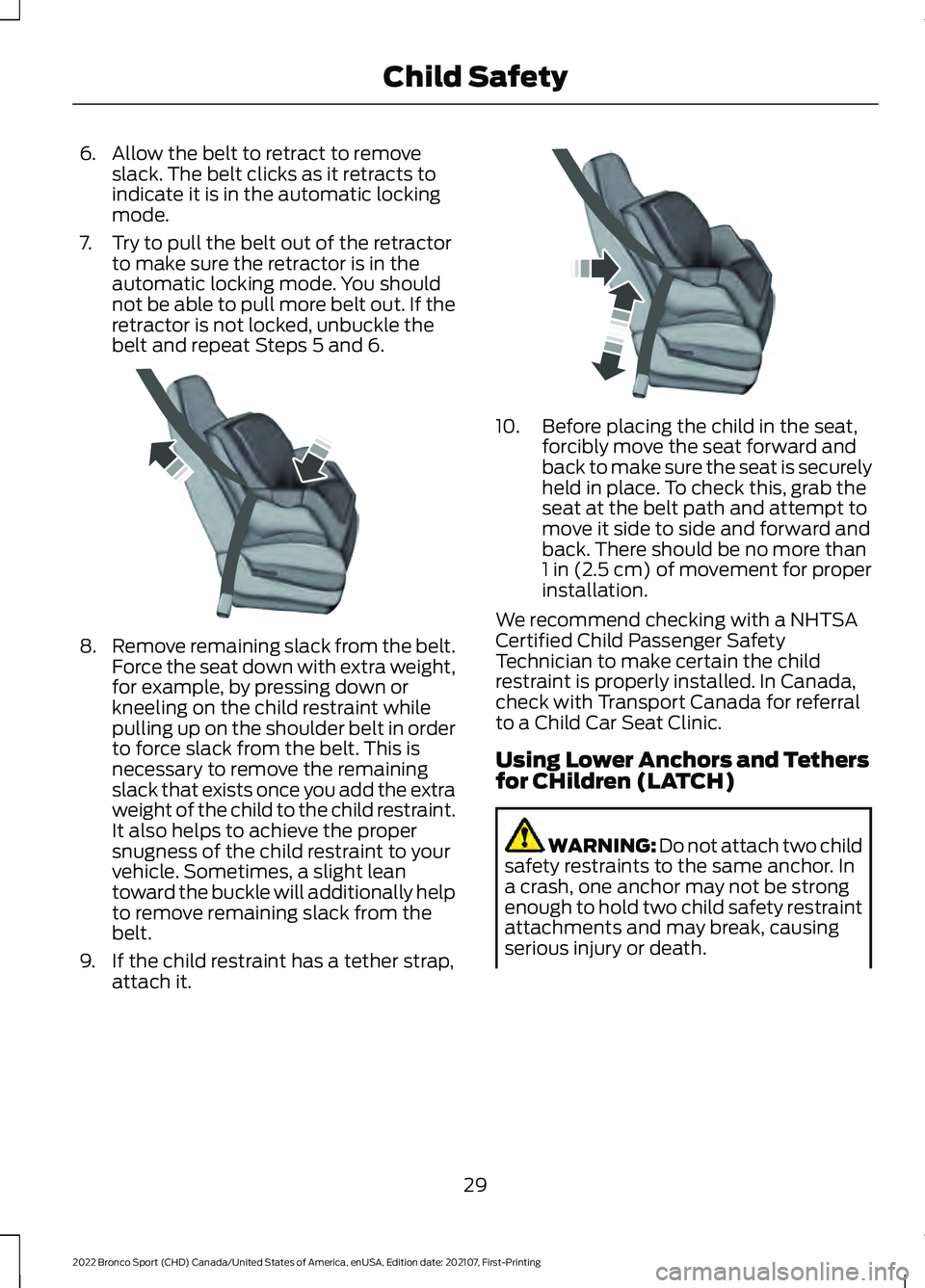
6. Allow the belt to retract to remove
slack. The belt clicks as it retracts to
indicate it is in the automatic locking
mode.
7. Try to pull the belt out of the retractor to make sure the retractor is in the
automatic locking mode. You should
not be able to pull more belt out. If the
retractor is not locked, unbuckle the
belt and repeat Steps 5 and 6. 8.
Remove remaining slack from the belt.
Force the seat down with extra weight,
for example, by pressing down or
kneeling on the child restraint while
pulling up on the shoulder belt in order
to force slack from the belt. This is
necessary to remove the remaining
slack that exists once you add the extra
weight of the child to the child restraint.
It also helps to achieve the proper
snugness of the child restraint to your
vehicle. Sometimes, a slight lean
toward the buckle will additionally help
to remove remaining slack from the
belt.
9. If the child restraint has a tether strap, attach it. 10. Before placing the child in the seat,
forcibly move the seat forward and
back to make sure the seat is securely
held in place. To check this, grab the
seat at the belt path and attempt to
move it side to side and forward and
back. There should be no more than
1 in (2.5 cm) of movement for proper
installation.
We recommend checking with a NHTSA
Certified Child Passenger Safety
Technician to make certain the child
restraint is properly installed. In Canada,
check with Transport Canada for referral
to a Child Car Seat Clinic.
Using Lower Anchors and Tethers
for CHildren (LATCH) WARNING: Do not attach two child
safety restraints to the same anchor. In
a crash, one anchor may not be strong
enough to hold two child safety restraint
attachments and may break, causing
serious injury or death.
29
2022 Bronco Sport (CHD) Canada/United States of America, enUSA, Edition date: 202107, First-Printing Child SafetyE142533 E142534
Page 46 of 494
Note:
If a rear seat is unoccupied, or an
occupant never fastens the seatbelt buckle
to begin with, the warning will not display.
Note: Front seating positions appear in this
warning display. Warnings for unfastened
front seatbelt buckles appear in the initial
warning lamp.
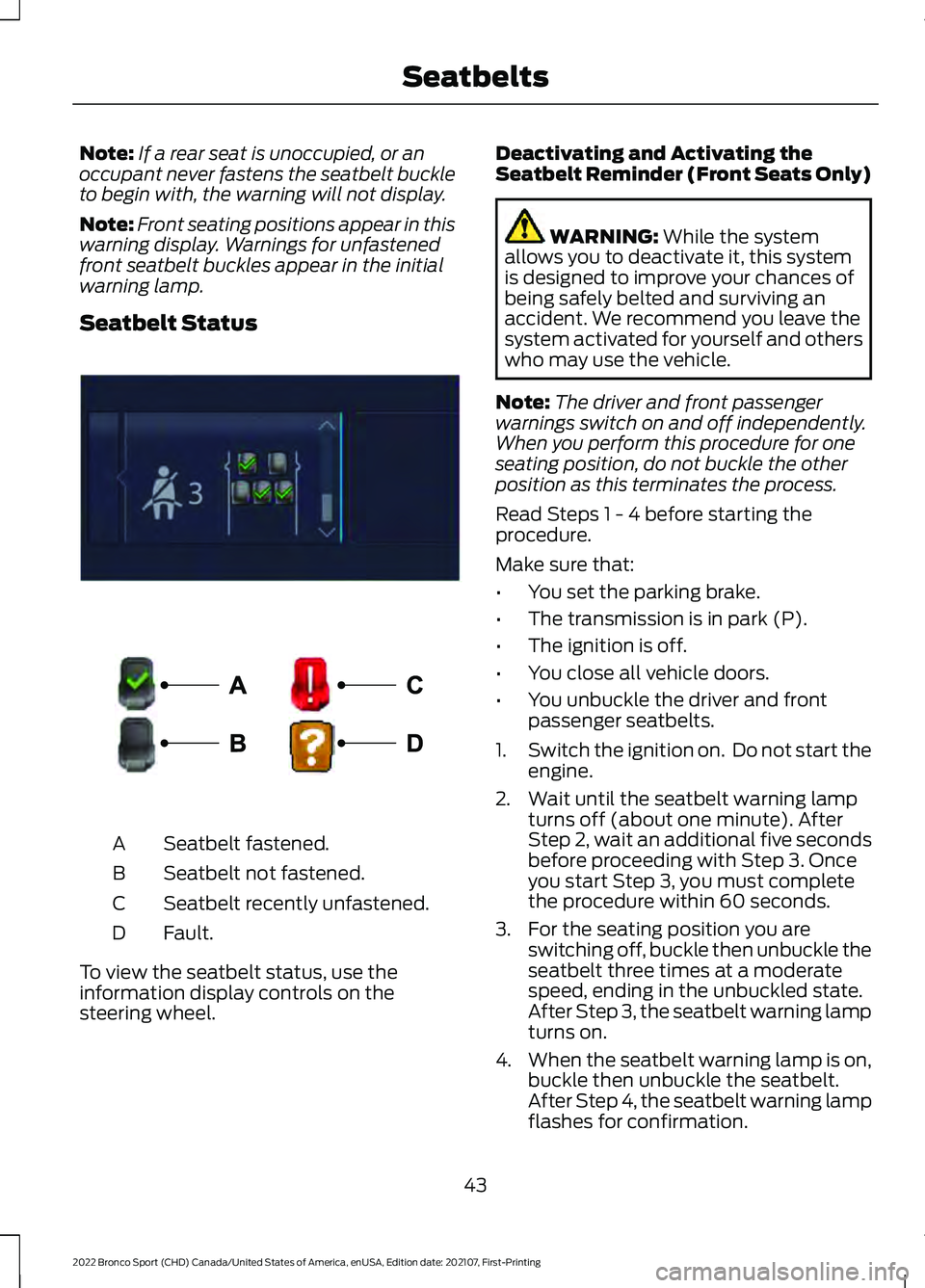
Seatbelt Status Seatbelt fastened.
A
Seatbelt not fastened.
B
Seatbelt recently unfastened.
C
Fault.
D
To view the seatbelt status, use the
information display controls on the
steering wheel. Deactivating and Activating the
Seatbelt Reminder (Front Seats Only) WARNING: While the system
allows you to deactivate it, this system
is designed to improve your chances of
being safely belted and surviving an
accident. We recommend you leave the
system activated for yourself and others
who may use the vehicle.
Note: The driver and front passenger
warnings switch on and off independently.
When you perform this procedure for one
seating position, do not buckle the other
position as this terminates the process.
Read Steps 1 - 4 before starting the
procedure.
Make sure that:
• You set the parking brake.
• The transmission is in park (P).
• The ignition is off.
• You close all vehicle doors.
• You unbuckle the driver and front
passenger seatbelts.
1. Switch the ignition on. Do not start the
engine.
2. Wait until the seatbelt warning lamp turns off (about one minute). After
Step 2, wait an additional five seconds
before proceeding with Step 3. Once
you start Step 3, you must complete
the procedure within 60 seconds.
3. For the seating position you are switching off, buckle then unbuckle the
seatbelt three times at a moderate
speed, ending in the unbuckled state.
After Step 3, the seatbelt warning lamp
turns on.
4. When the seatbelt warning lamp is on,
buckle then unbuckle the seatbelt.
After Step 4, the seatbelt warning lamp
flashes for confirmation.
43
2022 Bronco Sport (CHD) Canada/United States of America, enUSA, Edition date: 202107, First-Printing SeatbeltsE281361 E274703
Page 58 of 494
WHAT IS 911 ASSIST
If a crash deploys an airbag, excluding knee
airbags and rear inflatable seatbelts, or
activates the fuel pump shut-off, your
vehicle may be able to contact emergency
services by dialing 911 through a paired and
connected Bluetooth®-enabled phone.
Website
www.owner.ford.com
www.syncmyride.ca
www.syncmaroute.ca
Not all crashes will deploy an airbag or
activate the fuel pump shut-off (the
triggers for 911 Assist). If a connected cell
phone sustains damage or loses its
connection to SYNC during a crash, SYNC
will search for and try to connect to a
previously paired cell phone; SYNC will
then attempt to call emergency services.
Before making the call:
• SYNC provides a short window of time
(about 10 seconds) to cancel the call.
If you fail to cancel the call, SYNC
attempts to dial 911.
• SYNC says the following, or a similar
message: "SYNC will attempt to call
911, to cancel the call, press Cancel on
your screen or press and hold the
phone button on your steering wheel."
If you do not cancel the call, and SYNC
makes a successful call, a pre-recorded
message plays for the 911 operator, and
then the occupant(s) in your vehicle is able
to talk with the operator. Be prepared to
provide your name, phone number and
location immediately, because not all 911
systems are capable of receiving this
information electronically.
During an emergency call, the system
transmits vehicle data to emergency
services. See
Data Recording (page 11). EMERGENCY CALL
REQUIREMENTS WARNING:
Do not wait for 911
Assist to make an emergency call if you
can do it yourself. Dial emergency
services immediately to avoid delayed
response time which could increase the
risk of serious injury or death after a
crash. If you do not hear 911 Assist within
five seconds of the crash, the system or
phone may be damaged or
non-functional. WARNING:
Always place your
phone in a secure location in your vehicle
so it does not become a projectile or get
damaged in a crash. Failure to do so may
cause serious injury to someone or
damage the phone which could prevent
911 Assist from working properly. WARNING:
Unless the 911 Assist
setting is set on before a crash, the
system will not dial for help which could
delay response time, potentially
increasing the risk of serious injury or
death after a crash.
• SYNC must be powered and working
properly at the time of the incident and
throughout feature activation and use.
• The 911 Assist feature must be set on
before the incident.
• You must pair and connect a
Bluetooth®
enabled and compatible
cell phone to SYNC.
• A connected
Bluetooth® enabled
phone must have the ability to make
and maintain an outgoing call at the
time of the incident.
55
2022 Bronco Sport (CHD) Canada/United States of America, enUSA, Edition date: 202107, First-Printing 911 Assist