Parking FORD C MAX 2008 1.G User Guide
[x] Cancel search | Manufacturer: FORD, Model Year: 2008, Model line: C MAX, Model: FORD C MAX 2008 1.GPages: 278, PDF Size: 17.5 MB
Page 158 of 278
Downloaded from www.Manualslib.com manuals search engine Drive
Select drive to shift automaticallythrough the forward gears.
Manual shifting
Note:A shift will occur only whenthe vehicle speed and the enginespeed are appropriate.
Select manual shifting to shiftmanually through the forward gears.Push the selector lever forwards toshift down and pull it backwards toshift up.
WARNING
Do not hold the selector leverpermanently in – or +.
Gears can be skipped by moving theselector lever repeatedly at shortintervals.
Manual mode also provides akickdown function. See Kickdown.
The transmission will automaticallydownshift when the engine speed istoo low and upshift when to high.
Drive modes
The transmission will select theappropriate gear for optimumperformance based on ambienttemperature, road gradient, vehicleload and driver input.
Hints on driving with anautomatic transmission
Moving off
WARNING
It is not possible to tow-start orpush-start a vehicle fitted withan automatic transmission. SeeUsing booster cables (page 209).
1.Release the parking brake.
2.Release the brake pedal andpress the accelerator pedal.
Stopping
1.Release the accelerator pedal andpress the brake pedal.
2.Apply the parking brake.
Kickdown
Press the accelerator pedal fully withthe selector lever in the drive positionto select the next lowest gear foroptimum performance. Release theaccelerator pedal when you nolonger require kickdown.
Emergency park positionrelease lever
Use the lever to move the selectorlever from the park position in theevent of an electrical malfunction orif your vehicle has a flat battery.
156
Transmission
Page 161 of 278
Downloaded from www.Manualslib.com manuals search engine The ABS will not eliminate thedangers inherent when:
•you drive too close to the vehiclein front of you.
•the vehicle is aquaplaning.
•you take corners too fast.
•the road surface is poor.
PARKING BRAKE
All vehicles
WARNING
Vehicles with an automatictransmission should always beleft with the selector lever in positionP.
•Press the foot brake pedal firmly.
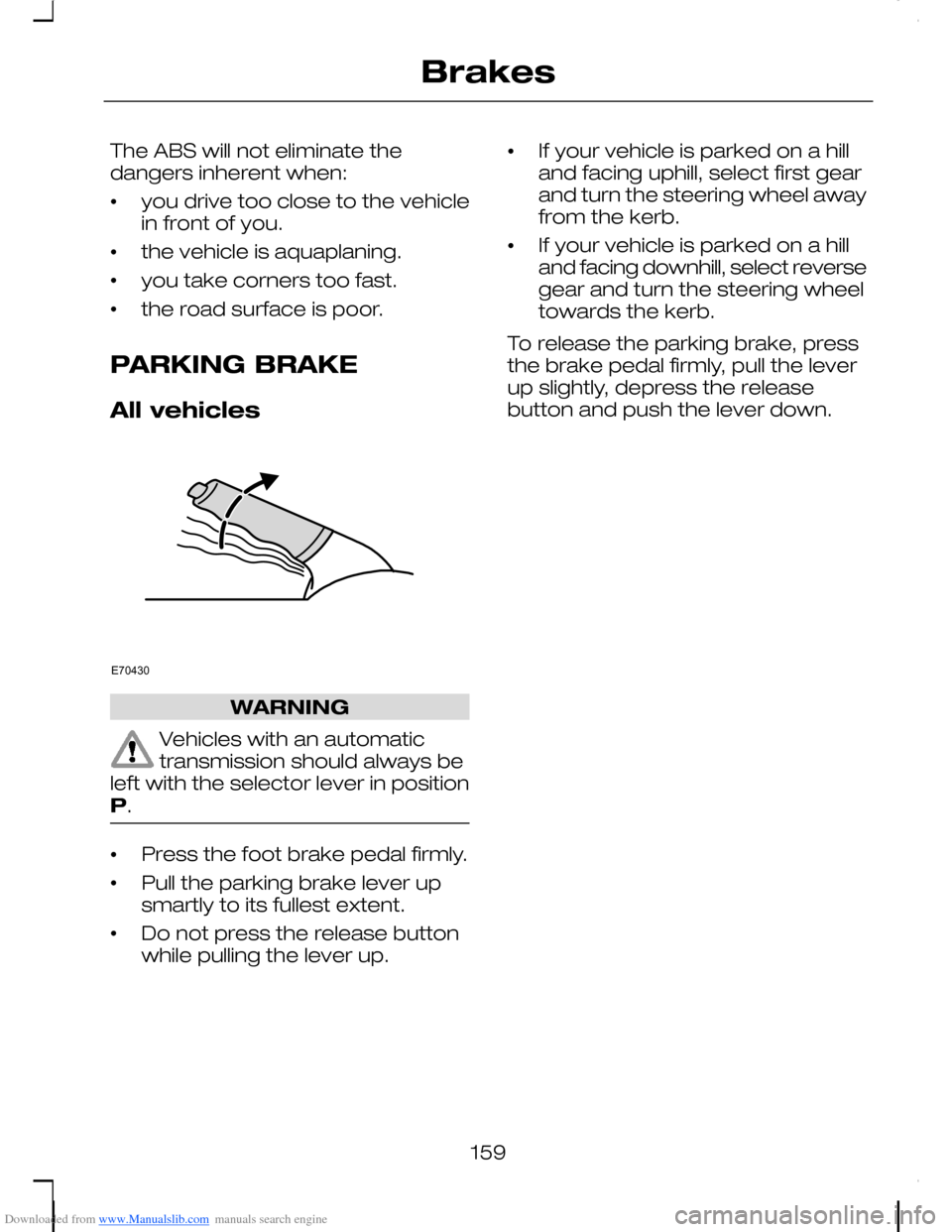
•Pull the parking brake lever upsmartly to its fullest extent.
•Do not press the release buttonwhile pulling the lever up.
•If your vehicle is parked on a hilland facing uphill, select first gearand turn the steering wheel awayfrom the kerb.
•If your vehicle is parked on a hilland facing downhill, select reversegear and turn the steering wheeltowards the kerb.
To release the parking brake, pressthe brake pedal firmly, pull the leverup slightly, depress the releasebutton and push the lever down.
159
BrakesE70430
Page 164 of 278
Downloaded from www.Manualslib.com manuals search engine PRINCIPLE OF
OPERATION
WARNING
The parking aid does not relieveyou of your responsibility todrive with due care and attention.
CAUTIONS
The sensors may not detectobjects in heavy rain or otherconditions that cause disruptivereflections.
The sensors may not detectobjects with surfaces that absorbultrasonic waves.
The sensors may not detectobjects that are close to thevehicle (approximately 30centimetres [11 inches] to the rearand above or below the sensors).
If you use a high pressure sprayto wash your vehicle, only spraythe sensors briefly from a distancenot less than 20 centimetres (8inches).
Note:The parking aid may emit falsetones if it detects a signal using thesame frequency as the sensors or ifthe vehicle is fully laden.
Note:The outer sensors may detectthe side walls of a garage. If thedistance between the outer sensorand the side wall remains constantfor three seconds, the tone willswitch off. As you continue, the innersensors will detect rearward objects.
USING THE PARKING AID
Note:Keep the sensors free fromdirt, ice and snow. Do not clean withsharp objects.
Switching the parking aidon and off
Note:The parking aid switches offautomatically when you start theengine or when you exceed 16 km/h(10 mph).
Note:Vehicles fitted with a trailertow module not approved by us maynot correctly detect obstacles.
Note:On vehicles fitted with a towball arm, the rear sensors aredeactivated automatically when anytrailer lamps (or lighting boards) areconnected to the 13-pin socket via atrailer tow module we haveapproved. On vehicles fitted with atrailer tow module not approved byus, you have to switch the parkingaid off using the switch.
Note:The front and rear sensors arealways activated or deactivatedtogether.
Note:On vehicles fitted withautomatic transmission, the parkingaid will not operate in position P.
The parking aid is per default off. Toswitch the parking aid on, press theswitch in the instrument panel orselect reverse gear.
The light in the switch illuminateswhen the parking aid is activated.
To turn it off, press the switch again.
162
Parking aid
Page 165 of 278
Downloaded from www.Manualslib.com manuals search engine Manoeuvring with theparking aid
CAUTIONS
The parking aid does not detectobstacles moving away from thevehicle. They will only be detectedshortly after they start to movetowards the vehicle again.
Take particular care whenreversing with a tow ball arm orrear fitted accessories e.g. a bicyclecarrier, as the rear parking aid will onlyindicate the distance from thebumper to the obstacle.
Note:If a high pitch warning tonesounds for three seconds and thelight in the switch is flashing, itindicates a malfunction. The systemwill be disabled. Have the systemchecked by properly trainedtechnicians.
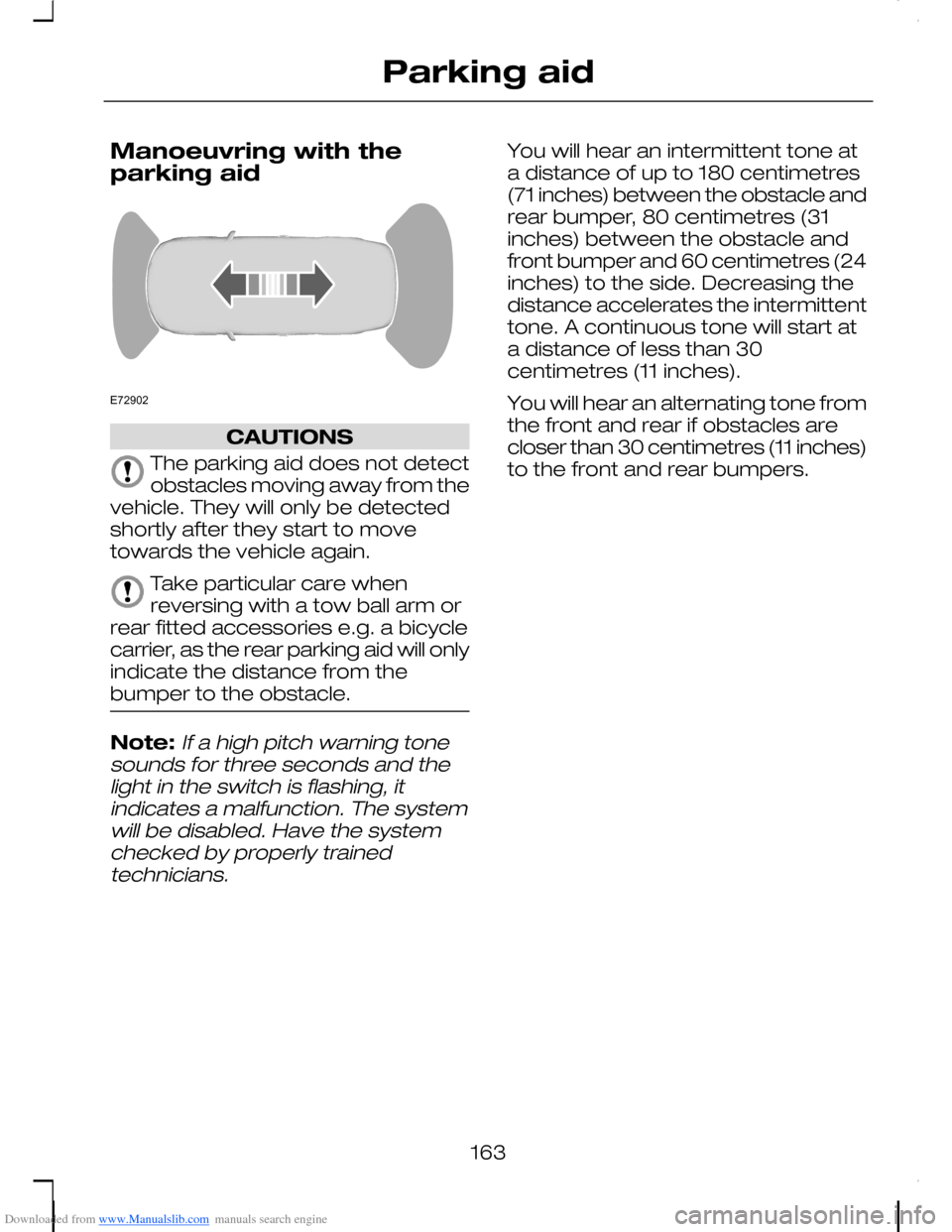
You will hear an intermittent tone ata distance of up to 180 centimetres(71 inches) between the obstacle andrear bumper, 80 centimetres (31inches) between the obstacle andfront bumper and 60 centimetres (24inches) to the side. Decreasing thedistance accelerates the intermittenttone. A continuous tone will start ata distance of less than 30centimetres (11 inches).
You will hear an alternating tone fromthe front and rear if obstacles arecloser than 30 centimetres (11 inches)to the front and rear bumpers.
163
Parking aidE72902
Page 177 of 278
Downloaded from www.Manualslib.com manuals search engine FUEL CUT-OFF SWITCH
Vehicles with a Duratecengine
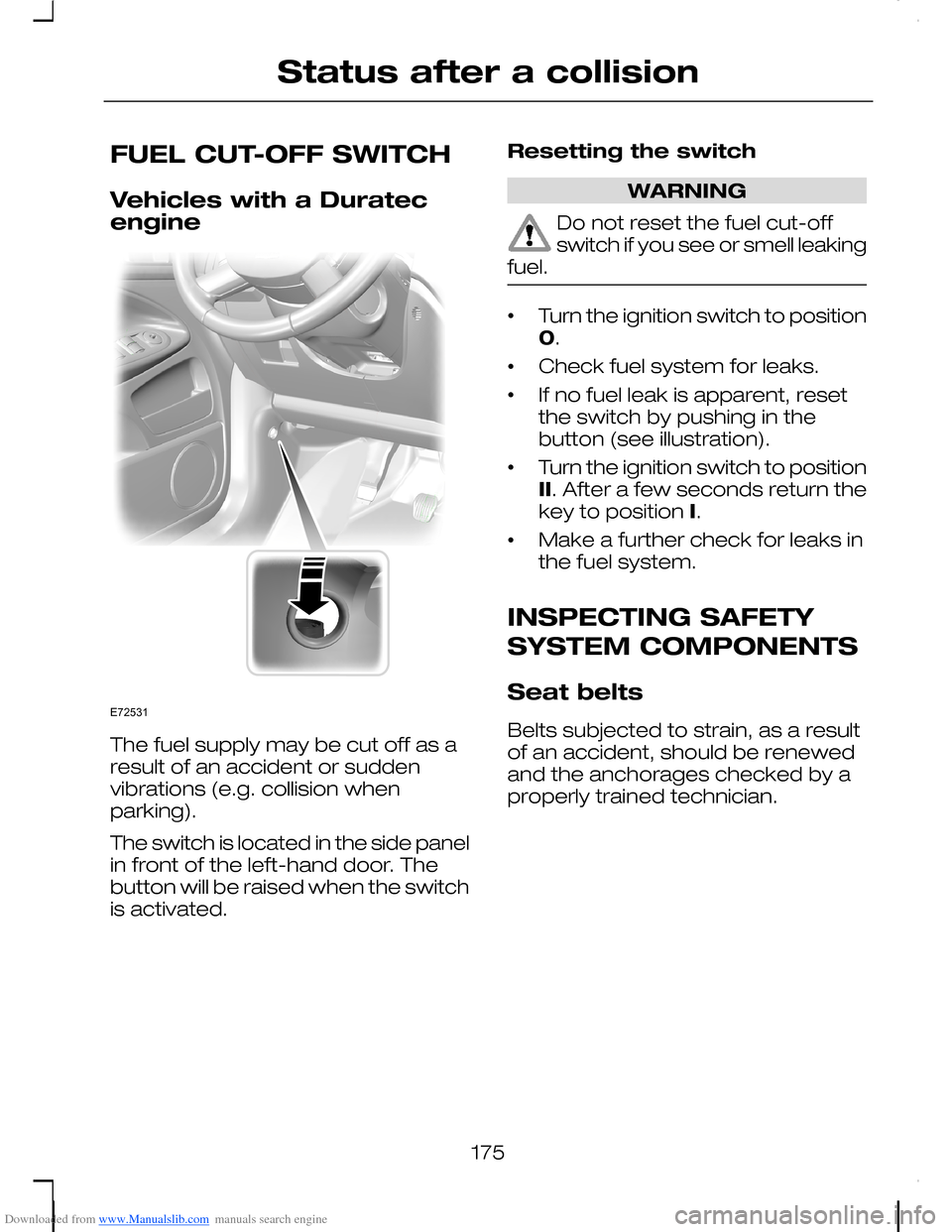
The fuel supply may be cut off as aresult of an accident or suddenvibrations (e.g. collision whenparking).
The switch is located in the side panelin front of the left-hand door. Thebutton will be raised when the switchis activated.
Resetting the switch
WARNING
Do not reset the fuel cut-offswitch if you see or smell leakingfuel.
•Turn the ignition switch to position0.
•Check fuel system for leaks.
•If no fuel leak is apparent, resetthe switch by pushing in thebutton (see illustration).
•Turn the ignition switch to positionII. After a few seconds return thekey to position I.
•Make a further check for leaks inthe fuel system.
INSPECTING SAFETY
SYSTEM COMPONENTS
Seat belts
Belts subjected to strain, as a resultof an accident, should be renewedand the anchorages checked by aproperly trained technician.
175
Status after a collisionE72531
Page 180 of 278
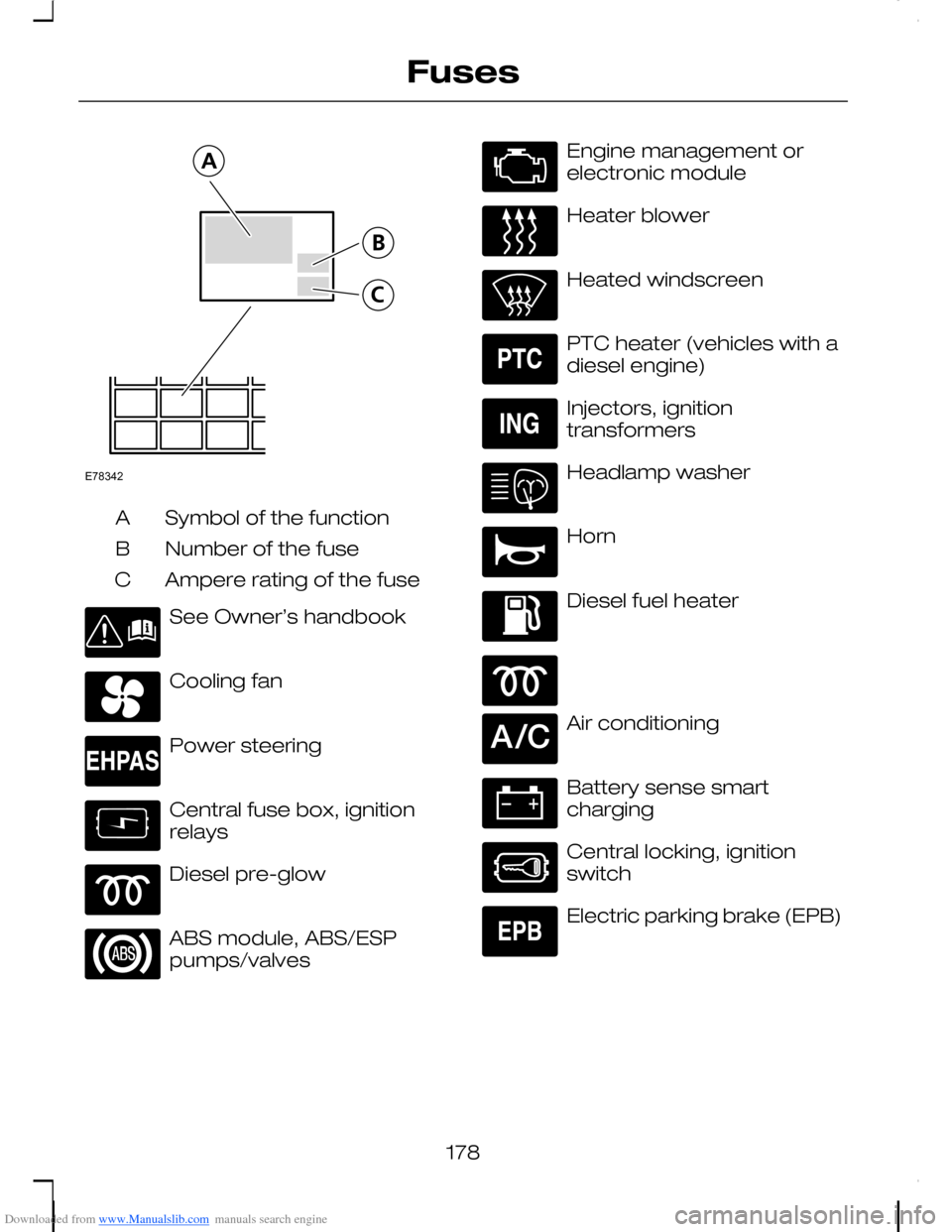
Downloaded from www.Manualslib.com manuals search engine Symbol of the functionA
Number of the fuseB
Ampere rating of the fuseC
See Owner’s handbook
Cooling fan
Power steering
Central fuse box, ignitionrelays
Diesel pre-glow
ABS module, ABS/ESPpumps/valves
Engine management orelectronic module
Heater blower
Heated windscreen
PTC heater (vehicles with adiesel engine)
Injectors, ignitiontransformers
Headlamp washer
Horn
Diesel fuel heater
Air conditioning
Battery sense smartcharging
Central locking, ignitionswitch
Electric parking brake (EPB)
178
FusesE78342
Page 184 of 278
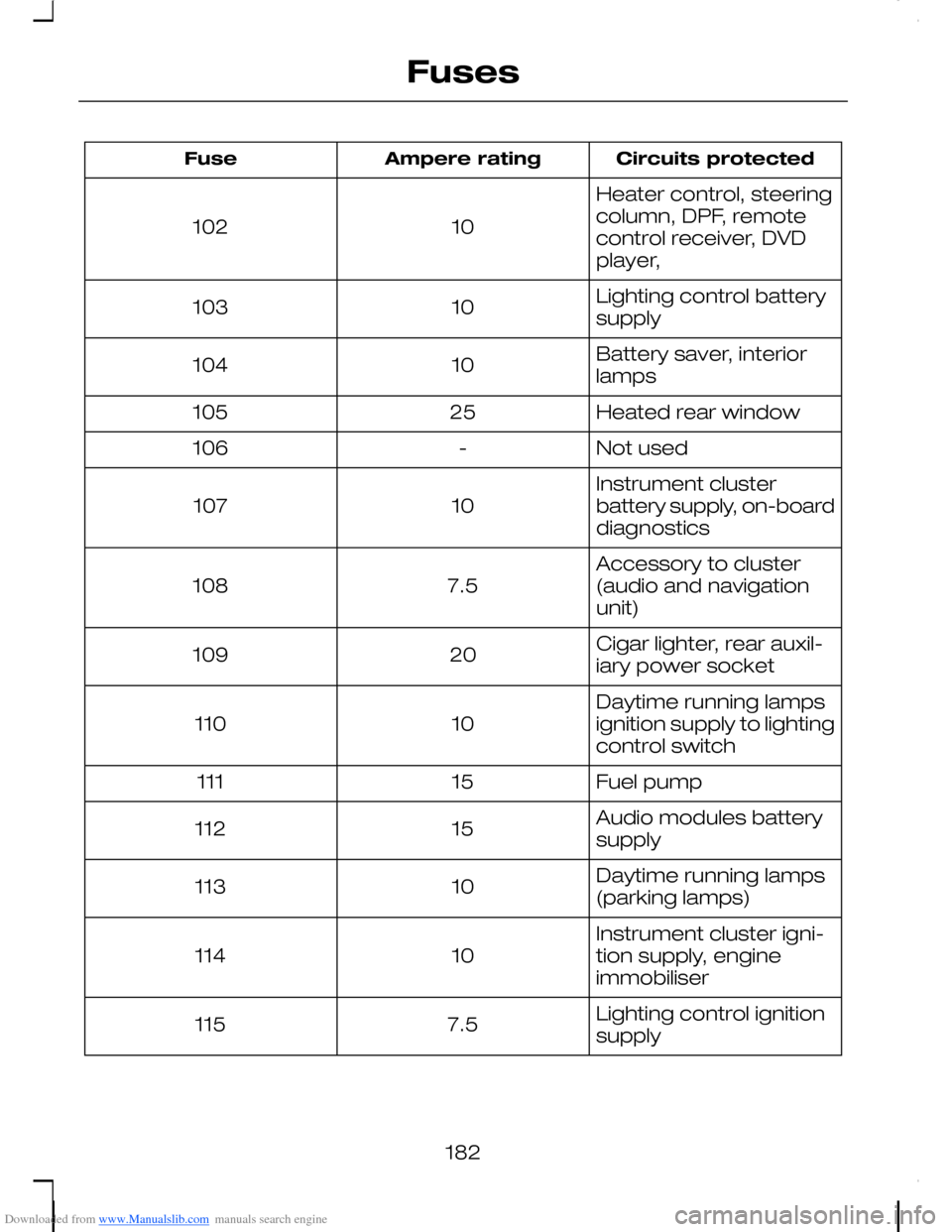
Downloaded from www.Manualslib.com manuals search engine Circuits protectedAmpere ratingFuse
Heater control, steeringcolumn, DPF, remotecontrol receiver, DVDplayer,
10102
Lighting control batterysupply10103
Battery saver, interiorlamps10104
Heated rear window25105
Not used-106
Instrument clusterbattery supply, on-boarddiagnostics10107
Accessory to cluster(audio and navigationunit)7.5108
Cigar lighter, rear auxil-iary power socket20109
Daytime running lampsignition supply to lightingcontrol switch10110
Fuel pump15111
Audio modules batterysupply15112
Daytime running lamps(parking lamps)10113
Instrument cluster igni-tion supply, engineimmobiliser10114
Lighting control ignitionsupply7.5115
182
Fuses
Page 185 of 278
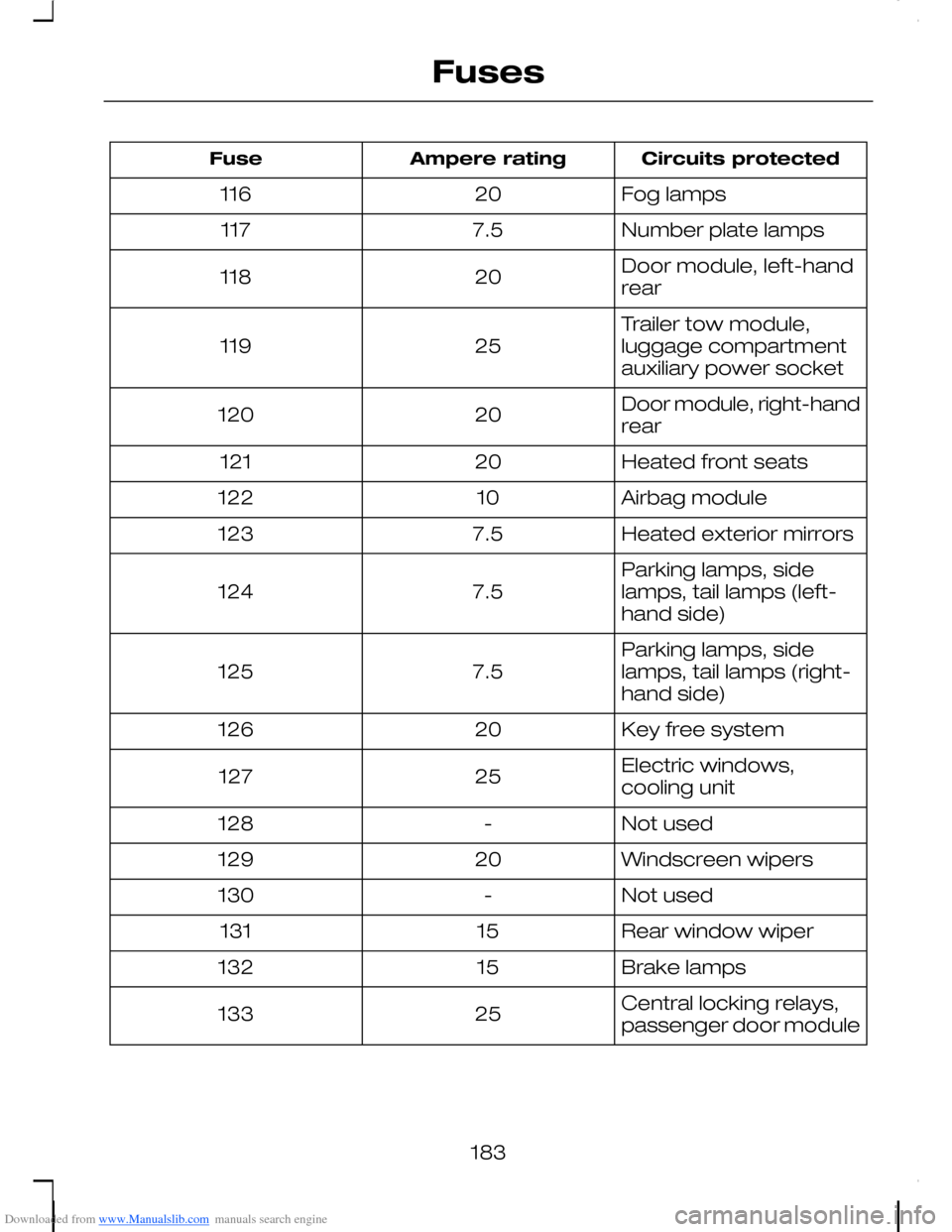
Downloaded from www.Manualslib.com manuals search engine Circuits protectedAmpere ratingFuse
Fog lamps20116
Number plate lamps7.5117
Door module, left-handrear20118
Trailer tow module,luggage compartmentauxiliary power socket25119
Door module, right-handrear20120
Heated front seats20121
Airbag module10122
Heated exterior mirrors7.5123
Parking lamps, sidelamps, tail lamps (left-hand side)7.5124
Parking lamps, sidelamps, tail lamps (right-hand side)7.5125
Key free system20126
Electric windows,cooling unit25127
Not used-128
Windscreen wipers20129
Not used-130
Rear window wiper15131
Brake lamps15132
Central locking relays,passenger door module25133
183
Fuses
Page 190 of 278
Downloaded from www.Manualslib.com manuals search engine GENERAL INFORMATION
Have your vehicle serviced regularlyto help maintain its roadworthinessand resale value. There is a largenetwork of Ford Authorised Repairersthat are there to help you with theirprofessional servicing expertise. Webelieve that their specially trainedtechnicians are best qualified toservice your vehicle properly andexpertly. They are supported by awide range of highly specialised toolsdeveloped specifically for servicingyour vehicle.
In addition to regular servicing, werecommend that you carry out thefollowing additional checks.
WARNINGS
Switch the ignition off beforetouching or attemptingadjustment of any kind.
Do not touch the electronicignition system parts after youhave switched the ignition on orwhen the engine is running. Thesystem operates at high voltage.
Keep your hands and clothingclear of the engine cooling fan.Under certain conditions, the fan maycontinue to run for several minutesafter you have switched the engineoff.
Daily checks
•Exterior lamps.
•Interior lamps.
•Warning lamps and indicators.
Check when refuelling
•Engine oil level. See Engine oilcheck (page 200).
•Brake fluid level. See Brake andclutch fluid check (page 202).
•Washer fluid level. See Washerfluid check (page 203).
•Tyre pressures (when cold). SeeWheels and tyres (page 211).
•Tyre condition. See Wheels andtyres (page 211).
Monthly checks
•Engine coolant level (engine cold).See Engine coolant check(page 201).
•Pipes, hoses and reservoirs forleaks.
•Power steering fluid level. SeePower steering fluid check(page 202).
•Air conditioning operation.
•Parking brake operation.
•Horn operation.
•Tightness of wheel nuts. SeeWheels and tyres (page 211).
188
Maintenance
Page 217 of 278
Downloaded from www.Manualslib.com manuals search engine Removing a wheel
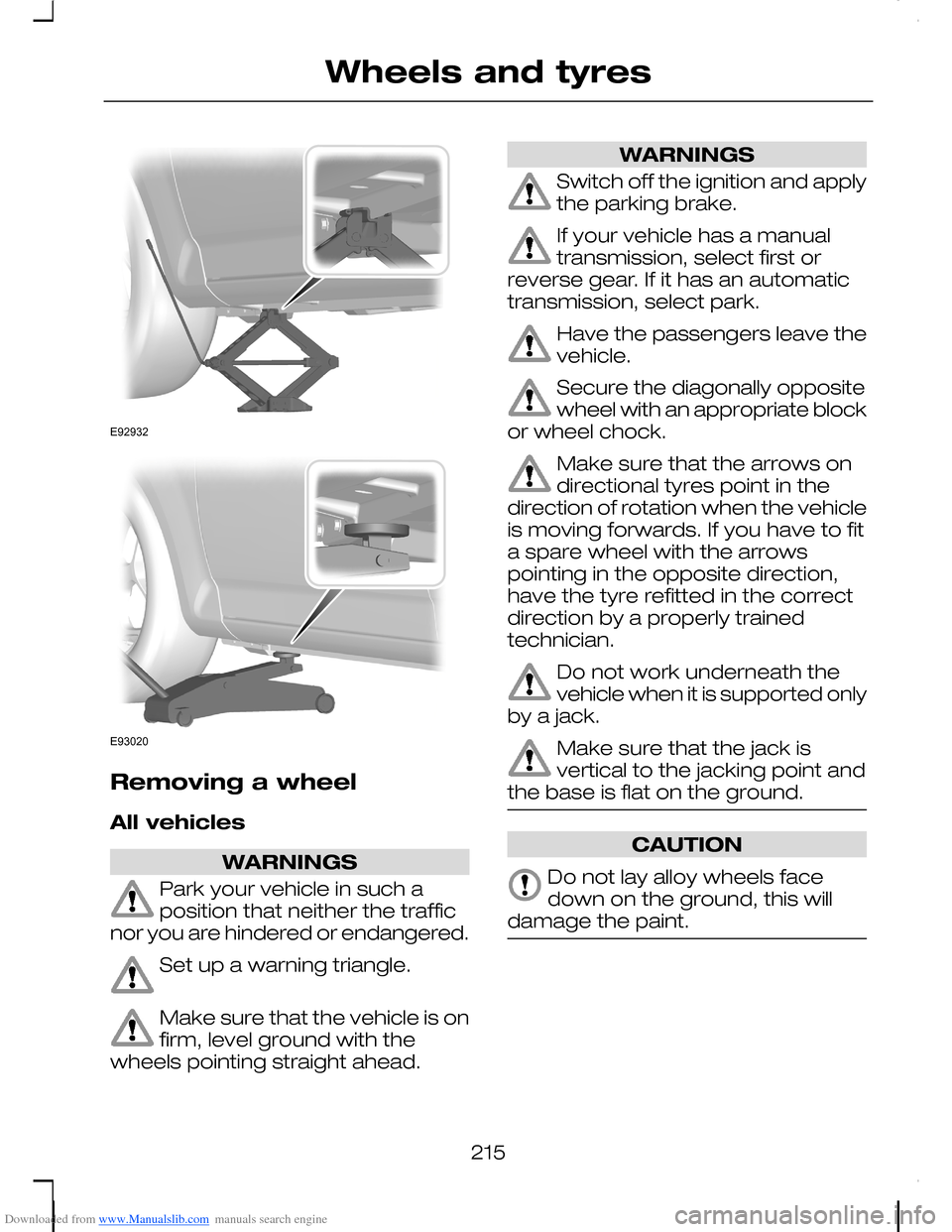
All vehicles
WARNINGS
Park your vehicle in such aposition that neither the trafficnor you are hindered or endangered.
Set up a warning triangle.
Make sure that the vehicle is onfirm, level ground with thewheels pointing straight ahead.
WARNINGS
Switch off the ignition and applythe parking brake.
If your vehicle has a manualtransmission, select first orreverse gear. If it has an automatictransmission, select park.
Have the passengers leave thevehicle.
Secure the diagonally oppositewheel with an appropriate blockor wheel chock.
Make sure that the arrows ondirectional tyres point in thedirection of rotation when the vehicleis moving forwards. If you have to fita spare wheel with the arrowspointing in the opposite direction,have the tyre refitted in the correctdirection by a properly trainedtechnician.
Do not work underneath thevehicle when it is supported onlyby a jack.
Make sure that the jack isvertical to the jacking point andthe base is flat on the ground.
CAUTION
Do not lay alloy wheels facedown on the ground, this willdamage the paint.
215
Wheels and tyresE92932 E93020