phone FORD C MAX 2011 2.G User Guide
[x] Cancel search | Manufacturer: FORD, Model Year: 2011, Model line: C MAX, Model: FORD C MAX 2011 2.GPages: 296, PDF Size: 7.87 MB
Page 226 of 296
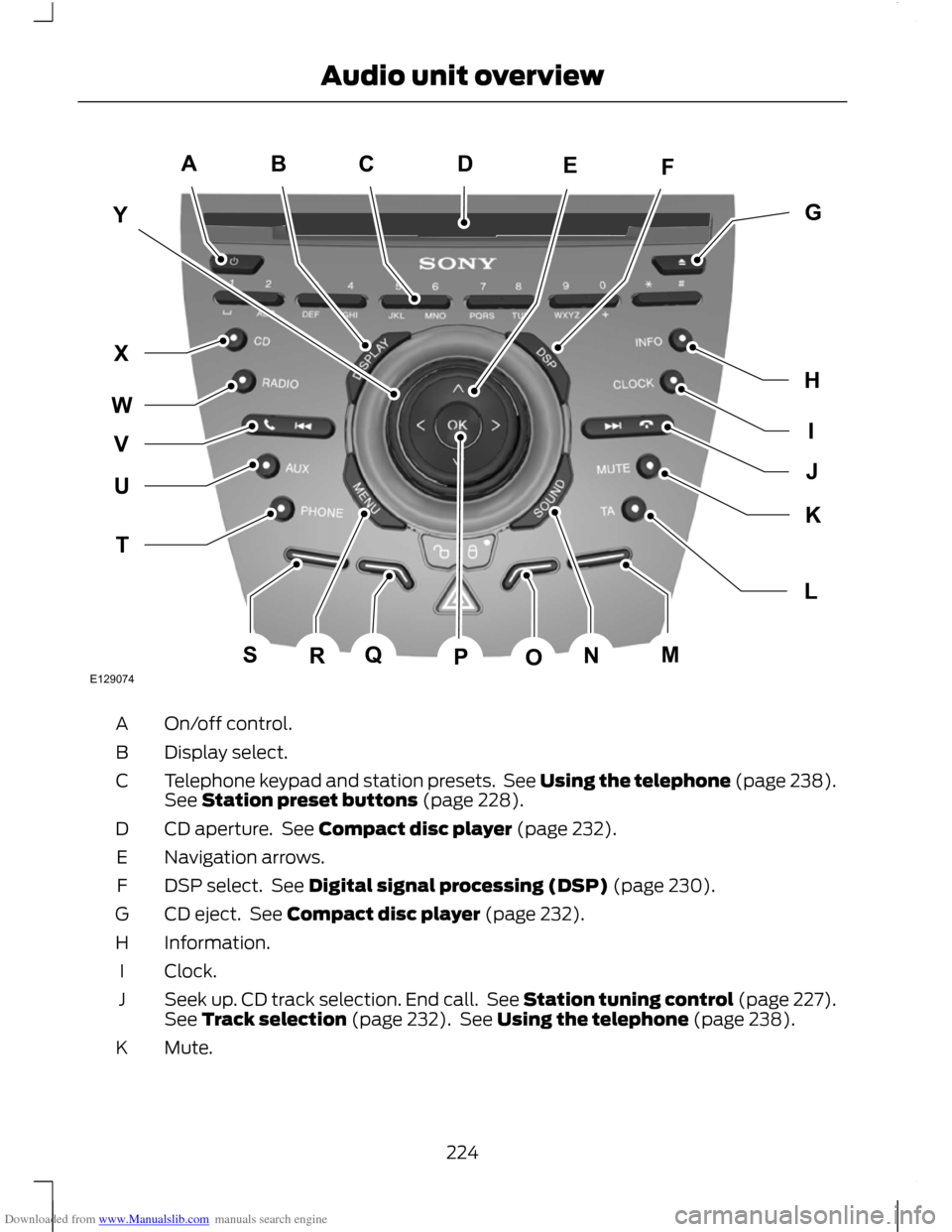
Downloaded from www.Manualslib.com manuals search engine On/off control.
A
Display select.
B
Telephone keypad and station presets. See Using the telephone (page 238).
See Station preset buttons (page 228).
C
CD aperture. See Compact disc player (page 232).
D
Navigation arrows.
E
DSP select. See Digital signal processing (DSP) (page 230).
F
CD eject. See Compact disc player (page 232).
G
Information.
H
Clock.
I
Seek up. CD track selection. End call. See Station tuning control (page 227).
See Track selection (page 232). See Using the telephone (page 238).
J
Mute.
K
224
Audio unit overviewE129074ACBFEYIGHJLKTUWXVQSRNMOPD
Page 227 of 296
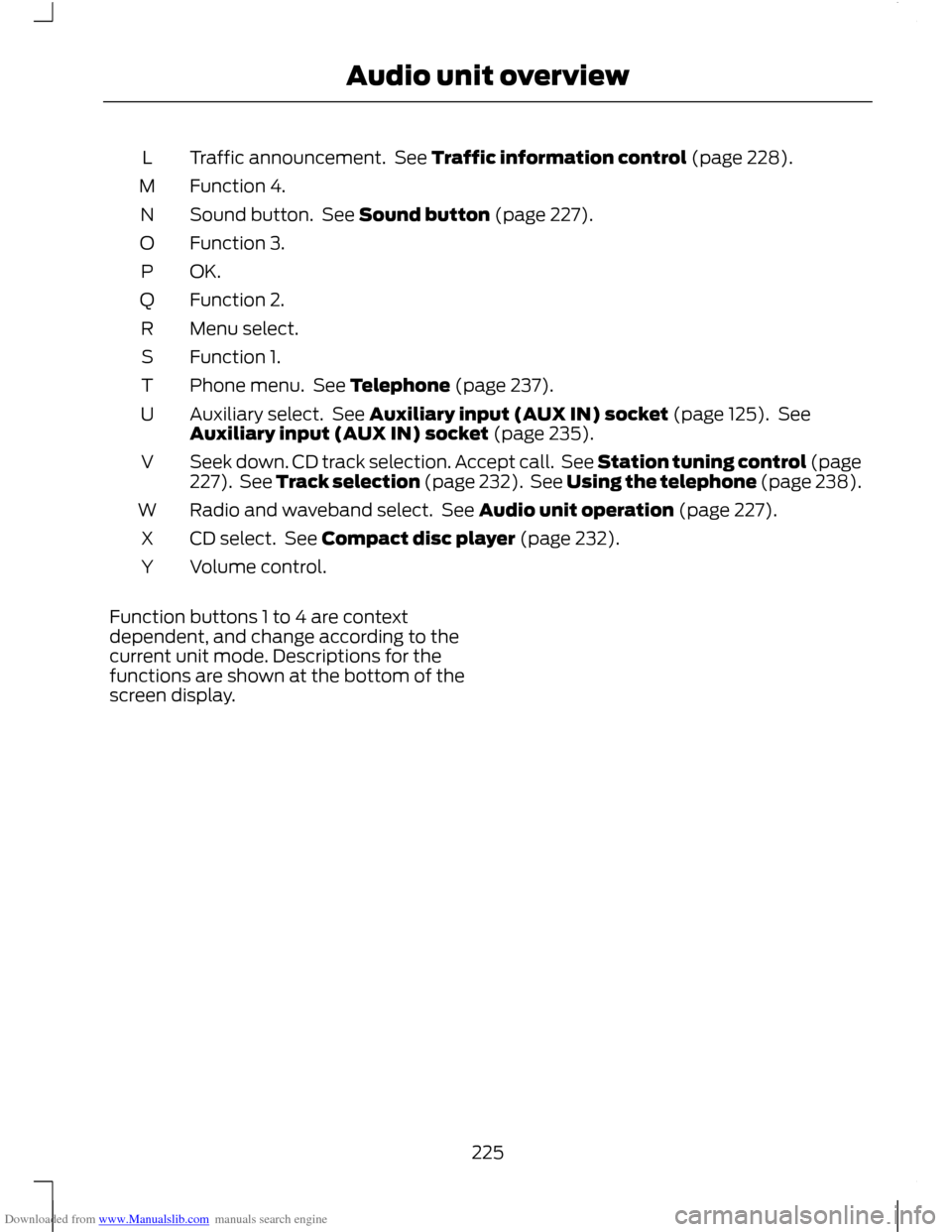
Downloaded from www.Manualslib.com manuals search engine Traffic announcement. See Traffic information control (page 228).
L
Function 4.
M
Sound button. See Sound button (page 227).
N
Function 3.
O
OK.P
Function 2.
Q
Menu select.
R
Function 1.
S
Phone menu. See Telephone (page 237).
T
Auxiliary select. See Auxiliary input (AUX IN) socket (page 125). See
Auxiliary input (AUX IN) socket (page 235).
U
Seek down. CD track selection. Accept call. See Station tuning control (page
227). See Track selection (page 232). See Using the telephone (page 238).
V
Radio and waveband select. See Audio unit operation (page 227).
W
CD select. See Compact disc player (page 232).
X
Volume control.
Y
Function buttons 1 to 4 are context
dependent, and change according to the
current unit mode. Descriptions for the
functions are shown at the bottom of the
screen display.
225
Audio unit overview
Page 239 of 296
Downloaded from www.Manualslib.com manuals search engine GENERAL INFORMATION
CAUTION
Using the system with the engine off
will drain the battery.
This section describes the functions and
features of the Bluetooth mobile phone
hands free system.
The Bluetooth mobile phone part of the
system provides interaction with the audio
or navigation system and your mobile
phone. It allows you to use the audio or
navigation system to make and receive
calls without having to hold your mobile
phone.
Compatibility of phones
CAUTION
As no common agreement exists,
mobile phone manufacturers are able
to implement a variety of profiles in
their Bluetooth devices. Because of this,
an incompatibility can occur between the
phone and hands-free system, which in
some cases may significantly degrade the
system performance. To avoid this
situation, only recommended phones
should be used.
Please visit the website www.ford-
mobile-connectivity.com for full details. BLUETOOTH SETUP
Before you can use your telephone with
your vehicle it must be bonded to the
vehicle telephone system.
Handling of phones
Up to six Bluetooth devices can be bonded
to the vehicle system. Note:
If there is an ongoing call when the
phone in use is selected as the new active
phone, the call is transferred to the vehicle
audio system.
Note: Even if connected to the car system,
your phone can still be used in the usual
way.
Requirements for Bluetooth
connection
The following are required before a
Bluetooth phone connection can be made.
1. The Bluetooth feature must be activated on the phone and on the
audio unit. Make sure the Bluetooth
menu option in the audio unit is set to
ON. For information on phone settings,
refer to your phone user guide.
2. In the Bluetooth menu on your phone, search for Ford Audio and select it.
3. Enter the code number shown on the vehicle display using the phone keypad.
If no code number is shown on the
display, enter the Bluetooth PIN
number 0000 using the phone keypad.
Now enter the Bluetooth PIN number
shown on the vehicle display.
4. If your mobile phone asks you to authorize the automatic connection,
select YES.
Note: A phone call will be disconnected if
the audio unit is switched off. If the ignition
key is turned to the off position the phone
call will remain in progress.
TELEPHONE SETUP
Phonebook
Note: It may be necessary to confirm
phonebook access to the Bluetooth system
via the mobile phone.
237
Telephone
Page 240 of 296
Downloaded from www.Manualslib.com manuals search engine After start up access to the phonebook list
can be delayed for several minutes,
depending upon the size.
Phonebook categories
The category is indicated as an icon:
Phone
Mobile
Home
Office
Making a phone an active phone
Note: If there is an ongoing call when the
phone in use is selected as the new active
phone, the call is transferred to the vehicle
audio system.
When using the system for the first time,
no phone is connected to the system.
After switching on the ignition and the
audio unit, the Bluetooth phone must be
bonded to the system. See Bluetooth
setup (page 237).
After bonding a Bluetooth phone to the
system, this becomes the active phone.
For further information refer to the phone
menu.
Select the phone from the active phone
menu.
Turning the ignition and radio back on
again, the last active phone is picked up by
the system.
Note: In some cases the Bluetooth
connection must also be confirmed on the
phone. Bond another Bluetooth phone
Bond a new Bluetooth phone as described
in the requirements for a Bluetooth
connection.
Phones stored in the system are accessible
by using the phone list on the audio unit.
Note:
A maximum of six devices may be
bonded. If six Bluetooth devices have
already been bonded, one of these has to
be debonded in order to bond a new device.
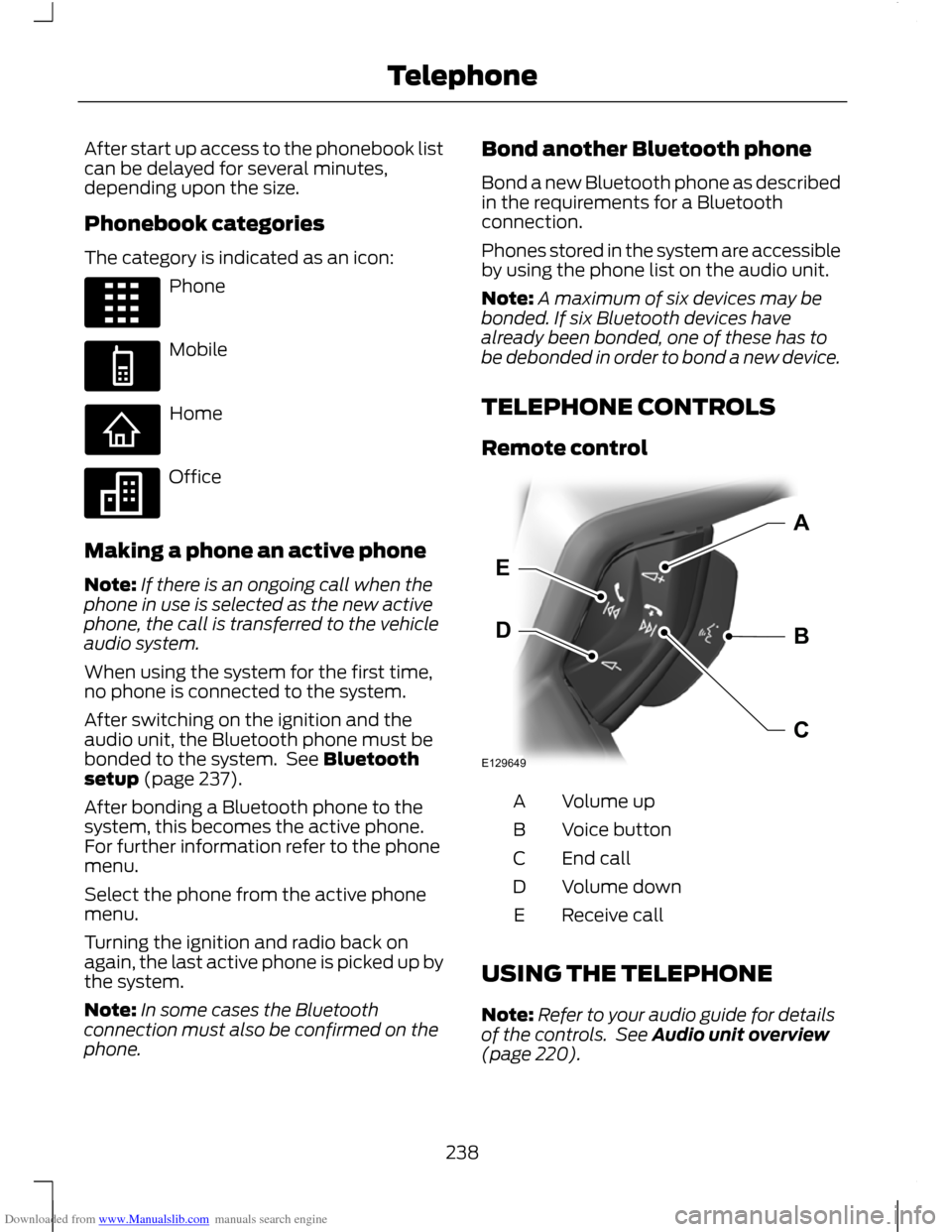
TELEPHONE CONTROLS
Remote control Volume up
A
Voice button
B
End call
C
Volume down
D
Receive call
E
USING THE TELEPHONE
Note: Refer to your audio guide for details
of the controls. See Audio unit overview
(page 220).
238
TelephoneE87990 E87991 E87992 E87993 E129649BDEAC
Page 241 of 296
Downloaded from www.Manualslib.com manuals search engine Note:
You can exit the phone menu by
pressing any source button CD, RADIO or
AUX.
Note: When referred to, the use of the
up/down arrow buttons, seek up and seek
down buttons, and the OK button can be
used on either the steering wheel or the
audio unit.
This chapter describes the phone functions
of the audio unit.
An active phone must be present.
Even if connected to the audio unit, your
phone can still be used in the usual way.
Making a call
Dialling a number using voice control
Phone numbers can be dialled using voice
control. See Telephone commands
(page 249).
Dialling a number using the address
book
1. Press the PHONE button.
2. Press the up/down arrow buttons until
PHONEBOOK is shown.
3. Press the OK button.
Note: You can also use the telephone
keypad to select the first letter of the entry
you are looking for. Press the relevant
number that corresponds to the letter
repeatedly until the required letter is
displayed.
4. Press the up/down arrow buttons to select the desired phone number.
Note: Press and hold the up/down arrow
buttons to search forwards or backwards
within the phonebook.
5. Press the OK button to dial the selected phone number. Dialling a number using the telephone
keypad
1. Press the PHONE button.
2. Dial the number using the telephone
keypad on the audio unit.
3. Press the OK button.
Note: If you enter an incorrect digit whilst
entering a phone number, press function
button 3 to erase the last digit. A long press
will erase the complete string of digits.
Ending a call
Calls can be ended by:
• pressing the seek up button
• pressing the OK button
• pressing function button 4.
Redialling a number
1. Press the PHONE button.
2. Press the up/down arrow buttons until
CALL LISTS is displayed.
3. Press the OK button.
Note: If the active phone does not provide
a call out list, the last outgoing call
number/entry can be redialled.
4. Press the up/down buttons to select the desired call list.
5. Press the OK button.
6. Press the up/down buttons to select the desired phone number.
7. Press the OK button.
Redialling the last dialled number
1. Press the PHONE button.
2. Press the up/down arrow buttons until
REDIAL is displayed.
3. Press the OK button.
239
Telephone
Page 242 of 296
Downloaded from www.Manualslib.com manuals search engine Receiving an incoming call
Accepting an incoming call
Incoming calls can be accepted by pressing
the seek down button, or by pressing the
OK button.
Rejecting an incoming call
Incoming calls can be rejected by:
•
pressing the seek up button, or
• pressing the arrow down button to
highlight REJECT and then pressing
the OK button.
Receiving a second incoming call
Note: The second incoming call function
must be activated in your phone.
If there is an incoming call whilst there is
an ongoing call, a beep will be heard and
you will have the option to end the active
call and to accept the incoming call.
Accepting a second incoming call
Note: The first incoming call will be
disconnected and replaced by the second
incoming call.
Second incoming calls can be accepted
by pressing the seek down button on the
steering wheel or on the audio unit, or by
pressing the OK button on the audio unit.
Rejecting a second incoming call
Second incoming calls can be rejected by:
• pressing the seek up button, or
• pressing the arrow down button to
highlight REJECT and then pressing
the OK button.
Second incoming calls can be rejected by
pressing function button 4. Muting the microphone
Note:
During a call, it is possible to mute
the microphone. Whilst muted, confirmation
will appear in the display.
Press function button 1. Press the button
once again to turn this function off.
Changing the active phone
Note: Phones must be bonded to the
system before they can be made active.
Note: After bonding a phone to the system,
this becomes the active phone.
1. Press the PHONE button.
2. Press the up/down buttons until SELECT PHONE is shown.
3. Press the OK button.
4. Scroll through the different stored phones by using the up/down buttons
to display the bonded phones.
5. Press the OK button to select the phone which is to be the active phone.
Debonding a bonded phone
A bonded phone can be deleted from the
system at any time, unless a phone call is
in progress.
1. Press the PHONE button.
2. Press the up/down buttons until SELECT PHONE is shown.
3. Press the OK button.
4. Press the up/down buttons to highlight
the required phone.
5. Press function button 1.
240
Telephone
Page 243 of 296
Downloaded from www.Manualslib.com manuals search engine PRINCIPLE OF OPERATION
CAUTION
Using the system with the engine off
will drain the battery.
Voice recognition enables operation of the
system without the need to divert your
attention from the road ahead in order to
change settings, or receive feedback from
the system.
Whenever you issue one of the defined
commands with the system active, the
voice recognition system converts your
command into a control signal for the
system. Your inputs take the form of
dialogues or commands. You are guided
through these dialogues by
announcements or questions.
Please familiarise yourself with the
functions of the system before using voice
recognition.
Supported commands
The voice control system allows you to
control the following vehicle functions:
•
Bluetooth phone
• radio
• CD Player
• external device (USB)
• external device (iPod)
• automatic climate control
System response
As you work through a voice session the
system will prompt you with a beep tone
each time the system is ready to proceed.
Do not try to give any commands until the
beep tone has been heard. The voice
control system will repeat each spoken
command back to you. If you are not sure how to continue say
"HELP" for assistance or "CANCEL" if you
do not wish to continue.
The "HELP" function provides only a
subset of the available voice commands.
Detailed explanations of all possible voice
commands can be found on the following
pages.
Voice commands
All voice commands should be given using
a natural speaking voice, as if speaking to
a passenger or on the phone. Your voice
level should be dependant on the
surrounding noise level inside or outside
the vehicle but do not shout.
USING VOICE CONTROL
System operation
The order and content of the voice controls
are given in the following lists. The tables
show the sequence of user voice
commands and system responses for each
available function.
<> indicates a number or stored name tag
to be inserted by the user.
Short cuts
There are a number of voice command
short cuts available, which allow you to
control some vehicle features without
having to follow the complete command
menu. These are:
•
phone: "MOBILE NAME", "DIAL
NUMBER", "DIAL NAME", and "REDIAL"
• automatic climate control:
"TEMPERATURE", "AUTO MODE",
"DEFROSTING/DEMISTING ON" and
"DEFROSTING/DEMISTING OFF"
• radio: "TUNE NAME"
• external device (USB): "TRACK"
• external device (iPod): "TRACK"
241
Voice control
Page 244 of 296
Downloaded from www.Manualslib.com manuals search engine Start communicating with the system
Before you can start talking to the system
you first have to press the VOICE button
for each operation and wait until the
system answers with a beep. See Voice
Control (page 51).
Press the button again to cancel the voice
session.
Name tag
The name tag functionality can support
the phone, audio and navigation features
by using the "STORE NAME" function. You
can assign name tags to items such as
favourite radio stations and personal
phone contacts. See Audio unit
commands (page 242). See Telephone
commands (page 249).
•
Store up to 20 name tags per function.
• The average recording time for each
name tag is approximately 2-3
seconds.
AUDIO UNIT COMMANDS
CD Player
You can control playback directly by voice
control.
Overview
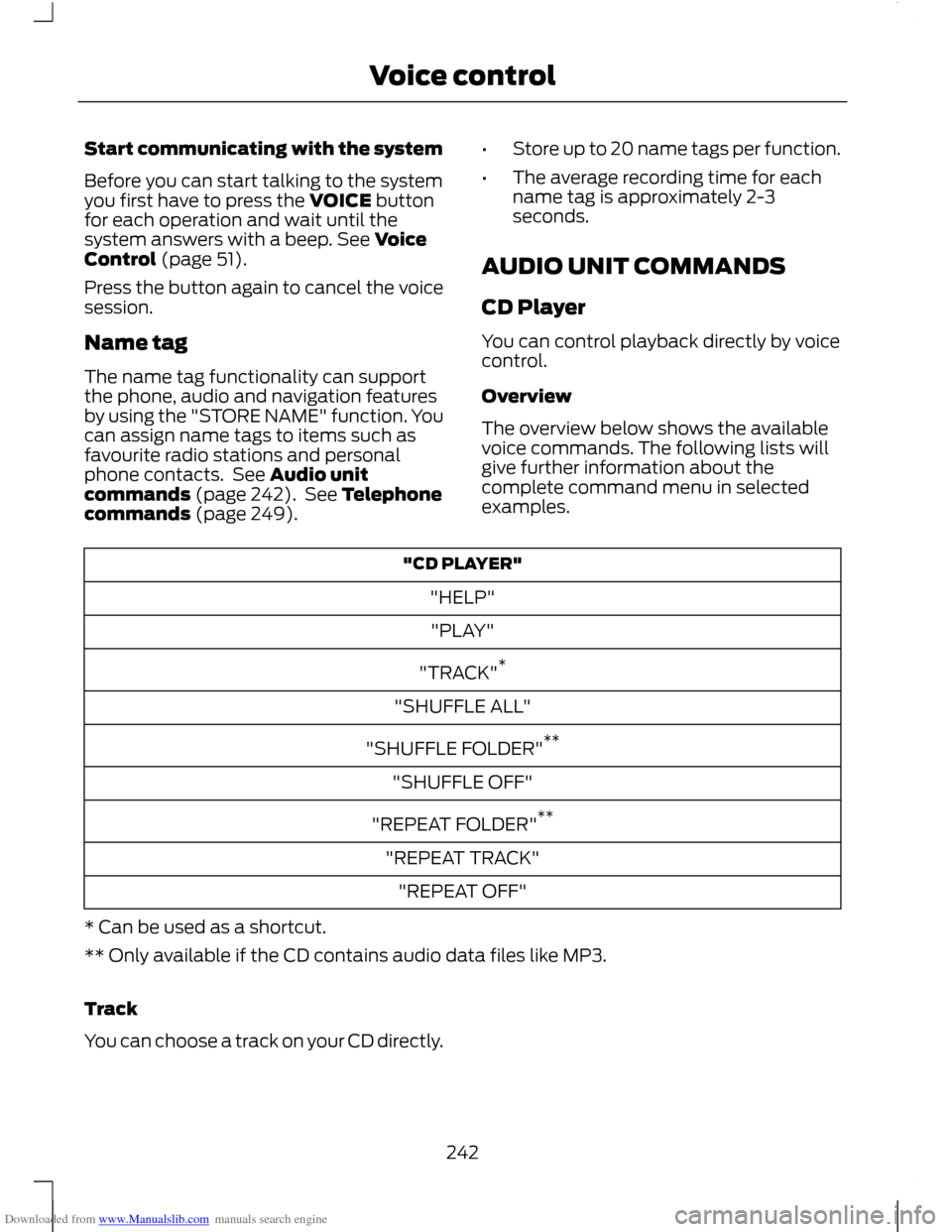
The overview below shows the available
voice commands. The following lists will
give further information about the
complete command menu in selected
examples. "CD PLAYER"
"HELP""PLAY"
"TRACK" *
"SHUFFLE ALL"
"SHUFFLE FOLDER" **
"SHUFFLE OFF"
"REPEAT FOLDER" **
"REPEAT TRACK" "REPEAT OFF"
* Can be used as a shortcut.
** Only available if the CD contains audio data files like MP3.
Track
You can choose a track on your CD directly.
242
Voice control
Page 251 of 296
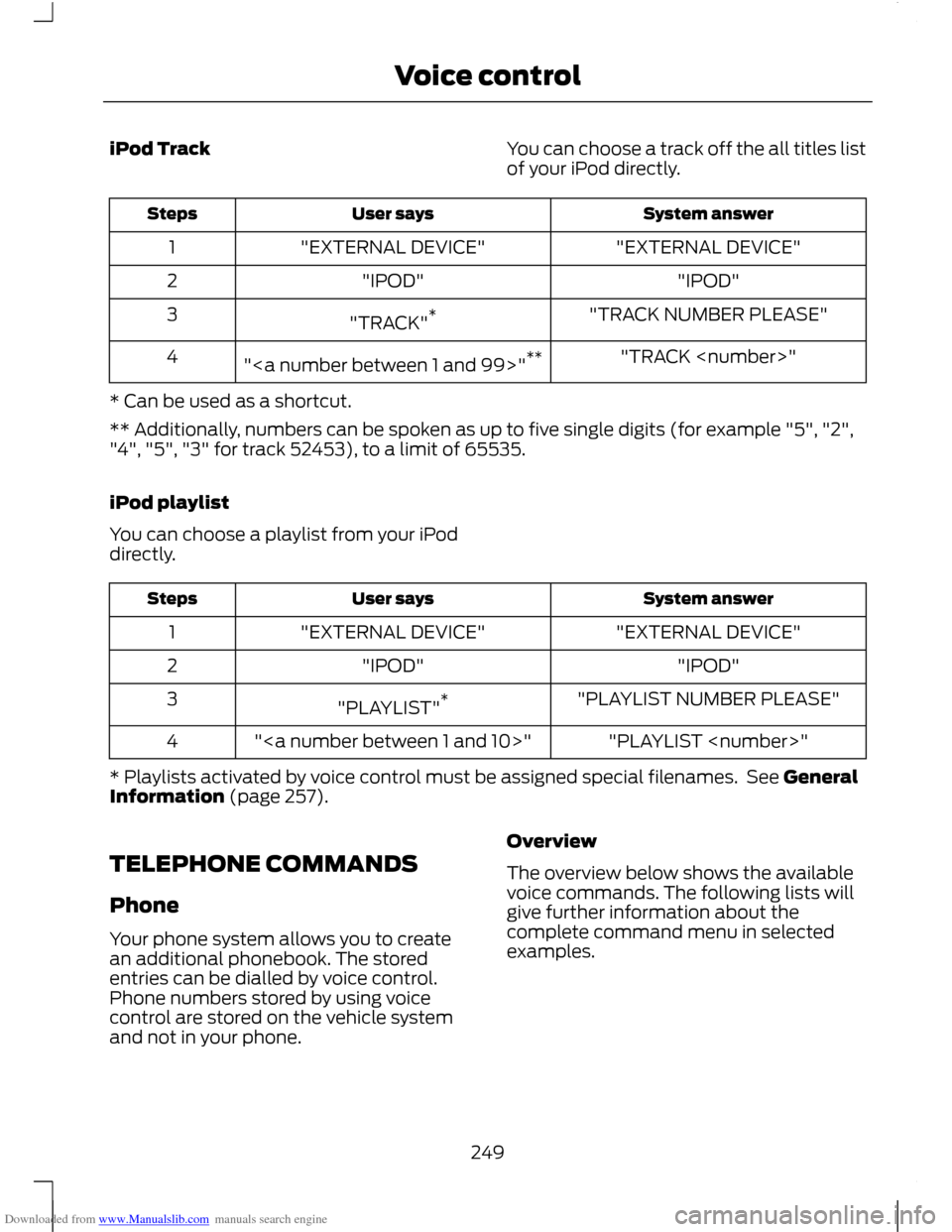
Downloaded from www.Manualslib.com manuals search engine iPod Track
You can choose a track off the all titles list
of your iPod directly. System answer
User says
Steps
"EXTERNAL DEVICE"
"EXTERNAL DEVICE"
1
"IPOD"
"IPOD"
2
"TRACK NUMBER PLEASE"
"TRACK" *
3
"TRACK
"" **
4
* Can be used as a shortcut.
** Additionally, numbers can be spoken as up to five single digits (for example "5", "2",
"4", "5", "3" for track 52453), to a limit of 65535.
iPod playlist
You can choose a playlist from your iPod
directly. System answer
User says
Steps
"EXTERNAL DEVICE"
"EXTERNAL DEVICE"
1
"IPOD"
"IPOD"
2
"PLAYLIST NUMBER PLEASE"
"PLAYLIST" *
3
"PLAYLIST
""
4
* Playlists activated by voice control must be assigned special filenames. See General
Information (page 257).
TELEPHONE COMMANDS
Phone
Your phone system allows you to create
an additional phonebook. The stored
entries can be dialled by voice control.
Phone numbers stored by using voice
control are stored on the vehicle system
and not in your phone. Overview
The overview below shows the available
voice commands. The following lists will
give further information about the
complete command menu in selected
examples.
249
Voice control
Page 252 of 296
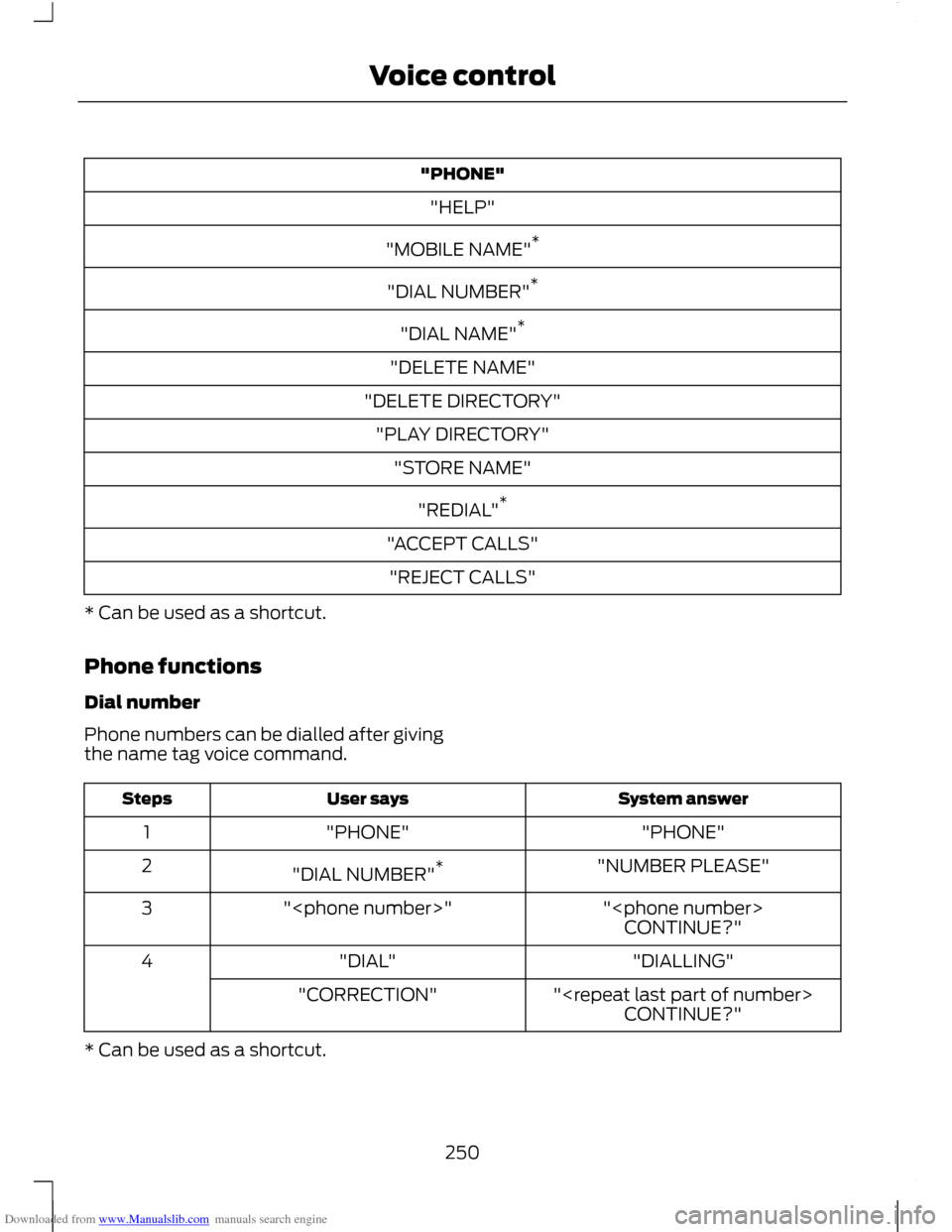
Downloaded from www.Manualslib.com manuals search engine "PHONE"
"HELP"
"MOBILE NAME" *
"DIAL NUMBER" *
"DIAL NAME" *
"DELETE NAME"
"DELETE DIRECTORY" "PLAY DIRECTORY" "STORE NAME"
"REDIAL" *
"ACCEPT CALLS" "REJECT CALLS"
* Can be used as a shortcut.
Phone functions
Dial number
Phone numbers can be dialled after giving
the name tag voice command. System answer
User says
Steps
"PHONE"
"PHONE"
1
"NUMBER PLEASE"
"DIAL NUMBER" *
2
"
"
3
CONTINUE?"
"DIALLING"
"DIAL"
4
"
"CORRECTION"
CONTINUE?"
* Can be used as a shortcut.
250
Voice control