trailer FORD C MAX 2011 2.G User Guide
[x] Cancel search | Manufacturer: FORD, Model Year: 2011, Model line: C MAX, Model: FORD C MAX 2011 2.GPages: 296, PDF Size: 7.87 MB
Page 159 of 296
Downloaded from www.Manualslib.com manuals search engine Green - 0.6 - 0.9 metre (24 - 35
inches)
D
Amber - centre line of the
projected vehicle path
E
Note: The green line is extended from 0.9
metre (35 inches) up to a distance of 3.2
metres (126 inches).
Note: When reversing with a trailer, the lines
on the screen are not shown. The camera
will show the vehicle direction and not the
trailer.
Deactivating the rear view camera
Note: Disengage reverse gear. The display
will stay on for a short period before
switching off.
Note: The system will automatically switch
off once the vehicle speed has reached
approximately 15 km/h (9 mph).
Press the parking aid switch in the
instrument panel. For item location: See
At a Glance (page 10).
Vehicles with parking aid
The display will additionally show a
coloured distance bar. This guide indicates
the distance from the rear bumper to the
detected obstacle.
These are colour coded as follows:
• Green - 0.6 to 1.8 metres (24 - 71
inches).
• Amber - 0.3 to 0.6 metre (12 - 24
inches).
• Red - 0.3 metre (12 inches) or less.
157
Rear view camera
Page 170 of 296
Downloaded from www.Manualslib.com manuals search engine TOWING A TRAILER
WARNINGS
Do not exceed 100 km/h (62 mph).
The rear tyre pressures must be
increased by 0.2 bar (3 psi) above
specification. See Technical
Specifications (page 209). Do not exceed the maximum gross
train weight stated on the vehicle
identification plate. See Vehicle
identification (page 214). CAUTION
Do not exceed the maximum
permissible nose weight, i.e. vertical
weight on the tow ball, of 75
kilogrammes (165 pounds). Note:
Not all vehicles are suitable or
approved to have tow bars fitted. Check
with your dealer first.
Place loads as low and central to the
axle(s) of the trailer as possible. If you are
towing with an unladen vehicle, the load
in the trailer should be placed toward the
nose, within the maximum nose load, as
this gives the best stability.
The stability of the vehicle to trailer
combination is very much dependant on
the quality of the trailer.
In high altitude regions above 1000 metres
(3281 feet), the stipulated maximum
permitted gross train weight must be
reduced by 10% for every additional 1000
metres (3281 feet).
Steep gradients WARNING
The overrun brake on a trailer is not
controlled by ABS. Change down a gear before you reach a
steep downhill gradient.
RETRACTABLE TOW BALL
CAUTION
Only move the tow ball arm with your
hand. Never use your foot or auxiliary
tools as damage to the mechanism
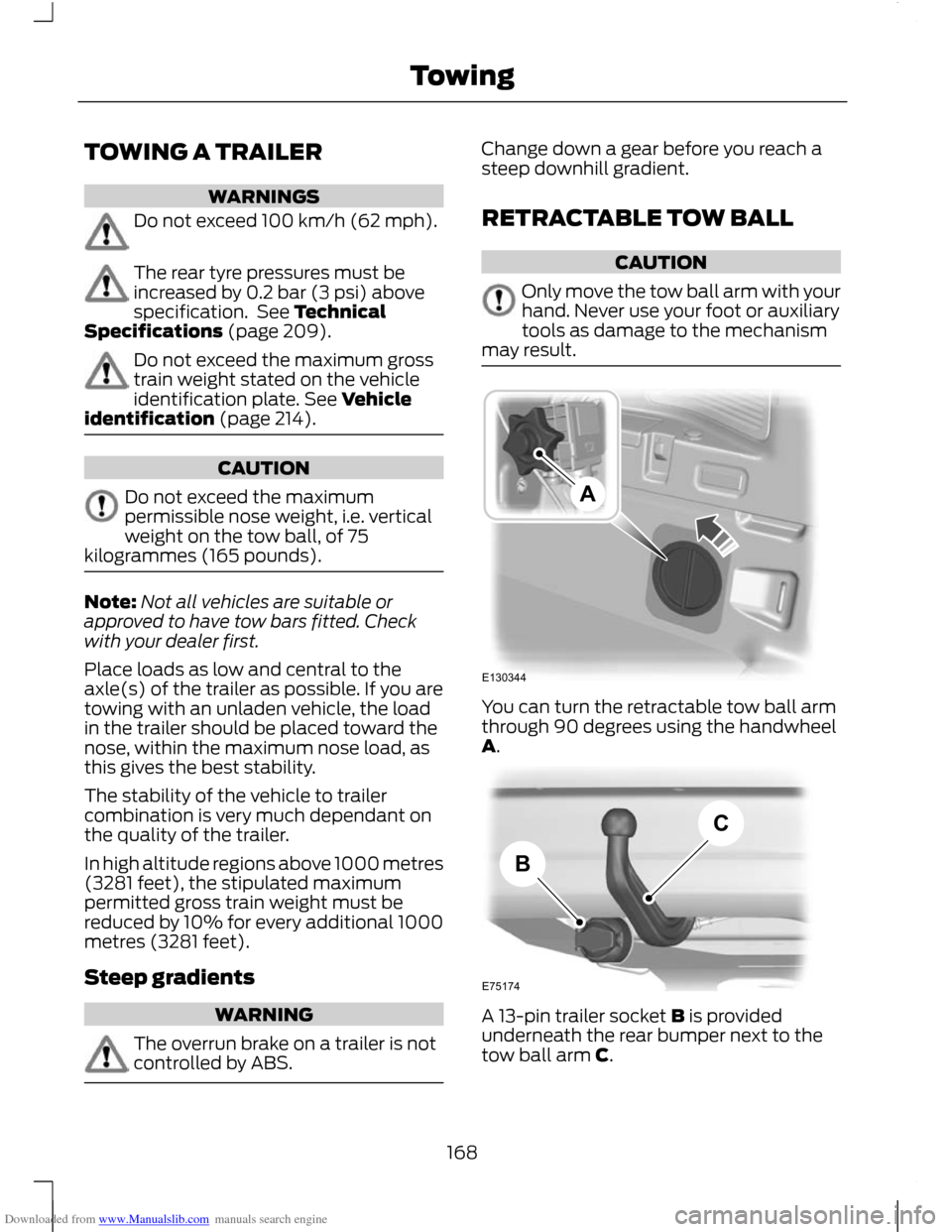
may result. You can turn the retractable tow ball arm
through 90 degrees using the handwheel
A.
A 13-pin trailer socket B is provided
underneath the rear bumper next to the
tow ball arm C.
168
TowingE130344A E75174BC
Page 171 of 296
Downloaded from www.Manualslib.com manuals search engine Swivelling the tow ball in
WARNINGS
Keep your hands away from the
handwheel as it rotates during the
locking process.
You will hear a warning tone when
the tow ball arm is not in one of the
locked positions. If you do not hear
the tone when moving the tow ball arm,
do not use the tow bar and have it checked
by a properly trained technician. CAUTION
Before retracting the ball neck into its
stowage position always unhitch the
trailer or dismantle load carriers and
their attachments. Dismantle attachments
for tracking stabilisation. Remove the plug
for the trailer power supply and the
adapter from the socket. Failure to do so
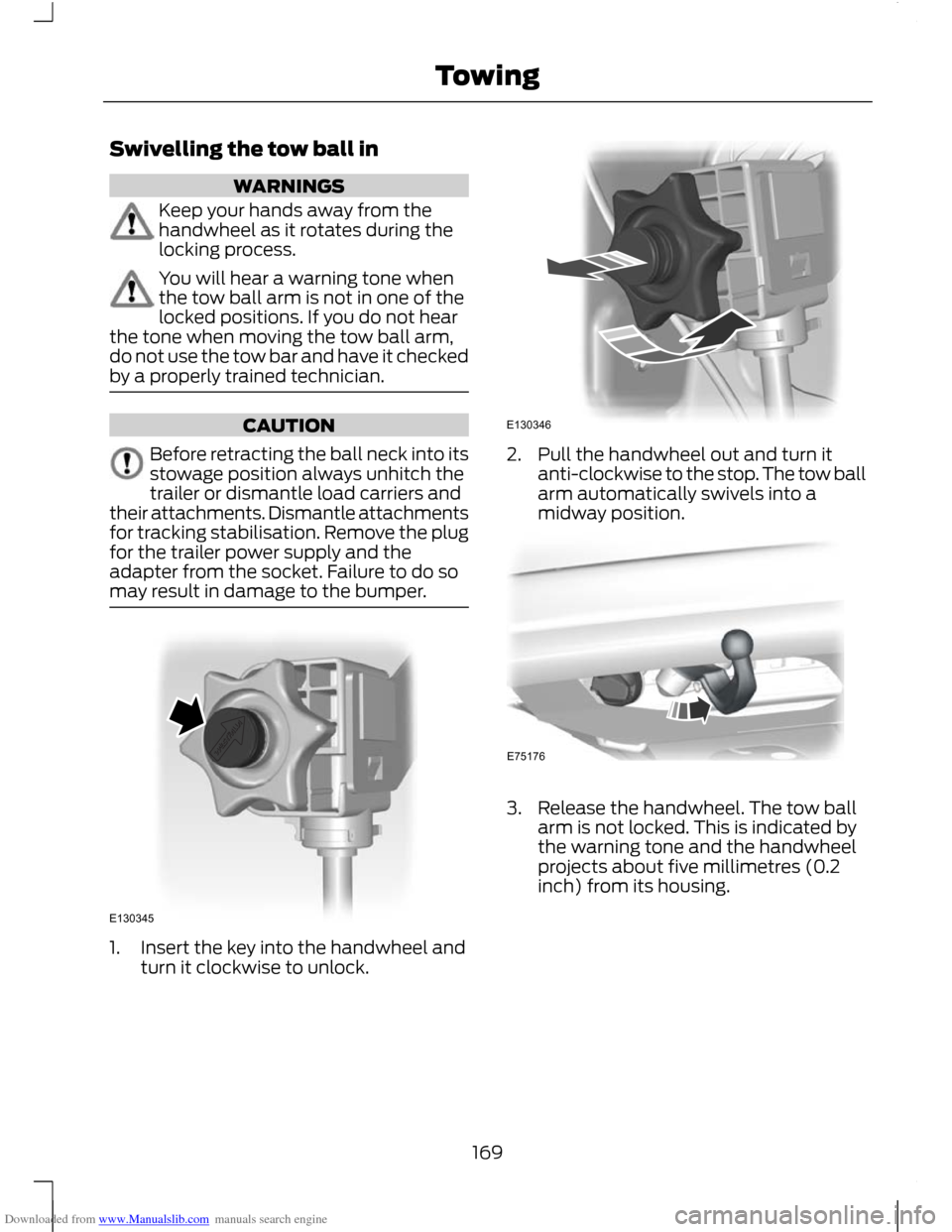
may result in damage to the bumper. 1. Insert the key into the handwheel and
turn it clockwise to unlock. 2. Pull the handwheel out and turn it
anti-clockwise to the stop. The tow ball
arm automatically swivels into a
midway position. 3. Release the handwheel. The tow ball
arm is not locked. This is indicated by
the warning tone and the handwheel
projects about five millimetres (0.2
inch) from its housing.
169
TowingE130345 E130346 E75176
Page 173 of 296
Downloaded from www.Manualslib.com manuals search engine Driving with a trailer
WARNING
If any of the conditions below cannot
be met, do not use the tow bar and
have it checked by a properly trained
technician. Before starting your journey, make sure
that the tow ball arm is properly locked.
Check that:
•
there is no warning tone when the
locking procedure has been completed
• the handwheel is in its housing and that
there is no gap
• you have locked the handwheel
(anti-clockwise) and removed the key
• the tow ball arm is locked. It must not
move when jerked.
Maintenance CAUTIONS
The towing hitch and control unit are
maintenance-free. Do not grease or
oil them.
Only the manufacturer should carry
out repairs or dismantle the towing
hitch.
If you use a high pressure spray to
wash your vehicle, do not direct the
spray onto the swivel joint of the tow
ball arm. 171
Towing
Page 183 of 296
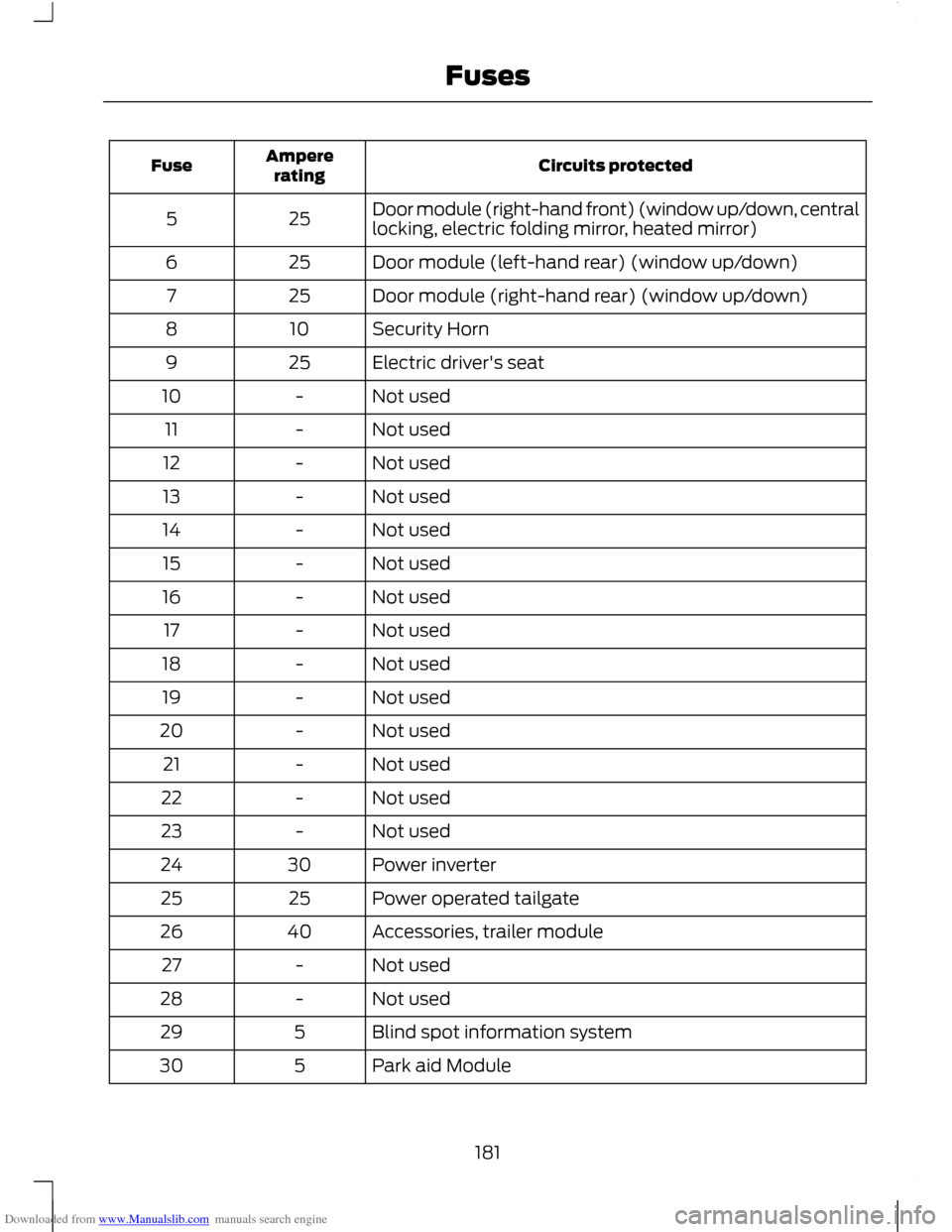
Downloaded from www.Manualslib.com manuals search engine Circuits protected
Ampere
rating
Fuse
Door module (right-hand front) (window up/down, central
locking, electric folding mirror, heated mirror)
25
5
Door module (left-hand rear) (window up/down)
25
6
Door module (right-hand rear) (window up/down)
25
7
Security Horn
10
8
Electric driver's seat
25
9
Not used
-
10
Not used
-
11
Not used
-
12
Not used
-
13
Not used
-
14
Not used
-
15
Not used
-
16
Not used
-
17
Not used
-
18
Not used
-
19
Not used
-
20
Not used
-
21
Not used
-
22
Not used
-
23
Power inverter
30
24
Power operated tailgate
25
25
Accessories, trailer module
40
26
Not used
-
27
Not used
-
28
Blind spot information system
5
29
Park aid Module
5
30
181
Fuses
Page 206 of 296
Downloaded from www.Manualslib.com manuals search engine WARNING
Have the wheel nuts checked for
tightness and the tyre pressure
checked as soon as possible.
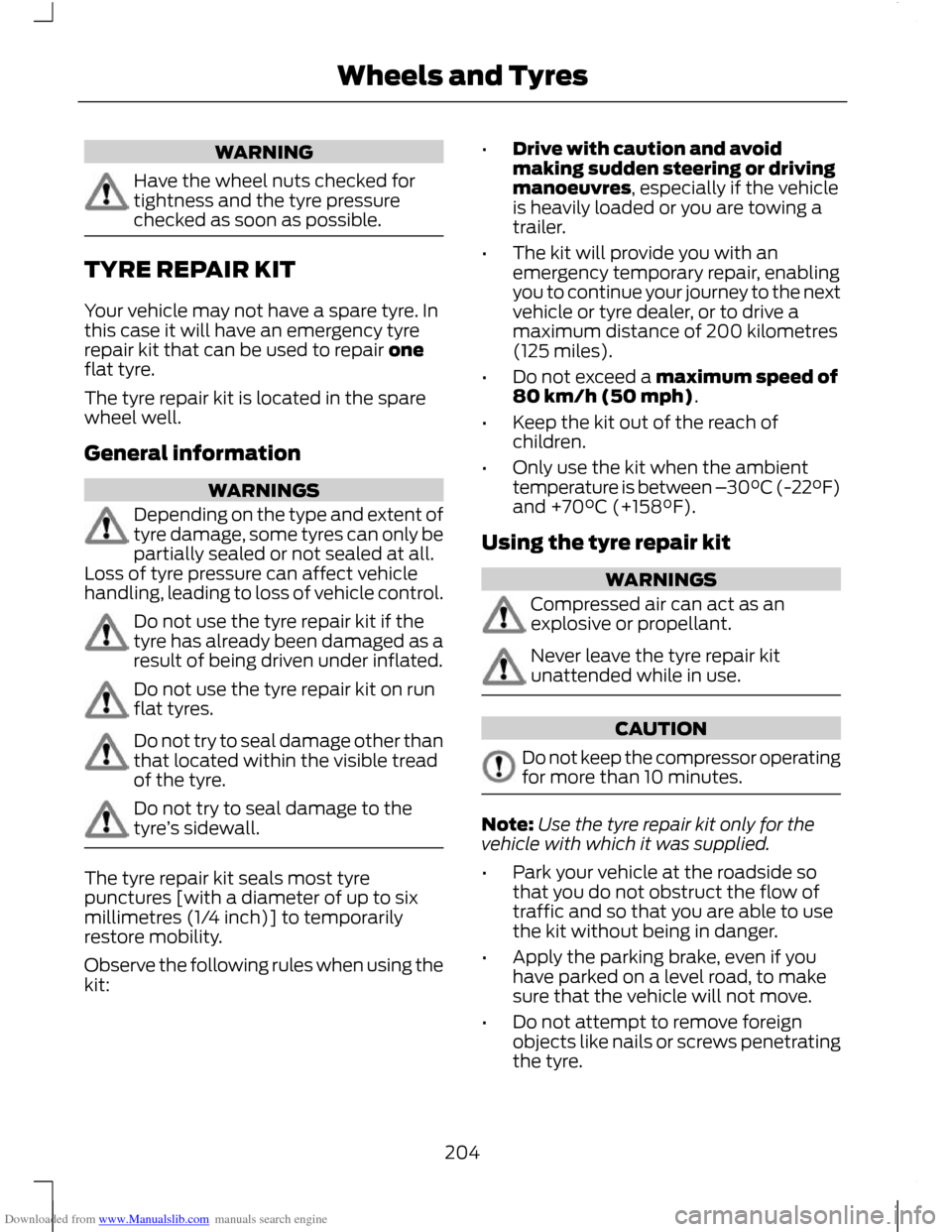
TYRE REPAIR KIT
Your vehicle may not have a spare tyre. In
this case it will have an emergency tyre
repair kit that can be used to repair one
flat tyre.
The tyre repair kit is located in the spare
wheel well.
General information
WARNINGS
Depending on the type and extent of
tyre damage, some tyres can only be
partially sealed or not sealed at all.
Loss of tyre pressure can affect vehicle
handling, leading to loss of vehicle control. Do not use the tyre repair kit if the
tyre has already been damaged as a
result of being driven under inflated.
Do not use the tyre repair kit on run
flat tyres.
Do not try to seal damage other than
that located within the visible tread
of the tyre.
Do not try to seal damage to the
tyre
’s sidewall. The tyre repair kit seals most tyre
punctures [with a diameter of up to six
millimetres (1/4 inch)] to temporarily
restore mobility.
Observe the following rules when using the
kit: •
Drive with caution and avoid
making sudden steering or driving
manoeuvres, especially if the vehicle
is heavily loaded or you are towing a
trailer.
• The kit will provide you with an
emergency temporary repair, enabling
you to continue your journey to the next
vehicle or tyre dealer, or to drive a
maximum distance of 200 kilometres
(125 miles).
• Do not exceed a maximum speed of
80 km/h (50 mph) .
• Keep the kit out of the reach of
children.
• Only use the kit when the ambient
temperature is between – 30°C (-22°F)
and +70°C (+158°F).
Using the tyre repair kit WARNINGS
Compressed air can act as an
explosive or propellant.
Never leave the tyre repair kit
unattended while in use.
CAUTION
Do not keep the compressor operating
for more than 10 minutes.
Note:
Use the tyre repair kit only for the
vehicle with which it was supplied.
• Park your vehicle at the roadside so
that you do not obstruct the flow of
traffic and so that you are able to use
the kit without being in danger.
• Apply the parking brake, even if you
have parked on a level road, to make
sure that the vehicle will not move.
• Do not attempt to remove foreign
objects like nails or screws penetrating
the tyre.
204
Wheels and Tyres
Page 211 of 296
Downloaded from www.Manualslib.com manuals search engine Apart from a too low tyre pressure or a
damaged tyre, the following situations can
affect the rolling circumference:
•
Vehicle load is uneven.
• When using a trailer or travelling up and
down an incline.
• Using snow chains.
• Driving on soft surfaces such as snow
or mud.
Note: The system will still function
correctly, but there may be an increased
detection time. System reset
Note:
Do not reset the system when the
vehicle is moving.
Note: You should reset the system
following any adjustment to the tyre
pressures or any changing of tyres.
Note: Turn the ignition on.
1. Using the information display control, navigate to Settings > Driver assist
> Deflation detection
2. Press and hold the OK button until confirmation appears.
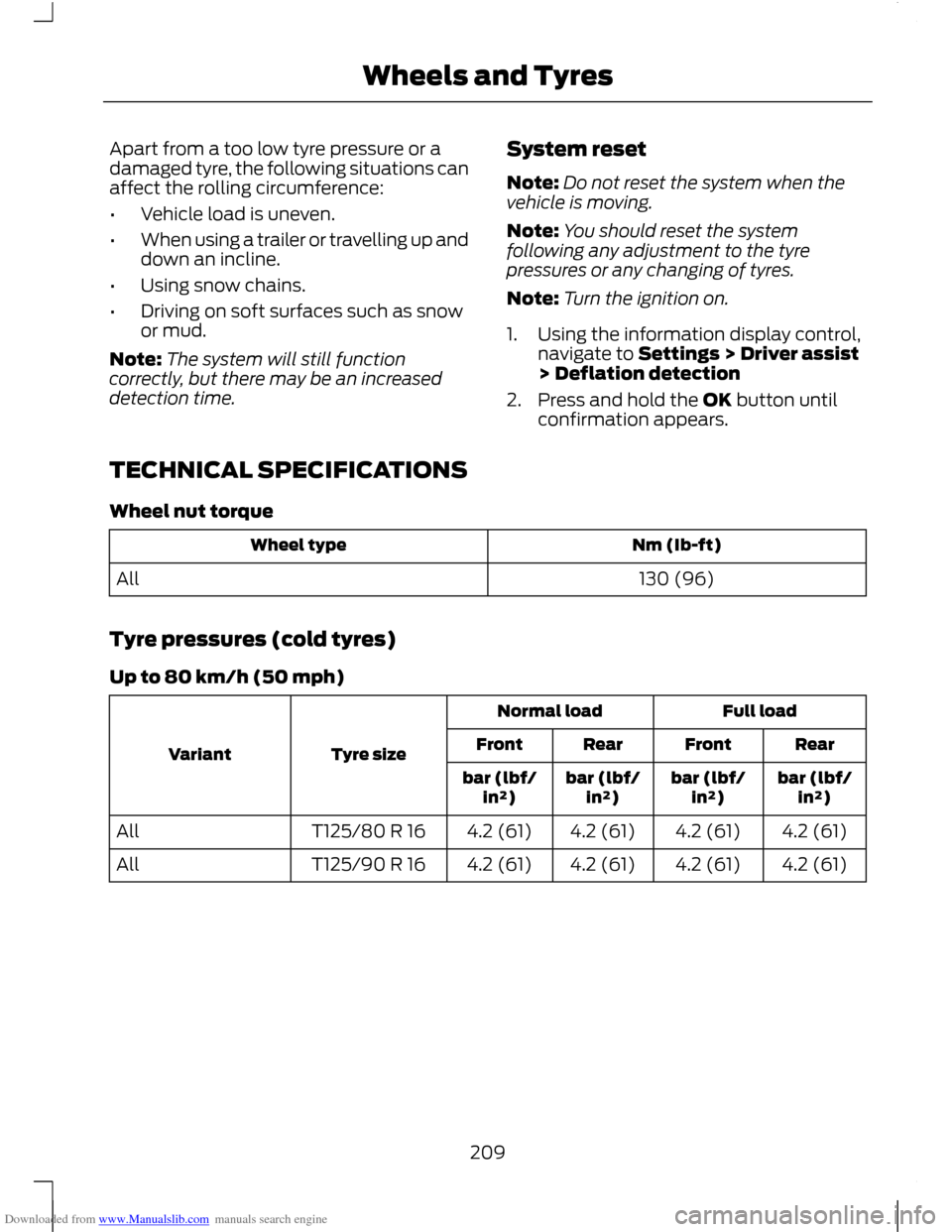
TECHNICAL SPECIFICATIONS
Wheel nut torque Nm (Ib-ft)
Wheel type
130 (96)
All
Tyre pressures (cold tyres)
Up to 80 km/h (50 mph) Full load
Normal load
Tyre size
Variant Rear
Front
Rear
Front
bar (lbf/in²)
bar (lbf/
in²)
bar (lbf/
in²)
bar (lbf/
in²)
4.2 (61)
4.2 (61)
4.2 (61)
4.2 (61)
T125/80 R 16
All
4.2 (61)
4.2 (61)
4.2 (61)
4.2 (61)
T125/90 R 16
All
209
Wheels and Tyres
Page 277 of 296
Downloaded from www.Manualslib.com manuals search engine ROUTE OPTIONS MENU
You can set a number of options which
alter the way a route is planned.
Using the up, down, left and right arrow
buttons, you can select from the list which
road features are to be avoided or included
in the route by turning the feature on or off.
Route
Eco
This option will prioritise the most
economical route to the destination.
Fast
This option will prioritise the fastest route
to the destination.
Short
This option will prioritise the shortest route
to the destination..
Always ask
Use this feature to make sure that you are
always given the choice of route type
selection for your journey.
Driver
Leisurely
This option will prioritise the route for a
leisurely driver to the destination.
Normal
This option will prioritise the route for a
normal driver to the destination.
Fast
This option will prioritise the route for a
fast driver to the destination.
Eco settings
Trailer
Use this feature to change the economy
settings of your journey relating to whether
or not you are towing a trailer and if so the
size of trailer being towed.
Roof box
Use this feature to change the economy
settings of your journey relating to the use
of a roof box.
Dynamic
When switched on, and if the unit is
receiving a valid traffic message channel
(TMC) signal, the route will be
automatically updated to take into
account real time traffic incidents or
congestion.
Note:
This feature can be useful in avoiding
delays or hold ups on journeys.
Motorway
When switched on the system will look for
motorways on your route and
automatically update your route distance
and timings.
Note: This feature can be useful in avoiding
delays or hold ups on journeys.
Ferry/motorail
When switched on the system will look for
ferry crossings and motorail facilities on
your route and automatically update your
route distance and timings.
Toll
When switched on the system will look for
toll roads on your route and automatically
update your route distance and timings.
275
Navigation system
Page 291 of 296
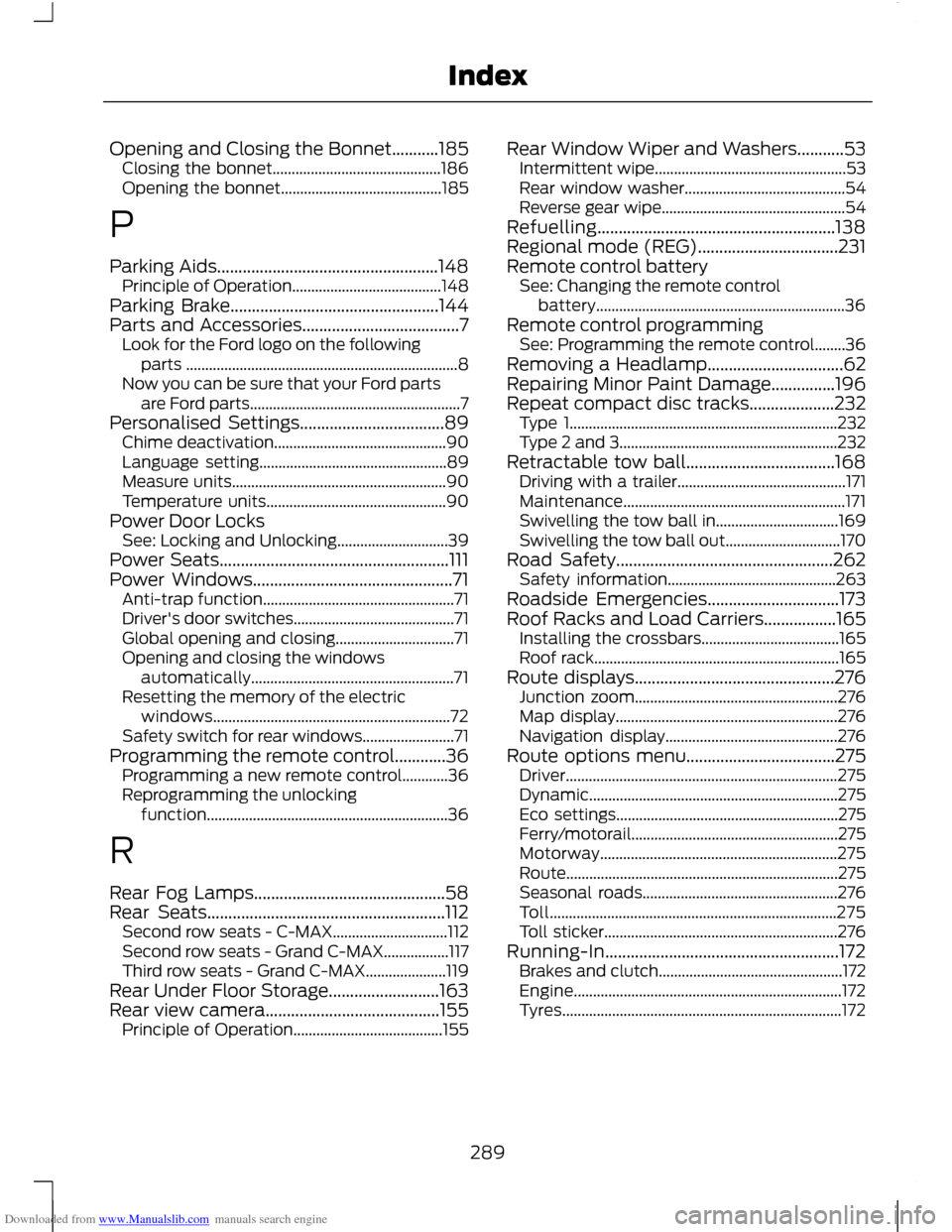
Downloaded from www.Manualslib.com manuals search engine Opening and Closing the Bonnet...........185
Closing the bonnet............................................ 186
Opening the bonnet.......................................... 185
P
Parking Aids....................................................148 Principle of Operation....................................... 148
Parking Brake.................................................144
Parts and Accessories.....................................7 Look for the Ford logo on the following
parts ....................................................................... 8
Now you can be sure that your Ford parts are Ford parts....................................................... 7
Personalised Settings..................................89 Chime deactivation............................................. 90
Language setting................................................. 89
Measure units........................................................ 90
Temperature units............................................... 90
Power Door Locks See: Locking and Unlocking............................. 39
Power Seats......................................................111
Power Windows...............................................71 Anti-trap function.................................................. 71
Driver's door switches.......................................... 71
Global opening and closing............................... 71
Opening and closing the windows automatically..................................................... 71
Resetting the memory of the electric windows.............................................................. 72
Safety switch for rear windows........................ 71
Programming the remote control............36 Programming a new remote control............36
Reprogramming the unlocking
function............................................................... 36
R
Rear Fog Lamps.............................................58
Rear Seats........................................................112 Second row seats - C-MAX.............................. 112
Second row seats - Grand C-MAX.................117
Third row seats - Grand C-MAX..................... 119
Rear Under Floor Storage..........................163
Rear view camera.........................................155 Principle of Operation....................................... 155Rear Window Wiper and Washers...........53
Intermittent wipe.................................................. 53
Rear window washer.......................................... 54
Reverse gear wipe................................................ 54
Refuelling........................................................138
Regional mode (REG).................................231
Remote control battery See: Changing the remote control
battery................................................................. 36
Remote control programming See: Programming the remote control........36
Removing a Headlamp................................62
Repairing Minor Paint Damage...............196
Repeat compact disc tracks....................232 Type 1...................................................................... 232
Type 2 and 3......................................................... 232
Retractable tow ball...................................168 Driving with a trailer............................................ 171
Maintenance.......................................................... 171
Swivelling the tow ball in................................ 169
Swivelling the tow ball out.............................. 170
Road Safety...................................................262 Safety information............................................ 263
Roadside Emergencies...............................173
Roof Racks and Load Carriers.................165 Installing the crossbars.................................... 165
Roof rack................................................................ 165
Route displays...............................................276 Junction zoom..................................................... 276
Map display.......................................................... 276
Navigation display............................................. 276
Route options menu...................................275 Driver....................................................................... 275
Dynamic................................................................. 275
Eco settings.......................................................... 275
Ferry/motorail...................................................... 275
Motorway.............................................................. 275
Route....................................................................... 275
Seasonal roads................................................... 276
Toll........................................................................\
... 275
Toll sticker............................................................. 276
Running-In.......................................................172 Brakes and clutch................................................ 172
Engine...................................................................... 172
Tyres........................................................................\
. 172
289
Index
Page 292 of 296
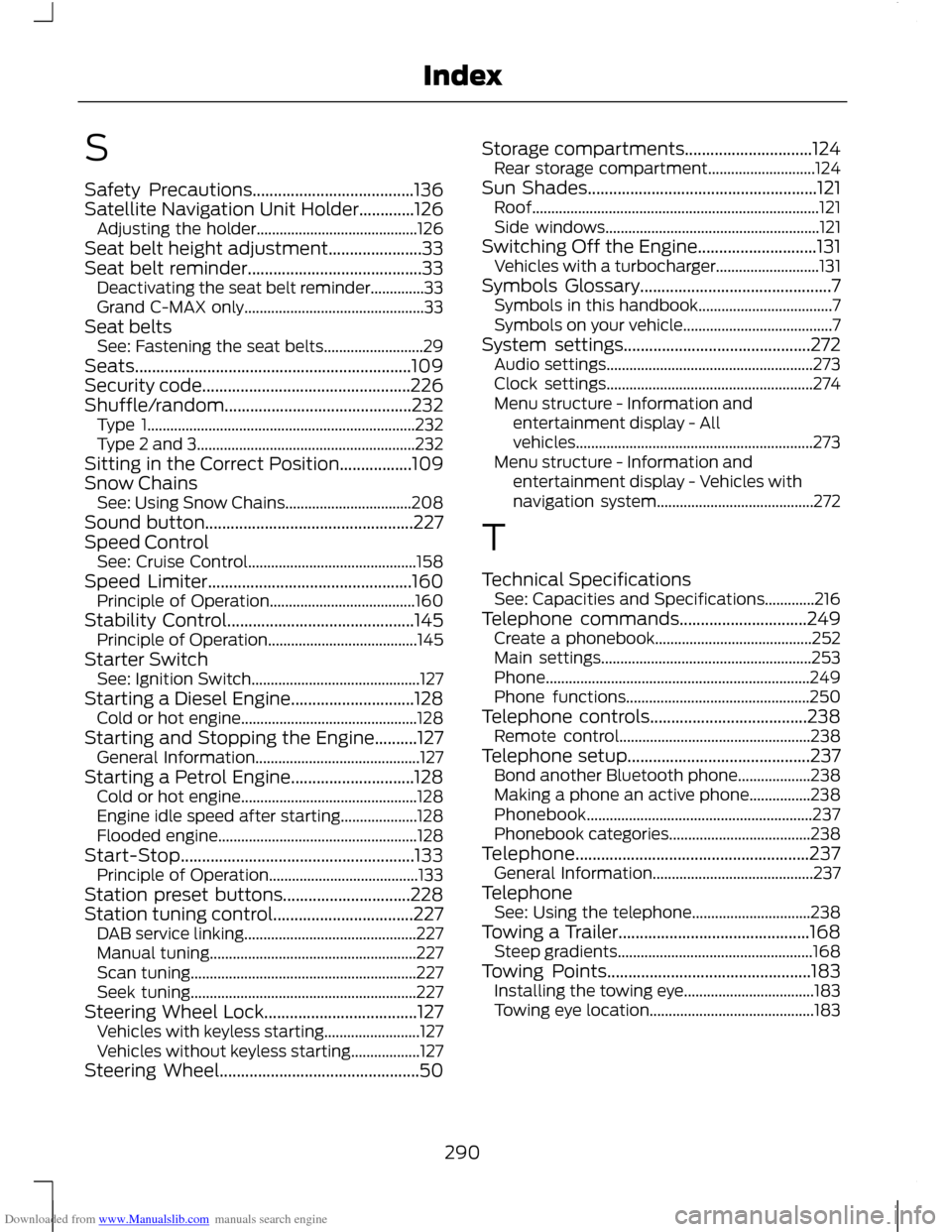
Downloaded from www.Manualslib.com manuals search engine S
Safety Precautions......................................136
Satellite Navigation Unit Holder.............126
Adjusting the holder.......................................... 126
Seat belt height adjustment......................33
Seat belt reminder.........................................33 Deactivating the seat belt reminder..............33
Grand C-MAX only............................................... 33
Seat belts See: Fastening the seat belts.......................... 29
Seats.................................................................109
Security code.................................................226
Shuffle/random............................................232 Type 1...................................................................... 232
Type 2 and 3......................................................... 232
Sitting in the Correct Position.................109
Snow Chains See: Using Snow Chains................................. 208
Sound button.................................................227
Speed Control See: Cruise Control............................................ 158
Speed Limiter................................................160 Principle of Operation...................................... 160
Stability Control............................................145 Principle of Operation....................................... 145
Starter Switch See: Ignition Switch............................................ 127
Starting a Diesel Engine.............................128 Cold or hot engine.............................................. 128
Starting and Stopping the Engine..........127 General Information........................................... 127
Starting a Petrol Engine.............................128 Cold or hot engine.............................................. 128
Engine idle speed after starting.................... 128
Flooded engine.................................................... 128
Start-Stop.......................................................133 Principle of Operation....................................... 133
Station preset buttons..............................228
Station tuning control.................................227 DAB service linking............................................. 227
Manual tuning...................................................... 227
Scan tuning........................................................... 227
Seek tuning........................................................... 227
Steering Wheel Lock....................................127 Vehicles with keyless starting......................... 127
Vehicles without keyless starting.................. 127
Steering Wheel...............................................50 Storage compartments..............................124
Rear storage compartment............................ 124
Sun Shades......................................................121 Roof........................................................................\
... 121
Side windows........................................................ 121
Switching Off the Engine............................131 Vehicles with a turbocharger........................... 131
Symbols Glossary.............................................7 Symbols in this handbook................................... 7
Symbols on your vehicle....................................... 7
System settings............................................272 Audio settings...................................................... 273
Clock settings...................................................... 274
Menu structure - Information and entertainment display - All
vehicles..............................................................273
Menu structure - Information and entertainment display - Vehicles with
navigation system......................................... 272
T
Technical Specifications See: Capacities and Specifications.............216
Telephone commands..............................249 Create a phonebook......................................... 252
Main settings....................................................... 253
Phone..................................................................... 249
Phone functions................................................ 250
Telephone controls.....................................238 Remote control.................................................. 238
Telephone setup...........................................237 Bond another Bluetooth phone................... 238
Making a phone an active phone................238
Phonebook........................................................... 237
Phonebook categories..................................... 238
Telephone.......................................................237 General Information.......................................... 237
Telephone See: Using the telephone............................... 238
Towing a Trailer.............................................168 Steep gradients................................................... 168
Towing Points................................................183 Installing the towing eye.................................. 183
Towing eye location........................................... 183
290
Index