battery FORD C MAX 2011 2.G Owner's Manual
[x] Cancel search | Manufacturer: FORD, Model Year: 2011, Model line: C MAX, Model: FORD C MAX 2011 2.GPages: 296, PDF Size: 7.87 MB
Page 135 of 296
Downloaded from www.Manualslib.com manuals search engine PRINCIPLE OF OPERATION
CAUTION
For vehicles with Start-stop the
battery requirement is different. It
must be replaced by one of exactly
the same specification as the original. The system reduces fuel consumption and
CO2 emissions by shutting down the
engine when the vehicle is idling, for
example at traffic lights. The engine will
automatically restart when the driver
presses the clutch pedal or when required
by a vehicle system, for example to
recharge the battery.
To obtain maximum benefit from the
system, move the gear lever to the neutral
position and release the clutch pedal
during any stop of longer than three
seconds.
USING START-STOP
WARNINGS
The engine may restart
automatically if required by the
system. See Principle of Operation
(page 133). Switch the ignition off before
opening the bonnet or carrying out
any maintenance.
Always switch the ignition off before
leaving your vehicle, as the system
may have shut down the engine but
the ignition will still be live. Note:
The system only operates when the
engine is warm and the outside temperature
is between 0°C (32°F) and 30°C (86°F). Note:
If you stall the engine, and then
depress the clutch pedal within a couple of
seconds, the system will automatically
restart the engine.
Note: The Start-stop indicator will
illuminate green when the engine shuts
down. See Warning Lamps and Indicators
(page 79).
Note: The Start-stop indicator will flash
amber, requiring you to select neutral or
depress the clutch pedal. In conjunction a
message will be shown in the display.
Note: If the system detects a malfunction,
it is deactivated. Have the system checked
by a properly trained technician.
Note: If you have switched the system off,
the switch will be illuminated.
Note: The system is on by default. To
switch the system off, press the switch in
the instrument panel. The system will only
be de-activated for the current ignition
cycle. To turn it on, press the switch again.
For item location. See At a Glance (page
10). To stop the engine
1. Stop the vehicle.
2. Move the gear lever to the neutral
position.
3. Release the clutch pedal.
4. Release the accelerator pedal.
The system may not shut down the engine
under certain conditions, for example:
• To maintain the interior climate.
• Low battery voltage.
• The outside temperature is too low or
too high.
• The driver's door has been opened.
133
Start-Stop
Page 136 of 296
Downloaded from www.Manualslib.com manuals search engine •
Low engine operating temperature.
• Low brake system vacuum.
• If a road speed of 5 km/h (3 mph) has
not been exceeded.
To re-start the engine
Note: The gear lever must be in the neutral
position.
Depress the clutch pedal.
The system may automatically restart the
engine under certain conditions, for
example:
• Low battery voltage.
• To maintain the interior climate.
134
Start-Stop
Page 145 of 296
Downloaded from www.Manualslib.com manuals search engine Hints on driving with an automatic
transmission
CAUTION
Do not idle the engine for long periods
of time in drive with the brakes
applied.
Moving off
1. Release the parking brake.
2.
Release the brake pedal and press the
accelerator pedal.
Stopping
1. Release the accelerator pedal and press the brake pedal.
2. Apply the parking brake.
3. Select neutral or park.
Kickdown
Press the accelerator pedal fully with the
selector lever in the drive position to select
the next lowest gear for optimum
performance. Release the accelerator
pedal when you no longer require
kickdown.
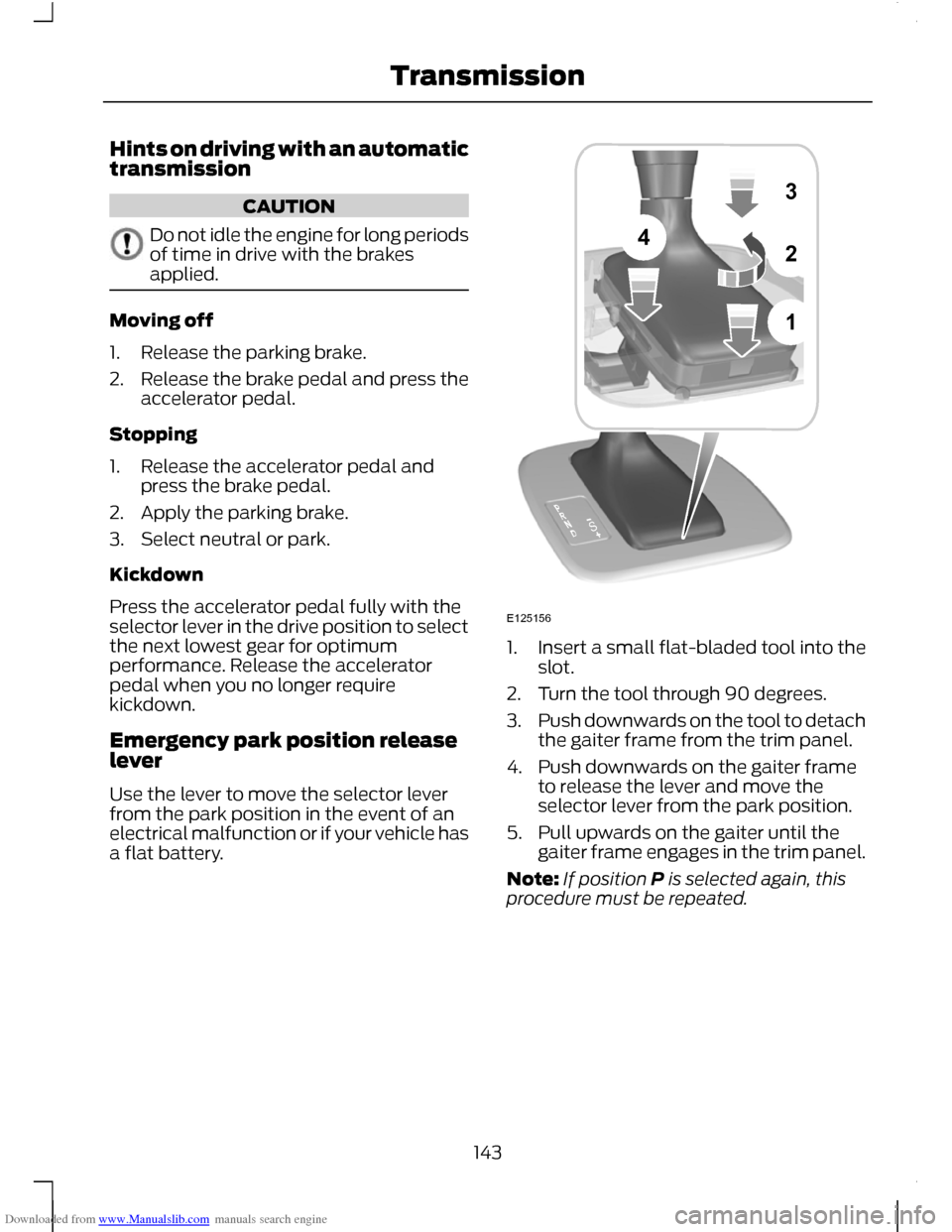
Emergency park position release
lever
Use the lever to move the selector lever
from the park position in the event of an
electrical malfunction or if your vehicle has
a flat battery. 1.
Insert a small flat-bladed tool into the
slot.
2. Turn the tool through 90 degrees.
3. Push downwards on the tool to detach
the gaiter frame from the trim panel.
4. Push downwards on the gaiter frame to release the lever and move the
selector lever from the park position.
5. Pull upwards on the gaiter until the gaiter frame engages in the trim panel.
Note: If position P is selected again, this
procedure must be repeated.
143
Transmission1324SE125156
Page 178 of 296
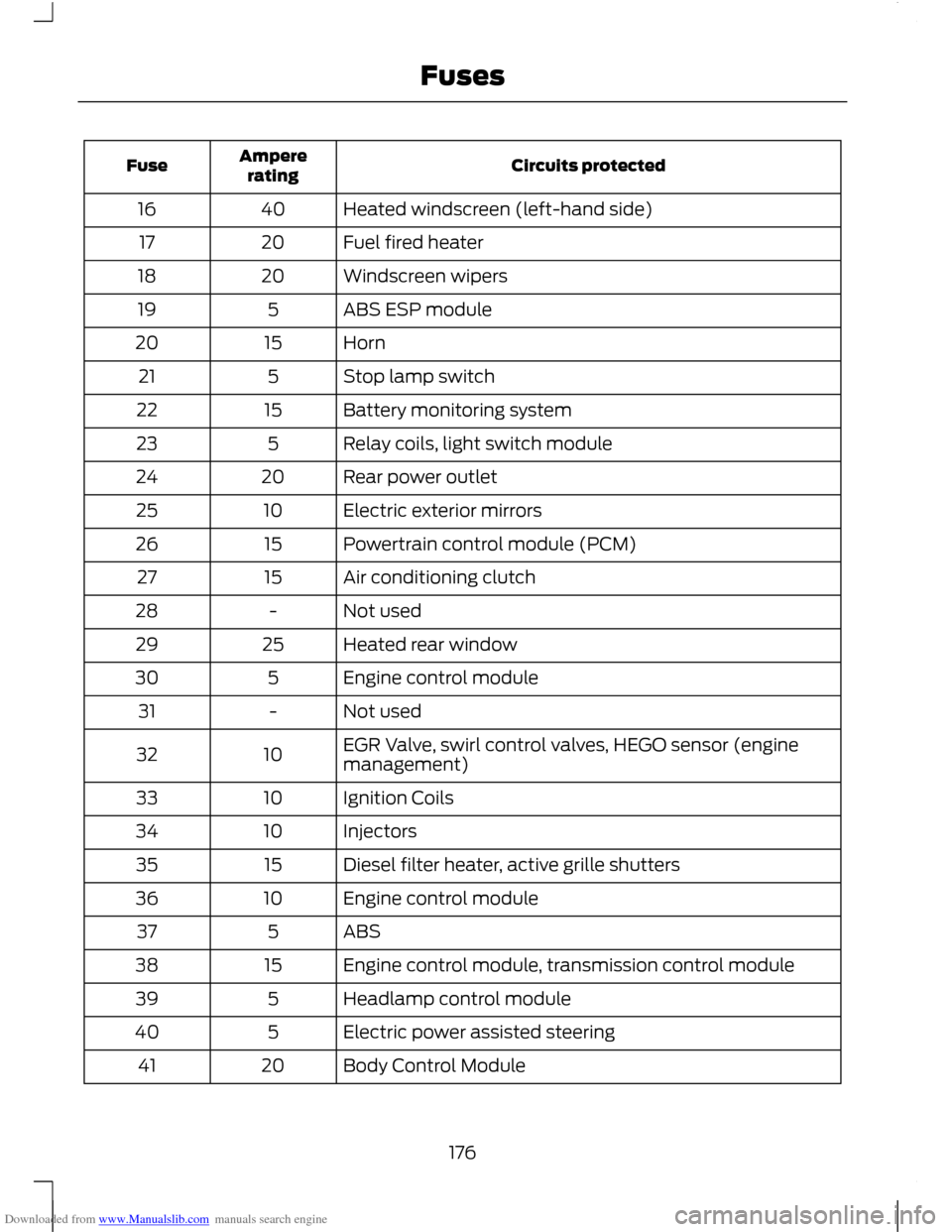
Downloaded from www.Manualslib.com manuals search engine Circuits protected
Ampere
rating
Fuse
Heated windscreen (left-hand side)
40
16
Fuel fired heater
20
17
Windscreen wipers
20
18
ABS ESP module
5
19
Horn
15
20
Stop lamp switch
5
21
Battery monitoring system
15
22
Relay coils, light switch module
5
23
Rear power outlet
20
24
Electric exterior mirrors
10
25
Powertrain control module (PCM)
15
26
Air conditioning clutch
15
27
Not used
-
28
Heated rear window
25
29
Engine control module
5
30
Not used
-
31
EGR Valve, swirl control valves, HEGO sensor (engine
management)
10
32
Ignition Coils
10
33
Injectors
10
34
Diesel filter heater, active grille shutters
15
35
Engine control module
10
36
ABS
5
37
Engine control module, transmission control module
15
38
Headlamp control module
5
39
Electric power assisted steering
5
40
Body Control Module
20
41
176
Fuses
Page 189 of 296
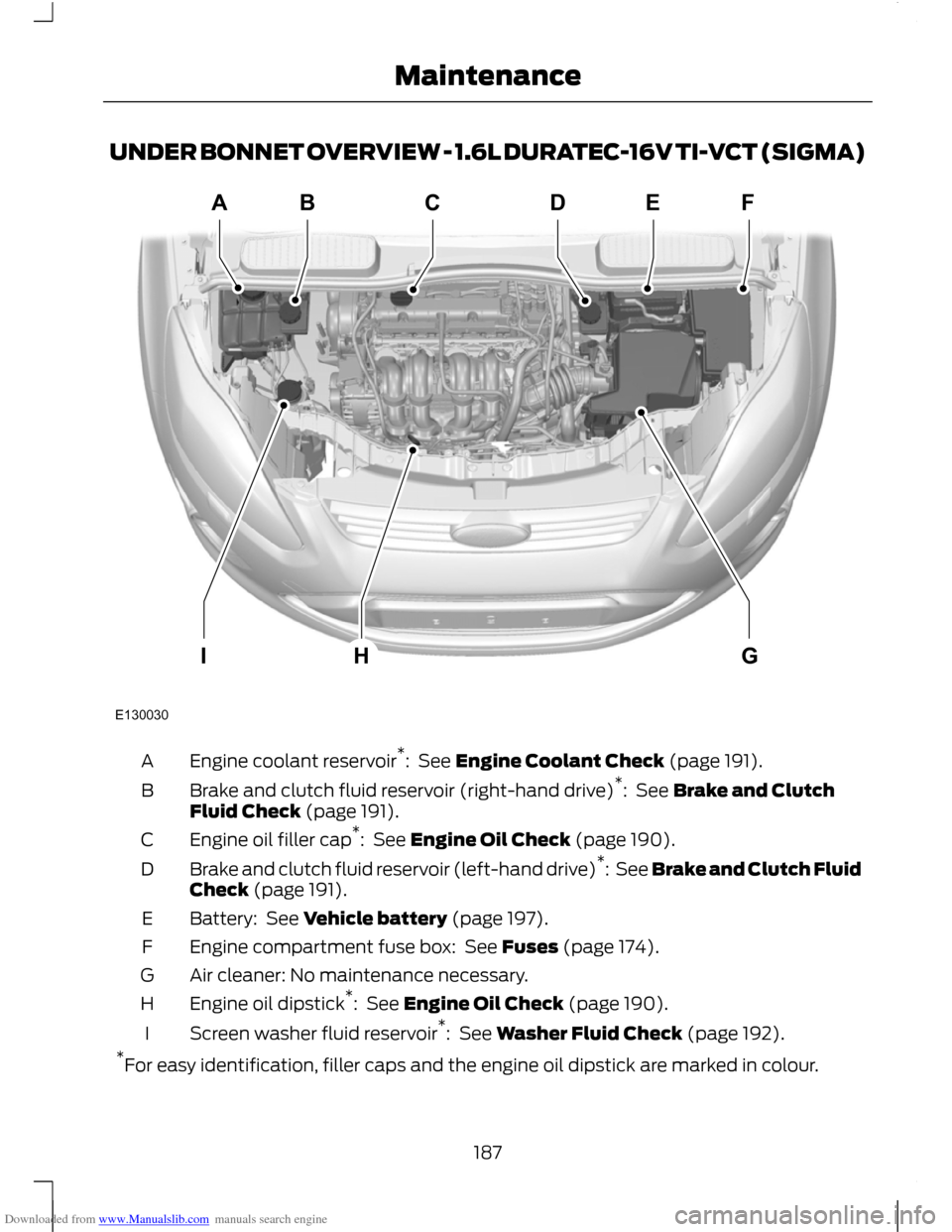
Downloaded from www.Manualslib.com manuals search engine UNDER BONNET OVERVIEW - 1.6L DURATEC-16V TI-VCT (SIGMA)
Engine coolant reservoir
*
: See Engine Coolant Check (page 191).
A
Brake and clutch fluid reservoir (right-hand drive) *
: See Brake and Clutch
Fluid Check (page 191).
B
Engine oil filler cap *
: See Engine Oil Check (page 190).
C
Brake and clutch fluid reservoir (left-hand drive) *
: See Brake and Clutch Fluid
Check (page 191).
D
Battery: See Vehicle battery (page 197).
E
Engine compartment fuse box: See Fuses (page 174).
F
Air cleaner: No maintenance necessary.
G
Engine oil dipstick *
: See Engine Oil Check (page 190).
H
Screen washer fluid reservoir *
: See Washer Fluid Check (page 192).
I
* For easy identification, filler caps and the engine oil dipstick are marked in colour.
187
MaintenanceE130030ABCDEFGHI
Page 190 of 296
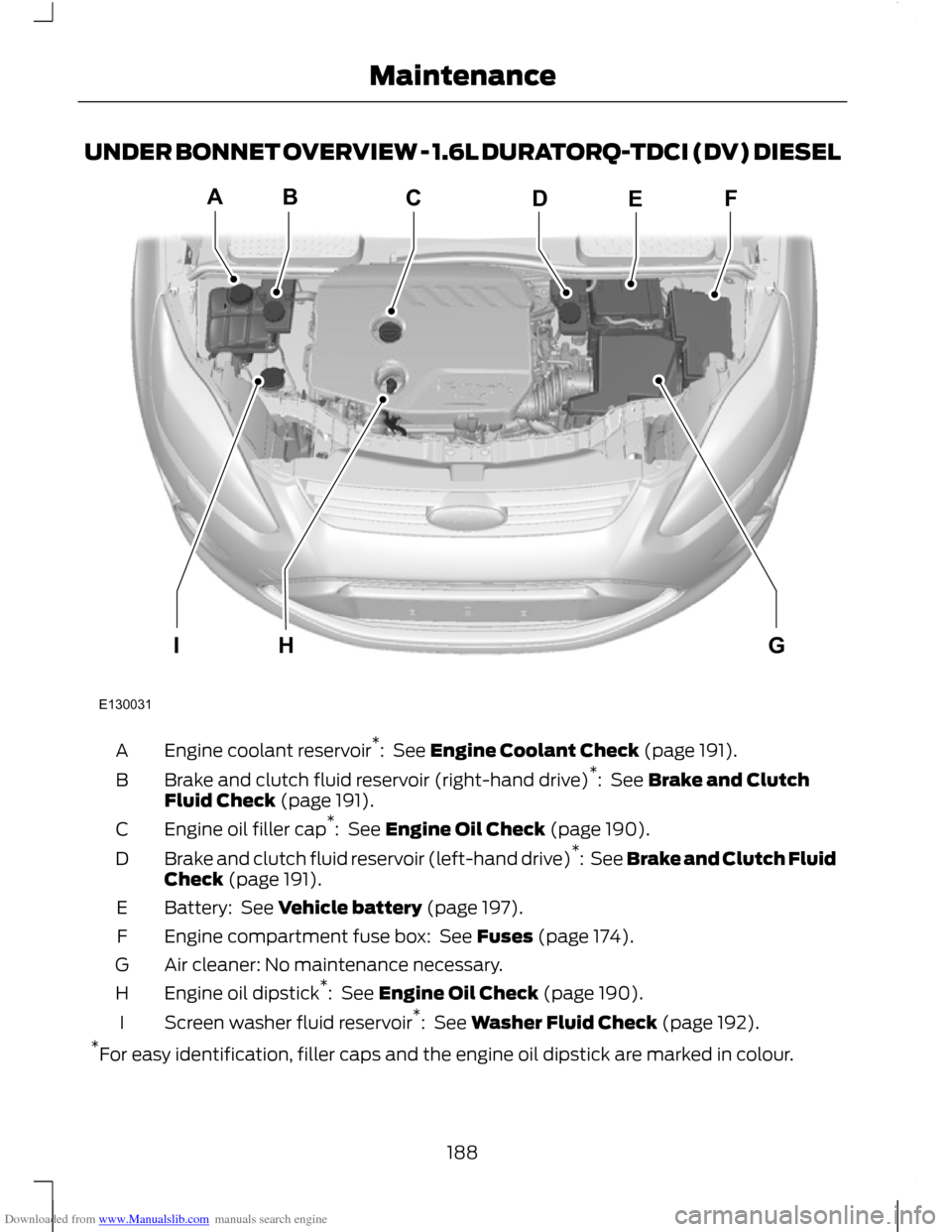
Downloaded from www.Manualslib.com manuals search engine UNDER BONNET OVERVIEW - 1.6L DURATORQ-TDCI (DV) DIESEL
Engine coolant reservoir
*
: See Engine Coolant Check (page 191).
A
Brake and clutch fluid reservoir (right-hand drive) *
: See Brake and Clutch
Fluid Check (page 191).
B
Engine oil filler cap *
: See Engine Oil Check (page 190).
C
Brake and clutch fluid reservoir (left-hand drive) *
: See Brake and Clutch Fluid
Check (page 191).
D
Battery: See Vehicle battery (page 197).
E
Engine compartment fuse box: See Fuses (page 174).
F
Air cleaner: No maintenance necessary.
G
Engine oil dipstick *
: See Engine Oil Check (page 190).
H
Screen washer fluid reservoir *
: See Washer Fluid Check (page 192).
I
* For easy identification, filler caps and the engine oil dipstick are marked in colour.
188
MaintenanceE130031ABCDEFGHI
Page 191 of 296
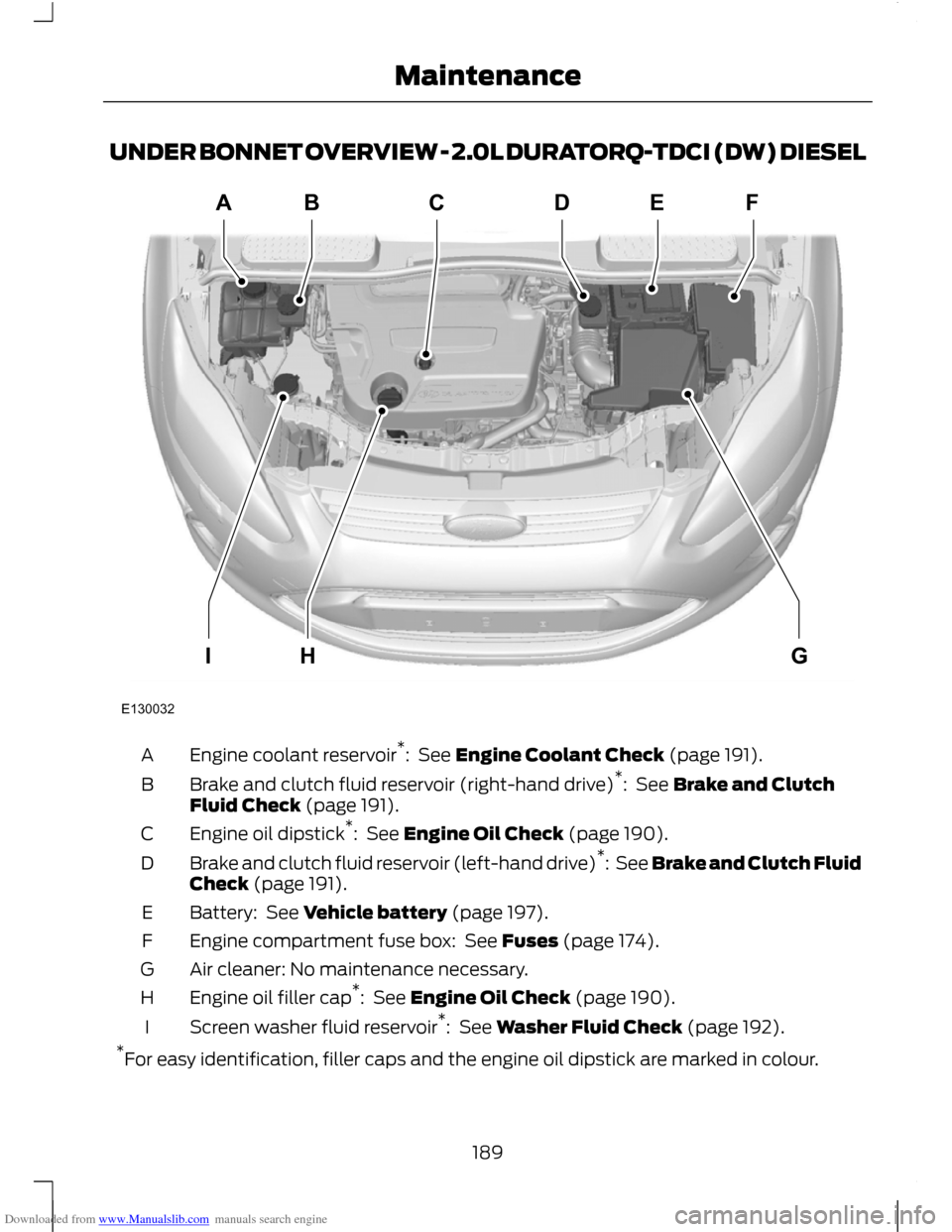
Downloaded from www.Manualslib.com manuals search engine UNDER BONNET OVERVIEW - 2.0L DURATORQ-TDCI (DW) DIESEL
Engine coolant reservoir
*
: See Engine Coolant Check (page 191).
A
Brake and clutch fluid reservoir (right-hand drive) *
: See Brake and Clutch
Fluid Check (page 191).
B
Engine oil dipstick *
: See Engine Oil Check (page 190).
C
Brake and clutch fluid reservoir (left-hand drive) *
: See Brake and Clutch Fluid
Check (page 191).
D
Battery: See Vehicle battery (page 197).
E
Engine compartment fuse box: See Fuses (page 174).
F
Air cleaner: No maintenance necessary.
G
Engine oil filler cap *
: See Engine Oil Check (page 190).
H
Screen washer fluid reservoir *
: See Washer Fluid Check (page 192).
I
* For easy identification, filler caps and the engine oil dipstick are marked in colour.
189
MaintenanceE130032ABCDEFGHI
Page 199 of 296
Downloaded from www.Manualslib.com manuals search engine JUMP-STARTING THE VEHICLE
WARNING
Do not use fuel lines, engine rocker
covers or the intake manifold as
grounding points.
CAUTIONS
Connect batteries with only the same
nominal voltage.
Always use booster cables with
insulated clamps and adequate size
cable.
Do not disconnect the battery from
the vehicle
’s electrical system. To connect the booster cables
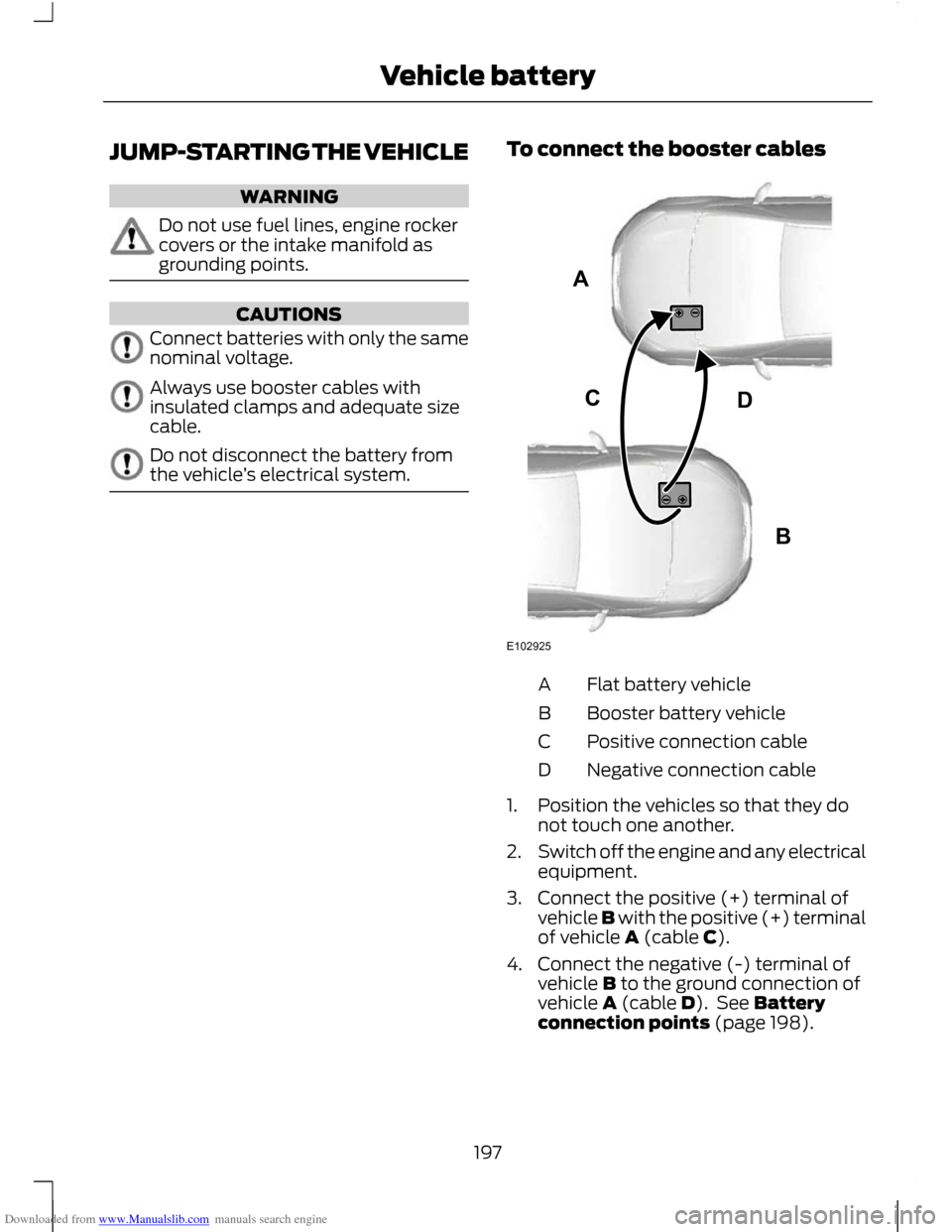
Flat battery vehicle
A
Booster battery vehicle
B
Positive connection cable
C
Negative connection cable
D
1. Position the vehicles so that they do not touch one another.
2. Switch off the engine and any electrical
equipment.
3. Connect the positive (+) terminal of vehicle B with the positive (+) terminal
of vehicle A (cable C).
4. Connect the negative (-) terminal of vehicle B to the ground connection of
vehicle A (cable D). See Battery
connection points (page 198).
197
Vehicle batteryABCDE102925
Page 200 of 296
Downloaded from www.Manualslib.com manuals search engine CAUTIONS
Do not connect to the negative (–)
terminal of the flat battery.
Make sure that the cables are clear of
any moving parts and fuel delivery
system parts.
To start the engine
1. Run the engine of vehicle B at
moderately high speed.
2. Start the engine of vehicle A.
3. Run both vehicles for a minimum of three minutes before disconnecting the
cables. CAUTION
Do not switch on the headlamps when
disconnecting the cables. The peak
voltage could blow the bulbs.
Disconnect the cables in the reverse order.
CHANGING THE VEHICLE
BATTERY
CAUTION
For vehicles with Start-stop the
battery requirement is different. It
must be replaced by one of exactly
the same specification as the original. Note:
Where applicable, the audio system
must be reprogrammed with the keycode.
The battery is located in the engine
compartment. See Maintenance (page
185). BATTERY CONNECTION
POINTS CAUTION
Do not connect to the negative (–)
terminal of the flat battery.
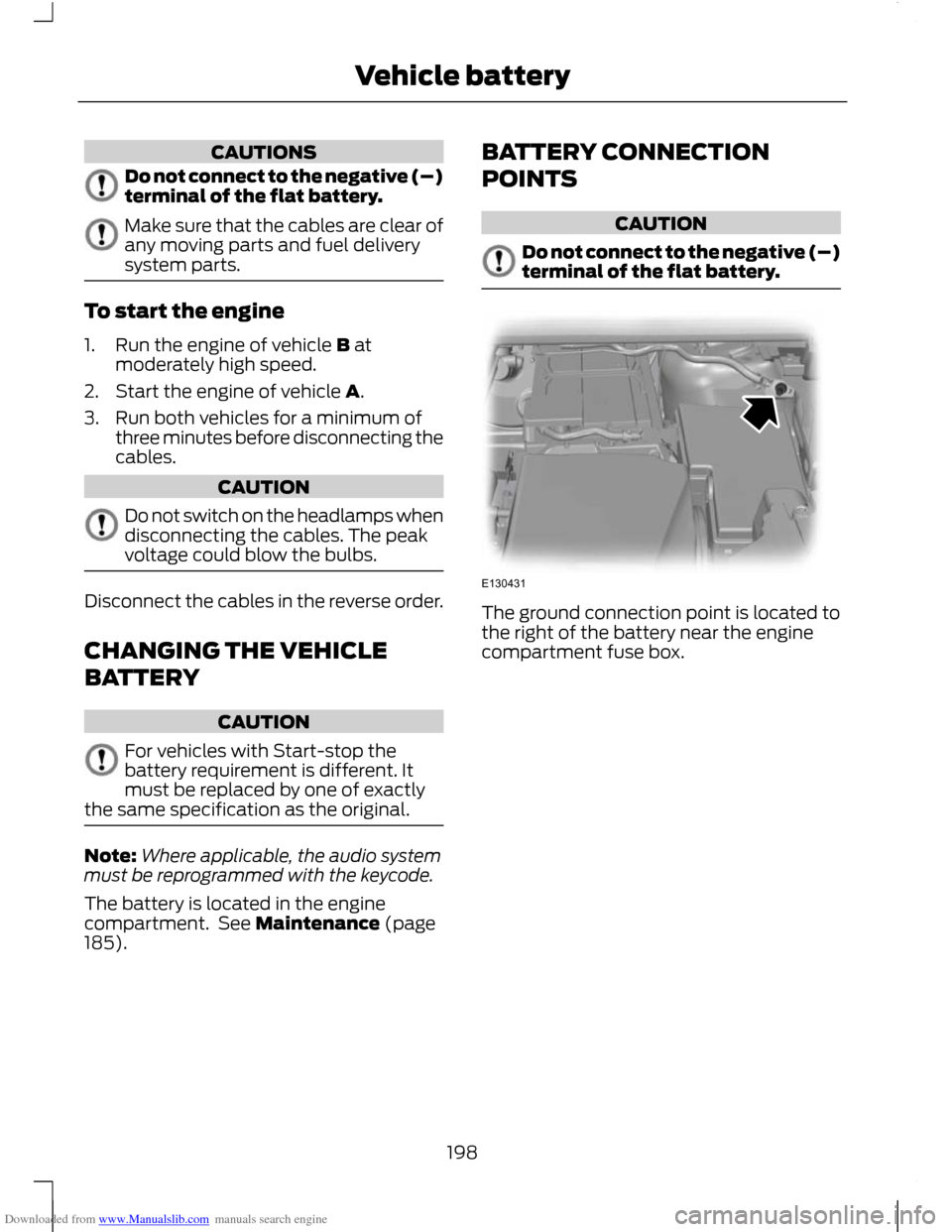
The ground connection point is located to
the right of the battery near the engine
compartment fuse box.
198
Vehicle batteryE130431
Page 239 of 296
Downloaded from www.Manualslib.com manuals search engine GENERAL INFORMATION
CAUTION
Using the system with the engine off
will drain the battery.
This section describes the functions and
features of the Bluetooth mobile phone
hands free system.
The Bluetooth mobile phone part of the
system provides interaction with the audio
or navigation system and your mobile
phone. It allows you to use the audio or
navigation system to make and receive
calls without having to hold your mobile
phone.
Compatibility of phones
CAUTION
As no common agreement exists,
mobile phone manufacturers are able
to implement a variety of profiles in
their Bluetooth devices. Because of this,
an incompatibility can occur between the
phone and hands-free system, which in
some cases may significantly degrade the
system performance. To avoid this
situation, only recommended phones
should be used.
Please visit the website www.ford-
mobile-connectivity.com for full details. BLUETOOTH SETUP
Before you can use your telephone with
your vehicle it must be bonded to the
vehicle telephone system.
Handling of phones
Up to six Bluetooth devices can be bonded
to the vehicle system. Note:
If there is an ongoing call when the
phone in use is selected as the new active
phone, the call is transferred to the vehicle
audio system.
Note: Even if connected to the car system,
your phone can still be used in the usual
way.
Requirements for Bluetooth
connection
The following are required before a
Bluetooth phone connection can be made.
1. The Bluetooth feature must be activated on the phone and on the
audio unit. Make sure the Bluetooth
menu option in the audio unit is set to
ON. For information on phone settings,
refer to your phone user guide.
2. In the Bluetooth menu on your phone, search for Ford Audio and select it.
3. Enter the code number shown on the vehicle display using the phone keypad.
If no code number is shown on the
display, enter the Bluetooth PIN
number 0000 using the phone keypad.
Now enter the Bluetooth PIN number
shown on the vehicle display.
4. If your mobile phone asks you to authorize the automatic connection,
select YES.
Note: A phone call will be disconnected if
the audio unit is switched off. If the ignition
key is turned to the off position the phone
call will remain in progress.
TELEPHONE SETUP
Phonebook
Note: It may be necessary to confirm
phonebook access to the Bluetooth system
via the mobile phone.
237
Telephone