brake light FORD C MAX 2011 2.G Owners Manual
[x] Cancel search | Manufacturer: FORD, Model Year: 2011, Model line: C MAX, Model: FORD C MAX 2011 2.GPages: 296, PDF Size: 7.87 MB
Page 19 of 296
Downloaded from www.Manualslib.com manuals search engine WARNING
We recommend that you remove the
fuel nozzle slowly to allow any
residual fuel to drain into the fuel
tank. Alternatively you can wait 10 seconds
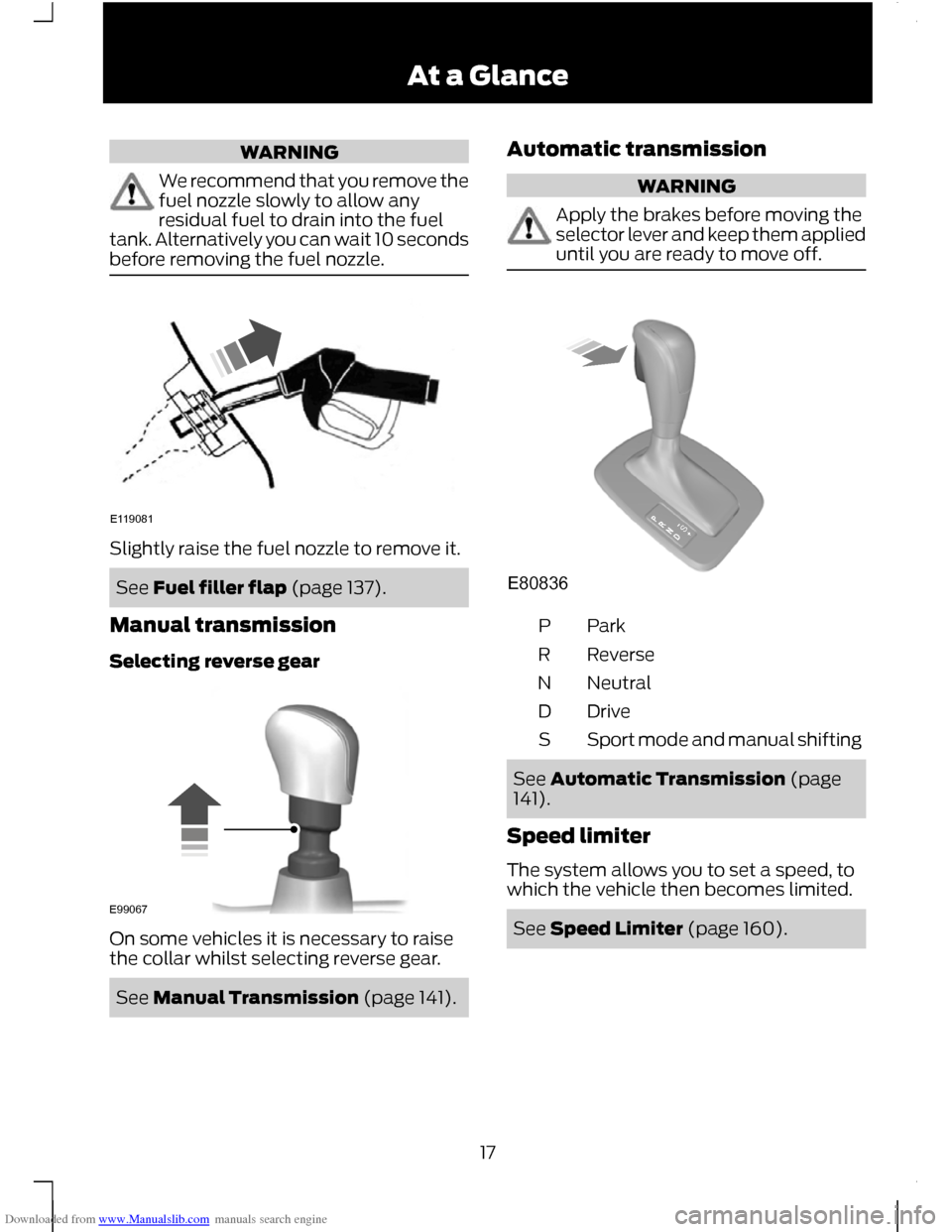
before removing the fuel nozzle. Slightly raise the fuel nozzle to remove it.
See Fuel filler flap (page 137).
Manual transmission
Selecting reverse gear On some vehicles it is necessary to raise
the collar whilst selecting reverse gear.
See Manual Transmission (page 141). Automatic transmission WARNING
Apply the brakes before moving the
selector lever and keep them applied
until you are ready to move off.
ParkP
Reverse
R
Neutral
N
Drive
D
Sport mode and manual shifting
S See Automatic Transmission (page
141).
Speed limiter
The system allows you to set a speed, to
which the vehicle then becomes limited. See Speed Limiter (page 160).
17 At a GlanceE119081 E99067 E80836S
Page 68 of 296
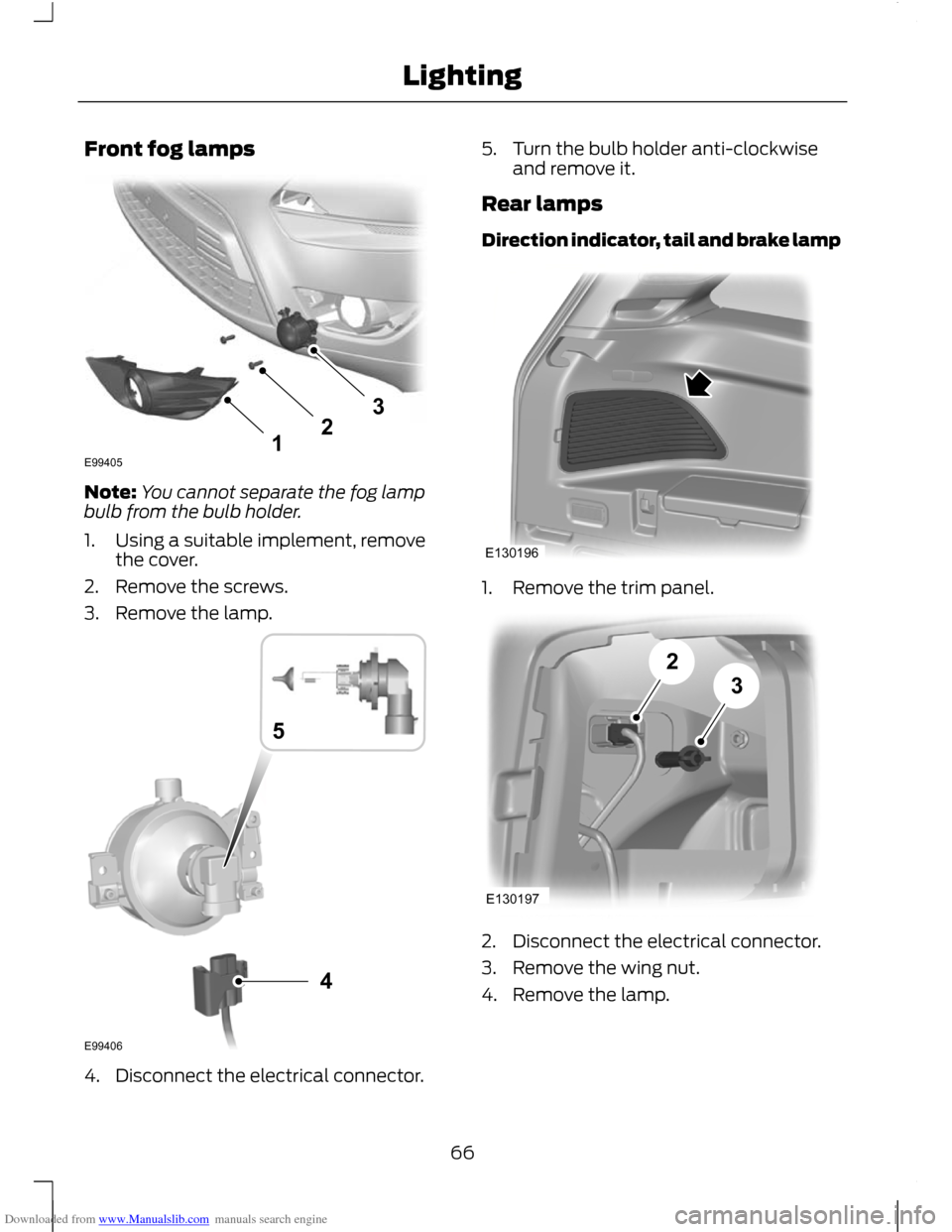
Downloaded from www.Manualslib.com manuals search engine Front fog lamps
Note:
You cannot separate the fog lamp
bulb from the bulb holder.
1. Using a suitable implement, remove the cover.
2. Remove the screws.
3. Remove the lamp. 4. Disconnect the electrical connector. 5. Turn the bulb holder anti-clockwise
and remove it.
Rear lamps
Direction indicator, tail and brake lamp 1. Remove the trim panel.
2. Disconnect the electrical connector.
3. Remove the wing nut.
4. Remove the lamp.
66
Lighting123E99405 4E994065 E130196 E13019723
Page 69 of 296
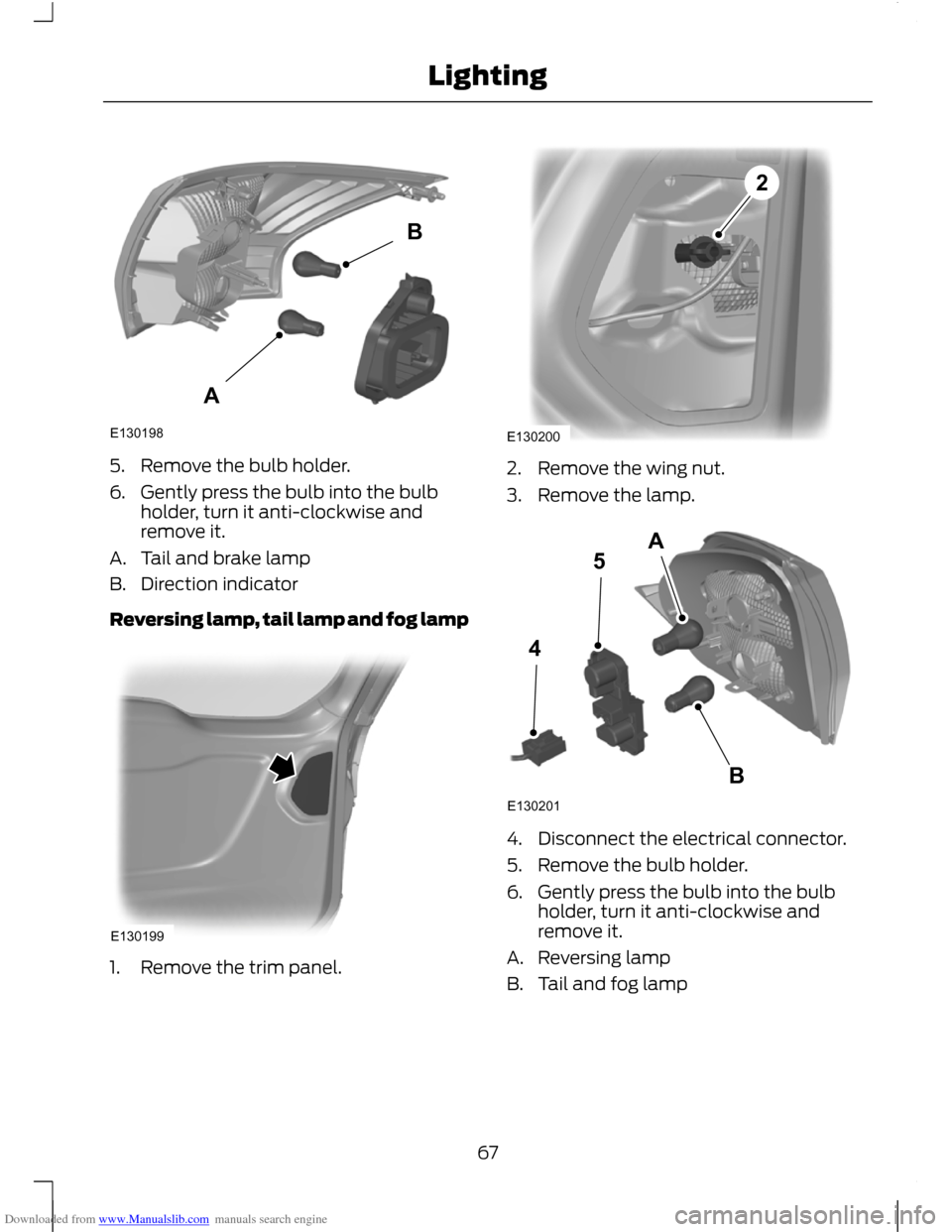
Downloaded from www.Manualslib.com manuals search engine 5. Remove the bulb holder.
6. Gently press the bulb into the bulb
holder, turn it anti-clockwise and
remove it.
A. Tail and brake lamp
B. Direction indicator
Reversing lamp, tail lamp and fog lamp 1. Remove the trim panel. 2. Remove the wing nut.
3. Remove the lamp.
4. Disconnect the electrical connector.
5. Remove the bulb holder.
6. Gently press the bulb into the bulb
holder, turn it anti-clockwise and
remove it.
A. Reversing lamp
B. Tail and fog lamp
67
LightingE130198AB E130199 E1302002 E130201245AB
Page 70 of 296
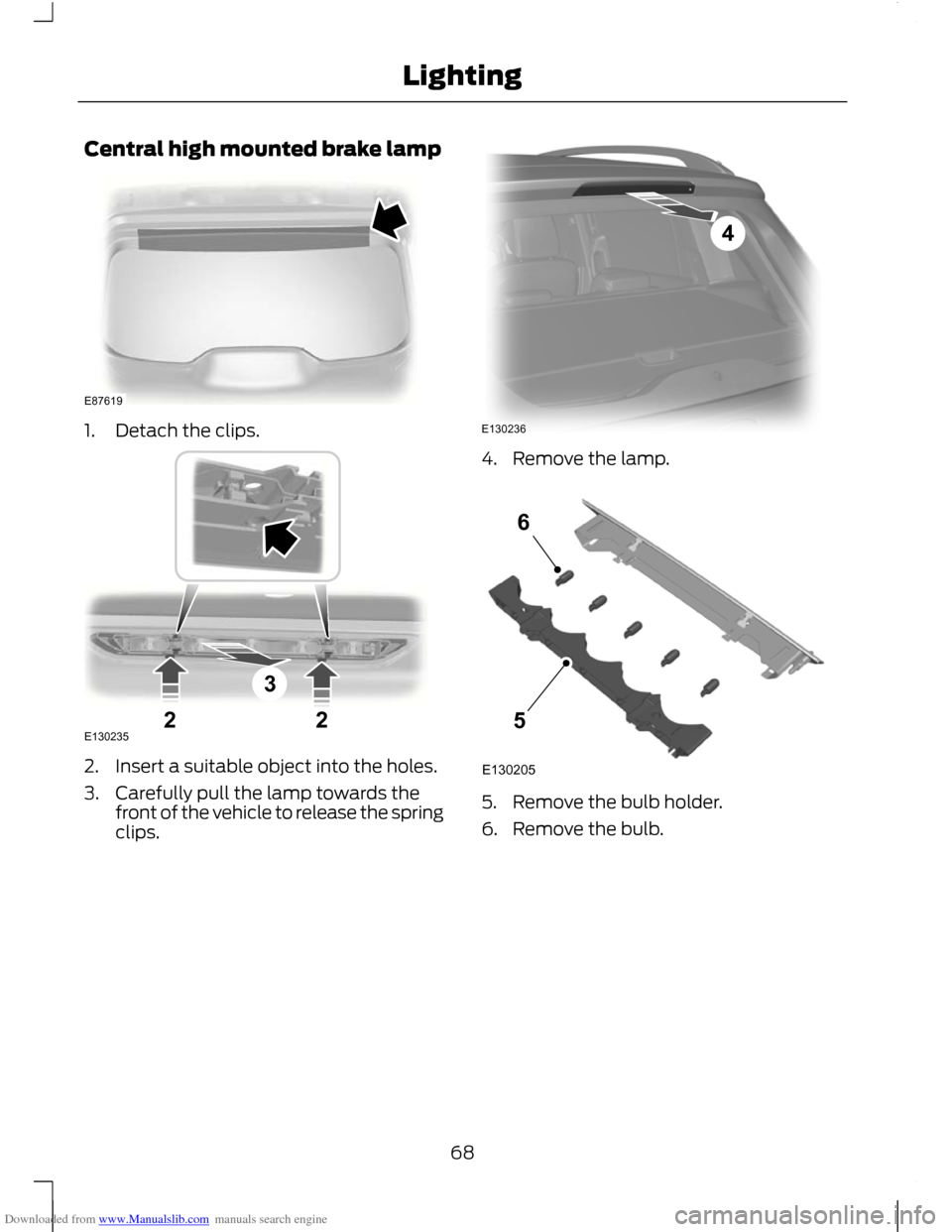
Downloaded from www.Manualslib.com manuals search engine Central high mounted brake lamp
1. Detach the clips.
2. Insert a suitable object into the holes.
3. Carefully pull the lamp towards the
front of the vehicle to release the spring
clips. 4. Remove the lamp.
5. Remove the bulb holder.
6. Remove the bulb.
68
LightingE87619 322E130235 4E130236 E13020556
Page 72 of 296
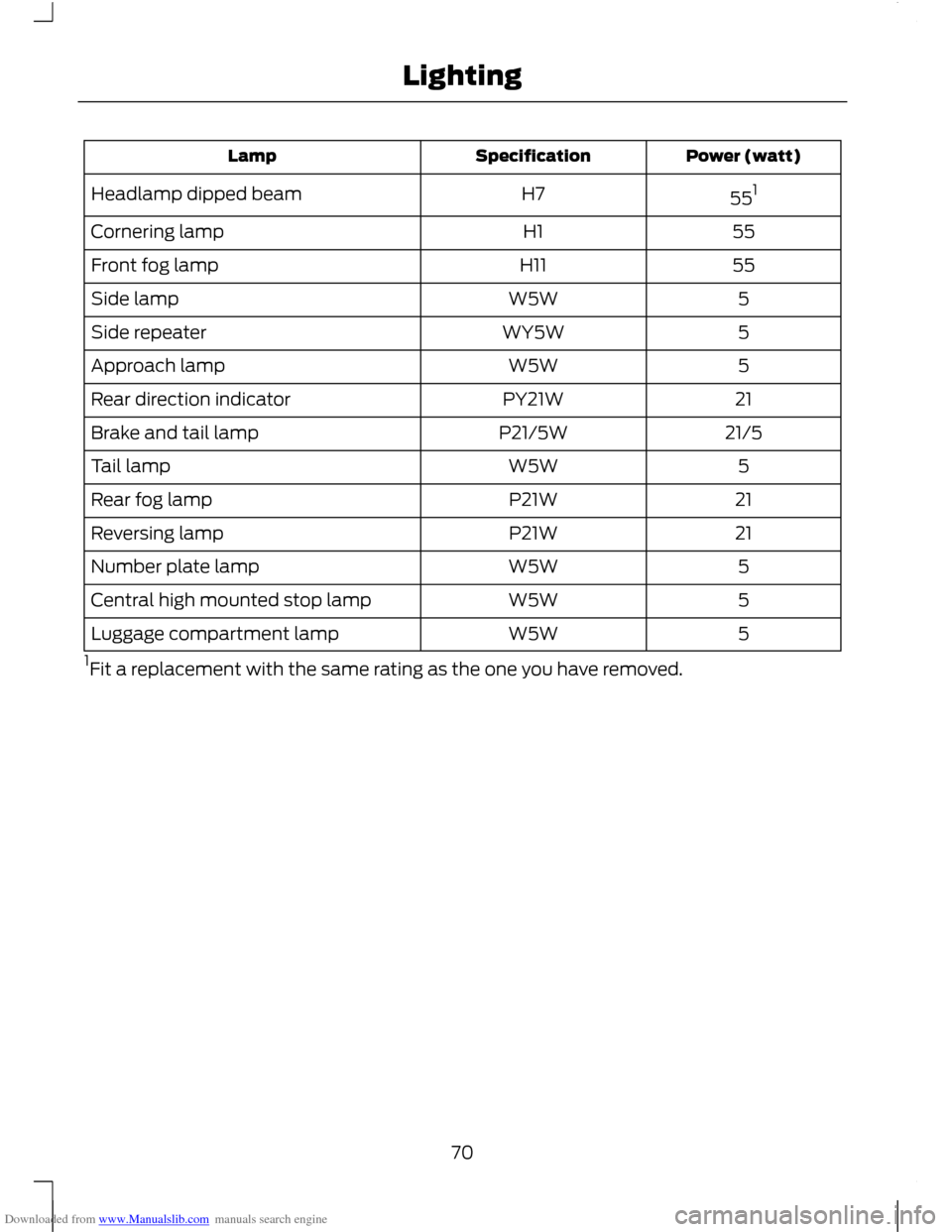
Downloaded from www.Manualslib.com manuals search engine Power (watt)
Specification
Lamp
551
H7
Headlamp dipped beam
55
H1
Cornering lamp
55
H11
Front fog lamp
5
W5W
Side lamp
5
WY5W
Side repeater
5
W5W
Approach lamp
21
PY21W
Rear direction indicator
21/5
P21/5W
Brake and tail lamp
5
W5W
Tail lamp
21
P21W
Rear fog lamp
21
P21W
Reversing lamp
5
W5W
Number plate lamp
5
W5W
Central high mounted stop lamp
5
W5W
Luggage compartment lamp
1 Fit a replacement with the same rating as the one you have removed.
70
Lighting
Page 96 of 296
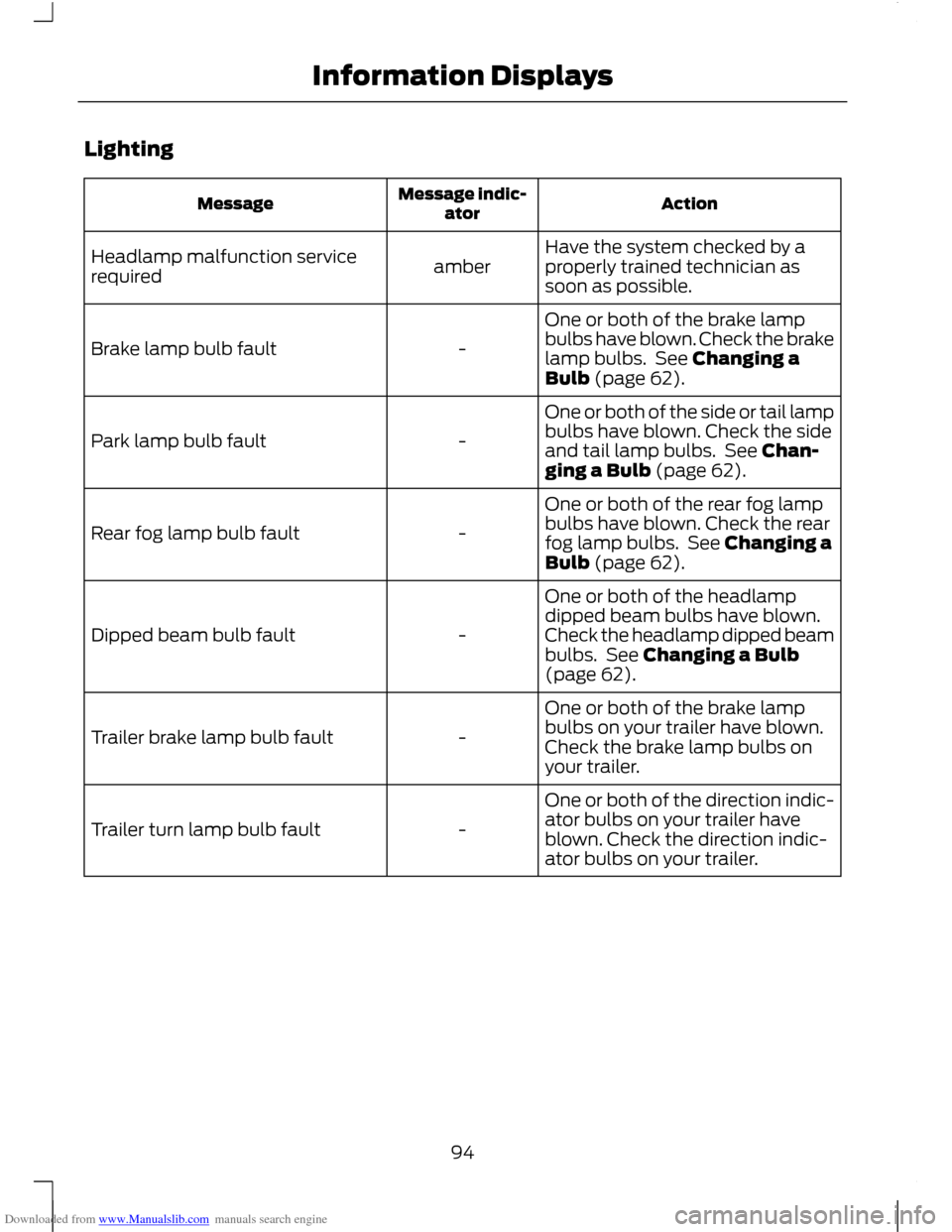
Downloaded from www.Manualslib.com manuals search engine Lighting
Action
Message indic-
ator
Message
Have the system checked by a
properly trained technician as
soon as possible.
amber
Headlamp malfunction service
required
One or both of the brake lamp
bulbs have blown. Check the brake
lamp bulbs. See Changing a
Bulb (page 62).
-
Brake lamp bulb fault
One or both of the side or tail lamp
bulbs have blown. Check the side
and tail lamp bulbs. See Chan-
ging a Bulb (page 62).
-
Park lamp bulb fault
One or both of the rear fog lamp
bulbs have blown. Check the rear
fog lamp bulbs. See Changing a
Bulb (page 62).
-
Rear fog lamp bulb fault
One or both of the headlamp
dipped beam bulbs have blown.
Check the headlamp dipped beam
bulbs. See Changing a Bulb
(page 62).
-
Dipped beam bulb fault
One or both of the brake lamp
bulbs on your trailer have blown.
Check the brake lamp bulbs on
your trailer.
-
Trailer brake lamp bulb fault
One or both of the direction indic-
ator bulbs on your trailer have
blown. Check the direction indic-
ator bulbs on your trailer.
-
Trailer turn lamp bulb fault
94
Information Displays
Page 146 of 296
Downloaded from www.Manualslib.com manuals search engine PRINCIPLE OF OPERATION
Note:
Depending on applicable laws and
regulations in the country for which your
vehicle was originally built, the brake lamps
may flash if you brake heavily.
Note: Occasional brake noise is normal and
often does not indicate a concern. In normal
operation, the system may emit occasional
or intermittent squeal or groan noises when
the brakes are applied. Such noises are
usually caused by environmental conditions
such as cold, heat, moisture, road dust, salt
or mud.
Disc brakes
Wet brake discs result in reduced braking
efficiency. Dab the brake pedal when
driving from a car wash to remove the film
of water.
ABS WARNING
The ABS does not relieve you of your
responsibility to drive with due care
and attention.
The ABS helps you to maintain full steering
and directional stability when you brake
heavily in an emergency, by preventing the
road wheels from locking.
HINTS ON DRIVING WITH
ANTI-LOCK BRAKES
When the ABS is operating, the brake pedal
will pulse. This is normal. Maintain pressure
on the brake pedal.
The ABS will not eliminate the dangers
inherent when:
•
you drive too close to the vehicle in
front of you.
• the vehicle is aquaplaning. •
you take corners too fast.
• the road surface is poor.
PARKING BRAKE WARNING
Vehicles with an automatic
transmission should always be left
with the selector lever in position P
(Park). •
Press the foot brake pedal firmly.
• Pull the parking brake lever up smartly
to its fullest extent.
• Do not press the release button while
pulling the lever up.
• If your vehicle is parked on a hill and
facing uphill, select first gear or P
(Park) and turn the steering wheel
away from the kerb.
• If your vehicle is parked on a hill and
facing downhill, select reverse gear or
P (Park) and turn the steering wheel
towards the kerb.
To release the parking brake, press the
brake pedal firmly, pull the lever up slightly,
depress the release button and push the
lever down.
144
Brakes
Page 148 of 296
Downloaded from www.Manualslib.com manuals search engine PRINCIPLE OF OPERATION
The system makes it easier to pull away
when the vehicle is on a slope without the
need to use the parking brake.
When the system is active, the vehicle will
remain stationary on the slope for a short
time after you release the brake pedal.
During this time, you have time to move
your foot from the brake to the accelerator
pedal and pull away. The brakes are
released automatically once the engine
has developed sufficient drive to prevent
the vehicle from rolling down the slope.
This is an advantage when pulling away
on a slope, for example from a car park
ramp, traffic lights or when reversing uphill
into a parking space.
WARNING
The system does not replace the
parking brake. When you leave the
vehicle, always apply the parking
brake and select first or reverse gear. USING HILL START ASSIST
The system is activated automatically
when you stop your vehicle on a slope
greater than 3%. The system operates with
the vehicle facing downhill if reverse gear
is selected and with the vehicle facing
uphill if any forward gear is selected.
Vehicles with manual
transmission only
The system can be switched on and off
using the information display. See General
Information (page 83).
Activating the system
WARNINGS
You must remain in the vehicle once
you have activated the system. WARNINGS
At all times you are responsible for
controlling the vehicle, supervising
the system and intervening, if
required. If a malfunction is detected when the
system is active, the system will be
deactivated and a message will be
shown in the display. See Information
Messages (page 90). You can activate the system only if the
following conditions have been met:
•
The engine is running.
• The system is switched on.
• On vehicles with manual transmission,
the clutch pedal is pressed.
• No failure mode is present.
To activate the system:
1. Press the brake pedal to bring the vehicle to a complete standstill. Keep
the brake pedal depressed.
2. If the sensors detect that the vehicle is
on a slope the system will be activated
automatically.
3. When you remove your foot from the brake pedal, the vehicle will remain on
the slope without rolling away for a
short time. This hold time will
automatically be extended if you are
in the process of driving off.
4. Drive off in the normal manner. The brakes will be released automatically.
Deactivating the system
To deactivate the system, perform one of
the following:
146
Hill Start Assist
Page 174 of 296
Downloaded from www.Manualslib.com manuals search engine RUNNING-IN
Tyres
WARNING
New tyres need to be run-in for
approximately 500 kilometres (300
miles). During this time, you may
experience different driving characteristics. Brakes and clutch
WARNING
Avoid heavy use of the brakes and
clutch if possible for the first 150
kilometres (100 miles) in town and
for the first 1500 kilometres (1000 miles)
on motorways. Engine
CAUTION
Avoid driving too fast during the first
1500 kilometres (1000 miles). Vary
your speed frequently and change up
through the gears early. Do not labour the
engine. COLD WEATHER
PRECAUTIONS
The functional operation of some
components and systems can be affected
at temperatures below -30°C (-22°F).
DRIVING THROUGH WATER
Driving through water
CAUTIONS
Drive through water in an emergency
only, and not as part of normal driving.
Engine damage can occur if water
enters the air filter. In an emergency, the vehicle can be driven
through water to a maximum depth of 200
millimetres (8 inches) and at a maximum
speed of 10 km/h (6 mph). Extra caution
should be exercised when driving through
flowing water.
When driving in water, maintain a low
speed and do not stop the vehicle. After
driving through water, and as soon as it is
safe to do so:
•
Depress the brake pedal lightly and
check that full brake function is
achieved.
• Check that the horn works.
• Check that the vehicle's lights are fully
operational.
• Check the power assistance
of the steering system.
172
Driving Hints
Page 285 of 296
Downloaded from www.Manualslib.com manuals search engine A
A/C
See: Climate Control........................................ 100
About This Manual...........................................7
ABS See: Brakes........................................................... 144
ABS driving hints See: Hints on Driving With Anti-Lock
Brakes................................................................ 144
Accessories See: Parts and Accessories................................. 7
Active Park Assist.........................................152 Principle of Operation....................................... 152
Adjusting the Headlamps - Vehicles With: Adaptive Front Lighting/Xenon
Headlamps....................................................59
Adjusting the Steering Wheel...................50
Air Conditioning See: Climate Control........................................ 100
Air Vents..........................................................100 Centre air vents................................................... 100
Second row air vents.......................................... 101
Side air vent........................................................... 101
Alarm..................................................................48 Principle of Operation........................................ 48
Alternative frequencies.............................230
Appendices....................................................279
Arming the alarm...........................................49
Arming the engine immobiliser.................47 At a Glance........................................................10
........................................................................\
.............. 16
Adjusting the steering wheel............................ 13
Autolamps............................................................... 14
Automatic climate control................................. 15
Automatic transmission...................................... 17
Autowipers............................................................... 14
Diesel particulate filter (DPF).......................... 16
Electric folding mirrors........................................ 15
Electric windows................................................... 14
Fuel filler flap.......................................................... 16
Information displays............................................ 15
Instrument panel overview............................... 10
Keyless entry........................................................... 13
Keyless starting...................................................... 16
Locking the vehicle............................................... 13
Manual climate control....................................... 15
Manual transmission............................................ 17
Power liftgate.......................................................... 13
Speed limiter........................................................... 17
Towing the vehicle on four wheels.................18
Unlocking the vehicle........................................... 13
Audible Warnings and Indicators..............81 Automatic transmission..................................... 81
Frost........................................................................\
... 81
Key-in-ignition........................................................ 81
Key outside car....................................................... 81
Lights on................................................................... 81
Low fuel................................................................... 82
Luggage compartment lid - power liftgate................................................................. 82
Seat belt reminder............................................... 82
Switching the chimes on and off.................... 81
Audio Control..................................................50 Type 1........................................................................\
50
Type 2........................................................................\
51
Audio introduction.......................................219
Audio system security................................226
Audio troubleshooting...............................236
Audio unit commands...............................242 Auxiliary input..................................................... 246
CD Player............................................................... 242
External devices - iPod.................................... 248
External devices - USB.................................... 246
Radio ....................................................................... 243
Audio unit menus........................................230
Audio unit operation...................................227
Audio unit overview....................................220
283
Index