park assist FORD C MAX 2013 User Guide
[x] Cancel search | Manufacturer: FORD, Model Year: 2013, Model line: C MAX, Model: FORD C MAX 2013Pages: 552, PDF Size: 8.55 MB
Page 230 of 552
Automatic Steering into Parking Space
Note:If vehicle speed exceeds 7 mph (12 km/h), the system turns off
and you need to take full control of the vehicle.
Note:If a maneuver is interrupted before completion, the system turns off.
The steering wheel position will not indicate the actual position of the
steering and you have to full take control of the vehicle. I some instances a
message may appear that would allow you to resume the maneuver.
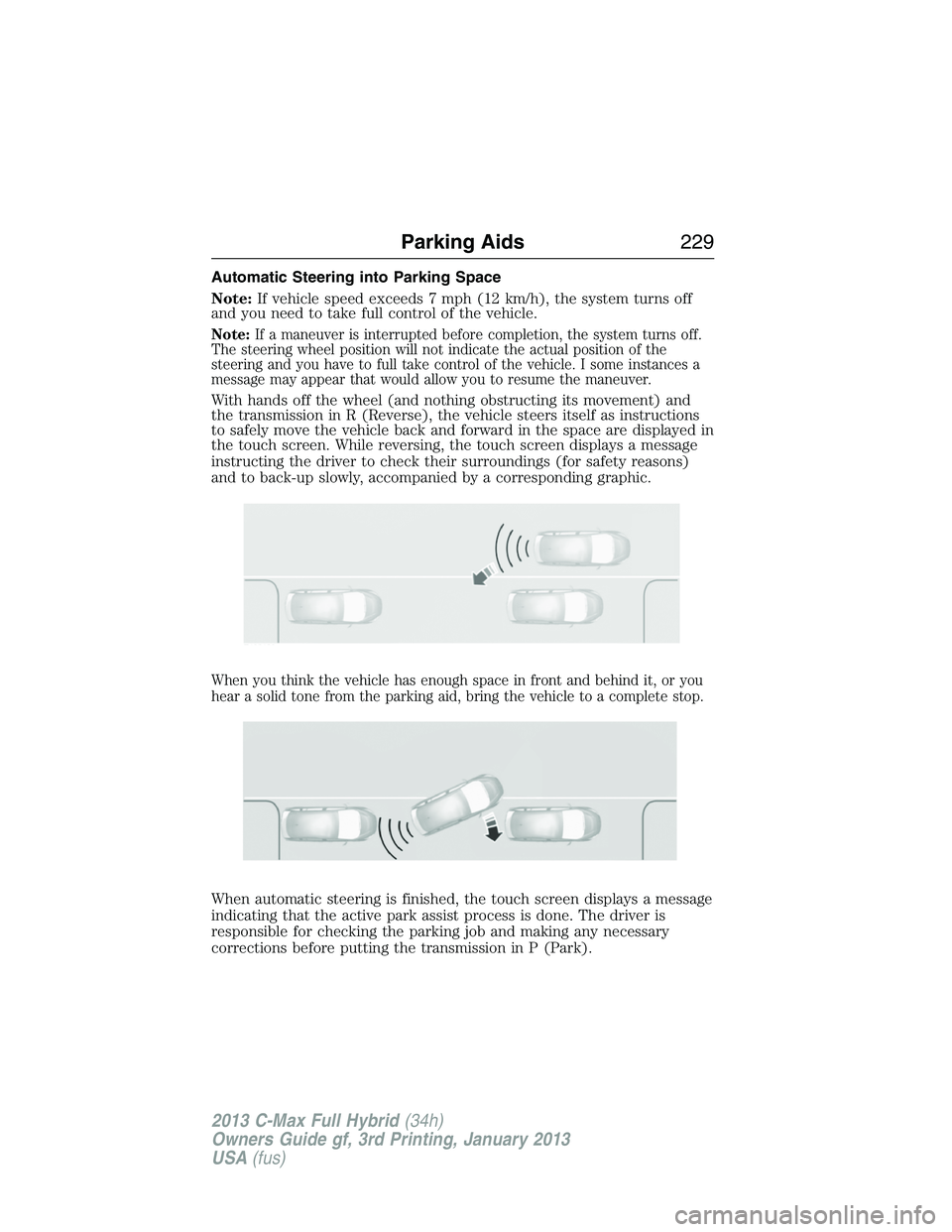
With hands off the wheel (and nothing obstructing its movement) and
the transmission in R (Reverse), the vehicle steers itself as instructions
to safely move the vehicle back and forward in the space are displayed in
the touch screen. While reversing, the touch screen displays a message
instructing the driver to check their surroundings (for safety reasons)
and to back-up slowly, accompanied by a corresponding graphic.
When you think the vehicle has enough space in front and behind it, or you
hear a solid tone from the parking aid, bring the vehicle to a complete stop.
When automatic steering is finished, the touch screen displays a message
indicating that the active park assist process is done. The driver is
responsible for checking the parking job and making any necessary
corrections before putting the transmission in P (Park).
Parking Aids229
2013 C-Max Full Hybrid(34h)
Owners Guide gf, 3rd Printing, January 2013
USA(fus)
Page 231 of 552
Deactivating the Park Assist Feature
The system can be deactivated manually by:
•pressing the active park assist button
•grabbing the steering wheel
•driving above approximately 20 mph (35 km/h) for 30 seconds during
an active park search
•driving above 7 mph (12 km/h) during automatic steering
•turning off the traction control system.
Certain vehicle conditions can also deactivate the system:
•Traction control has activated on a slippery or loose surface.
•Anti-lock brake system activation or failure.
•Any door (except the driver’s) opens.
•Something touches the steering wheel.
If a problem occurs with the system, a warning message is displayed,
followed by a chime. Occasional active park assist messages may occur in
normal operation. For recurring or frequent active park assist faults,
contact an authorized dealer to have your vehicle serviced.
Troubleshooting the System
The system does not look for a space
The traction control system may be off
Any door (except the driver’s) may not be completely closed
The system does not offer a particular space
Something may be contacting the front bumper or side sensors
There is not enough room on both sides of the vehicle in order to park
There is not enough space for the parking maneuver on the opposite
side of the parking space
The vehicle is farther than 5 ft (1.5 m) from the parking space
The vehicle is closer than 16 in. (40 cm) from neighboring parked
vehicles
The transmission is in R (Reverse); the vehicle must be moving
forward to detect a parking space
230Parking Aids
2013 C-Max Full Hybrid(34h)
Owners Guide gf, 3rd Printing, January 2013
USA(fus)
Page 256 of 552
Always
•Call 911 if assistance is needed and advise that an electric or
hybrid-electric vehicle is involved.
•Do not touch exposed electrical components or the engine
compartment, as a shock hazard may exist.
•Avoid contact with leaking fluids and gases, and remain out of the way
of oncoming traffic until emergency responders arrive.
•When emergency responders arrive, tell them that the vehicle involved
is an electric vehicle or hybrid-electric vehicle.
Fires
As with any vehicle, call 911 immediately if you see sparks, smoke, or
flames coming from the vehicle.
•Exit the vehicle immediately.
•Advise 911 that an electric or hybrid-electric vehicle is involved.
•As with any vehicle fire, do not inhale smoke, vapors, or gas from the
vehicle, as they may be hazardous.
•Remain a safe distance upwind and uphill from the vehicle fire.
•Stay out of the roadway and stay out of the way of any oncoming
traffic while awaiting the arrival of emergency responders.
Post-Incident
•Do not store a severely damaged vehicle with a lithium-ion battery
inside a structure or within 50 feet (15 meters) of any structure or
vehicle.
•Ensure that passenger and cargo compartments remain ventilated
(i.e., open door, trunk or liftgate).
•
For vehicles in the United States, notify Ford Motor Company
1-800-392-3673 (then follow the prompts on the voice response menu),
an authorized Ford dealer or service center as soon as possible as there
may be other steps to secure and/or discharge the HV battery.
•For vehicles in Canada, notify Ford Motor Company 1-800-565-3673
(then follow the prompts on the voice response menu), an authorized
Ford dealer or service center as soon as possible as there may be
other steps to secure and/or discharge the HV battery.
•Call 911 if you observe leaking fluids, sparks, smoke, or flames, or
hear gurgling or bubbling from the HV battery.
Roadside Emergencies255
2013 C-Max Full Hybrid(34h)
Owners Guide gf, 3rd Printing, January 2013
USA(fus)
Page 269 of 552
If your vehicle must be serviced while you are traveling or living
in Asia-Pacific Region, Sub-Saharan Africa, U.S. Virgin Islands,
Central America, the Caribbean, and Israel, contact the nearest
authorized dealer. If the authorized dealer cannot help you,
contact:
FORD MOTOR COMPANY
FORD EXPORT OPERATIONS & GLOBAL INITIATIVES
Customer Relationship Center
1555 Fairlane Drive Fairlane Business Park #3
Allen Park, Michigan 48101
U.S.A.
Telephone: (313) 594-4857
FAX: (313) 390-0804 Email: [email protected]
For customers in Guam, the Commonwealth of the Northern
Mariana Islands (CNMI), America Samoa, and the U.S. Virgin
Islands, please feel free to call our Toll-Free Number:
(800) 841-FORD (3673)
If your vehicle must be serviced while you are traveling or living
in Puerto Rico, contact the nearest authorized dealer. If the
authorized dealer cannot help you, contact:
FORD MOTOR COMPANY
FORD EXPORT OPERATIONS & GLOBAL INITIATIVES
Customer Relationship Center
1555 Fairlane Drive Fairlane Business Park #3
Allen Park, Michigan 48101
U.S.A.
Telephone: (313) 594-4857
FAX: (313) 390-0804 Email: www.ford.com.pr
If your vehicle must be serviced while you are traveling or living
in the Middle East, contact the nearest authorized dealer. If the
authorized dealer cannot help you, contact:
Ford Middle East
Customer Relationship Center
P.O. Box 21470 Dubai, United Arab Emirates
Telephone: +971 4 3326084
Toll-Free Number of the Kingdom of Saudi Arabia: 800 8971409
Local Telephone Number of Kuwait: 24810575
FAX: +971 4 3327299
Email: [email protected]
www.me.ford.com
268Customer Assistance
2013 C-Max Full Hybrid(34h)
Owners Guide gf, 3rd Printing, January 2013
USA(fus)
Page 344 of 552
What to Do When a Tire Is Punctured
A tire puncture within the tire’s tread area can be repaired in two stages
with the temporary mobility kit:
•In the first stage, the tire will be reinflated with a sealing compound
and air. After the tire has been reinflated, you will need to drive the
vehicle a short distance (about 4 miles [6 kilometers]) to distribute
the sealant in the tire.
•In the second stage, check the tire pressure and adjust, if necessary,
to the vehicle’s tire inflation pressure.
First Stage: Reinflating the Tire with Sealing Compound and Air
WARNING:Do not stand directly over the temporary mobility
kit while inflating the tire. If you notice any unusual bulges or
deformations in the tire’s sidewall during inflation, stop and call
roadside assistance.
WARNING:If the tire does not inflate to the recommended tire
pressure within 15 minutes, stop and call roadside assistance.
Preparation
Park the vehicle in a safe, level and secure area, away from moving
traffic. Turn the hazard lights on. Apply the parking brake and turn the
engine off. Inspect the flat tire for visible damage.
Sealant compound contains latex. To avoid any allergic reactions, use the
non-latex gloves located in the accessory box on the underside of the
temporary mobility kit housing.
Do not remove any foreign object that has pierced the tire. If a puncture
is located in the tire sidewall, stop and call roadside assistance.
1. Remove the valve cap from the tire valve.
2. Unwrap the clear tube from the compressor housing.
3. Remove the tube cap and fasten the metal connector of the tube to
the tire valve, turning clockwise. Make sure the connection is tightly
fastened.
Wheels and Tires343
2013 C-Max Full Hybrid(34h)
Owners Guide gf, 3rd Printing, January 2013
USA(fus)
Page 358 of 552
ACCESSORIES
For a complete listing of the accessories that are available for your
vehicle, please contact your dealer or visit our online store at:
Accessories.Ford.com(U.S. only).
Ford Custom Accessories are available for your vehicle through your
local Ford or Ford of Canada dealer. Ford Motor Company will repair or
replace any properly dealer-installed Ford Custom Accessories found to
be defective in factory-supplied materials or workmanship during the
warranty period, as well as any component damaged by the defective
accessories. The accessories will be warranted for whichever provides
you the greatest benefit:
•
12 months or 12000 miles (20000 kilometers) (whichever occurs first), or
•the remainder of your new vehicle limited warranty.
Contact your dealer for details and a copy of the warranty.
Exterior style
•Hood deflectors
•Side window deflectors
•Splash guards
•Custom graphics*
Interior style
•Floor mats
Lifestyle
•Ash cup (smoker’s package)
•Soft cargo organizers
•Cargo net*
•Roof racks and carriers*
Peace of mind
•Keyless entry keypad
•Remote start
•Vehicle security systems
•Wheel locks
•Bumper mounted parking assist system*
Accessories357
2013 C-Max Full Hybrid(34h)
Owners Guide gf, 3rd Printing, January 2013
USA(fus)
Page 361 of 552
Roadside Assistance
Exclusive 24/7 roadside assistance, including:
•Towing, flat-tire change and battery jump starts
•Out of fuel and lock-out assistance
•Travel Expense reimbursement for lodging, meals and rental car
•Destination assistance for taxi, shuttle, rental car coverage and
emergency transportation
Transferable Coverage
If you sell your vehicle before your Ford Extended Service Plan coverage
expires, you can transfer any remaining coverage to the new owner.
Whenever you sell your vehicle, prospective buyers may have a higher
degree of confidence that vehicle was properly maintained with Ford
ESP, thereby improving resale value!
Avoid the Rising cost of vehicle maintenance
Ford ESP also offers a Premium Maintenance Plan that covers all
scheduled maintenance, and select items that routinely wear out.
The coverage is prepaid, so you never have to worry about affording
vehicle maintenance. It covers regular checkups, routine inspections,
preventative care and replacement items that require periodic attention
for normal wear:
•Windshield Wiper Blades
•Spark Plugs (except in California)
•The clutch Disc
•Brake pads and linings
•Shock Absorbers
•Belts and Hoses
•Diesel Exhaust Fluid Replenishment
Contact your selling dealership today so they can customize a Genuine
Ford Extended Service Plan that fits your driving lifestyle and budget.
360Ford Extended Service Plan
2013 C-Max Full Hybrid(34h)
Owners Guide gf, 3rd Printing, January 2013
USA(fus)
Page 435 of 552
See the following chart for more specific examples:
Restricted Features
Cellular Phone Pairing a Bluetooth phone
Adding phonebook contacts or uploading
phonebook contacts (from a USB)
List entries are limited for phone contacts and
recent phone call entries
System Functionality Editing the keypad code
Enabling Valet Mode
Editing settings while the rear view camera or
Active Park Assist are active
Wi-Fi and Wireless Editing wireless settings
Editing the list of wireless networks
Videos, Photos and
GraphicsPlaying video
Editing the screen’s wallpaper or adding new
wallpaper
Text Messages Composing text messages
Viewing received text messages
Editing preset text messages
Navigation Using the keyboard to enter a destination
Demo navigation route
Adding or Editing Address Book entries or
Avoid Areas
434MyFord Touch® (If Equipped)
2013 C-Max Full Hybrid(34h)
Owners Guide gf, 3rd Printing, January 2013
USA(fus)
Page 500 of 552
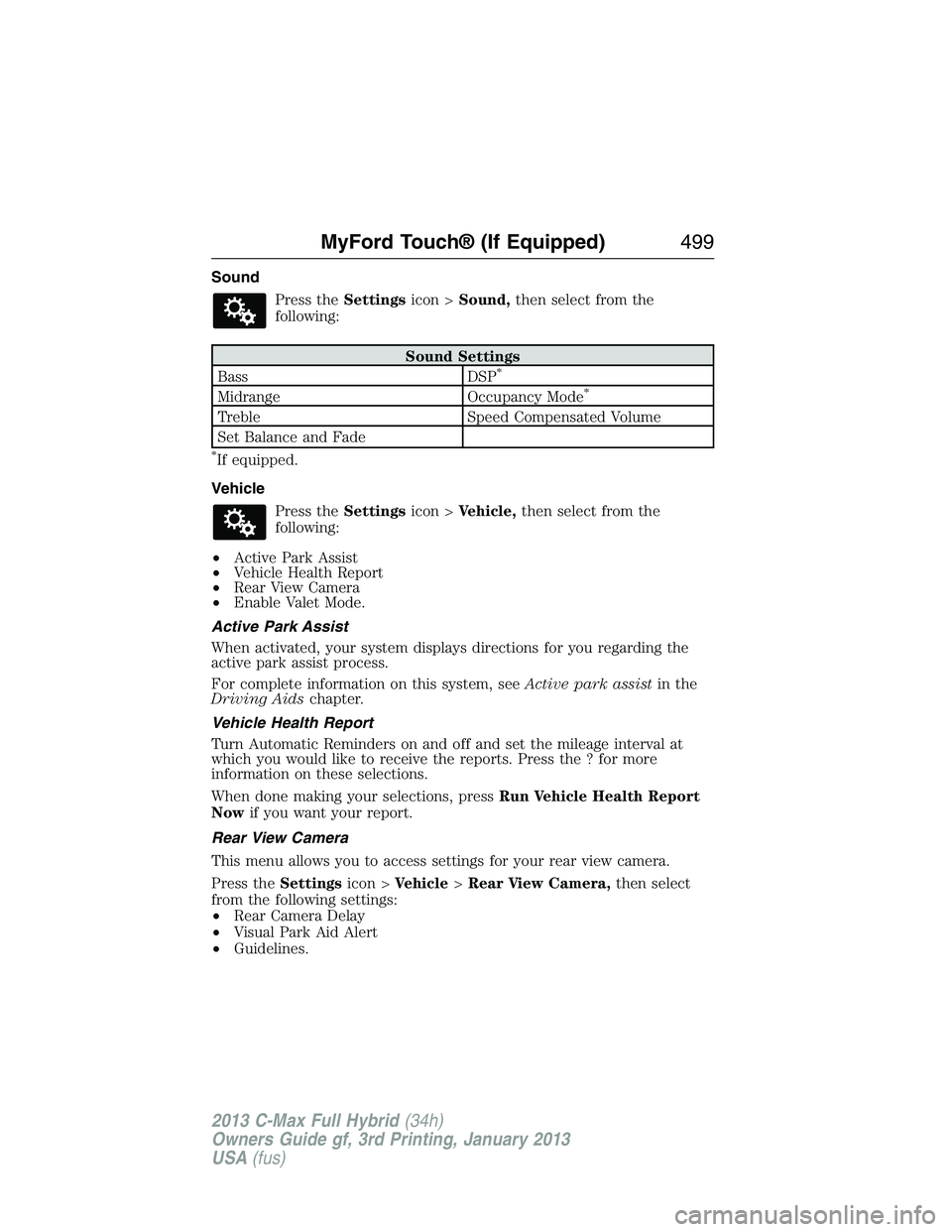
Sound
Press theSettingsicon >Sound,then select from the
following:
Sound Settings
Bass DSP*
Midrange Occupancy Mode*
Treble Speed Compensated Volume
Set Balance and Fade
*If equipped.
Vehicle
Press theSettingsicon >Vehicle,then select from the
following:
•Active Park Assist
•Vehicle Health Report
•Rear View Camera
•Enable Valet Mode.
Active Park Assist
When activated, your system displays directions for you regarding the
active park assist process.
For complete information on this system, seeActive park assistin the
Driving Aidschapter.
Vehicle Health Report
Turn Automatic Reminders on and off and set the mileage interval at
which you would like to receive the reports. Press the ? for more
information on these selections.
When done making your selections, pressRun Vehicle Health Report
Nowif you want your report.
Rear View Camera
This menu allows you to access settings for your rear view camera.
Press theSettingsicon >Vehicle>Rear View Camera,then select
from the following settings:
•Rear Camera Delay
•Visual Park Aid Alert
•Guidelines.
MyFord Touch® (If Equipped)499
2013 C-Max Full Hybrid(34h)
Owners Guide gf, 3rd Printing, January 2013
USA(fus)
Page 545 of 552
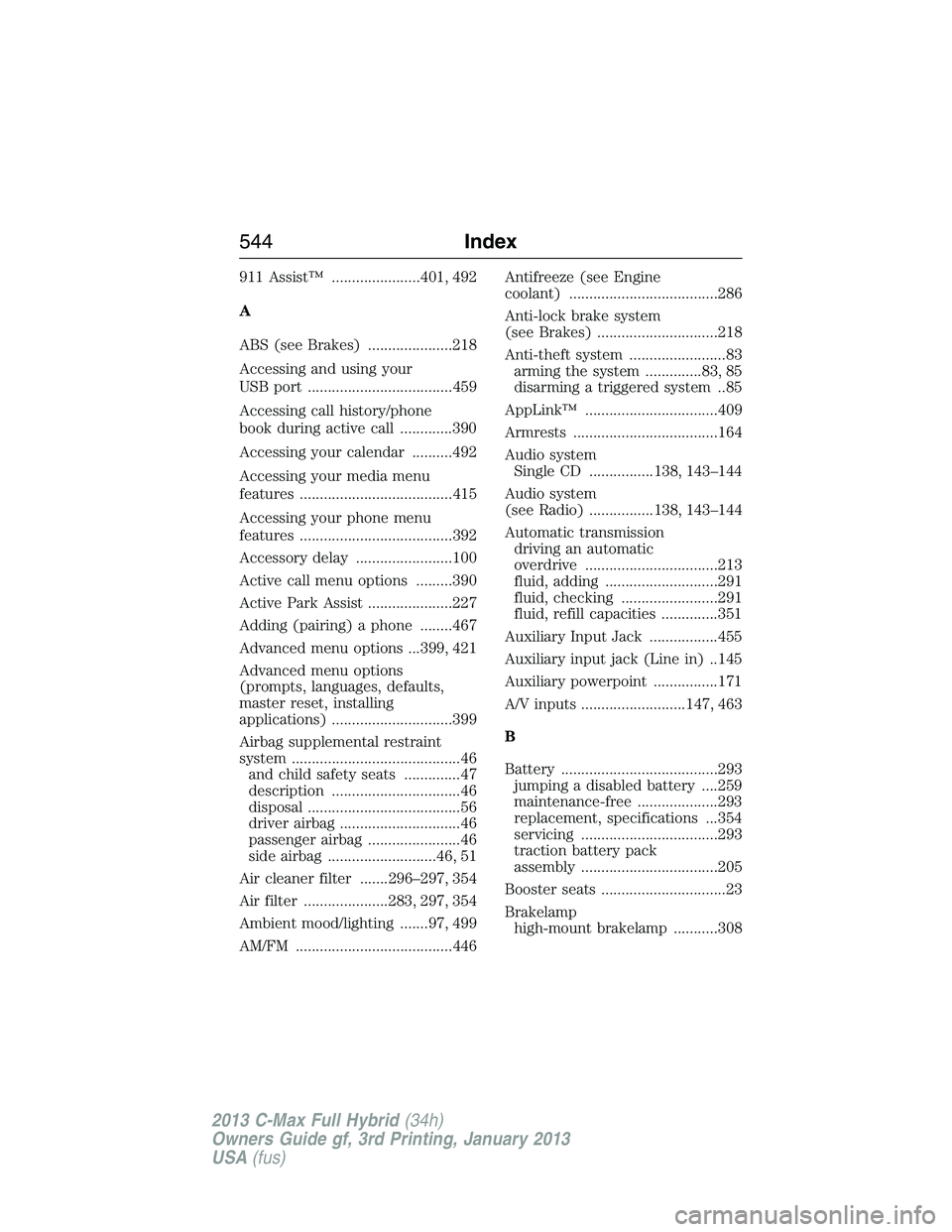
911 Assist™ ......................401, 492
A
ABS (see Brakes) .....................218
Accessing and using your
USB port ....................................459
Accessing call history/phone
book during active call .............390
Accessing your calendar ..........492
Accessing your media menu
features ......................................415
Accessing your phone menu
features ......................................392
Accessory delay ........................100
Active call menu options .........390
Active Park Assist .....................227
Adding (pairing) a phone ........467
Advanced menu options ...399, 421
Advanced menu options
(prompts, languages, defaults,
master reset, installing
applications) ..............................399
Airbag supplemental restraint
system ..........................................46
and child safety seats ..............47
description ................................46
disposal ......................................56
driver airbag ..............................46
passenger airbag .......................46
side airbag ...........................46, 51
Air cleaner filter .......296–297, 354
Air filter .....................283, 297, 354
Ambient mood/lighting .......97, 499
AM/FM .......................................446Antifreeze (see Engine
coolant) .....................................286
Anti-lock brake system
(see Brakes) ..............................218
Anti-theft system ........................83
arming the system ..............83, 85
disarming a triggered system ..85
AppLink™ .................................409
Armrests ....................................164
Audio system
Single CD ................138, 143–144
Audio system
(see Radio) ................138, 143–144
Automatic transmission
driving an automatic
overdrive .................................213
fluid, adding ............................291
fluid, checking ........................291
fluid, refill capacities ..............351
Auxiliary Input Jack .................455
Auxiliary input jack (Line in) ..145
Auxiliary powerpoint ................171
A/V inputs ..........................147, 463
B
Battery .......................................293
jumping a disabled battery ....259
maintenance-free ....................293
replacement, specifications ...354
servicing ..................................293
traction battery pack
assembly ..................................205
Booster seats ...............................23
Brakelamp
high-mount brakelamp ...........308
544Index
2013 C-Max Full Hybrid(34h)
Owners Guide gf, 3rd Printing, January 2013
USA(fus)