ad blue FORD C MAX ENERGI 2016 User Guide
[x] Cancel search | Manufacturer: FORD, Model Year: 2016, Model line: C MAX ENERGI, Model: FORD C MAX ENERGI 2016Pages: 395, PDF Size: 6.78 MB
Page 302 of 395
System data cannot be accessed withoutspecial equipment and access to thevehicle's SYNC module. Ford MotorCompany and Ford of Canada will notaccess the system data for any purposeother than as described absent consent, acourt order, or where required by lawenforcement, other governmentauthorities, or other third parties actingwith lawful authority. Other parties mayseek to access the informationindependently of Ford Motor Company andFord of Canada. For further privacyinformation, see the sections on 911 Assist,Vehicle Health Report, and Traffic,Directions and Information.
USING VOICE RECOGNITION
This system helps you control manyfeatures using voice commands. Thisallows you to keep your hands on thewheel and focus on what is in front of you.
Helpful Hints
•Make sure the interior of your vehicle isas quiet as possible. Wind noise fromopen windows and road vibrations mayprevent the system from correctlyrecognizing spoken commands.
•After pressing the voice button, waituntil after the tone sounds andListening appears before saying acommand. Any command spokenbefore this does not register with thesystem.
•Speak naturally, without long pausesbetween words.
•At any time, you can interrupt thesystem while it is speaking by pressingthe voice button.
Initiating a Voice Session
Initiate a voice session bypressing the voice button on thesteering wheel controls. SeeUsing Voice Recognition (page 299).
When prompted you can say any of the following:
If you want the system to carry out the followingVoice command
Stream audio from your phone.Bluetooth Audio
Cancel the requested action.Cancel
Access mobile applications.mobile (apps | applica-tions)
Make calls.Phone
Access the device connected to your USB port.USB [1]
Run a vehicle health report.Vehicle Health (Report)
299
C-MAX (CCG) Canada/United States of America, enUSA, First Printing
SYNC™E142599
Page 305 of 395
USING SYNC™ WITH YOUR
PHONE
Hands-free calling is one of the mainfeatures of SYNC. While the systemsupports a variety of features, many aredependent on your cell phone'sfunctionality. At a minimum, most cellphones with Bluetooth wireless technologysupport the following functions:
•Answering an incoming call.
•Ending a call.
•Using privacy mode.
•Dialing a number.
•Redialing.
•Call waiting notification.
•Caller ID.
Other features, such as text messagingusing Bluetooth and automatic phonebookdownload, are cell phone-dependentfeatures. To check your cell phone'scompatibility, see your cell phone's manualand visit www.SYNCMyRide.com,www.SYNCMyRide.ca orwww.syncmaroute.ca.
Pairing a Cell Phone for the FirstTime
Note:SYNC can support downloading upto approximately 1000 entries perBluetooth-enabled cell phone.
Note:Make sure to switch on the ignitionand the radio. Put the transmission inposition park (P) (automatic transmission)or neutral with the parking brake applied(manual transmission).
Note:To scroll through the menus, pressthe up and down arrows on your audiosystem.
Wirelessly pairing your cell phone withSYNC allows you to make and receivehands-free calls.
Press the phone button. When the display indicates there is no cell phone paired,do the following:
Action and DescriptionMessage
Press the OK button.NO PHONE
FIND SYNC1. Press the OK button.
2. Put your cell phone into Bluetooth discovery mode. Seeyour device's manual if necessary.
3. When prompted on your cell phone's display, enter thesix-digit PIN provided by SYNC in the radio display. Thedisplay indicates when the pairing is successful.
302
C-MAX (CCG) Canada/United States of America, enUSA, First Printing
SYNC™
Page 306 of 395
Depending on your cell phone's capabilityand your market, the system may promptyou with questions, such as setting thecurrent cell phone as the primary cellphone (the cell phone SYNC automaticallytries to connect with first upon vehiclestart-up) and downloading yourphonebook.
Pairing Subsequent Cell Phones
Note:To scroll through the menus, pressthe up and down arrows on your audiosystem.
Note:Make sure to switch on the ignitionand the radio. Put the transmission inposition park (P) (automatic transmission)or neutral with the parking brake applied(manual transmission).
Press the phone button, then scroll to:
ActionMessage
Press the OK button.PHONE SETNGS
Press the OK button.BT DEVICES
Press the OK button. When the following message appearsin the display.ADD DEVICE
FIND SYNC1. Press the OK button.
2. Put your cell phone into Bluetooth discovery mode. Seeyour device's manual if necessary.
3. When prompted on your cell phone's display, enter thesix-digit PIN provided by SYNC in the radio display. Thedisplay indicates when the pairing is successful.
The system then prompts with questions, such as if you would like to set the current cellphone as the primary cell phone (the cell phone SYNC automatically tries to connectwith first upon vehicle start-up) or download your phonebook.
Phone Voice Commands
Press the voice icon and say:
Voice Commands
Phone
You can then say any of the followingcommands.
Call History Incoming
Call History Missed
Call History Outgoing
Voice Commands
Phonebook ___
Phonebook ___ at Home
Phonebook ___ at Work
Phonebook ___ in Office
Phonebook ___ on Cell
___ is a dynamic listing that should be thename of a contact in your phonebook. Forexample you could say "Call Mom".
303
C-MAX (CCG) Canada/United States of America, enUSA, First Printing
SYNC™
Page 307 of 395
You can also say any of the following:
Voice Command
Call ___
Call ___ at Home
Call ___ at Work
Call ___ in Office
Call ___ on Mobile
Call ___ on Other
Dial
None of these commands are availableuntil your cell phone information iscompletely downloaded using Bluetooth.
___ is a dynamic listing that should be thename of a contact in your phonebook. Forexample you could say "Call Mom".
The following commands are onlyavailable during active calls:
Voice Commands
Go To Privacy
Hold
Join
Phone Menu Commands
To access the phone menu with voicecommands, press the voice button andwhen prompted say:
Voice Command
[Phone] Menu
You can then say any of the following:
[Phone] Connections | [Media] Connec-tions | [Bluetooth] Connections
Voice Command
[Phone] Settings [Message] NotificationOn
[Phone] Settings [Message] NotificationOff
[Phone] Settings [Set] Phone Ringer
[Phone] Settings [Set] Ringer 1
[Phone] Settings [Set] Ringer 2
[Phone] Settings [Set] Ringer 3
[Phone] Settings [Set] Ringer Off
Battery
Phone Name
Signal
Text Message Inbox
Send [New] Text Message
You do not need to say word containedwithin brackets for the system tounderstand your command.
Note:To exit dial mode, press and hold thephone button or press MENU to go to thePHONE menu.
Phonebook Commands
When you ask SYNC to access content, forexample the phonebook name or number,the requested information appears in thedisplay to view.
304
C-MAX (CCG) Canada/United States of America, enUSA, First Printing
SYNC™
Page 308 of 395
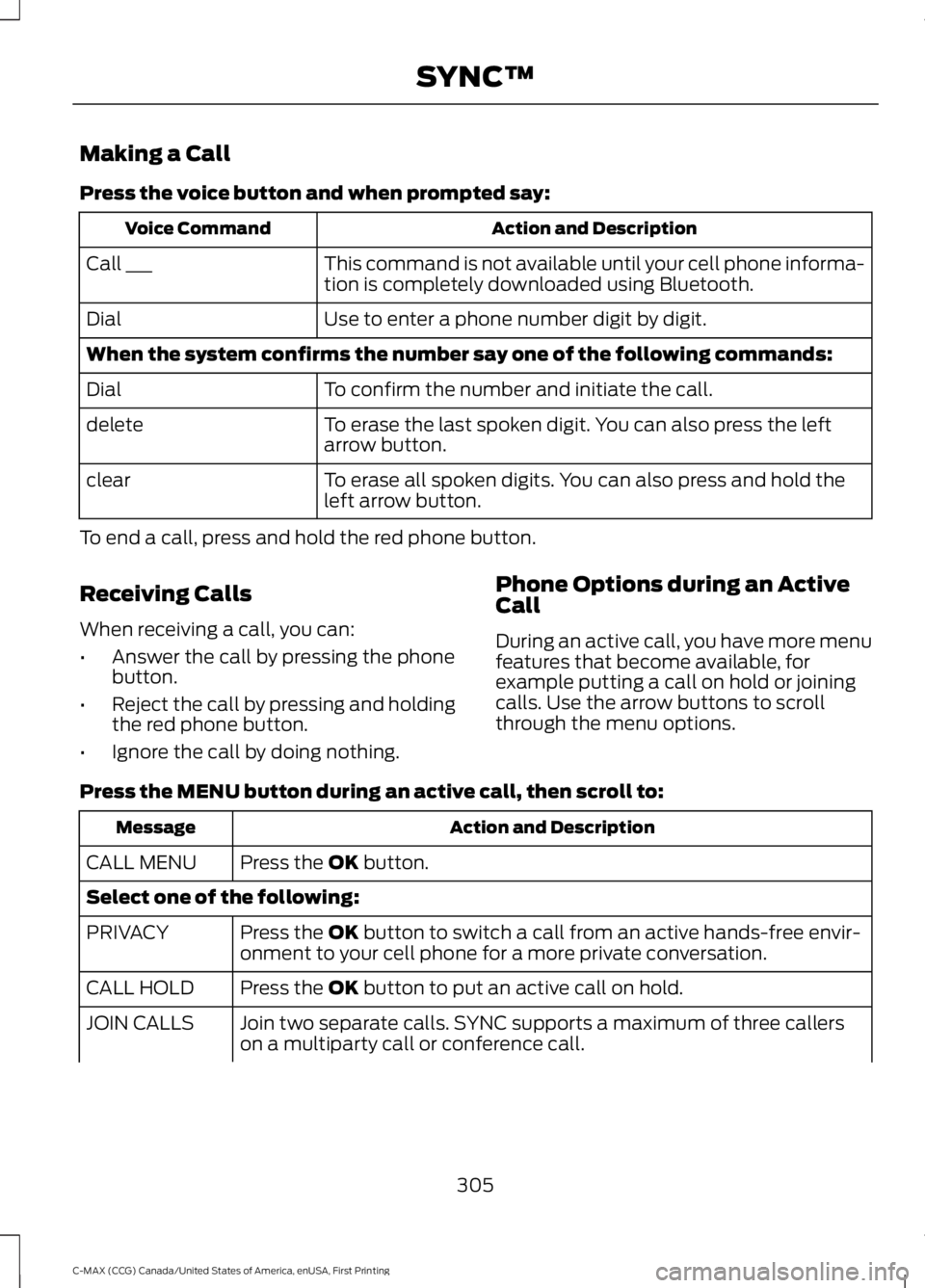
Making a Call
Press the voice button and when prompted say:
Action and DescriptionVoice Command
This command is not available until your cell phone informa-tion is completely downloaded using Bluetooth.Call ___
Use to enter a phone number digit by digit.Dial
When the system confirms the number say one of the following commands:
To confirm the number and initiate the call.Dial
To erase the last spoken digit. You can also press the leftarrow button.delete
To erase all spoken digits. You can also press and hold theleft arrow button.clear
To end a call, press and hold the red phone button.
Receiving Calls
When receiving a call, you can:
•Answer the call by pressing the phonebutton.
•Reject the call by pressing and holdingthe red phone button.
•Ignore the call by doing nothing.
Phone Options during an ActiveCall
During an active call, you have more menufeatures that become available, forexample putting a call on hold or joiningcalls. Use the arrow buttons to scrollthrough the menu options.
Press the MENU button during an active call, then scroll to:
Action and DescriptionMessage
Press the OK button.CALL MENU
Select one of the following:
Press the OK button to switch a call from an active hands-free envir-onment to your cell phone for a more private conversation.PRIVACY
Press the OK button to put an active call on hold.CALL HOLD
Join two separate calls. SYNC supports a maximum of three callerson a multiparty call or conference call.JOIN CALLS
305
C-MAX (CCG) Canada/United States of America, enUSA, First Printing
SYNC™
Page 310 of 395
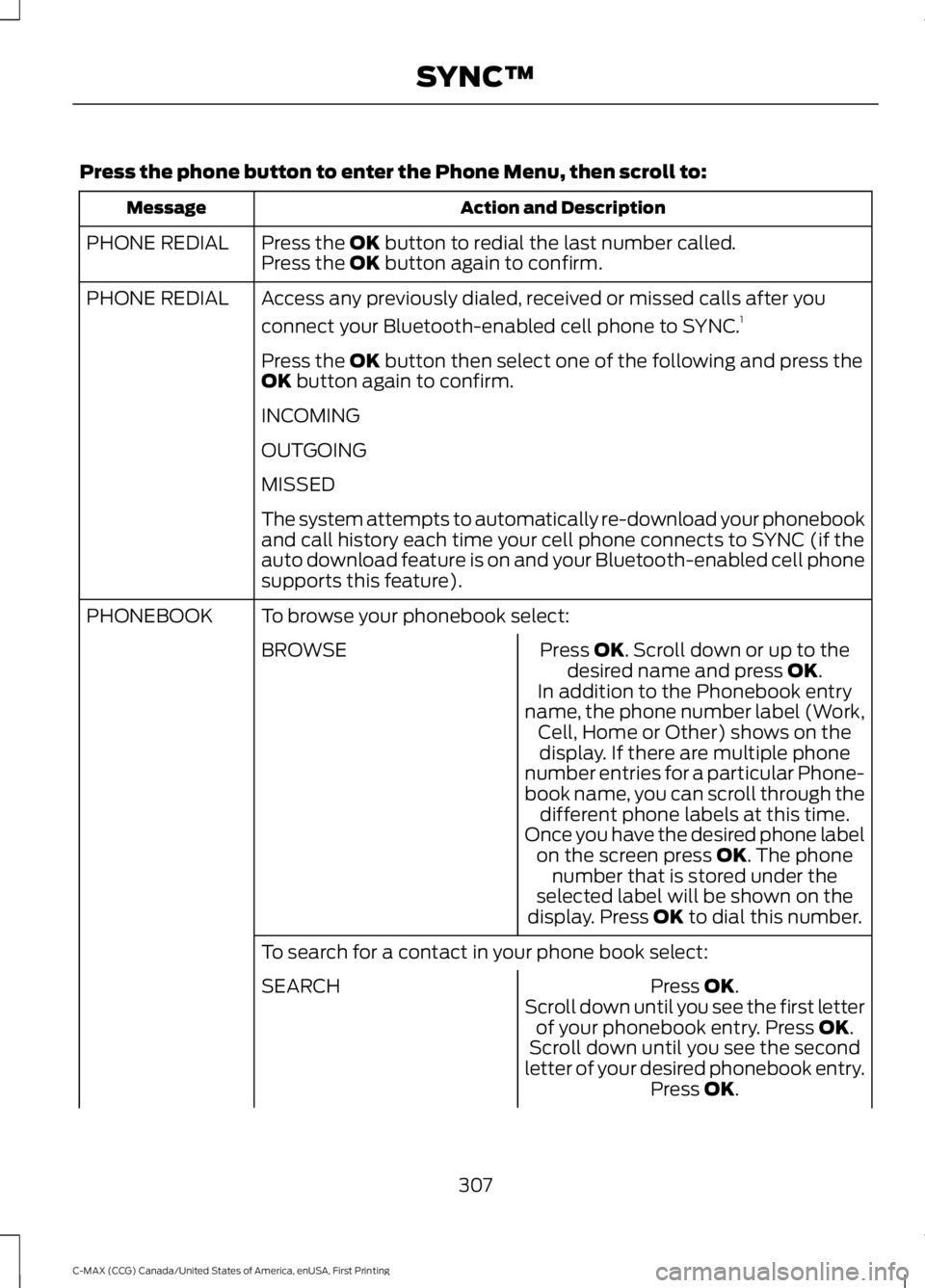
Press the phone button to enter the Phone Menu, then scroll to:
Action and DescriptionMessage
Press the OK button to redial the last number called.PHONE REDIALPress the OK button again to confirm.
Access any previously dialed, received or missed calls after you
connect your Bluetooth-enabled cell phone to SYNC.1PHONE REDIAL
Press the OK button then select one of the following and press theOK button again to confirm.
INCOMING
OUTGOING
MISSED
The system attempts to automatically re-download your phonebookand call history each time your cell phone connects to SYNC (if theauto download feature is on and your Bluetooth-enabled cell phonesupports this feature).
To browse your phonebook select:PHONEBOOK
Press OK. Scroll down or up to thedesired name and press OK.BROWSE
In addition to the Phonebook entryname, the phone number label (Work,Cell, Home or Other) shows on thedisplay. If there are multiple phonenumber entries for a particular Phone-book name, you can scroll through thedifferent phone labels at this time.Once you have the desired phone labelon the screen press OK. The phonenumber that is stored under theselected label will be shown on thedisplay. Press OK to dial this number.
To search for a contact in your phone book select:
Press OK.SEARCHScroll down until you see the first letterof your phonebook entry. Press OK.Scroll down until you see the secondletter of your desired phonebook entry.Press OK.
307
C-MAX (CCG) Canada/United States of America, enUSA, First Printing
SYNC™
Page 312 of 395
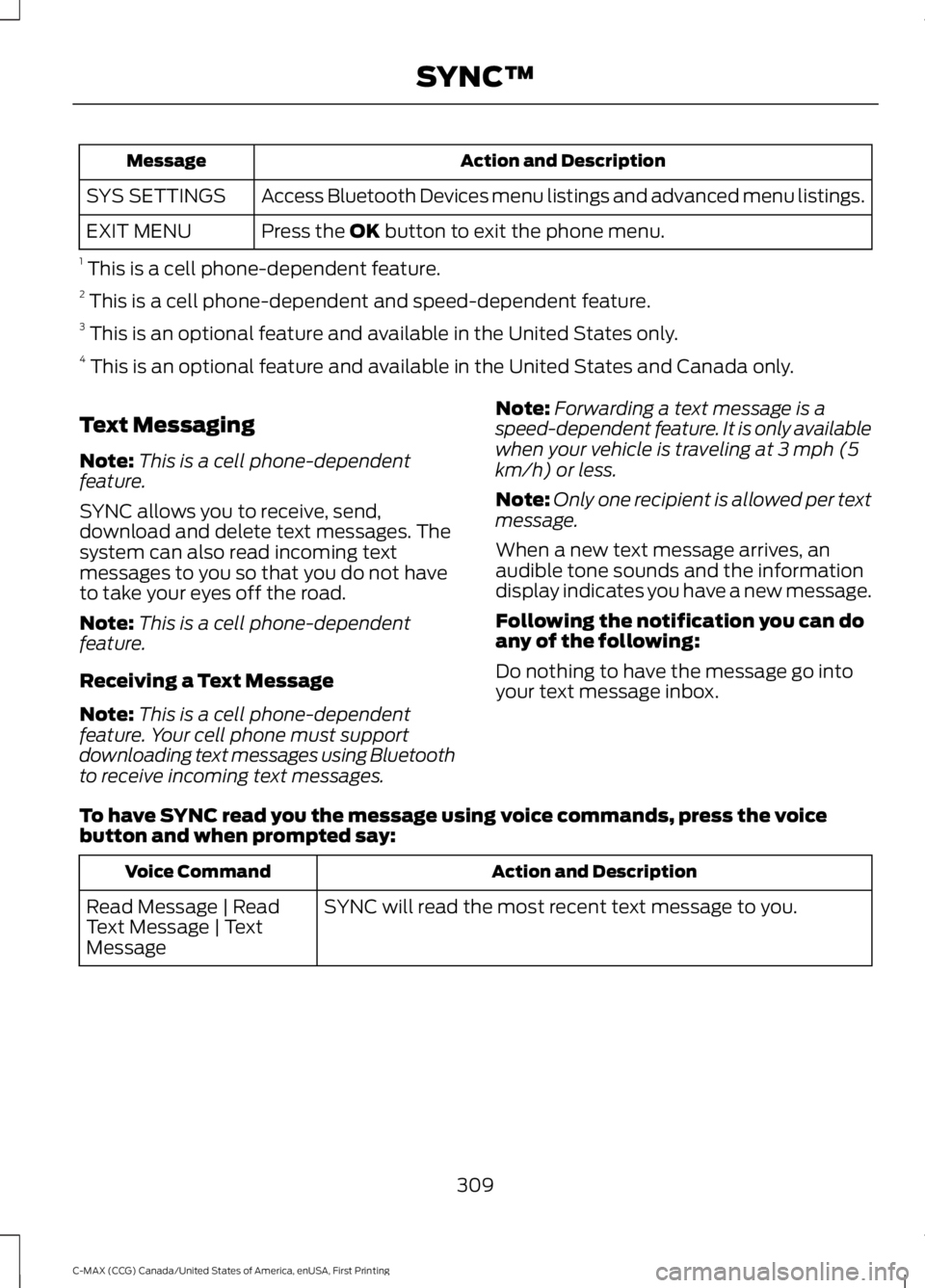
Action and DescriptionMessage
Access Bluetooth Devices menu listings and advanced menu listings.SYS SETTINGS
Press the OK button to exit the phone menu.EXIT MENU
1 This is a cell phone-dependent feature.2 This is a cell phone-dependent and speed-dependent feature.3 This is an optional feature and available in the United States only.4 This is an optional feature and available in the United States and Canada only.
Text Messaging
Note:This is a cell phone-dependentfeature.
SYNC allows you to receive, send,download and delete text messages. Thesystem can also read incoming textmessages to you so that you do not haveto take your eyes off the road.
Note:This is a cell phone-dependentfeature.
Receiving a Text Message
Note:This is a cell phone-dependentfeature. Your cell phone must supportdownloading text messages using Bluetoothto receive incoming text messages.
Note:Forwarding a text message is aspeed-dependent feature. It is only availablewhen your vehicle is traveling at 3 mph (5km/h) or less.
Note:Only one recipient is allowed per textmessage.
When a new text message arrives, anaudible tone sounds and the informationdisplay indicates you have a new message.
Following the notification you can doany of the following:
Do nothing to have the message go intoyour text message inbox.
To have SYNC read you the message using voice commands, press the voicebutton and when prompted say:
Action and DescriptionVoice Command
SYNC will read the most recent text message to you.Read Message | ReadText Message | TextMessage
309
C-MAX (CCG) Canada/United States of America, enUSA, First Printing
SYNC™
Page 315 of 395
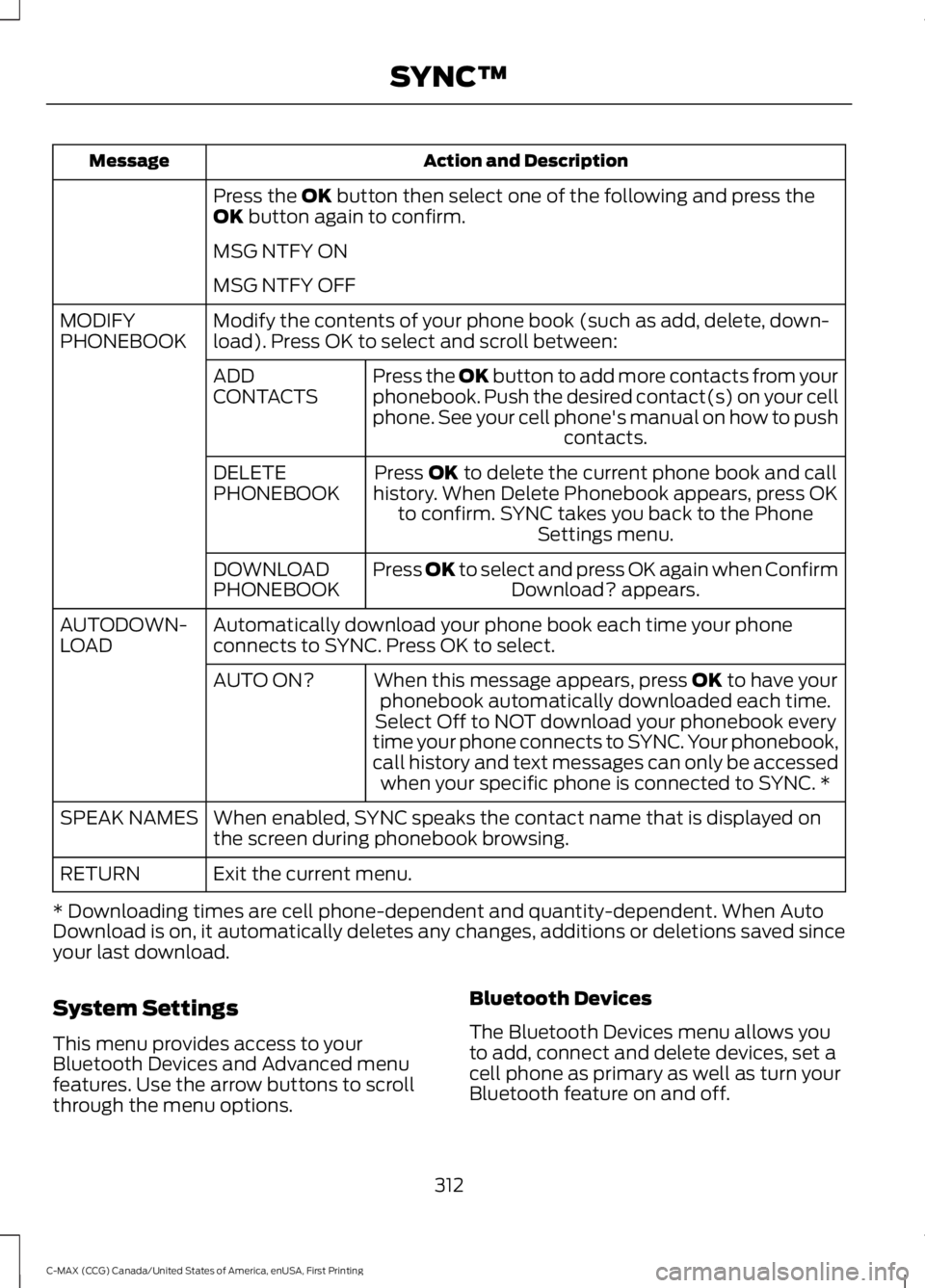
Action and DescriptionMessage
Press the OK button then select one of the following and press theOK button again to confirm.
MSG NTFY ON
MSG NTFY OFF
Modify the contents of your phone book (such as add, delete, down-load). Press OK to select and scroll between:MODIFYPHONEBOOK
Press the OK button to add more contacts from yourphonebook. Push the desired contact(s) on your cellphone. See your cell phone's manual on how to pushcontacts.
ADDCONTACTS
Press OK to delete the current phone book and callhistory. When Delete Phonebook appears, press OKto confirm. SYNC takes you back to the PhoneSettings menu.
DELETEPHONEBOOK
Press OK to select and press OK again when ConfirmDownload? appears.DOWNLOADPHONEBOOK
Automatically download your phone book each time your phoneconnects to SYNC. Press OK to select.AUTODOWN-LOAD
When this message appears, press OK to have yourphonebook automatically downloaded each time.AUTO ON?
Select Off to NOT download your phonebook everytime your phone connects to SYNC. Your phonebook,call history and text messages can only be accessedwhen your specific phone is connected to SYNC. *
When enabled, SYNC speaks the contact name that is displayed onthe screen during phonebook browsing.SPEAK NAMES
Exit the current menu.RETURN
* Downloading times are cell phone-dependent and quantity-dependent. When AutoDownload is on, it automatically deletes any changes, additions or deletions saved sinceyour last download.
System Settings
This menu provides access to yourBluetooth Devices and Advanced menufeatures. Use the arrow buttons to scrollthrough the menu options.
Bluetooth Devices
The Bluetooth Devices menu allows youto add, connect and delete devices, set acell phone as primary as well as turn yourBluetooth feature on and off.
312
C-MAX (CCG) Canada/United States of America, enUSA, First Printing
SYNC™
Page 316 of 395
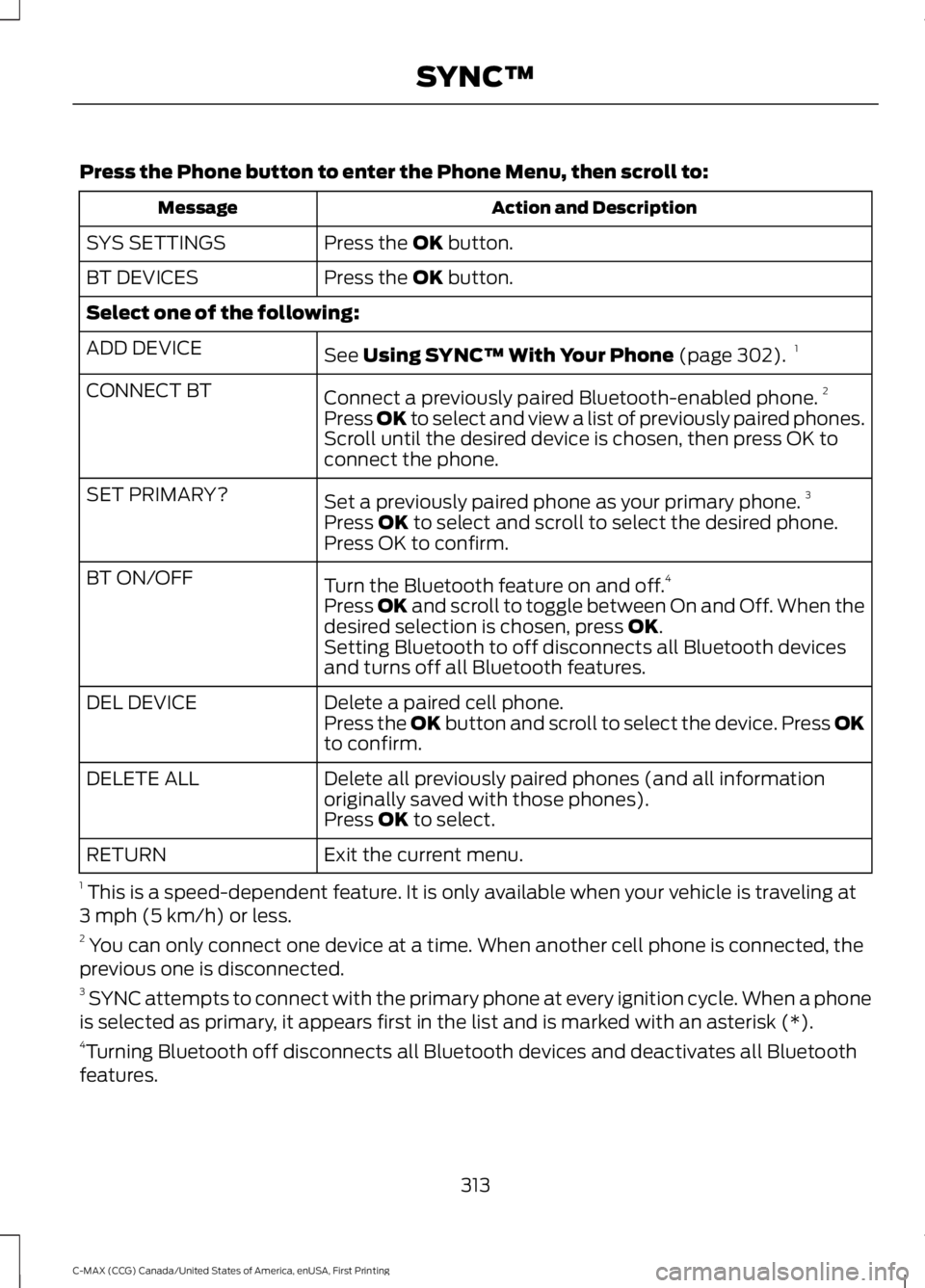
Press the Phone button to enter the Phone Menu, then scroll to:
Action and DescriptionMessage
Press the OK button.SYS SETTINGS
Press the OK button.BT DEVICES
Select one of the following:
See Using SYNC™ With Your Phone (page 302).1ADD DEVICE
Connect a previously paired Bluetooth-enabled phone.2CONNECT BT
Press OK to select and view a list of previously paired phones.Scroll until the desired device is chosen, then press OK toconnect the phone.
Set a previously paired phone as your primary phone.3SET PRIMARY?
Press OK to select and scroll to select the desired phone.Press OK to confirm.
Turn the Bluetooth feature on and off.4BT ON/OFF
Press OK and scroll to toggle between On and Off. When thedesired selection is chosen, press OK.Setting Bluetooth to off disconnects all Bluetooth devicesand turns off all Bluetooth features.
Delete a paired cell phone.DEL DEVICEPress the OK button and scroll to select the device. Press OKto confirm.
Delete all previously paired phones (and all informationoriginally saved with those phones).DELETE ALL
Press OK to select.
Exit the current menu.RETURN
1 This is a speed-dependent feature. It is only available when your vehicle is traveling at3 mph (5 km/h) or less.2 You can only connect one device at a time. When another cell phone is connected, theprevious one is disconnected.3 SYNC attempts to connect with the primary phone at every ignition cycle. When a phoneis selected as primary, it appears first in the list and is marked with an asterisk (*).4Turning Bluetooth off disconnects all Bluetooth devices and deactivates all Bluetoothfeatures.
313
C-MAX (CCG) Canada/United States of America, enUSA, First Printing
SYNC™
Page 319 of 395
Note:Before setting this feature on, makesure that you read the 911 Assist PrivacyNotice later in this section for importantinformation.
Note:If any user turns 911 Assist on or off,that setting applies for all paired phones. If911 Assist is turned off, either a voicemessage plays or a display message (oricon) comes on (or both) when your vehicleis started after a previously paired phoneconnects.
Note:Every phone operates differently.While SYNC 911 Assist works with mostcellular phones, some may have troubleusing this feature.
If a crash deploys an airbag (excludingknee airbags and rear inflatable safetybelts [if equipped]) or activates the fuelpump shut-off, your SYNC-equippedvehicle may be able to contact emergencyservices by dialing 911 through a paired andconnected Bluetooth-enabled phone. Youcan learn more about the 911 Assistfeature, visit www.SYNCMyRide.com,www.SYNCMyRide.ca orwww.syncmaroute.ca.
See Supplementary Restraints System(page 35). Important information aboutairbag deployment is in this chapter.
See Roadside Emergencies (page 195).Important information about the fuel pumpshut-off is in this chapter.
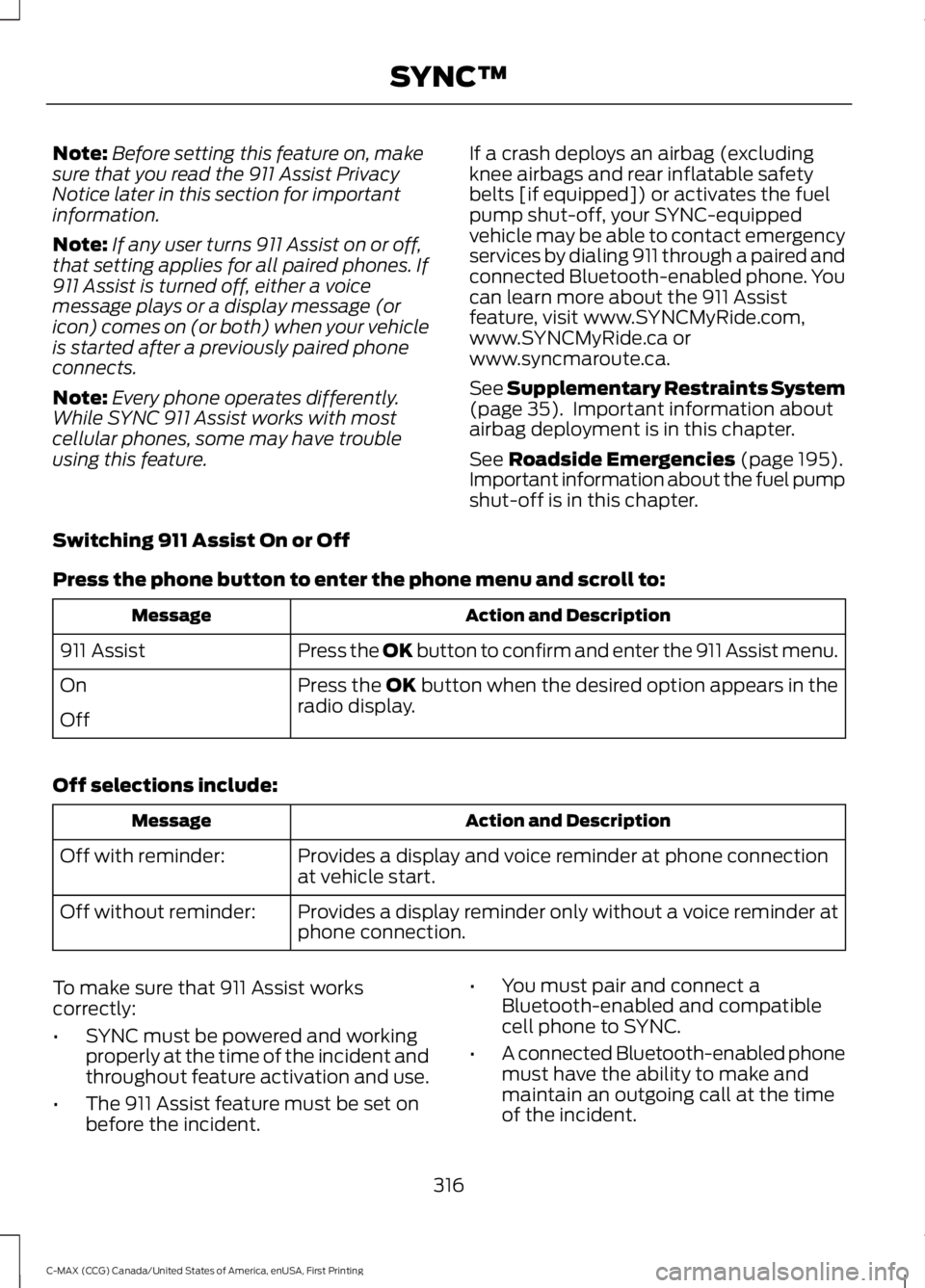
Switching 911 Assist On or Off
Press the phone button to enter the phone menu and scroll to:
Action and DescriptionMessage
Press the OK button to confirm and enter the 911 Assist menu.911 Assist
Press the OK button when the desired option appears in theradio display.On
Off
Off selections include:
Action and DescriptionMessage
Provides a display and voice reminder at phone connectionat vehicle start.Off with reminder:
Provides a display reminder only without a voice reminder atphone connection.Off without reminder:
To make sure that 911 Assist workscorrectly:
•SYNC must be powered and workingproperly at the time of the incident andthroughout feature activation and use.
•The 911 Assist feature must be set onbefore the incident.
•You must pair and connect aBluetooth-enabled and compatiblecell phone to SYNC.
•A connected Bluetooth-enabled phonemust have the ability to make andmaintain an outgoing call at the timeof the incident.
316
C-MAX (CCG) Canada/United States of America, enUSA, First Printing
SYNC™