battery FORD C MAX ENERGI 2016 User Guide
[x] Cancel search | Manufacturer: FORD, Model Year: 2016, Model line: C MAX ENERGI, Model: FORD C MAX ENERGI 2016Pages: 395, PDF Size: 6.78 MB
Page 64 of 395
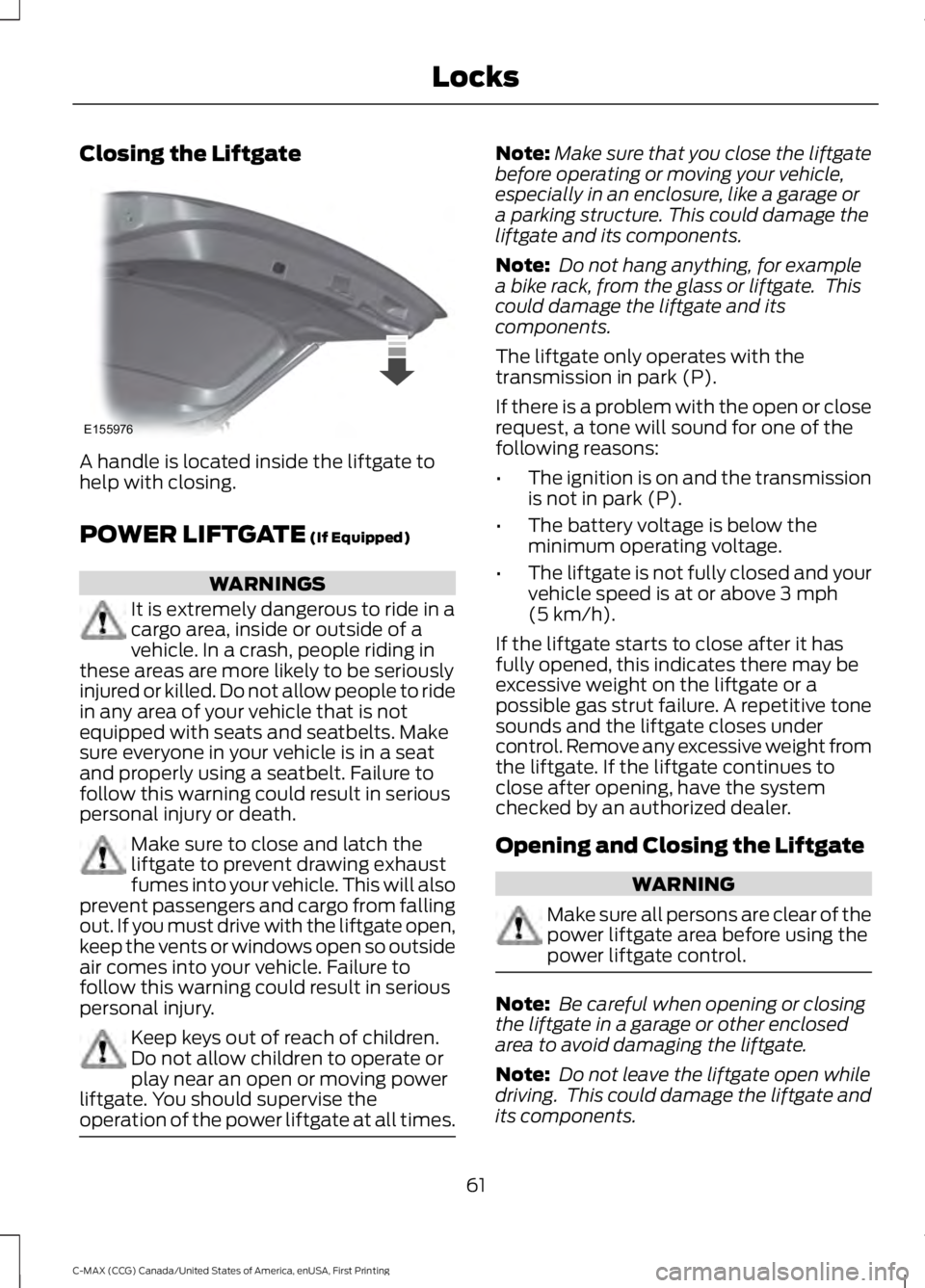
Closing the Liftgate
A handle is located inside the liftgate tohelp with closing.
POWER LIFTGATE (If Equipped)
WARNINGS
It is extremely dangerous to ride in acargo area, inside or outside of avehicle. In a crash, people riding inthese areas are more likely to be seriouslyinjured or killed. Do not allow people to ridein any area of your vehicle that is notequipped with seats and seatbelts. Makesure everyone in your vehicle is in a seatand properly using a seatbelt. Failure tofollow this warning could result in seriouspersonal injury or death.
Make sure to close and latch theliftgate to prevent drawing exhaustfumes into your vehicle. This will alsoprevent passengers and cargo from fallingout. If you must drive with the liftgate open,keep the vents or windows open so outsideair comes into your vehicle. Failure tofollow this warning could result in seriouspersonal injury.
Keep keys out of reach of children.Do not allow children to operate orplay near an open or moving powerliftgate. You should supervise theoperation of the power liftgate at all times.
Note:Make sure that you close the liftgatebefore operating or moving your vehicle,especially in an enclosure, like a garage ora parking structure. This could damage theliftgate and its components.
Note: Do not hang anything, for examplea bike rack, from the glass or liftgate. Thiscould damage the liftgate and itscomponents.
The liftgate only operates with thetransmission in park (P).
If there is a problem with the open or closerequest, a tone will sound for one of thefollowing reasons:
•The ignition is on and the transmissionis not in park (P).
•The battery voltage is below theminimum operating voltage.
•The liftgate is not fully closed and yourvehicle speed is at or above 3 mph(5 km/h).
If the liftgate starts to close after it hasfully opened, this indicates there may beexcessive weight on the liftgate or apossible gas strut failure. A repetitive tonesounds and the liftgate closes undercontrol. Remove any excessive weight fromthe liftgate. If the liftgate continues toclose after opening, have the systemchecked by an authorized dealer.
Opening and Closing the Liftgate
WARNING
Make sure all persons are clear of thepower liftgate area before using thepower liftgate control.
Note: Be careful when opening or closingthe liftgate in a garage or other enclosedarea to avoid damaging the liftgate.
Note: Do not leave the liftgate open whiledriving. This could damage the liftgate andits components.
61
C-MAX (CCG) Canada/United States of America, enUSA, First Printing
LocksE155976
Page 66 of 395
Setting the Liftgate Open Height
1. Open the liftgate.
2.Stop the liftgate movement by pressingthe control button on the liftgate whenit reaches the desired height.
Note:Once the liftgate has stoppedmoving, you can also manually move it tothe desired height.
3. Press and hold the liftgate controlbutton on the liftgate until you hear atone, indicating programming iscomplete.
Note: You can only use the liftgate controlbutton to program the height.
Note: You cannot program the height if theliftgate position is too low.
The new open liftgate height is recalledwhen the power liftgate is opened. Tochange the programmed height, repeat theabove procedure. Once you open thepower liftgate, you can manually move itto a different height.
Note:The system recalls the newprogrammed height until you reprogram it,even if you disconnect the battery.
When operating the power liftgate afteryou have programmed a lower height thanfully open, you can fully open the liftgateby manually pushing it upward to themaximum open position.
Obstacle Detection
When Closing
The system stops when it detects anobstacle. A tone sounds and the systemreverses to open. Once you remove theobstacle, you can power close the liftgate.
Note:Entering your vehicle while theliftgate is closing can cause your vehicle tobounce and activate obstacle detection. Toprevent this, let the power liftgate closecompletely before you enter your vehicle.Before driving off, check the instrumentcluster for a liftgate or door ajar message orwarning indicator. Failure to do this couldresult in unintentionally leaving the liftgateopen while driving.
When Opening
The system stops when it detects anobstacle and a tone sounds. Once youremove the obstacle, you can continue tooperate the liftgate.
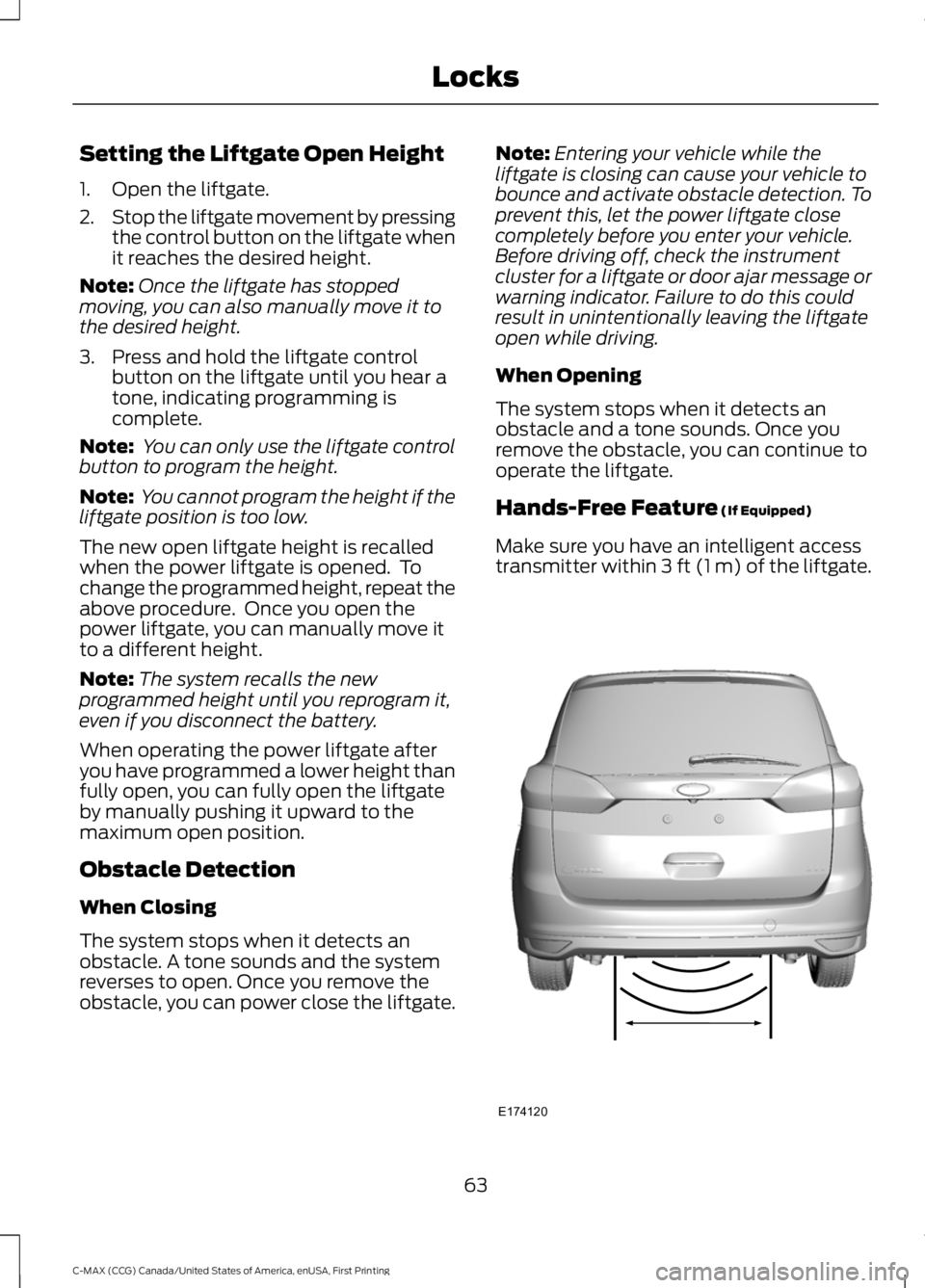
Hands-Free Feature (If Equipped)
Make sure you have an intelligent accesstransmitter within 3 ft (1 m) of the liftgate.
63
C-MAX (CCG) Canada/United States of America, enUSA, First Printing
LocksE174120
Page 79 of 395
INSTRUMENT LIGHTING
DIMMER
Note:If you disconnect the battery or itbecomes discharged, the illuminatedcomponents will switch to the maximumsetting.
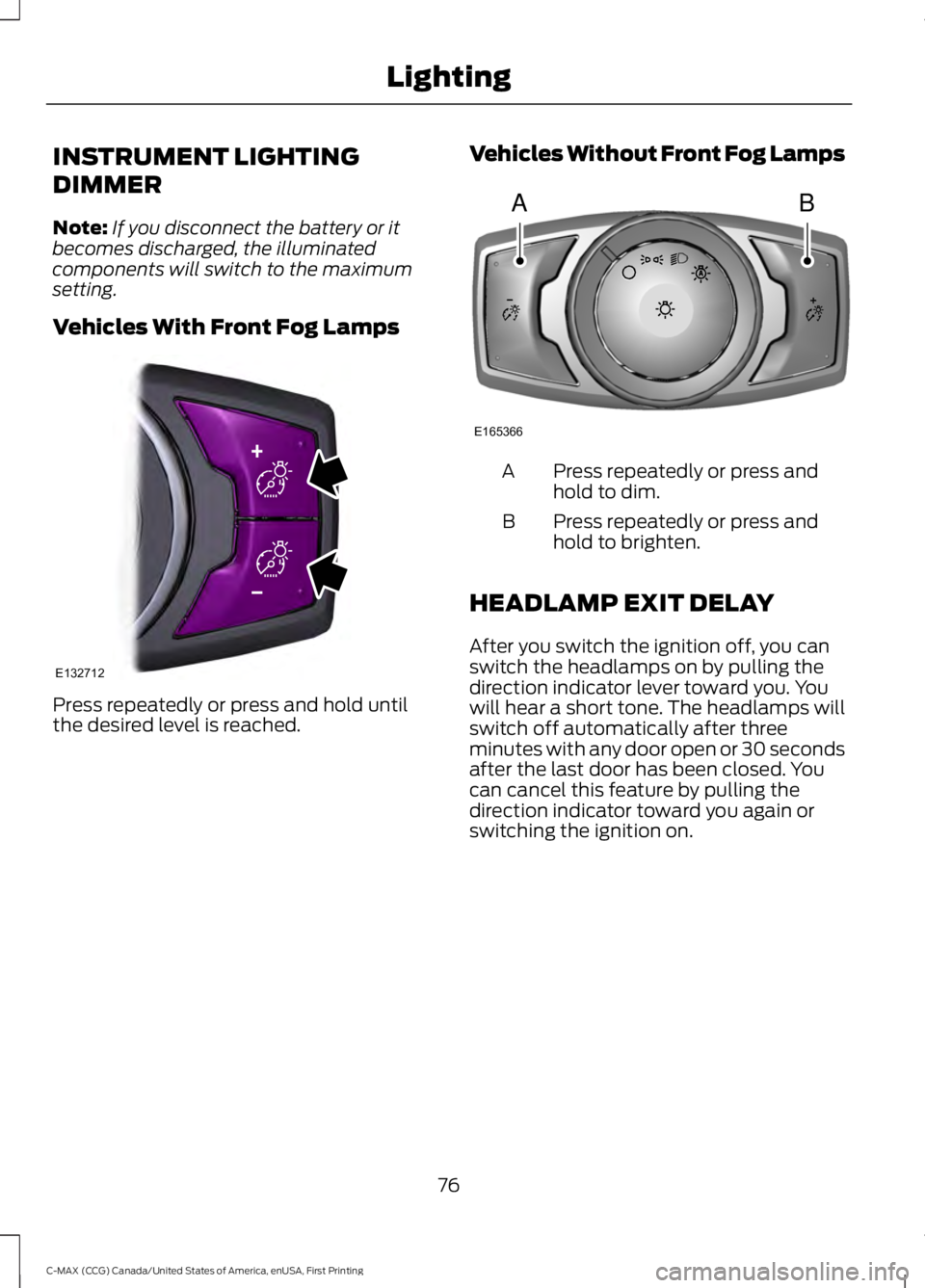
Vehicles With Front Fog Lamps
Press repeatedly or press and hold untilthe desired level is reached.
Vehicles Without Front Fog Lamps
Press repeatedly or press andhold to dim.A
Press repeatedly or press andhold to brighten.B
HEADLAMP EXIT DELAY
After you switch the ignition off, you canswitch the headlamps on by pulling thedirection indicator lever toward you. Youwill hear a short tone. The headlamps willswitch off automatically after threeminutes with any door open or 30 secondsafter the last door has been closed. Youcan cancel this feature by pulling thedirection indicator toward you again orswitching the ignition on.
76
C-MAX (CCG) Canada/United States of America, enUSA, First Printing
LightingE132712 AB
E165366
Page 84 of 395
2. Close the window a third time to thepoint of resistance. The bounce-backfeature is now disabled and you canclose the window manually. Thewindow will go past the point ofresistance and you can close it fully.
See an authorized dealer as soon aspossible if the window does not close afterthe third attempt.
Resetting the Bounce-Back Feature
WARNING
The bounce-back feature remainsturned off until you reset thememory.
If you have disconnected the battery, youmust reset the bounce-back memoryseparately for each window.
1. Lift and hold the switch until thewindow is fully closed.
2. Release the switch.
3. Lift the switch again for one moresecond.
4. Press and hold the switch until thewindow is fully open.
5. Release the switch.
6. Lift and hold the switch until thewindow is fully closed.
7.Open the window and then try to closeit automatically.
8. Reset and repeat the procedure if thewindow does not close automatically.
Accessory Delay (If Equipped)
You can use the window switches forseveral minutes after you switch theignition off or until you open either frontdoor.
GLOBAL OPENING
You can use the remote control to operatethe windows with the ignition off.
Note:To operate this feature, accessorydelay must not be active.
Opening the Windows
You can use the global opening feature toopen the windows only for a short timeafter you unlock your vehicle by using theremote control.
To use the global opening feature:
1. Press and release the remote controlunlock button.
2.Press the remote control unlock buttonagain and hold it for approximatelythree seconds. Release the controlwhen the windows begin to open.
3.Press the lock or unlock button on yourremote control to stop the windowopening function.
Note:Contact an authorized Ford dealer todeactivate this feature.
EXTERIOR MIRRORS
Power Exterior Mirrors
WARNING
Do not adjust the mirrors when yourvehicle is moving.
81
C-MAX (CCG) Canada/United States of America, enUSA, First Printing
Windows and Mirrors
Page 88 of 395
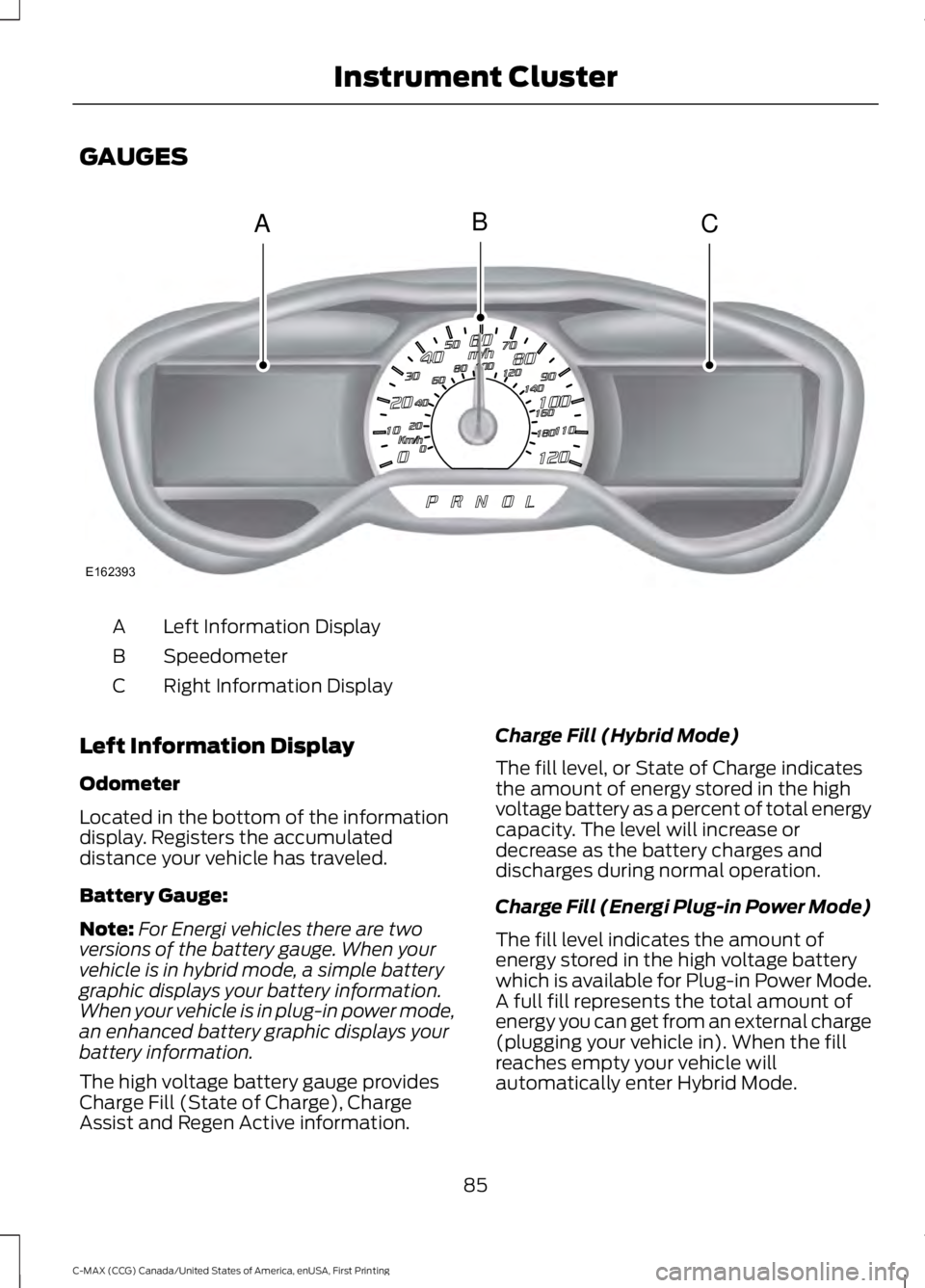
GAUGES
Left Information DisplayA
SpeedometerB
Right Information DisplayC
Left Information Display
Odometer
Located in the bottom of the informationdisplay. Registers the accumulateddistance your vehicle has traveled.
Battery Gauge:
Note:For Energi vehicles there are twoversions of the battery gauge. When yourvehicle is in hybrid mode, a simple batterygraphic displays your battery information.When your vehicle is in plug-in power mode,an enhanced battery graphic displays yourbattery information.
The high voltage battery gauge providesCharge Fill (State of Charge), ChargeAssist and Regen Active information.
Charge Fill (Hybrid Mode)
The fill level, or State of Charge indicatesthe amount of energy stored in the highvoltage battery as a percent of total energycapacity. The level will increase ordecrease as the battery charges anddischarges during normal operation.
Charge Fill (Energi Plug-in Power Mode)
The fill level indicates the amount ofenergy stored in the high voltage batterywhich is available for Plug-in Power Mode.A full fill represents the total amount ofenergy you can get from an external charge(plugging your vehicle in). When the fillreaches empty your vehicle willautomatically enter Hybrid Mode.
85
C-MAX (CCG) Canada/United States of America, enUSA, First Printing
Instrument ClusterACB
E162393
Page 89 of 395
Charge Assist
The up and down arrows provideinformation about the energy going intoand out of the high voltage battery. The uparrow above the battery indicates batterycharging such as from regenerative braking.The down arrow below the batteryindicates battery discharging to providepower for propulsion or vehicleaccessories.
Regen Active
A circular arrow symbol appears in thecenter of the battery gauge when energyis being recaptured through theregenerative braking system.
This feature can be switched on or off inthe information displays settings menu.See General Information (page 93).
Fuel Gauge:
Note:The fuel gauge may vary slightlywhen your vehicle is moving or on a gradient.
Switch the ignition on. The fuel gauge willindicate approximately how much fuel isleft in the fuel tank. The arrow adjacent tothe fuel pump symbol indicates on whichside of your vehicle the fuel filler door islocated.
The needle should move toward F whenyou refuel your vehicle. If the needle pointsto E after adding fuel, this indicates yourvehicle needs service soon.
After refueling some variability in needleposition is normal:
•It may take a short time for the needleto reach F after leaving the gas station.This is normal and depends upon theslope of pavement at the gas station.
•The fuel amount dispensed into thetank is a little less or more than thegauge indicated. This is normal anddepends upon the slope of pavementat the gas station.
•If the gas station nozzle shuts offbefore the tank is full, try a differentgas pump nozzle.
Low Fuel Reminder
A low fuel reminder triggers when the fuelgauge needle is at 1/16th.
Variations:
Distance-to-emptyFuel gauge positionDriving type (fuel economyconditions)
35–80 mi (56–129 km)1/16thHighway driving
35 mi (56 km)1/16thSevere duty driving (trailertowing, extended idle)
Vehicle Settings and Personalization
Display/Trip
See General Information (page 93).
Information
See General Information (page 93).
Settings
See General Information (page 93).
86
C-MAX (CCG) Canada/United States of America, enUSA, First Printing
Instrument Cluster
Page 90 of 395
Brake Coach Display:
The Brake Coach appears after the vehiclehas come to a stop. It coaches you to brakein a manner which maximizes the amountof energy returned through theregenerative braking system. The percentdisplayed is an indication of theregenerative braking efficiency with 100%representing the maximum amount ofenergy recovery.
This feature can be switched on or off inthe information displays settings menu.See General Information (page 93).
Trip Summary:
The Trip Summary displays upon shuttingoff your vehicle. The information iscumulative over the last trip. A new tripbegins each time you start your vehicle(when the Ready to Drive message comeson).
•Distance - Displays the total distancetraveled, distance traveled on batterypower only (EV distance) and Regendistance. Regen distance is theestimated range gained from energyrecaptured through regenerativebraking.
•Energy Use - Displays the average fueleconomy. In addition for Energi,displays the total electrical energy usedwhile in Plug-in Power Mode in kilowatthours (kWh).
•Brake Score - The percent displayed isan indication of the regenerativebraking efficiency for the trip.
Note:Corresponding trip efficiency leavesappear on the right information display uponshutting off your Hybrid vehicle. On Energivehicles the trip efficiency leaves are shownon the right information display when thevehicle operates in Hybrid Mode for theentire trip. For trips with Plug-in Power Modeoperation an estimate of your EV Range/FullCharge is provided along with a listing offactors and their contributions to thisestimate. See Next Full Charge under RightInformation Display in this chapter.
Right Information Display
Entertainment
See your SYNC information.
Navigation or Compass
See your SYNC information.
Phone
See your SYNC information.
Fuel Economy
See General Information (page 93).
Vehicle Range
Vehicle range indicates the estimateddistance your vehicle will travel with theenergy currently onboard. The range isdisplayed at the bottom of the screen withgasoline range shown in white and electricrange (Energi only) shown in blue.
•Gasoline Range: Is the estimateddistance to empty based on the fuelremaining in the tank.
•Electric Range: Is the estimateddistance you can travel in Plug-InPower Mode with the engine off. Thisrange is based on a calculationdetermined by the amount of energystored in the high voltage battery as aresult of charging while plugged in andthe energy being used while driving.
87
C-MAX (CCG) Canada/United States of America, enUSA, First Printing
Instrument Cluster
Page 91 of 395
The amount of energy being used whiledriving is affected by:
•Mild or aggressive acceleration orbraking.
•Your vehicle speed.
•Your use of accessories such as climatecontrol.
•The ambient temperature and otherweather conditions.
•City or highway driving.
•Road grades.
Note:It is normal for vehicle rangeestimates to vary due to changes in averageenergy usage. This is why you will typicallysee different range estimates each time youfill up your fuel tank or fully charge yourbattery.
Trip Efficiency Leaves
Trip Efficiency Leaves display uponshutting off your Hybrid vehicle. For Energivehicles the trip efficiency leaves aredisplayed only when the vehicle operatesin Hybrid for the entire trip. The number ofleaves represent the average for the lasttrip. A new trip begins each time you startyour vehicle (when the Ready to Drivemessage comes on). Corresponding TripSummary data displays on the leftinformation display.
Next Full Charge
The Next Full Charge display is shownupon shutting off your Energi vehiclewhenever your vehicle operates in Plug-inPower Mode for a portion of your trip.
Miles or kilometers per full charge
This is an estimate of the EV Range youwould see if you plugged in and fullycharged your vehicle right now. Theestimate is based on your energy usagewhile driving. Energy usage is affected byyour driving style and route, climate controluse, outside temperature and other factors.
Energy usage effects (+/-)
A green bar indicates a positive effect onyour EV range per full charge estimate. Anamber bar indicates a negative effect. Thebigger the bar the bigger the effect on yourestimate.
•Driving style/route – This includesenergy used to propel your vehiclebased on your driving style and route.Your driving style includes how fast youdrive and whether your accelerationand braking is mild or aggressive. Yourroute includes factors such as theamount of city or highway driving androad grades.
•Climate control use – This includesenergy used by your vehicle’s highvoltage climate control componentssuch as the electric A/C compressorand the electric heater.
•Outside temp./other – This includesenergy losses due to outsidetemperature and other conditionswhich reduce vehicle system efficiency.Energy used for low voltageaccessories such as cabin fans, heatedseats, headlights, etc. is also included.
88
C-MAX (CCG) Canada/United States of America, enUSA, First Printing
Instrument Cluster
Page 92 of 395
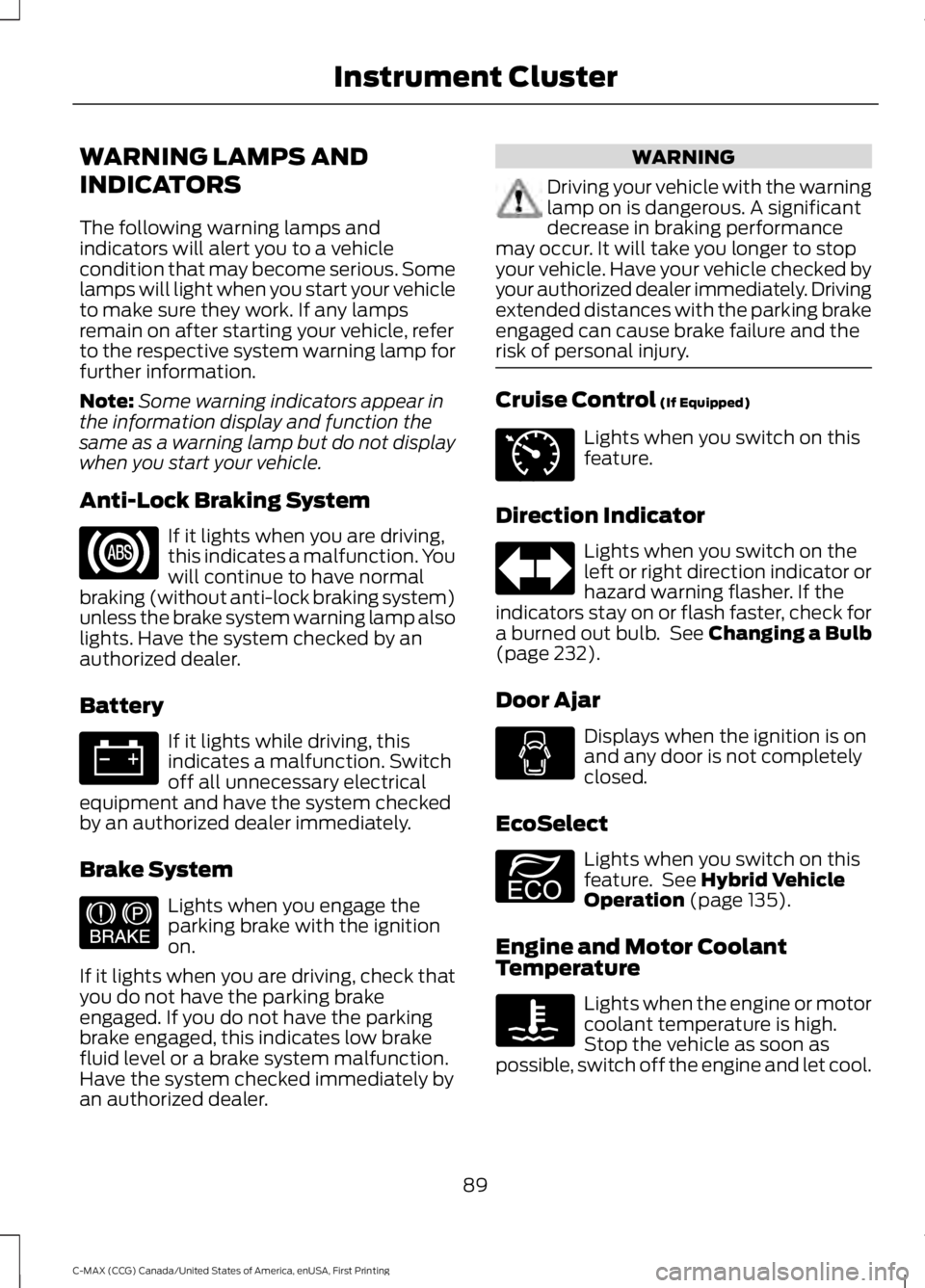
WARNING LAMPS AND
INDICATORS
The following warning lamps andindicators will alert you to a vehiclecondition that may become serious. Somelamps will light when you start your vehicleto make sure they work. If any lampsremain on after starting your vehicle, referto the respective system warning lamp forfurther information.
Note:Some warning indicators appear inthe information display and function thesame as a warning lamp but do not displaywhen you start your vehicle.
Anti-Lock Braking System
If it lights when you are driving,this indicates a malfunction. Youwill continue to have normalbraking (without anti-lock braking system)unless the brake system warning lamp alsolights. Have the system checked by anauthorized dealer.
Battery
If it lights while driving, thisindicates a malfunction. Switchoff all unnecessary electricalequipment and have the system checkedby an authorized dealer immediately.
Brake System
Lights when you engage theparking brake with the ignitionon.
If it lights when you are driving, check thatyou do not have the parking brakeengaged. If you do not have the parkingbrake engaged, this indicates low brakefluid level or a brake system malfunction.Have the system checked immediately byan authorized dealer.
WARNING
Driving your vehicle with the warninglamp on is dangerous. A significantdecrease in braking performancemay occur. It will take you longer to stopyour vehicle. Have your vehicle checked byyour authorized dealer immediately. Drivingextended distances with the parking brakeengaged can cause brake failure and therisk of personal injury.
Cruise Control (If Equipped)
Lights when you switch on thisfeature.
Direction Indicator
Lights when you switch on theleft or right direction indicator orhazard warning flasher. If theindicators stay on or flash faster, check fora burned out bulb. See Changing a Bulb(page 232).
Door Ajar
Displays when the ignition is onand any door is not completelyclosed.
EcoSelect
Lights when you switch on thisfeature. See Hybrid VehicleOperation (page 135).
Engine and Motor CoolantTemperature
Lights when the engine or motorcoolant temperature is high.Stop the vehicle as soon aspossible, switch off the engine and let cool.
89
C-MAX (CCG) Canada/United States of America, enUSA, First Printing
Instrument Cluster E144522 E71340 E194390
Page 93 of 395
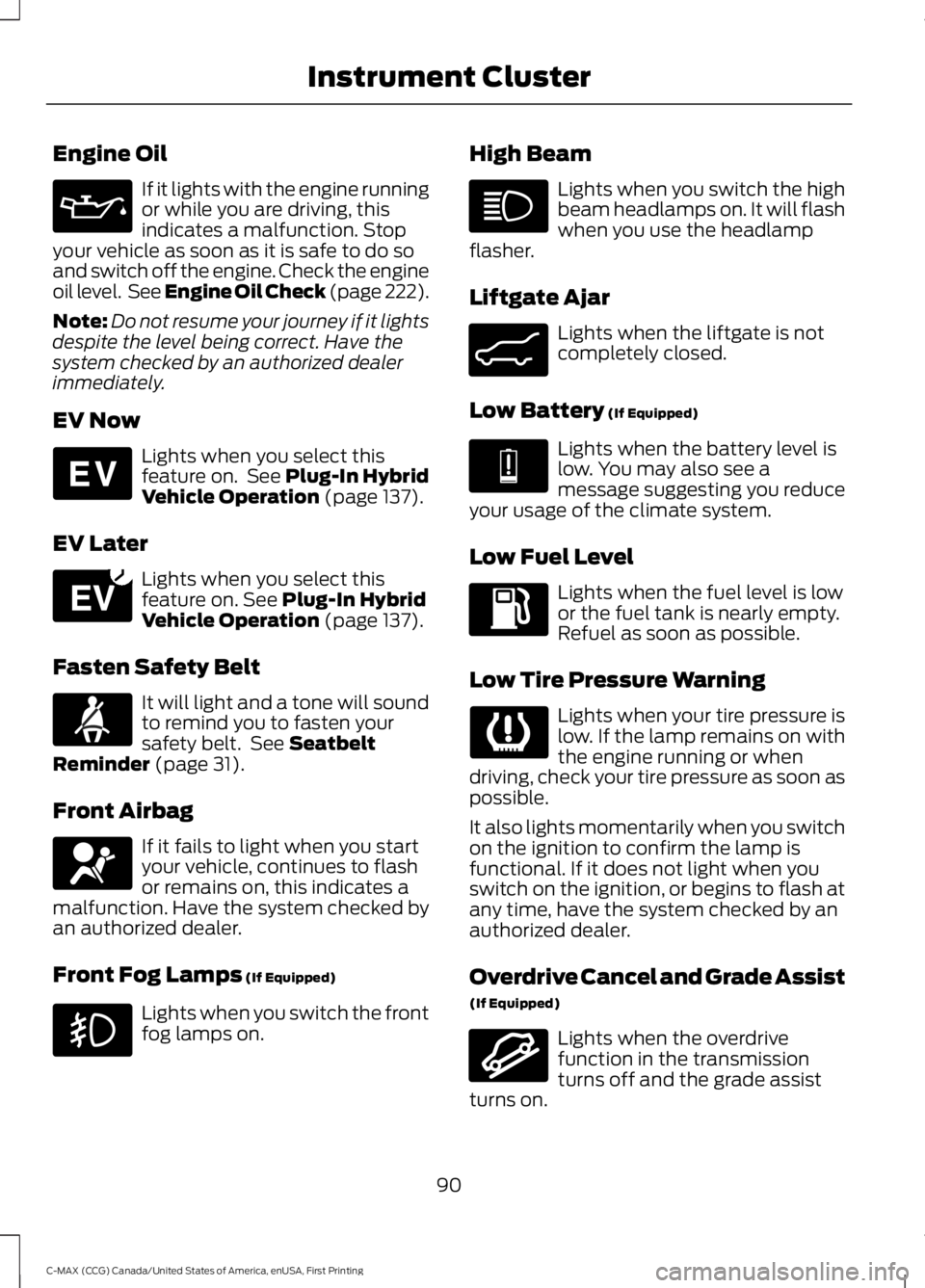
Engine Oil
If it lights with the engine runningor while you are driving, thisindicates a malfunction. Stopyour vehicle as soon as it is safe to do soand switch off the engine. Check the engineoil level. See Engine Oil Check (page 222).
Note:Do not resume your journey if it lightsdespite the level being correct. Have thesystem checked by an authorized dealerimmediately.
EV Now
Lights when you select thisfeature on. See Plug-In HybridVehicle Operation (page 137).
EV Later
Lights when you select thisfeature on. See Plug-In HybridVehicle Operation (page 137).
Fasten Safety Belt
It will light and a tone will soundto remind you to fasten yoursafety belt. See SeatbeltReminder (page 31).
Front Airbag
If it fails to light when you startyour vehicle, continues to flashor remains on, this indicates amalfunction. Have the system checked byan authorized dealer.
Front Fog Lamps (If Equipped)
Lights when you switch the frontfog lamps on.
High Beam
Lights when you switch the highbeam headlamps on. It will flashwhen you use the headlampflasher.
Liftgate Ajar
Lights when the liftgate is notcompletely closed.
Low Battery (If Equipped)
Lights when the battery level islow. You may also see amessage suggesting you reduceyour usage of the climate system.
Low Fuel Level
Lights when the fuel level is lowor the fuel tank is nearly empty.Refuel as soon as possible.
Low Tire Pressure Warning
Lights when your tire pressure islow. If the lamp remains on withthe engine running or whendriving, check your tire pressure as soon aspossible.
It also lights momentarily when you switchon the ignition to confirm the lamp isfunctional. If it does not light when youswitch on the ignition, or begins to flash atany time, have the system checked by anauthorized dealer.
Overdrive Cancel and Grade Assist
(If Equipped)
Lights when the overdrivefunction in the transmissionturns off and the grade assistturns on.
90
C-MAX (CCG) Canada/United States of America, enUSA, First Printing
Instrument Cluster E144814 E151263 E162453 E144691 E162456