belt FORD C MAX ENERGI 2016 Owner's Guide
[x] Cancel search | Manufacturer: FORD, Model Year: 2016, Model line: C MAX ENERGI, Model: FORD C MAX ENERGI 2016Pages: 395, PDF Size: 6.78 MB
Page 64 of 395
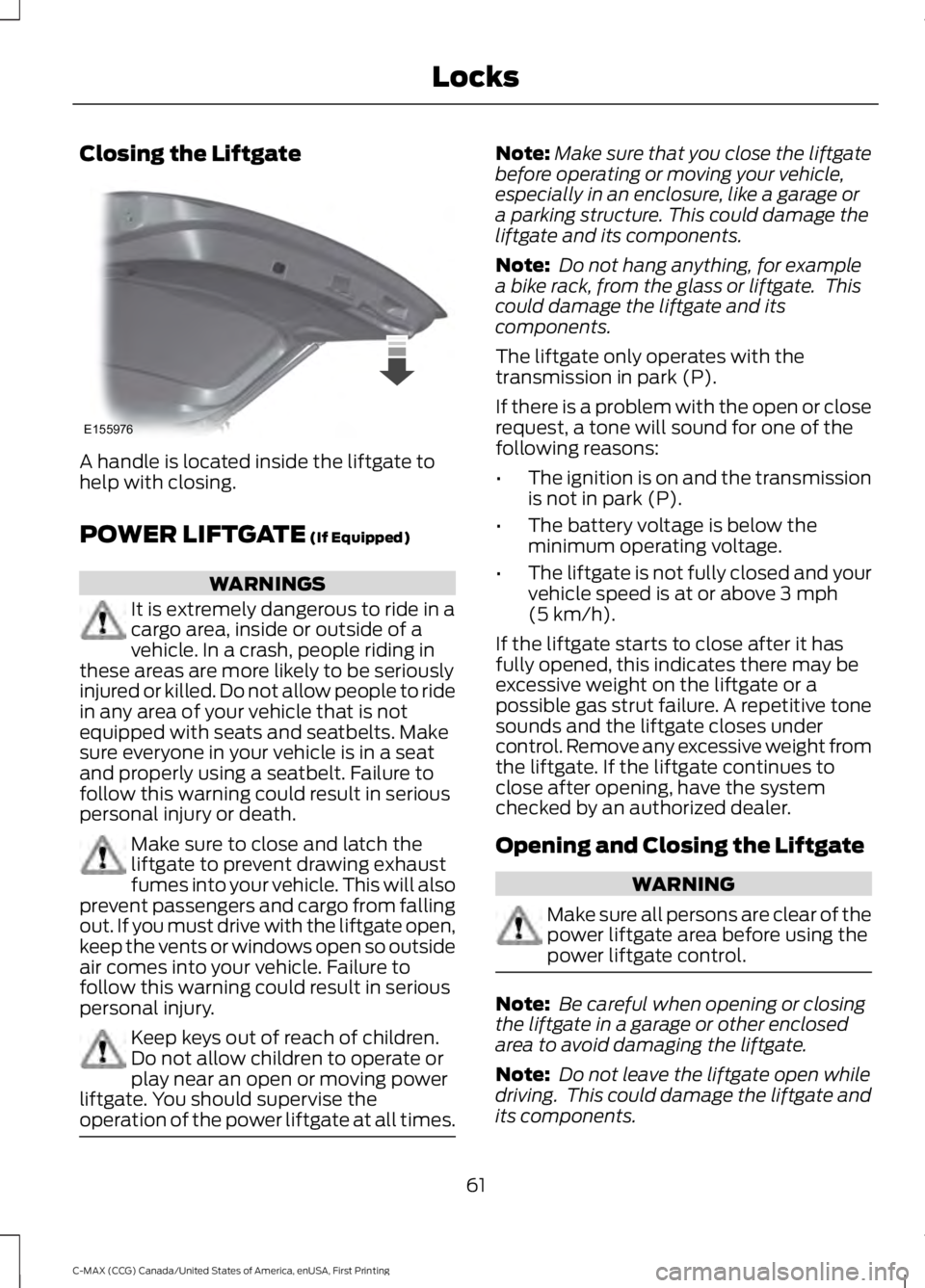
Closing the Liftgate
A handle is located inside the liftgate tohelp with closing.
POWER LIFTGATE (If Equipped)
WARNINGS
It is extremely dangerous to ride in acargo area, inside or outside of avehicle. In a crash, people riding inthese areas are more likely to be seriouslyinjured or killed. Do not allow people to ridein any area of your vehicle that is notequipped with seats and seatbelts. Makesure everyone in your vehicle is in a seatand properly using a seatbelt. Failure tofollow this warning could result in seriouspersonal injury or death.
Make sure to close and latch theliftgate to prevent drawing exhaustfumes into your vehicle. This will alsoprevent passengers and cargo from fallingout. If you must drive with the liftgate open,keep the vents or windows open so outsideair comes into your vehicle. Failure tofollow this warning could result in seriouspersonal injury.
Keep keys out of reach of children.Do not allow children to operate orplay near an open or moving powerliftgate. You should supervise theoperation of the power liftgate at all times.
Note:Make sure that you close the liftgatebefore operating or moving your vehicle,especially in an enclosure, like a garage ora parking structure. This could damage theliftgate and its components.
Note: Do not hang anything, for examplea bike rack, from the glass or liftgate. Thiscould damage the liftgate and itscomponents.
The liftgate only operates with thetransmission in park (P).
If there is a problem with the open or closerequest, a tone will sound for one of thefollowing reasons:
•The ignition is on and the transmissionis not in park (P).
•The battery voltage is below theminimum operating voltage.
•The liftgate is not fully closed and yourvehicle speed is at or above 3 mph(5 km/h).
If the liftgate starts to close after it hasfully opened, this indicates there may beexcessive weight on the liftgate or apossible gas strut failure. A repetitive tonesounds and the liftgate closes undercontrol. Remove any excessive weight fromthe liftgate. If the liftgate continues toclose after opening, have the systemchecked by an authorized dealer.
Opening and Closing the Liftgate
WARNING
Make sure all persons are clear of thepower liftgate area before using thepower liftgate control.
Note: Be careful when opening or closingthe liftgate in a garage or other enclosedarea to avoid damaging the liftgate.
Note: Do not leave the liftgate open whiledriving. This could damage the liftgate andits components.
61
C-MAX (CCG) Canada/United States of America, enUSA, First Printing
LocksE155976
Page 93 of 395
Engine Oil
If it lights with the engine runningor while you are driving, thisindicates a malfunction. Stopyour vehicle as soon as it is safe to do soand switch off the engine. Check the engineoil level. See Engine Oil Check (page 222).
Note:Do not resume your journey if it lightsdespite the level being correct. Have thesystem checked by an authorized dealerimmediately.
EV Now
Lights when you select thisfeature on. See Plug-In HybridVehicle Operation (page 137).
EV Later
Lights when you select thisfeature on. See Plug-In HybridVehicle Operation (page 137).
Fasten Safety Belt
It will light and a tone will soundto remind you to fasten yoursafety belt. See SeatbeltReminder (page 31).
Front Airbag
If it fails to light when you startyour vehicle, continues to flashor remains on, this indicates amalfunction. Have the system checked byan authorized dealer.
Front Fog Lamps (If Equipped)
Lights when you switch the frontfog lamps on.
High Beam
Lights when you switch the highbeam headlamps on. It will flashwhen you use the headlampflasher.
Liftgate Ajar
Lights when the liftgate is notcompletely closed.
Low Battery (If Equipped)
Lights when the battery level islow. You may also see amessage suggesting you reduceyour usage of the climate system.
Low Fuel Level
Lights when the fuel level is lowor the fuel tank is nearly empty.Refuel as soon as possible.
Low Tire Pressure Warning
Lights when your tire pressure islow. If the lamp remains on withthe engine running or whendriving, check your tire pressure as soon aspossible.
It also lights momentarily when you switchon the ignition to confirm the lamp isfunctional. If it does not light when youswitch on the ignition, or begins to flash atany time, have the system checked by anauthorized dealer.
Overdrive Cancel and Grade Assist
(If Equipped)
Lights when the overdrivefunction in the transmissionturns off and the grade assistturns on.
90
C-MAX (CCG) Canada/United States of America, enUSA, First Printing
Instrument Cluster E144814 E151263 E162453 E144691 E162456
Page 109 of 395
ActionMessage
Displays when a MyKey is in use and the MyKey speed limit isreached.Vehicle at Top Speed ofMyKey Setting
Displays when MyKey is active.Check Speed DriveSafely
Displays when a MyKey is in use and Belt-Minder is activated.Buckle Up to UnmuteAudio
Displays when a MyKey is in use and Traction control isactivated.Traction Control On -MyKey Setting
Displays when a MyKey is in use and park aid is activated.MyKey Park Aid Cannotbe Deactivated
Park Aid
ActionMessage
Displays when the system has detected a condition thatrequires service. Contact your authorized dealer. See Prin-ciple of Operation (page 170).
Check Park Aid
Displays the park aid status.Rear Park Aid On Off
Displays when the system has detected a condition thatrequires attention. See Principle of Operation (page 170).Check Rear Park Aid
Displays when the system has detected a condition thatrequires attention. See Principle of Operation (page 170).Check Front Park Aid
Displays when the system has detected a condition thatrequires service. Contact your authorized dealer. See Prin-ciple of Operation (page 170).
Park Aid Fault
Park Brake
ActionMessage
Displays when the parking brake is set, the engine is runningand the vehicle is driven more than 3 mph (5 km/h). If thewarning stays on after the parking brake is released, contactyour authorized dealer.
Park Brake Engaged
106
C-MAX (CCG) Canada/United States of America, enUSA, First Printing
Information Displays
Page 116 of 395
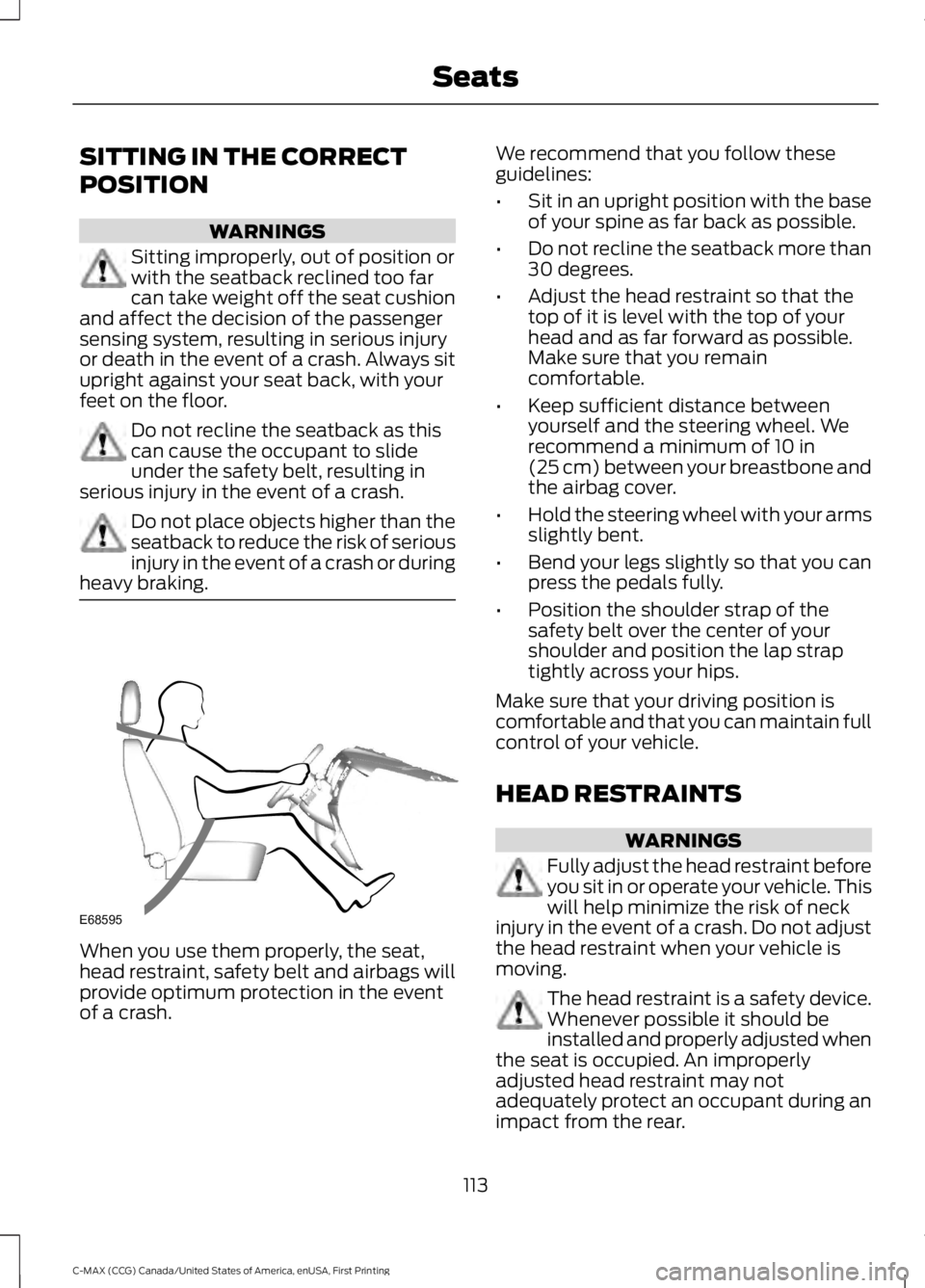
SITTING IN THE CORRECT
POSITION
WARNINGS
Sitting improperly, out of position orwith the seatback reclined too farcan take weight off the seat cushionand affect the decision of the passengersensing system, resulting in serious injuryor death in the event of a crash. Always situpright against your seat back, with yourfeet on the floor.
Do not recline the seatback as thiscan cause the occupant to slideunder the safety belt, resulting inserious injury in the event of a crash.
Do not place objects higher than theseatback to reduce the risk of seriousinjury in the event of a crash or duringheavy braking.
When you use them properly, the seat,head restraint, safety belt and airbags willprovide optimum protection in the eventof a crash.
We recommend that you follow theseguidelines:
•Sit in an upright position with the baseof your spine as far back as possible.
•Do not recline the seatback more than30 degrees.
•Adjust the head restraint so that thetop of it is level with the top of yourhead and as far forward as possible.Make sure that you remaincomfortable.
•Keep sufficient distance betweenyourself and the steering wheel. Werecommend a minimum of 10 in(25 cm) between your breastbone andthe airbag cover.
•Hold the steering wheel with your armsslightly bent.
•Bend your legs slightly so that you canpress the pedals fully.
•Position the shoulder strap of thesafety belt over the center of yourshoulder and position the lap straptightly across your hips.
Make sure that your driving position iscomfortable and that you can maintain fullcontrol of your vehicle.
HEAD RESTRAINTS
WARNINGS
Fully adjust the head restraint beforeyou sit in or operate your vehicle. Thiswill help minimize the risk of neckinjury in the event of a crash. Do not adjustthe head restraint when your vehicle ismoving.
The head restraint is a safety device.Whenever possible it should beinstalled and properly adjusted whenthe seat is occupied. An improperlyadjusted head restraint may notadequately protect an occupant during animpact from the rear.
113
C-MAX (CCG) Canada/United States of America, enUSA, First Printing
SeatsE68595
Page 133 of 395
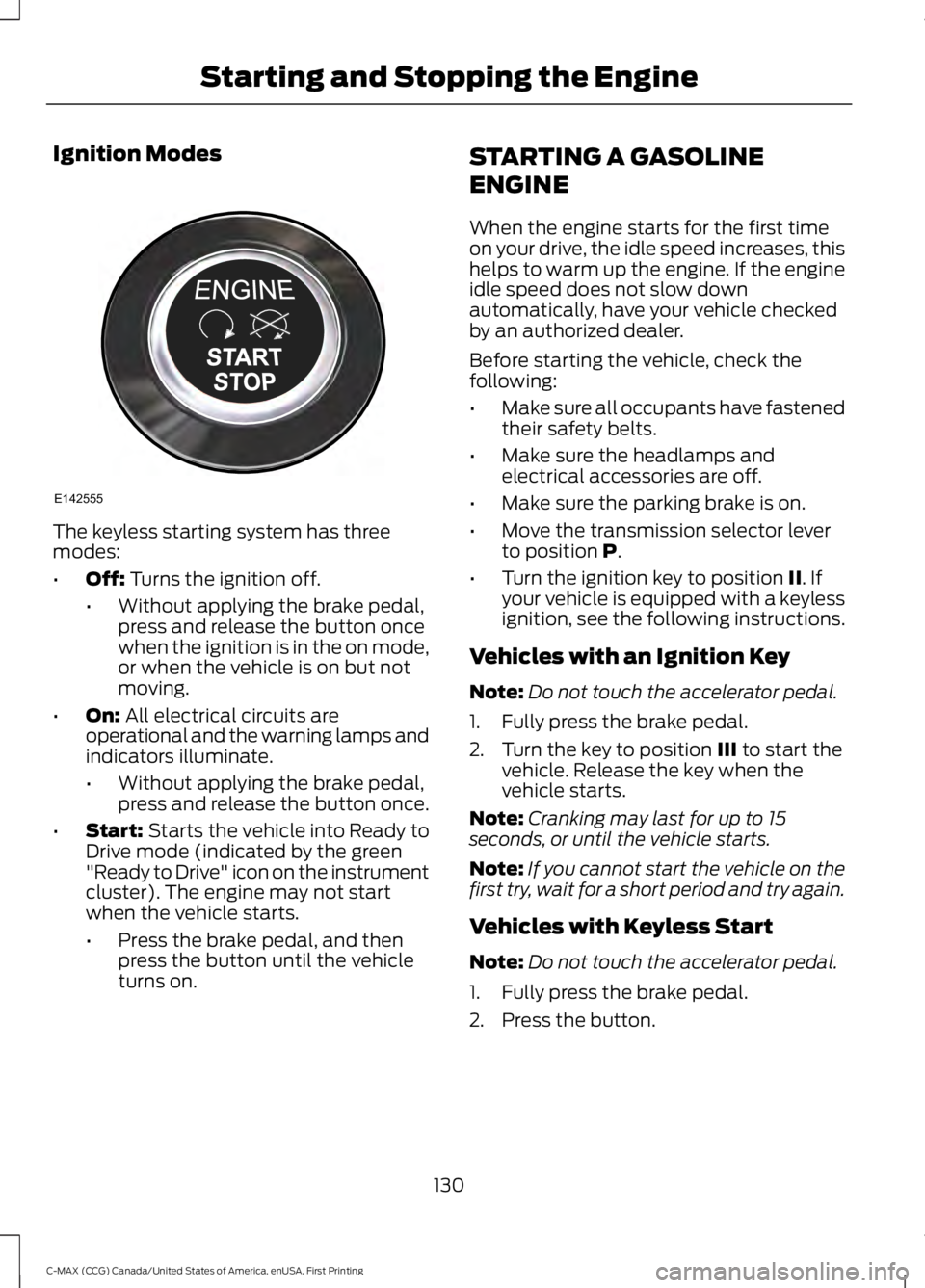
Ignition Modes
The keyless starting system has threemodes:
•Off: Turns the ignition off.
•Without applying the brake pedal,press and release the button oncewhen the ignition is in the on mode,or when the vehicle is on but notmoving.
•On: All electrical circuits areoperational and the warning lamps andindicators illuminate.
•Without applying the brake pedal,press and release the button once.
•Start: Starts the vehicle into Ready toDrive mode (indicated by the green"Ready to Drive" icon on the instrumentcluster). The engine may not startwhen the vehicle starts.
•Press the brake pedal, and thenpress the button until the vehicleturns on.
STARTING A GASOLINE
ENGINE
When the engine starts for the first timeon your drive, the idle speed increases, thishelps to warm up the engine. If the engineidle speed does not slow downautomatically, have your vehicle checkedby an authorized dealer.
Before starting the vehicle, check thefollowing:
•Make sure all occupants have fastenedtheir safety belts.
•Make sure the headlamps andelectrical accessories are off.
•Make sure the parking brake is on.
•Move the transmission selector leverto position P.
•Turn the ignition key to position II. Ifyour vehicle is equipped with a keylessignition, see the following instructions.
Vehicles with an Ignition Key
Note:Do not touch the accelerator pedal.
1. Fully press the brake pedal.
2. Turn the key to position III to start thevehicle. Release the key when thevehicle starts.
Note:Cranking may last for up to 15seconds, or until the vehicle starts.
Note:If you cannot start the vehicle on thefirst try, wait for a short period and try again.
Vehicles with Keyless Start
Note:Do not touch the accelerator pedal.
1. Fully press the brake pedal.
2. Press the button.
130
C-MAX (CCG) Canada/United States of America, enUSA, First Printing
Starting and Stopping the EngineE142555
Page 193 of 395
TOWING A TRAILER
WARNING
Your vehicle is not approvedfor trailer towing. Never towa trailer with your vehicle.
TRANSPORTING THE VEHICLE
If you need to have your vehicle towed,contact a professional towing service or,if you are a member of a roadsideassistance program, your roadsideassistance service provider.
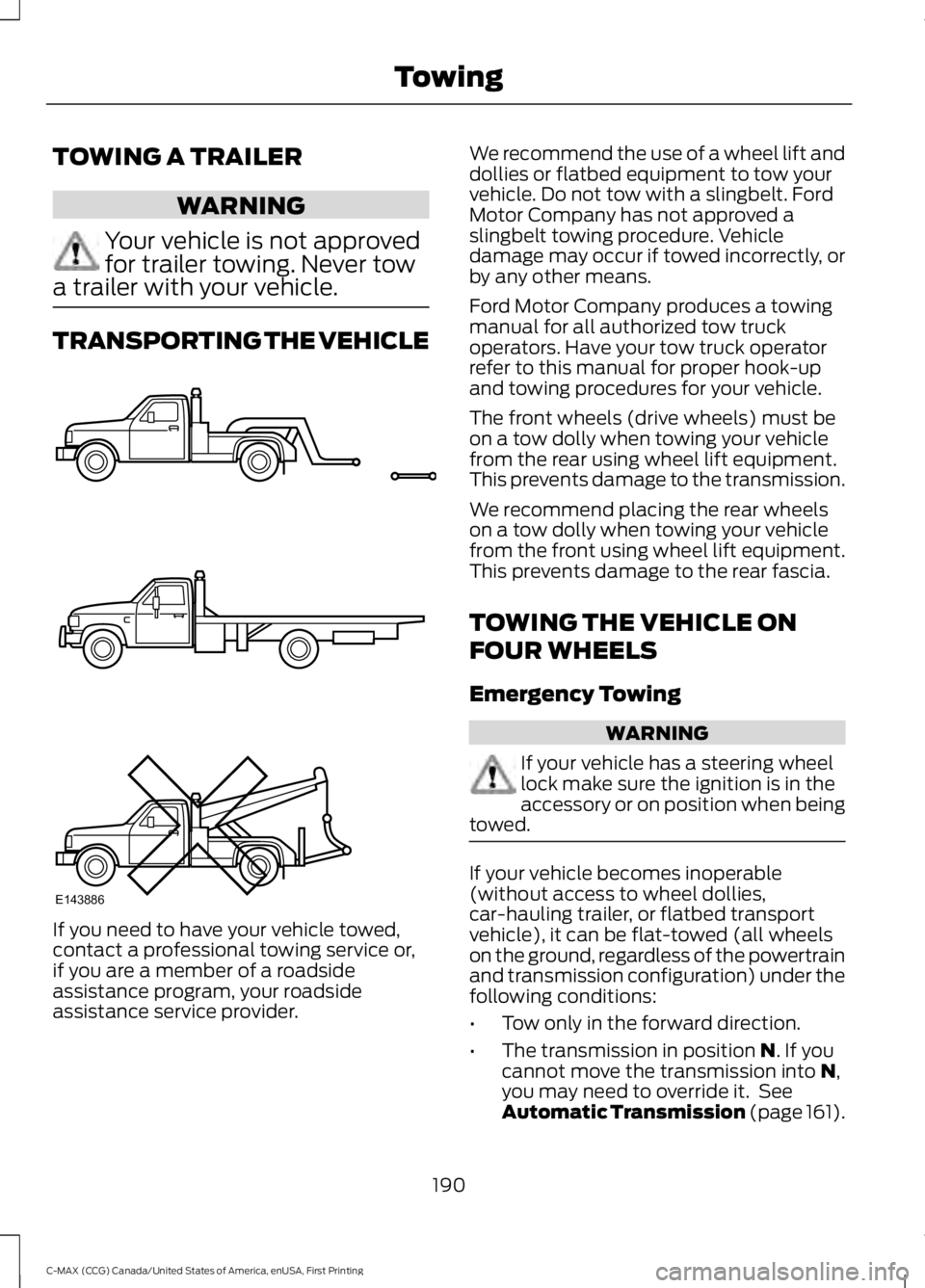
We recommend the use of a wheel lift anddollies or flatbed equipment to tow yourvehicle. Do not tow with a slingbelt. FordMotor Company has not approved aslingbelt towing procedure. Vehicledamage may occur if towed incorrectly, orby any other means.
Ford Motor Company produces a towingmanual for all authorized tow truckoperators. Have your tow truck operatorrefer to this manual for proper hook-upand towing procedures for your vehicle.
The front wheels (drive wheels) must beon a tow dolly when towing your vehiclefrom the rear using wheel lift equipment.This prevents damage to the transmission.
We recommend placing the rear wheelson a tow dolly when towing your vehiclefrom the front using wheel lift equipment.This prevents damage to the rear fascia.
TOWING THE VEHICLE ON
FOUR WHEELS
Emergency Towing
WARNING
If your vehicle has a steering wheellock make sure the ignition is in theaccessory or on position when beingtowed.
If your vehicle becomes inoperable(without access to wheel dollies,car-hauling trailer, or flatbed transportvehicle), it can be flat-towed (all wheelson the ground, regardless of the powertrainand transmission configuration) under thefollowing conditions:
•Tow only in the forward direction.
•The transmission in position N. If youcannot move the transmission into N,you may need to override it. SeeAutomatic Transmission (page 161).
190
C-MAX (CCG) Canada/United States of America, enUSA, First Printing
TowingE143886
Page 201 of 395
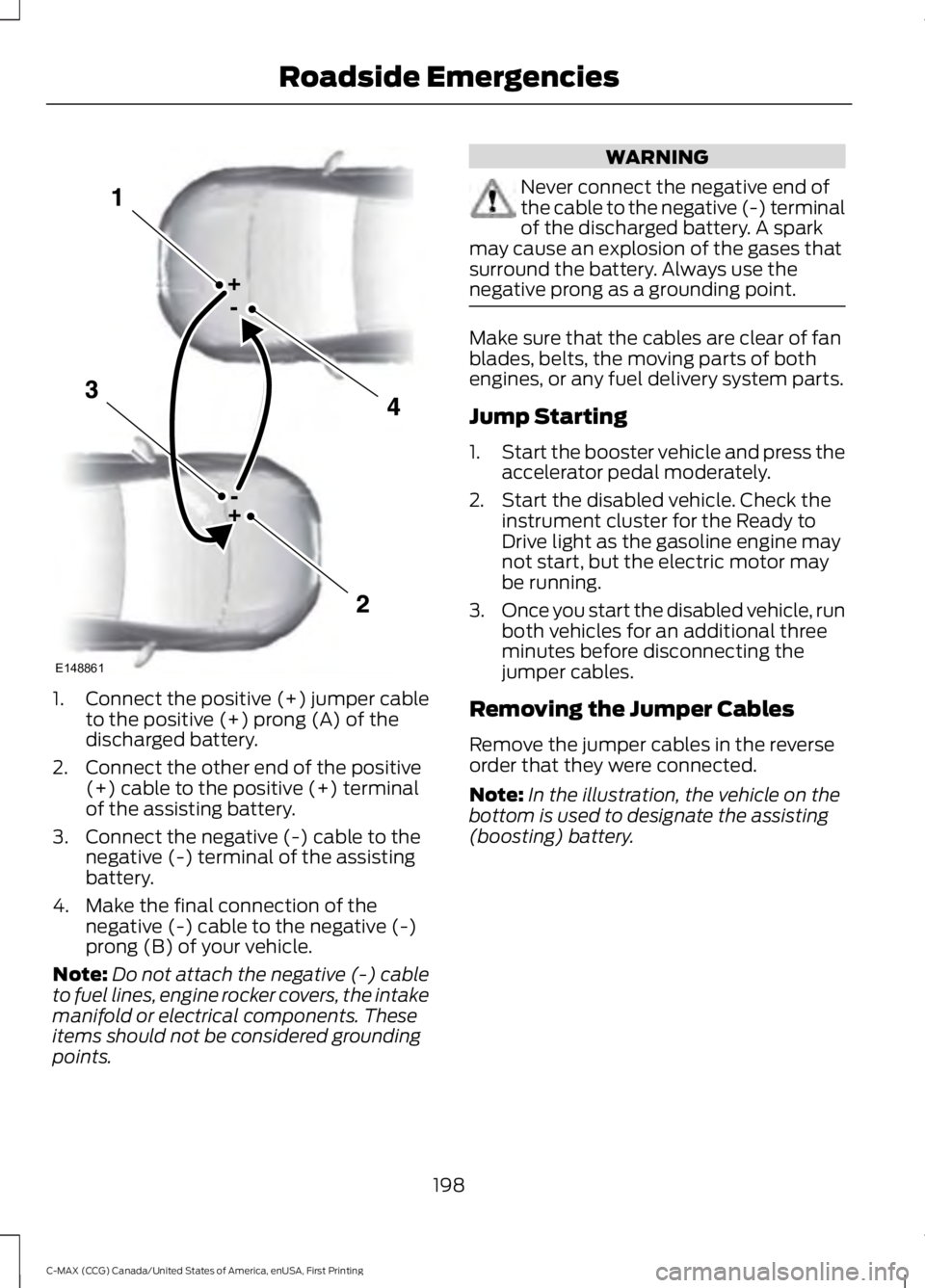
1.Connect the positive (+) jumper cableto the positive (+) prong (A) of thedischarged battery.
2. Connect the other end of the positive(+) cable to the positive (+) terminalof the assisting battery.
3. Connect the negative (-) cable to thenegative (-) terminal of the assistingbattery.
4. Make the final connection of thenegative (-) cable to the negative (-)prong (B) of your vehicle.
Note:Do not attach the negative (-) cableto fuel lines, engine rocker covers, the intakemanifold or electrical components. Theseitems should not be considered groundingpoints.
WARNING
Never connect the negative end ofthe cable to the negative (-) terminalof the discharged battery. A sparkmay cause an explosion of the gases thatsurround the battery. Always use thenegative prong as a grounding point.
Make sure that the cables are clear of fanblades, belts, the moving parts of bothengines, or any fuel delivery system parts.
Jump Starting
1.Start the booster vehicle and press theaccelerator pedal moderately.
2. Start the disabled vehicle. Check theinstrument cluster for the Ready toDrive light as the gasoline engine maynot start, but the electric motor maybe running.
3.Once you start the disabled vehicle, runboth vehicles for an additional threeminutes before disconnecting thejumper cables.
Removing the Jumper Cables
Remove the jumper cables in the reverseorder that they were connected.
Note:In the illustration, the vehicle on thebottom is used to designate the assisting(boosting) battery.
198
C-MAX (CCG) Canada/United States of America, enUSA, First Printing
Roadside EmergenciesE148861
Page 204 of 395
POST-CRASH ALERT SYSTEM
The system flashes the direction indicatorsand sounds the horn (intermittently) in theevent of a serious impact that deploys anairbag (front, side, side curtain or SafetyCanopy) or the safety belt pretensioners.
The horn and indicators will turn off when:
•You press the hazard control button.
•You press the panic button on theremote entry transmitter (if equipped).
•Your vehicle runs out of power.
201
C-MAX (CCG) Canada/United States of America, enUSA, First Printing
Roadside Emergencies
Page 247 of 395
CLEANING THE INTERIOR
WARNINGS
Do not use cleaning solvents, bleachor dye on the vehicle’s safety belts,as these actions may weaken thebelt webbing.
On vehicles equipped withseat-mounted airbags, do not usechemical solvents or strongdetergents. Such products couldcontaminate the side airbag system andaffect performance of the side airbag in acollision.
For fabric, carpets, cloth seats, safety beltsand seats equipped with side airbags:
•Remove dust and loose dirt with avacuum cleaner.
•Remove light stains and soil withMotorcraft Professional StrengthCarpet & Upholstery Cleaner.
•If grease or tar is present on thematerial, spot-clean the area first withMotorcraft Spot and Stain Remover. InCanada, use Motorcraft Multi-PurposeCleaner.
•If a ring forms on the fabric after spotcleaning, clean the entire areaimmediately (but do not oversaturate)or the ring will set.
•Do not use household cleaningproducts or glass cleaners, which canstain and discolor the fabric and affectthe flame retardant abilities of the seatmaterials.
CLEANING THE INSTRUMENT
PANEL AND INSTRUMENT
CLUSTER LENS
WARNING
Do not use chemical solvents orstrong detergents when cleaning thesteering wheel or instrument panelto avoid contamination of the airbagsystem.
Note:Follow the same procedure ascleaning leather seats for cleaning leatherinstrument panels and leather interior trimsurfaces. See Cleaning Leather Seats(page 245).
Clean the instrument panel and clusterlens with a clean, damp and soft cloth,then use a clean, dry and soft cloth to drythese areas.
•Avoid cleaners or polishes that increasethe gloss of the upper portion of theinstrument panel. The dull finish in thisarea helps protect you fromundesirable windshield reflection.
•Do not use any household cleaningproducts or glass cleaners as thesemay damage the finish of theinstrument panel, interior trim andcluster lens.
•Wash or wipe your hands clean if youhave been in contact with certainproducts such as insect repellent andsuntan lotion to avoid possible damageto the interior painted surfaces.
•Do not allow air fresheners and handsanitizers to spill onto interior surfaces.If a spill occurs, wipe off immediately.Your warranty may not cover thesedamages.
If a staining liquid like coffee or juice hasbeen spilled on the instrument panel or oninterior trim surfaces:
244
C-MAX (CCG) Canada/United States of America, enUSA, First Printing
Vehicle Care
Page 319 of 395
Note:Before setting this feature on, makesure that you read the 911 Assist PrivacyNotice later in this section for importantinformation.
Note:If any user turns 911 Assist on or off,that setting applies for all paired phones. If911 Assist is turned off, either a voicemessage plays or a display message (oricon) comes on (or both) when your vehicleis started after a previously paired phoneconnects.
Note:Every phone operates differently.While SYNC 911 Assist works with mostcellular phones, some may have troubleusing this feature.
If a crash deploys an airbag (excludingknee airbags and rear inflatable safetybelts [if equipped]) or activates the fuelpump shut-off, your SYNC-equippedvehicle may be able to contact emergencyservices by dialing 911 through a paired andconnected Bluetooth-enabled phone. Youcan learn more about the 911 Assistfeature, visit www.SYNCMyRide.com,www.SYNCMyRide.ca orwww.syncmaroute.ca.
See Supplementary Restraints System(page 35). Important information aboutairbag deployment is in this chapter.
See Roadside Emergencies (page 195).Important information about the fuel pumpshut-off is in this chapter.
Switching 911 Assist On or Off
Press the phone button to enter the phone menu and scroll to:
Action and DescriptionMessage
Press the OK button to confirm and enter the 911 Assist menu.911 Assist
Press the OK button when the desired option appears in theradio display.On
Off
Off selections include:
Action and DescriptionMessage
Provides a display and voice reminder at phone connectionat vehicle start.Off with reminder:
Provides a display reminder only without a voice reminder atphone connection.Off without reminder:
To make sure that 911 Assist workscorrectly:
•SYNC must be powered and workingproperly at the time of the incident andthroughout feature activation and use.
•The 911 Assist feature must be set onbefore the incident.
•You must pair and connect aBluetooth-enabled and compatiblecell phone to SYNC.
•A connected Bluetooth-enabled phonemust have the ability to make andmaintain an outgoing call at the timeof the incident.
316
C-MAX (CCG) Canada/United States of America, enUSA, First Printing
SYNC™