ad blue FORD C MAX ENERGI 2017 Owner's Manual
[x] Cancel search | Manufacturer: FORD, Model Year: 2017, Model line: C MAX ENERGI, Model: FORD C MAX ENERGI 2017Pages: 497, PDF Size: 7.64 MB
Page 327 of 497
911 Assist Privacy Notice
When you switch on 911 Assist, it maydisclose to emergency services that yourvehicle has been in a crash involving thedeployment of an airbag or activation ofthe fuel pump shut-off. Certain versions orupdates to 911 Assist may also be capableof electronically or verbally disclosing to911 operators your vehicle location or otherdetails about your vehicle or crash to assist911 operators to provide the mostappropriate emergency services. If you donot want to disclose this information, donot switch the feature on.
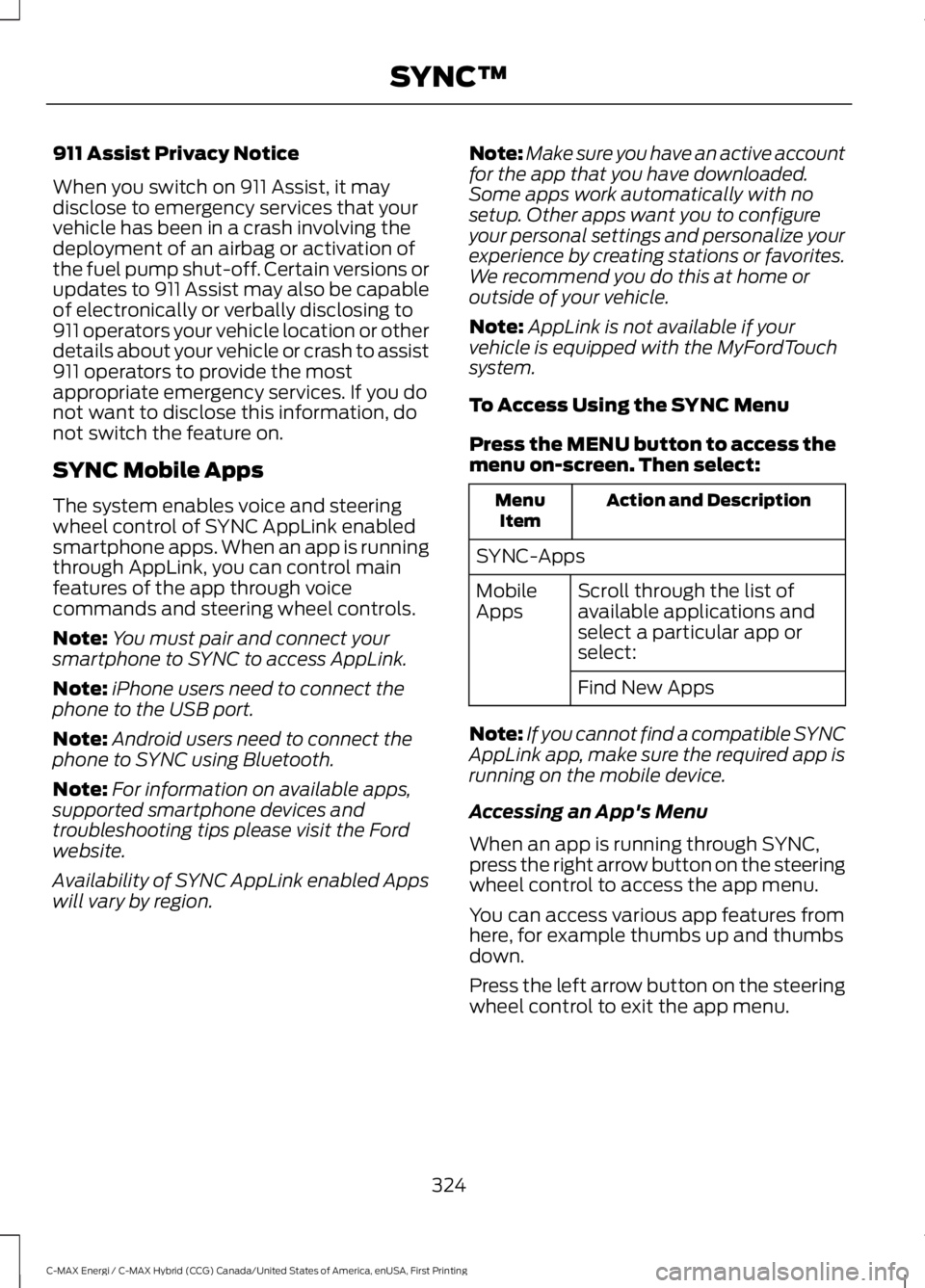
SYNC Mobile Apps
The system enables voice and steeringwheel control of SYNC AppLink enabledsmartphone apps. When an app is runningthrough AppLink, you can control mainfeatures of the app through voicecommands and steering wheel controls.
Note:You must pair and connect yoursmartphone to SYNC to access AppLink.
Note:iPhone users need to connect thephone to the USB port.
Note:Android users need to connect thephone to SYNC using Bluetooth.
Note:For information on available apps,supported smartphone devices andtroubleshooting tips please visit the Fordwebsite.
Availability of SYNC AppLink enabled Appswill vary by region.
Note:Make sure you have an active accountfor the app that you have downloaded.Some apps work automatically with nosetup. Other apps want you to configureyour personal settings and personalize yourexperience by creating stations or favorites.We recommend you do this at home oroutside of your vehicle.
Note:AppLink is not available if yourvehicle is equipped with the MyFordTouchsystem.
To Access Using the SYNC Menu
Press the MENU button to access themenu on-screen. Then select:
Action and DescriptionMenuItem
SYNC-Apps
Scroll through the list ofavailable applications andselect a particular app orselect:
MobileApps
Find New Apps
Note:If you cannot find a compatible SYNCAppLink app, make sure the required app isrunning on the mobile device.
Accessing an App's Menu
When an app is running through SYNC,press the right arrow button on the steeringwheel control to access the app menu.
You can access various app features fromhere, for example thumbs up and thumbsdown.
Press the left arrow button on the steeringwheel control to exit the app menu.
324
C-MAX Energi / C-MAX Hybrid (CCG) Canada/United States of America, enUSA, First Printing
SYNC™
Page 333 of 497
![FORD C MAX ENERGI 2017 Owners Manual Description and ActionCommand
Plays the current playlist in a random order.(Not all devices support this command.)shuffle [all] [on]
shuffle off
At any time during playback, you can pressthe voice but](/img/11/58728/w960_58728-332.png "FORD C MAX ENERGI 2017 Owners Manual Description and ActionCommand
Plays the current playlist in a random order.(Not all devices support this command.)shuffle [all] [on]
shuffle off
At any time during playback, you can pressthe voice but")
Description and ActionCommand
Plays the current playlist in a random order.(Not all devices support this command.)shuffle [all] [on]
shuffle off
At any time during playback, you can pressthe voice button and ask the system what isplaying. The system reads the metadata tags(if populated) of the current track.
((who's | who is) this | who plays this |(what's | what is) playing [now] | (what| which) (song | track | artist) is this |(who's | who is) playing | (what's | whatis) this)
___ is a dynamic listing, meaning that itcould be the name of anything, such as agroup, artist or song. For example youcould say "Play artist The Beatles".
Examples of USB Commands
SYNC provides the user with many intuitiveways to find and play a song using voice.For example, if we have a song called"Penny Lane" from the album "MagicalMystery Tour" we can say the following toplay this song:
•Play song "Penny Lane".
•Play "Penny Lane".
If we wanted to play the entire album, wecan say:
•Play album "Magical Mystery Tour".
•Play "Magical Mystery Tour".
Bluetooth Audio
The system is also capable of playingmusic from your cellular phone throughBluetooth.
To switch the Bluetooth Audio on, pressthe MEDIA button and select:
Menu Item
BT audio
Then any of the following:
Voice Command
pause
play
next [track | title | song | file | podcast | chapter | episode]
previous [track | title | song | file | podcast | chapter | episode]
Media Menu Features
The media menu allows you to select howto play your music (such as by artist, genre,shuffle or repeat), find similar music orreset the index of your USB devices.
Press the MEDIA button and select eitherUSB 1 or USB 2 from the media source listin the audio display to start USB playback.
330
C-MAX Energi / C-MAX Hybrid (CCG) Canada/United States of America, enUSA, First Printing
SYNC™
Page 336 of 497
Description and ActionDisplay
2. Scroll to browse indexed media files on the device, andthen press the OK button.
Resets the USB index. After the new indexing is complete,you can choose what to play from the USB song library.Reset USB
*You can use the buttons at the bottom of the audio display to jump to a certainalphabetical category quickly. You can also use the letters on the audio system's numerickeypad to jump in the list.
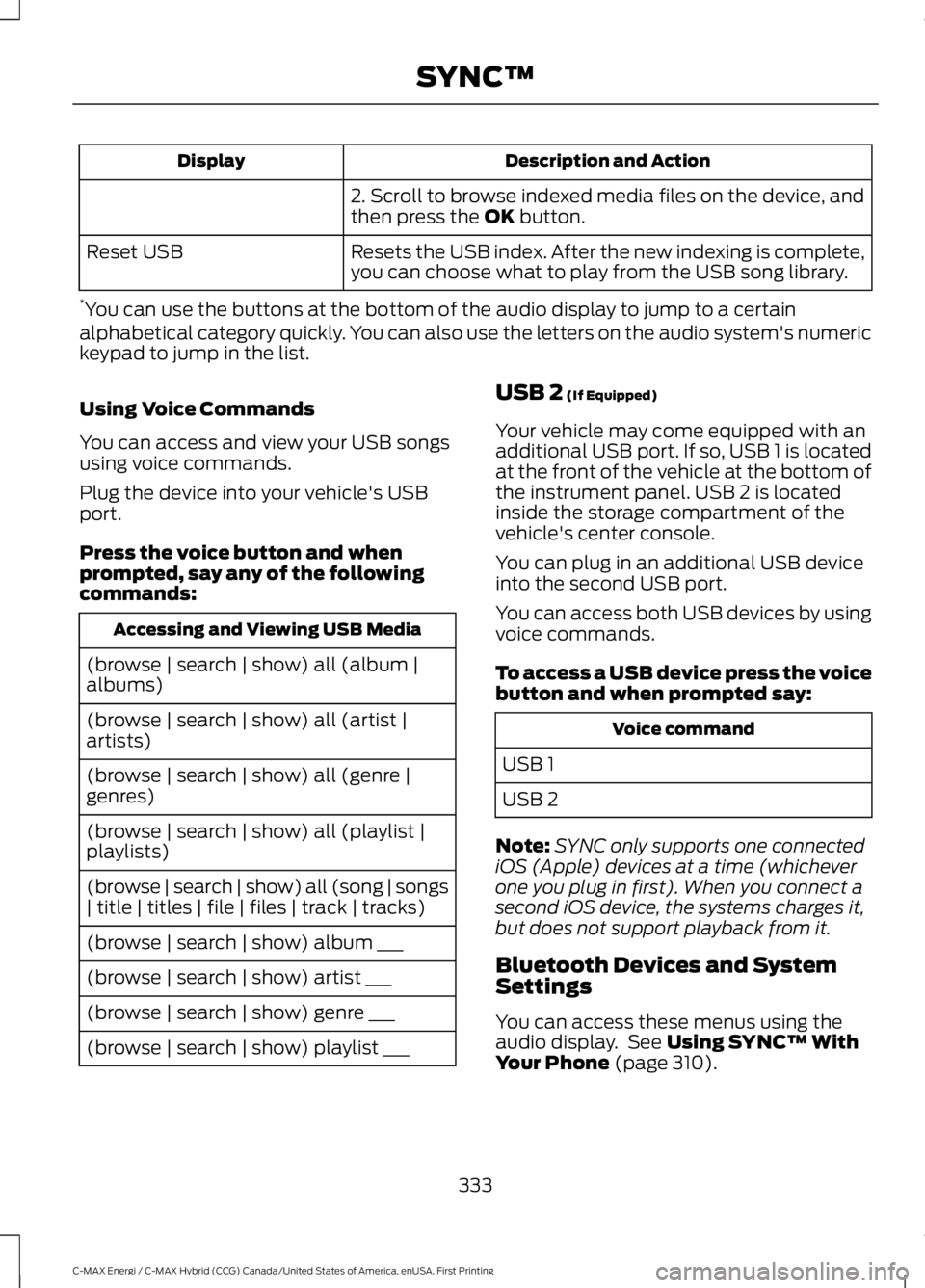
Using Voice Commands
You can access and view your USB songsusing voice commands.
Plug the device into your vehicle's USBport.
Press the voice button and whenprompted, say any of the followingcommands:
Accessing and Viewing USB Media
(browse | search | show) all (album |albums)
(browse | search | show) all (artist |artists)
(browse | search | show) all (genre |genres)
(browse | search | show) all (playlist |playlists)
(browse | search | show) all (song | songs| title | titles | file | files | track | tracks)
(browse | search | show) album ___
(browse | search | show) artist ___
(browse | search | show) genre ___
(browse | search | show) playlist ___
USB 2 (If Equipped)
Your vehicle may come equipped with anadditional USB port. If so, USB 1 is locatedat the front of the vehicle at the bottom ofthe instrument panel. USB 2 is locatedinside the storage compartment of thevehicle's center console.
You can plug in an additional USB deviceinto the second USB port.
You can access both USB devices by usingvoice commands.
To access a USB device press the voicebutton and when prompted say:
Voice command
USB 1
USB 2
Note:SYNC only supports one connectediOS (Apple) devices at a time (whicheverone you plug in first). When you connect asecond iOS device, the systems charges it,but does not support playback from it.
Bluetooth Devices and SystemSettings
You can access these menus using theaudio display. See Using SYNC™ WithYour Phone (page 310).
333
C-MAX Energi / C-MAX Hybrid (CCG) Canada/United States of America, enUSA, First Printing
SYNC™
Page 337 of 497
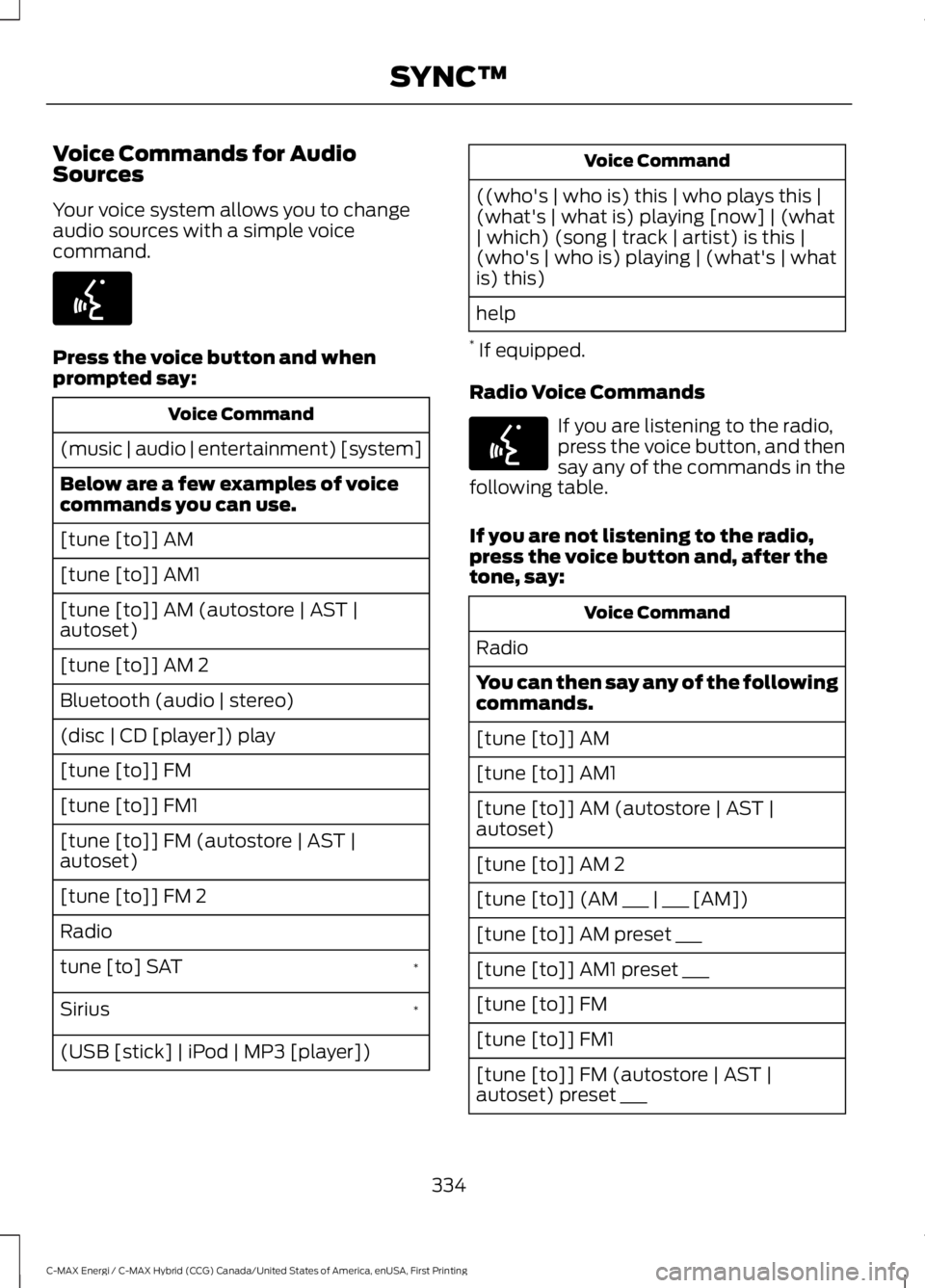
Voice Commands for AudioSources
Your voice system allows you to changeaudio sources with a simple voicecommand.
Press the voice button and whenprompted say:
Voice Command
(music | audio | entertainment) [system]
Below are a few examples of voicecommands you can use.
[tune [to]] AM
[tune [to]] AM1
[tune [to]] AM (autostore | AST |autoset)
[tune [to]] AM 2
Bluetooth (audio | stereo)
(disc | CD [player]) play
[tune [to]] FM
[tune [to]] FM1
[tune [to]] FM (autostore | AST |autoset)
[tune [to]] FM 2
Radio
*tune [to] SAT
*Sirius
(USB [stick] | iPod | MP3 [player])
Voice Command
((who's | who is) this | who plays this |(what's | what is) playing [now] | (what| which) (song | track | artist) is this |(who's | who is) playing | (what's | whatis) this)
help
* If equipped.
Radio Voice Commands
If you are listening to the radio,press the voice button, and thensay any of the commands in thefollowing table.
If you are not listening to the radio,press the voice button and, after thetone, say:
Voice Command
Radio
You can then say any of the followingcommands.
[tune [to]] AM
[tune [to]] AM1
[tune [to]] AM (autostore | AST |autoset)
[tune [to]] AM 2
[tune [to]] (AM ___ | ___ [AM])
[tune [to]] AM preset ___
[tune [to]] AM1 preset ___
[tune [to]] FM
[tune [to]] FM1
[tune [to]] FM (autostore | AST |autoset) preset ___
334
C-MAX Energi / C-MAX Hybrid (CCG) Canada/United States of America, enUSA, First Printing
SYNC™E142599 E142599
Page 340 of 497
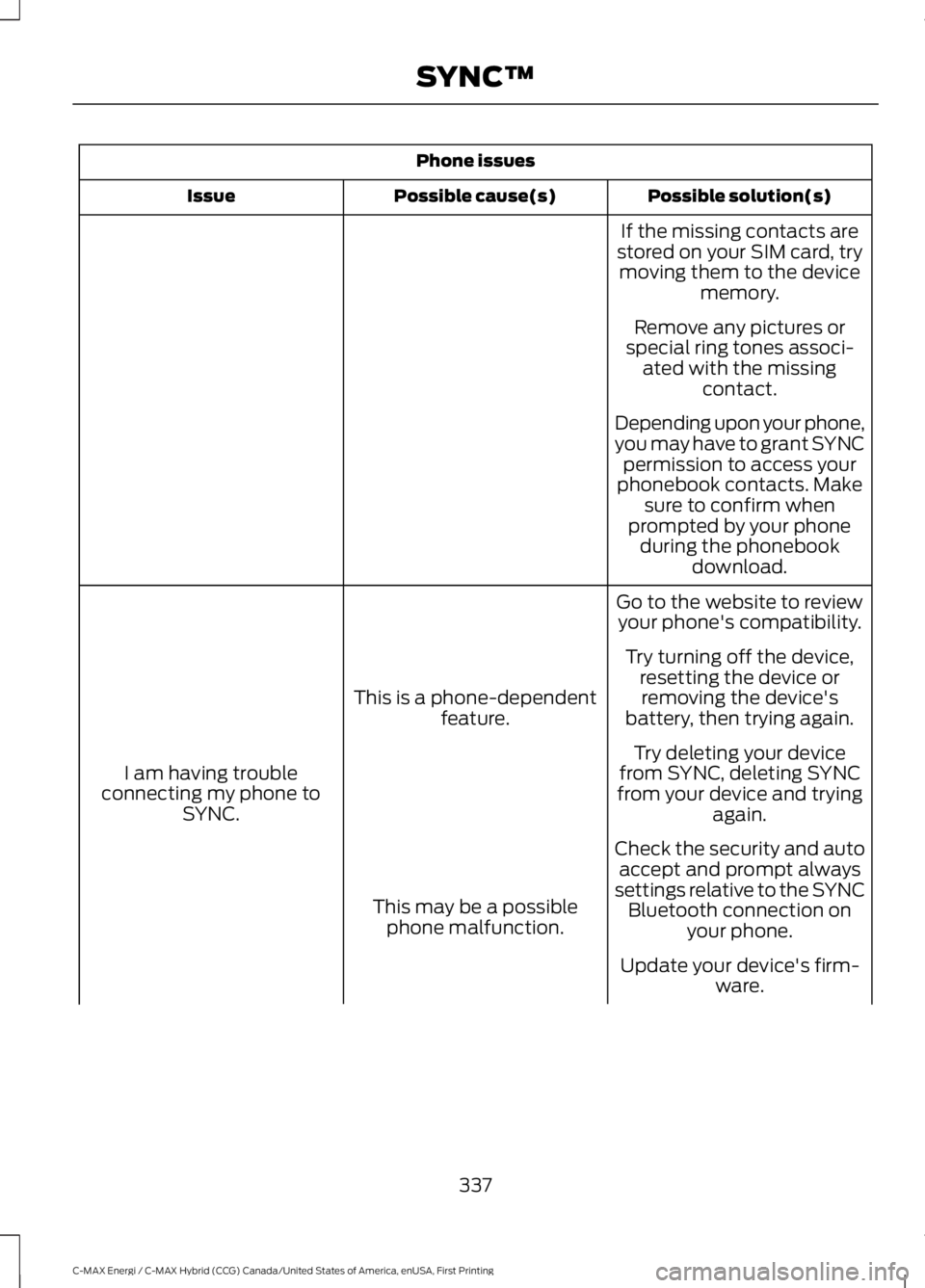
Phone issues
Possible solution(s)Possible cause(s)Issue
If the missing contacts arestored on your SIM card, trymoving them to the devicememory.
Remove any pictures orspecial ring tones associ-ated with the missingcontact.
Depending upon your phone,you may have to grant SYNCpermission to access yourphonebook contacts. Makesure to confirm whenprompted by your phoneduring the phonebookdownload.
Go to the website to reviewyour phone's compatibility.
This is a phone-dependentfeature.
I am having troubleconnecting my phone toSYNC.
Try turning off the device,resetting the device orremoving the device'sbattery, then trying again.
Try deleting your devicefrom SYNC, deleting SYNCfrom your device and tryingagain.
Check the security and autoaccept and prompt alwayssettings relative to the SYNCBluetooth connection onyour phone.
This may be a possiblephone malfunction.
Update your device's firm-ware.
337
C-MAX Energi / C-MAX Hybrid (CCG) Canada/United States of America, enUSA, First Printing
SYNC™
Page 341 of 497
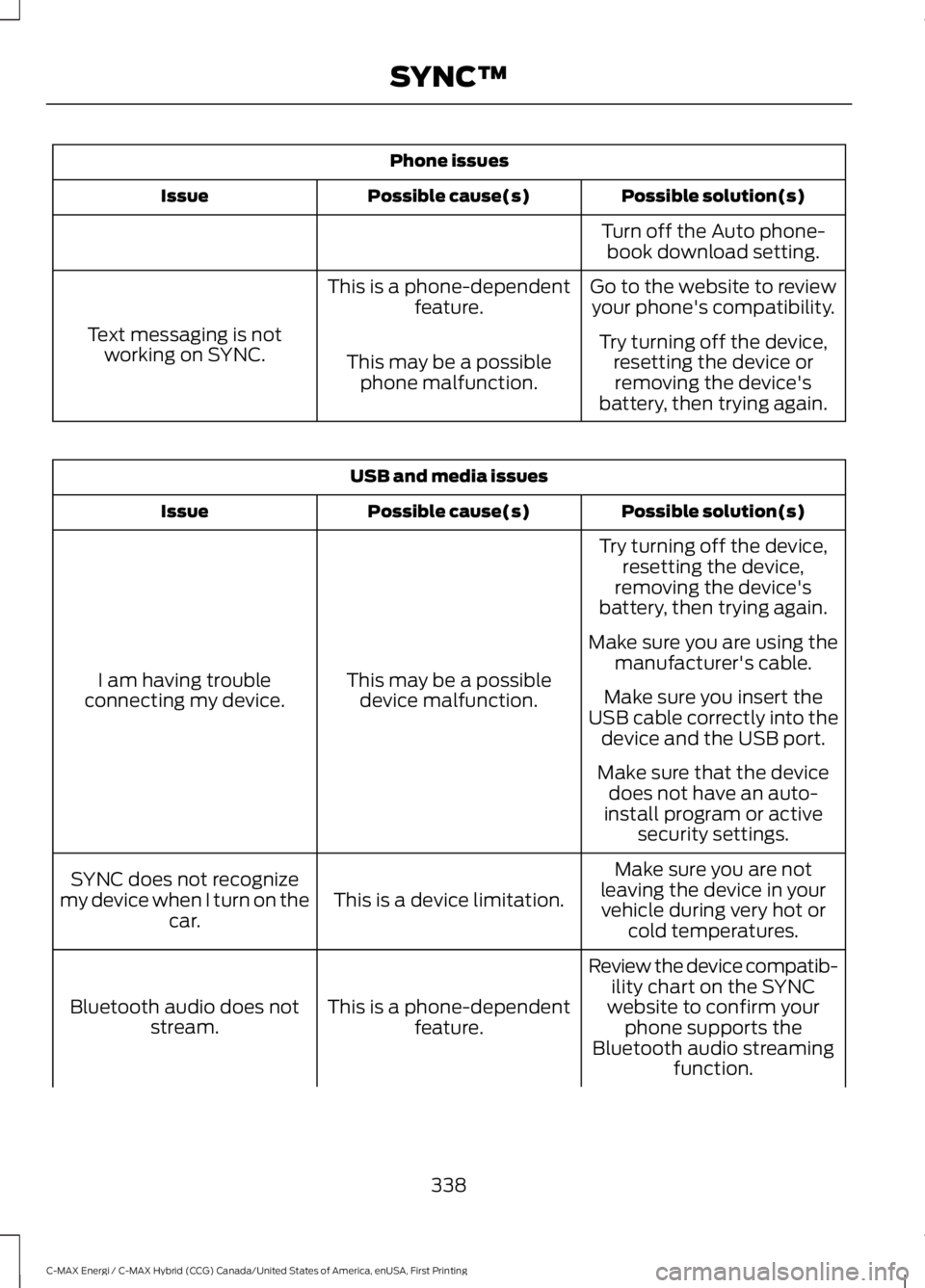
Phone issues
Possible solution(s)Possible cause(s)Issue
Turn off the Auto phone-book download setting.
Go to the website to reviewyour phone's compatibility.This is a phone-dependentfeature.
Text messaging is notworking on SYNC.Try turning off the device,resetting the device orremoving the device'sbattery, then trying again.
This may be a possiblephone malfunction.
USB and media issues
Possible solution(s)Possible cause(s)Issue
Try turning off the device,resetting the device,removing the device'sbattery, then trying again.
This may be a possibledevice malfunction.I am having troubleconnecting my device.
Make sure you are using themanufacturer's cable.
Make sure you insert theUSB cable correctly into thedevice and the USB port.
Make sure that the devicedoes not have an auto-install program or activesecurity settings.
Make sure you are notleaving the device in yourvehicle during very hot orcold temperatures.
This is a device limitation.SYNC does not recognizemy device when I turn on thecar.
Review the device compatib-ility chart on the SYNCwebsite to confirm yourphone supports theBluetooth audio streamingfunction.
This is a phone-dependentfeature.Bluetooth audio does notstream.
338
C-MAX Energi / C-MAX Hybrid (CCG) Canada/United States of America, enUSA, First Printing
SYNC™
Page 345 of 497
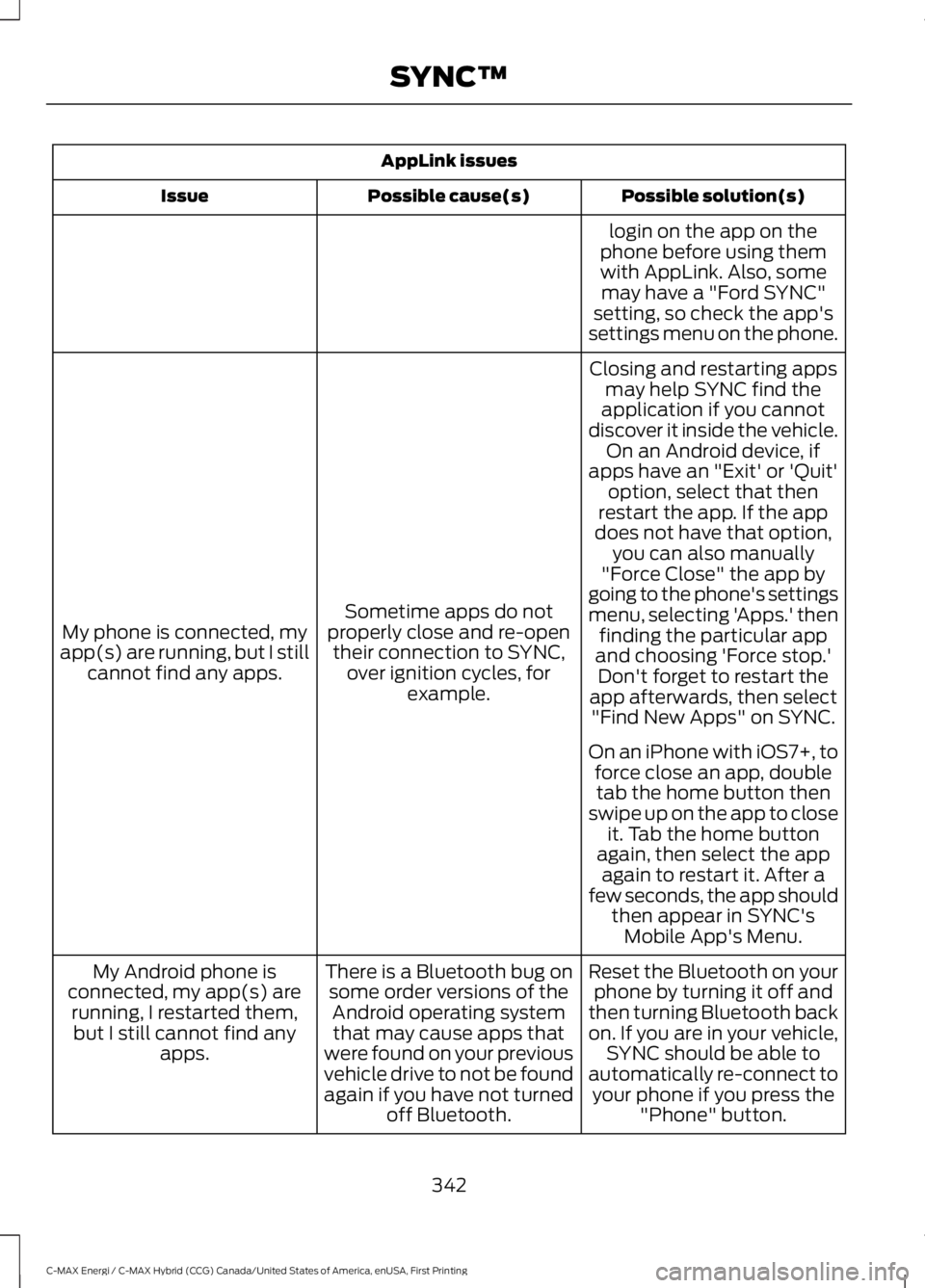
AppLink issues
Possible solution(s)Possible cause(s)Issue
login on the app on thephone before using themwith AppLink. Also, somemay have a "Ford SYNC"setting, so check the app'ssettings menu on the phone.
Closing and restarting appsmay help SYNC find theapplication if you cannotdiscover it inside the vehicle.On an Android device, ifapps have an "Exit' or 'Quit'
Sometime apps do notproperly close and re-opentheir connection to SYNC,over ignition cycles, forexample.
My phone is connected, myapp(s) are running, but I stillcannot find any apps.
option, select that thenrestart the app. If the appdoes not have that option,you can also manually"Force Close" the app bygoing to the phone's settingsmenu, selecting 'Apps.' thenfinding the particular appand choosing 'Force stop.'Don't forget to restart theapp afterwards, then select"Find New Apps" on SYNC.
On an iPhone with iOS7+, toforce close an app, doubletab the home button thenswipe up on the app to closeit. Tab the home buttonagain, then select the appagain to restart it. After afew seconds, the app shouldthen appear in SYNC'sMobile App's Menu.
Reset the Bluetooth on yourphone by turning it off andthen turning Bluetooth backon. If you are in your vehicle,SYNC should be able toautomatically re-connect toyour phone if you press the"Phone" button.
There is a Bluetooth bug onsome order versions of theAndroid operating systemthat may cause apps thatwere found on your previousvehicle drive to not be foundagain if you have not turnedoff Bluetooth.
My Android phone isconnected, my app(s) arerunning, I restarted them,but I still cannot find anyapps.
342
C-MAX Energi / C-MAX Hybrid (CCG) Canada/United States of America, enUSA, First Printing
SYNC™
Page 346 of 497
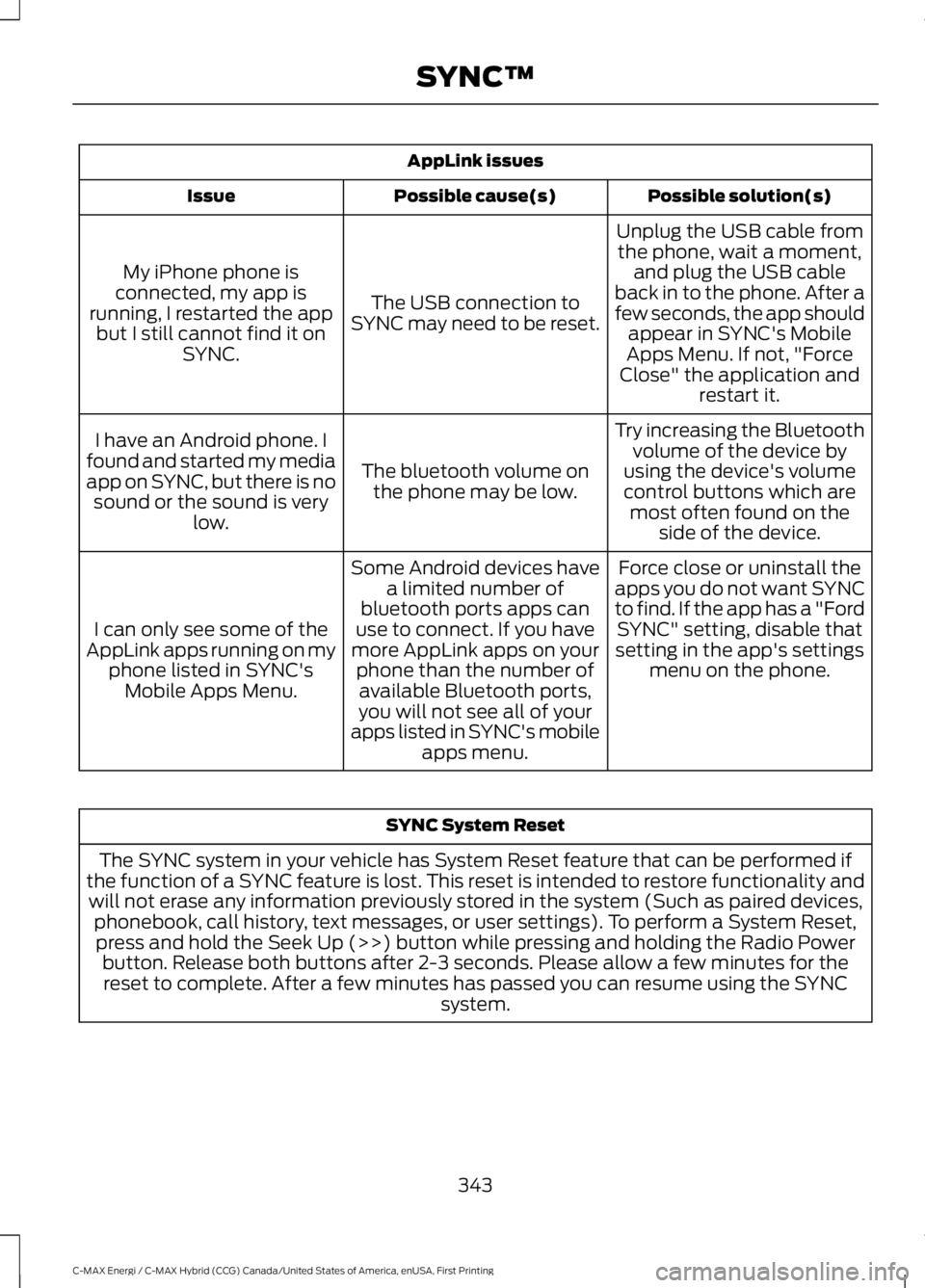
AppLink issues
Possible solution(s)Possible cause(s)Issue
Unplug the USB cable fromthe phone, wait a moment,and plug the USB cableback in to the phone. After afew seconds, the app shouldappear in SYNC's MobileApps Menu. If not, "ForceClose" the application andrestart it.
The USB connection toSYNC may need to be reset.
My iPhone phone isconnected, my app isrunning, I restarted the appbut I still cannot find it onSYNC.
Try increasing the Bluetoothvolume of the device byusing the device's volumecontrol buttons which aremost often found on theside of the device.
The bluetooth volume onthe phone may be low.
I have an Android phone. Ifound and started my mediaapp on SYNC, but there is nosound or the sound is verylow.
Force close or uninstall theapps you do not want SYNCto find. If the app has a "FordSYNC" setting, disable thatsetting in the app's settingsmenu on the phone.
Some Android devices havea limited number ofbluetooth ports apps canuse to connect. If you havemore AppLink apps on yourphone than the number ofavailable Bluetooth ports,you will not see all of yourapps listed in SYNC's mobileapps menu.
I can only see some of theAppLink apps running on myphone listed in SYNC'sMobile Apps Menu.
SYNC System Reset
The SYNC system in your vehicle has System Reset feature that can be performed ifthe function of a SYNC feature is lost. This reset is intended to restore functionality andwill not erase any information previously stored in the system (Such as paired devices,phonebook, call history, text messages, or user settings). To perform a System Reset,press and hold the Seek Up (>>) button while pressing and holding the Radio Powerbutton. Release both buttons after 2-3 seconds. Please allow a few minutes for thereset to complete. After a few minutes has passed you can resume using the SYNCsystem.
343
C-MAX Energi / C-MAX Hybrid (CCG) Canada/United States of America, enUSA, First Printing
SYNC™
Page 347 of 497
GENERAL INFORMATION
WARNING
Driving while distracted can result inloss of vehicle control, crash andinjury. We strongly recommend thatyou use extreme caution when using anydevice that may take your focus off theroad. Your primary responsibility is the safeoperation of your vehicle. We recommendagainst the use of any hand-held devicewhile driving and encourage the use ofvoice-operated systems when possible.Make sure you are aware of all applicablelocal laws that may affect the use ofelectronic devices while driving.
Getting to Know Your System
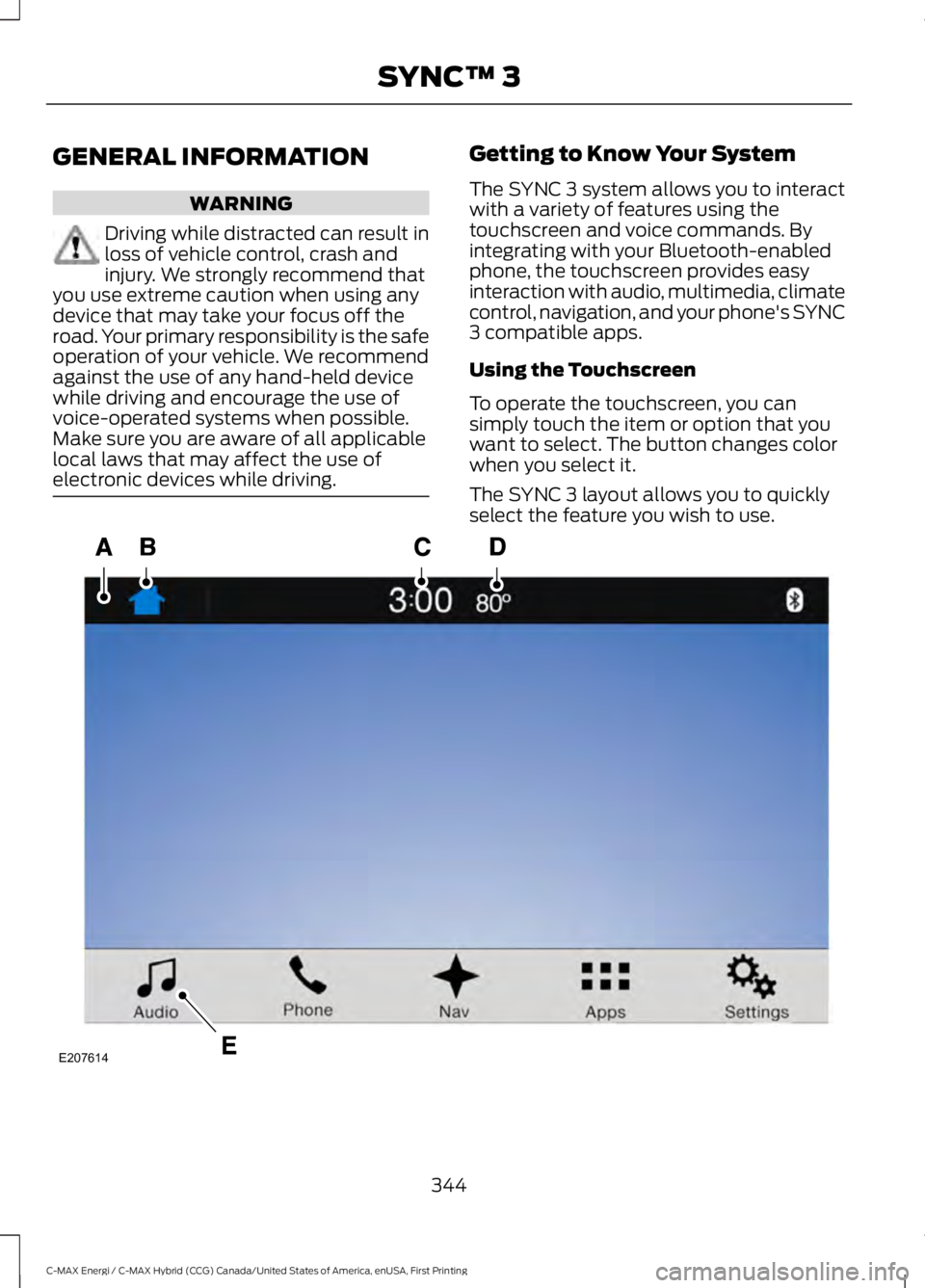
The SYNC 3 system allows you to interactwith a variety of features using thetouchscreen and voice commands. Byintegrating with your Bluetooth-enabledphone, the touchscreen provides easyinteraction with audio, multimedia, climatecontrol, navigation, and your phone's SYNC3 compatible apps.
Using the Touchscreen
To operate the touchscreen, you cansimply touch the item or option that youwant to select. The button changes colorwhen you select it.
The SYNC 3 layout allows you to quicklyselect the feature you wish to use.
344
C-MAX Energi / C-MAX Hybrid (CCG) Canada/United States of America, enUSA, First Printing
SYNC™ 3E207614
Page 350 of 497
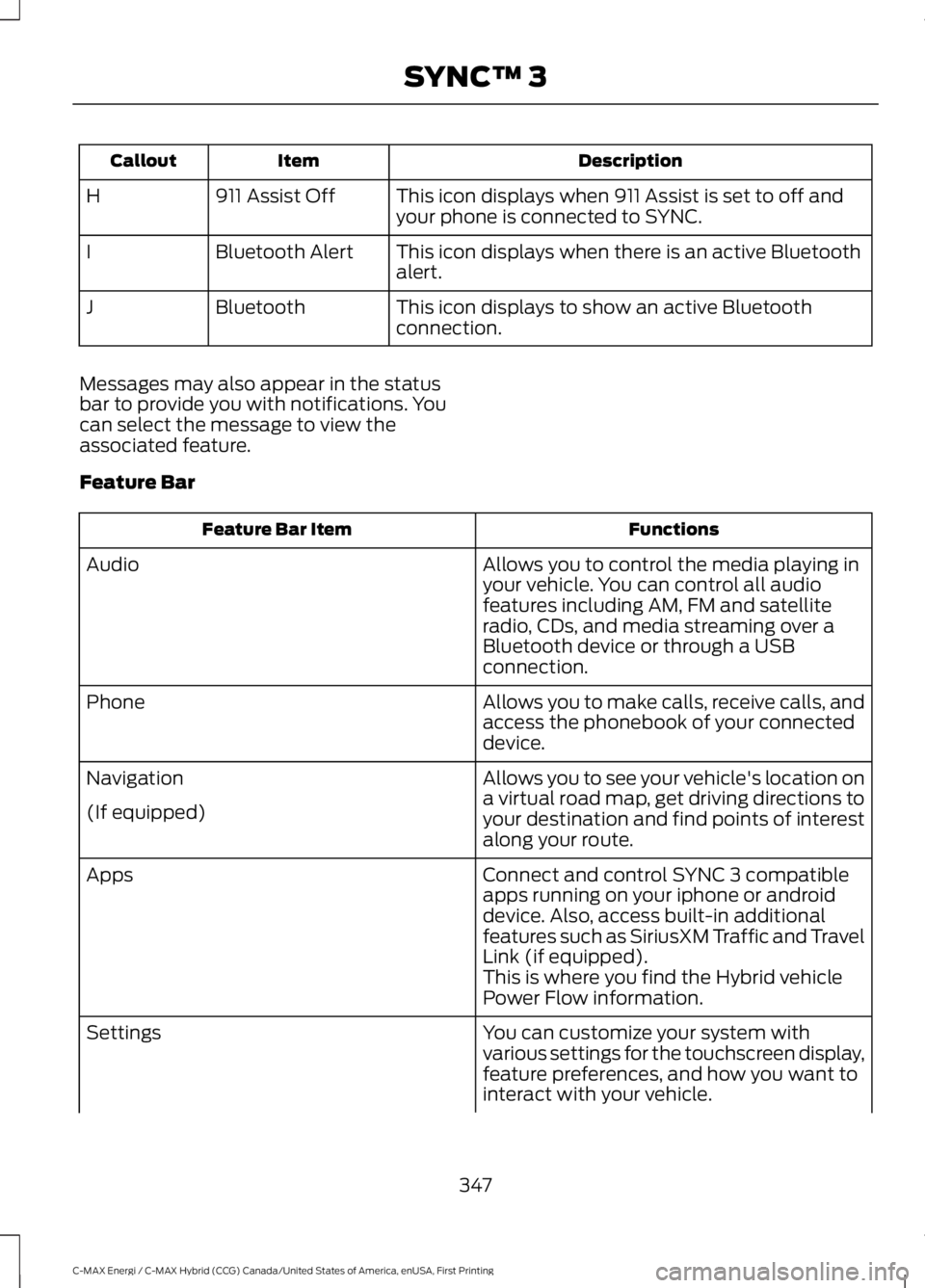
DescriptionItemCallout
This icon displays when 911 Assist is set to off andyour phone is connected to SYNC.911 Assist OffH
This icon displays when there is an active Bluetoothalert.Bluetooth AlertI
This icon displays to show an active Bluetoothconnection.BluetoothJ
Messages may also appear in the statusbar to provide you with notifications. Youcan select the message to view theassociated feature.
Feature Bar
FunctionsFeature Bar Item
Allows you to control the media playing inyour vehicle. You can control all audiofeatures including AM, FM and satelliteradio, CDs, and media streaming over aBluetooth device or through a USBconnection.
Audio
Allows you to make calls, receive calls, andaccess the phonebook of your connecteddevice.
Phone
Allows you to see your vehicle's location ona virtual road map, get driving directions toyour destination and find points of interestalong your route.
Navigation
(If equipped)
Connect and control SYNC 3 compatibleapps running on your iphone or androiddevice. Also, access built-in additionalfeatures such as SiriusXM Traffic and TravelLink (if equipped).
Apps
This is where you find the Hybrid vehiclePower Flow information.
You can customize your system withvarious settings for the touchscreen display,feature preferences, and how you want tointeract with your vehicle.
Settings
347
C-MAX Energi / C-MAX Hybrid (CCG) Canada/United States of America, enUSA, First Printing
SYNC™ 3