lights FORD C MAX ENERGI 2017 Owner's Manual
[x] Cancel search | Manufacturer: FORD, Model Year: 2017, Model line: C MAX ENERGI, Model: FORD C MAX ENERGI 2017Pages: 497, PDF Size: 7.64 MB
Page 205 of 497
Crashes
A crash or impact significant enough torequire an emergency response forconventional vehicles would also requirethe same response for an electric orhybrid-electric vehicle.
If possible
•Move your car to a safe, nearbylocation and remain on the scene.
•Roll down the windows before shuttingyour vehicle off.
•Place your vehicle in Park, set theparking brake, turn off the vehicle,activate the hazard lights, and moveyour key(s) at least 16 feet (5 meters)away from the vehicle.
Always
•Call 911 if assistance is needed andadvise that an electric or hybrid-electricvehicle is involved.
•Do not touch exposed electricalcomponents or the enginecompartment, as a shock hazard mayexist.
•Avoid contact with leaking fluids andgases, and remain out of the way ofoncoming traffic until emergencyresponders arrive.
•When emergency responders arrive,tell them that the vehicle involved is anelectric vehicle or hybrid vehicle.
Fires
As with any vehicle, call 911 immediately ifyou see sparks, smoke or flames comingfrom the vehicle.
•Exit the vehicle immediately.
•Advise 911 that an electric orhybrid-electric vehicle is involved.
•As with any vehicle fire, do not inhalesmoke, vapors or gas from the vehicle,as they may be hazardous.
•Remain a safe distance from thevehicle and try to stay clear of thesmoke.
•Stay out of the roadway and stay outof the way of any oncoming trafficwhile awaiting the arrival of emergencyresponders.
Post-Incident
•Do not store a severely damagedvehicle with a lithium-ion battery insidea structure or within 50 feet (15meters) of any structure or vehicle.
•Make sure that passenger and cargocompartments remain ventilated (i.e.open window, door or trunk).
•For vehicles in the United States, notifyFord Motor Company 1-800-392-3673(then follow the prompts on the voiceresponse menu), an authorized Forddealer or service center as soon aspossible as there may be other stepsto secure and discharge thehigh-voltage battery.
•For vehicles in Canada, notify FordMotor Company 1-800-565-3673(then follow the prompts on the voiceresponse menu), an authorized Forddealer or service center as soon aspossible as there may be other stepsto secure and discharge thehigh-voltage battery.
•Call 911 if you observe leaking fluids,sparks, smoke or flames, or heargurgling or bubbling from thehigh-voltage battery.
202
C-MAX Energi / C-MAX Hybrid (CCG) Canada/United States of America, enUSA, First Printing
Roadside Emergencies
Page 246 of 497
Trade numberFunction
3157KTail/brake lamp
T20Turn lamp - rear
921Backup lamp
W5WLicense plate lamp
W5W* High-mount brake lamp
LED* Interior lamps
* To replace these lamps - see your authorized dealer.
To replace all instrument panel lights - see your authorized dealer
243
C-MAX Energi / C-MAX Hybrid (CCG) Canada/United States of America, enUSA, First Printing
Maintenance
Page 259 of 497
General Information
WARNING
Failure to follow these guidelinescould result in an increased risk ofloss of vehicle control, injury or death.
Note:Do not use the kit if you have severelydamaged a tire. Only seal punctures locatedwithin the tire tread with the kit.
Do not attempt to repair punctures largerthan ¼ inch (6 millimeters) or damage tothe tire's sidewall. The tire may notcompletely seal.
Loss of air pressure may adversely affecttire performance. For this reason:
Note:Do not drive the vehicle above50 mph (80 km/h).
Note:Do not drive further than 120 mi(200 km). Drive only to the closestauthorized Ford dealer or tire repair shop tohave your tire inspected.
•Drive carefully and avoid abruptsteering maneuvers.
•Periodically monitor tire inflationpressure in the affected tire; if the tireis losing pressure, have the vehicletowed.
•Read the information in the Tips forUse of the Kit section to make sure safeoperation of the kit and your vehicle.
Tips for Use of the Kit
To ensure safe operation of the kit:
•Read all instructions and cautions fully.
•Before operating the kit, make sureyour vehicle is safely off the road andaway from moving traffic. Switch onthe hazard lights.
•Always set the parking brake to makesure the vehicle does not moveunexpectedly.
•Do not remove any foreign objects,such as nails or screws, from the tire.
•When using the kit, leave the enginerunning (only if the vehicle is outdoorsor in a well-ventilated area) so thecompressor does not drain thevehicle's battery.
•Do not allow the compressor tooperate continuously for more than 15minutes. This will help prevent thecompressor from overheating.
•Never leave the kit unattended duringoperation.
•Sealant compound contains latex.Those with latex sensitivities shoulduse appropriate precautions to avoidan allergic reaction.
•Keep the kit away from children.
•Only use the kit when the ambienttemperature is between -22°F (-30°C)and 158°F (70°C).
•Only use the sealing compound beforethe use-by date. The use-by date is ona label on the sealant canister, whichyou can see through the rectangularviewing window on the bottom of thecompressor. Check the use-by dateregularly and replace the canister afterfour years of non-use.
•Do not store the kit unsecured insidethe passenger compartment of thevehicle as it may cause injury during asudden stop or crash. Always store thekit in its original location.
•After sealant use, an authorized Forddealer must replace the tire pressuremonitoring system sensor and valvestem on the wheel.
•Operating the kit could cause anelectrical disturbance in radio, CD andDVD player operation.
256
C-MAX Energi / C-MAX Hybrid (CCG) Canada/United States of America, enUSA, First Printing
Wheels and Tires
Page 260 of 497
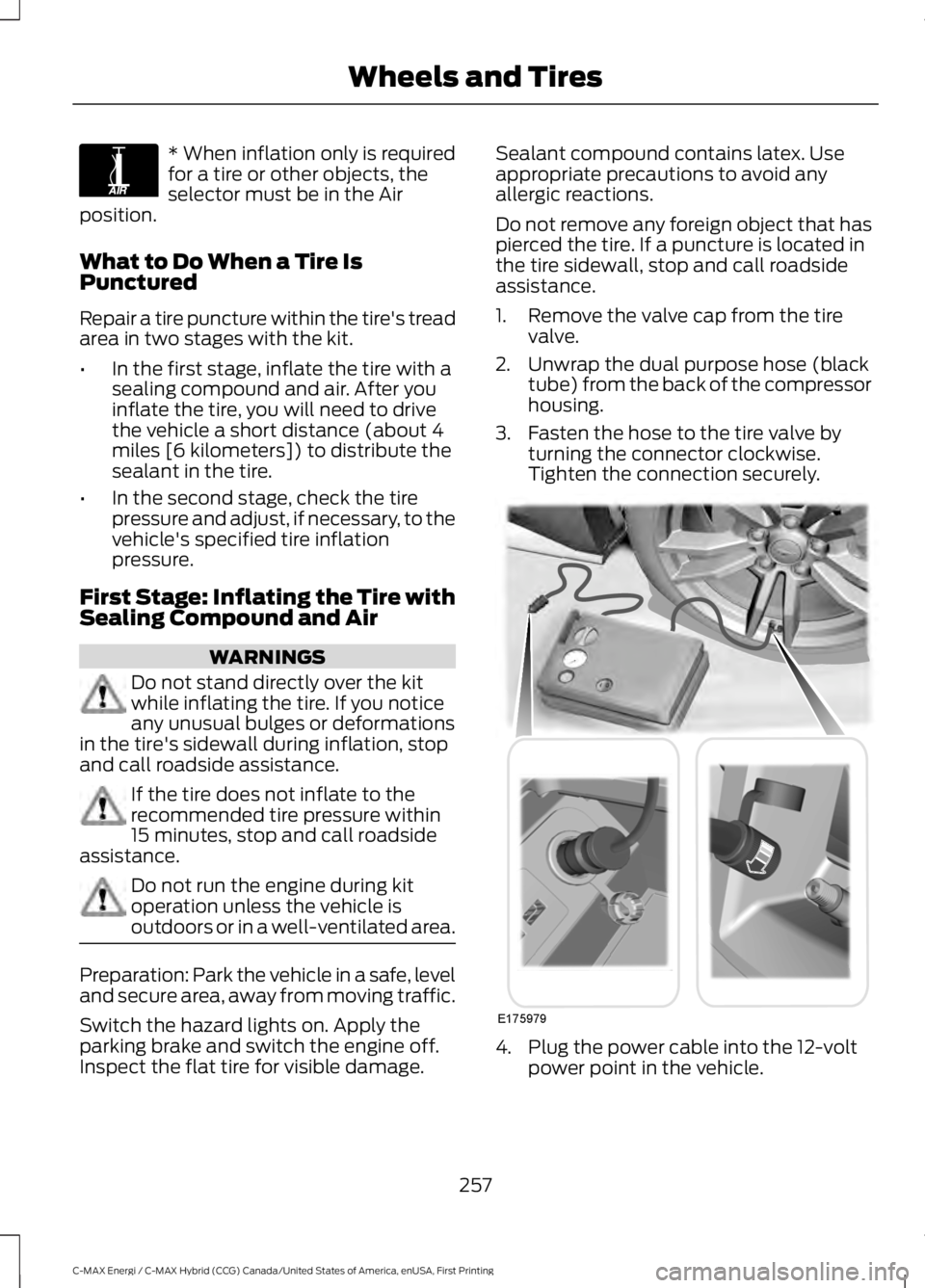
* When inflation only is requiredfor a tire or other objects, theselector must be in the Airposition.
What to Do When a Tire IsPunctured
Repair a tire puncture within the tire's treadarea in two stages with the kit.
•In the first stage, inflate the tire with asealing compound and air. After youinflate the tire, you will need to drivethe vehicle a short distance (about 4miles [6 kilometers]) to distribute thesealant in the tire.
•In the second stage, check the tirepressure and adjust, if necessary, to thevehicle's specified tire inflationpressure.
First Stage: Inflating the Tire withSealing Compound and Air
WARNINGS
Do not stand directly over the kitwhile inflating the tire. If you noticeany unusual bulges or deformationsin the tire's sidewall during inflation, stopand call roadside assistance.
If the tire does not inflate to therecommended tire pressure within15 minutes, stop and call roadsideassistance.
Do not run the engine during kitoperation unless the vehicle isoutdoors or in a well-ventilated area.
Preparation: Park the vehicle in a safe, leveland secure area, away from moving traffic.
Switch the hazard lights on. Apply theparking brake and switch the engine off.Inspect the flat tire for visible damage.
Sealant compound contains latex. Useappropriate precautions to avoid anyallergic reactions.
Do not remove any foreign object that haspierced the tire. If a puncture is located inthe tire sidewall, stop and call roadsideassistance.
1. Remove the valve cap from the tirevalve.
2. Unwrap the dual purpose hose (blacktube) from the back of the compressorhousing.
3. Fasten the hose to the tire valve byturning the connector clockwise.Tighten the connection securely.
4. Plug the power cable into the 12-voltpower point in the vehicle.
257
C-MAX Energi / C-MAX Hybrid (CCG) Canada/United States of America, enUSA, First Printing
Wheels and TiresE175978 E175979
Page 321 of 497
Sending a Text Message
Note:You can only send a text message toone recipient at a time.
1. Select the send option when thedesired selection highlights in the audiodisplay.
2. Select the confirmation option whenthe contact appears.
3. Press the OK button again to confirmwhen the system asks if you want tosend the message. A pre-definedsignature appears on each textmessage.
Note:You can send text messages eitherby choosing a contact from the phonebookand selecting the text option from the audiodisplay or by replying to a received messagein the inbox.
Accessing Your Phone Settings
These are phone-dependent features. Yourphone settings allow you to access andadjust features such as your ring tone andtext message notification, modify yourphonebook, and set up automaticdownload.
1. Press the PHONE button.
2. Scroll until the phone settings optionappears, and then press the OK button.
Scroll to select from the following options:
Description and actionMenu Item
If this option is checked, the system uses the cellular phoneas the master when there is more than one cellular phonepaired to the system. This option can be changed for allcellular phones (not only the active phone) using theBluetooth Devices menu.
Set as master
See the cellular phone name, provider name, cellularphone number, and signal level. When done, press the leftarrow buttons to return to the phone status menu.
Phone status
Select which ringtone sounds during an incoming call (oneof the system's tones or your cellular phone's). If yourphone supports in-band ringing, your phone's ringtonesounds when you choose the cellular phone ringtoneoption.
Set ringtone
1. Press the OK button to select and scroll to hear eachringtone.2. Press the OK button to select a ringtone.
Have the option of hearing an audible tone to notify youwhen a text message arrives. Press the OK button toswitch the audible tone off or on.
Text msg notify
Modify the contents of your phonebook (such as add,delete or download). Press the OK button to select andscroll between the choices in the phonebook preferencestable below.
Phonebook pref.
318
C-MAX Energi / C-MAX Hybrid (CCG) Canada/United States of America, enUSA, First Printing
SYNC™
Page 384 of 497
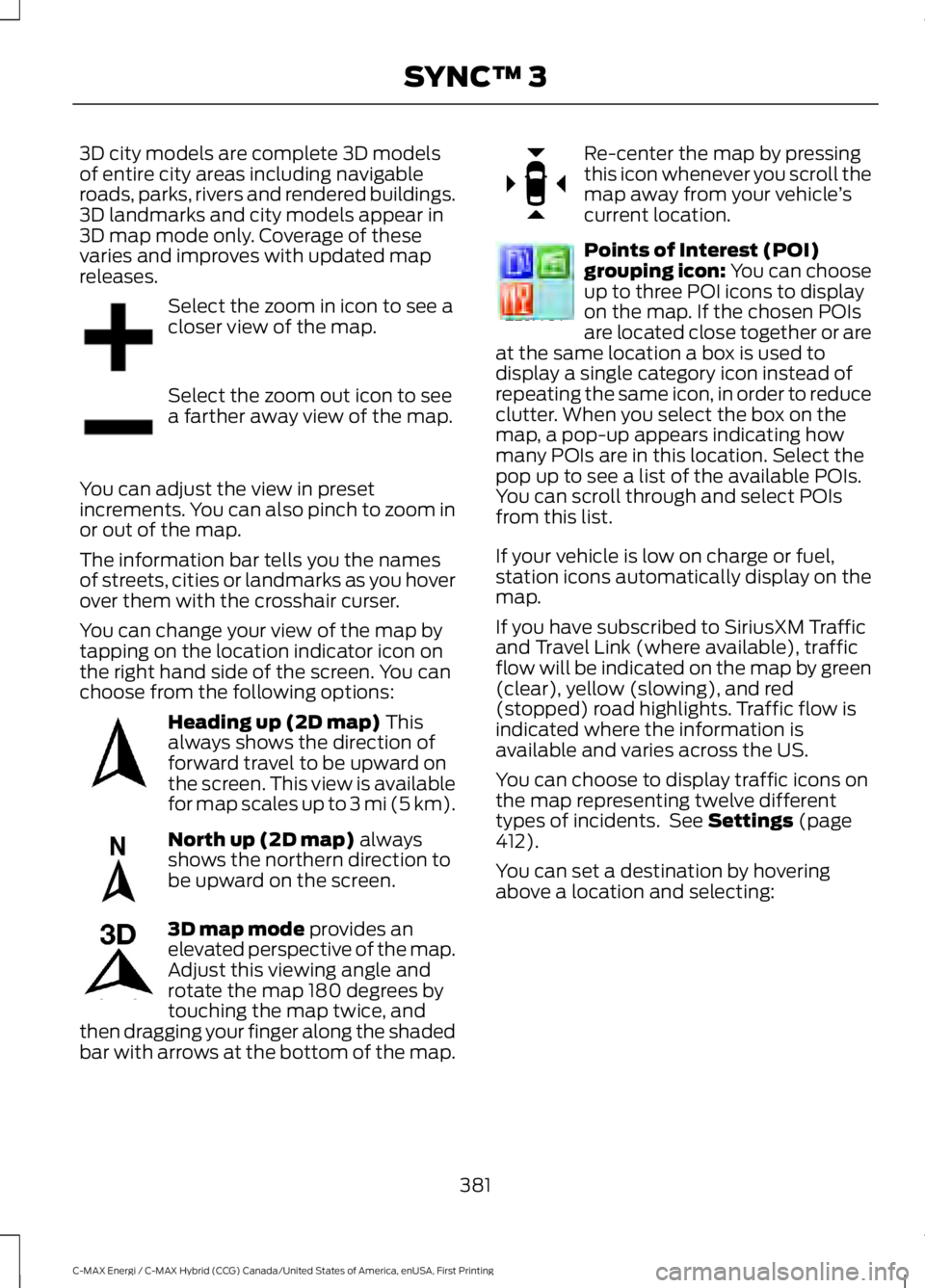
3D city models are complete 3D modelsof entire city areas including navigableroads, parks, rivers and rendered buildings.3D landmarks and city models appear in3D map mode only. Coverage of thesevaries and improves with updated mapreleases.
Select the zoom in icon to see acloser view of the map.
Select the zoom out icon to seea farther away view of the map.
You can adjust the view in presetincrements. You can also pinch to zoom inor out of the map.
The information bar tells you the namesof streets, cities or landmarks as you hoverover them with the crosshair curser.
You can change your view of the map bytapping on the location indicator icon onthe right hand side of the screen. You canchoose from the following options:
Heading up (2D map) Thisalways shows the direction offorward travel to be upward onthe screen. This view is availablefor map scales up to 3 mi (5 km).
North up (2D map) alwaysshows the northern direction tobe upward on the screen.
3D map mode provides anelevated perspective of the map.Adjust this viewing angle androtate the map 180 degrees bytouching the map twice, andthen dragging your finger along the shadedbar with arrows at the bottom of the map.
Re-center the map by pressingthis icon whenever you scroll themap away from your vehicle’scurrent location.
Points of Interest (POI)grouping icon: You can chooseup to three POI icons to displayon the map. If the chosen POIsare located close together or areat the same location a box is used todisplay a single category icon instead ofrepeating the same icon, in order to reduceclutter. When you select the box on themap, a pop-up appears indicating howmany POIs are in this location. Select thepop up to see a list of the available POIs.You can scroll through and select POIsfrom this list.
If your vehicle is low on charge or fuel,station icons automatically display on themap.
If you have subscribed to SiriusXM Trafficand Travel Link (where available), trafficflow will be indicated on the map by green(clear), yellow (slowing), and red(stopped) road highlights. Traffic flow isindicated where the information isavailable and varies across the US.
You can choose to display traffic icons onthe map representing twelve differenttypes of incidents. See Settings (page412).
You can set a destination by hoveringabove a location and selecting:
381
C-MAX Energi / C-MAX Hybrid (CCG) Canada/United States of America, enUSA, First Printing
SYNC™ 3E207752 E207753 E207750 E207749 E207748 E207751 E207754
Page 398 of 497
Action and DescriptionMenu ItemItem
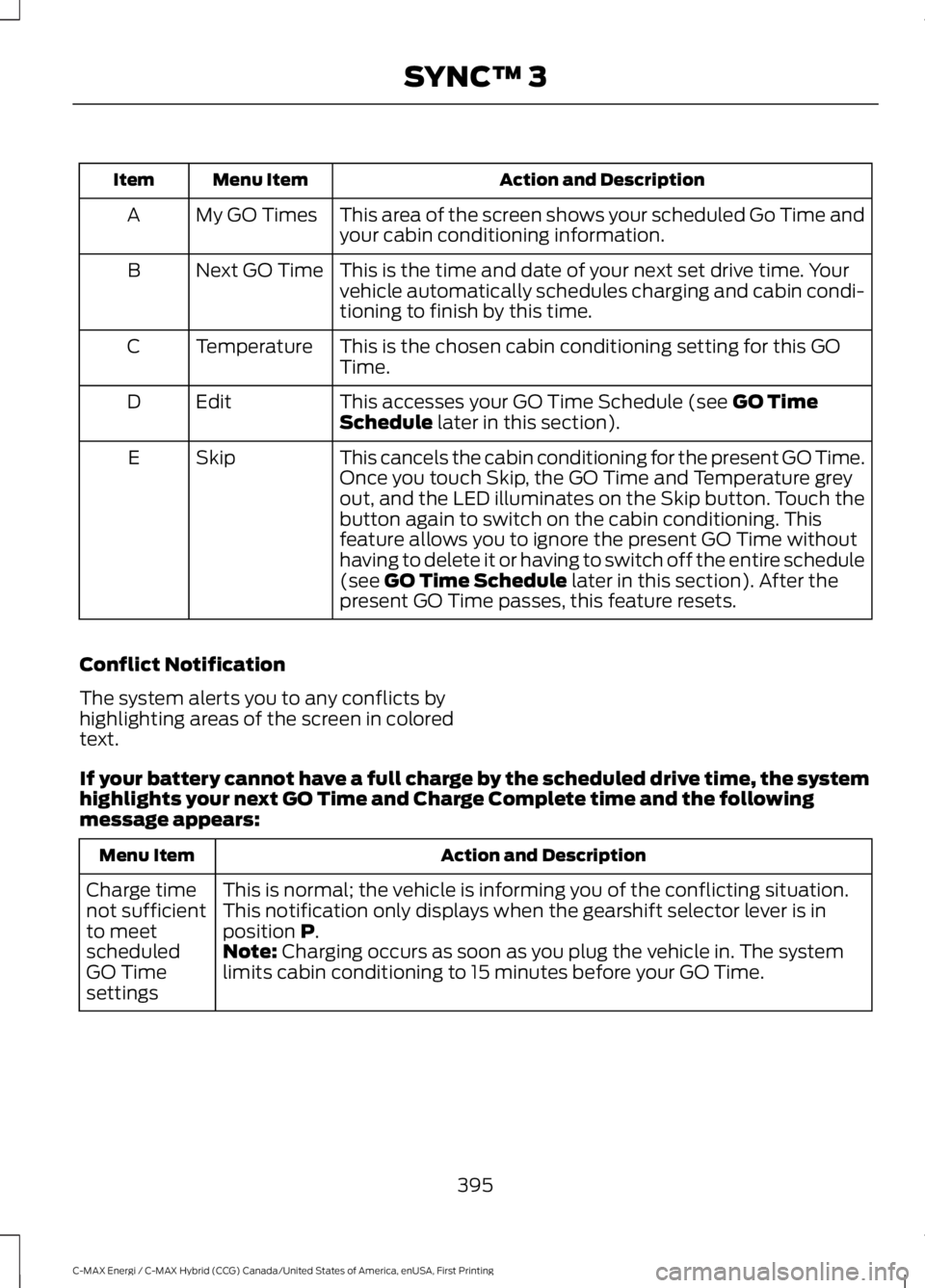
This area of the screen shows your scheduled Go Time andyour cabin conditioning information.My GO TimesA
This is the time and date of your next set drive time. Yourvehicle automatically schedules charging and cabin condi-tioning to finish by this time.
Next GO TimeB
This is the chosen cabin conditioning setting for this GOTime.TemperatureC
This accesses your GO Time Schedule (see GO TimeSchedule later in this section).EditD
This cancels the cabin conditioning for the present GO Time.Once you touch Skip, the GO Time and Temperature greyout, and the LED illuminates on the Skip button. Touch thebutton again to switch on the cabin conditioning. Thisfeature allows you to ignore the present GO Time withouthaving to delete it or having to switch off the entire schedule(see GO Time Schedule later in this section). After thepresent GO Time passes, this feature resets.
SkipE
Conflict Notification
The system alerts you to any conflicts byhighlighting areas of the screen in coloredtext.
If your battery cannot have a full charge by the scheduled drive time, the systemhighlights your next GO Time and Charge Complete time and the followingmessage appears:
Action and DescriptionMenu Item
This is normal; the vehicle is informing you of the conflicting situation.This notification only displays when the gearshift selector lever is inposition P.
Charge timenot sufficientto meetscheduledGO Timesettings
Note: Charging occurs as soon as you plug the vehicle in. The systemlimits cabin conditioning to 15 minutes before your GO Time.
395
C-MAX Energi / C-MAX Hybrid (CCG) Canada/United States of America, enUSA, First Printing
SYNC™ 3
Page 410 of 497
DescriptionItemCallout
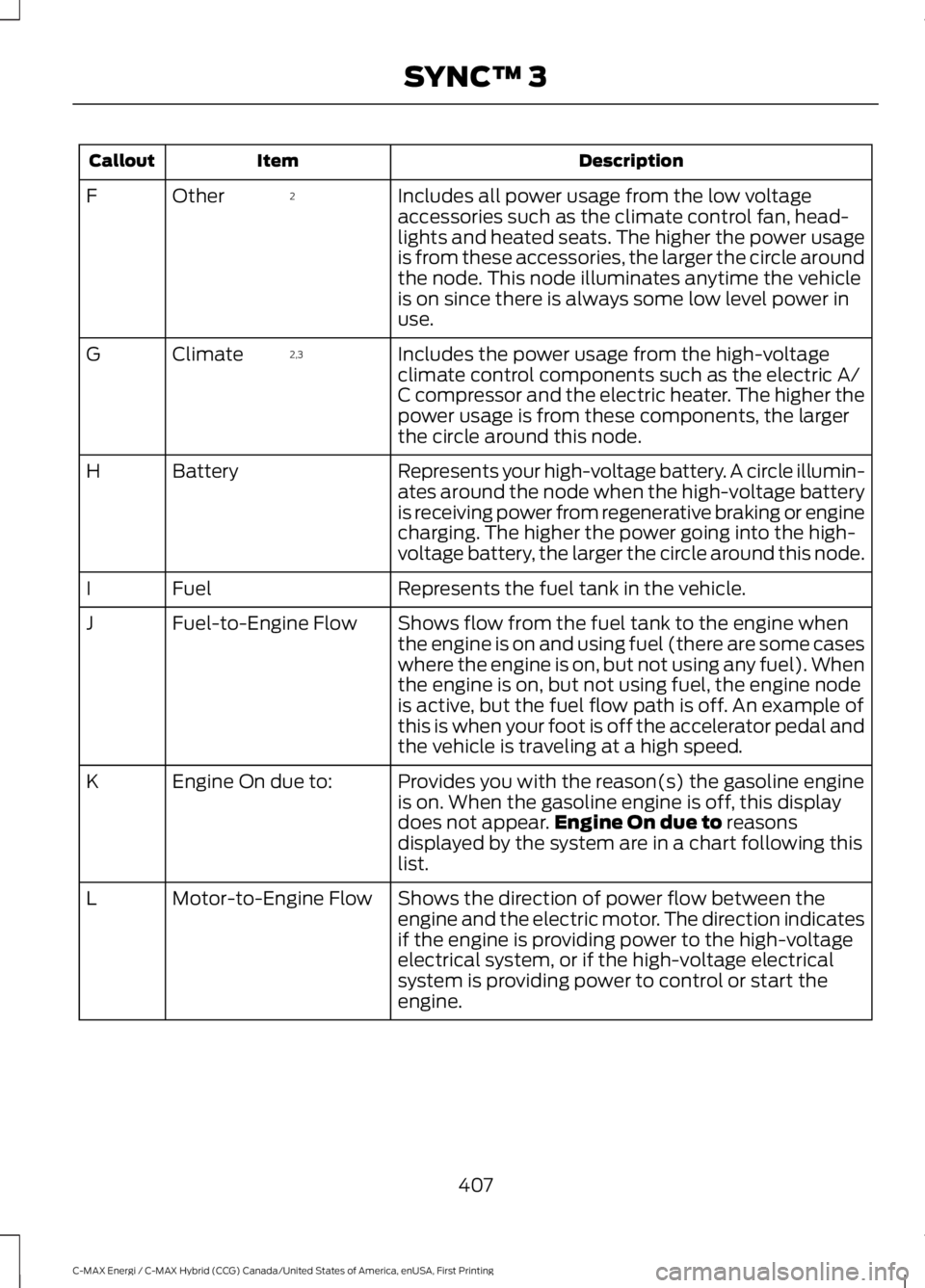
Includes all power usage from the low voltageaccessories such as the climate control fan, head-lights and heated seats. The higher the power usageis from these accessories, the larger the circle aroundthe node. This node illuminates anytime the vehicleis on since there is always some low level power inuse.
2OtherF
Includes the power usage from the high-voltageclimate control components such as the electric A/C compressor and the electric heater. The higher thepower usage is from these components, the largerthe circle around this node.
2,3ClimateG
Represents your high-voltage battery. A circle illumin-ates around the node when the high-voltage batteryis receiving power from regenerative braking or enginecharging. The higher the power going into the high-voltage battery, the larger the circle around this node.
BatteryH
Represents the fuel tank in the vehicle.FuelI
Shows flow from the fuel tank to the engine whenthe engine is on and using fuel (there are some caseswhere the engine is on, but not using any fuel). Whenthe engine is on, but not using fuel, the engine nodeis active, but the fuel flow path is off. An example ofthis is when your foot is off the accelerator pedal andthe vehicle is traveling at a high speed.
Fuel-to-Engine FlowJ
Provides you with the reason(s) the gasoline engineis on. When the gasoline engine is off, this displaydoes not appear.Engine On due to reasonsdisplayed by the system are in a chart following thislist.
Engine On due to:K
Shows the direction of power flow between theengine and the electric motor. The direction indicatesif the engine is providing power to the high-voltageelectrical system, or if the high-voltage electricalsystem is providing power to control or start theengine.
Motor-to-Engine FlowL
407
C-MAX Energi / C-MAX Hybrid (CCG) Canada/United States of America, enUSA, First Printing
SYNC™ 3
Page 411 of 497
DescriptionItemCallout
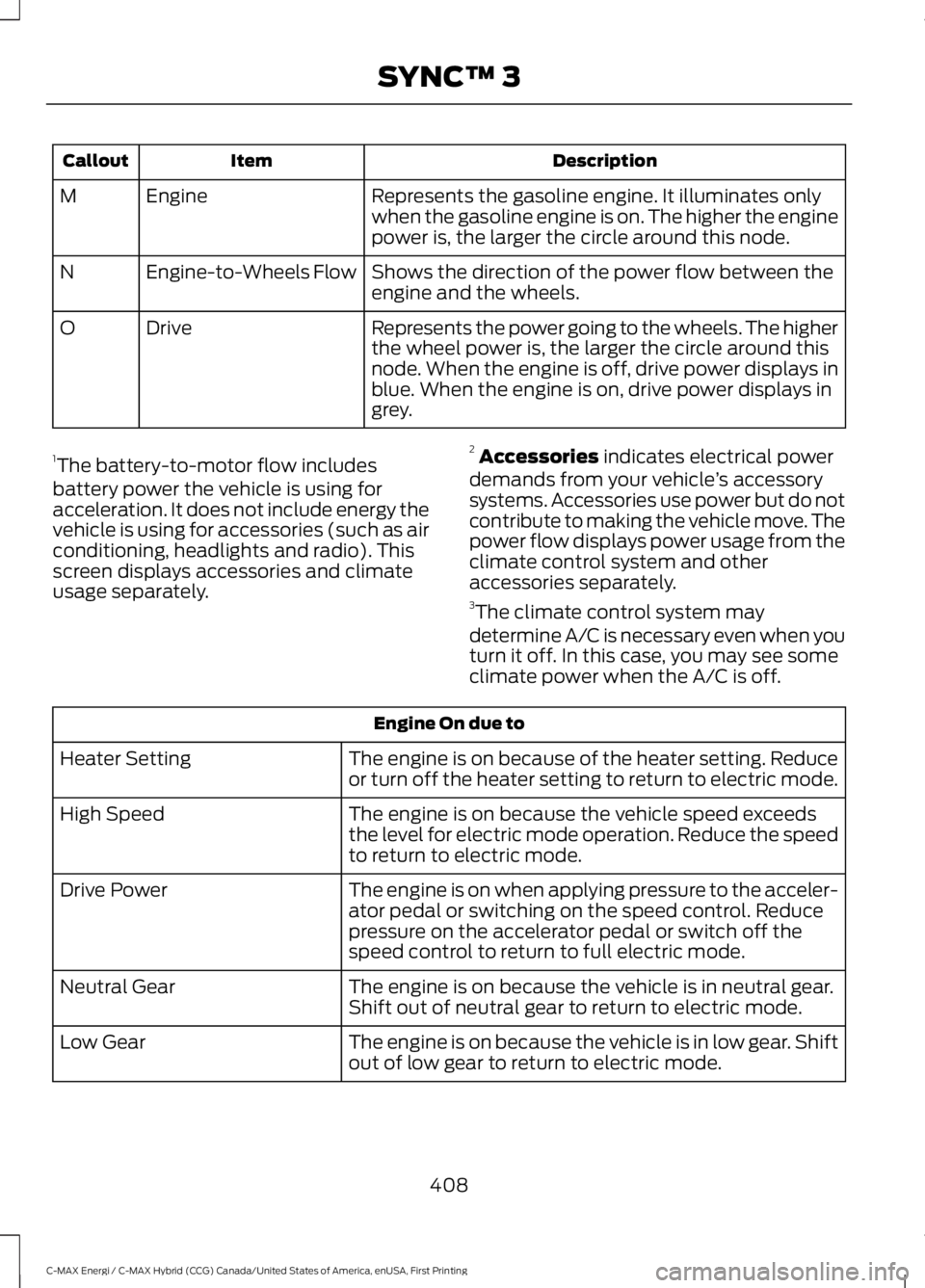
Represents the gasoline engine. It illuminates onlywhen the gasoline engine is on. The higher the enginepower is, the larger the circle around this node.
EngineM
Shows the direction of the power flow between theengine and the wheels.Engine-to-Wheels FlowN
Represents the power going to the wheels. The higherthe wheel power is, the larger the circle around thisnode. When the engine is off, drive power displays inblue. When the engine is on, drive power displays ingrey.
DriveO
1The battery-to-motor flow includesbattery power the vehicle is using foracceleration. It does not include energy thevehicle is using for accessories (such as airconditioning, headlights and radio). Thisscreen displays accessories and climateusage separately.
2Accessories indicates electrical powerdemands from your vehicle’s accessorysystems. Accessories use power but do notcontribute to making the vehicle move. Thepower flow displays power usage from theclimate control system and otheraccessories separately.3The climate control system may
determine A/C is necessary even when youturn it off. In this case, you may see someclimate power when the A/C is off.
Engine On due to
The engine is on because of the heater setting. Reduceor turn off the heater setting to return to electric mode.Heater Setting
The engine is on because the vehicle speed exceedsthe level for electric mode operation. Reduce the speedto return to electric mode.
High Speed
The engine is on when applying pressure to the acceler-ator pedal or switching on the speed control. Reducepressure on the accelerator pedal or switch off thespeed control to return to full electric mode.
Drive Power
The engine is on because the vehicle is in neutral gear.Shift out of neutral gear to return to electric mode.Neutral Gear
The engine is on because the vehicle is in low gear. Shiftout of low gear to return to electric mode.Low Gear
408
C-MAX Energi / C-MAX Hybrid (CCG) Canada/United States of America, enUSA, First Printing
SYNC™ 3
Page 446 of 497
Oils, Fluids and Flushing
In many cases, fluid discoloration is anormal operating characteristic and, byitself, does not necessarily indicate aconcern or that the fluid needs to bechanged. However, a qualified expert, suchas the factory-trained technicians at yourdealership, should inspect discolored fluidsthat also show signs of overheating orforeign material contaminationimmediately.
Make sure to change your vehicle’s oils andfluids at the specified intervals or inconjunction with a repair. Flushing is aviable way to change fluid for many vehiclesub-systems during scheduledmaintenance. It is critical that systems areflushed only with new fluid that is the sameas that required to fill and operate thesystem or using a Ford-approved flushingchemical.
Owner Checks and Services
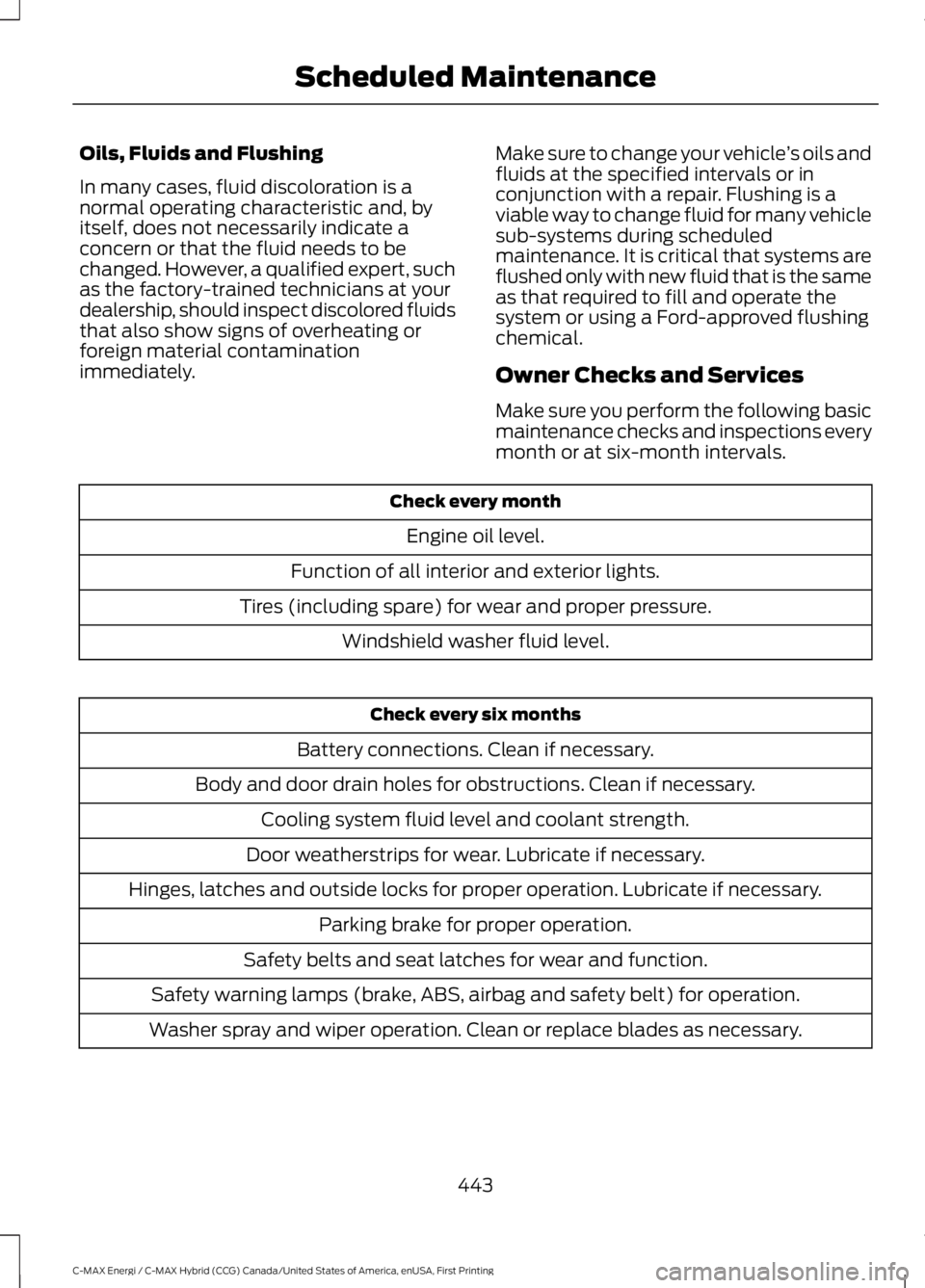
Make sure you perform the following basicmaintenance checks and inspections everymonth or at six-month intervals.
Check every month
Engine oil level.
Function of all interior and exterior lights.
Tires (including spare) for wear and proper pressure.
Windshield washer fluid level.
Check every six months
Battery connections. Clean if necessary.
Body and door drain holes for obstructions. Clean if necessary.
Cooling system fluid level and coolant strength.
Door weatherstrips for wear. Lubricate if necessary.
Hinges, latches and outside locks for proper operation. Lubricate if necessary.
Parking brake for proper operation.
Safety belts and seat latches for wear and function.
Safety warning lamps (brake, ABS, airbag and safety belt) for operation.
Washer spray and wiper operation. Clean or replace blades as necessary.
443
C-MAX Energi / C-MAX Hybrid (CCG) Canada/United States of America, enUSA, First Printing
Scheduled Maintenance