mirror FORD C MAX ENERGI 2017 Owners Manual
[x] Cancel search | Manufacturer: FORD, Model Year: 2017, Model line: C MAX ENERGI, Model: FORD C MAX ENERGI 2017Pages: 497, PDF Size: 7.64 MB
Page 5 of 497
Cruise Control.................................................69
Information Display Control.......................70
Wipers and Washers
Windshield Wipers..........................................71
Autowipers.........................................................71
Windshield Washers......................................72
Rear Window Wiper and Washers...........73
Lighting
Lighting Control...............................................74
Autolamps........................................................74
Instrument Lighting Dimmer......................75
Headlamp Exit Delay.....................................75
Daytime Running Lamps.............................76
Front Fog Lamps............................................76
Direction Indicators........................................76
Interior Lamps.................................................76
Ambient Lighting.............................................77
Windows and Mirrors
Power Windows..............................................78
Global Opening...............................................79
Exterior Mirrors................................................79
Interior Mirror....................................................81
Sun Visors.........................................................82
Sun Shades......................................................82
Instrument Cluster
Gauges...............................................................84
Warning Lamps and Indicators.................87
Audible Warnings and Indicators..............91
Information Displays
General Information......................................92
Information Messages.................................101
Climate Control
Automatic Climate Control......................109
Hints on Controlling the InteriorClimate...........................................................111
Heated Windows and Mirrors....................112
Cabin Air Filter.................................................113
Remote Start...................................................113
Seats
Sitting in the Correct Position...................114
Head Restraints..............................................114
Manual Seats..................................................116
Power Seats.....................................................117
Rear Seats........................................................119
Heated Seats.................................................120
Rear Seat Armrest........................................120
Universal Garage DoorOpener
Universal Garage Door Opener.................121
Auxiliary Power Points
Auxiliary Power Points................................126
Storage Compartments
Center Console..............................................128
Overhead Console........................................128
Starting and Stopping theEngine
General Information....................................129
Ignition Switch...............................................129
Keyless Starting............................................129
Starting a Gasoline Engine.......................130
Engine Block Heater.....................................132
Automatic Engine Shutdown...................133
Unique Driving Character-istics
Hybrid Vehicle Operation...........................135
Plug-In Hybrid Vehicle Operation...........137
EcoSelect........................................................139
2
C-MAX Energi / C-MAX Hybrid (CCG) Canada/United States of America, enUSA, First Printing
Table of Contents
Page 74 of 497
WINDSHIELD WIPERS
Note:Fully defrost the windshield beforeyou switch the windshield wipers on.
Note:Make sure you switch the windshieldwipers and vehicle power off before usingan automatic car wash.
Note: If streaks or smears appear on thewindshield, clean the windshield and thewiper blades. See Checking the WiperBlades (page 234). If that does not resolvethe issue, install new wiper blades. SeeChanging the Wiper Blades (page 235).
Note:Do not operate the wipers on a drywindshield. This may scratch the glass,damage the wiper blades or cause the wipermotor to burn out. Always use thewindshield washers before wiping a drywindshield.
Note:When wiping on dry glass, the wipersmay switch to the next lower operatingmode (low-speed or intermittent). Theprevious operation mode may resume afterthe windshield becomes wet again.
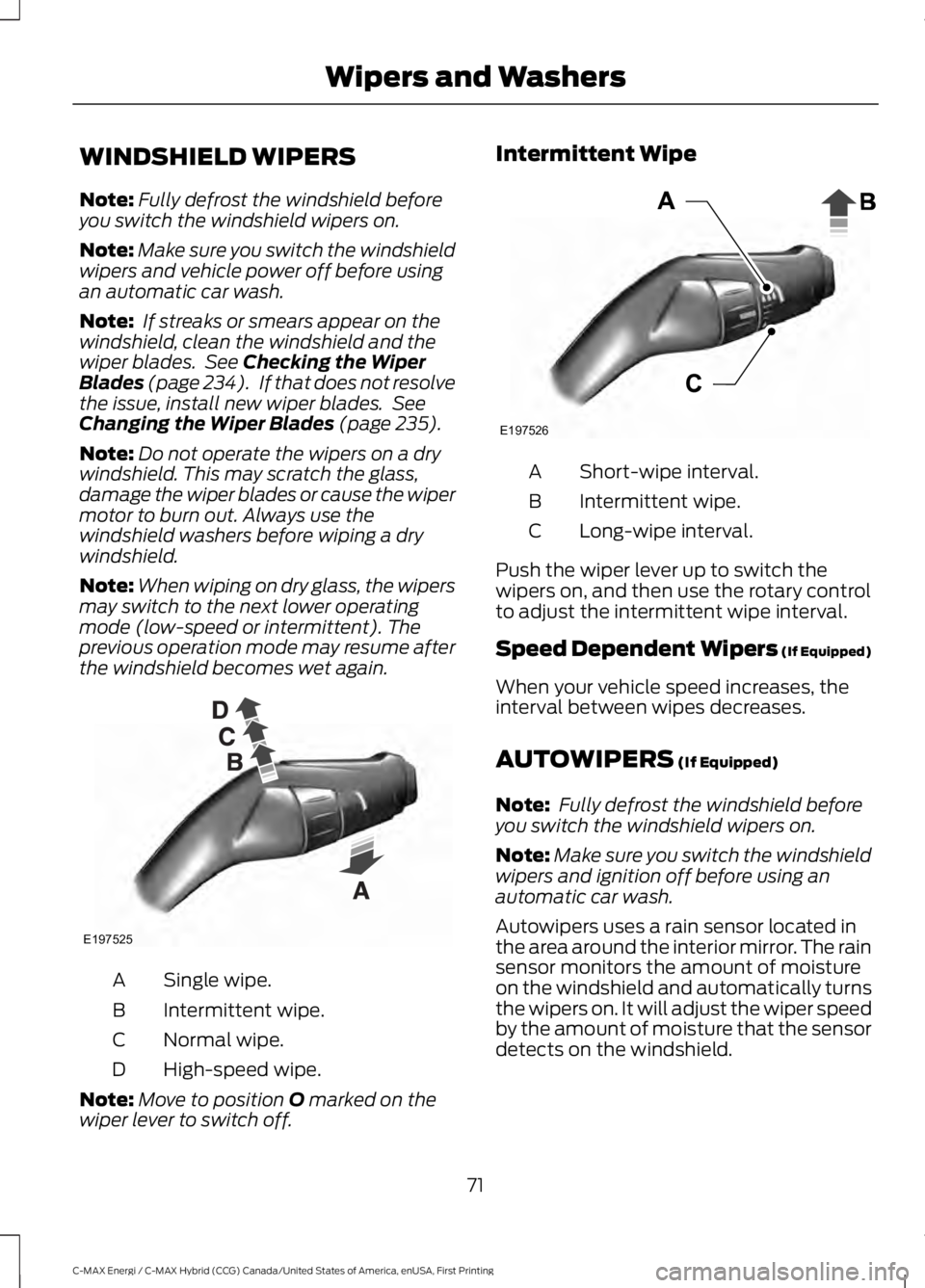
Single wipe.A
Intermittent wipe.B
Normal wipe.C
High-speed wipe.D
Note:Move to position O marked on thewiper lever to switch off.
Intermittent Wipe
Short-wipe interval.A
Intermittent wipe.B
Long-wipe interval.C
Push the wiper lever up to switch thewipers on, and then use the rotary controlto adjust the intermittent wipe interval.
Speed Dependent Wipers (If Equipped)
When your vehicle speed increases, theinterval between wipes decreases.
AUTOWIPERS (If Equipped)
Note: Fully defrost the windshield beforeyou switch the windshield wipers on.
Note:Make sure you switch the windshieldwipers and ignition off before using anautomatic car wash.
Autowipers uses a rain sensor located inthe area around the interior mirror. The rainsensor monitors the amount of moistureon the windshield and automatically turnsthe wipers on. It will adjust the wiper speedby the amount of moisture that the sensordetects on the windshield.
71
C-MAX Energi / C-MAX Hybrid (CCG) Canada/United States of America, enUSA, First Printing
Wipers and WashersE197525 E197526
Page 81 of 497
POWER WINDOWS
WARNINGS
Do not leave children unattended inyour vehicle and do not let them playwith the power windows. They mayseriously injure themselves.
When closing the power windows,you should verify they are free ofobstructions and make sure thatchildren and pets are not in the proximityof the window openings.
Note:You may hear a pulsing noise whenjust one of the windows is open. Lower theopposite window slightly to reduce thisnoise.
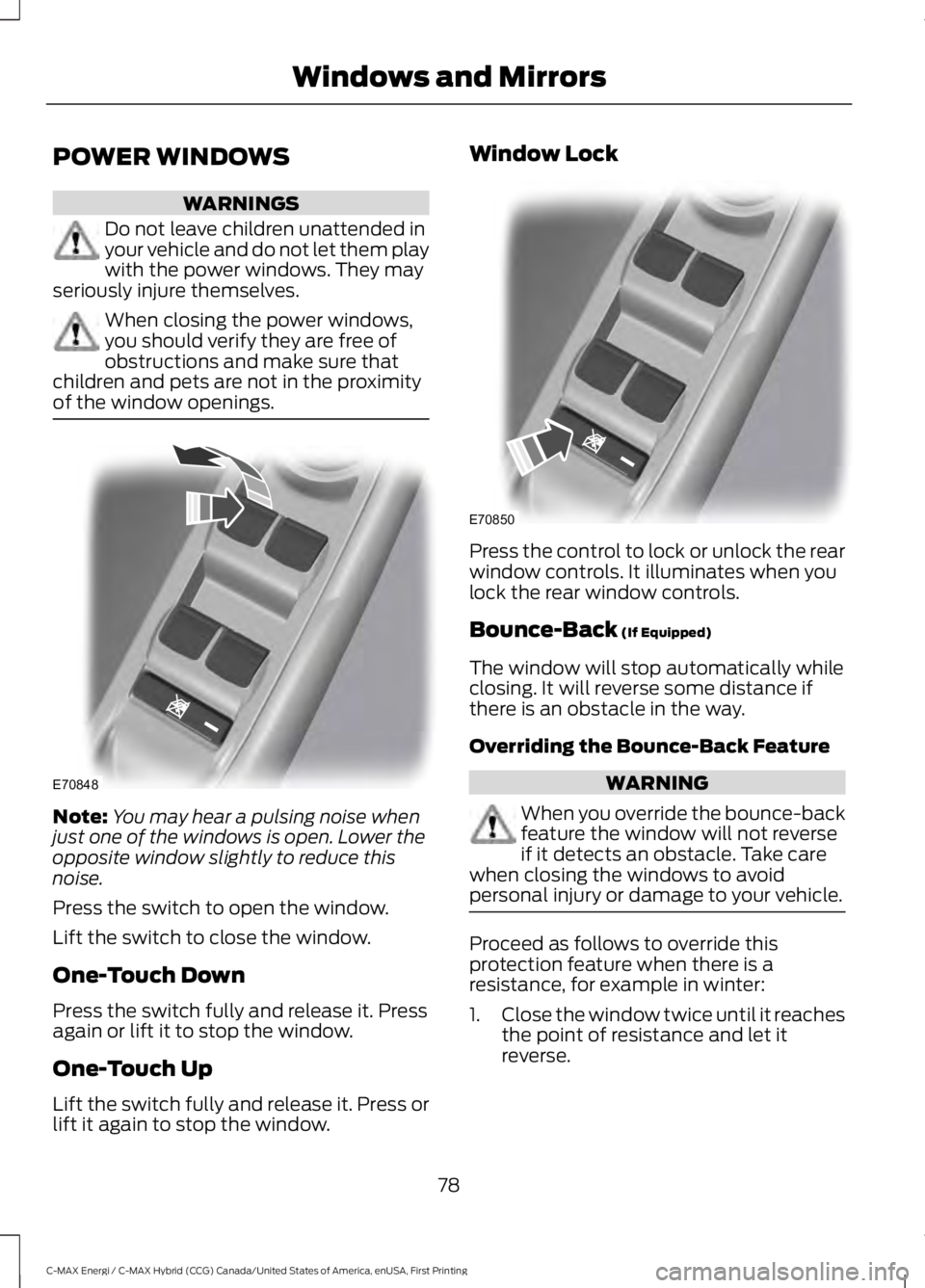
Press the switch to open the window.
Lift the switch to close the window.
One-Touch Down
Press the switch fully and release it. Pressagain or lift it to stop the window.
One-Touch Up
Lift the switch fully and release it. Press orlift it again to stop the window.
Window Lock
Press the control to lock or unlock the rearwindow controls. It illuminates when youlock the rear window controls.
Bounce-Back (If Equipped)
The window will stop automatically whileclosing. It will reverse some distance ifthere is an obstacle in the way.
Overriding the Bounce-Back Feature
WARNING
When you override the bounce-backfeature the window will not reverseif it detects an obstacle. Take carewhen closing the windows to avoidpersonal injury or damage to your vehicle.
Proceed as follows to override thisprotection feature when there is aresistance, for example in winter:
1.Close the window twice until it reachesthe point of resistance and let itreverse.
78
C-MAX Energi / C-MAX Hybrid (CCG) Canada/United States of America, enUSA, First Printing
Windows and MirrorsE70848 E70850
Page 82 of 497
2. Close the window a third time to thepoint of resistance. The bounce-backfeature is now disabled and you canclose the window manually. Thewindow will go past the point ofresistance and you can close it fully.
See an authorized dealer as soon aspossible if the window does not close afterthe third attempt.
Resetting the Bounce-Back Feature
WARNING
The bounce-back feature remainsturned off until you reset thememory.
If you have disconnected the battery, youmust reset the bounce-back memoryseparately for each window.
1. Lift and hold the switch until thewindow is fully closed.
2. Release the switch.
3. Lift the switch again for one moresecond.
4. Press and hold the switch until thewindow is fully open.
5. Release the switch.
6. Lift and hold the switch until thewindow is fully closed.
7.Open the window and then try to closeit automatically.
8. Reset and repeat the procedure if thewindow does not close automatically.
Accessory Delay (If Equipped)
You can use the window switches forseveral minutes after you switch theignition off or until you open either frontdoor.
GLOBAL OPENING
You can use the remote control to operatethe windows with the ignition off.
Note:To operate this feature, accessorydelay must not be active.
Opening the Windows
You can use the global opening feature toopen the windows only for a short timeafter you unlock your vehicle by using theremote control.
To use the global opening feature:
1. Press and release the remote controlunlock button.
2.Press the remote control unlock buttonagain and hold it for approximatelythree seconds. Release the controlwhen the windows begin to open.
3.Press the lock or unlock button on yourremote control to stop the windowopening function.
Note:Contact an authorized Ford dealer todeactivate this feature.
EXTERIOR MIRRORS
Power Exterior Mirrors
WARNING
Do not adjust the mirrors when yourvehicle is moving. This could resultin the loss of control of your vehicle,serious personal injury or death.
79
C-MAX Energi / C-MAX Hybrid (CCG) Canada/United States of America, enUSA, First Printing
Windows and Mirrors
Page 83 of 497
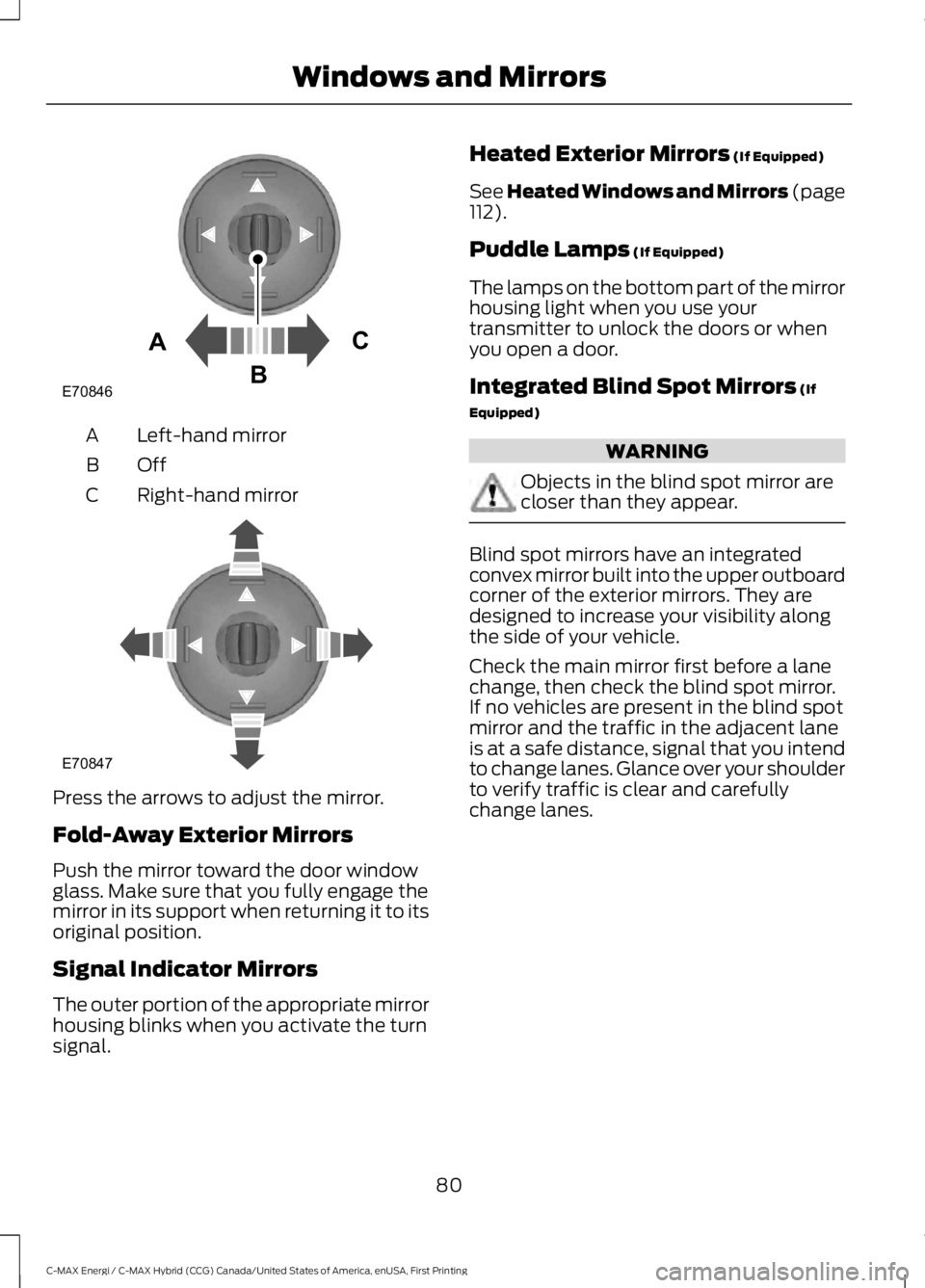
Left-hand mirrorA
OffB
Right-hand mirrorC
Press the arrows to adjust the mirror.
Fold-Away Exterior Mirrors
Push the mirror toward the door windowglass. Make sure that you fully engage themirror in its support when returning it to itsoriginal position.
Signal Indicator Mirrors
The outer portion of the appropriate mirrorhousing blinks when you activate the turnsignal.
Heated Exterior Mirrors (If Equipped)
See Heated Windows and Mirrors (page112).
Puddle Lamps (If Equipped)
The lamps on the bottom part of the mirrorhousing light when you use yourtransmitter to unlock the doors or whenyou open a door.
Integrated Blind Spot Mirrors (If
Equipped)
WARNING
Objects in the blind spot mirror arecloser than they appear.
Blind spot mirrors have an integratedconvex mirror built into the upper outboardcorner of the exterior mirrors. They aredesigned to increase your visibility alongthe side of your vehicle.
Check the main mirror first before a lanechange, then check the blind spot mirror.If no vehicles are present in the blind spotmirror and the traffic in the adjacent laneis at a safe distance, signal that you intendto change lanes. Glance over your shoulderto verify traffic is clear and carefullychange lanes.
80
C-MAX Energi / C-MAX Hybrid (CCG) Canada/United States of America, enUSA, First Printing
Windows and MirrorsE70846A
C
B E70847
Page 84 of 497
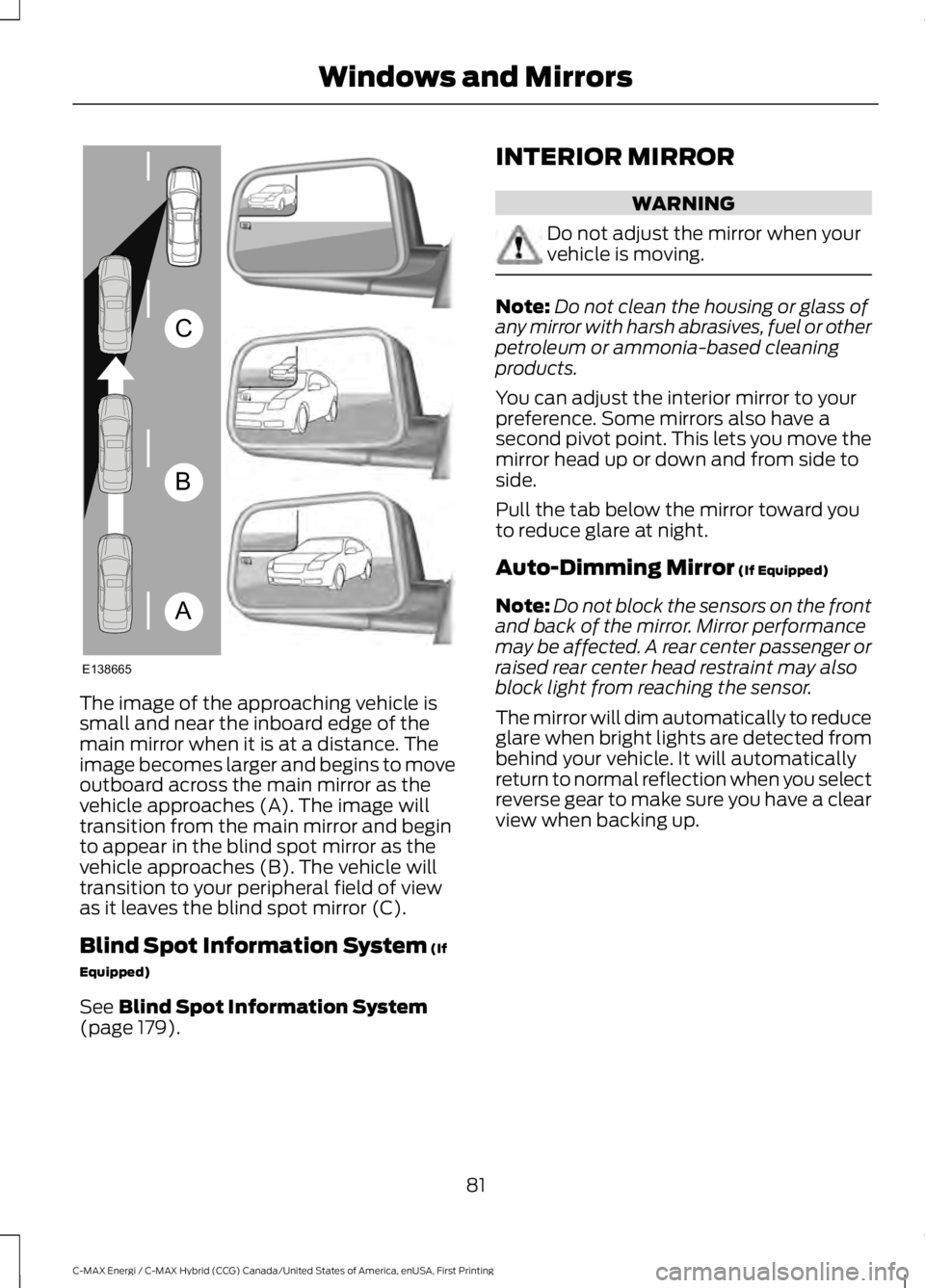
The image of the approaching vehicle issmall and near the inboard edge of themain mirror when it is at a distance. Theimage becomes larger and begins to moveoutboard across the main mirror as thevehicle approaches (A). The image willtransition from the main mirror and beginto appear in the blind spot mirror as thevehicle approaches (B). The vehicle willtransition to your peripheral field of viewas it leaves the blind spot mirror (C).
Blind Spot Information System (If
Equipped)
See Blind Spot Information System(page 179).
INTERIOR MIRROR
WARNING
Do not adjust the mirror when yourvehicle is moving.
Note:Do not clean the housing or glass ofany mirror with harsh abrasives, fuel or otherpetroleum or ammonia-based cleaningproducts.
You can adjust the interior mirror to yourpreference. Some mirrors also have asecond pivot point. This lets you move themirror head up or down and from side toside.
Pull the tab below the mirror toward youto reduce glare at night.
Auto-Dimming Mirror (If Equipped)
Note:Do not block the sensors on the frontand back of the mirror. Mirror performancemay be affected. A rear center passenger orraised rear center head restraint may alsoblock light from reaching the sensor.
The mirror will dim automatically to reduceglare when bright lights are detected frombehind your vehicle. It will automaticallyreturn to normal reflection when you selectreverse gear to make sure you have a clearview when backing up.
81
C-MAX Energi / C-MAX Hybrid (CCG) Canada/United States of America, enUSA, First Printing
Windows and MirrorsA
B
C
E138665
Page 85 of 497
SUN VISORS
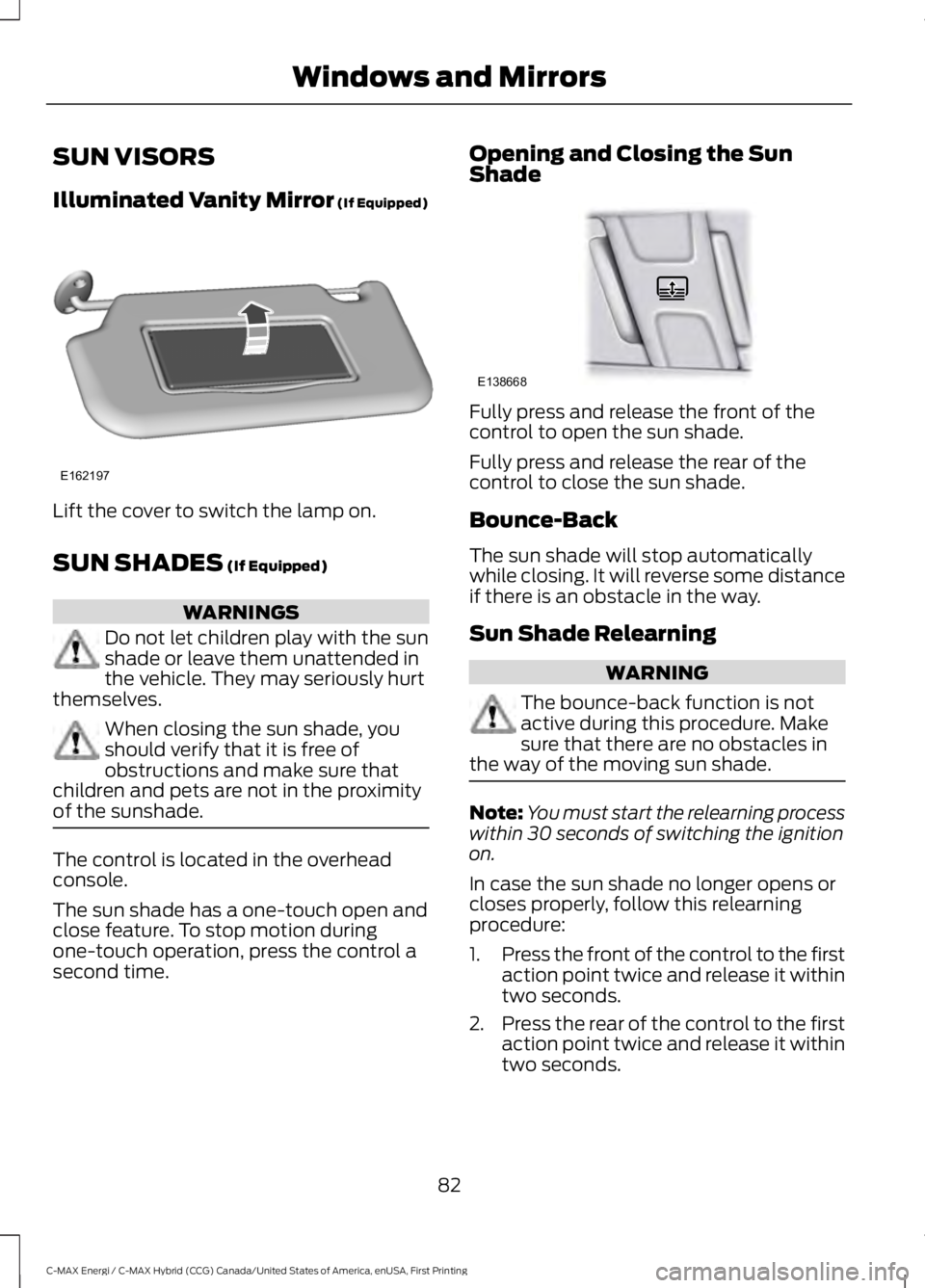
Illuminated Vanity Mirror (If Equipped)
Lift the cover to switch the lamp on.
SUN SHADES (If Equipped)
WARNINGS
Do not let children play with the sunshade or leave them unattended inthe vehicle. They may seriously hurtthemselves.
When closing the sun shade, youshould verify that it is free ofobstructions and make sure thatchildren and pets are not in the proximityof the sunshade.
The control is located in the overheadconsole.
The sun shade has a one-touch open andclose feature. To stop motion duringone-touch operation, press the control asecond time.
Opening and Closing the SunShade
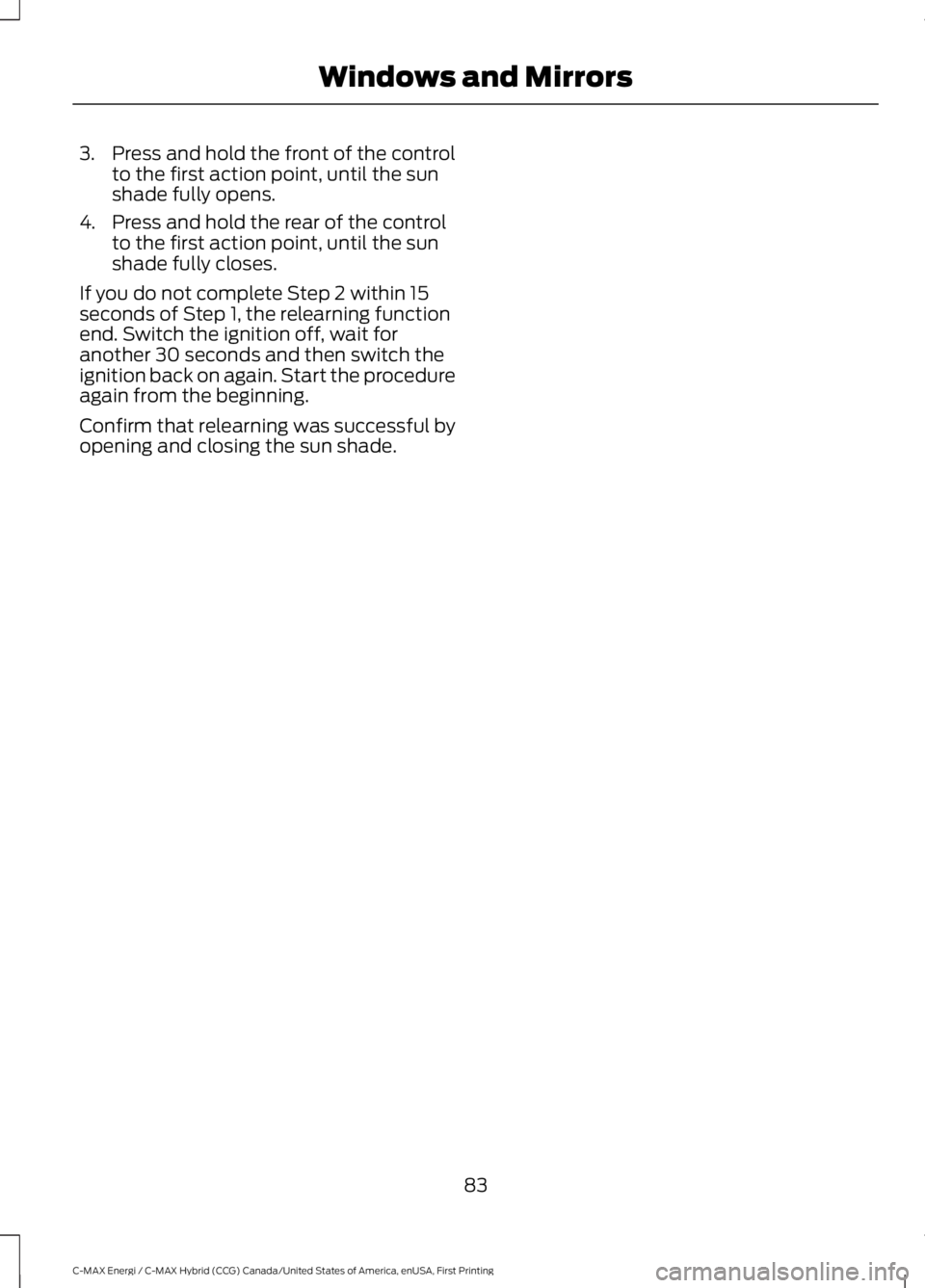
Fully press and release the front of thecontrol to open the sun shade.
Fully press and release the rear of thecontrol to close the sun shade.
Bounce-Back
The sun shade will stop automaticallywhile closing. It will reverse some distanceif there is an obstacle in the way.
Sun Shade Relearning
WARNING
The bounce-back function is notactive during this procedure. Makesure that there are no obstacles inthe way of the moving sun shade.
Note:You must start the relearning processwithin 30 seconds of switching the ignitionon.
In case the sun shade no longer opens orcloses properly, follow this relearningprocedure:
1.Press the front of the control to the firstaction point twice and release it withintwo seconds.
2.Press the rear of the control to the firstaction point twice and release it withintwo seconds.
82
C-MAX Energi / C-MAX Hybrid (CCG) Canada/United States of America, enUSA, First Printing
Windows and MirrorsE162197 E138668
Page 86 of 497
3.Press and hold the front of the controlto the first action point, until the sunshade fully opens.
4. Press and hold the rear of the controlto the first action point, until the sunshade fully closes.
If you do not complete Step 2 within 15seconds of Step 1, the relearning functionend. Switch the ignition off, wait foranother 30 seconds and then switch theignition back on again. Start the procedureagain from the beginning.
Confirm that relearning was successful byopening and closing the sun shade.
83
C-MAX Energi / C-MAX Hybrid (CCG) Canada/United States of America, enUSA, First Printing
Windows and Mirrors
Page 112 of 497
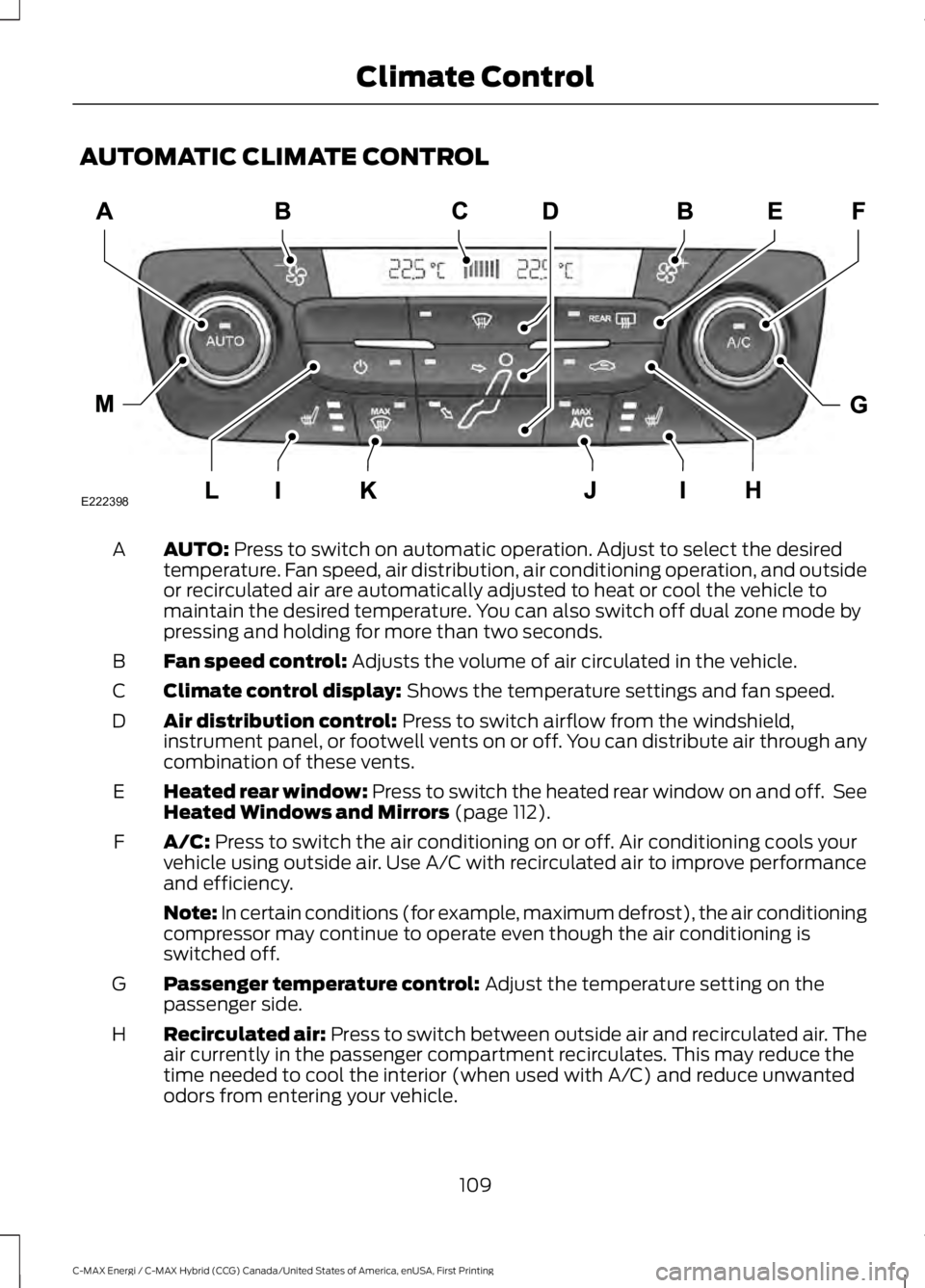
AUTOMATIC CLIMATE CONTROL
AUTO: Press to switch on automatic operation. Adjust to select the desiredtemperature. Fan speed, air distribution, air conditioning operation, and outsideor recirculated air are automatically adjusted to heat or cool the vehicle tomaintain the desired temperature. You can also switch off dual zone mode bypressing and holding for more than two seconds.
A
Fan speed control: Adjusts the volume of air circulated in the vehicle.B
Climate control display: Shows the temperature settings and fan speed.C
Air distribution control: Press to switch airflow from the windshield,instrument panel, or footwell vents on or off. You can distribute air through anycombination of these vents.
D
Heated rear window: Press to switch the heated rear window on and off. SeeHeated Windows and Mirrors (page 112).E
A/C: Press to switch the air conditioning on or off. Air conditioning cools yourvehicle using outside air. Use A/C with recirculated air to improve performanceand efficiency.
F
Note: In certain conditions (for example, maximum defrost), the air conditioningcompressor may continue to operate even though the air conditioning isswitched off.
Passenger temperature control: Adjust the temperature setting on thepassenger side.G
Recirculated air: Press to switch between outside air and recirculated air. Theair currently in the passenger compartment recirculates. This may reduce thetime needed to cool the interior (when used with A/C) and reduce unwantedodors from entering your vehicle.
H
109
C-MAX Energi / C-MAX Hybrid (CCG) Canada/United States of America, enUSA, First Printing
Climate ControlE222398
Page 115 of 497
•Press the recirculated air button sofresh air enters the vehicle.
•Press the fan button until the fan is atits lowest setting.
Automatic Climate Control
Note: Adjusting the settings when yourvehicle interior is extremely hot or cold isnot necessary. The system automaticallyadjusts to heat or cool the interior to yourselected temperature as quickly as possible.For the system to function efficiently, theinstrument panel and side air vents shouldbe fully open.
Note:If you select AUTO during coldoutside temperatures, the system directsairflow to the windshield and side windowvents. In addition, the fan may run at aslower speed until the engine warms up.
Note:If you select AUTO during hot outsidetemperatures, or when the inside of thevehicle is hot, the system automatically usesrecirculated air to maximize interior cooling.When the interior reaches the selectedtemperature, the system automaticallyswitches to using outside air.
Heating the Interior Quickly
1. Press the AUTO button.
2. Adjust the temperature control to thedesired setting.
Defrosting and Defogging theWindows Quickly
Press the MAX defrost button.
Recommended Settings forHeating
1. Press the AUTO button.
2. Adjust the temperature control to thedesired setting. Use 72°F (22°C) as astarting point, then adjust the settingas necessary.
Cooling the Interior Quickly
Press the MAX A/C button.
Recommended Settings forCooling
1. Press the AUTO button.
2. Adjust the temperature control to thedesired setting. Use 72°F (22°C) as astarting point, then adjust the settingas necessary.
Side Window Defogging in ColdWeather
1. Press the defrost and panel buttons.
2. Select A/C.
3. Adjust the temperature control to thedesired setting. Use 72°F (22°C) as astarting point, then adjust the settingas necessary.
4. Adjust the fan speed to a high speedsetting.
5. Direct the outer instrument panel airvents toward the side windows.
6. To increase the airflow to the outerinstrument panel vents, close the airvents in the middle of the instrumentpanel and in the rear of the centerconsole.
HEATED WINDOWS AND
MIRRORS
Heated Rear Window
Note:Make sure the vehicle is runningbefore operating the heated windows.
Press the button to clear theheated rear window of thin iceand fog. The heated rearwindow will automatically turn off after ashort period of time.
112
C-MAX Energi / C-MAX Hybrid (CCG) Canada/United States of America, enUSA, First Printing
Climate ControlE72507