steering FORD C MAX HYBRID 2014 2.G User Guide
[x] Cancel search | Manufacturer: FORD, Model Year: 2014, Model line: C MAX HYBRID, Model: FORD C MAX HYBRID 2014 2.GPages: 447, PDF Size: 8.06 MB
Page 84 of 447
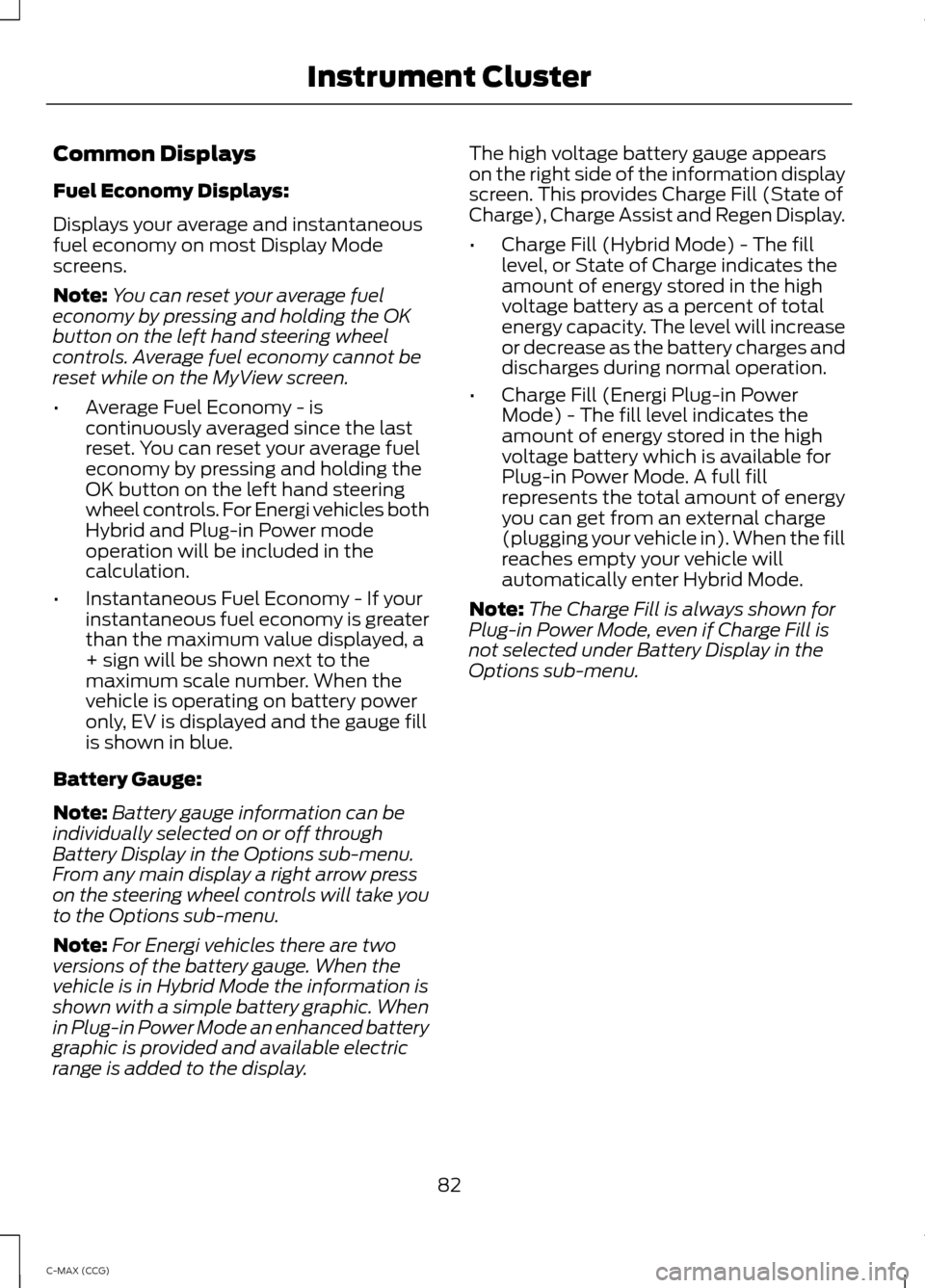
Common Displays
Fuel Economy Displays:
Displays your average and instantaneous
fuel economy on most Display Mode
screens.
Note:
You can reset your average fuel
economy by pressing and holding the OK
button on the left hand steering wheel
controls. Average fuel economy cannot be
reset while on the MyView screen.
• Average Fuel Economy - is
continuously averaged since the last
reset. You can reset your average fuel
economy by pressing and holding the
OK button on the left hand steering
wheel controls. For Energi vehicles both
Hybrid and Plug-in Power mode
operation will be included in the
calculation.
• Instantaneous Fuel Economy - If your
instantaneous fuel economy is greater
than the maximum value displayed, a
+ sign will be shown next to the
maximum scale number. When the
vehicle is operating on battery power
only, EV is displayed and the gauge fill
is shown in blue.
Battery Gauge:
Note: Battery gauge information can be
individually selected on or off through
Battery Display in the Options sub-menu.
From any main display a right arrow press
on the steering wheel controls will take you
to the Options sub-menu.
Note: For Energi vehicles there are two
versions of the battery gauge. When the
vehicle is in Hybrid Mode the information is
shown with a simple battery graphic. When
in Plug-in Power Mode an enhanced battery
graphic is provided and available electric
range is added to the display. The high voltage battery gauge appears
on the right side of the information display
screen. This provides Charge Fill (State of
Charge), Charge Assist and Regen Display.
•
Charge Fill (Hybrid Mode) - The fill
level, or State of Charge indicates the
amount of energy stored in the high
voltage battery as a percent of total
energy capacity. The level will increase
or decrease as the battery charges and
discharges during normal operation.
• Charge Fill (Energi Plug-in Power
Mode) - The fill level indicates the
amount of energy stored in the high
voltage battery which is available for
Plug-in Power Mode. A full fill
represents the total amount of energy
you can get from an external charge
(plugging your vehicle in). When the fill
reaches empty your vehicle will
automatically enter Hybrid Mode.
Note: The Charge Fill is always shown for
Plug-in Power Mode, even if Charge Fill is
not selected under Battery Display in the
Options sub-menu.
82
C-MAX (CCG) Instrument Cluster
Page 90 of 447
GENERAL INFORMATION
WARNING
Driving while distracted can result in
loss of vehicle control, crash and
injury. We strongly recommend that
you use extreme caution when using any
device that may take your focus off the
road. Your primary responsibility is the safe
operation of your vehicle. We recommend
against the use of any hand-held device
while driving and encourage the use of
voice-operated systems when possible.
Make sure you are aware of all applicable
local laws that may affect the use of
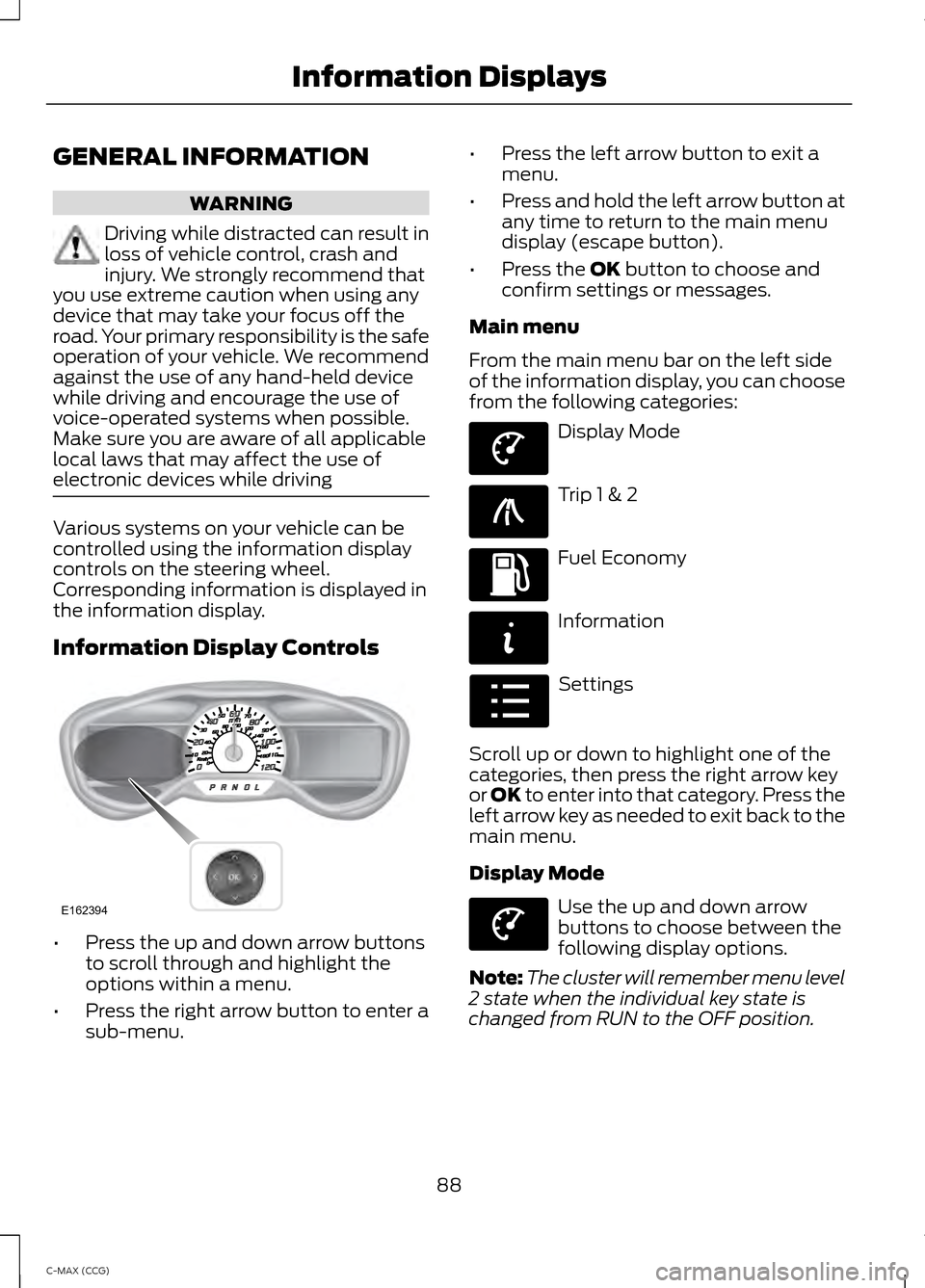
electronic devices while driving Various systems on your vehicle can be
controlled using the information display
controls on the steering wheel.
Corresponding information is displayed in
the information display.
Information Display Controls
•
Press the up and down arrow buttons
to scroll through and highlight the
options within a menu.
• Press the right arrow button to enter a
sub-menu. •
Press the left arrow button to exit a
menu.
• Press and hold the left arrow button at
any time to return to the main menu
display (escape button).
• Press the OK button to choose and
confirm settings or messages.
Main menu
From the main menu bar on the left side
of the information display, you can choose
from the following categories: Display Mode
Trip 1 & 2
Fuel Economy
Information
Settings
Scroll up or down to highlight one of the
categories, then press the right arrow key
or OK to enter into that category. Press the
left arrow key as needed to exit back to the
main menu.
Display Mode Use the up and down arrow
buttons to choose between the
following display options.
Note: The cluster will remember menu level
2 state when the individual key state is
changed from RUN to the OFF position.
88
C-MAX (CCG) Information DisplaysE162394 E144639 E138660 E144640 E144642 E100023 E144639
Page 94 of 447
Empower
Empower adds an engine on/off threshold
to the power demand gauge from
Enlighten. The threshold is shown as a blue
double outline. The gauge is designed to
show you how close you are to the gasoline
engine on/off threshold and how much
power you are requesting based on how
far you press the accelerator pedal.
When power demand is below the
threshold the vehicle is operating on
battery power only with the engine off, EV
is displayed and the gauge fill is shown in
blue.
When power demand exceeds the
threshold both the engine and the high
voltage battery provide power and the
gauge fill is white.
When power demand surpasses the amber
indicator, this level of demand and
associated fuel economy are shown in
amber.
Note:
You can reset your average fuel
economy by pressing and holding the OK
button on the left hand steering wheel
controls.
MyView
You can choose what to display in this
view. Selecting Change MyView in the
options menu allows you to scroll through
two columns of content choices.
• Press the up or down arrow to view
content.
• Use the right and left arrows to move
between the left column content and
the middle column content.
• The right column is reserved for the
Battery Gauge and the Fuel Gauge.
Once you have your desired content
showing in each column then press
OK to
save. This becomes your new MyView
screen. Unique content available in MyView:
•
Accessory Power — Indicates electrical
power demands from your vehicle ’s
accessory systems. Accessories use
power but do not contribute to
propelling the vehicle. The gauge
separately displays power demand in
kilowatts (kW) for climate and other
accessories.
Climate includes the power being used by
high voltage climate control components
such as the electric A/C compressor and
the electric heater (Energi vehicles only)
Other includes all power being used by the
low voltage accessories (cabin fans,
headlights, heated seats, etc.).
• Coolant Temp – Indicates engine
coolant temperature. At normal
operating temperature, the level
indicator will be white and will be in the
normal range (between H and C). If the
engine coolant temperature exceeds
the normal range, the level indicator
will change to red to indicate that the
engine is overheating. Stop the vehicle
as soon as safely possible, turn off the
vehicle and let the engine cool.
The thermometer indicator next to the
gauge will illuminate in blue or white to
indicate the following (not available for
Energi vehicles):
• Blue thermometer - This indicates that
the hybrid system is not warm enough
to allow EV operation. The gasoline
engine will typically run continuously
when the indicator is blue.
92
C-MAX (CCG) Information Displays
Page 97 of 447
Fuel Economy
Menu level 5
Menu level 4
Menu level 3
Menu level 2
—
1, 2, 6 min. Intervals
Interval Time
Fuel History
(Instantaneous Fuel Economy + Fuel
Economy History + Avg Fuel
Economy+Battery
Gauge+Fuel Gauge) Apply to all screens?
Yes / No
Regen Active
Battery Display
Charge AssistCharge Level Help —
—
Help
Apply to all screens?
Regen Active
Battery Display
Coach
(Coach+Battery
Gauge+Fuel Gauge) Yes / No
Charge Assist
Charge Level Help —
—
Help
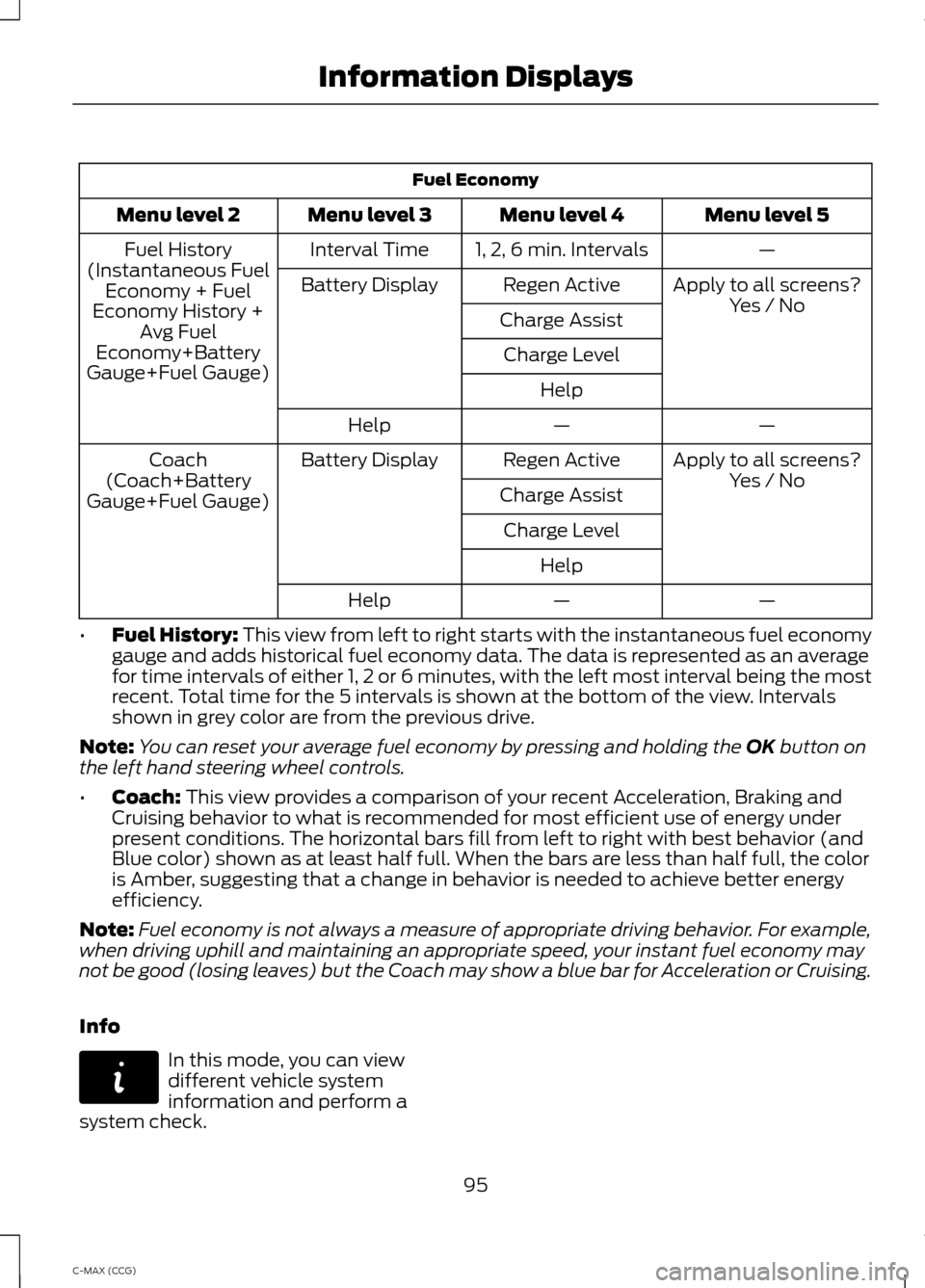
• Fuel History: This view from left to right starts with the instantaneous fuel economy
gauge and adds historical fuel economy data. The data is represented as an average
for time intervals of either 1, 2 or 6 minutes, with the left most interval being the most
recent. Total time for the 5 intervals is shown at the bottom of the view. Intervals
shown in grey color are from the previous drive.
Note: You can reset your average fuel economy by pressing and holding the
OK button on
the left hand steering wheel controls.
• Coach:
This view provides a comparison of your recent Acceleration, Braking and
Cruising behavior to what is recommended for most efficient use of energy under
present conditions. The horizontal bars fill from left to right with best behavior (and
Blue color) shown as at least half full. When the bars are less than half full, the color
is Amber, suggesting that a change in behavior is needed to achieve better energy
efficiency.
Note: Fuel economy is not always a measure of appropriate driving behavior. For example,
when driving uphill and maintaining an appropriate speed, your instant fuel economy may
not be good (losing leaves) but the Coach may show a blue bar for Acceleration or Cruising.
Info In this mode, you can view
different vehicle system
information and perform a
system check.
95
C-MAX (CCG) Information DisplaysE144642
Page 105 of 447
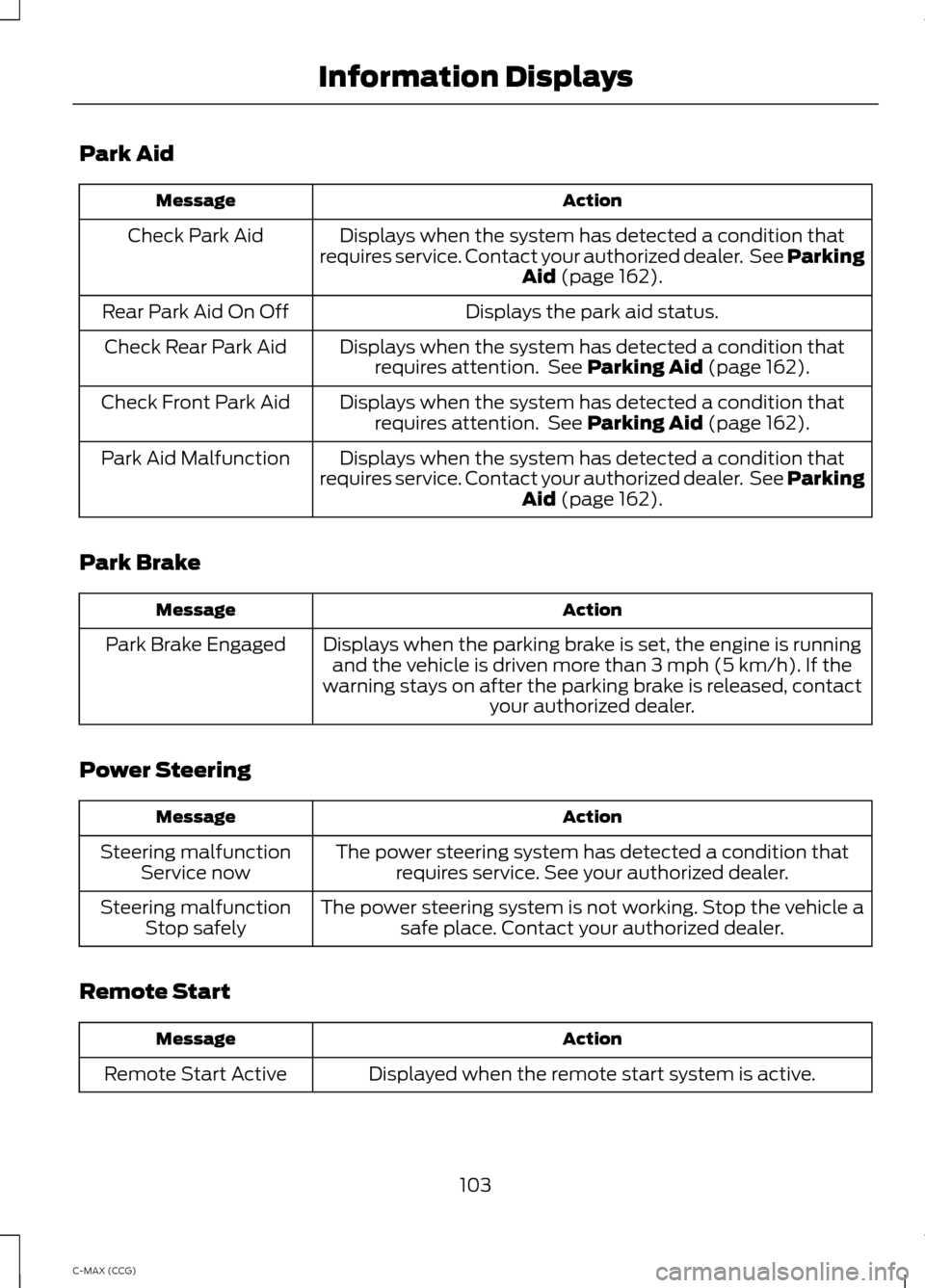
Park Aid
Action
Message
Displays when the system has detected a condition that
requires service. Contact your authorized dealer. See Parking Aid (page 162).
Check Park Aid
Displays the park aid status.
Rear Park Aid On Off
Displays when the system has detected a condition thatrequires attention. See
Parking Aid (page 162).
Check Rear Park Aid
Displays when the system has detected a condition thatrequires attention. See
Parking Aid (page 162).
Check Front Park Aid
Displays when the system has detected a condition that
requires service. Contact your authorized dealer. See Parking Aid
(page 162).
Park Aid Malfunction
Park Brake Action
Message
Displays when the parking brake is set, the engine is runningand the vehicle is driven more than 3 mph (5 km/h). If the
warning stays on after the parking brake is released, contact your authorized dealer.
Park Brake Engaged
Power Steering Action
Message
The power steering system has detected a condition thatrequires service. See your authorized dealer.
Steering malfunction
Service now
The power steering system is not working. Stop the vehicle asafe place. Contact your authorized dealer.
Steering malfunction
Stop safely
Remote Start Action
Message
Displayed when the remote start system is active.
Remote Start Active
103
C-MAX (CCG) Information Displays
Page 112 of 447
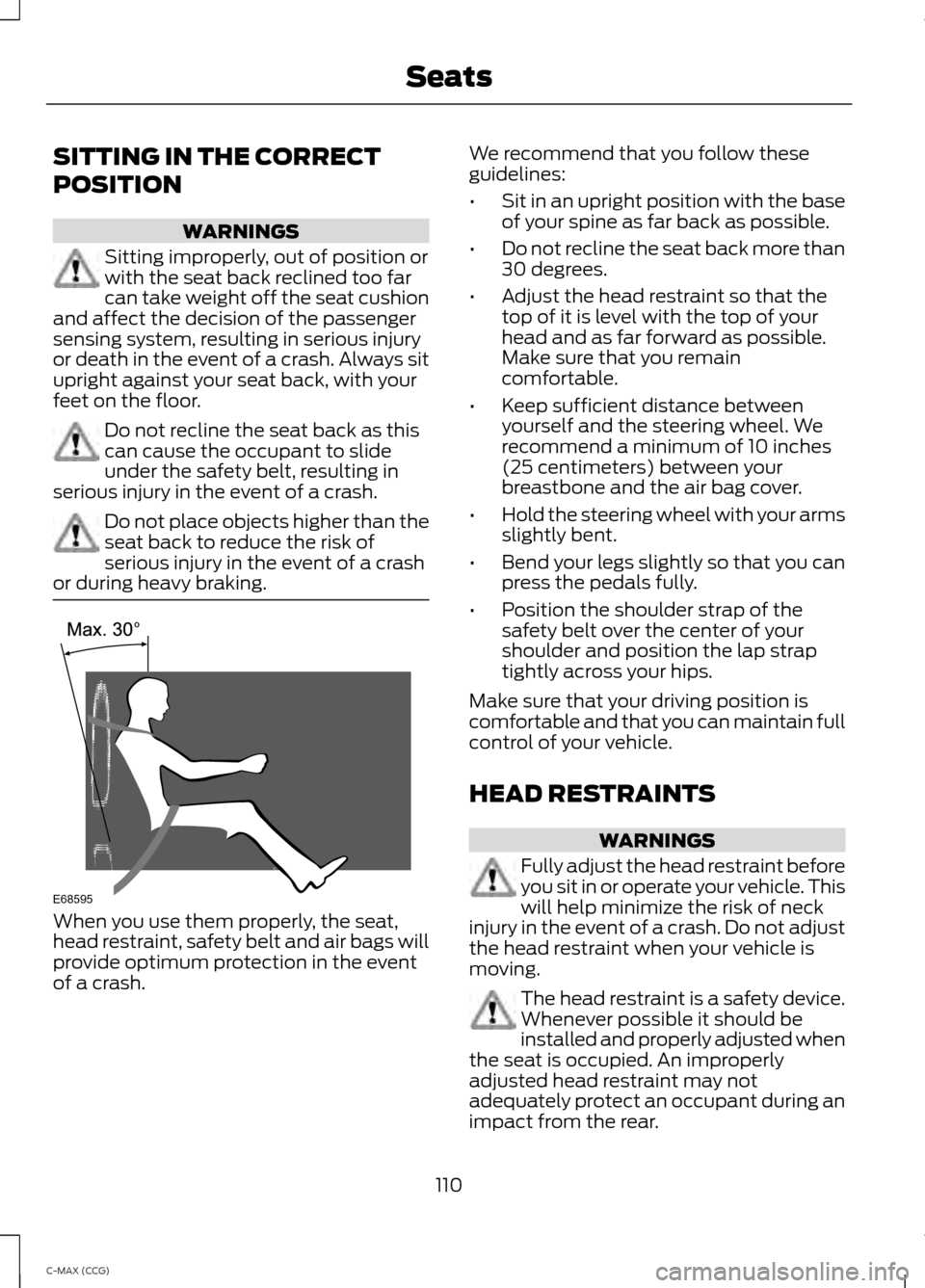
SITTING IN THE CORRECT
POSITION
WARNINGS
Sitting improperly, out of position or
with the seat back reclined too far
can take weight off the seat cushion
and affect the decision of the passenger
sensing system, resulting in serious injury
or death in the event of a crash. Always sit
upright against your seat back, with your
feet on the floor. Do not recline the seat back as this
can cause the occupant to slide
under the safety belt, resulting in
serious injury in the event of a crash. Do not place objects higher than the
seat back to reduce the risk of
serious injury in the event of a crash
or during heavy braking. When you use them properly, the seat,
head restraint, safety belt and air bags will
provide optimum protection in the event
of a crash. We recommend that you follow these
guidelines:
•
Sit in an upright position with the base
of your spine as far back as possible.
• Do not recline the seat back more than
30 degrees.
• Adjust the head restraint so that the
top of it is level with the top of your
head and as far forward as possible.
Make sure that you remain
comfortable.
• Keep sufficient distance between
yourself and the steering wheel. We
recommend a minimum of 10 inches
(25 centimeters) between your
breastbone and the air bag cover.
• Hold the steering wheel with your arms
slightly bent.
• Bend your legs slightly so that you can
press the pedals fully.
• Position the shoulder strap of the
safety belt over the center of your
shoulder and position the lap strap
tightly across your hips.
Make sure that your driving position is
comfortable and that you can maintain full
control of your vehicle.
HEAD RESTRAINTS WARNINGS
Fully adjust the head restraint before
you sit in or operate your vehicle. This
will help minimize the risk of neck
injury in the event of a crash. Do not adjust
the head restraint when your vehicle is
moving. The head restraint is a safety device.
Whenever possible it should be
installed and properly adjusted when
the seat is occupied. An improperly
adjusted head restraint may not
adequately protect an occupant during an
impact from the rear.
110
C-MAX (CCG) SeatsE68595
Page 128 of 447
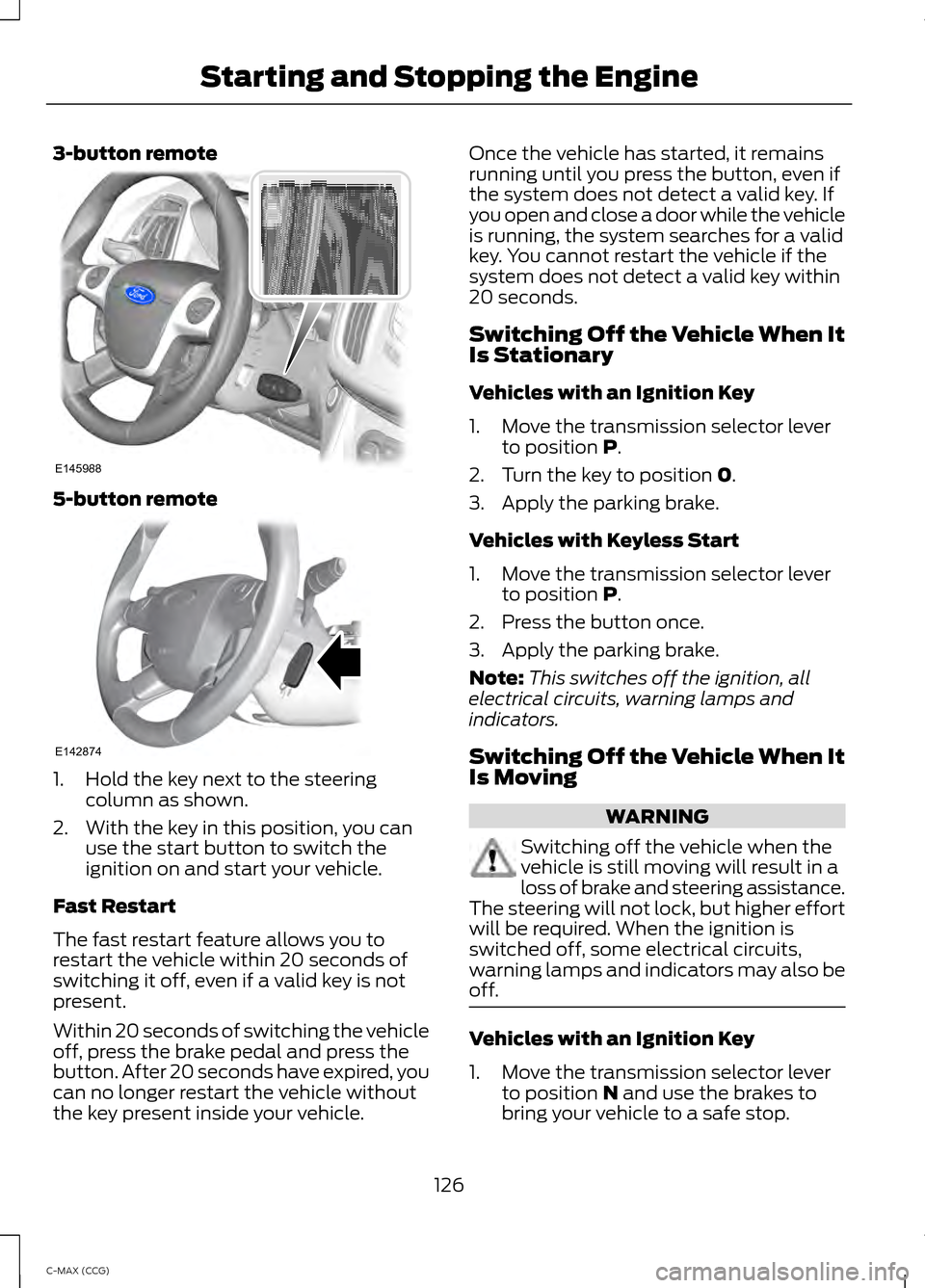
3-button remote
5-button remote
1. Hold the key next to the steering
column as shown.
2. With the key in this position, you can use the start button to switch the
ignition on and start your vehicle.
Fast Restart
The fast restart feature allows you to
restart the vehicle within 20 seconds of
switching it off, even if a valid key is not
present.
Within 20 seconds of switching the vehicle
off, press the brake pedal and press the
button. After 20 seconds have expired, you
can no longer restart the vehicle without
the key present inside your vehicle. Once the vehicle has started, it remains
running until you press the button, even if
the system does not detect a valid key. If
you open and close a door while the vehicle
is running, the system searches for a valid
key. You cannot restart the vehicle if the
system does not detect a valid key within
20 seconds.
Switching Off the Vehicle When It
Is Stationary
Vehicles with an Ignition Key
1. Move the transmission selector lever
to position P.
2. Turn the key to position
0.
3. Apply the parking brake.
Vehicles with Keyless Start
1. Move the transmission selector lever to position
P.
2. Press the button once.
3. Apply the parking brake.
Note: This switches off the ignition, all
electrical circuits, warning lamps and
indicators.
Switching Off the Vehicle When It
Is Moving WARNING
Switching off the vehicle when the
vehicle is still moving will result in a
loss of brake and steering assistance.
The steering will not lock, but higher effort
will be required. When the ignition is
switched off, some electrical circuits,
warning lamps and indicators may also be
off. Vehicles with an Ignition Key
1. Move the transmission selector lever
to position
N and use the brakes to
bring your vehicle to a safe stop.
126
C-MAX (CCG) Starting and Stopping the EngineE145988 E142874
Page 131 of 447
HYBRID ELECTRIC VEHICLE
Plug-in Power Mode and Hybrid
Mode (C-MAX Energi Only)
You must plug C-MAX Energi vehicles in
regularly for optimal use of the high
voltage battery's extended range
capability. When you charge your vehicle,
you add electrical energy that is then used
to propel the vehicle in plug-in power
mode. You can view your estimated
electric range in this mode from the
enhanced battery gauge on the instrument
panel display. The system maximizes the
use of electric-only operation in plug-in
power mode. System conditions may
require engine operation; however, the
system uses plug-in power whenever
possible.
When your plug-in power has been
depleted, the powertrain system will
automatically switch to hybrid mode. Your
battery gauge will show an electric range
of zero before transitioning to a simple
battery graphic upon entering hybrid mode.
Hybrid mode uses both the gasoline engine
and electric motor to power your vehicle
and maximize fuel economy as with
C-MAX Hybrid.
EV Modes (C-MAX Energi Only)
Your vehicle contains selectable
EV modes through the EV button
on the center console.
These modes are available when the
vehicle can run under high voltage battery
power. With the vehicle in driving mode,
you can change EV modes with each press
of the EV button. The current mode will be
displayed in the left hand instrument
cluster screen. Auto EV This mode provides an
automatic use of high voltage
battery power during the drive,
staying in electric mode when possible and
running the engine when needed. This
mode will be the only one available if the
plug-in power has been depleted.
EV Now This mode provides an electric
only driving experience. The
left-hand information display
will change to an Energy Use screen that
supplies EV specific tools and functions.
The vehicle may accelerate more slowly
and the top speed may be lower than in
Auto mode. Your engine may be enabled
at any time by using one of the following
methods:
1. Press the OK button on the left 5– way
steering wheel control while viewing
the EV screen. The vehicle will enable
the engine as needed, and will
automatically return to EV Now after
eight seconds or when the engine is no
longer needed.
2. Press the accelerator pedal fully. A pop
up message stating Press OK to
Enable Engine will appear. Press OK
on the left steering wheel button to
activate as needed. The message will
disappear if you release the accelerator
pedal.
3. Press the EV button. This will change the mode to EV Later and permit
engine operation.
The vehicle may automatically enter
Engine Enabled mode if system conditions
require it. A message Engine Enabled for
System Performance
will display if this
occurs. This is normal function, and your
vehicle will return to EV Now when
possible.
129
C-MAX (CCG) Unique Driving CharacteristicsE144814 E155152 E144814
Page 158 of 447
GENERAL INFORMATION
Note:
Occasional brake noise is normal. If
a metal-to-metal, continuous grinding or
continuous squeal sound is present, the
brake linings may be worn-out. Have the
system checked by an authorized dealer. If
the vehicle has continuous vibration or
shudder in the steering wheel while braking,
have it checked by an authorized dealer.
Note: Brake dust may accumulate on the
wheels, even under normal driving
conditions. Some dust is inevitable as the
brakes wear and does not contribute to
brake noise. See Cleaning the Alloy
Wheels (page 236). See
Warning Lamps and
Indicators (page 83).
Wet brakes result in reduced braking
efficiency. Gently press the brake pedal a
few times when driving from a car wash or
standing water to dry the brakes.
Brake Over Accelerator
In the event the accelerator pedal
becomes stuck or entrapped, apply steady
and firm pressure to the brake pedal to
slow the vehicle and reduce engine power.
If you experience this condition, apply the
brakes and bring your vehicle to a safe
stop. Move the transmission selector lever
to position
P, switch the engine off and
apply the parking brake. Inspect the
accelerator pedal for any interference. If
none are found and the condition persists,
have your vehicle towed to the nearest
authorized dealer. Brake Assist
Brake assist detects when you brake
heavily by measuring the rate at which you
press the brake pedal. It provides
maximum braking efficiency as long as you
press the pedal. Brake assist can reduce
stopping distances in critical situations.
Anti-lock Brake System
This system helps you maintain steering
control during emergency stops by keeping
the brakes from locking.
This lamp momentarily
illuminates when you turn the
ignition on. If the light does not
illuminate during start up, remains on or
flashes, the system may be disabled. Have
the system checked by an authorized
dealer. If the system is disabled, normal
braking is still effective. If the
brake warning lamp illuminates
when you release the parking brake, have
the system checked by an authorized
dealer.
Regenerative Braking System
This feature is used to simulate the engine
braking of an internal combustion engine
and assist the standard brake system while
recovering some of the energy of motion
and storing it in the battery to improve fuel
economy. The standard brake system is
designed to fully stop the car if
regenerative braking is not available.
During regenerative braking, the motor is
spun as a generator to create electrical
current. This recharges the battery and
slows the vehicle. In effect, once the
accelerator pedal is released, the motor
changes from an energy user to an energy
producer.
156
C-MAX (CCG) BrakesE144522 E144522
Page 159 of 447
When the accelerator pedal is released or
the brake pedal is applied, the brake
controller automatically detects the
amount of deceleration requested and
optimizes how much of the deceleration
will be produced by regenerative braking.
The remaining portion is generated by
standard friction braking. When the battery
is almost fully charged, the amount of
regenerative braking is limited to avoid
overcharging, and the requested
deceleration is produced by standard
friction braking alone.
Regenerative braking does not take the
place of the standard friction brakes; it only
assists them. Regenerative braking has
also been designed to interact with the
anti-lock brake system. Regenerative
braking is disabled when the anti-lock
brake system is activated or the battery is
fully charged.
HINTS ON DRIVING WITH
ANTI-LOCK BRAKES
Note:
When the system is operating, the
brake pedal will pulse and may travel
further. Maintain pressure on the brake
pedal. You may also hear a noise from the
system. This is normal.
The anti-lock braking system will not
eliminate the risks when:
• you drive too closely to the vehicle in
front of you
• your vehicle is hydroplaning
• you take corners too fast
• the road surface is poor. PARKING BRAKE WARNING
Always set the parking brake fully
and leave your vehicle with the
transmission selector lever in
position P. Note:
Do not press the release button while
pulling the lever up.
To apply the parking brake:
1. Press the foot brake pedal firmly.
2. Pull the parking brake lever up to its fullest extent.
Note: If you park your vehicle on a hill and
facing uphill, move the transmission selector
lever to position
P and turn the steering
wheel away from the curb.
Note: If you park your vehicle on a hill and
facing downhill, move the transmission
selector lever to
P and turn the steering
wheel toward the curb.
To release the parking brake:
1. Press the brake pedal firmly.
2. Pull the lever up slightly.
3. Press the release button and push the lever down.
HILL START ASSIST WARNINGS
The system does not replace the
parking brake. When you leave your
vehicle, always apply the parking
brake and put the transmission in park (P). You must remain in your vehicle once
you have activated the system.
During all times, you are responsible
for controlling your vehicle,
supervising the system and
intervening, if required.
157
C-MAX (CCG) Brakes