maintenance schedule FORD E-450 2018 User Guide
[x] Cancel search | Manufacturer: FORD, Model Year: 2018, Model line: E-450, Model: FORD E-450 2018Pages: 323, PDF Size: 6.2 MB
Page 150 of 323
Checking Automatic Transmission
Fluid
For scheduled intervals of the fluid checks
and changes, See Scheduled
Maintenance (page 270). Your
transmission does not consume fluid.
However, the fluid level should be checked
if the transmission is not working properly,
i.e., if the transmission slips or shifts slowly
or if you notice some sign of fluid leakage.
Automatic transmission fluid expands
when warmed. To obtain an accurate fluid
check, drive the vehicle until it is at normal
operating temperature (approximately
19 mi (30 km)
). Verify that the
transmission fluid temperature gauge,
located on the instrument cluster, is within
normal range.
1. Drive the vehicle
19 mi (30 km) until it
reaches normal operating temperature.
2. Park the vehicle on a level surface and
engage the parking brake.
3. With the engine running, parking brake
engaged and your foot on the brake
pedal, move the gearshift lever through
all of the gear ranges. Allow sufficient
time for each gear to engage.
4. Put the transmission in park (P) and leave the engine running.
5. Remove the dipstick, wiping it clean with a clean, dry lint free rag. If
necessary, refer to the Under Hood
Overview in this chapter for the
location of the dipstick.
6. Install the dipstick making sure it is fully
seated in the filler tube.
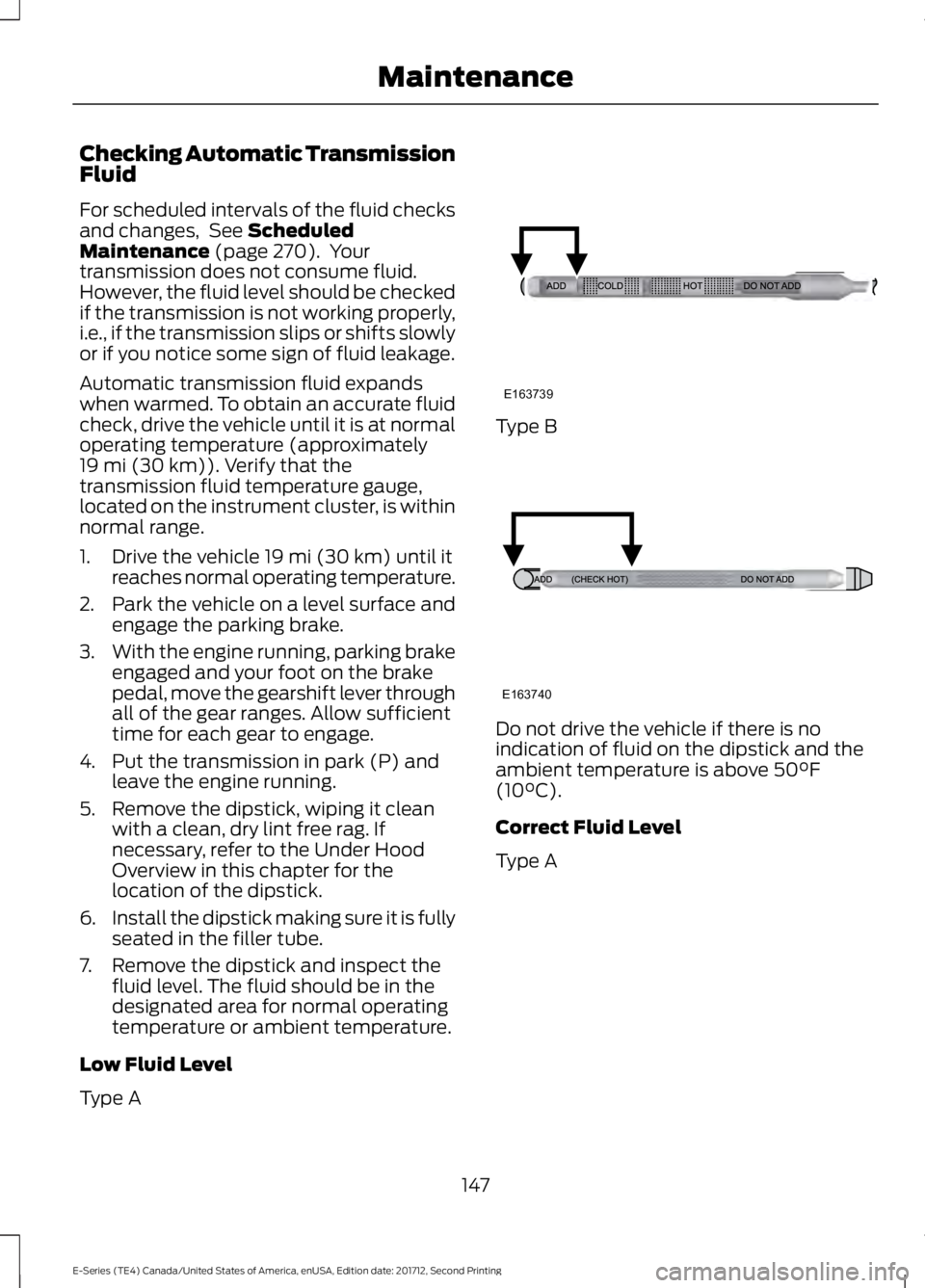
7. Remove the dipstick and inspect the fluid level. The fluid should be in the
designated area for normal operating
temperature or ambient temperature.
Low Fluid Level
Type A Type B
Do not drive the vehicle if there is no
indication of fluid on the dipstick and the
ambient temperature is above
50°F
(10°C).
Correct Fluid Level
Type A
147
E-Series (TE4) Canada/United States of America, enUSA, Edition date: 201712, Second Printing MaintenanceE163739 E163740
Page 152 of 323
•
the dipstick handle.
• See Capacities and Specifications
(page 194).
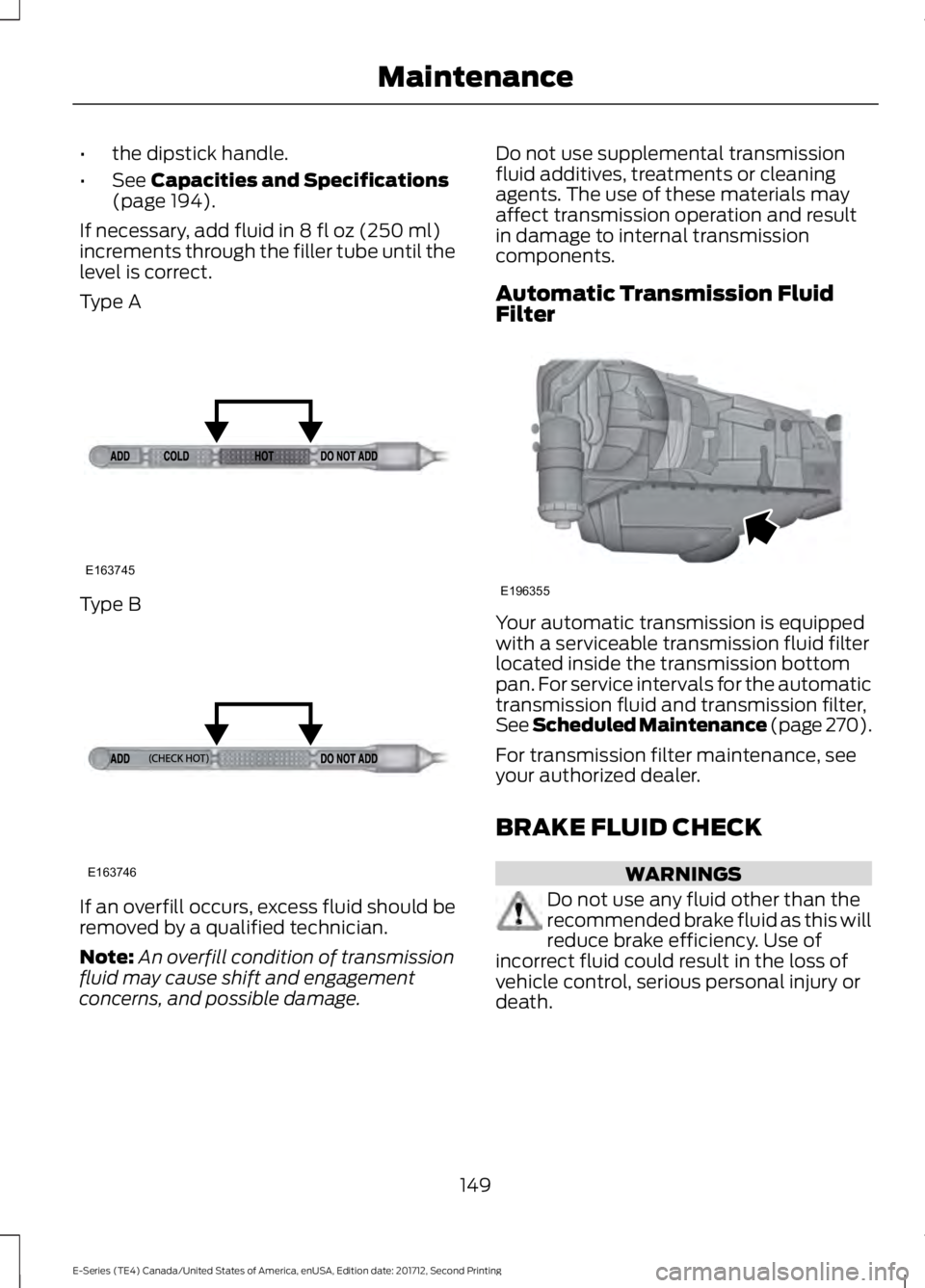
If necessary, add fluid in
8 fl oz (250 ml)
increments through the filler tube until the
level is correct.
Type A Type B
If an overfill occurs, excess fluid should be
removed by a qualified technician.
Note:
An overfill condition of transmission
fluid may cause shift and engagement
concerns, and possible damage. Do not use supplemental transmission
fluid additives, treatments or cleaning
agents. The use of these materials may
affect transmission operation and result
in damage to internal transmission
components.
Automatic Transmission Fluid
Filter
Your automatic transmission is equipped
with a serviceable transmission fluid filter
located inside the transmission bottom
pan. For service intervals for the automatic
transmission fluid and transmission filter,
See Scheduled Maintenance (page 270).
For transmission filter maintenance, see
your authorized dealer.
BRAKE FLUID CHECK
WARNINGS
Do not use any fluid other than the
recommended brake fluid as this will
reduce brake efficiency. Use of
incorrect fluid could result in the loss of
vehicle control, serious personal injury or
death.
149
E-Series (TE4) Canada/United States of America, enUSA, Edition date: 201712, Second Printing MaintenanceE163745 E163746 E196355
Page 161 of 323
CHANGING THE ENGINE AIR
FILTER
WARNING
To reduce the risk of vehicle damage
or personal injury, do not start the
engine with the air filter removed and
do not remove it while the engine is
running. Note:
Failure to use the correct air filter
element may result in severe engine
damage. The customer warranty may be
void for any damage to the engine if the
correct air filter element is not used.
When changing the air filter element, use
only the air filter element listed. See
Motorcraft Parts (page 195). The air filter
element should be replaced at the
appropriate intervals. See
Normal
Scheduled Maintenance (page 273).
Note: Failure to use the correct air filter
element may result in severe engine
damage. Resulting component damage may
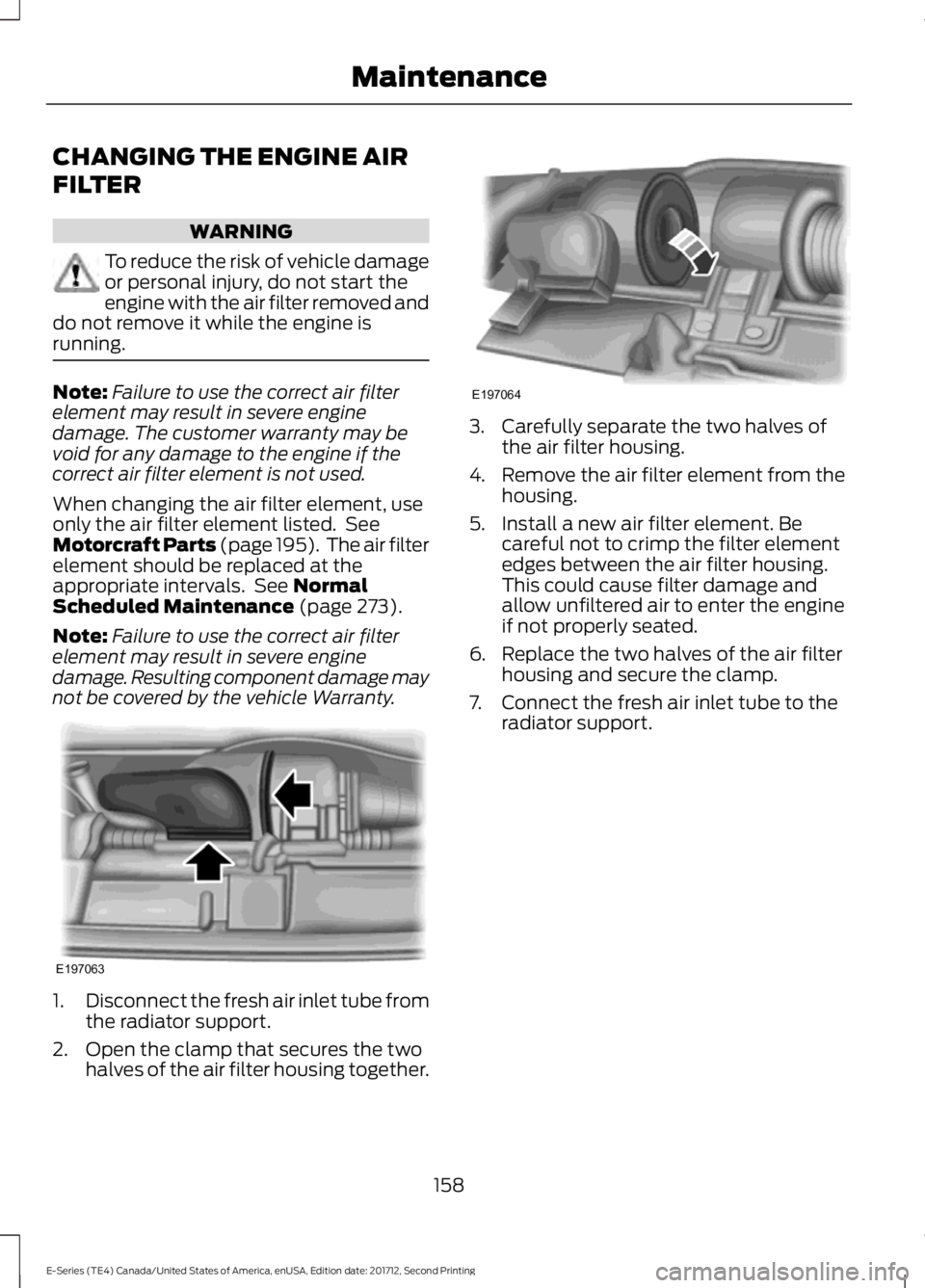
not be covered by the vehicle Warranty. 1.
Disconnect the fresh air inlet tube from
the radiator support.
2. Open the clamp that secures the two halves of the air filter housing together. 3. Carefully separate the two halves of
the air filter housing.
4. Remove the air filter element from the
housing.
5. Install a new air filter element. Be careful not to crimp the filter element
edges between the air filter housing.
This could cause filter damage and
allow unfiltered air to enter the engine
if not properly seated.
6. Replace the two halves of the air filter housing and secure the clamp.
7. Connect the fresh air inlet tube to the radiator support.
158
E-Series (TE4) Canada/United States of America, enUSA, Edition date: 201712, Second Printing MaintenanceE197063 E197064
Page 187 of 323
Note:
If your tires show uneven
wear ask an authorized dealer to
check for and correct any wheel
misalignment, tire imbalance or
mechanical problem involved
before tire rotation.
Note: Your vehicle may be
equipped with a dissimilar spare
wheel and tire assembly. A
dissimilar spare wheel and tire
assembly is defined as a spare
wheel and tire assembly that is
different in brand, size or
appearance from the road tires and
wheels. If you have a dissimilar
spare wheel and tire assembly it is
intended for temporary use only
and should not be used in a tire
rotation.
Note: After having your tires
rotated, inflation pressure must be
checked and adjusted to the
vehicle requirements.
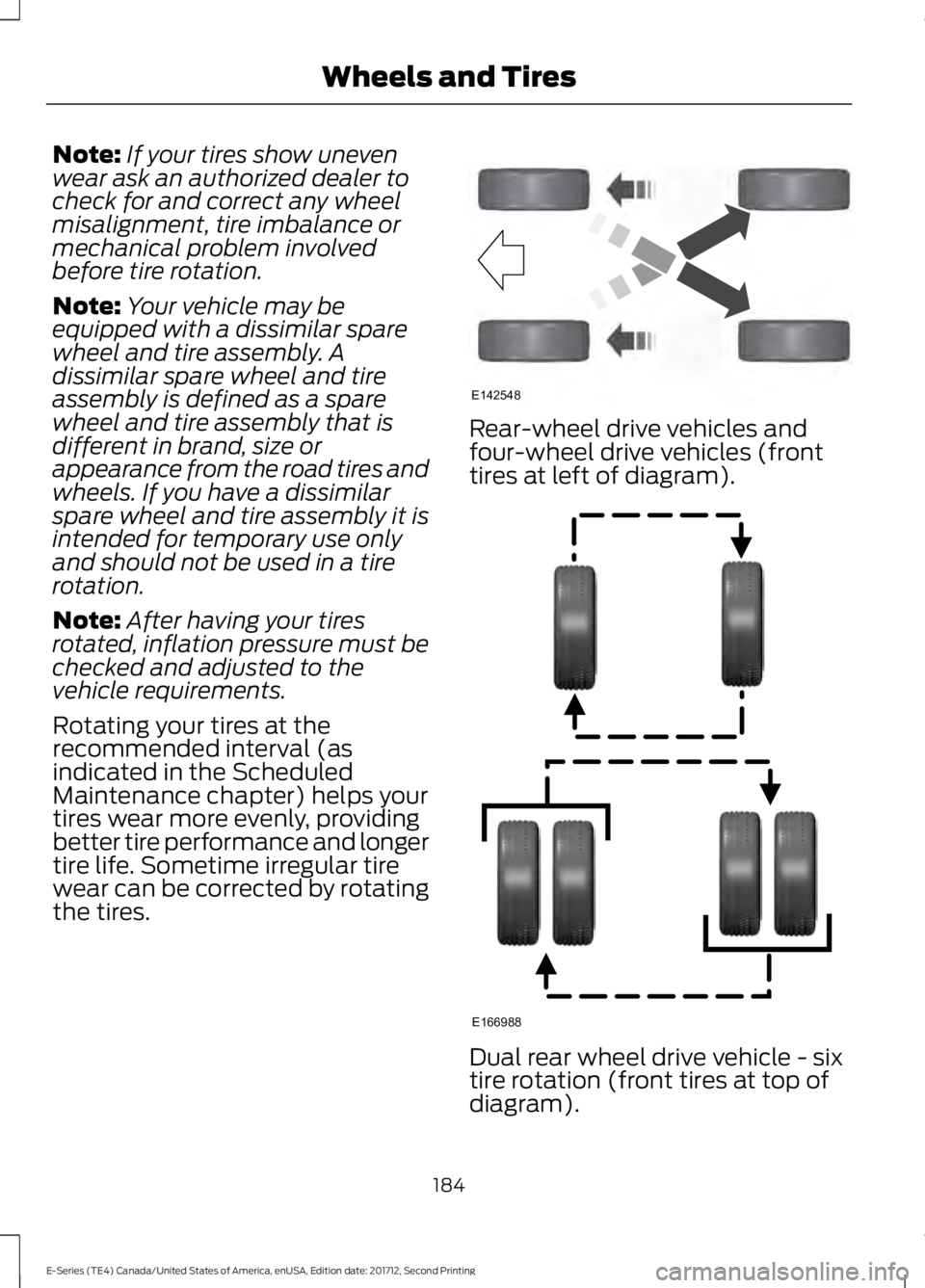
Rotating your tires at the
recommended interval (as
indicated in the Scheduled
Maintenance chapter) helps your
tires wear more evenly, providing
better tire performance and longer
tire life. Sometime irregular tire
wear can be corrected by rotating
the tires. Rear-wheel drive vehicles and
four-wheel drive vehicles (front
tires at left of diagram).
Dual rear wheel drive vehicle - six
tire rotation (front tires at top of
diagram).
184
E-Series (TE4) Canada/United States of America, enUSA, Edition date: 201712, Second Printing Wheels and TiresE142548 E166988
Page 198 of 323
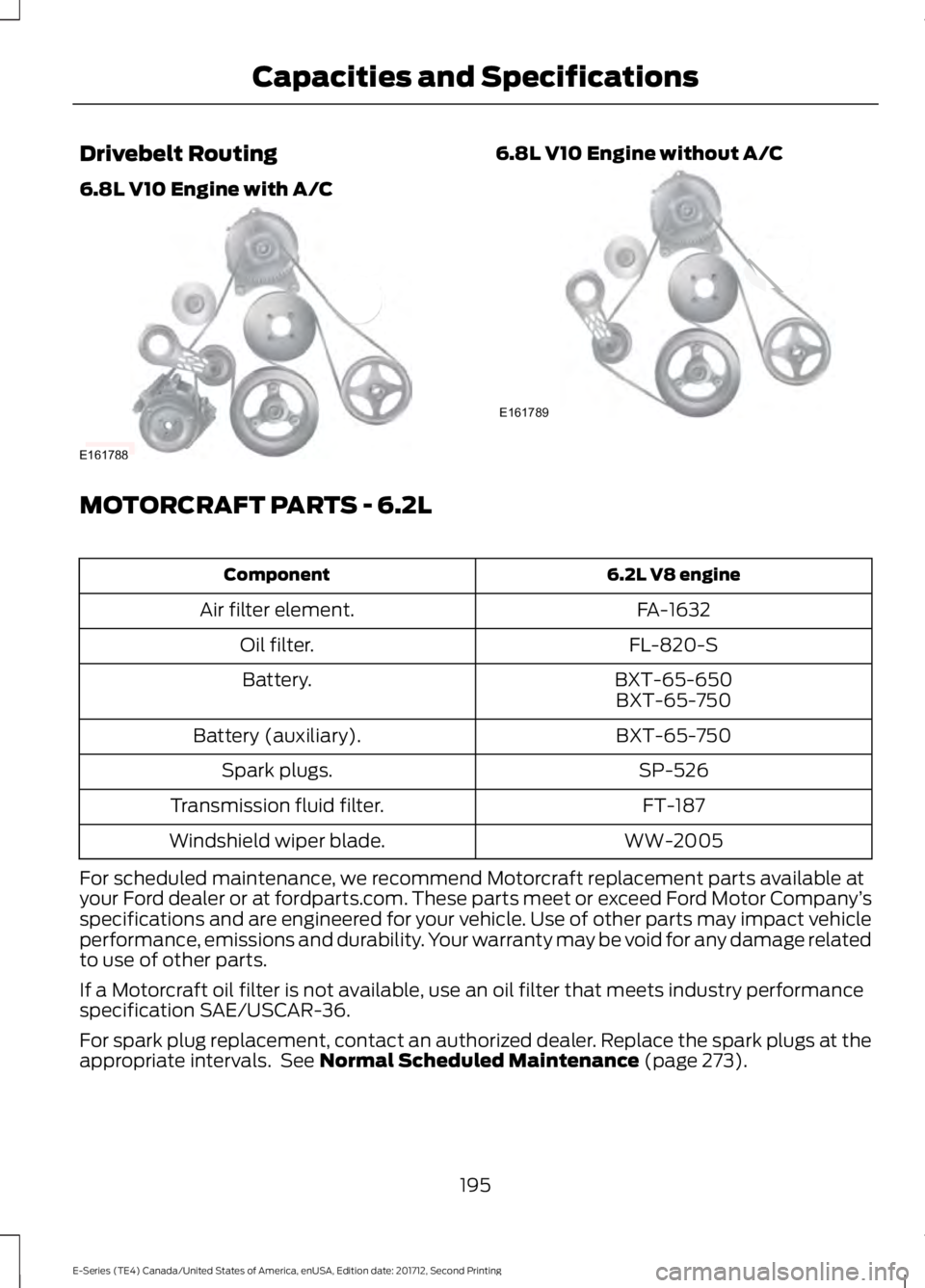
Drivebelt Routing
6.8L V10 Engine with A/C 6.8L V10 Engine without A/C
MOTORCRAFT PARTS - 6.2L
6.2L V8 engine
Component
FA-1632
Air filter element.
FL-820-S
Oil filter.
BXT-65-650
Battery.
BXT-65-750
BXT-65-750
Battery (auxiliary).
SP-526
Spark plugs.
FT-187
Transmission fluid filter.
WW-2005
Windshield wiper blade.
For scheduled maintenance, we recommend Motorcraft replacement parts available at
your Ford dealer or at fordparts.com. These parts meet or exceed Ford Motor Company ’s
specifications and are engineered for your vehicle. Use of other parts may impact vehicle
performance, emissions and durability. Your warranty may be void for any damage related
to use of other parts.
If a Motorcraft oil filter is not available, use an oil filter that meets industry performance
specification SAE/USCAR-36.
For spark plug replacement, contact an authorized dealer. Replace the spark plugs at the
appropriate intervals. See Normal Scheduled Maintenance (page 273).
195
E-Series (TE4) Canada/United States of America, enUSA, Edition date: 201712, Second Printing Capacities and SpecificationsE161788 E161789
Page 199 of 323
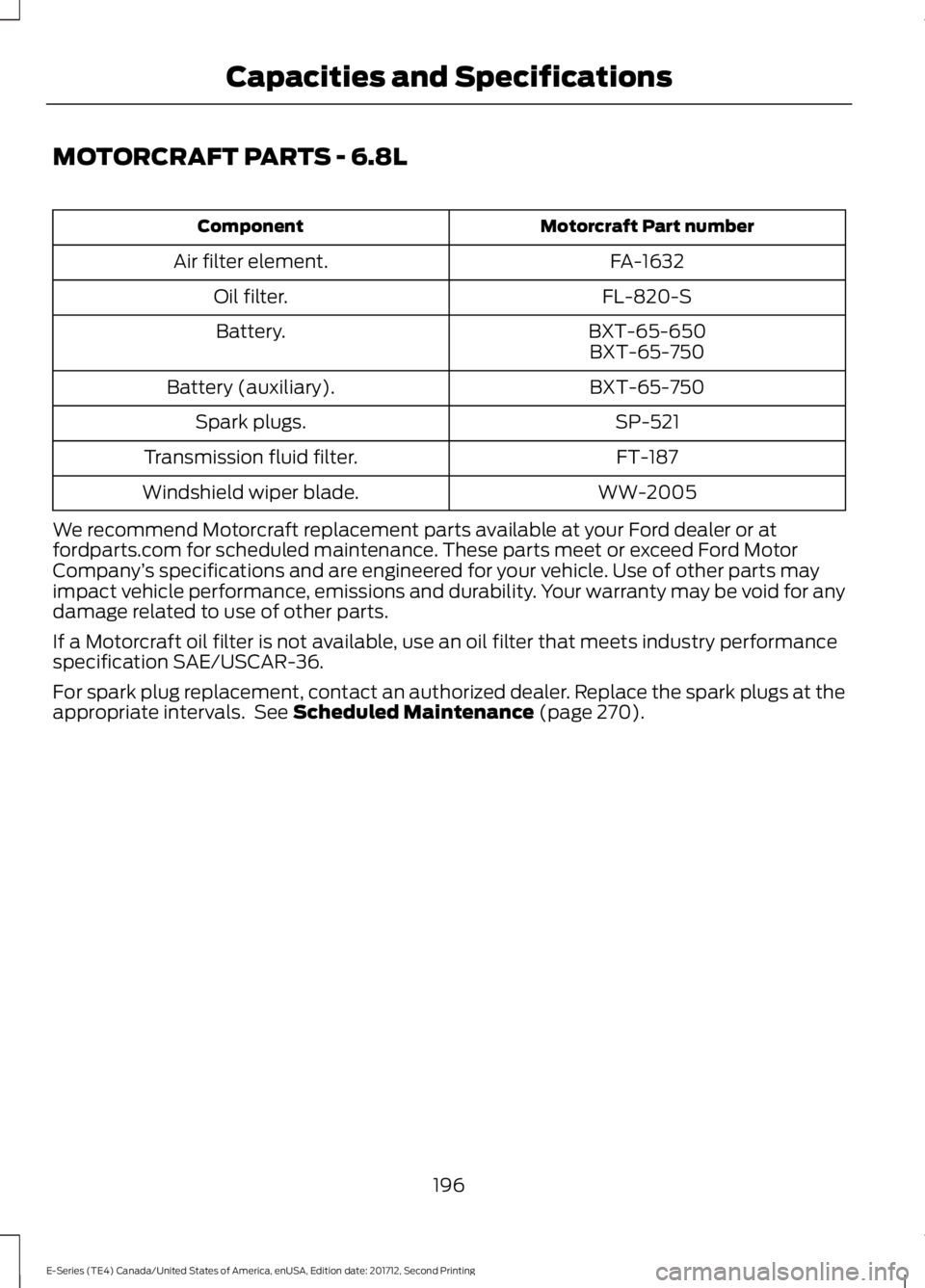
MOTORCRAFT PARTS - 6.8L
Motorcraft Part number
Component
FA-1632
Air filter element.
FL-820-S
Oil filter.
BXT-65-650
Battery.
BXT-65-750
BXT-65-750
Battery (auxiliary).
SP-521
Spark plugs.
FT-187
Transmission fluid filter.
WW-2005
Windshield wiper blade.
We recommend Motorcraft replacement parts available at your Ford dealer or at
fordparts.com for scheduled maintenance. These parts meet or exceed Ford Motor
Company ’s specifications and are engineered for your vehicle. Use of other parts may
impact vehicle performance, emissions and durability. Your warranty may be void for any
damage related to use of other parts.
If a Motorcraft oil filter is not available, use an oil filter that meets industry performance
specification SAE/USCAR-36.
For spark plug replacement, contact an authorized dealer. Replace the spark plugs at the
appropriate intervals. See Scheduled Maintenance (page 270).
196
E-Series (TE4) Canada/United States of America, enUSA, Edition date: 201712, Second Printing Capacities and Specifications
Page 242 of 323
If you do not cancel the call, and SYNC
makes a successful call, a pre-recorded
message plays for the 911 operator, and
then the occupant(s) in your vehicle is able
to talk with the operator. Be prepared to
provide your name, phone number and
location immediately, because not all 911
systems are capable of receiving this
information electronically.
911 Assist May Not Work If
•
Your cellular phone or 911 Assist
hardware sustains damage in a crash.
• The vehicle's battery or the SYNC
system has no power.
• The phone(s) thrown from your vehicle
are the ones paired and connected to
the system.
911 Assist Privacy Notice
When you turn on 911 Assist, it may
disclose to emergency services that your
vehicle has been in a crash involving the
deployment of an airbag or activation of
the fuel pump shut-off. Certain versions or
updates to 911 Assist may also be capable
of electronically or verbally disclosing to
911 operators your vehicle location or other
details about your vehicle or crash to assist
911 operators to provide the most
appropriate emergency services. If you do
not want to disclose this information, do
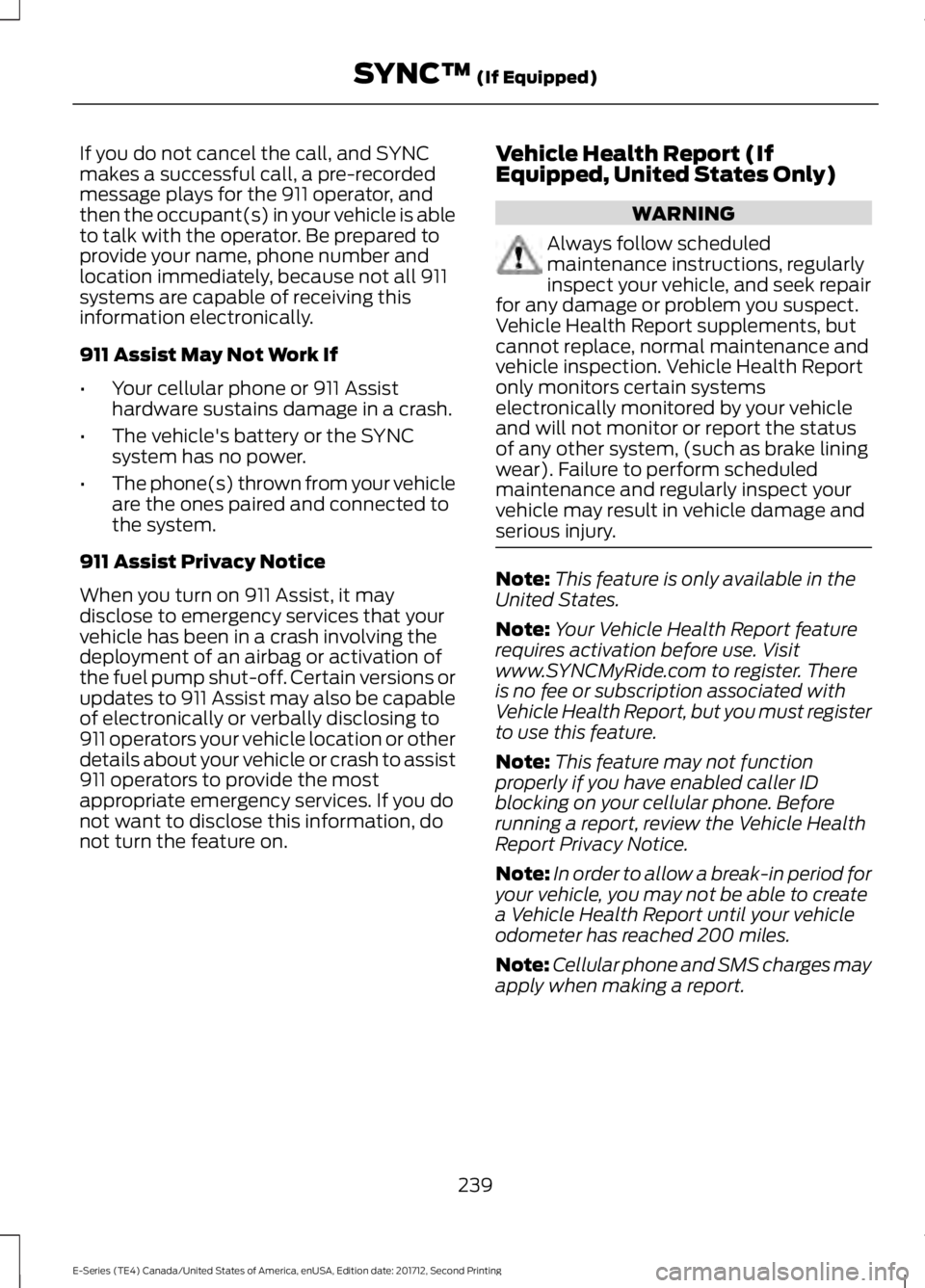
not turn the feature on. Vehicle Health Report (If
Equipped, United States Only) WARNING
Always follow scheduled
maintenance instructions, regularly
inspect your vehicle, and seek repair
for any damage or problem you suspect.
Vehicle Health Report supplements, but
cannot replace, normal maintenance and
vehicle inspection. Vehicle Health Report
only monitors certain systems
electronically monitored by your vehicle
and will not monitor or report the status
of any other system, (such as brake lining
wear). Failure to perform scheduled
maintenance and regularly inspect your
vehicle may result in vehicle damage and
serious injury. Note:
This feature is only available in the
United States.
Note: Your Vehicle Health Report feature
requires activation before use. Visit
www.SYNCMyRide.com to register. There
is no fee or subscription associated with
Vehicle Health Report, but you must register
to use this feature.
Note: This feature may not function
properly if you have enabled caller ID
blocking on your cellular phone. Before
running a report, review the Vehicle Health
Report Privacy Notice.
Note: In order to allow a break-in period for
your vehicle, you may not be able to create
a Vehicle Health Report until your vehicle
odometer has reached 200 miles.
Note: Cellular phone and SMS charges may
apply when making a report.
239
E-Series (TE4) Canada/United States of America, enUSA, Edition date: 201712, Second Printing SYNC™ (If Equipped)
Page 243 of 323
Register for Vehicle Health Report and set
your report preferences at
www.SYNCMyRide.com. After registering,
you can request a Vehicle Health Report
(inside your vehicle). Return to your
account at www.SYNCMyRide.com to view
your report. You can also choose for SYNC
to remind you automatically to run reports
at specific mileage intervals.
The system allows you to check your
vehicle's overall health in the form of a
diagnostic report card. The Vehicle Health
Report contains valuable information, for
example:
•
Vehicle diagnostic information
• Scheduled maintenance
• Open recalls and Field Service Actions
• Items noted during vehicle inspections
by an authorized dealer that still need
servicing.
You can run a vehicle health report after
your vehicle has been running a minimum
of 60 seconds. Choose one of the following
options.
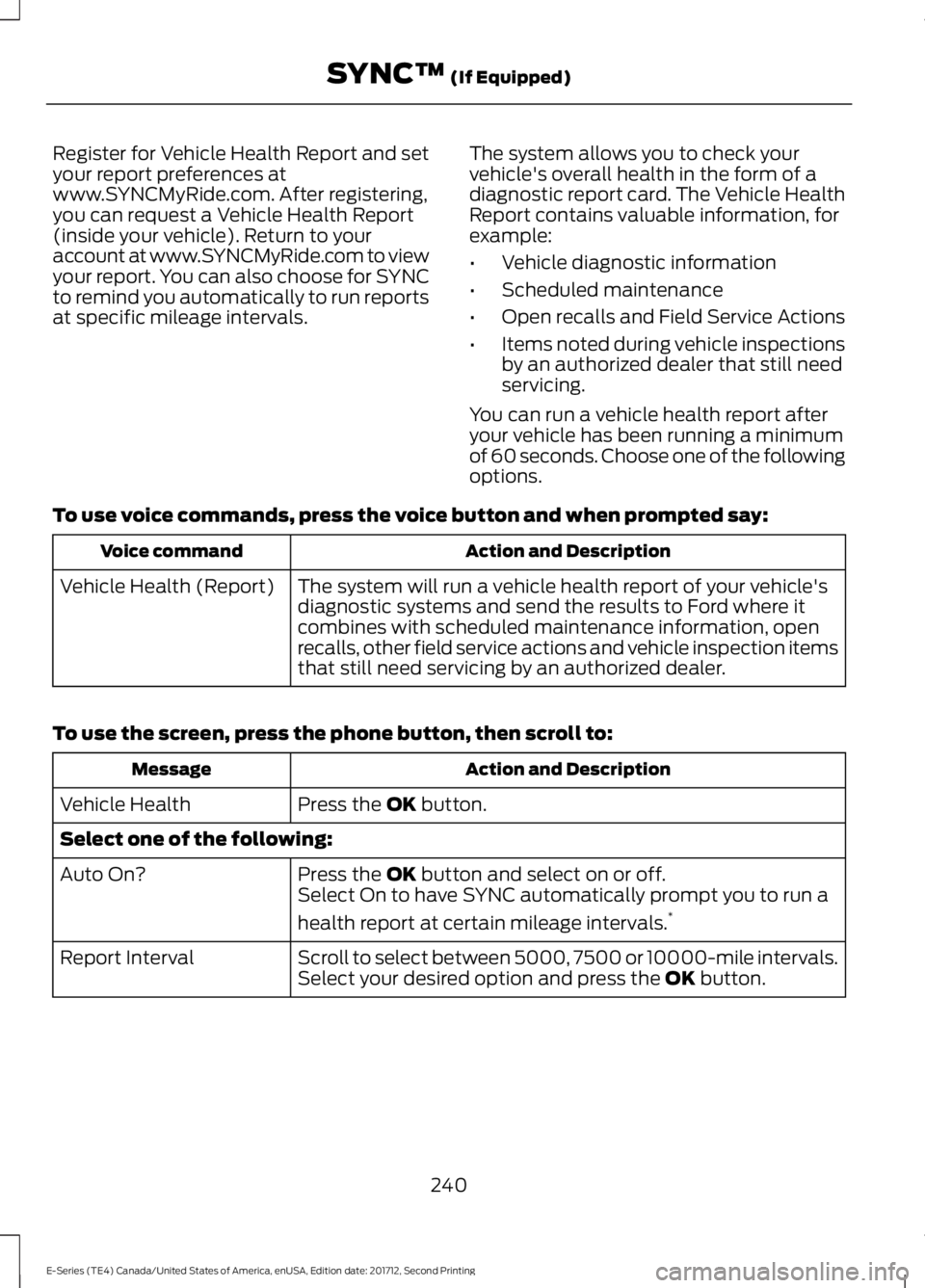
To use voice commands, press the voice button and when prompted say: Action and Description
Voice command
The system will run a vehicle health report of your vehicle's
diagnostic systems and send the results to Ford where it
combines with scheduled maintenance information, open
recalls, other field service actions and vehicle inspection items
that still need servicing by an authorized dealer.
Vehicle Health (Report)
To use the screen, press the phone button, then scroll to: Action and Description
Message
Press the OK button.
Vehicle Health
Select one of the following:
Press the
OK button and select on or off.
Auto On?
Select On to have SYNC automatically prompt you to run a
health report at certain mileage intervals. *
Scroll to select between 5000, 7500 or 10000-mile intervals.
Select your desired option and press the
OK button.
Report Interval
240
E-Series (TE4) Canada/United States of America, enUSA, Edition date: 201712, Second Printing SYNC™
(If Equipped)
Page 244 of 323
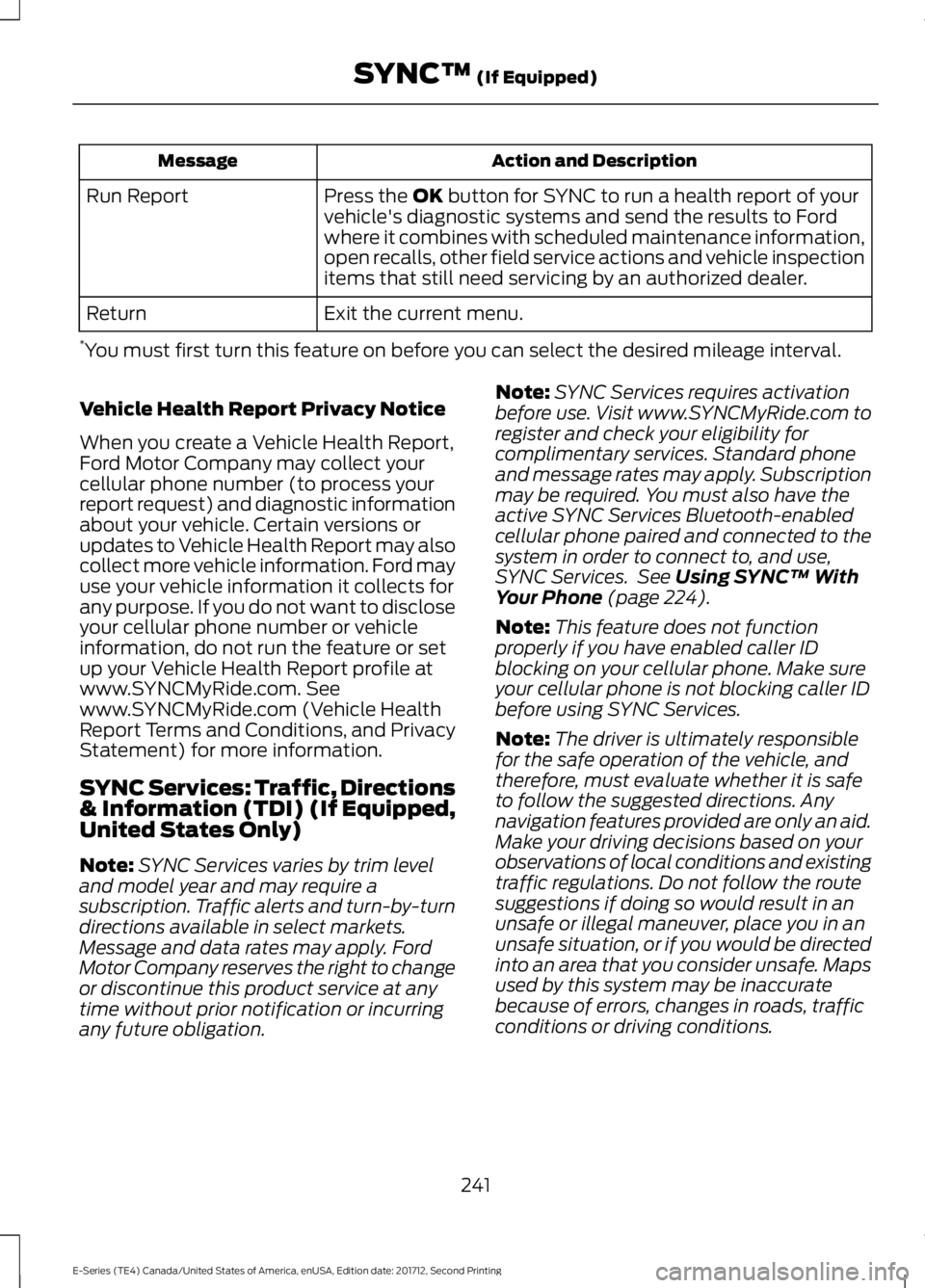
Action and Description
Message
Press the OK button for SYNC to run a health report of your
vehicle's diagnostic systems and send the results to Ford
where it combines with scheduled maintenance information,
open recalls, other field service actions and vehicle inspection
items that still need servicing by an authorized dealer.
Run Report
Exit the current menu.
Return
* You must first turn this feature on before you can select the desired mileage interval.
Vehicle Health Report Privacy Notice
When you create a Vehicle Health Report,
Ford Motor Company may collect your
cellular phone number (to process your
report request) and diagnostic information
about your vehicle. Certain versions or
updates to Vehicle Health Report may also
collect more vehicle information. Ford may
use your vehicle information it collects for
any purpose. If you do not want to disclose
your cellular phone number or vehicle
information, do not run the feature or set
up your Vehicle Health Report profile at
www.SYNCMyRide.com. See
www.SYNCMyRide.com (Vehicle Health
Report Terms and Conditions, and Privacy
Statement) for more information.
SYNC Services: Traffic, Directions
& Information (TDI) (If Equipped,
United States Only)
Note: SYNC Services varies by trim level
and model year and may require a
subscription. Traffic alerts and turn-by-turn
directions available in select markets.
Message and data rates may apply. Ford
Motor Company reserves the right to change
or discontinue this product service at any
time without prior notification or incurring
any future obligation. Note:
SYNC Services requires activation
before use. Visit www.SYNCMyRide.com to
register and check your eligibility for
complimentary services. Standard phone
and message rates may apply. Subscription
may be required. You must also have the
active SYNC Services Bluetooth-enabled
cellular phone paired and connected to the
system in order to connect to, and use,
SYNC Services. See
Using SYNC™ With
Your Phone (page 224).
Note: This feature does not function
properly if you have enabled caller ID
blocking on your cellular phone. Make sure
your cellular phone is not blocking caller ID
before using SYNC Services.
Note: The driver is ultimately responsible
for the safe operation of the vehicle, and
therefore, must evaluate whether it is safe
to follow the suggested directions. Any
navigation features provided are only an aid.
Make your driving decisions based on your
observations of local conditions and existing
traffic regulations. Do not follow the route
suggestions if doing so would result in an
unsafe or illegal maneuver, place you in an
unsafe situation, or if you would be directed
into an area that you consider unsafe. Maps
used by this system may be inaccurate
because of errors, changes in roads, traffic
conditions or driving conditions.
241
E-Series (TE4) Canada/United States of America, enUSA, Edition date: 201712, Second Printing SYNC™
(If Equipped)
Page 272 of 323
Less Cost to Properly Maintain Your
Vehicle
Ford Protect extended service plan also
offers a Premium Maintenance Plan that
covers all scheduled maintenance, and
selected wear items. The coverage is
prepaid, so you never have to worry about
the cost of your vehicle
’s maintenance.
Covered maintenance includes:
• Windshield wiper blades.
• Spark plugs.
• The clutch disc (if equipped).
• Brake pads and linings.
• Shock absorbers.
• Struts.
• Engine Belts.
• Engine coolant hoses, clamps and
o-rings.
• Diesel exhaust fluid replenishment (if
equipped).
• Cabin air filter replacement every
20,000 mi (32,000 km) (electric
vehicles only).
Interest Free Finance Options
Just a 10% down payment will provide you
with an affordable, no interest, no fee
payment program allowing you all the
security and benefits Ford Protect
extended service plan has to offer while
paying over time. You are pre-approved
with no credit check or hassles. To learn
more, call our Ford Protect extended
service plan specialists at 800-367-3377.
Ford Protect Extended Service Plan
P.O. Box 321067
Detroit, MI 48232 Ford Protect Extended Service
Plan (CANADA ONLY)
You can get more protection for your
vehicle by purchasing a Ford Protect
extended service plan. Ford Protect
extended service plan is the only service
contract backed by Ford Motor Company
of Canada, Limited. Depending on the plan
you purchase, Ford Protect extended
service plan provides benefits such as:
•
Rental reimbursement.
• Coverage for certain maintenance and
wear items.
• Protection against repair costs after
your New Vehicle Limited Warranty
Coverage expires.
• Roadside Assistance benefits.
There are several Ford Protect extended
service plans available in various time,
distance and deductible combinations.
Each plan is tailored to fit your own driving
needs, including reimbursement for towing
and rental. When you purchase Ford
Protect extended service plan, you receive
added peace-of-mind protection
throughout Canada, the United States and
Mexico, provided by a network of
participating authorized Ford Motor
Company dealers.
Note: Repairs performed outside of
Canada, the United States and Mexico are
not eligible for Ford Protect extended
service plan coverage.
This information is subject to change. For
more information; visit your local Ford of
Canada dealer or www.ford.ca to find the
Ford Protect extended service plan that is
right for you.
269
E-Series (TE4) Canada/United States of America, enUSA, Edition date: 201712, Second Printing Ford Protect