wheel FORD E-450 2018 User Guide
[x] Cancel search | Manufacturer: FORD, Model Year: 2018, Model line: E-450, Model: FORD E-450 2018Pages: 323, PDF Size: 6.2 MB
Page 92 of 323
LIMITED SLIP DIFFERENTIAL
(If Equipped)
This axle provides added traction on
slippery surfaces, particularly when one
wheel is on a poor traction surface. Under
normal conditions, the limited-slip axle
functions like a standard rear axle. The axle
may exhibit a slight noise or vibration
during tight turns with low vehicle speed.
This is normal behavior and indicates the
axle is working.
89
E-Series (TE4) Canada/United States of America, enUSA, Edition date: 201712, Second Printing Rear Axle
Page 93 of 323
GENERAL INFORMATION
Note:
Occasional brake noise is normal. If
a metal-to-metal, continuous grinding or
continuous squeal sound is present, the
brake linings may be worn-out and should
be inspected by an authorized dealer. If the
vehicle has continuous vibration or shudder
in the steering wheel while braking, the
vehicle should be inspected by an
authorized dealer.
Note: Brake dust may accumulate on the
wheels, even under normal driving
conditions. Some dust is inevitable as the
brakes wear and does not contribute to
brake noise. See Cleaning the Wheels
(page 163). See the Instrument Cluster
chapter for information on the
brake system warning light.
Wet brakes result in reduced braking
efficiency. Gently press the brake pedal a
few times when driving from a car wash or
standing water to dry the brakes.
Brake Over Accelerator
In the event the accelerator pedal
becomes stuck or entrapped, apply steady
and firm pressure to the brake pedal to
slow the vehicle and reduce engine power.
If you experience this condition, apply the
brakes and bring your vehicle to a safe
stop. Turn the engine off, shift the
transmission into park (P), apply the
parking brake, and then inspect the
accelerator pedal for any interferences. If
none are found and the condition persists,
have your vehicle towed to the nearest
authorized dealer. Hydraulic brake booster system
(Hydroboost or Hydromax)
The Hydroboost and Hydromax systems
receive fluid pressure from the power
steering pump to provide power assist
during braking.
The Hydromax booster receives backup
pressure from the reserve system electric
pump whenever the fluid in the power
steering system is not flowing. When the
engine is off, the pump will turn on if the
brake pedal is applied, or if the ignition is
turned to the on position.
The sound of the pump operating may be
heard by the driver, but this is a normal
characteristic of the system.
The reserve system provides reduced
braking power, so the vehicle should be
operated under these conditions with
caution, and only to seek service repair and
remove the vehicle from the roadway.
Note:
For Hydromax-equipped vehicles
operating under normal conditions, the noise
of the fluid flowing through the booster may
be heard whenever the brake is applied. This
condition is normal. Vehicle service is not
required.
If braking performance or pedal response
becomes very poor, even when the pedal
is strongly pressed, it may indicate the
presence of air in the hydraulic system or
leakage of fluid. Stop the vehicle safely as
soon as possible and seek service
immediately.
HINTS ON DRIVING WITH
ANTI-LOCK BRAKES
The anti-lock braking system does not
eliminate the risks when:
• You drive too closely to the vehicle in
front of you.
• Your vehicle is hydroplaning.
90
E-Series (TE4) Canada/United States of America, enUSA, Edition date: 201712, Second Printing BrakesE144522
Page 95 of 323
PRINCIPLE OF OPERATION
The traction control system helps avoid
drive wheel spin and loss of traction.
If your vehicle begins to slide, the system
applies the brakes to individual wheels
and, when needed, reduces engine power
at the same time. If the wheels spin when
accelerating on slippery or loose surfaces,
the system reduces engine power in order
to increase traction.
USING TRACTION CONTROL
WARNING
The traction control light illuminates
steadily if a failure is detected in the
system. Verify that the traction
control system was not manually disabled
using the switch. If the traction control light
is still illuminating steadily, have the
system serviced by an authorized dealer
immediately. Operating your vehicle with
traction control disabled could lead to an
increased risk of loss of vehicle control,
vehicle rollover, personal injury and death. The system automatically turns on each
time you switch the ignition on.
If your vehicle is stuck in mud or snow,
switching traction control off may be
beneficial as this allows the wheels to spin.
Switching the System Off
The switch for the traction
control system is located on the
instrument panel.
When you switch the system off, an
illuminated icon appears on the instrument
cluster.
Use the switch again to return the traction
control system to normal operation. System Indicator Lights and
Messages The traction control light
temporarily illuminates on
engine start-up and flashes
when a driving condition activates the
system. The traction control off light
temporarily illuminates on
engine start-up and stays on:
• When you switch the traction control
system off.
• If a problem occurs in the system.
92
E-Series (TE4) Canada/United States of America, enUSA, Edition date: 201712, Second Printing Traction Control (If Equipped)E194301 E138639 E194301
Page 98 of 323
PRINCIPLE OF OPERATION
Cruise control lets you maintain a set
speed without keeping your foot on the
accelerator pedal. You can use cruise
control when your vehicle speed is greater
than 20 mph (30 km/h).
USING CRUISE CONTROL
(If
Equipped) WARNINGS
Do not use cruise control on winding
roads, in heavy traffic or when the
road surface is slippery. This could
result in loss of vehicle control, serious
injury or death. When you are going downhill, your
vehicle speed could increase above
the set speed. The system does not
apply the brakes. To help the system to maintain the set
speed when going downhill, downshift to
a lower gear.
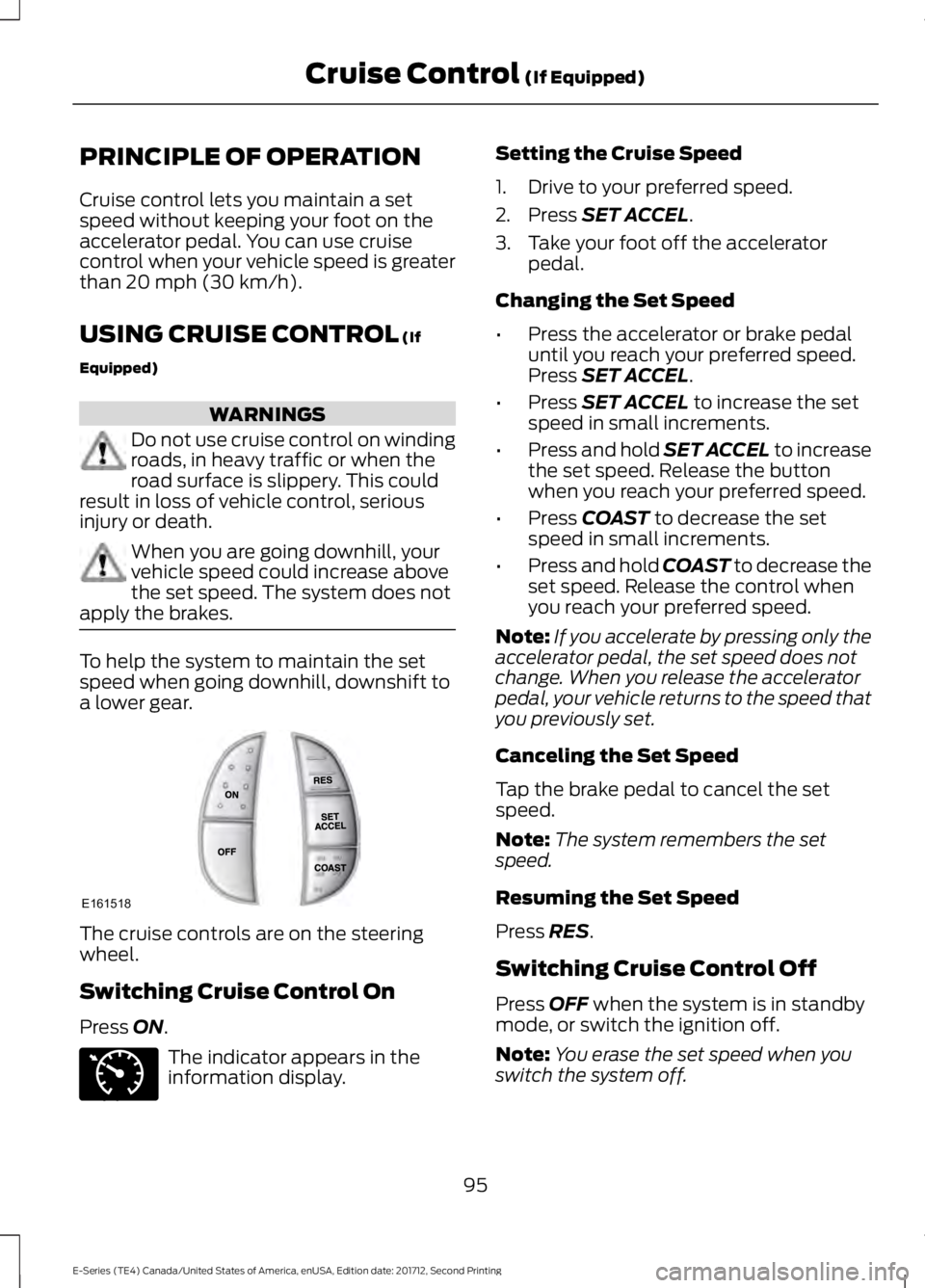
The cruise controls are on the steering
wheel.
Switching Cruise Control On
Press
ON.
The indicator appears in the
information display. Setting the Cruise Speed
1. Drive to your preferred speed.
2. Press
SET ACCEL.
3. Take your foot off the accelerator pedal.
Changing the Set Speed
• Press the accelerator or brake pedal
until you reach your preferred speed.
Press
SET ACCEL.
• Press
SET ACCEL to increase the set
speed in small increments.
• Press and hold SET ACCEL to increase
the set speed. Release the button
when you reach your preferred speed.
• Press
COAST to decrease the set
speed in small increments.
• Press and hold COAST to decrease the
set speed. Release the control when
you reach your preferred speed.
Note: If you accelerate by pressing only the
accelerator pedal, the set speed does not
change. When you release the accelerator
pedal, your vehicle returns to the speed that
you previously set.
Canceling the Set Speed
Tap the brake pedal to cancel the set
speed.
Note: The system remembers the set
speed.
Resuming the Set Speed
Press
RES.
Switching Cruise Control Off
Press
OFF when the system is in standby
mode, or switch the ignition off.
Note: You erase the set speed when you
switch the system off.
95
E-Series (TE4) Canada/United States of America, enUSA, Edition date: 201712, Second Printing Cruise Control
(If Equipped)E161518 E71340
Page 99 of 323
STEERING
To help prevent damage to the power
steering system:
•
Never hold the steering wheel at its
furthest turning points (until it stops)
for more than three to five seconds
when the engine is running.
• Do not operate the vehicle with a low
power steering pump fluid level (below
the MIN mark on the reservoir).
• Some noise is normal during operation.
If excessive, check for low power
steering pump fluid level before
seeking service by your dealer.
• Heavy or uneven efforts may be caused
by low power steering fluid. Check for
low power steering pump fluid level
before seeking service by your dealer.
• Do not fill the power steering pump
reservoir above the MAX mark on the
reservoir, as this may result in leaks
from the reservoir.
If the power steering system breaks down
(or if the engine is turned off), you can
steer the vehicle manually, but it takes
more effort.
If the steering wanders or pulls, check for:
• an improperly inflated tire
• uneven tire wear
• loose or worn suspension components
• loose or worn steering components
• improper vehicle alignment
If any steering components are serviced or
replaced, install new fasteners (many are
coated with thread adhesive or have
prevailing torque features which may not
be re-used). Never re-use a bolt or nut.
Torque fasteners to specifications.
A high crown in the road or high crosswinds
may also make the steering seem to
wander or pull.
96
E-Series (TE4) Canada/United States of America, enUSA, Edition date: 201712, Second Printing Driving Aids
Page 106 of 323
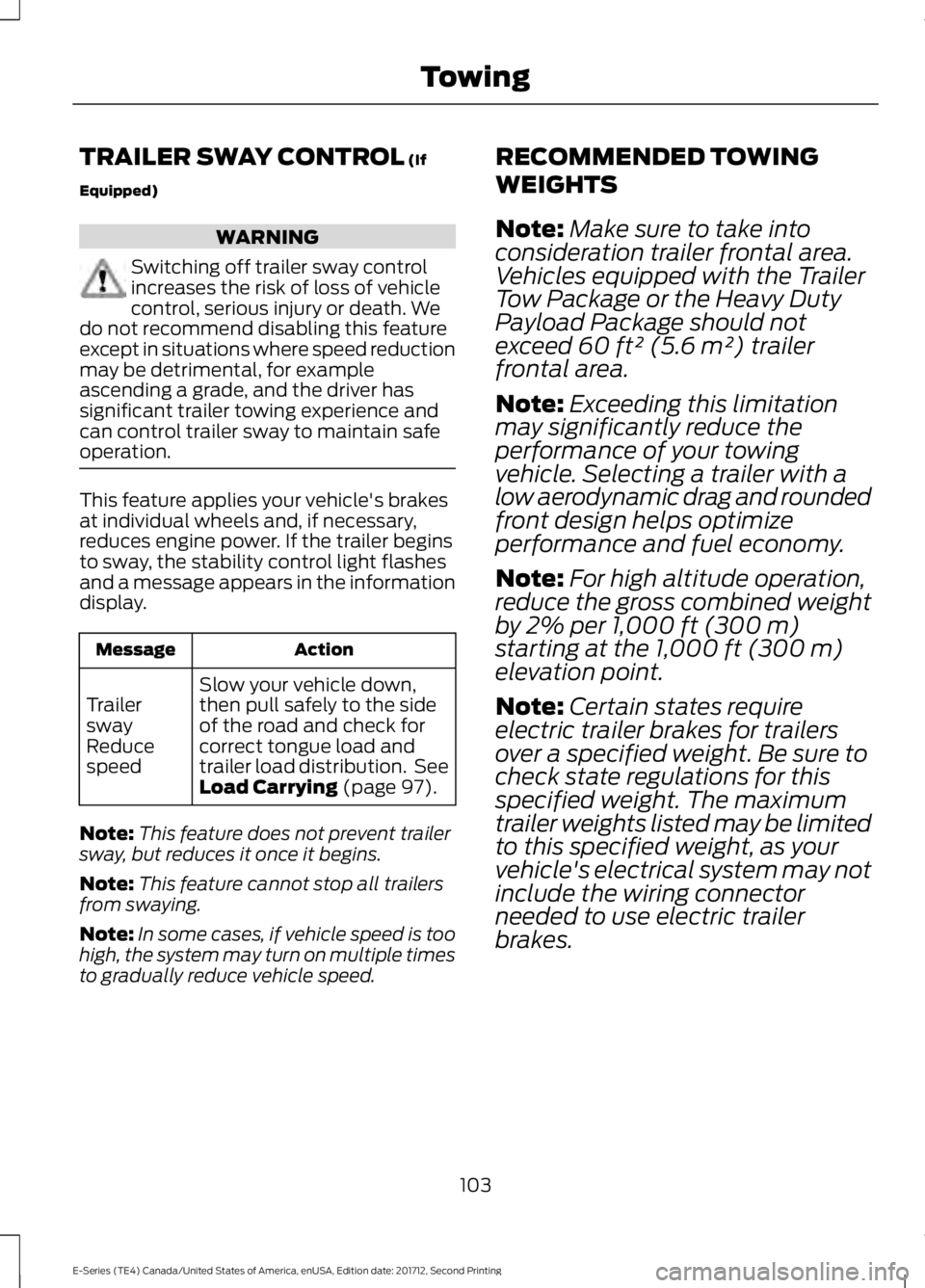
TRAILER SWAY CONTROL (If
Equipped) WARNING
Switching off trailer sway control
increases the risk of loss of vehicle
control, serious injury or death. We
do not recommend disabling this feature
except in situations where speed reduction
may be detrimental, for example
ascending a grade, and the driver has
significant trailer towing experience and
can control trailer sway to maintain safe
operation. This feature applies your vehicle's brakes
at individual wheels and, if necessary,
reduces engine power. If the trailer begins
to sway, the stability control light flashes
and a message appears in the information
display.
Action
Message
Slow your vehicle down,
then pull safely to the side
of the road and check for
correct tongue load and
trailer load distribution. See
Load Carrying
(page 97).
Trailer
sway
Reduce
speed
Note: This feature does not prevent trailer
sway, but reduces it once it begins.
Note: This feature cannot stop all trailers
from swaying.
Note: In some cases, if vehicle speed is too
high, the system may turn on multiple times
to gradually reduce vehicle speed. RECOMMENDED TOWING
WEIGHTS
Note:
Make sure to take into
consideration trailer frontal area.
Vehicles equipped with the Trailer
Tow Package or the Heavy Duty
Payload Package should not
exceed 60 ft² (5.6 m²) trailer
frontal area.
Note: Exceeding this limitation
may significantly reduce the
performance of your towing
vehicle. Selecting a trailer with a
low aerodynamic drag and rounded
front design helps optimize
performance and fuel economy.
Note: For high altitude operation,
reduce the gross combined weight
by 2% per
1,000 ft (300 m)
starting at the 1,000 ft (300 m)
elevation point.
Note: Certain states require
electric trailer brakes for trailers
over a specified weight. Be sure to
check state regulations for this
specified weight. The maximum
trailer weights listed may be limited
to this specified weight, as your
vehicle's electrical system may not
include the wiring connector
needed to use electric trailer
brakes.
103
E-Series (TE4) Canada/United States of America, enUSA, Edition date: 201712, Second Printing Towing
Page 107 of 323
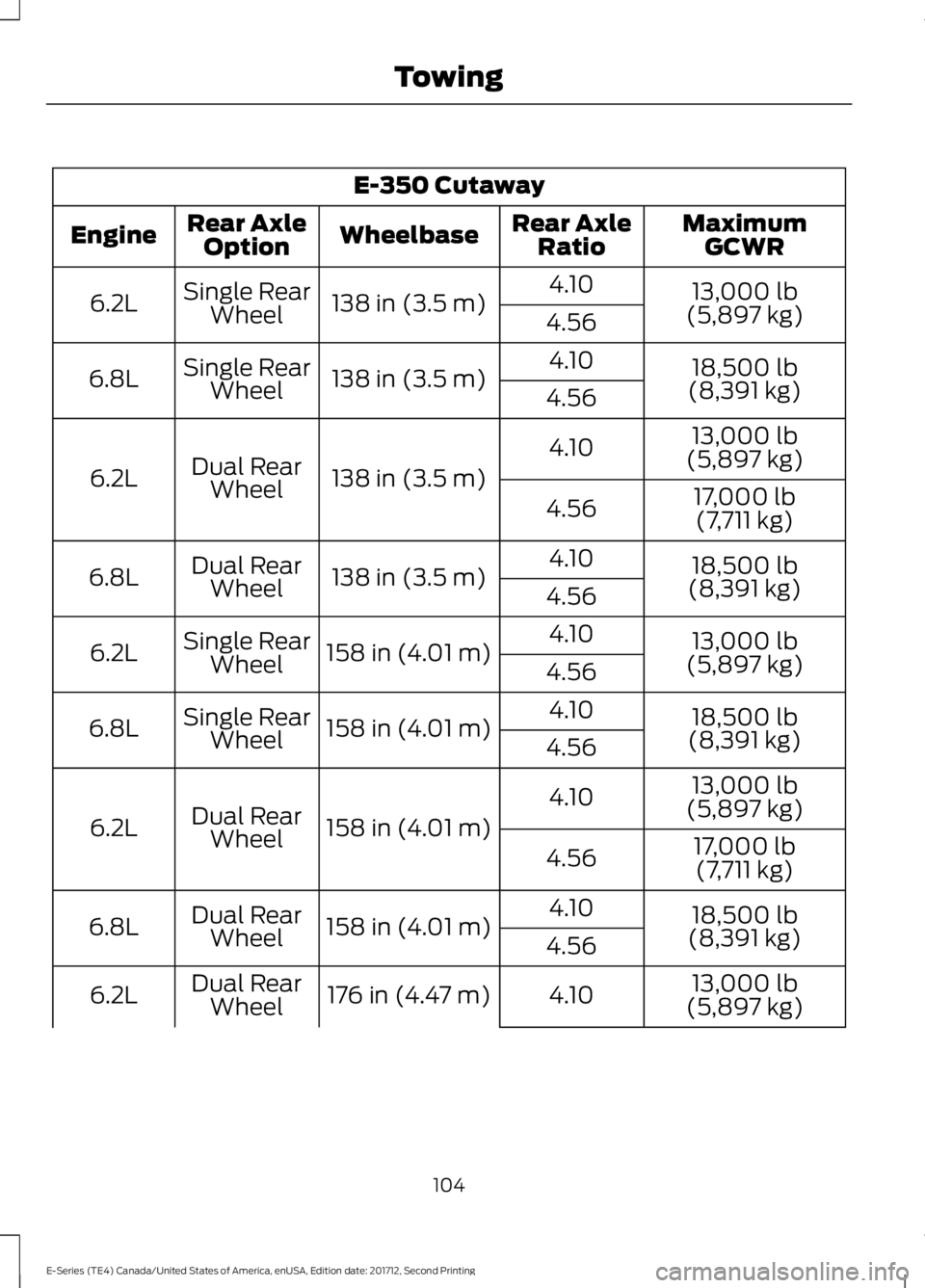
E-350 Cutaway
MaximumGCWR
Rear Axle
Ratio
Wheelbase
Rear Axle
Option
Engine
13,000 lb
(5,897 kg)
4.10
138 in (3.5 m)
Single Rear
Wheel
6.2L
4.56
18,500 lb
(8,391 kg)
4.10
138 in (3.5 m)
Single Rear
Wheel
6.8L
4.56
13,000 lb
(5,897 kg)
4.10
138 in (3.5 m)
Dual Rear
Wheel
6.2L
17,000 lb
(7,711 kg)
4.56
18,500 lb
(8,391 kg)
4.10
138 in (3.5 m)
Dual Rear
Wheel
6.8L
4.56
13,000 lb
(5,897 kg)
4.10
158 in (4.01 m)
Single Rear
Wheel
6.2L
4.56
18,500 lb
(8,391 kg)
4.10
158 in (4.01 m)
Single Rear
Wheel
6.8L
4.56
13,000 lb
(5,897 kg)
4.10
158 in (4.01 m)
Dual Rear
Wheel
6.2L
17,000 lb
(7,711 kg)
4.56
18,500 lb
(8,391 kg)
4.10
158 in (4.01 m)
Dual Rear
Wheel
6.8L
4.56
13,000 lb
(5,897 kg)
4.10
176 in (4.47 m)
Dual Rear
Wheel
6.2L
104
E-Series (TE4) Canada/United States of America, enUSA, Edition date: 201712, Second Printing Towing
Page 108 of 323
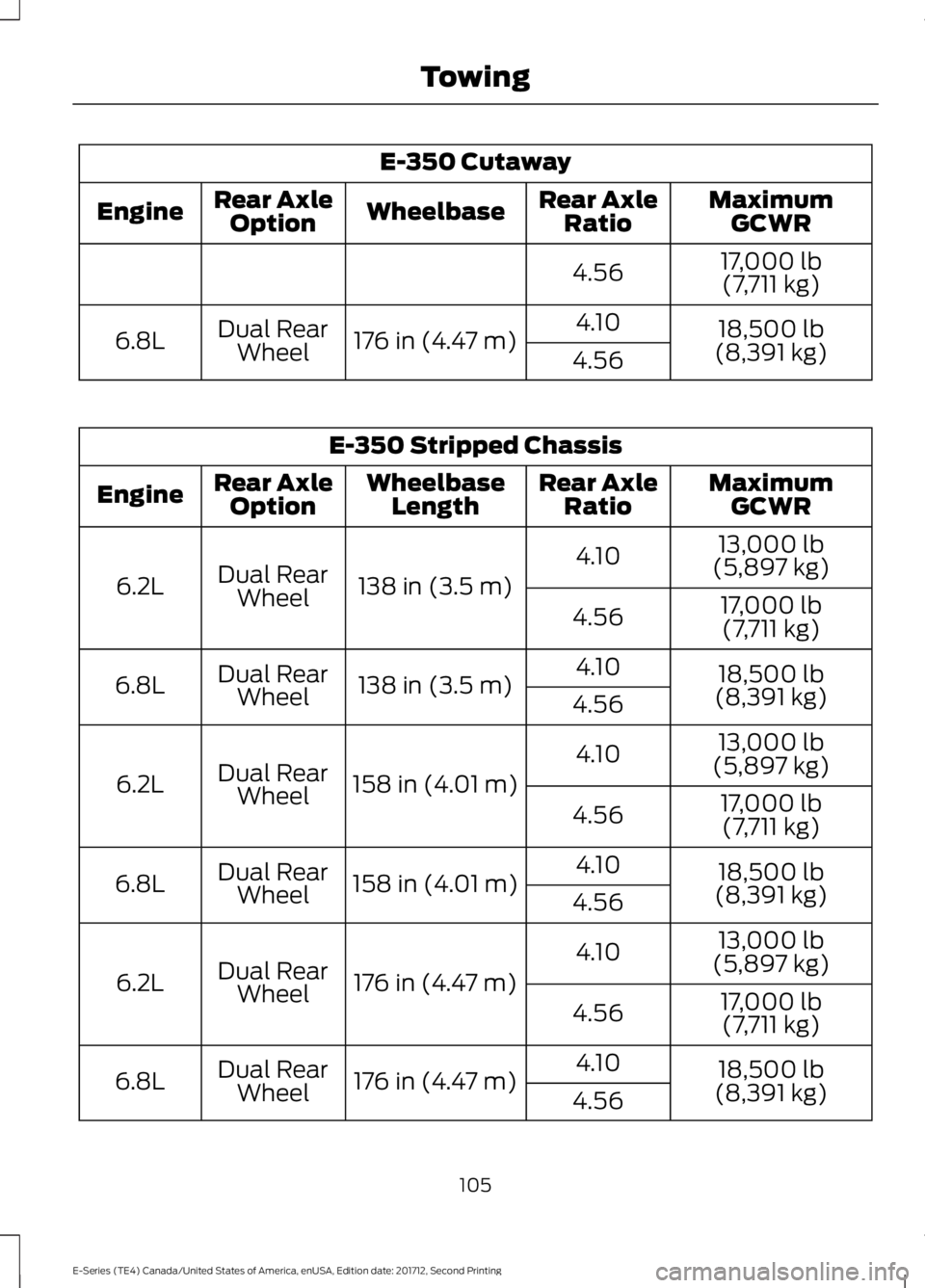
E-350 Cutaway
MaximumGCWR
Rear Axle
Ratio
Wheelbase
Rear Axle
Option
Engine
17,000 lb(7,711 kg)
4.56
18,500 lb
(8,391 kg)
4.10
176 in (4.47 m)
Dual Rear
Wheel
6.8L
4.56E-350 Stripped Chassis
MaximumGCWR
Rear Axle
Ratio
Wheelbase
Length
Rear Axle
Option
Engine
13,000 lb
(5,897 kg)
4.10
138 in (3.5 m)
Dual Rear
Wheel
6.2L
17,000 lb
(7,711 kg)
4.56
18,500 lb
(8,391 kg)
4.10
138 in (3.5 m)
Dual Rear
Wheel
6.8L
4.56
13,000 lb
(5,897 kg)
4.10
158 in (4.01 m)
Dual Rear
Wheel
6.2L
17,000 lb
(7,711 kg)
4.56
18,500 lb
(8,391 kg)
4.10
158 in (4.01 m)
Dual Rear
Wheel
6.8L
4.56
13,000 lb
(5,897 kg)
4.10
176 in (4.47 m)
Dual Rear
Wheel
6.2L
17,000 lb
(7,711 kg)
4.56
18,500 lb
(8,391 kg)
4.10
176 in (4.47 m)
Dual Rear
Wheel
6.8L
4.56
105
E-Series (TE4) Canada/United States of America, enUSA, Edition date: 201712, Second Printing Towing
Page 109 of 323
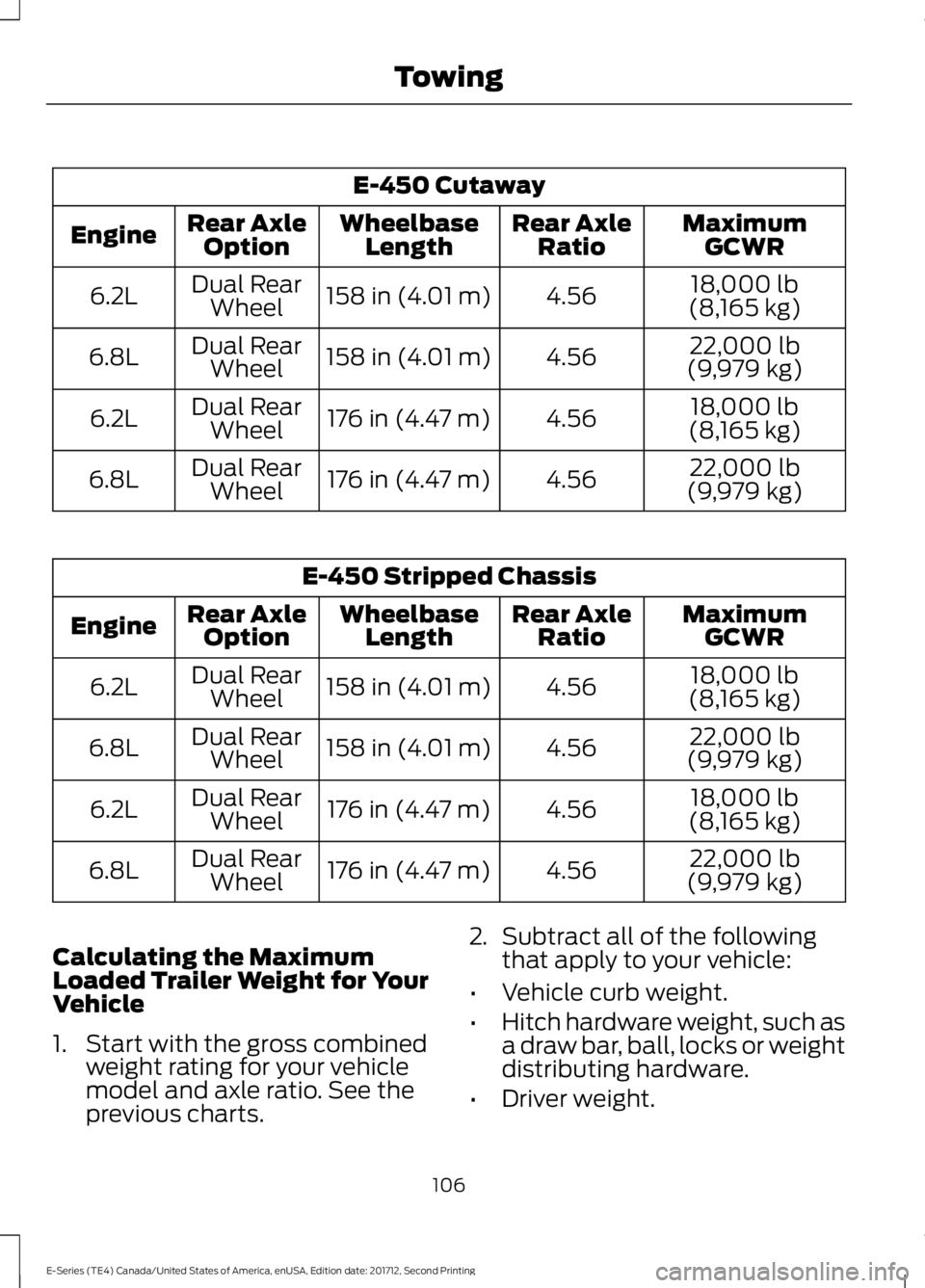
E-450 Cutaway
MaximumGCWR
Rear Axle
Ratio
Wheelbase
Length
Rear Axle
Option
Engine
18,000 lb
(8,165 kg)
4.56
158 in (4.01 m)
Dual Rear
Wheel
6.2L
22,000 lb
(9,979 kg)
4.56
158 in (4.01 m)
Dual Rear
Wheel
6.8L
18,000 lb
(8,165 kg)
4.56
176 in (4.47 m)
Dual Rear
Wheel
6.2L
22,000 lb
(9,979 kg)
4.56
176 in (4.47 m)
Dual Rear
Wheel
6.8L E-450 Stripped Chassis
MaximumGCWR
Rear Axle
Ratio
Wheelbase
Length
Rear Axle
Option
Engine
18,000 lb
(8,165 kg)
4.56
158 in (4.01 m)
Dual Rear
Wheel
6.2L
22,000 lb
(9,979 kg)
4.56
158 in (4.01 m)
Dual Rear
Wheel
6.8L
18,000 lb
(8,165 kg)
4.56
176 in (4.47 m)
Dual Rear
Wheel
6.2L
22,000 lb
(9,979 kg)
4.56
176 in (4.47 m)
Dual Rear
Wheel
6.8L
Calculating the Maximum
Loaded Trailer Weight for Your
Vehicle
1. Start with the gross combined weight rating for your vehicle
model and axle ratio. See the
previous charts. 2.
Subtract all of the following
that apply to your vehicle:
• Vehicle curb weight.
• Hitch hardware weight, such as
a draw bar, ball, locks or weight
distributing hardware.
• Driver weight.
106
E-Series (TE4) Canada/United States of America, enUSA, Edition date: 201712, Second Printing Towing
Page 111 of 323
Hitches
Do not use a hitch that either clamps onto
the bumper or attaches to the axle. You
must distribute the load in your trailer so
that 10-15% of the total weight of the
trailer is on the tongue.
Weight-distributing Hitches
WARNING
Do not adjust a weight-distributing
hitch to any position where the rear
bumper of the vehicle is higher than
it was before attaching the trailer. Doing
so will defeat the function of the
weight-distributing hitch, which may cause
unpredictable handling, and could result
in serious personal injury. When hooking-up a trailer using a
weight-distributing hitch, always use the
following procedure:
1. Park the loaded vehicle, without the
trailer, on a level surface.
2. Measure the height to the top of your vehicle's front wheel opening on the
fender. This is H1.
3. Attach the loaded trailer to your vehicle
without the weight-distributing bars
connected.
4. Measure the height to the top of your vehicle's front wheel opening on the
fender a second time. This is H2.
5. Install and adjust the tension in the weight-distributing bars so that the
height of your vehicle's front wheel
opening on the fender is approximately
half the way down from H2, toward H1.
6. Check that the trailer is level or slightly
nose down toward your vehicle. If not,
adjust the ball height accordingly and
repeat Steps 2-6. When the trailer is level or slightly nose
down toward the vehicle:
•
Lock the bar tension adjuster in place.
• Check that the trailer tongue securely
attaches and locks onto the hitch.
• Install safety chains, lighting, and trailer
brake controls as required by law or the
trailer manufacturer.
Safety Chains
Note: Do not attach safety chains to the
bumper.
Always connect the safety chains to the
frame or hook retainers of your vehicle
hitch.
To connect the safety chains, cross the
chains under the trailer tongue and allow
enough slack for turning tight corners. Do
not allow the chains to drag on the ground.
Trailer Brakes WARNING
Do not connect a trailer's hydraulic
brake system directly to your
vehicle's brake system. Your vehicle
may not have enough braking power and
your chances of having a collision greatly
increase. Electric brakes and manual, automatic or
surge-type trailer brakes are safe if you
install them properly and adjust them to
the manufacturer's specifications. The
trailer brakes must meet local and federal
regulations.
The rating for the tow vehicle's braking
system operation is at the gross vehicle
weight rating, not the gross combined
weight rating.
108
E-Series (TE4) Canada/United States of America, enUSA, Edition date: 201712, Second Printing Towing