radio FORD E-450 2018 Owner's Manual
[x] Cancel search | Manufacturer: FORD, Model Year: 2018, Model line: E-450, Model: FORD E-450 2018Pages: 323, PDF Size: 6.2 MB
Page 250 of 323
To Connect Using Voice Commands
Plug the device into the USB port. See
USB Port (page 218).
Press the voice button and when prompted say:
Action and Description
Voice command
You can now play music by saying any of the appropriate
voice commands. See Media voice commands.
USB [1]
You do not need to say words that appear within square brackets. For example, for where
USB[1]appears, you can say USB or USB one.
To Connect Using the System Menu
Plug the device into the USB port. See
USB Port
(page 218). Press the
AUX button, then the Menu
button to enter the Media Menu.
You can then scroll to: Action and Description
Message
Press the
OK button.
SELECT SRC
Press the
OK button.
SYNC USB
Depending on how many digital media files are on your
connected device, the following message may appear in the
radio display.
Indexing…
When indexing is complete, the screen returns to the Play menu. You can then
select one of the following:
PLAY ALL
ARTISTS
ALBUMS
GENRES
PLAYLISTS
TRACKS
EXPLORE USB
SIMILARMUSIC Exit the current menu.
RETURN
247
E-Series (TE4) Canada/United States of America, enUSA, Edition date: 201712, Second Printing SYNC™
(If Equipped)E142599
Page 268 of 323
For a complete listing of the accessories
that are available for your vehicle, please
contact your authorized dealer or visit the
online store web site:
Web Address (United States)
www.Accessories.Ford.com Web Address (Canada)
www.Accessories.Ford.ca
Ford Motor Company will repair or replace
any properly authorized dealer-installed
Ford Original Accessory found to be
defective in factory-supplied materials or
workmanship during the warranty period,
as well as any component damaged by the
defective accessories.
Ford Motor Company will warrant your
Ford Original Accessory through the
warranty that provides the greatest
benefit:
• 24 months, unlimited mileage.
• The remainder of your new vehicle
limited warranty.
Contact an authorized dealer for details
and a copy of the warranty.
Exterior Style
• Side window deflectors*.
Interior Style
• Seat covers*.
Peace of Mind
• Backup alarm*.
• Ford Telematics*.
• Roadside assistance kits*. *Ford Licensed Accessory. The accessory
manufacturer designs, develops and
therefore warrants Ford Licensed
Accessories, and does not design or test
these accessories to Ford Motor Company
engineering requirements. Contact an
authorized Ford dealer for the
manufacturer's limited warranty details,
and request a copy of the Ford Licensed
Accessories product limited warranty from
the accessory manufacturer.
For maximum vehicle performance, keep
the following information in mind when
adding accessories or equipment to your
vehicle:
•
When adding accessories, equipment,
passengers and luggage to your
vehicle, do not exceed the total weight
capacity of the vehicle or of the front
or rear axle (GVWR or GAWR as
indicated on the Safety Compliance
Certification label). Ask an authorized
dealer for specific weight information.
• The Federal Communications
Commission (FCC) and Canadian
Radio Telecommunications
Commission (CRTC) regulate the use
of mobile communications systems
that are equipped with radio
transmitters, for example two-way
radios, telephones and theft alarms.
Any such equipment installed in your
vehicle should comply with Federal
Communications Commission (FCC)
and Canadian Radio
Telecommunications Commission
(CRTC) regulations and should be
installed only by an authorized dealer.
265
E-Series (TE4) Canada/United States of America, enUSA, Edition date: 201712, Second Printing Accessories
Page 269 of 323
•
An authorized dealer needs to install
mobile communications systems.
Improper installation may harm the
operation of your vehicle, particularly
if the manufacturer did not design the
mobile communication system
specifically for automotive use.
• If you or an authorized Ford dealer add
any non-Ford electrical or electronic
accessories or components to your
vehicle, you may adversely affect
battery performance and durability. In
addition, you may also adversely affect
the performance of other electrical
systems in the vehicle.
AUXILIARY SWITCHES
For maximum vehicle performance, keep
the following information in mind when
adding accessories or equipment to your
vehicle:
• When adding accessories, equipment,
passengers and luggage to your
vehicle, do not exceed the total weight
capacity of the vehicle or of the front
or rear axle (GVWR or GAWR as
indicated on the Safety Compliance
Certification label). Ask an authorized
dealer for specific weight information.
• The Federal Communications
Commission (FCC) and Canadian
Radio Telecommunications
Commission (CRTC) regulate the use
of mobile communications systems
equipped with radio transmitters, for
example, two-way radios, telephones
and theft alarms. Any such equipment
installed in your vehicle should comply
with Federal Communications
Commission (FCC) and Canadian
Radio Telecommunications
Commission (CRTC) regulations, and
should be installed by an authorized
dealer. •
An authorized dealer needs to install
mobile communications systems.
Improper installation may harm the
operation of your vehicle, particularly
if the manufacturer did not design the
mobile communication system
specifically for automotive use.
• If you or an authorized Ford dealer add
any non-Ford electrical or electronic
accessories or components to your
vehicle, you may adversely affect
battery performance and durability. In
addition, you may also adversely affect
the performance of other electrical
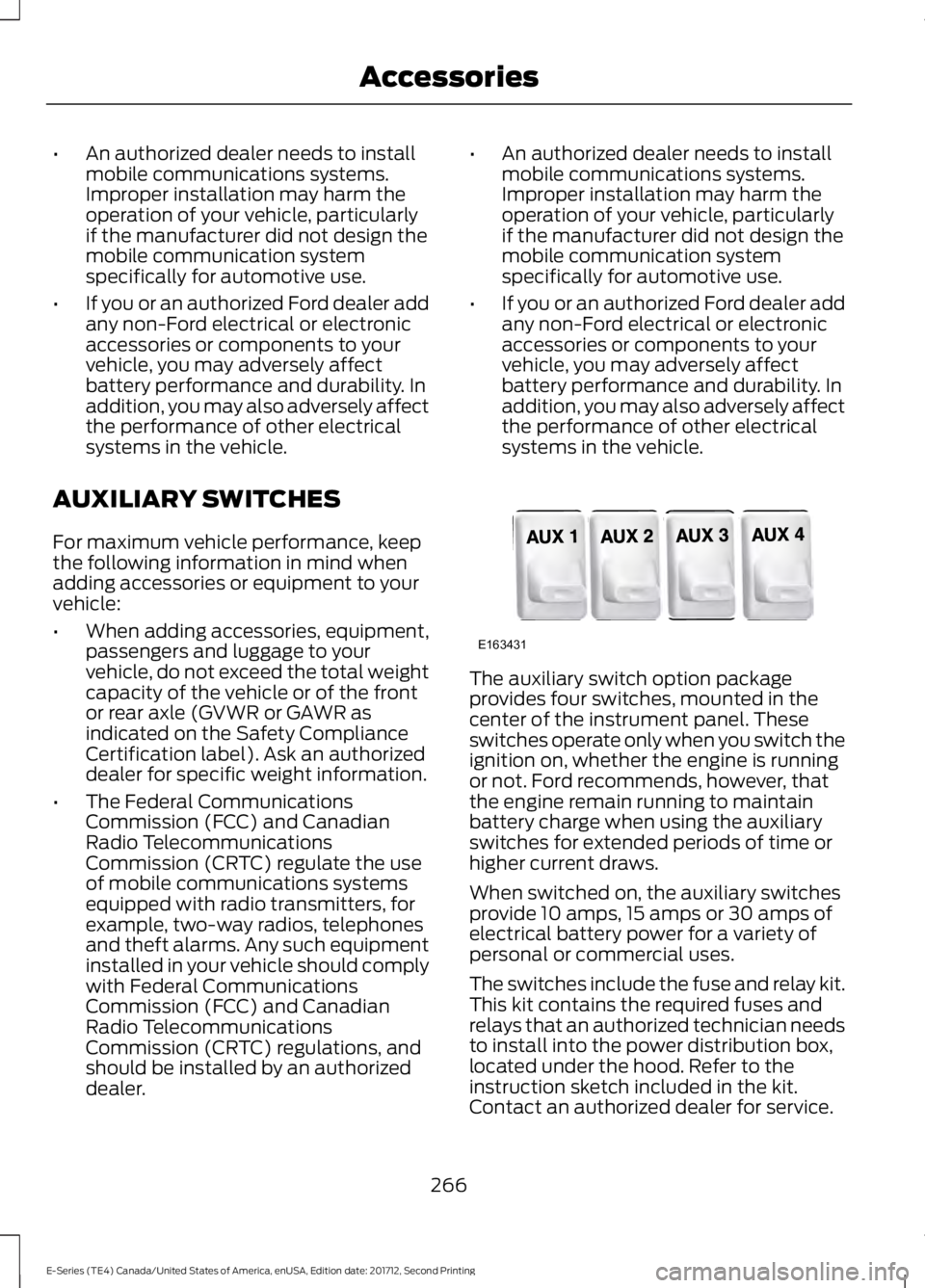
systems in the vehicle. The auxiliary switch option package
provides four switches, mounted in the
center of the instrument panel. These
switches operate only when you switch the
ignition on, whether the engine is running
or not. Ford recommends, however, that
the engine remain running to maintain
battery charge when using the auxiliary
switches for extended periods of time or
higher current draws.
When switched on, the auxiliary switches
provide 10 amps, 15 amps or 30 amps of
electrical battery power for a variety of
personal or commercial uses.
The switches include the fuse and relay kit.
This kit contains the required fuses and
relays that an authorized technician needs
to install into the power distribution box,
located under the hood. Refer to the
instruction sketch included in the kit.
Contact an authorized dealer for service.
266
E-Series (TE4) Canada/United States of America, enUSA, Edition date: 201712, Second Printing AccessoriesE163431
Page 291 of 323
ELECTROMAGNETIC
COMPATIBILITY
WARNINGS
Do not place objects or mount
equipment on or near the airbag
cover, on the side of the seatbacks
(of the front seats), or in front seat areas
that may come into contact with a
deploying airbag. Failure to follow these
instructions may increase the risk of
personal injury in the event of a crash. Do not fasten antenna cables to
original vehicle wiring, fuel pipes and
brake pipes.
Keep antenna and power cables at
least 4 in (10 cm) from any electronic
modules and airbags. Note:
We test and certify your vehicle to
meet electromagnetic compatibility
legislation (UNECE Regulation 10 or other
applicable local requirements). It is your
responsibility to make sure that any
equipment an authorized dealer installs on
your vehicle complies with applicable local
legislation and other requirements.
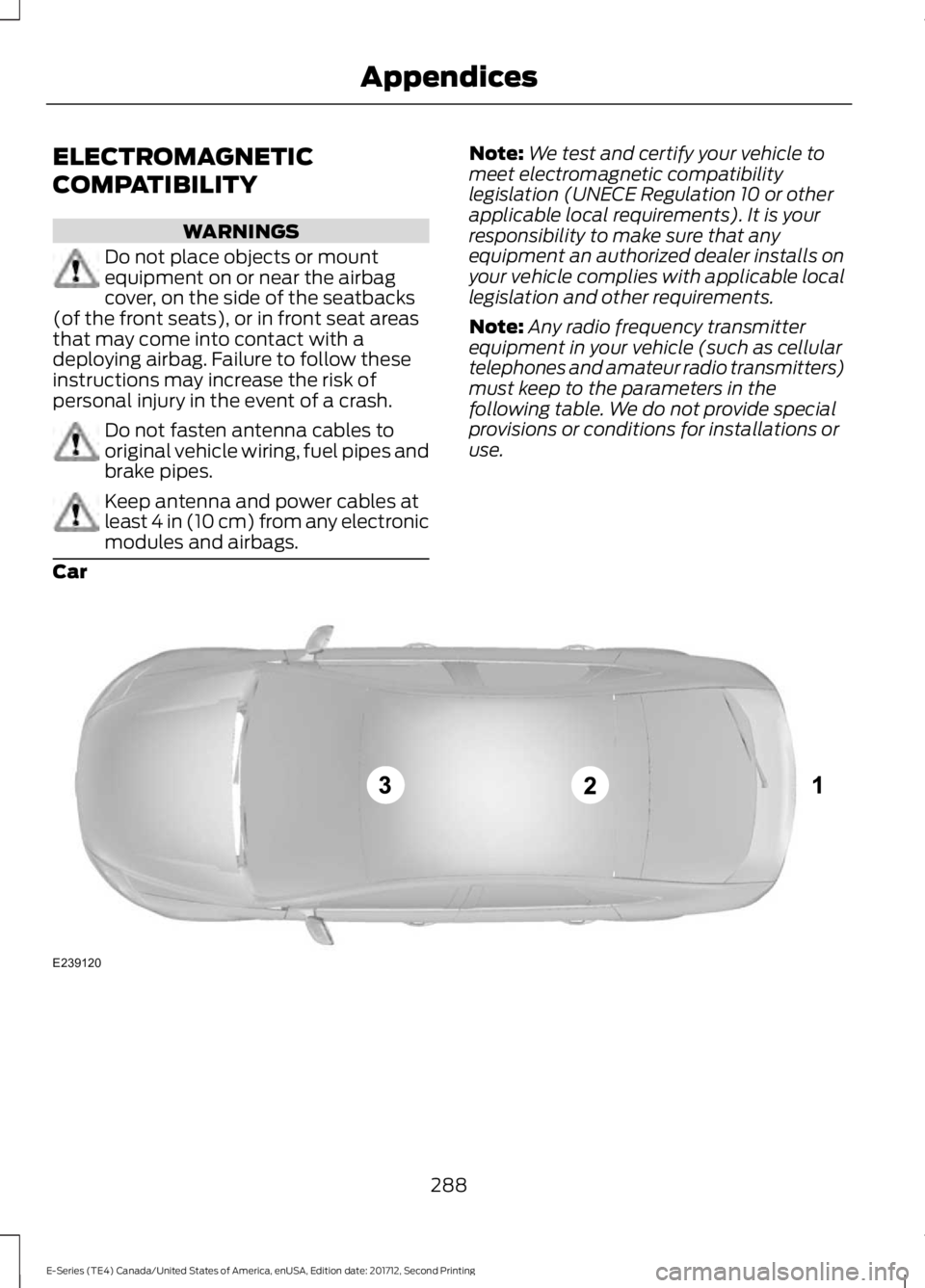
Note: Any radio frequency transmitter
equipment in your vehicle (such as cellular
telephones and amateur radio transmitters)
must keep to the parameters in the
following table. We do not provide special
provisions or conditions for installations or
use.
Car 288
E-Series (TE4) Canada/United States of America, enUSA, Edition date: 201712, Second Printing AppendicesE239120
Page 293 of 323
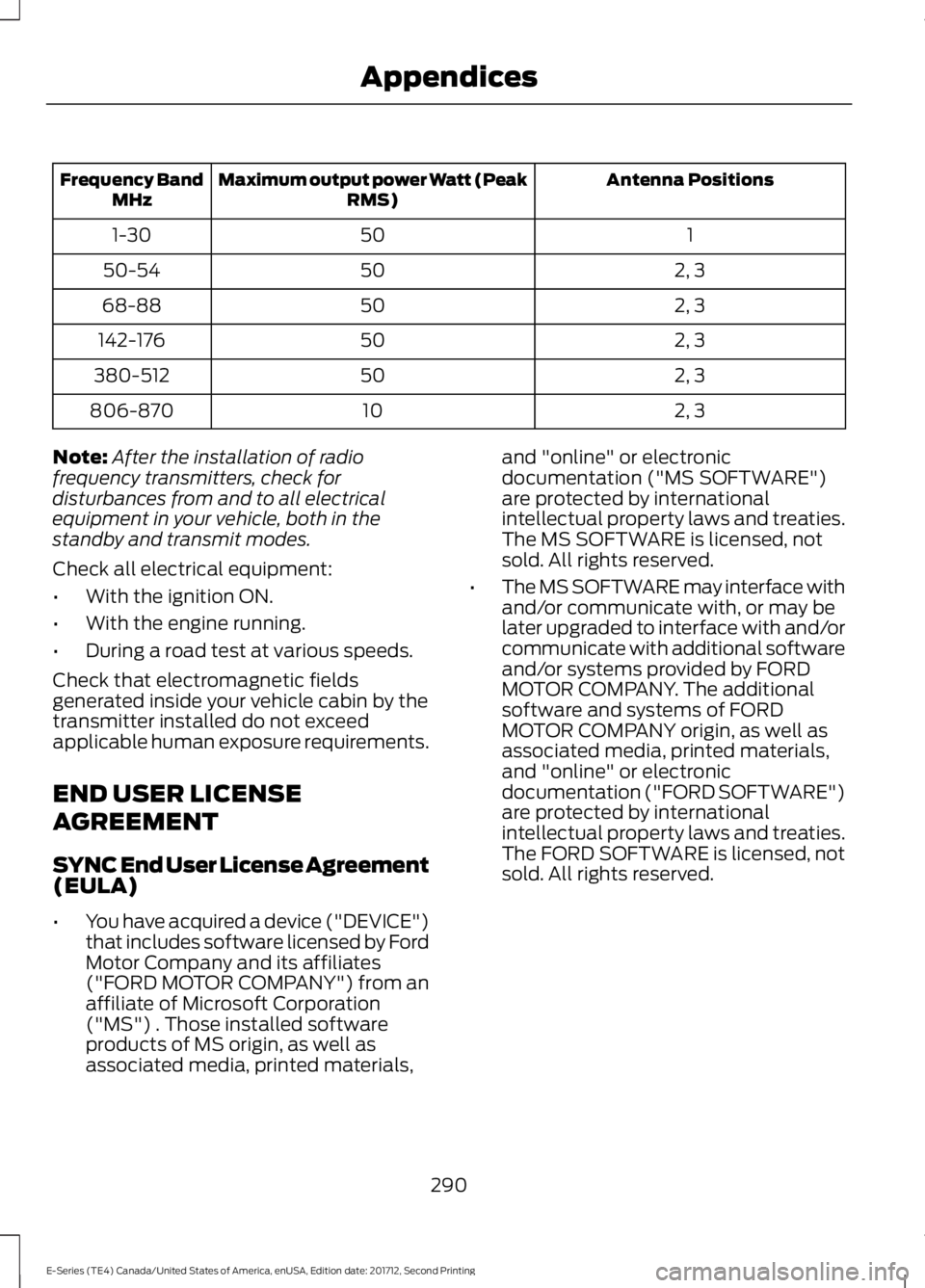
Antenna Positions
Maximum output power Watt (Peak
RMS)
Frequency Band
MHz
1
50
1-30
2, 3
50
50-54
2, 3
50
68-88
2, 3
50
142-176
2, 3
50
380-512
2, 3
10
806-870
Note: After the installation of radio
frequency transmitters, check for
disturbances from and to all electrical
equipment in your vehicle, both in the
standby and transmit modes.
Check all electrical equipment:
• With the ignition ON.
• With the engine running.
• During a road test at various speeds.
Check that electromagnetic fields
generated inside your vehicle cabin by the
transmitter installed do not exceed
applicable human exposure requirements.
END USER LICENSE
AGREEMENT
SYNC End User License Agreement
(EULA)
• You have acquired a device ("DEVICE")
that includes software licensed by Ford
Motor Company and its affiliates
("FORD MOTOR COMPANY") from an
affiliate of Microsoft Corporation
("MS") . Those installed software
products of MS origin, as well as
associated media, printed materials, and "online" or electronic
documentation ("MS SOFTWARE")
are protected by international
intellectual property laws and treaties.
The MS SOFTWARE is licensed, not
sold. All rights reserved.
• The MS SOFTWARE may interface with
and/or communicate with, or may be
later upgraded to interface with and/or
communicate with additional software
and/or systems provided by FORD
MOTOR COMPANY. The additional
software and systems of FORD
MOTOR COMPANY origin, as well as
associated media, printed materials,
and "online" or electronic
documentation ("FORD SOFTWARE")
are protected by international
intellectual property laws and treaties.
The FORD SOFTWARE is licensed, not
sold. All rights reserved.
290
E-Series (TE4) Canada/United States of America, enUSA, Edition date: 201712, Second Printing Appendices
Page 314 of 323
THE GRACENOTE SOFTWARE, EACH ITEM
OF GRACENOTE DATA AND THE
GRACENOTE CONTENT ARE LICENSED
TO YOU "AS IS". NEITHER GRACENOTE
MAKES ANY REPRESENTATIONS OR
WARRANTIES, EXPRESS OR IMPLIED,
REGARDING THE ACCURACY OF ANY
GRACENOTE DATA FROM THE
GRACENOTE SERVERS OR GRACENOTE
CONTENT. GRACENOTE COLLECTIVELY
AND SEPARATELY RESERVE THE RIGHT
TO DELETE DATA AND/OR CONTENT
FROM THE COMPANIES' RESPECTIVE
SERVERS OR, IN THE CASE OF
GRACENOTE, CHANGE DATA
CATEGORIES FOR ANY CAUSE THAT
GRACENOTE DEEMS SUFFICIENT. NO
WARRANTY IS MADE THAT EITHER
GRACENOTE CONTENT OR THE
GRACENOTE SOFTWARE OR
GRACENOTE SERVERS ARE ERROR-FREE
OR THAT THE FUNCTIONING OF THE
GRACENOTE SOFTWARE OR
GRACENOTE SERVERS WILL BE
UNINTERRUPTED. GRACENOTE IS NOT
OBLIGATED TO PROVIDE YOU WITH ANY
ENHANCED OR ADDITIONAL DATA TYPES
THAT GRACENOTE MAY CHOOSE TO
PROVIDE IN THE FUTURE AND IS FREE
TO DISCONTINUE ITS ONLINE SERVICES
AT ANY TIME. GRACENOTE DISCLAIM ALL
WARRANTIES EXPRESS OR IMPLIED,
INCLUDING, BUT NOT LIMITED TO,
IMPLIED WARRANTIES OF
MERCHANTABILITY, FITNESS FOR A
PARTICULAR PURPOSE, TITLE, AND
NON-INFRINGEMENT. NEITHER
GRACENOTE WARRANTS THE RESULTS
THAT WILL BE OBTAINED BY YOUR USE
OF THE GRACENOTE SOFTWARE OR ANY
GRACENOTE SERVER. IN NO CASE WILL
GRACENOTE BE LIABLE FOR ANY
CONSEQUENTIAL OR INCIDENTAL
DAMAGES OR FOR ANY LOST PROFITS
OR LOST REVENUES FOR ANY REASON
WHATSOEVER.
© Gracenote 2007.
Vehicle with SYNC only
United States and Mexico
FCC ID: KMHSG1G1
IC: 1422A-SG1G1
Mexico
Model: KMHSG1P1
NOM-121-SCT1-2009
The operation of this equipment is subject
to the following two conditions: (1) This
equipment or device may not cause
harmful interference, and (2) this
equipment or device must accept any
interference, including interference that
may cause undesired operation.
Vehicle with SYNC with
Touchscreen/My Touch
FCC ID: KMHSYNCG2
IC: 1422A-SYNCG2
This device complies with Part 15 of the
FCC Rules and with RSS-210 of Industry
Canada. Operation is subject to the
following two conditions: (1) This device
may not cause harmful interference, and
(2) this device must accept any
interference received, including
interference that may cause undesired
operation.
WARNING
Changes or modifications not
expressively approved by the party
responsible for compliance could
void the user's authority to operate the
equipment. The term "IC" before the radio
certification number only signifies that
Industry Canada technical specifications
were met. The antenna used for this transmitter must
not be co-located or operating in
conjunction with any other antenna or
transmitter.
311
E-Series (TE4) Canada/United States of America, enUSA, Edition date: 201712, Second Printing Appendices
Page 317 of 323

Changing a Fuse............................................137
Fuses........................................................................\
137
Changing a Road Wheel............................189 Dissimilar Spare Wheel and Tire Assembly
Information...................................................... 189
Tire Change Procedure.................................... 190
Changing the 12V Battery...........................151 Dual Batteries....................................................... 152
Reconnecting the Battery................................. 151
Changing the Engine Air Filter.................158
Changing the Wiper Blades
......................152
Checking the Wiper Blades.......................152
Child Restraint and Seatbelt Maintenance.................................................28
Child Restraint Positioning
..........................22
Child Safety.......................................................15
General Information............................................. 15
Cleaning Products
........................................159
Materials................................................................ 159
Cleaning the Engine......................................161
Cleaning the Exterior...................................159 Cleaning the Headlamps................................ 160
Exterior Chrome Parts...................................... 160
Exterior Plastic Parts......................................... 160
Stripes or Graphics............................................ 160
Underbody............................................................ 160
Under Hood.......................................................... 160
Cleaning the Instrument Panel and Instrument Cluster Lens
..........................162
Cleaning the Interior....................................162
Cleaning the Wheels
...................................163
Cleaning the Windows and Wiper Blades.............................................................161
Climate Control
..............................................64
Coolant Check See: Engine Coolant Check............................. 142
Crash Sensors and Airbag Indicator........36
Cruise Control
..................................................45
Principle of Operation........................................ 95
Cruise control See: Using Cruise Control................................. 95
Customer Assistance..................................122
D
Data Recording
..................................................7
Event Data Recording........................................... 8
Service Data Recording......................................... 7Daytime Running Lamps............................48
Digital Radio
...................................................213
HD Radio Reception and Station
Troubleshooting............................................. 214
Direction Indicators.......................................48
Doors and Locks.............................................40
Driver and Passenger Airbags.....................31 Children and Airbags........................................... 35
Passenger Airbag On and Off Switch ...........31
Proper Driver and Front Passenger Seating Adjustment........................................................ 35
Driving Aids
......................................................96
Driving Hints....................................................114
Driving Through Water
.................................115
DRL See: Daytime Running Lamps......................... 48
E
Economical Driving.......................................114
Electromagnetic Compatibility
..............288
Emission Law...................................................82
Noise Emissions Warranty, Prohibited
Tampering Acts and Maintenance...........83
Tampering With a Noise Control System................................................................ 82
End User License Agreement.................290 SYNC End User License Agreement
(EULA)............................................................. 290
Engine Block Heater......................................75 Using the Engine Block Heater........................ 75
Engine Coolant Check
.................................142
Adding Coolant.................................................... 143
Coolant Change.................................................. 145
Engine Coolant Temperature Management
................................................... 146
Fail-Safe Cooling................................................ 145
Recycled Coolant............................................... 144
Severe Climates.................................................. 144
Engine Emission Control.............................82
Engine Immobilizer See: Passive Anti-Theft System..................... 43
Engine Oil Check............................................141 Adding Engine Oil................................................ 141
Engine Oil Dipstick
........................................141
Engine Specifications - 6.2L.....................194 Drivebelt Routing................................................ 194
314
E-Series (TE4) Canada/United States of America, enUSA, Edition date: 201712, Second Printing Index
Page 318 of 323
Engine Specifications - 6.8L....................194
Drivebelt Routing................................................ 195
Environment......................................................13
Essential Towing Checks...........................107
Before Towing a Trailer....................................... 111
Hitches................................................................... 108
Launching or Retrieving a Boat or Personal Watercraft (PWC).......................................... 112
Safety Chains...................................................... 108
Trailer Brakes....................................................... 108
Trailer Lamps.......................................................... 111
Trailer Towing Connector................................. 107
When Towing a Trailer........................................ 112
Event Data Recording See: Data Recording............................................... 7
Exterior Mirrors................................................49 Fold-Away Exterior Mirrors............................... 49
Power Exterior Mirrors........................................ 49
Telescoping Mirrors ............................................ 50
F
Fastening the Seatbelts..............................26 Seatbelt Locking Modes.................................... 26
Using Seatbelts During Pregnancy................26
Flat Tire See: Changing a Road Wheel........................ 189
Floor Mats
.........................................................115
Ford Credit...........................................................9
US Only....................................................................... 9
Ford Protect..................................................268 Ford Protect Extended Service Plan
(CANADA ONLY).......................................... 269
Ford Protect Extended Service Plans (U.S. Only).................................................................. 268
Fuel and Refueling.........................................76
Fuel Consumption
.........................................80
Fuel Economy....................................................... 80
Fuel Quality - E85
..........................................76
Choosing the Right Fuel - Flex Fuel
Vehicles............................................................... 76
Switching Between E85 and Gasoline.........77
Fuel Quality - Gasoline.................................78 Choosing the Right Fuel..................................... 78
Fuel Shutoff
.....................................................118
Fuses.................................................................129
Fuse Specification Chart...........................129 Passenger Compartment Fuse Panel.........134 Power Distribution Box.....................................
129
G
Gauges................................................................51 Battery Voltage Gauge....................................... 52
Engine Coolant Temperature Gauge............52
Fuel Gauge............................................................... 51
Information Display............................................. 52
Gearbox See: Transmission............................................... 86
General Information on Radio Frequencies....................................................37
General Maintenance Information........270 Multi-point Inspection...................................... 272
Owner Checks and Services........................... 271
Protecting Your Investment........................... 270
Why Maintain Your Vehicle?.......................... 270
Why Maintain Your Vehicle at Your Dealership?..................................................... 270
Getting Assistance Outside the U.S. and Canada..........................................................125
Getting the Services You Need................122 Away From Home............................................... 122
H
Handbrake See: Parking Brake................................................ 91
Hazard Flashers
.............................................118
Headlamp Adjusting See: Adjusting the Headlamps...................... 153
Headlamp Removal See: Removing a Headlamp........................... 154
Headrest See: Head Restraints.......................................... 68
Head Restraints
..............................................68
Heating See: Climate Control.......................................... 64
Hints on Controlling the Interior Climate
............................................................65
Defogging the Side Windows in Cold
Weather.............................................................. 66
General Hints......................................................... 65
Quickly Cooling the Interior.............................. 66
Quickly Heating the Interior............................. 66
Recommended Settings for Cooling............66
Recommended Settings for Heating...........66
315
E-Series (TE4) Canada/United States of America, enUSA, Edition date: 201712, Second Printing Index
Page 320 of 323
N
Normal Scheduled Maintenance...........273
O
Oil Change Indicator Reset.......................142
Resetting the Oil Life Monitoring
System............................................................... 142
Oil Check See: Engine Oil Check........................................ 141
Opening and Closing the Hood...............139
Ordering Additional Owner's Literature.......................................................126
Obtaining a French Owner ’s Manual...........127
P
Parking Aids.....................................................93
Parking Brake....................................................91
Passive Anti-Theft System.........................43 SecuriLock®........................................................... 43
PATS See: Passive Anti-Theft System..................... 43
Perchlorate..........................................................9
Power Door Locks See: Locking and Unlocking............................. 40
Power Seats
.....................................................69
Recline Adjustment............................................. 70
Power Steering Fluid Check
.....................150
Power Windows.............................................49
Accessory Delay................................................... 49
One-Touch Down................................................. 49
Protecting the Environment
........................13
Puncture See: Changing a Road Wheel........................ 189
R
Rear Axle...........................................................89
Rear Passenger Climate Controls
............66
Rear View Camera.........................................93 Using the Rear View Camera System..........93
Rear View Camera See: Rear View Camera..................................... 93
Recommended Towing Weights............103 Calculating the Maximum Loaded Trailer
Weight for Your Vehicle............................... 106Reduced Engine Performance..................114
Refueling............................................................79
Fuel Filler Cap........................................................ 79
Remote Control
...............................................37
Car Finder................................................................ 39
Changing the Remote Control Battery........38
Reprogramming the Remote Control...........38
Sounding the Panic Alarm................................ 39
Removing a Headlamp...............................154
Repairing Minor Paint Damage...............163
Replacement Parts Recommendation........................................10
Collision Repairs.................................................... 10
Scheduled Maintenance and Mechanical Repairs................................................................. 10
Warranty on Replacement Parts.................... 10
Replacing a Lost Key or Remote Control............................................................39
Reporting Safety Defects (Canada Only)...............................................................127
Reporting Safety Defects (U.S. Only)...............................................................127
Roadside Assistance
....................................117
Vehicles Sold in Canada: Getting Roadside
Assistance......................................................... 118
Vehicles Sold in Canada: Roadside Assistance Program Coverage.................. 118
Vehicles Sold in Canada: Using Roadside Assistance......................................................... 118
Vehicles Sold in the United States: Getting Roadside Assistance...................................... 117
Vehicles Sold in the United States: Using Roadside Assistance...................................... 117
Roadside Emergencies
................................117
Running-In See: Breaking-In................................................... 114
Running Out of Fuel......................................78 Filling a Portable Fuel Container.................... 79
S
Safety Precautions
........................................76
Satellite Radio...............................................216
Satellite Radio Electronic Serial Number
(ESN).................................................................. 217
Satellite Radio Reception Factors................216
SiriusXM Satellite Radio Service................... 216
Troubleshooting................................................... 217
317
E-Series (TE4) Canada/United States of America, enUSA, Edition date: 201712, Second Printing Index