light FORD E-450 2019 Repair Manual
[x] Cancel search | Manufacturer: FORD, Model Year: 2019, Model line: E-450, Model: FORD E-450 2019Pages: 329, PDF Size: 6.24 MB
Page 194 of 329
How Temperature Affects Your Tire
Pressure
The tire pressure monitoring system
monitors tire pressure in each pneumatic
tire. When driving in a normal manner, a
typical passenger tire inflation pressure
may increase about 2
–4 psi (14– 28 kPa)
from a cold start situation. If the vehicle is
stationary overnight with the outside
temperature significantly lower than the
daytime temperature, the tire pressure may
decrease about 3 psi (21 kPa) for a drop of
30°F (17°C) in ambient temperature. This
lower pressure value may be detected by
the tire pressure monitoring system as
being significantly lower than the
recommended inflation pressure and
activate the system warning light for low
tire pressure. If the low tire pressure
warning light is on, visually check each tire
to verify that no tire is flat. If one or more
tires are flat, repair as necessary. Check
the air pressure in the road tires. If any tire
is under-inflated, carefully drive the vehicle
to the nearest location where air can be
added to the tires. Inflate all the tires to
the recommended inflation pressure.
Tire Pressure Monitoring System Reset
Procedure WARNING:
To determine the
required pressure(s) for your vehicle, see
the Safety Compliance Certification
Label (on the door hinge pillar,
door-latch post or the door edge that
meets the door-latch post, next to the
driver seat) or the Tire Label on the
B-Pillar or the edge of the driver door.
Note: You need to perform the tire pressure
monitoring system reset procedure after
each tire rotation. To provide the vehicle's load carrying
capability, some vehicles require different
recommended tire pressures in the front
tires as compared to the rear tires. The tire
pressure monitoring system on these
vehicles illuminate the low tire pressure
warning light at two different pressures:
one for the front tires and one for the rear
tires.
Since tires need to be rotated to provide
consistent performance and maximum tire
life, the tire pressure monitoring system
needs to know when the tires are rotated
to determine which set of tires are on the
front and which are on the rear. With this
information, the system can detect and
properly warn of low tire pressures.
System reset tips:
•
To reduce the chances of interference
from another vehicle, perform the
system reset procedure at least
3 ft
(1 m) away from another vehicle
undergoing the system reset procedure
at the same time.
• Do not wait more than two minutes
between resetting each tire sensor or
the system can time-out and you have
to repeat the entire procedure on all
four wheels.
• A double horn sounds indicating the
need to repeat the procedure.
Performing the System Reset Procedure
- Single Rear Wheel
Read the entire procedure before
attempting.
1. Drive the vehicle above
20 mph
(32 km/h) for at least two minutes,
then park in a safe location where you
can easily get to all four tires and have
access to an air pump.
2. Place the ignition in the off position and
keep the key in the ignition.
191
E-Series (TE4) Canada/United States of America, enUSA, Edition date: 201804, Second-Printing Wheels and Tires
Page 196 of 329
Note:
The tire pressure monitoring system
indicator light illuminates when the spare
tire is in use. To restore the full function of
the monitoring system, all road wheels
equipped with tire pressure monitoring
sensors must be mounted on the vehicle.
Note: Do not use wheels or lug nuts
different than the original equipment, as this
may damage the wheel or mounting system.
If you get a flat tire when driving, do not
apply the brake heavily. Instead, gradually
decrease your speed. Hold the steering
wheel firmly and slowly move to a safe
place on the side of the road.
Have a flat serviced by an authorized
dealer in order to prevent damage to the
tire pressure monitoring system sensors.
See Tire Pressure Monitoring System
(page 188). Replace the spare tire with a
road tire as soon as possible. During
repairing or replacing of the flat tire, have
the authorized dealer inspect the tire
pressure monitoring system sensor for
damage.
Dissimilar Spare Wheel and Tire
Assembly Information WARNING:
Failure to follow these
guidelines could result in an increased
risk of loss of vehicle control, injury or
death.
If you have a dissimilar spare wheel and
tire, then it is intended for temporary use
only. This means that if you need to use it,
you should replace it as soon as possible
with a road wheel and tire assembly that
is the same size and type as the road tires
and wheels that were originally provided
by Ford. If the dissimilar spare tire or wheel
is damaged, it should be replaced rather
than repaired. A dissimilar spare wheel and tire assembly
is defined as a spare wheel and tire
assembly that is different in brand, size or
appearance from the road tires and wheels
and can be one of three types:
1.
T-type mini-spare:
This spare tire
begins with the letter T for tire size and
may have Temporary Use Only molded in
the sidewall.
2. Full-size dissimilar spare with label
on wheel:
This spare tire has a label on
the wheel that states: THIS WHEEL AND
TIRE ASSEMBLY FOR TEMPORARY USE
ONLY.
When driving with one of the dissimilar
spare tires listed above, do not:
• Exceed
50 mph (80 km/h).
• Load the vehicle beyond maximum
vehicle load rating listed on the Safety
Compliance Label.
• Tow a trailer.
• Use snow chains on the end of the
vehicle with the dissimilar spare tire.
• Use more than one dissimilar spare tire
at a time.
• Use commercial car washing
equipment.
• Try to repair the dissimilar spare tire.
Use of one of the dissimilar spare tires
listed above at any one wheel location can
lead to impairment of the following:
• Handling, stability and braking
performance.
• Comfort and noise.
• Ground clearance and parking at curbs.
• Winter weather driving capability.
• Wet weather driving capability.
• All-wheel driving capability.
3. Full-size dissimilar spare without
label on wheel
193
E-Series (TE4) Canada/United States of America, enUSA, Edition date: 201804, Second-Printing Wheels and Tires
Page 215 of 329
Note:
Automatic transmissions that require
MERCON® LV transmission fluid should
only use MERCON® LV transmission fluid.
The use of any other fluid may cause
transmission damage. Alternative Engine Oil for
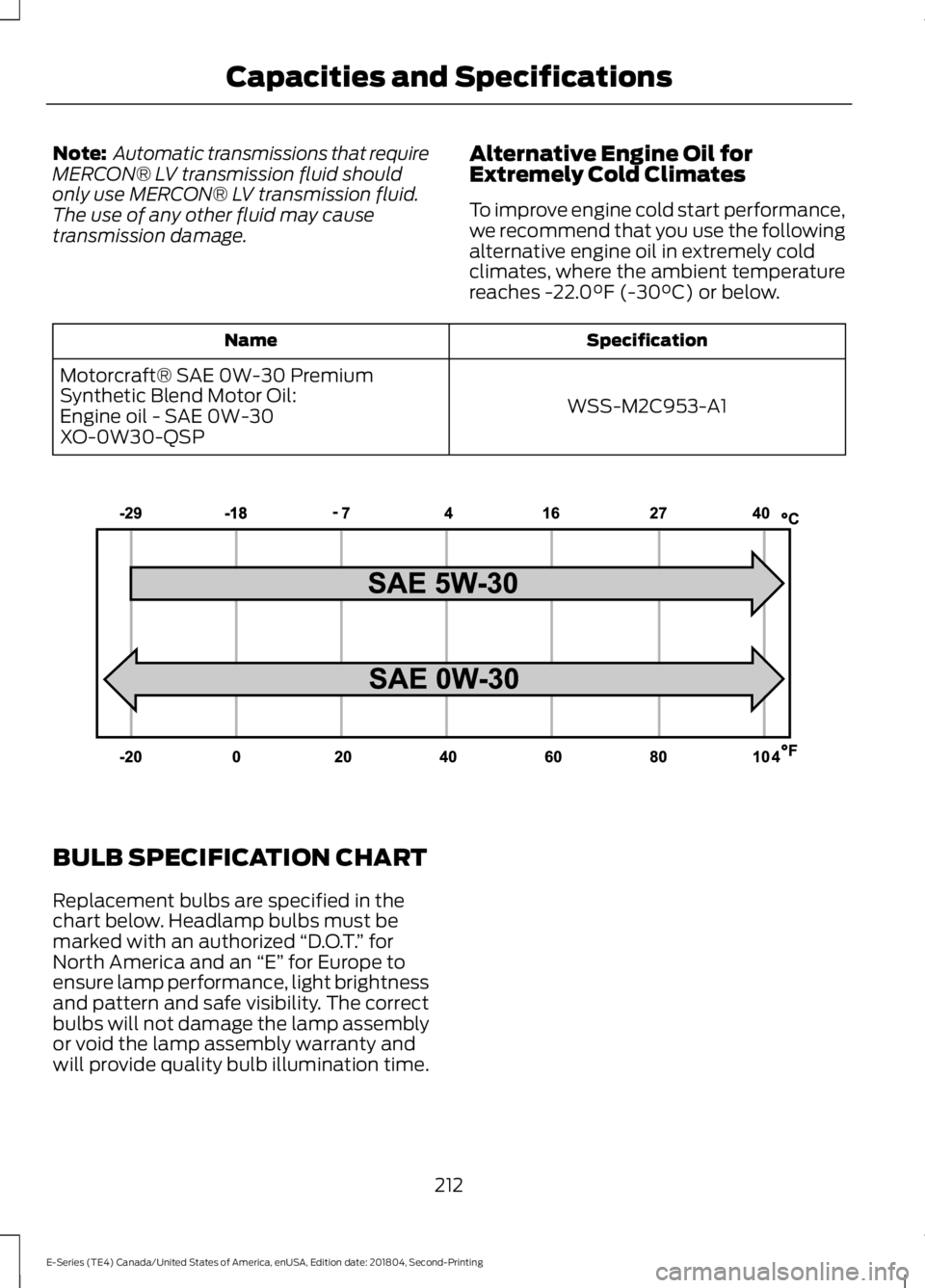
Extremely Cold Climates
To improve engine cold start performance,
we recommend that you use the following
alternative engine oil in extremely cold
climates, where the ambient temperature
reaches -22.0°F (-30°C) or below. Specification
Name
WSS-M2C953-A1
Motorcraft® SAE 0W-30 Premium
Synthetic Blend Motor Oil:
Engine oil - SAE 0W-30
XO-0W30-QSP BULB SPECIFICATION CHART
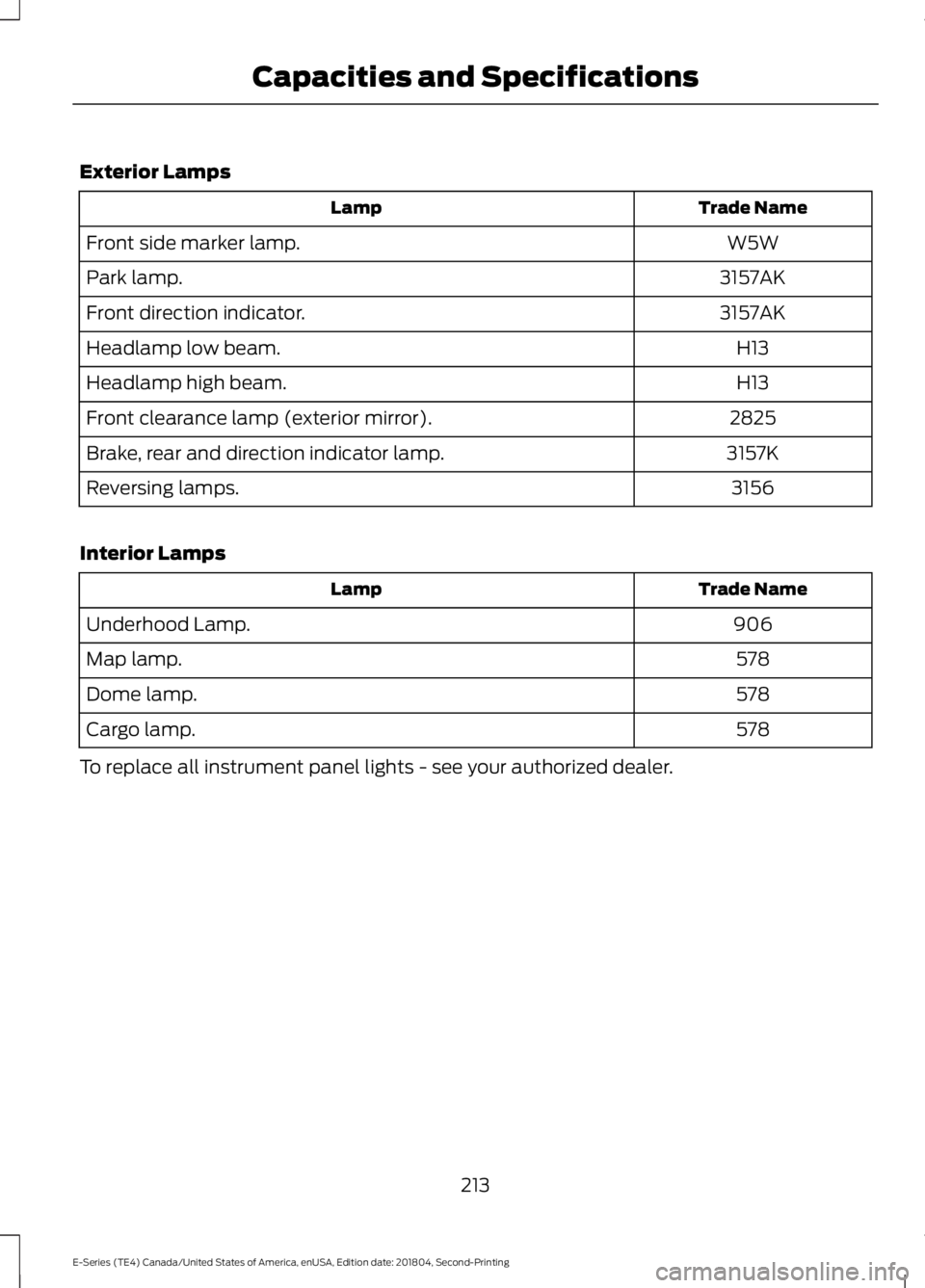
Replacement bulbs are specified in the
chart below. Headlamp bulbs must be
marked with an authorized
“D.O.T.” for
North America and an “E” for Europe to
ensure lamp performance, light brightness
and pattern and safe visibility. The correct
bulbs will not damage the lamp assembly
or void the lamp assembly warranty and
will provide quality bulb illumination time.
212
E-Series (TE4) Canada/United States of America, enUSA, Edition date: 201804, Second-Printing Capacities and SpecificationsE240523
Page 216 of 329
Exterior Lamps
Trade Name
Lamp
W5W
Front side marker lamp.
3157AK
Park lamp.
3157AK
Front direction indicator.
H13
Headlamp low beam.
H13
Headlamp high beam.
2825
Front clearance lamp (exterior mirror).
3157K
Brake, rear and direction indicator lamp.
3156
Reversing lamps.
Interior Lamps Trade Name
Lamp
906
Underhood Lamp.
578
Map lamp.
578
Dome lamp.
578
Cargo lamp.
To replace all instrument panel lights - see your authorized dealer.
213
E-Series (TE4) Canada/United States of America, enUSA, Edition date: 201804, Second-Printing Capacities and Specifications
Page 218 of 329
Always handle discs by their edges only.
Clean the disc with an approved CD
cleaner only. Wipe it from the center of
the disc toward the edge. Do not clean in
a circular motion.
Do not expose discs to direct sunlight or
heat sources for extended periods.
MP3 and WMA Track and Folder
Structure
Audio systems capable of recognizing and
playing MP3 and WMA individual tracks
and folder structures work as follows:
•
There are two different modes for MP3
and WMA disc playback: MP3 and
WMA track mode (system default) and
MP3 and WMA folder mode.
• MP3 and WMA track mode ignores any
folder structure on the MP3 and WMA
disc. The player numbers each MP3
and WMA track on the disc (noted by
the MP3 or WMA file extension) from
T001 to a maximum of T255. The
maximum number of playable MP3 and
WMA files may be less depending on
the structure of the CD and exact
model of radio present.
• MP3 and WMA folder mode represents
a folder structure consisting of one
level of folders. The CD player numbers
all MP3 and WMA tracks on the disc
(noted by the MP3 or WMA file
extension) and all folders containing
MP3 and WMA files, from F001 (folder)
T001 (track) to F253 T255.
• Creating discs with only one level of
folders helps with navigation through
the disc files.
If you are burning your own MP3 and WMA
discs, it is important to understand how
the system reads the structures you create.
While various files may be present (files
with extensions other than MP3 and
WMA), only files with the MP3 and WMA extension are played; other files are
ignored by the system. This enables you to
use the same MP3 and WMA disc for a
variety of tasks on your work computer,
home computer and your in-vehicle
system.
In track mode, the system displays and
plays the structure as if it were only one
level deep (all MP3 and WMA files play,
regardless of being in a specific folder). In
folder mode, the system only plays the
MP3 and WMA files in the current folder.
AUDIO UNIT - VEHICLES WITH:
AM/FM
WARNING: Driving while
distracted can result in loss of vehicle
control, crash and injury. We strongly
recommend that you use extreme
caution when using any device that may
take your focus off the road. Your
primary responsibility is the safe
operation of your vehicle. We
recommend against the use of any
hand-held device while driving and
encourage the use of voice-operated
systems when possible. Make sure you
are aware of all applicable local laws
that may affect the use of electronic
devices while driving.
Accessing the Clock Settings Press and release to display the
clock.
To set the time, press and hold until the
hours start to flash. Use the center arrow
controls to change the hours, then repeat
to set the minutes. Press again to exit clock
mode.
215
E-Series (TE4) Canada/United States of America, enUSA, Edition date: 201804, Second-Printing Audio SystemE265935
Page 222 of 329
Using Seek, Fast Forward and
Reverse
In radio mode, select a frequency band and
press and release either button. The
system stops at the first station it finds in
that direction.
In CD mode, press and release to select
the next or previous track. Press and hold
to move quickly forward or backward
through the current track.
In satellite radio mode, press and release
to select the next or previous satellite radio
station. If you select a specific category
(such as jazz, rock or news), press to find
the next or previous station in the category
you select.
DIGITAL RADIO (IF EQUIPPED)
Note: HD Radio broadcasts are not
available in all markets.
HD Radio technology is the digital
evolution of analog AM/FM radio. Your
system has a special receiver that allows
it to receive digital broadcasts (where
available) in addition to the analog
broadcasts, it already receives. Digital
broadcasts provide a better sound quality
than analog broadcasts with free,
crystal-clear audio and no static or
distortion. For more information, and a
guide to available stations and
programming, please visit
www.hdradio.com. When HD Radio is on and you tune to a
station broadcasting HD Radio technology,
you may notice the HD Radio logo on your
screen. When this logo is available, you
may also see Title and Artist fields
on-screen.
The multicast indicator appears in FM
mode (only) if the current station is
broadcasting multiple digital broadcasts.
The highlighted numbers signify available
digital channels where new or different
content is available. HD1 signifies the main
programming status and is available in
analog and digital broadcasts. Other
multicast stations (HD2 through HD7) are
only available digitally.
When HD Radio broadcasts are active, you
can access the following functions:
•
Scan
allows you to hear a brief
sampling of all available stations. This
feature still works when HD Radio
reception is on, although it does not
scan for HD2-HD7 channels. You may
see the HD logo appear if the station
has a digital broadcast.
• Memory presets
allow you to save an
active channel as a memory preset.
Touch and hold a memory preset slot
until the sound returns. There is a brief
mute while the radio saves the station.
Sound returns when finished. When
switching to an HD2 or HD3 memory
preset, the sound mutes before the
digital audio plays, because the system
has to reacquire the digital signal.
Note: As with any saved radio station, you
cannot access a station you save if your
vehicle is outside the station ’s reception
area.
219
E-Series (TE4) Canada/United States of America, enUSA, Edition date: 201804, Second-Printing Audio SystemE265273
Page 223 of 329
HD Radio Reception and Station Troubleshooting
Potential Reception Issues
If you are listening to a multicast station and you are on
the fringe of the reception area, the station may mute due
to weak signal strength.
Reception area
If you are listening to HD1, the system switches back to
the analog broadcast until the digital broadcast is available
again. However, if you are listening to any of the possible
HD2-HD7 multicast channels, the station mutes and stays
muted unless it is able to connect to the digital signal
again.
When the system first receives a station (aside from HD2-
HD7 multicast stations), it first plays the station in the
analog version. Once the receiver verifies the station is an
HD Radio station, it shifts to the digital version. Depending
on the station quality, you may hear a slight sound change
when the station changes from analog to digital. Blending
is the shift from analog to digital sound or digital back to
analog sound.
Station blending
In order to provide the best possible
experience, use the contact form to report
any station issues found while listening to
a station broadcasting with HD Radio
technology. Independent entities own and
operate each station. These stations are
responsible for ensuring all audio streams
and data fields are accurate.
220
E-Series (TE4) Canada/United States of America, enUSA, Edition date: 201804, Second-Printing Audio System
Page 280 of 329
Ford Motor Company has recommended
maintenance intervals for various parts
and component systems based upon
engineering testing. Ford Motor Company
relies upon this testing to determine the
most appropriate mileage for replacement
of oils and fluids to protect your vehicle at
the lowest overall cost to you and
recommends against maintenance
schedules that deviate from the scheduled
maintenance information.
We strongly recommend the use of only
genuine Ford, Motorcraft or
Ford-authorized re-manufactured
replacement parts engineered for your
vehicle.
Additives and Chemicals
This owner's manual and the Ford
Workshop Manual list the recommended
additives and chemicals for your vehicle.
We do not recommend using chemicals or
additives not approved by us as part of
your vehicle
’s normal maintenance. Please
consult your warranty information. Oils, Fluids and Flushing
In many cases, fluid discoloration is a
normal operating characteristic and, by
itself, does not necessarily indicate a
concern or that the fluid needs to be
changed. However, a qualified expert, such
as the factory-trained technicians at your
dealership, should inspect discolored fluids
that also show signs of overheating or
foreign material contamination
immediately.
Make sure to change your vehicle
’s oils and
fluids at the specified intervals or in
conjunction with a repair. Flushing is a
viable way to change fluid for many vehicle
sub-systems during scheduled
maintenance. It is critical that systems are
flushed only with new fluid that is the same
as that required to fill and operate the
system or using a Ford-approved flushing
chemical.
Owner Checks and Services
Make sure you perform the following basic
maintenance checks and inspections every
month or at six-month intervals. Check every month
Engine oil level.
Function of all interior and exterior lights.
Tires (including spare) for wear and proper pressure. Windshield washer fluid level. Check every six months
Battery connections. Clean if necessary.
Body and door drain holes for obstructions. Clean if necessary. Cooling system fluid level and coolant strength.
Door weatherstrips for wear. Lubricate if necessary.
277
E-Series (TE4) Canada/United States of America, enUSA, Edition date: 201804, Second-Printing Scheduled Maintenance
Page 325 of 329
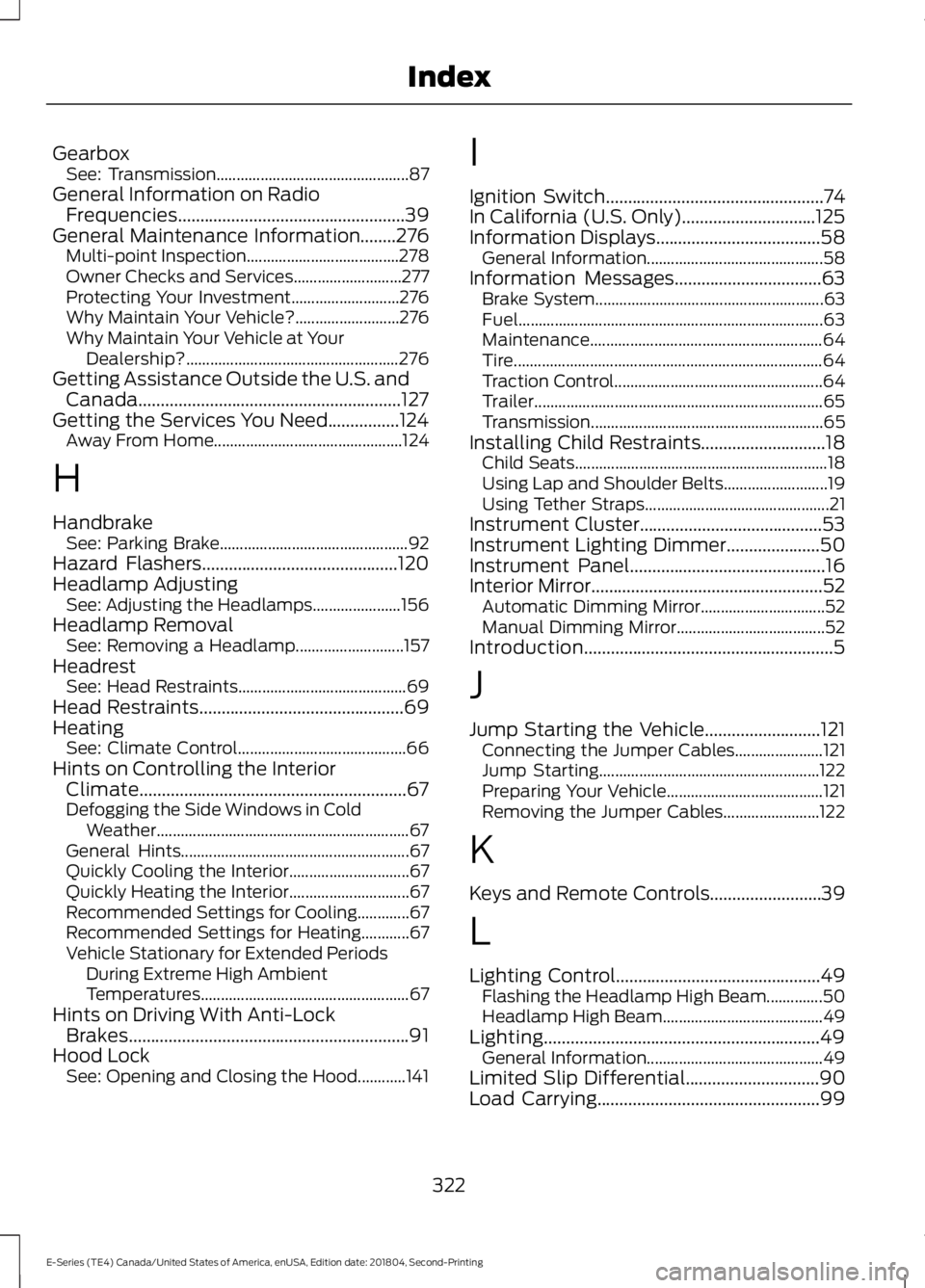
Gearbox
See: Transmission................................................ 87
General Information on Radio Frequencies...................................................39
General Maintenance Information........276 Multi-point Inspection...................................... 278
Owner Checks and Services........................... 277
Protecting Your Investment........................... 276
Why Maintain Your Vehicle?.......................... 276
Why Maintain Your Vehicle at Your Dealership?..................................................... 276
Getting Assistance Outside the U.S. and Canada...........................................................127
Getting the Services You Need
................124
Away From Home............................................... 124
H
Handbrake See: Parking Brake............................................... 92
Hazard Flashers
............................................120
Headlamp Adjusting See: Adjusting the Headlamps...................... 156
Headlamp Removal See: Removing a Headlamp........................... 157
Headrest See: Head Restraints.......................................... 69
Head Restraints
..............................................69
Heating See: Climate Control.......................................... 66
Hints on Controlling the Interior Climate............................................................67
Defogging the Side Windows in Cold Weather............................................................... 67
General Hints......................................................... 67
Quickly Cooling the Interior.............................. 67
Quickly Heating the Interior.............................. 67
Recommended Settings for Cooling.............67
Recommended Settings for Heating............67
Vehicle Stationary for Extended Periods During Extreme High Ambient
Temperatures.................................................... 67
Hints on Driving With Anti-Lock Brakes...............................................................91
Hood Lock See: Opening and Closing the Hood............141 I
Ignition Switch
.................................................74
In California (U.S. Only)..............................125
Information Displays.....................................58 General Information............................................ 58
Information Messages
.................................63
Brake System......................................................... 63
Fuel........................................................................\
.... 63
Maintenance.......................................................... 64
Tire........................................................................\
..... 64
Traction Control.................................................... 64
Trailer........................................................................\
65
Transmission .......................................................... 65
Installing Child Restraints
............................18
Child Seats............................................................... 18
Using Lap and Shoulder Belts.......................... 19
Using Tether Straps.............................................. 21
Instrument Cluster.........................................53
Instrument Lighting Dimmer
.....................50
Instrument Panel............................................16
Interior Mirror....................................................52
Automatic Dimming Mirror............................... 52
Manual Dimming Mirror..................................... 52
Introduction........................................................5
J
Jump Starting the Vehicle..........................121 Connecting the Jumper Cables...................... 121
Jump Starting....................................................... 122
Preparing Your Vehicle....................................... 121
Removing the Jumper Cables........................ 122
K
Keys and Remote Controls.........................39
L
Lighting Control..............................................49 Flashing the Headlamp High Beam..............50
Headlamp High Beam........................................ 49
Lighting..............................................................49 General Information............................................ 49
Limited Slip Differential
..............................90
Load Carrying..................................................99
322
E-Series (TE4) Canada/United States of America, enUSA, Edition date: 201804, Second-Printing Index
Page 328 of 329
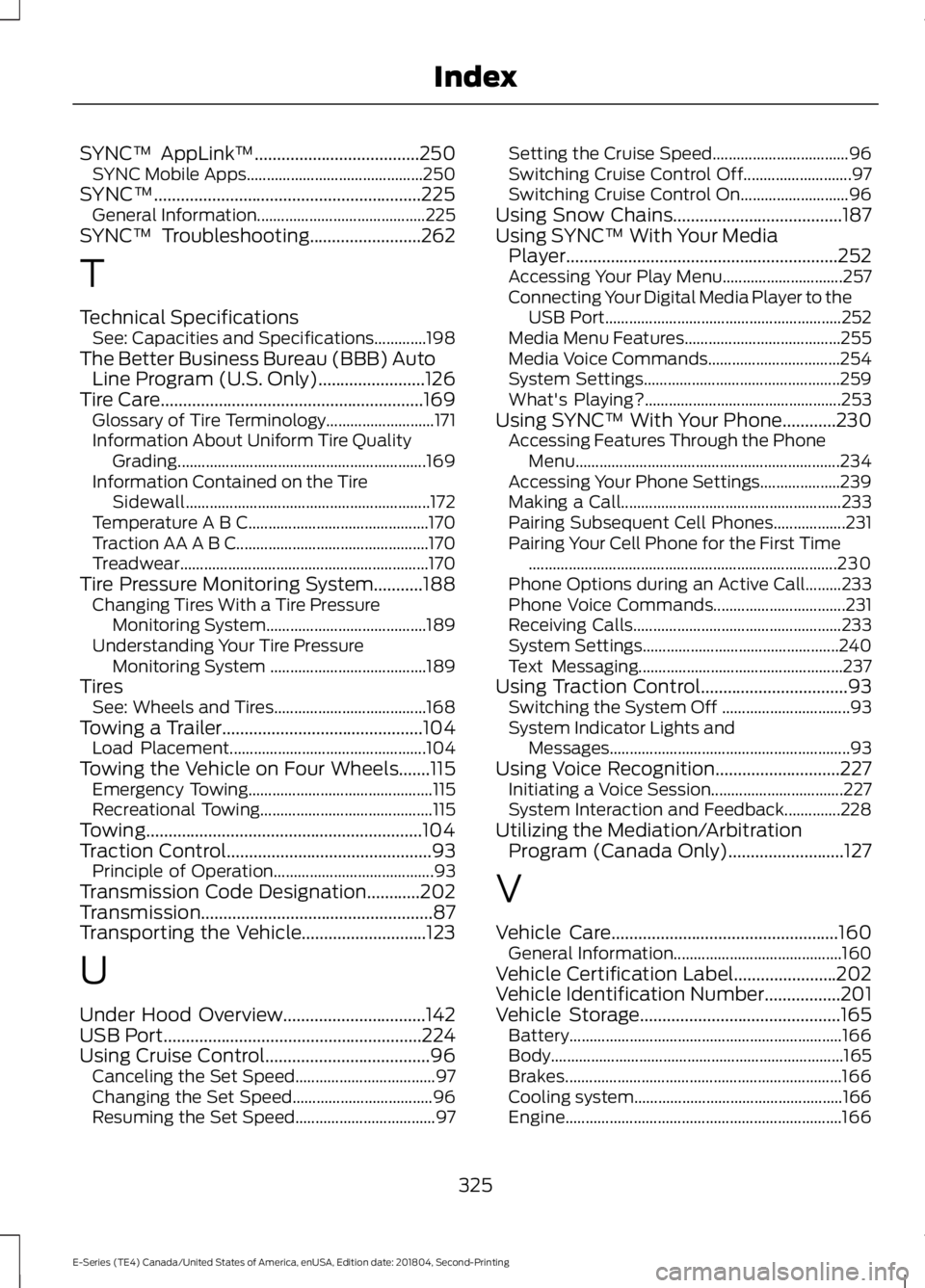
SYNC™ AppLink
™.....................................250
SYNC Mobile Apps............................................ 250
SYNC™............................................................225 General Information.......................................... 225
SYNC™ Troubleshooting
.........................262
T
Technical Specifications See: Capacities and Specifications.............198
The Better Business Bureau (BBB) Auto Line Program (U.S. Only)........................126
Tire Care
...........................................................169
Glossary of Tire Terminology........................... 171
Information About Uniform Tire Quality Grading.............................................................. 169
Information Contained on the Tire Sidewall............................................................. 172
Temperature A B C............................................. 170
Traction AA A B C................................................ 170
Treadwear.............................................................. 170
Tire Pressure Monitoring System...........188 Changing Tires With a Tire Pressure
Monitoring System........................................ 189
Understanding Your Tire Pressure Monitoring System ....................................... 189
Tires See: Wheels and Tires...................................... 168
Towing a Trailer.............................................104 Load Placement................................................. 104
Towing the Vehicle on Four Wheels.......115 Emergency Towing.............................................. 115
Recreational Towing........................................... 115
Towing..............................................................104
Traction Control
..............................................93
Principle of Operation........................................ 93
Transmission Code Designation............202
Transmission....................................................87
Transporting the Vehicle............................123
U
Under Hood Overview................................142
USB Port
..........................................................224
Using Cruise Control.....................................96
Canceling the Set Speed................................... 97
Changing the Set Speed................................... 96
Resuming the Set Speed................................... 97Setting the Cruise Speed..................................
96
Switching Cruise Control Off........................... 97
Switching Cruise Control On........................... 96
Using Snow Chains
......................................187
Using SYNC™ With Your Media Player.............................................................252
Accessing Your Play Menu.............................. 257
Connecting Your Digital Media Player to the USB Port........................................................... 252
Media Menu Features....................................... 255
Media Voice Commands................................. 254
System Settings................................................. 259
What's Playing?................................................. 253
Using SYNC™ With Your Phone
............230
Accessing Features Through the Phone
Menu.................................................................. 234
Accessing Your Phone Settings.................... 239
Making a Call....................................................... 233
Pairing Subsequent Cell Phones.................. 231
Pairing Your Cell Phone for the First Time ........................................................................\
..... 230
Phone Options during an Active Call.........233
Phone Voice Commands................................. 231
Receiving Calls.................................................... 233
System Settings................................................. 240
Text Messaging................................................... 237
Using Traction Control.................................93 Switching the System Off ................................ 93
System Indicator Lights and Messages............................................................ 93
Using Voice Recognition............................227 Initiating a Voice Session................................. 227
System Interaction and Feedback..............228
Utilizing the Mediation/Arbitration Program (Canada Only)..........................127
V
Vehicle Care
...................................................160
General Information.......................................... 160
Vehicle Certification Label
.......................202
Vehicle Identification Number.................201
Vehicle Storage
.............................................165
Battery.................................................................... 166
Body........................................................................\
. 165
Brakes..................................................................... 166
Cooling system.................................................... 166
Engine..................................................................... 166
325
E-Series (TE4) Canada/United States of America, enUSA, Edition date: 201804, Second-Printing Index