horn FORD E-450 2019 Owners Manual
[x] Cancel search | Manufacturer: FORD, Model Year: 2019, Model line: E-450, Model: FORD E-450 2019Pages: 329, PDF Size: 6.24 MB
Page 10 of 329
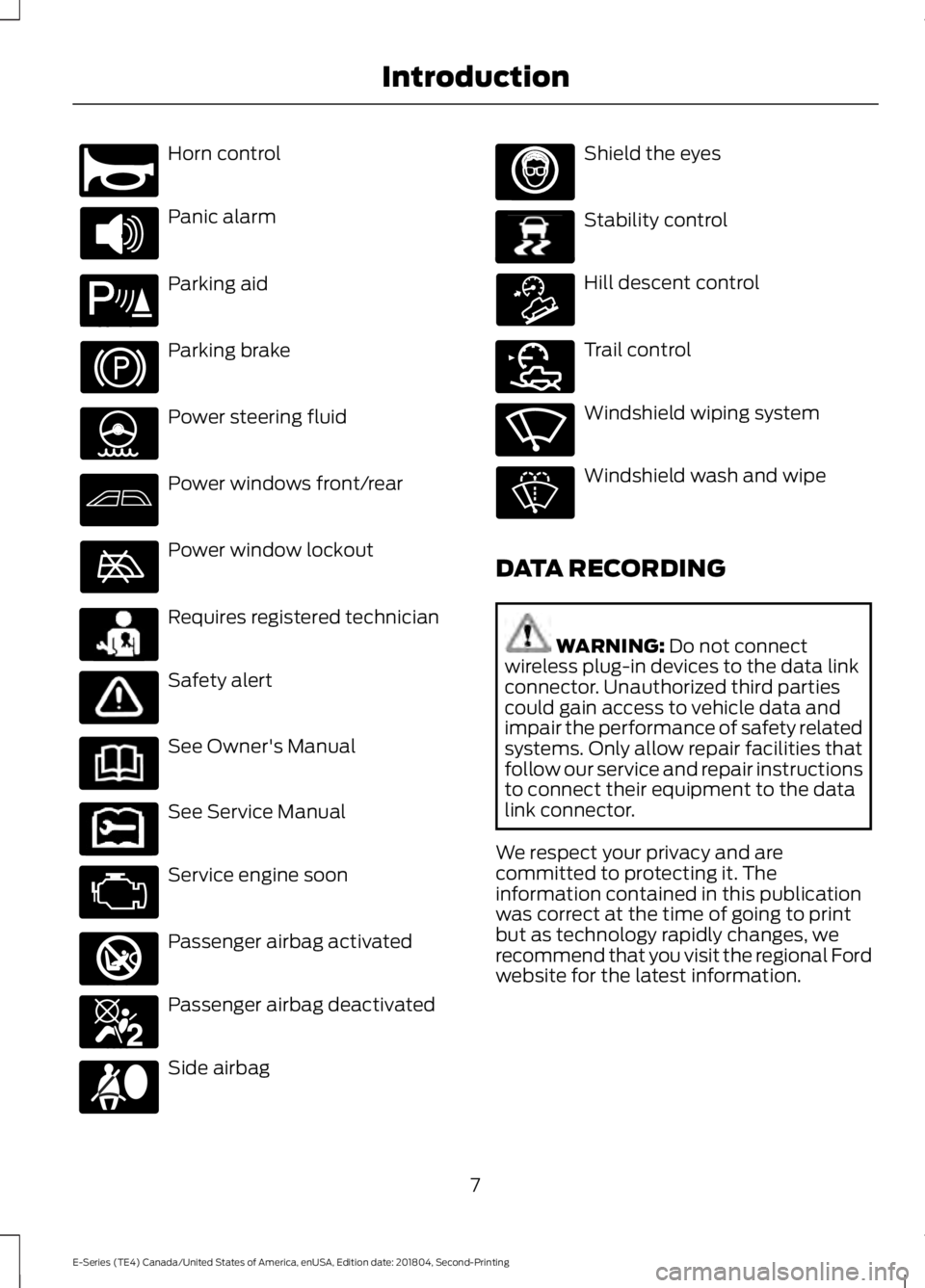
Horn control
Panic alarm
Parking aid
Parking brake
Power steering fluid
Power windows front/rear
Power window lockout
Requires registered technician
Safety alert
See Owner's Manual
See Service Manual
Service engine soon
Passenger airbag activated
Passenger airbag deactivated
Side airbag Shield the eyes
Stability control
Hill descent control
Trail control
Windshield wiping system
Windshield wash and wipe
DATA RECORDING WARNING: Do not connect
wireless plug-in devices to the data link
connector. Unauthorized third parties
could gain access to vehicle data and
impair the performance of safety related
systems. Only allow repair facilities that
follow our service and repair instructions
to connect their equipment to the data
link connector.
We respect your privacy and are
committed to protecting it. The
information contained in this publication
was correct at the time of going to print
but as technology rapidly changes, we
recommend that you visit the regional Ford
website for the latest information.
7
E-Series (TE4) Canada/United States of America, enUSA, Edition date: 201804, Second-Printing IntroductionE270945 E139213 E231159 E231158 E270849 E270850 E167012 E138639 E163957 E272858 E270969
Page 19 of 329
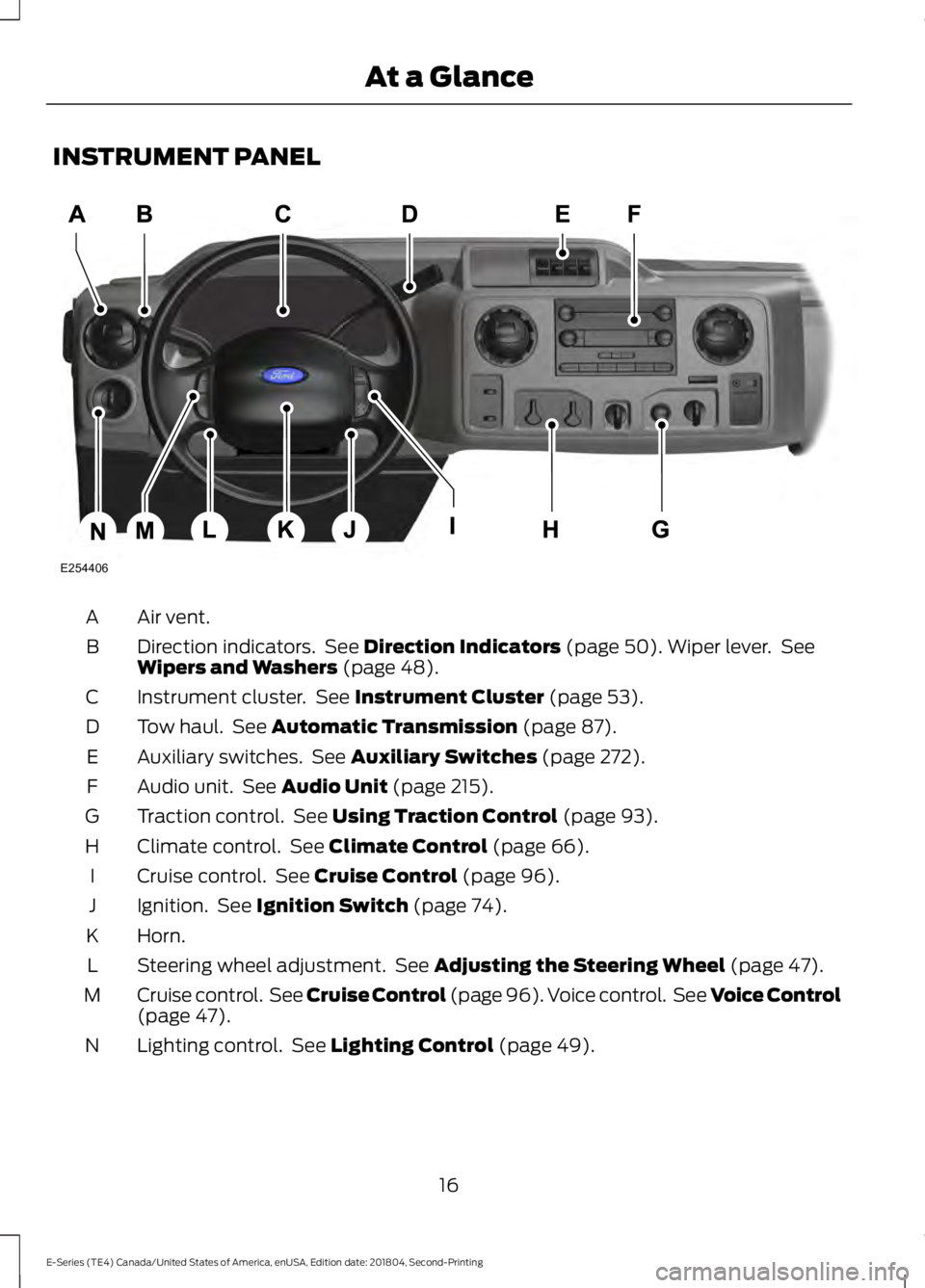
INSTRUMENT PANEL
Air vent.
A
Direction indicators. See Direction Indicators (page 50). Wiper lever. See
Wipers and Washers (page 48).
B
Instrument cluster. See
Instrument Cluster (page 53).
C
Tow haul. See
Automatic Transmission (page 87).
D
Auxiliary switches. See
Auxiliary Switches (page 272).
E
Audio unit. See
Audio Unit (page 215).
F
Traction control. See
Using Traction Control (page 93).
G
Climate control. See
Climate Control (page 66).
H
Cruise control. See
Cruise Control (page 96).
I
Ignition. See
Ignition Switch (page 74).
J
Horn.
K
Steering wheel adjustment. See
Adjusting the Steering Wheel (page 47).
L
Cruise control. See Cruise Control (page 96). Voice control. See Voice Control
(page
47).
M
Lighting control. See
Lighting Control (page 49).
N
16
E-Series (TE4) Canada/United States of America, enUSA, Edition date: 201804, Second-Printing At a GlanceE254406
Page 44 of 329
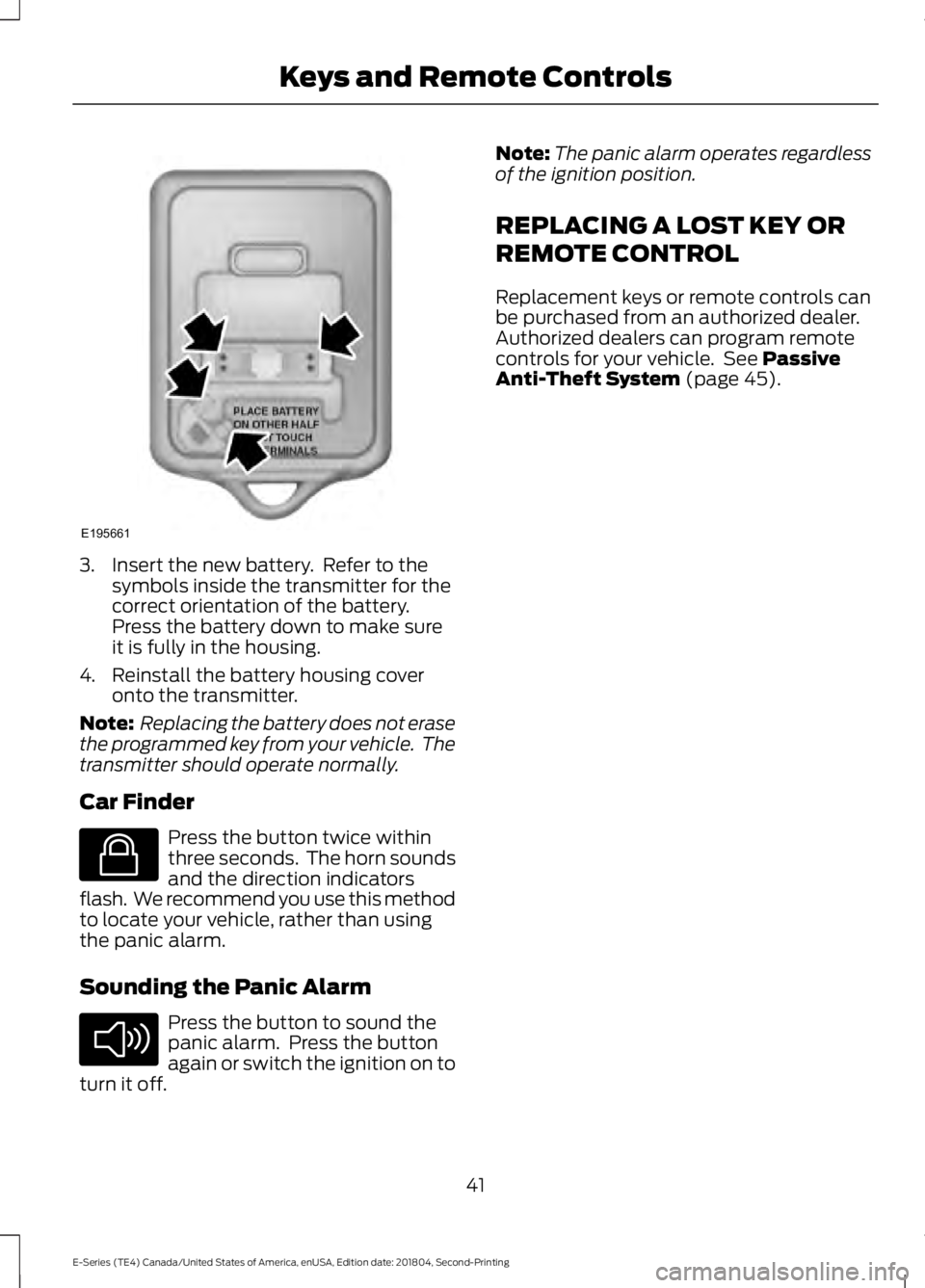
3. Insert the new battery. Refer to the
symbols inside the transmitter for the
correct orientation of the battery.
Press the battery down to make sure
it is fully in the housing.
4. Reinstall the battery housing cover onto the transmitter.
Note: Replacing the battery does not erase
the programmed key from your vehicle. The
transmitter should operate normally.
Car Finder Press the button twice within
three seconds. The horn sounds
and the direction indicators
flash. We recommend you use this method
to locate your vehicle, rather than using
the panic alarm.
Sounding the Panic Alarm Press the button to sound the
panic alarm. Press the button
again or switch the ignition on to
turn it off. Note:
The panic alarm operates regardless
of the ignition position.
REPLACING A LOST KEY OR
REMOTE CONTROL
Replacement keys or remote controls can
be purchased from an authorized dealer.
Authorized dealers can program remote
controls for your vehicle. See Passive
Anti-Theft System (page 45).
41
E-Series (TE4) Canada/United States of America, enUSA, Edition date: 201804, Second-Printing Keys and Remote ControlsE195661 E138623 E138624
Page 45 of 329
LOCKING AND UNLOCKING
You can use the power door lock control
or the remote control to lock and unlock
your vehicle.
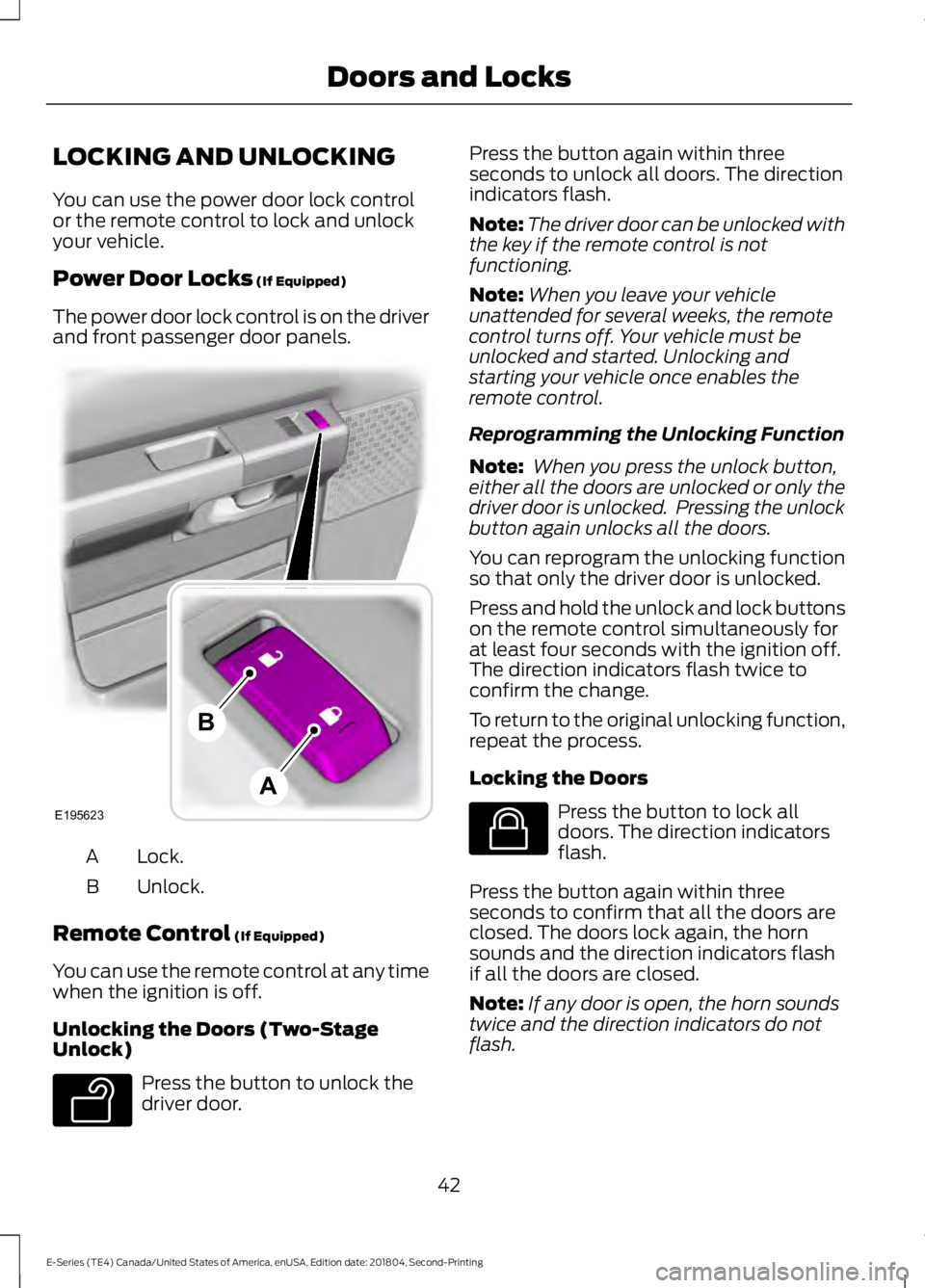
Power Door Locks (If Equipped)
The power door lock control is on the driver
and front passenger door panels. Lock.
A
Unlock.
B
Remote Control
(If Equipped)
You can use the remote control at any time
when the ignition is off.
Unlocking the Doors (Two-Stage
Unlock) Press the button to unlock the
driver door. Press the button again within three
seconds to unlock all doors. The direction
indicators flash.
Note:
The driver door can be unlocked with
the key if the remote control is not
functioning.
Note: When you leave your vehicle
unattended for several weeks, the remote
control turns off. Your vehicle must be
unlocked and started. Unlocking and
starting your vehicle once enables the
remote control.
Reprogramming the Unlocking Function
Note: When you press the unlock button,
either all the doors are unlocked or only the
driver door is unlocked. Pressing the unlock
button again unlocks all the doors.
You can reprogram the unlocking function
so that only the driver door is unlocked.
Press and hold the unlock and lock buttons
on the remote control simultaneously for
at least four seconds with the ignition off.
The direction indicators flash twice to
confirm the change.
To return to the original unlocking function,
repeat the process.
Locking the Doors Press the button to lock all
doors. The direction indicators
flash.
Press the button again within three
seconds to confirm that all the doors are
closed. The doors lock again, the horn
sounds and the direction indicators flash
if all the doors are closed.
Note: If any door is open, the horn sounds
twice and the direction indicators do not
flash.
42
E-Series (TE4) Canada/United States of America, enUSA, Edition date: 201804, Second-Printing Doors and LocksE195623
A
B E138629 E138623
Page 46 of 329
Autolock Feature
The autolock feature locks all the doors
when:
•
All doors are closed.
• The ignition is on.
• You shift into any gear putting your
vehicle in motion.
• The ignition is on, all the doors are
closed and your vehicle has been in
motion at a speed greater than 12 mph
(20 km/h).
Autounlock Feature
The autounlock feature unlocks all the
doors when:
• Your vehicle comes to a stop and you
switch the ignition off or to accessory.
• You open the driver door within 10
minutes of switching the ignition off or
to accessory.
Note: If you electronically lock your vehicle
after you switch the ignition off with the
driver door closed, the doors do not
autounlock.
Enabling or Disabling Autolock and
Autounlock
You can enable or disable the autolock and
autounlock features independently of each
other.
To enable or disable autolock, do the
following:
1. Switch the ignition on.
2. Press the power door unlock control three times.
3. Switch the ignition off.
4. Press the power door unlock control three times.
5. Switch the ignition on. The horn sounds
indicating your vehicle is in
programming mode. 6. Press the power door unlock control
and within five seconds, press the
power door lock control. The horn
sounds once if disabled or twice if
enabled.
7. Switch the ignition off. The horn sounds
indicating programming is complete.
Note: You can also switch this feature on
or off using the information display. See
Information Displays
(page 58).
To enable or disable autounlock, do the
following:
1. Switch the ignition on.
2. Press the power door unlock control three times.
3. Switch the ignition off.
4. Press the power door unlock control three times.
5. Switch the ignition on. The horn sounds
indicating your vehicle is in
programming mode.
6. Press the power door lock control and within five seconds, press the power
door unlock control. The horn sounds
once if disabled or twice if enabled.
7. Switch the ignition off. The horn sounds
indicating programming is complete.
Note: You can also switch this feature on
or off using the information display. See
Information Displays
(page 58).
Illuminated Entry
The interior lamps and some exterior
lamps illuminate when you unlock the
doors with the remote control.
The lamps turn off if:
• The ignition is on.
• You press the remote control lock
button.
• 25 seconds have elapsed.
43
E-Series (TE4) Canada/United States of America, enUSA, Edition date: 201804, Second-Printing Doors and Locks
Page 120 of 329
•
Do not warm up your vehicle on cold
mornings.
• Reduce the use of air conditioning and
heat.
• Avoid using speed control in hilly
terrain.
• Do not rest your foot on the brake
pedal while driving.
• Avoid carrying unnecessary weight.
• Avoid adding particular accessories to
your vehicle (e.g. bug deflectors,
rollbars/light bars, running boards, ski
racks).
• Avoid driving with the wheels out of
alignment.
DRIVING THROUGH WATER WARNING: Do not drive through
flowing or deep water as you may lose
control of your vehicle.
Note: Driving through standing water can
cause vehicle damage.
Note: Engine damage can occur if water
enters the air filter.
Before driving through standing water,
check the depth. Never drive through water
that is higher than the bottom of the wheel
hubs. When driving through standing water, drive
very slowly and do not stop your vehicle.
Your brake performance and traction may
be limited. After driving through water and
as soon as it is safe to do so:
•
Lightly press the brake pedal to dry the
brakes and to check that they work.
• Check that the horn works.
• Check that the exterior lights work.
• Turn the steering wheel to check that
the steering power assist works.
FLOOR MATS WARNING:
Use a floor mat
designed to fit the footwell of your
vehicle that does not obstruct the pedal
area. Failure to follow this instruction
could result in the loss of control of your
vehicle, personal injury or death. WARNING:
Pedals that cannot
move freely can cause loss of vehicle
control and increase the risk of serious
personal injury.
117
E-Series (TE4) Canada/United States of America, enUSA, Edition date: 201804, Second-Printing Driving HintsE176913
Page 135 of 329
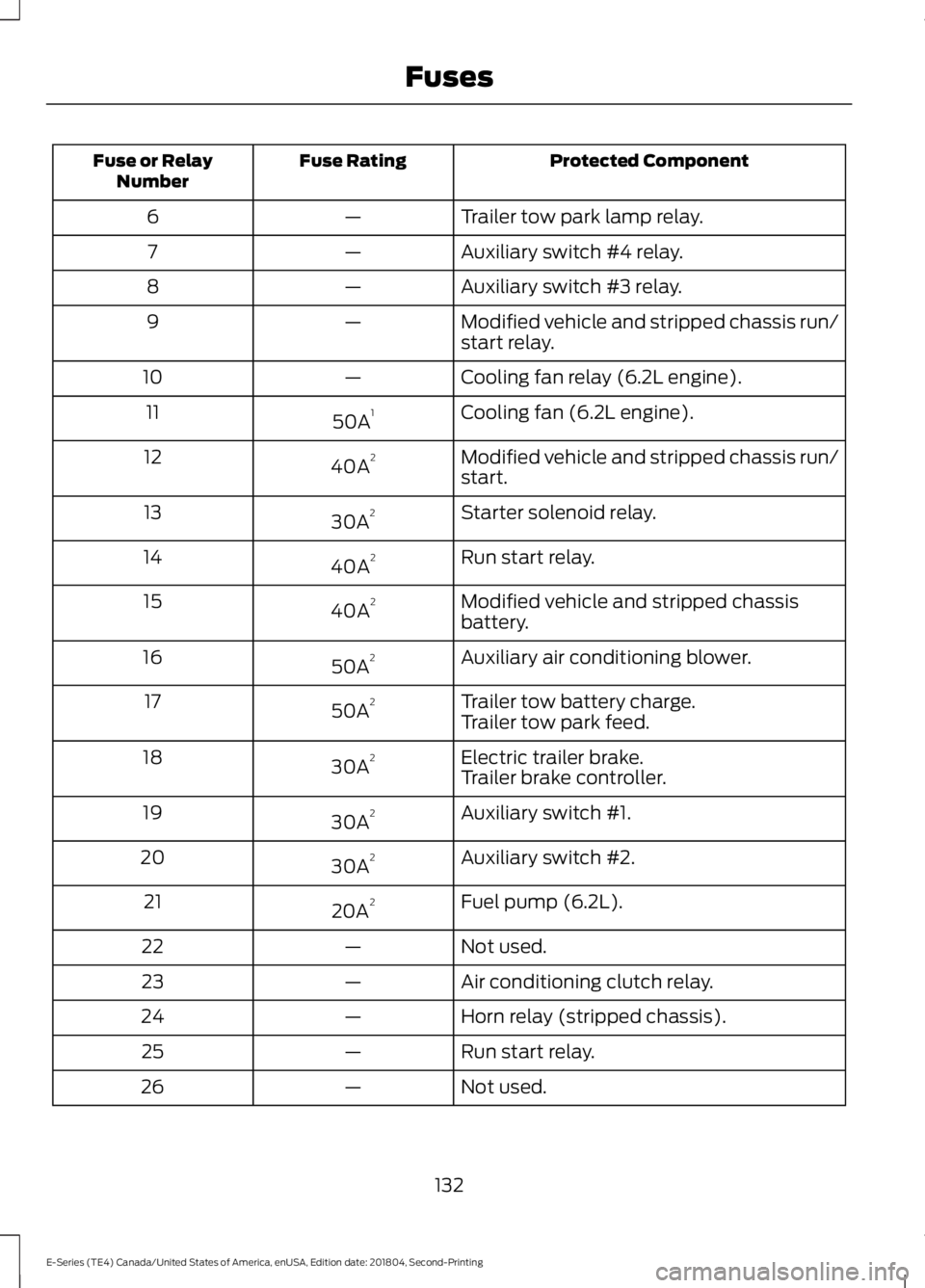
Protected Component
Fuse Rating
Fuse or Relay
Number
Trailer tow park lamp relay.
—
6
Auxiliary switch #4 relay.
—
7
Auxiliary switch #3 relay.
—
8
Modified vehicle and stripped chassis run/
start relay.
—
9
Cooling fan relay (6.2L engine).
—
10
Cooling fan (6.2L engine).
50A 1
11
Modified vehicle and stripped chassis run/
start.
40A 2
12
Starter solenoid relay.
30A 2
13
Run start relay.
40A 2
14
Modified vehicle and stripped chassis
battery.
40A 2
15
Auxiliary air conditioning blower.
50A 2
16
Trailer tow battery charge.
50A 2
17
Trailer tow park feed.
Electric trailer brake.
30A 2
18
Trailer brake controller.
Auxiliary switch #1.
30A 2
19
Auxiliary switch #2.
30A 2
20
Fuel pump (6.2L).
20A 2
21
Not used.
—
22
Air conditioning clutch relay.
—
23
Horn relay (stripped chassis).
—
24
Run start relay.
—
25
Not used.
—
26
132
E-Series (TE4) Canada/United States of America, enUSA, Edition date: 201804, Second-Printing Fuses
Page 136 of 329
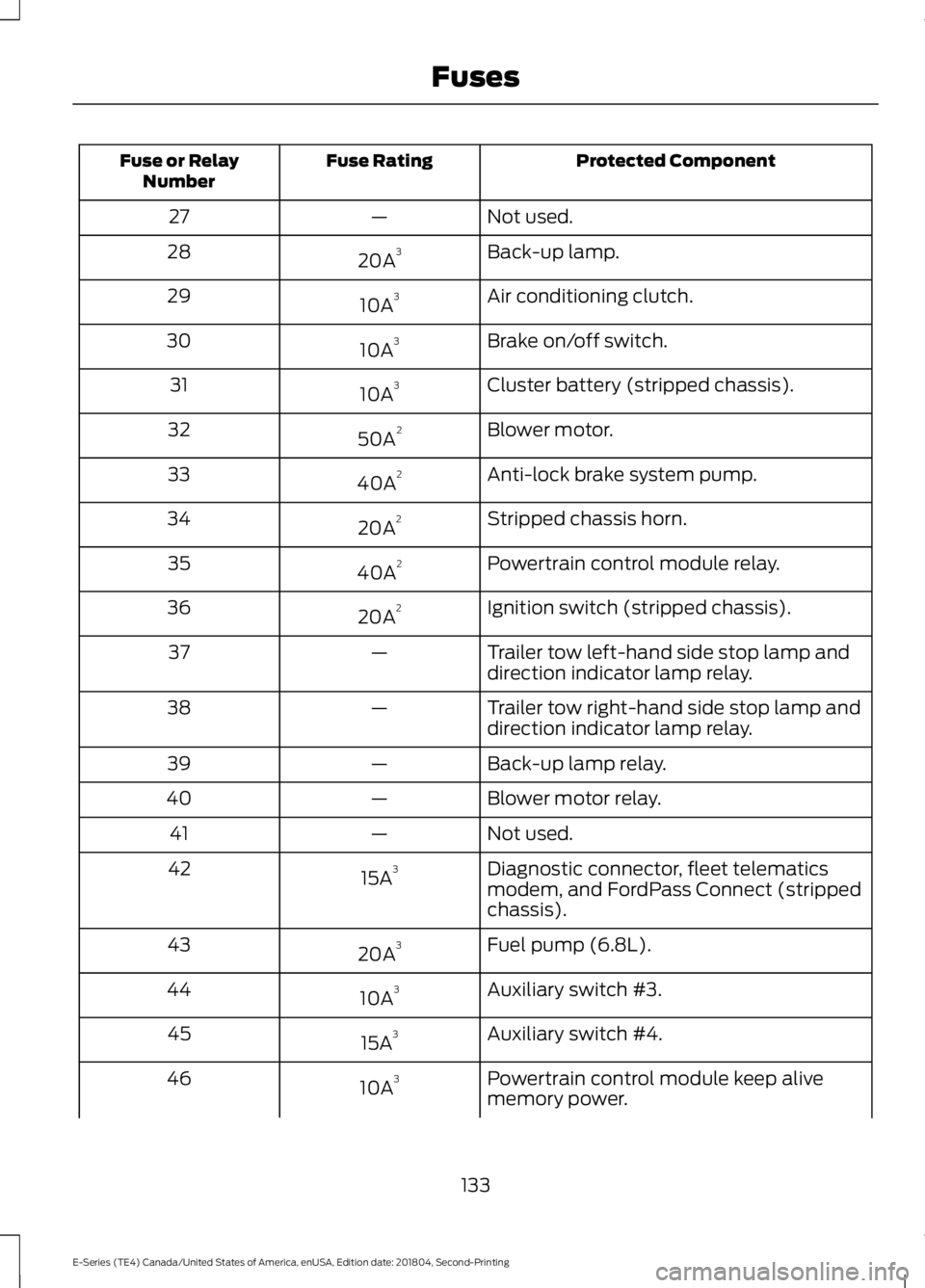
Protected Component
Fuse Rating
Fuse or Relay
Number
Not used.
—
27
Back-up lamp.
20A 3
28
Air conditioning clutch.
10A 3
29
Brake on/off switch.
10A 3
30
Cluster battery (stripped chassis).
10A 3
31
Blower motor.
50A 2
32
Anti-lock brake system pump.
40A 2
33
Stripped chassis horn.
20A 2
34
Powertrain control module relay.
40A 2
35
Ignition switch (stripped chassis).
20A 2
36
Trailer tow left-hand side stop lamp and
direction indicator lamp relay.
—
37
Trailer tow right-hand side stop lamp and
direction indicator lamp relay.
—
38
Back-up lamp relay.
—
39
Blower motor relay.
—
40
Not used.
—
41
Diagnostic connector, fleet telematics
modem, and FordPass Connect (stripped
chassis).
15A
3
42
Fuel pump (6.8L).
20A 3
43
Auxiliary switch #3.
10A 3
44
Auxiliary switch #4.
15A 3
45
Powertrain control module keep alive
memory power.
10A 3
46
133
E-Series (TE4) Canada/United States of America, enUSA, Edition date: 201804, Second-Printing Fuses
Page 140 of 329
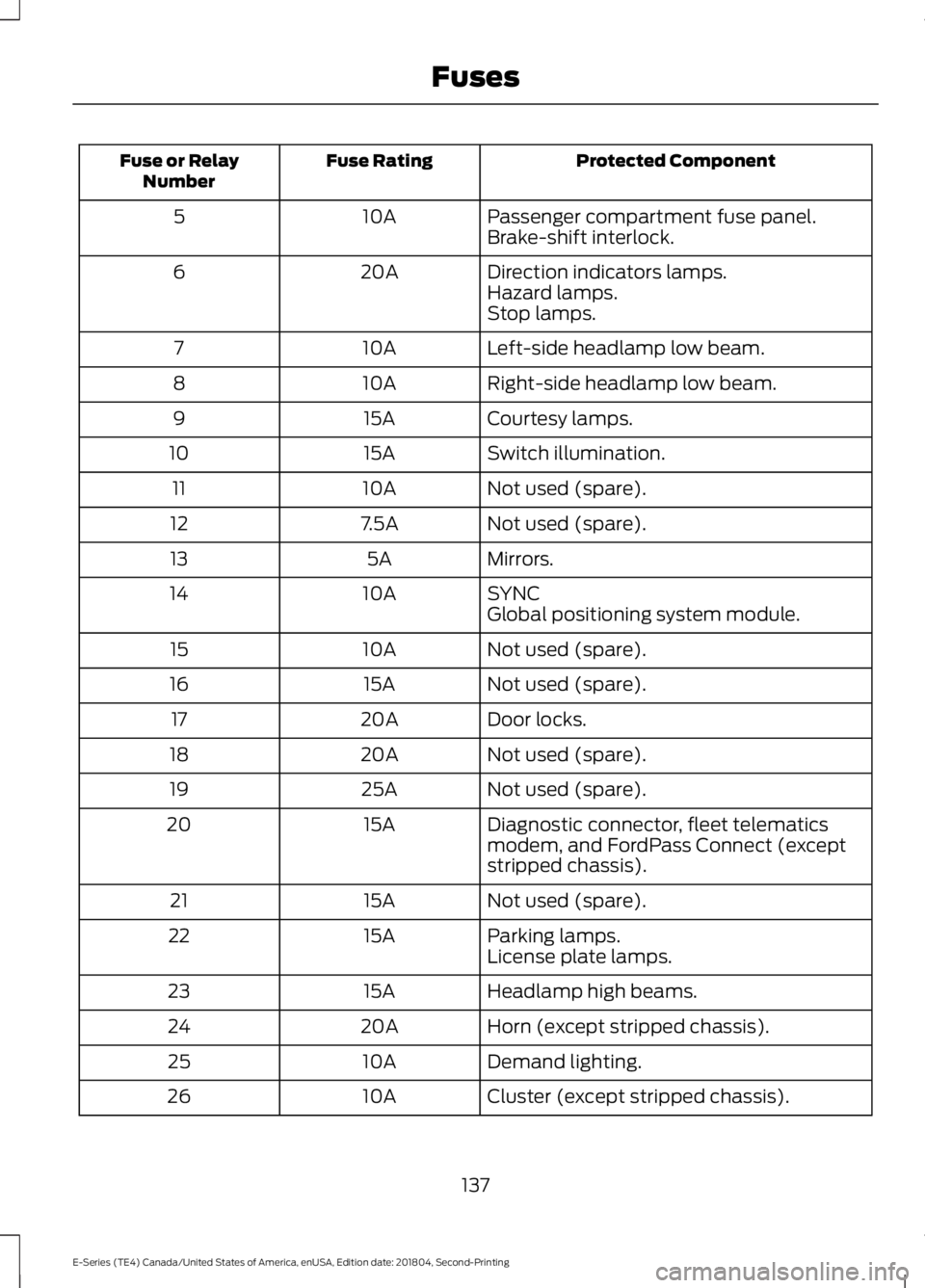
Protected Component
Fuse Rating
Fuse or Relay
Number
Passenger compartment fuse panel.
10A
5
Brake-shift interlock.
Direction indicators lamps.
20A
6
Hazard lamps.
Stop lamps.
Left-side headlamp low beam.
10A
7
Right-side headlamp low beam.
10A
8
Courtesy lamps.
15A
9
Switch illumination.
15A
10
Not used (spare).
10A
11
Not used (spare).
7.5A
12
Mirrors.
5A
13
SYNC
10A
14
Global positioning system module.
Not used (spare).
10A
15
Not used (spare).
15A
16
Door locks.
20A
17
Not used (spare).
20A
18
Not used (spare).
25A
19
Diagnostic connector, fleet telematics
modem, and FordPass Connect (except
stripped chassis).
15A
20
Not used (spare).
15A
21
Parking lamps.
15A
22
License plate lamps.
Headlamp high beams.
15A
23
Horn (except stripped chassis).
20A
24
Demand lighting.
10A
25
Cluster (except stripped chassis).
10A
26
137
E-Series (TE4) Canada/United States of America, enUSA, Edition date: 201804, Second-Printing Fuses
Page 194 of 329
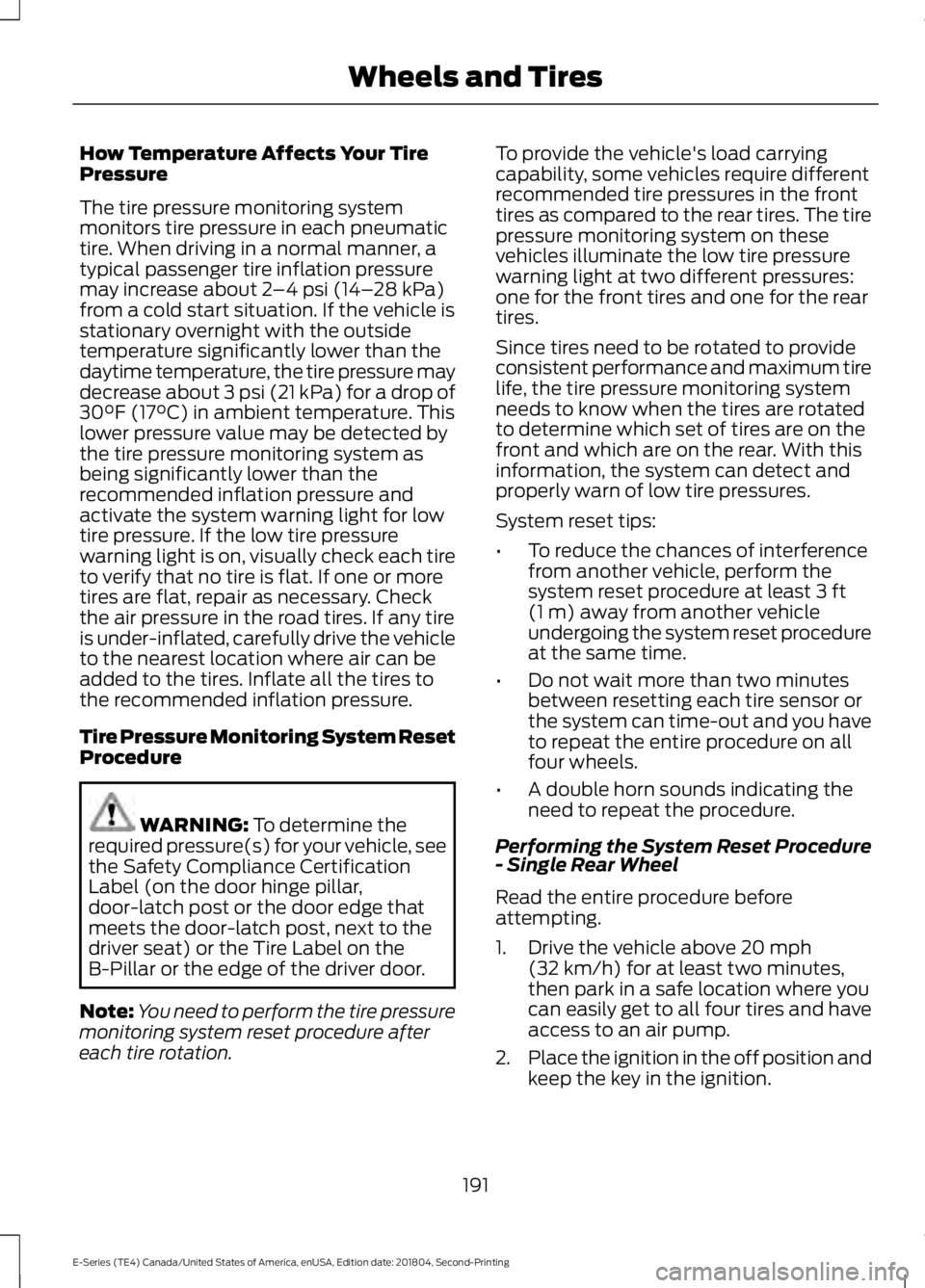
How Temperature Affects Your Tire
Pressure
The tire pressure monitoring system
monitors tire pressure in each pneumatic
tire. When driving in a normal manner, a
typical passenger tire inflation pressure
may increase about 2
–4 psi (14– 28 kPa)
from a cold start situation. If the vehicle is
stationary overnight with the outside
temperature significantly lower than the
daytime temperature, the tire pressure may
decrease about 3 psi (21 kPa) for a drop of
30°F (17°C) in ambient temperature. This
lower pressure value may be detected by
the tire pressure monitoring system as
being significantly lower than the
recommended inflation pressure and
activate the system warning light for low
tire pressure. If the low tire pressure
warning light is on, visually check each tire
to verify that no tire is flat. If one or more
tires are flat, repair as necessary. Check
the air pressure in the road tires. If any tire
is under-inflated, carefully drive the vehicle
to the nearest location where air can be
added to the tires. Inflate all the tires to
the recommended inflation pressure.
Tire Pressure Monitoring System Reset
Procedure WARNING:
To determine the
required pressure(s) for your vehicle, see
the Safety Compliance Certification
Label (on the door hinge pillar,
door-latch post or the door edge that
meets the door-latch post, next to the
driver seat) or the Tire Label on the
B-Pillar or the edge of the driver door.
Note: You need to perform the tire pressure
monitoring system reset procedure after
each tire rotation. To provide the vehicle's load carrying
capability, some vehicles require different
recommended tire pressures in the front
tires as compared to the rear tires. The tire
pressure monitoring system on these
vehicles illuminate the low tire pressure
warning light at two different pressures:
one for the front tires and one for the rear
tires.
Since tires need to be rotated to provide
consistent performance and maximum tire
life, the tire pressure monitoring system
needs to know when the tires are rotated
to determine which set of tires are on the
front and which are on the rear. With this
information, the system can detect and
properly warn of low tire pressures.
System reset tips:
•
To reduce the chances of interference
from another vehicle, perform the
system reset procedure at least
3 ft
(1 m) away from another vehicle
undergoing the system reset procedure
at the same time.
• Do not wait more than two minutes
between resetting each tire sensor or
the system can time-out and you have
to repeat the entire procedure on all
four wheels.
• A double horn sounds indicating the
need to repeat the procedure.
Performing the System Reset Procedure
- Single Rear Wheel
Read the entire procedure before
attempting.
1. Drive the vehicle above
20 mph
(32 km/h) for at least two minutes,
then park in a safe location where you
can easily get to all four tires and have
access to an air pump.
2. Place the ignition in the off position and
keep the key in the ignition.
191
E-Series (TE4) Canada/United States of America, enUSA, Edition date: 201804, Second-Printing Wheels and Tires