reset FORD E-450 2021 Owner's Manual
[x] Cancel search | Manufacturer: FORD, Model Year: 2021, Model line: E-450, Model: FORD E-450 2021Pages: 301, PDF Size: 3.83 MB
Page 240 of 301
Selecting a Menu Option
Selecting the Radio
Press the button to select radio
mode.
Press the button again to display
the available radio sources. Repeatedly
press the button, or rotate the right-hand
rotary control to scroll through the
available radio sources.
Setting a Memory Preset
Tune to a station then press and hold one
of the numbered memory preset buttons.
The audio mutes briefly while the system
saves the station and returns once the
station is stored. Switching the Audio Unit On and
Off Press and release the button.
Using a Cell Phone
Press the button to either
answer an incoming phone call
or to make a phone call.
Press and hold the button to end
a phone call.
Using Seek, Fast Forward and
Reverse Press and release the button to
skip to the next track.
Press and hold the button to fast
forward through the track. Press and release the button to
return to the beginning of a track.
Repeatedly press the button to
return to previous tracks.
Press and hold the button to rewind.
In radio mode, select a frequency band and
press and release either button. The
system stops at the first station it finds in
that direction.
237
E-Series (TE4) Canada/United States of America, enUSA, Edition date: 201910, First-Printing Audio System (If Equipped)E260781 E260686 E265040
Page 241 of 301
In satellite radio mode, press and release
to select the next or previous satellite radio
station. If you select a specific category,
such as jazz, rock or news, press to find the
next or previous station in the category you
select.
DIGITAL RADIO
Note:
HD Radio broadcasts are not
available in all markets.
HD Radio technology is the digital
evolution of analog AM/FM radio. Your
system has a special receiver that allows
it to receive digital broadcasts, where
available, in addition to the analog
broadcasts, it already receives. Digital
broadcasts provide a better sound quality
than analog broadcasts with free,
crystal-clear audio and no static or
distortion. For more information, and a
guide to available stations and
programming, please visit
www.hdradio.com.
When HD Radio is on and you tune to a
station broadcasting HD Radio technology,
you may notice the HD Radio logo on your
screen. When this logo is available, you
may also see Title and Artist fields
on-screen. The multicast indicator appears in FM
mode, only, if the current station is
broadcasting multiple digital broadcasts.
The highlighted numbers signify available
digital channels where new or different
content is available. HD1 signifies the main
programming status and is available in
analog and digital broadcasts. Other
multicast stations, HD2 through HD7, are
only available digitally.
When HD Radio broadcasts are active, you
can access the following functions:
•
Memory presets allow you to save an
active channel as a memory preset.
Touch and hold a memory preset slot
until the sound returns. There is a brief
mute while the radio saves the station.
Sound returns when finished. When
switching to an HD2 or HD3 memory
preset, the sound mutes before the
digital audio plays, because the system
has to reacquire the digital signal.
Note: As with any saved radio station, you
cannot access the saved station if your
vehicle is outside the station ’s reception
area.
238
E-Series (TE4) Canada/United States of America, enUSA, Edition date: 201910, First-Printing Audio System
(If Equipped)
Page 243 of 301
Potential station issues
Action
Cause
Issues
No action required. This is a
broadcast issue.
This is poor time alignment
by the radio broadcaster.
Echo, stutter, skip or repeat
in audio.
Increase or decrease in
audio volume.
No action required. The
reception issue may clear up
as you continue to drive.
The radio is shifting between
analog and digital audio.
Sound fading or blending in
and out.
No action required. This is
normal behavior. Wait until
the audio is available.
The digital multicast is not
available until the HD Radio
broadcast is decoded. Once
decoded, the audio is avail-
able.
There is an audio mute
delay when selecting HD2 or
HD3, multicast preset or
Direct Tune.
No action required. The
station is not available in
your current location.
The previously stored
multicast preset or direct
tune is not available in your
current reception area.
Cannot access HD2 or HD3
multicast channel when
recalling a preset or from a
direct tune.
Fill out the station issue
form at website listed
below.1
Data service issue by the
radio broadcaster.
Text information does not
match currently playing
audio.
Fill out the station issue
form at website listed
below.1
Data service issue by the
radio broadcaster.
There is no text information
shown for currently selected
frequency.
1 http://hdradio.com/stations/feedback
HD Radio Technology manufactured under
license from iBiquity Digital Corporation
and foreign patents. HD Radio and the HD
and HD Radio logos are proprietary
trademarks of DTS Ford Motor Company
and DTS are not responsible for the
content sent using HD Radio technology.
Content may be changed, added or deleted
at any time at the station owner's
discretion. CONNECTING A BLUETOOTH
DEVICE
Pairing a Device Press the button.
Select Bluetooth and follow the
instructions on the screen.
240
E-Series (TE4) Canada/United States of America, enUSA, Edition date: 201910, First-Printing Audio System
(If Equipped)E142607
Page 245 of 301
SiriusXM satellite radio is a
subscription-based satellite radio service
that broadcasts a variety of music, sports,
news, weather, traffic and entertainment
programming. Your factory-installed
SiriusXM satellite radio system includes
hardware and a limited subscription term,
which begins on the date of sale or lease
of your vehicle. See an authorized dealer
for availability.
For more information on extended
subscription terms (a service fee is
required), the online media player and a
complete list of SiriusXM satellite radio
channels, and other features, please visit
www.siriusxm.com in the United States,
www.siriusxm.ca in Canada, or call
SiriusXM at 1-888-539-7474.
Satellite Radio Electronic Serial
Number (ESN)
You need your ESN to activate, modify or
track your satellite radio account. When in
satellite radio mode, tune to channel 0.
Troubleshooting Action
Condition
Message
No action required. This
message should disappear
shortly.
Radio requires more than
two seconds to produce
audio for the selected
channel.
Acquiring…
If this message does not
clear shortly, or with an igni-
tion key cycle, your receiver
may have a fault. See an
authorized dealer for service.
There is an internal module
or system failure present.
Satellite antenna fault
SIRIUS system failure
Tune to another channel or
choose another preset.
The channel is no longer
available.
Invalid Channel
Contact SiriusXM at 1-888-
539-7474 to subscribe to
the channel, or tune to
another channel.
Your subscription does not
include this channel.
Unsubscribed Channel
The signal is blocked. When
you move into an open area,
the signal should return.
The signal is lost from the
SiriusXM satellite or Siri-
usXM tower to your vehicle
antenna.
No Signal
No action required. The
process may take up to
three minutes.
Update of channel
programming in progress.
Updating…
242
E-Series (TE4) Canada/United States of America, enUSA, Edition date: 201910, First-Printing Audio System (If Equipped)
Page 259 of 301
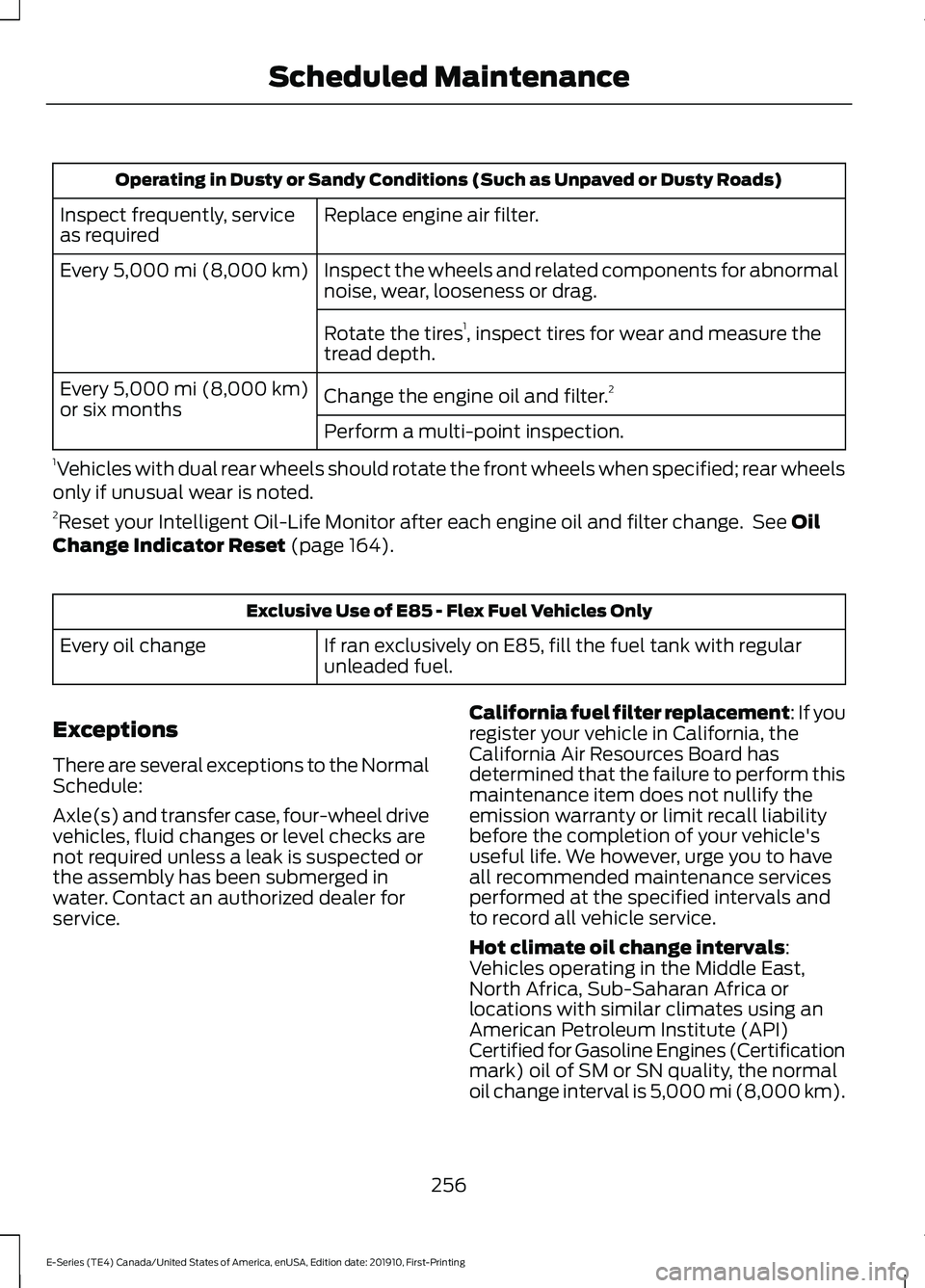
Operating in Dusty or Sandy Conditions (Such as Unpaved or Dusty Roads)
Replace engine air filter.
Inspect frequently, service
as required
Inspect the wheels and related components for abnormal
noise, wear, looseness or drag.
Every 5,000 mi (8,000 km)
Rotate the tires1
, inspect tires for wear and measure the
tread depth.
Change the engine oil and filter. 2
Every
5,000 mi (8,000 km)
or six months
Perform a multi-point inspection.
1 Vehicles with dual rear wheels should rotate the front wheels when specified; rear wheels
only if unusual wear is noted.
2 Reset your Intelligent Oil-Life Monitor after each engine oil and filter change. See
Oil
Change Indicator Reset (page 164). Exclusive Use of E85 - Flex Fuel Vehicles Only
If ran exclusively on E85, fill the fuel tank with regular
unleaded fuel.
Every oil change
Exceptions
There are several exceptions to the Normal
Schedule:
Axle(s) and transfer case, four-wheel drive
vehicles, fluid changes or level checks are
not required unless a leak is suspected or
the assembly has been submerged in
water. Contact an authorized dealer for
service. California fuel filter replacement: If you
register your vehicle in California, the
California Air Resources Board has
determined that the failure to perform this
maintenance item does not nullify the
emission warranty or limit recall liability
before the completion of your vehicle's
useful life. We however, urge you to have
all recommended maintenance services
performed at the specified intervals and
to record all vehicle service.
Hot climate oil change intervals
:
Vehicles operating in the Middle East,
North Africa, Sub-Saharan Africa or
locations with similar climates using an
American Petroleum Institute (API)
Certified for Gasoline Engines (Certification
mark) oil of SM or SN quality, the normal
oil change interval is 5,000 mi (8,000 km)
.
256
E-Series (TE4) Canada/United States of America, enUSA, Edition date: 201910, First-Printing Scheduled Maintenance
Page 294 of 301
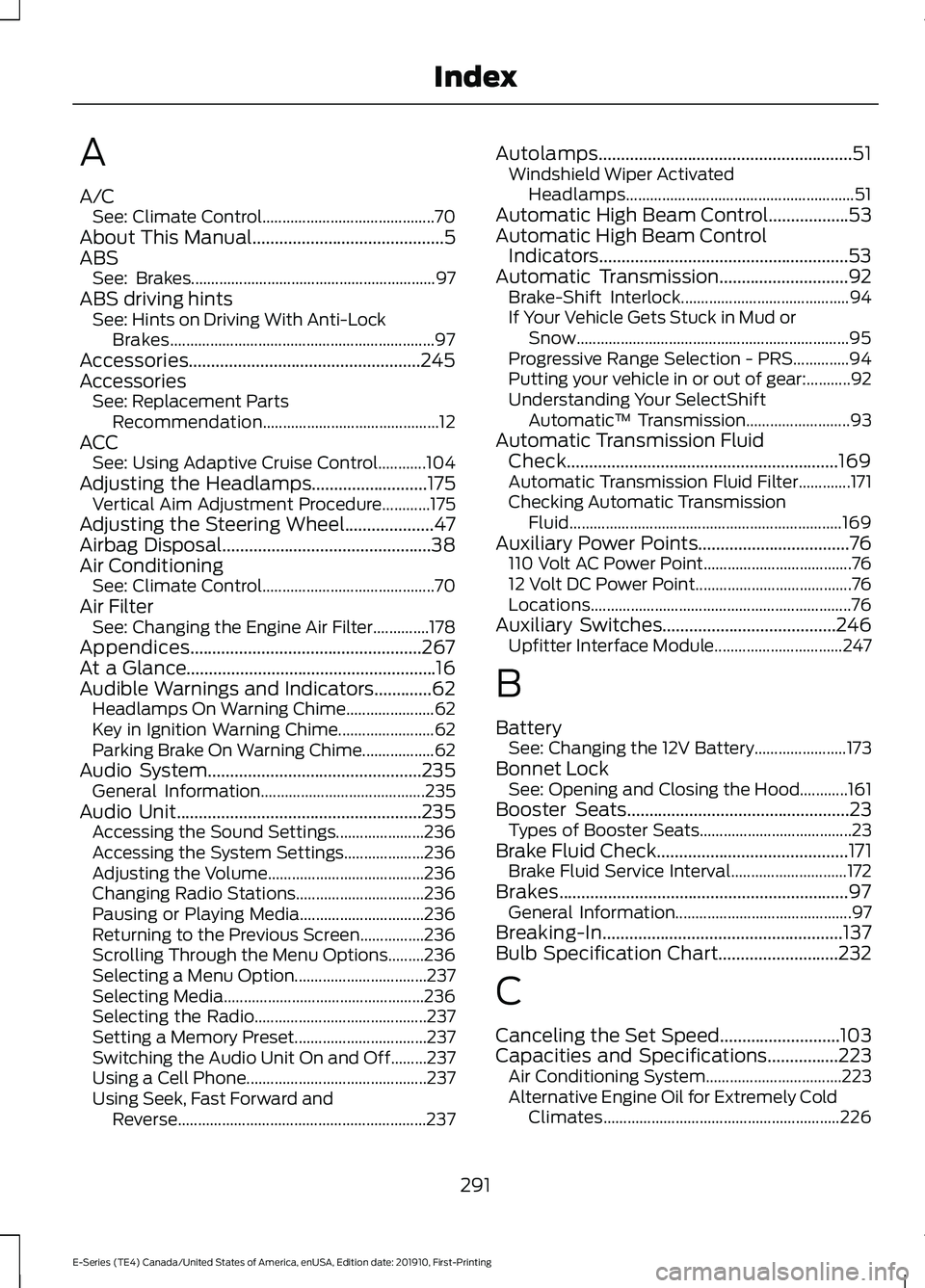
A
A/C
See: Climate Control........................................... 70
About This Manual...........................................5
ABS See: Brakes............................................................. 97
ABS driving hints See: Hints on Driving With Anti-Lock
Brakes.................................................................. 97
Accessories....................................................245
Accessories See: Replacement Parts
Recommendation............................................ 12
ACC See: Using Adaptive Cruise Control............104
Adjusting the Headlamps..........................175 Vertical Aim Adjustment Procedure............175
Adjusting the Steering Wheel....................47
Airbag Disposal...............................................38
Air Conditioning See: Climate Control........................................... 70
Air Filter See: Changing the Engine Air Filter..............178
Appendices....................................................267
At a Glance........................................................16
Audible Warnings and Indicators.............62 Headlamps On Warning Chime...................... 62
Key in Ignition Warning Chime........................ 62
Parking Brake On Warning Chime.................. 62
Audio System
................................................235
General Information......................................... 235
Audio Unit.......................................................235 Accessing the Sound Settings...................... 236
Accessing the System Settings.................... 236
Adjusting the Volume....................................... 236
Changing Radio Stations................................ 236
Pausing or Playing Media............................... 236
Returning to the Previous Screen................236
Scrolling Through the Menu Options.........236
Selecting a Menu Option................................. 237
Selecting Media.................................................. 236
Selecting the Radio........................................... 237
Setting a Memory Preset................................. 237
Switching the Audio Unit On and Off.........237
Using a Cell Phone............................................. 237
Using Seek, Fast Forward and Reverse.............................................................. 237Autolamps.........................................................51
Windshield Wiper Activated
Headlamps......................................................... 51
Automatic High Beam Control
..................53
Automatic High Beam Control Indicators........................................................53
Automatic Transmission
.............................92
Brake-Shift Interlock.......................................... 94
If Your Vehicle Gets Stuck in Mud or Snow.................................................................... 95
Progressive Range Selection - PRS..............94
Putting your vehicle in or out of gear:...........92
Understanding Your SelectShift Automatic ™ Transmission.......................... 93
Automatic Transmission Fluid Check.............................................................169
Automatic Transmission Fluid Filter.............171
Checking Automatic Transmission Fluid.................................................................... 169
Auxiliary Power Points
..................................76
110 Volt AC Power Point..................................... 76
12 Volt DC Power Point....................................... 76
Locations................................................................. 76
Auxiliary Switches.......................................246 Upfitter Interface Module................................ 247
B
Battery See: Changing the 12V Battery....................... 173
Bonnet Lock See: Opening and Closing the Hood............161
Booster Seats
..................................................23
Types of Booster Seats...................................... 23
Brake Fluid Check...........................................171 Brake Fluid Service Interval............................. 172
Brakes.................................................................97 General Information............................................ 97
Breaking-In......................................................137
Bulb Specification Chart...........................232
C
Canceling the Set Speed...........................103
Capacities and Specifications................223 Air Conditioning System.................................. 223
Alternative Engine Oil for Extremely Cold Climates........................................................... 226
291
E-Series (TE4) Canada/United States of America, enUSA, Edition date: 201910, First-Printing Index
Page 298 of 301
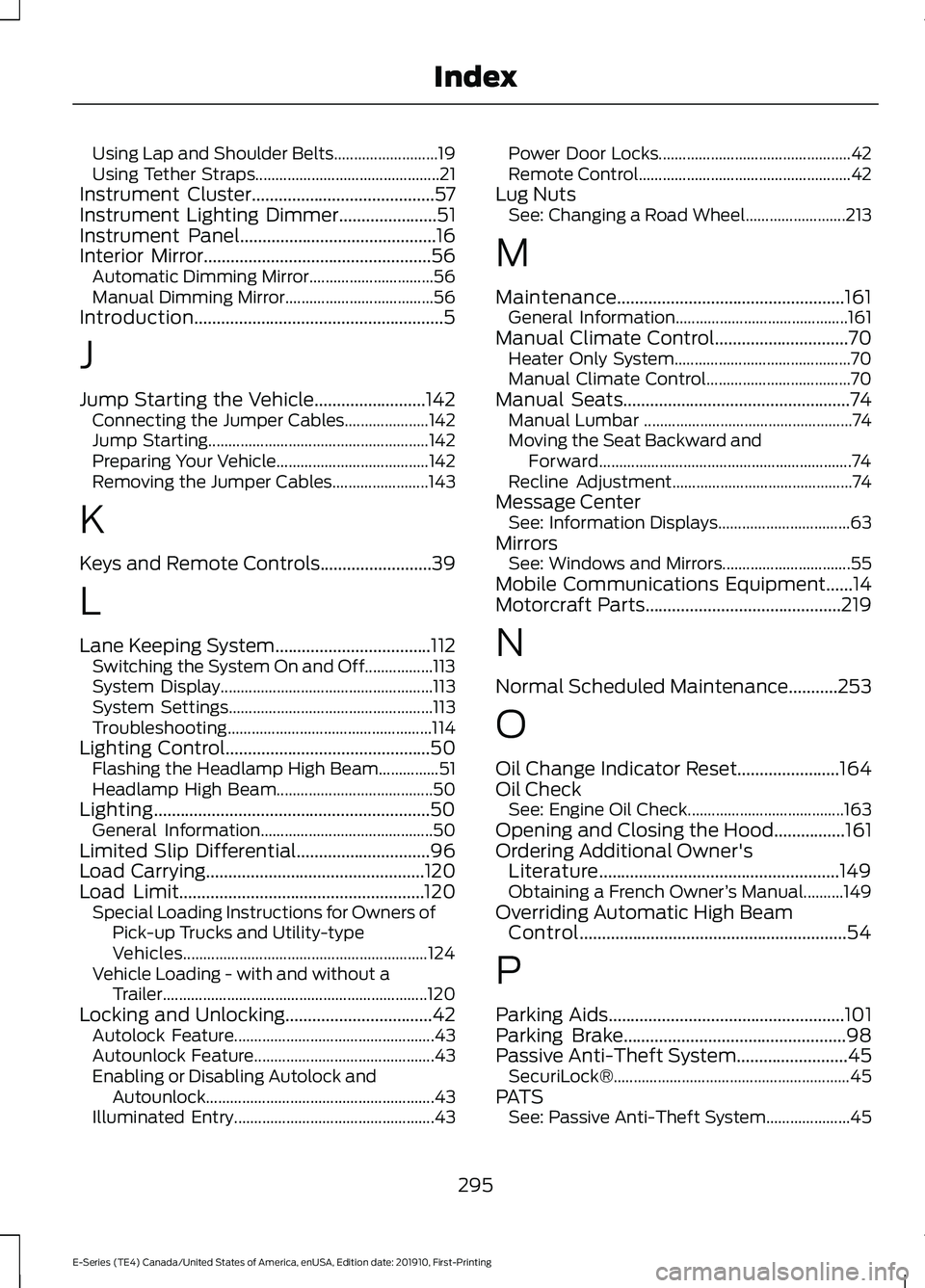
Using Lap and Shoulder Belts..........................
19
Using Tether Straps.............................................. 21
Instrument Cluster.........................................57
Instrument Lighting Dimmer......................51
Instrument Panel............................................16
Interior Mirror...................................................56
Automatic Dimming Mirror............................... 56
Manual Dimming Mirror..................................... 56
Introduction........................................................5
J
Jump Starting the Vehicle.........................142 Connecting the Jumper Cables..................... 142
Jump Starting....................................................... 142
Preparing Your Vehicle...................................... 142
Removing the Jumper Cables........................ 143
K
Keys and Remote Controls.........................39
L
Lane Keeping System
...................................112
Switching the System On and Off.................113
System Display..................................................... 113
System Settings................................................... 113
Troubleshooting................................................... 114
Lighting Control
..............................................50
Flashing the Headlamp High Beam...............51
Headlamp High Beam....................................... 50
Lighting..............................................................50 General Information........................................... 50
Limited Slip Differential..............................96
Load Carrying
.................................................120
Load Limit.......................................................120 Special Loading Instructions for Owners of
Pick-up Trucks and Utility-type
Vehicles............................................................. 124
Vehicle Loading - with and without a Trailer.................................................................. 120
Locking and Unlocking
.................................42
Autolock Feature.................................................. 43
Autounlock Feature............................................. 43
Enabling or Disabling Autolock and Autounlock......................................................... 43
Illuminated Entry.................................................. 43Power Door Locks................................................
42
Remote Control..................................................... 42
Lug Nuts See: Changing a Road Wheel......................... 213
M
Maintenance...................................................161 General Information........................................... 161
Manual Climate Control..............................70 Heater Only System............................................ 70
Manual Climate Control.................................... 70
Manual Seats...................................................74 Manual Lumbar .................................................... 74
Moving the Seat Backward and Forward............................................................... 74
Recline Adjustment............................................. 74
Message Center See: Information Displays................................. 63
Mirrors See: Windows and Mirrors................................ 55
Mobile Communications Equipment......14
Motorcraft Parts
............................................219
N
Normal Scheduled Maintenance
...........253
O
Oil Change Indicator Reset.......................164
Oil Check See: Engine Oil Check....................................... 163
Opening and Closing the Hood................161
Ordering Additional Owner's Literature......................................................149
Obtaining a French Owner ’s Manual..........149
Overriding Automatic High Beam Control............................................................54
P
Parking Aids
.....................................................101
Parking Brake..................................................98
Passive Anti-Theft System.........................45
SecuriLock®........................................................... 45
PATS See: Passive Anti-Theft System..................... 45
295
E-Series (TE4) Canada/United States of America, enUSA, Edition date: 201910, First-Printing Index