mirror FORD E SERIES 2009 4.G Owners Manual
[x] Cancel search | Manufacturer: FORD, Model Year: 2009, Model line: E SERIES, Model: FORD E SERIES 2009 4.GPages: 321, PDF Size: 2.31 MB
Page 1 of 321
Introduction 4
Instrument Cluster 12
Warning lights and chimes 12
Gauges 17
Entertainment Systems 20
AM/FM stereo 20
AM/FM stereo with CD 22
AM/FM stereo with CDX6/MP3 27
Auxiliary input jack 34
Satellite radio information 38
Navigation system 41
Climate Controls 42
Heater only 42
Manual heating and air conditioning 43
Lights 45
Headlamps 45
Turn signal control 49
Bulb replacement 50
Driver Controls 57
Windshield wiper/washer control 57
Steering wheel adjustment 58
Power windows 62
Mirrors 63
Speed control 66
Upfitter controls 68
Message center 69
Locks and Security 78
Keys 78
Locks 78
Anti-theft system 86
Table of Contents
1
2009 Econoline(eco)
Owners Guide, 1st Printing
USA(fus)
Page 58 of 321
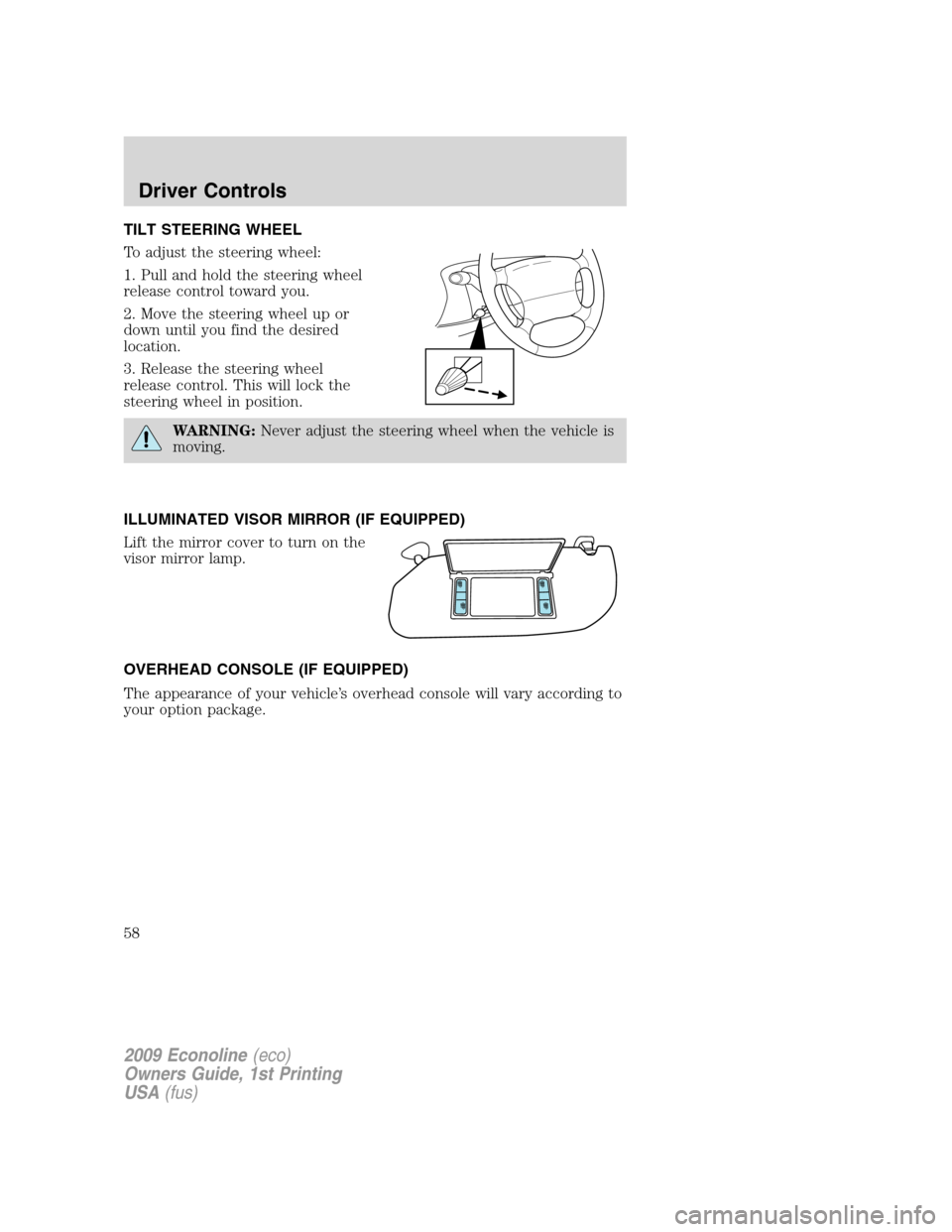
TILT STEERING WHEEL
To adjust the steering wheel:
1. Pull and hold the steering wheel
release control toward you.
2. Move the steering wheel up or
down until you find the desired
location.
3. Release the steering wheel
release control. This will lock the
steering wheel in position.
WARNING:Never adjust the steering wheel when the vehicle is
moving.
ILLUMINATED VISOR MIRROR (IF EQUIPPED)
Lift the mirror cover to turn on the
visor mirror lamp.
OVERHEAD CONSOLE (IF EQUIPPED)
The appearance of your vehicle’s overhead console will vary according to
your option package.
2009 Econoline(eco)
Owners Guide, 1st Printing
USA(fus)
Driver Controls
58
Page 63 of 321
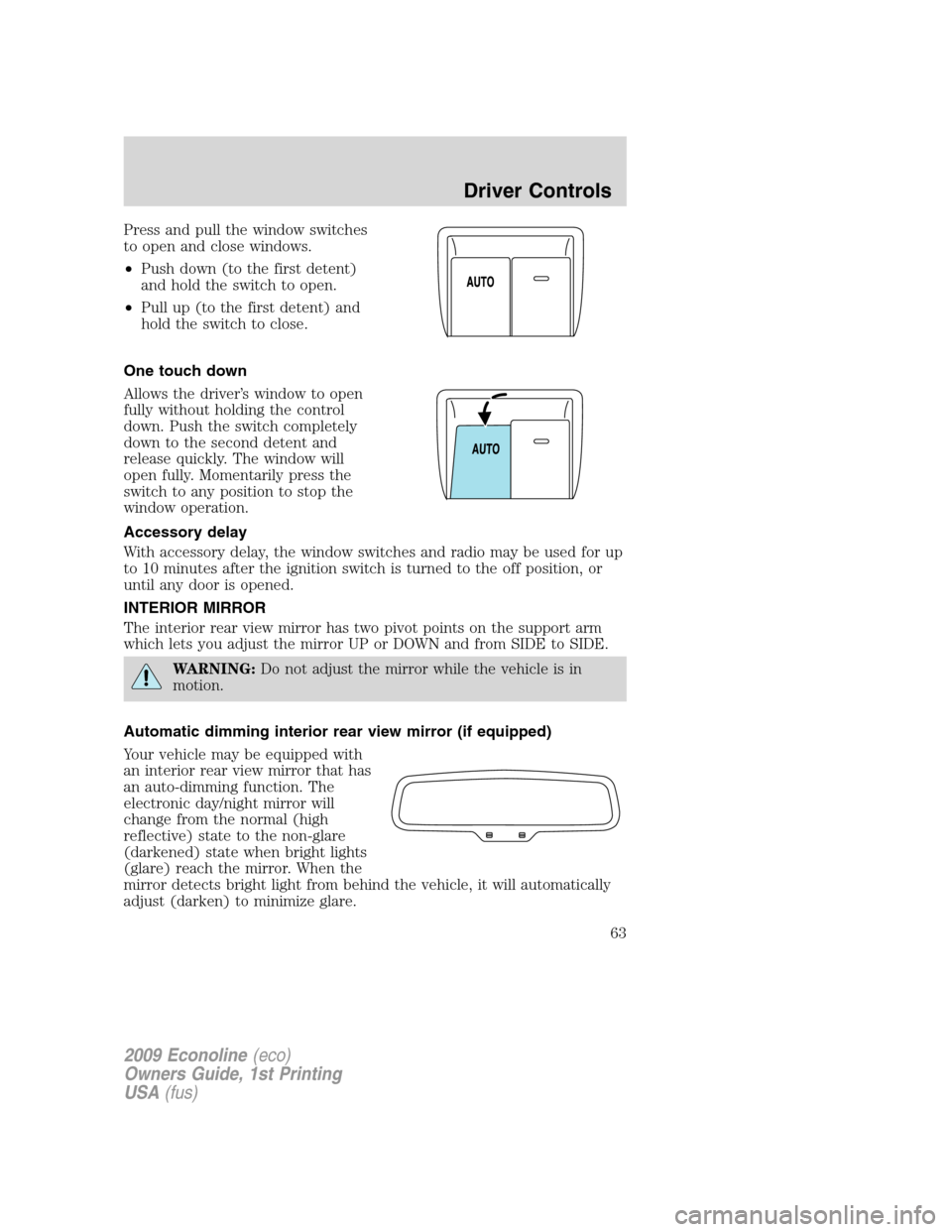
Press and pull the window switches
to open and close windows.
•Push down (to the first detent)
and hold the switch to open.
•Pull up (to the first detent) and
hold the switch to close.
One touch down
Allows the driver’s window to open
fully without holding the control
down. Push the switch completely
down to the second detent and
release quickly. The window will
open fully. Momentarily press the
switch to any position to stop the
window operation.
Accessory delay
With accessory delay, the window switches and radio may be used for up
to 10 minutes after the ignition switch is turned to the off position, or
until any door is opened.
INTERIOR MIRROR
The interior rear view mirror has two pivot points on the support arm
which lets you adjust the mirror UP or DOWN and from SIDE to SIDE.
WARNING:Do not adjust the mirror while the vehicle is in
motion.
Automatic dimming interior rear view mirror (if equipped)
Your vehicle may be equipped with
an interior rear view mirror that has
an auto-dimming function. The
electronic day/night mirror will
change from the normal (high
reflective) state to the non-glare
(darkened) state when bright lights
(glare) reach the mirror. When the
mirror detects bright light from behind the vehicle, it will automatically
adjust (darken) to minimize glare.
2009 Econoline(eco)
Owners Guide, 1st Printing
USA(fus)
Driver Controls
63
Page 64 of 321
The mirror will automatically return to the normal state whenever the
vehicle is placed in R (Reverse) to ensure a bright clear view when
backing up.
Do not block the sensors on the front and back of the interior
rear view mirror since this may impair proper mirror
performance.
Do not clean the housing or glass of any mirror with harsh
abrasives, fuel or other petroleum-based cleaning products.
Note:If equipped with a reverse camera system, a video image will
display in the mirror or the Navigation system display (if equipped)
when the vehicle is put in R (Reverse). As you shift into any other gear
from R (Reverse), the image will remain for a few seconds and then turn
off. Refer toReverse camera systemin theDrivingchapter.
EXTERIOR MIRRORS
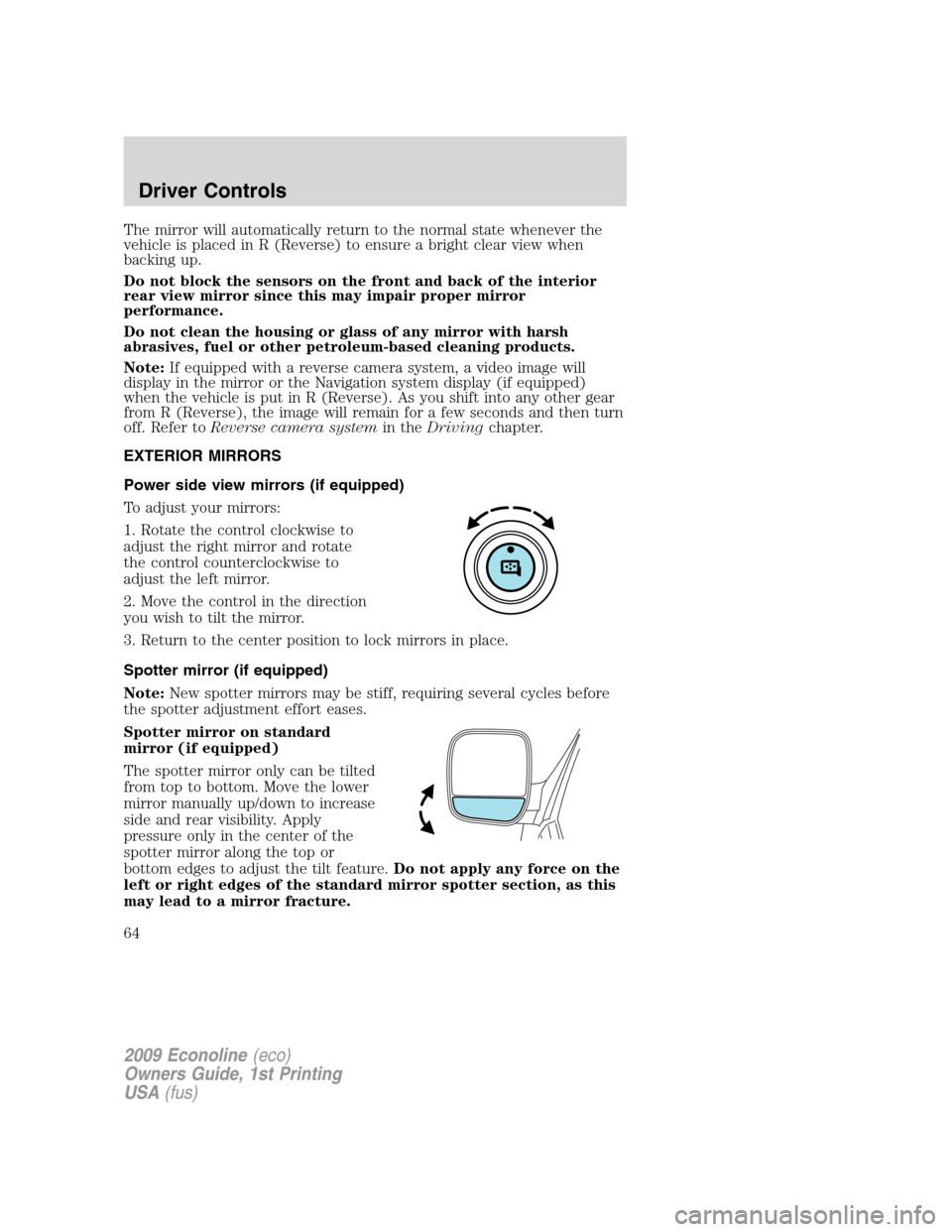
Power side view mirrors (if equipped)
To adjust your mirrors:
1. Rotate the control clockwise to
adjust the right mirror and rotate
the control counterclockwise to
adjust the left mirror.
2. Move the control in the direction
you wish to tilt the mirror.
3. Return to the center position to lock mirrors in place.
Spotter mirror (if equipped)
Note:New spotter mirrors may be stiff, requiring several cycles before
the spotter adjustment effort eases.
Spotter mirror on standard
mirror (if equipped)
The spotter mirror only can be tilted
from top to bottom. Move the lower
mirror manually up/down to increase
side and rear visibility. Apply
pressure only in the center of the
spotter mirror along the top or
bottom edges to adjust the tilt feature.Do not apply any force on the
left or right edges of the standard mirror spotter section, as this
may lead to a mirror fracture.
2009 Econoline(eco)
Owners Guide, 1st Printing
USA(fus)
Driver Controls
64
Page 65 of 321
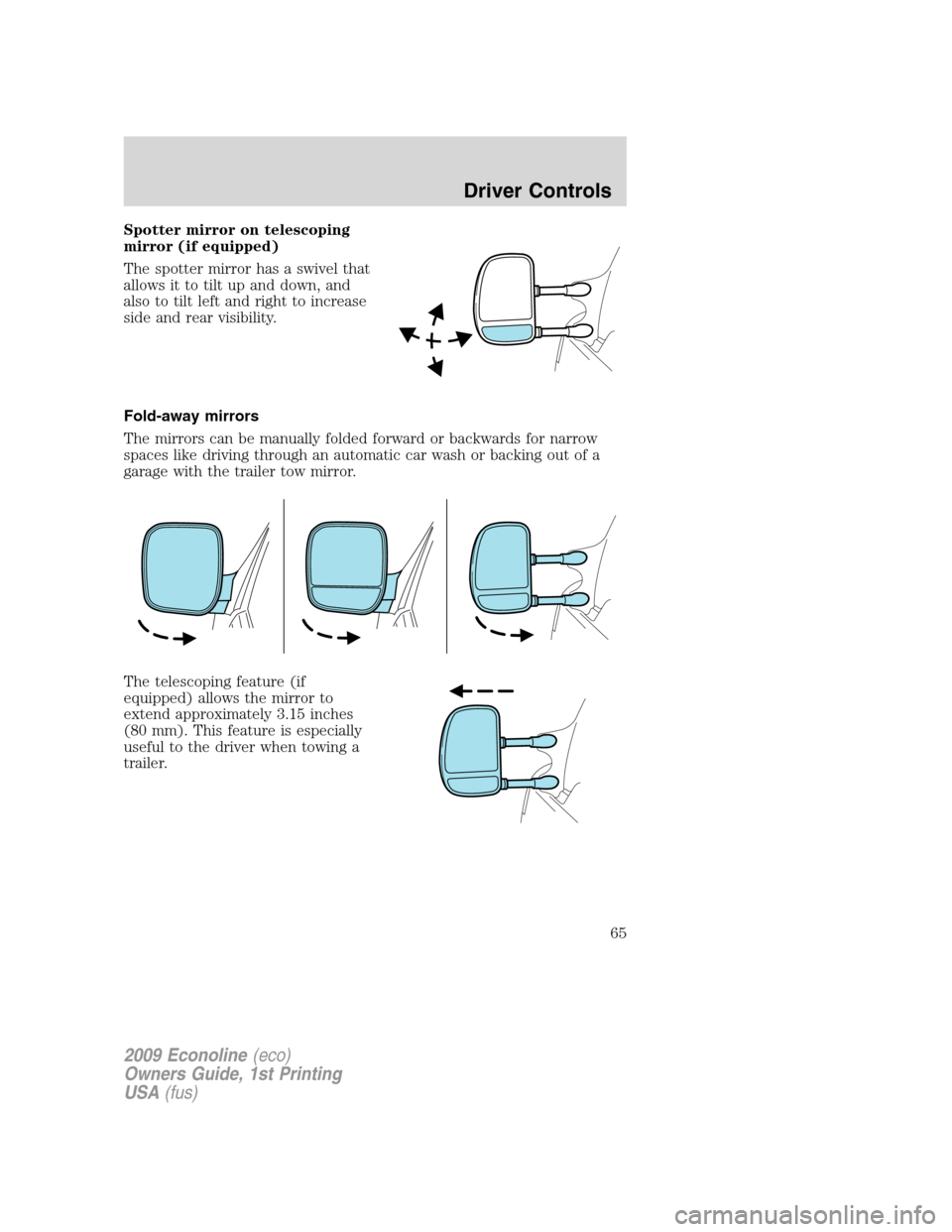
Spotter mirror on telescoping
mirror (if equipped)
The spotter mirror has a swivel that
allows it to tilt up and down, and
also to tilt left and right to increase
side and rear visibility.
Fold-away mirrors
The mirrors can be manually folded forward or backwards for narrow
spaces like driving through an automatic car wash or backing out of a
garage with the trailer tow mirror.
The telescoping feature (if
equipped) allows the mirror to
extend approximately 3.15 inches
(80 mm). This feature is especially
useful to the driver when towing a
trailer.
2009 Econoline(eco)
Owners Guide, 1st Printing
USA(fus)
Driver Controls
65
Page 217 of 321
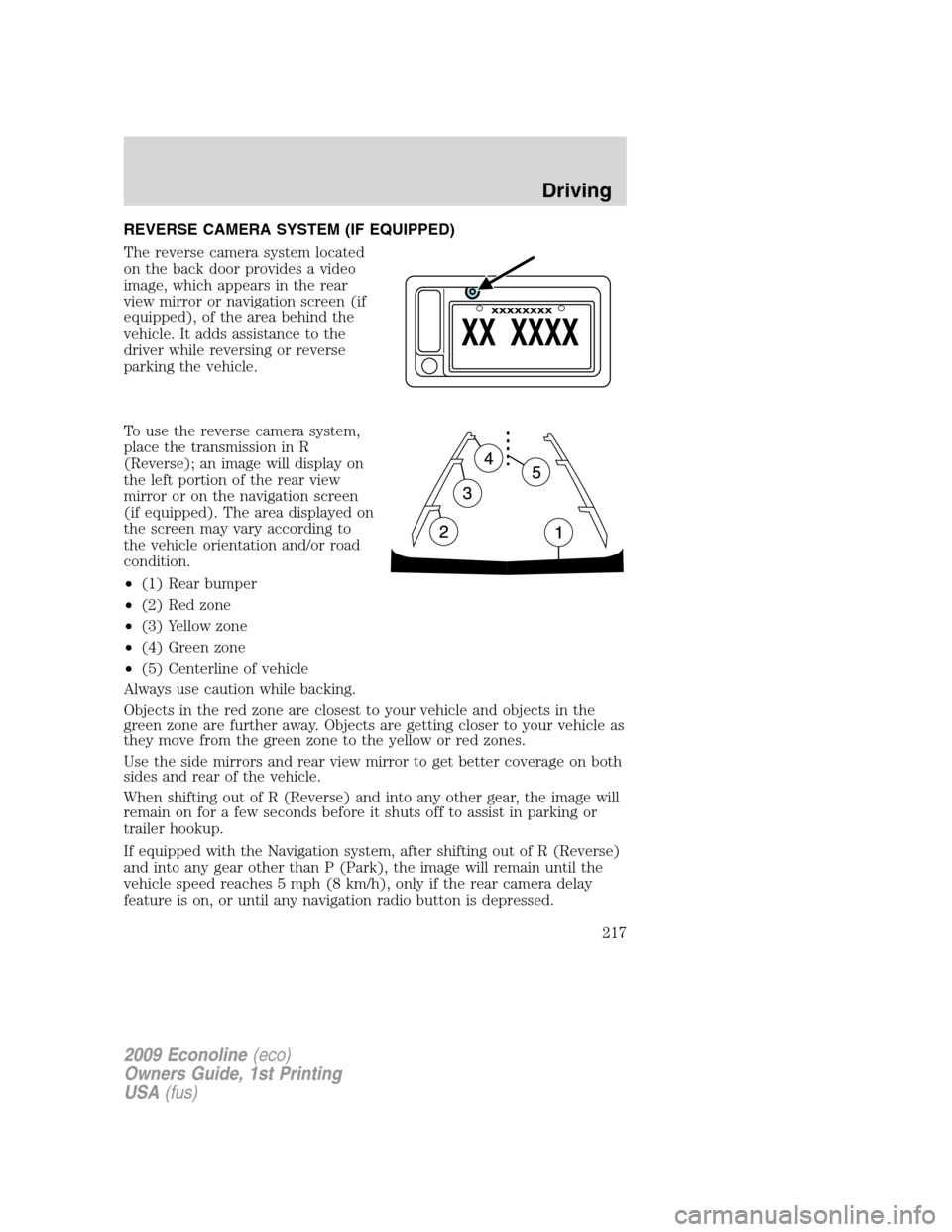
REVERSE CAMERA SYSTEM (IF EQUIPPED)
The reverse camera system located
on the back door provides a video
image, which appears in the rear
view mirror or navigation screen (if
equipped), of the area behind the
vehicle. It adds assistance to the
driver while reversing or reverse
parking the vehicle.
To use the reverse camera system,
place the transmission in R
(Reverse); an image will display on
the left portion of the rear view
mirror or on the navigation screen
(if equipped). The area displayed on
the screen may vary according to
the vehicle orientation and/or road
condition.
•(1) Rear bumper
•(2) Red zone
•(3) Yellow zone
•(4) Green zone
•(5) Centerline of vehicle
Always use caution while backing.
Objects in the red zone are closest to your vehicle and objects in the
green zone are further away. Objects are getting closer to your vehicle as
they move from the green zone to the yellow or red zones.
Use the side mirrors and rear view mirror to get better coverage on both
sides and rear of the vehicle.
When shifting out of R (Reverse) and into any other gear, the image will
remain on for a few seconds before it shuts off to assist in parking or
trailer hookup.
If equipped with the Navigation system, after shifting out of R (Reverse)
and into any gear other than P (Park), the image will remain until the
vehicle speed reaches 5 mph (8 km/h), only if the rear camera delay
feature is on, or until any navigation radio button is depressed.
2009 Econoline(eco)
Owners Guide, 1st Printing
USA(fus)
Driving
217
Page 218 of 321
Note:The default setting for the rear camera delay is off. Push the
“Settings” button found on the navigation screen (if equipped) to set the
rear camera delay feature to on or off.
When towing, the reverse camera system will only see what is being
towed behind the vehicle; this might not provide adequate coverage as it
usually provides in normal operation and some objects might not be
seen.
The camera lens for the reverse camera system is located on the
backdoor, above the license plate. Keep the lens clean so the video image
remains clear and undistorted. Clean the lens with a soft, lint-free cloth
and non-abrasive cleaner.
Note:If the reverse camera system image is not clear or seems
distorted, it may be covered with water droplets, snow, mud or any other
substance. If this occurs, clean the camera lens before using the reverse
camera system.
WARNING:The reverse camera system is a reverse aid
supplement device that still requires the driver to use it in
conjunction with the rear view mirror and the side mirrors for
maximum coverage.
WARNING:Objects that are close to either corner of the
bumper or under the bumper, might not be seen on the screen
due to the limited coverage of the reverse camera system.
WARNING:Backup as slow as possible since higher speeds
might limit your reaction time to stop the vehicle.
WARNING:Do not use the reverse camera system with the
backdoor open.
If the back end of the vehicle is hit or damaged, then check with your
authorized dealer to have your rear video system checked for proper
coverage and operation.
2009 Econoline(eco)
Owners Guide, 1st Printing
USA(fus)
Driving
218
Page 227 of 321
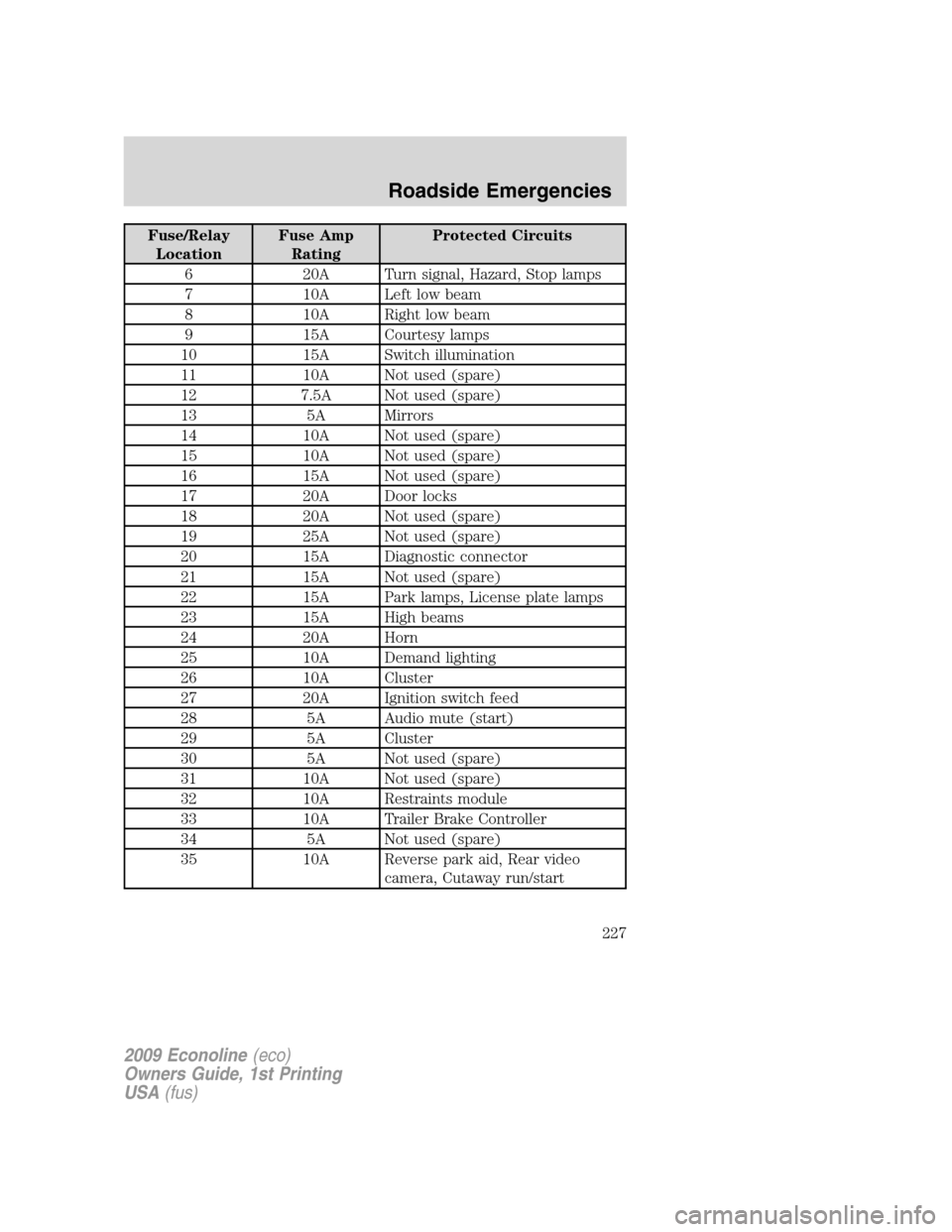
Fuse/Relay
LocationFuse Amp
RatingProtected Circuits
6 20A Turn signal, Hazard, Stop lamps
7 10A Left low beam
8 10A Right low beam
9 15A Courtesy lamps
10 15A Switch illumination
11 10A Not used (spare)
12 7.5A Not used (spare)
13 5A Mirrors
14 10A Not used (spare)
15 10A Not used (spare)
16 15A Not used (spare)
17 20A Door locks
18 20A Not used (spare)
19 25A Not used (spare)
20 15A Diagnostic connector
21 15A Not used (spare)
22 15A Park lamps, License plate lamps
23 15A High beams
24 20A Horn
25 10A Demand lighting
26 10A Cluster
27 20A Ignition switch feed
28 5A Audio mute (start)
29 5A Cluster
30 5A Not used (spare)
31 10A Not used (spare)
32 10A Restraints module
33 10A Trailer Brake Controller
34 5A Not used (spare)
35 10A Reverse park aid, Rear video
camera, Cutaway run/start
2009 Econoline(eco)
Owners Guide, 1st Printing
USA(fus)
Roadside Emergencies
227
Page 228 of 321
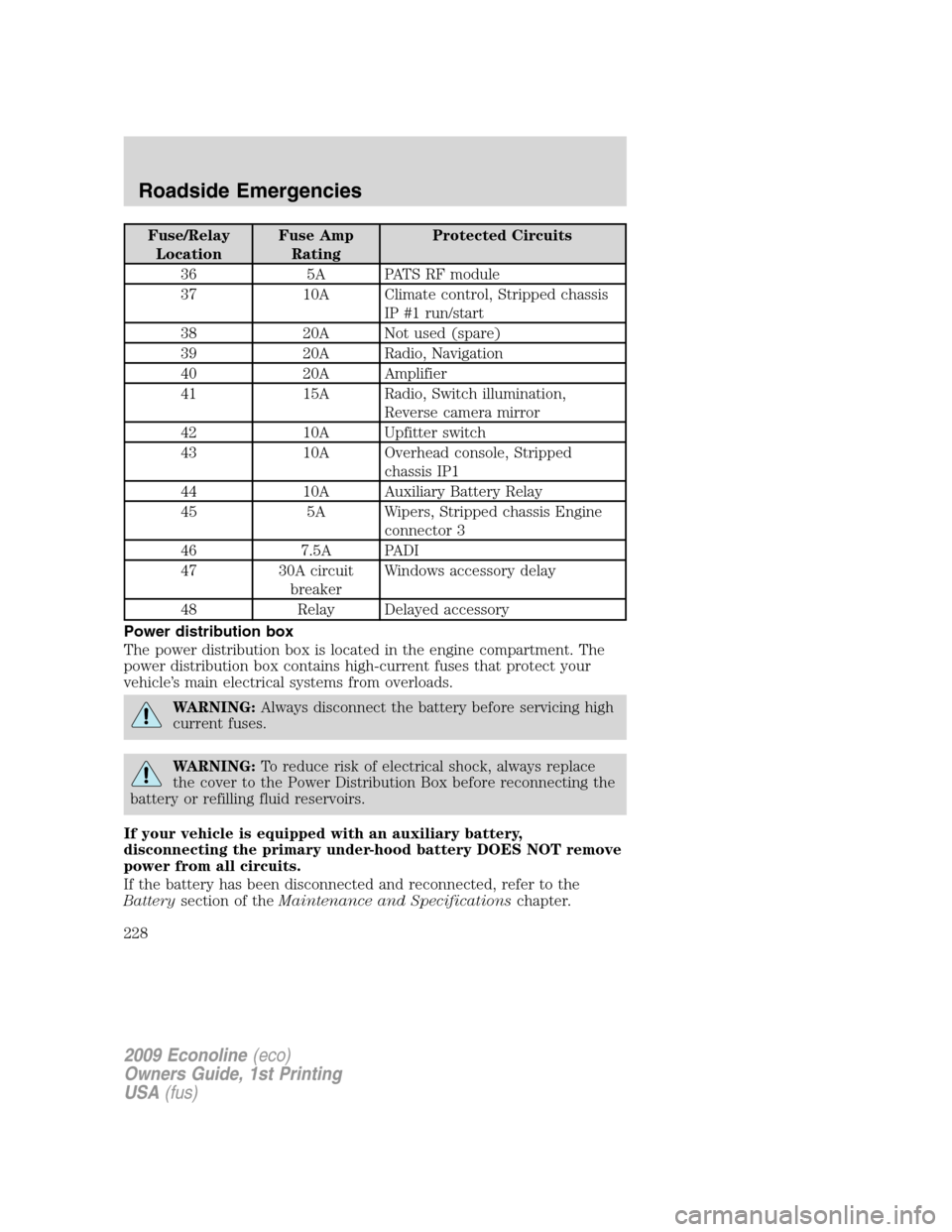
Fuse/Relay
LocationFuse Amp
RatingProtected Circuits
36 5A PATS RF module
37 10A Climate control, Stripped chassis
IP #1 run/start
38 20A Not used (spare)
39 20A Radio, Navigation
40 20A Amplifier
41 15A Radio, Switch illumination,
Reverse camera mirror
42 10A Upfitter switch
43 10A Overhead console, Stripped
chassis IP1
44 10A Auxiliary Battery Relay
45 5A Wipers, Stripped chassis Engine
connector 3
46 7.5A PADI
47 30A circuit
breakerWindows accessory delay
48 Relay Delayed accessory
Power distribution box
The power distribution box is located in the engine compartment. The
power distribution box contains high-current fuses that protect your
vehicle’s main electrical systems from overloads.
WARNING:Always disconnect the battery before servicing high
current fuses.
WARNING:To reduce risk of electrical shock, always replace
the cover to the Power Distribution Box before reconnecting the
battery or refilling fluid reservoirs.
If your vehicle is equipped with an auxiliary battery,
disconnecting the primary under-hood battery DOES NOT remove
power from all circuits.
If the battery has been disconnected and reconnected, refer to the
Batterysection of theMaintenance and Specificationschapter.
2009 Econoline(eco)
Owners Guide, 1st Printing
USA(fus)
Roadside Emergencies
228
Page 259 of 321
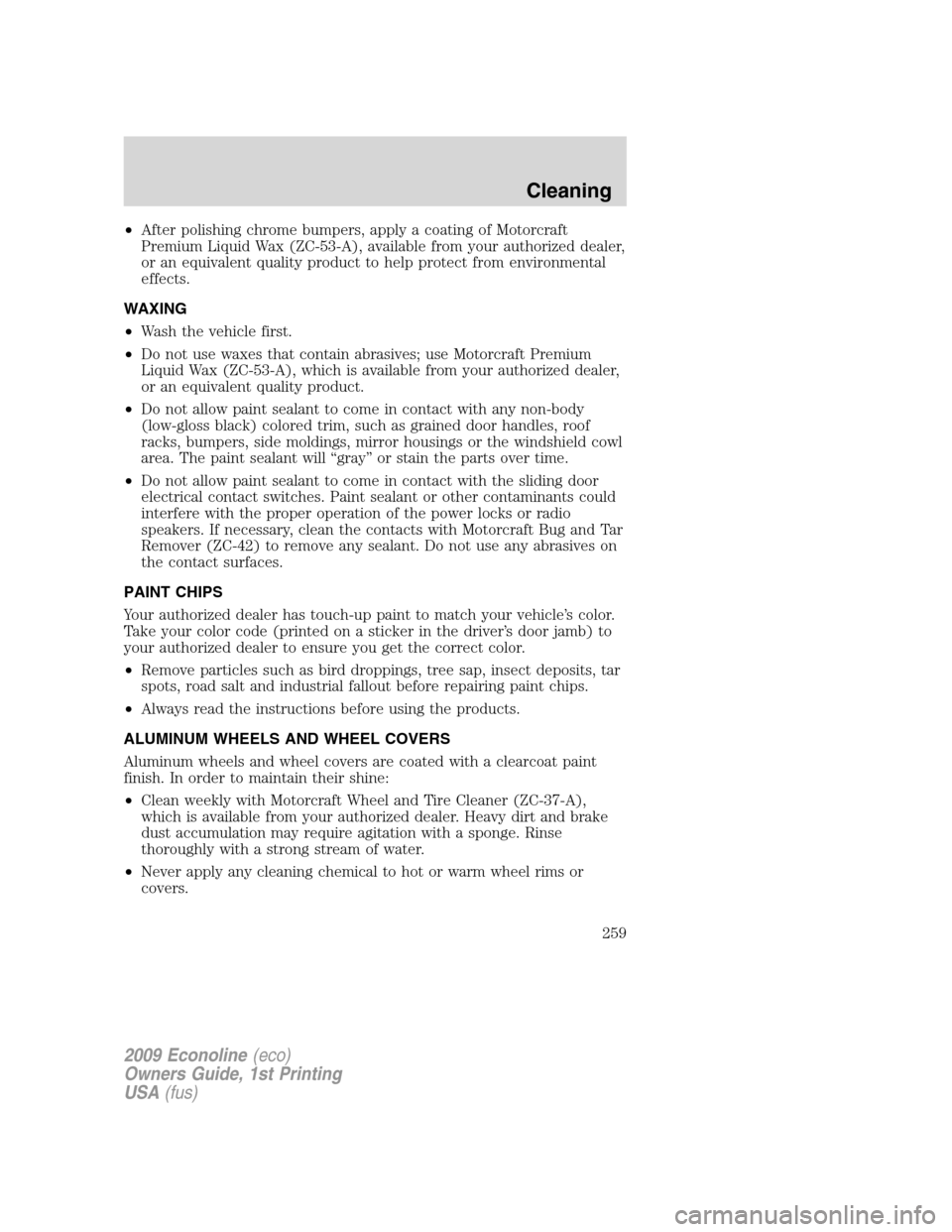
•After polishing chrome bumpers, apply a coating of Motorcraft
Premium Liquid Wax (ZC-53-A), available from your authorized dealer,
or an equivalent quality product to help protect from environmental
effects.
WAXING
•Wash the vehicle first.
•Do not use waxes that contain abrasives; use Motorcraft Premium
Liquid Wax (ZC-53-A), which is available from your authorized dealer,
or an equivalent quality product.
•Do not allow paint sealant to come in contact with any non-body
(low-gloss black) colored trim, such as grained door handles, roof
racks, bumpers, side moldings, mirror housings or the windshield cowl
area. The paint sealant will “gray” or stain the parts over time.
•Do not allow paint sealant to come in contact with the sliding door
electrical contact switches. Paint sealant or other contaminants could
interfere with the proper operation of the power locks or radio
speakers. If necessary, clean the contacts with Motorcraft Bug and Tar
Remover (ZC-42) to remove any sealant. Do not use any abrasives on
the contact surfaces.
PAINT CHIPS
Your authorized dealer has touch-up paint to match your vehicle’s color.
Take your color code (printed on a sticker in the driver’s door jamb) to
your authorized dealer to ensure you get the correct color.
•Remove particles such as bird droppings, tree sap, insect deposits, tar
spots, road salt and industrial fallout before repairing paint chips.
•Always read the instructions before using the products.
ALUMINUM WHEELS AND WHEEL COVERS
Aluminum wheels and wheel covers are coated with a clearcoat paint
finish. In order to maintain their shine:
•Clean weekly with Motorcraft Wheel and Tire Cleaner (ZC-37-A),
which is available from your authorized dealer. Heavy dirt and brake
dust accumulation may require agitation with a sponge. Rinse
thoroughly with a strong stream of water.
•Never apply any cleaning chemical to hot or warm wheel rims or
covers.
2009 Econoline(eco)
Owners Guide, 1st Printing
USA(fus)
Cleaning
259