brake FORD E SERIES 2014 4.G User Guide
[x] Cancel search | Manufacturer: FORD, Model Year: 2014, Model line: E SERIES, Model: FORD E SERIES 2014 4.GPages: 438, PDF Size: 5.12 MB
Page 82 of 438
WARNING:Under engine misfire conditions, excessive exhaust
temperatures could damage the catalytic converter, the fuel
system, interior floor coverings or other vehicle components, possibly
causing a fire.
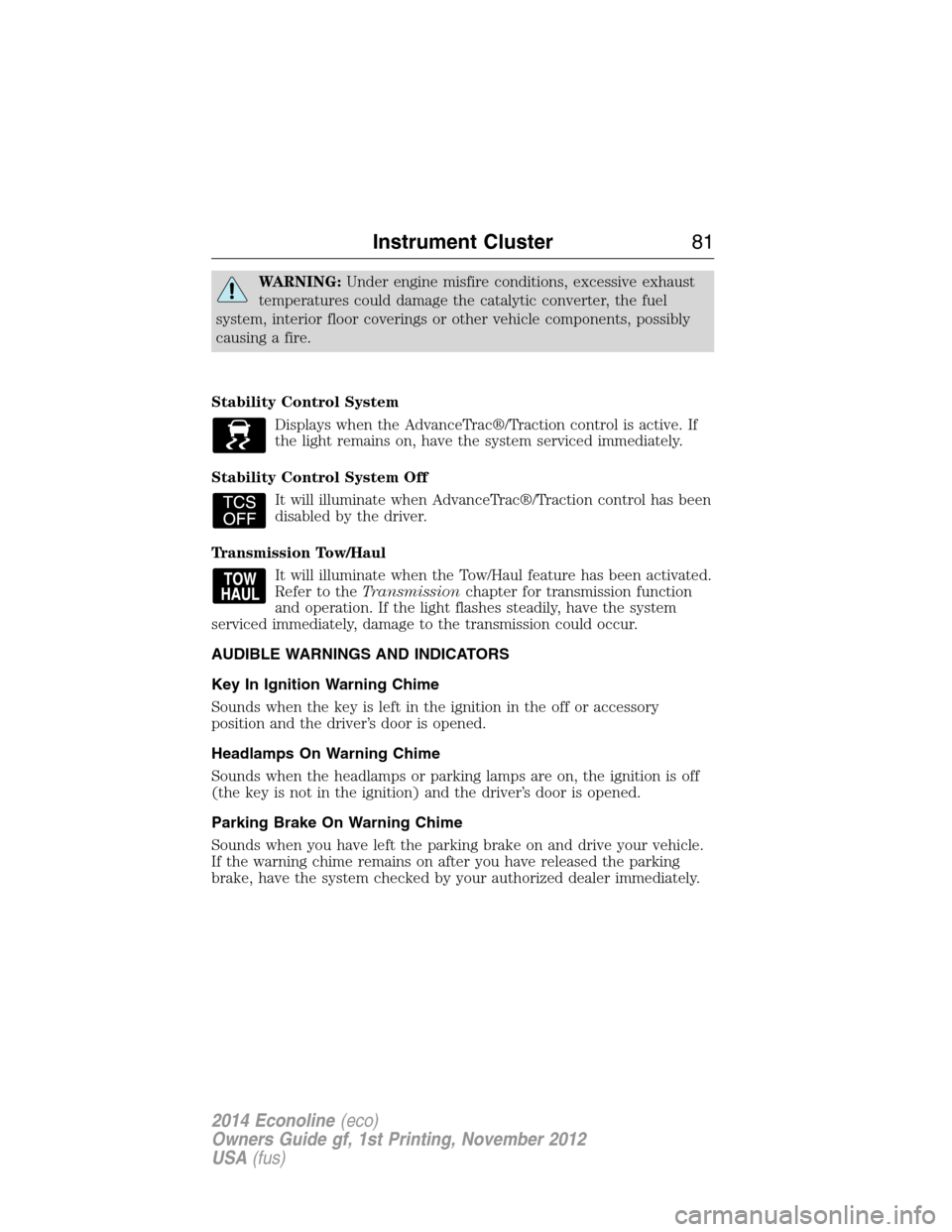
Stability Control System
Displays when the AdvanceTrac®/Traction control is active. If
the light remains on, have the system serviced immediately.
Stability Control System Off
It will illuminate when AdvanceTrac®/Traction control has been
disabled by the driver.
Transmission Tow/Haul
It will illuminate when the Tow/Haul feature has been activated.
Refer to theTransmissionchapter for transmission function
and operation. If the light flashes steadily, have the system
serviced immediately, damage to the transmission could occur.
AUDIBLE WARNINGS AND INDICATORS
Key In Ignition Warning Chime
Sounds when the key is left in the ignition in the off or accessory
position and the driver’s door is opened.
Headlamps On Warning Chime
Sounds when the headlamps or parking lamps are on, the ignition is off
(the key is not in the ignition) and the driver’s door is opened.
Parking Brake On Warning Chime
Sounds when you have left the parking brake on and drive your vehicle.
If the warning chime remains on after you have released the parking
brake, have the system checked by your authorized dealer immediately.
Instrument Cluster81
2014 Econoline(eco)
Owners Guide gf, 1st Printing, November 2012
USA(fus)
Page 85 of 438
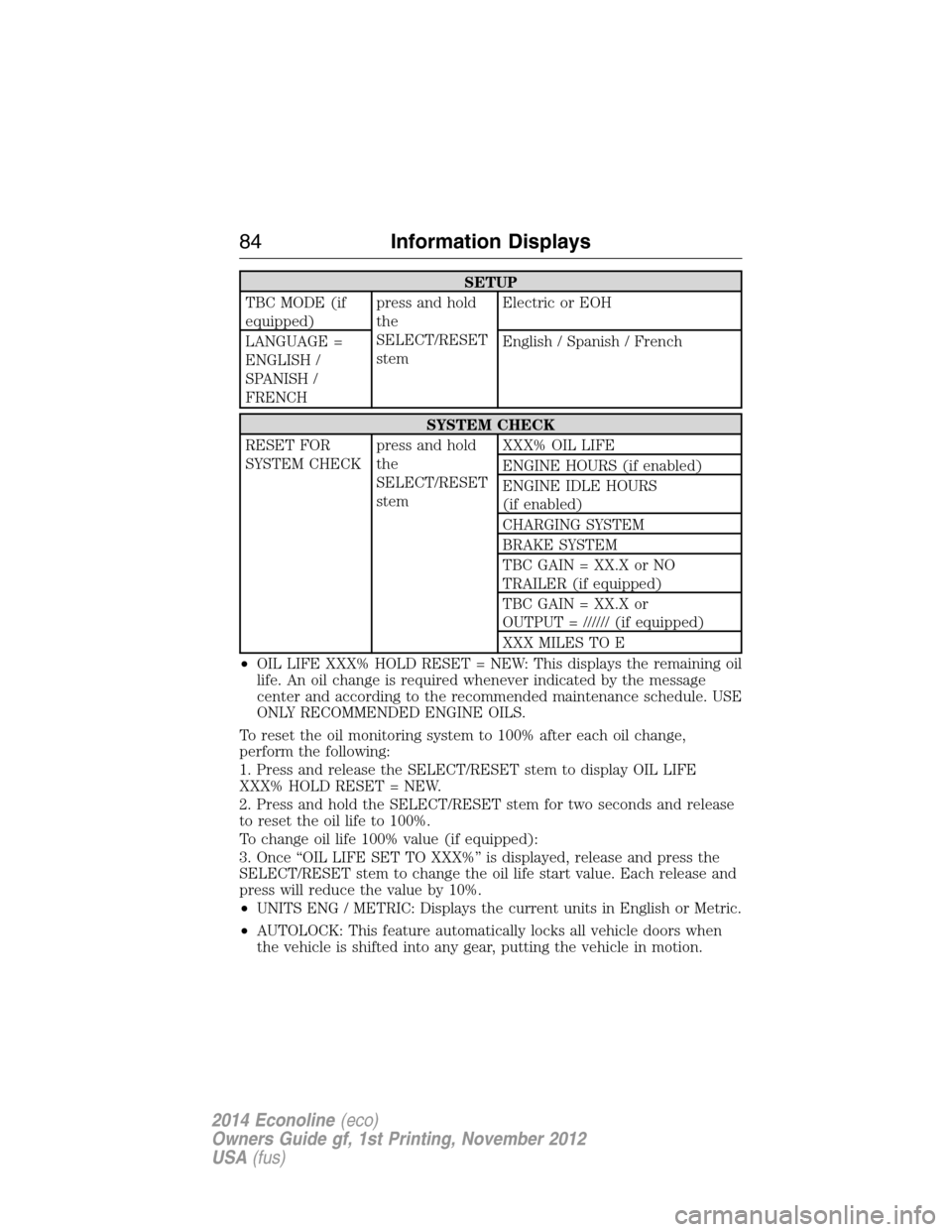
SETUP
TBC MODE (if
equipped)press and hold
the
SELECT/RESET
stemElectric or EOH
LANGUAGE =
ENGLISH /
SPANISH /
FRENCHEnglish / Spanish / French
SYSTEM CHECK
RESET FOR
SYSTEM CHECKpress and hold
the
SELECT/RESET
stemXXX% OIL LIFE
ENGINE HOURS (if enabled)
ENGINE IDLE HOURS
(if enabled)
CHARGING SYSTEM
BRAKE SYSTEM
TBC GAIN = XX.X or NO
TRAILER (if equipped)
TBC GAIN = XX.X or
OUTPUT = ////// (if equipped)
XXX MILES TO E
•OIL LIFE XXX% HOLD RESET = NEW: This displays the remaining oil
life. An oil change is required whenever indicated by the message
center and according to the recommended maintenance schedule. USE
ONLY RECOMMENDED ENGINE OILS.
To reset the oil monitoring system to 100% after each oil change,
perform the following:
1. Press and release the SELECT/RESET stem to display OIL LIFE
XXX% HOLD RESET = NEW.
2. Press and hold the SELECT/RESET stem for two seconds and release
to reset the oil life to 100%.
To change oil life 100% value (if equipped):
3. Once “OIL LIFE SET TO XXX%” is displayed, release and press the
SELECT/RESET stem to change the oil life start value. Each release and
press will reduce the value by 10%.
•UNITS ENG / METRIC: Displays the current units in English or Metric.
•AUTOLOCK: This feature automatically locks all vehicle doors when
the vehicle is shifted into any gear, putting the vehicle in motion.
84Information Displays
2014 Econoline(eco)
Owners Guide gf, 1st Printing, November 2012
USA(fus)
Page 87 of 438
Note:If the SELECT/RESET stem is pressed during the calibration or
three minutes has elapsed since the beginning of the calibration without
driving the vehicle, the message center reverts back to normal operation
and the CAL will display until a successful calibration is carried out.
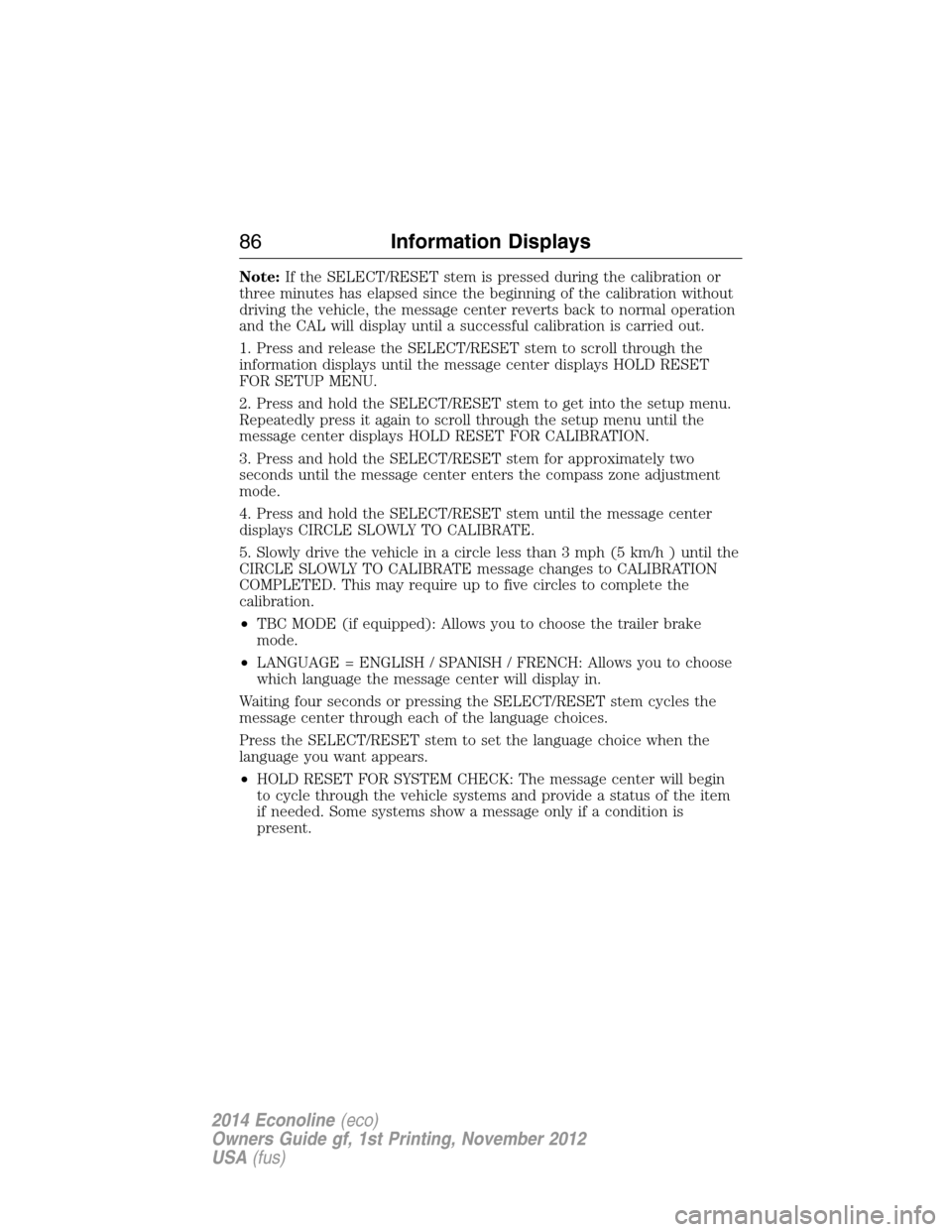
1. Press and release the SELECT/RESET stem to scroll through the
information displays until the message center displays HOLD RESET
FOR SETUP MENU.
2. Press and hold the SELECT/RESET stem to get into the setup menu.
Repeatedly press it again to scroll through the setup menu until the
message center displays HOLD RESET FOR CALIBRATION.
3. Press and hold the SELECT/RESET stem for approximately two
seconds until the message center enters the compass zone adjustment
mode.
4. Press and hold the SELECT/RESET stem until the message center
displays CIRCLE SLOWLY TO CALIBRATE.
5. Slowly drive the vehicle in a circle less than 3 mph (5 km/h ) until the
CIRCLE SLOWLY TO CALIBRATE message changes to CALIBRATION
COMPLETED. This may require up to five circles to complete the
calibration.
•TBC MODE (if equipped): Allows you to choose the trailer brake
mode.
•LANGUAGE = ENGLISH / SPANISH / FRENCH: Allows you to choose
which language the message center will display in.
Waiting four seconds or pressing the SELECT/RESET stem cycles the
message center through each of the language choices.
Press the SELECT/RESET stem to set the language choice when the
language you want appears.
•HOLD RESET FOR SYSTEM CHECK: The message center will begin
to cycle through the vehicle systems and provide a status of the item
if needed. Some systems show a message only if a condition is
present.
86Information Displays
2014 Econoline(eco)
Owners Guide gf, 1st Printing, November 2012
USA(fus)
Page 88 of 438
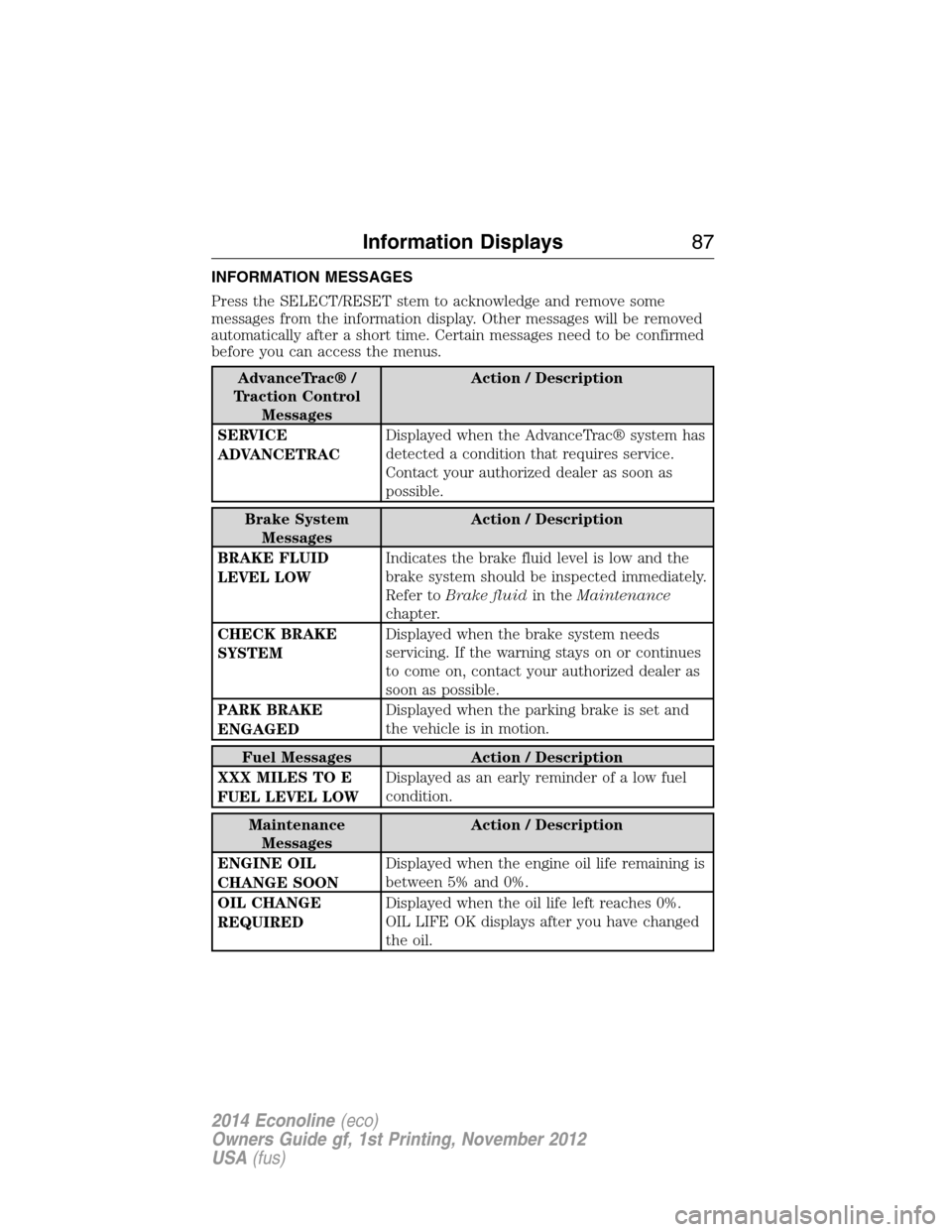
INFORMATION MESSAGES
Press the SELECT/RESET stem to acknowledge and remove some
messages from the information display. Other messages will be removed
automatically after a short time. Certain messages need to be confirmed
before you can access the menus.
AdvanceTrac® /
Traction Control
MessagesAction / Description
SERVICE
ADVANCETRACDisplayed when the AdvanceTrac® system has
detected a condition that requires service.
Contact your authorized dealer as soon as
possible.
Brake System
MessagesAction / Description
BRAKE FLUID
LEVEL LOWIndicates the brake fluid level is low and the
brake system should be inspected immediately.
Refer toBrake fluidin theMaintenance
chapter.
CHECK BRAKE
SYSTEMDisplayed when the brake system needs
servicing. If the warning stays on or continues
to come on, contact your authorized dealer as
soon as possible.
PARK BRAKE
ENGAGEDDisplayed when the parking brake is set and
the vehicle is in motion.
Fuel Messages Action / Description
XXX MILES TO E
FUEL LEVEL LOWDisplayed as an early reminder of a low fuel
condition.
Maintenance
MessagesAction / Description
ENGINE OIL
CHANGE SOONDisplayed when the engine oil life remaining is
between 5% and 0%.
OIL CHANGE
REQUIREDDisplayed when the oil life left reaches 0%.
OIL LIFE OK displays after you have changed
the oil.
Information Displays87
2014 Econoline(eco)
Owners Guide gf, 1st Printing, November 2012
USA(fus)
Page 89 of 438
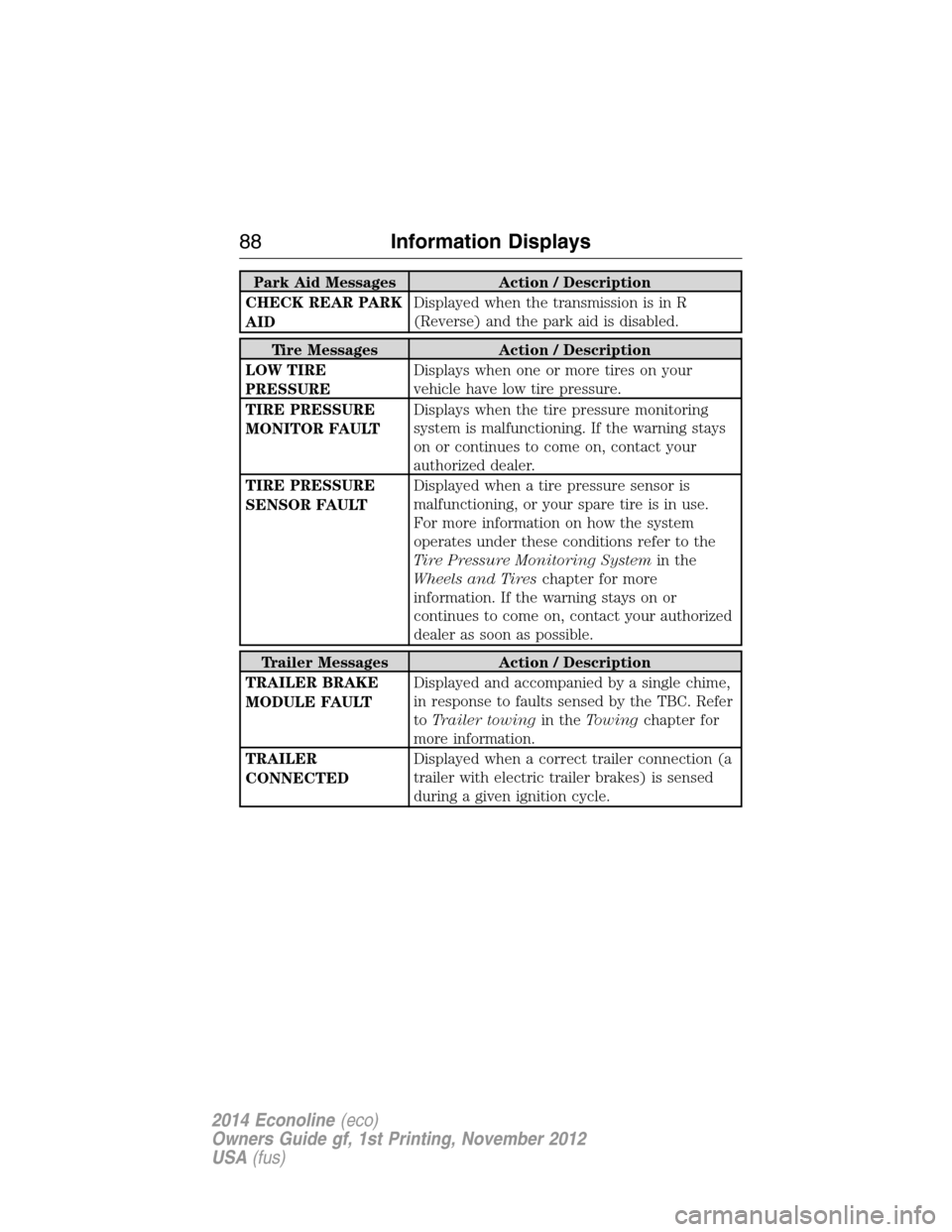
Park Aid Messages Action / Description
CHECK REAR PARK
AIDDisplayed when the transmission is in R
(Reverse) and the park aid is disabled.
Tire Messages Action / Description
LOW TIRE
PRESSUREDisplays when one or more tires on your
vehicle have low tire pressure.
TIRE PRESSURE
MONITOR FAULTDisplays when the tire pressure monitoring
system is malfunctioning. If the warning stays
on or continues to come on, contact your
authorized dealer.
TIRE PRESSURE
SENSOR FAULTDisplayed when a tire pressure sensor is
malfunctioning, or your spare tire is in use.
For more information on how the system
operates under these conditions refer to the
Tire Pressure Monitoring Systemin the
Wheels and Tireschapter for more
information. If the warning stays on or
continues to come on, contact your authorized
dealer as soon as possible.
Trailer Messages Action / Description
TRAILER BRAKE
MODULE FAULTDisplayed and accompanied by a single chime,
in response to faults sensed by the TBC. Refer
toTrailer towingin theTowingchapter for
more information.
TRAILER
CONNECTEDDisplayed when a correct trailer connection (a
trailer with electric trailer brakes) is sensed
during a given ignition cycle.
88Information Displays
2014 Econoline(eco)
Owners Guide gf, 1st Printing, November 2012
USA(fus)
Page 90 of 438
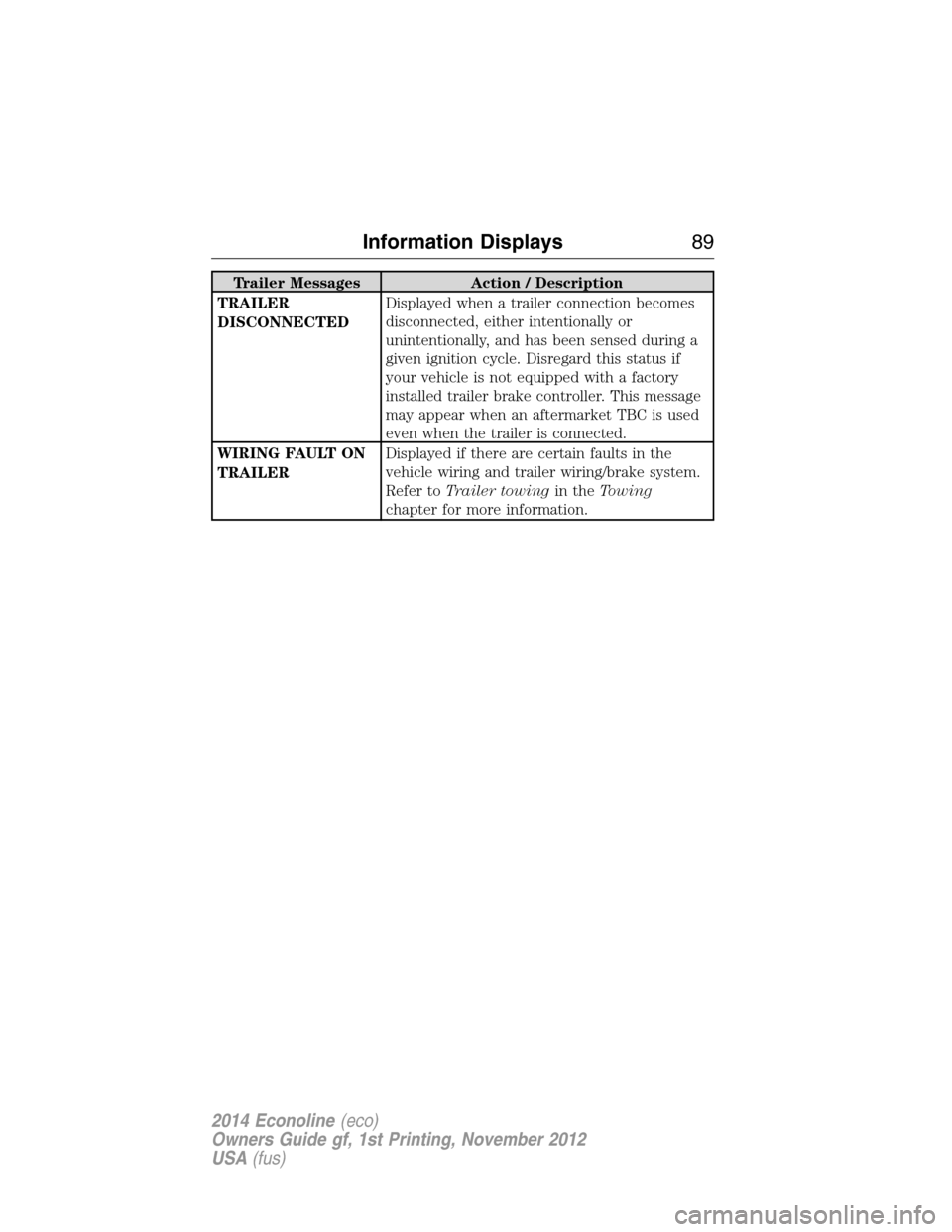
Trailer Messages Action / Description
TRAILER
DISCONNECTEDDisplayed when a trailer connection becomes
disconnected, either intentionally or
unintentionally, and has been sensed during a
given ignition cycle. Disregard this status if
your vehicle is not equipped with a factory
installed trailer brake controller. This message
may appear when an aftermarket TBC is used
even when the trailer is connected.
WIRING FAULT ON
TRAILERDisplayed if there are certain faults in the
vehicle wiring and trailer wiring/brake system.
Refer toTrailer towingin theTowing
chapter for more information.
Information Displays89
2014 Econoline(eco)
Owners Guide gf, 1st Printing, November 2012
USA(fus)
Page 94 of 438
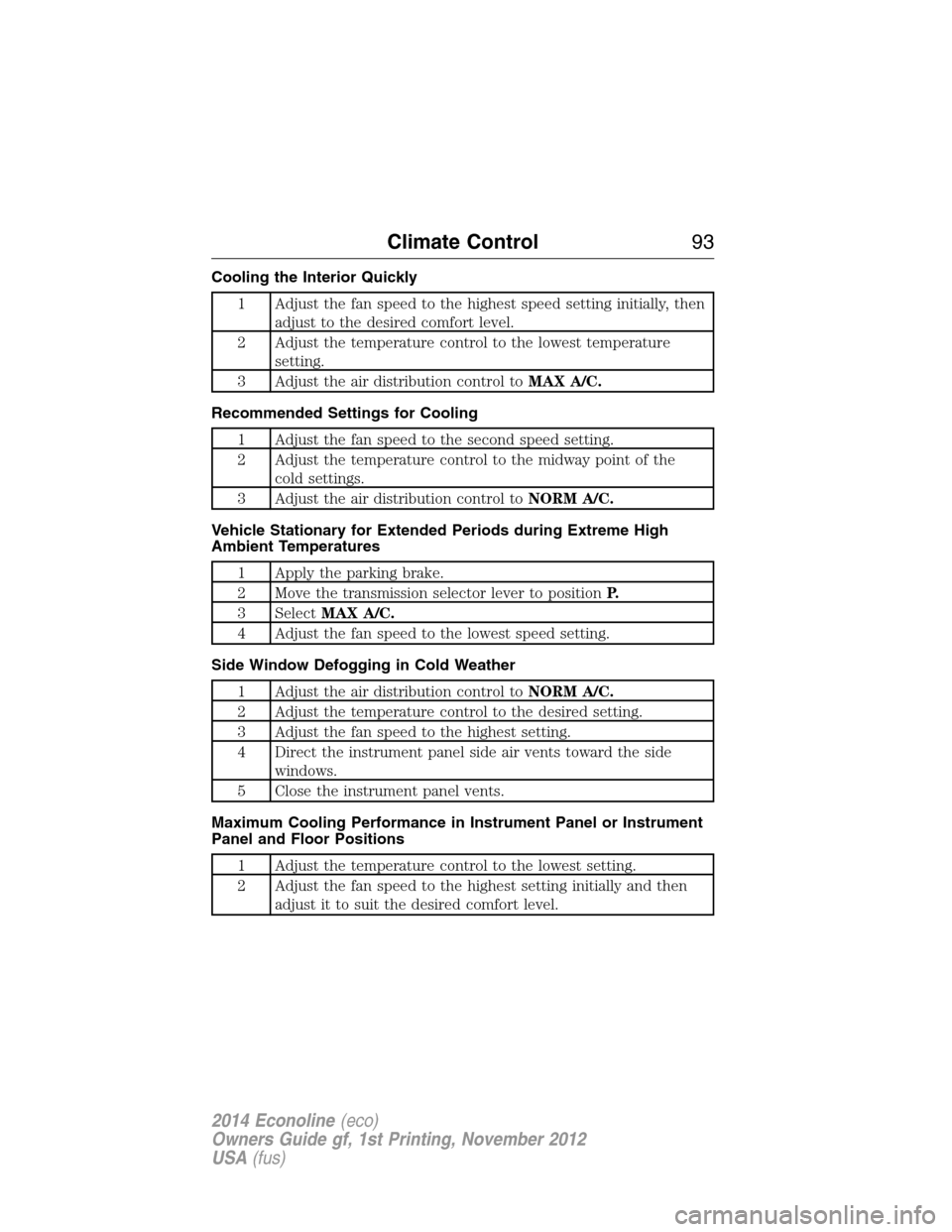
Cooling the Interior Quickly
1 Adjust the fan speed to the highest speed setting initially, then
adjust to the desired comfort level.
2 Adjust the temperature control to the lowest temperature
setting.
3 Adjust the air distribution control toMAX A/C.
Recommended Settings for Cooling
1 Adjust the fan speed to the second speed setting.
2 Adjust the temperature control to the midway point of the
cold settings.
3 Adjust the air distribution control toNORM A/C.
Vehicle Stationary for Extended Periods during Extreme High
Ambient Temperatures
1 Apply the parking brake.
2 Move the transmission selector lever to positionP.
3 SelectMAX A/C.
4 Adjust the fan speed to the lowest speed setting.
Side Window Defogging in Cold Weather
1 Adjust the air distribution control toNORM A/C.
2 Adjust the temperature control to the desired setting.
3 Adjust the fan speed to the highest setting.
4 Direct the instrument panel side air vents toward the side
windows.
5 Close the instrument panel vents.
Maximum Cooling Performance in Instrument Panel or Instrument
Panel and Floor Positions
1 Adjust the temperature control to the lowest setting.
2 Adjust the fan speed to the highest setting initially and then
adjust it to suit the desired comfort level.
Climate Control93
2014 Econoline(eco)
Owners Guide gf, 1st Printing, November 2012
USA(fus)
Page 107 of 438
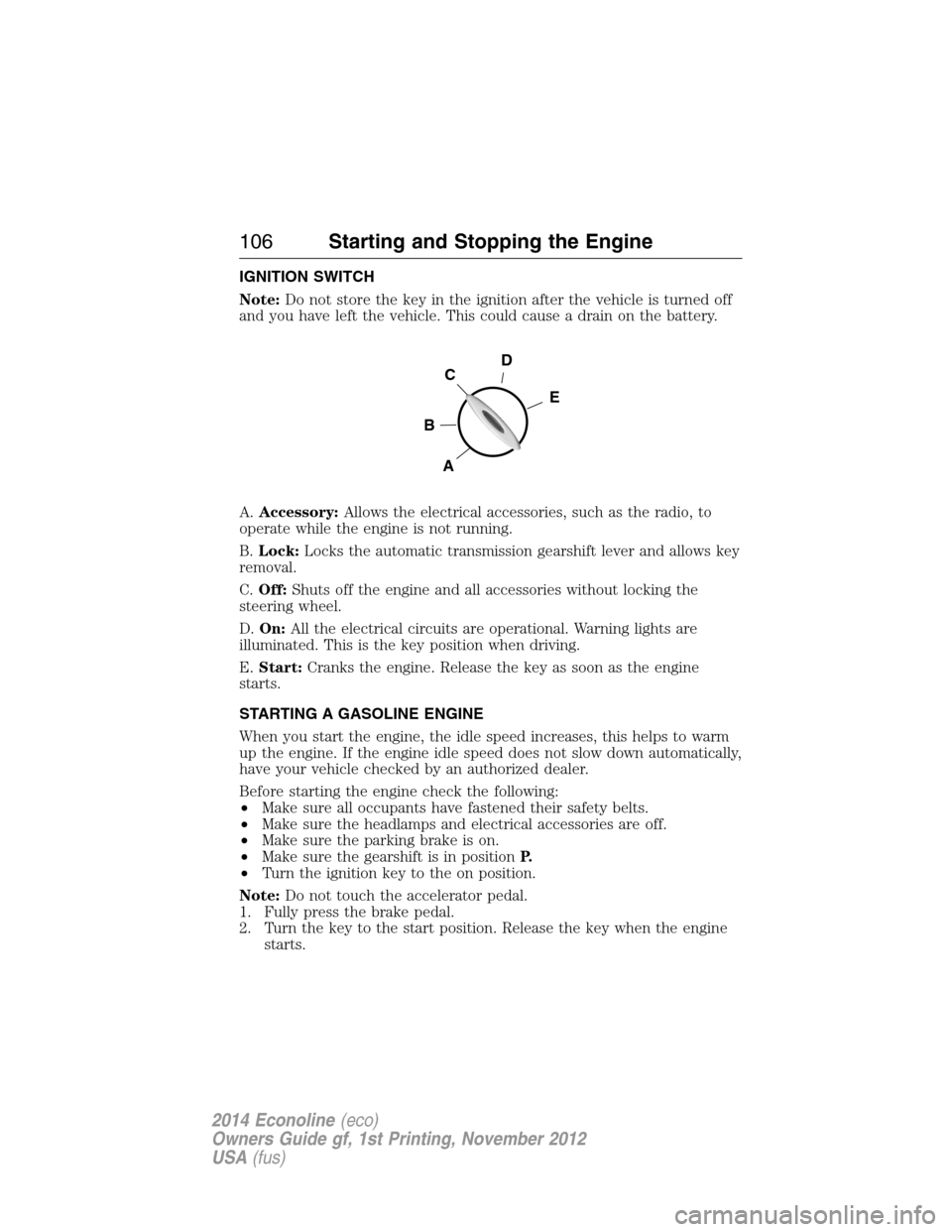
IGNITION SWITCH
Note:Do not store the key in the ignition after the vehicle is turned off
and you have left the vehicle. This could cause a drain on the battery.
A.Accessory:Allows the electrical accessories, such as the radio, to
operate while the engine is not running.
B.Lock:Locks the automatic transmission gearshift lever and allows key
removal.
C.Off:Shuts off the engine and all accessories without locking the
steering wheel.
D.On:All the electrical circuits are operational. Warning lights are
illuminated. This is the key position when driving.
E.Start:Cranks the engine. Release the key as soon as the engine
starts.
STARTING A GASOLINE ENGINE
When you start the engine, the idle speed increases, this helps to warm
up the engine. If the engine idle speed does not slow down automatically,
have your vehicle checked by an authorized dealer.
Before starting the engine check the following:
•Make sure all occupants have fastened their safety belts.
•Make sure the headlamps and electrical accessories are off.
•Make sure the parking brake is on.
•Make sure the gearshift is in positionP.
•Turn the ignition key to the on position.
Note:Do not touch the accelerator pedal.
1. Fully press the brake pedal.
2. Turn the key to the start position. Release the key when the engine
starts.
D
E
C
B
A
106Starting and Stopping the Engine
2014 Econoline(eco)
Owners Guide gf, 1st Printing, November 2012
USA(fus)
Page 108 of 438
Note:The engine may continue cranking for up to 15 seconds or until it
starts.
Note:If you cannot start the engine on the first try, wait for a short
period and try again.
Failure to Start
If you cannot start the engine after three attempts, wait 10 seconds and
follow this procedure:
1. Fully press the brake pedal.
2. Fully press the accelerator pedal and hold it there.
3. Start the engine.
Stopping the Engine When Your Vehicle Is Stationary
1. Move the transmission selector lever to positionP.
2. Turn the key to the off position.
3. Apply the parking brake.
Note:This switches off the ignition, all electrical circuits, warning lamps
and indicators.
Note:If the engine is idling for 30 minutes, the ignition and engine
automatically shut down.
Stopping the Engine When Your Vehicle Is Moving
WARNING:Switching off the engine when the vehicle is still
moving will result in a loss of brake and steering assistance. The
steering will not lock, but higher effort will be required. When the
ignition is switched off, some electrical circuits, warning lamps and
indicators may also be off.
1. Move the transmission selector lever to positionNand use the brakes
to bring your vehicle to a safe stop.
2. When your vehicle has stopped, move the transmission selector lever
to positionPand turn the key to the off position.
3. Apply the parking brake.
Starting and Stopping the Engine107
2014 Econoline(eco)
Owners Guide gf, 1st Printing, November 2012
USA(fus)
Page 121 of 438
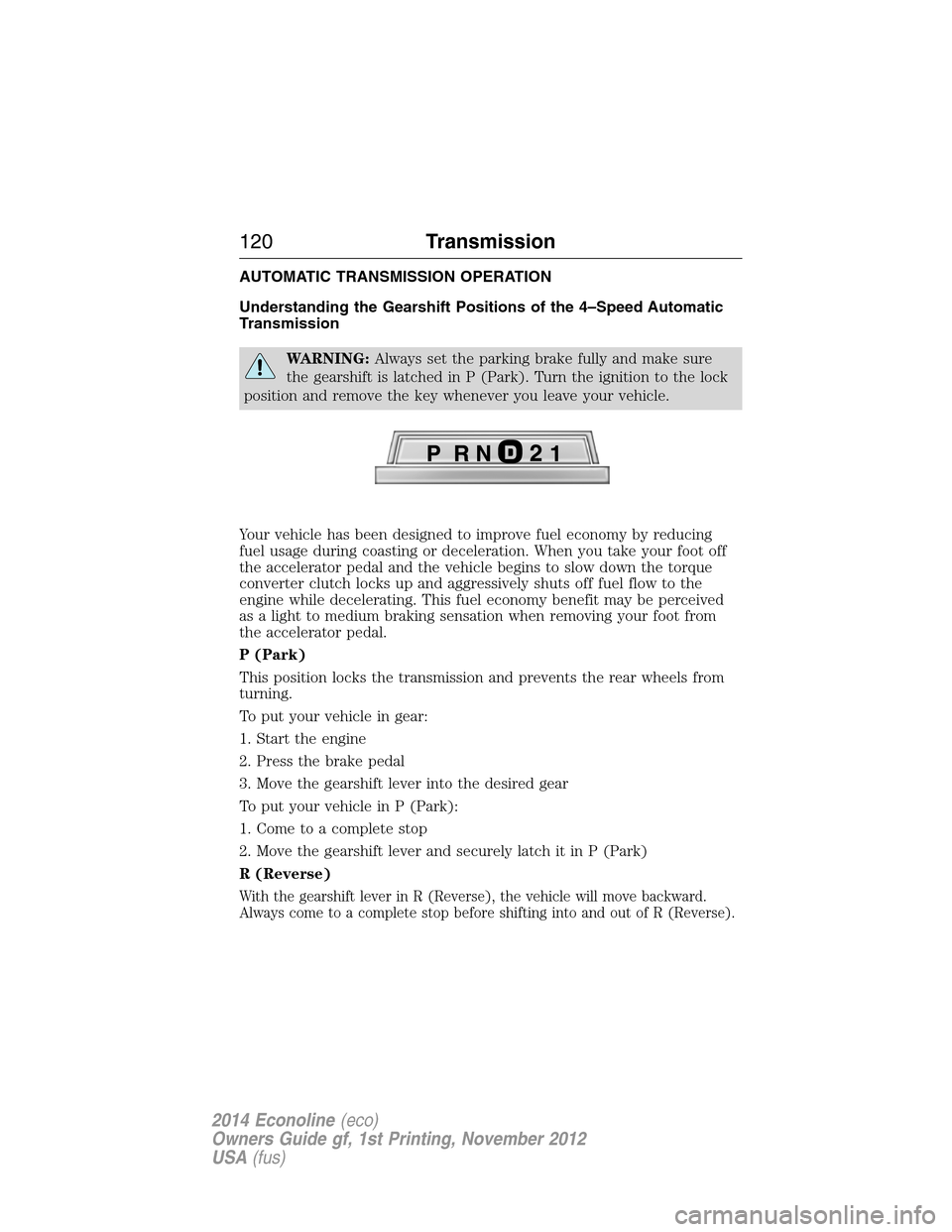
AUTOMATIC TRANSMISSION OPERATION
Understanding the Gearshift Positions of the 4–Speed Automatic
Transmission
WARNING:Always set the parking brake fully and make sure
the gearshift is latched in P (Park). Turn the ignition to the lock
position and remove the key whenever you leave your vehicle.
Your vehicle has been designed to improve fuel economy by reducing
fuel usage during coasting or deceleration. When you take your foot off
the accelerator pedal and the vehicle begins to slow down the torque
converter clutch locks up and aggressively shuts off fuel flow to the
engine while decelerating. This fuel economy benefit may be perceived
as a light to medium braking sensation when removing your foot from
the accelerator pedal.
P (Park)
This position locks the transmission and prevents the rear wheels from
turning.
To put your vehicle in gear:
1. Start the engine
2. Press the brake pedal
3. Move the gearshift lever into the desired gear
To put your vehicle in P (Park):
1. Come to a complete stop
2. Move the gearshift lever and securely latch it in P (Park)
R (Reverse)
With the gearshift lever in R (Reverse), the vehicle will move backward.
Always come to a complete stop before shifting into and out of R (Reverse).
120Transmission
2014 Econoline(eco)
Owners Guide gf, 1st Printing, November 2012
USA(fus)