buttons FORD E SERIES 2014 4.G User Guide
[x] Cancel search | Manufacturer: FORD, Model Year: 2014, Model line: E SERIES, Model: FORD E SERIES 2014 4.GPages: 438, PDF Size: 5.12 MB
Page 348 of 438
A.Memory presets:
•Store your favorite radio stations. To store a radio station, tune to the
station, then press and hold a preset button until sound returns.
•In radio and satellite radio mode, press a button to access your saved
presets or channels.
B.CD and DVD slot:Insert a CD or DVD, label side up.
C.Eject:Press this button to eject a CD or DVD from the system.
D.TUNE RPT:
•In radio or satellite radio mode, turn the control to advance in
individual increments up or down the frequency band to the desired
station.
•In MP3 mode, turn the control to advance to the next or previous
folder.
•In navigation mode, press this button to hear the last spoken
navigation guidance prompt.
E.MAP:
•Press this button to access the navigation map.
•Press while the map display is active to center the map on the
current vehicle position. Press while the map display and route are
active to see the different map guidance views.
F.DEST:
•Press this button to access the destination entry menu.
•Press while the destination entry menu is active to show additional
destination entry techniques.
G.N AV:
•Press this button to access the navigation menu.
•Press while the navigation menu is active to access the navigation
menu tabs.
H.I (Information):Press this button to access features such as Where
am I?, Sirius Travel Link, Calendar, System Info and Help.
I.PHONE:Press this button to access the SYNC phone menu.
J.DISP:Press this button to select a display mode: On, Status Bar Only,
and Off.
K.SEEK:
•In radio and satellite radio mode, press the arrow buttons to find
previous or next available stations or channels within the currently
selected Category or Genre.
•In CD and DVD modes, press the arrow buttons to select the previous
or next track or chapter.
Navigation System (If Equipped)347
2014 Econoline(eco)
Owners Guide gf, 1st Printing, November 2012
USA(fus)
Page 355 of 438
If you select: You can:
Feedback Settings Touch Screen Button Beepallows you to
select when the system sounds an audible
tone: All Buttons (whenever any system
button is touched), Touch Screen (only when
touchscreen selections are made) or Off (no
audible tones at all).
Voice Volumeallows you to change
navigation voice and audible tone volume by
touching + or -.
Satellite Radio Channel Nameallows you
to choose to display the satellite radio
channel name.
Voice Recognition Interaction Mode
allows you to choose the level of system
interaction and feedback. Standard is the
default and provides the most interaction and
feedback using prompts. Advanced uses less
feedback and prompts.
Voice Recognition Confirmationallows you
to choose level of voice command
confirmation. Selecting On causes the system
to ask you to confirm a command. Selecting
Off causes the system to ask for confirmation
less frequently.
Voice Recognition User Profileallows you
to switch between user profiles.
Train the system to recognize your voice
better. You can create two profiles. SeeUsing
voice recognitionearlier in this section.
Manage Voice Rec. User profilesallows
youtoeditProfile1or2bycreatinganew
profile or deleting a previously created profile.
354Navigation System (If Equipped)
2014 Econoline(eco)
Owners Guide gf, 1st Printing, November 2012
USA(fus)
Page 364 of 438
HD Radio Voice Commands
If you are listening to the radio, press the voice button on the
steering wheel control. When prompted, say any of the
commands in the following chart.
If you are not listening to the radio, press the voice button and, after the
tone, say “Radio”, then any of the commands in the following chart.
“RADIO”
“<87.7 - 107.9> HD <1–8>”
“FM <87.7-107.9> HD <1-8>”
“Tune”
*
“Help”
*If you have said, “Tune”, see the following “Tune” chart.
“TUNE”
“<87.7 - 107.9> HD <1–8>”
“FM <87.7-107.9> HD <1-8>”
“Tune HD <1-8>”
“Help”
Sirius® Satellite Radio (If Activated)
Press the RADIO hard button, then select SAT on the
touchscreen.
When you select: You can:
SAT123Press this button to access three different
satellite radio modes (SAT1, SAT2 or SAT3).
ScanPress this button to hear a brief sampling of
all satellite radio channels within the current
genre.
Scan PresetsPress these buttons to hear a brief sampling
of all channels stored in the memory presets.
Navigation System (If Equipped)363
2014 Econoline(eco)
Owners Guide gf, 1st Printing, November 2012
USA(fus)
Page 380 of 438
“TRAVEL LINK”
“College football scores” “Sports schedule”*
“Fuel prices” “Sports scores”**
“Golf leaders” “Traffic”
“Golf schedule” “Travel link help”
“Motor sports order” “Weather”
“Motor sports schedule” “Weather map”
“Movie listings”
*If you have said, “Sports schedule”, you may say any of the commands
in the “Sports schedule” chart:
**If you have said, “Sports scores”, you may say any of the commands in
the “Sports scores” chart:
“SPORTS SCHEDULES”
“Baseball schedule” “NBA schedule”
“College basketball schedule” “NFL schedule”
“College football schedule” “NHL schedule”
“Golf schedule” “Travel link help”
“Motor sports schedule”
“SPORTS SCORES”
“Baseball scores” “NBA scores”
“College basketball scores” “NFL scores”
“College football scores” “NHL scores”
“Golf leaderboard” “Travel link help”
“Motor sports results”
Calendar
Press the I (information) button, then select Calendar. You can
then select which month you would like to view by using the
arrow buttons or selecting Go to Today.
You can view calendars from one previous year and the next 10 years.
Note:Not all tab selections may be available in all markets. Check with
an authorized dealer for availability.
Navigation System (If Equipped)379
2014 Econoline(eco)
Owners Guide gf, 1st Printing, November 2012
USA(fus)
Page 381 of 438
System Information
Press the I (information) button, then select System
Information.
In this screen, you can view the following options:
•Phone number for your Customer Service Center
•Current system versions installed
•Current Sirius Radio ESN
•Sirius Travel Link ESN.
Note:Not all tab selections may be available in all markets. Check with
an authorized dealer for availability.
Help
The Help screen allows you to view basic information about controls and
driving restrictions as well as traffic legend information and basic voice
commands available in various modes.
If you select: You can:
Basic OperationView hard buttons on your navigation system.
Press the desired icon to view the button
description.
Driving RestrictionView the system’s driving restriction.
Traffic LegendView the color code for the Speed and Flow
of roads on the navigation system. You can
also select Traffic Incidents to help you
differentiate between viewed and unviewed
incidents.
Voice CommandsView a brief listing of possible voice
commands in a specific mode.
380Navigation System (If Equipped)
2014 Econoline(eco)
Owners Guide gf, 1st Printing, November 2012
USA(fus)
Page 395 of 438
Navigation Preferences
Avg. Speed: Main
RoadsWhen this feature is on, the system displays
the average speed on a main road, initially set
to 45 mph (72 km/h). You can change the
setting for specific roads and for your driving
preferences. This setting helps estimate your
arrival time at a destination based on your
driving preferences.
Avg. Speed: FreewaysWhen this feature is on, the system displays
the average speed on a freeway, initially set to
65 mph (105 km/h). You can change the
setting for specific roads and for your driving
preferences. This setting helps estimate your
arrival time at a destination based on your
driving preferences.
Parking POI
NotificationWhen this feature is on, the system displays
available parking accommodations around a
destination that is part of your route.
Low Fuel POI
NotificationWhen this feature is on, the system displays
gas station icons when the fuel level is low.
Fuel Price DisplayWhen this feature is on, the system displays
fuel prices at local stations. You can choose to
display prices forUnleadedorDiesel.
*
Calibrate Positionallows you to adjust the direction of
your vehicle by pressing the arrow buttons on
the screen.
Distanceallows you to recalibrate the
distance to the destination while your vehicle
is moving.
Restore Default
SettingsTouch theResetbutton to return the settings
to factory defaults.
*This feature requires activation of Sirius Travel Link, which is only
available in the United States.
394Navigation System (If Equipped)
2014 Econoline(eco)
Owners Guide gf, 1st Printing, November 2012
USA(fus)
Page 398 of 438
Map Scale
The map display scale has 17 levels, ranging from
0.02 miles (.03 kilometers) to 1000 miles (1600 kilometers).
The system synchronizes the zoom scales for North Up,
Heading Up and 3D Map views.
In Map Mode, you can zoom in or out, changing the display
scale, by touching an arrow button on the left side of the
screen.
In Full Screen Map Mode, touch this button to use the Zoom Direct
buttons. The Zoom Direct buttons represent the most common map
scales. Touch a button to show the map at the desired scale. The scale is
approximate and based on the width of the map scale button. The size of
the scale varies based on the screen size.
Map Scrolling
Single scroll modeallows you to press and release on the map display
to bring the pressed position to the center of the screen. The scroll
mode times out after five minutes of inactivity.
Continuous scroll modeallows you to touch and hold the map to begin
scrolling continuously in one of eight directions closest to the point that is
touched. The scroll continues until you release the map, and increases in
speed after three seconds. This is not possible if your vehicle is moving.
The scroll mode times out after five minutes of inactivity.
Bird’s eye view scroll modeis available after you touch the map twice,
and then selecting one of the eight buttons that appear on the map, in
an oval pattern, in the center of the screen. The two scroll buttons
located in the farthest east and west points of the oval, scroll in a circle
around your vehicle. The remaining buttons scroll in a straight line in the
arrow direction.
0.1 mi
Navigation System (If Equipped)397
2014 Econoline(eco)
Owners Guide gf, 1st Printing, November 2012
USA(fus)
Page 399 of 438
Quick-touch Buttons
When in map mode, touch anywhere on the map display to access the
following options:
When you select: You can:
Set as DestSelect a scrolled location on the map as your
destination. You may scroll the map by
pressing your index finger on the map display.
When you reach the desired location, simply
let go and then press Set as Dest.
Set as WaypointSet the current location as a waypoint.
Save to Address
BookSave the current location to the address book.
POI Icons On/OffSelect point of interest icons to display on the
map. You can select up to three icons to
display on the map at the same time.
View TrafficAdjust the map display to the right scale. This
scale allows the entire route to be visible in
the screen.
View/Edit RouteAccess these features when a route is active:
Cancel route.
Edit route preferences.
Edit destination/waypoints.
View route.
Edit traffic preferences.
*
Edit turn list.
*This feature requires activation of Sirius Travel Link, which is only
available in the United States.
Navteq is the digital map provider for the navigation application. If you
find map data errors, you may report them directly to Navteq by going to
http://mapreporter.navteq.com. Navteq evaluates all reported map errors
and responds with the result of their investigation by e-mail.
398Navigation System (If Equipped)
2014 Econoline(eco)
Owners Guide gf, 1st Printing, November 2012
USA(fus)
Page 436 of 438
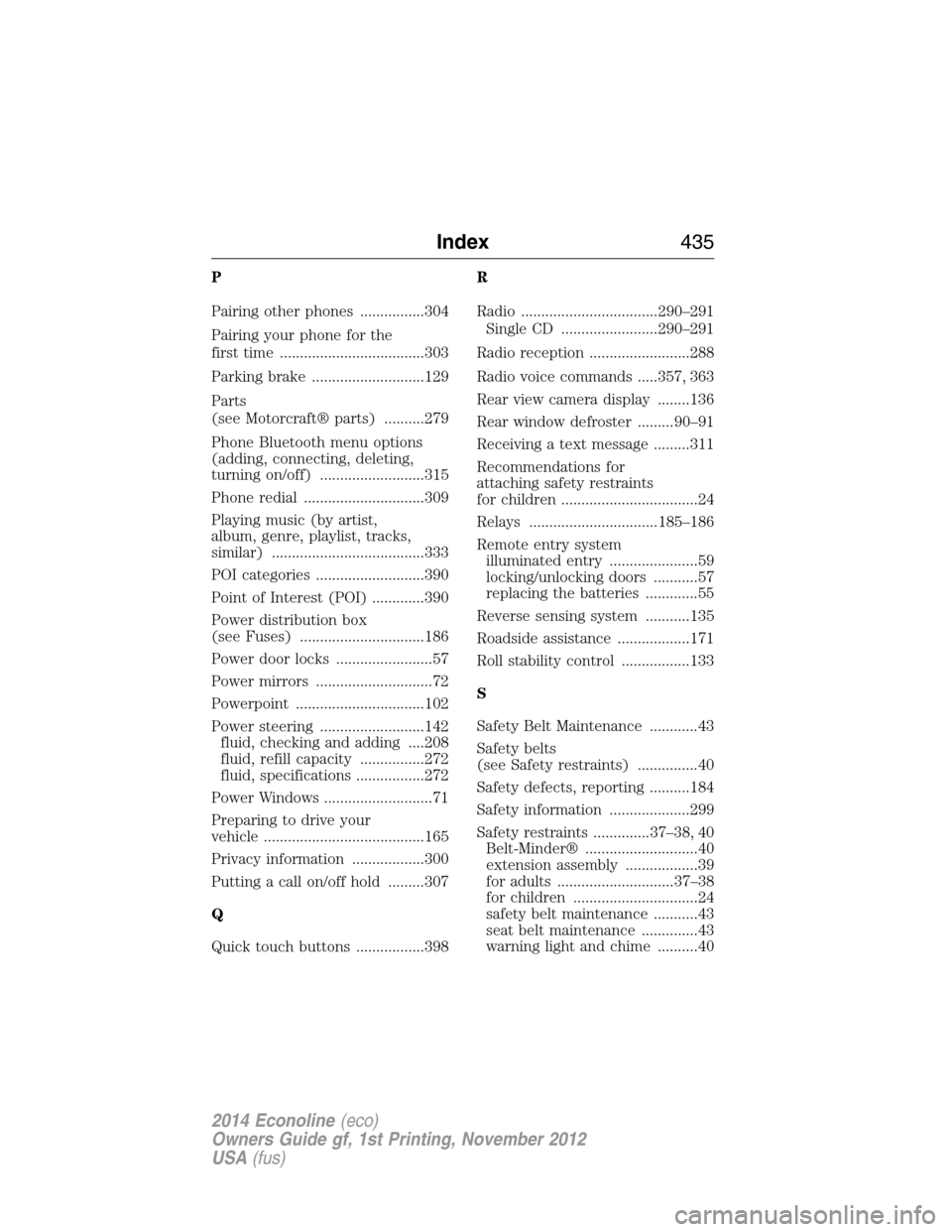
P
Pairing other phones ................304
Pairing your phone for the
first time ....................................303
Parking brake ............................129
Parts
(see Motorcraft® parts) ..........279
Phone Bluetooth menu options
(adding, connecting, deleting,
turning on/off) ..........................315
Phone redial ..............................309
Playing music (by artist,
album, genre, playlist, tracks,
similar) ......................................333
POI categories ...........................390
Point of Interest (POI) .............390
Power distribution box
(see Fuses) ...............................186
Power door locks ........................57
Power mirrors .............................72
Powerpoint ................................102
Power steering ..........................142
fluid, checking and adding ....208
fluid, refill capacity ................272
fluid, specifications .................272
Power Windows ...........................71
Preparing to drive your
vehicle ........................................165
Privacy information ..................300
Putting a call on/off hold .........307
Q
Quick touch buttons .................398R
Radio ..................................290–291
Single CD ........................290–291
Radio reception .........................288
Radio voice commands .....357, 363
Rear view camera display ........136
Rear window defroster .........90–91
Receiving a text message .........311
Recommendations for
attaching safety restraints
for children ..................................24
Relays ................................185–186
Remote entry system
illuminated entry ......................59
locking/unlocking doors ...........57
replacing the batteries .............55
Reverse sensing system ...........135
Roadside assistance ..................171
Roll stability control .................133
S
Safety Belt Maintenance ............43
Safety belts
(see Safety restraints) ...............40
Safety defects, reporting ..........184
Safety information ....................299
Safety restraints ..............37–38, 40
Belt-Minder® ............................40
extension assembly ..................39
for adults .............................37–38
for children ...............................24
safety belt maintenance ...........43
seat belt maintenance ..............43
warning light and chime ..........40
Index435
2014 Econoline(eco)
Owners Guide gf, 1st Printing, November 2012
USA(fus)