clock FORD E SERIES 2014 4.G User Guide
[x] Cancel search | Manufacturer: FORD, Model Year: 2014, Model line: E SERIES, Model: FORD E SERIES 2014 4.GPages: 438, PDF Size: 5.12 MB
Page 260 of 438
3. Cycle the ignition to the on position with the engine off.
4. Turn the hazard flashers on then off three times. This must be
accomplished within 10 seconds.
If the reset mode has been entered successfully, the horn will sound
once, the system indicator will flash and the message center (if
equipped) will displayTRAIN LEFT FRONT TIRE. If this does not
occur, please try again starting at Step 2.
If after repeated attempts to enter the reset mode, the horn does not
sound, the system indicator does not flash and the message center (if
equipped) does not displayTRAIN LEFT FRONT TIRE, seek service
from your authorized dealer.
5. Train the tire pressure monitoring system sensors in the tires using
the following system reset sequence starting with the left front tire in
the following clockwise order:
•Left front (Driver’s side front tire)
•Right front (Passenger’s side front tire)
•Right rear (Passenger’s side rear tire)
•Left rear (Driver’s side rear tire)
6. Remove the valve cap from the valve stem on the left front tire;
decrease the air pressure until the horn sounds.
Note:The single horn chirp confirms that the sensor identification code
has been learned by the module for this position. If a double horn is
heard, the reset procedure was unsuccessful, and must be repeated.
7. Remove the valve cap from the valve stem on the right front tire;
decrease the air pressure until the horn sounds.
8. Remove the valve cap from the valve stem on the right rear tire;
decrease the air pressure until the horn sounds.
9. Remove the valve cap from the valve stem on the left rear tire;
decrease the air pressure until the horn sounds.
Training is complete after the horn sounds for the last tire trained
(driver’s side rear tire), the system indicator stops flashing, and the
message center (if equipped) displays:
TRAINING COMPLETE.
Wheels and Tires259
2014 Econoline(eco)
Owners Guide gf, 1st Printing, November 2012
USA(fus)
Page 265 of 438
Spare Tire Information
The spare tire for your vehicle is stowed under the rear of your vehicle
(except cutaway and stripped chassis models).
Park on a level surface, activate the warning flashers, and place the
transmission selector lever in positionP.Then, apply the parking brake
and turn the engine off.
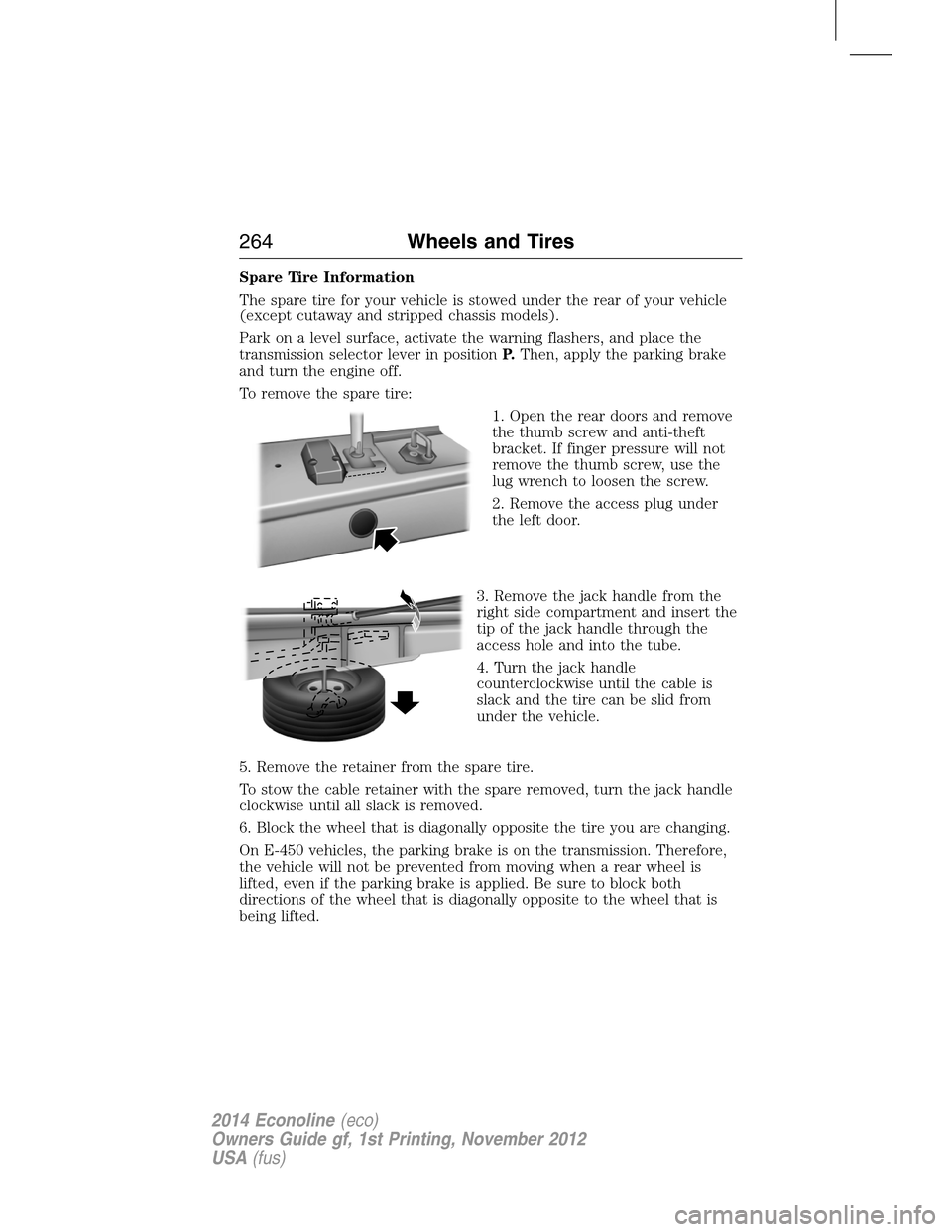
To remove the spare tire:
1. Open the rear doors and remove
the thumb screw and anti-theft
bracket. If finger pressure will not
remove the thumb screw, use the
lug wrench to loosen the screw.
2. Remove the access plug under
the left door.
3. Remove the jack handle from the
right side compartment and insert the
tip of the jack handle through the
access hole and into the tube.
4. Turn the jack handle
counterclockwise until the cable is
slack and the tire can be slid from
under the vehicle.
5. Remove the retainer from the spare tire.
To stow the cable retainer with the spare removed, turn the jack handle
clockwise until all slack is removed.
6. Block the wheel that is diagonally opposite the tire you are changing.
On E-450 vehicles, the parking brake is on the transmission. Therefore,
the vehicle will not be prevented from moving when a rear wheel is
lifted, even if the parking brake is applied. Be sure to block both
directions of the wheel that is diagonally opposite to the wheel that is
being lifted.
264Wheels and Tires
2014 Econoline(eco)
Owners Guide gf, 1st Printing, November 2012
USA(fus)
Page 266 of 438
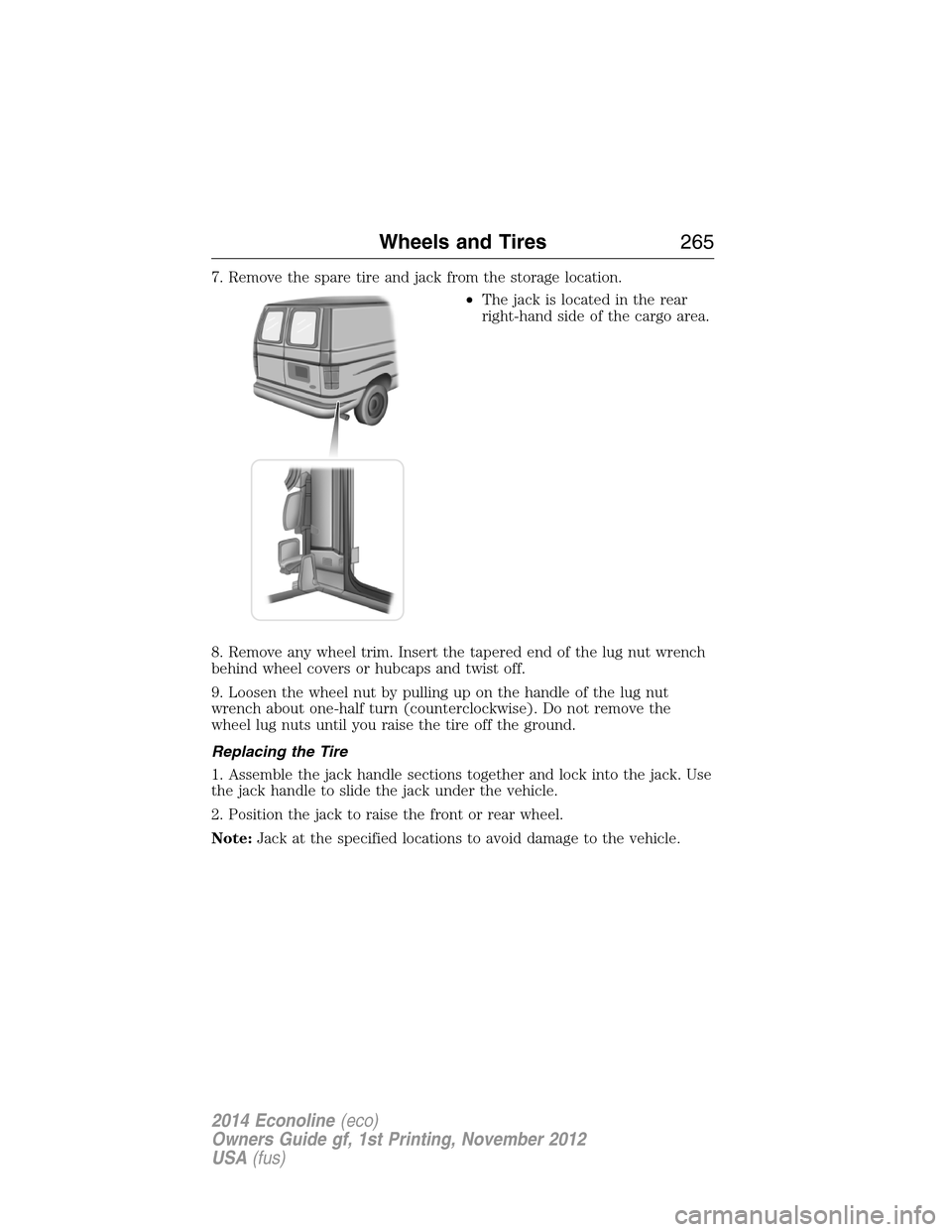
7. Remove the spare tire and jack from the storage location.
•The jack is located in the rear
right-hand side of the cargo area.
8. Remove any wheel trim. Insert the tapered end of the lug nut wrench
behind wheel covers or hubcaps and twist off.
9. Loosen the wheel nut by pulling up on the handle of the lug nut
wrench about one-half turn (counterclockwise). Do not remove the
wheel lug nuts until you raise the tire off the ground.
Replacing the Tire
1. Assemble the jack handle sections together and lock into the jack. Use
the jack handle to slide the jack under the vehicle.
2. Position the jack to raise the front or rear wheel.
Note:Jack at the specified locations to avoid damage to the vehicle.
Wheels and Tires265
2014 Econoline(eco)
Owners Guide gf, 1st Printing, November 2012
USA(fus)
Page 267 of 438
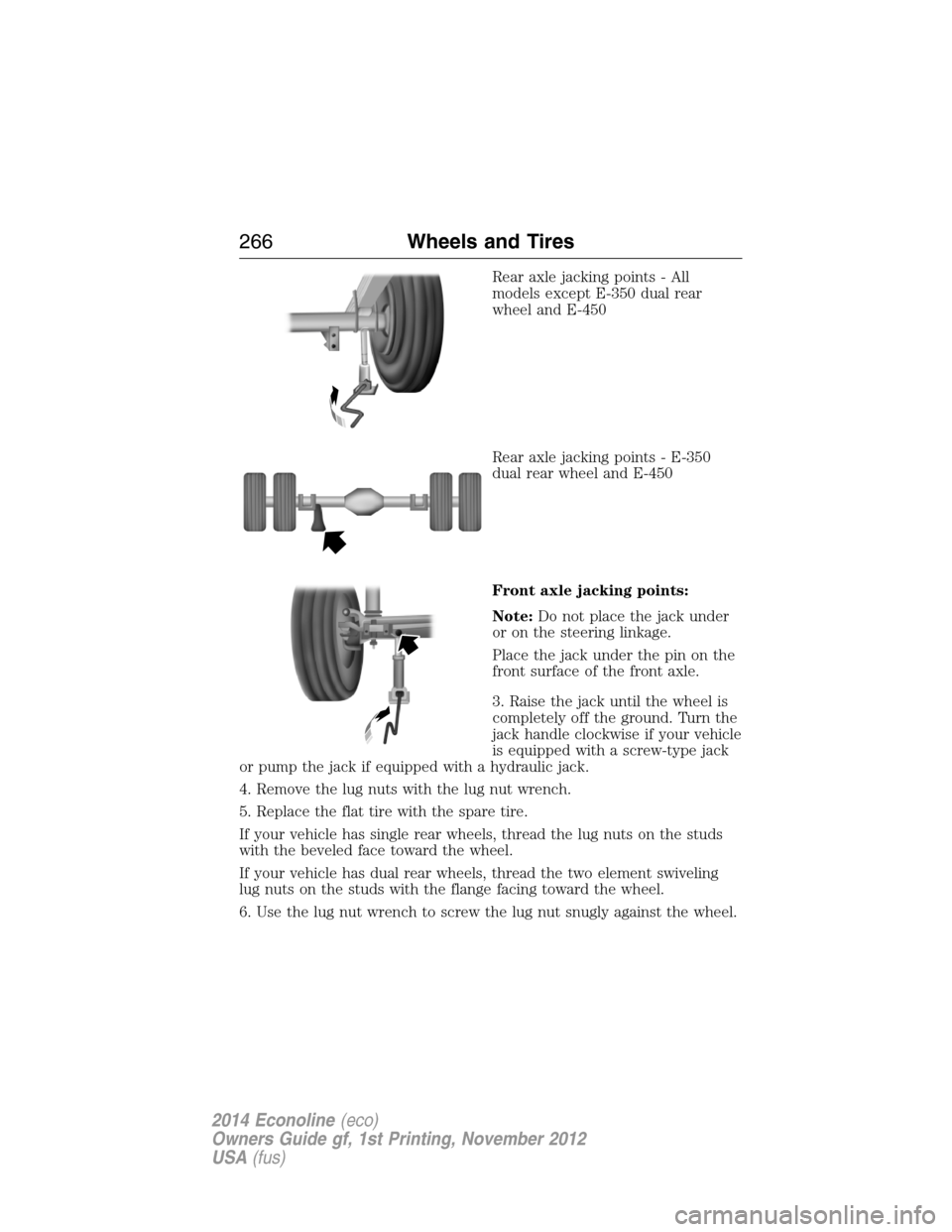
Rear axle jacking points - All
models except E-350 dual rear
wheel and E-450
Rear axle jacking points - E-350
dual rear wheel and E-450
Front axle jacking points:
Note:Do not place the jack under
or on the steering linkage.
Place the jack under the pin on the
front surface of the front axle.
3. Raise the jack until the wheel is
completely off the ground. Turn the
jack handle clockwise if your vehicle
is equipped with a screw-type jack
or pump the jack if equipped with a hydraulic jack.
4. Remove the lug nuts with the lug nut wrench.
5. Replace the flat tire with the spare tire.
If your vehicle has single rear wheels, thread the lug nuts on the studs
with the beveled face toward the wheel.
If your vehicle has dual rear wheels, thread the two element swiveling
lug nuts on the studs with the flange facing toward the wheel.
6. Use the lug nut wrench to screw the lug nut snugly against the wheel.
266Wheels and Tires
2014 Econoline(eco)
Owners Guide gf, 1st Printing, November 2012
USA(fus)
Page 268 of 438
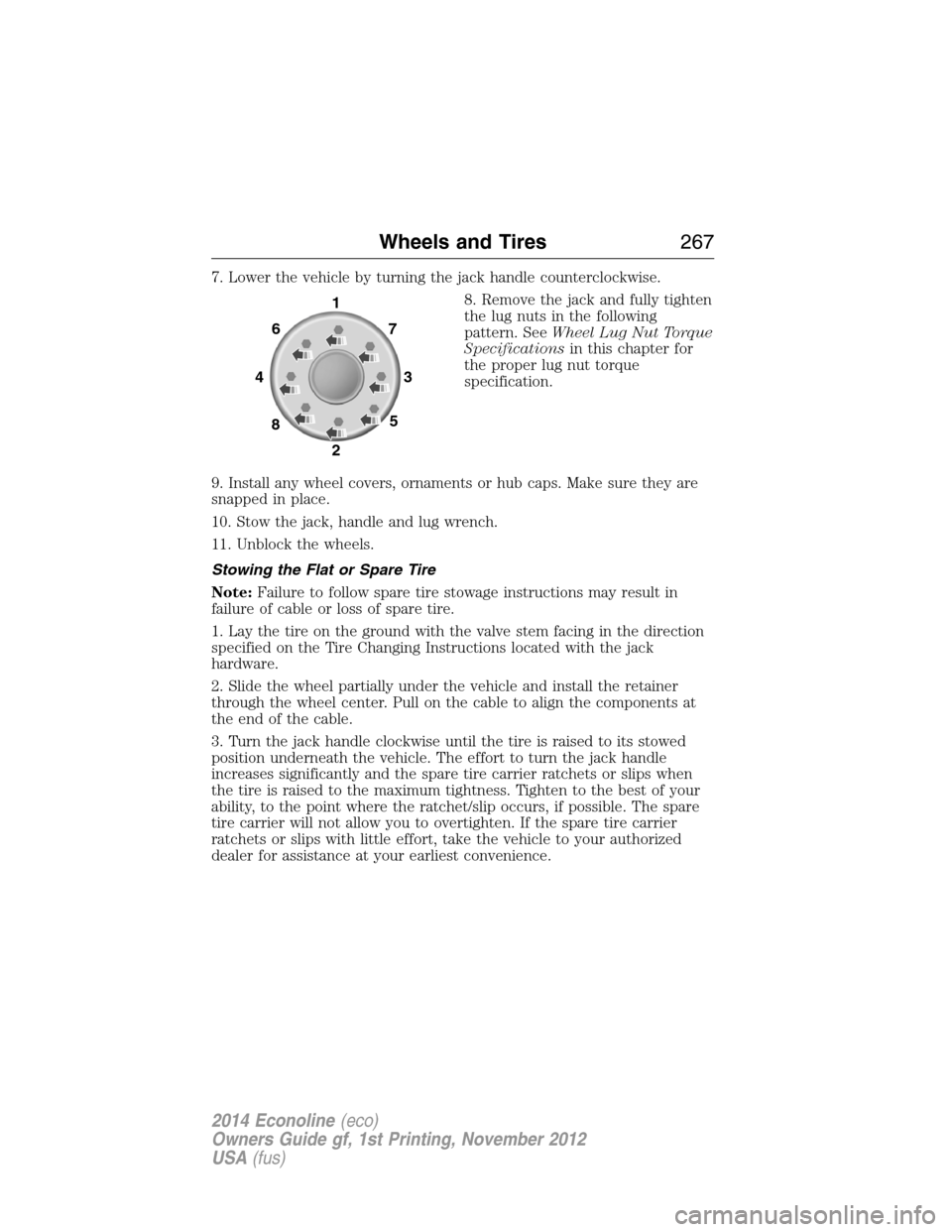
7. Lower the vehicle by turning the jack handle counterclockwise.
8. Remove the jack and fully tighten
the lug nuts in the following
pattern. SeeWheel Lug Nut Torque
Specificationsin this chapter for
the proper lug nut torque
specification.
9. Install any wheel covers, ornaments or hub caps. Make sure they are
snapped in place.
10. Stow the jack, handle and lug wrench.
11. Unblock the wheels.
Stowing the Flat or Spare Tire
Note:Failure to follow spare tire stowage instructions may result in
failure of cable or loss of spare tire.
1. Lay the tire on the ground with the valve stem facing in the direction
specified on the Tire Changing Instructions located with the jack
hardware.
2. Slide the wheel partially under the vehicle and install the retainer
through the wheel center. Pull on the cable to align the components at
the end of the cable.
3. Turn the jack handle clockwise until the tire is raised to its stowed
position underneath the vehicle. The effort to turn the jack handle
increases significantly and the spare tire carrier ratchets or slips when
the tire is raised to the maximum tightness. Tighten to the best of your
ability, to the point where the ratchet/slip occurs, if possible. The spare
tire carrier will not allow you to overtighten. If the spare tire carrier
ratchets or slips with little effort, take the vehicle to your authorized
dealer for assistance at your earliest convenience.
1
7
3
5 6
4
8
2
Wheels and Tires267
2014 Econoline(eco)
Owners Guide gf, 1st Printing, November 2012
USA(fus)
Page 291 of 438
AM/FM
WARNING:Driving while distracted can result in loss of vehicle
control, crash and injury. We strongly recommend that you use
extreme caution when using any device that may take your focus off
the road. Your primary responsibility is the safe operation of your
vehicle. We recommend against the use of any hand-held device while
driving and encourage the use of voice-operated systems when possible.
Make sure you are aware of all applicable local laws that may affect the
use of electronic devices while driving.
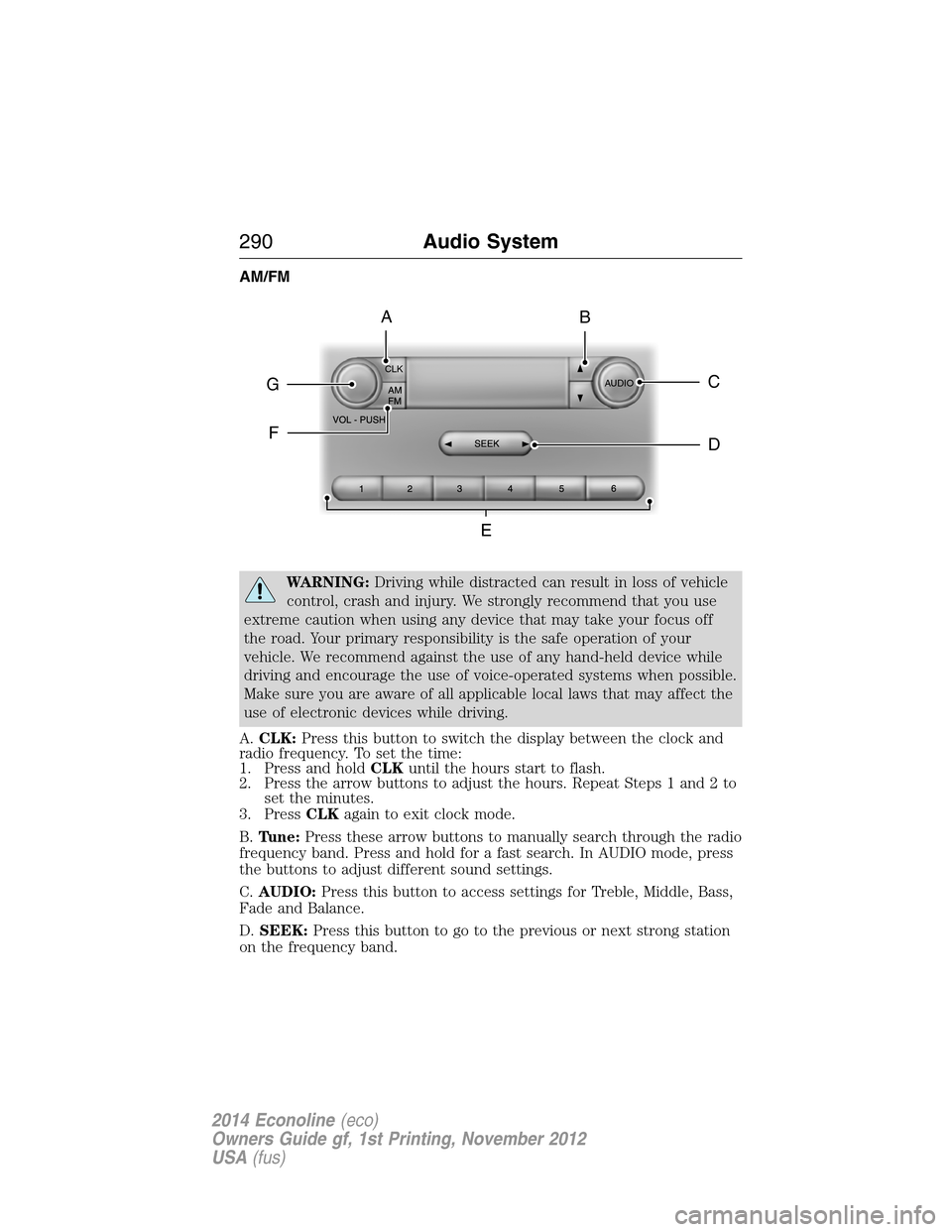
A.CLK:Press this button to switch the display between the clock and
radio frequency. To set the time:
1. Press and holdCLKuntil the hours start to flash.
2. Press the arrow buttons to adjust the hours. Repeat Steps 1 and 2 to
set the minutes.
3. PressCLKagain to exit clock mode.
B.Tune:Press these arrow buttons to manually search through the radio
frequency band. Press and hold for a fast search. In AUDIO mode, press
the buttons to adjust different sound settings.
C.AUDIO:Press this button to access settings for Treble, Middle, Bass,
Fade and Balance.
D.SEEK:Press this button to go to the previous or next strong station
on the frequency band.
CLK
AUDIOC
EG
F
BA
D
290Audio System
2014 Econoline(eco)
Owners Guide gf, 1st Printing, November 2012
USA(fus)
Page 347 of 438
NAVIGATION CONTROLS
WARNING:Driving while distracted can result in loss of vehicle
control, crash and injury. We strongly recommend that you use
extreme caution when using any device that may take your focus off
the road. Your primary responsibility is the safe operation of your
vehicle. We recommend against the use of any hand-held device while
driving and encourage the use of voice-operated systems when possible.
Make sure you are aware of all applicable local laws that may affect the
use of electronic devices while driving.
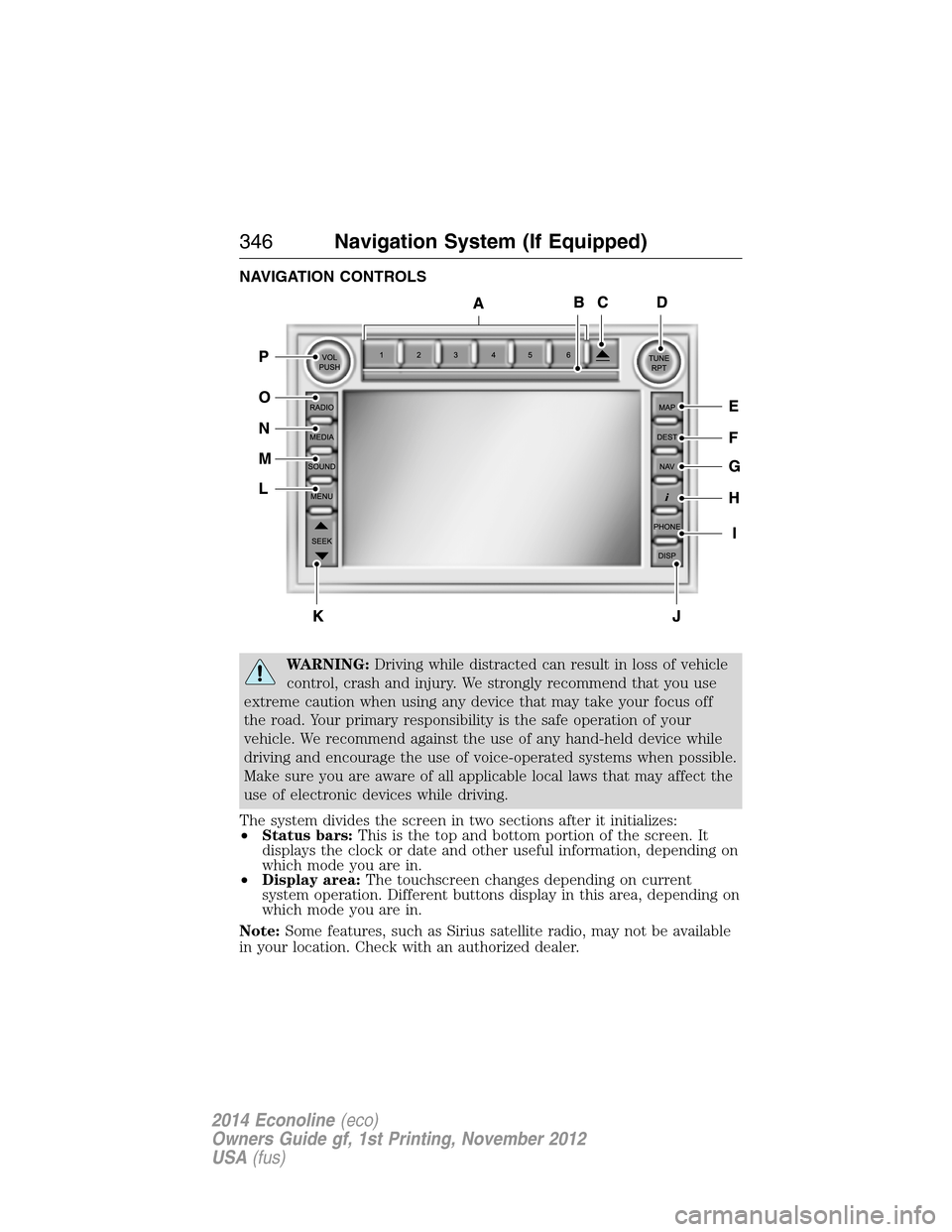
The system divides the screen in two sections after it initializes:
•Status bars:This is the top and bottom portion of the screen. It
displays the clock or date and other useful information, depending on
which mode you are in.
•Display area:The touchscreen changes depending on current
system operation. Different buttons display in this area, depending on
which mode you are in.
Note:Some features, such as Sirius satellite radio, may not be available
in your location. Check with an authorized dealer.
346Navigation System (If Equipped)
2014 Econoline(eco)
Owners Guide gf, 1st Printing, November 2012
USA(fus)
Page 349 of 438
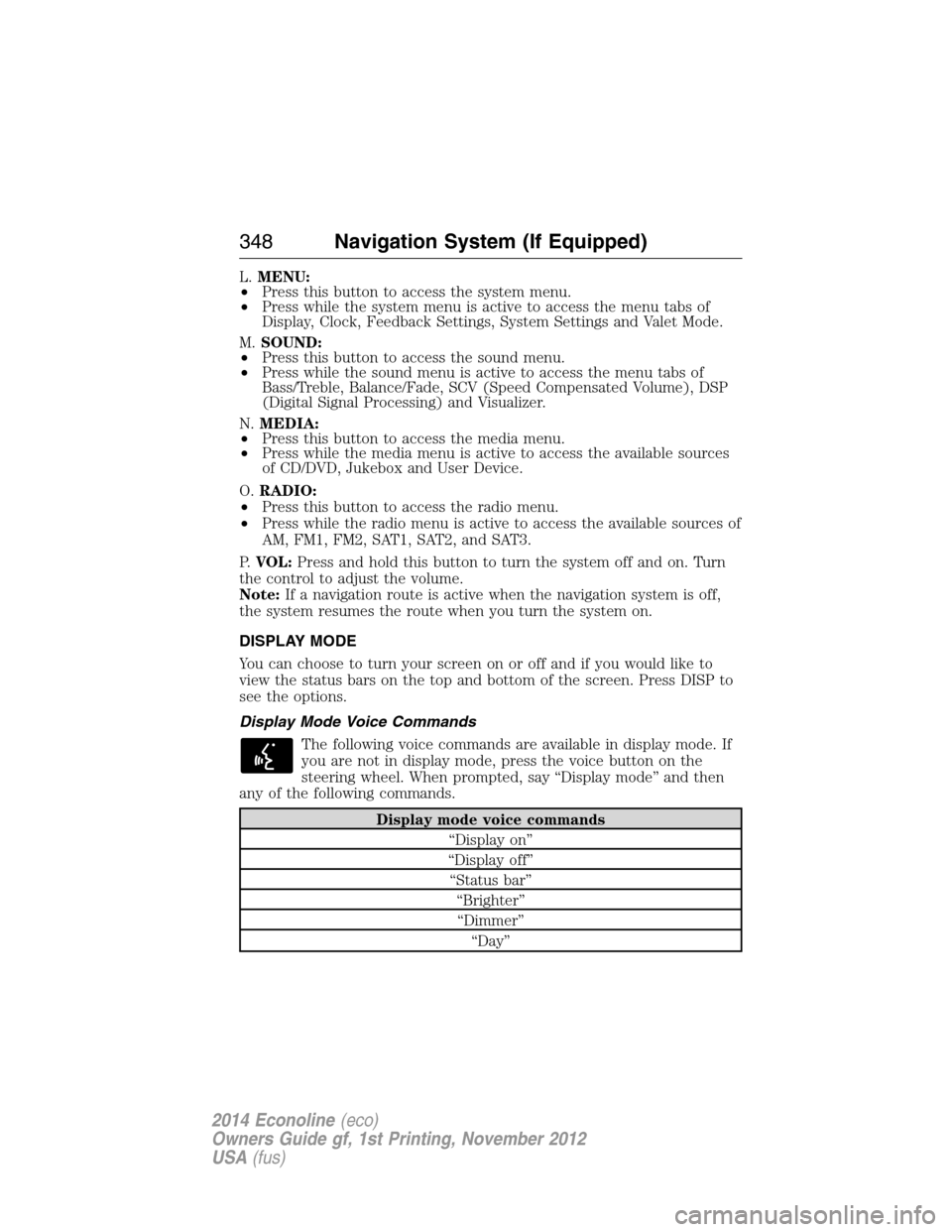
L.MENU:
•Press this button to access the system menu.
•Press while the system menu is active to access the menu tabs of
Display, Clock, Feedback Settings, System Settings and Valet Mode.
M.SOUND:
•Press this button to access the sound menu.
•Press while the sound menu is active to access the menu tabs of
Bass/Treble, Balance/Fade, SCV (Speed Compensated Volume), DSP
(Digital Signal Processing) and Visualizer.
N.MEDIA:
•Press this button to access the media menu.
•Press while the media menu is active to access the available sources
of CD/DVD, Jukebox and User Device.
O.RADIO:
•Press this button to access the radio menu.
•Press while the radio menu is active to access the available sources of
AM, FM1, FM2, SAT1, SAT2, and SAT3.
P.VOL:Press and hold this button to turn the system off and on. Turn
the control to adjust the volume.
Note:If a navigation route is active when the navigation system is off,
the system resumes the route when you turn the system on.
DISPLAY MODE
You can choose to turn your screen on or off and if you would like to
view the status bars on the top and bottom of the screen. Press DISP to
see the options.
Display Mode Voice Commands
The following voice commands are available in display mode. If
you are not in display mode, press the voice button on the
steering wheel. When prompted, say “Display mode” and then
any of the following commands.
Display mode voice commands
“Display on”
“Display off”
“Status bar”
“Brighter”
“Dimmer”
“Day”
348Navigation System (If Equipped)
2014 Econoline(eco)
Owners Guide gf, 1st Printing, November 2012
USA(fus)
Page 354 of 438
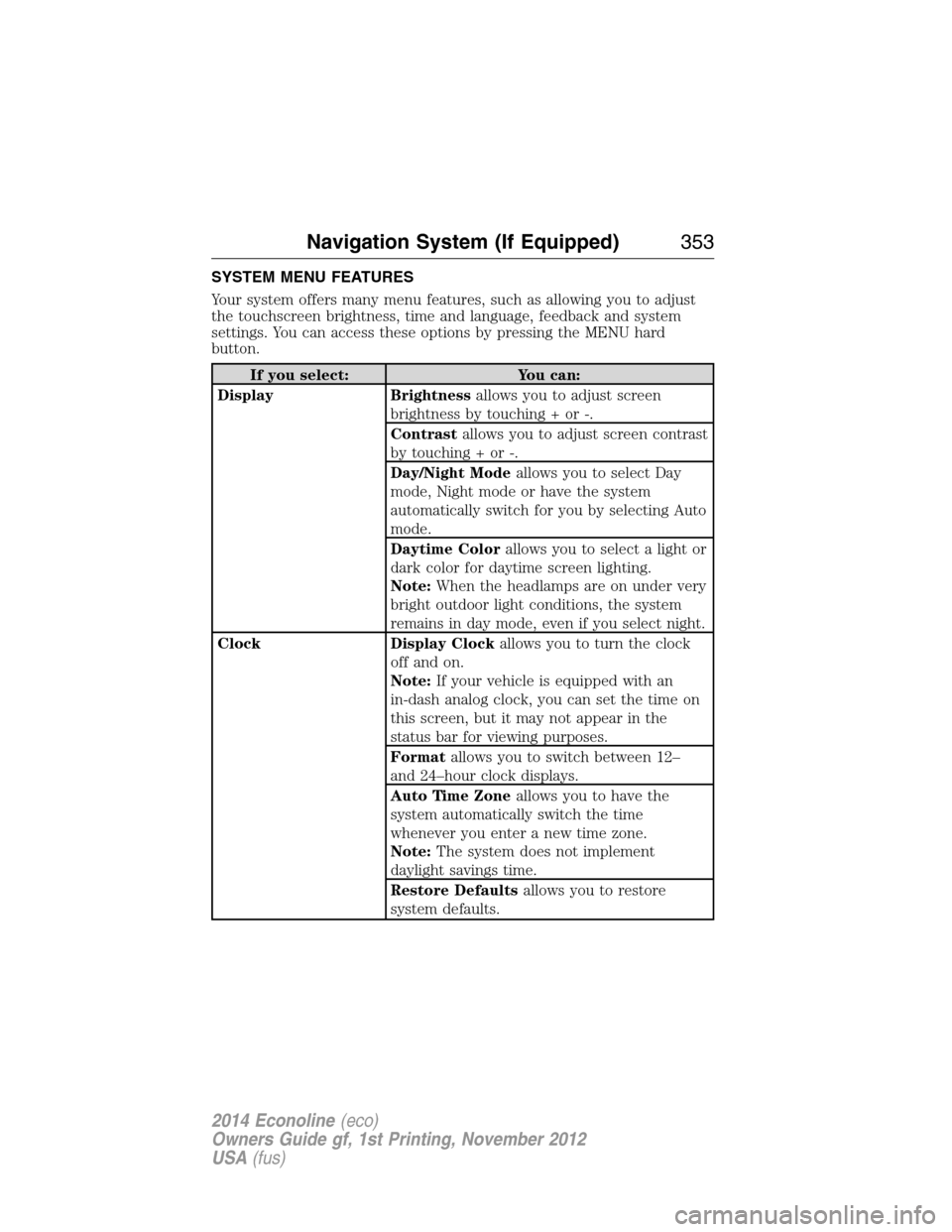
SYSTEM MENU FEATURES
Your system offers many menu features, such as allowing you to adjust
the touchscreen brightness, time and language, feedback and system
settings. You can access these options by pressing the MENU hard
button.
If you select: You can:
Display Brightnessallows you to adjust screen
brightness by touching + or -.
Contrastallows you to adjust screen contrast
by touching + or -.
Day/Night Modeallows you to select Day
mode, Night mode or have the system
automatically switch for you by selecting Auto
mode.
Daytime Colorallows you to select a light or
dark color for daytime screen lighting.
Note:When the headlamps are on under very
bright outdoor light conditions, the system
remains in day mode, even if you select night.
Clock Display Clockallows you to turn the clock
off and on.
Note:If your vehicle is equipped with an
in-dash analog clock, you can set the time on
this screen, but it may not appear in the
status bar for viewing purposes.
Formatallows you to switch between 12–
and 24–hour clock displays.
Auto Time Zoneallows you to have the
system automatically switch the time
whenever you enter a new time zone.
Note:The system does not implement
daylight savings time.
Restore Defaultsallows you to restore
system defaults.
Navigation System (If Equipped)353
2014 Econoline(eco)
Owners Guide gf, 1st Printing, November 2012
USA(fus)
Page 433 of 438
brake warning light ................128
fluid, checking and adding ....207
fluid, refill capacities ..............272
fluid, specifications .................272
lubricant specifications ..........272
parking ....................................129
shift interlock ..........................125
trailer ...............................156–157
C
Capacities for refilling
fluids ..........................................272
CD ......................................290–291
CD player ..................................288
CD voice
commands .................370, 372–373
Cell phone use ............................16
Changing a tire .........................260
Child safety seats
automatic locking mode
(retractor) .................................38
LATCH .......................................28
tether anchorage hardware .....33
Child safety seats -
booster seats ...............................22
Cleaning the touchscreen ........351
Cleaning your vehicle ...............224
engine compartment ..............226
instrument panel ....................228
interior .....................................228
plastic parts ............................225
washing ....................................224
waxing .....................................226
wheels ......................................230
wiper blades ............................227
Climate control
(see Air conditioning or
Heating) .................................90–91Clock ..................................290–291
Coolant ......................................197
checking and adding ..............197
refill capacities ........................272
specifications ..........................272
Creating a playlist .....................375
Cruise control ...........................140
Customer Assistance ................171
Ford Extended Service
Plan ..........................................285
Getting roadside
assistance ................................171
Getting the service you
need .........................................177
Ordering additional owner’s
literature .................................183
Utilizing the
Mediation/Arbitration
Program ...................................181
Customizing your home
screen ........................................349
D
Daytime running lamps
(see Lamps) ................................68
Defrost ...................................90–91
Dipstick
automatic transmission
fluid ..........................................201
engine oil .................................196
Drivebelt ....................................271
Driveline universal joint and
slip yoke ....................................207
Driving under special
conditions ..................................126
through water .........................168
432Index
2014 Econoline(eco)
Owners Guide gf, 1st Printing, November 2012
USA(fus)