ad blue FORD E SERIES 2014 4.G Owner's Manual
[x] Cancel search | Manufacturer: FORD, Model Year: 2014, Model line: E SERIES, Model: FORD E SERIES 2014 4.GPages: 438, PDF Size: 5.12 MB
Page 333 of 438
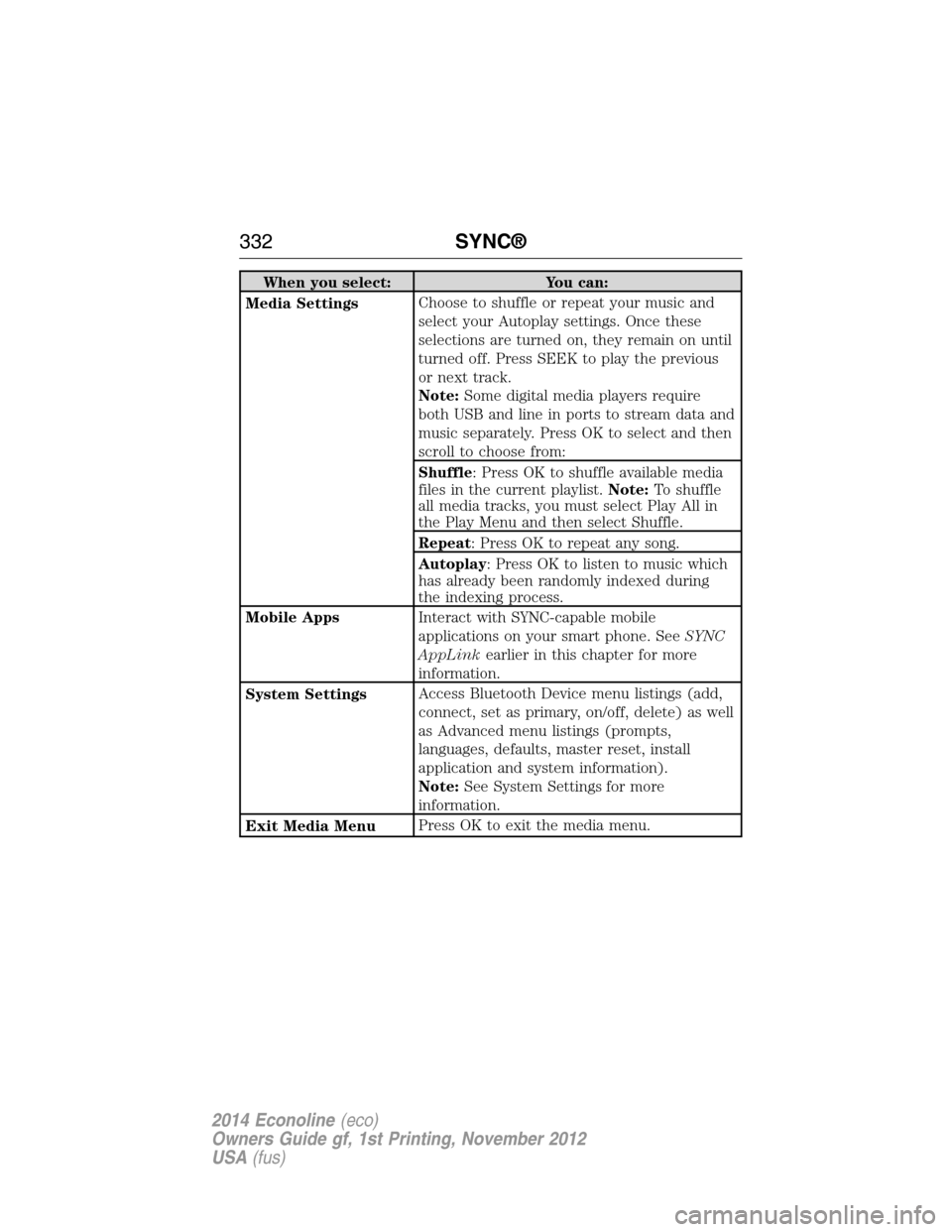
When you select: You can:
Media SettingsChoose to shuffle or repeat your music and
select your Autoplay settings. Once these
selections are turned on, they remain on until
turned off. Press SEEK to play the previous
or next track.
Note:Some digital media players require
both USB and line in ports to stream data and
music separately. Press OK to select and then
scroll to choose from:
Shuffle: Press OK to shuffle available media
files in the current playlist.Note:To shuffle
all media tracks, you must select Play All in
the Play Menu and then select Shuffle.
Repeat: Press OK to repeat any song.
Autoplay: Press OK to listen to music which
has already been randomly indexed during
the indexing process.
Mobile AppsInteract with SYNC-capable mobile
applications on your smart phone. SeeSYNC
AppLinkearlier in this chapter for more
information.
System SettingsAccess Bluetooth Device menu listings (add,
connect, set as primary, on/off, delete) as well
as Advanced menu listings (prompts,
languages, defaults, master reset, install
application and system information).
Note:See System Settings for more
information.
Exit Media MenuPress OK to exit the media menu.
332SYNC®
2014 Econoline(eco)
Owners Guide gf, 1st Printing, November 2012
USA(fus)
Page 337 of 438
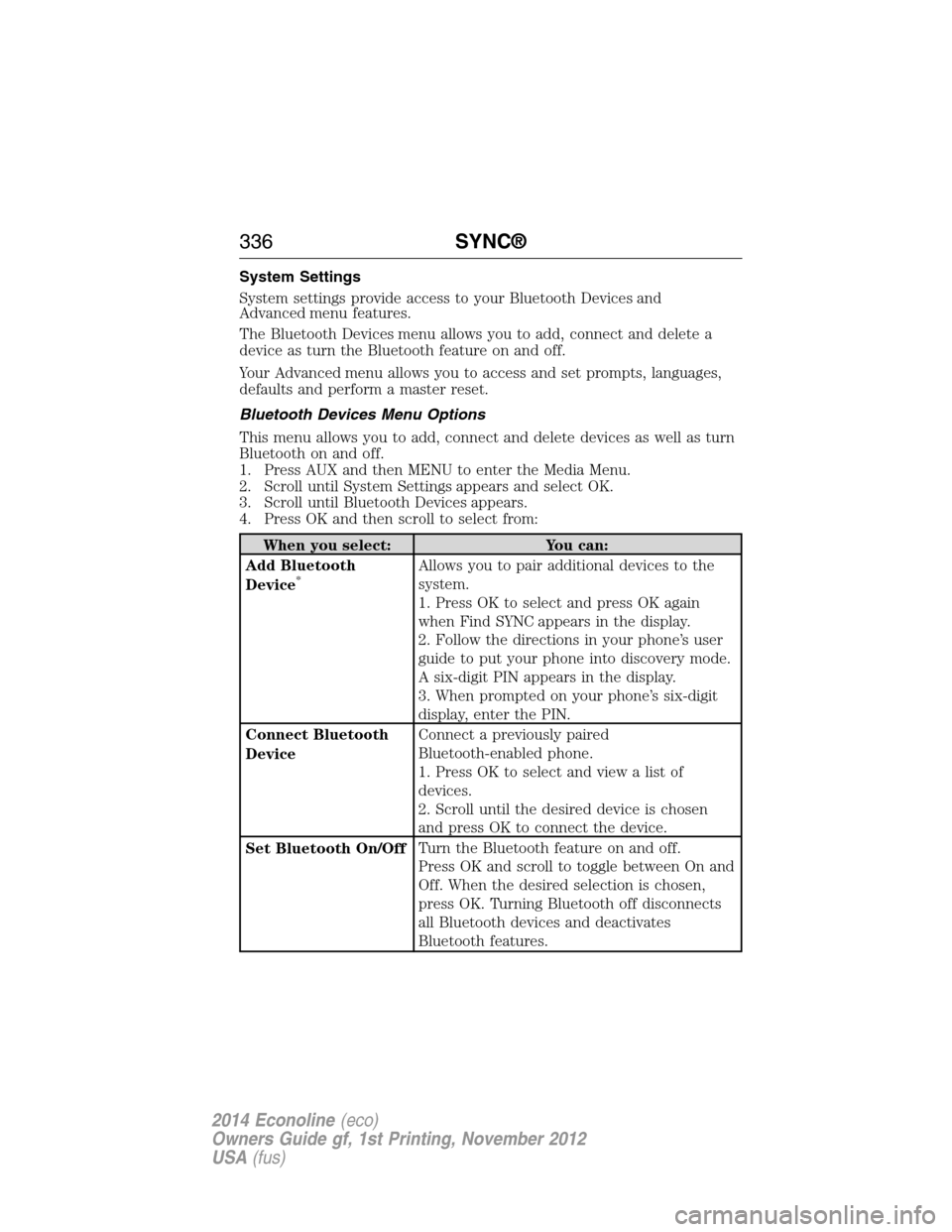
System Settings
System settings provide access to your Bluetooth Devices and
Advanced menu features.
The Bluetooth Devices menu allows you to add, connect and delete a
device as turn the Bluetooth feature on and off.
Your Advanced menu allows you to access and set prompts, languages,
defaults and perform a master reset.
Bluetooth Devices Menu Options
This menu allows you to add, connect and delete devices as well as turn
Bluetooth on and off.
1. Press AUX and then MENU to enter the Media Menu.
2. Scroll until System Settings appears and select OK.
3. Scroll until Bluetooth Devices appears.
4. Press OK and then scroll to select from:
When you select: You can:
Add Bluetooth
Device
*Allows you to pair additional devices to the
system.
1. Press OK to select and press OK again
when Find SYNC appears in the display.
2. Follow the directions in your phone’s user
guide to put your phone into discovery mode.
A six-digit PIN appears in the display.
3. When prompted on your phone’s six-digit
display, enter the PIN.
Connect Bluetooth
DeviceConnect a previously paired
Bluetooth-enabled phone.
1. Press OK to select and view a list of
devices.
2. Scroll until the desired device is chosen
and press OK to connect the device.
Set Bluetooth On/OffTurn the Bluetooth feature on and off.
Press OK and scroll to toggle between On and
Off. When the desired selection is chosen,
press OK. Turning Bluetooth off disconnects
all Bluetooth devices and deactivates
Bluetooth features.
336SYNC®
2014 Econoline(eco)
Owners Guide gf, 1st Printing, November 2012
USA(fus)
Page 341 of 438
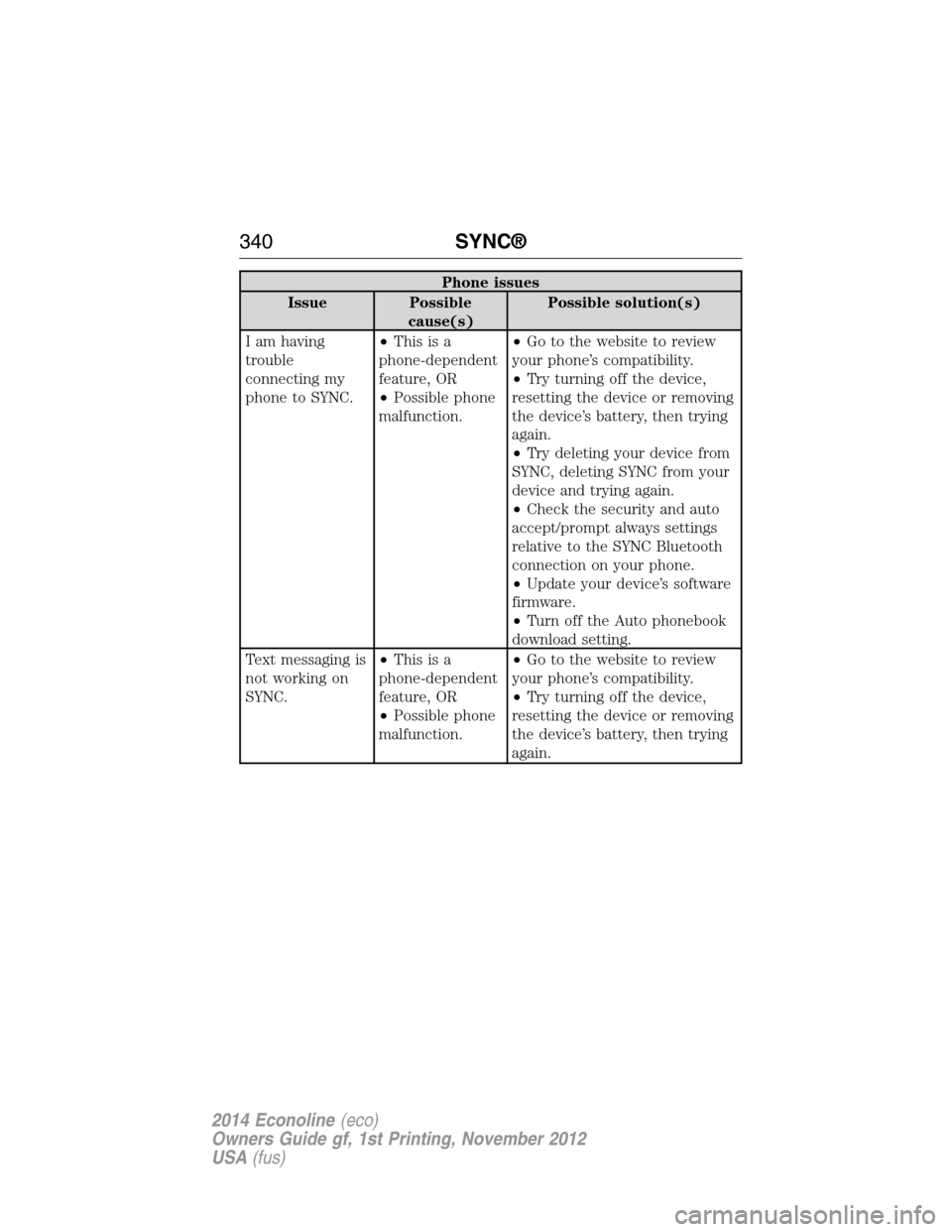
Phone issues
Issue Possible
cause(s)Possible solution(s)
I am having
trouble
connecting my
phone to SYNC.•Thisisa
phone-dependent
feature, OR
•Possible phone
malfunction.•Go to the website to review
your phone’s compatibility.
•Try turning off the device,
resetting the device or removing
the device’s battery, then trying
again.
•Try deleting your device from
SYNC, deleting SYNC from your
device and trying again.
•Check the security and auto
accept/prompt always settings
relative to the SYNC Bluetooth
connection on your phone.
•Update your device’s software
firmware.
•Turn off the Auto phonebook
download setting.
Text messaging is
not working on
SYNC.•Thisisa
phone-dependent
feature, OR
•Possible phone
malfunction.•Go to the website to review
your phone’s compatibility.
•Try turning off the device,
resetting the device or removing
the device’s battery, then trying
again.
340SYNC®
2014 Econoline(eco)
Owners Guide gf, 1st Printing, November 2012
USA(fus)
Page 342 of 438
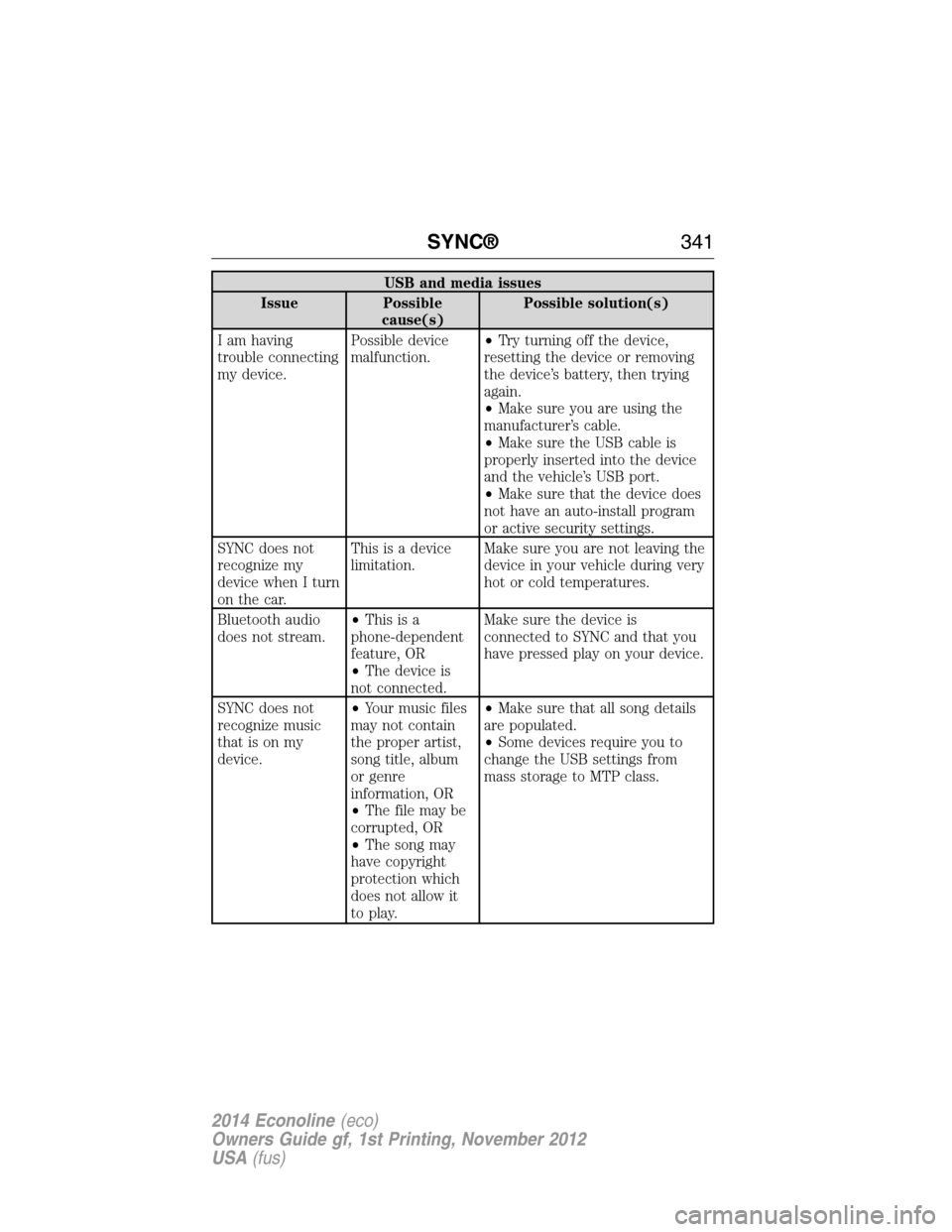
USB and media issues
Issue Possible
cause(s)Possible solution(s)
I am having
trouble connecting
my device.Possible device
malfunction.•Try turning off the device,
resetting the device or removing
the device’s battery, then trying
again.
•Make sure you are using the
manufacturer’s cable.
•Make sure the USB cable is
properly inserted into the device
and the vehicle’s USB port.
•Make sure that the device does
not have an auto-install program
or active security settings.
SYNC does not
recognize my
device when I turn
on the car.This is a device
limitation.Make sure you are not leaving the
device in your vehicle during very
hot or cold temperatures.
Bluetooth audio
does not stream.•Thisisa
phone-dependent
feature, OR
•The device is
not connected.Make sure the device is
connected to SYNC and that you
have pressed play on your device.
SYNC does not
recognize music
that is on my
device.•Your music files
may not contain
the proper artist,
song title, album
or genre
information, OR
•The file may be
corrupted, OR
•The song may
have copyright
protection which
does not allow it
to play.•Make sure that all song details
are populated.
•Some devices require you to
change the USB settings from
mass storage to MTP class.
SYNC®341
2014 Econoline(eco)
Owners Guide gf, 1st Printing, November 2012
USA(fus)
Page 343 of 438
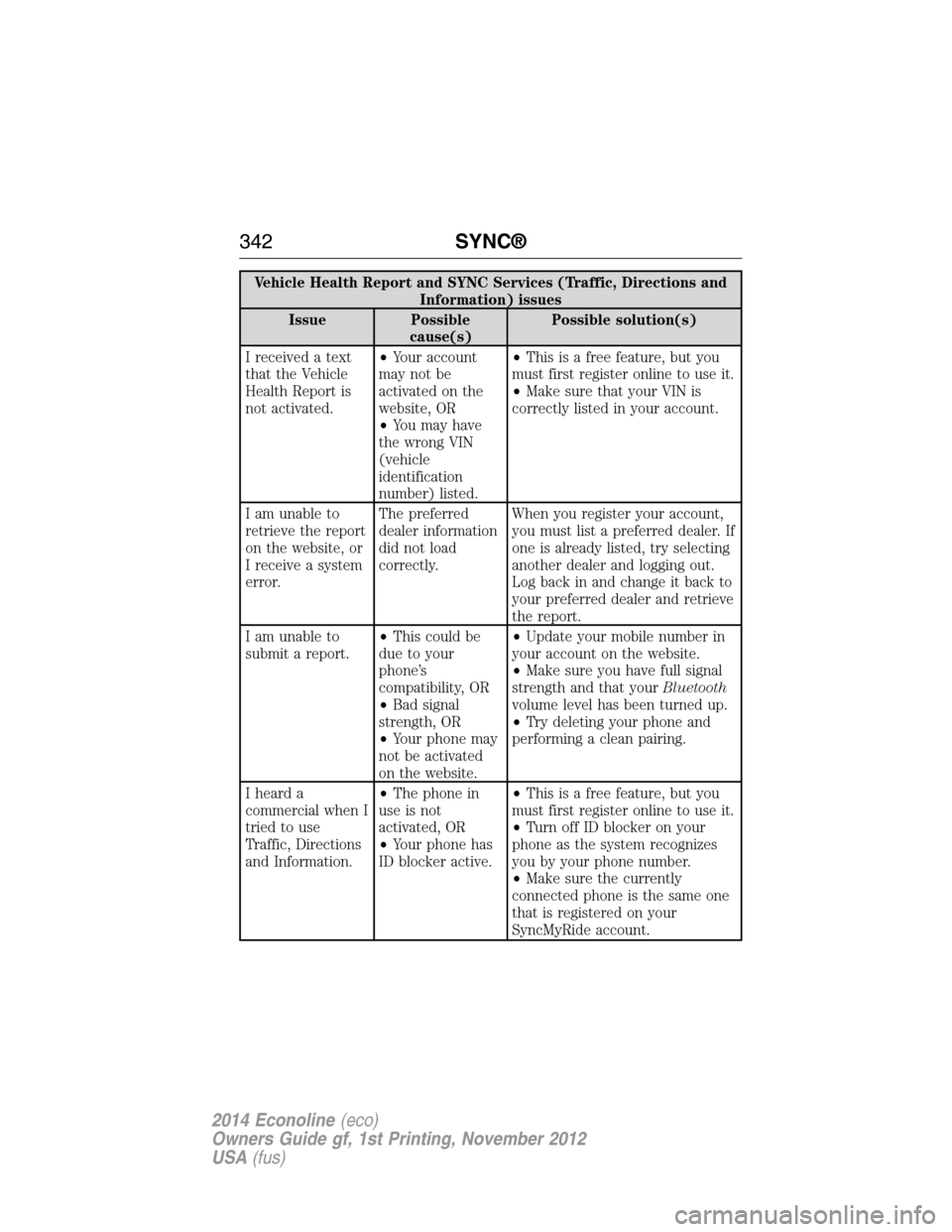
Vehicle Health Report and SYNC Services (Traffic, Directions and
Information) issues
Issue Possible
cause(s)Possible solution(s)
I received a text
that the Vehicle
Health Report is
not activated.•Your account
may not be
activated on the
website, OR
•You may have
the wrong VIN
(vehicle
identification
number) listed.•This is a free feature, but you
must first register online to use it.
•Make sure that your VIN is
correctly listed in your account.
I am unable to
retrieve the report
on the website, or
I receive a system
error.The preferred
dealer information
did not load
correctly.When you register your account,
you must list a preferred dealer. If
one is already listed, try selecting
another dealer and logging out.
Log back in and change it back to
your preferred dealer and retrieve
the report.
I am unable to
submit a report.•This could be
due to your
phone’s
compatibility, OR
•Bad signal
strength, OR
•Your phone may
not be activated
on the website.•Update your mobile number in
your account on the website.
•Make sure you have full signal
strength and that yourBluetooth
volume level has been turned up.
•Try deleting your phone and
performing a clean pairing.
I heard a
commercial when I
tried to use
Traffic, Directions
and Information.•The phone in
use is not
activated, OR
•Your phone has
ID blocker active.•This is a free feature, but you
must first register online to use it.
•Turn off ID blocker on your
phone as the system recognizes
you by your phone number.
•Make sure the currently
connected phone is the same one
that is registered on your
SyncMyRide account.
342SYNC®
2014 Econoline(eco)
Owners Guide gf, 1st Printing, November 2012
USA(fus)
Page 350 of 438
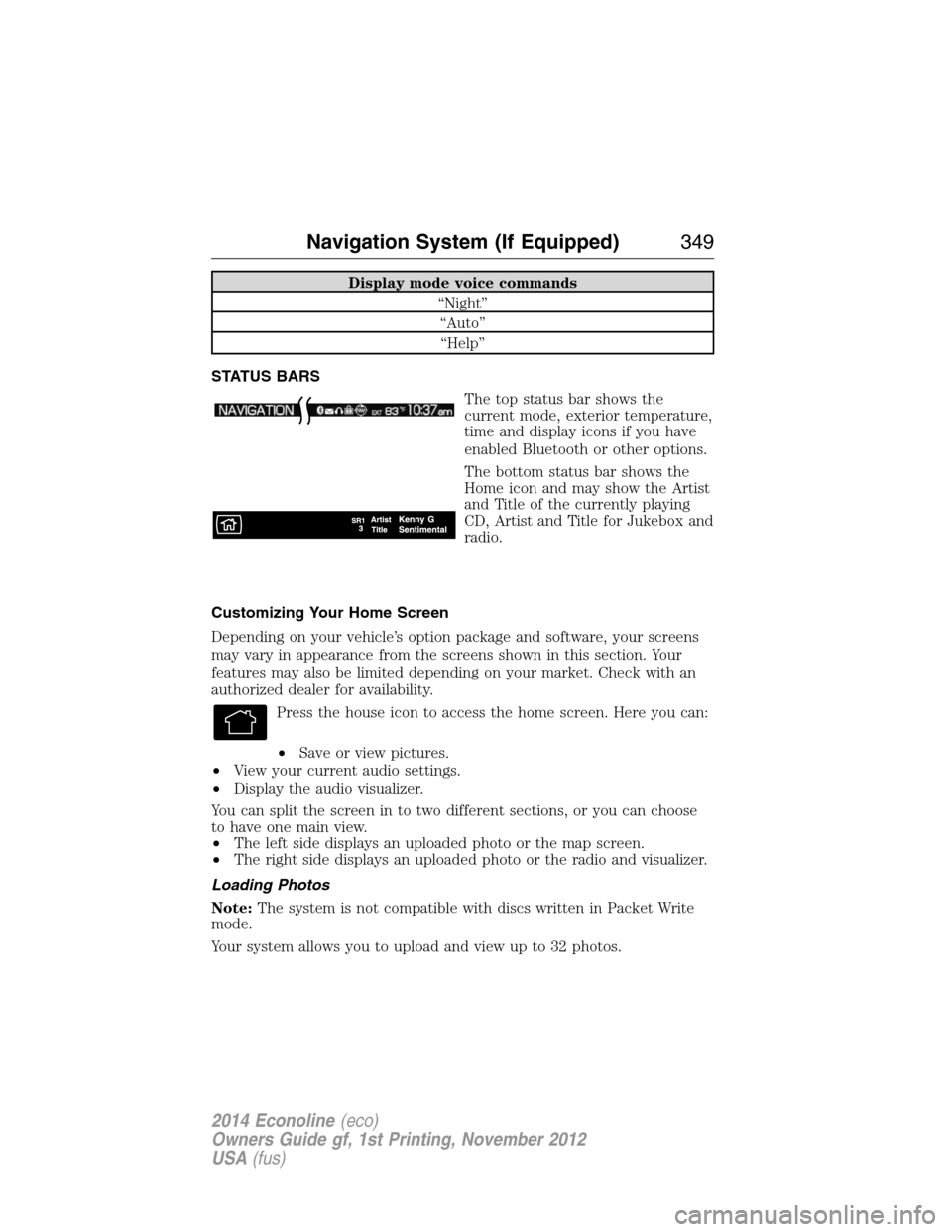
Display mode voice commands
“Night”
“Auto”
“Help”
STATUS BARS
The top status bar shows the
current mode, exterior temperature,
time and display icons if you have
enabled Bluetooth or other options.
The bottom status bar shows the
Home icon and may show the Artist
and Title of the currently playing
CD, Artist and Title for Jukebox and
radio.
Customizing Your Home Screen
Depending on your vehicle’s option package and software, your screens
may vary in appearance from the screens shown in this section. Your
features may also be limited depending on your market. Check with an
authorized dealer for availability.
Press the house icon to access the home screen. Here you can:
•Save or view pictures.
•View your current audio settings.
•Display the audio visualizer.
You can split the screen in to two different sections, or you can choose
to have one main view.
•The left side displays an uploaded photo or the map screen.
•The right side displays an uploaded photo or the radio and visualizer.
Loading Photos
Note:The system is not compatible with discs written in Packet Write
mode.
Your system allows you to upload and view up to 32 photos.
Navigation System (If Equipped)349
2014 Econoline(eco)
Owners Guide gf, 1st Printing, November 2012
USA(fus)
Page 435 of 438
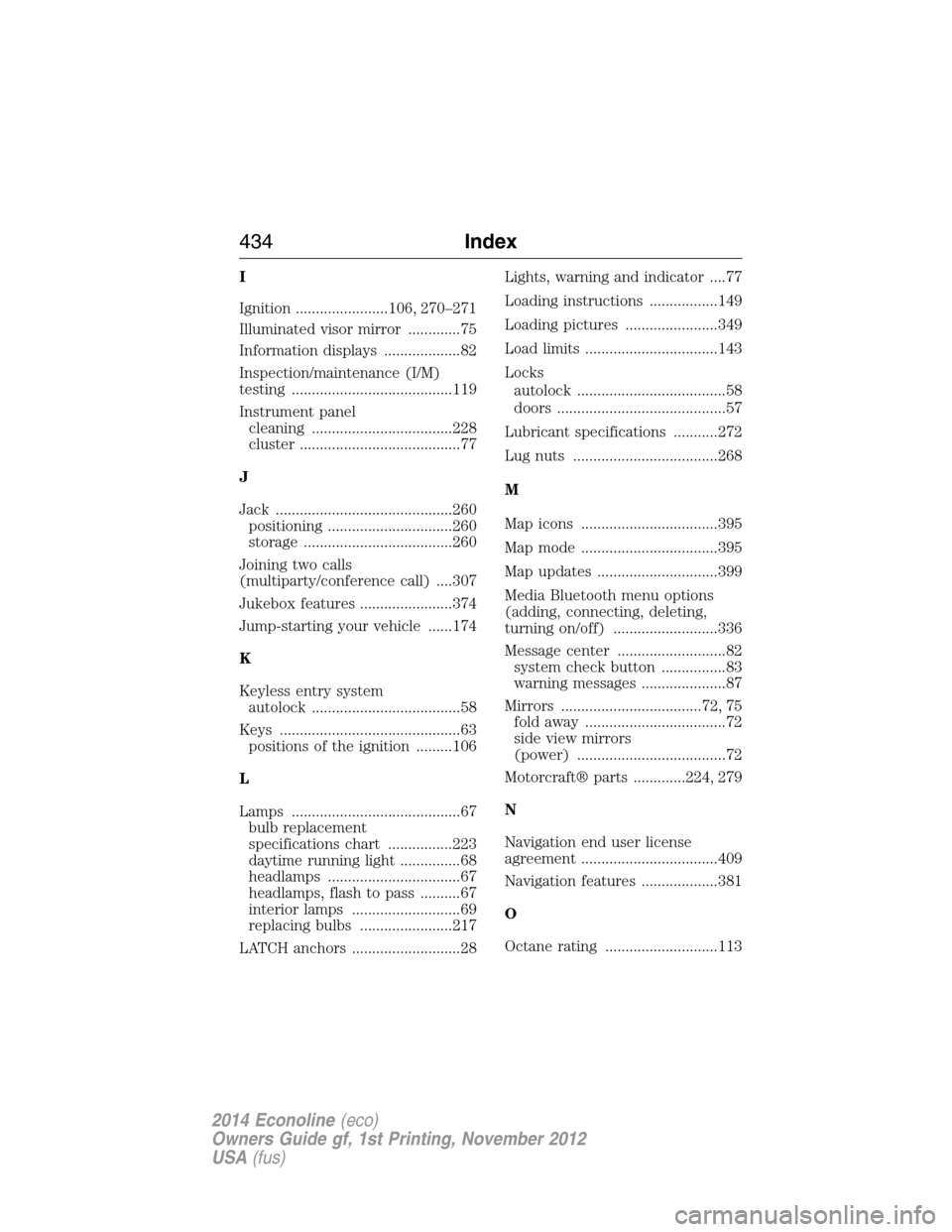
I
Ignition .......................106, 270–271
Illuminated visor mirror .............75
Information displays ...................82
Inspection/maintenance (I/M)
testing ........................................119
Instrument panel
cleaning ...................................228
cluster ........................................77
J
Jack ............................................260
positioning ...............................260
storage .....................................260
Joining two calls
(multiparty/conference call) ....307
Jukebox features .......................374
Jump-starting your vehicle ......174
K
Keyless entry system
autolock .....................................58
Keys .............................................63
positions of the ignition .........106
L
Lamps ..........................................67
bulb replacement
specifications chart ................223
daytime running light ...............68
headlamps .................................67
headlamps, flash to pass ..........67
interior lamps ...........................69
replacing bulbs .......................217
LATCH anchors ...........................28Lights, warning and indicator ....77
Loading instructions .................149
Loading pictures .......................349
Load limits .................................143
Locks
autolock .....................................58
doors ..........................................57
Lubricant specifications ...........272
Lug nuts ....................................268
M
Map icons ..................................395
Map mode ..................................395
Map updates ..............................399
Media Bluetooth menu options
(adding, connecting, deleting,
turning on/off) ..........................336
Message center ...........................82
system check button ................83
warning messages .....................87
Mirrors ...................................72, 75
fold away ...................................72
side view mirrors
(power) .....................................72
Motorcraft® parts .............224, 279
N
Navigation end user license
agreement ..................................409
Navigation features ...................381
O
Octane rating ............................113
434Index
2014 Econoline(eco)
Owners Guide gf, 1st Printing, November 2012
USA(fus)
Page 436 of 438
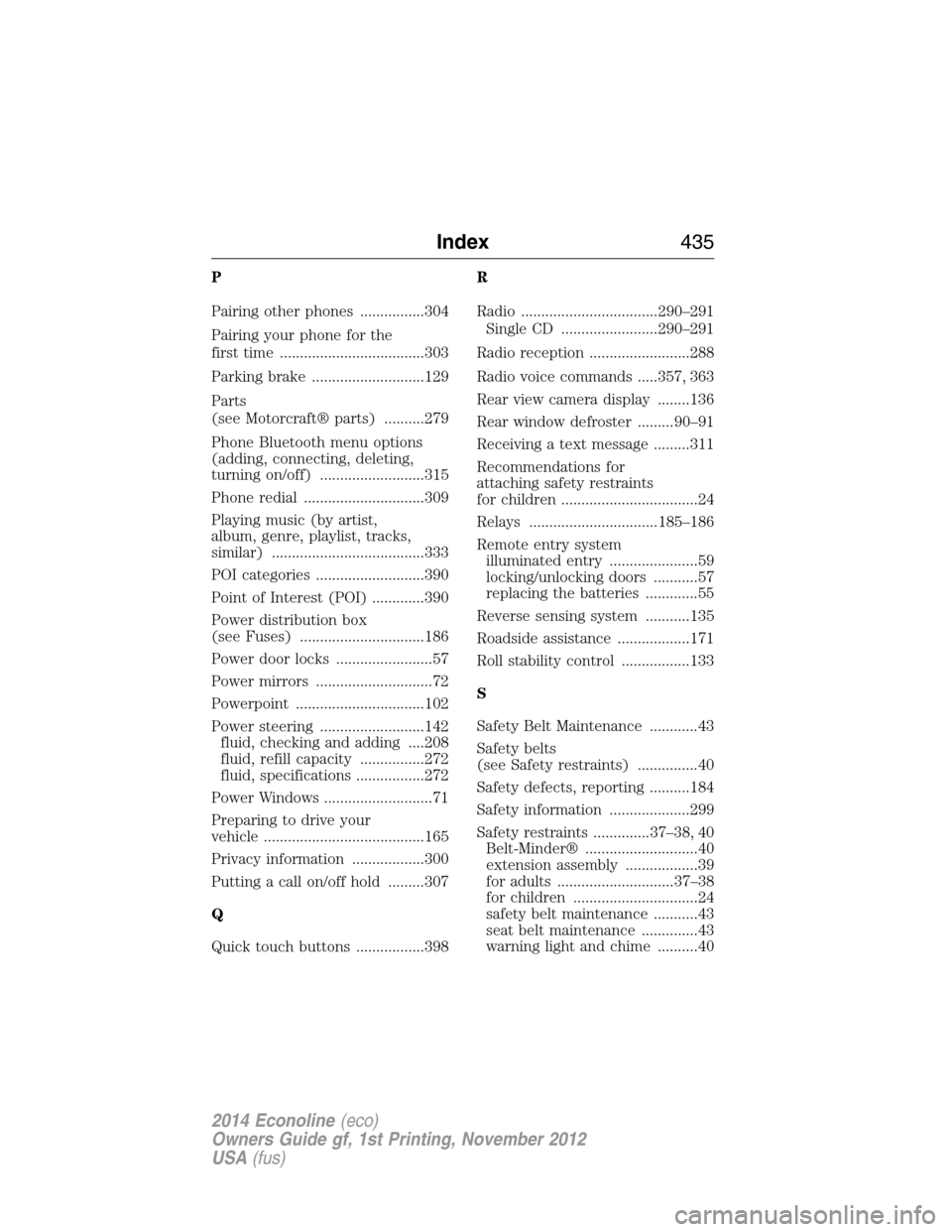
P
Pairing other phones ................304
Pairing your phone for the
first time ....................................303
Parking brake ............................129
Parts
(see Motorcraft® parts) ..........279
Phone Bluetooth menu options
(adding, connecting, deleting,
turning on/off) ..........................315
Phone redial ..............................309
Playing music (by artist,
album, genre, playlist, tracks,
similar) ......................................333
POI categories ...........................390
Point of Interest (POI) .............390
Power distribution box
(see Fuses) ...............................186
Power door locks ........................57
Power mirrors .............................72
Powerpoint ................................102
Power steering ..........................142
fluid, checking and adding ....208
fluid, refill capacity ................272
fluid, specifications .................272
Power Windows ...........................71
Preparing to drive your
vehicle ........................................165
Privacy information ..................300
Putting a call on/off hold .........307
Q
Quick touch buttons .................398R
Radio ..................................290–291
Single CD ........................290–291
Radio reception .........................288
Radio voice commands .....357, 363
Rear view camera display ........136
Rear window defroster .........90–91
Receiving a text message .........311
Recommendations for
attaching safety restraints
for children ..................................24
Relays ................................185–186
Remote entry system
illuminated entry ......................59
locking/unlocking doors ...........57
replacing the batteries .............55
Reverse sensing system ...........135
Roadside assistance ..................171
Roll stability control .................133
S
Safety Belt Maintenance ............43
Safety belts
(see Safety restraints) ...............40
Safety defects, reporting ..........184
Safety information ....................299
Safety restraints ..............37–38, 40
Belt-Minder® ............................40
extension assembly ..................39
for adults .............................37–38
for children ...............................24
safety belt maintenance ...........43
seat belt maintenance ..............43
warning light and chime ..........40
Index435
2014 Econoline(eco)
Owners Guide gf, 1st Printing, November 2012
USA(fus)