air condition FORD E SERIES 2014 4.G Owner's Manual
[x] Cancel search | Manufacturer: FORD, Model Year: 2014, Model line: E SERIES, Model: FORD E SERIES 2014 4.GPages: 438, PDF Size: 5.12 MB
Page 279 of 438
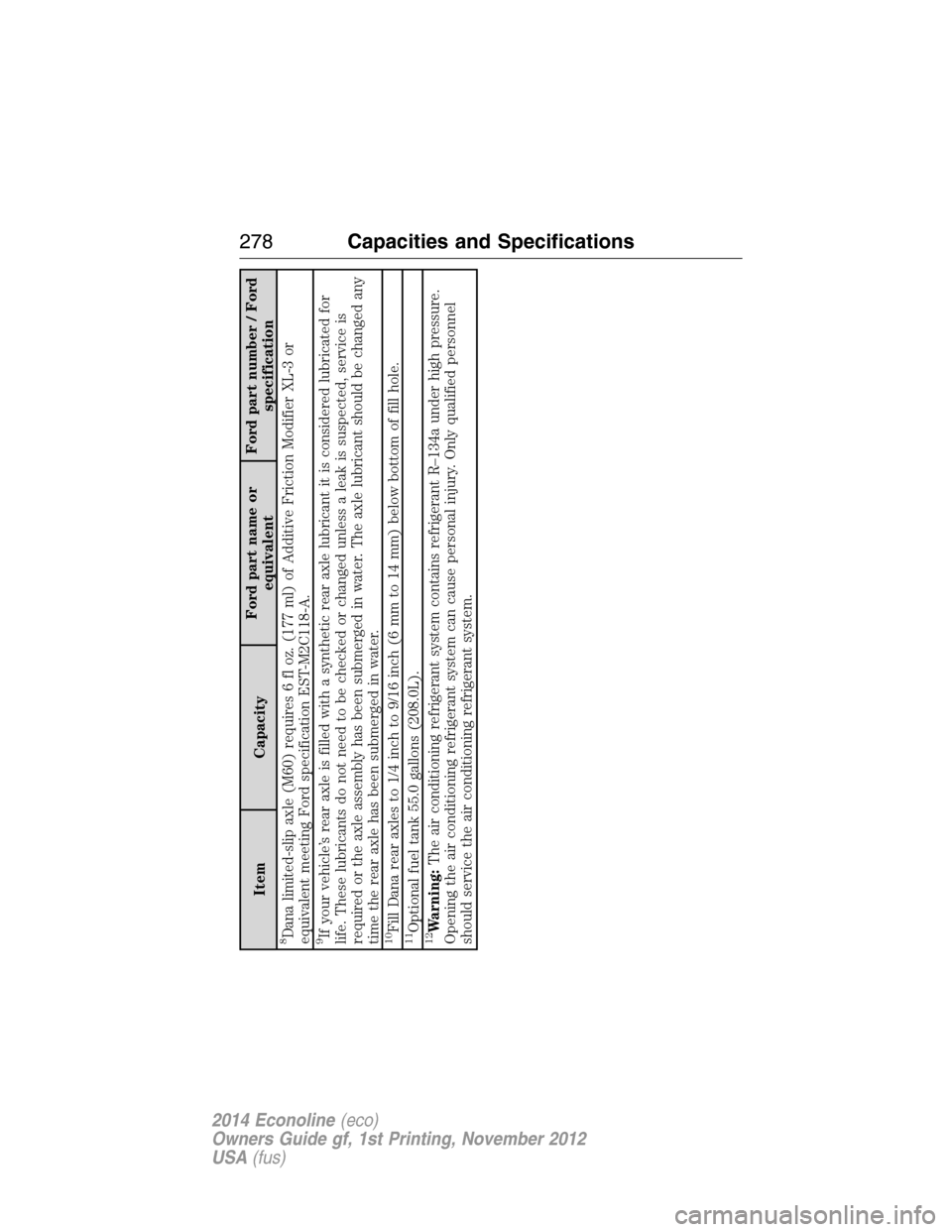
Item CapacityFord part name or
equivalentFord part number / Ford
specification
8Dana limited-slip axle (M60) requires 6 fl oz. (177 ml) of Additive Friction Modifier XL-3 or
equivalent meeting Ford specification EST-M2C118-A.9If your vehicle’s rear axle is filled with a synthetic rear axle lubricant it is considered lubricated for
life. These lubricants do not need to be checked or changed unless a leak is suspected, service is
required or the axle assembly has been submerged in water. The axle lubricant should be changed any
time the rear axle has been submerged in water.10Fill Dana rear axles to 1/4 inch to 9/16 inch (6 mm to 14 mm) below bottom of fill hole.11Optional fuel tank 55.0 gallons (208.0L).12Warning:The air conditioning refrigerant system contains refrigerant R–134a under high pressure.
Opening the air conditioning refrigerant system can cause personal injury. Only qualified personnel
should service the air conditioning refrigerant system.
278Capacities and Specifications
2014 Econoline(eco)
Owners Guide gf, 1st Printing, November 2012
USA(fus)
Page 301 of 438
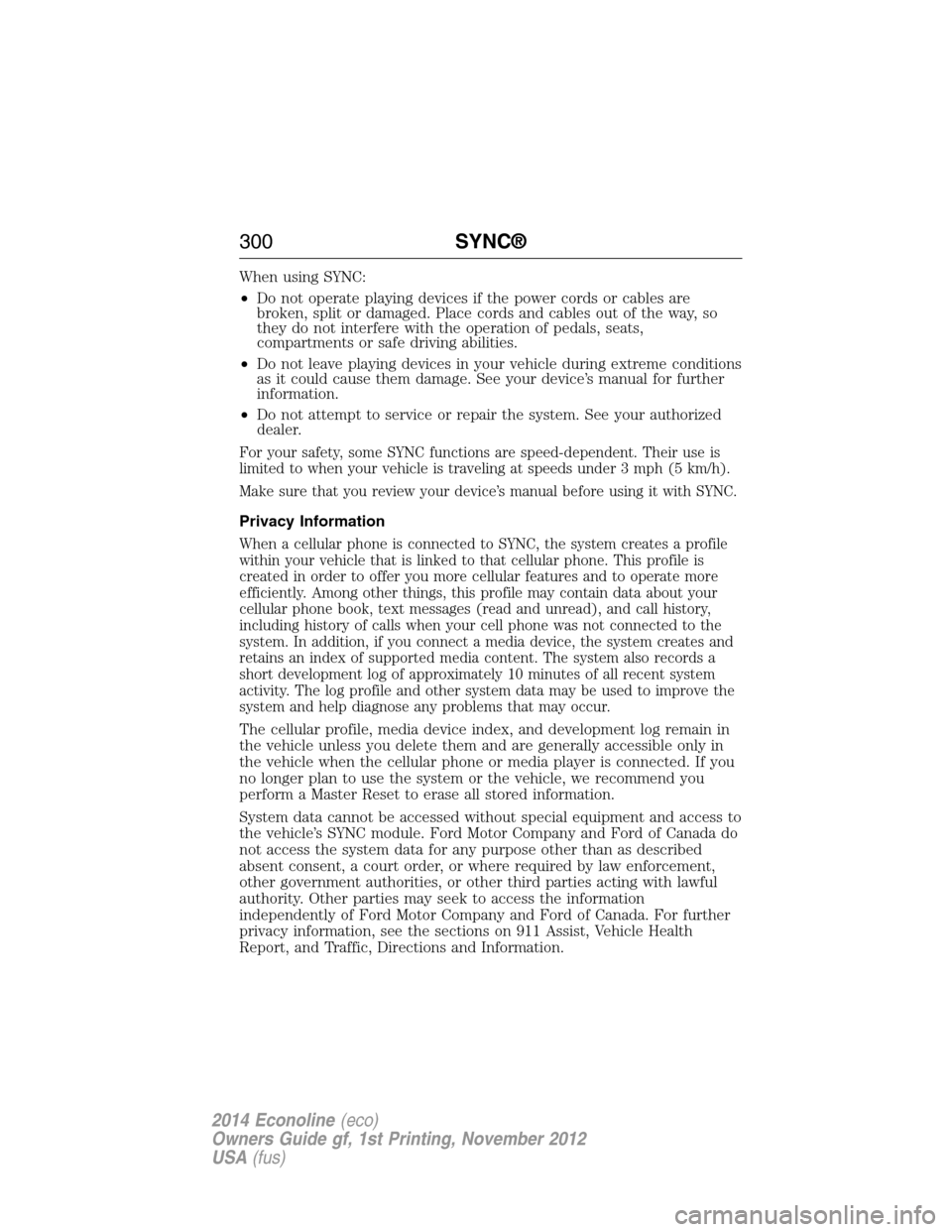
When using SYNC:
•Do not operate playing devices if the power cords or cables are
broken, split or damaged. Place cords and cables out of the way, so
they do not interfere with the operation of pedals, seats,
compartments or safe driving abilities.
•Do not leave playing devices in your vehicle during extreme conditions
as it could cause them damage. See your device’s manual for further
information.
•Do not attempt to service or repair the system. See your authorized
dealer.
For your safety, some SYNC functions are speed-dependent. Their use is
limited to when your vehicle is traveling at speeds under 3 mph (5 km/h).
Make sure that you review your device’s manual before using it with SYNC.
Privacy Information
When a cellular phone is connected to SYNC, the system creates a profile
within your vehicle that is linked to that cellular phone. This profile is
created in order to offer you more cellular features and to operate more
efficiently. Among other things, this profile may contain data about your
cellular phone book, text messages (read and unread), and call history,
including history of calls when your cell phone was not connected to the
system. In addition, if you connect a media device, the system creates and
retains an index of supported media content. The system also records a
short development log of approximately 10 minutes of all recent system
activity. The log profile and other system data may be used to improve the
system and help diagnose any problems that may occur.
The cellular profile, media device index, and development log remain in
the vehicle unless you delete them and are generally accessible only in
the vehicle when the cellular phone or media player is connected. If you
no longer plan to use the system or the vehicle, we recommend you
perform a Master Reset to erase all stored information.
System data cannot be accessed without special equipment and access to
the vehicle’s SYNC module. Ford Motor Company and Ford of Canada do
not access the system data for any purpose other than as described
absent consent, a court order, or where required by law enforcement,
other government authorities, or other third parties acting with lawful
authority. Other parties may seek to access the information
independently of Ford Motor Company and Ford of Canada. For further
privacy information, see the sections on 911 Assist, Vehicle Health
Report, and Traffic, Directions and Information.
300SYNC®
2014 Econoline(eco)
Owners Guide gf, 1st Printing, November 2012
USA(fus)
Page 324 of 438
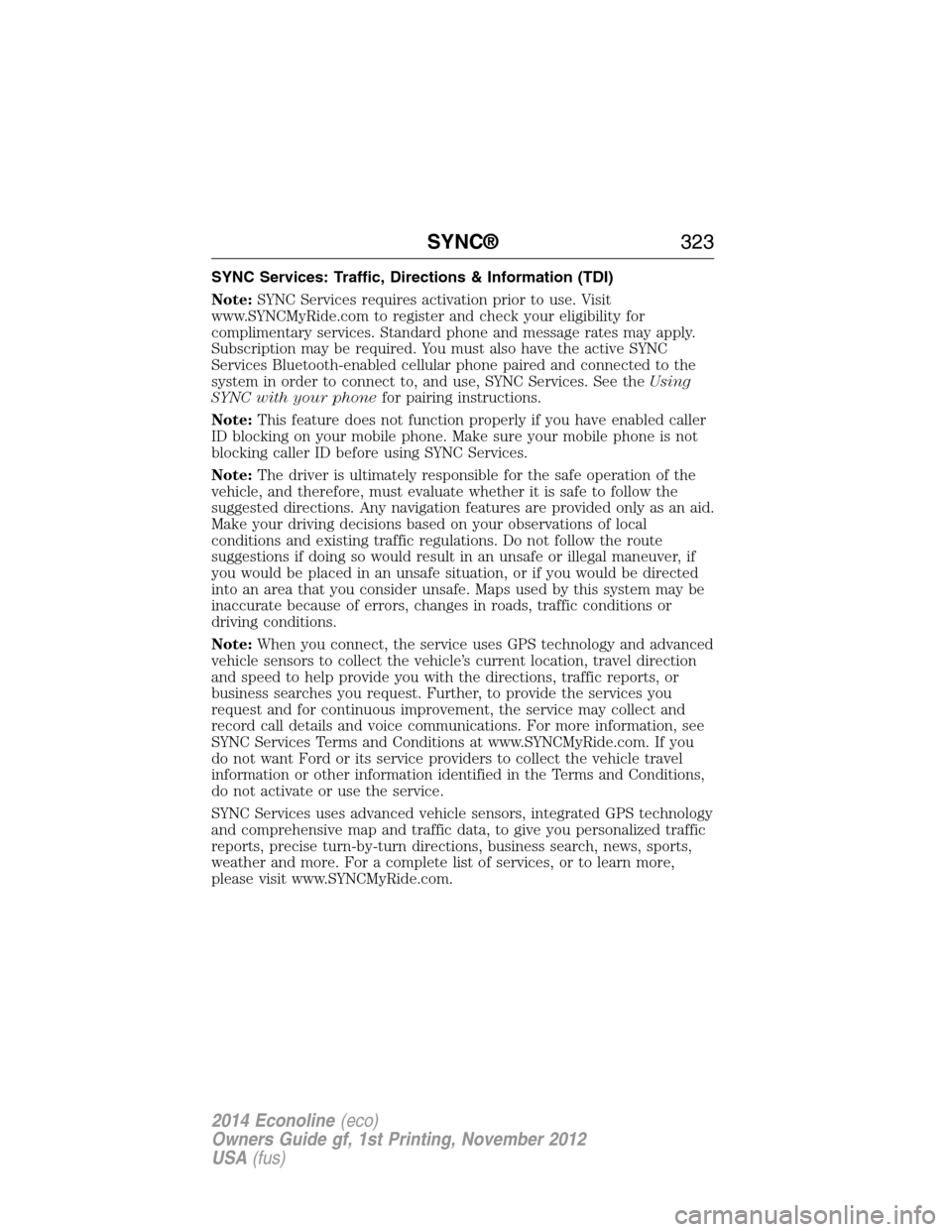
SYNC Services: Traffic, Directions & Information (TDI)
Note:SYNC Services requires activation prior to use. Visit
www.SYNCMyRide.com to register and check your eligibility for
complimentary services. Standard phone and message rates may apply.
Subscription may be required. You must also have the active SYNC
Services Bluetooth-enabled cellular phone paired and connected to the
system in order to connect to, and use, SYNC Services. See theUsing
SYNC with your phonefor pairing instructions.
Note:This feature does not function properly if you have enabled caller
ID blocking on your mobile phone. Make sure your mobile phone is not
blocking caller ID before using SYNC Services.
Note:The driver is ultimately responsible for the safe operation of the
vehicle, and therefore, must evaluate whether it is safe to follow the
suggested directions. Any navigation features are provided only as an aid.
Make your driving decisions based on your observations of local
conditions and existing traffic regulations. Do not follow the route
suggestions if doing so would result in an unsafe or illegal maneuver, if
you would be placed in an unsafe situation, or if you would be directed
into an area that you consider unsafe. Maps used by this system may be
inaccurate because of errors, changes in roads, traffic conditions or
driving conditions.
Note:When you connect, the service uses GPS technology and advanced
vehicle sensors to collect the vehicle’s current location, travel direction
and speed to help provide you with the directions, traffic reports, or
business searches you request. Further, to provide the services you
request and for continuous improvement, the service may collect and
record call details and voice communications. For more information, see
SYNC Services Terms and Conditions at www.SYNCMyRide.com. If you
do not want Ford or its service providers to collect the vehicle travel
information or other information identified in the Terms and Conditions,
do not activate or use the service.
SYNC Services uses advanced vehicle sensors, integrated GPS technology
and comprehensive map and traffic data, to give you personalized traffic
reports, precise turn-by-turn directions, business search, news, sports,
weather and more. For a complete list of services, or to learn more,
please visit www.SYNCMyRide.com.
SYNC®323
2014 Econoline(eco)
Owners Guide gf, 1st Printing, November 2012
USA(fus)
Page 325 of 438
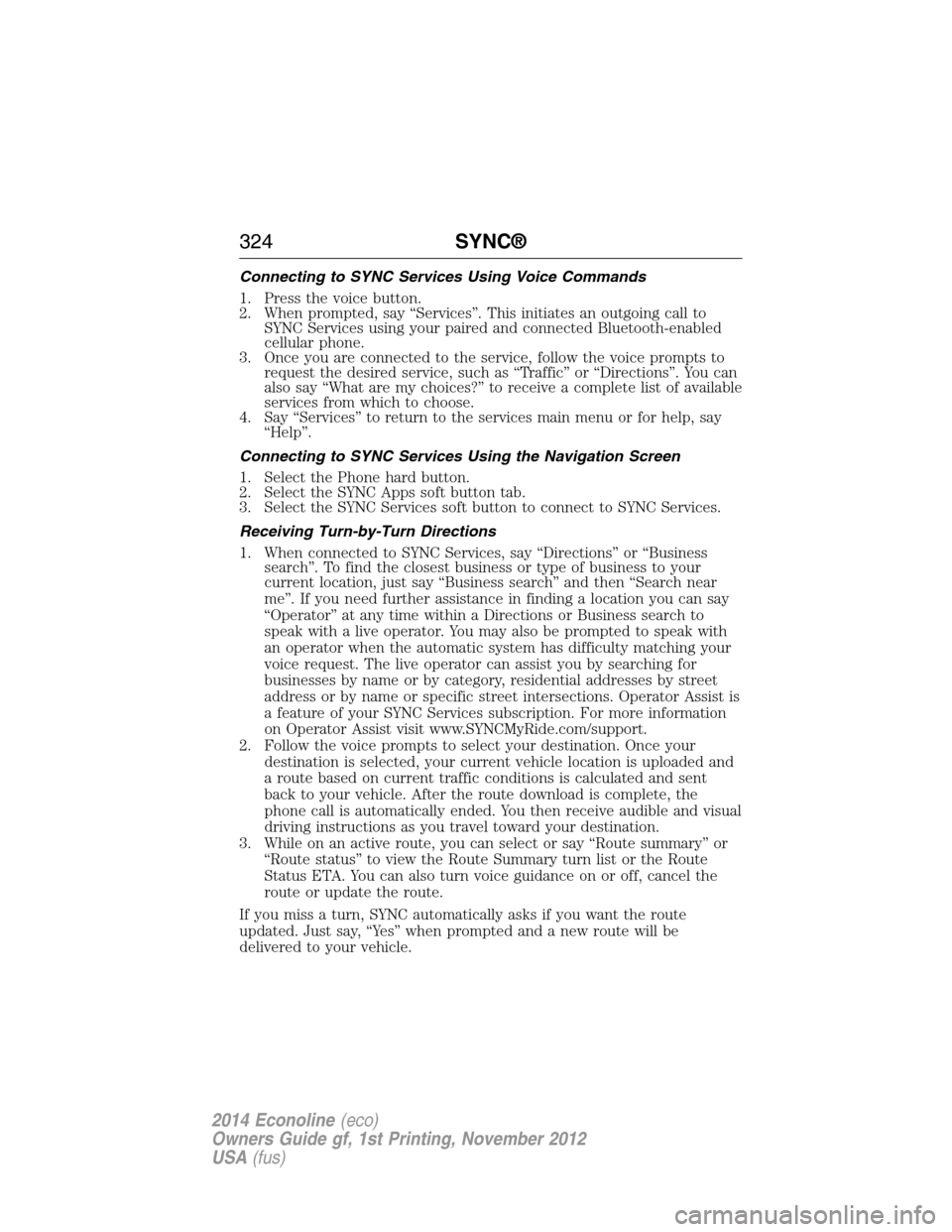
Connecting to SYNC Services Using Voice Commands
1. Press the voice button.
2. When prompted, say “Services”. This initiates an outgoing call to
SYNC Services using your paired and connected Bluetooth-enabled
cellular phone.
3. Once you are connected to the service, follow the voice prompts to
request the desired service, such as “Traffic” or “Directions”. You can
also say “What are my choices?” to receive a complete list of available
services from which to choose.
4. Say “Services” to return to the services main menu or for help, say
“Help”.
Connecting to SYNC Services Using the Navigation Screen
1. Select the Phone hard button.
2. Select the SYNC Apps soft button tab.
3. Select the SYNC Services soft button to connect to SYNC Services.
Receiving Turn-by-Turn Directions
1. When connected to SYNC Services, say “Directions” or “Business
search”. To find the closest business or type of business to your
current location, just say “Business search” and then “Search near
me”. If you need further assistance in finding a location you can say
“Operator” at any time within a Directions or Business search to
speak with a live operator. You may also be prompted to speak with
an operator when the automatic system has difficulty matching your
voice request. The live operator can assist you by searching for
businesses by name or by category, residential addresses by street
address or by name or specific street intersections. Operator Assist is
a feature of your SYNC Services subscription. For more information
on Operator Assist visit www.SYNCMyRide.com/support.
2. Follow the voice prompts to select your destination. Once your
destination is selected, your current vehicle location is uploaded and
a route based on current traffic conditions is calculated and sent
back to your vehicle. After the route download is complete, the
phone call is automatically ended. You then receive audible and visual
driving instructions as you travel toward your destination.
3. While on an active route, you can select or say “Route summary” or
“Route status” to view the Route Summary turn list or the Route
Status ETA. You can also turn voice guidance on or off, cancel the
route or update the route.
If you miss a turn, SYNC automatically asks if you want the route
updated. Just say, “Yes” when prompted and a new route will be
delivered to your vehicle.
324SYNC®
2014 Econoline(eco)
Owners Guide gf, 1st Printing, November 2012
USA(fus)
Page 418 of 438
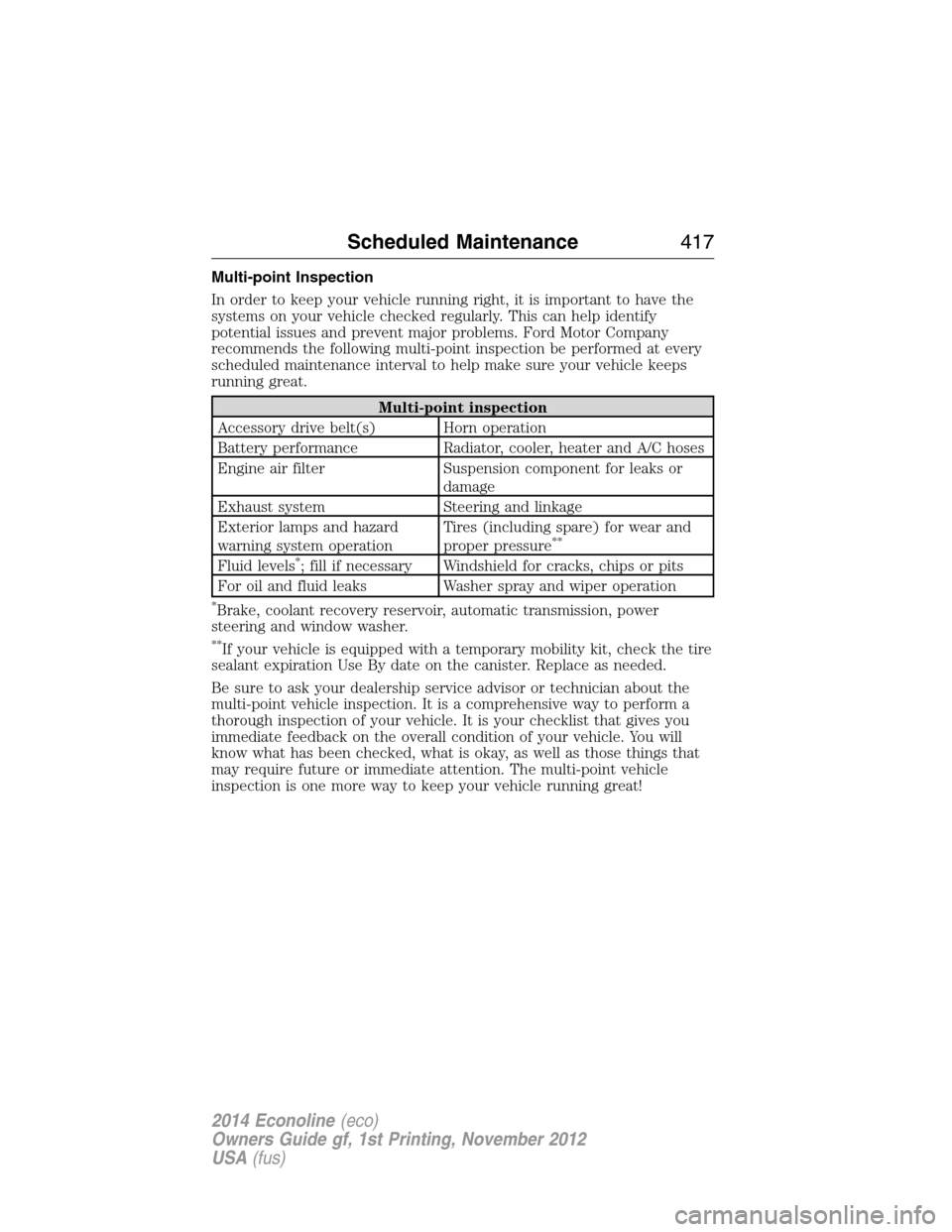
Multi-point Inspection
In order to keep your vehicle running right, it is important to have the
systems on your vehicle checked regularly. This can help identify
potential issues and prevent major problems. Ford Motor Company
recommends the following multi-point inspection be performed at every
scheduled maintenance interval to help make sure your vehicle keeps
running great.
Multi-point inspection
Accessory drive belt(s) Horn operation
Battery performance Radiator, cooler, heater and A/C hoses
Engine air filter Suspension component for leaks or
damage
Exhaust system Steering and linkage
Exterior lamps and hazard
warning system operationTires (including spare) for wear and
proper pressure
**
Fluid levels*; fill if necessary Windshield for cracks, chips or pits
For oil and fluid leaks Washer spray and wiper operation
*Brake, coolant recovery reservoir, automatic transmission, power
steering and window washer.
**If your vehicle is equipped with a temporary mobility kit, check the tire
sealant expiration Use By date on the canister. Replace as needed.
Be sure to ask your dealership service advisor or technician about the
multi-point vehicle inspection. It is a comprehensive way to perform a
thorough inspection of your vehicle. It is your checklist that gives you
immediate feedback on the overall condition of your vehicle. You will
know what has been checked, what is okay, as well as those things that
may require future or immediate attention. The multi-point vehicle
inspection is one more way to keep your vehicle running great!
Scheduled Maintenance417
2014 Econoline(eco)
Owners Guide gf, 1st Printing, November 2012
USA(fus)
Page 427 of 438
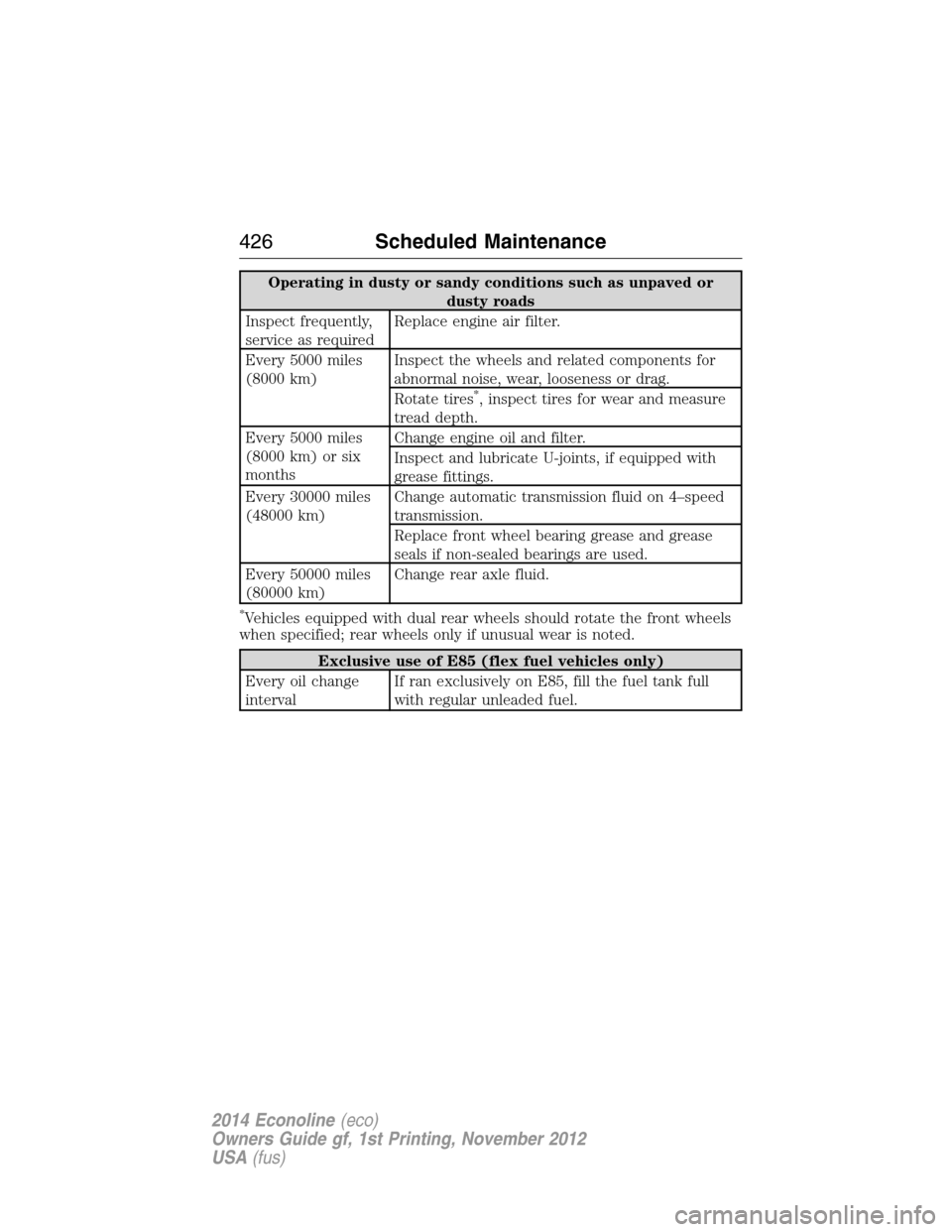
Operating in dusty or sandy conditions such as unpaved or
dusty roads
Inspect frequently,
service as requiredReplace engine air filter.
Every 5000 miles
(8000 km)Inspect the wheels and related components for
abnormal noise, wear, looseness or drag.
Rotate tires
*, inspect tires for wear and measure
tread depth.
Every 5000 miles
(8000 km) or six
monthsChange engine oil and filter.
Inspect and lubricate U-joints, if equipped with
grease fittings.
Every 30000 miles
(48000 km)Change automatic transmission fluid on 4–speed
transmission.
Replace front wheel bearing grease and grease
seals if non-sealed bearings are used.
Every 50000 miles
(80000 km)Change rear axle fluid.
*Vehicles equipped with dual rear wheels should rotate the front wheels
when specified; rear wheels only if unusual wear is noted.
Exclusive use of E85 (flex fuel vehicles only)
Every oil change
intervalIf ran exclusively on E85, fill the fuel tank full
with regular unleaded fuel.
426Scheduled Maintenance
2014 Econoline(eco)
Owners Guide gf, 1st Printing, November 2012
USA(fus)
Page 430 of 438
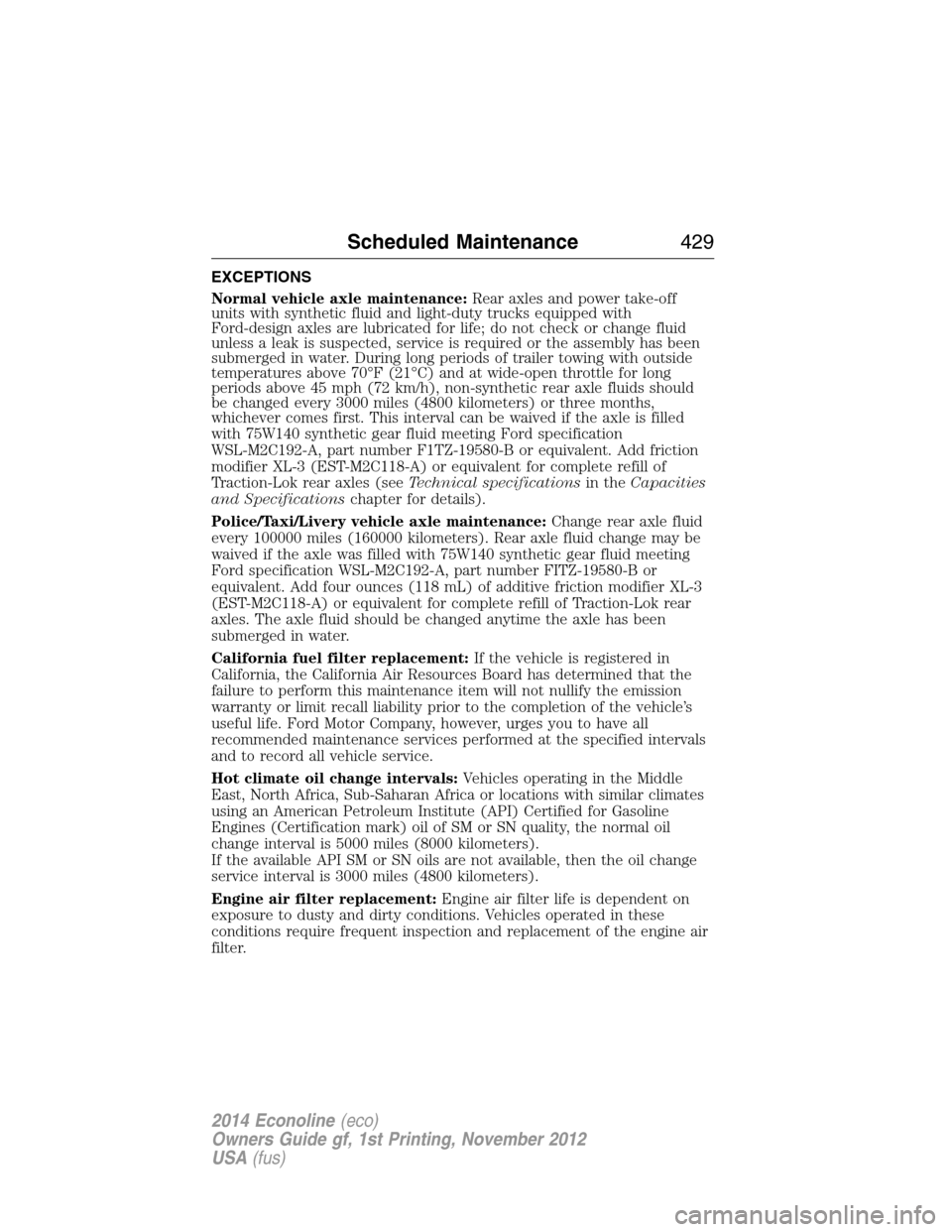
EXCEPTIONS
Normal vehicle axle maintenance:Rear axles and power take-off
units with synthetic fluid and light-duty trucks equipped with
Ford-design axles are lubricated for life; do not check or change fluid
unless a leak is suspected, service is required or the assembly has been
submerged in water. During long periods of trailer towing with outside
temperatures above 70°F (21°C) and at wide-open throttle for long
periods above 45 mph (72 km/h), non-synthetic rear axle fluids should
be changed every 3000 miles (4800 kilometers) or three months,
whichever comes first. This interval can be waived if the axle is filled
with 75W140 synthetic gear fluid meeting Ford specification
WSL-M2C192-A, part number F1TZ-19580-B or equivalent. Add friction
modifier XL-3 (EST-M2C118-A) or equivalent for complete refill of
Traction-Lok rear axles (seeTechnical specificationsin theCapacities
and Specificationschapter for details).
Police/Taxi/Livery vehicle axle maintenance:Change rear axle fluid
every 100000 miles (160000 kilometers). Rear axle fluid change may be
waived if the axle was filled with 75W140 synthetic gear fluid meeting
Ford specification WSL-M2C192-A, part number FITZ-19580-B or
equivalent. Add four ounces (118 mL) of additive friction modifier XL-3
(EST-M2C118-A) or equivalent for complete refill of Traction-Lok rear
axles. The axle fluid should be changed anytime the axle has been
submerged in water.
California fuel filter replacement:If the vehicle is registered in
California, the California Air Resources Board has determined that the
failure to perform this maintenance item will not nullify the emission
warranty or limit recall liability prior to the completion of the vehicle’s
useful life. Ford Motor Company, however, urges you to have all
recommended maintenance services performed at the specified intervals
and to record all vehicle service.
Hot climate oil change intervals:Vehicles operating in the Middle
East, North Africa, Sub-Saharan Africa or locations with similar climates
using an American Petroleum Institute (API) Certified for Gasoline
Engines (Certification mark) oil of SM or SN quality, the normal oil
change interval is 5000 miles (8000 kilometers).
If the available API SM or SN oils are not available, then the oil change
service interval is 3000 miles (4800 kilometers).
Engine air filter replacement:Engine air filter life is dependent on
exposure to dusty and dirty conditions. Vehicles operated in these
conditions require frequent inspection and replacement of the engine air
filter.
Scheduled Maintenance429
2014 Econoline(eco)
Owners Guide gf, 1st Printing, November 2012
USA(fus)
Page 432 of 438
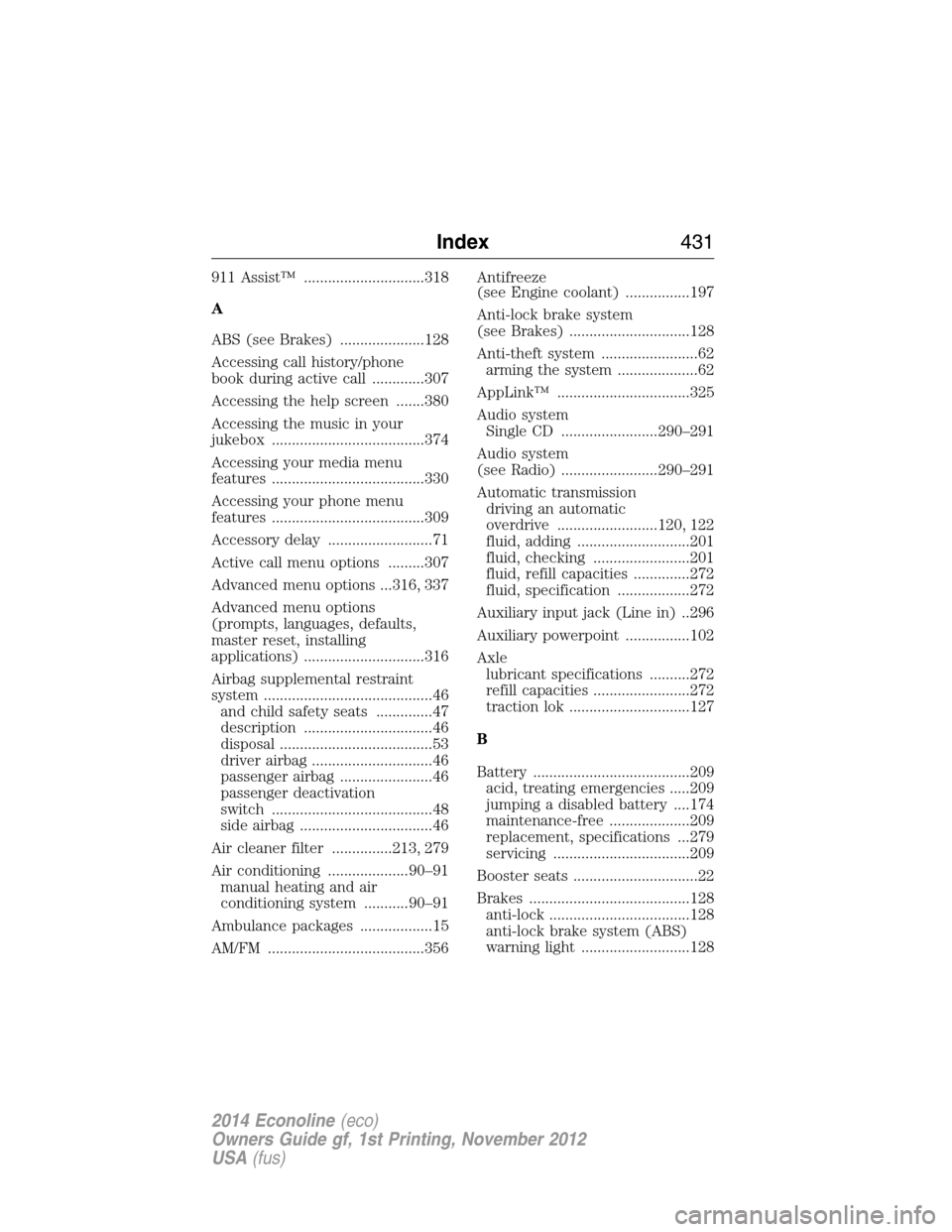
911 Assist™ ..............................318
A
ABS (see Brakes) .....................128
Accessing call history/phone
book during active call .............307
Accessing the help screen .......380
Accessing the music in your
jukebox ......................................374
Accessing your media menu
features ......................................330
Accessing your phone menu
features ......................................309
Accessory delay ..........................71
Active call menu options .........307
Advanced menu options ...316, 337
Advanced menu options
(prompts, languages, defaults,
master reset, installing
applications) ..............................316
Airbag supplemental restraint
system ..........................................46
and child safety seats ..............47
description ................................46
disposal ......................................53
driver airbag ..............................46
passenger airbag .......................46
passenger deactivation
switch ........................................48
side airbag .................................46
Air cleaner filter ...............213, 279
Air conditioning ....................90–91
manual heating and air
conditioning system ...........90–91
Ambulance packages ..................15
AM/FM .......................................356Antifreeze
(see Engine coolant) ................197
Anti-lock brake system
(see Brakes) ..............................128
Anti-theft system ........................62
arming the system ....................62
AppLink™ .................................325
Audio system
Single CD ........................290–291
Audio system
(see Radio) ........................290–291
Automatic transmission
driving an automatic
overdrive .........................120, 122
fluid, adding ............................201
fluid, checking ........................201
fluid, refill capacities ..............272
fluid, specification ..................272
Auxiliary input jack (Line in) ..296
Auxiliary powerpoint ................102
Axle
lubricant specifications ..........272
refill capacities ........................272
traction lok ..............................127
B
Battery .......................................209
acid, treating emergencies .....209
jumping a disabled battery ....174
maintenance-free ....................209
replacement, specifications ...279
servicing ..................................209
Booster seats ...............................22
Brakes ........................................128
anti-lock ...................................128
anti-lock brake system (ABS)
warning light ...........................128
Index431
2014 Econoline(eco)
Owners Guide gf, 1st Printing, November 2012
USA(fus)
Page 433 of 438
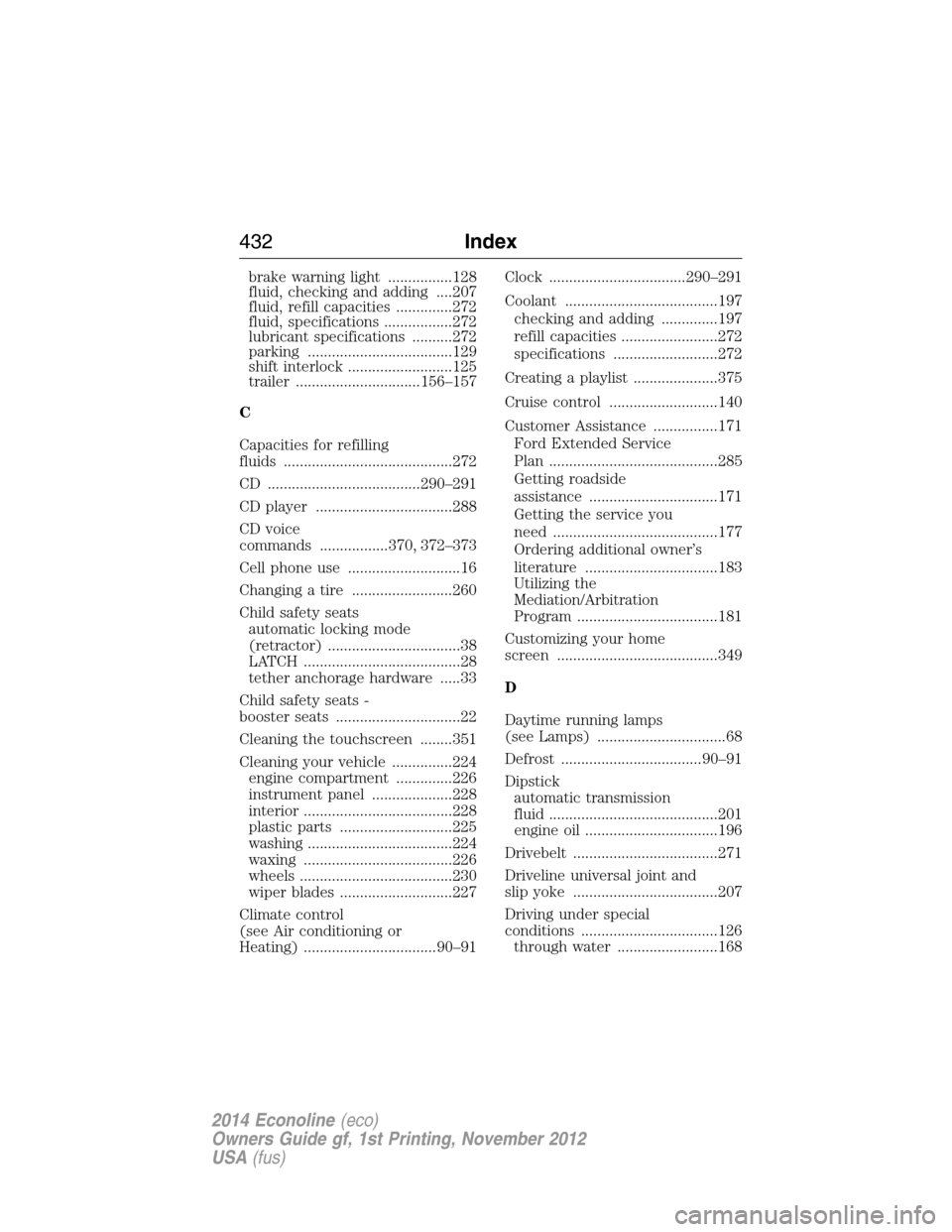
brake warning light ................128
fluid, checking and adding ....207
fluid, refill capacities ..............272
fluid, specifications .................272
lubricant specifications ..........272
parking ....................................129
shift interlock ..........................125
trailer ...............................156–157
C
Capacities for refilling
fluids ..........................................272
CD ......................................290–291
CD player ..................................288
CD voice
commands .................370, 372–373
Cell phone use ............................16
Changing a tire .........................260
Child safety seats
automatic locking mode
(retractor) .................................38
LATCH .......................................28
tether anchorage hardware .....33
Child safety seats -
booster seats ...............................22
Cleaning the touchscreen ........351
Cleaning your vehicle ...............224
engine compartment ..............226
instrument panel ....................228
interior .....................................228
plastic parts ............................225
washing ....................................224
waxing .....................................226
wheels ......................................230
wiper blades ............................227
Climate control
(see Air conditioning or
Heating) .................................90–91Clock ..................................290–291
Coolant ......................................197
checking and adding ..............197
refill capacities ........................272
specifications ..........................272
Creating a playlist .....................375
Cruise control ...........................140
Customer Assistance ................171
Ford Extended Service
Plan ..........................................285
Getting roadside
assistance ................................171
Getting the service you
need .........................................177
Ordering additional owner’s
literature .................................183
Utilizing the
Mediation/Arbitration
Program ...................................181
Customizing your home
screen ........................................349
D
Daytime running lamps
(see Lamps) ................................68
Defrost ...................................90–91
Dipstick
automatic transmission
fluid ..........................................201
engine oil .................................196
Drivebelt ....................................271
Driveline universal joint and
slip yoke ....................................207
Driving under special
conditions ..................................126
through water .........................168
432Index
2014 Econoline(eco)
Owners Guide gf, 1st Printing, November 2012
USA(fus)