key FORD E SERIES 2014 4.G Owner's Guide
[x] Cancel search | Manufacturer: FORD, Model Year: 2014, Model line: E SERIES, Model: FORD E SERIES 2014 4.GPages: 438, PDF Size: 5.12 MB
Page 369 of 438
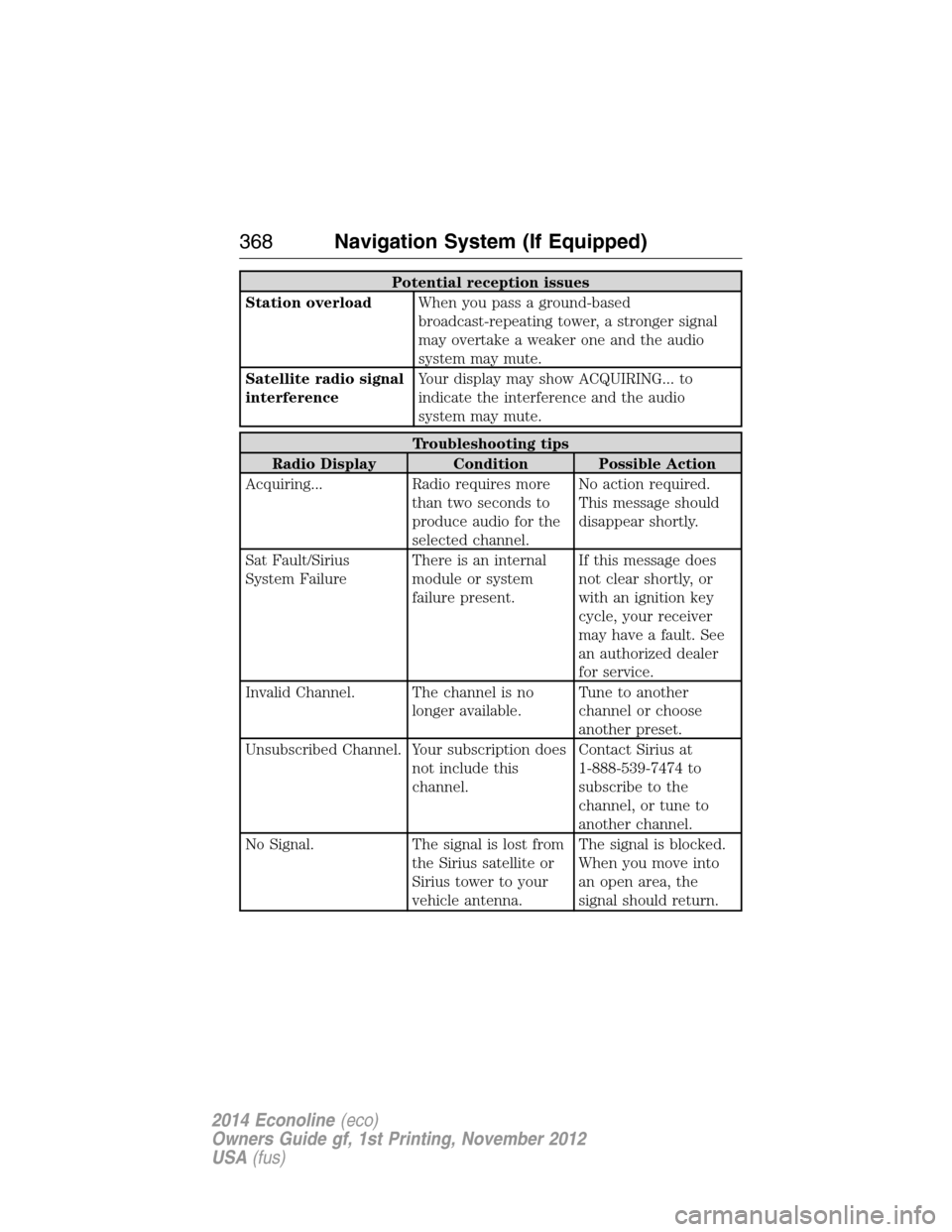
Potential reception issues
Station overloadWhen you pass a ground-based
broadcast-repeating tower, a stronger signal
may overtake a weaker one and the audio
system may mute.
Satellite radio signal
interferenceYour display may show ACQUIRING... to
indicate the interference and the audio
system may mute.
Troubleshooting tips
Radio Display Condition Possible Action
Acquiring... Radio requires more
than two seconds to
produce audio for the
selected channel.No action required.
This message should
disappear shortly.
Sat Fault/Sirius
System FailureThere is an internal
module or system
failure present.If this message does
not clear shortly, or
with an ignition key
cycle, your receiver
may have a fault. See
an authorized dealer
for service.
Invalid Channel. The channel is no
longer available.Tune to another
channel or choose
another preset.
Unsubscribed Channel. Your subscription does
not include this
channel.Contact Sirius at
1-888-539-7474 to
subscribe to the
channel, or tune to
another channel.
No Signal. The signal is lost from
the Sirius satellite or
Sirius tower to your
vehicle antenna.The signal is blocked.
When you move into
an open area, the
signal should return.
368Navigation System (If Equipped)
2014 Econoline(eco)
Owners Guide gf, 1st Printing, November 2012
USA(fus)
Page 372 of 438
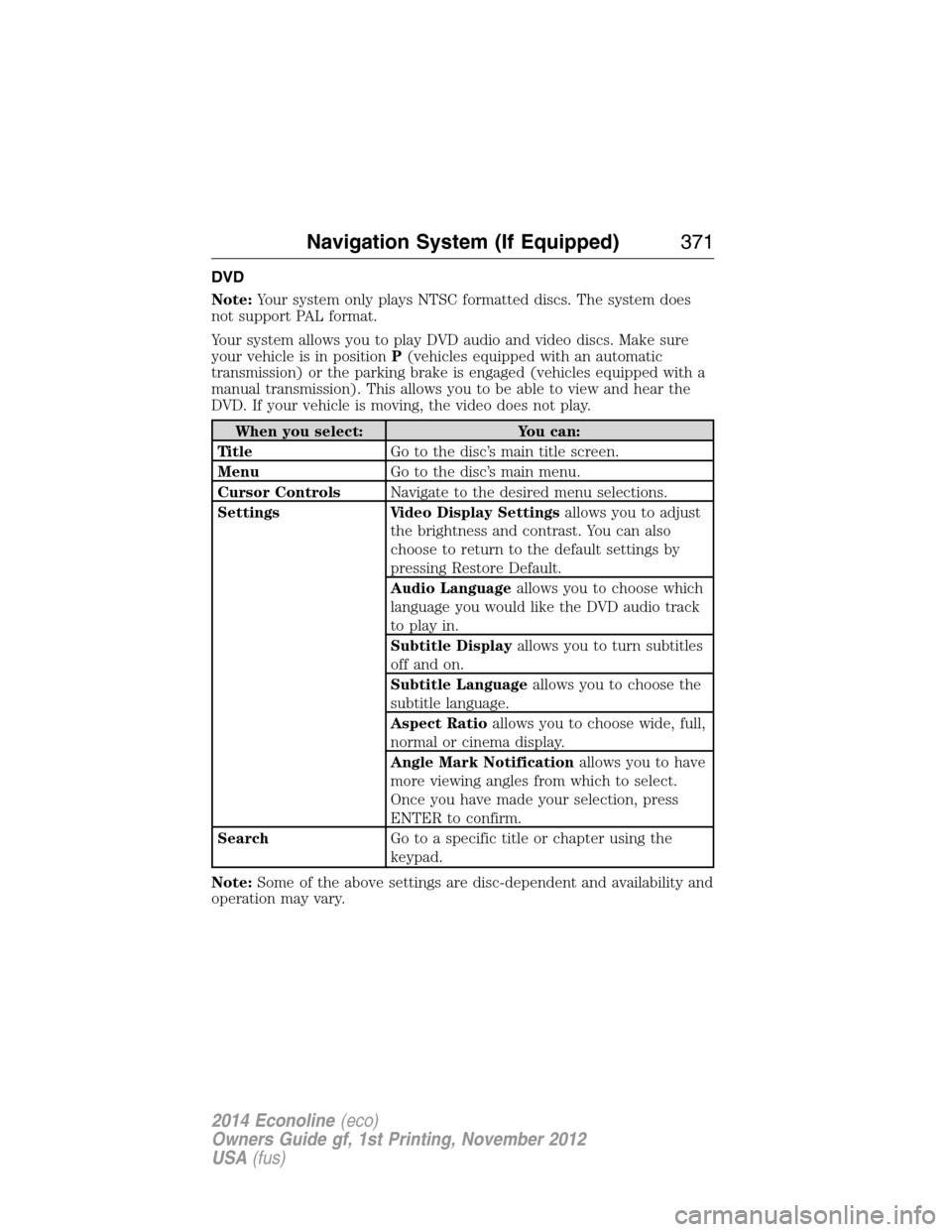
DVD
Note:Your system only plays NTSC formatted discs. The system does
not support PAL format.
Your system allows you to play DVD audio and video discs. Make sure
your vehicle is in positionP(vehicles equipped with an automatic
transmission) or the parking brake is engaged (vehicles equipped with a
manual transmission). This allows you to be able to view and hear the
DVD. If your vehicle is moving, the video does not play.
When you select: You can:
Ti t l eGo to the disc’s main title screen.
MenuGo to the disc’s main menu.
Cursor ControlsNavigate to the desired menu selections.
Settings Video Display Settingsallows you to adjust
the brightness and contrast. You can also
choose to return to the default settings by
pressing Restore Default.
Audio Languageallows you to choose which
language you would like the DVD audio track
to play in.
Subtitle Displayallows you to turn subtitles
off and on.
Subtitle Languageallows you to choose the
subtitle language.
Aspect Ratioallows you to choose wide, full,
normal or cinema display.
Angle Mark Notificationallows you to have
more viewing angles from which to select.
Once you have made your selection, press
ENTER to confirm.
SearchGo to a specific title or chapter using the
keypad.
Note:Some of the above settings are disc-dependent and availability and
operation may vary.
Navigation System (If Equipped)371
2014 Econoline(eco)
Owners Guide gf, 1st Printing, November 2012
USA(fus)
Page 385 of 438
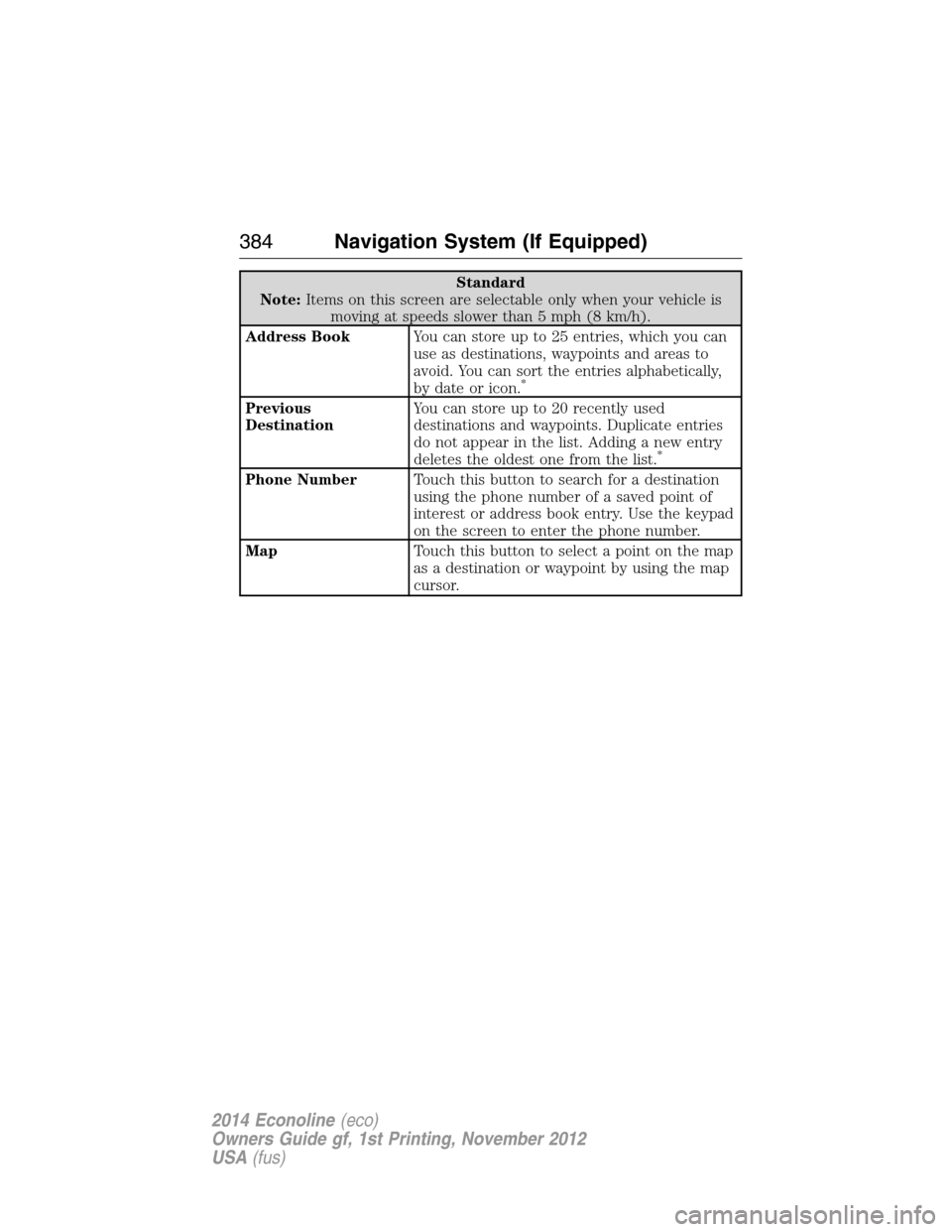
Standard
Note:Items on this screen are selectable only when your vehicle is
moving at speeds slower than 5 mph (8 km/h).
Address BookYou can store up to 25 entries, which you can
use as destinations, waypoints and areas to
avoid. You can sort the entries alphabetically,
by date or icon.
*
Previous
DestinationYou can store up to 20 recently used
destinations and waypoints. Duplicate entries
do not appear in the list. Adding a new entry
deletes the oldest one from the list.
*
Phone NumberTouch this button to search for a destination
using the phone number of a saved point of
interest or address book entry. Use the keypad
on the screen to enter the phone number.
MapTouch this button to select a point on the map
as a destination or waypoint by using the map
cursor.
384Navigation System (If Equipped)
2014 Econoline(eco)
Owners Guide gf, 1st Printing, November 2012
USA(fus)
Page 386 of 438
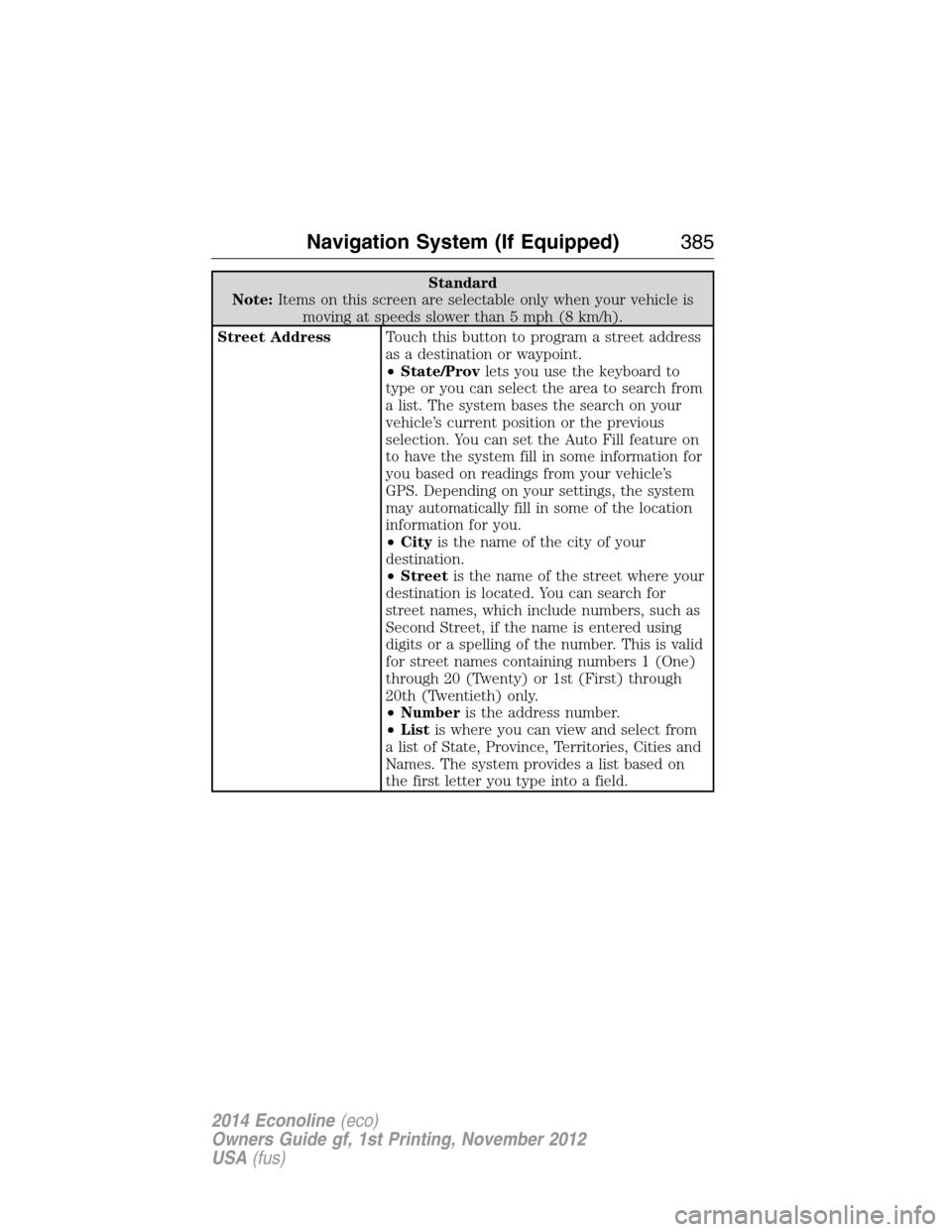
Standard
Note:Items on this screen are selectable only when your vehicle is
moving at speeds slower than 5 mph (8 km/h).
Street AddressTouch this button to program a street address
as a destination or waypoint.
•State/Provlets you use the keyboard to
type or you can select the area to search from
a list. The system bases the search on your
vehicle’s current position or the previous
selection. You can set the Auto Fill feature on
to have the system fill in some information for
you based on readings from your vehicle’s
GPS. Depending on your settings, the system
may automatically fill in some of the location
information for you.
•Cityis the name of the city of your
destination.
•Streetis the name of the street where your
destination is located. You can search for
street names, which include numbers, such as
Second Street, if the name is entered using
digits or a spelling of the number. This is valid
for street names containing numbers 1 (One)
through 20 (Twenty) or 1st (First) through
20th (Twentieth) only.
•Numberis the address number.
•Listis where you can view and select from
a list of State, Province, Territories, Cities and
Names. The system provides a list based on
the first letter you type into a field.
Navigation System (If Equipped)385
2014 Econoline(eco)
Owners Guide gf, 1st Printing, November 2012
USA(fus)
Page 387 of 438
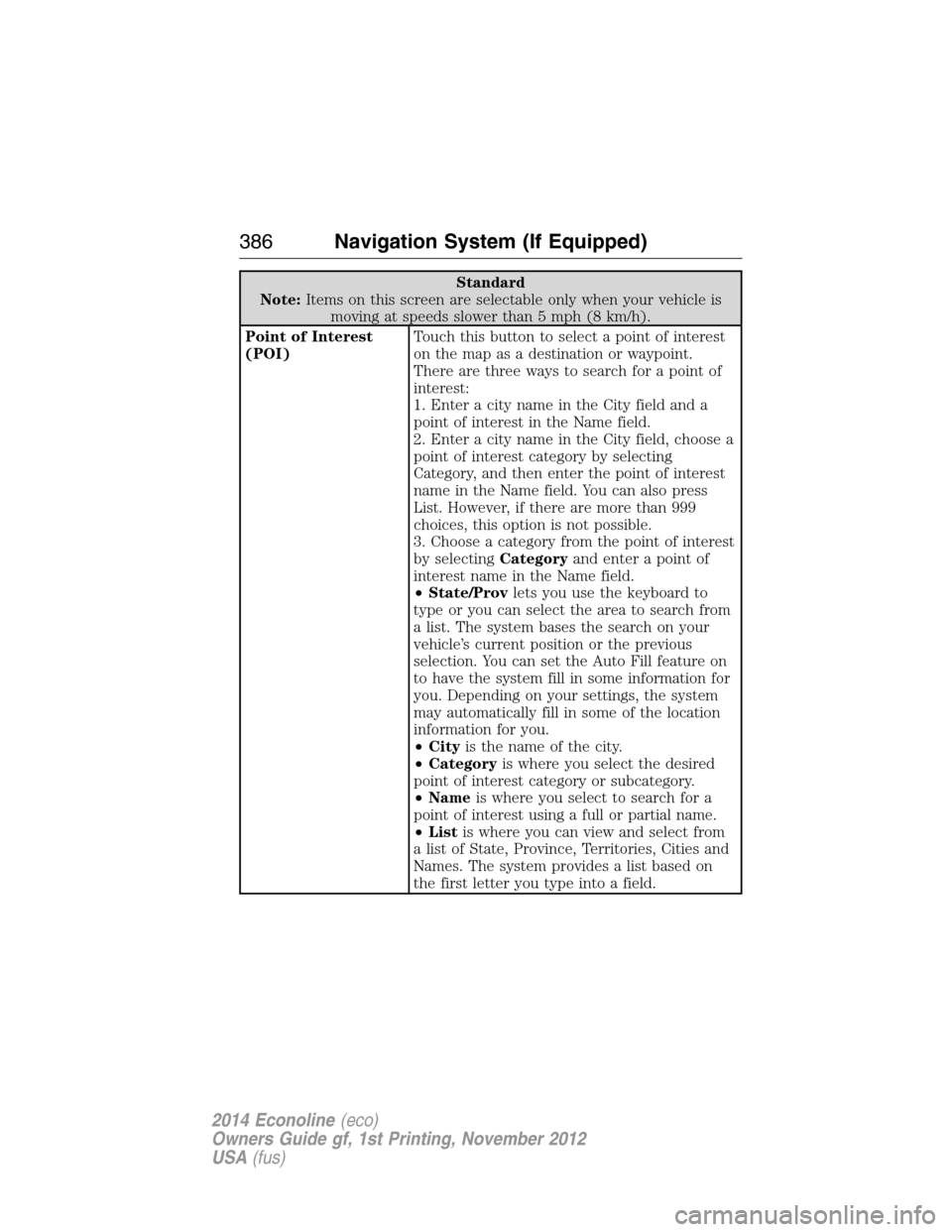
Standard
Note:Items on this screen are selectable only when your vehicle is
moving at speeds slower than 5 mph (8 km/h).
Point of Interest
(POI)Touch this button to select a point of interest
on the map as a destination or waypoint.
There are three ways to search for a point of
interest:
1. Enter a city name in the City field and a
point of interest in the Name field.
2. Enter a city name in the City field, choose a
point of interest category by selecting
Category, and then enter the point of interest
name in the Name field. You can also press
List. However, if there are more than 999
choices, this option is not possible.
3. Choose a category from the point of interest
by selectingCategoryand enter a point of
interest name in the Name field.
•State/Provlets you use the keyboard to
type or you can select the area to search from
a list. The system bases the search on your
vehicle’s current position or the previous
selection. You can set the Auto Fill feature on
to have the system fill in some information for
you. Depending on your settings, the system
may automatically fill in some of the location
information for you.
•Cityis the name of the city.
•Categoryis where you select the desired
point of interest category or subcategory.
•Nameis where you select to search for a
point of interest using a full or partial name.
•Listis where you can view and select from
a list of State, Province, Territories, Cities and
Names. The system provides a list based on
the first letter you type into a field.
386Navigation System (If Equipped)
2014 Econoline(eco)
Owners Guide gf, 1st Printing, November 2012
USA(fus)
Page 388 of 438
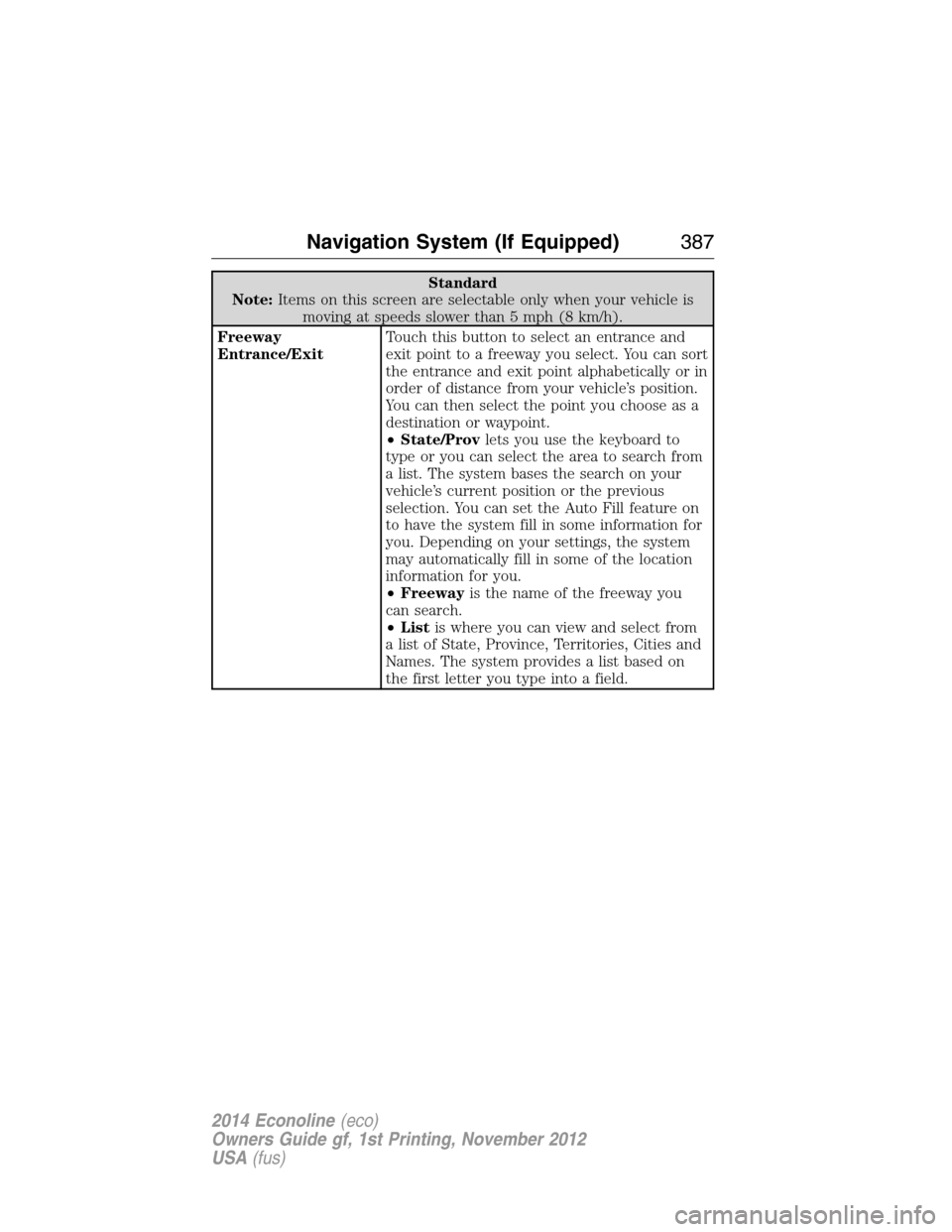
Standard
Note:Items on this screen are selectable only when your vehicle is
moving at speeds slower than 5 mph (8 km/h).
Freeway
Entrance/ExitTouch this button to select an entrance and
exit point to a freeway you select. You can sort
the entrance and exit point alphabetically or in
order of distance from your vehicle’s position.
You can then select the point you choose as a
destination or waypoint.
•State/Provlets you use the keyboard to
type or you can select the area to search from
a list. The system bases the search on your
vehicle’s current position or the previous
selection. You can set the Auto Fill feature on
to have the system fill in some information for
you. Depending on your settings, the system
may automatically fill in some of the location
information for you.
•Freewayis the name of the freeway you
can search.
•Listis where you can view and select from
a list of State, Province, Territories, Cities and
Names. The system provides a list based on
the first letter you type into a field.
Navigation System (If Equipped)387
2014 Econoline(eco)
Owners Guide gf, 1st Printing, November 2012
USA(fus)
Page 389 of 438
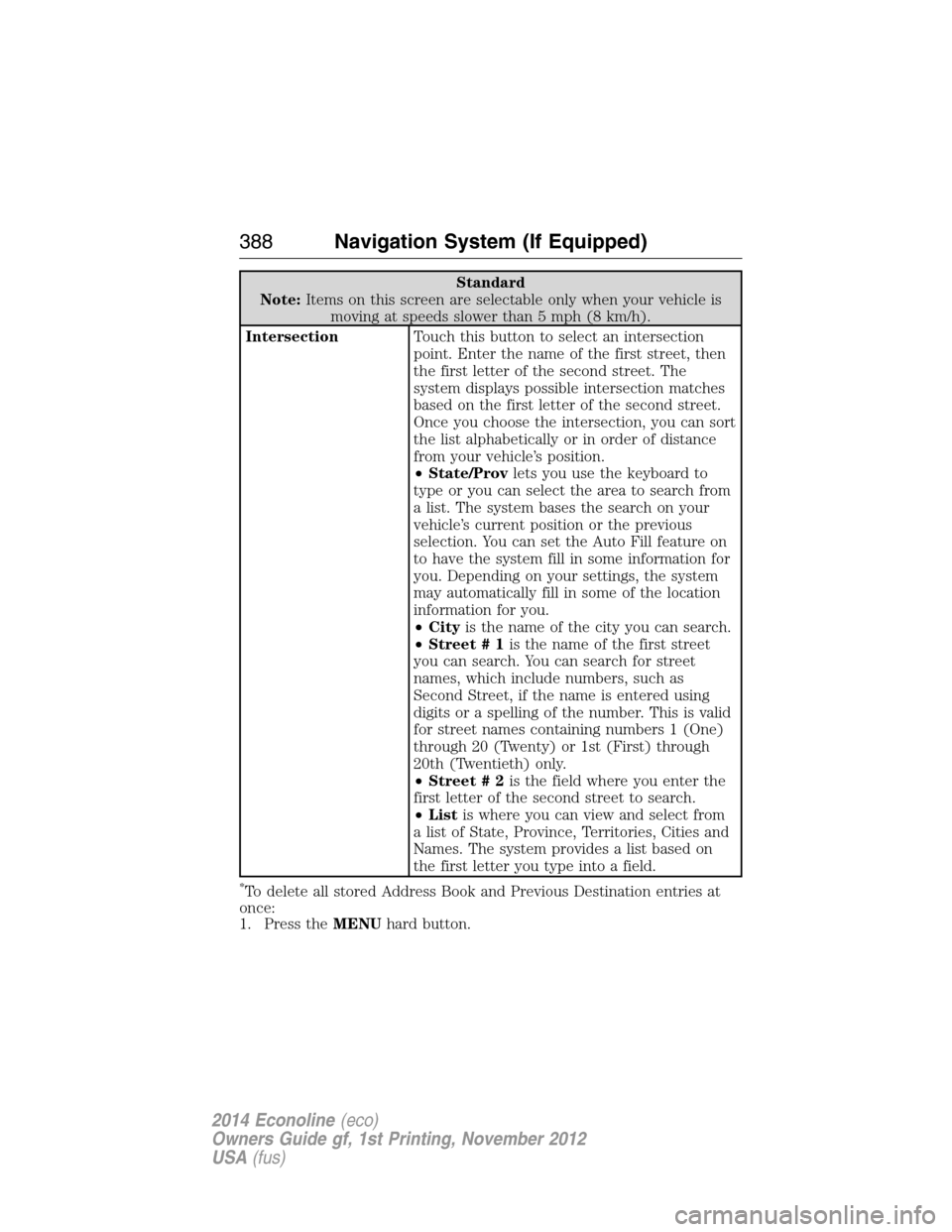
Standard
Note:Items on this screen are selectable only when your vehicle is
moving at speeds slower than 5 mph (8 km/h).
IntersectionTouch this button to select an intersection
point. Enter the name of the first street, then
the first letter of the second street. The
system displays possible intersection matches
based on the first letter of the second street.
Once you choose the intersection, you can sort
the list alphabetically or in order of distance
from your vehicle’s position.
•State/Provlets you use the keyboard to
type or you can select the area to search from
a list. The system bases the search on your
vehicle’s current position or the previous
selection. You can set the Auto Fill feature on
to have the system fill in some information for
you. Depending on your settings, the system
may automatically fill in some of the location
information for you.
•Cityis the name of the city you can search.
•Street # 1is the name of the first street
you can search. You can search for street
names, which include numbers, such as
Second Street, if the name is entered using
digits or a spelling of the number. This is valid
for street names containing numbers 1 (One)
through 20 (Twenty) or 1st (First) through
20th (Twentieth) only.
•Street # 2is the field where you enter the
first letter of the second street to search.
•Listis where you can view and select from
a list of State, Province, Territories, Cities and
Names. The system provides a list based on
the first letter you type into a field.
*To delete all stored Address Book and Previous Destination entries at
once:
1. Press theMENUhard button.
388Navigation System (If Equipped)
2014 Econoline(eco)
Owners Guide gf, 1st Printing, November 2012
USA(fus)
Page 435 of 438
I
Ignition .......................106, 270–271
Illuminated visor mirror .............75
Information displays ...................82
Inspection/maintenance (I/M)
testing ........................................119
Instrument panel
cleaning ...................................228
cluster ........................................77
J
Jack ............................................260
positioning ...............................260
storage .....................................260
Joining two calls
(multiparty/conference call) ....307
Jukebox features .......................374
Jump-starting your vehicle ......174
K
Keyless entry system
autolock .....................................58
Keys .............................................63
positions of the ignition .........106
L
Lamps ..........................................67
bulb replacement
specifications chart ................223
daytime running light ...............68
headlamps .................................67
headlamps, flash to pass ..........67
interior lamps ...........................69
replacing bulbs .......................217
LATCH anchors ...........................28Lights, warning and indicator ....77
Loading instructions .................149
Loading pictures .......................349
Load limits .................................143
Locks
autolock .....................................58
doors ..........................................57
Lubricant specifications ...........272
Lug nuts ....................................268
M
Map icons ..................................395
Map mode ..................................395
Map updates ..............................399
Media Bluetooth menu options
(adding, connecting, deleting,
turning on/off) ..........................336
Message center ...........................82
system check button ................83
warning messages .....................87
Mirrors ...................................72, 75
fold away ...................................72
side view mirrors
(power) .....................................72
Motorcraft® parts .............224, 279
N
Navigation end user license
agreement ..................................409
Navigation features ...................381
O
Octane rating ............................113
434Index
2014 Econoline(eco)
Owners Guide gf, 1st Printing, November 2012
USA(fus)