steering FORD E SERIES 2014 4.G Owner's Guide
[x] Cancel search | Manufacturer: FORD, Model Year: 2014, Model line: E SERIES, Model: FORD E SERIES 2014 4.GPages: 438, PDF Size: 5.12 MB
Page 267 of 438
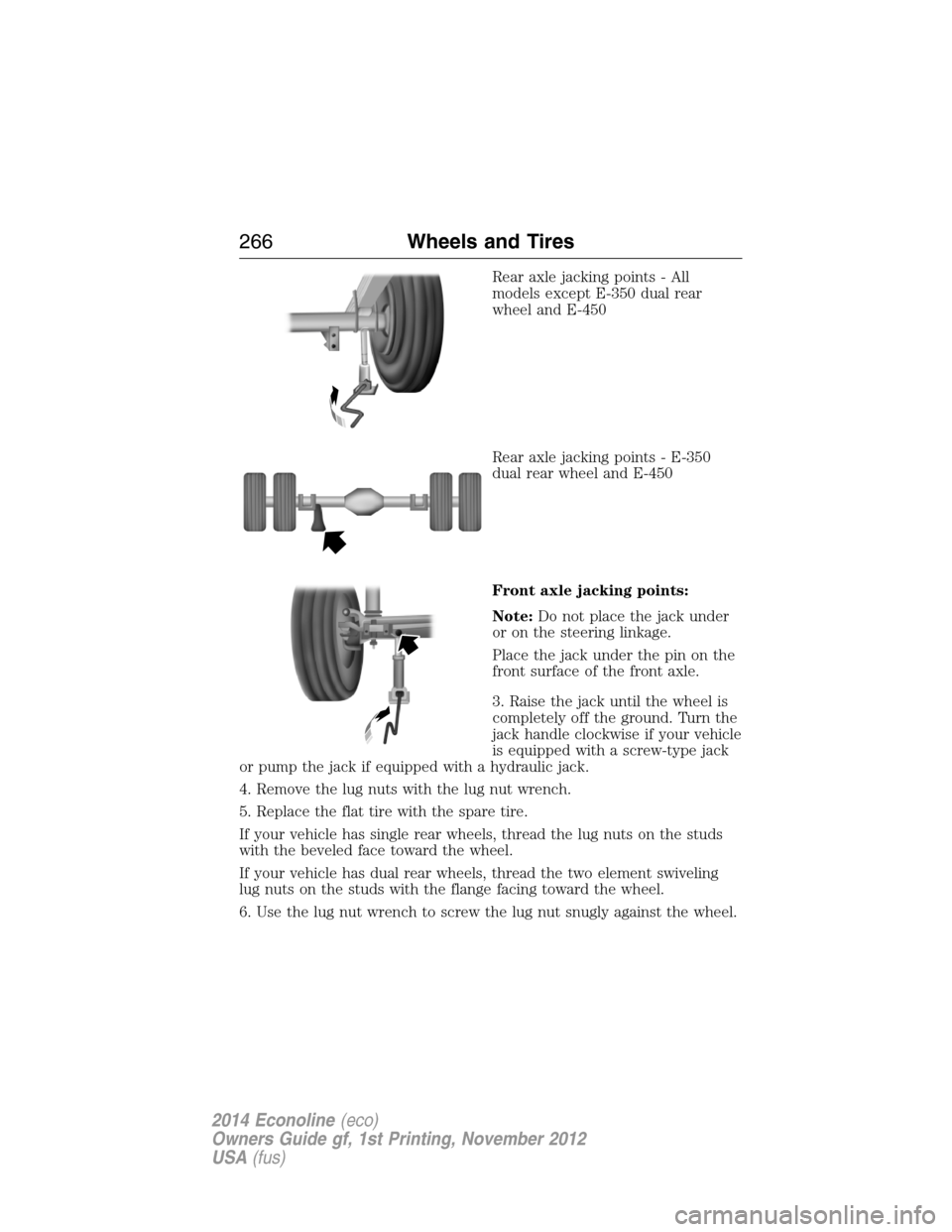
Rear axle jacking points - All
models except E-350 dual rear
wheel and E-450
Rear axle jacking points - E-350
dual rear wheel and E-450
Front axle jacking points:
Note:Do not place the jack under
or on the steering linkage.
Place the jack under the pin on the
front surface of the front axle.
3. Raise the jack until the wheel is
completely off the ground. Turn the
jack handle clockwise if your vehicle
is equipped with a screw-type jack
or pump the jack if equipped with a hydraulic jack.
4. Remove the lug nuts with the lug nut wrench.
5. Replace the flat tire with the spare tire.
If your vehicle has single rear wheels, thread the lug nuts on the studs
with the beveled face toward the wheel.
If your vehicle has dual rear wheels, thread the two element swiveling
lug nuts on the studs with the flange facing toward the wheel.
6. Use the lug nut wrench to screw the lug nut snugly against the wheel.
266Wheels and Tires
2014 Econoline(eco)
Owners Guide gf, 1st Printing, November 2012
USA(fus)
Page 275 of 438
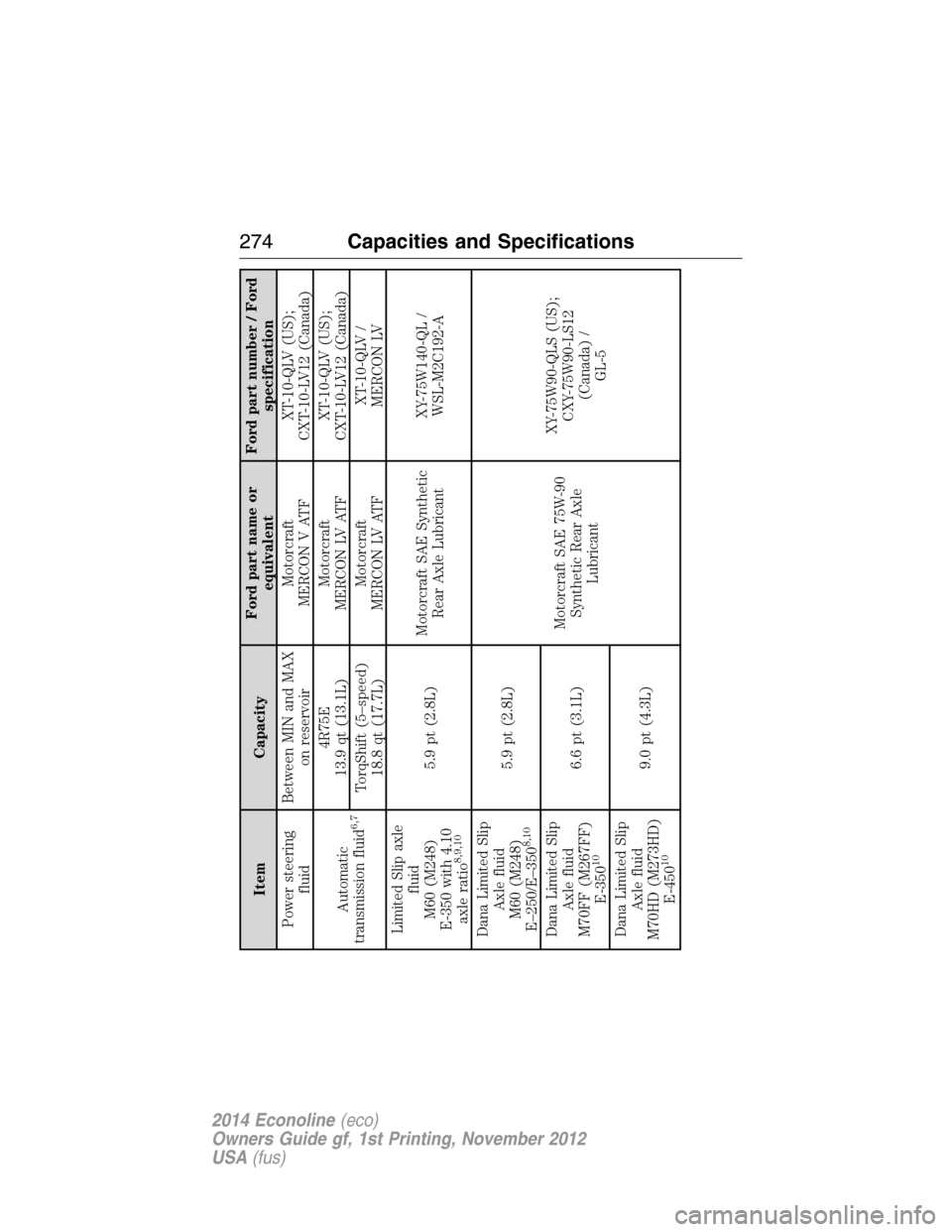
Item CapacityFord part name or
equivalentFord part number / Ford
specification
Power steering
fluidBetween MIN and MAX
on reservoirMotorcraft
MERCON V ATFXT-10-QLV (US);
CXT-10-LV12 (Canada)
Automatic
transmission fluid
6,7
4R75E
13.9 qt (13.1L)Motorcraft
MERCON LV ATFXT-10-QLV (US);
CXT-10-LV12 (Canada)
TorqShift (5–speed)
18.8 qt (17.7L)Motorcraft
MERCON LV ATFXT-10-QLV /
MERCON LV
Limited Slip axle
fluid
M60 (M248)
E-350 with 4.10
axle ratio
8,9,10
5.9 pt (2.8L)Motorcraft SAE Synthetic
Rear Axle LubricantXY-75W140-QL /
WSL-M2C192-A
Dana Limited Slip
Axle fluid
M60 (M248)
E–250/E–350
8,10
5.9 pt (2.8L)
Motorcraft SAE 75W-90
Synthetic Rear Axle
LubricantXY-75W90-QLS (US);
CXY-75W90-LS12
(Canada) /
GL-5 Dana Limited Slip
Axle fluid
M70FF (M267FF)
E-350
10
6.6 pt (3.1L)
Dana Limited Slip
Axle fluid
M70HD (M273HD)
E-450
10
9.0 pt (4.3L)
274Capacities and Specifications
2014 Econoline(eco)
Owners Guide gf, 1st Printing, November 2012
USA(fus)
Page 321 of 438
In the Event of a Crash
Not all crashes deploy an airbag or activate the fuel pump shut-off
(which would activate 911 Assist); however, if 911 Assist is triggered,
SYNC tries to contact emergency services. If a connected phone is
damaged or loses connection to SYNC, SYNC searches for, and tries to
connect to, any available previously paired phone and tries to make the
call to 911.
Before making the call:
•SYNC provides a short window of time (about 10 seconds) to cancel
the call. Failure to cancel the call results in SYNC attempting to dial
911.
•SYNC says the following, or a similar message: “SYNC will attempt to
call 911, to cancel the call, press Cancel on your screen or press and
hold the phone button on your steering wheel.”
If the call is not cancelled and a successful call is made, a pre-recorded
message is played for the 911 operator, then the occupant(s) in the
vehicle is able to talk with the operator. Be prepared to provide your
name, phone number and location immediately, because not all 911
systems are capable of receiving this information electronically.
911 Assist May Not Work If
•Your cellular phone or 911 Assist hardware was damaged in a crash.
•The vehicle’s battery or SYNC system has no power.
•The phone(s) paired and connected to the system was thrown from
the vehicle.
911 Assist Privacy Notice
Once 911 Assist is set on, it may disclose to emergency services that the
vehicle has been in a crash involving the deployment of an airbag or
activation of the fuel pump shut-off. Certain versions or updates to 911
Assist may also be capable of electronically or verbally disclosing to 911
operators the vehicle location, and/or other details about the vehicle or
crash to assist 911 operators to provide the most appropriate emergency
services. If you do not want to disclose this information, do not turn the
feature on.
320SYNC®
2014 Econoline(eco)
Owners Guide gf, 1st Printing, November 2012
USA(fus)
Page 326 of 438
Disconnecting from SYNC Services
1. Press and hold the phone button on the steering wheel.
2. Say “Good-bye” from the SYNC Services main menu.
SYNC Services quick tips
PersonalizingYou can personalize your Services feature to
provide quicker access to your most used or
favorite information. You can save address
points such as work or home. You can also
save favorite information like sports teams or
a news category. To learn more, log onto
www.SYNCMyRide.com.
Push to interruptPress the voice button at any time (while you
are connected to SYNC Services) to interrupt
a voice prompt or an audio clip (such as a
sports report), wait for the listening tone, and
say your voice command.
PortableYour subscription is associated with your
Bluetooth-enabled cellular phone number, not
your VIN (Vehicle Identification Number). You
can pair and connect your phone to any
vehicle equipped with SYNC Services and
continue enjoying your personalized services.
You can even access your account outside the
vehicle. Just use the number on your phone’s
call history. Traffic and Directions features do
not function properly but information services
and the 411 connect and text message
features are available.
SYNC AppLink™
Note:This feature is only available in the United States.
Note:Your smartphone must be paired and connected to SYNC to access
AppLink.
Note:iPhone users need to connect the phone to the USB port in order
to start the application. It is recommended to lock your iPhone after
starting an application.
SYNC®325
2014 Econoline(eco)
Owners Guide gf, 1st Printing, November 2012
USA(fus)
Page 327 of 438
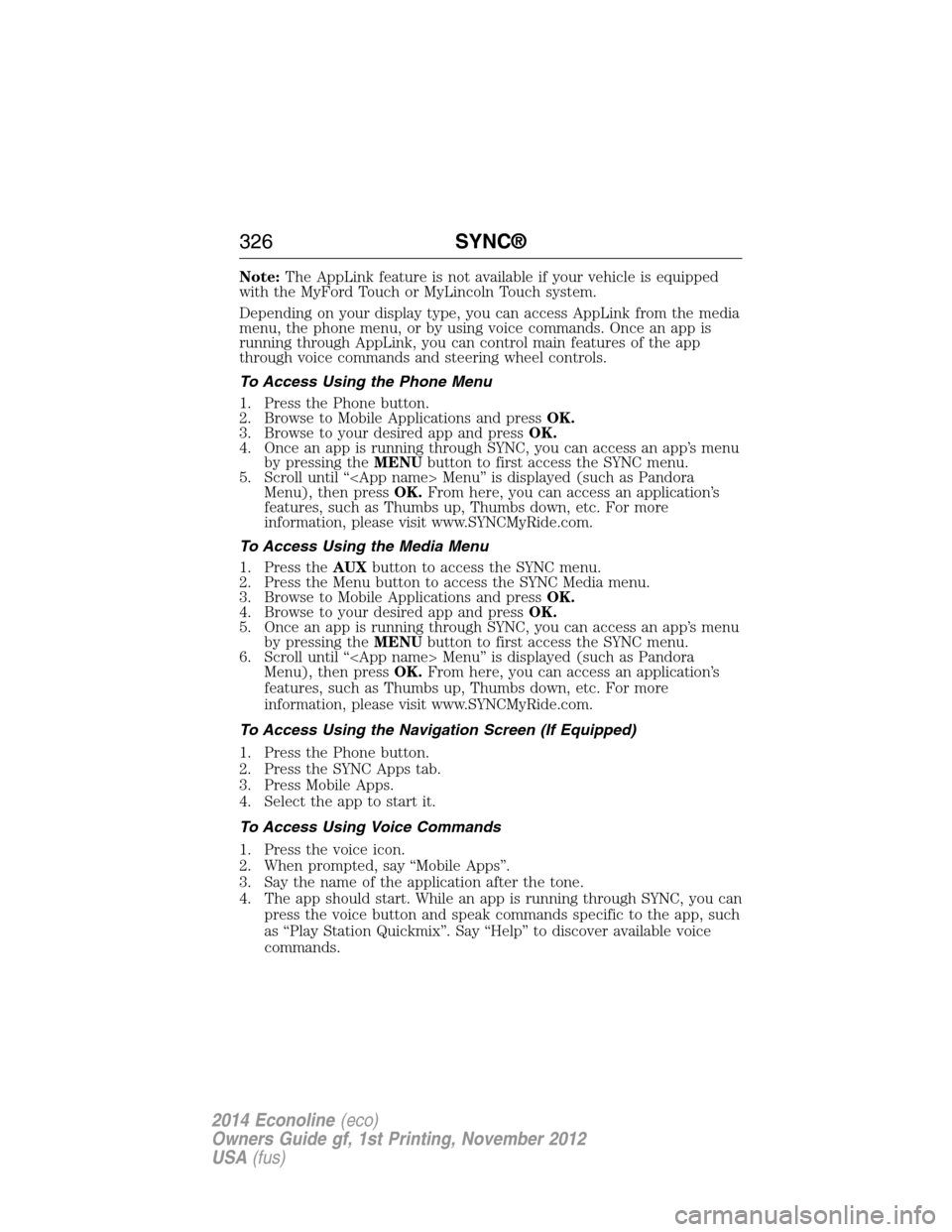
Note:The AppLink feature is not available if your vehicle is equipped
with the MyFord Touch or MyLincoln Touch system.
Depending on your display type, you can access AppLink from the media
menu, the phone menu, or by using voice commands. Once an app is
running through AppLink, you can control main features of the app
through voice commands and steering wheel controls.
To Access Using the Phone Menu
1. Press the Phone button.
2. Browse to Mobile Applications and pressOK.
3. Browse to your desired app and pressOK.
4. Once an app is running through SYNC, you can access an app’s menu
by pressing theMENUbutton to first access the SYNC menu.
5. Scroll until “
Menu), then pressOK.From here, you can access an application’s
features, such as Thumbs up, Thumbs down, etc. For more
information, please visit www.SYNCMyRide.com.
To Access Using the Media Menu
1. Press theAUXbutton to access the SYNC menu.
2. Press the Menu button to access the SYNC Media menu.
3. Browse to Mobile Applications and pressOK.
4. Browse to your desired app and pressOK.
5. Once an app is running through SYNC, you can access an app’s menu
by pressing theMENUbutton to first access the SYNC menu.
6. Scroll until “
Menu), then pressOK.From here, you can access an application’s
features, such as Thumbs up, Thumbs down, etc. For more
information, please visit www.SYNCMyRide.com.
To Access Using the Navigation Screen (If Equipped)
1. Press the Phone button.
2. Press the SYNC Apps tab.
3. Press Mobile Apps.
4. Select the app to start it.
To Access Using Voice Commands
1. Press the voice icon.
2. When prompted, say “Mobile Apps”.
3. Say the name of the application after the tone.
4. The app should start. While an app is running through SYNC, you can
press the voice button and speak commands specific to the app, such
as “Play Station Quickmix”. Say “Help” to discover available voice
commands.
326SYNC®
2014 Econoline(eco)
Owners Guide gf, 1st Printing, November 2012
USA(fus)
Page 349 of 438
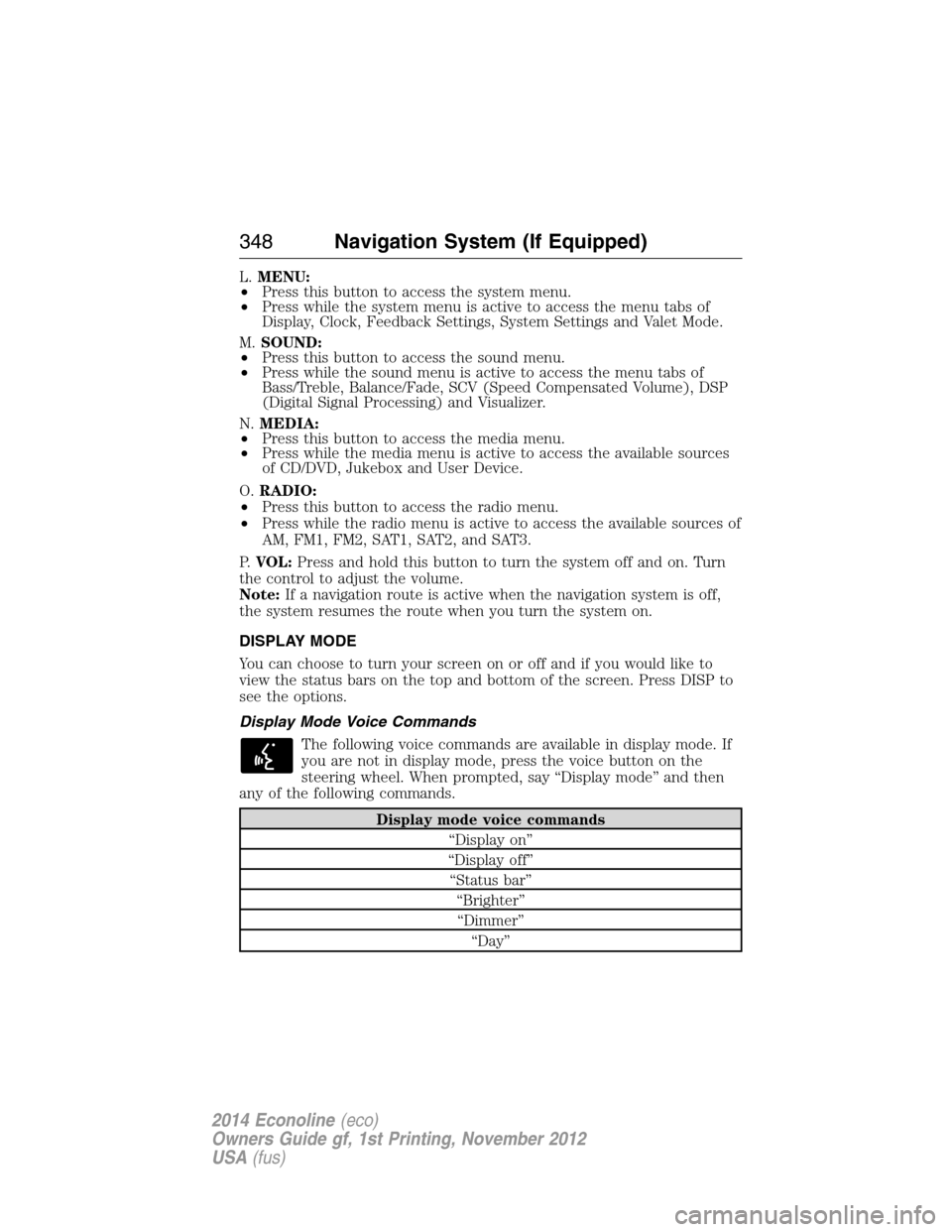
L.MENU:
•Press this button to access the system menu.
•Press while the system menu is active to access the menu tabs of
Display, Clock, Feedback Settings, System Settings and Valet Mode.
M.SOUND:
•Press this button to access the sound menu.
•Press while the sound menu is active to access the menu tabs of
Bass/Treble, Balance/Fade, SCV (Speed Compensated Volume), DSP
(Digital Signal Processing) and Visualizer.
N.MEDIA:
•Press this button to access the media menu.
•Press while the media menu is active to access the available sources
of CD/DVD, Jukebox and User Device.
O.RADIO:
•Press this button to access the radio menu.
•Press while the radio menu is active to access the available sources of
AM, FM1, FM2, SAT1, SAT2, and SAT3.
P.VOL:Press and hold this button to turn the system off and on. Turn
the control to adjust the volume.
Note:If a navigation route is active when the navigation system is off,
the system resumes the route when you turn the system on.
DISPLAY MODE
You can choose to turn your screen on or off and if you would like to
view the status bars on the top and bottom of the screen. Press DISP to
see the options.
Display Mode Voice Commands
The following voice commands are available in display mode. If
you are not in display mode, press the voice button on the
steering wheel. When prompted, say “Display mode” and then
any of the following commands.
Display mode voice commands
“Display on”
“Display off”
“Status bar”
“Brighter”
“Dimmer”
“Day”
348Navigation System (If Equipped)
2014 Econoline(eco)
Owners Guide gf, 1st Printing, November 2012
USA(fus)
Page 358 of 438
When you select: You can:
Show PresetsView the preset stations. Save a station by
pressing and holding one of the memory
preset areas. There is a brief mute while the
radio saves the station. Sound returns when
finished.
Set PTY/AllSelect a category of music you would like to
search for and then choose to either seek or
scan for the stations.
**
Note:The system scans the frequency band
three times for the chosen program type. If
the program type is unavailable in your
reception range, the system returns to the
previous station.
*This feature is only available in the United States.
**This feature is only available on the FM1 and FM2 radio tabs in the
United States.
Audio and Radio Voice Commands
If you are listening to the audio system, press the voice button
on the steering wheel control. When prompted, say any of the
commands in the following chart.
If you are not listening to the audio system, press the voice button and,
after the tone, say “Audio”, then any of the commands in the following
chart.
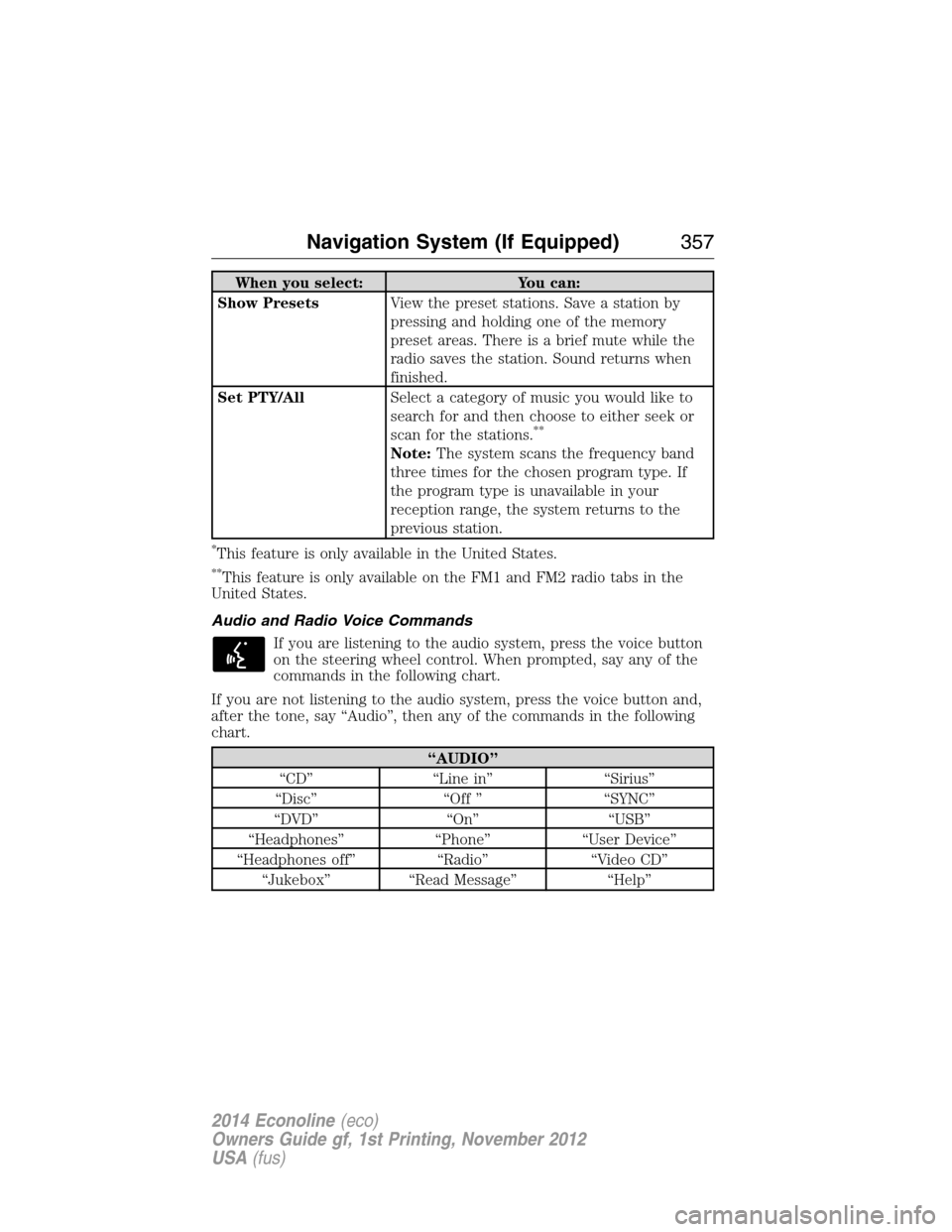
“AUDIO”
“CD” “Line in” “Sirius”
“Disc” “Off ” “SYNC”
“DVD” “On” “USB”
“Headphones” “Phone” “User Device”
“Headphones off” “Radio” “Video CD”
“Jukebox” “Read Message” “Help”
Navigation System (If Equipped)357
2014 Econoline(eco)
Owners Guide gf, 1st Printing, November 2012
USA(fus)
Page 359 of 438
If you are listening to the radio, press the voice button on the
steering wheel control. When prompted, say any of the
commands in the following chart.
If you are not listening to the radio, press the voice button and, after the
tone, say “Radio”, then any of the commands in the following chart.
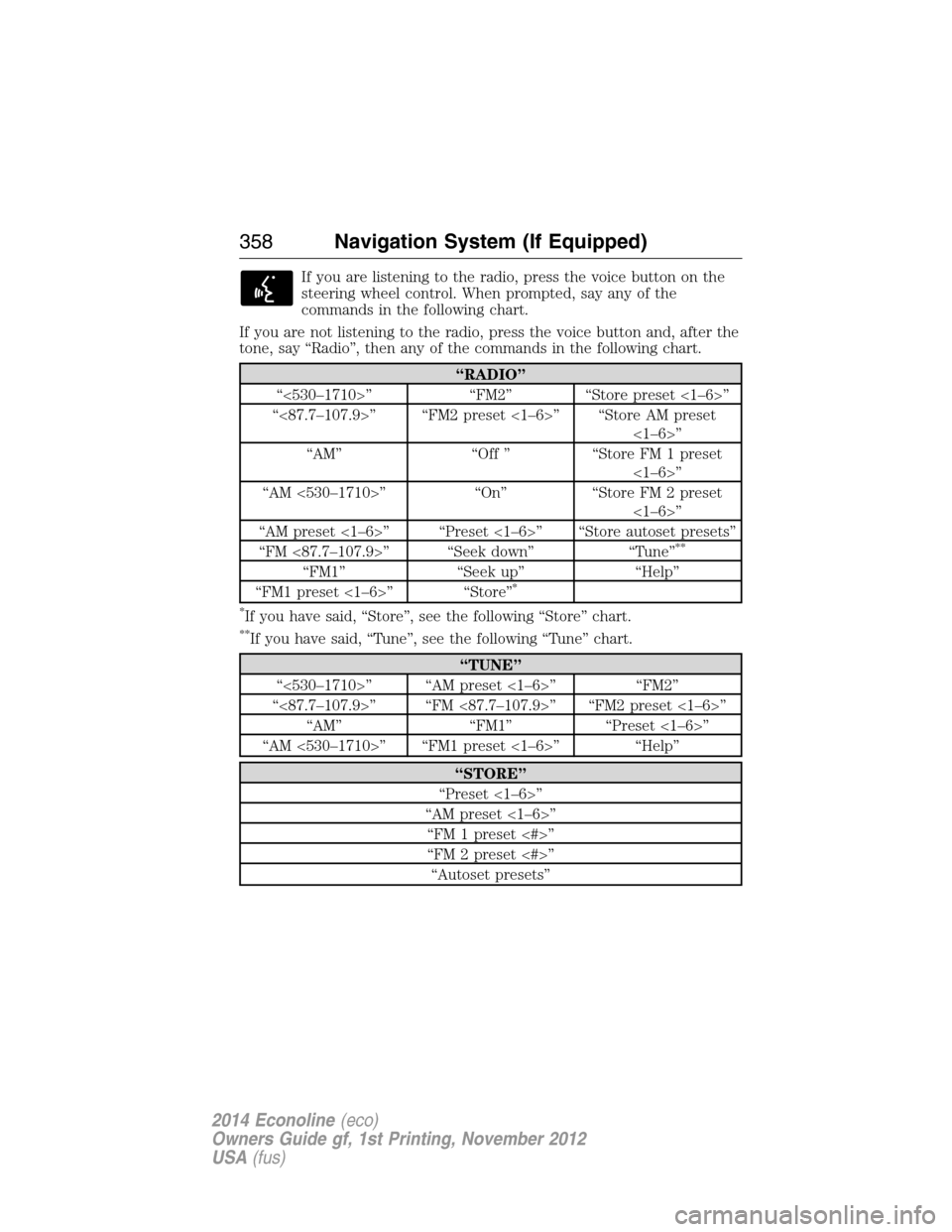
“RADIO”
“<530–1710>” “FM2” “Store preset <1–6>”
“<87.7–107.9>” “FM2 preset <1–6>” “Store AM preset
<1–6>”
“AM” “Off ” “Store FM 1 preset
<1–6>”
“AM <530–1710>” “On” “Store FM 2 preset
<1–6>”
“AM preset <1–6>” “Preset <1–6>” “Store autoset presets”
“FM <87.7–107.9>” “Seek down” “Tune”
**
“FM1” “Seek up” “Help”
“FM1 preset <1–6>” “Store”*
*
If you have said, “Store”, see the following “Store” chart.
**If you have said, “Tune”, see the following “Tune” chart.
“TUNE”
“<530–1710>” “AM preset <1–6>” “FM2”
“<87.7–107.9>” “FM <87.7–107.9>” “FM2 preset <1–6>”
“AM” “FM1” “Preset <1–6>”
“AM <530–1710>” “FM1 preset <1–6>” “Help”
“STORE”
“Preset <1–6>”
“AM preset <1–6>”
“FM 1 preset <#>”
“FM 2 preset <#>”
“Autoset presets”
358Navigation System (If Equipped)
2014 Econoline(eco)
Owners Guide gf, 1st Printing, November 2012
USA(fus)
Page 364 of 438
HD Radio Voice Commands
If you are listening to the radio, press the voice button on the
steering wheel control. When prompted, say any of the
commands in the following chart.
If you are not listening to the radio, press the voice button and, after the
tone, say “Radio”, then any of the commands in the following chart.
“RADIO”
“<87.7 - 107.9> HD <1–8>”
“FM <87.7-107.9> HD <1-8>”
“Tune”
*
“Help”
*If you have said, “Tune”, see the following “Tune” chart.
“TUNE”
“<87.7 - 107.9> HD <1–8>”
“FM <87.7-107.9> HD <1-8>”
“Tune HD <1-8>”
“Help”
Sirius® Satellite Radio (If Activated)
Press the RADIO hard button, then select SAT on the
touchscreen.
When you select: You can:
SAT123Press this button to access three different
satellite radio modes (SAT1, SAT2 or SAT3).
ScanPress this button to hear a brief sampling of
all satellite radio channels within the current
genre.
Scan PresetsPress these buttons to hear a brief sampling
of all channels stored in the memory presets.
Navigation System (If Equipped)363
2014 Econoline(eco)
Owners Guide gf, 1st Printing, November 2012
USA(fus)
Page 367 of 438
Sirius® Satellite Radio Voice Commands
If you are listening to Sirius satellite radio, press the voice
button on the steering wheel control. When prompted, say any
of the commands in the following chart.
If you are not listening to Sirius satellite radio, press the voice button
and, after the tone, say “Sirius”, then any of the commands in the
following chart.
“Sirius”
“<0–233>” “Seek up”
“
“Preset <#>” “Sirius On”
“SAT 1” “Store”
*
“SAT 1 preset <#>” “Store preset <1–6>”
“SAT 2” “Store SAT1 preset <1–6>”
“SAT 2 preset <#>” “Store SAT2 preset <1–6>”
“SAT 3” “Store SAT3 preset <1–6>”
“SAT 3 preset <#>” “Tune”
**
“Seek down ” “Help”
*If you have said, “Store”, see the following “Store” chart.
**If you have said, “Tune”, see the following “Tune” chart.
“STORE”
“Preset <1–6>”
“SAT1 preset <1–6>”
“SAT2 preset <1–6>”
“SAT3 preset <1–6>”
“TUNE”
“<0–233>” “SAT 2”
“
“Preset <#>” “SAT 3”
“SAT 1” “SAT 3 preset <#>”
“SAT 1 preset <#>” “Help”
366Navigation System (If Equipped)
2014 Econoline(eco)
Owners Guide gf, 1st Printing, November 2012
USA(fus)