ignition FORD E SERIES 2016 4.G Workshop Manual
[x] Cancel search | Manufacturer: FORD, Model Year: 2016, Model line: E SERIES, Model: FORD E SERIES 2016 4.GPages: 319, PDF Size: 6.18 MB
Page 211 of 319
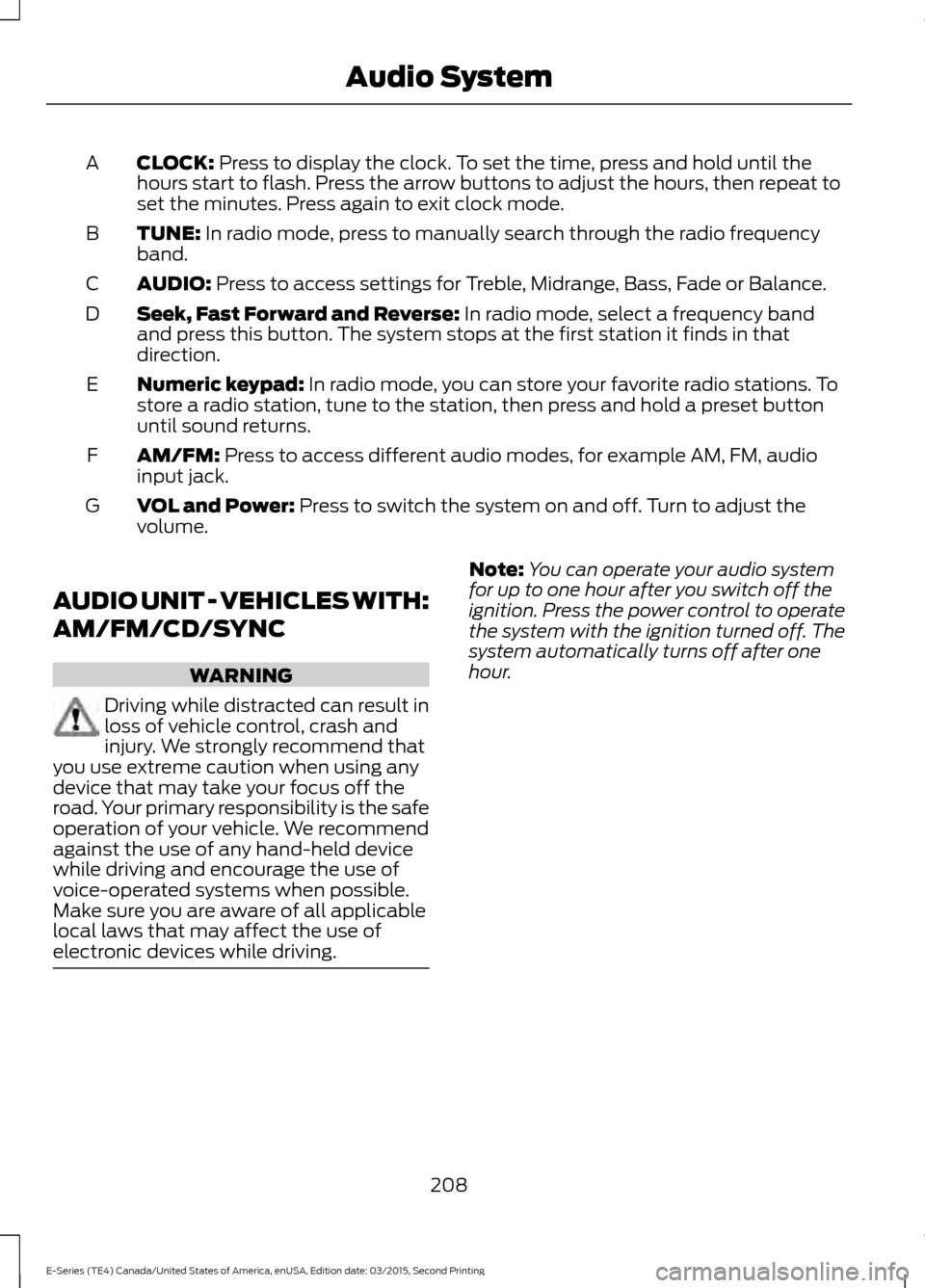
CLOCK: Press to display the clock. To set the time, press and hold until the
hours start to flash. Press the arrow buttons to adjust the hours, then repeat to
set the minutes. Press again to exit clock mode.
A
TUNE:
In radio mode, press to manually search through the radio frequency
band.
B
AUDIO:
Press to access settings for Treble, Midrange, Bass, Fade or Balance.
C
Seek, Fast Forward and Reverse:
In radio mode, select a frequency band
and press this button. The system stops at the first station it finds in that
direction.
D
Numeric keypad:
In radio mode, you can store your favorite radio stations. To
store a radio station, tune to the station, then press and hold a preset button
until sound returns.
E
AM/FM:
Press to access different audio modes, for example AM, FM, audio
input jack.
F
VOL and Power:
Press to switch the system on and off. Turn to adjust the
volume.
G
AUDIO UNIT - VEHICLES WITH:
AM/FM/CD/SYNC WARNING
Driving while distracted can result in
loss of vehicle control, crash and
injury. We strongly recommend that
you use extreme caution when using any
device that may take your focus off the
road. Your primary responsibility is the safe
operation of your vehicle. We recommend
against the use of any hand-held device
while driving and encourage the use of
voice-operated systems when possible.
Make sure you are aware of all applicable
local laws that may affect the use of
electronic devices while driving. Note:
You can operate your audio system
for up to one hour after you switch off the
ignition. Press the power control to operate
the system with the ignition turned off. The
system automatically turns off after one
hour.
208
E-Series (TE4) Canada/United States of America, enUSA, Edition date: 03/2015, Second Printing Audio System
Page 224 of 319
USING SYNC™ WITH YOUR
PHONE
Hands-free calling is one of the main
features of SYNC. While the system
supports a variety of features, many are
dependent on your cell phone's
functionality. At a minimum, most cell
phones with Bluetooth wireless technology
support the following functions:
•
Answering an incoming call.
• Ending a call.
• Using privacy mode.
• Dialing a number.
• Redialing.
• Call waiting notification.
• Caller ID. Other features, such as text messaging
using Bluetooth and automatic phonebook
download, are cell phone-dependent
features. To check your cell phone's
compatibility, see your cell phone's manual
and visit www.SYNCMyRide.com,
www.SYNCMyRide.ca or
www.syncmaroute.ca.
Pairing a Cell Phone for the First
Time
Note:
SYNC can support downloading up
to approximately 1000 entries per
Bluetooth-enabled cell phone.
Note: Make sure to switch on the ignition
and the radio. Put the transmission in
position park (P) (automatic transmission)
or neutral with the parking brake applied
(manual transmission).
Note: To scroll through the menus, press
the up and down arrows on your audio
system.
Wirelessly pairing your cell phone with
SYNC allows you to make and receive
hands-free calls.
Press the phone button. When the display indicates there is no cell phone paired,
do the following: Action and Description
Message
Press the
OK button.
NO PHONE
FIND SYNC 1. Press the
OK button.
2. Put your cell phone into Bluetooth discovery mode. See your device's manual if necessary.
3. When prompted on your cell phone's display, enter the six-digit PIN provided by SYNC in the radio display. The
display indicates when the pairing is successful.
221
E-Series (TE4) Canada/United States of America, enUSA, Edition date: 03/2015, Second Printing SYNC™
Page 225 of 319
Depending on your cell phone's capability
and your market, the system may prompt
you with questions, such as setting the
current cell phone as the primary cell
phone (the cell phone SYNC automatically
tries to connect with first upon vehicle
start-up) and downloading your
phonebook.
Pairing Subsequent Cell Phones
Note:
To scroll through the menus, press
the up and down arrows on your audio
system.
Note: Make sure to switch on the ignition
and the radio. Put the transmission in
position park (P) (automatic transmission)
or neutral with the parking brake applied
(manual transmission).
Press the phone button, then scroll to: Action
Message
Press the
OK button.
PHONE SETNGS
Press the
OK button.
BT DEVICES
Press the
OK button. When the following message appears
in the display.
ADD DEVICE
FIND SYNC
1. Press the
OK button.
2. Put your cell phone into Bluetooth discovery mode. See your device's manual if necessary.
3. When prompted on your cell phone's display, enter the six-digit PIN provided by SYNC in the radio display. The
display indicates when the pairing is successful.
The system then prompts with questions, such as if you would like to set the current cell
phone as the primary cell phone (the cell phone SYNC automatically tries to connect
with first upon vehicle start-up) or download your phonebook.
Phone Voice Commands
Press the voice icon and say: Voice Commands
Phone
You can then say any of the following
commands.
Call History Incoming
Call History Missed
Call History Outgoing Voice Commands
Phonebook ___
Phonebook ___ at Home
Phonebook ___ at Work
Phonebook ___ in Office
Phonebook ___ on Cell
___ is a dynamic listing that should be the
name of a contact in your phonebook. For
example you could say "Call Mom".
222
E-Series (TE4) Canada/United States of America, enUSA, Edition date: 03/2015, Second Printing SYNC™
Page 235 of 319
Press the Phone button to enter the Phone Menu, then scroll to:
Action and Description
Message
Press the OK button.
SYS SETTINGS
Press the
OK button.
BT DEVICES
Select one of the following:
See
Using SYNC™ With Your Phone (page 221).1
ADD DEVICE
Connect a previously paired Bluetooth-enabled phone. 2
CONNECT BT
Press OK to select and view a list of previously paired phones.
Scroll until the desired device is chosen, then press OK to
connect the phone.
Set a previously paired phone as your primary phone. 3
SET PRIMARY?
Press
OK to select and scroll to select the desired phone.
Press OK to confirm.
Turn the Bluetooth feature on and off. 4
BT ON/OFF
Press
OK and scroll to toggle between On and Off. When the
desired selection is chosen, press OK.
Setting Bluetooth to off disconnects all Bluetooth devices
and turns off all Bluetooth features.
Delete a paired cell phone.
DEL DEVICE
Press the OK button and scroll to select the device. Press OK
to confirm.
Delete all previously paired phones (and all information
originally saved with those phones).
DELETE ALL
Press
OK to select.
Exit the current menu.
RETURN
1 This is a speed-dependent feature. It is only available when your vehicle is traveling at
3 mph (5 km/h) or less.
2 You can only connect one device at a time. When another cell phone is connected, the
previous one is disconnected.
3 SYNC attempts to connect with the primary phone at every ignition cycle. When a phone
is selected as primary, it appears first in the list and is marked with an asterisk (*).
4 Turning Bluetooth off disconnects all Bluetooth devices and deactivates all Bluetooth
features.
232
E-Series (TE4) Canada/United States of America, enUSA, Edition date: 03/2015, Second Printing SYNC™
Page 263 of 319
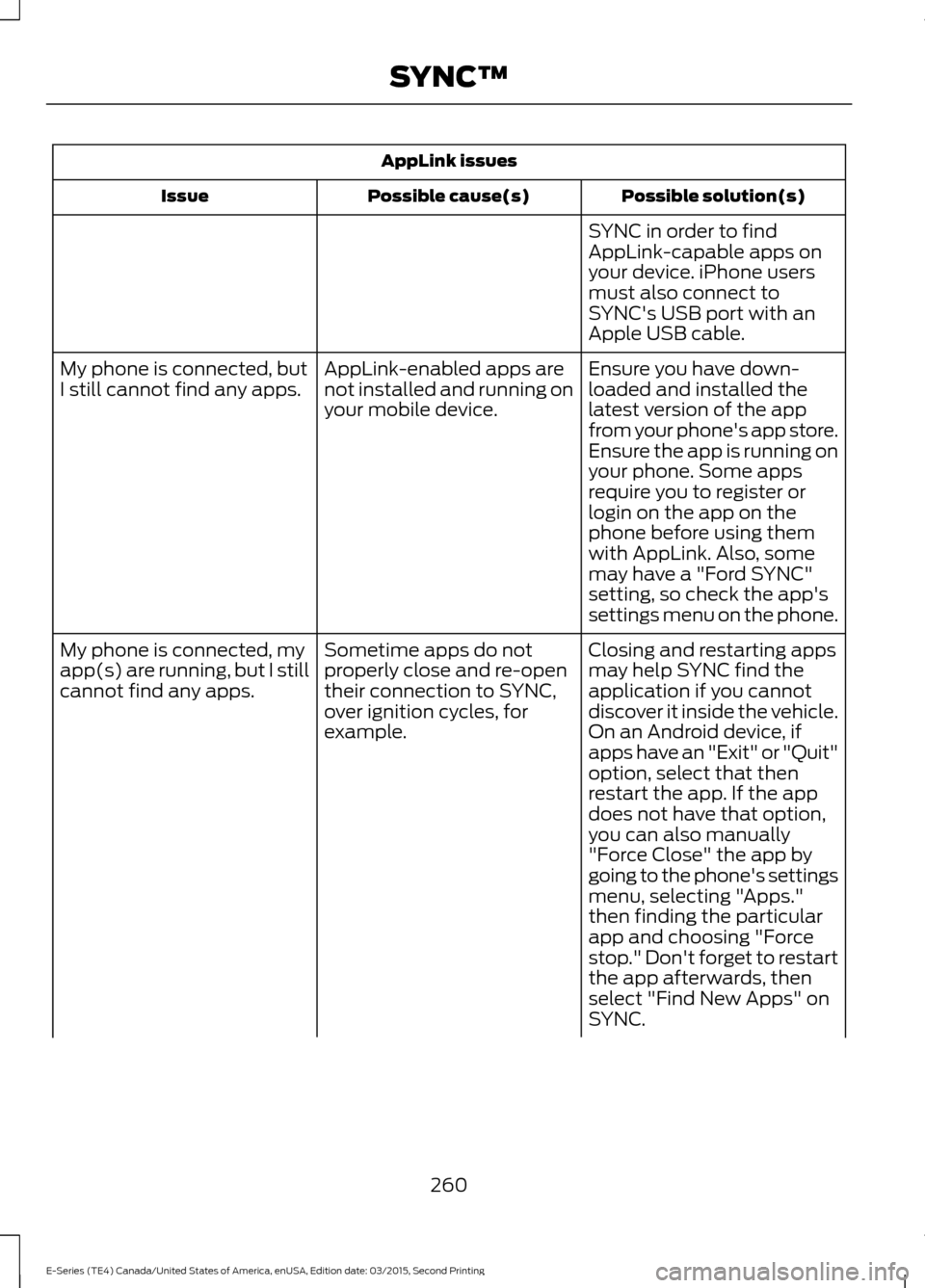
AppLink issues
Possible solution(s)
Possible cause(s)
Issue
SYNC in order to find
AppLink-capable apps on
your device. iPhone users
must also connect to
SYNC's USB port with an
Apple USB cable.
Ensure you have down-
loaded and installed the
latest version of the app
from your phone's app store.
Ensure the app is running on
your phone. Some apps
AppLink-enabled apps are
not installed and running on
your mobile device.
My phone is connected, but
I still cannot find any apps.
require you to register or
login on the app on the
phone before using them
with AppLink. Also, some
may have a "Ford SYNC"
setting, so check the app's
settings menu on the phone.
Closing and restarting apps
may help SYNC find the
application if you cannot
discover it inside the vehicle.
On an Android device, if
apps have an "Exit" or "Quit"
Sometime apps do not
properly close and re-open
their connection to SYNC,
over ignition cycles, for
example.
My phone is connected, my
app(s) are running, but I still
cannot find any apps.
option, select that then
restart the app. If the app
does not have that option,
you can also manually
"Force Close" the app by
going to the phone's settings
menu, selecting "Apps."
then finding the particular
app and choosing "Force
stop." Don't forget to restart
the app afterwards, then
select "Find New Apps" on
SYNC.
260
E-Series (TE4) Canada/United States of America, enUSA, Edition date: 03/2015, Second Printing SYNC™
Page 267 of 319
•
An authorized dealer needs to install
mobile communications systems.
Improper installation may harm the
operation of your vehicle, particularly
if the manufacturer did not design the
mobile communication system
specifically for automotive use.
• If you or an authorized Ford dealer add
any non-Ford electrical or electronic
accessories or components to your
vehicle, you may adversely affect
battery performance and durability. In
addition, you may also adversely affect
the performance of other electrical
systems in the vehicle.
AUXILIARY SWITCHES
For maximum vehicle performance, keep
the following information in mind when
adding accessories or equipment to your
vehicle:
• When adding accessories, equipment,
passengers and luggage to your
vehicle, do not exceed the total weight
capacity of the vehicle or of the front
or rear axle (GVWR or GAWR as
indicated on the Safety Compliance
Certification label). Ask an authorized
dealer for specific weight information.
• The Federal Communications
Commission (FCC) and Canadian
Radio Telecommunications
Commission (CRTC) regulate the use
of mobile communications systems
equipped with radio transmitters, for
example, two-way radios, telephones
and theft alarms. Any such equipment
installed in your vehicle should comply
with Federal Communications
Commission (FCC) and Canadian
Radio Telecommunications
Commission (CRTC) regulations, and
should be installed by an authorized
dealer. •
An authorized dealer needs to install
mobile communications systems.
Improper installation may harm the
operation of your vehicle, particularly
if the manufacturer did not design the
mobile communication system
specifically for automotive use.
• If you or an authorized Ford dealer add
any non-Ford electrical or electronic
accessories or components to your
vehicle, you may adversely affect
battery performance and durability. In
addition, you may also adversely affect
the performance of other electrical
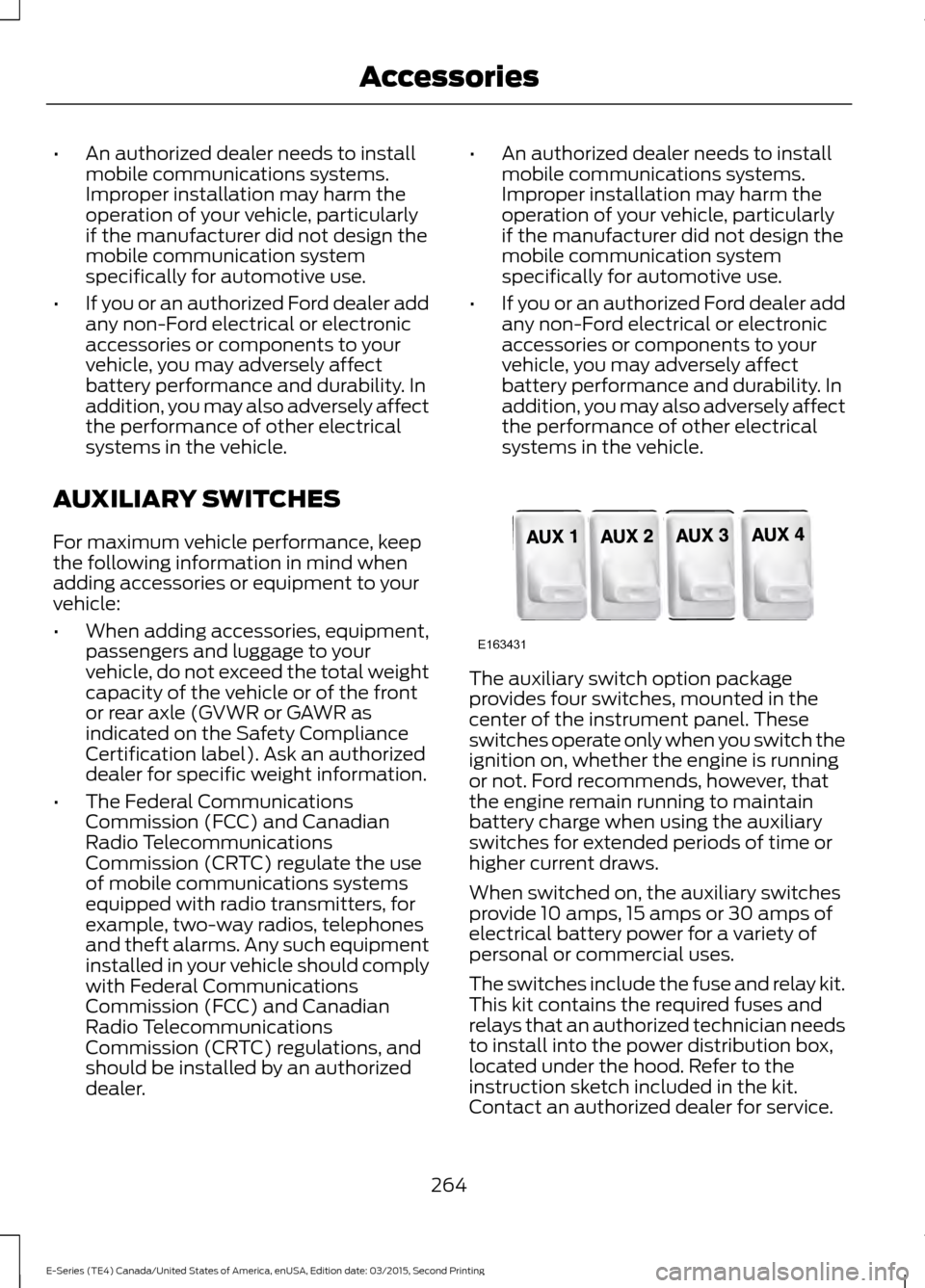
systems in the vehicle. The auxiliary switch option package
provides four switches, mounted in the
center of the instrument panel. These
switches operate only when you switch the
ignition on, whether the engine is running
or not. Ford recommends, however, that
the engine remain running to maintain
battery charge when using the auxiliary
switches for extended periods of time or
higher current draws.
When switched on, the auxiliary switches
provide 10 amps, 15 amps or 30 amps of
electrical battery power for a variety of
personal or commercial uses.
The switches include the fuse and relay kit.
This kit contains the required fuses and
relays that an authorized technician needs
to install into the power distribution box,
located under the hood. Refer to the
instruction sketch included in the kit.
Contact an authorized dealer for service.
264
E-Series (TE4) Canada/United States of America, enUSA, Edition date: 03/2015, Second Printing AccessoriesE163431
Page 312 of 319
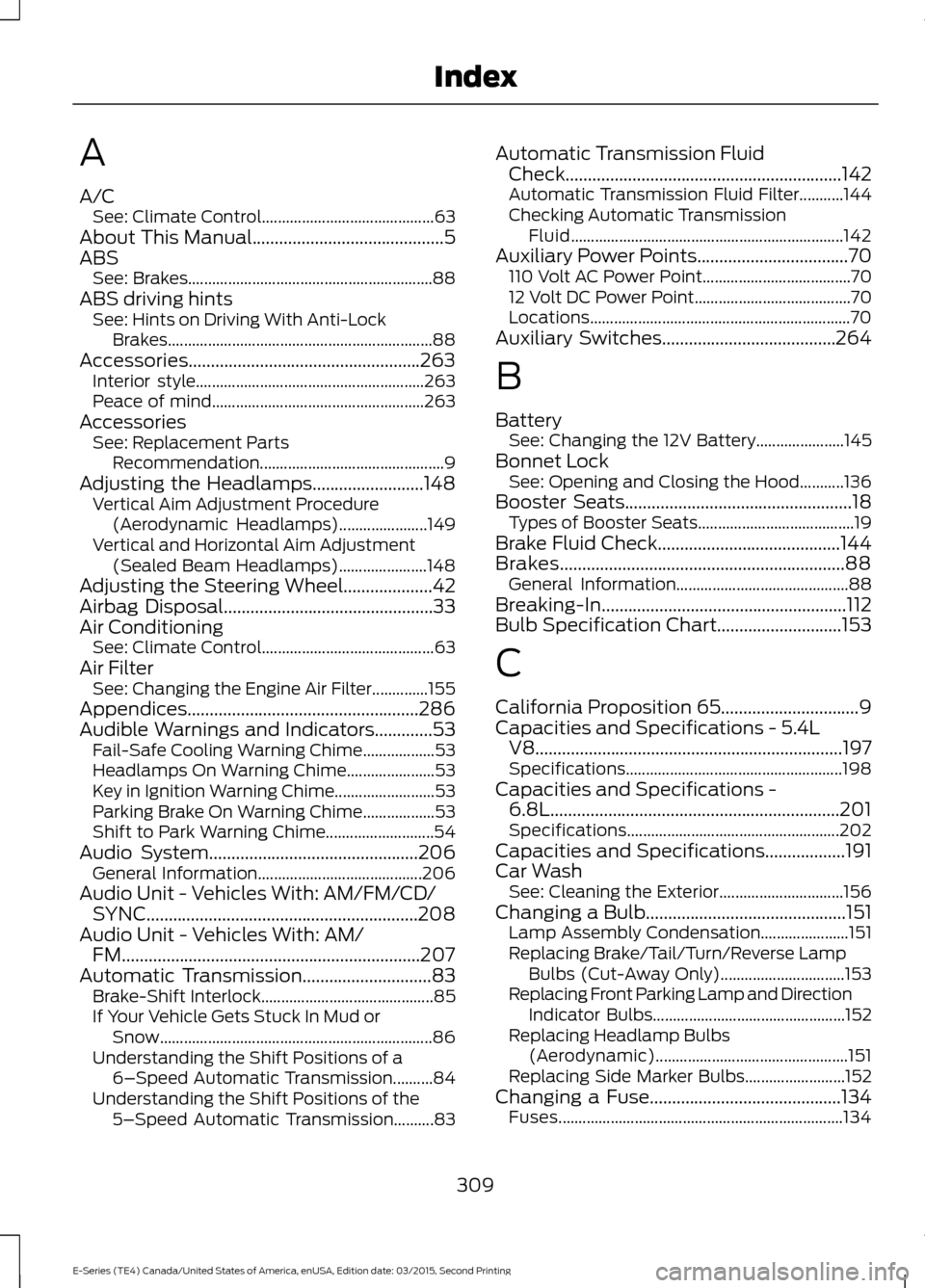
A
A/C
See: Climate Control........................................... 63
About This Manual...........................................5
ABS See: Brakes............................................................. 88
ABS driving hints See: Hints on Driving With Anti-Lock
Brakes.................................................................. 88
Accessories....................................................263 Interior style......................................................... 263
Peace of mind..................................................... 263
Accessories See: Replacement Parts
Recommendation.............................................. 9
Adjusting the Headlamps.........................148
Vertical Aim Adjustment Procedure
(Aerodynamic Headlamps)...................... 149
Vertical and Horizontal Aim Adjustment (Sealed Beam Headlamps)...................... 148
Adjusting the Steering Wheel....................42
Airbag Disposal
...............................................33
Air Conditioning See: Climate Control........................................... 63
Air Filter See: Changing the Engine Air Filter..............155
Appendices....................................................286
Audible Warnings and Indicators.............53 Fail-Safe Cooling Warning Chime.................. 53
Headlamps On Warning Chime...................... 53
Key in Ignition Warning Chime......................... 53
Parking Brake On Warning Chime.................. 53
Shift to Park Warning Chime........................... 54
Audio System...............................................206 General Information......................................... 206
Audio Unit - Vehicles With: AM/FM/CD/ SYNC.............................................................208
Audio Unit - Vehicles With: AM/ FM...................................................................207
Automatic Transmission
.............................83
Brake-Shift Interlock........................................... 85
If Your Vehicle Gets Stuck In Mud or Snow.................................................................... 86
Understanding the Shift Positions of a 6– Speed Automatic Transmission..........84
Understanding the Shift Positions of the 5– Speed Automatic Transmission..........83 Automatic Transmission Fluid
Check
..............................................................142
Automatic Transmission Fluid Filter...........144
Checking Automatic Transmission
Fluid.................................................................... 142
Auxiliary Power Points
..................................70
110 Volt AC Power Point..................................... 70
12 Volt DC Power Point....................................... 70
Locations................................................................. 70
Auxiliary Switches.......................................264
B
Battery See: Changing the 12V Battery...................... 145
Bonnet Lock See: Opening and Closing the Hood...........136
Booster Seats
...................................................18
Types of Booster Seats....................................... 19
Brake Fluid Check
.........................................144
Brakes................................................................88 General Information........................................... 88
Breaking-In.......................................................112
Bulb Specification Chart............................153
C
California Proposition 65...............................9
Capacities and Specifications - 5.4L V8.....................................................................197
Specifications...................................................... 198
Capacities and Specifications - 6.8L.................................................................201
Specifications..................................................... 202
Capacities and Specifications
..................191
Car Wash See: Cleaning the Exterior............................... 156
Changing a Bulb
.............................................151
Lamp Assembly Condensation...................... 151
Replacing Brake/Tail/Turn/Reverse Lamp Bulbs (Cut-Away Only)............................... 153
Replacing Front Parking Lamp and Direction Indicator Bulbs................................................ 152
Replacing Headlamp Bulbs (Aerodynamic)................................................ 151
Replacing Side Marker Bulbs......................... 152
Changing a Fuse
...........................................134
Fuses....................................................................... 134
309
E-Series (TE4) Canada/United States of America, enUSA, Edition date: 03/2015, Second Printing Index
Page 315 of 319
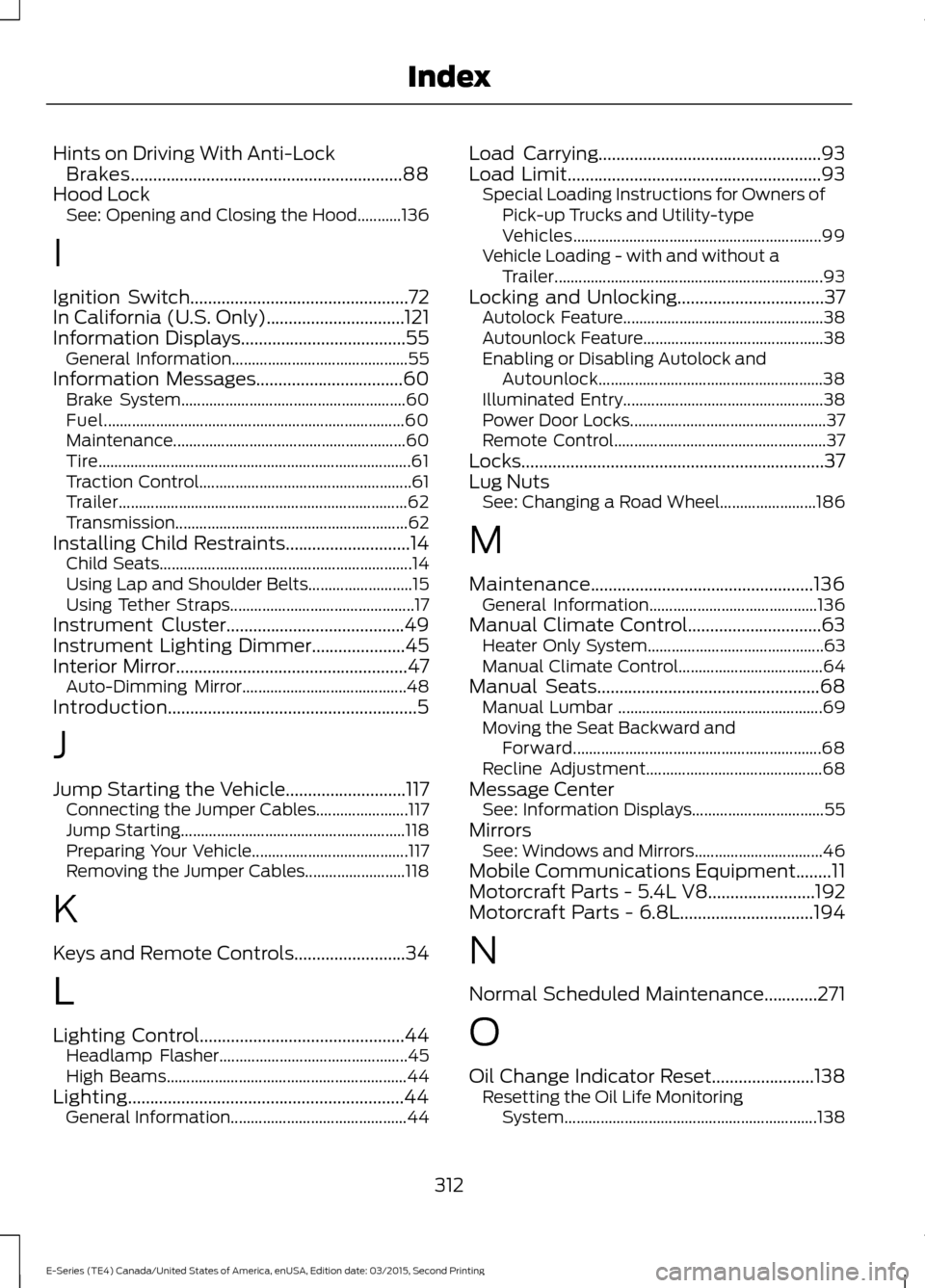
Hints on Driving With Anti-Lock
Brakes.............................................................88
Hood Lock See: Opening and Closing the Hood...........136
I
Ignition Switch
.................................................72
In California (U.S. Only)...............................121
Information Displays.....................................55 General Information............................................ 55
Information Messages
.................................60
Brake System........................................................ 60
Fuel........................................................................\
... 60
Maintenance.......................................................... 60
Tire........................................................................\
...... 61
Traction Control..................................................... 61
Trailer........................................................................\
62
Transmission.......................................................... 62
Installing Child Restraints............................14 Child Seats............................................................... 14
Using Lap and Shoulder Belts.......................... 15
Using Tether Straps.............................................. 17
Instrument Cluster........................................49
Instrument Lighting Dimmer.....................45
Interior Mirror
....................................................47
Auto-Dimming Mirror......................................... 48
Introduction........................................................5
J
Jump Starting the Vehicle
...........................117
Connecting the Jumper Cables....................... 117
Jump Starting........................................................ 118
Preparing Your Vehicle....................................... 117
Removing the Jumper Cables......................... 118
K
Keys and Remote Controls.........................34
L
Lighting Control
..............................................44
Headlamp Flasher............................................... 45
High Beams............................................................ 44
Lighting..............................................................44 General Information............................................ 44Load Carrying..................................................93
Load Limit.........................................................93
Special Loading Instructions for Owners of
Pick-up Trucks and Utility-type
Vehicles.............................................................. 99
Vehicle Loading - with and without a Trailer................................................................... 93
Locking and Unlocking
.................................37
Autolock Feature.................................................. 38
Autounlock Feature............................................. 38
Enabling or Disabling Autolock and Autounlock........................................................ 38
Illuminated Entry.................................................. 38
Power Door Locks................................................. 37
Remote Control..................................................... 37
Locks ....................................................................
37
Lug Nuts See: Changing a Road Wheel........................ 186
M
Maintenance..................................................136 General Information.......................................... 136
Manual Climate Control..............................63 Heater Only System............................................ 63
Manual Climate Control.................................... 64
Manual Seats
..................................................68
Manual Lumbar ................................................... 69
Moving the Seat Backward and Forward.............................................................. 68
Recline Adjustment............................................ 68
Message Center See: Information Displays................................. 55
Mirrors See: Windows and Mirrors................................ 46
Mobile Communications Equipment........11
Motorcraft Parts - 5.4L V8........................192
Motorcraft Parts - 6.8L..............................194
N
Normal Scheduled Maintenance
............271
O
Oil Change Indicator Reset
.......................138
Resetting the Oil Life Monitoring
System............................................................... 138
312
E-Series (TE4) Canada/United States of America, enUSA, Edition date: 03/2015, Second Printing Index
Page 317 of 319
Sitting in the Correct Position....................67
Snow Chains See: Using Snow Chains.................................. 182
Special Notices
................................................10
New Vehicle Limited Warranty........................ 10
Notice to Owners of Pickup Trucks and Utility Type Vehicles........................................ 10
On-board Diagnostics (OBD-II)...................... 10
Special Instructions............................................. 10
Using your Vehicle as an Ambulance............10
Special Operating Conditions Scheduled Maintenance
...............................................273
Exceptions............................................................ 274
Speed Control See: Cruise Control............................................... 91
Starter Switch See: Ignition Switch............................................. 72
Starting a Gasoline Engine..........................72 Failure to Start....................................................... 73
Guarding Against Exhaust Fumes.................. 73
Important Ventilating Information.................73
Stopping the Engine When Your Vehicle is Moving.................................................................. 73
Stopping the Engine When Your Vehicle is Stationary........................................................... 73
Starting and Stopping the Engine............72 General Information............................................ 72
Steering..............................................................92
Steering Wheel
................................................42
Sun Visors.........................................................48
Illuminated Vanity Mirror................................... 48
Supplementary Restraints System..........27 Principle of Operation......................................... 27
Symbols Glossary.............................................5
SYNC™ Applications and Services........................................................234
911 Assist............................................................... 234
SYNC Services: Traffic, Directions & Information (TDI) (If Equipped, United
States Only).................................................... 238
Vehicle Health Report (If Equipped, United States Only).................................................... 236
SYNC™ AppLink ™
......................................242
SYNC Mobile Apps............................................ 242
SYNC™.............................................................216 General Information.......................................... 216
SYNC™ Troubleshooting
.........................254 T
Technical Specifications
See: Capacities and Specifications..............191
The Better Business Bureau (BBB) Auto Line Program (U.S. Only)........................122
Tire Care...........................................................164 Glossary of Tire Terminology......................... 166
Information About Uniform Tire Quality Grading.............................................................. 164
Information Contained on the Tire Sidewall............................................................. 167
Temperature A B C............................................. 165
Traction AA A B C............................................... 165
Treadwear............................................................. 165
Tire Pressure Monitoring System...........183 Changing Tires With a Tire Pressure
Monitoring System........................................ 184
Understanding Your Tire Pressure Monitoring System ....................................... 184
Tires See: Wheels and Tires...................................... 163
Towing a Trailer.............................................100 Load Placement................................................. 100
Towing the Vehicle on Four Wheels
...........................................................110
Emergency Towing.............................................. 110
Recreational Towing........................................... 110
Towing..............................................................100
Traction Control
.............................................90
Principle of Operation........................................ 90
Trailer Sway Control.....................................101
Transmission Code Designation.............196
Transmission....................................................83
Transmission See: Transmission................................................ 83
Transporting the Vehicle............................110
U
Under Hood Overview
.................................137
USB Port...........................................................215
Using Cruise Control......................................91
Switching Cruise Control Off............................ 91
Switching Cruise Control On............................. 91
Using Snow Chains
......................................182
314
E-Series (TE4) Canada/United States of America, enUSA, Edition date: 03/2015, Second Printing Index