seats FORD E SERIES 2017 4.G User Guide
[x] Cancel search | Manufacturer: FORD, Model Year: 2017, Model line: E SERIES, Model: FORD E SERIES 2017 4.GPages: 318, PDF Size: 6.21 MB
Page 32 of 318
DRIVER AND PASSENGER
AIRBAGS
WARNINGS
Never place your arm over the airbag
module as a deploying airbag can
result in serious arm fractures or
other injuries. Airbags can kill or injure a child in a
child restraint. Never place a
rear-facing child restraint in front of
an active airbag. If you must use a
forward-facing child restraint in the front
seat, move the seat upon which the child
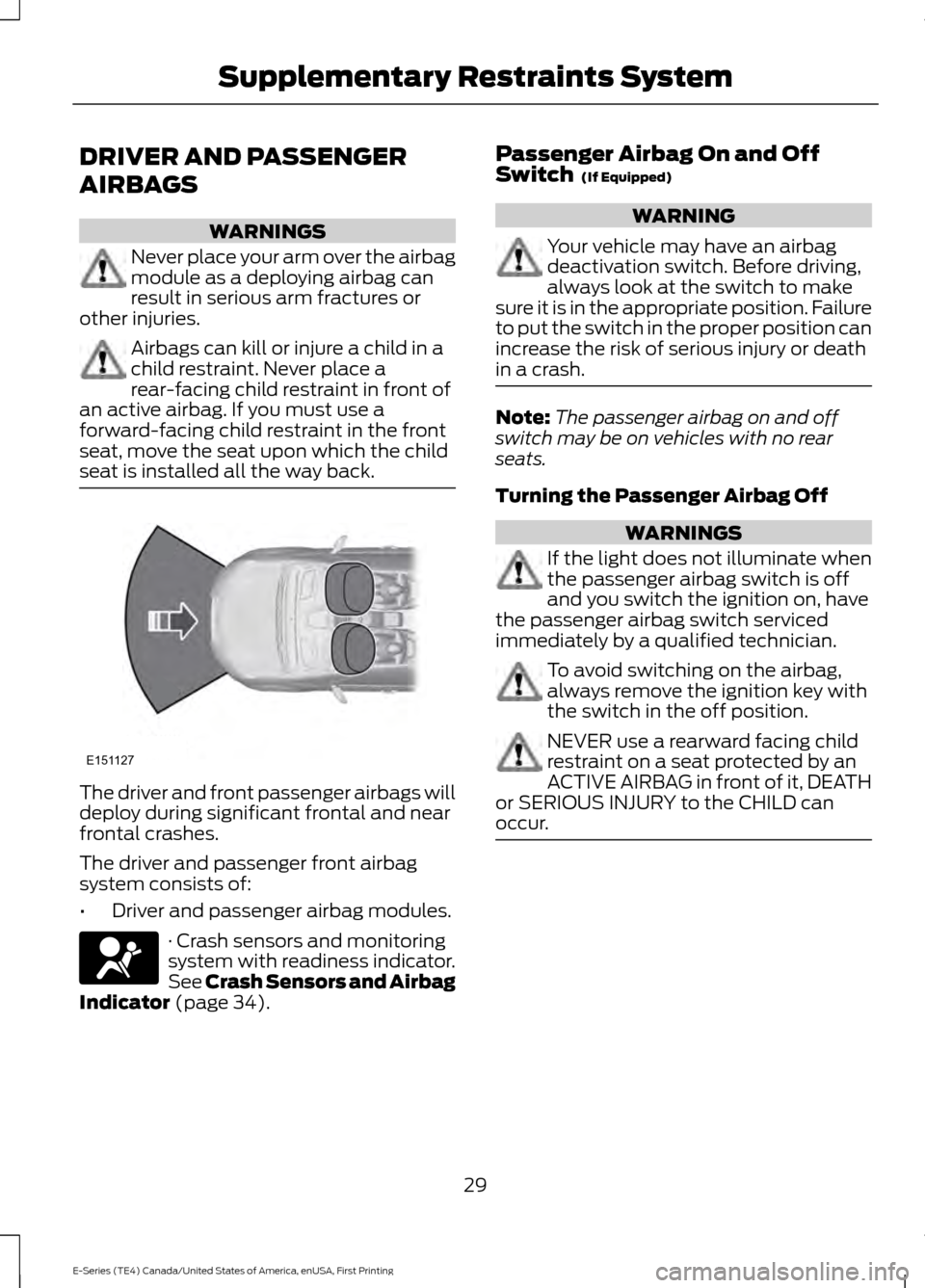
seat is installed all the way back. The driver and front passenger airbags will
deploy during significant frontal and near
frontal crashes.
The driver and passenger front airbag
system consists of:
•
Driver and passenger airbag modules. · Crash sensors and monitoring
system with readiness indicator.
See Crash Sensors and Airbag
Indicator (page 34). Passenger Airbag On and Off
Switch
(If Equipped) WARNING
Your vehicle may have an airbag
deactivation switch. Before driving,
always look at the switch to make
sure it is in the appropriate position. Failure
to put the switch in the proper position can
increase the risk of serious injury or death
in a crash. Note:
The passenger airbag on and off
switch may be on vehicles with no rear
seats.
Turning the Passenger Airbag Off WARNINGS
If the light does not illuminate when
the passenger airbag switch is off
and you switch the ignition on, have
the passenger airbag switch serviced
immediately by a qualified technician. To avoid switching on the airbag,
always remove the ignition key with
the switch in the off position.
NEVER use a rearward facing child
restraint on a seat protected by an
ACTIVE AIRBAG in front of it, DEATH
or SERIOUS INJURY to the CHILD can
occur. 29
E-Series (TE4) Canada/United States of America, enUSA, First Printing Supplementary Restraints SystemE151127
Page 33 of 318
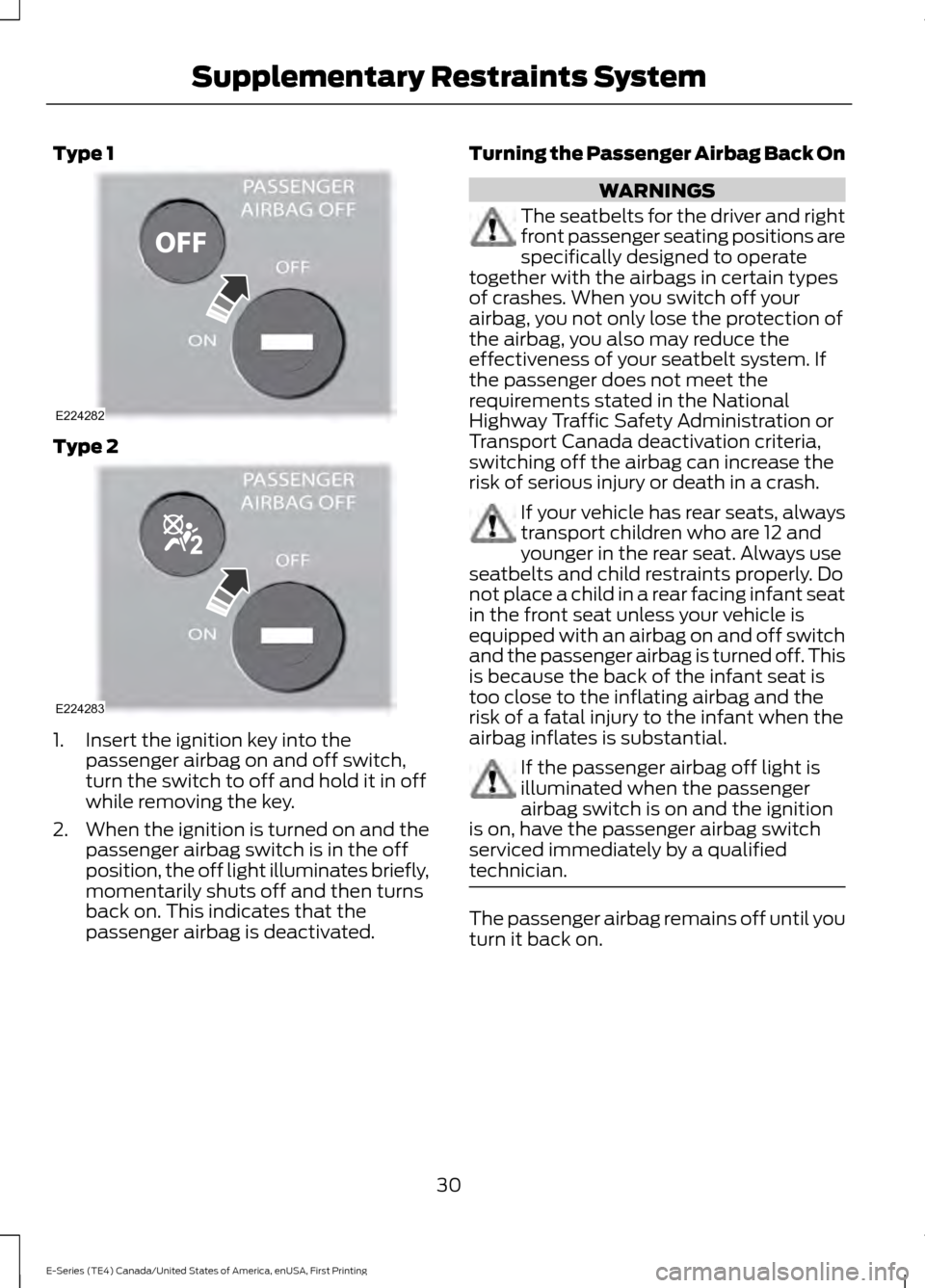
Type 1
Type 2
1. Insert the ignition key into the
passenger airbag on and off switch,
turn the switch to off and hold it in off
while removing the key.
2. When the ignition is turned on and the
passenger airbag switch is in the off
position, the off light illuminates briefly,
momentarily shuts off and then turns
back on. This indicates that the
passenger airbag is deactivated. Turning the Passenger Airbag Back On WARNINGS
The seatbelts for the driver and right
front passenger seating positions are
specifically designed to operate
together with the airbags in certain types
of crashes. When you switch off your
airbag, you not only lose the protection of
the airbag, you also may reduce the
effectiveness of your seatbelt system. If
the passenger does not meet the
requirements stated in the National
Highway Traffic Safety Administration or
Transport Canada deactivation criteria,
switching off the airbag can increase the
risk of serious injury or death in a crash. If your vehicle has rear seats, always
transport children who are 12 and
younger in the rear seat. Always use
seatbelts and child restraints properly. Do
not place a child in a rear facing infant seat
in the front seat unless your vehicle is
equipped with an airbag on and off switch
and the passenger airbag is turned off. This
is because the back of the infant seat is
too close to the inflating airbag and the
risk of a fatal injury to the infant when the
airbag inflates is substantial. If the passenger airbag off light is
illuminated when the passenger
airbag switch is on and the ignition
is on, have the passenger airbag switch
serviced immediately by a qualified
technician. The passenger airbag remains off until you
turn it back on.
30
E-Series (TE4) Canada/United States of America, enUSA, First Printing Supplementary Restraints SystemE224282 E224283
Page 36 of 318
•
My vehicle has no rear seat.
• Although children age 12 and under ride
in the rear seat whenever possible,
children age 12 and under have no
option but to sometimes ride in the
front seat because rear seat space is
insufficient.
• The child has a medical condition that,
according to the child's physician,
makes it necessary for the child to ride
in the front seat so that the driver can
monitor the child's condition.
3. Medical condition: A passenger has a
medical condition that, according to his or
her physician:
• Poses a special risk for the passenger
if the airbag deploys.
• Makes the potential harm from the
passenger airbag deployment greater
than the potential harm from turning
off the airbag and experiencing a crash
without the protection offered by the
airbag.
Proper Driver and Front Passenger
Seating Adjustment WARNING
National Highway Traffic Safety
Administration (NHTSA)
recommends a minimum distance
of at least
10 in (25 cm) between an
occupant’ s chest and the driver airbag
module. To properly position yourself away from
the airbag:
•
Move your seat to the rear as far as you
can while still reaching the pedals
comfortably.
• Recline the seat slightly (one or two
degrees) from the upright position. After all occupants have adjusted their
seats and put on seatbelts, it is very
important that they continue to sit
properly. Properly seated occupants sit
upright, lean against the seat back, and
center themselves on the seat cushion,
with their feet comfortably extended on
the floor. Sitting improperly can increase
the chance of injury in a crash event. For
example, if an occupant slouches, lies
down, turns sideways, sits forward, leans
forward or sideways, or puts one or both
feet up, the chance of injury during a crash
is greatly increased.
Children and Airbags
WARNING
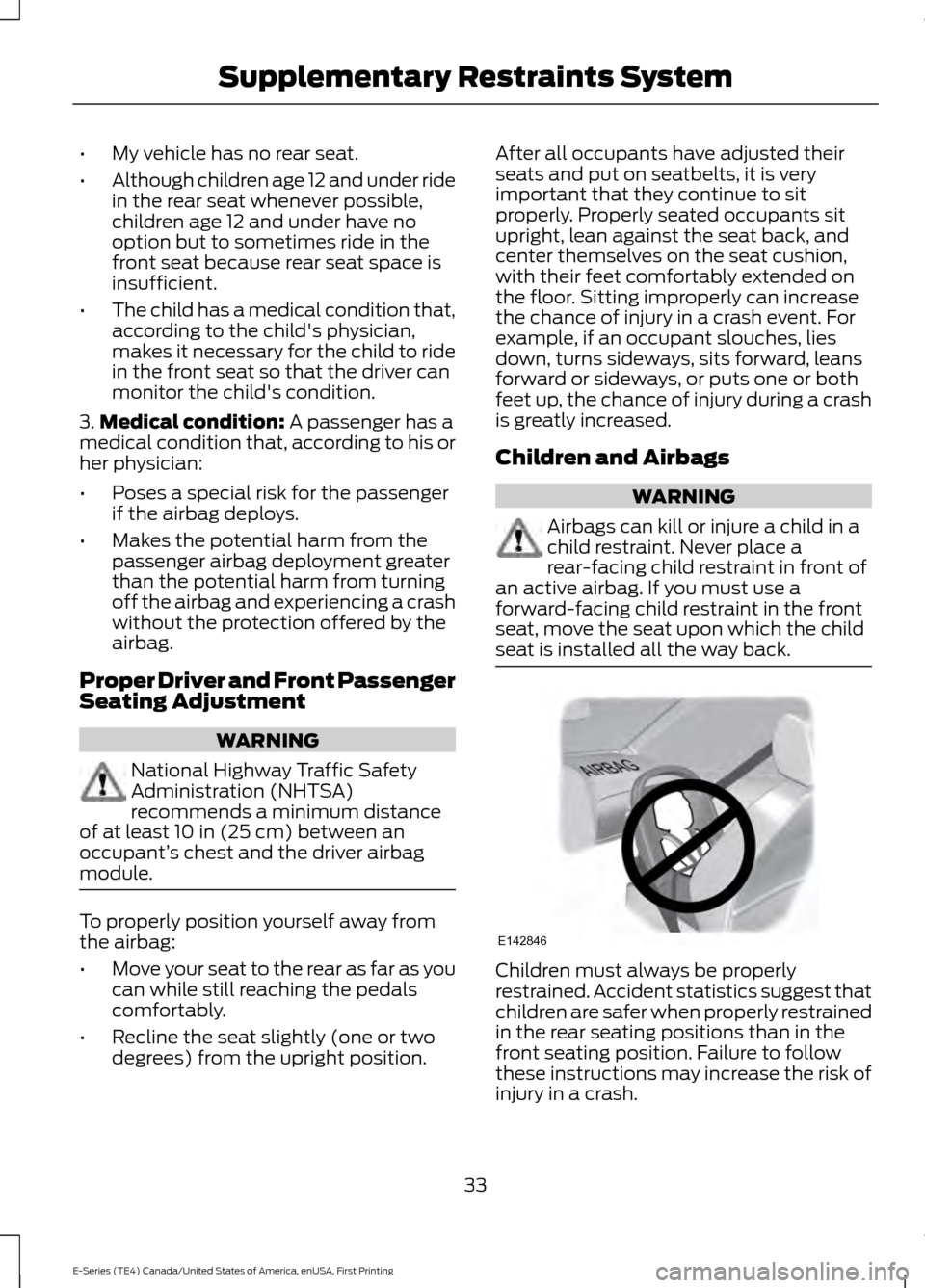
Airbags can kill or injure a child in a
child restraint. Never place a
rear-facing child restraint in front of
an active airbag. If you must use a
forward-facing child restraint in the front
seat, move the seat upon which the child
seat is installed all the way back. Children must always be properly
restrained. Accident statistics suggest that
children are safer when properly restrained
in the rear seating positions than in the
front seating position. Failure to follow
these instructions may increase the risk of
injury in a crash.
33
E-Series (TE4) Canada/United States of America, enUSA, First Printing Supplementary Restraints SystemE142846
Page 68 of 318
HINTS ON CONTROLLING THE
INTERIOR CLIMATE
General Hints
Note:
Prolonged use of recirculated air may
cause the windows to fog up.
Note: A small amount of air may be felt
from the footwell air vents regardless of the
air distribution setting.
Note: To reduce humidity build-up inside
your vehicle, do not drive with the system
switched off or with recirculated air always
switched on.
Note: Do not place objects under the front
seats as this may interfere with the airflow
to the rear seats.
Note: Keep the air intakes in front of the
windshield free from obstruction (such as
snow or leaves) to allow the climate control
system to function effectively.
Note: To reduce fogging of the windshield
during humid weather, adjust the air
distribution control to the windshield air
vents position. Increase the temperature
and fan speed and select the A/C function
to improve clearing, if required.
Heating the Interior Quickly
• Adjust the fan speed to the highest
speed setting.
• Adjust the temperature control to the
highest setting.
• Adjust the air distribution control to the
footwell air vents position. Recommended Settings for
Heating
•
Adjust the fan speed to the second
speed setting.
• Adjust the temperature control to the
midway point of the hot settings.
• Adjust the air distribution control to the
footwell and windshield air vents
position.
Cooling the Interior Quickly
• Adjust the fan speed to the highest
speed setting.
• Select the MAX A/C function.
• Adjust the air distribution control to the
instrument panel air vents position.
Recommended Settings for
Cooling
• Adjust the fan speed to the second
speed setting.
• Adjust the temperature control to the
midway point of the cold settings.
• Adjust the air distribution control to the
instrument panel air vents position.
Vehicle Stationary for Extended
Periods During Extreme High
Ambient Temperatures
• Apply the parking brake.
• Move the transmission selector lever
to position
P or neutral.
• Adjust the temperature control to the
MAX A/C
position.
• Adjust the fan speed to the lowest
speed setting.
65
E-Series (TE4) Canada/United States of America, enUSA, First Printing Climate Control
Page 70 of 318
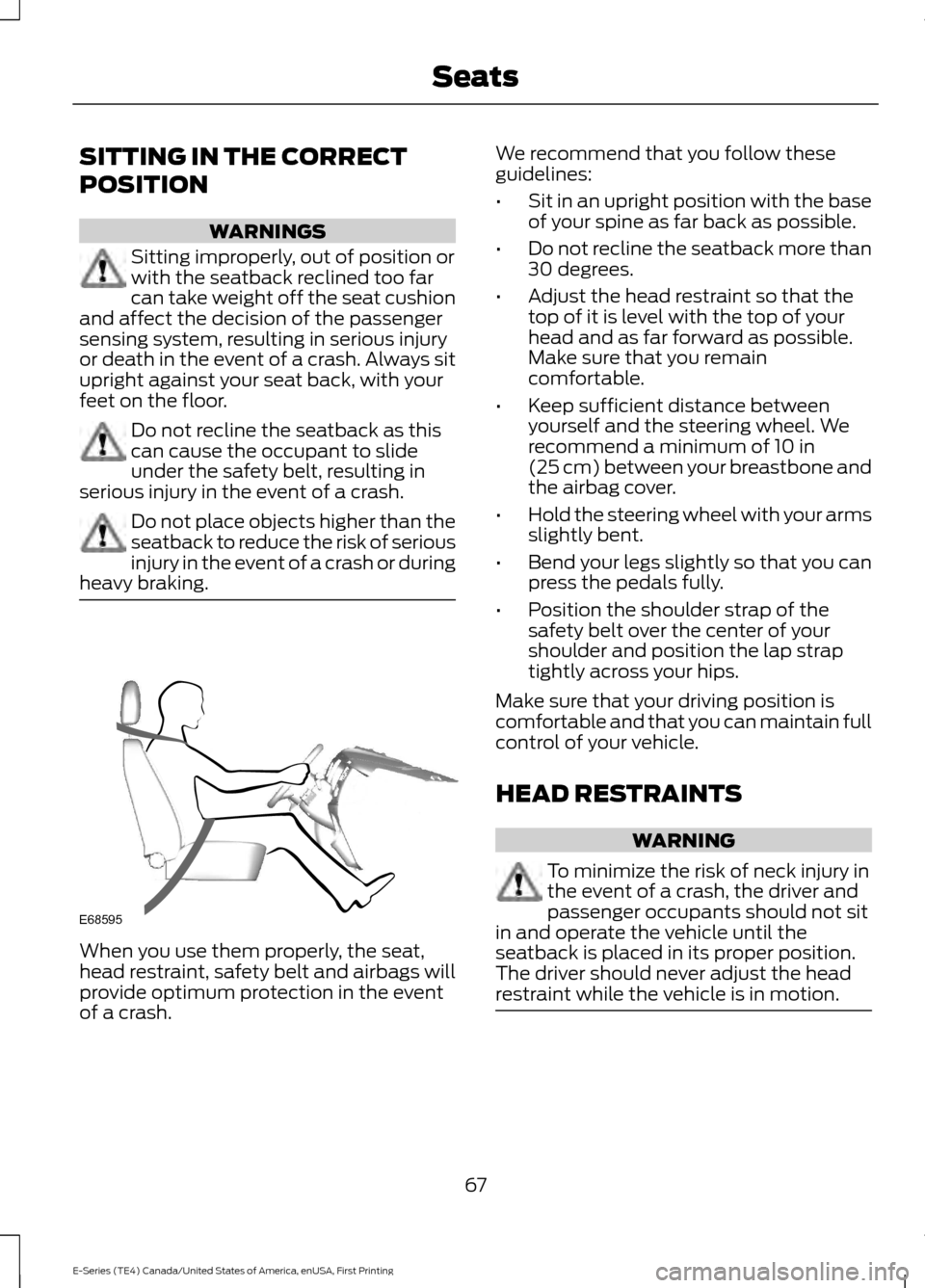
SITTING IN THE CORRECT
POSITION
WARNINGS
Sitting improperly, out of position or
with the seatback reclined too far
can take weight off the seat cushion
and affect the decision of the passenger
sensing system, resulting in serious injury
or death in the event of a crash. Always sit
upright against your seat back, with your
feet on the floor. Do not recline the seatback as this
can cause the occupant to slide
under the safety belt, resulting in
serious injury in the event of a crash. Do not place objects higher than the
seatback to reduce the risk of serious
injury in the event of a crash or during
heavy braking. When you use them properly, the seat,
head restraint, safety belt and airbags will
provide optimum protection in the event
of a crash. We recommend that you follow these
guidelines:
•
Sit in an upright position with the base
of your spine as far back as possible.
• Do not recline the seatback more than
30 degrees.
• Adjust the head restraint so that the
top of it is level with the top of your
head and as far forward as possible.
Make sure that you remain
comfortable.
• Keep sufficient distance between
yourself and the steering wheel. We
recommend a minimum of 10 in
(25 cm) between your breastbone and
the airbag cover.
• Hold the steering wheel with your arms
slightly bent.
• Bend your legs slightly so that you can
press the pedals fully.
• Position the shoulder strap of the
safety belt over the center of your
shoulder and position the lap strap
tightly across your hips.
Make sure that your driving position is
comfortable and that you can maintain full
control of your vehicle.
HEAD RESTRAINTS WARNING
To minimize the risk of neck injury in
the event of a crash, the driver and
passenger occupants should not sit
in and operate the vehicle until the
seatback is placed in its proper position.
The driver should never adjust the head
restraint while the vehicle is in motion. 67
E-Series (TE4) Canada/United States of America, enUSA, First Printing SeatsE68595
Page 71 of 318
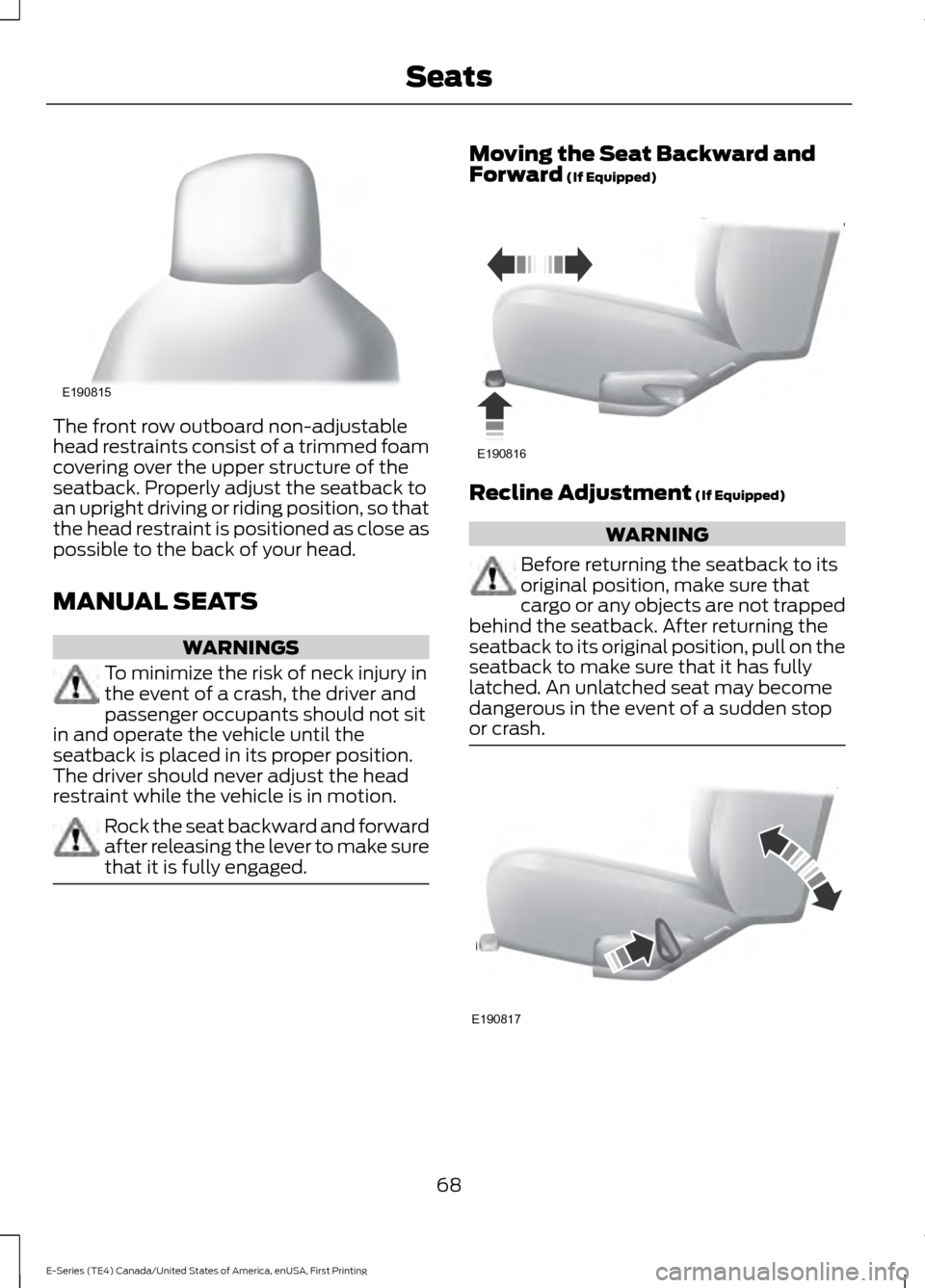
The front row outboard non-adjustable
head restraints consist of a trimmed foam
covering over the upper structure of the
seatback. Properly adjust the seatback to
an upright driving or riding position, so that
the head restraint is positioned as close as
possible to the back of your head.
MANUAL SEATS
WARNINGS
To minimize the risk of neck injury in
the event of a crash, the driver and
passenger occupants should not sit
in and operate the vehicle until the
seatback is placed in its proper position.
The driver should never adjust the head
restraint while the vehicle is in motion. Rock the seat backward and forward
after releasing the lever to make sure
that it is fully engaged. Moving the Seat Backward and
Forward (If Equipped)
Recline Adjustment
(If Equipped)
WARNING
Before returning the seatback to its
original position, make sure that
cargo or any objects are not trapped
behind the seatback. After returning the
seatback to its original position, pull on the
seatback to make sure that it has fully
latched. An unlatched seat may become
dangerous in the event of a sudden stop
or crash. 68
E-Series (TE4) Canada/United States of America, enUSA, First Printing SeatsE190815 E190816 E190817
Page 72 of 318
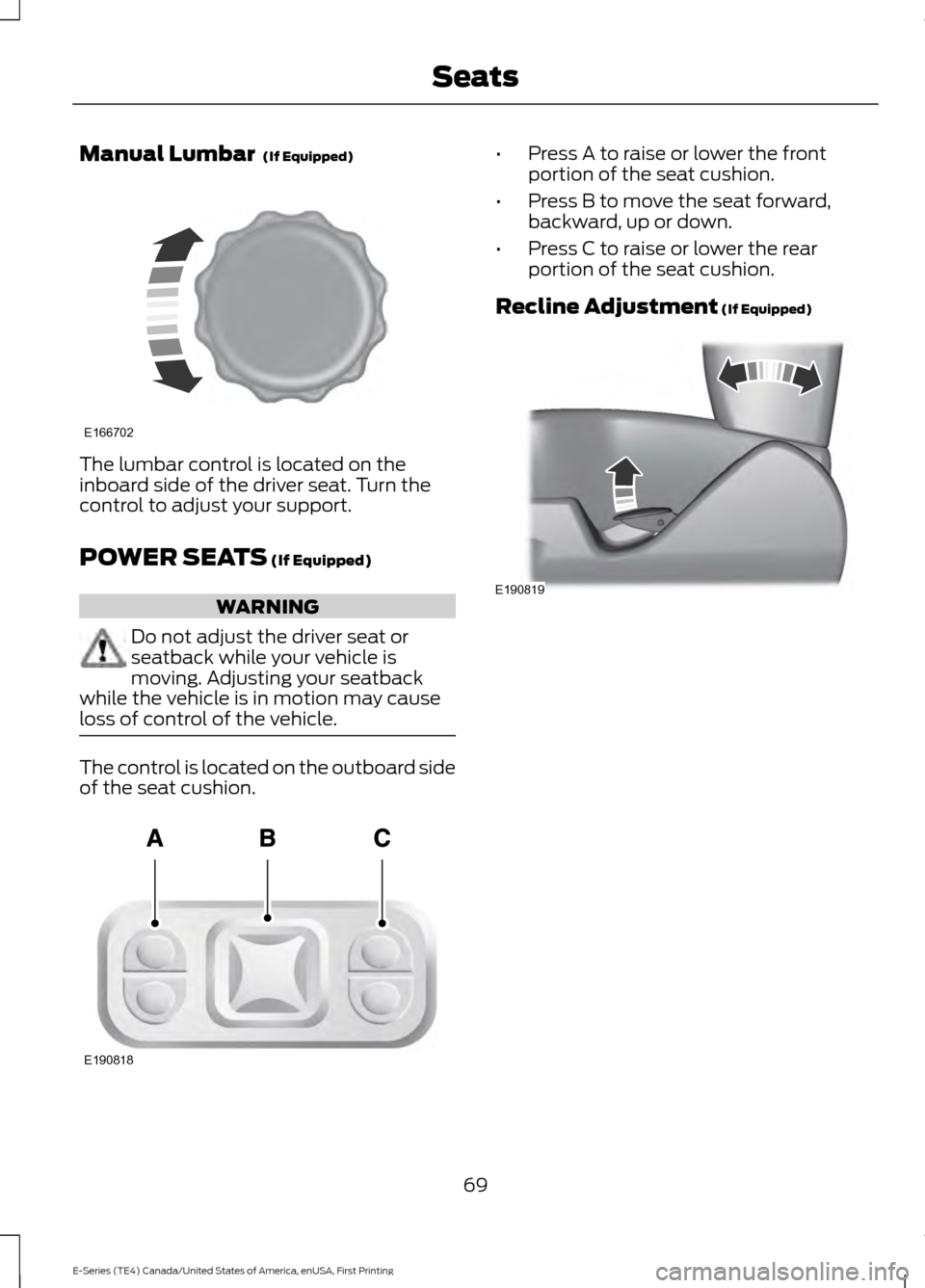
Manual Lumbar (If Equipped)
The lumbar control is located on the
inboard side of the driver seat. Turn the
control to adjust your support.
POWER SEATS
(If Equipped)
WARNING
Do not adjust the driver seat or
seatback while your vehicle is
moving. Adjusting your seatback
while the vehicle is in motion may cause
loss of control of the vehicle. The control is located on the outboard side
of the seat cushion. •
Press A to raise or lower the front
portion of the seat cushion.
• Press B to move the seat forward,
backward, up or down.
• Press C to raise or lower the rear
portion of the seat cushion.
Recline Adjustment
(If Equipped) 69
E-Series (TE4) Canada/United States of America, enUSA, First Printing SeatsE166702 E190818 E190819
Page 162 of 318
•
Never wash or rinse any ignition coil,
spark plug wire or spark plug well, or
the area in and around these locations.
• Cover the battery, power distribution
box, and air filter assembly to prevent
water damage when cleaning the
engine.
CLEANING THE WINDOWS AND
WIPER BLADES
Car wash chemicals and environmental
fallout can result in windshield and wiper
blade contamination. Dirty windshield and
wipers will result in poor windshield wiper
operation. Keep the windshield and wiper
blades clean to maintain windshield wiper
performance.
To clean the windshield and wiper blades:
• Clean the windshield with a
non-abrasive glass cleaner. When
cleaning the interior of the windshield,
avoid getting any glass cleaner on the
instrument panel or door panels. Wipe
any glass cleaner off these surfaces
immediately.
• For windshields contaminated with
tree sap, chemicals, wax or bugs, clean
the entire windshield using steel wool
(no greater than 0000 grade) in a
circular motion and rinse with water.
• Clean the wiper blades with isopropyl
rubbing alcohol or windshield washer
concentrate.
Note: Do not use razor blades or other
sharp objects to clean or remove decals
from the inside of the heated rear window.
The vehicle warranty does not cover
damage caused to the heated rear window
grid lines. CLEANING THE INTERIOR WARNINGS
Do not use cleaning solvents, bleach
or dye on the vehicle
’s safety belts,
as these actions may weaken the
belt webbing. On vehicles equipped with
seat-mounted airbags, do not use
chemical solvents or strong
detergents. Such products could
contaminate the side airbag system and
affect performance of the side airbag in a
collision. For fabric, carpets, cloth seats, safety belts
and seats equipped with side airbags:
•
Remove dust and loose dirt with a
vacuum cleaner.
• Remove light stains and soil with
Motorcraft Professional Strength
Carpet & Upholstery Cleaner.
• If grease or tar is present on the
material, spot-clean the area first with
Motorcraft Spot and Stain Remover. In
Canada, use Motorcraft Multi-Purpose
Cleaner.
• If a ring forms on the fabric after spot
cleaning, clean the entire area
immediately (but do not oversaturate)
or the ring will set.
• Do not use household cleaning
products or glass cleaners, which can
stain and discolor the fabric and affect
the flame retardant abilities of the seat
materials.
159
E-Series (TE4) Canada/United States of America, enUSA, First Printing Vehicle Care
Page 163 of 318
CLEANING THE INSTRUMENT
PANEL AND INSTRUMENT
CLUSTER LENS
WARNING
Do not use chemical solvents or
strong detergents when cleaning the
steering wheel or instrument panel
to avoid contamination of the airbag
system. Note:
Follow the same procedure as
cleaning leather seats for cleaning leather
instrument panels and leather interior trim
surfaces. See Cleaning Leather Seats
(page 160).
Clean the instrument panel and cluster
lens with a clean, damp and soft cloth,
then use a clean, dry and soft cloth to dry
these areas.
• Avoid cleaners or polishes that increase
the gloss of the upper portion of the
instrument panel. The dull finish in this
area helps protect you from
undesirable windshield reflection.
• Do not use any household cleaning
products or glass cleaners as these
may damage the finish of the
instrument panel, interior trim and
cluster lens.
• Wash or wipe your hands clean if you
have been in contact with certain
products such as insect repellent and
suntan lotion to avoid possible damage
to the interior painted surfaces.
• Do not allow air fresheners and hand
sanitizers to spill onto interior surfaces.
If a spill occurs, wipe off immediately.
Your warranty may not cover these
damages.
If a staining liquid like coffee or juice has
been spilled on the instrument panel or on
interior trim surfaces: 1. Wipe up spilled liquid using a clean,
soft cloth as quickly as possible.
2. Use Motorcraft Premium Leather and Vinyl Cleaner or a commercially
available leather cleaning product for
automotive interiors. Test any cleaner
or stain remover on an inconspicuous
area.
3. Alternatively, wipe the surface with a clean, soft cloth and a mild soap and
water solution. Dry the area with a
clean, soft cloth.
4. If necessary, apply more soap and water solution or cleaning product to
a clean, soft cloth and press it onto the
soiled area. Allow this to set at room
temperature for 30 minutes.
5. Remove the soaked cloth, then with a clean, damp cloth, use a rubbing
motion for 60 seconds on the soiled
area.
6. Dry the area with a clean, soft cloth.
CLEANING LEATHER SEATS
(If
Equipped)
Note: Follow the same procedure as
cleaning leather seats for cleaning leather
instrument panels and leather interior trim
surfaces.
For routine cleaning, wipe the surface with
a soft, damp cloth and a mild soap and
water solution. Dry the area with a clean,
soft cloth.
For cleaning and removing stains such as
dye transfer, use Motorcraft Premium
Leather and Vinyl Cleaner or a
commercially available leather cleaning
product for automotive interiors.
Note: Test any cleaner or stain remover on
an inconspicuous area.
160
E-Series (TE4) Canada/United States of America, enUSA, First Printing Vehicle Care
Page 220 of 318
Monday-Saturday, 8:30am-9:00pm EST.
Sunday, 10:30am-7:30pm EST.
In the United States, call 1-800-392-3673.
In Canada, call 1-800-565-3673.
Times are subject to change due to
holidays.
SYNC Owner Account
Why do I need a SYNC owner account?
•
Required to activate Vehicle Health
Report and to view the reports online.
• Required to activate the
subscription-based SYNC Services and
to personalize your Saved Points and
Favorites.
• Essential for keeping up with the latest
software downloads available for
SYNC.
• Access to customer support for any
questions you may have.
Driving Restrictions
For your safety, certain features are
speed-dependent and restricted when your
vehicle is traveling over 3 mph (5 km/h).
Safety Information WARNING
Driving while distracted can result in
loss of vehicle control, crash and
injury. We strongly recommend that
you use extreme caution when using any
device that may take your focus off the
road. Your primary responsibility is the safe
operation of your vehicle. We recommend
against the use of any hand-held device
while driving and encourage the use of
voice-operated systems when possible.
Make sure you are aware of all applicable
local laws that may affect the use of
electronic devices while driving. When using SYNC:
•
Do not operate playing devices if the
power cords or cables are broken, split
or damaged. Place cords and cables
out of the way, so they do not interfere
with the operation of pedals, seats,
compartments or safe driving abilities.
• Do not leave playing devices in your
vehicle during extreme conditions as it
could cause them damage. See your
device's manual for further information.
• Do not attempt to service or repair the
system. See an authorized dealer.
Privacy Information
When a cellular phone is connected to
SYNC, the system creates a profile within
your vehicle that is linked to that cellular
phone. This profile is created in order to
offer you more cellular features and to
operate more efficiently. Among other
things, this profile may contain data about
your cellular phone book, text messages
(read and unread), and call history,
including history of calls when your cellular
phone was not connected to the system.
In addition, if you connect a media device,
the system creates and retains an index of
supported media content. The system also
records a short development log of
approximately 10 minutes of all recent
system activity. The log profile and other
system data may be used to improve the
system and help diagnose any problems
that may occur.
The cellular profile, media device index,
and development log will remain in the
vehicle unless you delete them and are
generally accessible only in the vehicle
when the cellular phone or media player
is connected. If you no longer plan to use
the system or the vehicle, we recommend
you perform a Master Reset to erase all
stored information.
217
E-Series (TE4) Canada/United States of America, enUSA, First Printing SYNC™