service FORD E SERIES 2017 4.G Repair Manual
[x] Cancel search | Manufacturer: FORD, Model Year: 2017, Model line: E SERIES, Model: FORD E SERIES 2017 4.GPages: 318, PDF Size: 6.21 MB
Page 240 of 318
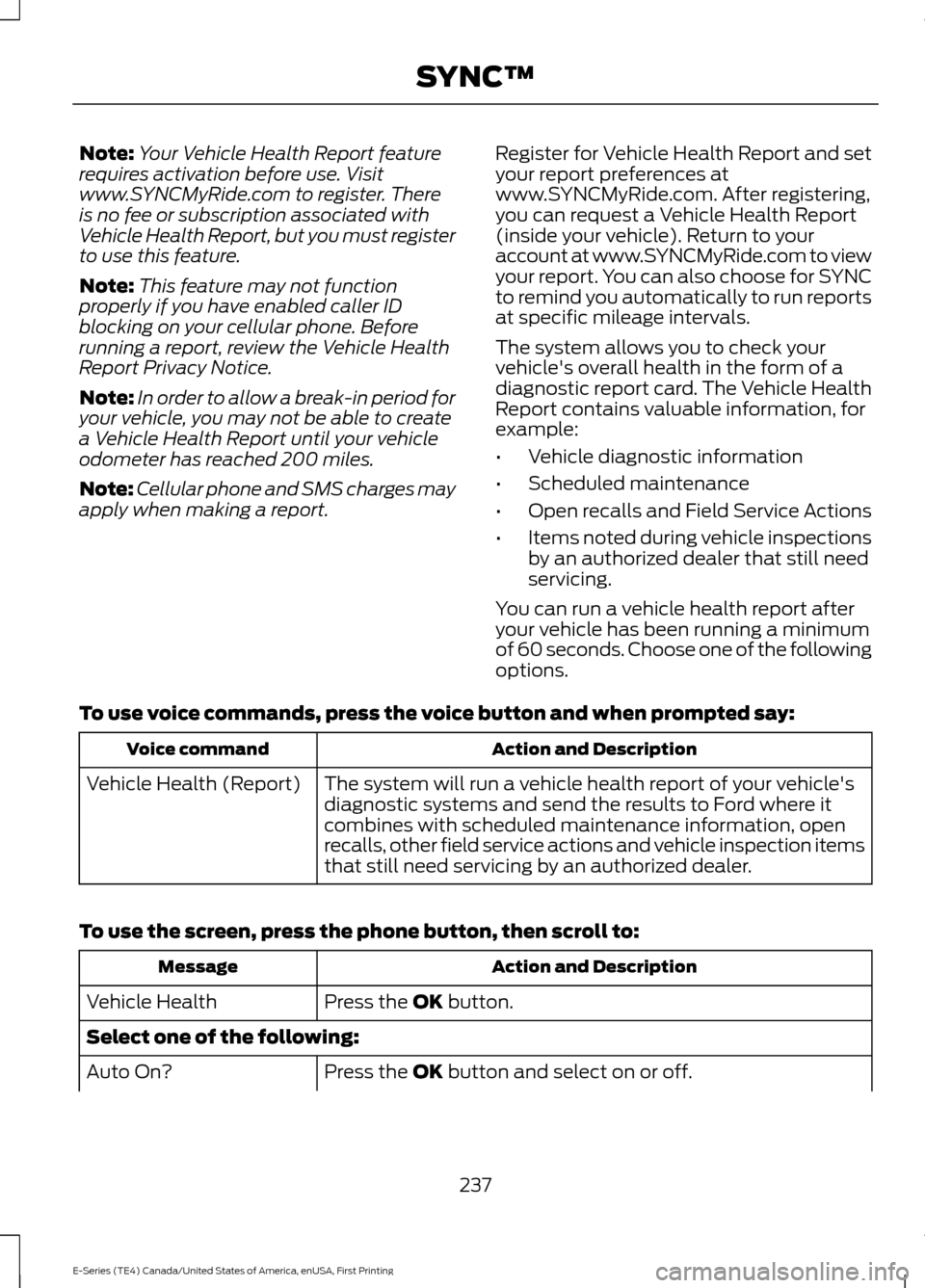
Note:
Your Vehicle Health Report feature
requires activation before use. Visit
www.SYNCMyRide.com to register. There
is no fee or subscription associated with
Vehicle Health Report, but you must register
to use this feature.
Note: This feature may not function
properly if you have enabled caller ID
blocking on your cellular phone. Before
running a report, review the Vehicle Health
Report Privacy Notice.
Note: In order to allow a break-in period for
your vehicle, you may not be able to create
a Vehicle Health Report until your vehicle
odometer has reached 200 miles.
Note: Cellular phone and SMS charges may
apply when making a report. Register for Vehicle Health Report and set
your report preferences at
www.SYNCMyRide.com. After registering,
you can request a Vehicle Health Report
(inside your vehicle). Return to your
account at www.SYNCMyRide.com to view
your report. You can also choose for SYNC
to remind you automatically to run reports
at specific mileage intervals.
The system allows you to check your
vehicle's overall health in the form of a
diagnostic report card. The Vehicle Health
Report contains valuable information, for
example:
•
Vehicle diagnostic information
• Scheduled maintenance
• Open recalls and Field Service Actions
• Items noted during vehicle inspections
by an authorized dealer that still need
servicing.
You can run a vehicle health report after
your vehicle has been running a minimum
of 60 seconds. Choose one of the following
options.
To use voice commands, press the voice button and when prompted say: Action and Description
Voice command
The system will run a vehicle health report of your vehicle's
diagnostic systems and send the results to Ford where it
combines with scheduled maintenance information, open
recalls, other field service actions and vehicle inspection items
that still need servicing by an authorized dealer.
Vehicle Health (Report)
To use the screen, press the phone button, then scroll to: Action and Description
Message
Press the OK button.
Vehicle Health
Select one of the following:
Press the
OK button and select on or off.
Auto On?
237
E-Series (TE4) Canada/United States of America, enUSA, First Printing SYNC™
Page 241 of 318
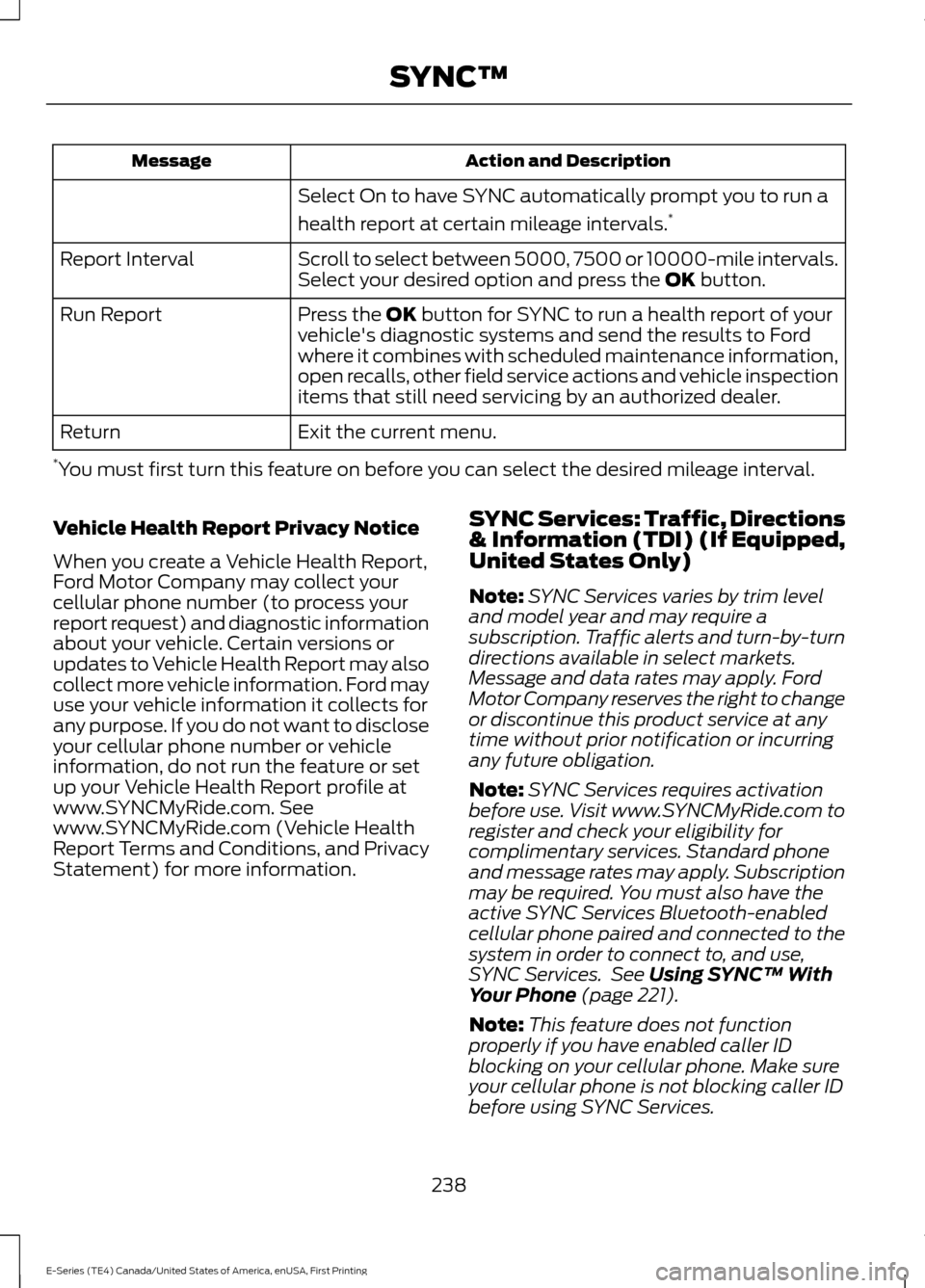
Action and Description
Message
Select On to have SYNC automatically prompt you to run a
health report at certain mileage intervals. *
Scroll to select between 5000, 7500 or 10000-mile intervals.
Select your desired option and press the OK button.
Report Interval
Press the
OK button for SYNC to run a health report of your
vehicle's diagnostic systems and send the results to Ford
where it combines with scheduled maintenance information,
open recalls, other field service actions and vehicle inspection
items that still need servicing by an authorized dealer.
Run Report
Exit the current menu.
Return
* You must first turn this feature on before you can select the desired mileage interval.
Vehicle Health Report Privacy Notice
When you create a Vehicle Health Report,
Ford Motor Company may collect your
cellular phone number (to process your
report request) and diagnostic information
about your vehicle. Certain versions or
updates to Vehicle Health Report may also
collect more vehicle information. Ford may
use your vehicle information it collects for
any purpose. If you do not want to disclose
your cellular phone number or vehicle
information, do not run the feature or set
up your Vehicle Health Report profile at
www.SYNCMyRide.com. See
www.SYNCMyRide.com (Vehicle Health
Report Terms and Conditions, and Privacy
Statement) for more information. SYNC Services: Traffic, Directions
& Information (TDI) (If Equipped,
United States Only)
Note:
SYNC Services varies by trim level
and model year and may require a
subscription. Traffic alerts and turn-by-turn
directions available in select markets.
Message and data rates may apply. Ford
Motor Company reserves the right to change
or discontinue this product service at any
time without prior notification or incurring
any future obligation.
Note: SYNC Services requires activation
before use. Visit www.SYNCMyRide.com to
register and check your eligibility for
complimentary services. Standard phone
and message rates may apply. Subscription
may be required. You must also have the
active SYNC Services Bluetooth-enabled
cellular phone paired and connected to the
system in order to connect to, and use,
SYNC Services. See
Using SYNC™ With
Your Phone (page 221).
Note: This feature does not function
properly if you have enabled caller ID
blocking on your cellular phone. Make sure
your cellular phone is not blocking caller ID
before using SYNC Services.
238
E-Series (TE4) Canada/United States of America, enUSA, First Printing SYNC™
Page 242 of 318
Note:
The driver is ultimately responsible
for the safe operation of the vehicle, and
therefore, must evaluate whether it is safe
to follow the suggested directions. Any
navigation features provided are only an aid.
Make your driving decisions based on your
observations of local conditions and existing
traffic regulations. Do not follow the route
suggestions if doing so would result in an
unsafe or illegal maneuver, place you in an
unsafe situation, or if you would be directed
into an area that you consider unsafe. Maps
used by this system may be inaccurate
because of errors, changes in roads, traffic
conditions or driving conditions. Note:
When you connect, the service uses
GPS technology and advanced vehicle
sensors to collect your vehicle's current
location, travel direction and speed to help
provide you with the directions, traffic
reports, or business searches you request.
Further, to provide the services you request,
for continuous improvement, the service
may collect and record call details and voice
communications. For more information, see
SYNC Services Terms and Conditions at
www.SYNCMyRide.com. If you do not want
Ford or its service providers to collect your
vehicle travel information or other
information identified in the Terms and
Conditions, do not subscribe or use the
service.
SYNC Services uses advanced vehicle
sensors, integrated GPS technology and
comprehensive map and traffic data, to
give you personalized traffic reports,
precise turn-by-turn directions, business
search, news, sports, weather and more.
For a complete list of services, or to learn
more, please visit www.SYNCMyRide.com.
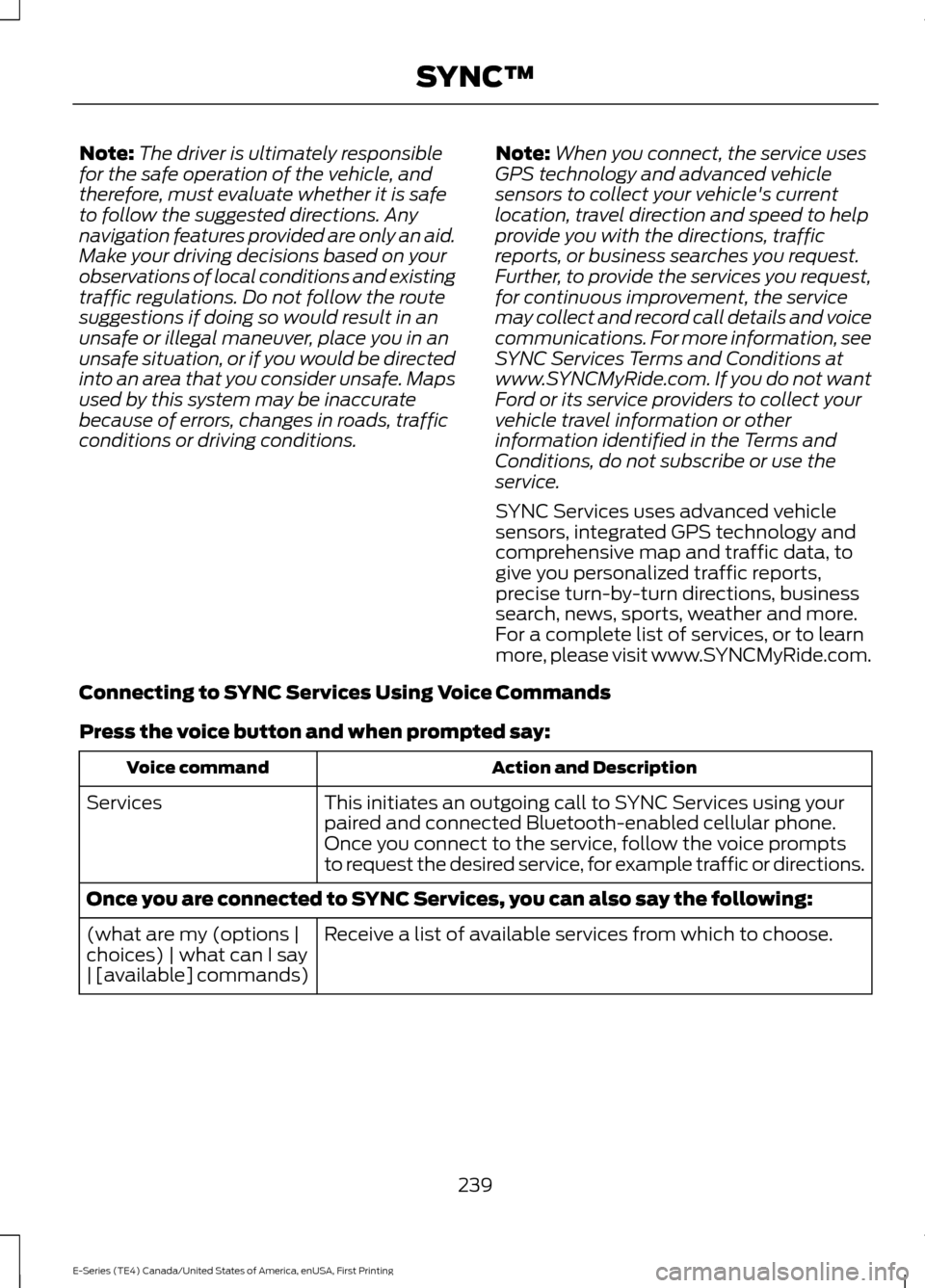
Connecting to SYNC Services Using Voice Commands
Press the voice button and when prompted say: Action and Description
Voice command
This initiates an outgoing call to SYNC Services using your
paired and connected Bluetooth-enabled cellular phone.
Services
Once you connect to the service, follow the voice prompts
to request the desired service, for example traffic or directions.
Once you are connected to SYNC Services, you can also say the following: Receive a list of available services from which to choose.
(what are my (options |
choices) | what can I say
| [available] commands)
239
E-Series (TE4) Canada/United States of America, enUSA, First Printing SYNC™
Page 243 of 318
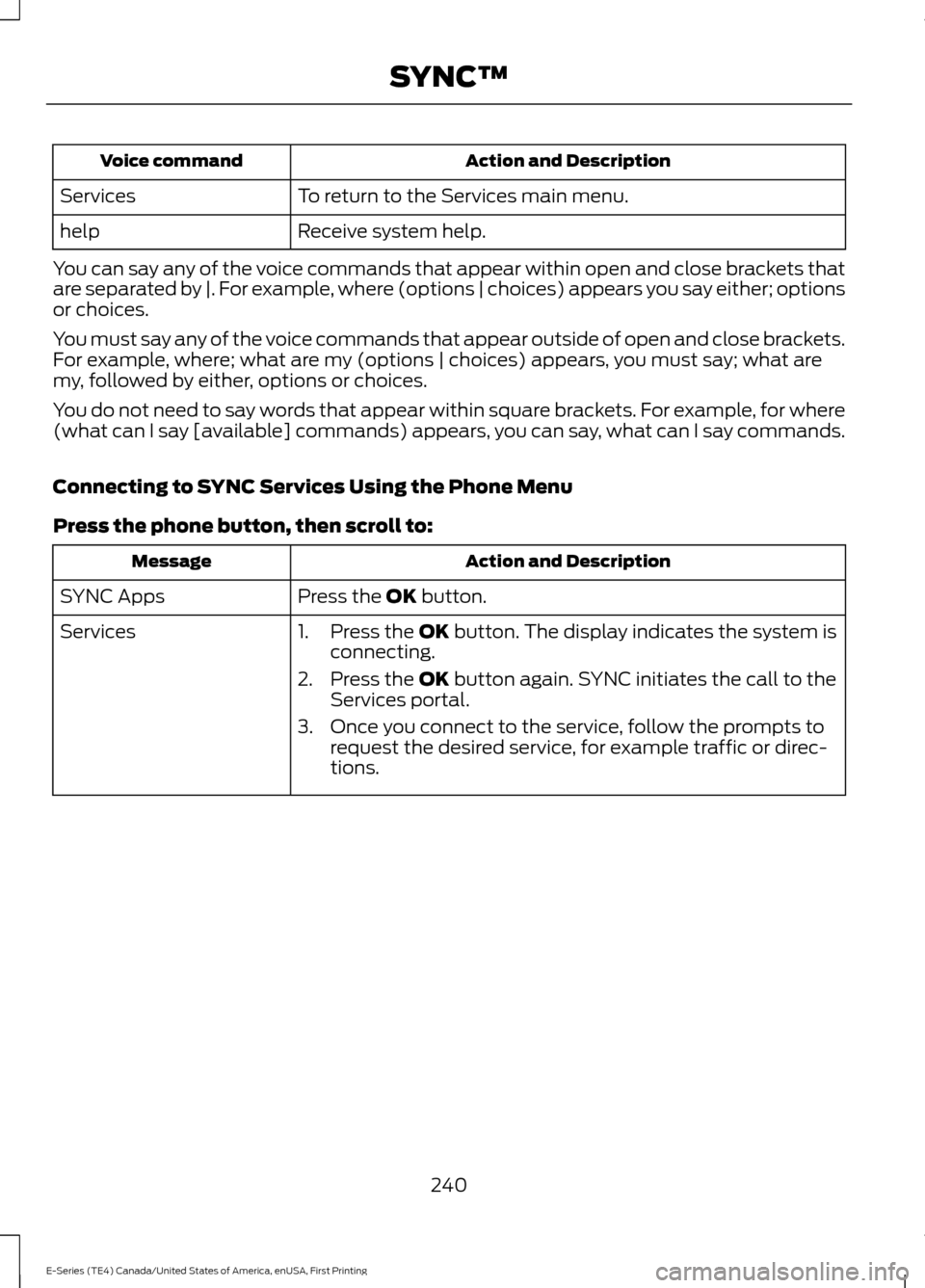
Action and Description
Voice command
To return to the Services main menu.
Services
Receive system help.
help
You can say any of the voice commands that appear within open and close brackets that
are separated by |. For example, where (options | choices) appears you say either; options
or choices.
You must say any of the voice commands that appear outside of open and close brackets.
For example, where; what are my (options | choices) appears, you must say; what are
my, followed by either, options or choices.
You do not need to say words that appear within square brackets. For example, for where
(what can I say [available] commands) appears, you can say, what can I say commands.
Connecting to SYNC Services Using the Phone Menu
Press the phone button, then scroll to: Action and Description
Message
Press the OK button.
SYNC Apps
Services 1. Press the
OK button. The display indicates the system is
connecting.
2. Press the
OK button again. SYNC initiates the call to the
Services portal.
3. Once you connect to the service, follow the prompts to request the desired service, for example traffic or direc-
tions.
240
E-Series (TE4) Canada/United States of America, enUSA, First Printing SYNC™
Page 244 of 318
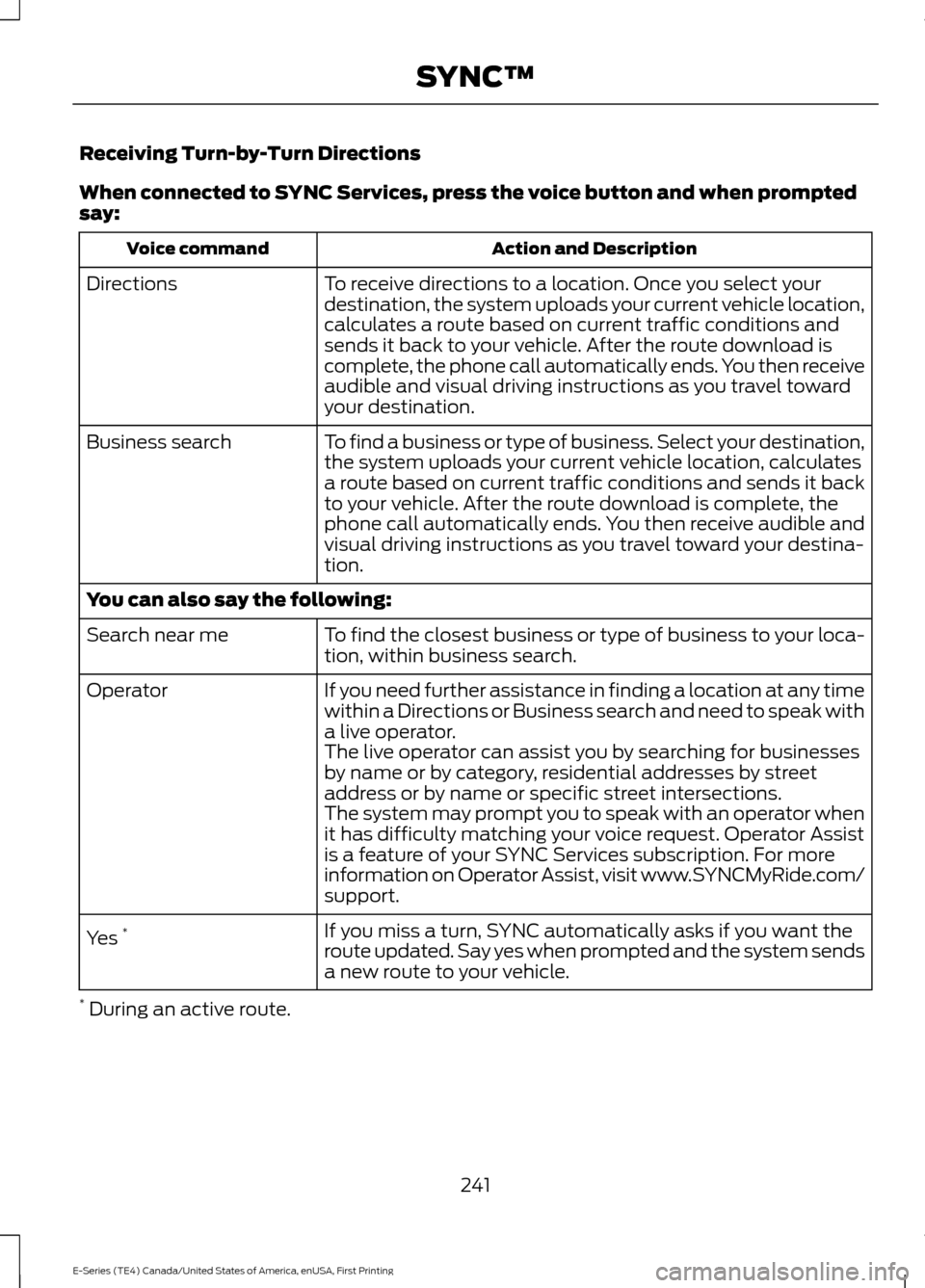
Receiving Turn-by-Turn Directions
When connected to SYNC Services, press the voice button and when prompted
say:
Action and Description
Voice command
To receive directions to a location. Once you select your
destination, the system uploads your current vehicle location,
calculates a route based on current traffic conditions and
sends it back to your vehicle. After the route download is
complete, the phone call automatically ends. You then receive
audible and visual driving instructions as you travel toward
your destination.
Directions
To find a business or type of business. Select your destination,
the system uploads your current vehicle location, calculates
a route based on current traffic conditions and sends it back
to your vehicle. After the route download is complete, the
phone call automatically ends. You then receive audible and
visual driving instructions as you travel toward your destina-
tion.
Business search
You can also say the following:
To find the closest business or type of business to your loca-
tion, within business search.
Search near me
If you need further assistance in finding a location at any time
within a Directions or Business search and need to speak with
a live operator.
Operator
The live operator can assist you by searching for businesses
by name or by category, residential addresses by street
address or by name or specific street intersections.
The system may prompt you to speak with an operator when
it has difficulty matching your voice request. Operator Assist
is a feature of your SYNC Services subscription. For more
information on Operator Assist, visit www.SYNCMyRide.com/
support.
If you miss a turn, SYNC automatically asks if you want the
route updated. Say yes when prompted and the system sends
a new route to your vehicle.
Yes
*
* During an active route.
241
E-Series (TE4) Canada/United States of America, enUSA, First Printing SYNC™
Page 245 of 318
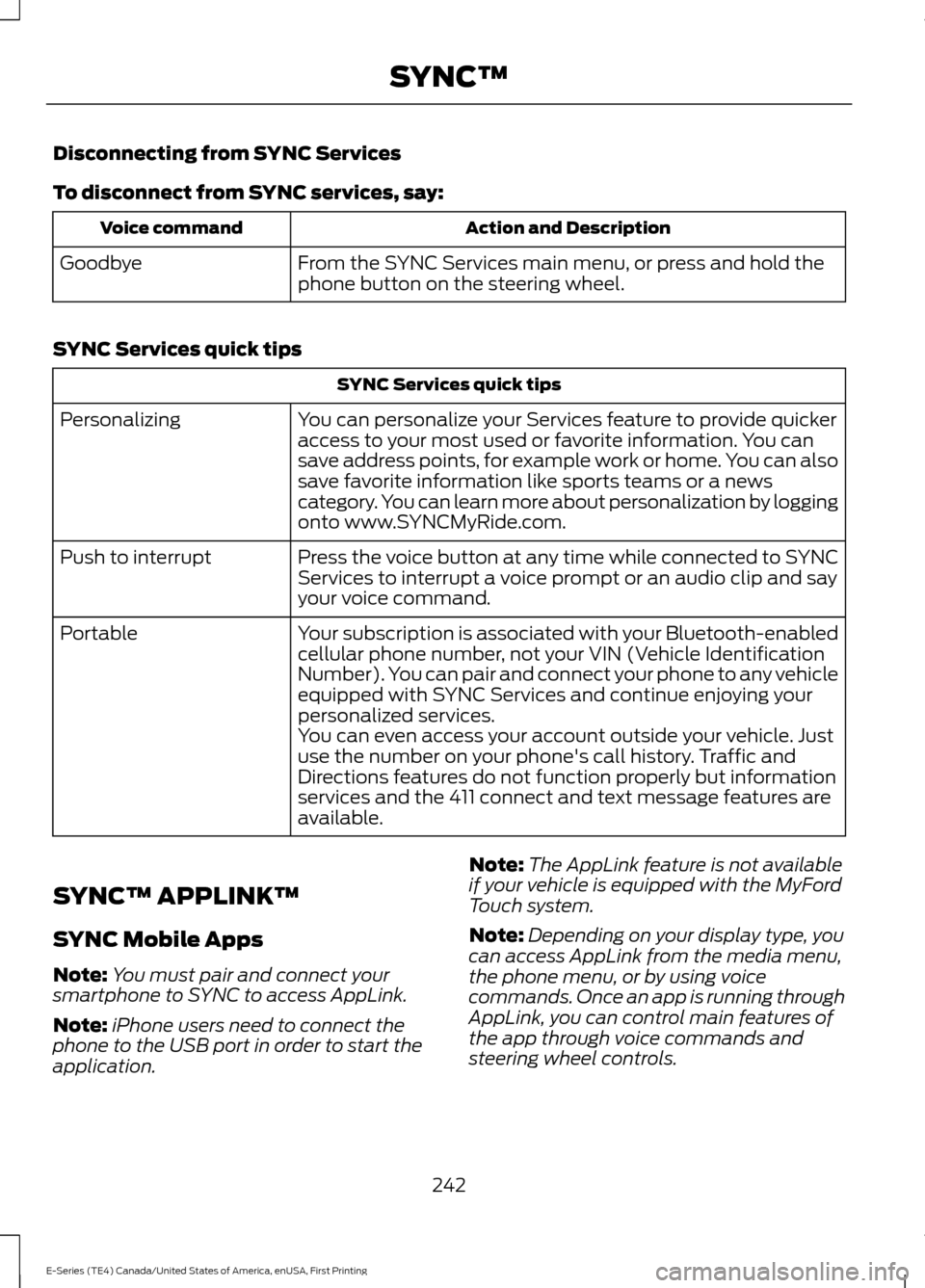
Disconnecting from SYNC Services
To disconnect from SYNC services, say:
Action and Description
Voice command
From the SYNC Services main menu, or press and hold the
phone button on the steering wheel.
Goodbye
SYNC Services quick tips SYNC Services quick tips
You can personalize your Services feature to provide quicker
access to your most used or favorite information. You can
save address points, for example work or home. You can also
save favorite information like sports teams or a news
category. You can learn more about personalization by logging
onto www.SYNCMyRide.com.
Personalizing
Press the voice button at any time while connected to SYNC
Services to interrupt a voice prompt or an audio clip and say
your voice command.
Push to interrupt
Your subscription is associated with your Bluetooth-enabled
cellular phone number, not your VIN (Vehicle Identification
Number). You can pair and connect your phone to any vehicle
equipped with SYNC Services and continue enjoying your
personalized services.
Portable
You can even access your account outside your vehicle. Just
use the number on your phone's call history. Traffic and
Directions features do not function properly but information
services and the 411 connect and text message features are
available.
SYNC™ APPLINK ™
SYNC Mobile Apps
Note: You must pair and connect your
smartphone to SYNC to access AppLink.
Note: iPhone users need to connect the
phone to the USB port in order to start the
application. Note:
The AppLink feature is not available
if your vehicle is equipped with the MyFord
Touch system.
Note: Depending on your display type, you
can access AppLink from the media menu,
the phone menu, or by using voice
commands. Once an app is running through
AppLink, you can control main features of
the app through voice commands and
steering wheel controls.
242
E-Series (TE4) Canada/United States of America, enUSA, First Printing SYNC™
Page 260 of 318
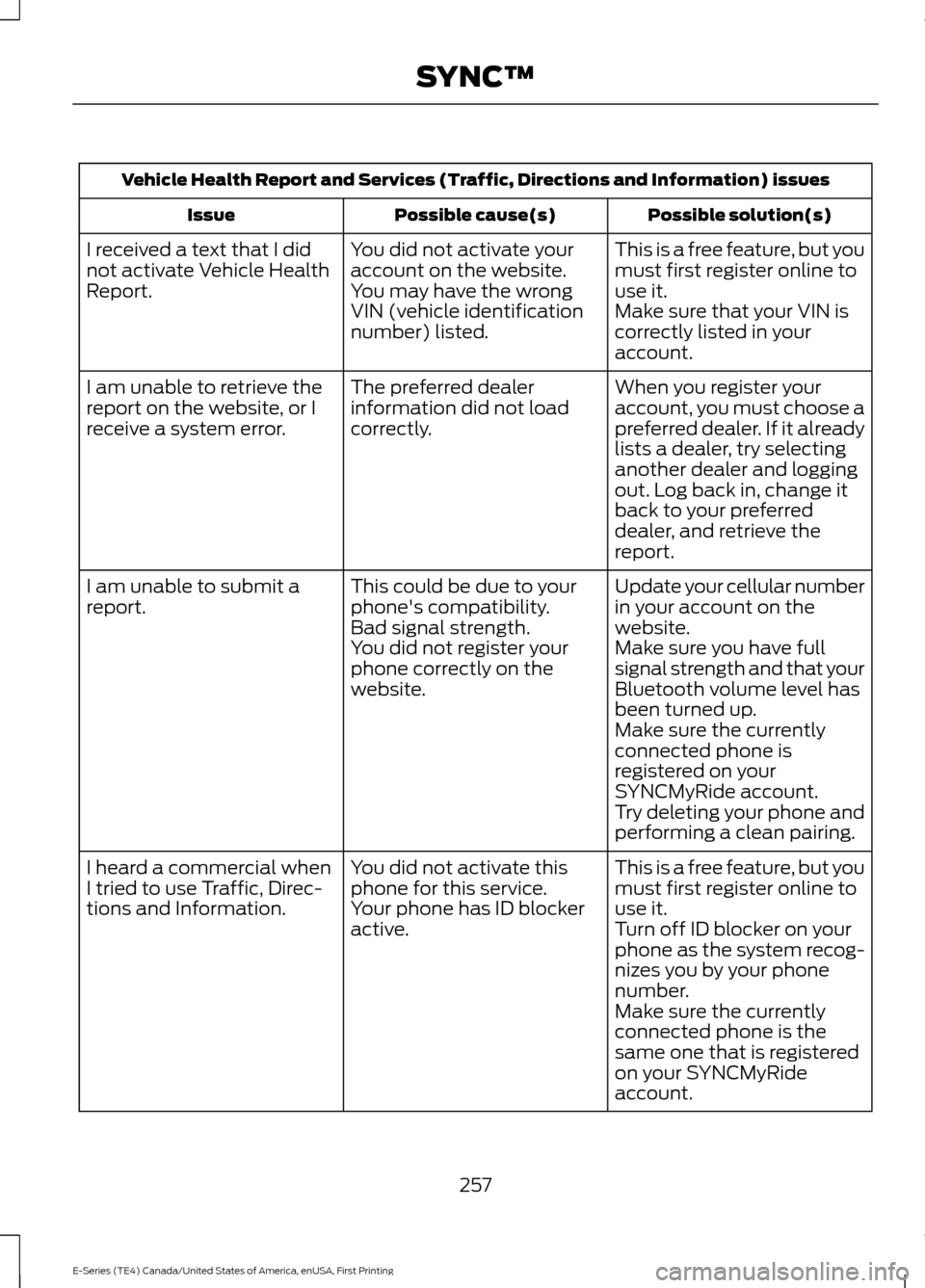
Vehicle Health Report and Services (Traffic, Directions and Information) issues
Possible solution(s)
Possible cause(s)
Issue
This is a free feature, but you
must first register online to
use it.
You did not activate your
account on the website.
You may have the wrong
VIN (vehicle identification
number) listed.
I received a text that I did
not activate Vehicle Health
Report.
Make sure that your VIN is
correctly listed in your
account.
When you register your
account, you must choose a
preferred dealer. If it already
lists a dealer, try selecting
another dealer and logging
out. Log back in, change it
back to your preferred
dealer, and retrieve the
report.
The preferred dealer
information did not load
correctly.
I am unable to retrieve the
report on the website, or I
receive a system error.
Update your cellular number
in your account on the
website.
This could be due to your
phone's compatibility.
Bad signal strength.
I am unable to submit a
report.
Make sure you have full
signal strength and that your
Bluetooth volume level has
been turned up.
You did not register your
phone correctly on the
website.
Make sure the currently
connected phone is
registered on your
SYNCMyRide account.
Try deleting your phone and
performing a clean pairing.
This is a free feature, but you
must first register online to
use it.
You did not activate this
phone for this service.
Your phone has ID blocker
active.
I heard a commercial when
I tried to use Traffic, Direc-
tions and Information.
Turn off ID blocker on your
phone as the system recog-
nizes you by your phone
number.
Make sure the currently
connected phone is the
same one that is registered
on your SYNCMyRide
account.
257
E-Series (TE4) Canada/United States of America, enUSA, First Printing SYNC™
Page 268 of 318
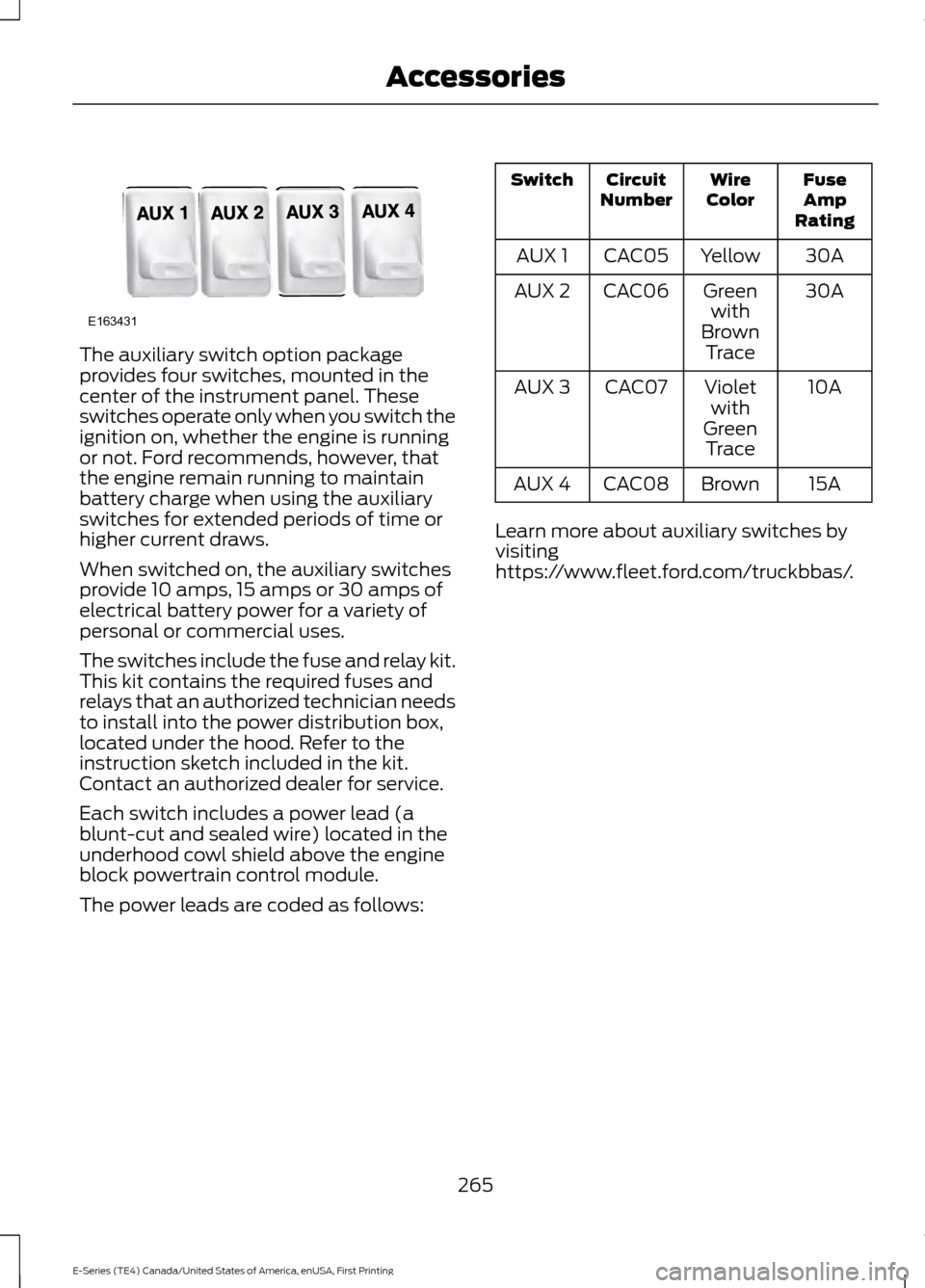
The auxiliary switch option package
provides four switches, mounted in the
center of the instrument panel. These
switches operate only when you switch the
ignition on, whether the engine is running
or not. Ford recommends, however, that
the engine remain running to maintain
battery charge when using the auxiliary
switches for extended periods of time or
higher current draws.
When switched on, the auxiliary switches
provide 10 amps, 15 amps or 30 amps of
electrical battery power for a variety of
personal or commercial uses.
The switches include the fuse and relay kit.
This kit contains the required fuses and
relays that an authorized technician needs
to install into the power distribution box,
located under the hood. Refer to the
instruction sketch included in the kit.
Contact an authorized dealer for service.
Each switch includes a power lead (a
blunt-cut and sealed wire) located in the
underhood cowl shield above the engine
block powertrain control module.
The power leads are coded as follows: Fuse
Amp
Rating
Wire
Color
Circuit
Number
Switch
30A
Yellow
CAC05
AUX 1
30A
Green
with
Brown Trace
CAC06
AUX 2
10A
Violet
with
Green Trace
CAC07
AUX 3
15A
Brown
CAC08
AUX 4
Learn more about auxiliary switches by
visiting
https://www.fleet.ford.com/truckbbas/.
265
E-Series (TE4) Canada/United States of America, enUSA, First Printing AccessoriesE163431
Page 269 of 318
PROTECT YOURSELF FROM THE RISING
COST OF VEHICLE REPAIRS WITH FORD
PROTECT.
Ford Protect (U.S. Only)
Ford Protect means peace of mind. It’
s the
extended service plan backed by Ford
Motor Company, and provides more
protection beyond the New Vehicle Limited
Warranty coverage.
Ford Protect Can Quickly Pay for Itself
One trip to the Service Center could easily
exceed the price of your Ford Extended
Service Plan. With Ford Protect you
minimize your risk for unexpected repair
bills and rising repair costs.
Up to 1,000+ Covered Vehicle
Components
There are four core Ford Protect with
different levels of coverage. Ask your
authorized dealer for details.
1. PremiumCARE - Our most comprehensive coverage. With over
1,000 covered components, this plan
is so complete it’ s probably easier to
list what’ s not covered.
2. ExtraCARE - Covers 113 components, and includes many high-tech items.
3. BaseCARE - Covers 84 components.
4. PowertrainCARE - Covers 29 critical components.
Ford Protect is honored by all authorized
Ford dealers in the U.S., Canada and
Mexico.
That means you get:
• Reliable, quality service at any Ford or
Lincoln dealership.
• Repairs performed by factory trained
technicians, using genuine parts. Rental Car Reimbursement
1st day Rental Benefit
If you bring your car into your dealer for
service, we
’ll give you a loaner to use for
the day.
Extended Rental Benefits
If your vehicle is kept overnight for covered
repairs, you are eligible for rental car
coverage, including bumper to bumper
warranty repairs, and Field Service Actions.
Roadside Assistance
Exclusive 24/7 roadside assistance,
including:
• Towing, flat-tire change and battery
jump starts.
• Out of fuel and lock-out assistance.
• Travel expense reimbursement for
lodging, meals and rental car.
• Assistance for taxi, shuttle, rental car
coverage or other transportation.
Transferable Coverage
If you sell your vehicle before your Ford
Protect plan coverage expires, you can
transfer any remaining coverage to the new
owner. Which should give you and your
potential buyer a little more peace of mind.
Less Cost to Properly Maintain Your
Vehicle
Ford Protect also offers a Premium
Maintenance Plan that covers all
scheduled maintenance, and selected
wear items. The coverage is prepaid, so
you never have to worry about the cost of
your vehicle ’s maintenance.
Covered maintenance includes:
• Windshield wiper blades.
• Spark plugs.
• The clutch disc.
266
E-Series (TE4) Canada/United States of America, enUSA, First Printing Ford Protect
Page 270 of 318
•
Brake pads and linings.
• Shock absorbers.
• Struts.
• Engine Belts.
• Engine coolant hoses, clamps and
o-rings.
• Diesel exhaust fluid replenishment.
Interest Free Finance Options
Just a 10% down payment will provide you
with an affordable, no interest, no fee
payment program allowing you all the
security and benefits Ford ESP has to offer
while paying over time. You are
pre-approved with no credit check or
hassles. To learn more, call our Ford
Protect Extended Service Plan specialists
at 800-367-3377.
Ford Protect Extended Service Plan
P.O. Box 321067
Detroit, MI 48232
EXTENDED SERVICE PLAN
(CANADA ONLY)
You can get more protection for your
vehicle by purchasing a Ford Extended
Service Plan. Ford Extended Service Plan
is the only service contract backed by Ford
Motor Company of Canada, Limited.
Depending on the plan you purchase, Ford
Extended Service Plan provides benefits
such as:
• Rental reimbursement.
• Coverage for certain maintenance and
wear items.
• Protection against repair costs after
your New Vehicle Limited Warranty
Coverage expires.
• Roadside Assistance benefits. There are several Ford Extended Service
Plans available in various time, distance
and deductible combinations. Each plan
is tailored to fit your own driving needs,
including reimbursement for towing and
rental. When you purchase Ford Extended
Service Plan, you receive added
peace-of-mind protection throughout
Canada, the United States and Mexico,
provided by a network of participating
authorized Ford Motor Company dealers.
Note:
Repairs performed outside of
Canada, the United States and Mexico are
not eligible for Ford Extended Service Plan
coverage.
This information is subject to change. For
more information, visit your local Ford of
Canada dealer or www.ford.ca to find the
Ford Extended Service Plan that is right for
you.
267
E-Series (TE4) Canada/United States of America, enUSA, First Printing Ford Protect