engine FORD E SERIES 2018 Owners Manual
[x] Cancel search | Manufacturer: FORD, Model Year: 2018, Model line: E SERIES, Model: FORD E SERIES 2018Pages: 323, PDF Size: 7.09 MB
Page 289 of 323
286
E-Series (TE4) Canada/United States of America, enUSA, Edition date: 201712, Second Printing
Scheduled MaintenanceE146852
Repair Order #:Distance:
Engine hours (optional): Multi-point inspection (recommended): Signature:
Dealer stamp E146852
Repair Order #:Distance:
Engine hours (optional): Multi-point inspection (recommended): Signature:
Dealer stamp
Page 290 of 323
287
E-Series (TE4) Canada/United States of America, enUSA, Edition date: 201712, Second Printing
Scheduled MaintenanceE146852
Repair Order #:Distance:
Engine hours (optional): Multi-point inspection (recommended): Signature:
Dealer stamp
Page 293 of 323
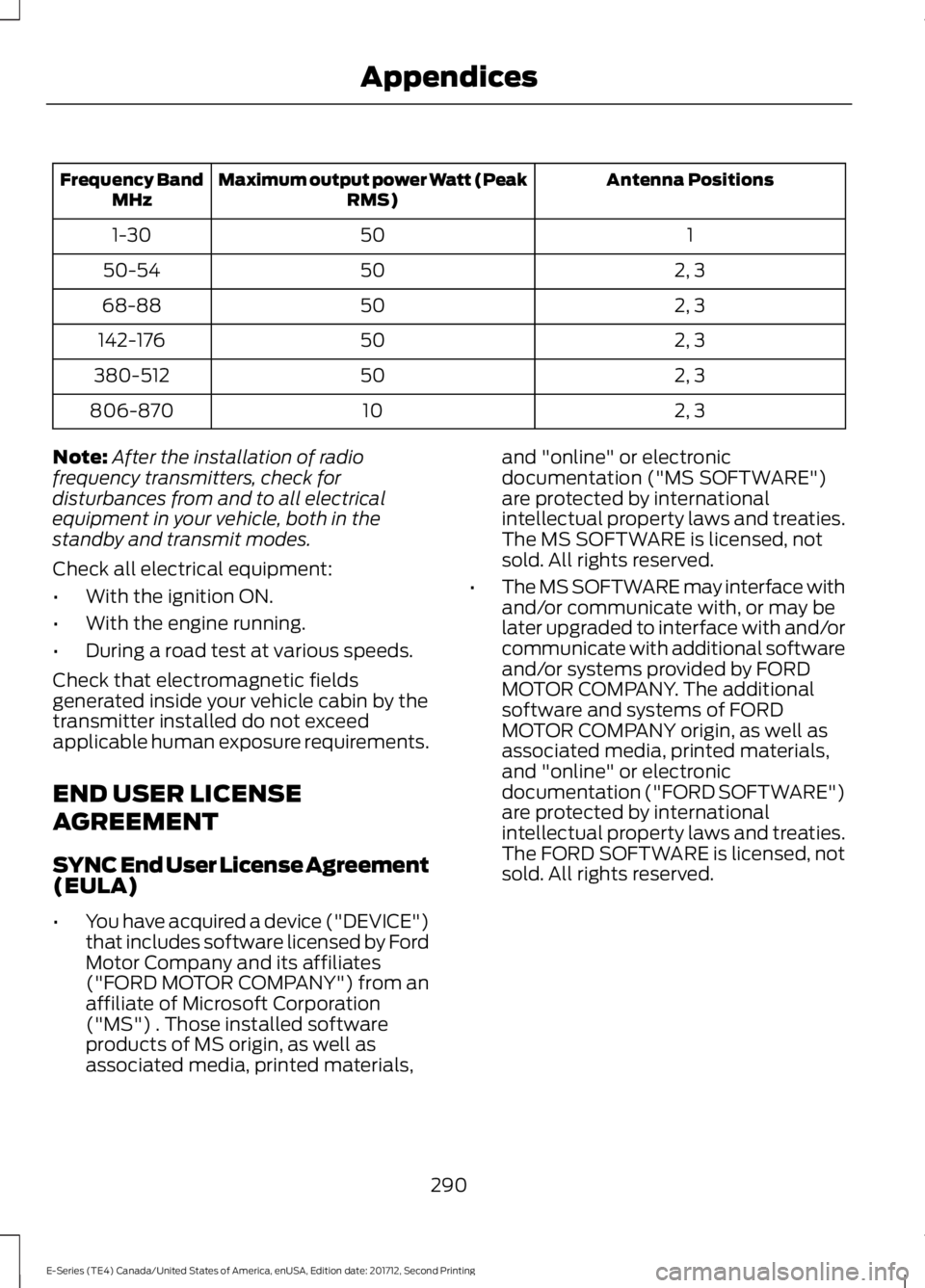
Antenna PositionsMaximum output power Watt (PeakRMS)Frequency BandMHz
1501-30
2, 35050-54
2, 35068-88
2, 350142-176
2, 350380-512
2, 310806-870
Note:After the installation of radiofrequency transmitters, check fordisturbances from and to all electricalequipment in your vehicle, both in thestandby and transmit modes.
Check all electrical equipment:
•With the ignition ON.
•With the engine running.
•During a road test at various speeds.
Check that electromagnetic fieldsgenerated inside your vehicle cabin by thetransmitter installed do not exceedapplicable human exposure requirements.
END USER LICENSE
AGREEMENT
SYNC End User License Agreement(EULA)
•You have acquired a device ("DEVICE")that includes software licensed by FordMotor Company and its affiliates("FORD MOTOR COMPANY") from anaffiliate of Microsoft Corporation("MS") . Those installed softwareproducts of MS origin, as well asassociated media, printed materials,
and "online" or electronicdocumentation ("MS SOFTWARE")are protected by internationalintellectual property laws and treaties.The MS SOFTWARE is licensed, notsold. All rights reserved.
•The MS SOFTWARE may interface withand/or communicate with, or may belater upgraded to interface with and/orcommunicate with additional softwareand/or systems provided by FORDMOTOR COMPANY. The additionalsoftware and systems of FORDMOTOR COMPANY origin, as well asassociated media, printed materials,and "online" or electronicdocumentation ("FORD SOFTWARE")are protected by internationalintellectual property laws and treaties.The FORD SOFTWARE is licensed, notsold. All rights reserved.
290
E-Series (TE4) Canada/United States of America, enUSA, Edition date: 201712, Second Printing
Appendices
Page 294 of 323
•The MS SOFTWARE and/or FORDSOFTWARE may interface with and/orcommunicate with, or may be laterupgraded to interface with and/orcommunicate with additional softwareand/or systems provided by third partysoftware and service suppliers. Theadditional software and services ofthird party origin, as well as associatedmedia, printed materials, and "online"or electronic documentation ("THIRDPARTY SOFTWARE") are protected byinternational intellectual property lawsand treaties. The THIRD PARTYSOFTWARE is licensed, not sold. Allrights reserved.
•The MS SOFTWARE, FORDSOFTWARE and THIRD PARTYSOFTWARE hereinafter collectivelyand individually will be referred to as"SOFTWARE".
IF YOU DO NOT AGREE TO THIS ENDUSER LICENSE AGREEMENT ("EULA")DO NOT USE THE DEVICE OR COPYTHE SOFTWARE. ANY USE OF THESOFTWARE, INCLUDING BUT NOTLIMITED TO USE ON THE DEVICE, WILLCONSTITUTE YOUR AGREEMENT TOTHIS EULA (OR RATIFICATION OF ANYPREVIOUS CONSENT).
GRANT OF SOFTWARE LICENSE: ThisEULA grants you the following license:
•You may use the SOFTWARE asinstalled on the DEVICE and asotherwise interfacing with systemsand/or services provide by or throughFORD MOTOR COMPANY or its thirdparty software and service providers.
Description of Other Rights andLimitations
•Speech Recognition: If theSOFTWARE includes speechrecognition component(s), you shouldunderstand that speech recognition isan inherently statistical process andthat recognition errors are inherent inthe process. Neither FORD MOTORCOMPANY nor its suppliers shall beliable for any damages arising out oferrors in the speech recognitionprocess.
•Limitations on Reverse Engineering,Decompilation and Disassembly:You may not reverse engineer,decompile, or disassemble nor permitothers to reverse engineer, decompileor disassemble the SOFTWARE, exceptand only to the extent that such activityis expressly permitted by applicablelaw notwithstanding this limitation.
•Limitations on Distributing,Copying, Modifying and CreatingDerivative Works: You may notdistribute, copy, make modificationsto or create derivative works based onthe SOFTWARE, except and only to theextent that such activity is expresslypermitted by applicable lawnotwithstanding this limitation.
•Single EULA: The end userdocumentation for the DEVICE andrelated systems and services maycontain multiple EULAs, such asmultiple translations and/or multiplemedia versions (e.g., in the userdocumentation and in the software).Even if you receive multiple EULAs, youare licensed to use only one (1) copy ofthe SOFTWARE.
291
E-Series (TE4) Canada/United States of America, enUSA, Edition date: 201712, Second Printing
Appendices
Page 298 of 323
![FORD E SERIES 2018 Owners Manual •THERE ARE NO WARRANTIES OTHERTHAN THOSE THAT MAY EXPRESSLYBE PROVIDED FOR YOUR NEWVEHICLE.
Adobe
Contains Adobe® [Flash® Player] or[AIR®] technology by Adobe SystemsIncorporated. This [Licensee](/img/11/58730/w960_58730-297.png "FORD E SERIES 2018 Owners Manual •THERE ARE NO WARRANTIES OTHERTHAN THOSE THAT MAY EXPRESSLYBE PROVIDED FOR YOUR NEWVEHICLE.
Adobe
Contains Adobe® [Flash® Player] or[AIR®] technology by Adobe SystemsIncorporated. This [Licensee")
•THERE ARE NO WARRANTIES OTHERTHAN THOSE THAT MAY EXPRESSLYBE PROVIDED FOR YOUR NEWVEHICLE.
Adobe
Contains Adobe® [Flash® Player] or[AIR®] technology by Adobe SystemsIncorporated. This [Licensee Product]contains [Adobe® Flash® Player][Adobe® AIR®] software under licensefrom Adobe Systems Incorporated,Copyright ©1995-2009 AdobeMacromedia Software LLC. All rightsreserved. Adobe, Flash and AIR aretrademarks of Adobe SystemsIncorporated.
End User Notice
Microsoft® Windows® Mobile forAutomotive Important SafetyInformation
This system Ford SYNC contains softwarethat is licensed to Manufacturer FORDMOTOR COMPANY by an affiliate ofMicrosoft Corporation pursuant to a licenseagreement. Any removal, reproduction,reverse engineering or other unauthorizeduse of the software from this system inviolation of the license agreement is strictlyprohibited and may subject you to legalaction.
Read and follow instructions: Beforeusing your Windows Automotive- basedsystem, read and follow all instructionsand safety information provided in this enduser manual ("User's Guide"). Notfollowing precautions found in this User'sGuide can lead to an accident or otherserious consequences.
Keep User's Guide in vehicle: When keptin the vehicle, the User's Guide will be aready reference for you and other usersunfamiliar with the WindowsAutomotive-based system. Please makecertain that before using the system forthe first time, all persons have access tothe User's Guide and read its instructionsand safety information carefully.
WARNING
Operating certain parts of thissystem while driving can distractyour attention away from the road,and possibly cause an accident or otherserious consequences. Do not changesystem settings or enter data non-verbally(using your hands) while driving. Stop thevehicle in a safe and legal manner beforeattempting these operations. This isimportant since while setting up orchanging some functions you might berequired to distract your attention awayfrom the road and remove your hands fromthe wheel.
General Operation
Voice Command Control: Functionswithin the Windows Automotive-basedsystem may be accomplished using onlyvoice commands. Using voice commandswhile driving allows you to operate thesystem without removing your hands fromthe wheel.
Prolonged Views of Screen: Do notaccess any function requiring a prolongedview of the screen while you are driving.Pull over in a safe and legal manner beforeattempting to access a function of thesystem requiring prolonged attention. Evenoccasional short scans to the screen maybe hazardous if your attention has beendiverted away from your driving task at acritical time.
295
E-Series (TE4) Canada/United States of America, enUSA, Edition date: 201712, Second Printing
Appendices
Page 300 of 323
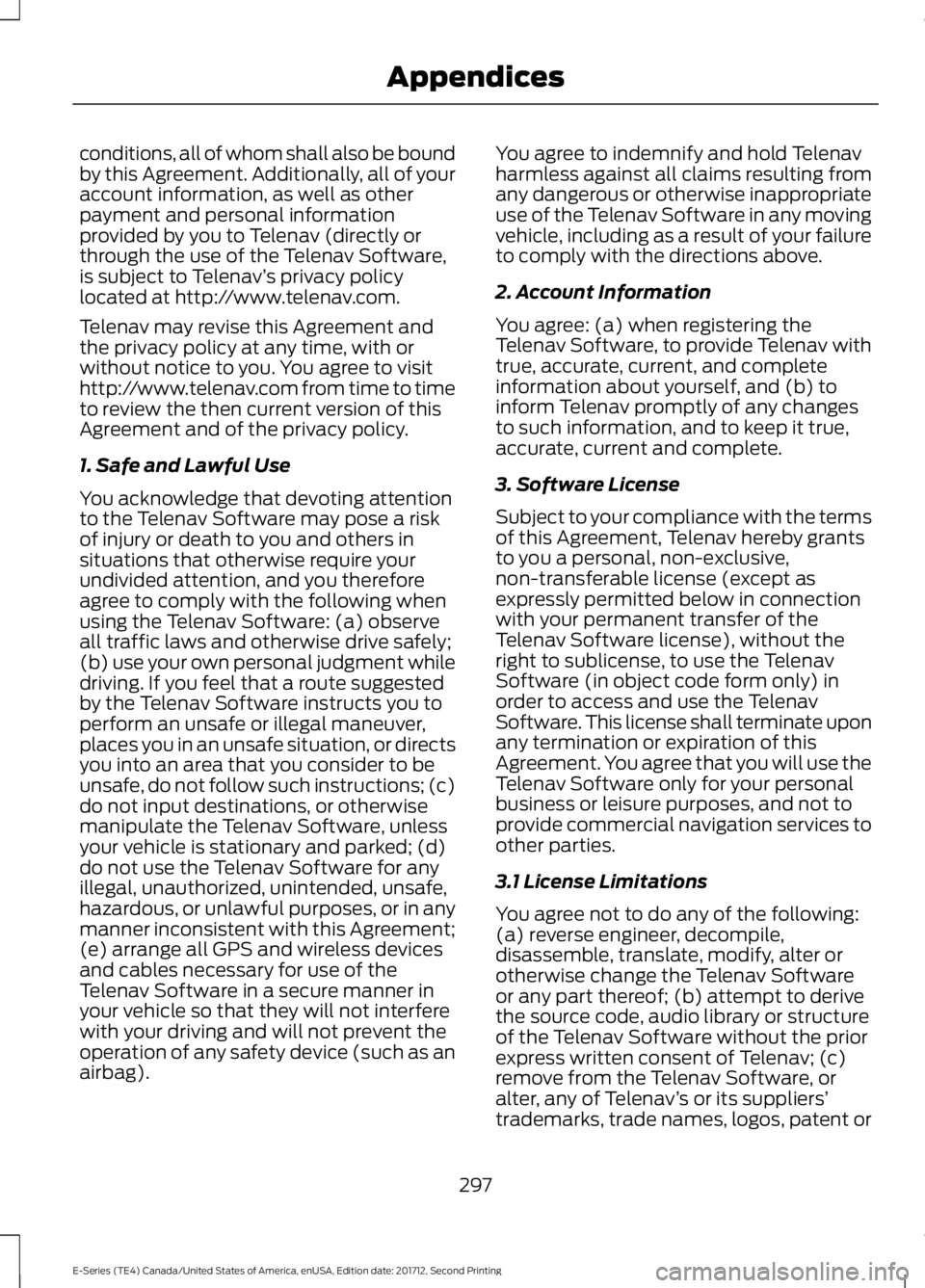
conditions, all of whom shall also be boundby this Agreement. Additionally, all of youraccount information, as well as otherpayment and personal informationprovided by you to Telenav (directly orthrough the use of the Telenav Software,is subject to Telenav’s privacy policylocated at http://www.telenav.com.
Telenav may revise this Agreement andthe privacy policy at any time, with orwithout notice to you. You agree to visithttp://www.telenav.com from time to timeto review the then current version of thisAgreement and of the privacy policy.
1. Safe and Lawful Use
You acknowledge that devoting attentionto the Telenav Software may pose a riskof injury or death to you and others insituations that otherwise require yourundivided attention, and you thereforeagree to comply with the following whenusing the Telenav Software: (a) observeall traffic laws and otherwise drive safely;(b) use your own personal judgment whiledriving. If you feel that a route suggestedby the Telenav Software instructs you toperform an unsafe or illegal maneuver,places you in an unsafe situation, or directsyou into an area that you consider to beunsafe, do not follow such instructions; (c)do not input destinations, or otherwisemanipulate the Telenav Software, unlessyour vehicle is stationary and parked; (d)do not use the Telenav Software for anyillegal, unauthorized, unintended, unsafe,hazardous, or unlawful purposes, or in anymanner inconsistent with this Agreement;(e) arrange all GPS and wireless devicesand cables necessary for use of theTelenav Software in a secure manner inyour vehicle so that they will not interferewith your driving and will not prevent theoperation of any safety device (such as anairbag).
You agree to indemnify and hold Telenavharmless against all claims resulting fromany dangerous or otherwise inappropriateuse of the Telenav Software in any movingvehicle, including as a result of your failureto comply with the directions above.
2. Account Information
You agree: (a) when registering theTelenav Software, to provide Telenav withtrue, accurate, current, and completeinformation about yourself, and (b) toinform Telenav promptly of any changesto such information, and to keep it true,accurate, current and complete.
3. Software License
Subject to your compliance with the termsof this Agreement, Telenav hereby grantsto you a personal, non-exclusive,non-transferable license (except asexpressly permitted below in connectionwith your permanent transfer of theTelenav Software license), without theright to sublicense, to use the TelenavSoftware (in object code form only) inorder to access and use the TelenavSoftware. This license shall terminate uponany termination or expiration of thisAgreement. You agree that you will use theTelenav Software only for your personalbusiness or leisure purposes, and not toprovide commercial navigation services toother parties.
3.1 License Limitations
You agree not to do any of the following:(a) reverse engineer, decompile,disassemble, translate, modify, alter orotherwise change the Telenav Softwareor any part thereof; (b) attempt to derivethe source code, audio library or structureof the Telenav Software without the priorexpress written consent of Telenav; (c)remove from the Telenav Software, oralter, any of Telenav’s or its suppliers’trademarks, trade names, logos, patent or
297
E-Series (TE4) Canada/United States of America, enUSA, Edition date: 201712, Second Printing
Appendices
Page 304 of 323
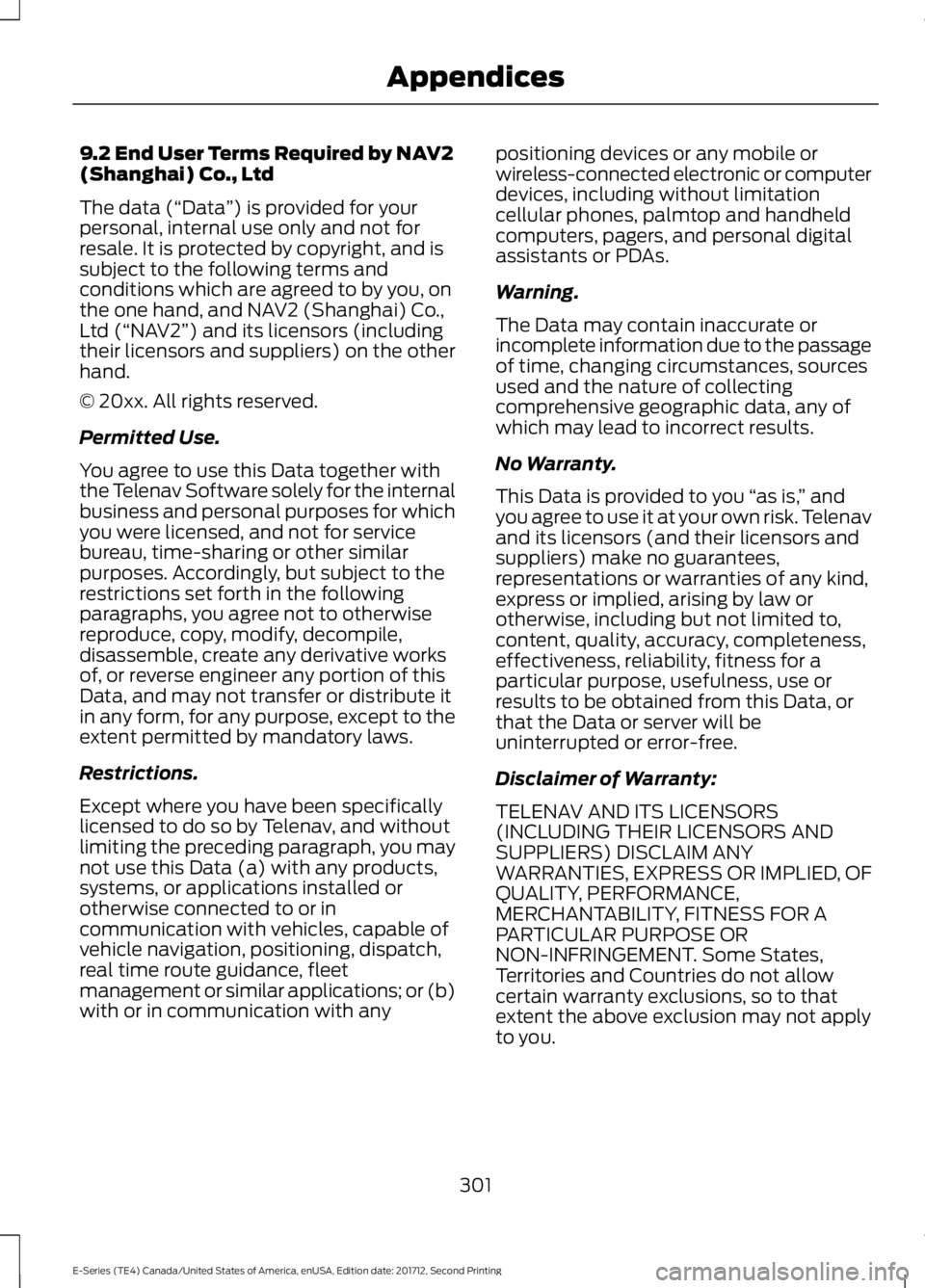
9.2 End User Terms Required by NAV2(Shanghai) Co., Ltd
The data (“Data”) is provided for yourpersonal, internal use only and not forresale. It is protected by copyright, and issubject to the following terms andconditions which are agreed to by you, onthe one hand, and NAV2 (Shanghai) Co.,Ltd (“NAV2”) and its licensors (includingtheir licensors and suppliers) on the otherhand.
© 20xx. All rights reserved.
Permitted Use.
You agree to use this Data together withthe Telenav Software solely for the internalbusiness and personal purposes for whichyou were licensed, and not for servicebureau, time-sharing or other similarpurposes. Accordingly, but subject to therestrictions set forth in the followingparagraphs, you agree not to otherwisereproduce, copy, modify, decompile,disassemble, create any derivative worksof, or reverse engineer any portion of thisData, and may not transfer or distribute itin any form, for any purpose, except to theextent permitted by mandatory laws.
Restrictions.
Except where you have been specificallylicensed to do so by Telenav, and withoutlimiting the preceding paragraph, you maynot use this Data (a) with any products,systems, or applications installed orotherwise connected to or incommunication with vehicles, capable ofvehicle navigation, positioning, dispatch,real time route guidance, fleetmanagement or similar applications; or (b)with or in communication with any
positioning devices or any mobile orwireless-connected electronic or computerdevices, including without limitationcellular phones, palmtop and handheldcomputers, pagers, and personal digitalassistants or PDAs.
Warning.
The Data may contain inaccurate orincomplete information due to the passageof time, changing circumstances, sourcesused and the nature of collectingcomprehensive geographic data, any ofwhich may lead to incorrect results.
No Warranty.
This Data is provided to you “as is,” andyou agree to use it at your own risk. Telenavand its licensors (and their licensors andsuppliers) make no guarantees,representations or warranties of any kind,express or implied, arising by law orotherwise, including but not limited to,content, quality, accuracy, completeness,effectiveness, reliability, fitness for aparticular purpose, usefulness, use orresults to be obtained from this Data, orthat the Data or server will beuninterrupted or error-free.
Disclaimer of Warranty:
TELENAV AND ITS LICENSORS(INCLUDING THEIR LICENSORS ANDSUPPLIERS) DISCLAIM ANYWARRANTIES, EXPRESS OR IMPLIED, OFQUALITY, PERFORMANCE,MERCHANTABILITY, FITNESS FOR APARTICULAR PURPOSE ORNON-INFRINGEMENT. Some States,Territories and Countries do not allowcertain warranty exclusions, so to thatextent the above exclusion may not applyto you.
301
E-Series (TE4) Canada/United States of America, enUSA, Edition date: 201712, Second Printing
Appendices
Page 311 of 323
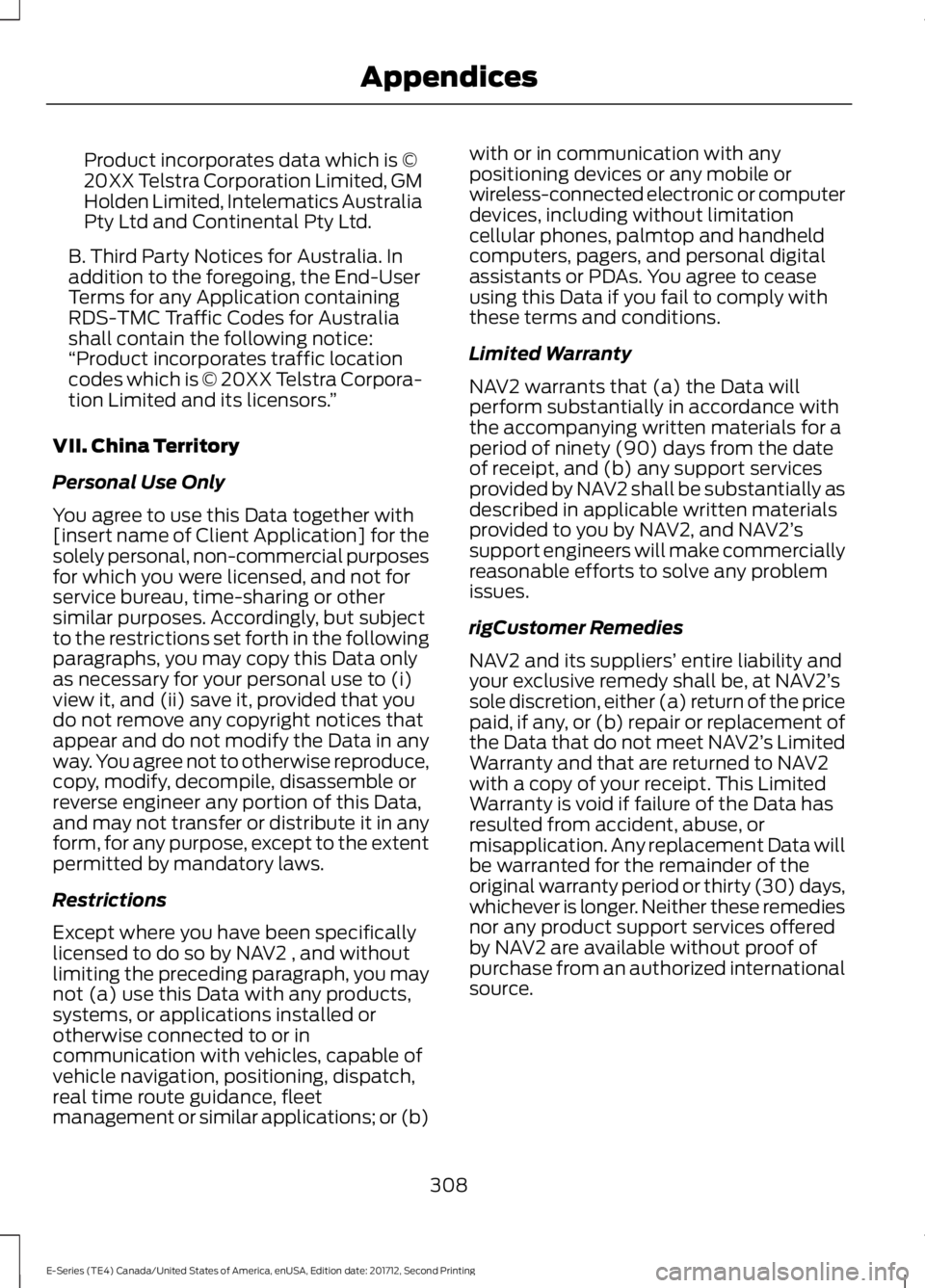
Product incorporates data which is ©20XX Telstra Corporation Limited, GMHolden Limited, Intelematics AustraliaPty Ltd and Continental Pty Ltd.
B. Third Party Notices for Australia. Inaddition to the foregoing, the End-UserTerms for any Application containingRDS-TMC Traffic Codes for Australiashall contain the following notice:“Product incorporates traffic locationcodes which is © 20XX Telstra Corpora-tion Limited and its licensors.”
VII. China Territory
Personal Use Only
You agree to use this Data together with[insert name of Client Application] for thesolely personal, non-commercial purposesfor which you were licensed, and not forservice bureau, time-sharing or othersimilar purposes. Accordingly, but subjectto the restrictions set forth in the followingparagraphs, you may copy this Data onlyas necessary for your personal use to (i)view it, and (ii) save it, provided that youdo not remove any copyright notices thatappear and do not modify the Data in anyway. You agree not to otherwise reproduce,copy, modify, decompile, disassemble orreverse engineer any portion of this Data,and may not transfer or distribute it in anyform, for any purpose, except to the extentpermitted by mandatory laws.
Restrictions
Except where you have been specificallylicensed to do so by NAV2 , and withoutlimiting the preceding paragraph, you maynot (a) use this Data with any products,systems, or applications installed orotherwise connected to or incommunication with vehicles, capable ofvehicle navigation, positioning, dispatch,real time route guidance, fleetmanagement or similar applications; or (b)
with or in communication with anypositioning devices or any mobile orwireless-connected electronic or computerdevices, including without limitationcellular phones, palmtop and handheldcomputers, pagers, and personal digitalassistants or PDAs. You agree to ceaseusing this Data if you fail to comply withthese terms and conditions.
Limited Warranty
NAV2 warrants that (a) the Data willperform substantially in accordance withthe accompanying written materials for aperiod of ninety (90) days from the dateof receipt, and (b) any support servicesprovided by NAV2 shall be substantially asdescribed in applicable written materialsprovided to you by NAV2, and NAV2’ssupport engineers will make commerciallyreasonable efforts to solve any problemissues.
rigCustomer Remedies
NAV2 and its suppliers’ entire liability andyour exclusive remedy shall be, at NAV2’ssole discretion, either (a) return of the pricepaid, if any, or (b) repair or replacement ofthe Data that do not meet NAV2’s LimitedWarranty and that are returned to NAV2with a copy of your receipt. This LimitedWarranty is void if failure of the Data hasresulted from accident, abuse, ormisapplication. Any replacement Data willbe warranted for the remainder of theoriginal warranty period or thirty (30) days,whichever is longer. Neither these remediesnor any product support services offeredby NAV2 are available without proof ofpurchase from an authorized internationalsource.
308
E-Series (TE4) Canada/United States of America, enUSA, Edition date: 201712, Second Printing
Appendices
Page 316 of 323
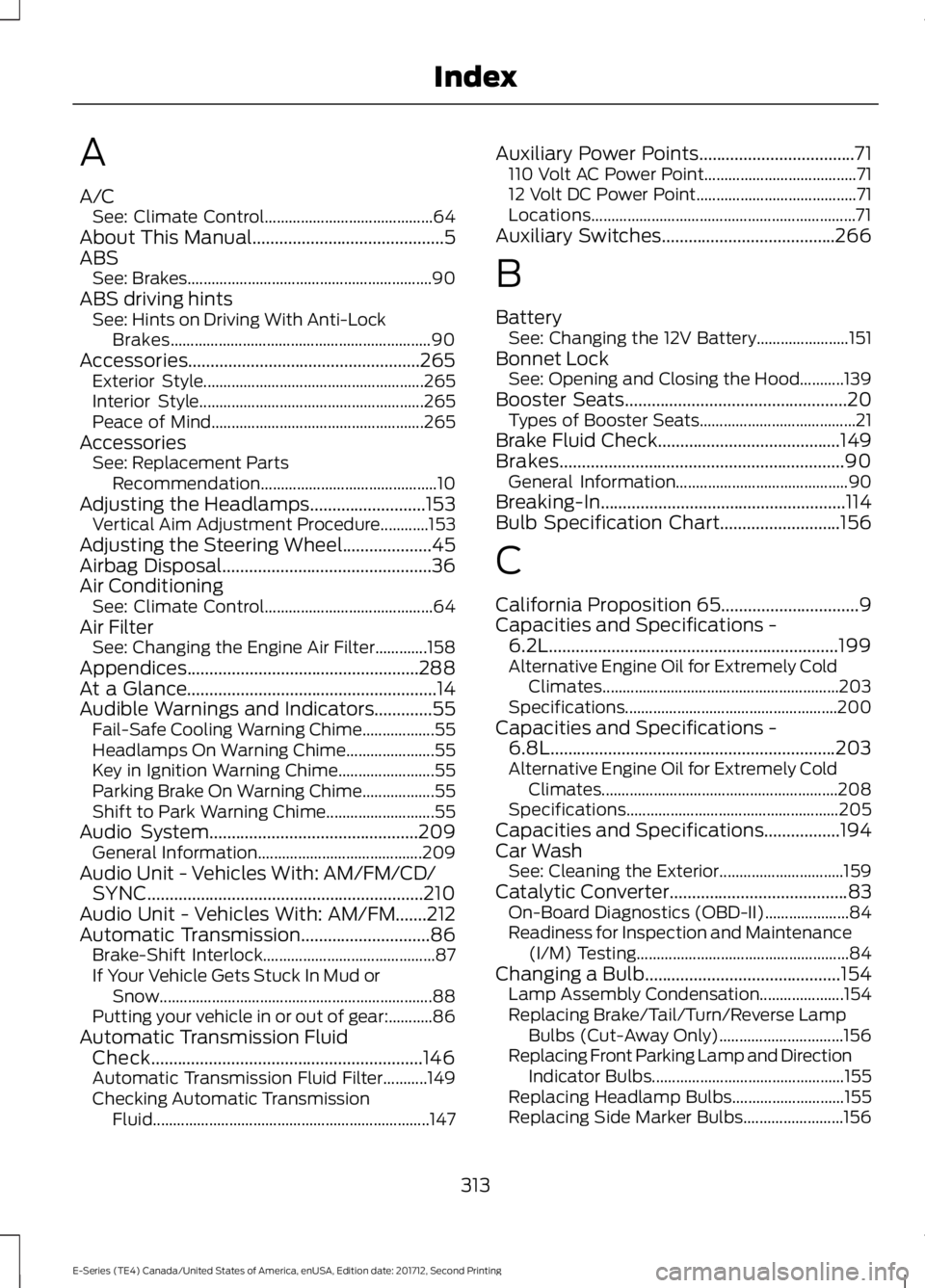
A
A/CSee: Climate Control..........................................64About This Manual...........................................5ABSSee: Brakes.............................................................90ABS driving hintsSee: Hints on Driving With Anti-LockBrakes.................................................................90Accessories....................................................265Exterior Style.......................................................265Interior Style........................................................265Peace of Mind.....................................................265AccessoriesSee: Replacement PartsRecommendation............................................10Adjusting the Headlamps..........................153Vertical Aim Adjustment Procedure............153Adjusting the Steering Wheel....................45Airbag Disposal...............................................36Air ConditioningSee: Climate Control..........................................64Air FilterSee: Changing the Engine Air Filter.............158Appendices....................................................288At a Glance........................................................14Audible Warnings and Indicators.............55Fail-Safe Cooling Warning Chime..................55Headlamps On Warning Chime......................55Key in Ignition Warning Chime........................55Parking Brake On Warning Chime..................55Shift to Park Warning Chime...........................55Audio System...............................................209General Information.........................................209Audio Unit - Vehicles With: AM/FM/CD/SYNC..............................................................210Audio Unit - Vehicles With: AM/FM.......212Automatic Transmission.............................86Brake-Shift Interlock...........................................87If Your Vehicle Gets Stuck In Mud orSnow....................................................................88Putting your vehicle in or out of gear:...........86Automatic Transmission FluidCheck.............................................................146Automatic Transmission Fluid Filter...........149Checking Automatic TransmissionFluid.....................................................................147
Auxiliary Power Points...................................71110 Volt AC Power Point......................................7112 Volt DC Power Point........................................71Locations..................................................................71Auxiliary Switches.......................................266
B
BatterySee: Changing the 12V Battery.......................151Bonnet LockSee: Opening and Closing the Hood...........139Booster Seats..................................................20Types of Booster Seats.......................................21Brake Fluid Check.........................................149Brakes................................................................90General Information...........................................90Breaking-In.......................................................114Bulb Specification Chart...........................156
C
California Proposition 65...............................9Capacities and Specifications -6.2L.................................................................199Alternative Engine Oil for Extremely ColdClimates...........................................................203Specifications.....................................................200Capacities and Specifications -6.8L................................................................203Alternative Engine Oil for Extremely ColdClimates...........................................................208Specifications.....................................................205Capacities and Specifications.................194Car WashSee: Cleaning the Exterior...............................159Catalytic Converter........................................83On-Board Diagnostics (OBD-II).....................84Readiness for Inspection and Maintenance(I/M) Testing.....................................................84Changing a Bulb............................................154Lamp Assembly Condensation.....................154Replacing Brake/Tail/Turn/Reverse LampBulbs (Cut-Away Only)...............................156Replacing Front Parking Lamp and DirectionIndicator Bulbs................................................155Replacing Headlamp Bulbs............................155Replacing Side Marker Bulbs.........................156
313
E-Series (TE4) Canada/United States of America, enUSA, Edition date: 201712, Second Printing
Index
Page 317 of 323
Changing a Fuse............................................137Fuses........................................................................137Changing a Road Wheel............................189Dissimilar Spare Wheel and Tire AssemblyInformation......................................................189Tire Change Procedure....................................190Changing the 12V Battery...........................151Dual Batteries.......................................................152Reconnecting the Battery.................................151Changing the Engine Air Filter.................158Changing the Wiper Blades......................152Checking the Wiper Blades.......................152Child Restraint and SeatbeltMaintenance.................................................28Child Restraint Positioning..........................22Child Safety.......................................................15General Information.............................................15Cleaning Products........................................159Materials................................................................159Cleaning the Engine......................................161Cleaning the Exterior...................................159Cleaning the Headlamps................................160Exterior Chrome Parts......................................160Exterior Plastic Parts.........................................160Stripes or Graphics............................................160Underbody............................................................160Under Hood..........................................................160Cleaning the Instrument Panel andInstrument Cluster Lens..........................162Cleaning the Interior....................................162Cleaning the Wheels...................................163Cleaning the Windows and WiperBlades.............................................................161Climate Control..............................................64Coolant CheckSee: Engine Coolant Check.............................142Crash Sensors and Airbag Indicator........36Cruise Control..................................................45Principle of Operation........................................95Cruise controlSee: Using Cruise Control.................................95Customer Assistance..................................122
D
Data Recording..................................................7Event Data Recording...........................................8Service Data Recording.........................................7
Daytime Running Lamps............................48Digital Radio...................................................213HD Radio Reception and StationTroubleshooting.............................................214Direction Indicators.......................................48Doors and Locks.............................................40Driver and Passenger Airbags.....................31Children and Airbags...........................................35Passenger Airbag On and Off Switch ...........31Proper Driver and Front Passenger SeatingAdjustment........................................................35Driving Aids......................................................96Driving Hints....................................................114Driving Through Water.................................115DRLSee: Daytime Running Lamps.........................48
E
Economical Driving.......................................114Electromagnetic Compatibility..............288Emission Law...................................................82Noise Emissions Warranty, ProhibitedTampering Acts and Maintenance...........83Tampering With a Noise ControlSystem................................................................82End User License Agreement.................290SYNC End User License Agreement(EULA).............................................................290Engine Block Heater......................................75Using the Engine Block Heater........................75Engine Coolant Check.................................142Adding Coolant....................................................143Coolant Change..................................................145Engine Coolant TemperatureManagement...................................................146Fail-Safe Cooling................................................145Recycled Coolant...............................................144Severe Climates..................................................144Engine Emission Control.............................82Engine ImmobilizerSee: Passive Anti-Theft System.....................43Engine Oil Check............................................141Adding Engine Oil................................................141Engine Oil Dipstick........................................141Engine Specifications - 6.2L.....................194Drivebelt Routing................................................194
314
E-Series (TE4) Canada/United States of America, enUSA, Edition date: 201712, Second Printing
Index