instrument cluster FORD E SERIES 2018 User Guide
[x] Cancel search | Manufacturer: FORD, Model Year: 2018, Model line: E SERIES, Model: FORD E SERIES 2018Pages: 323, PDF Size: 7.09 MB
Page 90 of 323
Tow/Haul Mode
To activate tow/haul, press thebutton on the gearshift lever.The TOW HAUL indicator lightilluminates in the instrument cluster.
The tow/haul feature:
•Delays upshifts to reduce the frequencyof transmission shifting.
•Provides engine braking in all forwardgears, which slows your vehicle andassists you in controlling your vehiclewhen descending a slope.
•Depending on driving conditions andload conditions, may downshift thetransmission, slow your vehicle andcontrol your vehicle speed whendescending a hill, without pressing theaccelerator pedal. The amount ofdownshift braking provided will varybased upon the amount you press thebrake pedal.
The tow/haul feature improvestransmission operation when towing atrailer or a heavy load. All transmissiongear ranges are available when usingtow/haul.
To deactivate the tow/haul feature andreturn to normal driving mode, press thebutton on the gearshift lever again. TheTOW HAUL light deactivates. Tow/haulalso deactivates when you power downyour vehicle.
WARNING
Do not use tow/haul when the roadsurface is slippery. Failure to followthis instruction could result in theloss of control of your vehicle.
Brake-Shift Interlock
WARNINGS
When doing this procedure, you needto take the transmission out of park(P) which means your vehicle canroll freely. To avoid unwanted vehiclemovement, always fully apply the parkingbrake prior to doing this procedure. Usewheels chocks if appropriate.
If the parking brake is fully released,but the brake warning lamp remainsilluminated, the brakes may not beworking properly. Have your vehiclechecked as soon as possible.
Note:Do not drive your vehicle until youverify that the brake lamps are working.
Your vehicle has a brake-shift interlockfeature that prevents the gearshift leverfrom moving from park (P) when theignition is in the 3 (on) position and thebrake pedal is not pressed.
If you cannot move the gearshift lever outof park (P) position with the ignition in the4 (on) position and the brake pedalpressed, a malfunction may have occurred.It is possible that a fuse has blown or yourvehicle’s brake lamps are not operatingproperly. See Fuse Specification Chart(page 129).
If the fuse is not blown and the brakelamps are working properly, the followingprocedure allows you to move the gearshiftlever from park (P):
1. Apply the parking brake and turn theignition on.
2.Use a screwdriver to remove the lowertrim panel under the steering column.Make sure not to disturb the wires onthe electrical connector.
3. Locate the brake-shift interlocksolenoid underneath the steeringcolumn.
87
E-Series (TE4) Canada/United States of America, enUSA, Edition date: 201712, Second Printing
TransmissionE161509
Page 93 of 323
GENERAL INFORMATION
Note:Occasional brake noise is normal. Ifa metal-to-metal, continuous grinding orcontinuous squeal sound is present, thebrake linings may be worn-out and shouldbe inspected by an authorized dealer. If thevehicle has continuous vibration or shudderin the steering wheel while braking, thevehicle should be inspected by anauthorized dealer.
Note:Brake dust may accumulate on thewheels, even under normal drivingconditions. Some dust is inevitable as thebrakes wear and does not contribute tobrake noise. See Cleaning the Wheels(page 163).
See the Instrument Clusterchapter for information on thebrake system warning light.
Wet brakes result in reduced brakingefficiency. Gently press the brake pedal afew times when driving from a car wash orstanding water to dry the brakes.
Brake Over Accelerator
In the event the accelerator pedalbecomes stuck or entrapped, apply steadyand firm pressure to the brake pedal toslow the vehicle and reduce engine power.If you experience this condition, apply thebrakes and bring your vehicle to a safestop. Turn the engine off, shift thetransmission into park (P), apply theparking brake, and then inspect theaccelerator pedal for any interferences. Ifnone are found and the condition persists,have your vehicle towed to the nearestauthorized dealer.
Hydraulic brake booster system(Hydroboost or Hydromax)
The Hydroboost and Hydromax systemsreceive fluid pressure from the powersteering pump to provide power assistduring braking.
The Hydromax booster receives backuppressure from the reserve system electricpump whenever the fluid in the powersteering system is not flowing. When theengine is off, the pump will turn on if thebrake pedal is applied, or if the ignition isturned to the on position.
The sound of the pump operating may beheard by the driver, but this is a normalcharacteristic of the system.
The reserve system provides reducedbraking power, so the vehicle should beoperated under these conditions withcaution, and only to seek service repair andremove the vehicle from the roadway.
Note:For Hydromax-equipped vehiclesoperating under normal conditions, the noiseof the fluid flowing through the booster maybe heard whenever the brake is applied. Thiscondition is normal. Vehicle service is notrequired.
If braking performance or pedal responsebecomes very poor, even when the pedalis strongly pressed, it may indicate thepresence of air in the hydraulic system orleakage of fluid. Stop the vehicle safely assoon as possible and seek serviceimmediately.
HINTS ON DRIVING WITH
ANTI-LOCK BRAKES
The anti-lock braking system does noteliminate the risks when:
•You drive too closely to the vehicle infront of you.
•Your vehicle is hydroplaning.
90
E-Series (TE4) Canada/United States of America, enUSA, Edition date: 201712, Second Printing
BrakesE144522
Page 94 of 323
•You take corners too fast.
•The road surface is poor.
Note: If the system activates, the brakepedal may pulse and may travel further.Maintain pressure on the brake pedal. Youmay also hear a noise from the system. Thisis normal.
PARKING BRAKE
WARNING
Always set the parking brake fullyand make sure the transmissionselector lever is placed in park (P).Failure to set the parking brake and engagepark could result in vehicle roll-away,property damage or bodily injury. Turn theignition to the lock position and removethe key whenever you leave your vehicle.
Apply the parking brake whenever yourvehicle is parked.
•For vehicles equipped with a footoperated parking brake, press the pedaldownward to set the parking brake.
•For vehicle equipped with a handoperated parking brake, pull theparking brake lever up to set theparking brake.
The brake warning lamp in theinstrument cluster illuminateswhen the ignition is turned onand the parking brake is applied.
The parking brake is not recommended tostop a moving vehicle. However, if thenormal brakes fail, the parking brake canbe used to stop your vehicle in anemergency. Your vehicle's stoppingdistance will increase greatly and thehandling of your vehicle will be adverselyaffected.
To release the parking brake:
•For vehicles equipped with a footoperated parking brake, pull theparking brake release lever.
•For vehicles equipped with a handoperated parking brake, push theparking brake lever down.
91
E-Series (TE4) Canada/United States of America, enUSA, Edition date: 201712, Second Printing
BrakesE144522
Page 95 of 323
PRINCIPLE OF OPERATION
The traction control system helps avoiddrive wheel spin and loss of traction.
If your vehicle begins to slide, the systemapplies the brakes to individual wheelsand, when needed, reduces engine powerat the same time. If the wheels spin whenaccelerating on slippery or loose surfaces,the system reduces engine power in orderto increase traction.
USING TRACTION CONTROL
WARNING
The traction control light illuminatessteadily if a failure is detected in thesystem. Verify that the tractioncontrol system was not manually disabledusing the switch. If the traction control lightis still illuminating steadily, have thesystem serviced by an authorized dealerimmediately. Operating your vehicle withtraction control disabled could lead to anincreased risk of loss of vehicle control,vehicle rollover, personal injury and death.
The system automatically turns on eachtime you switch the ignition on.
If your vehicle is stuck in mud or snow,switching traction control off may bebeneficial as this allows the wheels to spin.
Switching the System Off
The switch for the tractioncontrol system is located on theinstrument panel.
When you switch the system off, anilluminated icon appears on the instrumentcluster.
Use the switch again to return the tractioncontrol system to normal operation.
System Indicator Lights andMessages
The traction control lighttemporarily illuminates onengine start-up and flasheswhen a driving condition activates thesystem.
The traction control off lighttemporarily illuminates onengine start-up and stays on:
•When you switch the traction controlsystem off.
•If a problem occurs in the system.
92
E-Series (TE4) Canada/United States of America, enUSA, Edition date: 201712, Second Printing
Traction Control (If Equipped)E194301 E138639 E194301
Page 139 of 323
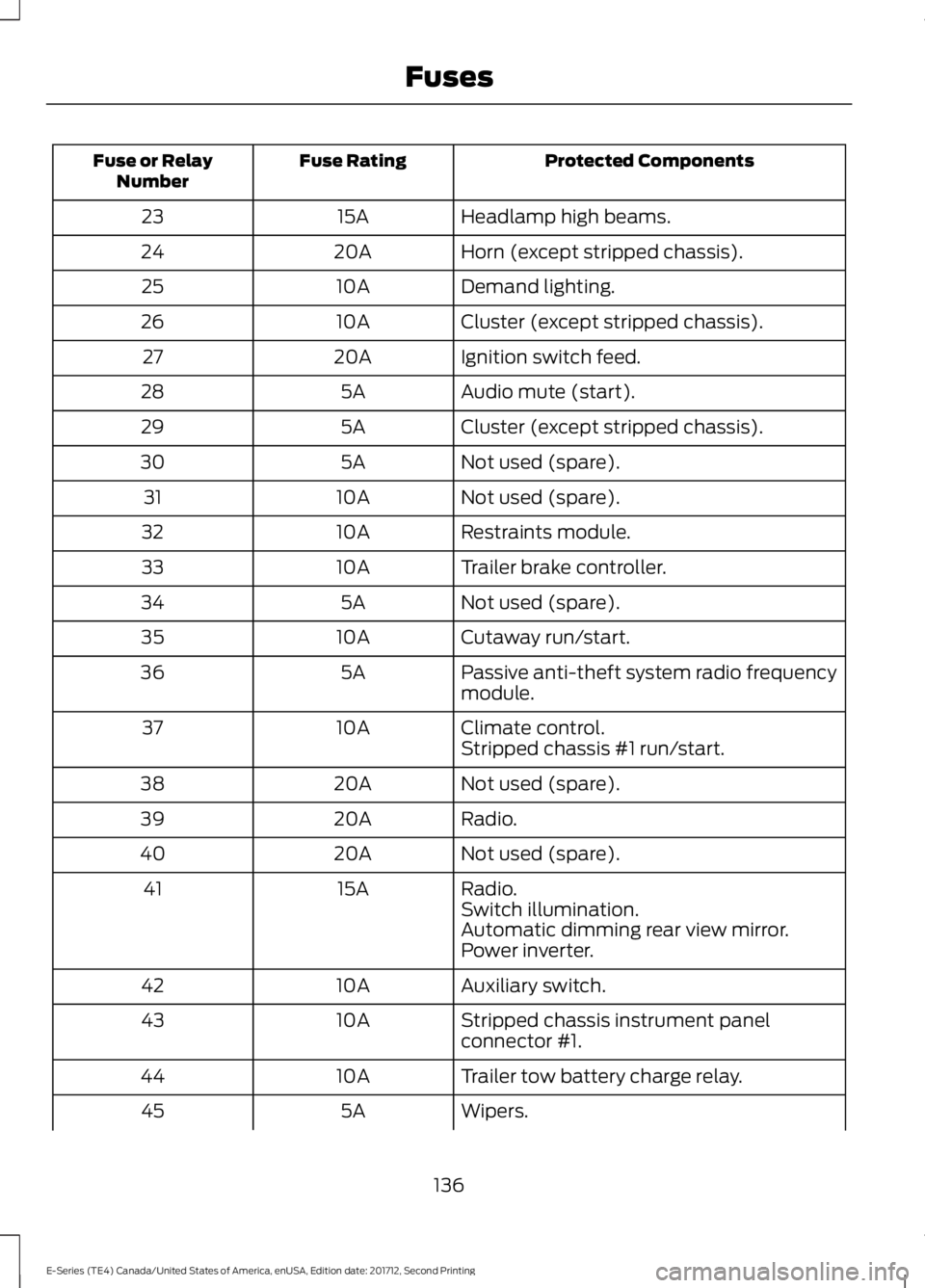
Protected ComponentsFuse RatingFuse or RelayNumber
Headlamp high beams.15A23
Horn (except stripped chassis).20A24
Demand lighting.10A25
Cluster (except stripped chassis).10A26
Ignition switch feed.20A27
Audio mute (start).5A28
Cluster (except stripped chassis).5A29
Not used (spare).5A30
Not used (spare).10A31
Restraints module.10A32
Trailer brake controller.10A33
Not used (spare).5A34
Cutaway run/start.10A35
Passive anti-theft system radio frequencymodule.5A36
Climate control.10A37Stripped chassis #1 run/start.
Not used (spare).20A38
Radio.20A39
Not used (spare).20A40
Radio.15A41Switch illumination.Automatic dimming rear view mirror.Power inverter.
Auxiliary switch.10A42
Stripped chassis instrument panelconnector #1.10A43
Trailer tow battery charge relay.10A44
Wipers.5A45
136
E-Series (TE4) Canada/United States of America, enUSA, Edition date: 201712, Second Printing
Fuses
Page 150 of 323
Checking Automatic TransmissionFluid
For scheduled intervals of the fluid checksand changes, See ScheduledMaintenance (page 270). Yourtransmission does not consume fluid.However, the fluid level should be checkedif the transmission is not working properly,i.e., if the transmission slips or shifts slowlyor if you notice some sign of fluid leakage.
Automatic transmission fluid expandswhen warmed. To obtain an accurate fluidcheck, drive the vehicle until it is at normaloperating temperature (approximately19 mi (30 km)). Verify that thetransmission fluid temperature gauge,located on the instrument cluster, is withinnormal range.
1. Drive the vehicle 19 mi (30 km) until itreaches normal operating temperature.
2.Park the vehicle on a level surface andengage the parking brake.
3.With the engine running, parking brakeengaged and your foot on the brakepedal, move the gearshift lever throughall of the gear ranges. Allow sufficienttime for each gear to engage.
4. Put the transmission in park (P) andleave the engine running.
5. Remove the dipstick, wiping it cleanwith a clean, dry lint free rag. Ifnecessary, refer to the Under HoodOverview in this chapter for thelocation of the dipstick.
6.Install the dipstick making sure it is fullyseated in the filler tube.
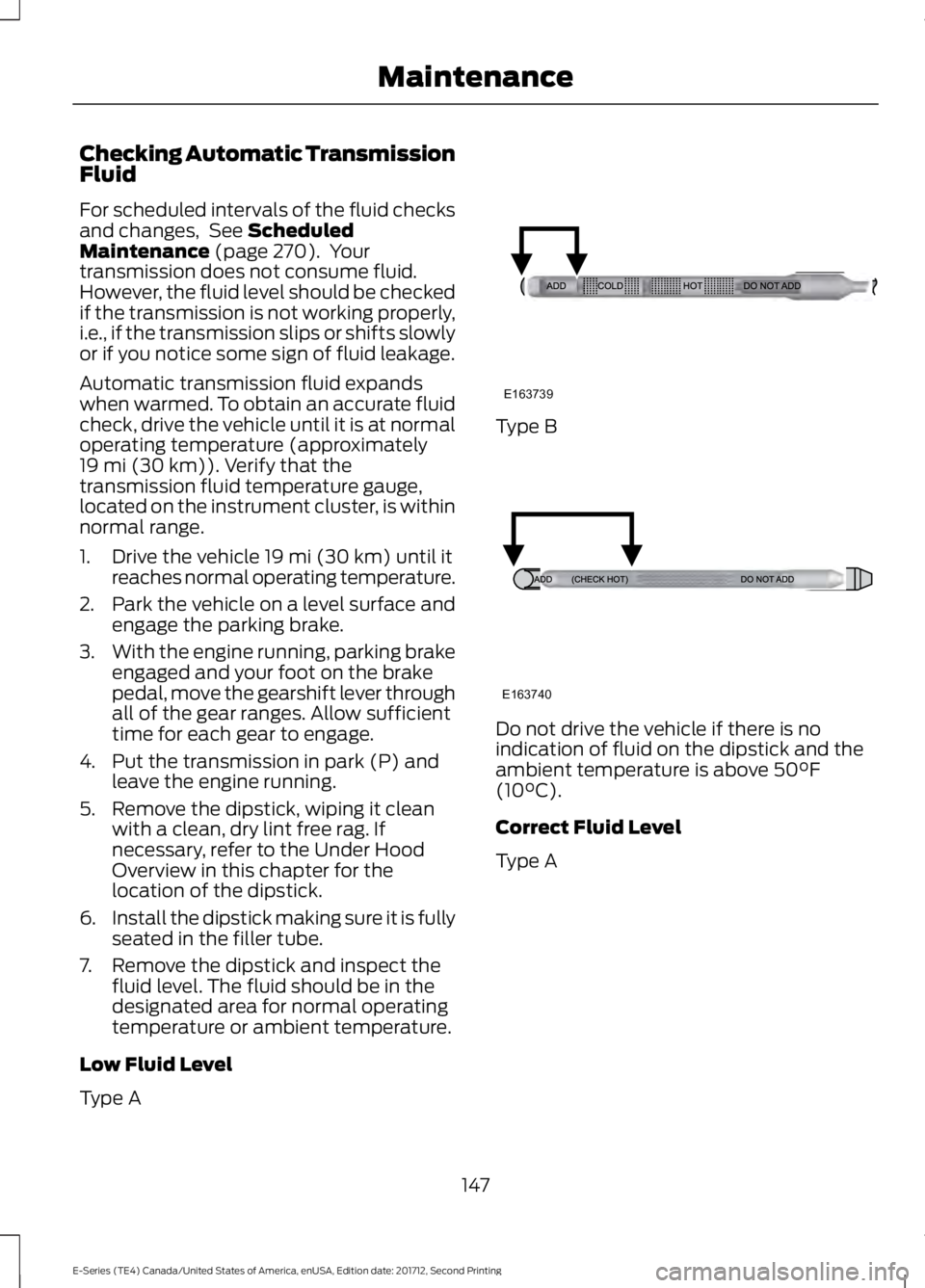
7. Remove the dipstick and inspect thefluid level. The fluid should be in thedesignated area for normal operatingtemperature or ambient temperature.
Low Fluid Level
Type A
Type B
Do not drive the vehicle if there is noindication of fluid on the dipstick and theambient temperature is above 50°F(10°C).
Correct Fluid Level
Type A
147
E-Series (TE4) Canada/United States of America, enUSA, Edition date: 201712, Second Printing
MaintenanceE163739 E163740
Page 165 of 323
To clean the windshield and wiper blades:
•Clean the windshield with anon-abrasive glass cleaner. Whencleaning the interior of the windshield,avoid getting any glass cleaner on theinstrument panel or door panels. Wipeany glass cleaner off these surfacesimmediately.
•For windshields contaminated withtree sap, chemicals, wax or bugs, cleanthe entire windshield using steel wool(no greater than 0000 grade) in acircular motion and rinse with water.
•Clean the wiper blades with isopropylrubbing alcohol or windshield washerconcentrate.
Note: Do not use razor blades or othersharp objects to clean or remove decalsfrom the inside of the heated rear window.The vehicle warranty does not coverdamage caused to the heated rear windowgrid lines.
CLEANING THE INTERIOR
WARNINGS
Do not use cleaning solvents, bleachor dye on the vehicle's seatbelts, asthese actions may weaken the beltwebbing.
On vehicles equipped withseat-mounted airbags, do not usechemical solvents or strongdetergents. Such products couldcontaminate the side airbag system andaffect performance of the side airbag in acrash.
For fabric, carpets, cloth seats and seatsequipped with side airbags:
•Remove dust and loose dirt with avacuum cleaner.
•Remove light stains and soil withMotorcraft Professional StrengthCarpet & Upholstery Cleaner.
•If grease or tar is present on thematerial, spot-clean the area first withMotorcraft Spot and Stain Remover. InCanada, use Motorcraft Multi-PurposeCleaner.
•If a ring forms on the fabric after spotcleaning, clean the entire areaimmediately (but do not oversaturate)or the ring will set.
•Do not use household cleaningproducts or glass cleaners, which canstain and discolor the fabric and affectthe flame retardant abilities of the seatmaterials.
CLEANING THE INSTRUMENT
PANEL AND INSTRUMENT
CLUSTER LENS
WARNING
Do not use chemical solvents orstrong detergents when cleaning thesteering wheel or instrument panelto avoid contamination of the airbagsystem.
Note:Follow the same procedure ascleaning leather seats for cleaning leatherinstrument panels and leather interior trimsurfaces.
Clean the instrument panel and clusterlens with a clean, damp and soft cloth,then use a clean, dry and soft cloth to drythese areas.
162
E-Series (TE4) Canada/United States of America, enUSA, Edition date: 201712, Second Printing
Vehicle Care
Page 166 of 323
•Avoid cleaners or polishes that increasethe gloss of the upper portion of theinstrument panel. The dull finish in thisarea helps protect you fromundesirable windshield reflection.
•Do not use any household cleaningproducts or glass cleaners as thesemay damage the finish of theinstrument panel, interior trim andcluster lens.
•Wash or wipe your hands clean if youhave been in contact with certainproducts such as insect repellent andsuntan lotion to avoid possible damageto the interior painted surfaces.
•Do not allow air fresheners and handsanitizers to spill onto interior surfaces.If a spill occurs, wipe off immediately.Your warranty may not cover thesedamages.
If a staining liquid like coffee or juice hasbeen spilled on the instrument panel or oninterior trim surfaces:
1. Wipe up spilled liquid using a clean,soft cloth as quickly as possible.
2. Use Motorcraft Premium Leather andVinyl Cleaner or a commerciallyavailable leather cleaning product forautomotive interiors. Test any cleaneror stain remover on an inconspicuousarea.
3. Alternatively, wipe the surface with aclean, soft cloth and a mild soap andwater solution. Dry the area with aclean, soft cloth.
4. If necessary, apply more soap andwater solution or cleaning product toa clean, soft cloth and press it onto thesoiled area. Allow this to set at roomtemperature for 30 minutes.
5. Remove the soaked cloth, then with aclean, damp cloth, use a rubbingmotion for 60 seconds on the soiledarea.
6. Dry the area with a clean, soft cloth.
REPAIRING MINOR PAINT
DAMAGE
Authorized dealers have touch-up paint tomatch your vehicle’s color. Your vehiclecolor code is printed on a sticker on thefront, left-hand side door jamb. Take yourcolor code to your authorized dealer tomake sure you get the correct color.
Before repairing minor paint damage, usea cleaner such as Motorcraft Bug and TarRemover to remove particles such as birddroppings, tree sap, insect deposits, tarspots, road salt and industrial fallout.
Always read the instructions before usingcleaning products.
CLEANING THE WHEELS
1. Regularly clean them with a wheelcleaner. We recommend that you useFord approved wheel cleaner ifavailable.
2. Remove dirt and brake dust with asponge.
3.Remove tar and grease with a bug andtar remover. We recommend that youuse Ford approved bug and tar removerif available.
4.Thoroughly rinse the wheels with waterafter cleaning.
If you intend on parking your vehicle for anextended period after cleaning the wheelswith a wheel cleaner, drive your vehicle fora few minutes before doing so. Thisreduces the risk of corrosion of the brakediscs, brake pads and linings.
Do not clean the wheels when they are hot.
Note: Some car washes could damagewheel rims and covers.
163
E-Series (TE4) Canada/United States of America, enUSA, Edition date: 201712, Second Printing
Vehicle Care
Page 317 of 323
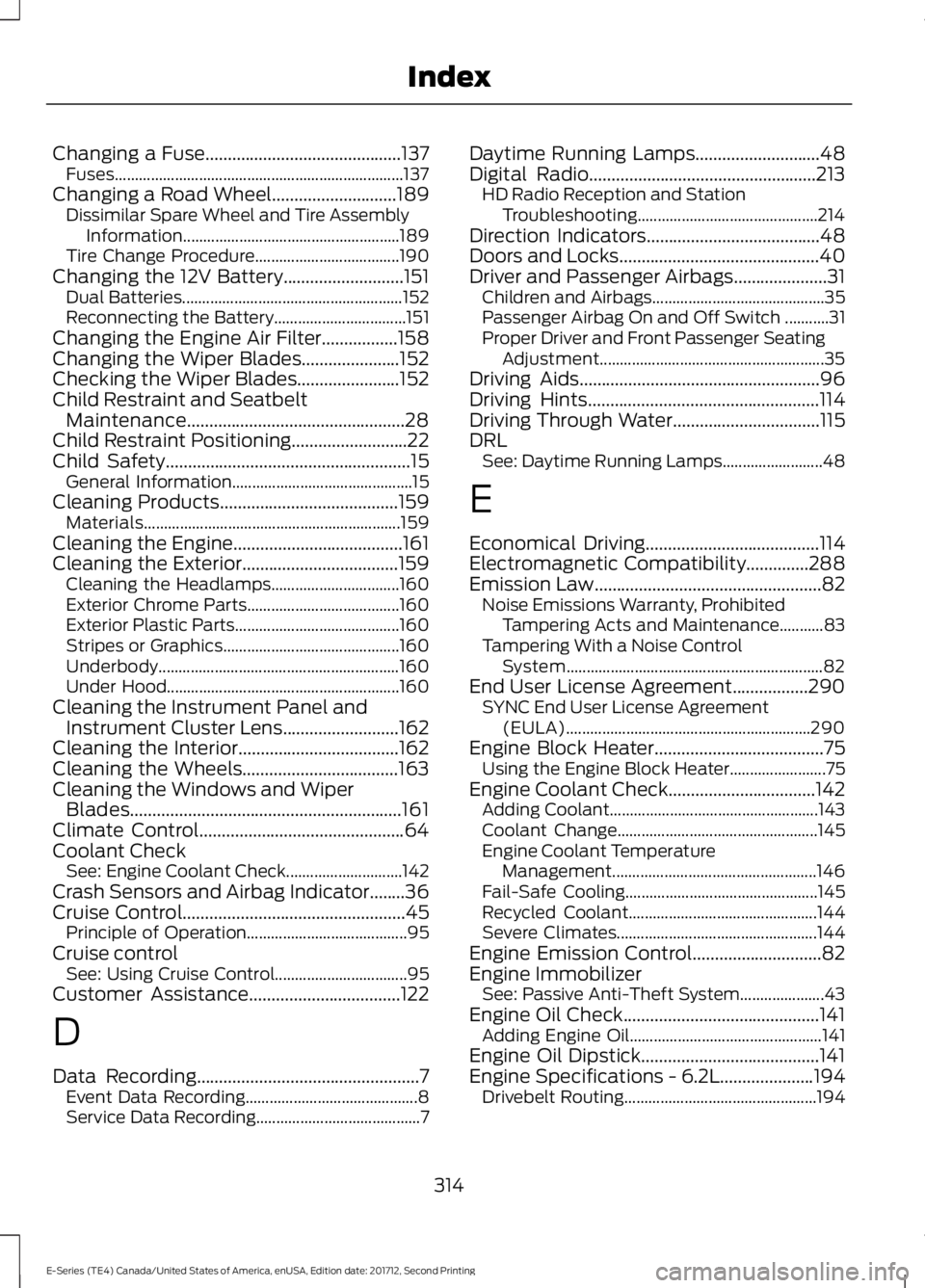
Changing a Fuse............................................137Fuses........................................................................137Changing a Road Wheel............................189Dissimilar Spare Wheel and Tire AssemblyInformation......................................................189Tire Change Procedure....................................190Changing the 12V Battery...........................151Dual Batteries.......................................................152Reconnecting the Battery.................................151Changing the Engine Air Filter.................158Changing the Wiper Blades......................152Checking the Wiper Blades.......................152Child Restraint and SeatbeltMaintenance.................................................28Child Restraint Positioning..........................22Child Safety.......................................................15General Information.............................................15Cleaning Products........................................159Materials................................................................159Cleaning the Engine......................................161Cleaning the Exterior...................................159Cleaning the Headlamps................................160Exterior Chrome Parts......................................160Exterior Plastic Parts.........................................160Stripes or Graphics............................................160Underbody............................................................160Under Hood..........................................................160Cleaning the Instrument Panel andInstrument Cluster Lens..........................162Cleaning the Interior....................................162Cleaning the Wheels...................................163Cleaning the Windows and WiperBlades.............................................................161Climate Control..............................................64Coolant CheckSee: Engine Coolant Check.............................142Crash Sensors and Airbag Indicator........36Cruise Control..................................................45Principle of Operation........................................95Cruise controlSee: Using Cruise Control.................................95Customer Assistance..................................122
D
Data Recording..................................................7Event Data Recording...........................................8Service Data Recording.........................................7
Daytime Running Lamps............................48Digital Radio...................................................213HD Radio Reception and StationTroubleshooting.............................................214Direction Indicators.......................................48Doors and Locks.............................................40Driver and Passenger Airbags.....................31Children and Airbags...........................................35Passenger Airbag On and Off Switch ...........31Proper Driver and Front Passenger SeatingAdjustment........................................................35Driving Aids......................................................96Driving Hints....................................................114Driving Through Water.................................115DRLSee: Daytime Running Lamps.........................48
E
Economical Driving.......................................114Electromagnetic Compatibility..............288Emission Law...................................................82Noise Emissions Warranty, ProhibitedTampering Acts and Maintenance...........83Tampering With a Noise ControlSystem................................................................82End User License Agreement.................290SYNC End User License Agreement(EULA).............................................................290Engine Block Heater......................................75Using the Engine Block Heater........................75Engine Coolant Check.................................142Adding Coolant....................................................143Coolant Change..................................................145Engine Coolant TemperatureManagement...................................................146Fail-Safe Cooling................................................145Recycled Coolant...............................................144Severe Climates..................................................144Engine Emission Control.............................82Engine ImmobilizerSee: Passive Anti-Theft System.....................43Engine Oil Check............................................141Adding Engine Oil................................................141Engine Oil Dipstick........................................141Engine Specifications - 6.2L.....................194Drivebelt Routing................................................194
314
E-Series (TE4) Canada/United States of America, enUSA, Edition date: 201712, Second Printing
Index
Page 319 of 323
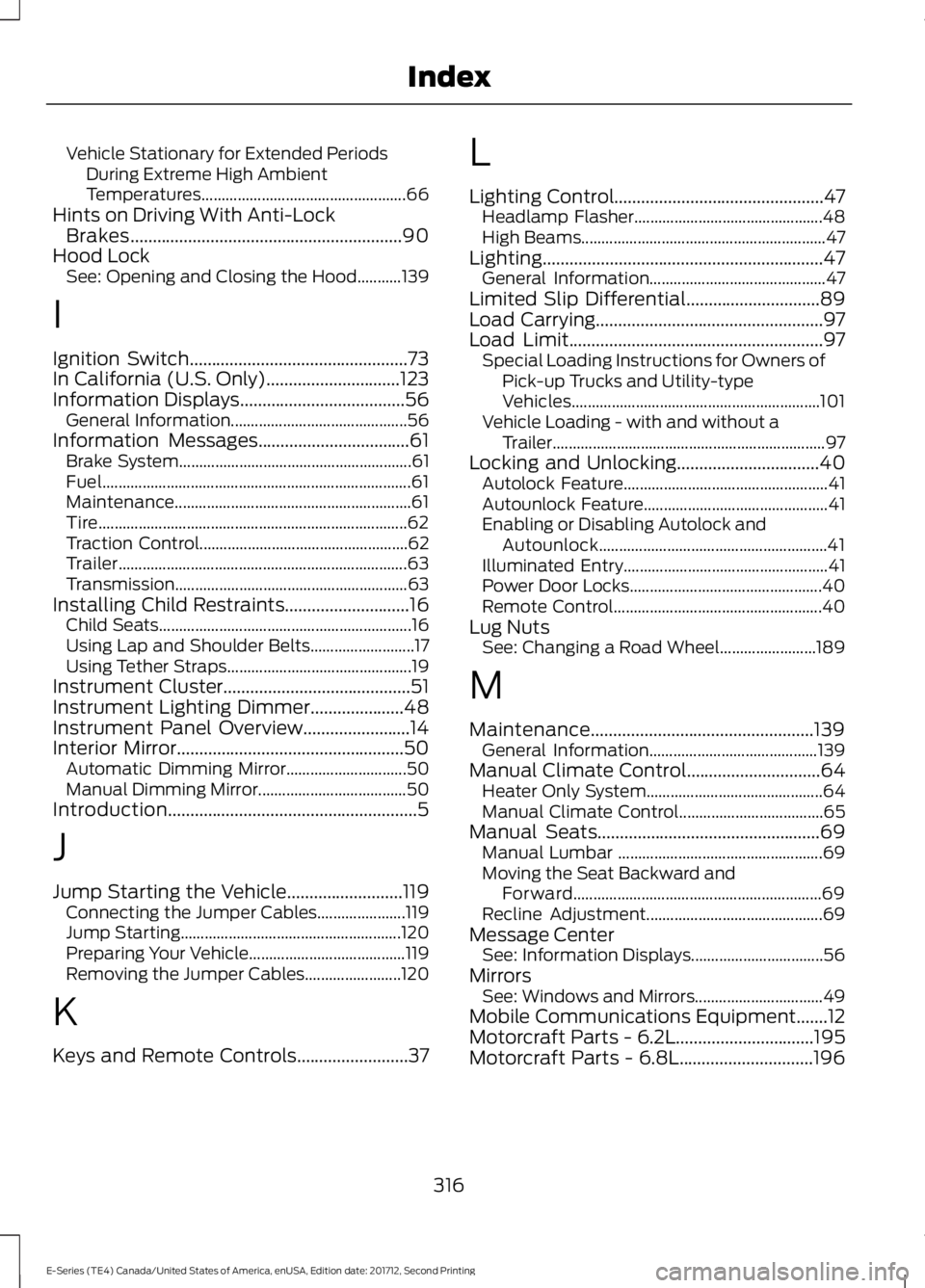
Vehicle Stationary for Extended PeriodsDuring Extreme High AmbientTemperatures...................................................66Hints on Driving With Anti-LockBrakes.............................................................90Hood LockSee: Opening and Closing the Hood...........139
I
Ignition Switch.................................................73In California (U.S. Only)..............................123Information Displays.....................................56General Information............................................56Information Messages..................................61Brake System..........................................................61Fuel.............................................................................61Maintenance...........................................................61Tire.............................................................................62Traction Control....................................................62Trailer........................................................................63Transmission..........................................................63Installing Child Restraints............................16Child Seats...............................................................16Using Lap and Shoulder Belts..........................17Using Tether Straps..............................................19Instrument Cluster..........................................51Instrument Lighting Dimmer.....................48Instrument Panel Overview........................14Interior Mirror...................................................50Automatic Dimming Mirror..............................50Manual Dimming Mirror.....................................50Introduction........................................................5
J
Jump Starting the Vehicle..........................119Connecting the Jumper Cables......................119Jump Starting.......................................................120Preparing Your Vehicle.......................................119Removing the Jumper Cables........................120
K
Keys and Remote Controls.........................37
L
Lighting Control...............................................47Headlamp Flasher...............................................48High Beams.............................................................47Lighting...............................................................47General Information............................................47Limited Slip Differential..............................89Load Carrying...................................................97Load Limit.........................................................97Special Loading Instructions for Owners ofPick-up Trucks and Utility-typeVehicles..............................................................101Vehicle Loading - with and without aTrailer....................................................................97Locking and Unlocking................................40Autolock Feature...................................................41Autounlock Feature..............................................41Enabling or Disabling Autolock andAutounlock.........................................................41Illuminated Entry...................................................41Power Door Locks................................................40Remote Control....................................................40Lug NutsSee: Changing a Road Wheel........................189
M
Maintenance..................................................139General Information..........................................139Manual Climate Control..............................64Heater Only System............................................64Manual Climate Control....................................65Manual Seats..................................................69Manual Lumbar ...................................................69Moving the Seat Backward andForward..............................................................69Recline Adjustment............................................69Message CenterSee: Information Displays.................................56MirrorsSee: Windows and Mirrors................................49Mobile Communications Equipment.......12Motorcraft Parts - 6.2L...............................195Motorcraft Parts - 6.8L..............................196
316
E-Series (TE4) Canada/United States of America, enUSA, Edition date: 201712, Second Printing
Index