instrument panel FORD E SERIES 2018 User Guide
[x] Cancel search | Manufacturer: FORD, Model Year: 2018, Model line: E SERIES, Model: FORD E SERIES 2018Pages: 323, PDF Size: 7.09 MB
Page 135 of 323
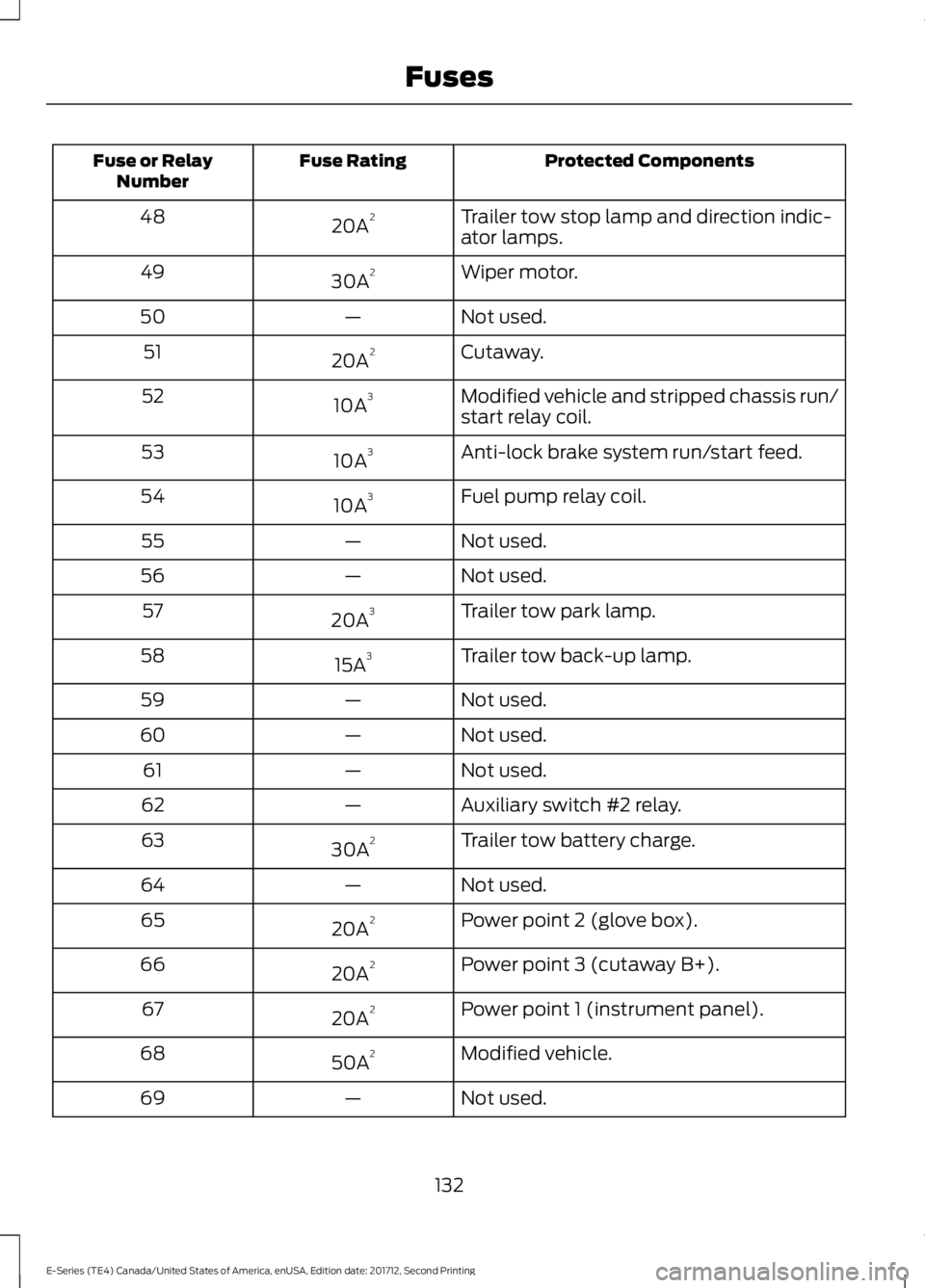
Protected ComponentsFuse RatingFuse or RelayNumber
Trailer tow stop lamp and direction indic-ator lamps.20A248
Wiper motor.30A249
Not used.—50
Cutaway.20A251
Modified vehicle and stripped chassis run/start relay coil.10A352
Anti-lock brake system run/start feed.10A353
Fuel pump relay coil.10A354
Not used.—55
Not used.—56
Trailer tow park lamp.20A357
Trailer tow back-up lamp.15A358
Not used.—59
Not used.—60
Not used.—61
Auxiliary switch #2 relay.—62
Trailer tow battery charge.30A263
Not used.—64
Power point 2 (glove box).20A265
Power point 3 (cutaway B+).20A266
Power point 1 (instrument panel).20A267
Modified vehicle.50A268
Not used.—69
132
E-Series (TE4) Canada/United States of America, enUSA, Edition date: 201712, Second Printing
Fuses
Page 139 of 323
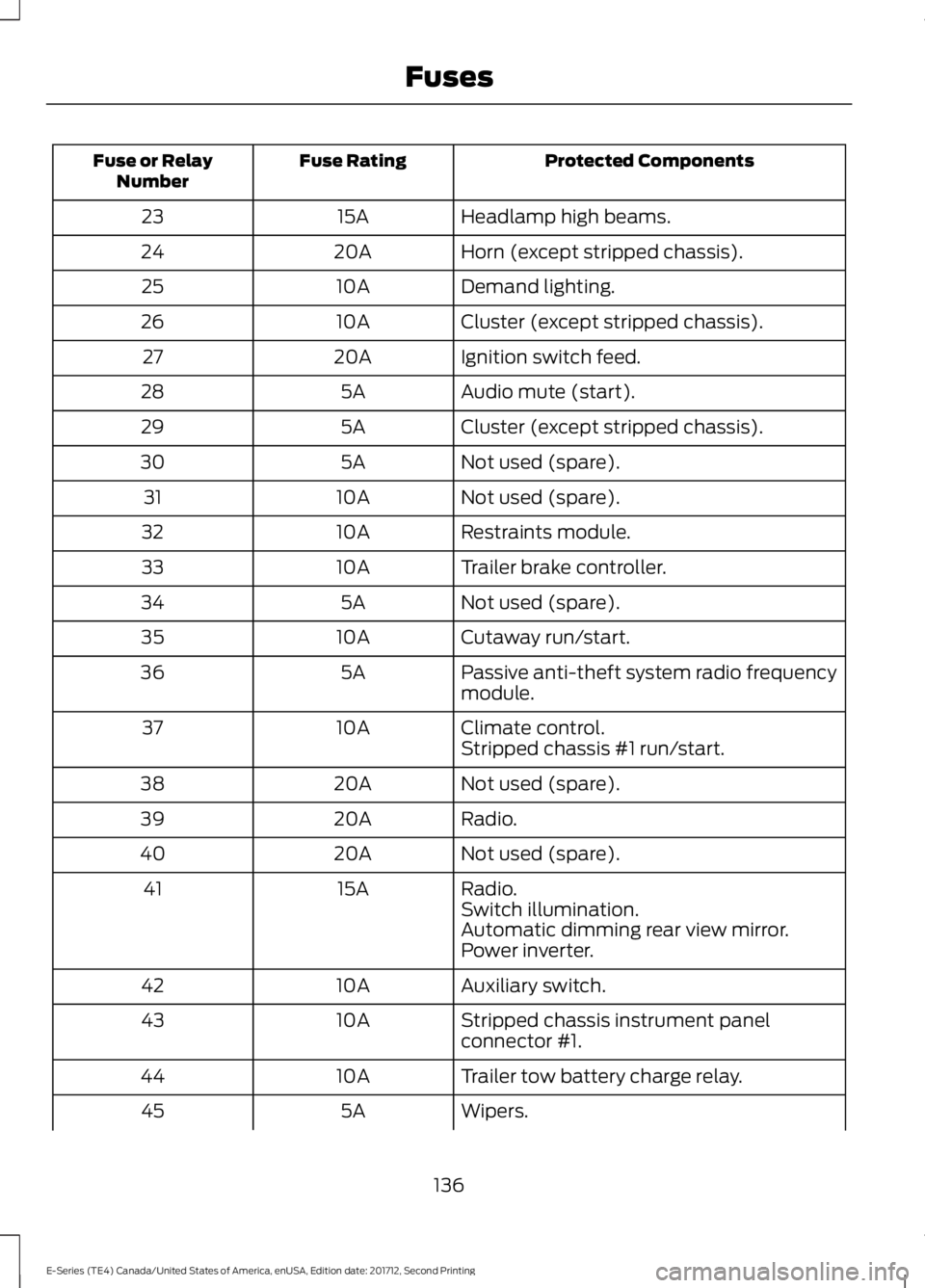
Protected ComponentsFuse RatingFuse or RelayNumber
Headlamp high beams.15A23
Horn (except stripped chassis).20A24
Demand lighting.10A25
Cluster (except stripped chassis).10A26
Ignition switch feed.20A27
Audio mute (start).5A28
Cluster (except stripped chassis).5A29
Not used (spare).5A30
Not used (spare).10A31
Restraints module.10A32
Trailer brake controller.10A33
Not used (spare).5A34
Cutaway run/start.10A35
Passive anti-theft system radio frequencymodule.5A36
Climate control.10A37Stripped chassis #1 run/start.
Not used (spare).20A38
Radio.20A39
Not used (spare).20A40
Radio.15A41Switch illumination.Automatic dimming rear view mirror.Power inverter.
Auxiliary switch.10A42
Stripped chassis instrument panelconnector #1.10A43
Trailer tow battery charge relay.10A44
Wipers.5A45
136
E-Series (TE4) Canada/United States of America, enUSA, Edition date: 201712, Second Printing
Fuses
Page 142 of 323
GENERAL INFORMATION
Have your vehicle serviced regularly to helpmaintain its roadworthiness and resalevalue. There is a large network ofauthorized dealers that are there to helpyou with their professional servicingexpertise. We believe that their speciallytrained technicians are best qualified toservice your vehicle properly and expertly.They are supported by a wide range ofhighly specialized tools developedspecifically for servicing your vehicle.
If your vehicle requires professional service,an authorized dealer can provide thenecessary parts and service. Check yourwarranty information to find out whichparts and services are covered.
Use only recommended fuels, lubricants,fluids and service parts conforming tospecifications. Motorcraft® parts aredesigned and built to provide the bestperformance in your vehicle.
Precautions
•Do not work on a hot engine.
•Make sure that nothing gets caught inmoving parts.
•Do not work on a vehicle with theengine running in an enclosed space,unless you are sure you have enoughventilation.
•Keep all open flames and other burningmaterial (such as cigarettes) awayfrom the battery and all fuel relatedparts.
Working with the Engine Off
1.Set the parking brake and shift to park(P).
2. Switch off the engine.
3. Block the wheels.
Working with the Engine On
WARNING
To reduce the risk of vehicle damageand/or personal burn injuries, do notstart your engine with the air cleanerremoved and do not remove it while theengine is running.
1.Set the parking brake and shift to park(P).
2. Block the wheels.
OPENING AND CLOSING THE
HOOD
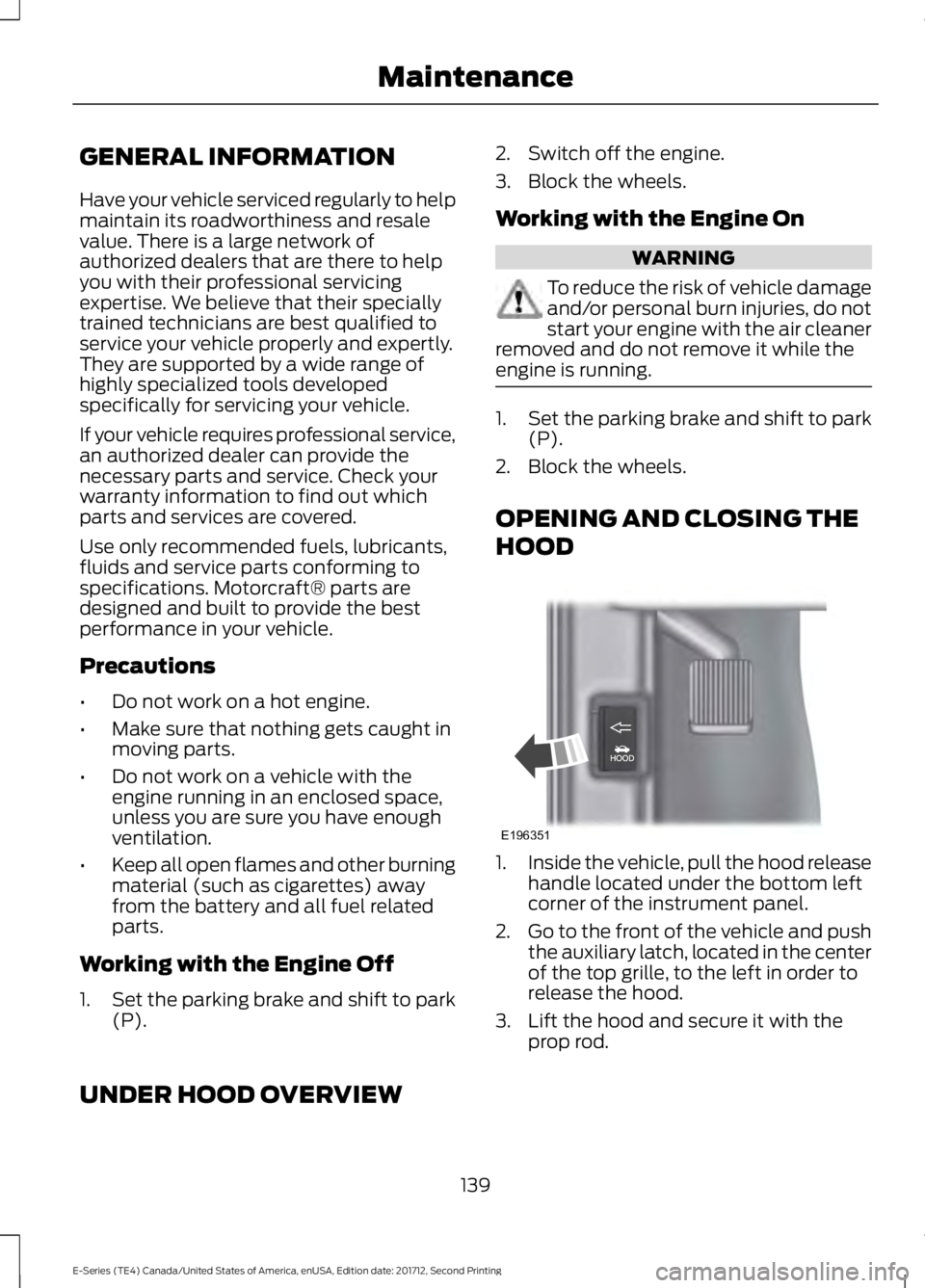
1.Inside the vehicle, pull the hood releasehandle located under the bottom leftcorner of the instrument panel.
2.Go to the front of the vehicle and pushthe auxiliary latch, located in the centerof the top grille, to the left in order torelease the hood.
3. Lift the hood and secure it with theprop rod.
UNDER HOOD OVERVIEW
139
E-Series (TE4) Canada/United States of America, enUSA, Edition date: 201712, Second Printing
MaintenanceE196351
Page 160 of 323
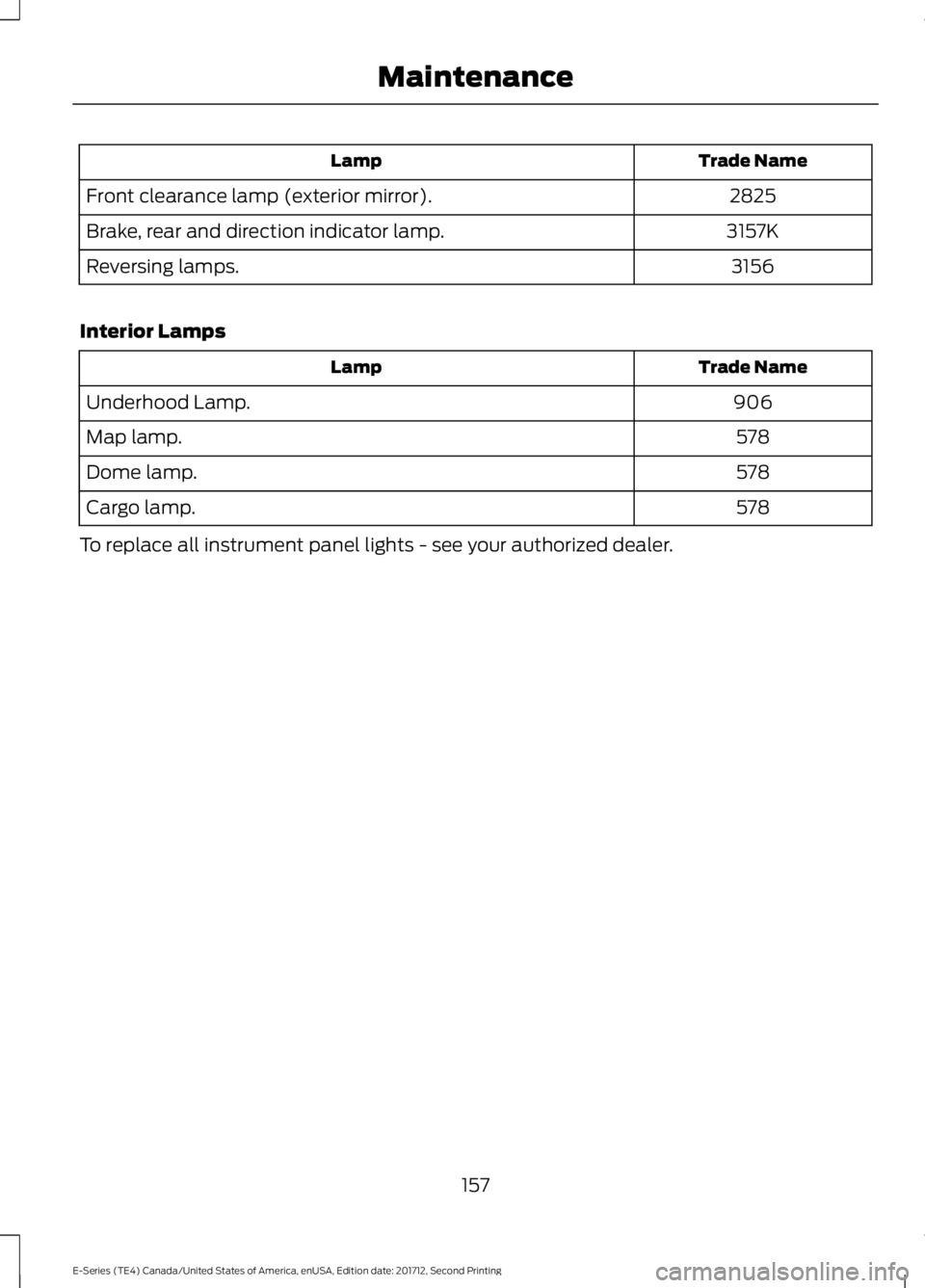
Trade NameLamp
2825Front clearance lamp (exterior mirror).
3157KBrake, rear and direction indicator lamp.
3156Reversing lamps.
Interior Lamps
Trade NameLamp
906Underhood Lamp.
578Map lamp.
578Dome lamp.
578Cargo lamp.
To replace all instrument panel lights - see your authorized dealer.
157
E-Series (TE4) Canada/United States of America, enUSA, Edition date: 201712, Second Printing
Maintenance
Page 165 of 323
To clean the windshield and wiper blades:
•Clean the windshield with anon-abrasive glass cleaner. Whencleaning the interior of the windshield,avoid getting any glass cleaner on theinstrument panel or door panels. Wipeany glass cleaner off these surfacesimmediately.
•For windshields contaminated withtree sap, chemicals, wax or bugs, cleanthe entire windshield using steel wool(no greater than 0000 grade) in acircular motion and rinse with water.
•Clean the wiper blades with isopropylrubbing alcohol or windshield washerconcentrate.
Note: Do not use razor blades or othersharp objects to clean or remove decalsfrom the inside of the heated rear window.The vehicle warranty does not coverdamage caused to the heated rear windowgrid lines.
CLEANING THE INTERIOR
WARNINGS
Do not use cleaning solvents, bleachor dye on the vehicle's seatbelts, asthese actions may weaken the beltwebbing.
On vehicles equipped withseat-mounted airbags, do not usechemical solvents or strongdetergents. Such products couldcontaminate the side airbag system andaffect performance of the side airbag in acrash.
For fabric, carpets, cloth seats and seatsequipped with side airbags:
•Remove dust and loose dirt with avacuum cleaner.
•Remove light stains and soil withMotorcraft Professional StrengthCarpet & Upholstery Cleaner.
•If grease or tar is present on thematerial, spot-clean the area first withMotorcraft Spot and Stain Remover. InCanada, use Motorcraft Multi-PurposeCleaner.
•If a ring forms on the fabric after spotcleaning, clean the entire areaimmediately (but do not oversaturate)or the ring will set.
•Do not use household cleaningproducts or glass cleaners, which canstain and discolor the fabric and affectthe flame retardant abilities of the seatmaterials.
CLEANING THE INSTRUMENT
PANEL AND INSTRUMENT
CLUSTER LENS
WARNING
Do not use chemical solvents orstrong detergents when cleaning thesteering wheel or instrument panelto avoid contamination of the airbagsystem.
Note:Follow the same procedure ascleaning leather seats for cleaning leatherinstrument panels and leather interior trimsurfaces.
Clean the instrument panel and clusterlens with a clean, damp and soft cloth,then use a clean, dry and soft cloth to drythese areas.
162
E-Series (TE4) Canada/United States of America, enUSA, Edition date: 201712, Second Printing
Vehicle Care
Page 166 of 323
•Avoid cleaners or polishes that increasethe gloss of the upper portion of theinstrument panel. The dull finish in thisarea helps protect you fromundesirable windshield reflection.
•Do not use any household cleaningproducts or glass cleaners as thesemay damage the finish of theinstrument panel, interior trim andcluster lens.
•Wash or wipe your hands clean if youhave been in contact with certainproducts such as insect repellent andsuntan lotion to avoid possible damageto the interior painted surfaces.
•Do not allow air fresheners and handsanitizers to spill onto interior surfaces.If a spill occurs, wipe off immediately.Your warranty may not cover thesedamages.
If a staining liquid like coffee or juice hasbeen spilled on the instrument panel or oninterior trim surfaces:
1. Wipe up spilled liquid using a clean,soft cloth as quickly as possible.
2. Use Motorcraft Premium Leather andVinyl Cleaner or a commerciallyavailable leather cleaning product forautomotive interiors. Test any cleaneror stain remover on an inconspicuousarea.
3. Alternatively, wipe the surface with aclean, soft cloth and a mild soap andwater solution. Dry the area with aclean, soft cloth.
4. If necessary, apply more soap andwater solution or cleaning product toa clean, soft cloth and press it onto thesoiled area. Allow this to set at roomtemperature for 30 minutes.
5. Remove the soaked cloth, then with aclean, damp cloth, use a rubbingmotion for 60 seconds on the soiledarea.
6. Dry the area with a clean, soft cloth.
REPAIRING MINOR PAINT
DAMAGE
Authorized dealers have touch-up paint tomatch your vehicle’s color. Your vehiclecolor code is printed on a sticker on thefront, left-hand side door jamb. Take yourcolor code to your authorized dealer tomake sure you get the correct color.
Before repairing minor paint damage, usea cleaner such as Motorcraft Bug and TarRemover to remove particles such as birddroppings, tree sap, insect deposits, tarspots, road salt and industrial fallout.
Always read the instructions before usingcleaning products.
CLEANING THE WHEELS
1. Regularly clean them with a wheelcleaner. We recommend that you useFord approved wheel cleaner ifavailable.
2. Remove dirt and brake dust with asponge.
3.Remove tar and grease with a bug andtar remover. We recommend that youuse Ford approved bug and tar removerif available.
4.Thoroughly rinse the wheels with waterafter cleaning.
If you intend on parking your vehicle for anextended period after cleaning the wheelswith a wheel cleaner, drive your vehicle fora few minutes before doing so. Thisreduces the risk of corrosion of the brakediscs, brake pads and linings.
Do not clean the wheels when they are hot.
Note: Some car washes could damagewheel rims and covers.
163
E-Series (TE4) Canada/United States of America, enUSA, Edition date: 201712, Second Printing
Vehicle Care
Page 200 of 323
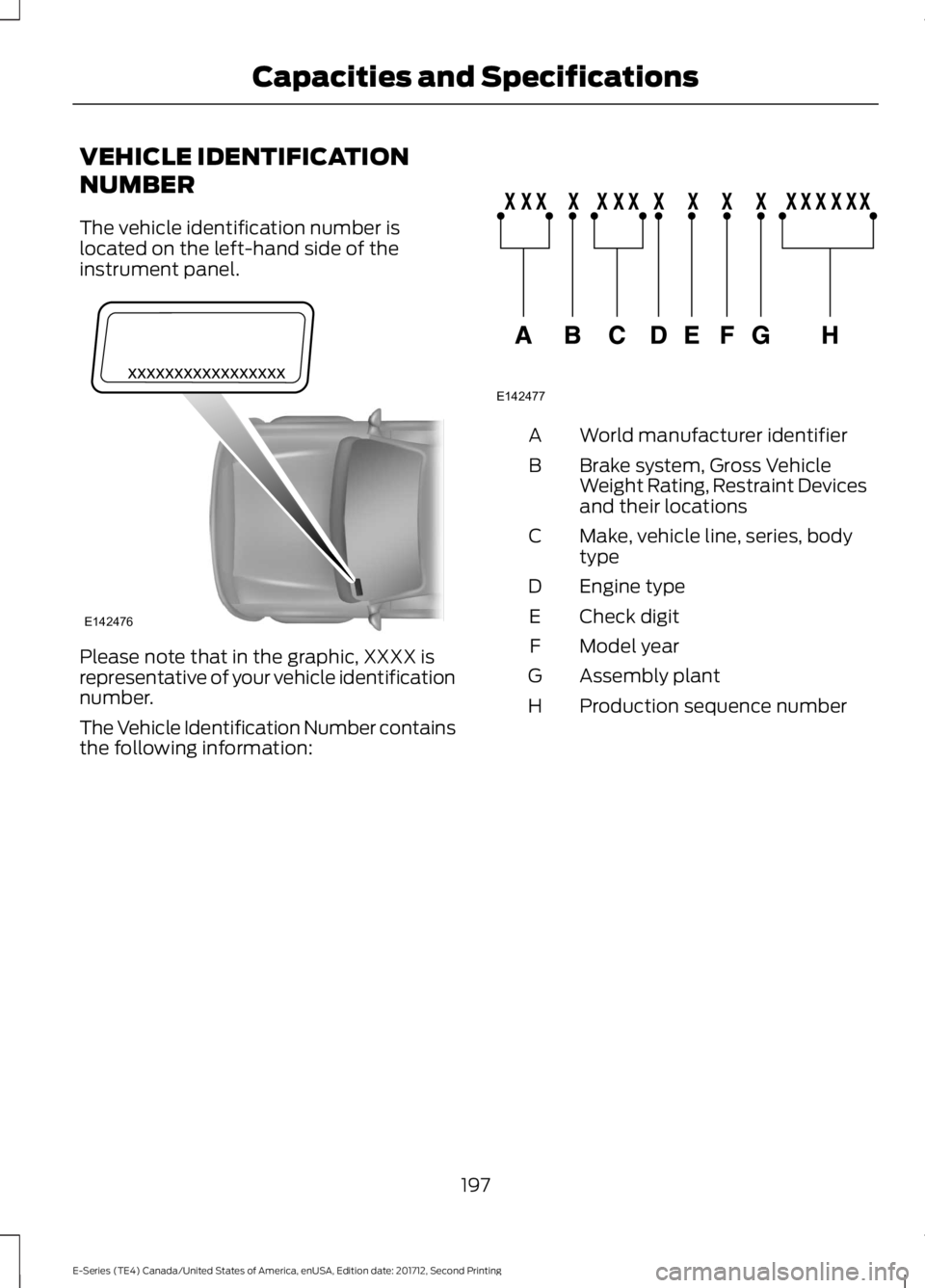
VEHICLE IDENTIFICATION
NUMBER
The vehicle identification number islocated on the left-hand side of theinstrument panel.
Please note that in the graphic, XXXX isrepresentative of your vehicle identificationnumber.
The Vehicle Identification Number containsthe following information:
World manufacturer identifierA
Brake system, Gross VehicleWeight Rating, Restraint Devicesand their locations
B
Make, vehicle line, series, bodytypeC
Engine typeD
Check digitE
Model yearF
Assembly plantG
Production sequence numberH
197
E-Series (TE4) Canada/United States of America, enUSA, Edition date: 201712, Second Printing
Capacities and SpecificationsE142476 E142477
Page 269 of 323
•An authorized dealer needs to installmobile communications systems.Improper installation may harm theoperation of your vehicle, particularlyif the manufacturer did not design themobile communication systemspecifically for automotive use.
•If you or an authorized Ford dealer addany non-Ford electrical or electronicaccessories or components to yourvehicle, you may adversely affectbattery performance and durability. Inaddition, you may also adversely affectthe performance of other electricalsystems in the vehicle.
AUXILIARY SWITCHES
For maximum vehicle performance, keepthe following information in mind whenadding accessories or equipment to yourvehicle:
•When adding accessories, equipment,passengers and luggage to yourvehicle, do not exceed the total weightcapacity of the vehicle or of the frontor rear axle (GVWR or GAWR asindicated on the Safety ComplianceCertification label). Ask an authorizeddealer for specific weight information.
•The Federal CommunicationsCommission (FCC) and CanadianRadio TelecommunicationsCommission (CRTC) regulate the useof mobile communications systemsequipped with radio transmitters, forexample, two-way radios, telephonesand theft alarms. Any such equipmentinstalled in your vehicle should complywith Federal CommunicationsCommission (FCC) and CanadianRadio TelecommunicationsCommission (CRTC) regulations, andshould be installed by an authorizeddealer.
•An authorized dealer needs to installmobile communications systems.Improper installation may harm theoperation of your vehicle, particularlyif the manufacturer did not design themobile communication systemspecifically for automotive use.
•If you or an authorized Ford dealer addany non-Ford electrical or electronicaccessories or components to yourvehicle, you may adversely affectbattery performance and durability. Inaddition, you may also adversely affectthe performance of other electricalsystems in the vehicle.
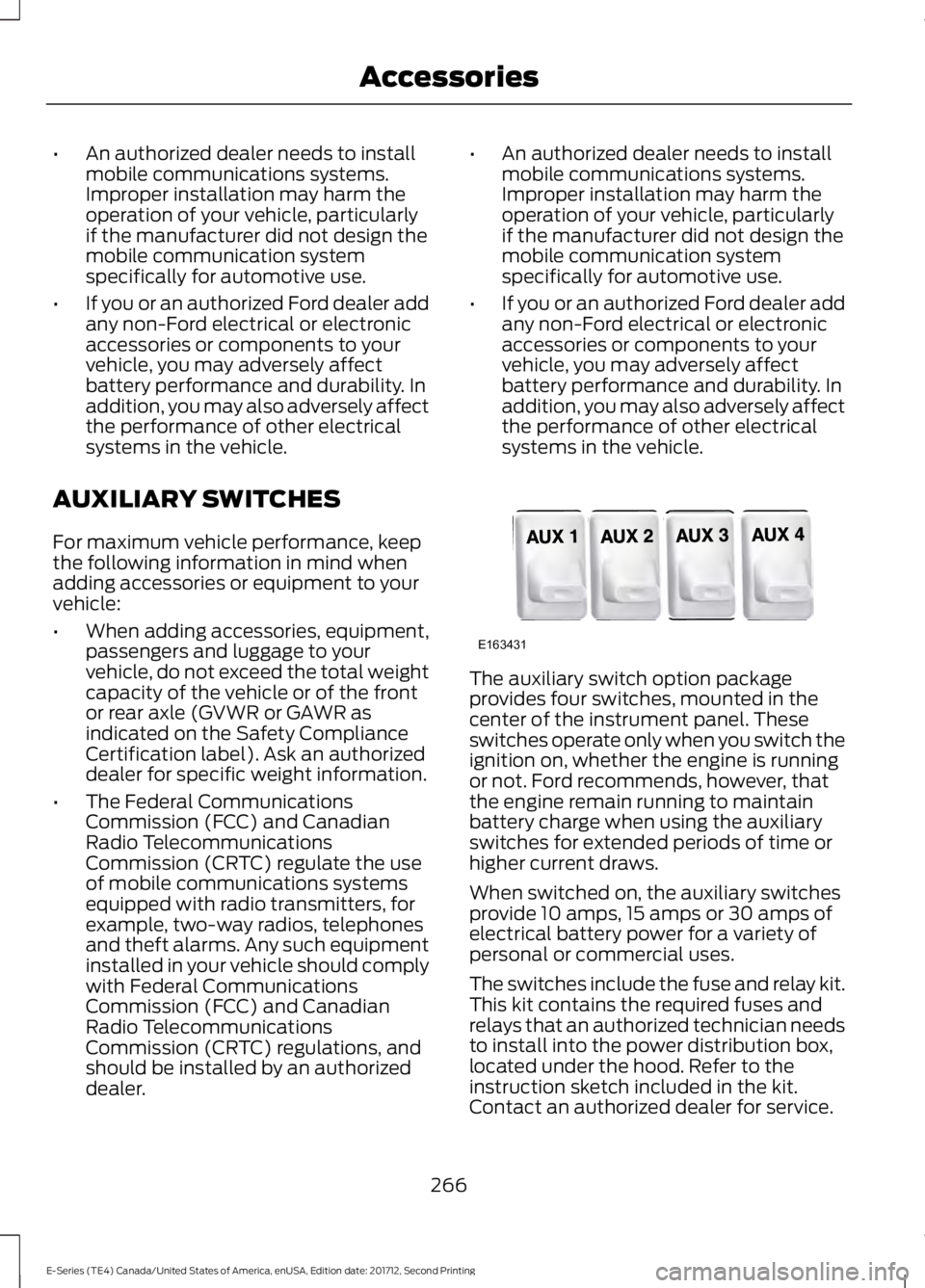
The auxiliary switch option packageprovides four switches, mounted in thecenter of the instrument panel. Theseswitches operate only when you switch theignition on, whether the engine is runningor not. Ford recommends, however, thatthe engine remain running to maintainbattery charge when using the auxiliaryswitches for extended periods of time orhigher current draws.
When switched on, the auxiliary switchesprovide 10 amps, 15 amps or 30 amps ofelectrical battery power for a variety ofpersonal or commercial uses.
The switches include the fuse and relay kit.This kit contains the required fuses andrelays that an authorized technician needsto install into the power distribution box,located under the hood. Refer to theinstruction sketch included in the kit.Contact an authorized dealer for service.
266
E-Series (TE4) Canada/United States of America, enUSA, Edition date: 201712, Second Printing
AccessoriesE163431
Page 317 of 323
Changing a Fuse............................................137Fuses........................................................................137Changing a Road Wheel............................189Dissimilar Spare Wheel and Tire AssemblyInformation......................................................189Tire Change Procedure....................................190Changing the 12V Battery...........................151Dual Batteries.......................................................152Reconnecting the Battery.................................151Changing the Engine Air Filter.................158Changing the Wiper Blades......................152Checking the Wiper Blades.......................152Child Restraint and SeatbeltMaintenance.................................................28Child Restraint Positioning..........................22Child Safety.......................................................15General Information.............................................15Cleaning Products........................................159Materials................................................................159Cleaning the Engine......................................161Cleaning the Exterior...................................159Cleaning the Headlamps................................160Exterior Chrome Parts......................................160Exterior Plastic Parts.........................................160Stripes or Graphics............................................160Underbody............................................................160Under Hood..........................................................160Cleaning the Instrument Panel andInstrument Cluster Lens..........................162Cleaning the Interior....................................162Cleaning the Wheels...................................163Cleaning the Windows and WiperBlades.............................................................161Climate Control..............................................64Coolant CheckSee: Engine Coolant Check.............................142Crash Sensors and Airbag Indicator........36Cruise Control..................................................45Principle of Operation........................................95Cruise controlSee: Using Cruise Control.................................95Customer Assistance..................................122
D
Data Recording..................................................7Event Data Recording...........................................8Service Data Recording.........................................7
Daytime Running Lamps............................48Digital Radio...................................................213HD Radio Reception and StationTroubleshooting.............................................214Direction Indicators.......................................48Doors and Locks.............................................40Driver and Passenger Airbags.....................31Children and Airbags...........................................35Passenger Airbag On and Off Switch ...........31Proper Driver and Front Passenger SeatingAdjustment........................................................35Driving Aids......................................................96Driving Hints....................................................114Driving Through Water.................................115DRLSee: Daytime Running Lamps.........................48
E
Economical Driving.......................................114Electromagnetic Compatibility..............288Emission Law...................................................82Noise Emissions Warranty, ProhibitedTampering Acts and Maintenance...........83Tampering With a Noise ControlSystem................................................................82End User License Agreement.................290SYNC End User License Agreement(EULA).............................................................290Engine Block Heater......................................75Using the Engine Block Heater........................75Engine Coolant Check.................................142Adding Coolant....................................................143Coolant Change..................................................145Engine Coolant TemperatureManagement...................................................146Fail-Safe Cooling................................................145Recycled Coolant...............................................144Severe Climates..................................................144Engine Emission Control.............................82Engine ImmobilizerSee: Passive Anti-Theft System.....................43Engine Oil Check............................................141Adding Engine Oil................................................141Engine Oil Dipstick........................................141Engine Specifications - 6.2L.....................194Drivebelt Routing................................................194
314
E-Series (TE4) Canada/United States of America, enUSA, Edition date: 201712, Second Printing
Index
Page 319 of 323
Vehicle Stationary for Extended PeriodsDuring Extreme High AmbientTemperatures...................................................66Hints on Driving With Anti-LockBrakes.............................................................90Hood LockSee: Opening and Closing the Hood...........139
I
Ignition Switch.................................................73In California (U.S. Only)..............................123Information Displays.....................................56General Information............................................56Information Messages..................................61Brake System..........................................................61Fuel.............................................................................61Maintenance...........................................................61Tire.............................................................................62Traction Control....................................................62Trailer........................................................................63Transmission..........................................................63Installing Child Restraints............................16Child Seats...............................................................16Using Lap and Shoulder Belts..........................17Using Tether Straps..............................................19Instrument Cluster..........................................51Instrument Lighting Dimmer.....................48Instrument Panel Overview........................14Interior Mirror...................................................50Automatic Dimming Mirror..............................50Manual Dimming Mirror.....................................50Introduction........................................................5
J
Jump Starting the Vehicle..........................119Connecting the Jumper Cables......................119Jump Starting.......................................................120Preparing Your Vehicle.......................................119Removing the Jumper Cables........................120
K
Keys and Remote Controls.........................37
L
Lighting Control...............................................47Headlamp Flasher...............................................48High Beams.............................................................47Lighting...............................................................47General Information............................................47Limited Slip Differential..............................89Load Carrying...................................................97Load Limit.........................................................97Special Loading Instructions for Owners ofPick-up Trucks and Utility-typeVehicles..............................................................101Vehicle Loading - with and without aTrailer....................................................................97Locking and Unlocking................................40Autolock Feature...................................................41Autounlock Feature..............................................41Enabling or Disabling Autolock andAutounlock.........................................................41Illuminated Entry...................................................41Power Door Locks................................................40Remote Control....................................................40Lug NutsSee: Changing a Road Wheel........................189
M
Maintenance..................................................139General Information..........................................139Manual Climate Control..............................64Heater Only System............................................64Manual Climate Control....................................65Manual Seats..................................................69Manual Lumbar ...................................................69Moving the Seat Backward andForward..............................................................69Recline Adjustment............................................69Message CenterSee: Information Displays.................................56MirrorsSee: Windows and Mirrors................................49Mobile Communications Equipment.......12Motorcraft Parts - 6.2L...............................195Motorcraft Parts - 6.8L..............................196
316
E-Series (TE4) Canada/United States of America, enUSA, Edition date: 201712, Second Printing
Index