change time FORD E SERIES 2018 Owner's Manual
[x] Cancel search | Manufacturer: FORD, Model Year: 2018, Model line: E SERIES, Model: FORD E SERIES 2018Pages: 323, PDF Size: 7.09 MB
Page 225 of 323
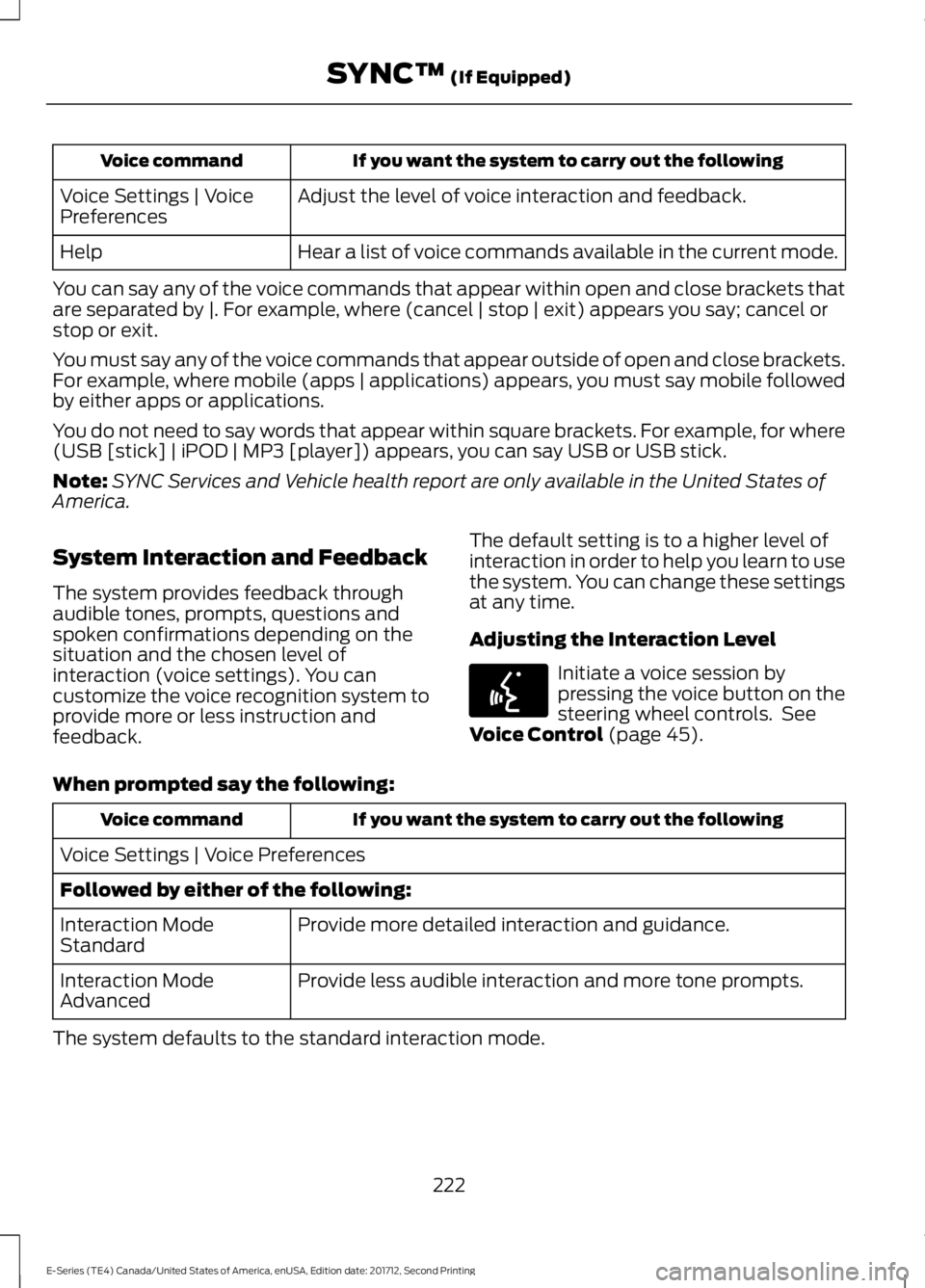
If you want the system to carry out the followingVoice command
Adjust the level of voice interaction and feedback.Voice Settings | VoicePreferences
Hear a list of voice commands available in the current mode.Help
You can say any of the voice commands that appear within open and close brackets thatare separated by |. For example, where (cancel | stop | exit) appears you say; cancel orstop or exit.
You must say any of the voice commands that appear outside of open and close brackets.For example, where mobile (apps | applications) appears, you must say mobile followedby either apps or applications.
You do not need to say words that appear within square brackets. For example, for where(USB [stick] | iPOD | MP3 [player]) appears, you can say USB or USB stick.
Note:SYNC Services and Vehicle health report are only available in the United States ofAmerica.
System Interaction and Feedback
The system provides feedback throughaudible tones, prompts, questions andspoken confirmations depending on thesituation and the chosen level ofinteraction (voice settings). You cancustomize the voice recognition system toprovide more or less instruction andfeedback.
The default setting is to a higher level ofinteraction in order to help you learn to usethe system. You can change these settingsat any time.
Adjusting the Interaction Level
Initiate a voice session bypressing the voice button on thesteering wheel controls. SeeVoice Control (page 45).
When prompted say the following:
If you want the system to carry out the followingVoice command
Voice Settings | Voice Preferences
Followed by either of the following:
Provide more detailed interaction and guidance.Interaction ModeStandard
Provide less audible interaction and more tone prompts.Interaction ModeAdvanced
The system defaults to the standard interaction mode.
222
E-Series (TE4) Canada/United States of America, enUSA, Edition date: 201712, Second Printing
SYNC™ (If Equipped)E142599
Page 233 of 323
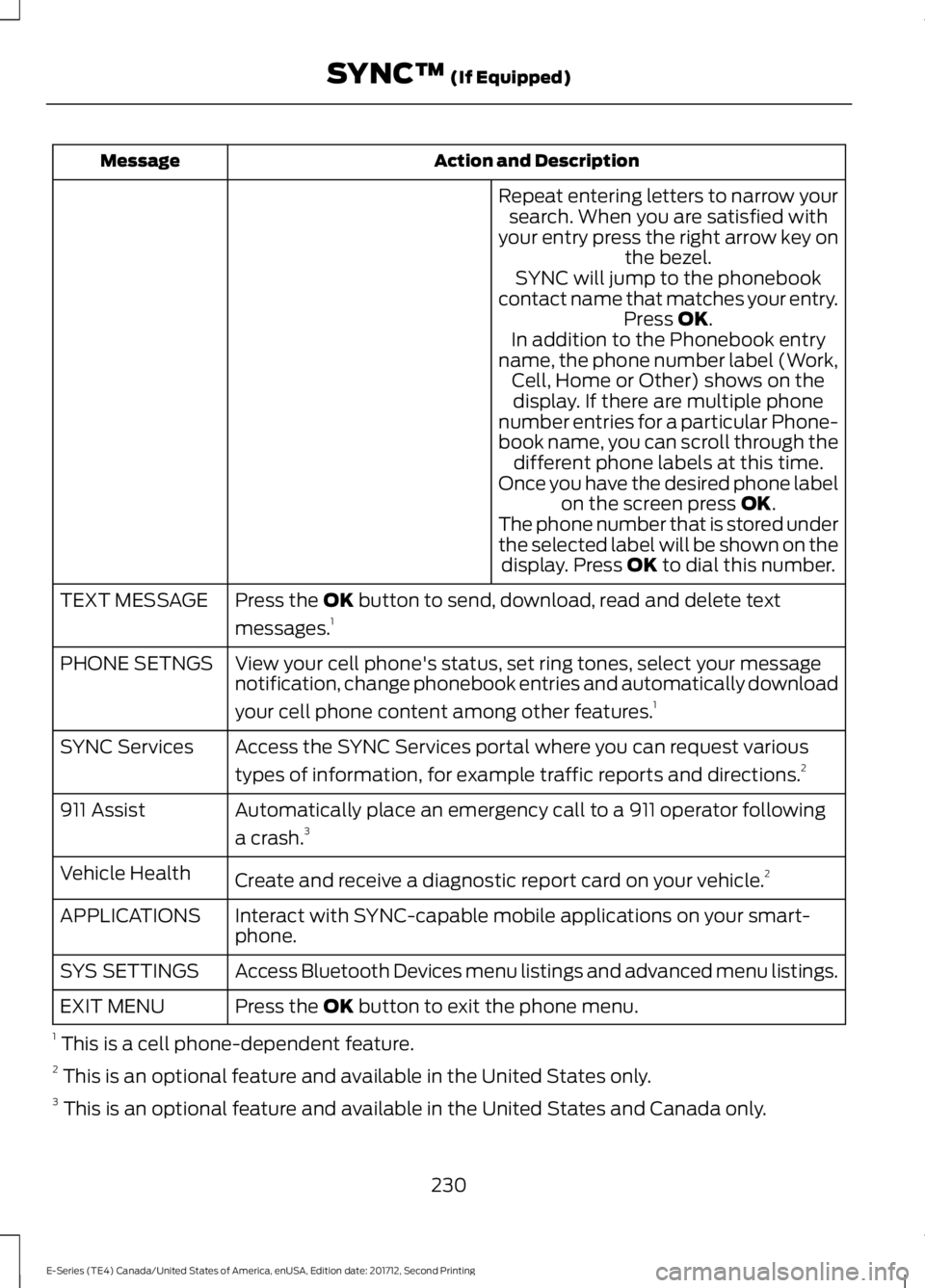
Action and DescriptionMessage
Repeat entering letters to narrow yoursearch. When you are satisfied withyour entry press the right arrow key onthe bezel.SYNC will jump to the phonebookcontact name that matches your entry.Press OK.In addition to the Phonebook entryname, the phone number label (Work,Cell, Home or Other) shows on thedisplay. If there are multiple phonenumber entries for a particular Phone-book name, you can scroll through thedifferent phone labels at this time.Once you have the desired phone labelon the screen press OK.The phone number that is stored underthe selected label will be shown on thedisplay. Press OK to dial this number.
Press the OK button to send, download, read and delete text
messages.1TEXT MESSAGE
View your cell phone's status, set ring tones, select your messagenotification, change phonebook entries and automatically download
your cell phone content among other features.1
PHONE SETNGS
Access the SYNC Services portal where you can request various
types of information, for example traffic reports and directions.2SYNC Services
Automatically place an emergency call to a 911 operator following
a crash.3911 Assist
Create and receive a diagnostic report card on your vehicle.2Vehicle Health
Interact with SYNC-capable mobile applications on your smart-phone.APPLICATIONS
Access Bluetooth Devices menu listings and advanced menu listings.SYS SETTINGS
Press the OK button to exit the phone menu.EXIT MENU
1 This is a cell phone-dependent feature.2 This is an optional feature and available in the United States only.3 This is an optional feature and available in the United States and Canada only.
230
E-Series (TE4) Canada/United States of America, enUSA, Edition date: 201712, Second Printing
SYNC™ (If Equipped)
Page 237 of 323
Action and DescriptionMessage
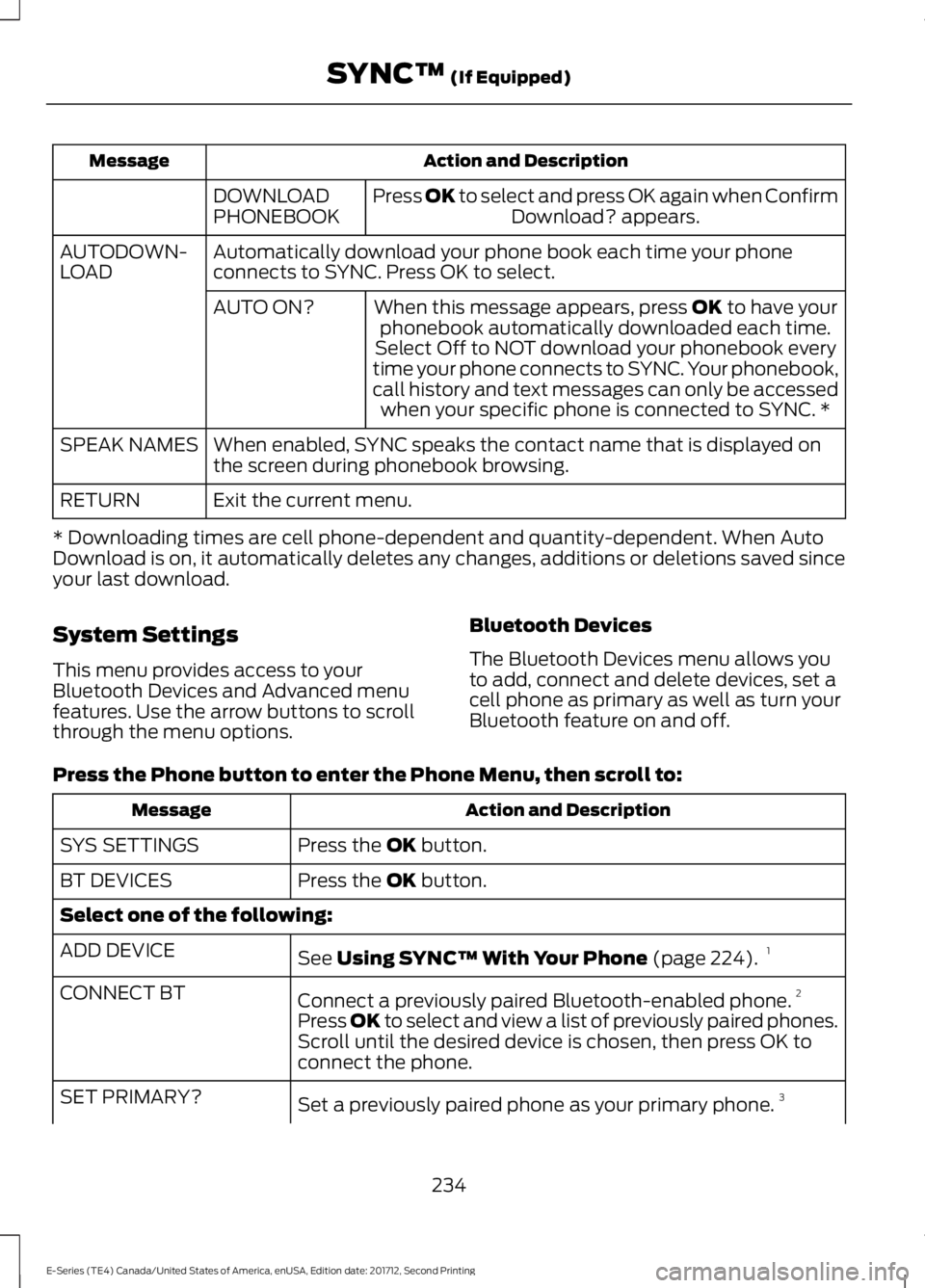
Press OK to select and press OK again when ConfirmDownload? appears.DOWNLOADPHONEBOOK
Automatically download your phone book each time your phoneconnects to SYNC. Press OK to select.AUTODOWN-LOAD
When this message appears, press OK to have yourphonebook automatically downloaded each time.AUTO ON?
Select Off to NOT download your phonebook everytime your phone connects to SYNC. Your phonebook,call history and text messages can only be accessedwhen your specific phone is connected to SYNC. *
When enabled, SYNC speaks the contact name that is displayed onthe screen during phonebook browsing.SPEAK NAMES
Exit the current menu.RETURN
* Downloading times are cell phone-dependent and quantity-dependent. When AutoDownload is on, it automatically deletes any changes, additions or deletions saved sinceyour last download.
System Settings
This menu provides access to yourBluetooth Devices and Advanced menufeatures. Use the arrow buttons to scrollthrough the menu options.
Bluetooth Devices
The Bluetooth Devices menu allows youto add, connect and delete devices, set acell phone as primary as well as turn yourBluetooth feature on and off.
Press the Phone button to enter the Phone Menu, then scroll to:
Action and DescriptionMessage
Press the OK button.SYS SETTINGS
Press the OK button.BT DEVICES
Select one of the following:
See Using SYNC™ With Your Phone (page 224).1ADD DEVICE
Connect a previously paired Bluetooth-enabled phone.2CONNECT BT
Press OK to select and view a list of previously paired phones.Scroll until the desired device is chosen, then press OK toconnect the phone.
Set a previously paired phone as your primary phone.3SET PRIMARY?
234
E-Series (TE4) Canada/United States of America, enUSA, Edition date: 201712, Second Printing
SYNC™ (If Equipped)
Page 244 of 323
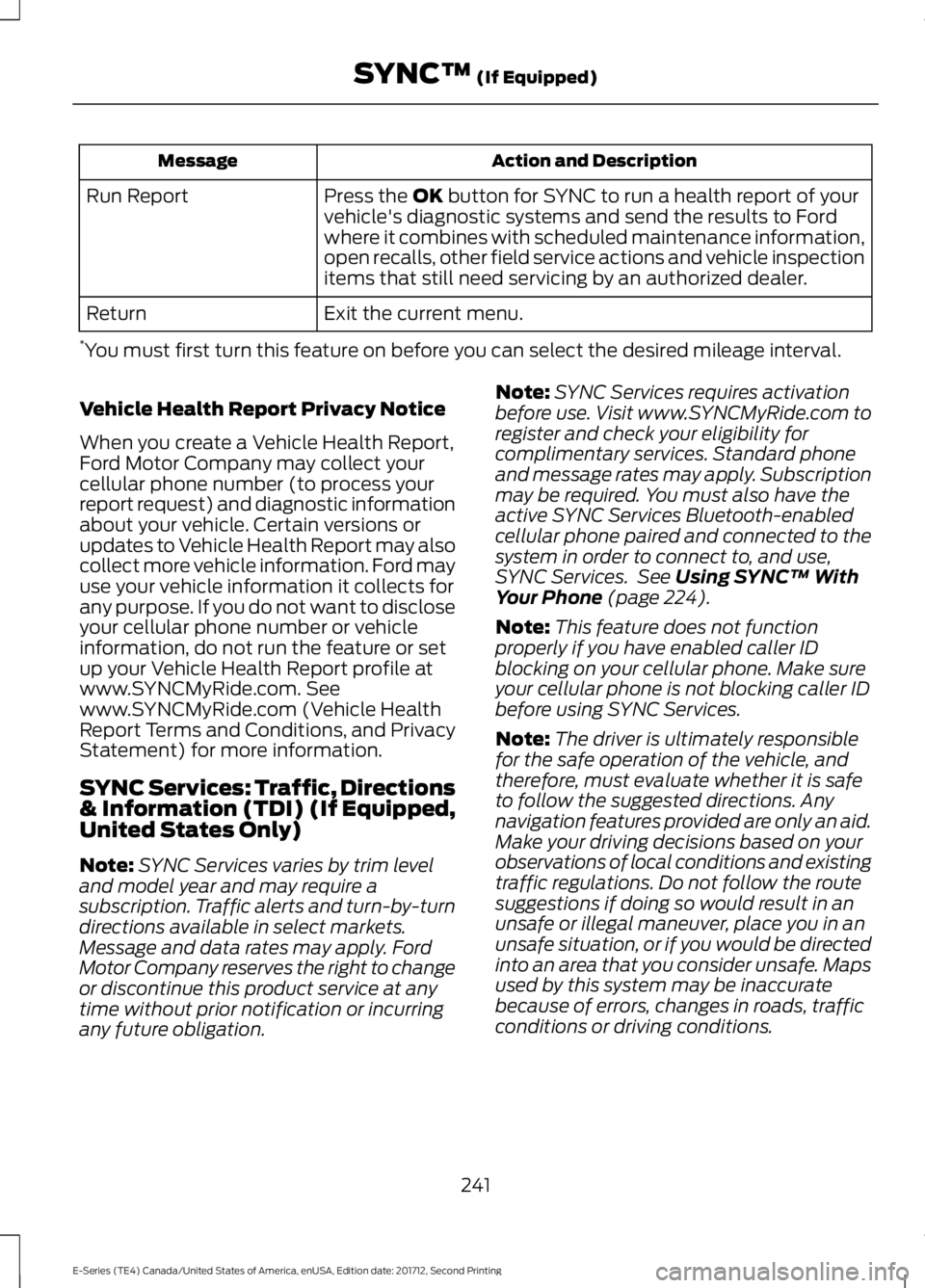
Action and DescriptionMessage
Press the OK button for SYNC to run a health report of yourvehicle's diagnostic systems and send the results to Fordwhere it combines with scheduled maintenance information,open recalls, other field service actions and vehicle inspectionitems that still need servicing by an authorized dealer.
Run Report
Exit the current menu.Return
*You must first turn this feature on before you can select the desired mileage interval.
Vehicle Health Report Privacy Notice
When you create a Vehicle Health Report,Ford Motor Company may collect yourcellular phone number (to process yourreport request) and diagnostic informationabout your vehicle. Certain versions orupdates to Vehicle Health Report may alsocollect more vehicle information. Ford mayuse your vehicle information it collects forany purpose. If you do not want to discloseyour cellular phone number or vehicleinformation, do not run the feature or setup your Vehicle Health Report profile atwww.SYNCMyRide.com. Seewww.SYNCMyRide.com (Vehicle HealthReport Terms and Conditions, and PrivacyStatement) for more information.
SYNC Services: Traffic, Directions& Information (TDI) (If Equipped,United States Only)
Note:SYNC Services varies by trim leveland model year and may require asubscription. Traffic alerts and turn-by-turndirections available in select markets.Message and data rates may apply. FordMotor Company reserves the right to changeor discontinue this product service at anytime without prior notification or incurringany future obligation.
Note:SYNC Services requires activationbefore use. Visit www.SYNCMyRide.com toregister and check your eligibility forcomplimentary services. Standard phoneand message rates may apply. Subscriptionmay be required. You must also have theactive SYNC Services Bluetooth-enabledcellular phone paired and connected to thesystem in order to connect to, and use,SYNC Services. See Using SYNC™ WithYour Phone (page 224).
Note:This feature does not functionproperly if you have enabled caller IDblocking on your cellular phone. Make sureyour cellular phone is not blocking caller IDbefore using SYNC Services.
Note:The driver is ultimately responsiblefor the safe operation of the vehicle, andtherefore, must evaluate whether it is safeto follow the suggested directions. Anynavigation features provided are only an aid.Make your driving decisions based on yourobservations of local conditions and existingtraffic regulations. Do not follow the routesuggestions if doing so would result in anunsafe or illegal maneuver, place you in anunsafe situation, or if you would be directedinto an area that you consider unsafe. Mapsused by this system may be inaccuratebecause of errors, changes in roads, trafficconditions or driving conditions.
241
E-Series (TE4) Canada/United States of America, enUSA, Edition date: 201712, Second Printing
SYNC™ (If Equipped)
Page 272 of 323
Less Cost to Properly Maintain YourVehicle
Ford Protect extended service plan alsooffers a Premium Maintenance Plan thatcovers all scheduled maintenance, andselected wear items. The coverage isprepaid, so you never have to worry aboutthe cost of your vehicle’s maintenance.
Covered maintenance includes:
•Windshield wiper blades.
•Spark plugs.
•The clutch disc (if equipped).
•Brake pads and linings.
•Shock absorbers.
•Struts.
•Engine Belts.
•Engine coolant hoses, clamps ando-rings.
•Diesel exhaust fluid replenishment (ifequipped).
•Cabin air filter replacement every20,000 mi (32,000 km) (electricvehicles only).
Interest Free Finance Options
Just a 10% down payment will provide youwith an affordable, no interest, no feepayment program allowing you all thesecurity and benefits Ford Protectextended service plan has to offer whilepaying over time. You are pre-approvedwith no credit check or hassles. To learnmore, call our Ford Protect extendedservice plan specialists at 800-367-3377.
Ford Protect Extended Service PlanP.O. Box 321067Detroit, MI 48232
Ford Protect Extended ServicePlan (CANADA ONLY)
You can get more protection for yourvehicle by purchasing a Ford Protectextended service plan. Ford Protectextended service plan is the only servicecontract backed by Ford Motor Companyof Canada, Limited. Depending on the planyou purchase, Ford Protect extendedservice plan provides benefits such as:
•Rental reimbursement.
•Coverage for certain maintenance andwear items.
•Protection against repair costs afteryour New Vehicle Limited WarrantyCoverage expires.
•Roadside Assistance benefits.
There are several Ford Protect extendedservice plans available in various time,distance and deductible combinations.Each plan is tailored to fit your own drivingneeds, including reimbursement for towingand rental. When you purchase FordProtect extended service plan, you receiveadded peace-of-mind protectionthroughout Canada, the United States andMexico, provided by a network ofparticipating authorized Ford MotorCompany dealers.
Note:Repairs performed outside ofCanada, the United States and Mexico arenot eligible for Ford Protect extendedservice plan coverage.
This information is subject to change. Formore information; visit your local Ford ofCanada dealer or www.ford.ca to find theFord Protect extended service plan that isright for you.
269
E-Series (TE4) Canada/United States of America, enUSA, Edition date: 201712, Second Printing
Ford Protect
Page 298 of 323
![FORD E SERIES 2018 Owners Manual •THERE ARE NO WARRANTIES OTHERTHAN THOSE THAT MAY EXPRESSLYBE PROVIDED FOR YOUR NEWVEHICLE.
Adobe
Contains Adobe® [Flash® Player] or[AIR®] technology by Adobe SystemsIncorporated. This [Licensee](/img/11/58730/w960_58730-297.png "FORD E SERIES 2018 Owners Manual •THERE ARE NO WARRANTIES OTHERTHAN THOSE THAT MAY EXPRESSLYBE PROVIDED FOR YOUR NEWVEHICLE.
Adobe
Contains Adobe® [Flash® Player] or[AIR®] technology by Adobe SystemsIncorporated. This [Licensee")
•THERE ARE NO WARRANTIES OTHERTHAN THOSE THAT MAY EXPRESSLYBE PROVIDED FOR YOUR NEWVEHICLE.
Adobe
Contains Adobe® [Flash® Player] or[AIR®] technology by Adobe SystemsIncorporated. This [Licensee Product]contains [Adobe® Flash® Player][Adobe® AIR®] software under licensefrom Adobe Systems Incorporated,Copyright ©1995-2009 AdobeMacromedia Software LLC. All rightsreserved. Adobe, Flash and AIR aretrademarks of Adobe SystemsIncorporated.
End User Notice
Microsoft® Windows® Mobile forAutomotive Important SafetyInformation
This system Ford SYNC contains softwarethat is licensed to Manufacturer FORDMOTOR COMPANY by an affiliate ofMicrosoft Corporation pursuant to a licenseagreement. Any removal, reproduction,reverse engineering or other unauthorizeduse of the software from this system inviolation of the license agreement is strictlyprohibited and may subject you to legalaction.
Read and follow instructions: Beforeusing your Windows Automotive- basedsystem, read and follow all instructionsand safety information provided in this enduser manual ("User's Guide"). Notfollowing precautions found in this User'sGuide can lead to an accident or otherserious consequences.
Keep User's Guide in vehicle: When keptin the vehicle, the User's Guide will be aready reference for you and other usersunfamiliar with the WindowsAutomotive-based system. Please makecertain that before using the system forthe first time, all persons have access tothe User's Guide and read its instructionsand safety information carefully.
WARNING
Operating certain parts of thissystem while driving can distractyour attention away from the road,and possibly cause an accident or otherserious consequences. Do not changesystem settings or enter data non-verbally(using your hands) while driving. Stop thevehicle in a safe and legal manner beforeattempting these operations. This isimportant since while setting up orchanging some functions you might berequired to distract your attention awayfrom the road and remove your hands fromthe wheel.
General Operation
Voice Command Control: Functionswithin the Windows Automotive-basedsystem may be accomplished using onlyvoice commands. Using voice commandswhile driving allows you to operate thesystem without removing your hands fromthe wheel.
Prolonged Views of Screen: Do notaccess any function requiring a prolongedview of the screen while you are driving.Pull over in a safe and legal manner beforeattempting to access a function of thesystem requiring prolonged attention. Evenoccasional short scans to the screen maybe hazardous if your attention has beendiverted away from your driving task at acritical time.
295
E-Series (TE4) Canada/United States of America, enUSA, Edition date: 201712, Second Printing
Appendices
Page 300 of 323
conditions, all of whom shall also be boundby this Agreement. Additionally, all of youraccount information, as well as otherpayment and personal informationprovided by you to Telenav (directly orthrough the use of the Telenav Software,is subject to Telenav’s privacy policylocated at http://www.telenav.com.
Telenav may revise this Agreement andthe privacy policy at any time, with orwithout notice to you. You agree to visithttp://www.telenav.com from time to timeto review the then current version of thisAgreement and of the privacy policy.
1. Safe and Lawful Use
You acknowledge that devoting attentionto the Telenav Software may pose a riskof injury or death to you and others insituations that otherwise require yourundivided attention, and you thereforeagree to comply with the following whenusing the Telenav Software: (a) observeall traffic laws and otherwise drive safely;(b) use your own personal judgment whiledriving. If you feel that a route suggestedby the Telenav Software instructs you toperform an unsafe or illegal maneuver,places you in an unsafe situation, or directsyou into an area that you consider to beunsafe, do not follow such instructions; (c)do not input destinations, or otherwisemanipulate the Telenav Software, unlessyour vehicle is stationary and parked; (d)do not use the Telenav Software for anyillegal, unauthorized, unintended, unsafe,hazardous, or unlawful purposes, or in anymanner inconsistent with this Agreement;(e) arrange all GPS and wireless devicesand cables necessary for use of theTelenav Software in a secure manner inyour vehicle so that they will not interferewith your driving and will not prevent theoperation of any safety device (such as anairbag).
You agree to indemnify and hold Telenavharmless against all claims resulting fromany dangerous or otherwise inappropriateuse of the Telenav Software in any movingvehicle, including as a result of your failureto comply with the directions above.
2. Account Information
You agree: (a) when registering theTelenav Software, to provide Telenav withtrue, accurate, current, and completeinformation about yourself, and (b) toinform Telenav promptly of any changesto such information, and to keep it true,accurate, current and complete.
3. Software License
Subject to your compliance with the termsof this Agreement, Telenav hereby grantsto you a personal, non-exclusive,non-transferable license (except asexpressly permitted below in connectionwith your permanent transfer of theTelenav Software license), without theright to sublicense, to use the TelenavSoftware (in object code form only) inorder to access and use the TelenavSoftware. This license shall terminate uponany termination or expiration of thisAgreement. You agree that you will use theTelenav Software only for your personalbusiness or leisure purposes, and not toprovide commercial navigation services toother parties.
3.1 License Limitations
You agree not to do any of the following:(a) reverse engineer, decompile,disassemble, translate, modify, alter orotherwise change the Telenav Softwareor any part thereof; (b) attempt to derivethe source code, audio library or structureof the Telenav Software without the priorexpress written consent of Telenav; (c)remove from the Telenav Software, oralter, any of Telenav’s or its suppliers’trademarks, trade names, logos, patent or
297
E-Series (TE4) Canada/United States of America, enUSA, Edition date: 201712, Second Printing
Appendices
Page 314 of 323
THE GRACENOTE SOFTWARE, EACH ITEMOF GRACENOTE DATA AND THEGRACENOTE CONTENT ARE LICENSEDTO YOU "AS IS". NEITHER GRACENOTEMAKES ANY REPRESENTATIONS ORWARRANTIES, EXPRESS OR IMPLIED,REGARDING THE ACCURACY OF ANYGRACENOTE DATA FROM THEGRACENOTE SERVERS OR GRACENOTECONTENT. GRACENOTE COLLECTIVELYAND SEPARATELY RESERVE THE RIGHTTO DELETE DATA AND/OR CONTENTFROM THE COMPANIES' RESPECTIVESERVERS OR, IN THE CASE OFGRACENOTE, CHANGE DATACATEGORIES FOR ANY CAUSE THATGRACENOTE DEEMS SUFFICIENT. NOWARRANTY IS MADE THAT EITHERGRACENOTE CONTENT OR THEGRACENOTE SOFTWARE ORGRACENOTE SERVERS ARE ERROR-FREEOR THAT THE FUNCTIONING OF THEGRACENOTE SOFTWARE ORGRACENOTE SERVERS WILL BEUNINTERRUPTED. GRACENOTE IS NOTOBLIGATED TO PROVIDE YOU WITH ANYENHANCED OR ADDITIONAL DATA TYPESTHAT GRACENOTE MAY CHOOSE TOPROVIDE IN THE FUTURE AND IS FREETO DISCONTINUE ITS ONLINE SERVICESAT ANY TIME. GRACENOTE DISCLAIM ALLWARRANTIES EXPRESS OR IMPLIED,INCLUDING, BUT NOT LIMITED TO,IMPLIED WARRANTIES OFMERCHANTABILITY, FITNESS FOR APARTICULAR PURPOSE, TITLE, ANDNON-INFRINGEMENT. NEITHERGRACENOTE WARRANTS THE RESULTSTHAT WILL BE OBTAINED BY YOUR USEOF THE GRACENOTE SOFTWARE OR ANYGRACENOTE SERVER. IN NO CASE WILLGRACENOTE BE LIABLE FOR ANYCONSEQUENTIAL OR INCIDENTALDAMAGES OR FOR ANY LOST PROFITSOR LOST REVENUES FOR ANY REASONWHATSOEVER.
© Gracenote 2007.
Vehicle with SYNC only
United States and Mexico
FCC ID: KMHSG1G1
IC: 1422A-SG1G1
Mexico
Model: KMHSG1P1
NOM-121-SCT1-2009
The operation of this equipment is subjectto the following two conditions: (1) Thisequipment or device may not causeharmful interference, and (2) thisequipment or device must accept anyinterference, including interference thatmay cause undesired operation.
Vehicle with SYNC withTouchscreen/My Touch
FCC ID: KMHSYNCG2
IC: 1422A-SYNCG2
This device complies with Part 15 of theFCC Rules and with RSS-210 of IndustryCanada. Operation is subject to thefollowing two conditions: (1) This devicemay not cause harmful interference, and(2) this device must accept anyinterference received, includinginterference that may cause undesiredoperation.
WARNING
Changes or modifications notexpressively approved by the partyresponsible for compliance couldvoid the user's authority to operate theequipment. The term "IC" before the radiocertification number only signifies thatIndustry Canada technical specificationswere met.
The antenna used for this transmitter mustnot be co-located or operating inconjunction with any other antenna ortransmitter.
311
E-Series (TE4) Canada/United States of America, enUSA, Edition date: 201712, Second Printing
Appendices
Page 317 of 323
Changing a Fuse............................................137Fuses........................................................................137Changing a Road Wheel............................189Dissimilar Spare Wheel and Tire AssemblyInformation......................................................189Tire Change Procedure....................................190Changing the 12V Battery...........................151Dual Batteries.......................................................152Reconnecting the Battery.................................151Changing the Engine Air Filter.................158Changing the Wiper Blades......................152Checking the Wiper Blades.......................152Child Restraint and SeatbeltMaintenance.................................................28Child Restraint Positioning..........................22Child Safety.......................................................15General Information.............................................15Cleaning Products........................................159Materials................................................................159Cleaning the Engine......................................161Cleaning the Exterior...................................159Cleaning the Headlamps................................160Exterior Chrome Parts......................................160Exterior Plastic Parts.........................................160Stripes or Graphics............................................160Underbody............................................................160Under Hood..........................................................160Cleaning the Instrument Panel andInstrument Cluster Lens..........................162Cleaning the Interior....................................162Cleaning the Wheels...................................163Cleaning the Windows and WiperBlades.............................................................161Climate Control..............................................64Coolant CheckSee: Engine Coolant Check.............................142Crash Sensors and Airbag Indicator........36Cruise Control..................................................45Principle of Operation........................................95Cruise controlSee: Using Cruise Control.................................95Customer Assistance..................................122
D
Data Recording..................................................7Event Data Recording...........................................8Service Data Recording.........................................7
Daytime Running Lamps............................48Digital Radio...................................................213HD Radio Reception and StationTroubleshooting.............................................214Direction Indicators.......................................48Doors and Locks.............................................40Driver and Passenger Airbags.....................31Children and Airbags...........................................35Passenger Airbag On and Off Switch ...........31Proper Driver and Front Passenger SeatingAdjustment........................................................35Driving Aids......................................................96Driving Hints....................................................114Driving Through Water.................................115DRLSee: Daytime Running Lamps.........................48
E
Economical Driving.......................................114Electromagnetic Compatibility..............288Emission Law...................................................82Noise Emissions Warranty, ProhibitedTampering Acts and Maintenance...........83Tampering With a Noise ControlSystem................................................................82End User License Agreement.................290SYNC End User License Agreement(EULA).............................................................290Engine Block Heater......................................75Using the Engine Block Heater........................75Engine Coolant Check.................................142Adding Coolant....................................................143Coolant Change..................................................145Engine Coolant TemperatureManagement...................................................146Fail-Safe Cooling................................................145Recycled Coolant...............................................144Severe Climates..................................................144Engine Emission Control.............................82Engine ImmobilizerSee: Passive Anti-Theft System.....................43Engine Oil Check............................................141Adding Engine Oil................................................141Engine Oil Dipstick........................................141Engine Specifications - 6.2L.....................194Drivebelt Routing................................................194
314
E-Series (TE4) Canada/United States of America, enUSA, Edition date: 201712, Second Printing
Index