phone FORD E SERIES 2018 Workshop Manual
[x] Cancel search | Manufacturer: FORD, Model Year: 2018, Model line: E SERIES, Model: FORD E SERIES 2018Pages: 323, PDF Size: 7.09 MB
Page 266 of 323
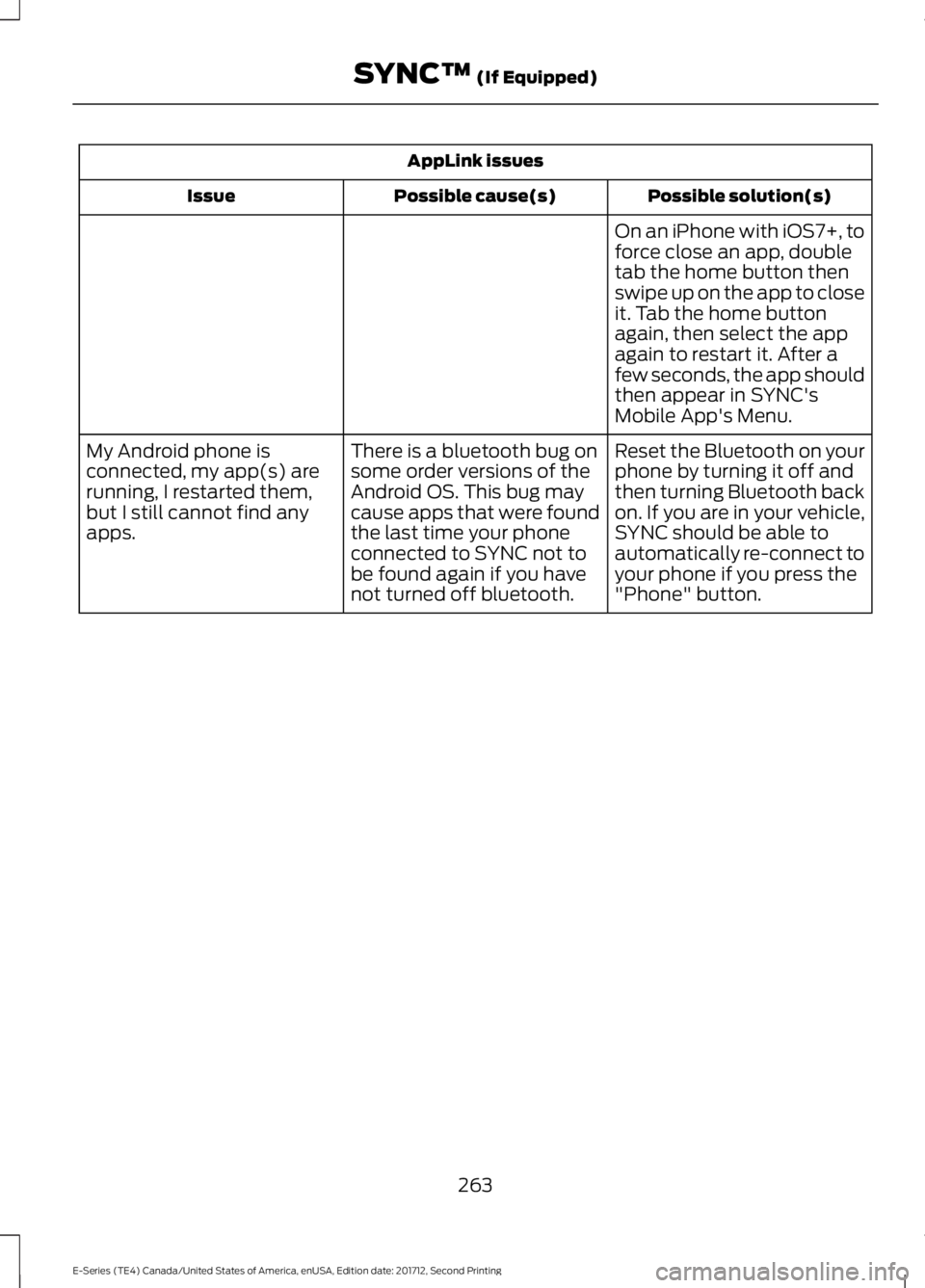
AppLink issues
Possible solution(s)Possible cause(s)Issue
On an iPhone with iOS7+, toforce close an app, doubletab the home button thenswipe up on the app to closeit. Tab the home buttonagain, then select the appagain to restart it. After afew seconds, the app shouldthen appear in SYNC'sMobile App's Menu.
Reset the Bluetooth on yourphone by turning it off andthen turning Bluetooth backon. If you are in your vehicle,SYNC should be able toautomatically re-connect toyour phone if you press the"Phone" button.
There is a bluetooth bug onsome order versions of theAndroid OS. This bug maycause apps that were foundthe last time your phoneconnected to SYNC not tobe found again if you havenot turned off bluetooth.
My Android phone isconnected, my app(s) arerunning, I restarted them,but I still cannot find anyapps.
263
E-Series (TE4) Canada/United States of America, enUSA, Edition date: 201712, Second Printing
SYNC™ (If Equipped)
Page 267 of 323
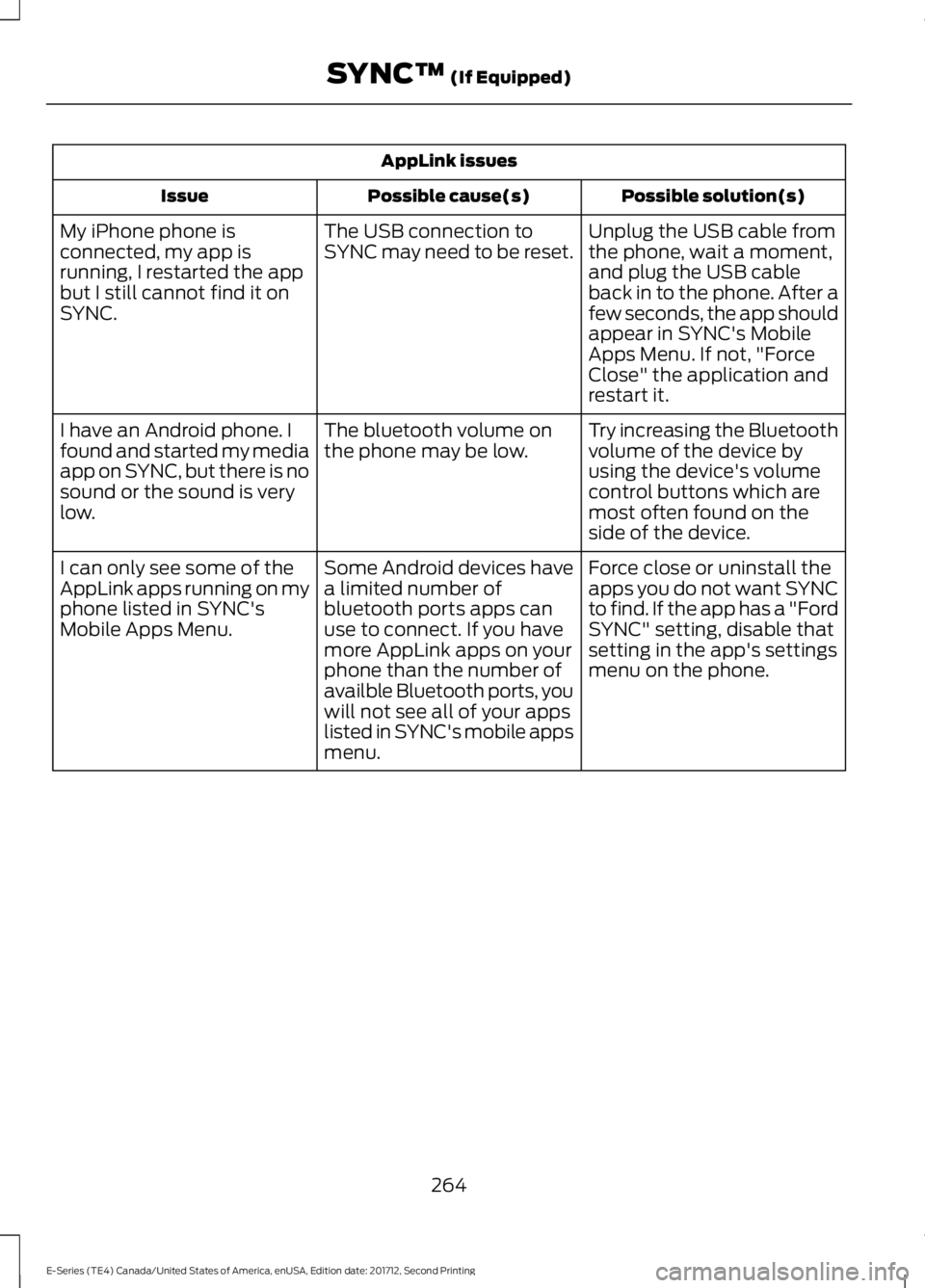
AppLink issues
Possible solution(s)Possible cause(s)Issue
Unplug the USB cable fromthe phone, wait a moment,and plug the USB cableback in to the phone. After afew seconds, the app shouldappear in SYNC's MobileApps Menu. If not, "ForceClose" the application andrestart it.
The USB connection toSYNC may need to be reset.My iPhone phone isconnected, my app isrunning, I restarted the appbut I still cannot find it onSYNC.
Try increasing the Bluetoothvolume of the device byusing the device's volumecontrol buttons which aremost often found on theside of the device.
The bluetooth volume onthe phone may be low.I have an Android phone. Ifound and started my mediaapp on SYNC, but there is nosound or the sound is verylow.
Force close or uninstall theapps you do not want SYNCto find. If the app has a "FordSYNC" setting, disable thatsetting in the app's settingsmenu on the phone.
Some Android devices havea limited number ofbluetooth ports apps canuse to connect. If you havemore AppLink apps on yourphone than the number ofavailble Bluetooth ports, youwill not see all of your appslisted in SYNC's mobile appsmenu.
I can only see some of theAppLink apps running on myphone listed in SYNC'sMobile Apps Menu.
264
E-Series (TE4) Canada/United States of America, enUSA, Edition date: 201712, Second Printing
SYNC™ (If Equipped)
Page 268 of 323
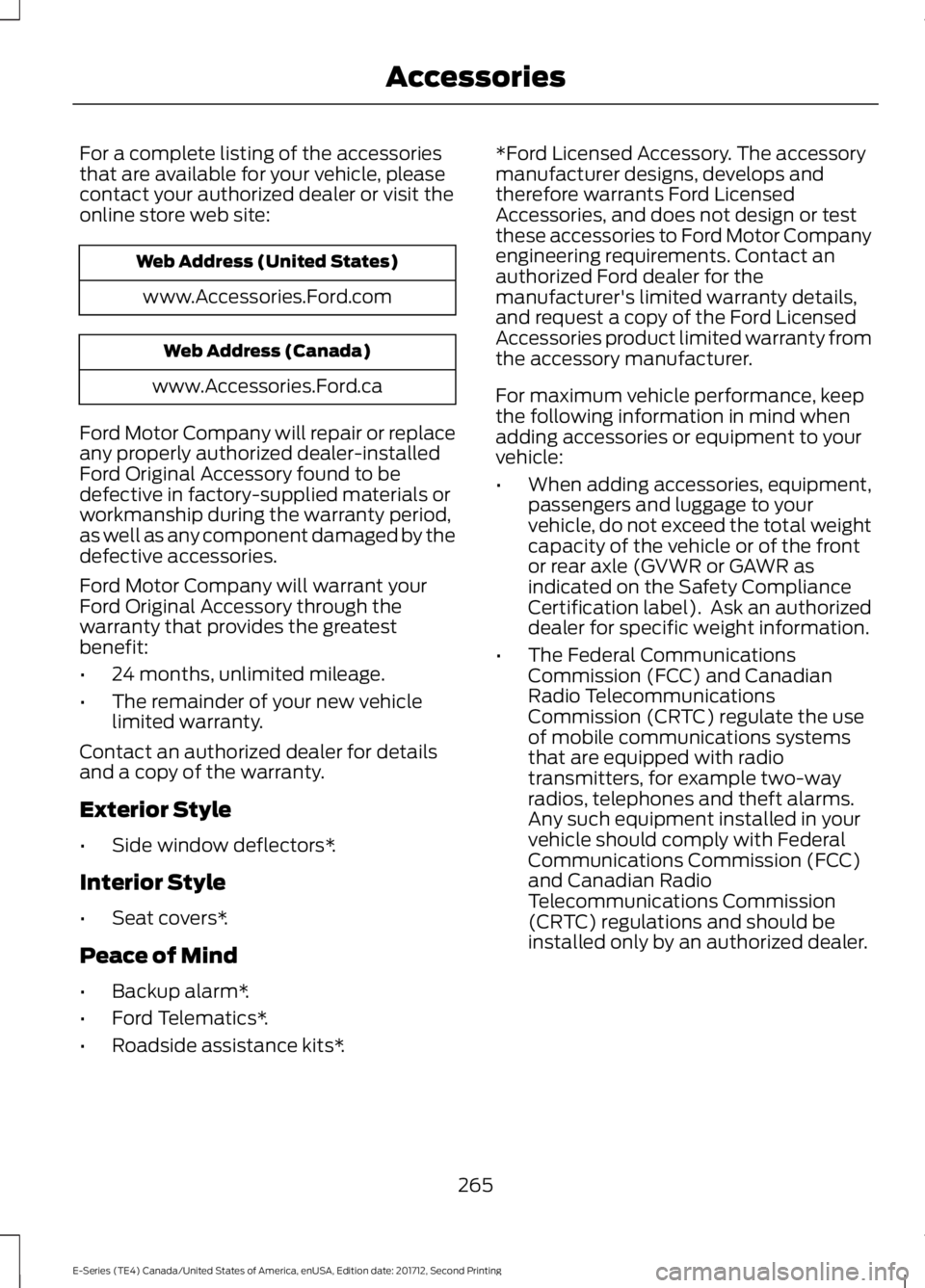
For a complete listing of the accessoriesthat are available for your vehicle, pleasecontact your authorized dealer or visit theonline store web site:
Web Address (United States)
www.Accessories.Ford.com
Web Address (Canada)
www.Accessories.Ford.ca
Ford Motor Company will repair or replaceany properly authorized dealer-installedFord Original Accessory found to bedefective in factory-supplied materials orworkmanship during the warranty period,as well as any component damaged by thedefective accessories.
Ford Motor Company will warrant yourFord Original Accessory through thewarranty that provides the greatestbenefit:
•24 months, unlimited mileage.
•The remainder of your new vehiclelimited warranty.
Contact an authorized dealer for detailsand a copy of the warranty.
Exterior Style
•Side window deflectors*.
Interior Style
•Seat covers*.
Peace of Mind
•Backup alarm*.
•Ford Telematics*.
•Roadside assistance kits*.
*Ford Licensed Accessory. The accessorymanufacturer designs, develops andtherefore warrants Ford LicensedAccessories, and does not design or testthese accessories to Ford Motor Companyengineering requirements. Contact anauthorized Ford dealer for themanufacturer's limited warranty details,and request a copy of the Ford LicensedAccessories product limited warranty fromthe accessory manufacturer.
For maximum vehicle performance, keepthe following information in mind whenadding accessories or equipment to yourvehicle:
•When adding accessories, equipment,passengers and luggage to yourvehicle, do not exceed the total weightcapacity of the vehicle or of the frontor rear axle (GVWR or GAWR asindicated on the Safety ComplianceCertification label). Ask an authorizeddealer for specific weight information.
•The Federal CommunicationsCommission (FCC) and CanadianRadio TelecommunicationsCommission (CRTC) regulate the useof mobile communications systemsthat are equipped with radiotransmitters, for example two-wayradios, telephones and theft alarms.Any such equipment installed in yourvehicle should comply with FederalCommunications Commission (FCC)and Canadian RadioTelecommunications Commission(CRTC) regulations and should beinstalled only by an authorized dealer.
265
E-Series (TE4) Canada/United States of America, enUSA, Edition date: 201712, Second Printing
Accessories
Page 269 of 323
•An authorized dealer needs to installmobile communications systems.Improper installation may harm theoperation of your vehicle, particularlyif the manufacturer did not design themobile communication systemspecifically for automotive use.
•If you or an authorized Ford dealer addany non-Ford electrical or electronicaccessories or components to yourvehicle, you may adversely affectbattery performance and durability. Inaddition, you may also adversely affectthe performance of other electricalsystems in the vehicle.
AUXILIARY SWITCHES
For maximum vehicle performance, keepthe following information in mind whenadding accessories or equipment to yourvehicle:
•When adding accessories, equipment,passengers and luggage to yourvehicle, do not exceed the total weightcapacity of the vehicle or of the frontor rear axle (GVWR or GAWR asindicated on the Safety ComplianceCertification label). Ask an authorizeddealer for specific weight information.
•The Federal CommunicationsCommission (FCC) and CanadianRadio TelecommunicationsCommission (CRTC) regulate the useof mobile communications systemsequipped with radio transmitters, forexample, two-way radios, telephonesand theft alarms. Any such equipmentinstalled in your vehicle should complywith Federal CommunicationsCommission (FCC) and CanadianRadio TelecommunicationsCommission (CRTC) regulations, andshould be installed by an authorizeddealer.
•An authorized dealer needs to installmobile communications systems.Improper installation may harm theoperation of your vehicle, particularlyif the manufacturer did not design themobile communication systemspecifically for automotive use.
•If you or an authorized Ford dealer addany non-Ford electrical or electronicaccessories or components to yourvehicle, you may adversely affectbattery performance and durability. Inaddition, you may also adversely affectthe performance of other electricalsystems in the vehicle.
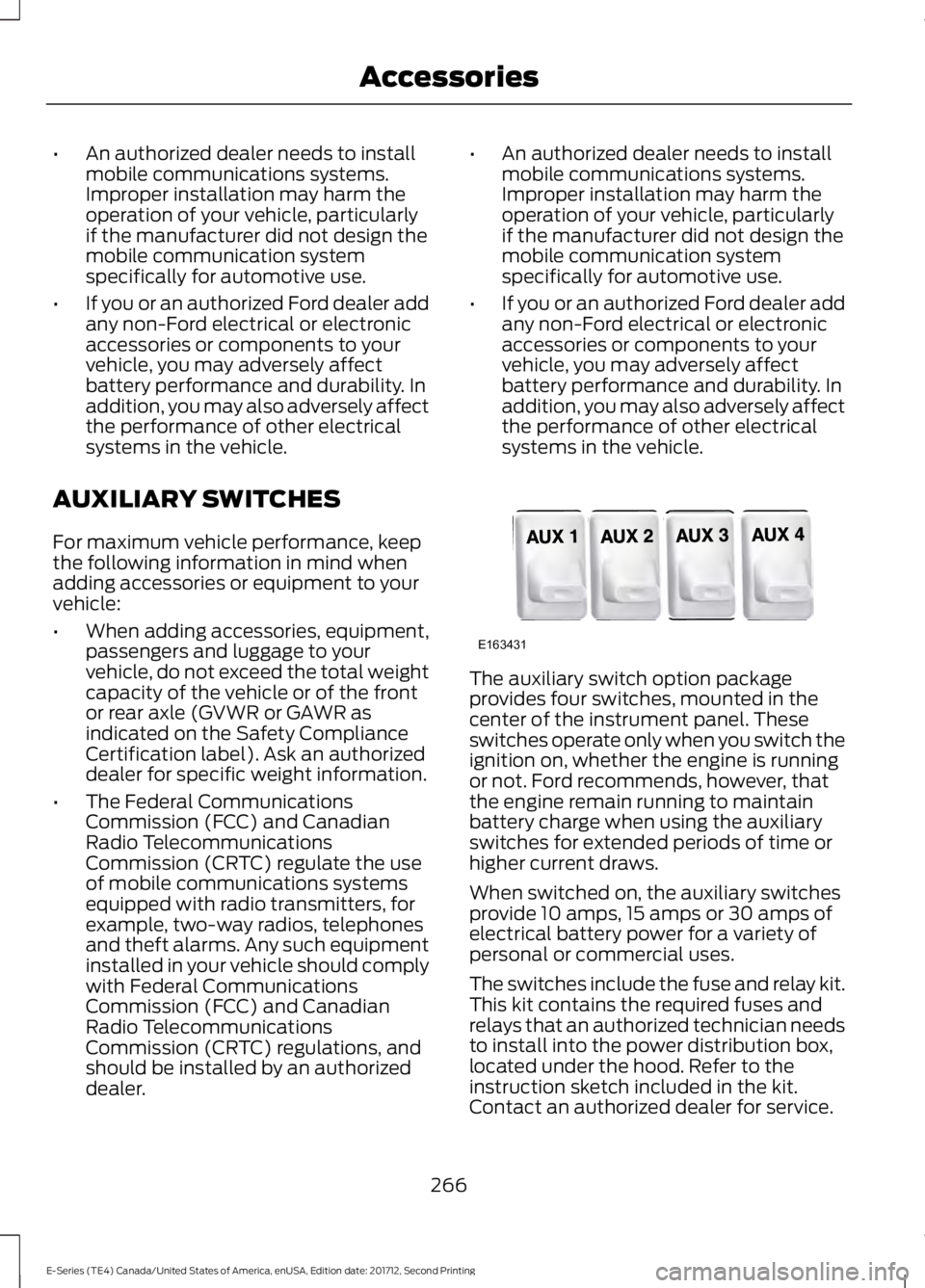
The auxiliary switch option packageprovides four switches, mounted in thecenter of the instrument panel. Theseswitches operate only when you switch theignition on, whether the engine is runningor not. Ford recommends, however, thatthe engine remain running to maintainbattery charge when using the auxiliaryswitches for extended periods of time orhigher current draws.
When switched on, the auxiliary switchesprovide 10 amps, 15 amps or 30 amps ofelectrical battery power for a variety ofpersonal or commercial uses.
The switches include the fuse and relay kit.This kit contains the required fuses andrelays that an authorized technician needsto install into the power distribution box,located under the hood. Refer to theinstruction sketch included in the kit.Contact an authorized dealer for service.
266
E-Series (TE4) Canada/United States of America, enUSA, Edition date: 201712, Second Printing
AccessoriesE163431
Page 291 of 323
ELECTROMAGNETIC
COMPATIBILITY
WARNINGS
Do not place objects or mountequipment on or near the airbagcover, on the side of the seatbacks(of the front seats), or in front seat areasthat may come into contact with adeploying airbag. Failure to follow theseinstructions may increase the risk ofpersonal injury in the event of a crash.
Do not fasten antenna cables tooriginal vehicle wiring, fuel pipes andbrake pipes.
Keep antenna and power cables atleast 4 in (10 cm) from any electronicmodules and airbags.
Note:We test and certify your vehicle tomeet electromagnetic compatibilitylegislation (UNECE Regulation 10 or otherapplicable local requirements). It is yourresponsibility to make sure that anyequipment an authorized dealer installs onyour vehicle complies with applicable locallegislation and other requirements.
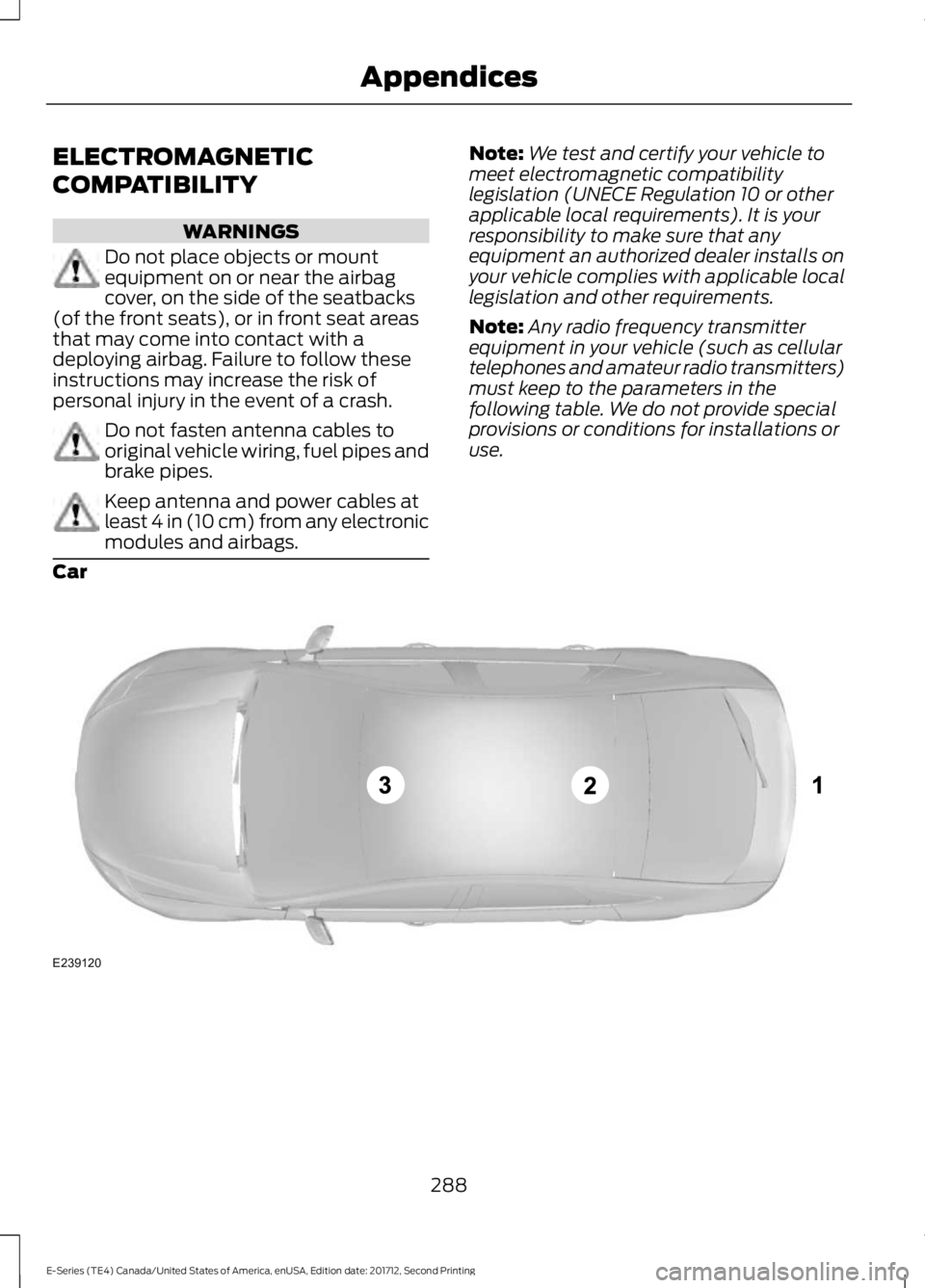
Note:Any radio frequency transmitterequipment in your vehicle (such as cellulartelephones and amateur radio transmitters)must keep to the parameters in thefollowing table. We do not provide specialprovisions or conditions for installations oruse.
Car
288
E-Series (TE4) Canada/United States of America, enUSA, Edition date: 201712, Second Printing
AppendicesE239120
Page 304 of 323
9.2 End User Terms Required by NAV2(Shanghai) Co., Ltd
The data (“Data”) is provided for yourpersonal, internal use only and not forresale. It is protected by copyright, and issubject to the following terms andconditions which are agreed to by you, onthe one hand, and NAV2 (Shanghai) Co.,Ltd (“NAV2”) and its licensors (includingtheir licensors and suppliers) on the otherhand.
© 20xx. All rights reserved.
Permitted Use.
You agree to use this Data together withthe Telenav Software solely for the internalbusiness and personal purposes for whichyou were licensed, and not for servicebureau, time-sharing or other similarpurposes. Accordingly, but subject to therestrictions set forth in the followingparagraphs, you agree not to otherwisereproduce, copy, modify, decompile,disassemble, create any derivative worksof, or reverse engineer any portion of thisData, and may not transfer or distribute itin any form, for any purpose, except to theextent permitted by mandatory laws.
Restrictions.
Except where you have been specificallylicensed to do so by Telenav, and withoutlimiting the preceding paragraph, you maynot use this Data (a) with any products,systems, or applications installed orotherwise connected to or incommunication with vehicles, capable ofvehicle navigation, positioning, dispatch,real time route guidance, fleetmanagement or similar applications; or (b)with or in communication with any
positioning devices or any mobile orwireless-connected electronic or computerdevices, including without limitationcellular phones, palmtop and handheldcomputers, pagers, and personal digitalassistants or PDAs.
Warning.
The Data may contain inaccurate orincomplete information due to the passageof time, changing circumstances, sourcesused and the nature of collectingcomprehensive geographic data, any ofwhich may lead to incorrect results.
No Warranty.
This Data is provided to you “as is,” andyou agree to use it at your own risk. Telenavand its licensors (and their licensors andsuppliers) make no guarantees,representations or warranties of any kind,express or implied, arising by law orotherwise, including but not limited to,content, quality, accuracy, completeness,effectiveness, reliability, fitness for aparticular purpose, usefulness, use orresults to be obtained from this Data, orthat the Data or server will beuninterrupted or error-free.
Disclaimer of Warranty:
TELENAV AND ITS LICENSORS(INCLUDING THEIR LICENSORS ANDSUPPLIERS) DISCLAIM ANYWARRANTIES, EXPRESS OR IMPLIED, OFQUALITY, PERFORMANCE,MERCHANTABILITY, FITNESS FOR APARTICULAR PURPOSE ORNON-INFRINGEMENT. Some States,Territories and Countries do not allowcertain warranty exclusions, so to thatextent the above exclusion may not applyto you.
301
E-Series (TE4) Canada/United States of America, enUSA, Edition date: 201712, Second Printing
Appendices
Page 311 of 323
Product incorporates data which is ©20XX Telstra Corporation Limited, GMHolden Limited, Intelematics AustraliaPty Ltd and Continental Pty Ltd.
B. Third Party Notices for Australia. Inaddition to the foregoing, the End-UserTerms for any Application containingRDS-TMC Traffic Codes for Australiashall contain the following notice:“Product incorporates traffic locationcodes which is © 20XX Telstra Corpora-tion Limited and its licensors.”
VII. China Territory
Personal Use Only
You agree to use this Data together with[insert name of Client Application] for thesolely personal, non-commercial purposesfor which you were licensed, and not forservice bureau, time-sharing or othersimilar purposes. Accordingly, but subjectto the restrictions set forth in the followingparagraphs, you may copy this Data onlyas necessary for your personal use to (i)view it, and (ii) save it, provided that youdo not remove any copyright notices thatappear and do not modify the Data in anyway. You agree not to otherwise reproduce,copy, modify, decompile, disassemble orreverse engineer any portion of this Data,and may not transfer or distribute it in anyform, for any purpose, except to the extentpermitted by mandatory laws.
Restrictions
Except where you have been specificallylicensed to do so by NAV2 , and withoutlimiting the preceding paragraph, you maynot (a) use this Data with any products,systems, or applications installed orotherwise connected to or incommunication with vehicles, capable ofvehicle navigation, positioning, dispatch,real time route guidance, fleetmanagement or similar applications; or (b)
with or in communication with anypositioning devices or any mobile orwireless-connected electronic or computerdevices, including without limitationcellular phones, palmtop and handheldcomputers, pagers, and personal digitalassistants or PDAs. You agree to ceaseusing this Data if you fail to comply withthese terms and conditions.
Limited Warranty
NAV2 warrants that (a) the Data willperform substantially in accordance withthe accompanying written materials for aperiod of ninety (90) days from the dateof receipt, and (b) any support servicesprovided by NAV2 shall be substantially asdescribed in applicable written materialsprovided to you by NAV2, and NAV2’ssupport engineers will make commerciallyreasonable efforts to solve any problemissues.
rigCustomer Remedies
NAV2 and its suppliers’ entire liability andyour exclusive remedy shall be, at NAV2’ssole discretion, either (a) return of the pricepaid, if any, or (b) repair or replacement ofthe Data that do not meet NAV2’s LimitedWarranty and that are returned to NAV2with a copy of your receipt. This LimitedWarranty is void if failure of the Data hasresulted from accident, abuse, ormisapplication. Any replacement Data willbe warranted for the remainder of theoriginal warranty period or thirty (30) days,whichever is longer. Neither these remediesnor any product support services offeredby NAV2 are available without proof ofpurchase from an authorized internationalsource.
308
E-Series (TE4) Canada/United States of America, enUSA, Edition date: 201712, Second Printing
Appendices
Page 322 of 323
U
Under Hood Overview................................139USB Port..........................................................218Using Cruise Control.....................................95Switching Cruise Control Off...........................95Switching Cruise Control On............................95Using Snow Chains......................................185Using SYNC™ With Your MediaPlayer............................................................246Accessing Your Play Menu...............................251Connecting Your Digital Media Player to theUSB Port..........................................................246Media Menu Features......................................249Media Voice Commands................................248System Settings.................................................253What's Playing?.................................................248Using SYNC™ With Your Phone............224Accessing Features Through the PhoneMenu..................................................................228Accessing Your Phone Settings....................233Making a Call........................................................227Pairing Subsequent Cell Phones.................225Pairing Your Cell Phone for the First Time..............................................................................224Phone Options during an Active Call..........227Phone Voice Commands................................225Receiving Calls....................................................227System Settings.................................................234Text Messaging....................................................231Using Traction Control.................................92Switching the System Off ................................92System Indicator Lights andMessages............................................................92Using Voice Recognition.............................221Initiating a Voice Session.................................221System Interaction and Feedback..............222Utilizing the Mediation/ArbitrationProgram (Canada Only).........................125
V
Vehicle Care....................................................159General Information..........................................159Vehicle Certification Label........................198Vehicle Identification Number.................197Vehicle Storage.............................................164Battery....................................................................164
Body........................................................................164Brakes.....................................................................165Cooling system....................................................164Engine.....................................................................164Fuel system..........................................................164General...................................................................164Miscellaneous......................................................165Removing Vehicle From Storage..................165Tires.........................................................................165VentilationSee: Climate Control..........................................64VINSee: Vehicle Identification Number.............197Voice Control...................................................45
W
Warning Lamps and Indicators.................52Airbag Warning Lamp.........................................53Anti-Lock Brake System WarningLamp....................................................................53Anti-Theft System...............................................53Battery......................................................................53Brake System Warning Lamp..........................53Check Fuel Cap.....................................................53Cruise Control Indicator.....................................53Direction Indicator................................................53Engine Coolant Temperature WarningLamp....................................................................53Engine Oil................................................................54Fasten Seatbelt Warning Lamp......................54Headlamp High Beam Indicator.....................54Low Fuel Level Warning Lamp........................54Low Tire Pressure Warning Lamp..................54Powertrain Malfunction/Electronic ThrottleControl.................................................................54Service Engine Soon...........................................54Tow Haul Indicator...............................................55Traction Control System...................................54Traction Control System Off............................55Washer Fluid Check.....................................150WashersSee: Cleaning the Exterior...............................159See: Wipers and Washers.................................46Waxing...............................................................161Wheel NutsSee: Changing a Road Wheel........................189
319
E-Series (TE4) Canada/United States of America, enUSA, Edition date: 201712, Second Printing
Index