remote control FORD E SERIES 2018 Owners Manual
[x] Cancel search | Manufacturer: FORD, Model Year: 2018, Model line: E SERIES, Model: FORD E SERIES 2018Pages: 323, PDF Size: 7.09 MB
Page 4 of 323
Introduction
About This Manual..........................................5
Symbols Glossary............................................5
Data Recording..................................................7
California Proposition 65..............................9
Perchlorate.........................................................9
Ford Credit..........................................................9
Replacement Parts Recommendation...........................................................................10
Special Notices...............................................10
Mobile Communications Equipment............................................................................12
Environment
Protecting the Environment.......................13
At a Glance
Instrument Panel Overview.......................14
Child Safety
General Information......................................15
Installing Child Restraints...........................16
Booster Seats.................................................20
Child Restraint Positioning.........................22
Seatbelts
Principle of Operation..................................25
Fastening the Seatbelts.............................26
Seatbelt Height Adjustment.....................27
Seatbelt Warning Lamp and IndicatorChime............................................................28
Child Restraint and SeatbeltMaintenance...............................................28
Seatbelt Extension.......................................29
Supplementary RestraintsSystem
Principle of Operation.................................30
Driver and Passenger Airbags....................31
Crash Sensors and Airbag Indicator.......36
Airbag Disposal..............................................36
Keys and Remote Controls
General Information on RadioFrequencies.................................................37
Remote Control..............................................37
Replacing a Lost Key or Remote Control..........................................................................39
Doors and Locks
Locking and Unlocking...............................40
Security
Passive Anti-Theft System........................43
Steering Wheel
Adjusting the Steering Wheel..................45
Voice Control..................................................45
Cruise Control.................................................45
Wipers and Washers
Windshield Wipers.......................................46
Windshield Washers....................................46
Lighting
General Information.....................................47
Lighting Control..............................................47
Instrument Lighting Dimmer....................48
Daytime Running Lamps...........................48
Direction Indicators......................................48
Windows and Mirrors
Power Windows............................................49
Exterior Mirrors...............................................49
Interior Mirror..................................................50
Sun Visors........................................................50
Instrument Cluster
Gauges...............................................................51
Warning Lamps and Indicators................52
1
E-Series (TE4) Canada/United States of America, enUSA, Edition date: 201712, Second Printing
Table of Contents
Page 12 of 323
or where required by law enforcement,other government authorities or otherthird parties acting with lawfulauthority. Other parties may seek toaccess the information independentlyof Ford Motor Company and Ford ofCanada.
Note:Including to the extent that anylaw pertaining to Event Data Recordersapplies to SYNC or its features, pleasenote the following: Once 911 Assist (ifequipped) is enabled (set ON), 911 Assistmay, through any paired and connectedcell phone, disclose to emergencyservices that the vehicle has been in acrash involving the deployment of anairbag or, in certain vehicles, theactivation of the fuel pump shut-off.Certain versions or updates to 911 Assistmay also be capable of being used toelectronically or verbally provide to 911operators the vehicle location (such aslatitude and longitude), and/or otherdetails about the vehicle or crash orpersonal information about theoccupants to assist 911 operators toprovide the most appropriate emergencyservices. If you do not want to disclosethis information, do not activate the 911Assist feature. See SYNC™ (page 219).
Additionally, when you connect toTraffic, Directions and Information (ifequipped, U.S. only), the service usesGPS technology and advanced vehiclesensors to collect the vehicle’s currentlocation, travel direction, and speed(“vehicle travel information”), only tohelp provide you with the directions,traffic reports, or business searchesthat you request. If you do not wantFord or its vendors to receive thisinformation, do not activate theservice. For more information, seeTraffic, Directions and Information,Terms and Conditions. See SYNC™(page 219).
CALIFORNIA PROPOSITION 65
WARNINGS
Some constituents of engineexhaust, certain vehicle components,certain fluids contained in vehiclesand certain products of component wearcontain or emit chemicals known to theState of California to cause cancer andbirth defects or other reproductive harm.
Battery posts, terminals and relatedaccessories contain lead and leadcompounds, chemicals known to theState of California to cause cancer andreproductive harm. Batteries also containother chemicals known to the State ofCalifornia to cause cancer. Wash yourhands after handling.
PERCHLORATE
Certain components in your vehicle suchas airbag modules, seatbelt pretensionersand remote control batteries may containperchlorate material. Special handlingmay apply for service or vehicle end of lifedisposal.
For more information visit:
Web Address
www.dtsc.ca.gov/hazard-ouswaste/perchlorate
FORD CREDIT
US Only
Ford Credit offers a full range of financingand lease plans to help you acquire yourvehicle. If you have financed or leased yourvehicle through Ford Credit, thank you foryour business.
9
E-Series (TE4) Canada/United States of America, enUSA, Edition date: 201712, Second Printing
Introduction
Page 14 of 323
On Board Diagnostics Data LinkConnector
WARNING
Do not connect wireless plug-indevices to the data link connector.Unauthorized third parties could gainaccess to vehicle data and impair theperformance of safety related systems.Only allow repair facilities that follow ourservice and repair instructions to connecttheir equipment to the data link connector.
Your vehicle has an OBD Data LinkConnector (DLC) that is used inconjunction with a diagnostic scan tool forvehicle diagnostics, repairs andreprogramming services. Installing anaftermarket device that uses the DLCduring normal driving for purposes such asremote insurance company monitoring,transmission of vehicle data to otherdevices or entities, or altering theperformance of the vehicle, may causeinterference with or even damage tovehicle systems. We do not recommendor endorse the use of aftermarket plug-indevices unless approved by Ford. Thevehicle Warranty will not cover damagecaused by an aftermarket plug-in device.
Notice to Owners of Pickup Trucksand Utility Type Vehicles
WARNING
Utility vehicles have a significantlyhigher rollover rate than other typesof vehicles.
Before you drive your vehicle, please readthis Owner’s Manual carefully. Your vehicleis not a passenger car. As with othervehicles of this type, failure to operate thisvehicle correctly may result in loss ofvehicle control, vehicle rollover, personalinjury or death.
Using your Vehicle as anAmbulance
If your light truck has the Ford AmbulancePreparation Package, it may be utilized asan ambulance. Ford urges ambulancemanufacturers to follow therecommendations of the Ford IncompleteVehicle Manual, Ford Truck Body Builder’sLayout Book and the Qualified VehicleModifiers (QVM) Guidelines as well aspertinent supplements. For additionalinformation, please contact the Truck BodyBuilders Advisory Service athttp://www.fleet.ford.com/truckbbas/and then by selecting Contact Us or byphone at 1–877–840–4338.
Use of your Ford light truck as anambulance, without the Ford AmbulancePreparation Package voids the Ford NewVehicle Limited Warranty and may voidthe emissions warranties. In addition,ambulance usage without the preparationpackage could cause high underbodytemperatures, over-pressurized fuel and arisk of spraying fuel, which could lead tofires.
If your vehicle has the Ford AmbulancePreparation Package, it will be indicatedon the Safety Compliance CertificationLabel. The label is on the driver side doorpillar or on the rear edge of the driver door.You can determine whether theambulance manufacturer followed Ford’srecommendations by directly contactingthat manufacturer.
11
E-Series (TE4) Canada/United States of America, enUSA, Edition date: 201712, Second Printing
Introduction
Page 40 of 323
GENERAL INFORMATION ON
RADIO FREQUENCIES
This device complies with Part 15 of theFCC Rules and with Licence exempt RSSStandards of Industry Canada. Operationis subject to the following two conditions:
•This device may not cause harmfulinterference, and
•This device must accept anyinterference received, includinginterference that may cause undesiredoperation.
WARNING
Changes or modifications notexpressively approved by the partyresponsible for compliance couldvoid the user's authority to operate theequipment. The term "IC:" before the radiocertification number only signifies thatIndustry Canada technical specificationswere met.
The typical operating range for yourtransmitter is approximately 33 ft (10 m).Vehicles with the remote start feature willhave a greater range. One of the followingcould cause a decrease in operating range:
•Weather conditions.
•Nearby radio towers.
•Structures around the vehicle.
•Other vehicles parked next to yourvehicle.
Other short distance radio transmissions,for example amateur radios, medicalequipment, wireless headphones, remotecontrols and alarm systems can also usethe radio frequency used by your remotecontrol. If the frequencies are jammed, youwill not be able to use your remote control.You can lock and unlock the doors with thekey.
Note:Make sure to lock your vehicle beforeleaving it unattended.
Note:If you are in range, the remote controlwill operate if you press any buttonunintentionally.
Note:The remote control contains sensitiveelectrical components. Exposure to moistureor impact may cause permanent damage.
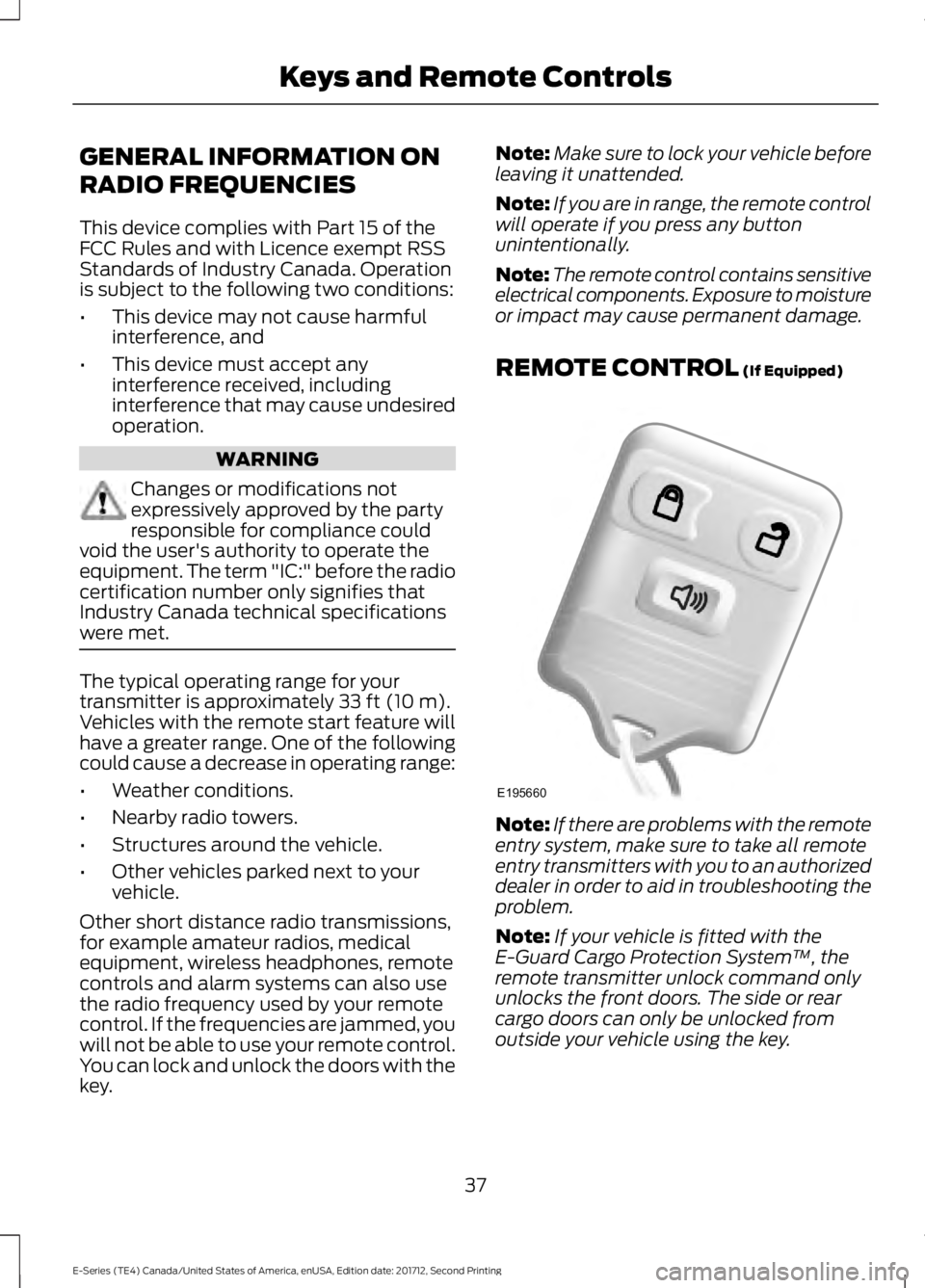
REMOTE CONTROL (If Equipped)
Note:If there are problems with the remoteentry system, make sure to take all remoteentry transmitters with you to an authorizeddealer in order to aid in troubleshooting theproblem.
Note:If your vehicle is fitted with theE-Guard Cargo Protection System™, theremote transmitter unlock command onlyunlocks the front doors. The side or rearcargo doors can only be unlocked fromoutside your vehicle using the key.
37
E-Series (TE4) Canada/United States of America, enUSA, Edition date: 201712, Second Printing
Keys and Remote ControlsE195660
Page 41 of 323
Reprogramming the RemoteControl
You must have all remote controls readilyaccessible before beginning thisprocedure. Any remote control that is notpresent during the programming procedurewill no longer operate your vehicle.
Note:You can program a maximum of fourcoded keys to your vehicle.
Note:Do not apply the brake pedal duringthis procedure.
1. Switch the ignition from off to on 8times within 10 seconds, finishing in theon position. The doors lock then unlockto confirm that programming hasstarted.
2.Press any button on the remote controlthat you want to program within 20seconds. The doors lock then unlockto confirm that programming wassuccessful.
3. Repeat step 2 to program eachadditional remote control.
4.After you have programmed all remotecontrols, switch the ignition off.
5. The doors lock then unlock to confirmthat programming is complete.
Changing the Remote ControlBattery
The remote control uses one coin-typethree-volt lithium battery CR2032 orequivalent.
Make sure that you dispose ofold batteries in anenvironmentally friendly way.Seek advice from your local authorityabout recycling old batteries.
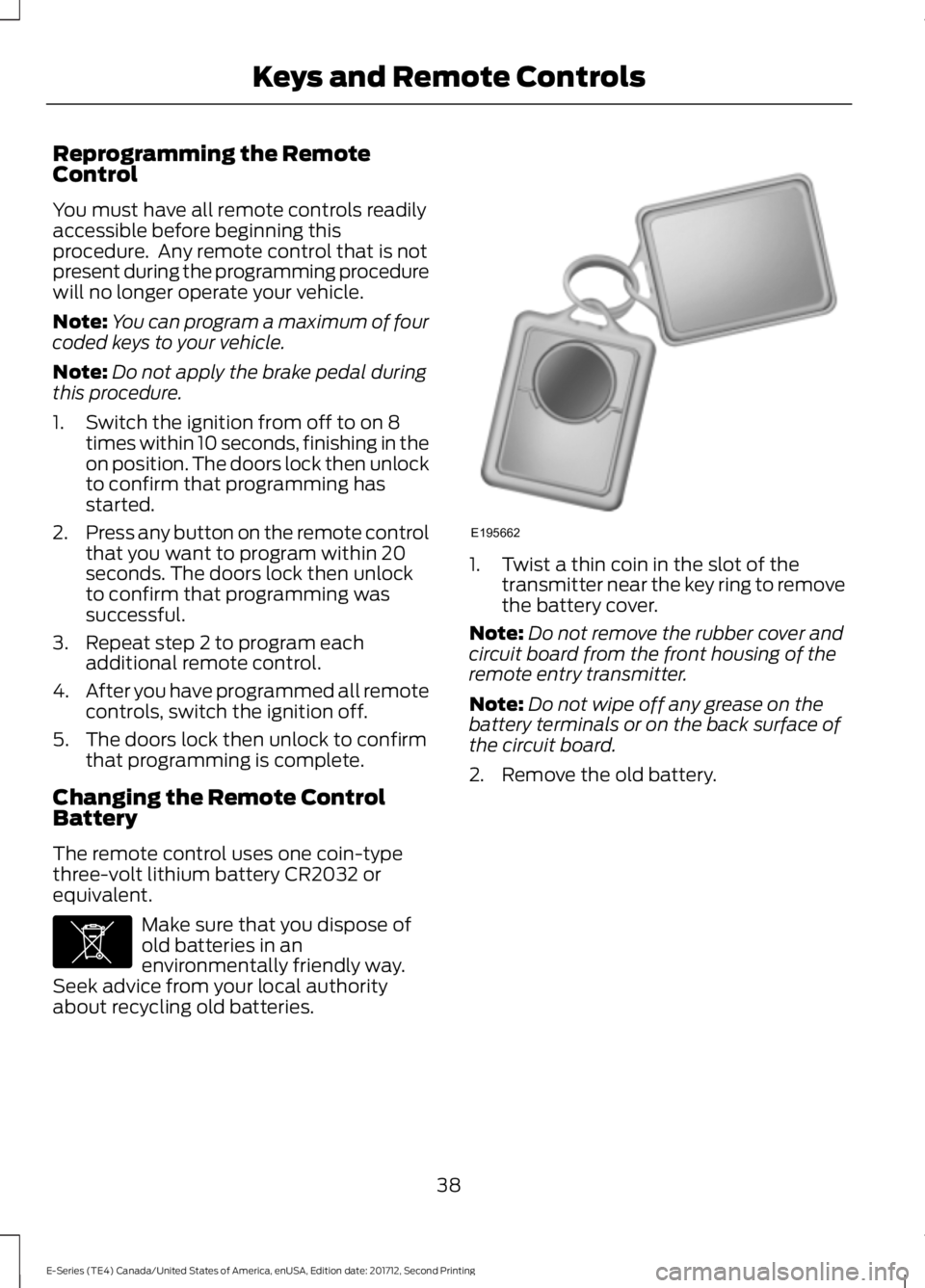
1. Twist a thin coin in the slot of thetransmitter near the key ring to removethe battery cover.
Note:Do not remove the rubber cover andcircuit board from the front housing of theremote entry transmitter.
Note:Do not wipe off any grease on thebattery terminals or on the back surface ofthe circuit board.
2. Remove the old battery.
38
E-Series (TE4) Canada/United States of America, enUSA, Edition date: 201712, Second Printing
Keys and Remote ControlsE107998 E195662
Page 42 of 323
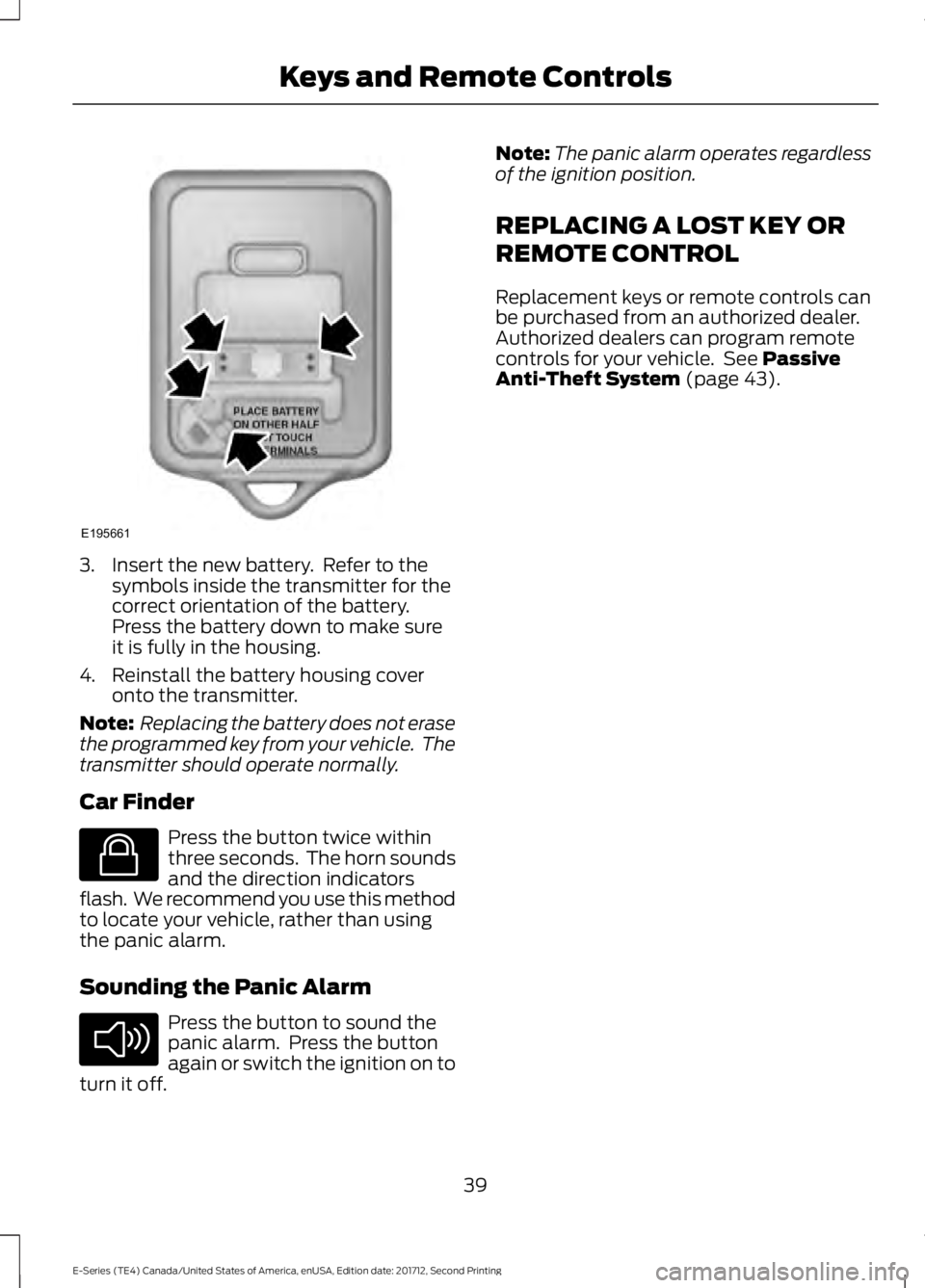
3. Insert the new battery. Refer to thesymbols inside the transmitter for thecorrect orientation of the battery.Press the battery down to make sureit is fully in the housing.
4. Reinstall the battery housing coveronto the transmitter.
Note: Replacing the battery does not erasethe programmed key from your vehicle. Thetransmitter should operate normally.
Car Finder
Press the button twice withinthree seconds. The horn soundsand the direction indicatorsflash. We recommend you use this methodto locate your vehicle, rather than usingthe panic alarm.
Sounding the Panic Alarm
Press the button to sound thepanic alarm. Press the buttonagain or switch the ignition on toturn it off.
Note:The panic alarm operates regardlessof the ignition position.
REPLACING A LOST KEY OR
REMOTE CONTROL
Replacement keys or remote controls canbe purchased from an authorized dealer.Authorized dealers can program remotecontrols for your vehicle. See PassiveAnti-Theft System (page 43).
39
E-Series (TE4) Canada/United States of America, enUSA, Edition date: 201712, Second Printing
Keys and Remote ControlsE195661 E138623 E138624
Page 43 of 323
LOCKING AND UNLOCKING
You can use the power door lock controlor the remote control to lock and unlockyour vehicle.
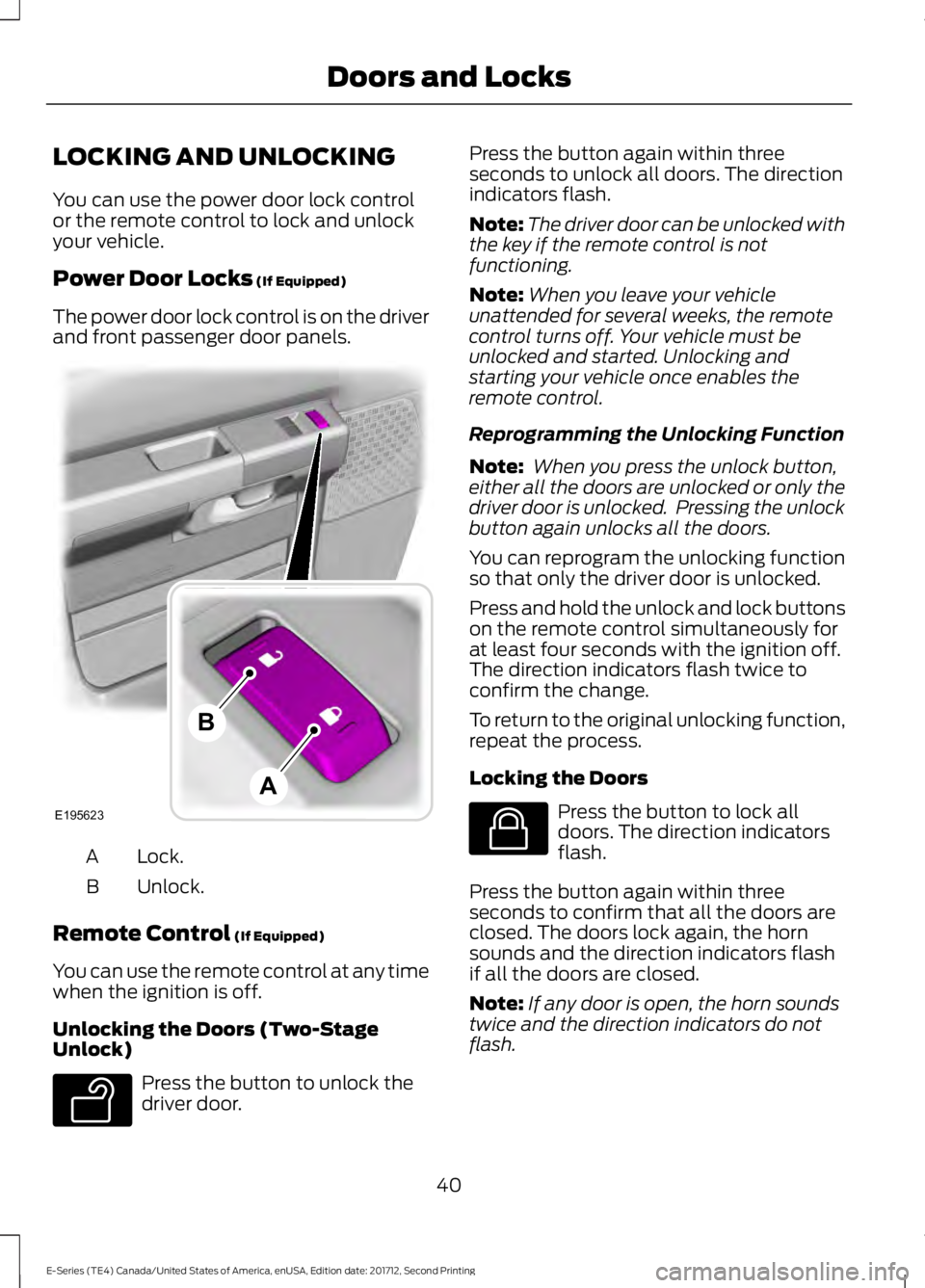
Power Door Locks (If Equipped)
The power door lock control is on the driverand front passenger door panels.
Lock.A
Unlock.B
Remote Control (If Equipped)
You can use the remote control at any timewhen the ignition is off.
Unlocking the Doors (Two-StageUnlock)
Press the button to unlock thedriver door.
Press the button again within threeseconds to unlock all doors. The directionindicators flash.
Note:The driver door can be unlocked withthe key if the remote control is notfunctioning.
Note:When you leave your vehicleunattended for several weeks, the remotecontrol turns off. Your vehicle must beunlocked and started. Unlocking andstarting your vehicle once enables theremote control.
Reprogramming the Unlocking Function
Note: When you press the unlock button,either all the doors are unlocked or only thedriver door is unlocked. Pressing the unlockbutton again unlocks all the doors.
You can reprogram the unlocking functionso that only the driver door is unlocked.
Press and hold the unlock and lock buttonson the remote control simultaneously forat least four seconds with the ignition off.The direction indicators flash twice toconfirm the change.
To return to the original unlocking function,repeat the process.
Locking the Doors
Press the button to lock alldoors. The direction indicatorsflash.
Press the button again within threeseconds to confirm that all the doors areclosed. The doors lock again, the hornsounds and the direction indicators flashif all the doors are closed.
Note:If any door is open, the horn soundstwice and the direction indicators do notflash.
40
E-Series (TE4) Canada/United States of America, enUSA, Edition date: 201712, Second Printing
Doors and LocksE195623
A
B E138629 E138623
Page 44 of 323
Autolock Feature
The autolock feature locks all the doorswhen:
•All doors are closed.
•The ignition is on.
•You shift into any gear putting yourvehicle in motion.
•The ignition is on, all the doors areclosed and your vehicle has been inmotion at a speed greater than 12 mph(20 km/h).
Autounlock Feature
The autounlock feature unlocks all thedoors when:
•Your vehicle comes to a stop and youswitch the ignition off or to accessory.
•You open the driver door within 10minutes of switching the ignition off orto accessory.
Note:If you electronically lock your vehicleafter you switch the ignition off with thedriver door closed, the doors do notautounlock.
Enabling or Disabling Autolock andAutounlock
You can enable or disable the autolock andautounlock features independently of eachother.
To enable or disable autolock, do thefollowing:
1. Switch the ignition on.
2. Press the power door unlock controlthree times.
3. Switch the ignition off.
4. Press the power door unlock controlthree times.
5.Switch the ignition on. The horn soundsindicating your vehicle is inprogramming mode.
6. Press the power door unlock controland within five seconds, press thepower door lock control. The hornsounds once if disabled or twice ifenabled.
7.Switch the ignition off. The horn soundsindicating programming is complete.
Note:You can also switch this feature onor off using the information display. SeeInformation Displays (page 56).
To enable or disable autounlock, do thefollowing:
1. Switch the ignition on.
2. Press the power door unlock controlthree times.
3. Switch the ignition off.
4. Press the power door unlock controlthree times.
5.Switch the ignition on. The horn soundsindicating your vehicle is inprogramming mode.
6. Press the power door lock control andwithin five seconds, press the powerdoor unlock control. The horn soundsonce if disabled or twice if enabled.
7.Switch the ignition off. The horn soundsindicating programming is complete.
Note:You can also switch this feature onor off using the information display. SeeInformation Displays (page 56).
Illuminated Entry
The interior lamps and some exteriorlamps illuminate when you unlock thedoors with the remote control.
The lamps turn off if:
•The ignition is on.
•You press the remote control lockbutton.
•25 seconds have elapsed.
41
E-Series (TE4) Canada/United States of America, enUSA, Edition date: 201712, Second Printing
Doors and Locks
Page 46 of 323
PASSIVE ANTI-THEFT
SYSTEM (If Equipped)
Note:The system is not compatible withnon-Ford aftermarket remote start systems.Use of these systems may result in vehiclestarting problems and a loss of securityprotection.
Note:Metallic objects, electronic devicesor a second coded key on the same keychain may cause vehicle starting problemsif they are too close to the key when startingthe engine. Prevent these objects fromtouching the coded key while starting theengine. Switch the ignition off, move allobjects on the key chain away from thecoded key and restart the engine if aproblem occurs.
Note:Do not leave a duplicate coded keyin the vehicle. Always take your keys andlock all doors when leaving the vehicle.
SecuriLock®
The system is an engine immobilizationsystem. It is designed to help prevent theengine from being started unless acorrectly coded key for your vehicle is used.Using an incorrectly coded key mayprevent the engine from starting. Amessage may appear in the informationdisplay.
If you are unable to start the engine with acorrectly coded key, a malfunction hashappened and a message may appear inthe information display.
Automatic Arming
The engine immobilization system armsimmediately after you switch the ignitionoff.
Automatic Disarming
Switching the ignition on with a correctlycoded key disarms the engineimmobilization system.
Replacement Keys
The integrated keyhead transmitterfunctions as a programmed ignition keythat operates all the locks and starts yourvehicle, as well as a remote control.
If your keys are lost or stolen and you donot have a spare correctly coded key, youwill need to have your vehicle towed to anauthorized dealer. You need to erase thecoded keys from your vehicle and programnew coded keys.
Store an extra correctly coded key awayfrom the vehicle in a safe place to helpprevent any inconveniences. See anauthorized dealer to purchase additionalspare or replacement keys.
Note:Your vehicle comes with twointegrated keyhead transmitters.
Programming a Spare IntegratedKeyhead Transmitter
You can program your own integratedkeyhead transmitter or standardSecuriLock coded keys to your vehicle. Thisprocedure will program both the engineimmobilizer keycode and the remote entryportion of the remote control to yourvehicle
Only use integrated keyhead transmittersor standard SecuriLock keys.
You must have two previouslyprogrammed correctly coded keys and thenew unprogrammed key readily accessible.See an authorized dealer to have the sparekey programmed if two previouslyprogrammed correctly coded keys are notavailable.
Read and understand the entire procedurebefore you begin.
43
E-Series (TE4) Canada/United States of America, enUSA, Edition date: 201712, Second Printing
Security
Page 319 of 323
Vehicle Stationary for Extended PeriodsDuring Extreme High AmbientTemperatures...................................................66Hints on Driving With Anti-LockBrakes.............................................................90Hood LockSee: Opening and Closing the Hood...........139
I
Ignition Switch.................................................73In California (U.S. Only)..............................123Information Displays.....................................56General Information............................................56Information Messages..................................61Brake System..........................................................61Fuel.............................................................................61Maintenance...........................................................61Tire.............................................................................62Traction Control....................................................62Trailer........................................................................63Transmission..........................................................63Installing Child Restraints............................16Child Seats...............................................................16Using Lap and Shoulder Belts..........................17Using Tether Straps..............................................19Instrument Cluster..........................................51Instrument Lighting Dimmer.....................48Instrument Panel Overview........................14Interior Mirror...................................................50Automatic Dimming Mirror..............................50Manual Dimming Mirror.....................................50Introduction........................................................5
J
Jump Starting the Vehicle..........................119Connecting the Jumper Cables......................119Jump Starting.......................................................120Preparing Your Vehicle.......................................119Removing the Jumper Cables........................120
K
Keys and Remote Controls.........................37
L
Lighting Control...............................................47Headlamp Flasher...............................................48High Beams.............................................................47Lighting...............................................................47General Information............................................47Limited Slip Differential..............................89Load Carrying...................................................97Load Limit.........................................................97Special Loading Instructions for Owners ofPick-up Trucks and Utility-typeVehicles..............................................................101Vehicle Loading - with and without aTrailer....................................................................97Locking and Unlocking................................40Autolock Feature...................................................41Autounlock Feature..............................................41Enabling or Disabling Autolock andAutounlock.........................................................41Illuminated Entry...................................................41Power Door Locks................................................40Remote Control....................................................40Lug NutsSee: Changing a Road Wheel........................189
M
Maintenance..................................................139General Information..........................................139Manual Climate Control..............................64Heater Only System............................................64Manual Climate Control....................................65Manual Seats..................................................69Manual Lumbar ...................................................69Moving the Seat Backward andForward..............................................................69Recline Adjustment............................................69Message CenterSee: Information Displays.................................56MirrorsSee: Windows and Mirrors................................49Mobile Communications Equipment.......12Motorcraft Parts - 6.2L...............................195Motorcraft Parts - 6.8L..............................196
316
E-Series (TE4) Canada/United States of America, enUSA, Edition date: 201712, Second Printing
Index