steering wheel FORD E SERIES 2018 Owners Manual
[x] Cancel search | Manufacturer: FORD, Model Year: 2018, Model line: E SERIES, Model: FORD E SERIES 2018Pages: 323, PDF Size: 7.09 MB
Page 4 of 323
Introduction
About This Manual..........................................5
Symbols Glossary............................................5
Data Recording..................................................7
California Proposition 65..............................9
Perchlorate.........................................................9
Ford Credit..........................................................9
Replacement Parts Recommendation...........................................................................10
Special Notices...............................................10
Mobile Communications Equipment............................................................................12
Environment
Protecting the Environment.......................13
At a Glance
Instrument Panel Overview.......................14
Child Safety
General Information......................................15
Installing Child Restraints...........................16
Booster Seats.................................................20
Child Restraint Positioning.........................22
Seatbelts
Principle of Operation..................................25
Fastening the Seatbelts.............................26
Seatbelt Height Adjustment.....................27
Seatbelt Warning Lamp and IndicatorChime............................................................28
Child Restraint and SeatbeltMaintenance...............................................28
Seatbelt Extension.......................................29
Supplementary RestraintsSystem
Principle of Operation.................................30
Driver and Passenger Airbags....................31
Crash Sensors and Airbag Indicator.......36
Airbag Disposal..............................................36
Keys and Remote Controls
General Information on RadioFrequencies.................................................37
Remote Control..............................................37
Replacing a Lost Key or Remote Control..........................................................................39
Doors and Locks
Locking and Unlocking...............................40
Security
Passive Anti-Theft System........................43
Steering Wheel
Adjusting the Steering Wheel..................45
Voice Control..................................................45
Cruise Control.................................................45
Wipers and Washers
Windshield Wipers.......................................46
Windshield Washers....................................46
Lighting
General Information.....................................47
Lighting Control..............................................47
Instrument Lighting Dimmer....................48
Daytime Running Lamps...........................48
Direction Indicators......................................48
Windows and Mirrors
Power Windows............................................49
Exterior Mirrors...............................................49
Interior Mirror..................................................50
Sun Visors........................................................50
Instrument Cluster
Gauges...............................................................51
Warning Lamps and Indicators................52
1
E-Series (TE4) Canada/United States of America, enUSA, Edition date: 201712, Second Printing
Table of Contents
Page 5 of 323
Audible Warnings and Indicators............55
Information Displays
General Information.....................................56
Information Messages.................................61
Climate Control
Manual Climate Control.............................64
Hints on Controlling the Interior Climate..........................................................................65
Rear Passenger Climate Controls...........66
Seats
Sitting in the Correct Position..................68
Head Restraints.............................................68
Manual Seats.................................................69
Power Seats....................................................69
Auxiliary Power Points
Auxiliary Power Points..................................71
Starting and Stopping theEngine
General Information.....................................73
Ignition Switch................................................73
Starting a Gasoline Engine.........................73
Engine Block Heater.....................................75
Fuel and Refueling
Safety Precautions.......................................76
Fuel Quality - E85.........................................76
Fuel Quality - Gasoline................................78
Running Out of Fuel.....................................78
Refueling...........................................................79
Fuel Consumption........................................80
Engine Emission Control
Emission Law..................................................82
Catalytic Converter.......................................83
Transmission
Automatic Transmission............................86
Rear Axle
Limited Slip Differential.............................89
Brakes
General Information....................................90
Hints on Driving With Anti-Lock Brakes..........................................................................90
Parking Brake...................................................91
Traction Control
Principle of Operation.................................92
Using Traction Control................................92
Parking Aids
Rear View Camera........................................93
Cruise Control
Principle of Operation.................................95
Using Cruise Control....................................95
Driving Aids
Steering............................................................96
Load Carrying
Load Limit........................................................97
Towing
Towing a Trailer............................................102
Trailer Sway Control...................................103
Recommended Towing Weights...........103
Essential Towing Checks..........................107
Towing the Vehicle on Four Wheels......113
Driving Hints
Breaking-In......................................................114
Reduced Engine Performance.................114
2
E-Series (TE4) Canada/United States of America, enUSA, Edition date: 201712, Second Printing
Table of Contents
Page 6 of 323
Economical Driving......................................114
Driving Through Water................................115
Floor Mats........................................................115
Roadside Emergencies
Roadside Assistance...................................117
Hazard Flashers............................................118
Fuel Shutoff....................................................118
Jump Starting the Vehicle.........................119
Transporting the Vehicle............................121
Customer Assistance
Getting the Services You Need...............122
In California (U.S. Only).............................123
The Better Business Bureau (BBB) AutoLine Program (U.S. Only)......................124
Utilizing the Mediation/ArbitrationProgram (Canada Only).......................125
Getting Assistance Outside the U.S. andCanada........................................................125
Ordering Additional Owner's Literature.........................................................................126
Reporting Safety Defects (U.S. Only)..........................................................................127
Reporting Safety Defects (Canada Only)..........................................................................127
Fuses
Fuse Specification Chart..........................129
Changing a Fuse...........................................137
Maintenance
General Information...................................139
Opening and Closing the Hood..............139
Under Hood Overview...............................139
Engine Oil Dipstick.......................................141
Engine Oil Check...........................................141
Oil Change Indicator Reset......................142
Engine Coolant Check...............................142
Automatic Transmission Fluid Check.........................................................................146
Brake Fluid Check........................................149
Power Steering Fluid Check....................150
Washer Fluid Check....................................150
Changing the 12V Battery..........................151
Checking the Wiper Blades......................152
Changing the Wiper Blades.....................152
Adjusting the Headlamps.........................153
Removing a Headlamp..............................154
Changing a Bulb...........................................154
Bulb Specification Chart..........................156
Changing the Engine Air Filter................158
Vehicle Care
General Information...................................159
Cleaning Products.......................................159
Cleaning the Exterior..................................159
Waxing..............................................................161
Cleaning the Engine.....................................161
Cleaning the Windows and Wiper Blades..........................................................................161
Cleaning the Interior...................................162
Cleaning the Instrument Panel andInstrument Cluster Lens.......................162
Repairing Minor Paint Damage..............163
Cleaning the Wheels..................................163
Vehicle Storage............................................164
Wheels and Tires
General Information...................................166
Tire Care..........................................................167
Using Snow Chains.....................................185
Tire Pressure Monitoring System..........186
Changing a Road Wheel...........................189
Technical Specifications...........................192
Capacities and Specifications
Engine Specifications - 6.2L...................194
Engine Specifications - 6.8L...................194
Motorcraft Parts - 6.2L..............................195
3
E-Series (TE4) Canada/United States of America, enUSA, Edition date: 201712, Second Printing
Table of Contents
Page 11 of 323
data only as long as necessary to performthese functions or to comply with law. Wemay provide information where requiredin response to official requests to lawenforcement or other governmentauthorities or third parties acting withlawful authority or court order, and suchinformation may be used in legalproceedings. For U.S. only (if equipped), ifyou choose to use connected apps andservices, such as SYNC Vehicle HealthReport or MyFord Mobile App, you consentthat certain diagnostic information mayalso be accessed electronically by FordMotor Company and Ford authorizedservice facilities, and that the diagnosticinformation may be used to provideservices to you, personalizing yourexperience, troubleshoot, and to improveproducts and services and offer youproducts and services that may interestyou, where permitted by law. For Canadaonly, for more information, please reviewthe Ford of Canada privacy policy atwww.ford.ca, including our U.S. datastorage and use of service providers inother jurisdictions who may be subject tolegal requirements in Canada, the UnitedStates and other countries applicable tothem, for example, lawful requirements todisclose personal information togovernmental authorities in thosecountries. See SYNC™ (page 219).
Event Data Recording
This vehicle is equipped with an eventdata recorder. The main purpose of anevent data recorder is to record, incertain crash or near crash-likesituations, such as an airbagdeployment or hitting a road obstacle;this data will assist in understandinghow a vehicle’s systems performed.The event data recorder is designed torecord data related to vehicle dynamicsand safety systems for a short periodof time, typically 30 seconds or less.
The event data recorder in this vehicleis designed to record such data as:
•How various systems in your vehiclewere operating;
•Whether or not the driver andpassenger safety belts werebuckled/fastened;
•How far (if at all) the driver wasdepressing the accelerator and/orthe brake pedal; and
•How fast the vehicle was traveling;and
•Where the driver was positioningthe steering wheel.
This data can help provide a betterunderstanding of the circumstances inwhich crashes and injuries occur.
Note:Event data recorder data isrecorded by your vehicle only if anon-trivial crash situation occurs; no datais recorded by the event data recorderunder normal driving conditions and nopersonal data or information (e.g., name,gender, age, and crash location) isrecorded (see limitations regarding 911Assist and Traffic, directions andInformation privacy below). However,parties, such as law enforcement, couldcombine the event data recorder datawith the type of personally identifyingdata routinely acquired during a crashinvestigation.
To read data recorded by an event datarecorder, special equipment is required,and access to the vehicle or the eventdata recorder is needed. In addition tothe vehicle manufacturer, otherparties, such as law enforcement, thathave such special equipment, can readthe information if they have access tothe vehicle or the event data recorder.Ford Motor Company and Ford ofCanada do not access event datarecorder information without obtainingconsent, unless pursuant to court order
8
E-Series (TE4) Canada/United States of America, enUSA, Edition date: 201712, Second Printing
Introduction
Page 17 of 323
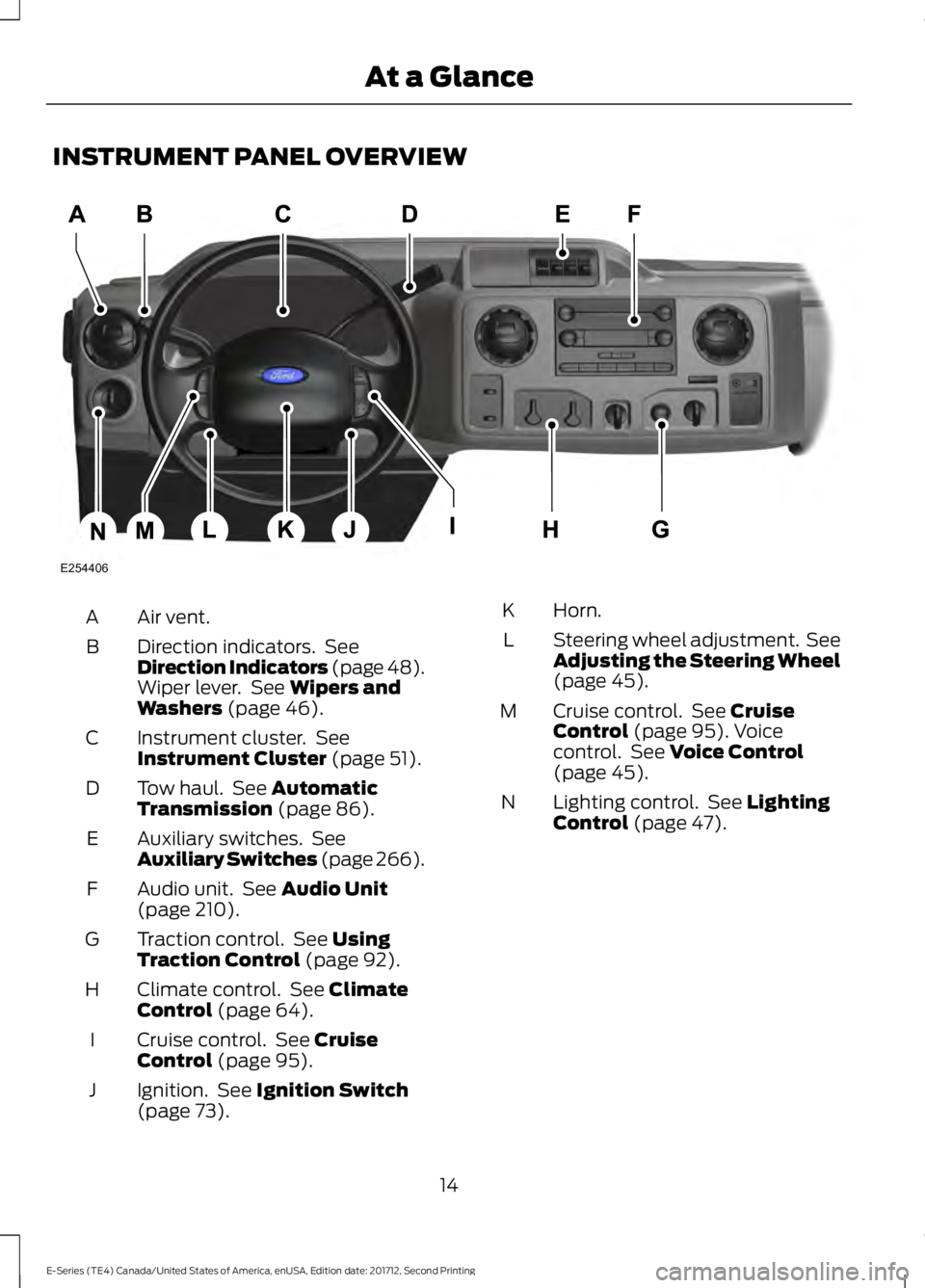
INSTRUMENT PANEL OVERVIEW
Air vent.A
Direction indicators. SeeDirection Indicators (page 48).Wiper lever. See Wipers andWashers (page 46).
B
Instrument cluster. SeeInstrument Cluster (page 51).C
Tow haul. See AutomaticTransmission (page 86).D
Auxiliary switches. SeeAuxiliary Switches (page 266).E
Audio unit. See Audio Unit(page 210).F
Traction control. See UsingTraction Control (page 92).G
Climate control. See ClimateControl (page 64).H
Cruise control. See CruiseControl (page 95).I
Ignition. See Ignition Switch(page 73).J
Horn.K
Steering wheel adjustment. SeeAdjusting the Steering Wheel(page 45).
L
Cruise control. See CruiseControl (page 95). Voicecontrol. See Voice Control(page 45).
M
Lighting control. See LightingControl (page 47).N
14
E-Series (TE4) Canada/United States of America, enUSA, Edition date: 201712, Second Printing
At a GlanceE254406
Page 48 of 323
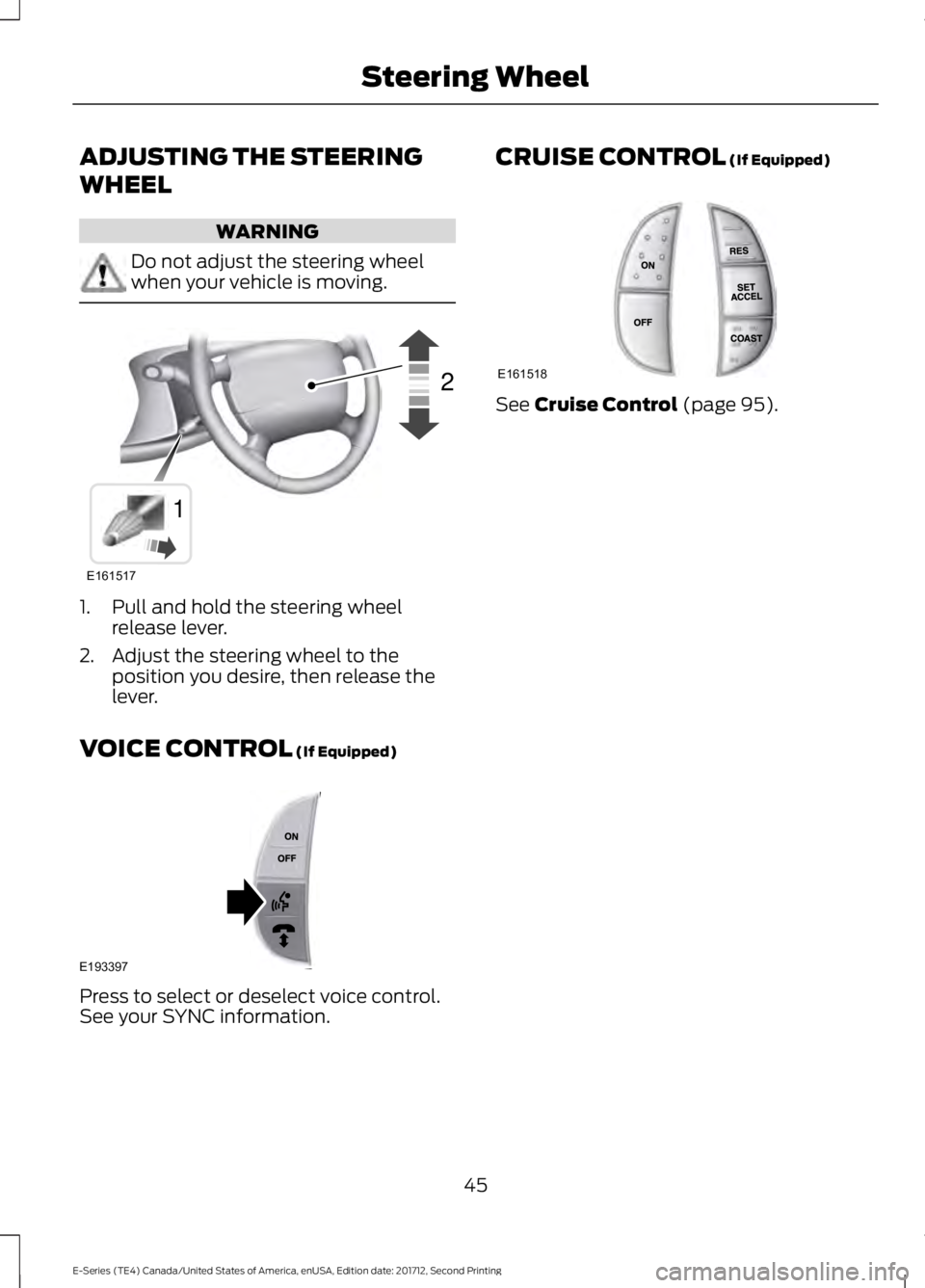
ADJUSTING THE STEERING
WHEEL
WARNING
Do not adjust the steering wheelwhen your vehicle is moving.
1. Pull and hold the steering wheelrelease lever.
2. Adjust the steering wheel to theposition you desire, then release thelever.
VOICE CONTROL (If Equipped)
Press to select or deselect voice control.See your SYNC information.
CRUISE CONTROL (If Equipped)
See Cruise Control (page 95).
45
E-Series (TE4) Canada/United States of America, enUSA, Edition date: 201712, Second Printing
Steering WheelE161517
12 E193397 E161518
Page 71 of 323
SITTING IN THE CORRECT
POSITION
WARNINGS
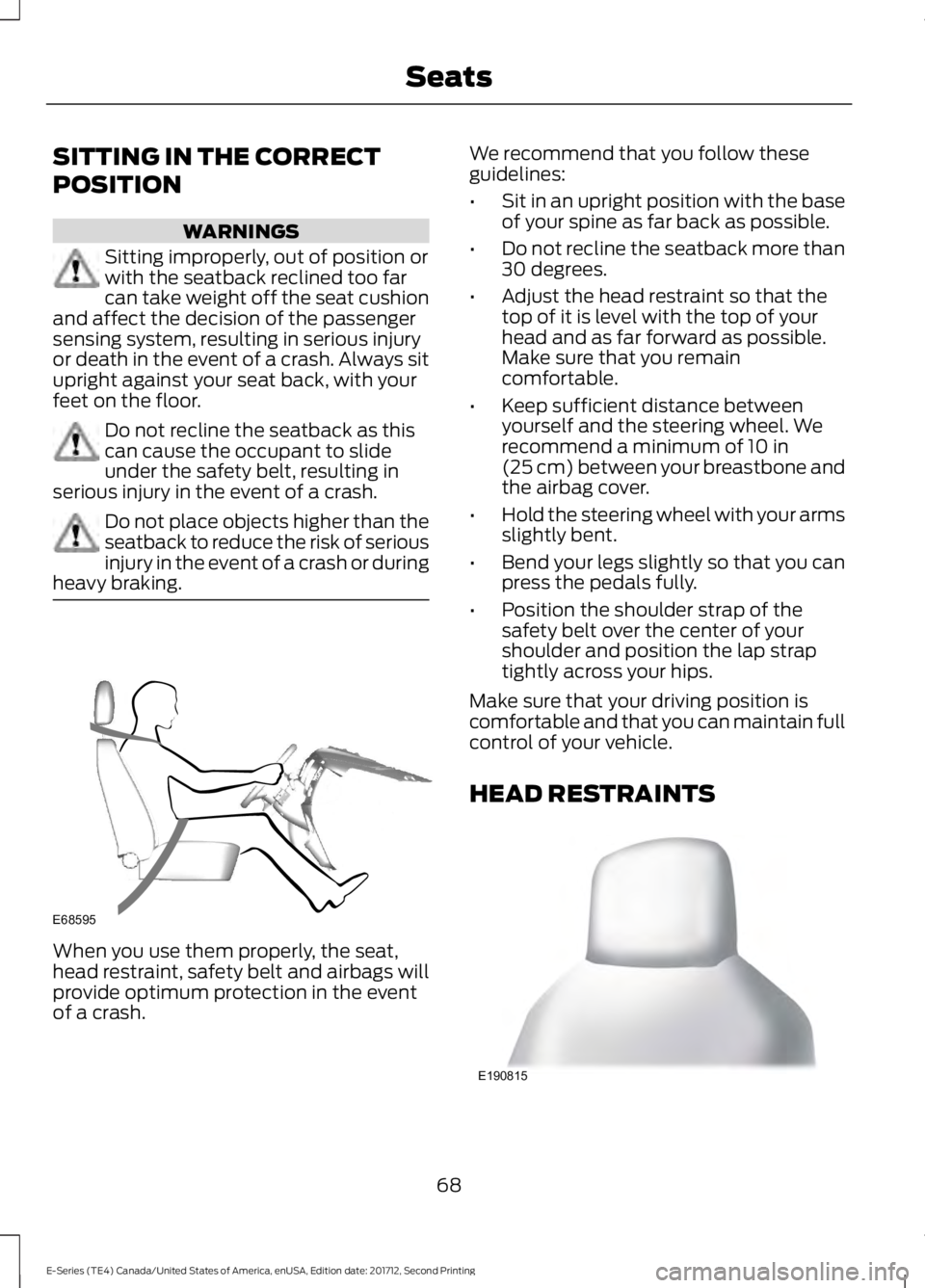
Sitting improperly, out of position orwith the seatback reclined too farcan take weight off the seat cushionand affect the decision of the passengersensing system, resulting in serious injuryor death in the event of a crash. Always situpright against your seat back, with yourfeet on the floor.
Do not recline the seatback as thiscan cause the occupant to slideunder the safety belt, resulting inserious injury in the event of a crash.
Do not place objects higher than theseatback to reduce the risk of seriousinjury in the event of a crash or duringheavy braking.
When you use them properly, the seat,head restraint, safety belt and airbags willprovide optimum protection in the eventof a crash.
We recommend that you follow theseguidelines:
•Sit in an upright position with the baseof your spine as far back as possible.
•Do not recline the seatback more than30 degrees.
•Adjust the head restraint so that thetop of it is level with the top of yourhead and as far forward as possible.Make sure that you remaincomfortable.
•Keep sufficient distance betweenyourself and the steering wheel. Werecommend a minimum of 10 in(25 cm) between your breastbone andthe airbag cover.
•Hold the steering wheel with your armsslightly bent.
•Bend your legs slightly so that you canpress the pedals fully.
•Position the shoulder strap of thesafety belt over the center of yourshoulder and position the lap straptightly across your hips.
Make sure that your driving position iscomfortable and that you can maintain fullcontrol of your vehicle.
HEAD RESTRAINTS
68
E-Series (TE4) Canada/United States of America, enUSA, Edition date: 201712, Second Printing
SeatsE68595 E190815
Page 90 of 323
Tow/Haul Mode
To activate tow/haul, press thebutton on the gearshift lever.The TOW HAUL indicator lightilluminates in the instrument cluster.
The tow/haul feature:
•Delays upshifts to reduce the frequencyof transmission shifting.
•Provides engine braking in all forwardgears, which slows your vehicle andassists you in controlling your vehiclewhen descending a slope.
•Depending on driving conditions andload conditions, may downshift thetransmission, slow your vehicle andcontrol your vehicle speed whendescending a hill, without pressing theaccelerator pedal. The amount ofdownshift braking provided will varybased upon the amount you press thebrake pedal.
The tow/haul feature improvestransmission operation when towing atrailer or a heavy load. All transmissiongear ranges are available when usingtow/haul.
To deactivate the tow/haul feature andreturn to normal driving mode, press thebutton on the gearshift lever again. TheTOW HAUL light deactivates. Tow/haulalso deactivates when you power downyour vehicle.
WARNING
Do not use tow/haul when the roadsurface is slippery. Failure to followthis instruction could result in theloss of control of your vehicle.
Brake-Shift Interlock
WARNINGS
When doing this procedure, you needto take the transmission out of park(P) which means your vehicle canroll freely. To avoid unwanted vehiclemovement, always fully apply the parkingbrake prior to doing this procedure. Usewheels chocks if appropriate.
If the parking brake is fully released,but the brake warning lamp remainsilluminated, the brakes may not beworking properly. Have your vehiclechecked as soon as possible.
Note:Do not drive your vehicle until youverify that the brake lamps are working.
Your vehicle has a brake-shift interlockfeature that prevents the gearshift leverfrom moving from park (P) when theignition is in the 3 (on) position and thebrake pedal is not pressed.
If you cannot move the gearshift lever outof park (P) position with the ignition in the4 (on) position and the brake pedalpressed, a malfunction may have occurred.It is possible that a fuse has blown or yourvehicle’s brake lamps are not operatingproperly. See Fuse Specification Chart(page 129).
If the fuse is not blown and the brakelamps are working properly, the followingprocedure allows you to move the gearshiftlever from park (P):
1. Apply the parking brake and turn theignition on.
2.Use a screwdriver to remove the lowertrim panel under the steering column.Make sure not to disturb the wires onthe electrical connector.
3. Locate the brake-shift interlocksolenoid underneath the steeringcolumn.
87
E-Series (TE4) Canada/United States of America, enUSA, Edition date: 201712, Second Printing
TransmissionE161509
Page 93 of 323
GENERAL INFORMATION
Note:Occasional brake noise is normal. Ifa metal-to-metal, continuous grinding orcontinuous squeal sound is present, thebrake linings may be worn-out and shouldbe inspected by an authorized dealer. If thevehicle has continuous vibration or shudderin the steering wheel while braking, thevehicle should be inspected by anauthorized dealer.
Note:Brake dust may accumulate on thewheels, even under normal drivingconditions. Some dust is inevitable as thebrakes wear and does not contribute tobrake noise. See Cleaning the Wheels(page 163).
See the Instrument Clusterchapter for information on thebrake system warning light.
Wet brakes result in reduced brakingefficiency. Gently press the brake pedal afew times when driving from a car wash orstanding water to dry the brakes.
Brake Over Accelerator
In the event the accelerator pedalbecomes stuck or entrapped, apply steadyand firm pressure to the brake pedal toslow the vehicle and reduce engine power.If you experience this condition, apply thebrakes and bring your vehicle to a safestop. Turn the engine off, shift thetransmission into park (P), apply theparking brake, and then inspect theaccelerator pedal for any interferences. Ifnone are found and the condition persists,have your vehicle towed to the nearestauthorized dealer.
Hydraulic brake booster system(Hydroboost or Hydromax)
The Hydroboost and Hydromax systemsreceive fluid pressure from the powersteering pump to provide power assistduring braking.
The Hydromax booster receives backuppressure from the reserve system electricpump whenever the fluid in the powersteering system is not flowing. When theengine is off, the pump will turn on if thebrake pedal is applied, or if the ignition isturned to the on position.
The sound of the pump operating may beheard by the driver, but this is a normalcharacteristic of the system.
The reserve system provides reducedbraking power, so the vehicle should beoperated under these conditions withcaution, and only to seek service repair andremove the vehicle from the roadway.
Note:For Hydromax-equipped vehiclesoperating under normal conditions, the noiseof the fluid flowing through the booster maybe heard whenever the brake is applied. Thiscondition is normal. Vehicle service is notrequired.
If braking performance or pedal responsebecomes very poor, even when the pedalis strongly pressed, it may indicate thepresence of air in the hydraulic system orleakage of fluid. Stop the vehicle safely assoon as possible and seek serviceimmediately.
HINTS ON DRIVING WITH
ANTI-LOCK BRAKES
The anti-lock braking system does noteliminate the risks when:
•You drive too closely to the vehicle infront of you.
•Your vehicle is hydroplaning.
90
E-Series (TE4) Canada/United States of America, enUSA, Edition date: 201712, Second Printing
BrakesE144522
Page 98 of 323
PRINCIPLE OF OPERATION
Cruise control lets you maintain a setspeed without keeping your foot on theaccelerator pedal. You can use cruisecontrol when your vehicle speed is greaterthan 20 mph (30 km/h).
USING CRUISE CONTROL (If
Equipped)
WARNINGS
Do not use cruise control on windingroads, in heavy traffic or when theroad surface is slippery. This couldresult in loss of vehicle control, seriousinjury or death.
When you are going downhill, yourvehicle speed could increase abovethe set speed. The system does notapply the brakes.
To help the system to maintain the setspeed when going downhill, downshift toa lower gear.
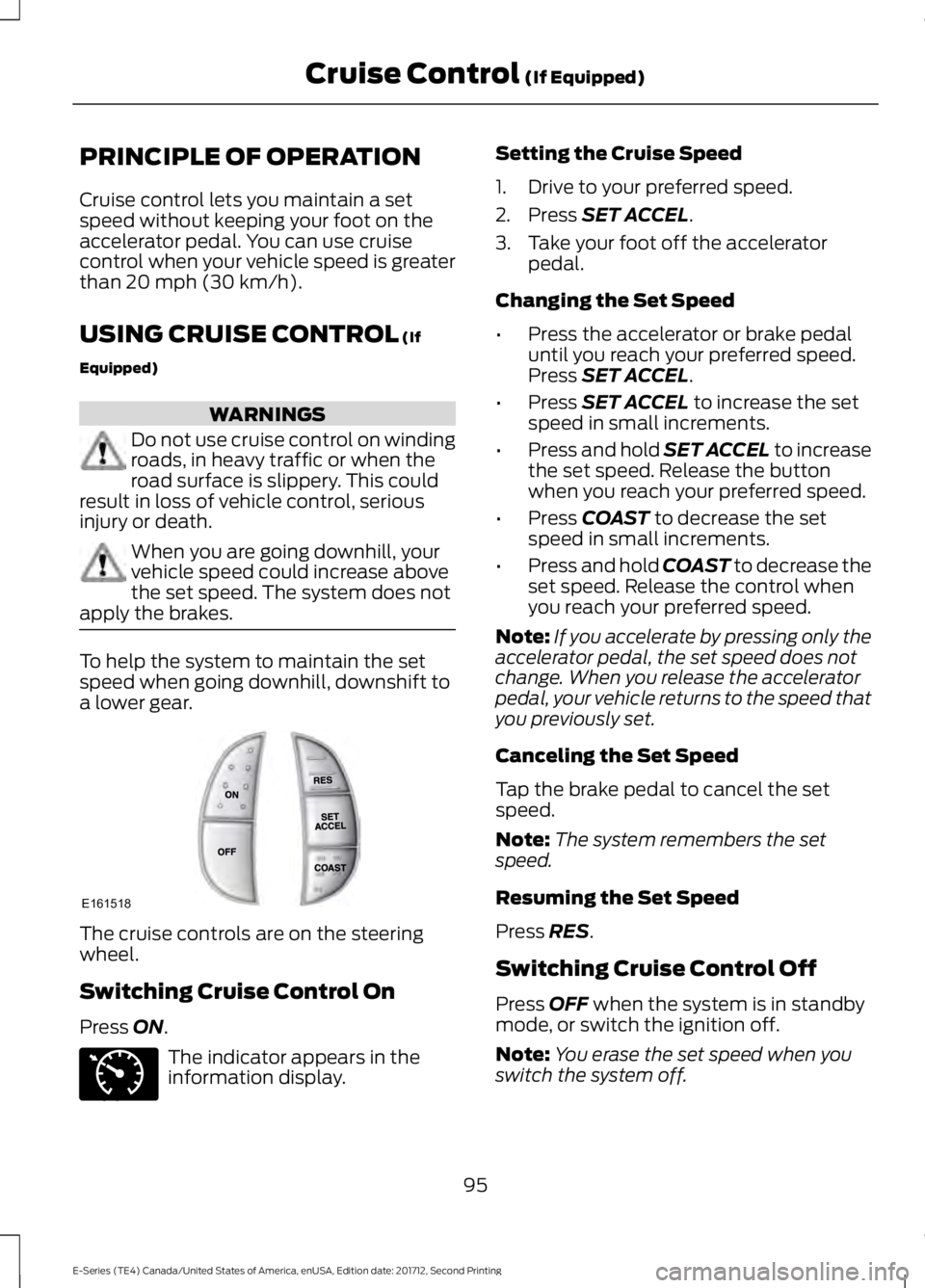
The cruise controls are on the steeringwheel.
Switching Cruise Control On
Press ON.
The indicator appears in theinformation display.
Setting the Cruise Speed
1. Drive to your preferred speed.
2. Press SET ACCEL.
3. Take your foot off the acceleratorpedal.
Changing the Set Speed
•Press the accelerator or brake pedaluntil you reach your preferred speed.Press SET ACCEL.
•Press SET ACCEL to increase the setspeed in small increments.
•Press and hold SET ACCEL to increasethe set speed. Release the buttonwhen you reach your preferred speed.
•Press COAST to decrease the setspeed in small increments.
•Press and hold COAST to decrease theset speed. Release the control whenyou reach your preferred speed.
Note:If you accelerate by pressing only theaccelerator pedal, the set speed does notchange. When you release the acceleratorpedal, your vehicle returns to the speed thatyou previously set.
Canceling the Set Speed
Tap the brake pedal to cancel the setspeed.
Note:The system remembers the setspeed.
Resuming the Set Speed
Press RES.
Switching Cruise Control Off
Press OFF when the system is in standbymode, or switch the ignition off.
Note:You erase the set speed when youswitch the system off.
95
E-Series (TE4) Canada/United States of America, enUSA, Edition date: 201712, Second Printing
Cruise Control (If Equipped)E161518 E71340