AUX FORD E SERIES 2019 User Guide
[x] Cancel search | Manufacturer: FORD, Model Year: 2019, Model line: E SERIES, Model: FORD E SERIES 2019Pages: 329, PDF Size: 2.92 MB
Page 144 of 329
GENERAL INFORMATION
Have your vehicle serviced regularly to helpmaintain its roadworthiness and resalevalue. There is a large network ofauthorized dealers that are there to helpyou with their professional servicingexpertise. We believe that their speciallytrained technicians are best qualified toservice your vehicle properly and expertly.They are supported by a wide range ofhighly specialized tools developedspecifically for servicing your vehicle.
If your vehicle requires professional service,an authorized dealer can provide thenecessary parts and service. Check yourwarranty information to find out whichparts and services are covered.
Use only recommended fuels, lubricants,fluids and service parts conforming tospecifications. Motorcraft® parts aredesigned and built to provide the bestperformance in your vehicle.
Precautions
•Do not work on a hot engine.
•Make sure that nothing gets caught inmoving parts.
•Do not work on a vehicle with theengine running in an enclosed space,unless you are sure you have enoughventilation.
•Keep all open flames and other burningmaterial (such as cigarettes) awayfrom the battery and all fuel relatedparts.
Working with the Engine Off
1. Set the parking brake and shift thetransmission to park (P).
2. Switch off the engine.
3. Block the wheels.
Working with the Engine On
WARNING: To reduce the risk ofvehicle damage and personal burninjuries, do not start your engine with theair cleaner removed and do not removeit while the engine is running.
1. Set the parking brake and shift thetransmission to park (P).
2. Block the wheels.
OPENING AND CLOSING THE
HOOD
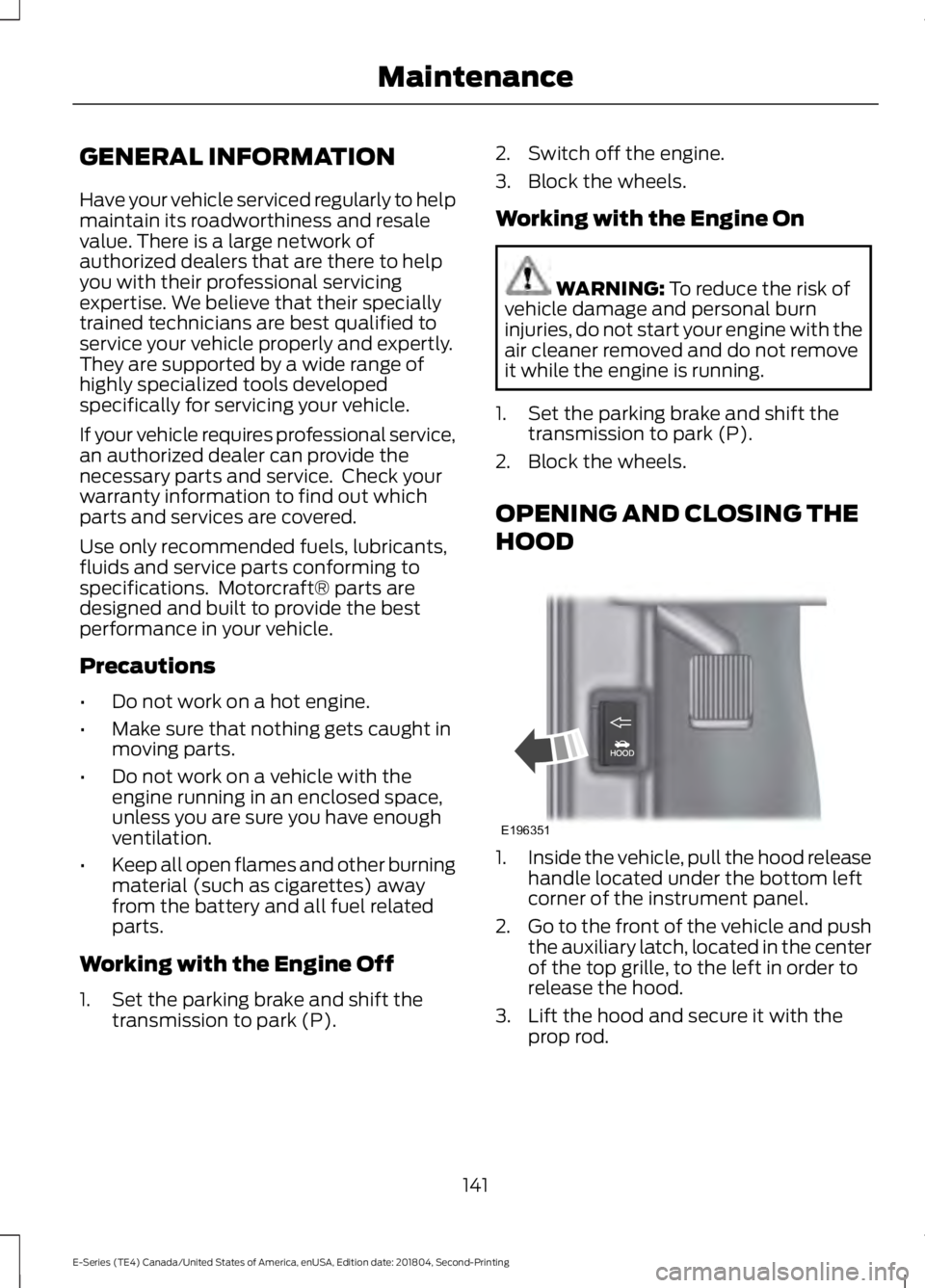
1.Inside the vehicle, pull the hood releasehandle located under the bottom leftcorner of the instrument panel.
2.Go to the front of the vehicle and pushthe auxiliary latch, located in the centerof the top grille, to the left in order torelease the hood.
3. Lift the hood and secure it with theprop rod.
141
E-Series (TE4) Canada/United States of America, enUSA, Edition date: 201804, Second-Printing
MaintenanceE196351
Page 202 of 329
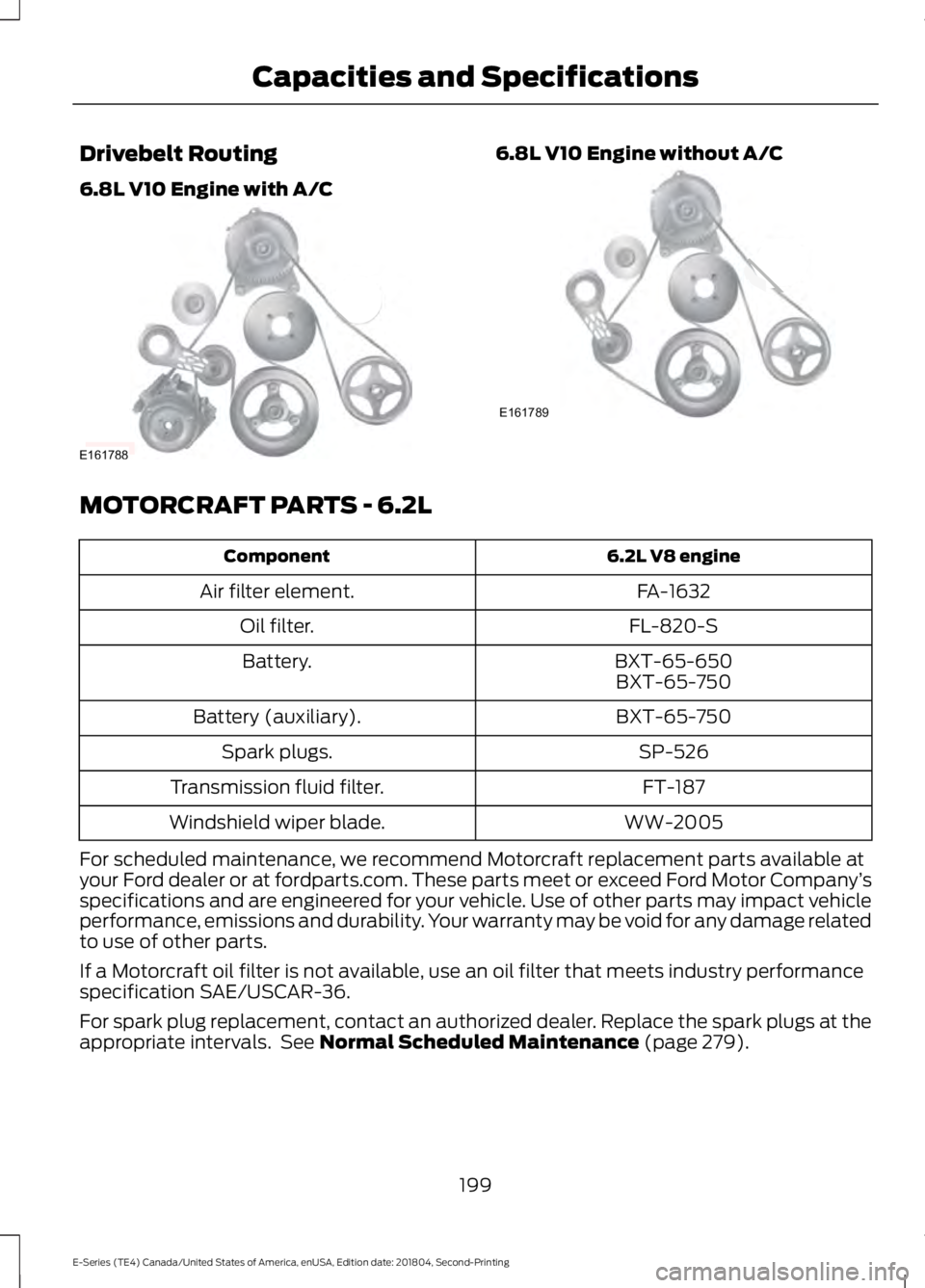
Drivebelt Routing
6.8L V10 Engine with A/C
6.8L V10 Engine without A/C
MOTORCRAFT PARTS - 6.2L
6.2L V8 engineComponent
FA-1632Air filter element.
FL-820-SOil filter.
BXT-65-650Battery.BXT-65-750
BXT-65-750Battery (auxiliary).
SP-526Spark plugs.
FT-187Transmission fluid filter.
WW-2005Windshield wiper blade.
For scheduled maintenance, we recommend Motorcraft replacement parts available atyour Ford dealer or at fordparts.com. These parts meet or exceed Ford Motor Company’sspecifications and are engineered for your vehicle. Use of other parts may impact vehicleperformance, emissions and durability. Your warranty may be void for any damage relatedto use of other parts.
If a Motorcraft oil filter is not available, use an oil filter that meets industry performancespecification SAE/USCAR-36.
For spark plug replacement, contact an authorized dealer. Replace the spark plugs at theappropriate intervals. See Normal Scheduled Maintenance (page 279).
199
E-Series (TE4) Canada/United States of America, enUSA, Edition date: 201804, Second-Printing
Capacities and SpecificationsE161788 E161789
Page 203 of 329
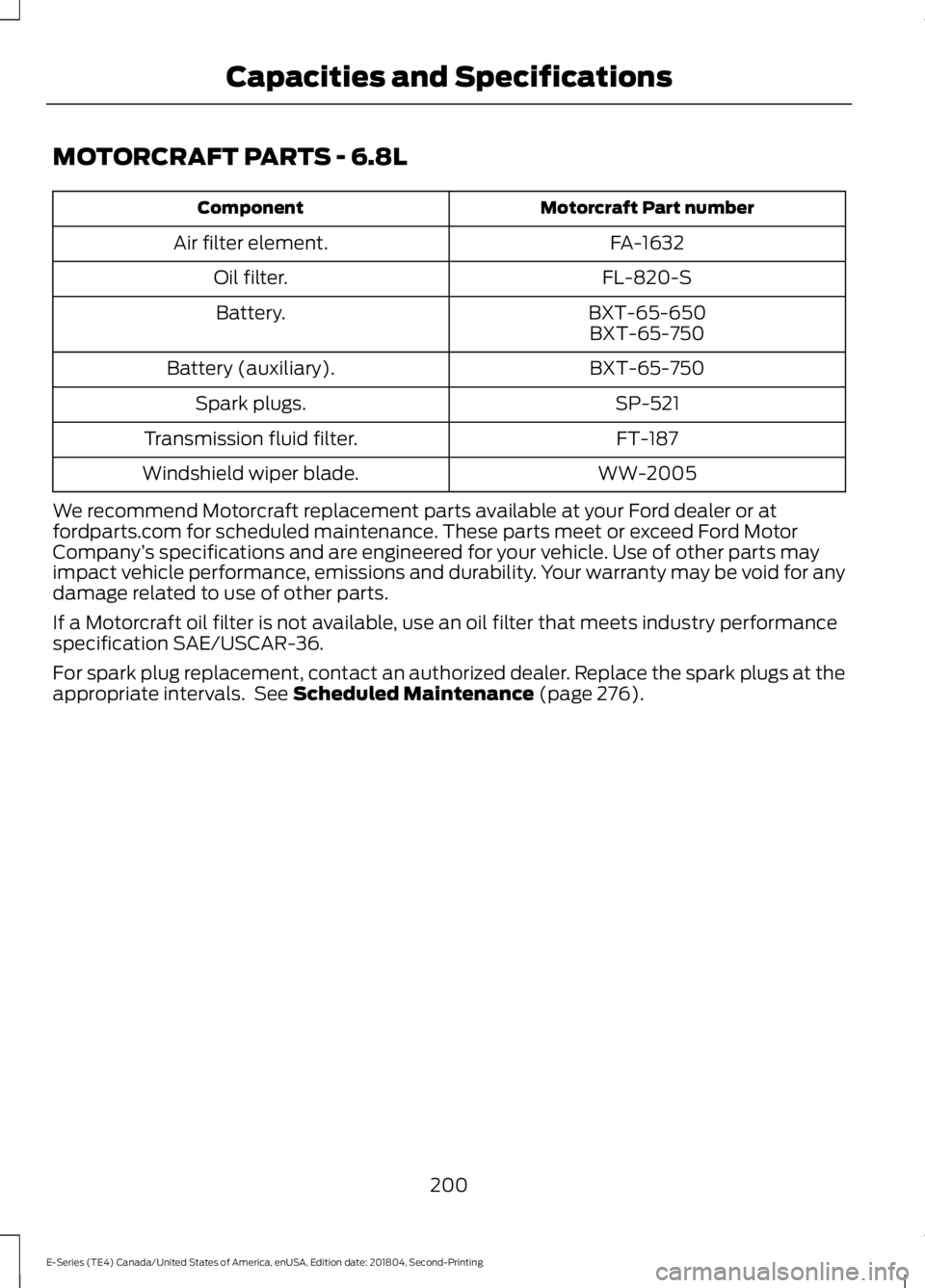
MOTORCRAFT PARTS - 6.8L
Motorcraft Part numberComponent
FA-1632Air filter element.
FL-820-SOil filter.
BXT-65-650Battery.BXT-65-750
BXT-65-750Battery (auxiliary).
SP-521Spark plugs.
FT-187Transmission fluid filter.
WW-2005Windshield wiper blade.
We recommend Motorcraft replacement parts available at your Ford dealer or atfordparts.com for scheduled maintenance. These parts meet or exceed Ford MotorCompany’s specifications and are engineered for your vehicle. Use of other parts mayimpact vehicle performance, emissions and durability. Your warranty may be void for anydamage related to use of other parts.
If a Motorcraft oil filter is not available, use an oil filter that meets industry performancespecification SAE/USCAR-36.
For spark plug replacement, contact an authorized dealer. Replace the spark plugs at theappropriate intervals. See Scheduled Maintenance (page 276).
200
E-Series (TE4) Canada/United States of America, enUSA, Edition date: 201804, Second-Printing
Capacities and Specifications
Page 206 of 329
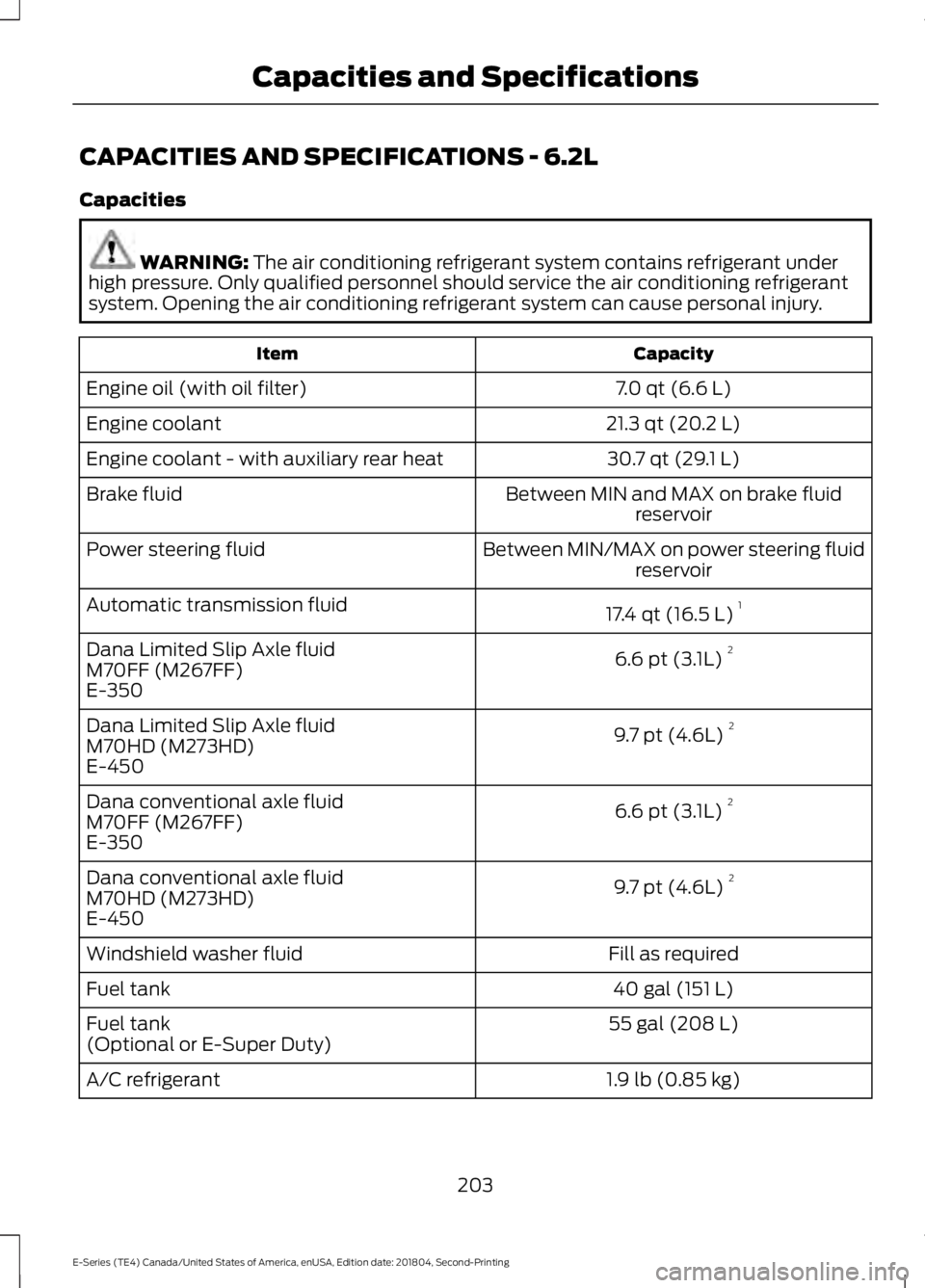
CAPACITIES AND SPECIFICATIONS - 6.2L
Capacities
WARNING: The air conditioning refrigerant system contains refrigerant underhigh pressure. Only qualified personnel should service the air conditioning refrigerantsystem. Opening the air conditioning refrigerant system can cause personal injury.
CapacityItem
7.0 qt (6.6 L)Engine oil (with oil filter)
21.3 qt (20.2 L)Engine coolant
30.7 qt (29.1 L)Engine coolant - with auxiliary rear heat
Between MIN and MAX on brake fluidreservoirBrake fluid
Between MIN/MAX on power steering fluidreservoirPower steering fluid
17.4 qt (16.5 L)1Automatic transmission fluid
6.6 pt (3.1L) 2Dana Limited Slip Axle fluidM70FF (M267FF)E-350
9.7 pt (4.6L) 2Dana Limited Slip Axle fluidM70HD (M273HD)E-450
6.6 pt (3.1L) 2Dana conventional axle fluidM70FF (M267FF)E-350
9.7 pt (4.6L) 2Dana conventional axle fluidM70HD (M273HD)E-450
Fill as requiredWindshield washer fluid
40 gal (151 L)Fuel tank
55 gal (208 L)Fuel tank(Optional or E-Super Duty)
1.9 lb (0.85 kg)A/C refrigerant
203
E-Series (TE4) Canada/United States of America, enUSA, Edition date: 201804, Second-Printing
Capacities and Specifications
Page 211 of 329
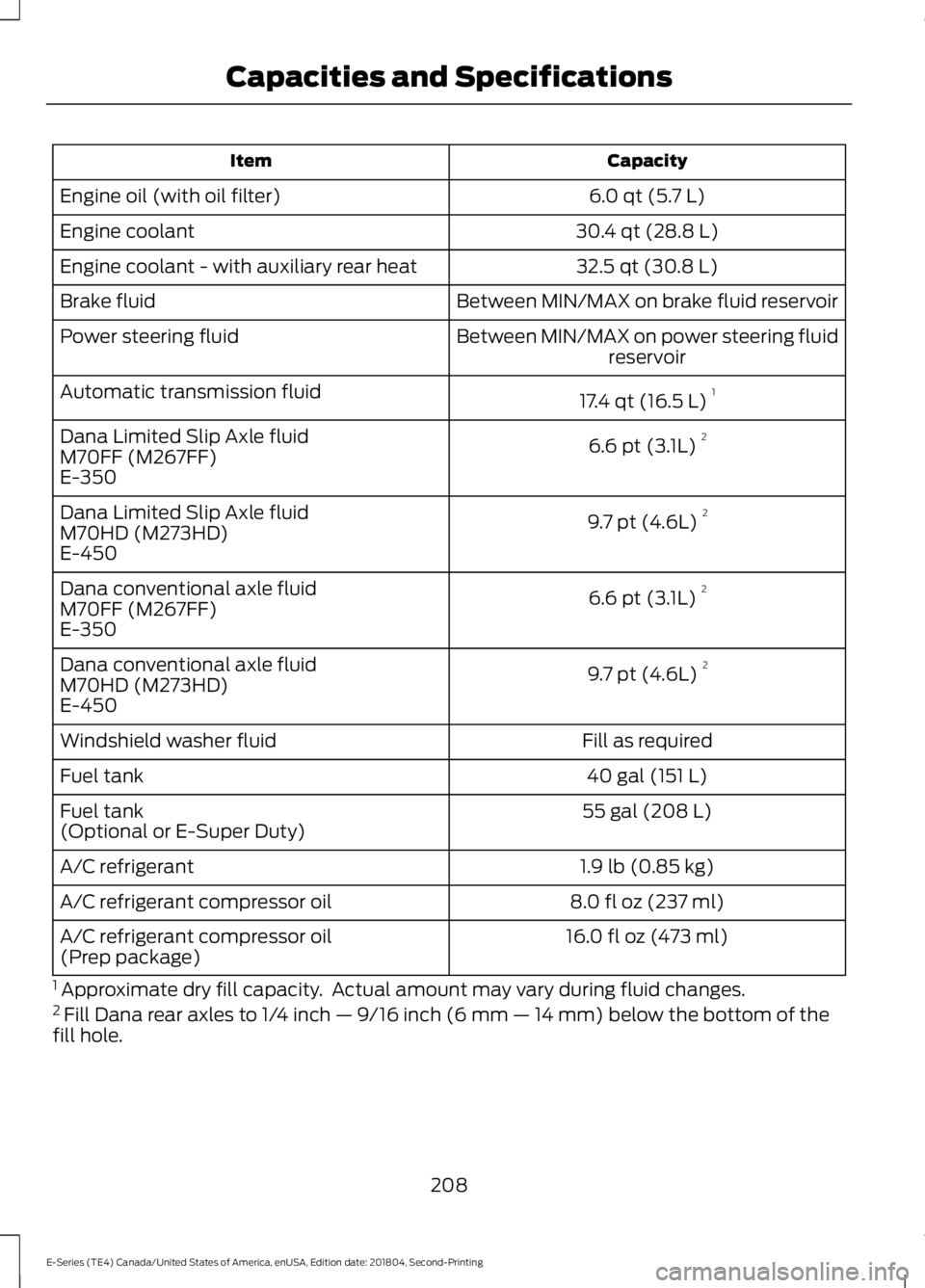
CapacityItem
6.0 qt (5.7 L)Engine oil (with oil filter)
30.4 qt (28.8 L)Engine coolant
32.5 qt (30.8 L)Engine coolant - with auxiliary rear heat
Between MIN/MAX on brake fluid reservoirBrake fluid
Between MIN/MAX on power steering fluidreservoirPower steering fluid
17.4 qt (16.5 L)1Automatic transmission fluid
6.6 pt (3.1L) 2Dana Limited Slip Axle fluidM70FF (M267FF)E-350
9.7 pt (4.6L) 2Dana Limited Slip Axle fluidM70HD (M273HD)E-450
6.6 pt (3.1L) 2Dana conventional axle fluidM70FF (M267FF)E-350
9.7 pt (4.6L) 2Dana conventional axle fluidM70HD (M273HD)E-450
Fill as requiredWindshield washer fluid
40 gal (151 L)Fuel tank
55 gal (208 L)Fuel tank(Optional or E-Super Duty)
1.9 lb (0.85 kg)A/C refrigerant
8.0 fl oz (237 ml)A/C refrigerant compressor oil
16.0 fl oz (473 ml)A/C refrigerant compressor oil(Prep package)
1 Approximate dry fill capacity. Actual amount may vary during fluid changes.2 Fill Dana rear axles to 1/4 inch — 9/16 inch (6 mm — 14 mm) below the bottom of thefill hole.
208
E-Series (TE4) Canada/United States of America, enUSA, Edition date: 201804, Second-Printing
Capacities and Specifications
Page 219 of 329
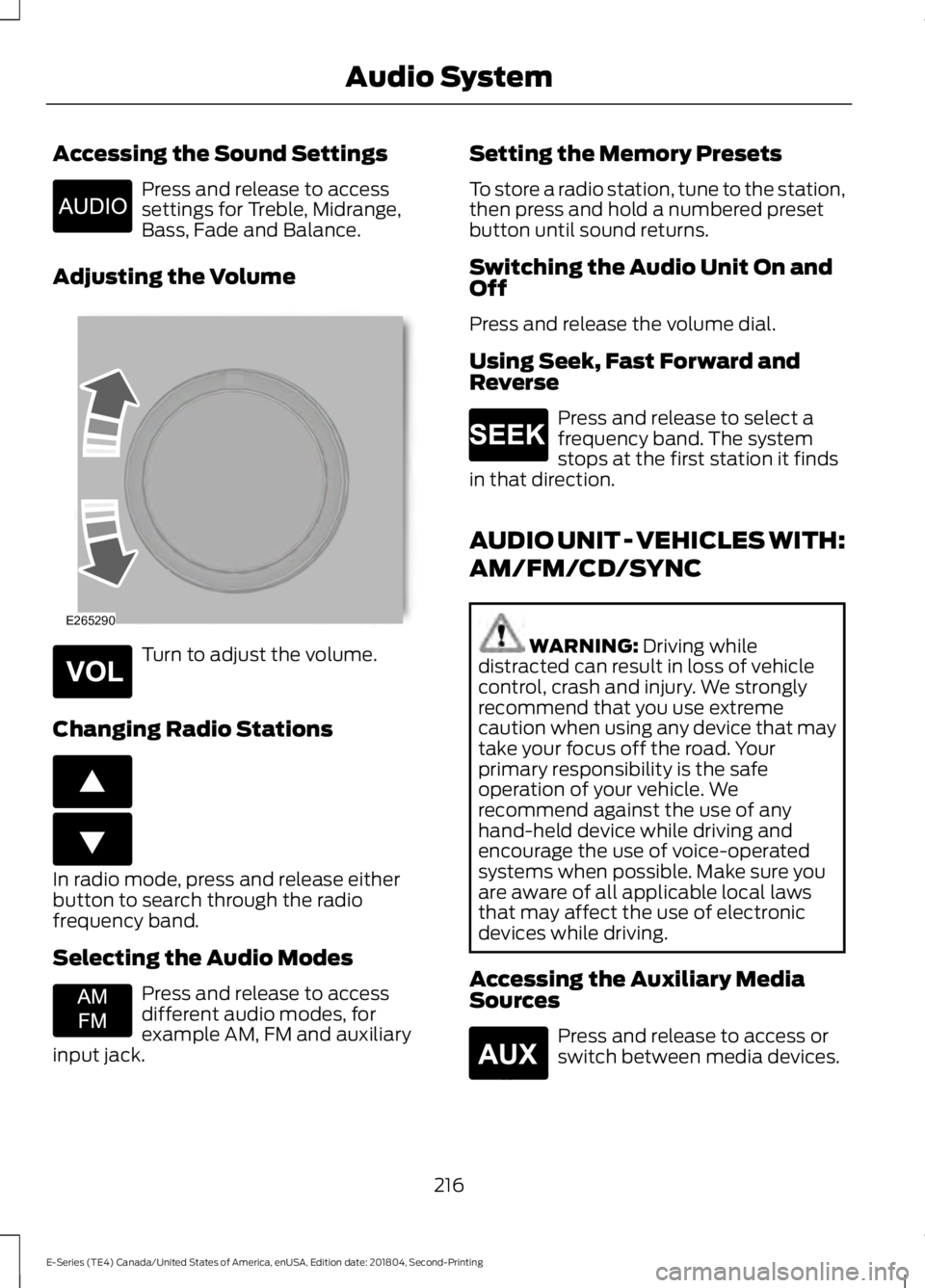
Accessing the Sound Settings
Press and release to accesssettings for Treble, Midrange,Bass, Fade and Balance.
Adjusting the Volume
Turn to adjust the volume.
Changing Radio Stations
In radio mode, press and release eitherbutton to search through the radiofrequency band.
Selecting the Audio Modes
Press and release to accessdifferent audio modes, forexample AM, FM and auxiliaryinput jack.
Setting the Memory Presets
To store a radio station, tune to the station,then press and hold a numbered presetbutton until sound returns.
Switching the Audio Unit On andOff
Press and release the volume dial.
Using Seek, Fast Forward andReverse
Press and release to select afrequency band. The systemstops at the first station it findsin that direction.
AUDIO UNIT - VEHICLES WITH:
AM/FM/CD/SYNC
WARNING: Driving whiledistracted can result in loss of vehiclecontrol, crash and injury. We stronglyrecommend that you use extremecaution when using any device that maytake your focus off the road. Yourprimary responsibility is the safeoperation of your vehicle. Werecommend against the use of anyhand-held device while driving andencourage the use of voice-operatedsystems when possible. Make sure youare aware of all applicable local lawsthat may affect the use of electronicdevices while driving.
Accessing the Auxiliary MediaSources
Press and release to access orswitch between media devices.
216
E-Series (TE4) Canada/United States of America, enUSA, Edition date: 201804, Second-Printing
Audio SystemE266185 E265290 E265304 E266187 E266186 E265934 E265273 E265277
Page 254 of 329
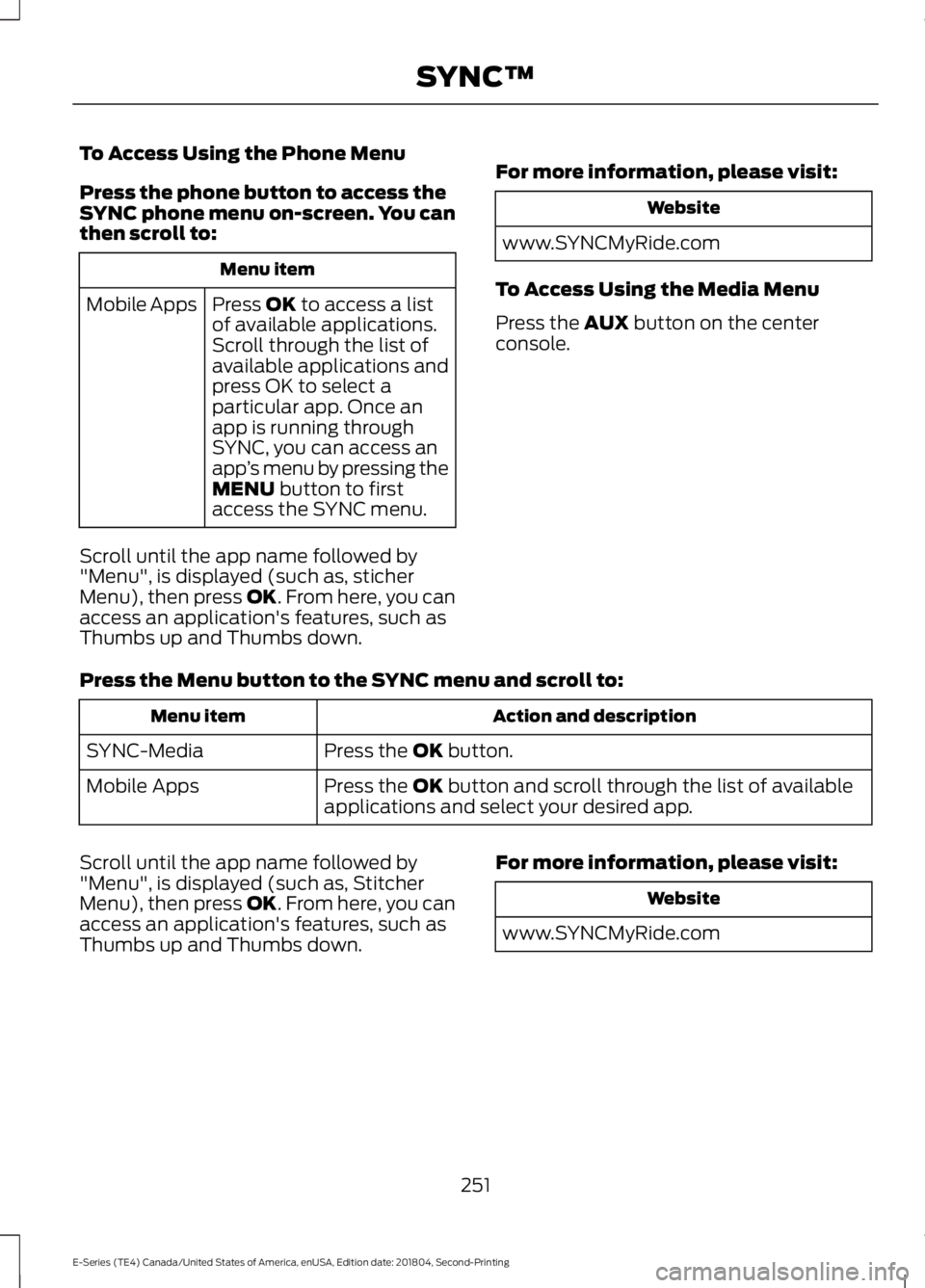
To Access Using the Phone Menu
Press the phone button to access theSYNC phone menu on-screen. You canthen scroll to:
Menu item
Press OK to access a listof available applications.Mobile Apps
Scroll through the list ofavailable applications andpress OK to select aparticular app. Once anapp is running throughSYNC, you can access anapp’s menu by pressing theMENU button to firstaccess the SYNC menu.
Scroll until the app name followed by"Menu", is displayed (such as, sticherMenu), then press OK. From here, you canaccess an application's features, such asThumbs up and Thumbs down.
For more information, please visit:
Website
www.SYNCMyRide.com
To Access Using the Media Menu
Press the AUX button on the centerconsole.
Press the Menu button to the SYNC menu and scroll to:
Action and descriptionMenu item
Press the OK button.SYNC-Media
Press the OK button and scroll through the list of availableapplications and select your desired app.Mobile Apps
Scroll until the app name followed by"Menu", is displayed (such as, StitcherMenu), then press OK. From here, you canaccess an application's features, such asThumbs up and Thumbs down.
For more information, please visit:
Website
www.SYNCMyRide.com
251
E-Series (TE4) Canada/United States of America, enUSA, Edition date: 201804, Second-Printing
SYNC™
Page 256 of 329
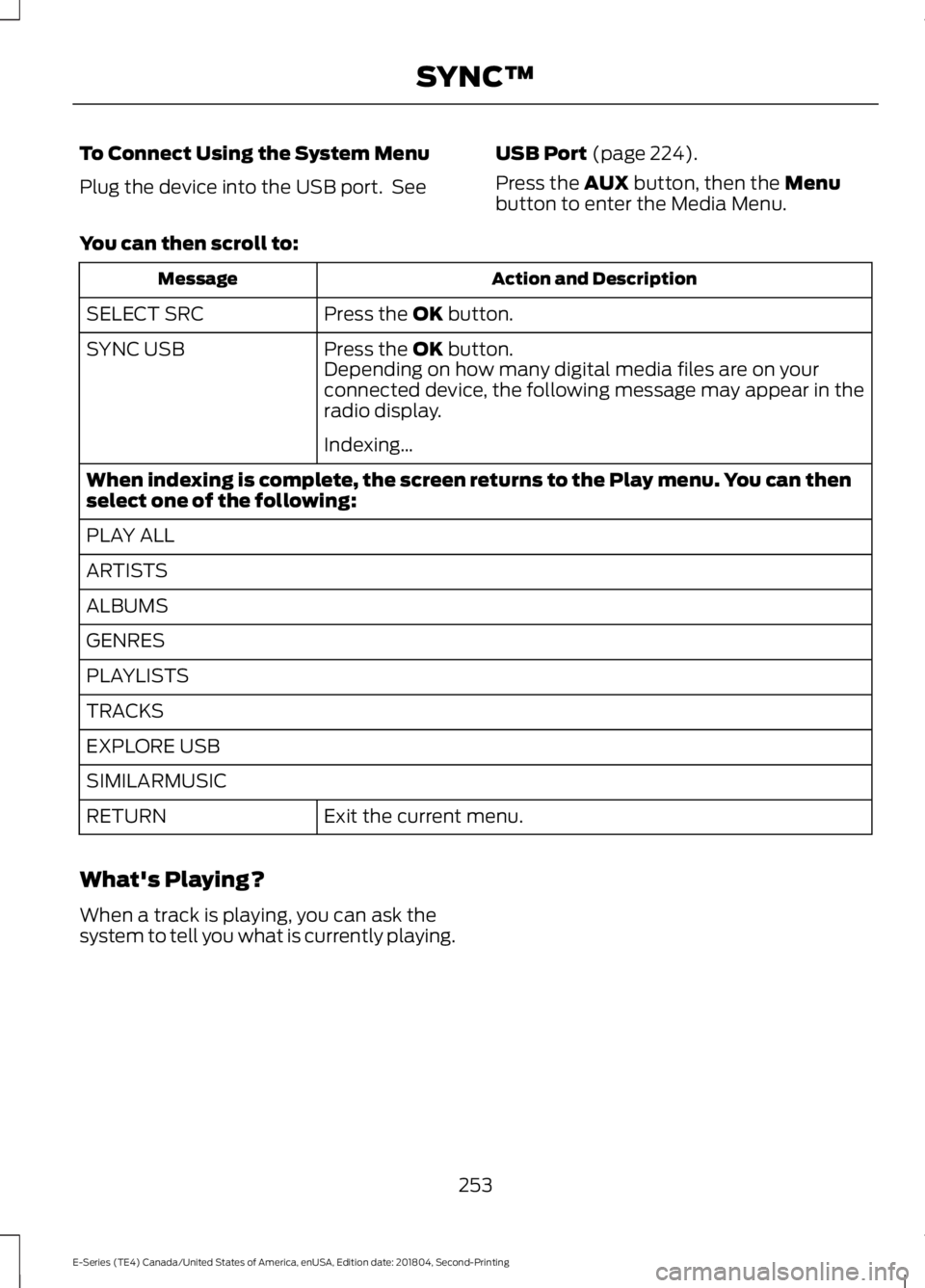
To Connect Using the System Menu
Plug the device into the USB port. See
USB Port (page 224).
Press the AUX button, then the Menubutton to enter the Media Menu.
You can then scroll to:
Action and DescriptionMessage
Press the OK button.SELECT SRC
Press the OK button.SYNC USBDepending on how many digital media files are on yourconnected device, the following message may appear in theradio display.
Indexing…
When indexing is complete, the screen returns to the Play menu. You can thenselect one of the following:
PLAY ALL
ARTISTS
ALBUMS
GENRES
PLAYLISTS
TRACKS
EXPLORE USB
SIMILARMUSIC
Exit the current menu.RETURN
What's Playing?
When a track is playing, you can ask thesystem to tell you what is currently playing.
253
E-Series (TE4) Canada/United States of America, enUSA, Edition date: 201804, Second-Printing
SYNC™
Page 258 of 329
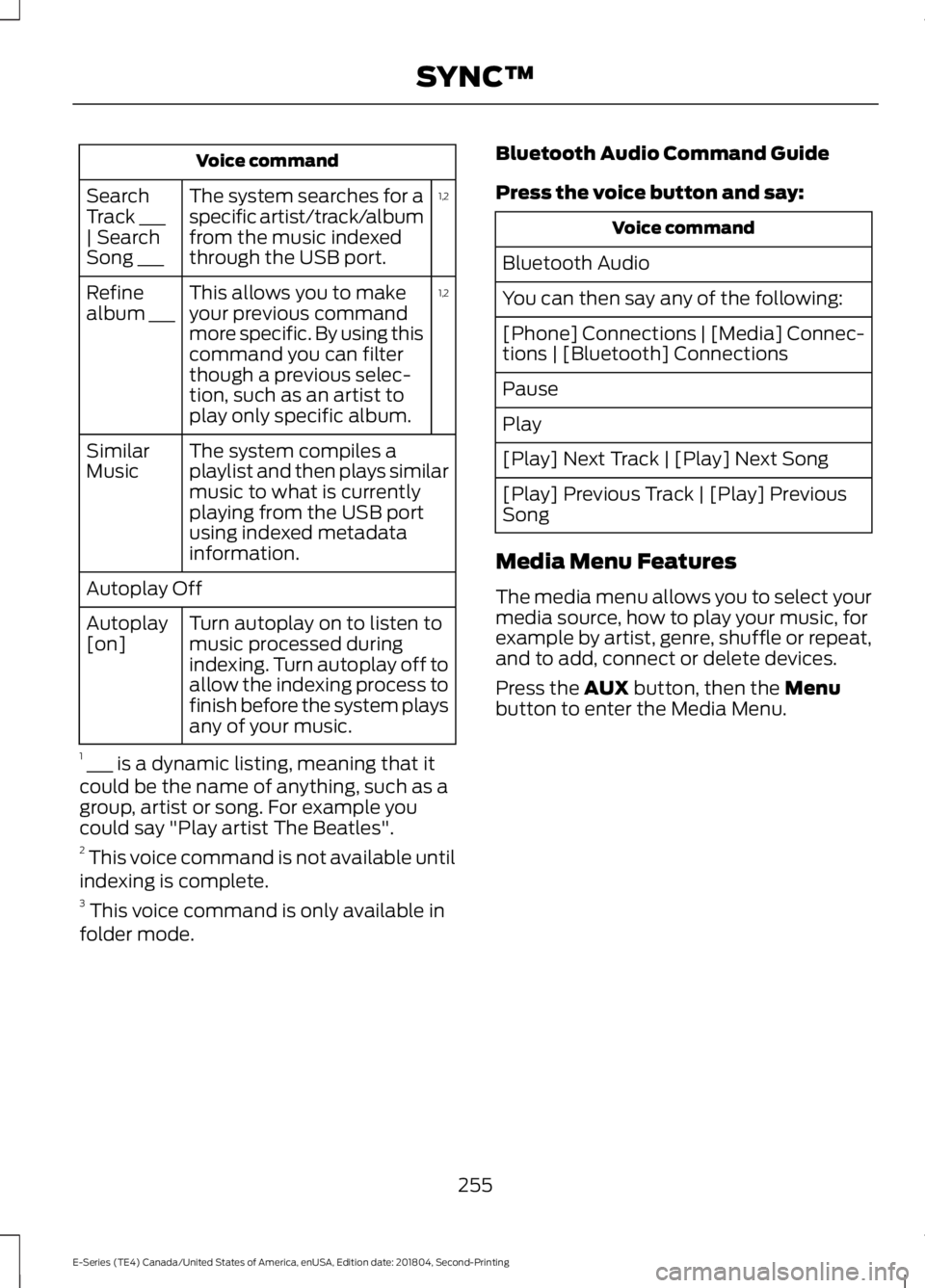
Voice command
1,2The system searches for aspecific artist/track/albumfrom the music indexedthrough the USB port.
SearchTrack ___| SearchSong ___
1,2This allows you to makeyour previous commandmore specific. By using thiscommand you can filterthough a previous selec-tion, such as an artist toplay only specific album.
Refinealbum ___
The system compiles aplaylist and then plays similarmusic to what is currentlyplaying from the USB portusing indexed metadatainformation.
SimilarMusic
Autoplay Off
Turn autoplay on to listen tomusic processed duringindexing. Turn autoplay off toallow the indexing process tofinish before the system playsany of your music.
Autoplay[on]
1 ___ is a dynamic listing, meaning that itcould be the name of anything, such as agroup, artist or song. For example youcould say "Play artist The Beatles".2 This voice command is not available untilindexing is complete.3 This voice command is only available infolder mode.
Bluetooth Audio Command Guide
Press the voice button and say:
Voice command
Bluetooth Audio
You can then say any of the following:
[Phone] Connections | [Media] Connec-tions | [Bluetooth] Connections
Pause
Play
[Play] Next Track | [Play] Next Song
[Play] Previous Track | [Play] PreviousSong
Media Menu Features
The media menu allows you to select yourmedia source, how to play your music, forexample by artist, genre, shuffle or repeat,and to add, connect or delete devices.
Press the AUX button, then the Menubutton to enter the Media Menu.
255
E-Series (TE4) Canada/United States of America, enUSA, Edition date: 201804, Second-Printing
SYNC™
Page 260 of 329
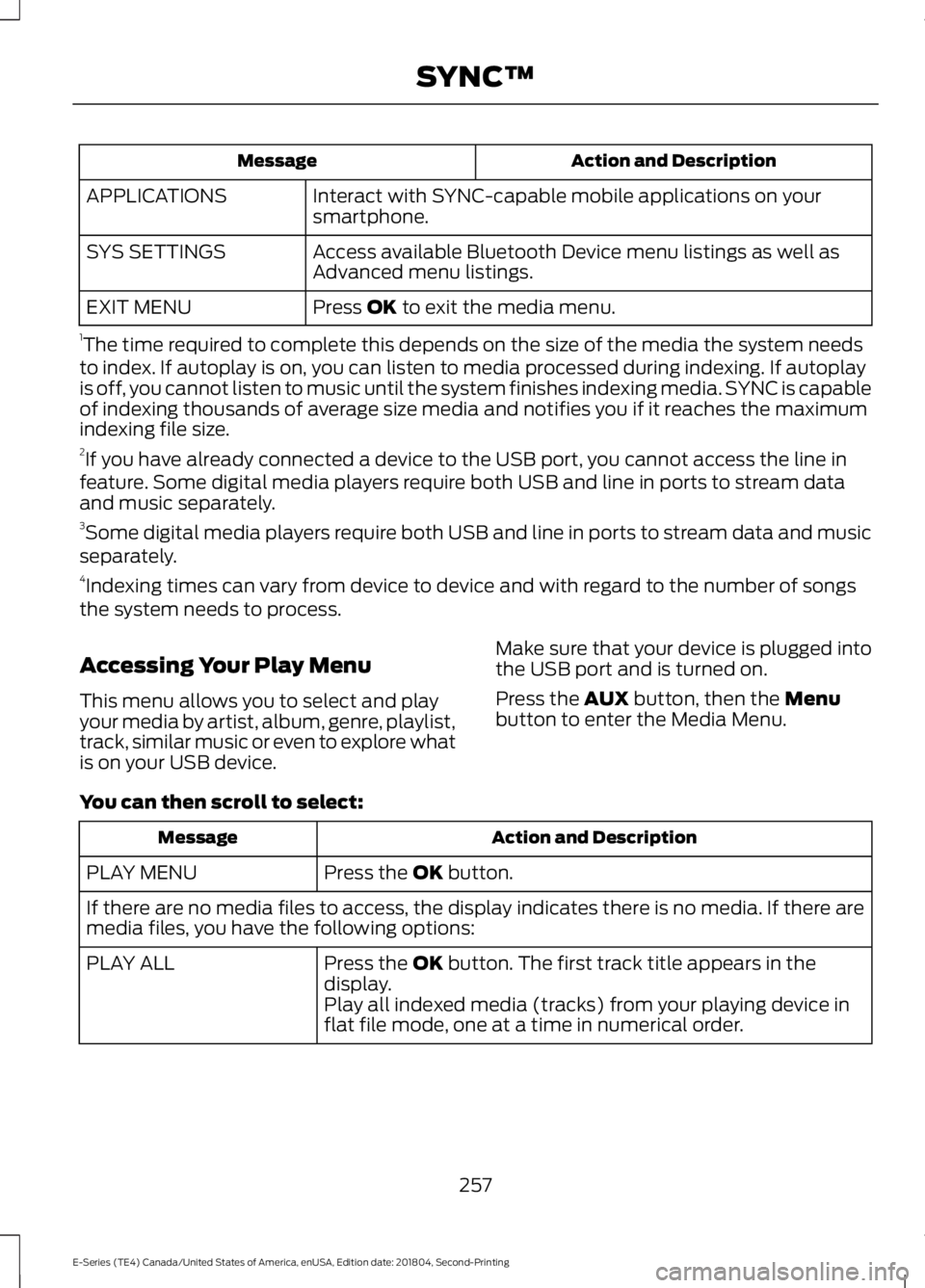
Action and DescriptionMessage
Interact with SYNC-capable mobile applications on yoursmartphone.APPLICATIONS
Access available Bluetooth Device menu listings as well asAdvanced menu listings.SYS SETTINGS
Press OK to exit the media menu.EXIT MENU
1The time required to complete this depends on the size of the media the system needsto index. If autoplay is on, you can listen to media processed during indexing. If autoplayis off, you cannot listen to music until the system finishes indexing media. SYNC is capableof indexing thousands of average size media and notifies you if it reaches the maximumindexing file size.2If you have already connected a device to the USB port, you cannot access the line infeature. Some digital media players require both USB and line in ports to stream dataand music separately.3Some digital media players require both USB and line in ports to stream data and musicseparately.4Indexing times can vary from device to device and with regard to the number of songsthe system needs to process.
Accessing Your Play Menu
This menu allows you to select and playyour media by artist, album, genre, playlist,track, similar music or even to explore whatis on your USB device.
Make sure that your device is plugged intothe USB port and is turned on.
Press the AUX button, then the Menubutton to enter the Media Menu.
You can then scroll to select:
Action and DescriptionMessage
Press the OK button.PLAY MENU
If there are no media files to access, the display indicates there is no media. If there aremedia files, you have the following options:
Press the OK button. The first track title appears in thedisplay.PLAY ALL
Play all indexed media (tracks) from your playing device inflat file mode, one at a time in numerical order.
257
E-Series (TE4) Canada/United States of America, enUSA, Edition date: 201804, Second-Printing
SYNC™