brake FORD E SERIES 2019 User Guide
[x] Cancel search | Manufacturer: FORD, Model Year: 2019, Model line: E SERIES, Model: FORD E SERIES 2019Pages: 329, PDF Size: 2.92 MB
Page 60 of 329
Tow Haul Indicator
Illuminates when the driveractivates the tow/haul feature.If the light flashes steadily, havean authorized dealer check the systemimmediately, damage to the transmissioncould occur.
AUDIBLE WARNINGS AND
INDICATORS
Fail-Safe Cooling Warning Chime
Sounds when the coolant gauge pointerhas moved to hot. There are three stagesof chimes:
•Stage 1 is a single chime when theengine temperature begins to overheat.
•Stage 2 is multiple chimes and enginepower becomes limited in order to helpcool the engine.
•Stage 3 is multiple chimes and theengine will shut down.
Headlamps On Warning Chime
Sounds when you remove the key from theignition and open the driver's door and youhave left the headlamps or parking lampson.
Key in Ignition Warning Chime
Sounds when you open the driver's doorand you have left the key in the ignition.
Parking Brake On Warning Chime
Sounds when you have left the parkingbrake on and drive your vehicle. If thewarning chime remains on after you havereleased the parking brake, have thesystem checked by your authorized dealerimmediately.
Shift to Park Warning Chime
Sounds when the ignition is in the off oraccessory position and your vehicle is notin park, or when you open the driver's doorand your vehicle is not in park.
57
E-Series (TE4) Canada/United States of America, enUSA, Edition date: 201804, Second-Printing
Instrument ClusterE161509
Page 64 of 329

SYSTEM CHECK
CHARGING SYSTEM
BRAKE SYSTEM
TBC GAIN = XX.X or NOTRAILER (if equipped)
TBC GAIN = XX.X orOUTPUT = ////// (ifequipped)
XXX MILES TO E
OIL LIFE XXX% HOLD RESET = NEW
This displays the remaining oil life. An oilchange is required whenever indicated bythe message center and according to therecommended maintenance schedule.USE ONLY RECOMMENDED ENGINE OILS.
To reset the oil monitoring system to 100%after each oil change, perform thefollowing:
1. Press and release the SELECT/RESETstem to display OIL LIFE XXX% HOLDRESET = NEW.
2. Press and hold the SELECT/RESETstem for two seconds and release toreset the oil life to 100%.
Note:To change oil life 100% value (ifequipped):
3. Once OIL LIFE SET TO XXX%displays, release and press theSELECT/RESET stem to change the oillife start value. Each release and pressreduces the value by 10%.
UNITS ENG / METRIC
Displays the current units in English orMetric.
AUTOLOCK
This feature automatically locks all vehicledoors when you shift into any gear, puttingthe vehicle in motion.
AUTOUNLOCK
This feature automatically unlocks allvehicle doors when you open the driver'sdoor within 10 minutes of switching theignition off.
COMPASS
Displays the vehicle's heading direction.
Note:Driving near large buildings, bridges,power lines and powerful broadcastantennas may affect the compass reading.Magnetic or metallic objects placed in, onor near the vehicle may also affect compassaccuracy. If the compass appears to beinaccurate, a manual calibration may benecessary. Refer to Compass zoneadjustment.
61
E-Series (TE4) Canada/United States of America, enUSA, Edition date: 201804, Second-Printing
Information Displays
Page 65 of 329
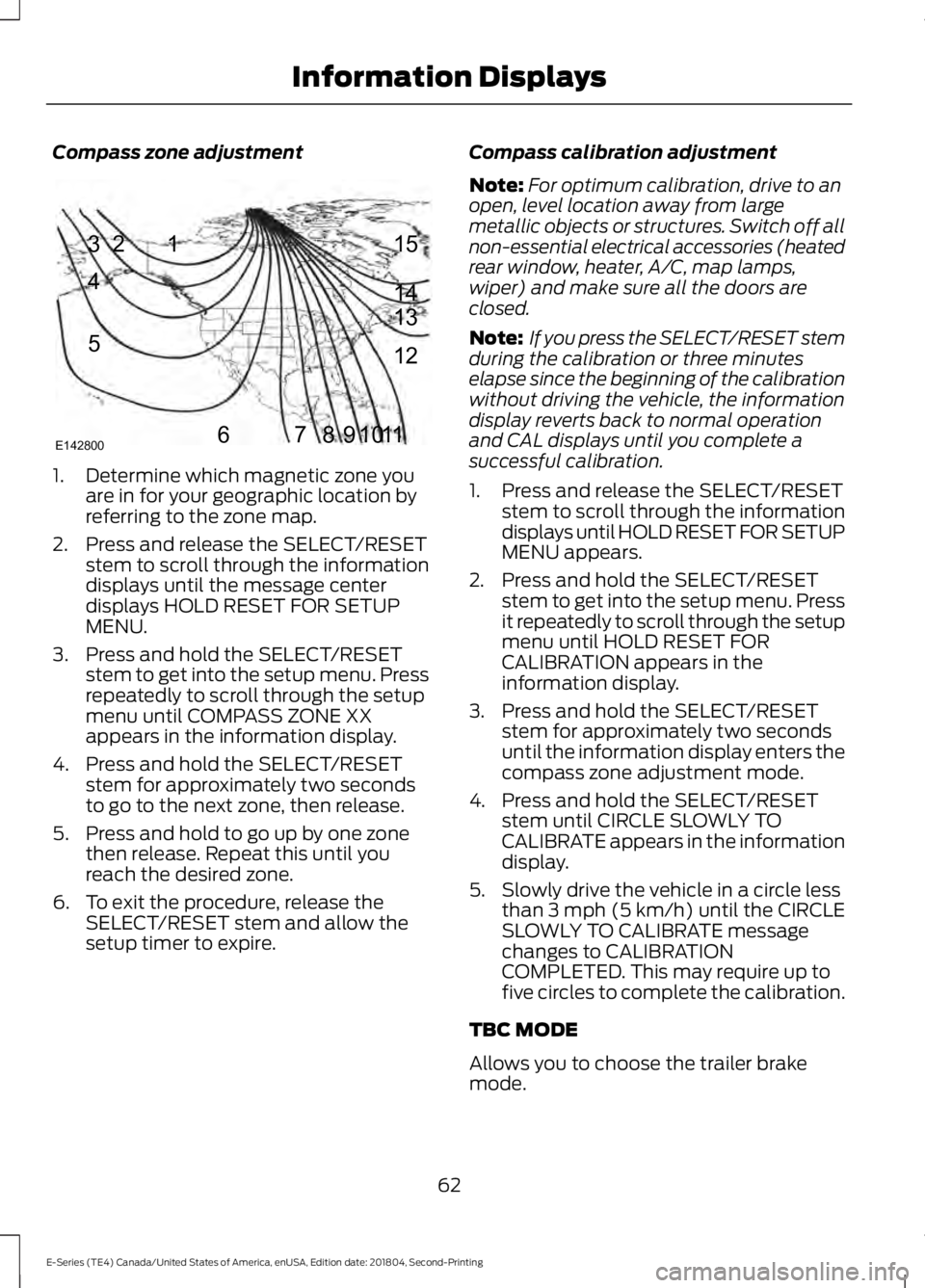
Compass zone adjustment
1. Determine which magnetic zone youare in for your geographic location byreferring to the zone map.
2. Press and release the SELECT/RESETstem to scroll through the informationdisplays until the message centerdisplays HOLD RESET FOR SETUPMENU.
3. Press and hold the SELECT/RESETstem to get into the setup menu. Pressrepeatedly to scroll through the setupmenu until COMPASS ZONE XXappears in the information display.
4. Press and hold the SELECT/RESETstem for approximately two secondsto go to the next zone, then release.
5. Press and hold to go up by one zonethen release. Repeat this until youreach the desired zone.
6. To exit the procedure, release theSELECT/RESET stem and allow thesetup timer to expire.
Compass calibration adjustment
Note:For optimum calibration, drive to anopen, level location away from largemetallic objects or structures. Switch off allnon-essential electrical accessories (heatedrear window, heater, A/C, map lamps,wiper) and make sure all the doors areclosed.
Note: If you press the SELECT/RESET stemduring the calibration or three minuteselapse since the beginning of the calibrationwithout driving the vehicle, the informationdisplay reverts back to normal operationand CAL displays until you complete asuccessful calibration.
1. Press and release the SELECT/RESETstem to scroll through the informationdisplays until HOLD RESET FOR SETUPMENU appears.
2. Press and hold the SELECT/RESETstem to get into the setup menu. Pressit repeatedly to scroll through the setupmenu until HOLD RESET FORCALIBRATION appears in theinformation display.
3. Press and hold the SELECT/RESETstem for approximately two secondsuntil the information display enters thecompass zone adjustment mode.
4. Press and hold the SELECT/RESETstem until CIRCLE SLOWLY TOCALIBRATE appears in the informationdisplay.
5. Slowly drive the vehicle in a circle lessthan 3 mph (5 km/h) until the CIRCLESLOWLY TO CALIBRATE messagechanges to CALIBRATIONCOMPLETED. This may require up tofive circles to complete the calibration.
TBC MODE
Allows you to choose the trailer brakemode.
62
E-Series (TE4) Canada/United States of America, enUSA, Edition date: 201804, Second-Printing
Information Displays123
4
5
6 7 8 9 1011 12 13 14 15
E142800
Page 66 of 329
LANGUAGE = ENGLISH / SPANISH /FRENCH
Allows you to choose which languageappears in the information display.
Waiting four seconds or pressing theSELECT/RESET stem cycles theinformation display through each of thelanguage choices.
Press the SELECT/RESET stem to set thelanguage choice when the language youwant appears.
HOLD RESET FOR SYSTEM CHECK
The information display begins to cyclethrough the vehicle systems and providesa status of the item if needed. Somesystems show a message only if acondition is present.
INFORMATION MESSAGES
Note:Depending on the vehicle optionsequipped with your vehicle, not all of themessages will display or be available.Certain messages may be abbreviated orshortened depending upon which clustertype you have.
Press the SELECT/RESET stem toacknowledge and remove some messagesfrom the information display. Othermessages will be removed automaticallyafter a short time.
Certain messages need to be confirmedbefore you can access the menus.
Brake System
ActionMessage
Indicates the brake fluid level is low, have the brakesystem inspected immediately.BRAKE FLUID LEVEL LOW
Displays when the brake system needs servicing. If thewarning stays on or continues to come on, contactyour authorized dealer as soon as possible.
CHECK BRAKE SYSTEM
Displays when the parking brake is set and the vehicleis in motion.PARK BRAKE ENGAGED
Fuel
ActionMessage
Displays as an early reminder of a low fuel condition.XXX MILES TO E FUEL LEVELLOW
63
E-Series (TE4) Canada/United States of America, enUSA, Edition date: 201804, Second-Printing
Information Displays
Page 68 of 329
Trailer
ActionMessage
Displays along with a single tone in response to faultssensed by the TBC. See Essential Towing Checks(page 108).
TRAILER BRAKE MODULEFAULT
Displays when a correct trailer connection (a trailerwith electric trailer brakes) is sensed during a givenignition cycle.
TRAILER CONNECTED
Displays when a trailer connection becomes discon-nected, either intentionally or unintentionally, and hasbeen sensed during a given ignition cycle. Disregardthis status if your vehicle is not equipped with a factoryinstalled trailer brake controller. This message mayappear when you use an aftermarket TBC even whenthe trailer is connected.
TRAILER DISCONNECTED
Displays if there are certain faults in the vehicle wiringand trailer wiring or brake system. See EssentialTowing Checks (page 108).
WIRING FAULT ON TRAILER
Transmission
ActionMessage
A reminder to apply the brakes, then shift to park.SHIFT TO PARK
65
E-Series (TE4) Canada/United States of America, enUSA, Edition date: 201804, Second-Printing
Information Displays
Page 70 of 329
Recirculated air flows through theinstrument panel vents and air conditioningturns on.
HINTS ON CONTROLLING THE
INTERIOR CLIMATE
General Hints
Note:Prolonged use of recirculated air maycause the windows to fog up.
Note:You may feel a small amount of airfrom the footwell air vents regardless of theair distribution setting.
Note:To reduce humidity build-up insideyour vehicle, do not drive with the systemswitched off or with recirculated air alwaysswitched on.
Note:To reduce fogging of the windshieldduring humid weather, adjust the airdistribution control to the windshield airvents position.
Note:Do not place objects under the frontseats as this may interfere with the airflowto the rear seats.
Note:Remove any snow, ice or leaves fromthe air intake area at the base of thewindshield.
Note:To improve the time to reach acomfortable temperature in hot weather,drive with the windows open until you feelcold air through the air vents.
Quickly Heating the Interior
1. Adjust the fan speed to the highestspeed setting.
2. Adjust the temperature control to thefull heat setting.
3. Direct air to the footwell air vents.
Recommended Settings forHeating
1. Adjust the fan speed to the centersetting.
2. Adjust the temperature control to themidway point of the hot settings.
3. Direct air to the footwell air vents.
Quickly Cooling the Interior
1. Turn to MAX A/C.
2. Drive with the windows open until youfeel cold air through the air vents.
Recommended Settings forCooling
1. Adjust the fan speed to the centersetting.
2. Adjust the temperature control to themidway point of the cold settings.
3. Direct air to the instrument panel airvents.
Vehicle Stationary for ExtendedPeriods During Extreme HighAmbient Temperatures
1. Apply the parking brake.
2. Place your vehicle in park (P) orneutral.
3. Turn to MAX A/C.
4. Adjust the fan speed to the lowestspeed setting.
Defogging the Side Windows inCold Weather
1. Direct air to the instrument panel andwindshield vents.
2. Turn to NORM A/C.
3. Adjust the temperature control to thedesired setting.
4. Adjust the fan speed to the highestsetting.
67
E-Series (TE4) Canada/United States of America, enUSA, Edition date: 201804, Second-Printing
Climate Control
Page 78 of 329
Before starting the engine check thefollowing:
•Make sure all occupants have fastenedtheir safety belts.
•Make sure the headlamps andelectrical accessories are off.
•Make sure the parking brake is on.
•Make sure the transmission is in park(P) or neutral (N).
•Turn the ignition key to the on position.
Note:Do not touch the accelerator pedal.
1. Fully press the brake pedal.
2. Turn the key to the start position tostart the engine. Release the key whenthe engine starts.
Note:The engine may continue crankingfor up to 15 seconds or until it starts.
Note:If you cannot start the engine on thefirst try, wait for a short period and try again.
Failure to Start
If you cannot start the engine after threeattempts, wait 10 seconds and follow thisprocedure:
1. Fully press the brake pedal.
2. Fully press the accelerator pedal andhold it there.
3. Start the engine.
Stopping the Engine When YourVehicle is Stationary
1. Shift into park (P) or neutral (N).
2. Turn the key to the off position.
3. Apply the parking brake.
Stopping the Engine When YourVehicle is Moving
WARNING: Switching off theengine when the vehicle is still movingwill result in a loss of brake and steeringassistance. The steering will not lock, buthigher effort will be required. When theignition is switched off, some electricalcircuits, including air bags, warning lampsand indicators may also be off. If theignition was turned off accidentally, youcan shift into neutral (N) and re-start theengine.
1. Put the transmission into neutral (N)and use the brakes to bring your vehicleto a safe stop.
2. When your vehicle has stopped, shiftinto park (P) or neutral (N) and switchthe ignition off.
3. Apply the parking brake.
Guarding Against Exhaust Fumes
WARNING: If you smell exhaustfumes inside your vehicle, have yourvehicle checked by your authorizeddealer immediately. Do not drive yourvehicle if you smell exhaust fumes.Carbon monoxide is present in exhaustfumes. Take precautions to avoid itsdangerous effects.
Important Ventilating Information
If you stop your vehicle and then leave theengine idling for long periods of time, werecommend that you do one of thefollowing:
•Open the windows at least 1 in (3 cm).
•Set your climate control to outside air.
75
E-Series (TE4) Canada/United States of America, enUSA, Edition date: 201804, Second-Printing
Starting and Stopping the Engine
Page 90 of 329
AUTOMATIC TRANSMISSION
WARNING: Always fully apply theparking brake. Make sure you shift intopark (P) for vehicles with an automatictransmission. Switch the ignition off andremove the key whenever you leave yourvehicle.
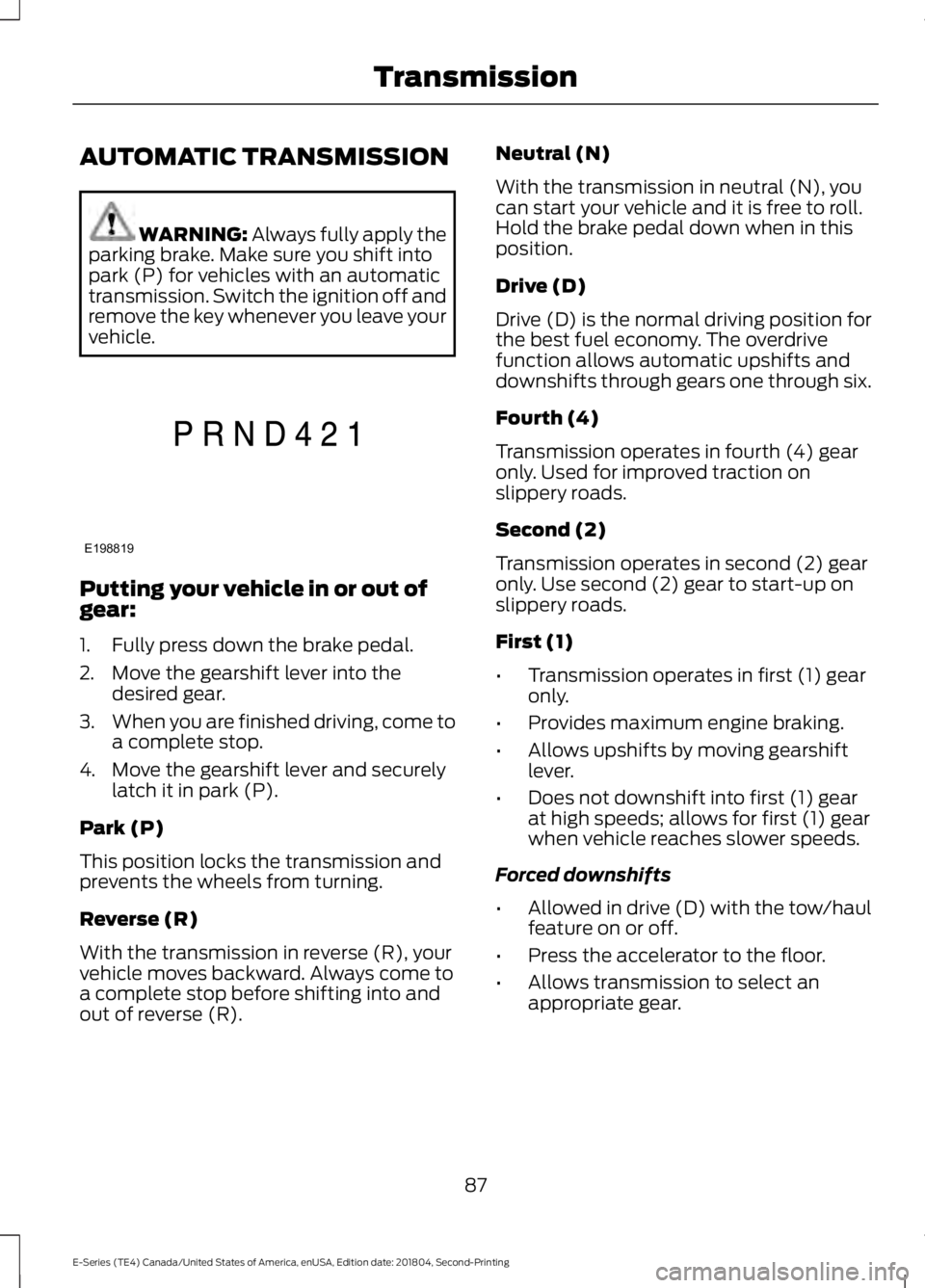
Putting your vehicle in or out ofgear:
1. Fully press down the brake pedal.
2. Move the gearshift lever into thedesired gear.
3.When you are finished driving, come toa complete stop.
4. Move the gearshift lever and securelylatch it in park (P).
Park (P)
This position locks the transmission andprevents the wheels from turning.
Reverse (R)
With the transmission in reverse (R), yourvehicle moves backward. Always come toa complete stop before shifting into andout of reverse (R).
Neutral (N)
With the transmission in neutral (N), youcan start your vehicle and it is free to roll.Hold the brake pedal down when in thisposition.
Drive (D)
Drive (D) is the normal driving position forthe best fuel economy. The overdrivefunction allows automatic upshifts anddownshifts through gears one through six.
Fourth (4)
Transmission operates in fourth (4) gearonly. Used for improved traction onslippery roads.
Second (2)
Transmission operates in second (2) gearonly. Use second (2) gear to start-up onslippery roads.
First (1)
•Transmission operates in first (1) gearonly.
•Provides maximum engine braking.
•Allows upshifts by moving gearshiftlever.
•Does not downshift into first (1) gearat high speeds; allows for first (1) gearwhen vehicle reaches slower speeds.
Forced downshifts
•Allowed in drive (D) with the tow/haulfeature on or off.
•Press the accelerator to the floor.
•Allows transmission to select anappropriate gear.
87
E-Series (TE4) Canada/United States of America, enUSA, Edition date: 201804, Second-Printing
TransmissionE198819
Page 91 of 329
Tow/Haul Mode
To activate tow/haul, press thebutton on the gearshift lever.The TOW HAUL indicator lightilluminates in the instrument cluster.
The tow/haul feature:
•Delays upshifts to reduce the frequencyof transmission shifting.
•Provides engine braking in all forwardgears, which slows your vehicle andassists you in controlling your vehiclewhen descending a slope.
•Depending on driving conditions andload conditions, may downshift thetransmission, slow your vehicle andcontrol your vehicle speed whendescending a hill, without pressing theaccelerator pedal. The amount ofdownshift braking provided will varybased upon the amount you press thebrake pedal.
The tow/haul feature improvestransmission operation when towing atrailer or a heavy load. All transmissiongear ranges are available when usingtow/haul.
To deactivate the tow/haul feature andreturn to normal driving mode, press thebutton on the gearshift lever again. TheTOW HAUL light deactivates. Tow/haulalso deactivates when you power downyour vehicle.
WARNING: Do not use tow/haulwhen the road surface is slippery. Failureto follow this instruction could result inthe loss of control of your vehicle.
Brake-Shift Interlock
WARNING: When doing thisprocedure, you need to take thetransmission out of park (P) whichmeans your vehicle can roll freely. Toavoid unwanted vehicle movement,always fully apply the parking brake priorto doing this procedure. Use wheelschocks if appropriate.
WARNING: If the parking brake isfully released, but the brake warninglamp remains illuminated, the brakesmay not be working properly. Have yourvehicle checked as soon as possible.
Note:Do not drive your vehicle until youverify that the brake lamps are working.
Your vehicle has a brake-shift interlockfeature that prevents the gearshift leverfrom moving from park (P) when theignition is in the 3 (on) position and thebrake pedal is not pressed.
If you cannot move the gearshift lever outof park (P) position with the ignition in the4 (on) position and the brake pedalpressed, a malfunction may have occurred.It is possible that a fuse has blown or yourvehicle’s brake lamps are not operatingproperly. See Fuse Specification Chart(page 131).
If the fuse is not blown and the brakelamps are working properly, the followingprocedure allows you to move the gearshiftlever from park (P):
1. Apply the parking brake and turn theignition on.
2.Use a screwdriver to remove the lowertrim panel under the steering column.Make sure not to disturb the wires onthe electrical connector.
88
E-Series (TE4) Canada/United States of America, enUSA, Edition date: 201804, Second-Printing
TransmissionE161509
Page 92 of 329
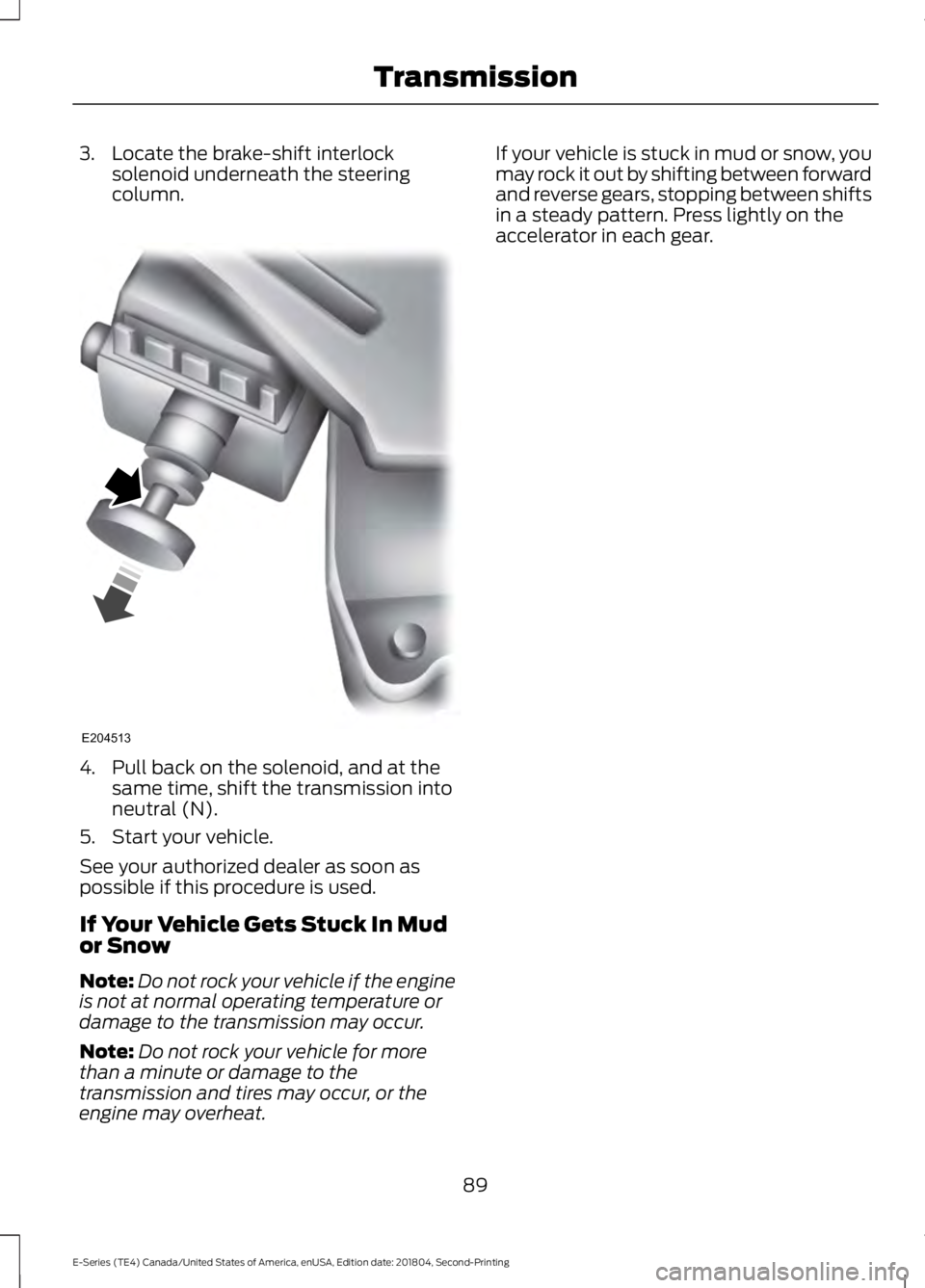
3. Locate the brake-shift interlocksolenoid underneath the steeringcolumn.
4. Pull back on the solenoid, and at thesame time, shift the transmission intoneutral (N).
5. Start your vehicle.
See your authorized dealer as soon aspossible if this procedure is used.
If Your Vehicle Gets Stuck In Mudor Snow
Note:Do not rock your vehicle if the engineis not at normal operating temperature ordamage to the transmission may occur.
Note:Do not rock your vehicle for morethan a minute or damage to thetransmission and tires may occur, or theengine may overheat.
If your vehicle is stuck in mud or snow, youmay rock it out by shifting between forwardand reverse gears, stopping between shiftsin a steady pattern. Press lightly on theaccelerator in each gear.
89
E-Series (TE4) Canada/United States of America, enUSA, Edition date: 201804, Second-Printing
TransmissionE204513