spare wheel FORD E SERIES 2019 User Guide
[x] Cancel search | Manufacturer: FORD, Model Year: 2019, Model line: E SERIES, Model: FORD E SERIES 2019Pages: 329, PDF Size: 2.92 MB
Page 191 of 329
TIRE PRESSURE MONITORING
SYSTEM (IF EQUIPPED)
WARNING: The tire pressuremonitoring system is not a substitute formanually checking tire pressures. Youshould periodically check tire pressuresusing a pressure gauge. Failure tocorrectly maintain tire pressures couldincrease the risk of tire failure, loss ofcontrol, vehicle rollover and personalinjury.
Note: You should only use tire sealants inroadside emergencies as they may causedamage to the tire pressure monitoringsystem sensor.
Note: If the tire pressure monitoring systemsensor becomes damaged, it may notfunction.
Each tire, including the spare, ifprovided, should be checkedmonthly when cold and inflatedto the inflation pressure recommended bythe vehicle manufacturer on the vehicleplacard or tire inflation pressure label. Ifyour vehicle has tires of a different sizethan the size indicated on the vehicleplacard or tire inflation pressure label, youshould determine the proper tire inflationpressure for those tires.
As an added safety feature, your vehiclehas been equipped with a Tire PressureMonitoring System (TPMS) thatilluminates a low tire pressure telltalewhen one or more of your tires issignificantly under-inflated. Accordingly,when the low tire pressure telltaleilluminates, you should stop and checkyour tires as soon as possible, and inflate
them to the proper pressure. Driving on asignificantly under-inflated tire causes thetire to overheat and can lead to tire failure.Under-inflation also reduces fuel efficiencyand tire tread life, and may affect thevehicle’s handling and stopping ability.
Please note that the TPMS is not asubstitute for proper tire maintenance, andit is the driver's responsibility to maintaincorrect tire pressure, even if under-inflationhas not reached the level to triggerillumination of the TPMS low tire pressuretelltale.
Your vehicle has a TPMS malfunctionindicator to indicate when the system isnot operating properly. The TPMSmalfunction indicator is combined with thelow tire pressure telltale. When the systemdetects a malfunction, the telltale flashesfor approximately one minute and thenremains continuously illuminated. Thissequence continues upon subsequentvehicle start-ups as long as themalfunction exists.
When the malfunction indicator isilluminated, the system may not be ableto detect or signal low tire pressure asintended. TPMS malfunctions may occurfor a variety of reasons, including theinstallation of replacement or alternatetires or wheels on the vehicle that preventthe TPMS from functioning properly.Always check the TPMS malfunctiontelltale after replacing one or more tires orwheels on your vehicle to ensure that thereplacement or alternate tires and wheelsallow the TPMS to continue to functionproperly.
This device complies with Part 15 of theFCC Rules and with License exempt RSSStandards of Industry Canada. Operationis subject to the following two conditions:
1. This device may not cause harmfulinterference.
188
E-Series (TE4) Canada/United States of America, enUSA, Edition date: 201804, Second-Printing
Wheels and Tires
Page 192 of 329

2. This device must accept anyinterference received, includinginterference that may cause undesiredoperation.
Note:Changes or modifications notexpressively approved by the partyresponsible for compliance could void theuser's authority to operate the equipment.The term "IC:" before the radio certificationnumber only signifies that Industry Canadatechnical specifications were met.
Changing Tires With a TirePressure Monitoring System
Note:Each road tire is equipped with a tirepressure sensor located inside the wheeland tire assembly cavity. The pressuresensor is attached to the valve stem. Thepressure sensor is covered by the tire and isnot visible unless the tire is removed. Takecare when changing the tire to avoiddamaging the sensor.
You should always have your tires servicedby an authorized dealer.
Check the tire pressure periodically, atleast monthly, using an accurate tire gauge.See Inflating Your Tires in this chapter.
Understanding Your Tire PressureMonitoring System
The tire pressure monitoring systemmeasures pressure in your four road tiresand sends the tire pressure readings toyour vehicle. The low tire pressure warninglight turns on if the tire pressure issignificantly low. Once the light isilluminated, your tires are under-inflatedand need to be inflated to themanufacturer’s recommended tirepressure. Even if the light turns on and ashort time later turns off, your tire pressurestill needs to be checked.
When Your Temporary Spare Tire isInstalled
When you replace one of the road tireswith the temporary spare, the systemcontinues to identify an issue to remindyou that you need to repair and put backon the damaged road wheel and tireassembly on your vehicle.
To restore the full function of the tirepressure monitoring system, have thedamaged road wheel and tire assemblyrepaired and remounted on your vehicle.
When You Believe Your System is NotOperating Properly
The main function of the tire pressuremonitoring system is to warn you whenyour tires need air. It can also warn you inthe event the system is no longer capableof functioning as intended. See thefollowing chart for information concerningyour tire pressure monitoring system:
189
E-Series (TE4) Canada/United States of America, enUSA, Edition date: 201804, Second-Printing
Wheels and TiresE142549
Page 193 of 329
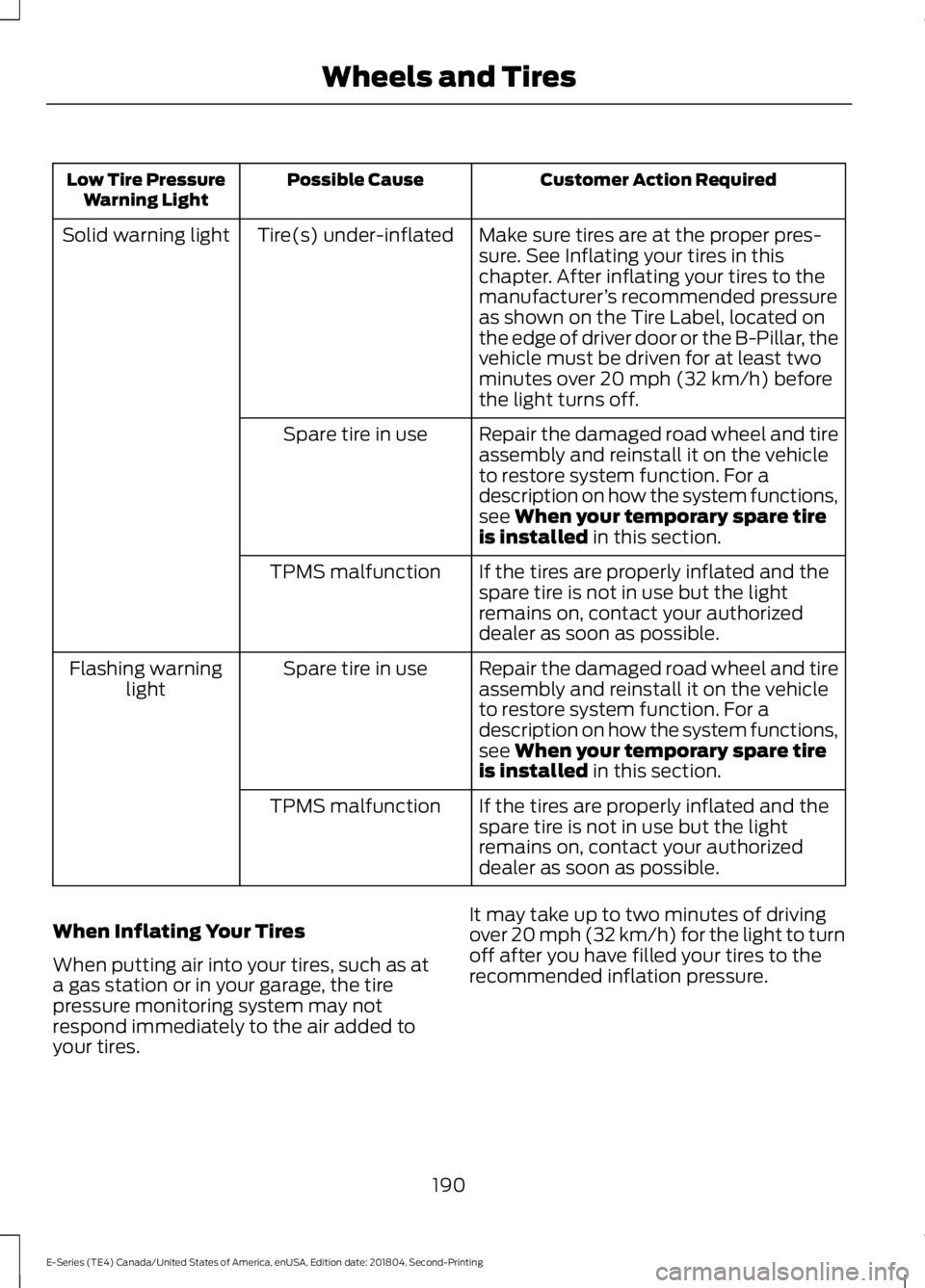
Customer Action RequiredPossible CauseLow Tire PressureWarning Light
Make sure tires are at the proper pres-sure. See Inflating your tires in thischapter. After inflating your tires to themanufacturer’s recommended pressureas shown on the Tire Label, located onthe edge of driver door or the B-Pillar, thevehicle must be driven for at least twominutes over 20 mph (32 km/h) beforethe light turns off.
Tire(s) under-inflatedSolid warning light
Repair the damaged road wheel and tireassembly and reinstall it on the vehicleto restore system function. For adescription on how the system functions,see When your temporary spare tireis installed in this section.
Spare tire in use
If the tires are properly inflated and thespare tire is not in use but the lightremains on, contact your authorizeddealer as soon as possible.
TPMS malfunction
Repair the damaged road wheel and tireassembly and reinstall it on the vehicleto restore system function. For adescription on how the system functions,see When your temporary spare tireis installed in this section.
Spare tire in useFlashing warninglight
If the tires are properly inflated and thespare tire is not in use but the lightremains on, contact your authorizeddealer as soon as possible.
TPMS malfunction
When Inflating Your Tires
When putting air into your tires, such as ata gas station or in your garage, the tirepressure monitoring system may notrespond immediately to the air added toyour tires.
It may take up to two minutes of drivingover 20 mph (32 km/h) for the light to turnoff after you have filled your tires to therecommended inflation pressure.
190
E-Series (TE4) Canada/United States of America, enUSA, Edition date: 201804, Second-Printing
Wheels and Tires
Page 196 of 329
Note:The tire pressure monitoring systemindicator light illuminates when the sparetire is in use. To restore the full function ofthe monitoring system, all road wheelsequipped with tire pressure monitoringsensors must be mounted on the vehicle.
Note:Do not use wheels or lug nutsdifferent than the original equipment, as thismay damage the wheel or mounting system.
If you get a flat tire when driving, do notapply the brake heavily. Instead, graduallydecrease your speed. Hold the steeringwheel firmly and slowly move to a safeplace on the side of the road.
Have a flat serviced by an authorizeddealer in order to prevent damage to thetire pressure monitoring system sensors.See Tire Pressure Monitoring System(page 188). Replace the spare tire with aroad tire as soon as possible. Duringrepairing or replacing of the flat tire, havethe authorized dealer inspect the tirepressure monitoring system sensor fordamage.
Dissimilar Spare Wheel and TireAssembly Information
WARNING: Failure to follow theseguidelines could result in an increasedrisk of loss of vehicle control, injury ordeath.
If you have a dissimilar spare wheel andtire, then it is intended for temporary useonly. This means that if you need to use it,you should replace it as soon as possiblewith a road wheel and tire assembly thatis the same size and type as the road tiresand wheels that were originally providedby Ford. If the dissimilar spare tire or wheelis damaged, it should be replaced ratherthan repaired.
A dissimilar spare wheel and tire assemblyis defined as a spare wheel and tireassembly that is different in brand, size orappearance from the road tires and wheelsand can be one of three types:
1.T-type mini-spare: This spare tirebegins with the letter T for tire size andmay have Temporary Use Only molded inthe sidewall.
2.Full-size dissimilar spare with labelon wheel: This spare tire has a label onthe wheel that states: THIS WHEEL ANDTIRE ASSEMBLY FOR TEMPORARY USEONLY.
When driving with one of the dissimilarspare tires listed above, do not:
•Exceed 50 mph (80 km/h).
•Load the vehicle beyond maximumvehicle load rating listed on the SafetyCompliance Label.
•Tow a trailer.
•Use snow chains on the end of thevehicle with the dissimilar spare tire.
•Use more than one dissimilar spare tireat a time.
•Use commercial car washingequipment.
•Try to repair the dissimilar spare tire.
Use of one of the dissimilar spare tireslisted above at any one wheel location canlead to impairment of the following:
•Handling, stability and brakingperformance.
•Comfort and noise.
•Ground clearance and parking at curbs.
•Winter weather driving capability.
•Wet weather driving capability.
•All-wheel driving capability.
3.Full-size dissimilar spare withoutlabel on wheel
193
E-Series (TE4) Canada/United States of America, enUSA, Edition date: 201804, Second-Printing
Wheels and Tires
Page 197 of 329
When driving with the full-size dissimilarspare wheel and tire assembly, do not:
•Exceed 70 mph (113 km/h).
•Use more than one dissimilar sparewheel and tire assembly at a time.
•Use commercial car washingequipment.
•Use snow chains on the end of thevehicle with the dissimilar spare wheeland tire assembly.
The usage of a full-size dissimilar sparewheel and tire assembly can lead toimpairment of the following:
•Handling, stability and brakingperformance.
•Comfort and noise.
•Ground clearance and parking at curbs.
•Winter weather driving capability.
•Wet weather driving capability.
•All-wheel driving capability.
When driving with the full-size dissimilarspare wheel and tire assembly additionalcaution should be given to:
•Towing a trailer.
•Driving vehicles equipped with acamper body.
•Driving vehicles with a load on thecargo rack.
Drive cautiously when using a full-sizedissimilar spare wheel and tire assemblyand seek service as soon as possible.
Tire Change Procedure
WARNING: When one of the frontwheels is off the ground, thetransmission alone will not prevent thevehicle from moving or slipping off thejack, even if the transmission is in park(P).
WARNING: To help prevent yourvehicle from moving when changing awheel, shift the transmission into park(P), set the parking brake and use anappropriate block or wheel chock tosecure the wheel diagonally opposite tothe wheel being changed. For example,when changing the front left wheel,place an appropriate block or wheelchock on the right rear wheel.
WARNING: Do not get under avehicle that is only supported by avehicle jack.
WARNING: Do not attempt tochange a tire on the side of the vehicleclose to moving traffic. Pull far enoughoff the road to avoid the danger of beinghit when operating the jack or changingthe wheel.
WARNING: Always use the jackprovided as original equipment with yourvehicle. If using a jack other than the oneprovided, make sure the jack capacity isadequate for the vehicle weight,including any vehicle cargo ormodifications. If you are unsure if the jackcapacity is adequate, contact theauthorized dealer.
Note:Passengers should not remain in yourvehicle when the vehicle is being jacked.
Removing the flat wheel and tire
1.Park on a level surface, set the parkingbrake and activate the hazard flashers.
2.Place the transmission in park (P) andturn the engine off.
194
E-Series (TE4) Canada/United States of America, enUSA, Edition date: 201804, Second-Printing
Wheels and Tires
Page 198 of 329
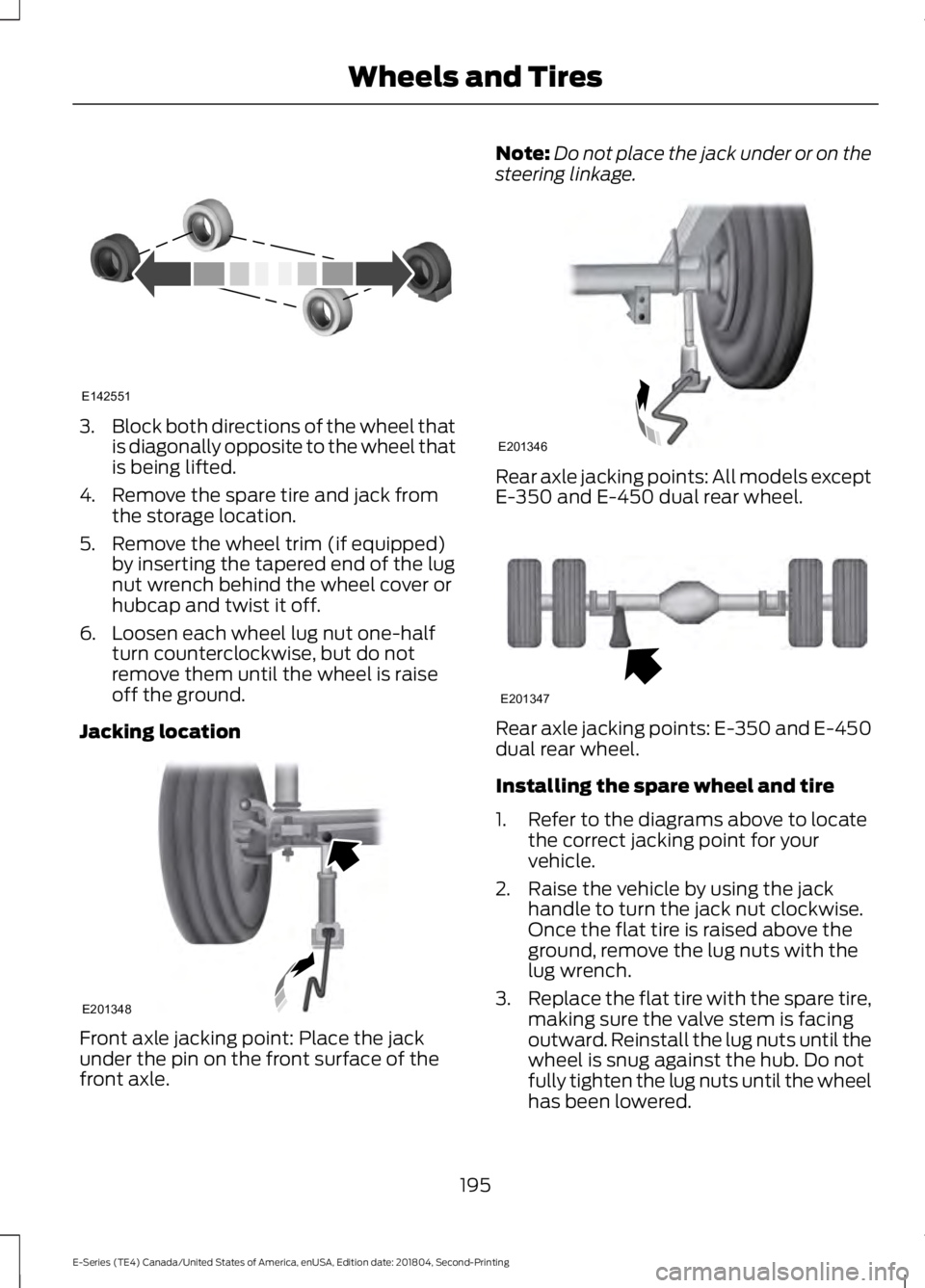
3.Block both directions of the wheel thatis diagonally opposite to the wheel thatis being lifted.
4. Remove the spare tire and jack fromthe storage location.
5. Remove the wheel trim (if equipped)by inserting the tapered end of the lugnut wrench behind the wheel cover orhubcap and twist it off.
6. Loosen each wheel lug nut one-halfturn counterclockwise, but do notremove them until the wheel is raiseoff the ground.
Jacking location
Front axle jacking point: Place the jackunder the pin on the front surface of thefront axle.
Note:Do not place the jack under or on thesteering linkage.
Rear axle jacking points: All models exceptE-350 and E-450 dual rear wheel.
Rear axle jacking points: E-350 and E-450dual rear wheel.
Installing the spare wheel and tire
1. Refer to the diagrams above to locatethe correct jacking point for yourvehicle.
2. Raise the vehicle by using the jackhandle to turn the jack nut clockwise.Once the flat tire is raised above theground, remove the lug nuts with thelug wrench.
3.Replace the flat tire with the spare tire,making sure the valve stem is facingoutward. Reinstall the lug nuts until thewheel is snug against the hub. Do notfully tighten the lug nuts until the wheelhas been lowered.
195
E-Series (TE4) Canada/United States of America, enUSA, Edition date: 201804, Second-Printing
Wheels and TiresE142551 E201348 E201346 E201347
Page 323 of 329
Bulb Specification Chart............................212
C
Capacities and Specifications -6.2L................................................................203Alternative Engine Oil for Extremely ColdClimates...........................................................207Specifications.....................................................204Capacities and Specifications -6.8L................................................................207Alternative Engine Oil for Extremely ColdClimates.............................................................212Specifications.....................................................209Capacities and Specifications................198Car WashSee: Cleaning the Exterior...............................160Catalytic Converter.......................................84On-Board Diagnostics (OBD-II).....................85Readiness for Inspection and Maintenance(I/M) Testing.....................................................85Changing a Bulb............................................157Lamp Assembly Condensation.....................157Replacing Brake/Tail/Turn/Reverse LampBulbs (Cut-Away Only)...............................158Replacing Front Parking Lamp and DirectionIndicator Bulbs...............................................158Replacing Headlamp Bulbs............................157Replacing Side Marker Bulbs.........................158Changing a Fuse...........................................139Fuses.......................................................................139Changing a Road Wheel............................192Dissimilar Spare Wheel and Tire AssemblyInformation......................................................193Tire Change Procedure.....................................194Changing the 12V Battery..........................153Dual Batteries......................................................155Reconnecting the Battery...............................154Changing the Engine Air Filter.................159Changing the Wiper Blades......................155Checking the Wiper Blades.......................155Child Restraint and SeatbeltMaintenance..................................................31Child Restraint Positioning.........................25Child Safety........................................................17General Information.............................................17Cleaning Leather Seats..............................164
Cleaning Products.......................................160Materials................................................................160Cleaning the Engine.....................................162Cleaning the Exterior..................................160Cleaning the Headlamps..................................161Exterior Chrome Parts.......................................161Exterior Plastic Parts..........................................161Stripes or Graphics..............................................161Underbody.............................................................161Under Hood...........................................................161Cleaning the Instrument Panel andInstrument Cluster Lens.........................163Cleaning the Interior....................................163Mirrors.....................................................................163Cleaning the Wheels...................................165Cleaning the Windows and WiperBlades............................................................162Climate Control..............................................66Coolant CheckSee: Engine Coolant Check............................144Crash Sensors and Airbag Indicator........37Cruise Control..................................................47Principle of Operation........................................96Cruise controlSee: Using Cruise Control.................................96Customer Assistance..................................124
D
Data Recording..................................................7911 Assist Privacy Notice......................................11Comfort, Convenience and EntertainmentData........................................................................9Event Data.................................................................9Service Data.............................................................8Services That Third Parties Provide...............10Services That We Provide..................................10Vehicles With a Modem.....................................10Vehicles With SYNC.............................................10Daytime Running Lamps............................50Digital Radio...................................................219HD Radio Reception and StationTroubleshooting............................................220Direction Indicators.......................................50Doors and Locks.............................................42Driver and Passenger Airbags....................33Children and Airbags...........................................37Passenger Airbag On and Off Switch ..........33
320
E-Series (TE4) Canada/United States of America, enUSA, Edition date: 201804, Second-Printing
Index
Page 327 of 329
Reprogramming the Remote Control..........40Sounding the Panic Alarm.................................41Removing a Headlamp...............................157Repairing Minor Paint Damage...............165Replacement PartsRecommendation........................................12Collision Repairs....................................................12Scheduled Maintenance and MechanicalRepairs..................................................................12Warranty on Replacement Parts.....................12Replacing a Lost Key or RemoteControl..............................................................41Reporting Safety Defects (CanadaOnly)...............................................................129Reporting Safety Defects (U.S.Only)...............................................................129Roadside Assistance....................................119Vehicles Sold in Canada: Getting RoadsideAssistance........................................................120Vehicles Sold in the United States: GettingRoadside Assistance.....................................119Vehicles Sold in the United States: UsingRoadside Assistance.....................................119Roadside Emergencies................................119Running-InSee: Breaking-In...................................................116Running Out of Fuel......................................79Filling a Portable Fuel Container...................80
S
Safety Precautions.........................................77Satellite Radio................................................221Satellite Radio Electronic Serial Number(ESN).................................................................222Satellite Radio Reception Factors...............222SiriusXM Satellite Radio Service..................222Troubleshooting.................................................223Scheduled Maintenance Record...........283Scheduled Maintenance...........................276Seatbelt Extension.........................................31Seatbelt Height Adjustment.....................30Seatbelts............................................................27Principle of Operation.........................................27Seatbelt Warning Lamp and IndicatorChime..............................................................30Conditions of operation.....................................30Seats...................................................................69
Security..............................................................45Sitting in the Correct Position...................69Snow ChainsSee: Using Snow Chains..................................187Spare WheelSee: Changing a Road Wheel........................192Special Notices................................................12Fleet Telematics Modem....................................13FordPass Connect.................................................13New Vehicle Limited Warranty.........................12Notice to Owners of Pickup Trucks andUtility Type Vehicles........................................13On Board Diagnostics Data LinkConnector............................................................13Special Instructions..............................................12Using your Vehicle as an Ambulance.............13Special Operating Conditions ScheduledMaintenance...............................................281Exceptions............................................................283Speed ControlSee: Cruise Control..............................................96Starter SwitchSee: Ignition Switch.............................................74Starting a Gasoline Engine..........................74Failure to Start.......................................................75Guarding Against Exhaust Fumes..................75Important Ventilating Information.................75Stopping the Engine When Your Vehicle isMoving..................................................................75Stopping the Engine When Your Vehicle isStationary...........................................................75Starting and Stopping the Engine............74General Information............................................74Steering.............................................................98Steering Wheel................................................47Sun Visors.........................................................52Illuminated Vanity Mirror...................................52Supplementary Restraints System.........32Principle of Operation.........................................32Symbols Glossary.............................................5SYNC™ Applications andServices........................................................243911 Assist...............................................................243SYNC Services: Traffic, Directions &Information (TDI) (If Equipped, UnitedStates Only)....................................................247Vehicle Health Report (If Equipped, UnitedStates Only)....................................................245
324
E-Series (TE4) Canada/United States of America, enUSA, Edition date: 201804, Second-Printing
Index