wheel FORD E SERIES 2019 User Guide
[x] Cancel search | Manufacturer: FORD, Model Year: 2019, Model line: E SERIES, Model: FORD E SERIES 2019Pages: 329, PDF Size: 2.92 MB
Page 90 of 329
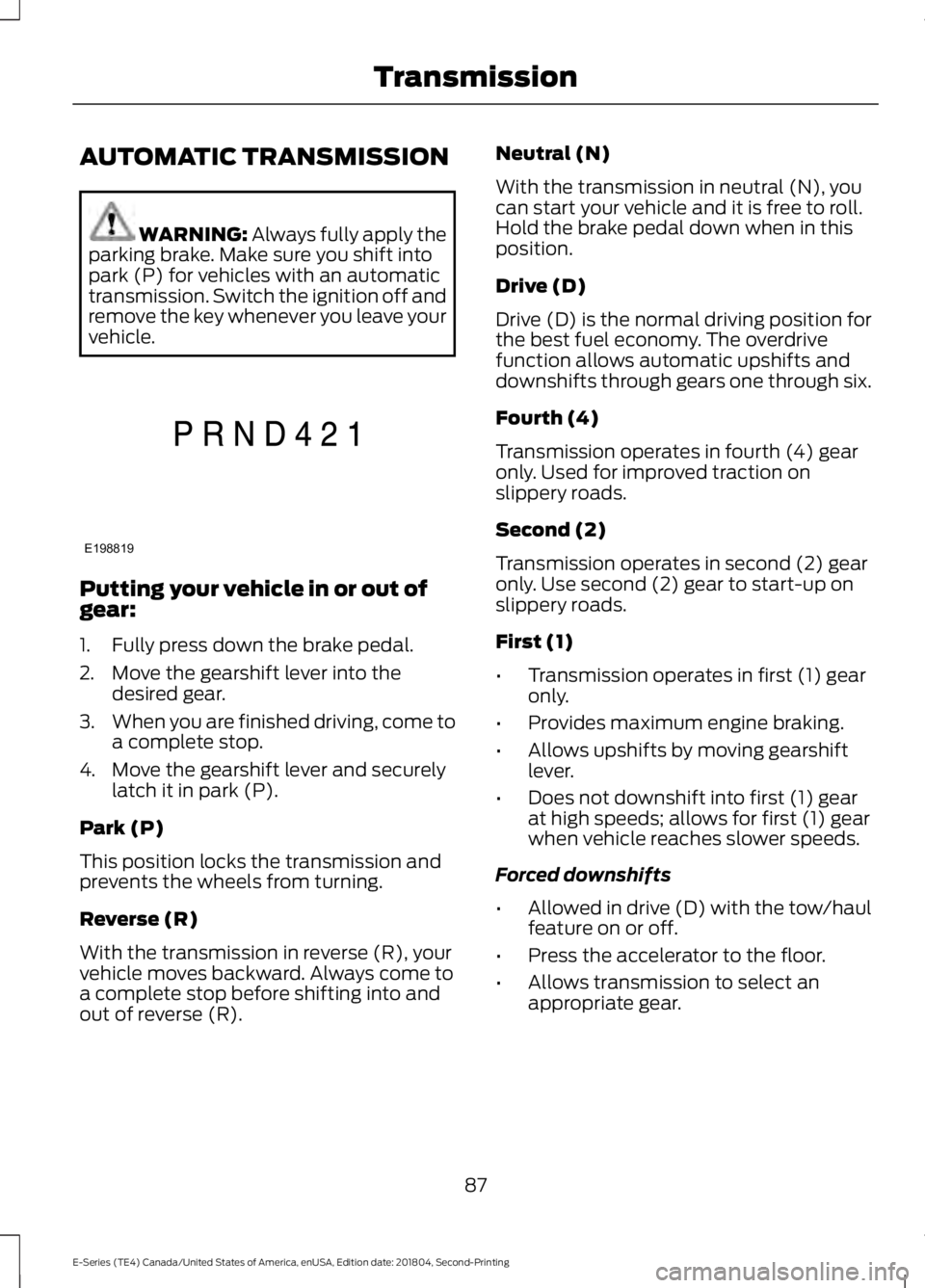
AUTOMATIC TRANSMISSION
WARNING: Always fully apply theparking brake. Make sure you shift intopark (P) for vehicles with an automatictransmission. Switch the ignition off andremove the key whenever you leave yourvehicle.
Putting your vehicle in or out ofgear:
1. Fully press down the brake pedal.
2. Move the gearshift lever into thedesired gear.
3.When you are finished driving, come toa complete stop.
4. Move the gearshift lever and securelylatch it in park (P).
Park (P)
This position locks the transmission andprevents the wheels from turning.
Reverse (R)
With the transmission in reverse (R), yourvehicle moves backward. Always come toa complete stop before shifting into andout of reverse (R).
Neutral (N)
With the transmission in neutral (N), youcan start your vehicle and it is free to roll.Hold the brake pedal down when in thisposition.
Drive (D)
Drive (D) is the normal driving position forthe best fuel economy. The overdrivefunction allows automatic upshifts anddownshifts through gears one through six.
Fourth (4)
Transmission operates in fourth (4) gearonly. Used for improved traction onslippery roads.
Second (2)
Transmission operates in second (2) gearonly. Use second (2) gear to start-up onslippery roads.
First (1)
•Transmission operates in first (1) gearonly.
•Provides maximum engine braking.
•Allows upshifts by moving gearshiftlever.
•Does not downshift into first (1) gearat high speeds; allows for first (1) gearwhen vehicle reaches slower speeds.
Forced downshifts
•Allowed in drive (D) with the tow/haulfeature on or off.
•Press the accelerator to the floor.
•Allows transmission to select anappropriate gear.
87
E-Series (TE4) Canada/United States of America, enUSA, Edition date: 201804, Second-Printing
TransmissionE198819
Page 91 of 329
Tow/Haul Mode
To activate tow/haul, press thebutton on the gearshift lever.The TOW HAUL indicator lightilluminates in the instrument cluster.
The tow/haul feature:
•Delays upshifts to reduce the frequencyof transmission shifting.
•Provides engine braking in all forwardgears, which slows your vehicle andassists you in controlling your vehiclewhen descending a slope.
•Depending on driving conditions andload conditions, may downshift thetransmission, slow your vehicle andcontrol your vehicle speed whendescending a hill, without pressing theaccelerator pedal. The amount ofdownshift braking provided will varybased upon the amount you press thebrake pedal.
The tow/haul feature improvestransmission operation when towing atrailer or a heavy load. All transmissiongear ranges are available when usingtow/haul.
To deactivate the tow/haul feature andreturn to normal driving mode, press thebutton on the gearshift lever again. TheTOW HAUL light deactivates. Tow/haulalso deactivates when you power downyour vehicle.
WARNING: Do not use tow/haulwhen the road surface is slippery. Failureto follow this instruction could result inthe loss of control of your vehicle.
Brake-Shift Interlock
WARNING: When doing thisprocedure, you need to take thetransmission out of park (P) whichmeans your vehicle can roll freely. Toavoid unwanted vehicle movement,always fully apply the parking brake priorto doing this procedure. Use wheelschocks if appropriate.
WARNING: If the parking brake isfully released, but the brake warninglamp remains illuminated, the brakesmay not be working properly. Have yourvehicle checked as soon as possible.
Note:Do not drive your vehicle until youverify that the brake lamps are working.
Your vehicle has a brake-shift interlockfeature that prevents the gearshift leverfrom moving from park (P) when theignition is in the 3 (on) position and thebrake pedal is not pressed.
If you cannot move the gearshift lever outof park (P) position with the ignition in the4 (on) position and the brake pedalpressed, a malfunction may have occurred.It is possible that a fuse has blown or yourvehicle’s brake lamps are not operatingproperly. See Fuse Specification Chart(page 131).
If the fuse is not blown and the brakelamps are working properly, the followingprocedure allows you to move the gearshiftlever from park (P):
1. Apply the parking brake and turn theignition on.
2.Use a screwdriver to remove the lowertrim panel under the steering column.Make sure not to disturb the wires onthe electrical connector.
88
E-Series (TE4) Canada/United States of America, enUSA, Edition date: 201804, Second-Printing
TransmissionE161509
Page 93 of 329
LIMITED SLIP DIFFERENTIAL
(IF EQUIPPED)
This axle provides added traction onslippery surfaces, particularly when onewheel is on a poor traction surface. Undernormal conditions, the limited-slip axlefunctions like a standard rear axle. The axlemay exhibit a slight noise or vibrationduring tight turns with low vehicle speed.This is normal behavior and indicates theaxle is working.
90
E-Series (TE4) Canada/United States of America, enUSA, Edition date: 201804, Second-Printing
Rear Axle
Page 94 of 329
GENERAL INFORMATION
Note: Occasional brake noise is normal. Ifa metal-to-metal, continuous grinding orcontinuous squeal sound is present, thebrake linings may be worn-out and shouldbe inspected by an authorized dealer. If thevehicle has continuous vibration or shudderin the steering wheel while braking, thevehicle should be inspected by anauthorized dealer.
Note:Brake dust may accumulate on thewheels, even under normal drivingconditions. Some dust is inevitable as thebrakes wear and does not contribute tobrake noise. See Cleaning the Wheels(page 165).
Note:Indicators vary depending on region.
See Warning Lamps andIndicators (page 54).
Wet brakes result in reduced brakingefficiency. Gently press the brake pedal afew times when driving from a car wash orstanding water to dry the brakes.
Brake Over Accelerator
In the event the accelerator pedalbecomes stuck or entrapped, apply steadyand firm pressure to the brake pedal toslow the vehicle and reduce engine power.If you experience this condition, apply thebrakes and bring your vehicle to a safestop. Switch the engine off, shift thetransmission into park (P), apply theparking brake, and then inspect theaccelerator pedal for any interferences. Ifnone are found and the condition persists,have your vehicle towed to the nearestauthorized dealer.
Hydraulic brake booster system(Hydroboost or Hydromax)
The Hydroboost and Hydromax systemsreceive fluid pressure from the powersteering pump to provide power assistduring braking.
The Hydromax booster receives backuppressure from the reserve system electricpump whenever the fluid in the powersteering system is not flowing. When theengine is off, the pump turns on if you applythe brake pedal, or if you switch the ignitionto the on position.
The sound of the pump operating may beheard by the driver. This is a normalcharacteristic of the system.
The reserve system provides reducedbraking power, so the vehicle should beoperated under these conditions withcaution, and only to seek service repair andremoval of the vehicle from the roadway.
Note:For vehicles with the Hydromaxsystem operating under normal conditions,the noise of the fluid flowing through thebooster may be heard whenever you applythe brake. This condition is normal. Vehicleservice is not required.
If braking performance or pedal responsebecomes very poor, even when youstrongly press the pedal, it may indicatethe presence of air in the hydraulic systemor leakage of fluid. Stop the vehicle safelyas soon as possible and seek serviceimmediately.
HINTS ON DRIVING WITH
ANTI-LOCK BRAKES
The anti-lock braking system does noteliminate the risks when:
•You drive too closely to the vehicle infront of you.
•Your vehicle is hydroplaning.
91
E-Series (TE4) Canada/United States of America, enUSA, Edition date: 201804, Second-Printing
BrakesE144522
Page 96 of 329
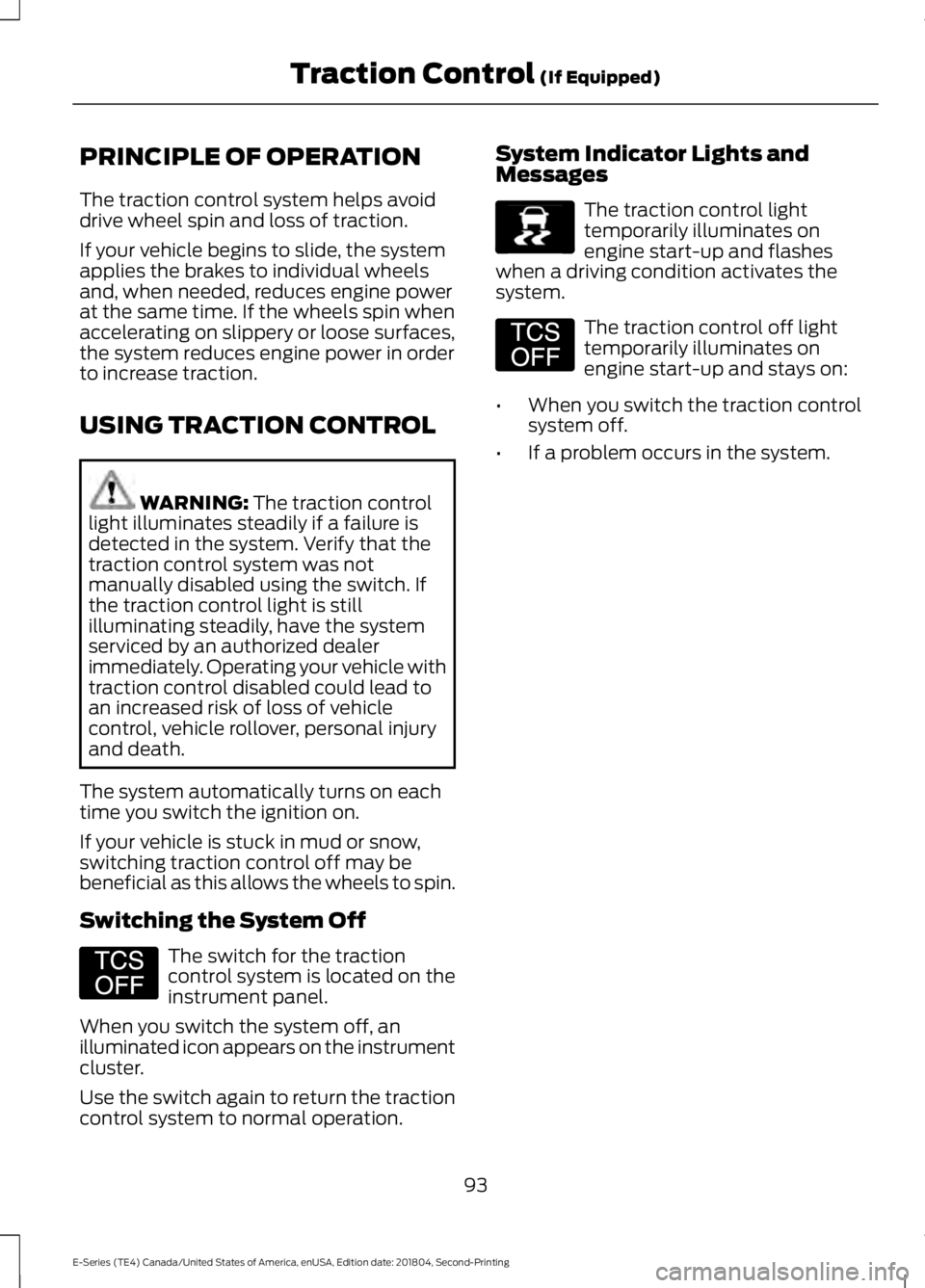
PRINCIPLE OF OPERATION
The traction control system helps avoiddrive wheel spin and loss of traction.
If your vehicle begins to slide, the systemapplies the brakes to individual wheelsand, when needed, reduces engine powerat the same time. If the wheels spin whenaccelerating on slippery or loose surfaces,the system reduces engine power in orderto increase traction.
USING TRACTION CONTROL
WARNING: The traction controllight illuminates steadily if a failure isdetected in the system. Verify that thetraction control system was notmanually disabled using the switch. Ifthe traction control light is stillilluminating steadily, have the systemserviced by an authorized dealerimmediately. Operating your vehicle withtraction control disabled could lead toan increased risk of loss of vehiclecontrol, vehicle rollover, personal injuryand death.
The system automatically turns on eachtime you switch the ignition on.
If your vehicle is stuck in mud or snow,switching traction control off may bebeneficial as this allows the wheels to spin.
Switching the System Off
The switch for the tractioncontrol system is located on theinstrument panel.
When you switch the system off, anilluminated icon appears on the instrumentcluster.
Use the switch again to return the tractioncontrol system to normal operation.
System Indicator Lights andMessages
The traction control lighttemporarily illuminates onengine start-up and flasheswhen a driving condition activates thesystem.
The traction control off lighttemporarily illuminates onengine start-up and stays on:
•When you switch the traction controlsystem off.
•If a problem occurs in the system.
93
E-Series (TE4) Canada/United States of America, enUSA, Edition date: 201804, Second-Printing
Traction Control (If Equipped)E194301 E138639 E194301
Page 99 of 329
PRINCIPLE OF OPERATION
Cruise control lets you maintain a setspeed without keeping your foot on theaccelerator pedal. You can use cruisecontrol when your vehicle speed is greaterthan 20 mph (30 km/h).
USING CRUISE CONTROL
WARNING: Do not use cruisecontrol on winding roads, in heavy trafficor when the road surface is slippery. Thiscould result in loss of vehicle control,serious injury or death.
WARNING: When you are goingdownhill, your vehicle speed couldincrease above the set speed. Thesystem does not apply the brakes.
To help the system to maintain the setspeed when going downhill, downshift toa lower gear.
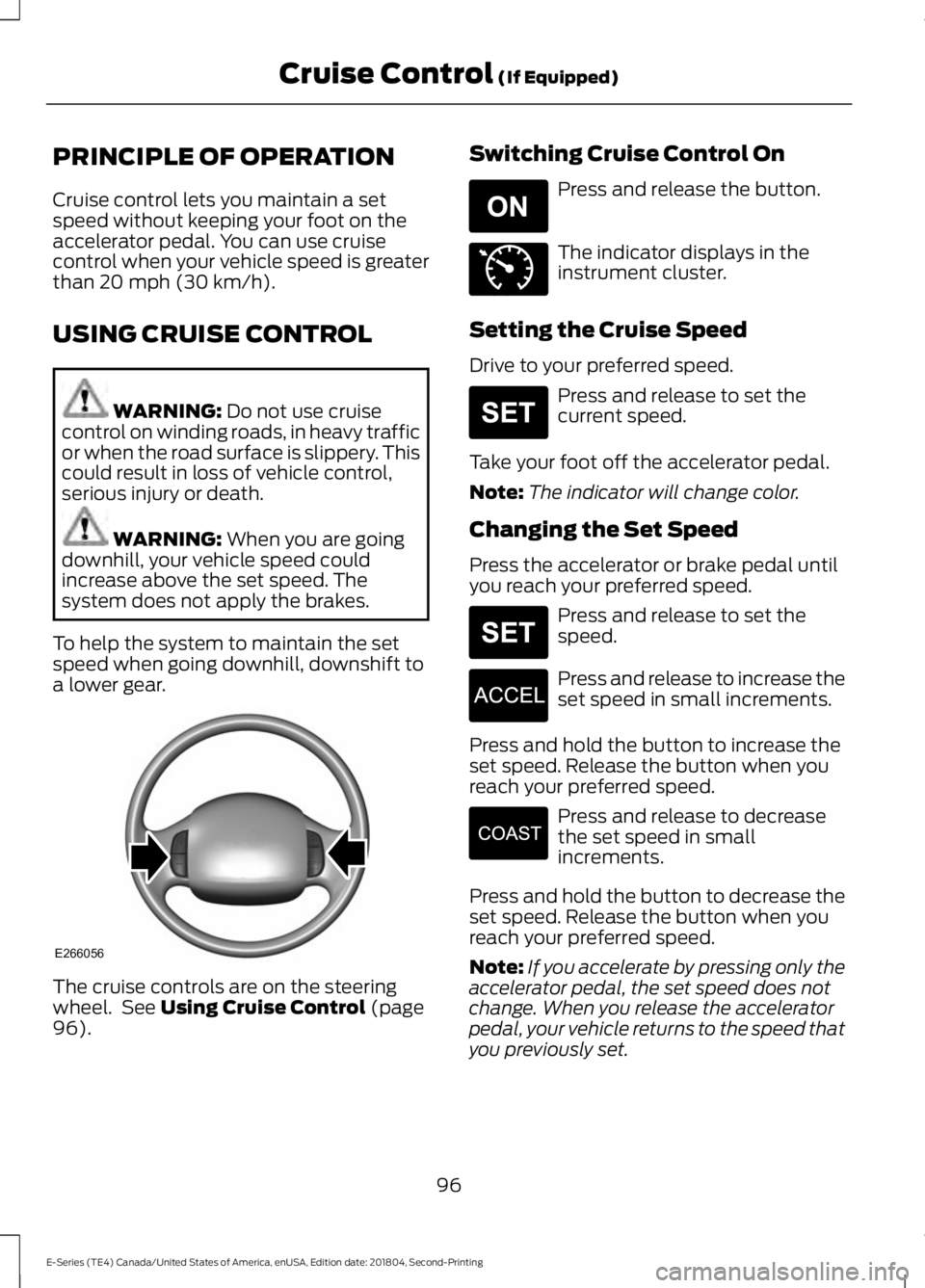
The cruise controls are on the steeringwheel. See Using Cruise Control (page96).
Switching Cruise Control On
Press and release the button.
The indicator displays in theinstrument cluster.
Setting the Cruise Speed
Drive to your preferred speed.
Press and release to set thecurrent speed.
Take your foot off the accelerator pedal.
Note:The indicator will change color.
Changing the Set Speed
Press the accelerator or brake pedal untilyou reach your preferred speed.
Press and release to set thespeed.
Press and release to increase theset speed in small increments.
Press and hold the button to increase theset speed. Release the button when youreach your preferred speed.
Press and release to decreasethe set speed in smallincrements.
Press and hold the button to decrease theset speed. Release the button when youreach your preferred speed.
Note:If you accelerate by pressing only theaccelerator pedal, the set speed does notchange. When you release the acceleratorpedal, your vehicle returns to the speed thatyou previously set.
96
E-Series (TE4) Canada/United States of America, enUSA, Edition date: 201804, Second-Printing
Cruise Control (If Equipped)E266056 E265296 E71340 E265306 E265306 E266055 E266054
Page 101 of 329
STEERING
To help prevent damage to the powersteering system:
•Do not hold the steering wheel at itsfurthest turning points for more thanthree to five seconds when the engineis running.
•Avoid continuously steering back andforth with elevated engine RPM as thismay overheat the system. If trying tofree a stuck vehicle, pause betweenattempts to allow the power steeringsystem to cool or seek assistance.Typical steering and driving maneuversallow the system to cool.
•Do not operate the vehicle if the powersteering pump fluid level is below theMIN mark on the reservoir.
•Some noise is normal during operation.If excessive, check for low powersteering pump fluid level beforeseeking service by your dealer.
•Heavy or uneven efforts may be causedby low power steering fluid. Check forlow power steering pump fluid levelbefore seeking service by your dealer.
•Do not fill the power steering pumpreservoir above the MAX mark on thereservoir, as this may result in leaksfrom the reservoir.
If the power steering system breaks downor if the engine is switched off, you cansteer the vehicle manually, but it takesmore effort.
If the steering wanders or pulls, check for:
•An improperly inflated tire.
•Uneven tire wear.
•Loose or worn suspensioncomponents.
•Loose or worn steering components.
•Improper vehicle alignment.
If any steering components are serviced orreplaced, install new fasteners. Manyfasteners are coated with thread adhesiveor have prevailing torque features whichmay not be re-used. Do not re-use a boltor nut. Torque fasteners to specifications.
A high crown in the road or high crosswindsmay also make the steering seem towander or pull.
98
E-Series (TE4) Canada/United States of America, enUSA, Edition date: 201804, Second-Printing
Driving Aids
Page 108 of 329
RECOMMENDED TOWING
WEIGHTS
Note:Make sure to take intoconsideration trailer frontal area.Vehicles equipped with the TrailerTow Package or the Heavy DutyPayload Package should notexceed 60 ft² (5.6 m²) trailerfrontal area.
Note:Exceeding this limitationmay significantly reduce theperformance of your towingvehicle. Selecting a trailer with alow aerodynamic drag and roundedfront design helps optimizeperformance and fuel economy.
Note:For high altitude operation,reduce the gross combined weightby 2% per 1,000 ft (300 m)starting at the 1,000 ft (300 m)elevation point.
Note:Certain states requireelectric trailer brakes for trailersover a specified weight. Be sure tocheck state regulations for thisspecified weight. The maximumtrailer weights listed may be limitedto this specified weight, as yourvehicle's electrical system may notinclude the wiring connectorneeded to use electric trailerbrakes.
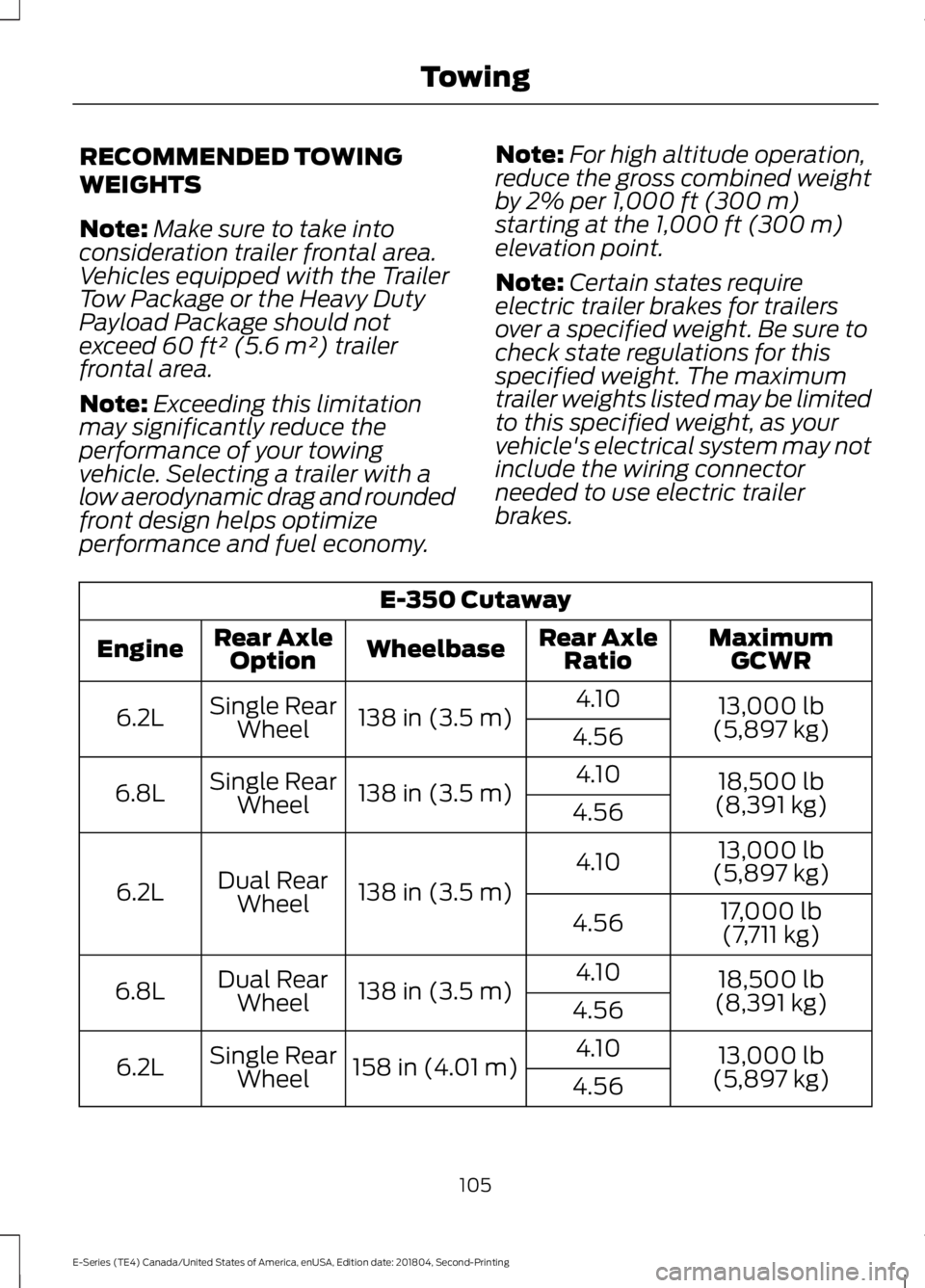
E-350 Cutaway
MaximumGCWRRear AxleRatioWheelbaseRear AxleOptionEngine
13,000 lb(5,897 kg)
4.10138 in (3.5 m)Single RearWheel6.2L4.56
18,500 lb(8,391 kg)
4.10138 in (3.5 m)Single RearWheel6.8L4.56
13,000 lb(5,897 kg)4.10
138 in (3.5 m)Dual RearWheel6.2L17,000 lb
(7,711 kg)4.56
18,500 lb(8,391 kg)
4.10138 in (3.5 m)Dual RearWheel6.8L4.56
13,000 lb(5,897 kg)
4.10158 in (4.01 m)Single RearWheel6.2L4.56
105
E-Series (TE4) Canada/United States of America, enUSA, Edition date: 201804, Second-Printing
Towing
Page 109 of 329
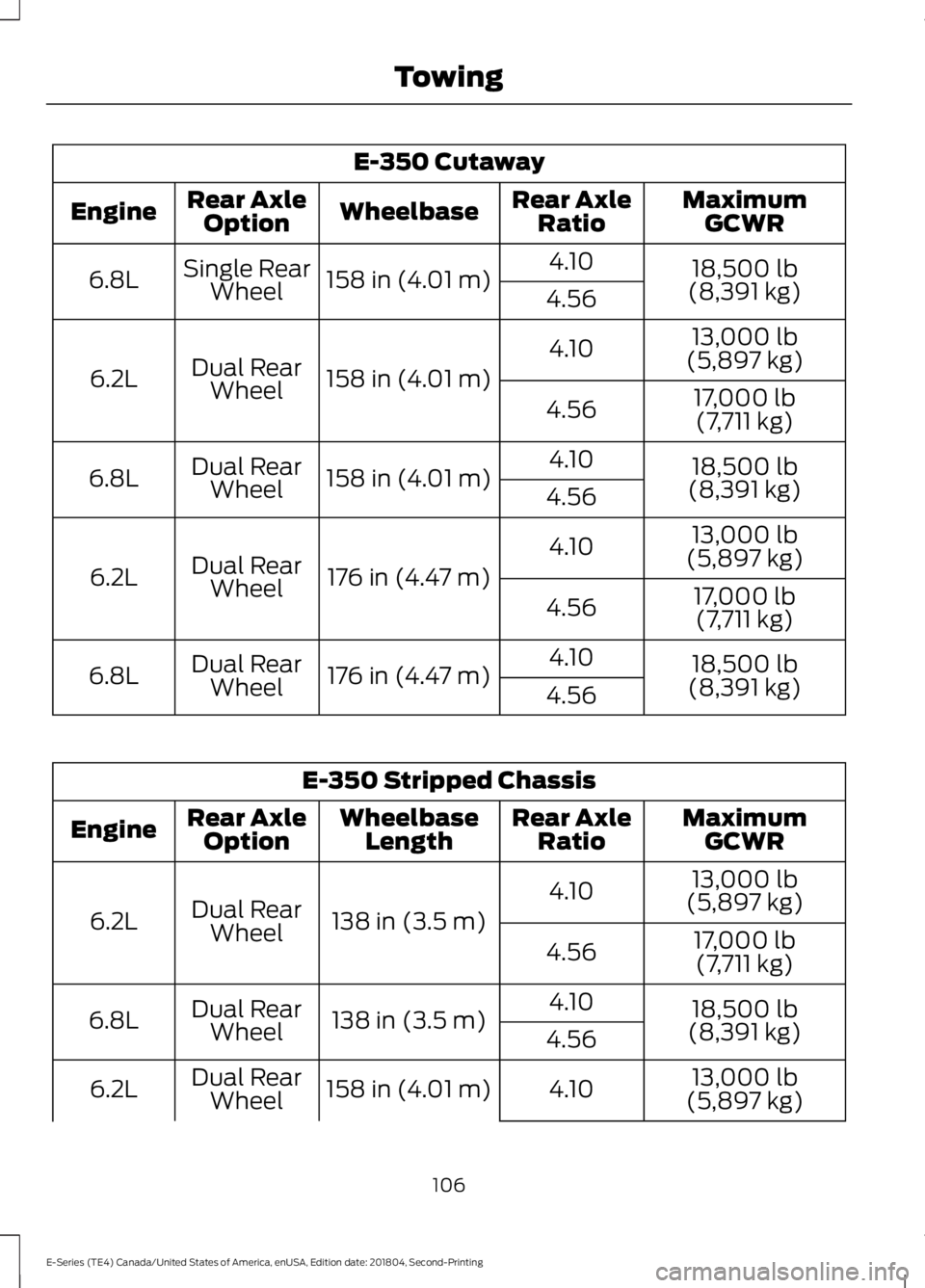
E-350 Cutaway
MaximumGCWRRear AxleRatioWheelbaseRear AxleOptionEngine
18,500 lb(8,391 kg)
4.10158 in (4.01 m)Single RearWheel6.8L4.56
13,000 lb(5,897 kg)4.10
158 in (4.01 m)Dual RearWheel6.2L17,000 lb(7,711 kg)4.56
18,500 lb(8,391 kg)
4.10158 in (4.01 m)Dual RearWheel6.8L4.56
13,000 lb(5,897 kg)4.10
176 in (4.47 m)Dual RearWheel6.2L17,000 lb(7,711 kg)4.56
18,500 lb(8,391 kg)
4.10176 in (4.47 m)Dual RearWheel6.8L4.56
E-350 Stripped Chassis
MaximumGCWRRear AxleRatioWheelbaseLengthRear AxleOptionEngine
13,000 lb(5,897 kg)4.10
138 in (3.5 m)Dual RearWheel6.2L17,000 lb(7,711 kg)4.56
18,500 lb(8,391 kg)
4.10138 in (3.5 m)Dual RearWheel6.8L4.56
13,000 lb
(5,897 kg)4.10158 in (4.01 m)Dual Rear
Wheel6.2L
106
E-Series (TE4) Canada/United States of America, enUSA, Edition date: 201804, Second-Printing
Towing
Page 110 of 329
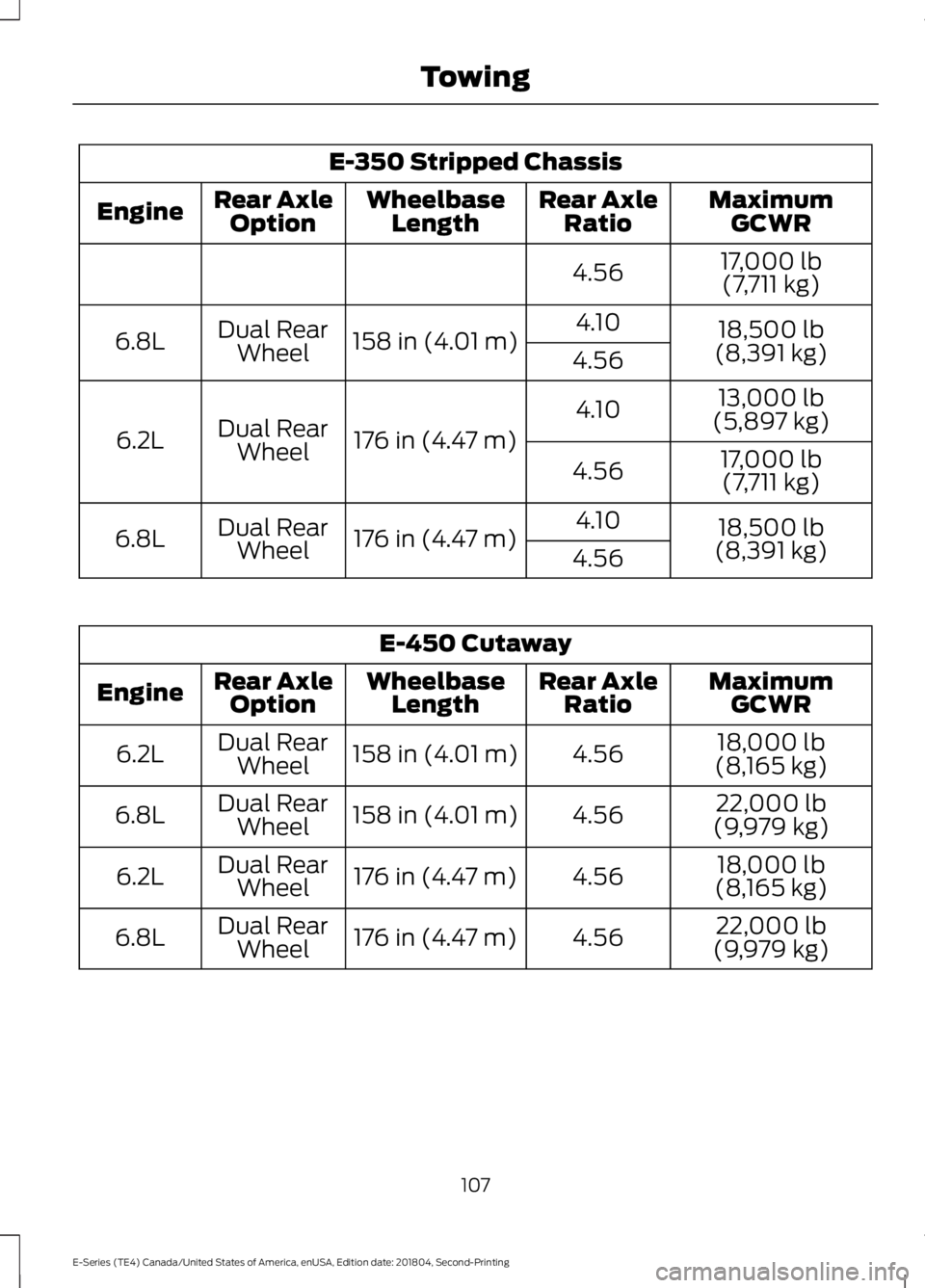
E-350 Stripped Chassis
MaximumGCWRRear AxleRatioWheelbaseLengthRear AxleOptionEngine
17,000 lb(7,711 kg)4.56
18,500 lb(8,391 kg)
4.10158 in (4.01 m)Dual RearWheel6.8L4.56
13,000 lb(5,897 kg)4.10
176 in (4.47 m)Dual RearWheel6.2L17,000 lb(7,711 kg)4.56
18,500 lb(8,391 kg)
4.10176 in (4.47 m)Dual RearWheel6.8L4.56
E-450 Cutaway
MaximumGCWRRear AxleRatioWheelbaseLengthRear AxleOptionEngine
18,000 lb(8,165 kg)4.56158 in (4.01 m)Dual RearWheel6.2L
22,000 lb(9,979 kg)4.56158 in (4.01 m)Dual RearWheel6.8L
18,000 lb(8,165 kg)4.56176 in (4.47 m)Dual RearWheel6.2L
22,000 lb(9,979 kg)4.56176 in (4.47 m)Dual RearWheel6.8L
107
E-Series (TE4) Canada/United States of America, enUSA, Edition date: 201804, Second-Printing
Towing