parking brake FORD E SERIES 2019 Owner's Manual
[x] Cancel search | Manufacturer: FORD, Model Year: 2019, Model line: E SERIES, Model: FORD E SERIES 2019Pages: 329, PDF Size: 2.92 MB
Page 196 of 329
Note:The tire pressure monitoring systemindicator light illuminates when the sparetire is in use. To restore the full function ofthe monitoring system, all road wheelsequipped with tire pressure monitoringsensors must be mounted on the vehicle.
Note:Do not use wheels or lug nutsdifferent than the original equipment, as thismay damage the wheel or mounting system.
If you get a flat tire when driving, do notapply the brake heavily. Instead, graduallydecrease your speed. Hold the steeringwheel firmly and slowly move to a safeplace on the side of the road.
Have a flat serviced by an authorizeddealer in order to prevent damage to thetire pressure monitoring system sensors.See Tire Pressure Monitoring System(page 188). Replace the spare tire with aroad tire as soon as possible. Duringrepairing or replacing of the flat tire, havethe authorized dealer inspect the tirepressure monitoring system sensor fordamage.
Dissimilar Spare Wheel and TireAssembly Information
WARNING: Failure to follow theseguidelines could result in an increasedrisk of loss of vehicle control, injury ordeath.
If you have a dissimilar spare wheel andtire, then it is intended for temporary useonly. This means that if you need to use it,you should replace it as soon as possiblewith a road wheel and tire assembly thatis the same size and type as the road tiresand wheels that were originally providedby Ford. If the dissimilar spare tire or wheelis damaged, it should be replaced ratherthan repaired.
A dissimilar spare wheel and tire assemblyis defined as a spare wheel and tireassembly that is different in brand, size orappearance from the road tires and wheelsand can be one of three types:
1.T-type mini-spare: This spare tirebegins with the letter T for tire size andmay have Temporary Use Only molded inthe sidewall.
2.Full-size dissimilar spare with labelon wheel: This spare tire has a label onthe wheel that states: THIS WHEEL ANDTIRE ASSEMBLY FOR TEMPORARY USEONLY.
When driving with one of the dissimilarspare tires listed above, do not:
•Exceed 50 mph (80 km/h).
•Load the vehicle beyond maximumvehicle load rating listed on the SafetyCompliance Label.
•Tow a trailer.
•Use snow chains on the end of thevehicle with the dissimilar spare tire.
•Use more than one dissimilar spare tireat a time.
•Use commercial car washingequipment.
•Try to repair the dissimilar spare tire.
Use of one of the dissimilar spare tireslisted above at any one wheel location canlead to impairment of the following:
•Handling, stability and brakingperformance.
•Comfort and noise.
•Ground clearance and parking at curbs.
•Winter weather driving capability.
•Wet weather driving capability.
•All-wheel driving capability.
3.Full-size dissimilar spare withoutlabel on wheel
193
E-Series (TE4) Canada/United States of America, enUSA, Edition date: 201804, Second-Printing
Wheels and Tires
Page 197 of 329
When driving with the full-size dissimilarspare wheel and tire assembly, do not:
•Exceed 70 mph (113 km/h).
•Use more than one dissimilar sparewheel and tire assembly at a time.
•Use commercial car washingequipment.
•Use snow chains on the end of thevehicle with the dissimilar spare wheeland tire assembly.
The usage of a full-size dissimilar sparewheel and tire assembly can lead toimpairment of the following:
•Handling, stability and brakingperformance.
•Comfort and noise.
•Ground clearance and parking at curbs.
•Winter weather driving capability.
•Wet weather driving capability.
•All-wheel driving capability.
When driving with the full-size dissimilarspare wheel and tire assembly additionalcaution should be given to:
•Towing a trailer.
•Driving vehicles equipped with acamper body.
•Driving vehicles with a load on thecargo rack.
Drive cautiously when using a full-sizedissimilar spare wheel and tire assemblyand seek service as soon as possible.
Tire Change Procedure
WARNING: When one of the frontwheels is off the ground, thetransmission alone will not prevent thevehicle from moving or slipping off thejack, even if the transmission is in park(P).
WARNING: To help prevent yourvehicle from moving when changing awheel, shift the transmission into park(P), set the parking brake and use anappropriate block or wheel chock tosecure the wheel diagonally opposite tothe wheel being changed. For example,when changing the front left wheel,place an appropriate block or wheelchock on the right rear wheel.
WARNING: Do not get under avehicle that is only supported by avehicle jack.
WARNING: Do not attempt tochange a tire on the side of the vehicleclose to moving traffic. Pull far enoughoff the road to avoid the danger of beinghit when operating the jack or changingthe wheel.
WARNING: Always use the jackprovided as original equipment with yourvehicle. If using a jack other than the oneprovided, make sure the jack capacity isadequate for the vehicle weight,including any vehicle cargo ormodifications. If you are unsure if the jackcapacity is adequate, contact theauthorized dealer.
Note:Passengers should not remain in yourvehicle when the vehicle is being jacked.
Removing the flat wheel and tire
1.Park on a level surface, set the parkingbrake and activate the hazard flashers.
2.Place the transmission in park (P) andturn the engine off.
194
E-Series (TE4) Canada/United States of America, enUSA, Edition date: 201804, Second-Printing
Wheels and Tires
Page 233 of 329
USING SYNC™ WITH YOUR
PHONE
Hands-free calling is one of the mainfeatures of SYNC. While the systemsupports a variety of features, many aredependent on your cell phone'sfunctionality. At a minimum, most cellphones with Bluetooth wireless technologysupport the following functions:
•Answering an incoming call.
•Ending a call.
•Using privacy mode.
•Dialing a number.
•Redialing.
•Call waiting notification.
•Caller identification.
Other features, such as text messagingusing Bluetooth and automatic phonebookdownload, are cell phone-dependentfeatures. To check your cell phone'scompatibility, see your cell phone's manualand visit www.SYNCMyRide.com,www.SYNCMyRide.ca orwww.syncmaroute.ca.
Pairing Your Cell Phone for theFirst Time
Note:SYNC can support downloading upto approximately 1000 entries perBluetooth-enabled cell phone.
Note:Make sure to switch on the ignitionand the radio. Put the transmission inposition park (P) (automatic transmission)or neutral with the parking brake applied(manual transmission).
Note:To scroll through the menus, pressthe up and down arrows on your audiosystem.
Wirelessly pairing your cell phone withSYNC allows you to make and receivehands-free calls.
Press the phone button. When the display indicates there is no cell phone paired,do the following:
Action and DescriptionMessage
Press the OK button.NO PHONE
FIND SYNC1. Press the OK button.
2. Put your cell phone into Bluetooth discovery mode. Seeyour device's manual if necessary.
3. When prompted on your cell phone's display, enter thesix-digit PIN provided by SYNC in the radio display. Thedisplay indicates when the pairing is successful.
230
E-Series (TE4) Canada/United States of America, enUSA, Edition date: 201804, Second-Printing
SYNC™
Page 234 of 329
Depending on your cell phone's capabilityand your market, the system may promptyou with questions, such as setting thecurrent cell phone as the primary cellphone (the cell phone SYNC automaticallytries to connect with first upon vehiclestart-up) and downloading yourphonebook.
Pairing Subsequent Cell Phones
Note:To scroll through the menus, pressthe up and down arrows on your audiosystem.
Note:Make sure to switch on the ignitionand the radio. Put the transmission inposition park (P) (automatic transmission)or neutral with the parking brake applied(manual transmission).
Press the phone button, then scroll to:
ActionMessage
Press the OK button.PHONE SETNGS
Press the OK button.BT DEVICES
Press the OK button. When the following message appearsin the display.ADD DEVICE
FIND SYNC1. Press the OK button.
2. Put your cell phone into Bluetooth discovery mode. Seeyour device's manual if necessary.
3. When prompted on your cell phone's display, enter thesix-digit PIN provided by SYNC in the radio display. Thedisplay indicates when the pairing is successful.
The system then prompts with questions, such as if you would like to set the current cellphone as the primary cell phone (the cell phone SYNC automatically tries to connectwith first upon vehicle start-up) or download your phonebook.
Phone Voice Commands
Press the voice icon and say:
Voice Commands
Phone
You can then say any of the followingcommands.
Call History Incoming
Call History Missed
Call History Outgoing
Voice Commands
Phonebook ___
Phonebook ___ at Home
Phonebook ___ at Work
Phonebook ___ in Office
Phonebook ___ on Cell
___ is a dynamic listing that should be thename of a contact in your phonebook. Forexample you could say "Call Mom".
231
E-Series (TE4) Canada/United States of America, enUSA, Edition date: 201804, Second-Printing
SYNC™
Page 281 of 329
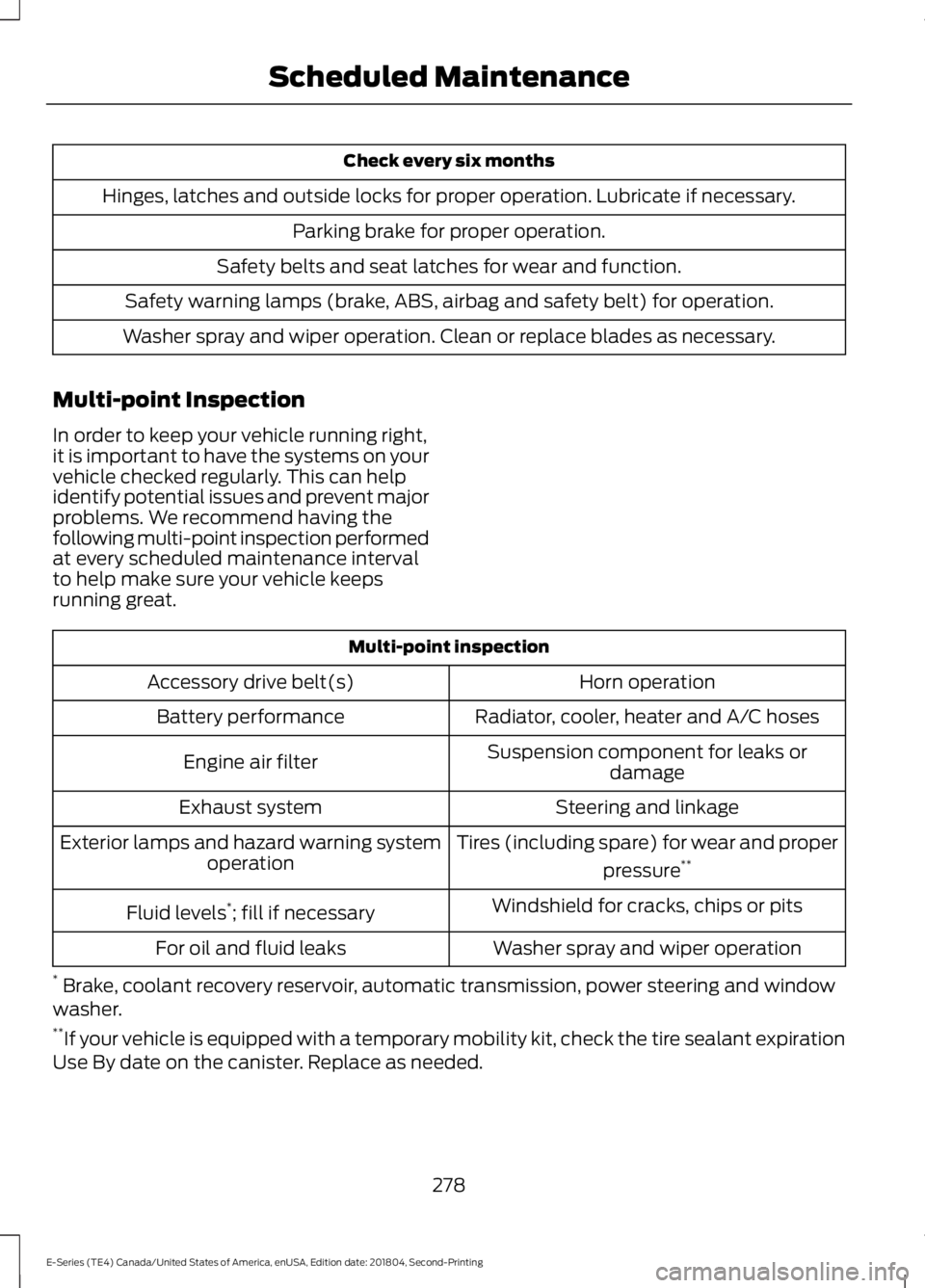
Check every six months
Hinges, latches and outside locks for proper operation. Lubricate if necessary.
Parking brake for proper operation.
Safety belts and seat latches for wear and function.
Safety warning lamps (brake, ABS, airbag and safety belt) for operation.
Washer spray and wiper operation. Clean or replace blades as necessary.
Multi-point Inspection
In order to keep your vehicle running right,it is important to have the systems on yourvehicle checked regularly. This can helpidentify potential issues and prevent majorproblems. We recommend having thefollowing multi-point inspection performedat every scheduled maintenance intervalto help make sure your vehicle keepsrunning great.
Multi-point inspection
Horn operationAccessory drive belt(s)
Radiator, cooler, heater and A/C hosesBattery performance
Suspension component for leaks ordamageEngine air filter
Steering and linkageExhaust system
Tires (including spare) for wear and proper
pressure**Exterior lamps and hazard warning systemoperation
Windshield for cracks, chips or pitsFluid levels*; fill if necessary
Washer spray and wiper operationFor oil and fluid leaks
* Brake, coolant recovery reservoir, automatic transmission, power steering and windowwasher.**If your vehicle is equipped with a temporary mobility kit, check the tire sealant expirationUse By date on the canister. Replace as needed.
278
E-Series (TE4) Canada/United States of America, enUSA, Edition date: 201804, Second-Printing
Scheduled Maintenance
Page 282 of 329
Be sure to ask your dealership serviceadvisor or technician about the multi-pointvehicle inspection. It is a comprehensiveway to perform a thorough inspection of
your vehicle. Your checklist gives youimmediate feedback on the overallcondition of your vehicle.
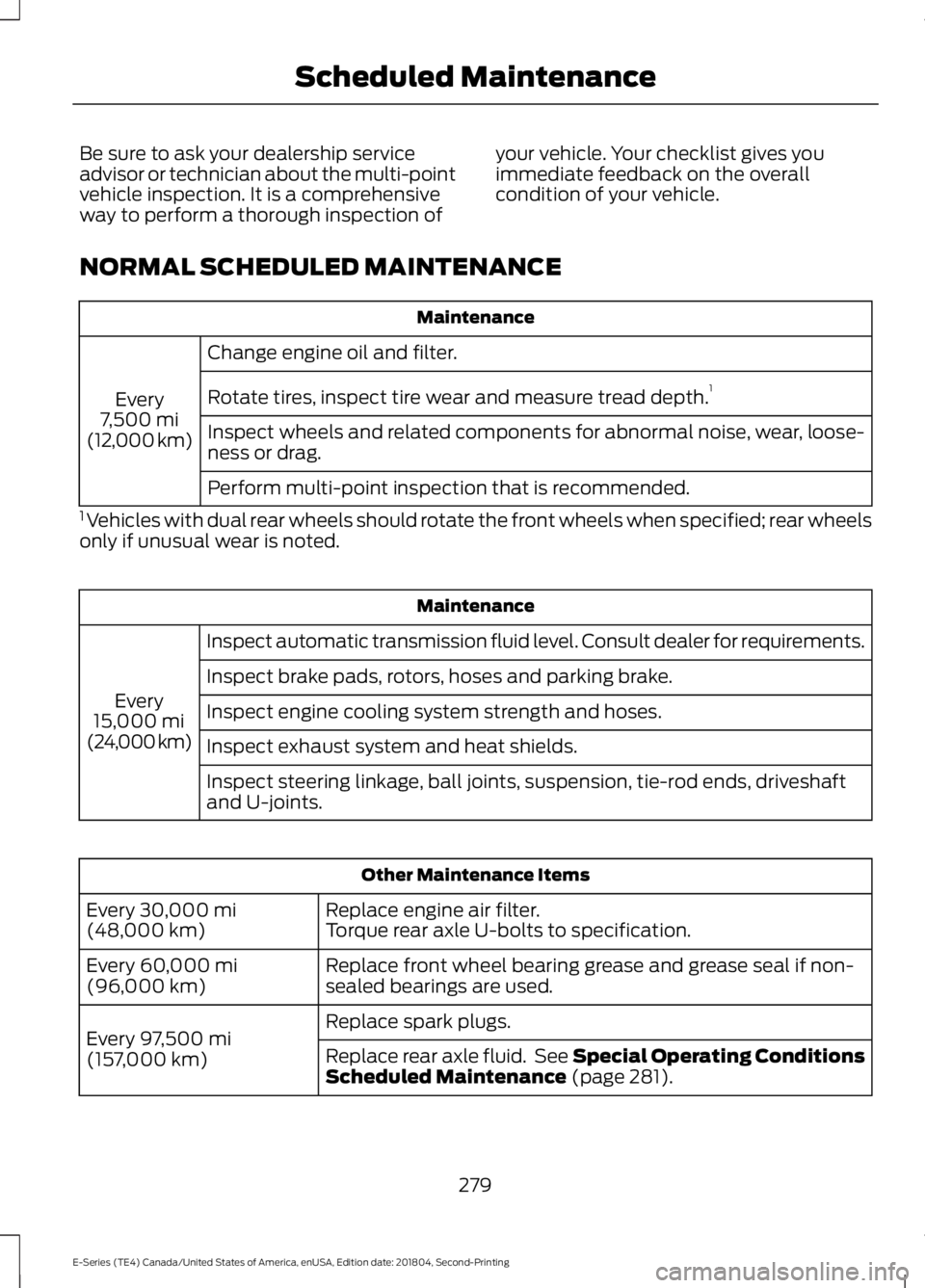
NORMAL SCHEDULED MAINTENANCE
Maintenance
Change engine oil and filter.
Every7,500 mi(12,000 km)
Rotate tires, inspect tire wear and measure tread depth.1
Inspect wheels and related components for abnormal noise, wear, loose-ness or drag.
Perform multi-point inspection that is recommended.
1 Vehicles with dual rear wheels should rotate the front wheels when specified; rear wheelsonly if unusual wear is noted.
Maintenance
Inspect automatic transmission fluid level. Consult dealer for requirements.
Every15,000 mi(24,000 km)
Inspect brake pads, rotors, hoses and parking brake.
Inspect engine cooling system strength and hoses.
Inspect exhaust system and heat shields.
Inspect steering linkage, ball joints, suspension, tie-rod ends, driveshaftand U-joints.
Other Maintenance Items
Replace engine air filter.Every 30,000 mi(48,000 km)Torque rear axle U-bolts to specification.
Replace front wheel bearing grease and grease seal if non-sealed bearings are used.Every 60,000 mi(96,000 km)
Replace spark plugs.Every 97,500 mi(157,000 km)Replace rear axle fluid. See Special Operating ConditionsScheduled Maintenance (page 281).
279
E-Series (TE4) Canada/United States of America, enUSA, Edition date: 201804, Second-Printing
Scheduled Maintenance
Page 322 of 329
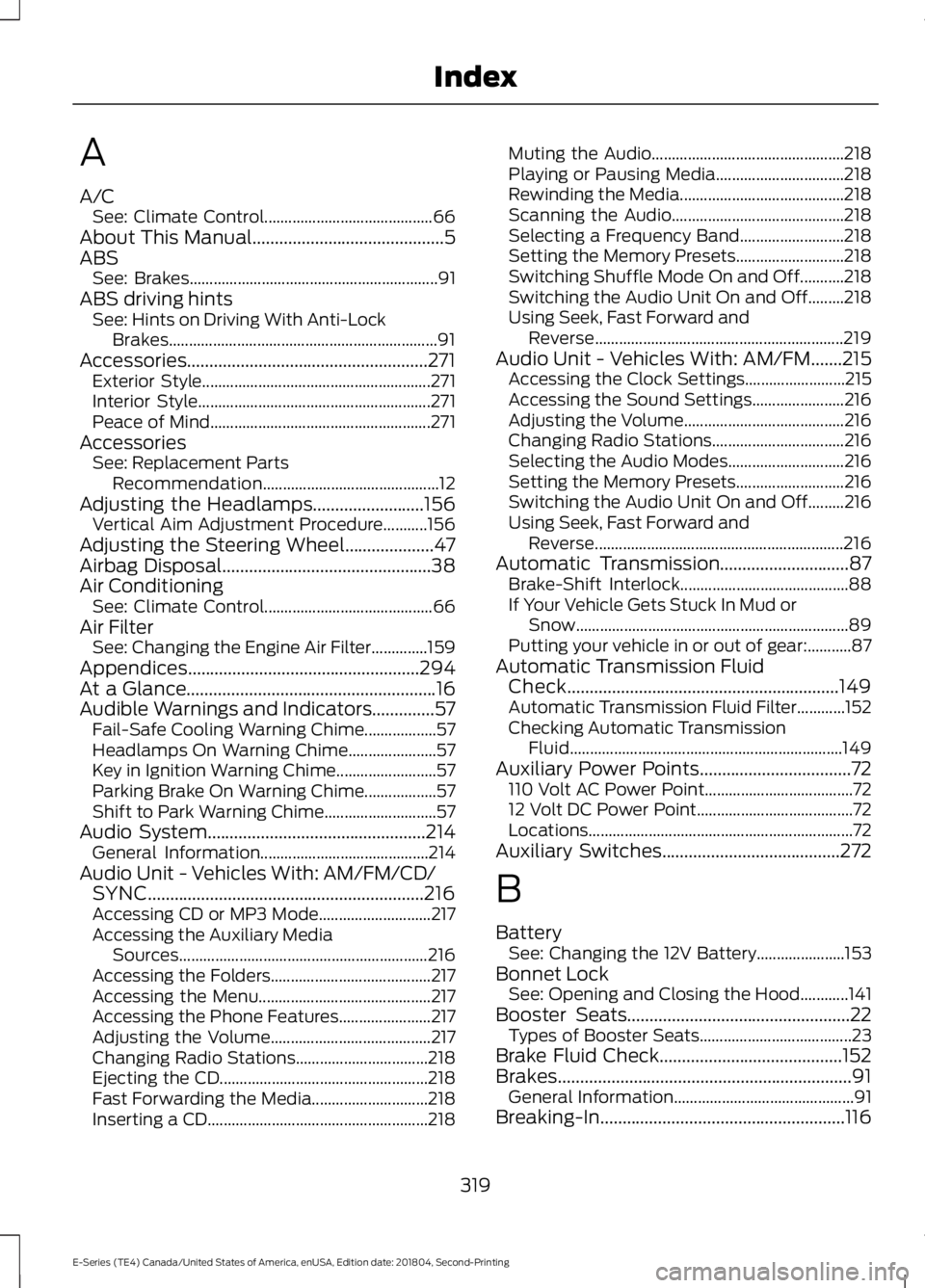
A
A/CSee: Climate Control..........................................66About This Manual...........................................5ABSSee: Brakes..............................................................91ABS driving hintsSee: Hints on Driving With Anti-LockBrakes...................................................................91Accessories......................................................271Exterior Style.........................................................271Interior Style..........................................................271Peace of Mind.......................................................271AccessoriesSee: Replacement PartsRecommendation............................................12Adjusting the Headlamps.........................156Vertical Aim Adjustment Procedure...........156Adjusting the Steering Wheel....................47Airbag Disposal...............................................38Air ConditioningSee: Climate Control..........................................66Air FilterSee: Changing the Engine Air Filter..............159Appendices....................................................294At a Glance........................................................16Audible Warnings and Indicators..............57Fail-Safe Cooling Warning Chime..................57Headlamps On Warning Chime......................57Key in Ignition Warning Chime.........................57Parking Brake On Warning Chime..................57Shift to Park Warning Chime............................57Audio System.................................................214General Information..........................................214Audio Unit - Vehicles With: AM/FM/CD/SYNC..............................................................216Accessing CD or MP3 Mode............................217Accessing the Auxiliary MediaSources..............................................................216Accessing the Folders........................................217Accessing the Menu...........................................217Accessing the Phone Features.......................217Adjusting the Volume........................................217Changing Radio Stations.................................218Ejecting the CD....................................................218Fast Forwarding the Media.............................218Inserting a CD.......................................................218
Muting the Audio................................................218Playing or Pausing Media................................218Rewinding the Media.........................................218Scanning the Audio...........................................218Selecting a Frequency Band..........................218Setting the Memory Presets...........................218Switching Shuffle Mode On and Off...........218Switching the Audio Unit On and Off.........218Using Seek, Fast Forward andReverse..............................................................219Audio Unit - Vehicles With: AM/FM.......215Accessing the Clock Settings.........................215Accessing the Sound Settings.......................216Adjusting the Volume........................................216Changing Radio Stations.................................216Selecting the Audio Modes.............................216Setting the Memory Presets...........................216Switching the Audio Unit On and Off.........216Using Seek, Fast Forward andReverse..............................................................216Automatic Transmission.............................87Brake-Shift Interlock..........................................88If Your Vehicle Gets Stuck In Mud orSnow....................................................................89Putting your vehicle in or out of gear:...........87Automatic Transmission FluidCheck.............................................................149Automatic Transmission Fluid Filter............152Checking Automatic TransmissionFluid....................................................................149Auxiliary Power Points..................................72110 Volt AC Power Point.....................................7212 Volt DC Power Point.......................................72Locations..................................................................72Auxiliary Switches........................................272
B
BatterySee: Changing the 12V Battery......................153Bonnet LockSee: Opening and Closing the Hood............141Booster Seats..................................................22Types of Booster Seats......................................23Brake Fluid Check.........................................152Brakes..................................................................91General Information.............................................91Breaking-In.......................................................116
319
E-Series (TE4) Canada/United States of America, enUSA, Edition date: 201804, Second-Printing
Index
Page 323 of 329
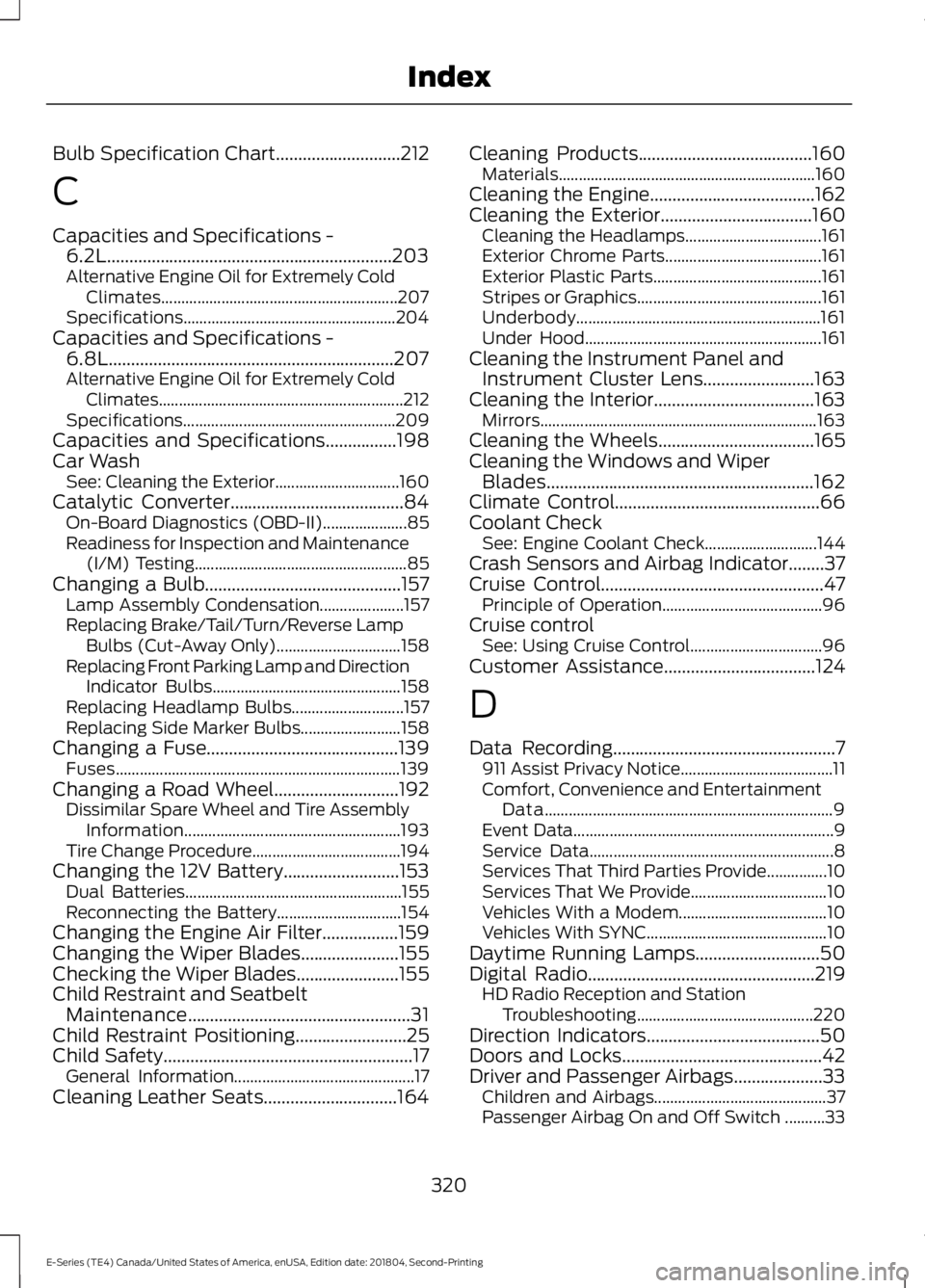
Bulb Specification Chart............................212
C
Capacities and Specifications -6.2L................................................................203Alternative Engine Oil for Extremely ColdClimates...........................................................207Specifications.....................................................204Capacities and Specifications -6.8L................................................................207Alternative Engine Oil for Extremely ColdClimates.............................................................212Specifications.....................................................209Capacities and Specifications................198Car WashSee: Cleaning the Exterior...............................160Catalytic Converter.......................................84On-Board Diagnostics (OBD-II).....................85Readiness for Inspection and Maintenance(I/M) Testing.....................................................85Changing a Bulb............................................157Lamp Assembly Condensation.....................157Replacing Brake/Tail/Turn/Reverse LampBulbs (Cut-Away Only)...............................158Replacing Front Parking Lamp and DirectionIndicator Bulbs...............................................158Replacing Headlamp Bulbs............................157Replacing Side Marker Bulbs.........................158Changing a Fuse...........................................139Fuses.......................................................................139Changing a Road Wheel............................192Dissimilar Spare Wheel and Tire AssemblyInformation......................................................193Tire Change Procedure.....................................194Changing the 12V Battery..........................153Dual Batteries......................................................155Reconnecting the Battery...............................154Changing the Engine Air Filter.................159Changing the Wiper Blades......................155Checking the Wiper Blades.......................155Child Restraint and SeatbeltMaintenance..................................................31Child Restraint Positioning.........................25Child Safety........................................................17General Information.............................................17Cleaning Leather Seats..............................164
Cleaning Products.......................................160Materials................................................................160Cleaning the Engine.....................................162Cleaning the Exterior..................................160Cleaning the Headlamps..................................161Exterior Chrome Parts.......................................161Exterior Plastic Parts..........................................161Stripes or Graphics..............................................161Underbody.............................................................161Under Hood...........................................................161Cleaning the Instrument Panel andInstrument Cluster Lens.........................163Cleaning the Interior....................................163Mirrors.....................................................................163Cleaning the Wheels...................................165Cleaning the Windows and WiperBlades............................................................162Climate Control..............................................66Coolant CheckSee: Engine Coolant Check............................144Crash Sensors and Airbag Indicator........37Cruise Control..................................................47Principle of Operation........................................96Cruise controlSee: Using Cruise Control.................................96Customer Assistance..................................124
D
Data Recording..................................................7911 Assist Privacy Notice......................................11Comfort, Convenience and EntertainmentData........................................................................9Event Data.................................................................9Service Data.............................................................8Services That Third Parties Provide...............10Services That We Provide..................................10Vehicles With a Modem.....................................10Vehicles With SYNC.............................................10Daytime Running Lamps............................50Digital Radio...................................................219HD Radio Reception and StationTroubleshooting............................................220Direction Indicators.......................................50Doors and Locks.............................................42Driver and Passenger Airbags....................33Children and Airbags...........................................37Passenger Airbag On and Off Switch ..........33
320
E-Series (TE4) Canada/United States of America, enUSA, Edition date: 201804, Second-Printing
Index
Page 325 of 329
GearboxSee: Transmission................................................87General Information on RadioFrequencies...................................................39General Maintenance Information........276Multi-point Inspection......................................278Owner Checks and Services...........................277Protecting Your Investment...........................276Why Maintain Your Vehicle?..........................276Why Maintain Your Vehicle at YourDealership?.....................................................276Getting Assistance Outside the U.S. andCanada...........................................................127Getting the Services You Need................124Away From Home...............................................124
H
HandbrakeSee: Parking Brake...............................................92Hazard Flashers............................................120Headlamp AdjustingSee: Adjusting the Headlamps......................156Headlamp RemovalSee: Removing a Headlamp...........................157HeadrestSee: Head Restraints..........................................69Head Restraints..............................................69HeatingSee: Climate Control..........................................66Hints on Controlling the InteriorClimate............................................................67Defogging the Side Windows in ColdWeather...............................................................67General Hints.........................................................67Quickly Cooling the Interior..............................67Quickly Heating the Interior..............................67Recommended Settings for Cooling.............67Recommended Settings for Heating............67Vehicle Stationary for Extended PeriodsDuring Extreme High AmbientTemperatures....................................................67Hints on Driving With Anti-LockBrakes...............................................................91Hood LockSee: Opening and Closing the Hood............141
I
Ignition Switch.................................................74In California (U.S. Only)..............................125Information Displays.....................................58General Information............................................58Information Messages.................................63Brake System.........................................................63Fuel............................................................................63Maintenance..........................................................64Tire.............................................................................64Traction Control....................................................64Trailer........................................................................65Transmission..........................................................65Installing Child Restraints............................18Child Seats...............................................................18Using Lap and Shoulder Belts..........................19Using Tether Straps..............................................21Instrument Cluster.........................................53Instrument Lighting Dimmer.....................50Instrument Panel............................................16Interior Mirror....................................................52Automatic Dimming Mirror...............................52Manual Dimming Mirror.....................................52Introduction........................................................5
J
Jump Starting the Vehicle..........................121Connecting the Jumper Cables......................121Jump Starting.......................................................122Preparing Your Vehicle.......................................121Removing the Jumper Cables........................122
K
Keys and Remote Controls.........................39
L
Lighting Control..............................................49Flashing the Headlamp High Beam..............50Headlamp High Beam........................................49Lighting..............................................................49General Information............................................49Limited Slip Differential..............................90Load Carrying..................................................99
322
E-Series (TE4) Canada/United States of America, enUSA, Edition date: 201804, Second-Printing
Index
Page 326 of 329
Load Limit.........................................................99Special Loading Instructions for Owners ofPick-up Trucks and Utility-typeVehicles.............................................................103Vehicle Loading - with and without aTrailer...................................................................99Locking and Unlocking.................................42Autolock Feature..................................................43Autounlock Feature.............................................43Enabling or Disabling Autolock andAutounlock.........................................................43Illuminated Entry..................................................43Power Door Locks................................................42Remote Control.....................................................42Lug NutsSee: Changing a Road Wheel........................192
M
Maintenance....................................................141General Information...........................................141Manual Climate Control..............................66Heater Only System............................................66Manual Climate Control....................................66Manual Seats...................................................70Manual Lumbar ....................................................70Moving the Seat Backward andForward...............................................................70Recline Adjustment.............................................70Media Hub......................................................224Message CenterSee: Information Displays.................................58MirrorsSee: Windows and Mirrors.................................51Mobile Communications Equipment......14Motorcraft Parts - 6.2L...............................199Motorcraft Parts - 6.8L.............................200
N
Normal Scheduled Maintenance...........279
O
Oil Change Indicator Reset.......................144Resetting the Oil Life MonitoringSystem...............................................................144
Oil CheckSee: Engine Oil Check.......................................143Opening and Closing the Hood................141Ordering Additional Owner'sLiterature.......................................................129Obtaining a French Owner’s Manual..........129
P
Parking Aids.....................................................94Parking Brake...................................................92Passive Anti-Theft System.........................45SecuriLock®...........................................................45PATSSee: Passive Anti-Theft System.....................45Perchlorate.........................................................11Power Door LocksSee: Locking and Unlocking.............................42Power Seats.......................................................71Recline Adjustment..............................................71Power Steering Fluid Check......................152Power Windows...............................................51Accessory Delay.....................................................51One-Touch Down..................................................51Protecting the Environment........................15PunctureSee: Changing a Road Wheel........................192
R
Rear Axle...........................................................90Rear Passenger Climate Controls...........68Setting the Blower Motor Speed...................68Switching the Rear Climate Control On andOff.........................................................................68Rear View Camera.........................................94Using the Rear View Camera System..........94Rear View CameraSee: Rear View Camera.....................................94Recommended Towing Weights............105Calculating the Maximum Loaded TrailerWeight for Your Vehicle...............................108Reduced Engine Performance..................116Refueling...........................................................80Fuel Filler Cap.........................................................81Remote Control..............................................39Car Finder.................................................................41Changing the Remote Control Battery........40
323
E-Series (TE4) Canada/United States of America, enUSA, Edition date: 201804, Second-Printing
Index