battery FORD E SERIES 2019 Service Manual
[x] Cancel search | Manufacturer: FORD, Model Year: 2019, Model line: E SERIES, Model: FORD E SERIES 2019Pages: 329, PDF Size: 2.92 MB
Page 248 of 329
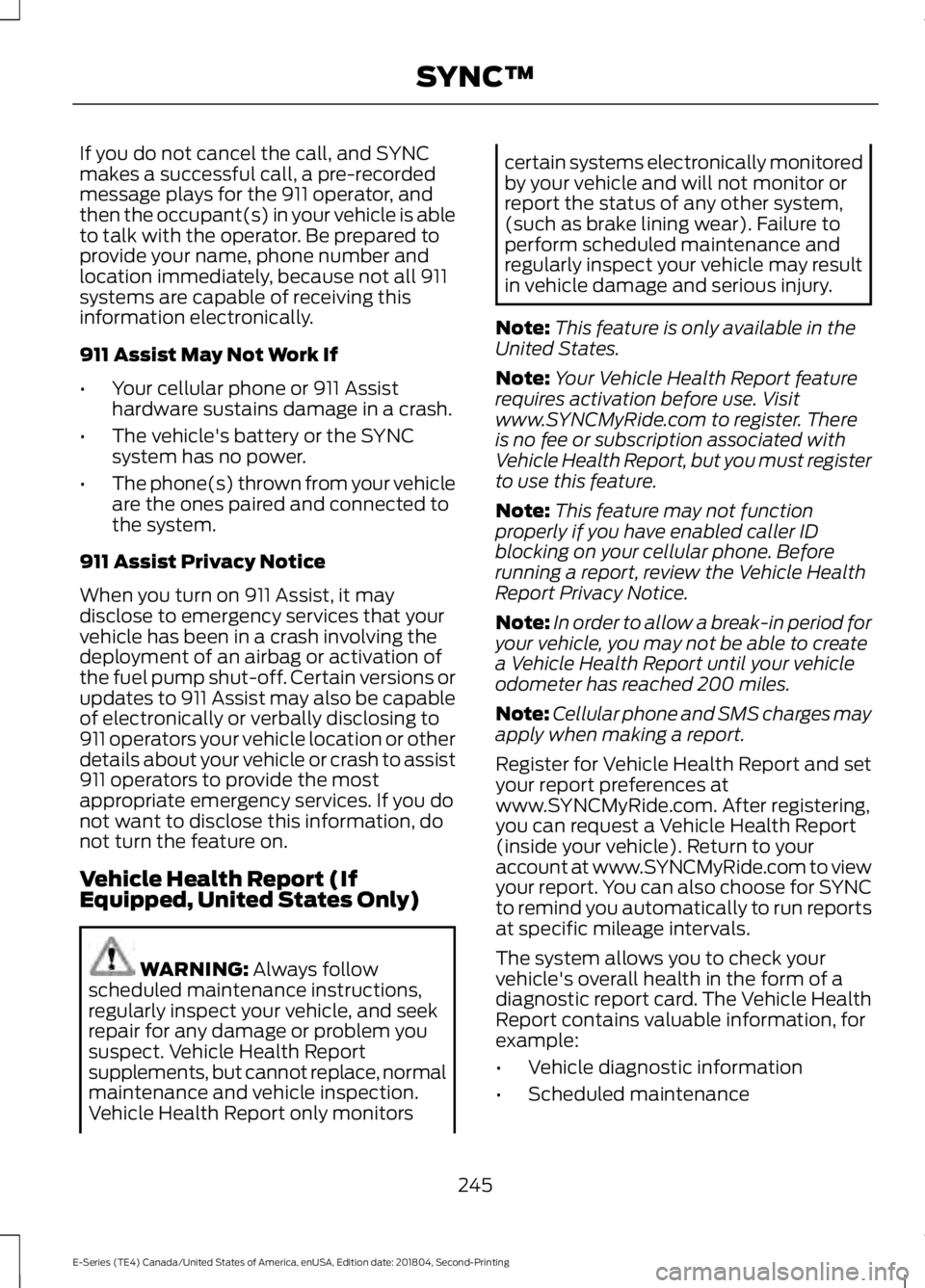
If you do not cancel the call, and SYNCmakes a successful call, a pre-recordedmessage plays for the 911 operator, andthen the occupant(s) in your vehicle is ableto talk with the operator. Be prepared toprovide your name, phone number andlocation immediately, because not all 911systems are capable of receiving thisinformation electronically.
911 Assist May Not Work If
•Your cellular phone or 911 Assisthardware sustains damage in a crash.
•The vehicle's battery or the SYNCsystem has no power.
•The phone(s) thrown from your vehicleare the ones paired and connected tothe system.
911 Assist Privacy Notice
When you turn on 911 Assist, it maydisclose to emergency services that yourvehicle has been in a crash involving thedeployment of an airbag or activation ofthe fuel pump shut-off. Certain versions orupdates to 911 Assist may also be capableof electronically or verbally disclosing to911 operators your vehicle location or otherdetails about your vehicle or crash to assist911 operators to provide the mostappropriate emergency services. If you donot want to disclose this information, donot turn the feature on.
Vehicle Health Report (IfEquipped, United States Only)
WARNING: Always followscheduled maintenance instructions,regularly inspect your vehicle, and seekrepair for any damage or problem yoususpect. Vehicle Health Reportsupplements, but cannot replace, normalmaintenance and vehicle inspection.Vehicle Health Report only monitors
certain systems electronically monitoredby your vehicle and will not monitor orreport the status of any other system,(such as brake lining wear). Failure toperform scheduled maintenance andregularly inspect your vehicle may resultin vehicle damage and serious injury.
Note:This feature is only available in theUnited States.
Note:Your Vehicle Health Report featurerequires activation before use. Visitwww.SYNCMyRide.com to register. Thereis no fee or subscription associated withVehicle Health Report, but you must registerto use this feature.
Note:This feature may not functionproperly if you have enabled caller IDblocking on your cellular phone. Beforerunning a report, review the Vehicle HealthReport Privacy Notice.
Note:In order to allow a break-in period foryour vehicle, you may not be able to createa Vehicle Health Report until your vehicleodometer has reached 200 miles.
Note:Cellular phone and SMS charges mayapply when making a report.
Register for Vehicle Health Report and setyour report preferences atwww.SYNCMyRide.com. After registering,you can request a Vehicle Health Report(inside your vehicle). Return to youraccount at www.SYNCMyRide.com to viewyour report. You can also choose for SYNCto remind you automatically to run reportsat specific mileage intervals.
The system allows you to check yourvehicle's overall health in the form of adiagnostic report card. The Vehicle HealthReport contains valuable information, forexample:
•Vehicle diagnostic information
•Scheduled maintenance
245
E-Series (TE4) Canada/United States of America, enUSA, Edition date: 201804, Second-Printing
SYNC™
Page 265 of 329
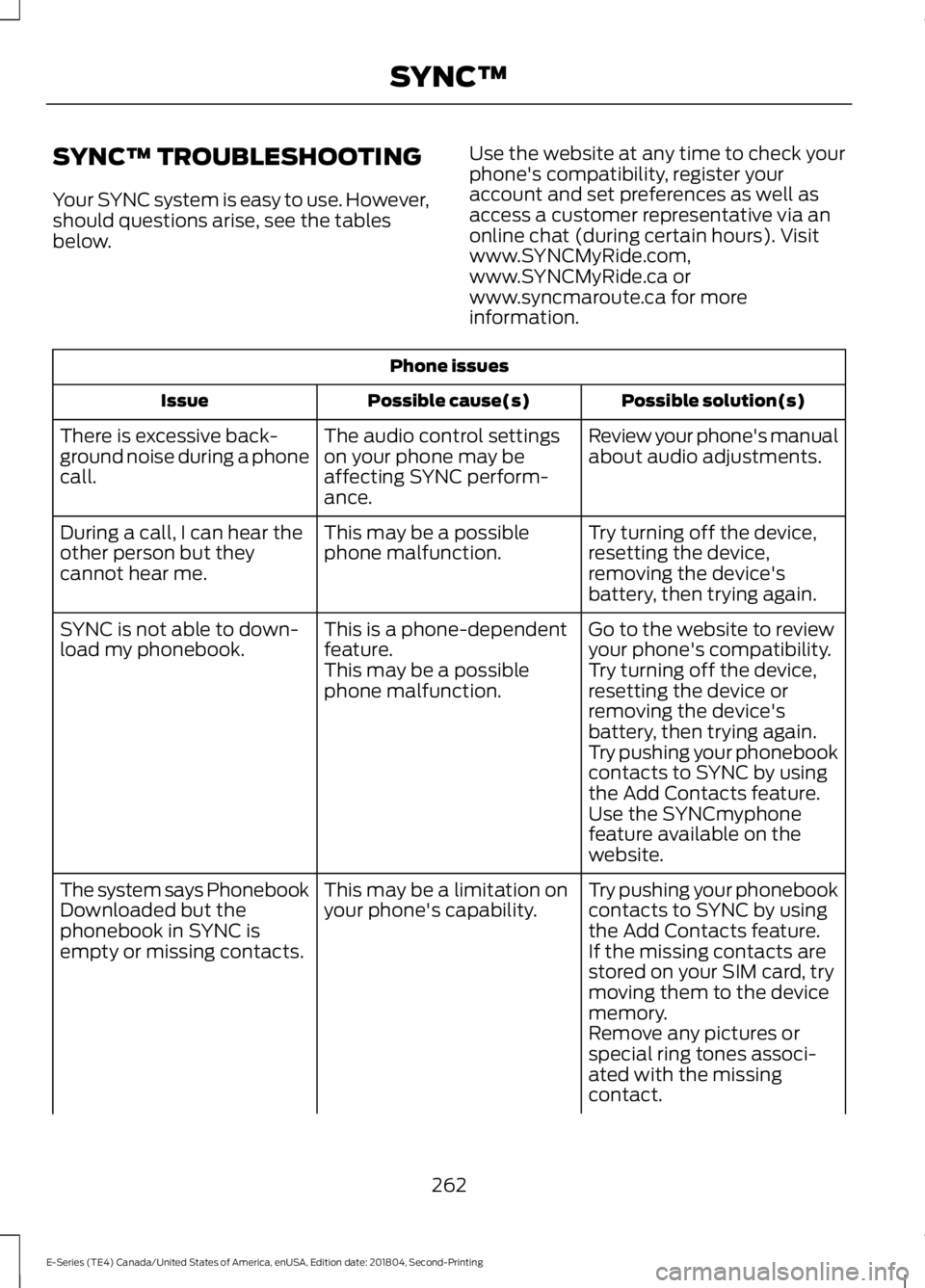
SYNC™ TROUBLESHOOTING
Your SYNC system is easy to use. However,should questions arise, see the tablesbelow.
Use the website at any time to check yourphone's compatibility, register youraccount and set preferences as well asaccess a customer representative via anonline chat (during certain hours). Visitwww.SYNCMyRide.com,www.SYNCMyRide.ca orwww.syncmaroute.ca for moreinformation.
Phone issues
Possible solution(s)Possible cause(s)Issue
Review your phone's manualabout audio adjustments.The audio control settingson your phone may beaffecting SYNC perform-ance.
There is excessive back-ground noise during a phonecall.
Try turning off the device,resetting the device,removing the device'sbattery, then trying again.
This may be a possiblephone malfunction.During a call, I can hear theother person but theycannot hear me.
Go to the website to reviewyour phone's compatibility.This is a phone-dependentfeature.SYNC is not able to down-load my phonebook.Try turning off the device,resetting the device orremoving the device'sbattery, then trying again.
This may be a possiblephone malfunction.
Try pushing your phonebookcontacts to SYNC by usingthe Add Contacts feature.Use the SYNCmyphonefeature available on thewebsite.
Try pushing your phonebookcontacts to SYNC by usingthe Add Contacts feature.
This may be a limitation onyour phone's capability.The system says PhonebookDownloaded but thephonebook in SYNC isempty or missing contacts.If the missing contacts arestored on your SIM card, trymoving them to the devicememory.Remove any pictures orspecial ring tones associ-ated with the missingcontact.
262
E-Series (TE4) Canada/United States of America, enUSA, Edition date: 201804, Second-Printing
SYNC™
Page 266 of 329
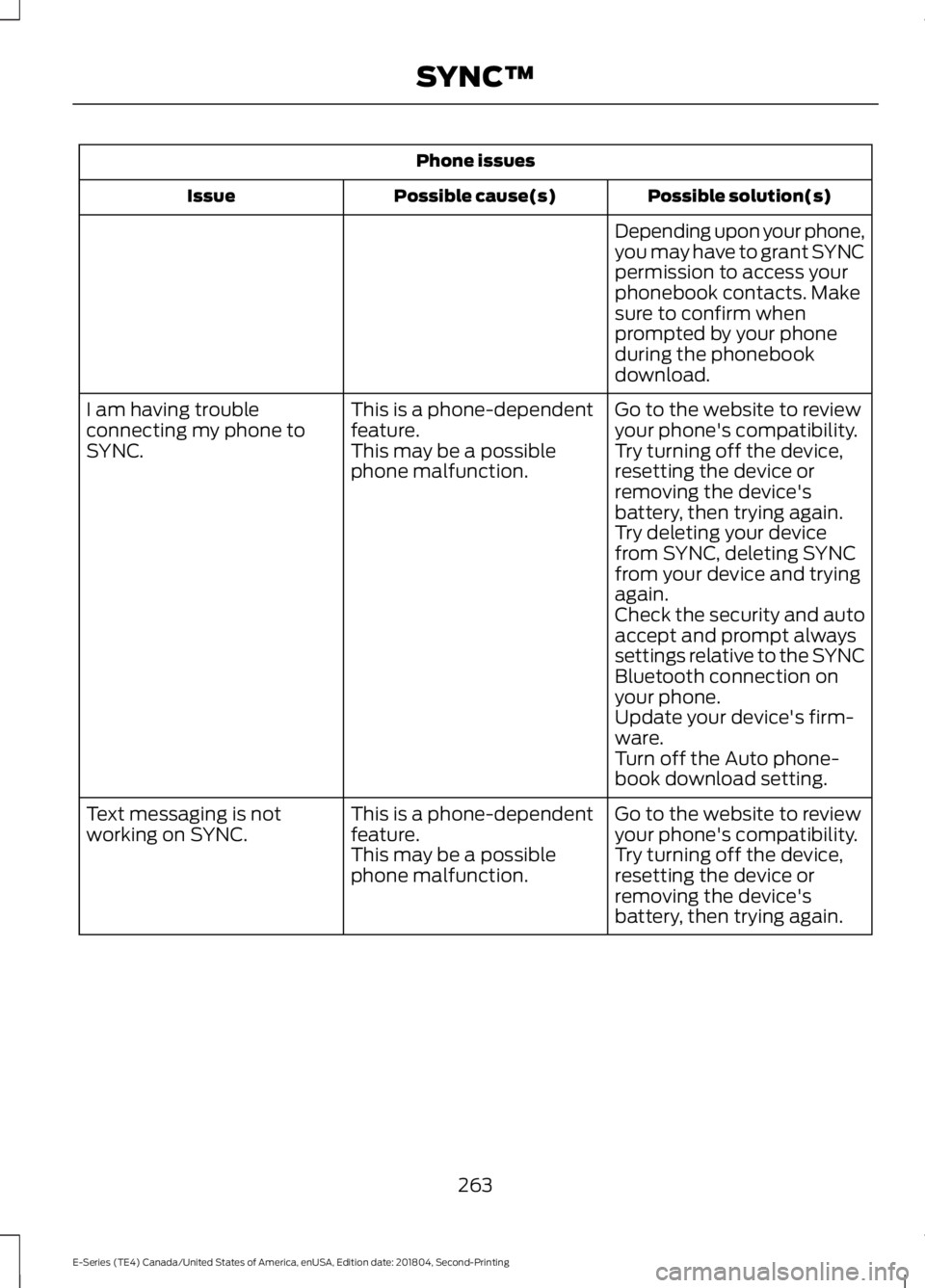
Phone issues
Possible solution(s)Possible cause(s)Issue
Depending upon your phone,you may have to grant SYNCpermission to access yourphonebook contacts. Makesure to confirm whenprompted by your phoneduring the phonebookdownload.
Go to the website to reviewyour phone's compatibility.This is a phone-dependentfeature.I am having troubleconnecting my phone toSYNC.Try turning off the device,resetting the device orremoving the device'sbattery, then trying again.
This may be a possiblephone malfunction.
Try deleting your devicefrom SYNC, deleting SYNCfrom your device and tryingagain.Check the security and autoaccept and prompt alwayssettings relative to the SYNCBluetooth connection onyour phone.Update your device's firm-ware.Turn off the Auto phone-book download setting.
Go to the website to reviewyour phone's compatibility.This is a phone-dependentfeature.Text messaging is notworking on SYNC.Try turning off the device,resetting the device orremoving the device'sbattery, then trying again.
This may be a possiblephone malfunction.
263
E-Series (TE4) Canada/United States of America, enUSA, Edition date: 201804, Second-Printing
SYNC™
Page 267 of 329
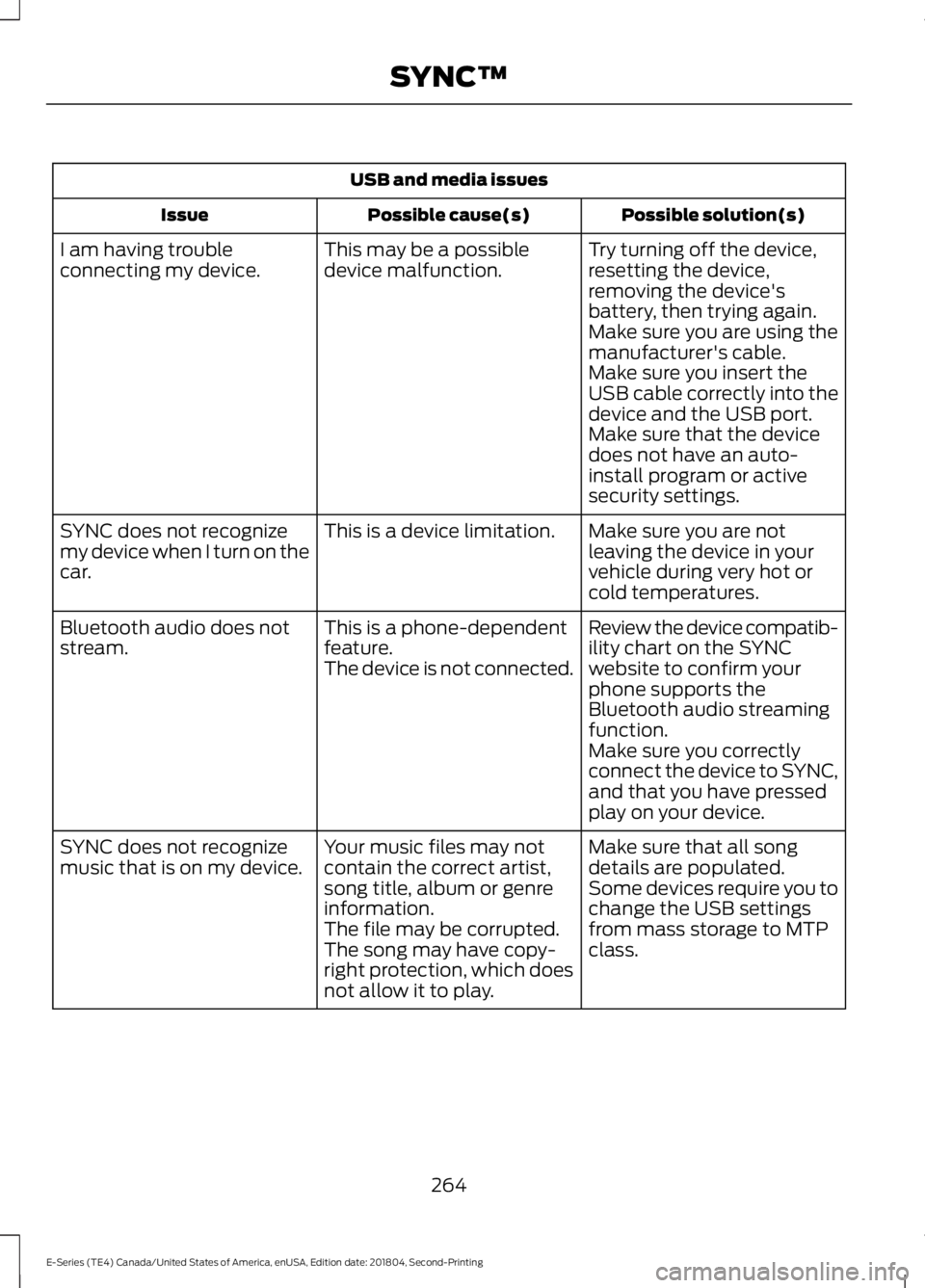
USB and media issues
Possible solution(s)Possible cause(s)Issue
Try turning off the device,resetting the device,removing the device'sbattery, then trying again.
This may be a possibledevice malfunction.I am having troubleconnecting my device.
Make sure you are using themanufacturer's cable.Make sure you insert theUSB cable correctly into thedevice and the USB port.Make sure that the devicedoes not have an auto-install program or activesecurity settings.
Make sure you are notleaving the device in yourvehicle during very hot orcold temperatures.
This is a device limitation.SYNC does not recognizemy device when I turn on thecar.
Review the device compatib-ility chart on the SYNCwebsite to confirm yourphone supports theBluetooth audio streamingfunction.
This is a phone-dependentfeature.The device is not connected.
Bluetooth audio does notstream.
Make sure you correctlyconnect the device to SYNC,and that you have pressedplay on your device.
Make sure that all songdetails are populated.Your music files may notcontain the correct artist,song title, album or genreinformation.
SYNC does not recognizemusic that is on my device.Some devices require you tochange the USB settingsfrom mass storage to MTPclass.The file may be corrupted.The song may have copy-right protection, which doesnot allow it to play.
264
E-Series (TE4) Canada/United States of America, enUSA, Edition date: 201804, Second-Printing
SYNC™
Page 275 of 329
•An authorized dealer needs to installmobile communications systems.Improper installation may harm theoperation of your vehicle, particularlyif the manufacturer did not design themobile communication systemspecifically for automotive use.
•If you or an authorized Ford dealer addany non-Ford electrical or electronicaccessories or components to yourvehicle, you may adversely affectbattery performance and durability. Inaddition, you may also adversely affectthe performance of other electricalsystems in the vehicle.
AUXILIARY SWITCHES
For maximum vehicle performance, keepthe following information in mind whenadding accessories or equipment to yourvehicle:
•When adding accessories, equipment,passengers and luggage to yourvehicle, do not exceed the total weightcapacity of the vehicle or of the frontor rear axle (GVWR or GAWR asindicated on the Safety ComplianceCertification label). Ask an authorizeddealer for specific weight information.
•The Federal CommunicationsCommission (FCC) and CanadianRadio TelecommunicationsCommission (CRTC) regulate the useof mobile communications systemsequipped with radio transmitters, forexample, two-way radios, telephonesand theft alarms. Any such equipmentinstalled in your vehicle should complywith Federal CommunicationsCommission (FCC) and CanadianRadio TelecommunicationsCommission (CRTC) regulations, andshould be installed by an authorizeddealer.
•An authorized dealer needs to installmobile communications systems.Improper installation may harm theoperation of your vehicle, particularlyif the manufacturer did not design themobile communication systemspecifically for automotive use.
•If you or an authorized Ford dealer addany non-Ford electrical or electronicaccessories or components to yourvehicle, you may adversely affectbattery performance and durability. Inaddition, you may also adversely affectthe performance of other electricalsystems in the vehicle.
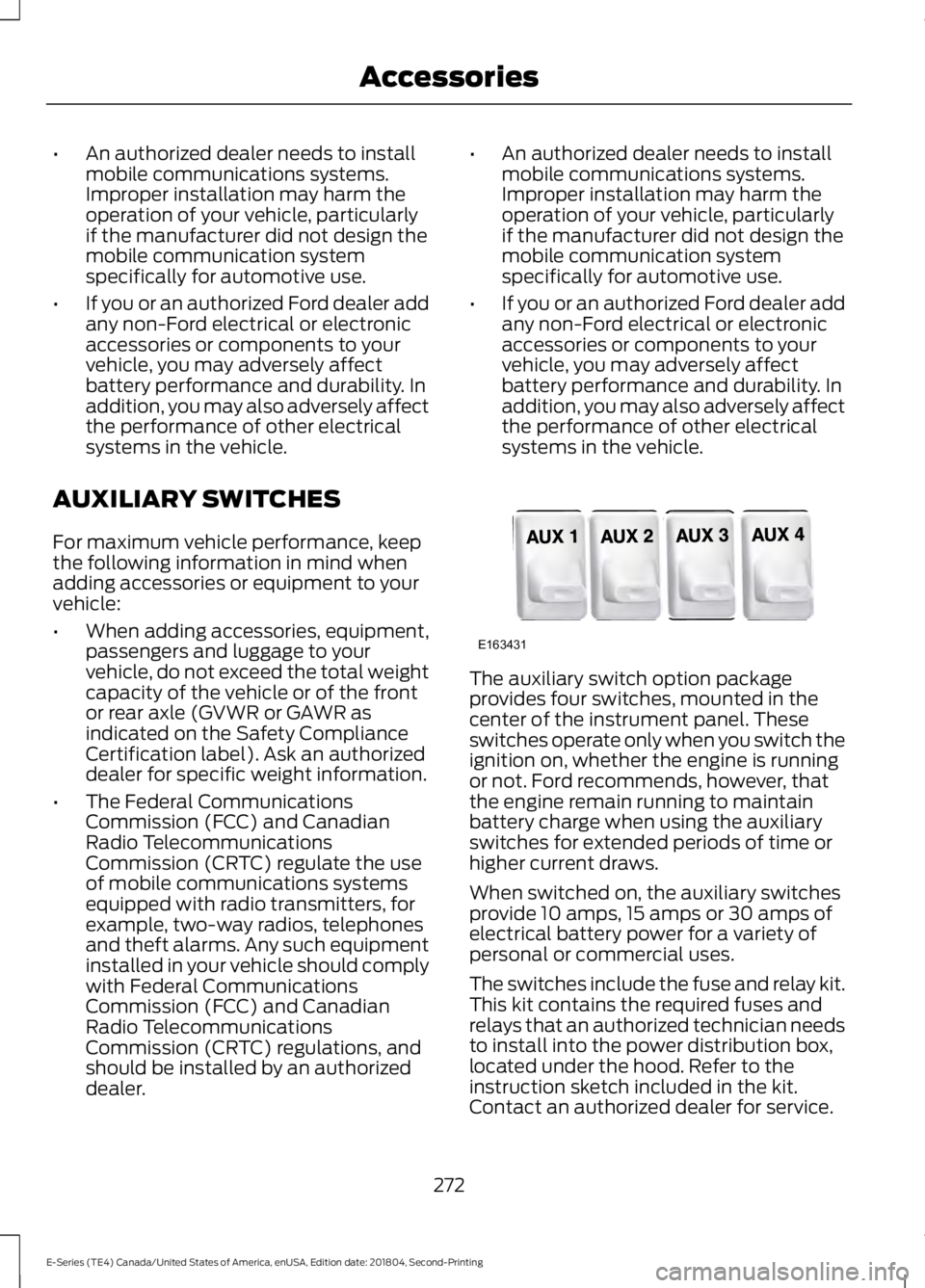
The auxiliary switch option packageprovides four switches, mounted in thecenter of the instrument panel. Theseswitches operate only when you switch theignition on, whether the engine is runningor not. Ford recommends, however, thatthe engine remain running to maintainbattery charge when using the auxiliaryswitches for extended periods of time orhigher current draws.
When switched on, the auxiliary switchesprovide 10 amps, 15 amps or 30 amps ofelectrical battery power for a variety ofpersonal or commercial uses.
The switches include the fuse and relay kit.This kit contains the required fuses andrelays that an authorized technician needsto install into the power distribution box,located under the hood. Refer to theinstruction sketch included in the kit.Contact an authorized dealer for service.
272
E-Series (TE4) Canada/United States of America, enUSA, Edition date: 201804, Second-Printing
AccessoriesE163431
Page 277 of 329
PROTECT YOURSELF FROM THE RISINGCOST OF VEHICLE REPAIRS WITH A FORDPROTECT EXTENDED SERVICE PLAN.
Ford Protect Extended ServicePlans (U.S. Only)
Ford Protect extended service plan meanspeace of mind. It’s the extended serviceplan backed by Ford Motor Company, andprovides more protection beyond the NewVehicle Limited Warranty coverage. Whenyou visit your Ford Dealer, Insist on FordProtect extended service plans!
Ford Protect Can Quickly Pay for Itself
One trip to the Service Center could easilyexceed the price of your Ford Protectextended service plan. With Ford Protectextended service plan you minimize yourrisk for unexpected repair bills and risingrepair costs.
Up to 1,000+ Covered VehicleComponents
There are four mechanical Ford Protectextended service plans with different levelsof coverage. Ask your authorized dealer fordetails.
1. PremiumCARE - Our mostcomprehensive coverage. With over1,000 covered components, this planis so complete it’s probably easier tolist what’s not covered.
2. ExtraCARE - Covers 113 components,and includes many high-tech items.
3. BaseCARE - Covers 84 components.
4. PowertrainCARE - Covers 29 criticalcomponents.
Ford Protect extended service plans arehonored by all authorized Ford dealers inthe U.S., Canada and Mexico.
That means you get:
•Reliable, quality service at any Ford orLincoln dealership.
•Repairs performed by factory trainedtechnicians, using genuine parts.
Rental Car Reimbursement
1st day Rental Benefit
If you bring your car into your dealer forservice, we’ll give you a loaner to use forthe day.
Extended Rental Benefits
If your vehicle is kept overnight for coveredrepairs, you are eligible for rental carcoverage, including warranty repairs, andField Service Actions.
Roadside Assistance
Exclusive 24/7 roadside assistance,including:
•Towing, flat-tire change and batteryjump starts.
•Out of fuel and lock-out assistance.
•Travel expense reimbursement forlodging, meals and rental car.
•Assistance for taxi, shuttle, rental carcoverage or other transportation.
Transferable Coverage
If you sell your vehicle before your FordProtect extended service plan coverageexpires, you can transfer any remainingcoverage to the new owner. Which shouldgive you and your potential buyer a littlemore peace of mind.
274
E-Series (TE4) Canada/United States of America, enUSA, Edition date: 201804, Second-Printing
Ford Protect
Page 280 of 329
Ford Motor Company has recommendedmaintenance intervals for various partsand component systems based uponengineering testing. Ford Motor Companyrelies upon this testing to determine themost appropriate mileage for replacementof oils and fluids to protect your vehicle atthe lowest overall cost to you andrecommends against maintenanceschedules that deviate from the scheduledmaintenance information.
We strongly recommend the use of onlygenuine Ford, Motorcraft orFord-authorized re-manufacturedreplacement parts engineered for yourvehicle.
Additives and Chemicals
This owner's manual and the FordWorkshop Manual list the recommendedadditives and chemicals for your vehicle.We do not recommend using chemicals oradditives not approved by us as part ofyour vehicle’s normal maintenance. Pleaseconsult your warranty information.
Oils, Fluids and Flushing
In many cases, fluid discoloration is anormal operating characteristic and, byitself, does not necessarily indicate aconcern or that the fluid needs to bechanged. However, a qualified expert, suchas the factory-trained technicians at yourdealership, should inspect discolored fluidsthat also show signs of overheating orforeign material contaminationimmediately.
Make sure to change your vehicle’s oils andfluids at the specified intervals or inconjunction with a repair. Flushing is aviable way to change fluid for many vehiclesub-systems during scheduledmaintenance. It is critical that systems areflushed only with new fluid that is the sameas that required to fill and operate thesystem or using a Ford-approved flushingchemical.
Owner Checks and Services
Make sure you perform the following basicmaintenance checks and inspections everymonth or at six-month intervals.
Check every month
Engine oil level.
Function of all interior and exterior lights.
Tires (including spare) for wear and proper pressure.
Windshield washer fluid level.
Check every six months
Battery connections. Clean if necessary.
Body and door drain holes for obstructions. Clean if necessary.
Cooling system fluid level and coolant strength.
Door weatherstrips for wear. Lubricate if necessary.
277
E-Series (TE4) Canada/United States of America, enUSA, Edition date: 201804, Second-Printing
Scheduled Maintenance
Page 281 of 329
Check every six months
Hinges, latches and outside locks for proper operation. Lubricate if necessary.
Parking brake for proper operation.
Safety belts and seat latches for wear and function.
Safety warning lamps (brake, ABS, airbag and safety belt) for operation.
Washer spray and wiper operation. Clean or replace blades as necessary.
Multi-point Inspection
In order to keep your vehicle running right,it is important to have the systems on yourvehicle checked regularly. This can helpidentify potential issues and prevent majorproblems. We recommend having thefollowing multi-point inspection performedat every scheduled maintenance intervalto help make sure your vehicle keepsrunning great.
Multi-point inspection
Horn operationAccessory drive belt(s)
Radiator, cooler, heater and A/C hosesBattery performance
Suspension component for leaks ordamageEngine air filter
Steering and linkageExhaust system
Tires (including spare) for wear and proper
pressure**Exterior lamps and hazard warning systemoperation
Windshield for cracks, chips or pitsFluid levels*; fill if necessary
Washer spray and wiper operationFor oil and fluid leaks
* Brake, coolant recovery reservoir, automatic transmission, power steering and windowwasher.**If your vehicle is equipped with a temporary mobility kit, check the tire sealant expirationUse By date on the canister. Replace as needed.
278
E-Series (TE4) Canada/United States of America, enUSA, Edition date: 201804, Second-Printing
Scheduled Maintenance
Page 322 of 329
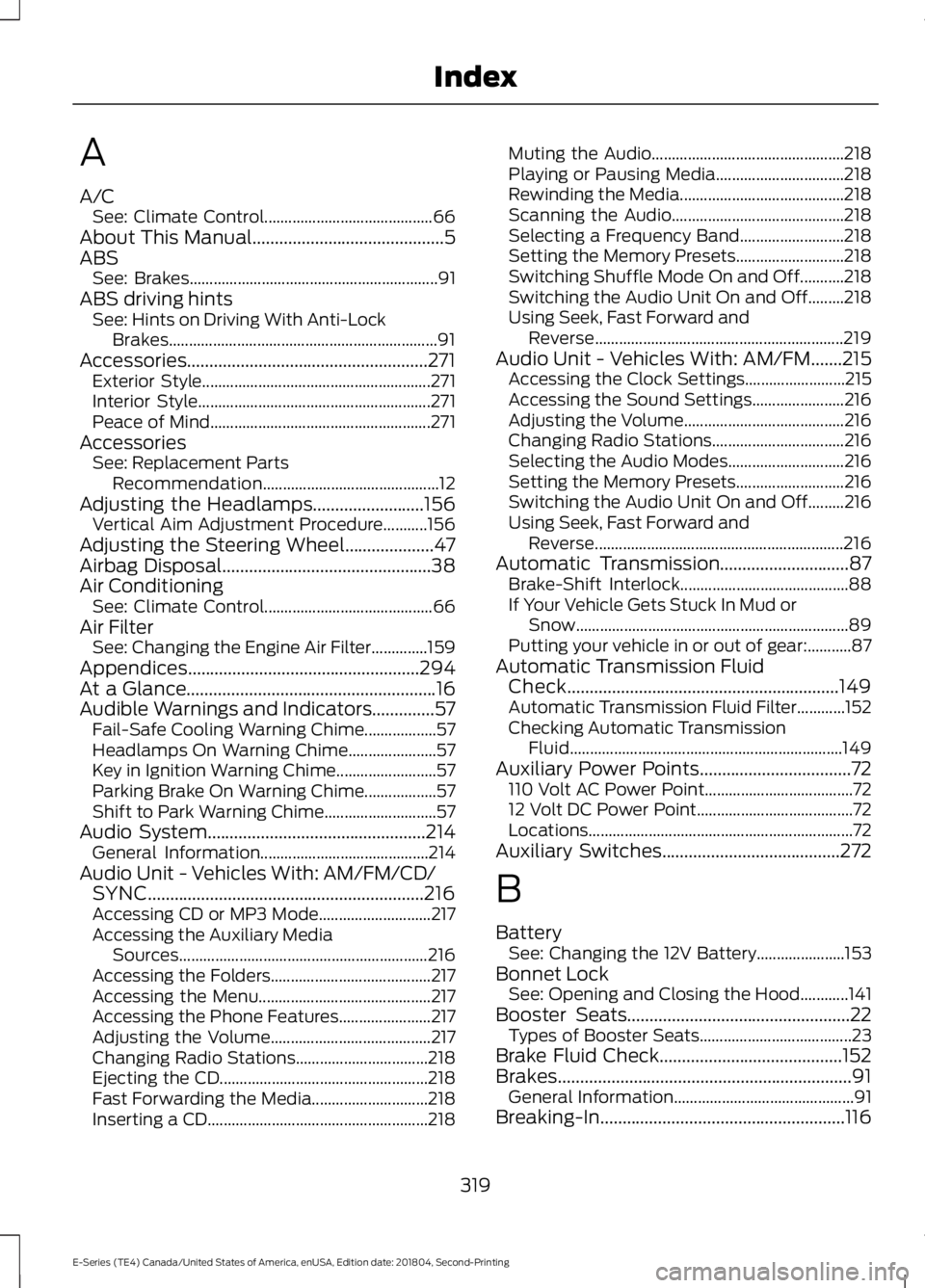
A
A/CSee: Climate Control..........................................66About This Manual...........................................5ABSSee: Brakes..............................................................91ABS driving hintsSee: Hints on Driving With Anti-LockBrakes...................................................................91Accessories......................................................271Exterior Style.........................................................271Interior Style..........................................................271Peace of Mind.......................................................271AccessoriesSee: Replacement PartsRecommendation............................................12Adjusting the Headlamps.........................156Vertical Aim Adjustment Procedure...........156Adjusting the Steering Wheel....................47Airbag Disposal...............................................38Air ConditioningSee: Climate Control..........................................66Air FilterSee: Changing the Engine Air Filter..............159Appendices....................................................294At a Glance........................................................16Audible Warnings and Indicators..............57Fail-Safe Cooling Warning Chime..................57Headlamps On Warning Chime......................57Key in Ignition Warning Chime.........................57Parking Brake On Warning Chime..................57Shift to Park Warning Chime............................57Audio System.................................................214General Information..........................................214Audio Unit - Vehicles With: AM/FM/CD/SYNC..............................................................216Accessing CD or MP3 Mode............................217Accessing the Auxiliary MediaSources..............................................................216Accessing the Folders........................................217Accessing the Menu...........................................217Accessing the Phone Features.......................217Adjusting the Volume........................................217Changing Radio Stations.................................218Ejecting the CD....................................................218Fast Forwarding the Media.............................218Inserting a CD.......................................................218
Muting the Audio................................................218Playing or Pausing Media................................218Rewinding the Media.........................................218Scanning the Audio...........................................218Selecting a Frequency Band..........................218Setting the Memory Presets...........................218Switching Shuffle Mode On and Off...........218Switching the Audio Unit On and Off.........218Using Seek, Fast Forward andReverse..............................................................219Audio Unit - Vehicles With: AM/FM.......215Accessing the Clock Settings.........................215Accessing the Sound Settings.......................216Adjusting the Volume........................................216Changing Radio Stations.................................216Selecting the Audio Modes.............................216Setting the Memory Presets...........................216Switching the Audio Unit On and Off.........216Using Seek, Fast Forward andReverse..............................................................216Automatic Transmission.............................87Brake-Shift Interlock..........................................88If Your Vehicle Gets Stuck In Mud orSnow....................................................................89Putting your vehicle in or out of gear:...........87Automatic Transmission FluidCheck.............................................................149Automatic Transmission Fluid Filter............152Checking Automatic TransmissionFluid....................................................................149Auxiliary Power Points..................................72110 Volt AC Power Point.....................................7212 Volt DC Power Point.......................................72Locations..................................................................72Auxiliary Switches........................................272
B
BatterySee: Changing the 12V Battery......................153Bonnet LockSee: Opening and Closing the Hood............141Booster Seats..................................................22Types of Booster Seats......................................23Brake Fluid Check.........................................152Brakes..................................................................91General Information.............................................91Breaking-In.......................................................116
319
E-Series (TE4) Canada/United States of America, enUSA, Edition date: 201804, Second-Printing
Index
Page 323 of 329
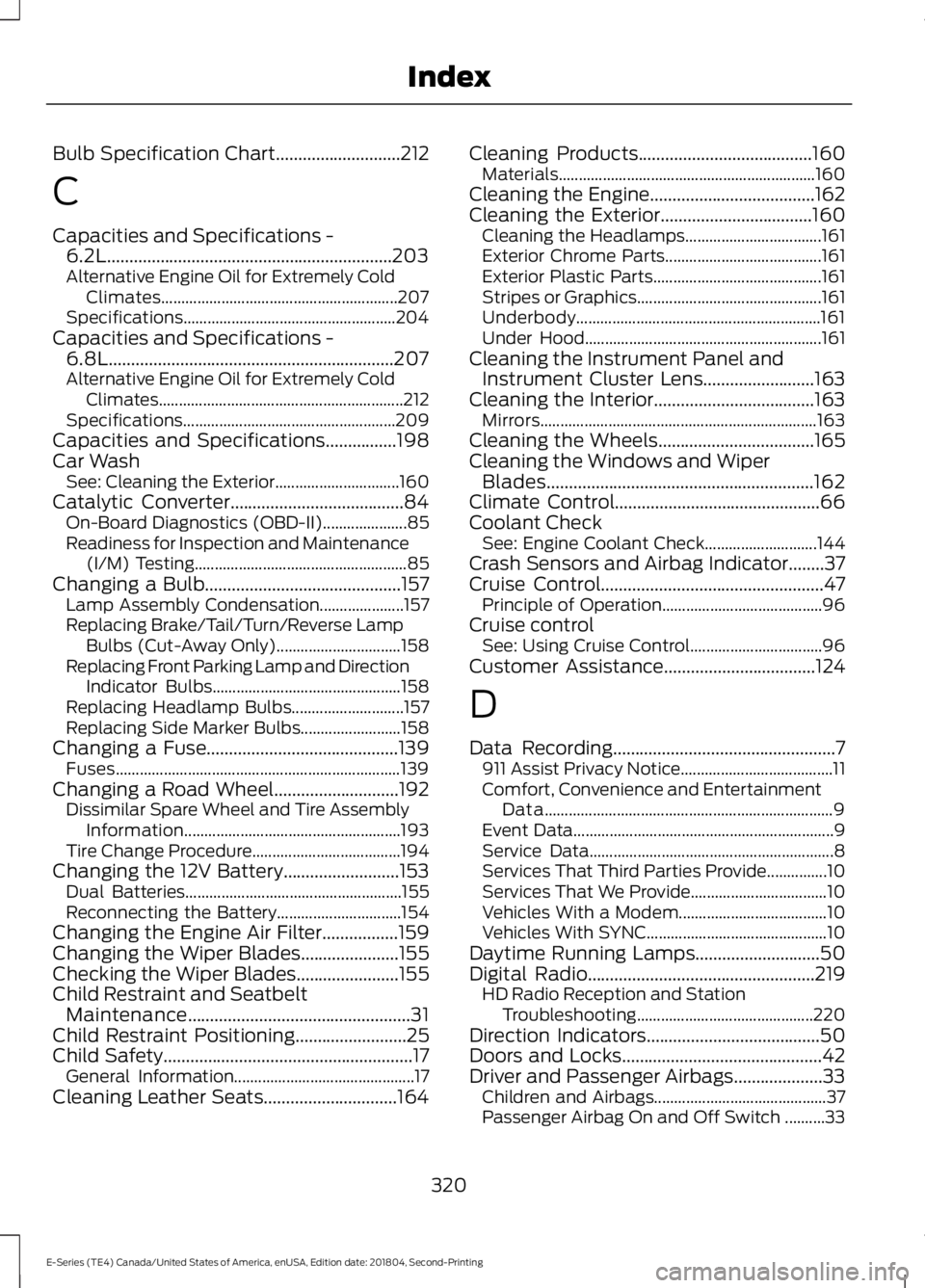
Bulb Specification Chart............................212
C
Capacities and Specifications -6.2L................................................................203Alternative Engine Oil for Extremely ColdClimates...........................................................207Specifications.....................................................204Capacities and Specifications -6.8L................................................................207Alternative Engine Oil for Extremely ColdClimates.............................................................212Specifications.....................................................209Capacities and Specifications................198Car WashSee: Cleaning the Exterior...............................160Catalytic Converter.......................................84On-Board Diagnostics (OBD-II).....................85Readiness for Inspection and Maintenance(I/M) Testing.....................................................85Changing a Bulb............................................157Lamp Assembly Condensation.....................157Replacing Brake/Tail/Turn/Reverse LampBulbs (Cut-Away Only)...............................158Replacing Front Parking Lamp and DirectionIndicator Bulbs...............................................158Replacing Headlamp Bulbs............................157Replacing Side Marker Bulbs.........................158Changing a Fuse...........................................139Fuses.......................................................................139Changing a Road Wheel............................192Dissimilar Spare Wheel and Tire AssemblyInformation......................................................193Tire Change Procedure.....................................194Changing the 12V Battery..........................153Dual Batteries......................................................155Reconnecting the Battery...............................154Changing the Engine Air Filter.................159Changing the Wiper Blades......................155Checking the Wiper Blades.......................155Child Restraint and SeatbeltMaintenance..................................................31Child Restraint Positioning.........................25Child Safety........................................................17General Information.............................................17Cleaning Leather Seats..............................164
Cleaning Products.......................................160Materials................................................................160Cleaning the Engine.....................................162Cleaning the Exterior..................................160Cleaning the Headlamps..................................161Exterior Chrome Parts.......................................161Exterior Plastic Parts..........................................161Stripes or Graphics..............................................161Underbody.............................................................161Under Hood...........................................................161Cleaning the Instrument Panel andInstrument Cluster Lens.........................163Cleaning the Interior....................................163Mirrors.....................................................................163Cleaning the Wheels...................................165Cleaning the Windows and WiperBlades............................................................162Climate Control..............................................66Coolant CheckSee: Engine Coolant Check............................144Crash Sensors and Airbag Indicator........37Cruise Control..................................................47Principle of Operation........................................96Cruise controlSee: Using Cruise Control.................................96Customer Assistance..................................124
D
Data Recording..................................................7911 Assist Privacy Notice......................................11Comfort, Convenience and EntertainmentData........................................................................9Event Data.................................................................9Service Data.............................................................8Services That Third Parties Provide...............10Services That We Provide..................................10Vehicles With a Modem.....................................10Vehicles With SYNC.............................................10Daytime Running Lamps............................50Digital Radio...................................................219HD Radio Reception and StationTroubleshooting............................................220Direction Indicators.......................................50Doors and Locks.............................................42Driver and Passenger Airbags....................33Children and Airbags...........................................37Passenger Airbag On and Off Switch ..........33
320
E-Series (TE4) Canada/United States of America, enUSA, Edition date: 201804, Second-Printing
Index