tow FORD E SERIES 2019 Repair Manual
[x] Cancel search | Manufacturer: FORD, Model Year: 2019, Model line: E SERIES, Model: FORD E SERIES 2019Pages: 329, PDF Size: 2.92 MB
Page 217 of 329
GENERAL INFORMATION
WARNING: Driving whiledistracted can result in loss of vehiclecontrol, crash and injury. We stronglyrecommend that you use extremecaution when using any device that maytake your focus off the road. Yourprimary responsibility is the safeoperation of your vehicle. Werecommend against the use of anyhand-held device while driving andencourage the use of voice-operatedsystems when possible. Make sure youare aware of all applicable local lawsthat may affect the use of electronicdevices while driving.
Radio Frequencies and ReceptionFactors
AM and FM frequencies are established bythe Federal Communications Commission(FCC) and the Canadian Radio andTelecommunications Commission (CRTC).Those frequencies are:
•AM: 530-1710 kHz
•FM: 87.9-107.9 MHz
Note:Listening to loud audio for longperiods of time could damage your hearing.
Radio Reception Factors
The further you travel from an AM or FM station, theweaker the signal and the weaker the reception.Distance and strength
Hills, mountains, tall buildings, bridges, tunnels, freewayoverpasses, parking garages, dense tree foliage andthunderstorms can interfere with the reception.
Terrain
When you pass a ground-based broadcast repeatingtower, a stronger signal may overtake a weaker one andresult in the audio system muting.
Station overload
CD and CD Player Information
Note:CD units play commercially pressed4.7 in (12 cm) audio compact discs only. Dueto technical incompatibility, certainrecordable and re-recordable compact discsmay not function correctly when used in thevehicle’s CD player.
Note: Do not insert CDs with homemadepaper (adhesive) labels into the CD playeras the label may peel and cause the CD tobecome jammed. You should use apermanent felt tip marker rather thanadhesive labels on your homemade CDs.Ballpoint pens may damage CDs. Ask anauthorized dealer for more information.
Note:Do not use any irregularly shapeddiscs or discs with a scratch protection filmattached.
214
E-Series (TE4) Canada/United States of America, enUSA, Edition date: 201804, Second-Printing
Audio System
Page 218 of 329
Always handle discs by their edges only.Clean the disc with an approved CDcleaner only. Wipe it from the center ofthe disc toward the edge. Do not clean ina circular motion.
Do not expose discs to direct sunlight orheat sources for extended periods.
MP3 and WMA Track and FolderStructure
Audio systems capable of recognizing andplaying MP3 and WMA individual tracksand folder structures work as follows:
•There are two different modes for MP3and WMA disc playback: MP3 andWMA track mode (system default) andMP3 and WMA folder mode.
•MP3 and WMA track mode ignores anyfolder structure on the MP3 and WMAdisc. The player numbers each MP3and WMA track on the disc (noted bythe MP3 or WMA file extension) fromT001 to a maximum of T255. Themaximum number of playable MP3 andWMA files may be less depending onthe structure of the CD and exactmodel of radio present.
•MP3 and WMA folder mode representsa folder structure consisting of onelevel of folders. The CD player numbersall MP3 and WMA tracks on the disc(noted by the MP3 or WMA fileextension) and all folders containingMP3 and WMA files, from F001 (folder)T001 (track) to F253 T255.
•Creating discs with only one level offolders helps with navigation throughthe disc files.
If you are burning your own MP3 and WMAdiscs, it is important to understand howthe system reads the structures you create.While various files may be present (fileswith extensions other than MP3 andWMA), only files with the MP3 and WMA
extension are played; other files areignored by the system. This enables you touse the same MP3 and WMA disc for avariety of tasks on your work computer,home computer and your in-vehiclesystem.
In track mode, the system displays andplays the structure as if it were only onelevel deep (all MP3 and WMA files play,regardless of being in a specific folder). Infolder mode, the system only plays theMP3 and WMA files in the current folder.
AUDIO UNIT - VEHICLES WITH:
AM/FM
WARNING: Driving whiledistracted can result in loss of vehiclecontrol, crash and injury. We stronglyrecommend that you use extremecaution when using any device that maytake your focus off the road. Yourprimary responsibility is the safeoperation of your vehicle. Werecommend against the use of anyhand-held device while driving andencourage the use of voice-operatedsystems when possible. Make sure youare aware of all applicable local lawsthat may affect the use of electronicdevices while driving.
Accessing the Clock Settings
Press and release to display theclock.
To set the time, press and hold until thehours start to flash. Use the center arrowcontrols to change the hours, then repeatto set the minutes. Press again to exit clockmode.
215
E-Series (TE4) Canada/United States of America, enUSA, Edition date: 201804, Second-Printing
Audio SystemE265935
Page 225 of 329
Note:This receiver includes the eCosreal-time operating system. eCos ispublished under the eCos License.
Satellite Radio Reception Factors
Potential satellite radio reception issues
For optimal reception performance, keep the antennaclear of snow and ice build-up and keep luggage and othermaterial as far away from the antenna as possible.
Antenna obstructions
Hills, mountains, tall buildings, bridges, tunnels, freewayoverpasses, parking garages, dense tree foliage andthunderstorms can interfere with your reception.
Terrain
When you pass a ground-based broadcast-repeatingtower, a stronger signal may overtake a weaker one andthe audio system may mute.
Station overload
Your display may show ACQUIRING . . . to indicate theinterference and the audio system may mute.Satellite radio signal interfer-ence
SiriusXM Satellite Radio Service
Note:SiriusXM reserves the unrestrictedright to change, rearrange, add or deleteprogramming including canceling, movingor adding particular channels, and its prices,at any time, with or without notice to you.Ford Motor Company shall not beresponsible for any such programmingchanges.
SiriusXM satellite radio is asubscription-based satellite radio servicethat broadcasts a variety of music, sports,news, weather, traffic and entertainmentprogramming. Your factory-installedSiriusXM satellite radio system includeshardware and a limited subscription term,which begins on the date of sale or leaseof your vehicle. See an authorized dealerfor availability.
For more information on extendedsubscription terms (a service fee isrequired), the online media player and acomplete list of SiriusXM satellite radiochannels, and other features, please visitwww.siriusxm.com in the United States,www.siriusxm.ca in Canada, or callSiriusXM at 1-888-539-7474.
Satellite Radio Electronic SerialNumber (ESN)
You need your ESN to activate, modify ortrack your satellite radio account. When insatellite radio mode, tune to channel 0.
222
E-Series (TE4) Canada/United States of America, enUSA, Edition date: 201804, Second-Printing
Audio SystemE208625
Page 226 of 329
Troubleshooting
ActionConditionMessage
No action required. Thismessage should disappearshortly.
Radio requires more thantwo seconds to produceaudio for the selectedchannel.
Acquiring…
If this message does notclear shortly, or with an igni-tion key cycle, your receivermay have a fault. See anauthorized dealer for service.
There is an internal moduleor system failure present.Satellite antenna fault
SIRIUS system failure
Tune to another channel orchoose another preset.The channel is no longeravailable.Invalid Channel
Contact SiriusXM at 1-888-539-7474 to subscribe tothe channel, or tune toanother channel.
Your subscription does notinclude this channel.Unsubscribed Channel
The signal is blocked. Whenyou move into an open area,the signal should return.
The signal is lost from theSiriusXM satellite or Siri-usXM tower to your vehicleantenna.
No Signal
No action required. Theprocess may take up tothree minutes.
Update of channelprogramming in progress.Updating…
Contact SiriusXM at 1-888-539-7474 to resolvesubscription issues.
Your satellite service is nolonger available.Questions? Call
1-888-539-7474
Use the channel guide toturn off the Lock or Skipfunction on that station.
All the channels in theselected category are eitherskipped or locked.
None found
Check Channel Guide
No action required.SiriusXM has updated thechannels available for yourvehicle.
Subscription Updated
223
E-Series (TE4) Canada/United States of America, enUSA, Edition date: 201804, Second-Printing
Audio System
Page 252 of 329
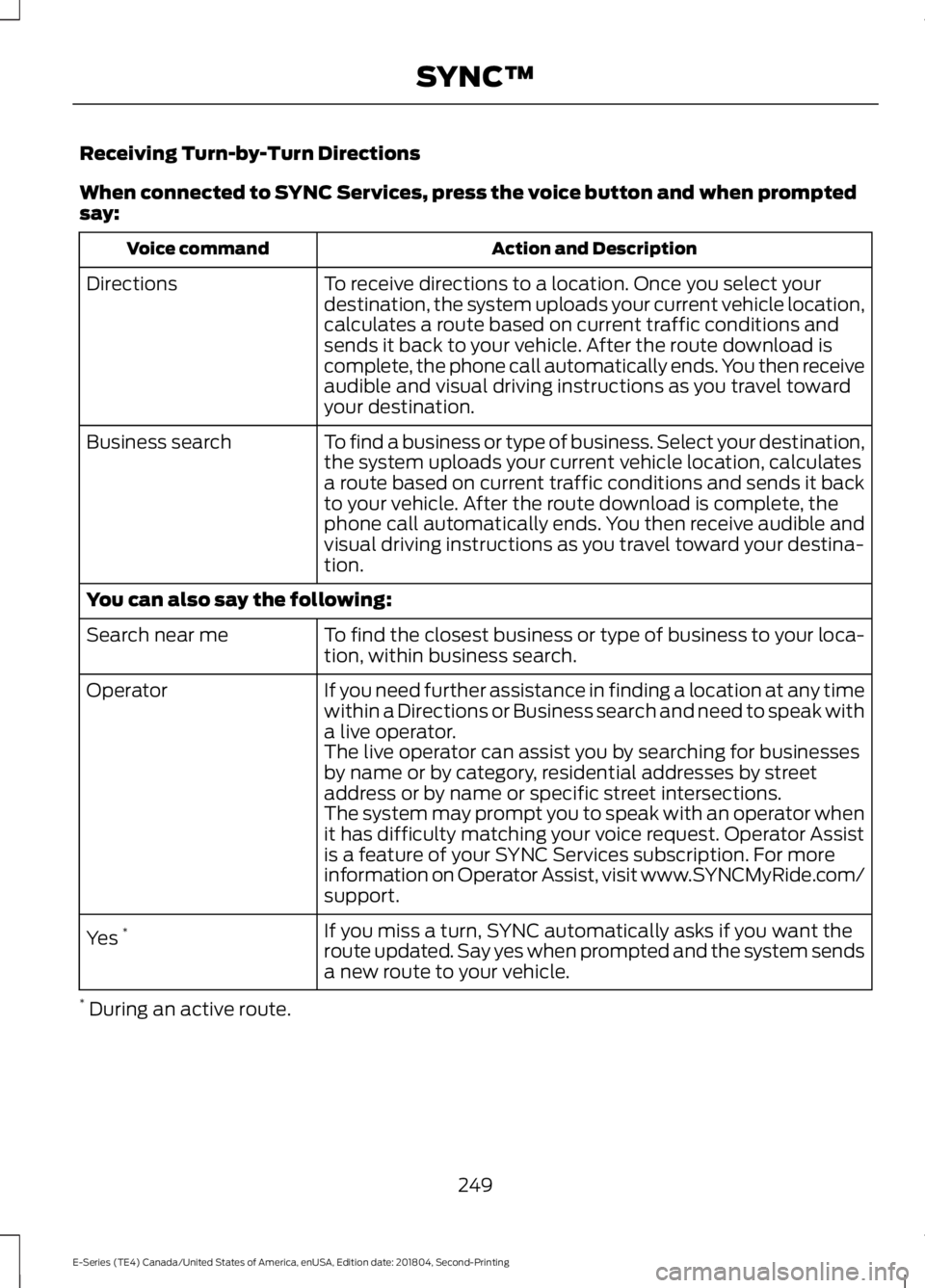
Receiving Turn-by-Turn Directions
When connected to SYNC Services, press the voice button and when promptedsay:
Action and DescriptionVoice command
To receive directions to a location. Once you select yourdestination, the system uploads your current vehicle location,calculates a route based on current traffic conditions andsends it back to your vehicle. After the route download iscomplete, the phone call automatically ends. You then receiveaudible and visual driving instructions as you travel towardyour destination.
Directions
To find a business or type of business. Select your destination,the system uploads your current vehicle location, calculatesa route based on current traffic conditions and sends it backto your vehicle. After the route download is complete, thephone call automatically ends. You then receive audible andvisual driving instructions as you travel toward your destina-tion.
Business search
You can also say the following:
To find the closest business or type of business to your loca-tion, within business search.Search near me
If you need further assistance in finding a location at any timewithin a Directions or Business search and need to speak witha live operator.
Operator
The live operator can assist you by searching for businessesby name or by category, residential addresses by streetaddress or by name or specific street intersections.The system may prompt you to speak with an operator whenit has difficulty matching your voice request. Operator Assistis a feature of your SYNC Services subscription. For moreinformation on Operator Assist, visit www.SYNCMyRide.com/support.
If you miss a turn, SYNC automatically asks if you want theroute updated. Say yes when prompted and the system sendsa new route to your vehicle.
Yes *
* During an active route.
249
E-Series (TE4) Canada/United States of America, enUSA, Edition date: 201804, Second-Printing
SYNC™
Page 277 of 329
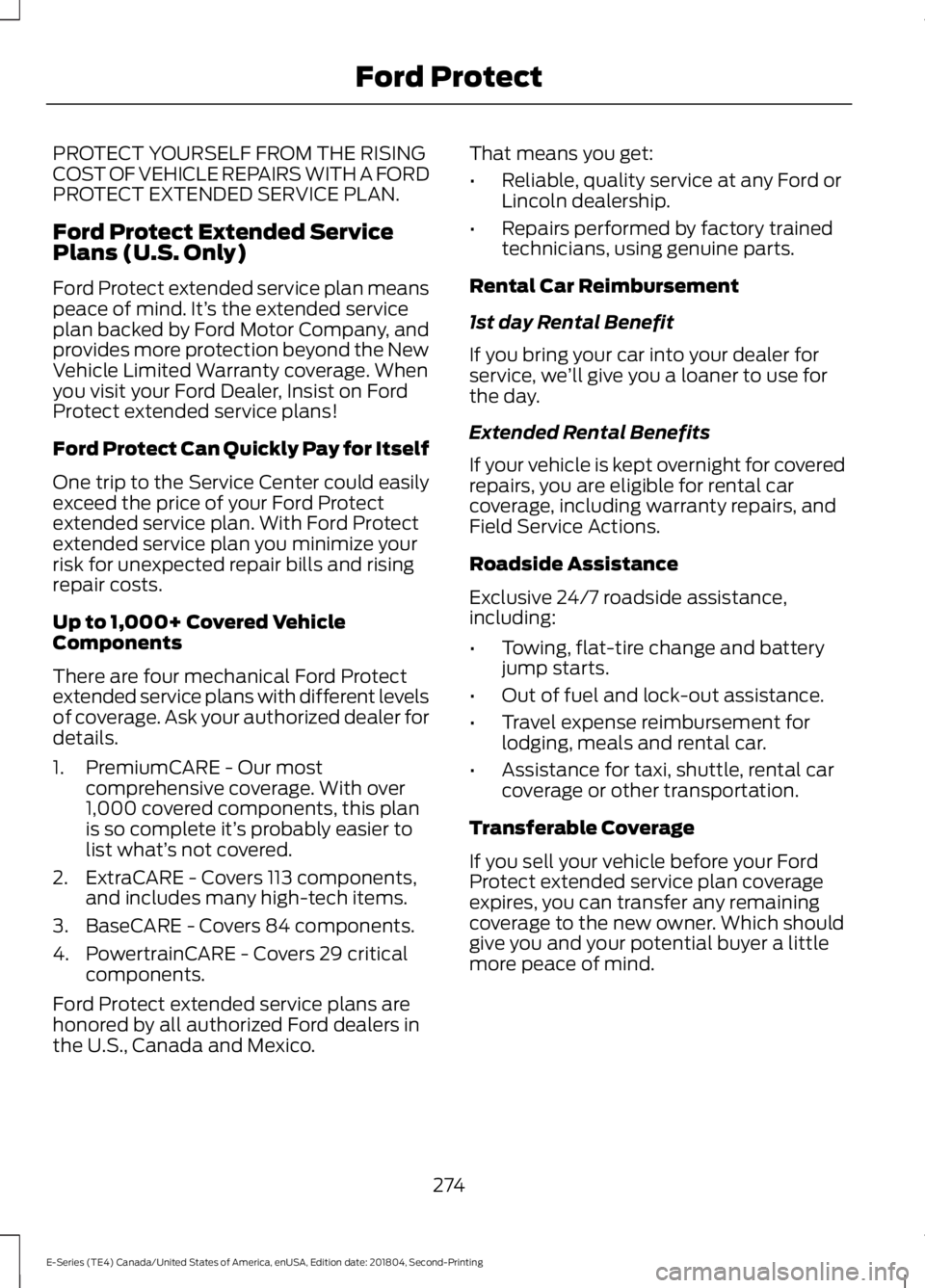
PROTECT YOURSELF FROM THE RISINGCOST OF VEHICLE REPAIRS WITH A FORDPROTECT EXTENDED SERVICE PLAN.
Ford Protect Extended ServicePlans (U.S. Only)
Ford Protect extended service plan meanspeace of mind. It’s the extended serviceplan backed by Ford Motor Company, andprovides more protection beyond the NewVehicle Limited Warranty coverage. Whenyou visit your Ford Dealer, Insist on FordProtect extended service plans!
Ford Protect Can Quickly Pay for Itself
One trip to the Service Center could easilyexceed the price of your Ford Protectextended service plan. With Ford Protectextended service plan you minimize yourrisk for unexpected repair bills and risingrepair costs.
Up to 1,000+ Covered VehicleComponents
There are four mechanical Ford Protectextended service plans with different levelsof coverage. Ask your authorized dealer fordetails.
1. PremiumCARE - Our mostcomprehensive coverage. With over1,000 covered components, this planis so complete it’s probably easier tolist what’s not covered.
2. ExtraCARE - Covers 113 components,and includes many high-tech items.
3. BaseCARE - Covers 84 components.
4. PowertrainCARE - Covers 29 criticalcomponents.
Ford Protect extended service plans arehonored by all authorized Ford dealers inthe U.S., Canada and Mexico.
That means you get:
•Reliable, quality service at any Ford orLincoln dealership.
•Repairs performed by factory trainedtechnicians, using genuine parts.
Rental Car Reimbursement
1st day Rental Benefit
If you bring your car into your dealer forservice, we’ll give you a loaner to use forthe day.
Extended Rental Benefits
If your vehicle is kept overnight for coveredrepairs, you are eligible for rental carcoverage, including warranty repairs, andField Service Actions.
Roadside Assistance
Exclusive 24/7 roadside assistance,including:
•Towing, flat-tire change and batteryjump starts.
•Out of fuel and lock-out assistance.
•Travel expense reimbursement forlodging, meals and rental car.
•Assistance for taxi, shuttle, rental carcoverage or other transportation.
Transferable Coverage
If you sell your vehicle before your FordProtect extended service plan coverageexpires, you can transfer any remainingcoverage to the new owner. Which shouldgive you and your potential buyer a littlemore peace of mind.
274
E-Series (TE4) Canada/United States of America, enUSA, Edition date: 201804, Second-Printing
Ford Protect
Page 278 of 329
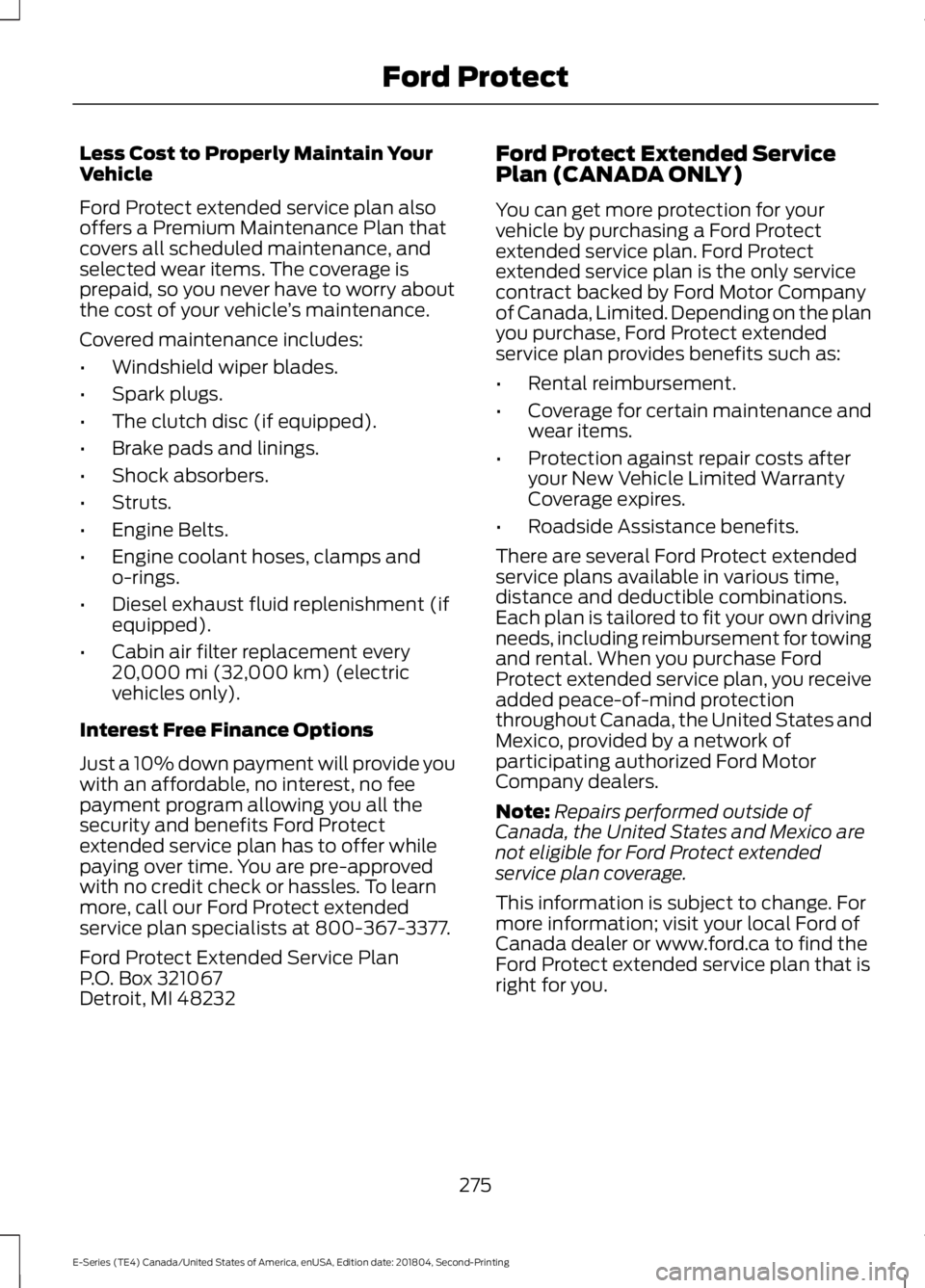
Less Cost to Properly Maintain YourVehicle
Ford Protect extended service plan alsooffers a Premium Maintenance Plan thatcovers all scheduled maintenance, andselected wear items. The coverage isprepaid, so you never have to worry aboutthe cost of your vehicle’s maintenance.
Covered maintenance includes:
•Windshield wiper blades.
•Spark plugs.
•The clutch disc (if equipped).
•Brake pads and linings.
•Shock absorbers.
•Struts.
•Engine Belts.
•Engine coolant hoses, clamps ando-rings.
•Diesel exhaust fluid replenishment (ifequipped).
•Cabin air filter replacement every20,000 mi (32,000 km) (electricvehicles only).
Interest Free Finance Options
Just a 10% down payment will provide youwith an affordable, no interest, no feepayment program allowing you all thesecurity and benefits Ford Protectextended service plan has to offer whilepaying over time. You are pre-approvedwith no credit check or hassles. To learnmore, call our Ford Protect extendedservice plan specialists at 800-367-3377.
Ford Protect Extended Service PlanP.O. Box 321067Detroit, MI 48232
Ford Protect Extended ServicePlan (CANADA ONLY)
You can get more protection for yourvehicle by purchasing a Ford Protectextended service plan. Ford Protectextended service plan is the only servicecontract backed by Ford Motor Companyof Canada, Limited. Depending on the planyou purchase, Ford Protect extendedservice plan provides benefits such as:
•Rental reimbursement.
•Coverage for certain maintenance andwear items.
•Protection against repair costs afteryour New Vehicle Limited WarrantyCoverage expires.
•Roadside Assistance benefits.
There are several Ford Protect extendedservice plans available in various time,distance and deductible combinations.Each plan is tailored to fit your own drivingneeds, including reimbursement for towingand rental. When you purchase FordProtect extended service plan, you receiveadded peace-of-mind protectionthroughout Canada, the United States andMexico, provided by a network ofparticipating authorized Ford MotorCompany dealers.
Note:Repairs performed outside ofCanada, the United States and Mexico arenot eligible for Ford Protect extendedservice plan coverage.
This information is subject to change. Formore information; visit your local Ford ofCanada dealer or www.ford.ca to find theFord Protect extended service plan that isright for you.
275
E-Series (TE4) Canada/United States of America, enUSA, Edition date: 201804, Second-Printing
Ford Protect
Page 284 of 329
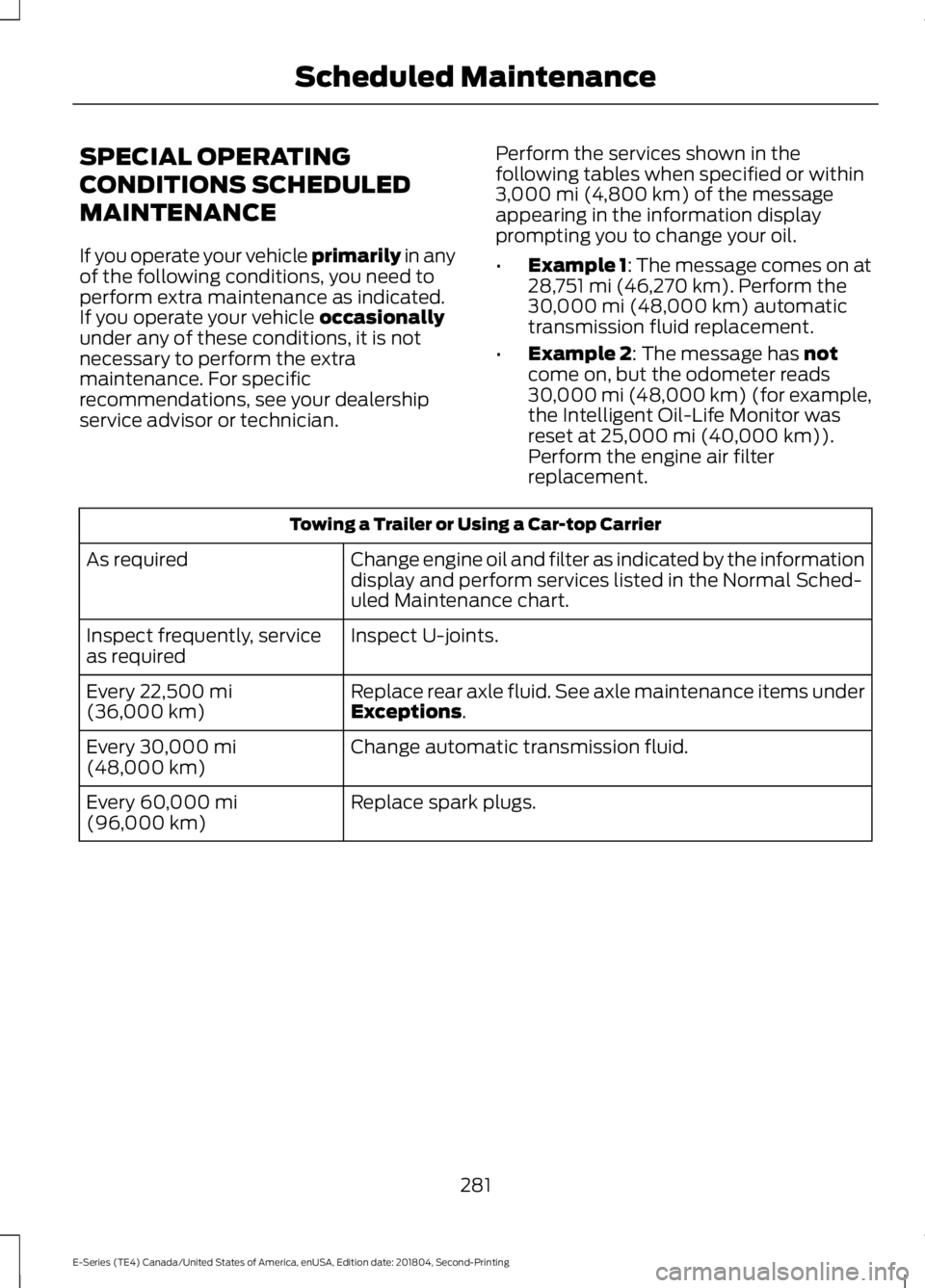
SPECIAL OPERATING
CONDITIONS SCHEDULED
MAINTENANCE
If you operate your vehicle primarily in anyof the following conditions, you need toperform extra maintenance as indicated.If you operate your vehicle occasionallyunder any of these conditions, it is notnecessary to perform the extramaintenance. For specificrecommendations, see your dealershipservice advisor or technician.
Perform the services shown in thefollowing tables when specified or within3,000 mi (4,800 km) of the messageappearing in the information displayprompting you to change your oil.
•Example 1: The message comes on at28,751 mi (46,270 km). Perform the30,000 mi (48,000 km) automatictransmission fluid replacement.
•Example 2: The message has notcome on, but the odometer reads30,000 mi (48,000 km) (for example,the Intelligent Oil-Life Monitor wasreset at 25,000 mi (40,000 km)).Perform the engine air filterreplacement.
Towing a Trailer or Using a Car-top Carrier
Change engine oil and filter as indicated by the informationdisplay and perform services listed in the Normal Sched-uled Maintenance chart.
As required
Inspect U-joints.Inspect frequently, serviceas required
Replace rear axle fluid. See axle maintenance items underExceptions.Every 22,500 mi(36,000 km)
Change automatic transmission fluid.Every 30,000 mi(48,000 km)
Replace spark plugs.Every 60,000 mi(96,000 km)
281
E-Series (TE4) Canada/United States of America, enUSA, Edition date: 201804, Second-Printing
Scheduled Maintenance
Page 309 of 329
Notices by posting them on Telenav’sWebsite or by downloading such Noticesto your wireless device. If you desire towithdraw your consent to receive Noticeselectronically, you must discontinue youruse of the Telenav Software.
8.4
Telenav’s or your failure to requireperformance of any provision shall notaffect that party’s right to requireperformance at any time thereafter, norshall a waiver of any breach or default ofthis Agreement constitute a waiver of anysubsequent breach or default or a waiverof the provision itself.
8.5
If any provision herein is heldunenforceable, then such provision will bemodified to reflect the intention of theparties, and the remaining provisions ofthis Agreement will remain in full force andeffect.
8.6
The headings in this Agreement are forconvenience of reference only, will not bedeemed to be a part of this Agreement,and will not be referred to in connectionwith the construction or interpretation ofthis Agreement. As used in this Agreement,the words “include” and “including,” andvariations thereof, will not be deemed tobe terms of limitation, but rather will bedeemed to be followed by the words“without limitation.”
9. Other Vendors Terms and Conditions
The Telenav Software utilizes map andother data licensed to Telenav by thirdparty vendors for the benefit of you andother end users. This Agreement includesend-user terms applicable to thesecompanies (included at the end of this
Agreement), and thus your use of theTelenav Software is also subject to suchterms. You agree to comply with thefollowing additional terms and conditions,which are applicable to Telenav’s thirdparty vendor licensors:
9.1 End User Terms Required by HERENorth America, LLC
The data (“Data”) is provided for yourpersonal, internal use only and not forresale. It is protected by copyright, and issubject to the following terms andconditions which are agreed to by you, onthe one hand, and Telenav (“Telenav”) andits licensors (including their licensors andsuppliers) on the other hand.
© 2013 HERE. All rights reserved.
The Data for areas of Canada includesinformation taken with permission fromCanadian authorities, including: © HerMajesty the Queen in Right of Canada, ©Queen's Printer for Ontario, © Canada PostCorporation, GeoBase®, © Department ofNatural Resources Canada.
HERE holds a non-exclusive license fromthe United States Postal Service® topublish and sell ZIP+4® information.
©United States Postal Service® 2014.Prices are not established, controlled orapproved by the United States PostalService®. The following trademarks andregistrations are owned by the USPS:United States Postal Service, USPS, andZIP+4.
The Data for Mexico includes certain datafrom Instituto Nacional de Estadística yGeografía.
TERMS AND CONDITIONS
306
E-Series (TE4) Canada/United States of America, enUSA, Edition date: 201804, Second-Printing
Appendices
Page 324 of 329
Proper Driver and Front Passenger SeatingAdjustment........................................................37Driving Aids......................................................98Driving Hints....................................................116Driving Through Water.................................117DRLSee: Daytime Running Lamps.........................50
E
Economical Driving.......................................116Electromagnetic Compatibility..............294Emission Law...................................................83Noise Emissions Warranty, ProhibitedTampering Acts and Maintenance...........84Tampering With a Noise ControlSystem................................................................83End User License Agreement.................296SYNC End User License Agreement(EULA)..............................................................296Engine Block Heater......................................76Using the Engine Block Heater........................76Engine Coolant Check................................144Adding Coolant....................................................145Coolant Change...................................................147Engine Coolant TemperatureManagement...................................................148Fail-Safe Cooling.................................................147Recycled Coolant...............................................146Severe Climates...................................................147Engine Emission Control.............................83Engine ImmobilizerSee: Passive Anti-Theft System.....................45Engine Oil Check...........................................143Adding Engine Oil...............................................143Engine Oil Dipstick.......................................143Engine Specifications - 6.2L....................198Drivebelt Routing................................................198Engine Specifications - 6.8L....................198Drivebelt Routing................................................199Environment......................................................15Essential Towing Checks..........................108Before Towing a Trailer......................................113Hitches...................................................................109Launching or Retrieving a Boat or PersonalWatercraft (PWC)..........................................114Safety Chains........................................................110Trailer Brakes.........................................................110
Trailer Lamps.........................................................113Trailer Towing Connector................................109When Towing a Trailer.......................................113Event Data RecordingSee: Data Recording...............................................7Exterior Mirrors.................................................51Fold-Away Exterior Mirrors................................51Power Exterior Mirrors.........................................51Telescoping Mirrors .............................................52
F
Fastening the Seatbelts..............................28Seatbelt Locking Modes....................................29Using Seatbelts During Pregnancy................28Flat TireSee: Changing a Road Wheel........................192Floor Mats.........................................................117Ford Credit..........................................................11US Only......................................................................11Ford Protect...................................................274Ford Protect Extended Service Plan(CANADA ONLY)...........................................275Ford Protect Extended Service Plans (U.S.Only)...................................................................274Fuel and Refueling..........................................77Fuel Consumption..........................................81Advertised Capacity.............................................81Fuel Economy.........................................................81Fuel Quality - E85...........................................77Choosing the Right Fuel - Flex FuelVehicles................................................................77Switching Between E85 and Gasoline.........78Fuel Quality - Gasoline.................................79Choosing the Right Fuel.....................................79Fuel Shutoff....................................................120Fuses..................................................................131Fuse Specification Chart.............................131Passenger Compartment Fuse Panel........136Power Distribution Box......................................131
G
Gauges...............................................................53Battery Voltage Gauge.......................................54Engine Coolant Temperature Gauge............54Fuel Gauge..............................................................53Information Display.............................................54
321
E-Series (TE4) Canada/United States of America, enUSA, Edition date: 201804, Second-Printing
Index