transmission FORD E SERIES 2019 Owners Manual
[x] Cancel search | Manufacturer: FORD, Model Year: 2019, Model line: E SERIES, Model: FORD E SERIES 2019Pages: 329, PDF Size: 2.92 MB
Page 5 of 329
Information Displays
General Information.....................................58
Information Messages................................63
Climate Control
Manual Climate Control.............................66
Hints on Controlling the Interior Climate...........................................................................67
Rear Passenger Climate Controls...........68
Seats
Sitting in the Correct Position..................69
Head Restraints.............................................69
Manual Seats..................................................70
Power Seats......................................................71
Auxiliary Power Points
Auxiliary Power Points.................................72
Starting and Stopping theEngine
General Information.....................................74
Ignition Switch................................................74
Starting a Gasoline Engine........................74
Engine Block Heater.....................................76
Fuel and Refueling
Safety Precautions........................................77
Fuel Quality - E85..........................................77
Fuel Quality - Gasoline................................79
Running Out of Fuel.....................................79
Refueling..........................................................80
Fuel Consumption.........................................81
Engine Emission Control
Emission Law..................................................83
Catalytic Converter......................................84
Transmission
Automatic Transmission............................87
Rear Axle
Limited Slip Differential.............................90
Brakes
General Information......................................91
Hints on Driving With Anti-Lock Brakes...........................................................................91
Parking Brake..................................................92
Traction Control
Principle of Operation.................................93
Using Traction Control................................93
Parking Aids
Rear View Camera........................................94
Cruise Control
Principle of Operation.................................96
Using Cruise Control....................................96
Driving Aids
Steering............................................................98
Load Carrying
Load Limit........................................................99
Towing
Towing a Trailer............................................104
Recommended Towing Weights...........105
Essential Towing Checks.........................108
Towing the Vehicle on Four Wheels......115
Driving Hints
Breaking-In......................................................116
Reduced Engine Performance.................116
Economical Driving......................................116
2
E-Series (TE4) Canada/United States of America, enUSA, Edition date: 201804, Second-Printing
Table of Contents
Page 6 of 329
Driving Through Water................................117
Floor Mats........................................................117
Roadside Emergencies
Roadside Assistance...................................119
Hazard Flashers...........................................120
Fuel Shutoff...................................................120
Jump Starting the Vehicle.........................121
Transporting the Vehicle...........................123
Customer Assistance
Getting the Services You Need...............124
In California (U.S. Only).............................125
The Better Business Bureau (BBB) AutoLine Program (U.S. Only).....................126
Utilizing the Mediation/ArbitrationProgram (Canada Only)........................127
Getting Assistance Outside the U.S. andCanada.........................................................127
Ordering Additional Owner's Literature.........................................................................129
Reporting Safety Defects (U.S. Only).........................................................................129
Reporting Safety Defects (Canada Only).........................................................................129
Fuses
Fuse Specification Chart............................131
Changing a Fuse..........................................139
Maintenance
General Information....................................141
Opening and Closing the Hood...............141
Under Hood Overview...............................142
Engine Oil Dipstick......................................143
Engine Oil Check..........................................143
Oil Change Indicator Reset......................144
Engine Coolant Check...............................144
Automatic Transmission Fluid Check.........................................................................149
Brake Fluid Check........................................152
Power Steering Fluid Check.....................152
Washer Fluid Check....................................153
Changing the 12V Battery.........................153
Checking the Wiper Blades......................155
Changing the Wiper Blades.....................155
Adjusting the Headlamps........................156
Removing a Headlamp..............................157
Changing a Bulb...........................................157
Changing the Engine Air Filter................159
Vehicle Care
General Information...................................160
Cleaning Products......................................160
Cleaning the Exterior.................................160
Waxing.............................................................162
Cleaning the Engine....................................162
Cleaning the Windows and Wiper Blades.........................................................................162
Cleaning the Interior...................................163
Cleaning the Instrument Panel andInstrument Cluster Lens.......................163
Cleaning Leather Seats.............................164
Repairing Minor Paint Damage..............165
Cleaning the Wheels..................................165
Vehicle Storage............................................165
Wheels and Tires
General Information...................................168
Tire Care..........................................................169
Using Snow Chains.....................................187
Tire Pressure Monitoring System..........188
Changing a Road Wheel...........................192
Technical Specifications..........................196
Capacities and Specifications
Engine Specifications - 6.2L...................198
Engine Specifications - 6.8L...................198
Motorcraft Parts - 6.2L..............................199
Motorcraft Parts - 6.8L............................200
3
E-Series (TE4) Canada/United States of America, enUSA, Edition date: 201804, Second-Printing
Table of Contents
Page 7 of 329
Vehicle Identification Number................201
Vehicle Certification Label......................202
Transmission Code Designation...........202
Capacities and Specifications - 6.2L........................................................................203
Capacities and Specifications - 6.8L........................................................................207
Bulb Specification Chart...........................212
Audio System
General Information...................................214
Audio Unit - Vehicles With: AM/FM......215
Audio Unit - Vehicles With: AM/FM/CD/SYNC............................................................216
Digital Radio..................................................219
Satellite Radio...............................................221
USB Port.........................................................224
Media Hub.....................................................224
SYNC™
General Information..................................225
Using Voice Recognition...........................227
Using SYNC™ With Your Phone...........230
SYNC™ Applications and Services......243
SYNC™ AppLink™....................................250
Using SYNC™ With Your Media Player........................................................................252
SYNC™ Troubleshooting........................262
Accessories
Accessories.....................................................271
Auxiliary Switches.......................................272
Ford Protect
Ford Protect..................................................274
Scheduled Maintenance
General Maintenance Information.......276
Normal Scheduled Maintenance..........279
Special Operating Conditions ScheduledMaintenance.............................................281
Scheduled Maintenance Record..........283
Appendices
Electromagnetic Compatibility.............294
End User License Agreement................296
4
E-Series (TE4) Canada/United States of America, enUSA, Edition date: 201804, Second-Printing
Table of Contents
Page 16 of 329
Fleet Telematics Modem (If Equipped)
The onboard modem provides access todata to support telematics services suchas location, speed, idle time, fuel, vehiclediagnostics and maintenance alerts. Toexplore data, telematics services, thirdparty service provider support and tomanage existing telematics accounts, referto www.commericalsolutions.ford.com orcall 833-FCS-FORD.
Note:This is not available with FordPassConnect.
FordPass Connect (If Equipped)
With a FordPass Connect-equippedvehicle, you can use FordPass to track yourvehicle’s location and remotely accessvehicle features such as start, lock andunlock and vehicle status including fuellevel and approximate mileage. Messageand data rates may apply. Services maybe limited by mobile phone networkcoverage area. For additional information,refer to www.fordpass.com.
On Board Diagnostics Data LinkConnector
WARNING: Do not connectwireless plug-in devices to the data linkconnector. Unauthorized third partiescould gain access to vehicle data andimpair the performance of safety relatedsystems. Only allow repair facilities thatfollow our service and repair instructionsto connect their equipment to the datalink connector.
Your vehicle has an OBD Data LinkConnector (DLC) that is used inconjunction with a diagnostic scan tool forvehicle diagnostics, repairs andreprogramming services. Installing anaftermarket device that uses the DLCduring normal driving for purposes such as
remote insurance company monitoring,transmission of vehicle data to otherdevices or entities, or altering theperformance of the vehicle, may causeinterference with or even damage tovehicle systems. We do not recommendor endorse the use of aftermarket plug-indevices unless approved by Ford. Thevehicle Warranty will not cover damagecaused by an aftermarket plug-in device.
Notice to Owners of Pickup Trucksand Utility Type Vehicles
WARNING: Utility vehicles have asignificantly higher rollover rate thanother types of vehicles.
Before you drive your vehicle, please readthis Owner’s Manual carefully. Your vehicleis not a passenger car. As with othervehicles of this type, failure to operate thisvehicle correctly may result in loss ofvehicle control, vehicle rollover, personalinjury or death.
Using your Vehicle as anAmbulance
If your light truck has the Ford AmbulancePreparation Package, it may be utilized asan ambulance. Ford urges ambulancemanufacturers to follow therecommendations of the Ford IncompleteVehicle Manual, Ford Truck Body Builder’sLayout Book and the Qualified VehicleModifiers (QVM) Guidelines as well aspertinent supplements. For additionalinformation, please contact the Truck BodyBuilders Advisory Service athttp://www.fleet.ford.com/truckbbas/and then by selecting Contact Us or byphone at 1–877–840–4338.
13
E-Series (TE4) Canada/United States of America, enUSA, Edition date: 201804, Second-Printing
Introduction
Page 19 of 329
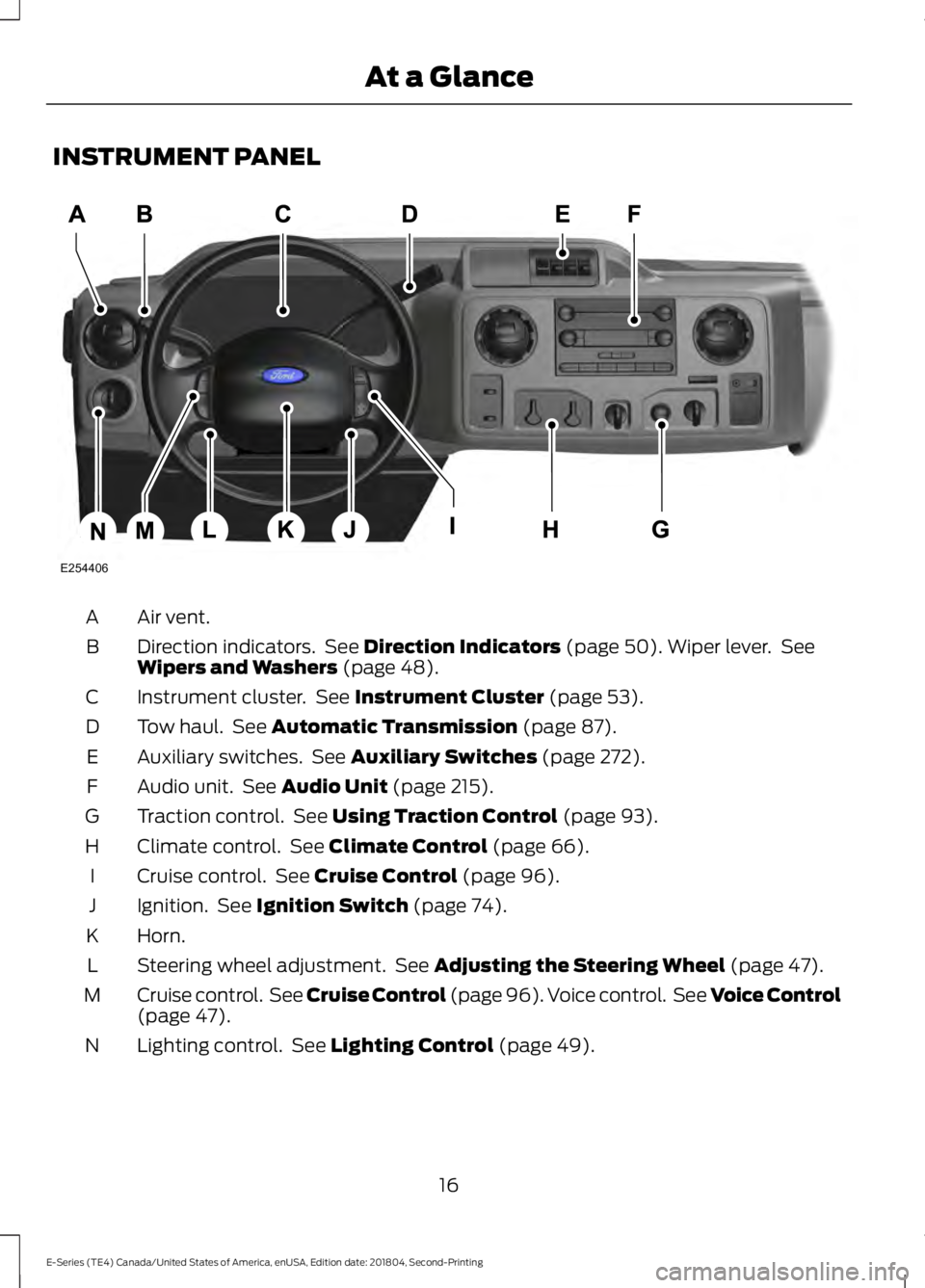
INSTRUMENT PANEL
Air vent.A
Direction indicators. See Direction Indicators (page 50). Wiper lever. SeeWipers and Washers (page 48).B
Instrument cluster. See Instrument Cluster (page 53).C
Tow haul. See Automatic Transmission (page 87).D
Auxiliary switches. See Auxiliary Switches (page 272).E
Audio unit. See Audio Unit (page 215).F
Traction control. See Using Traction Control (page 93).G
Climate control. See Climate Control (page 66).H
Cruise control. See Cruise Control (page 96).I
Ignition. See Ignition Switch (page 74).J
Horn.K
Steering wheel adjustment. See Adjusting the Steering Wheel (page 47).L
Cruise control. See Cruise Control (page 96). Voice control. See Voice Control(page 47).M
Lighting control. See Lighting Control (page 49).N
16
E-Series (TE4) Canada/United States of America, enUSA, Edition date: 201804, Second-Printing
At a GlanceE254406
Page 42 of 329
GENERAL INFORMATION ON
RADIO FREQUENCIES
This device complies with Part 15 of theFCC Rules and with Licence exempt RSSStandards of Industry Canada. Operationis subject to the following two conditions:
•This device may not cause harmfulinterference, and
•This device must accept anyinterference received, includinginterference that may cause undesiredoperation.
WARNING: Changes ormodifications not expressively approvedby the party responsible for compliancecould void the user's authority to operatethe equipment. The term "IC:" before theradio certification number only signifiesthat Industry Canada technicalspecifications were met.
The typical operating range for yourtransmitter is approximately 33 ft (10 m).Vehicles with the remote start feature willhave a greater range. One of the followingcould cause a decrease in operating range:
•Weather conditions.
•Nearby radio towers.
•Structures around the vehicle.
•Other vehicles parked next to yourvehicle.
Other short distance radio transmissions,for example amateur radios, medicalequipment, wireless headphones, remotecontrols and alarm systems can also usethe radio frequency used by your remotecontrol. If the frequencies are jammed, youwill not be able to use your remote control.You can lock and unlock the doors with thekey.
Note:Make sure to lock your vehicle beforeleaving it unattended.
Note:If you are in range, the remote controlwill operate if you press any buttonunintentionally.
Note:The remote control contains sensitiveelectrical components. Exposure to moistureor impact may cause permanent damage.
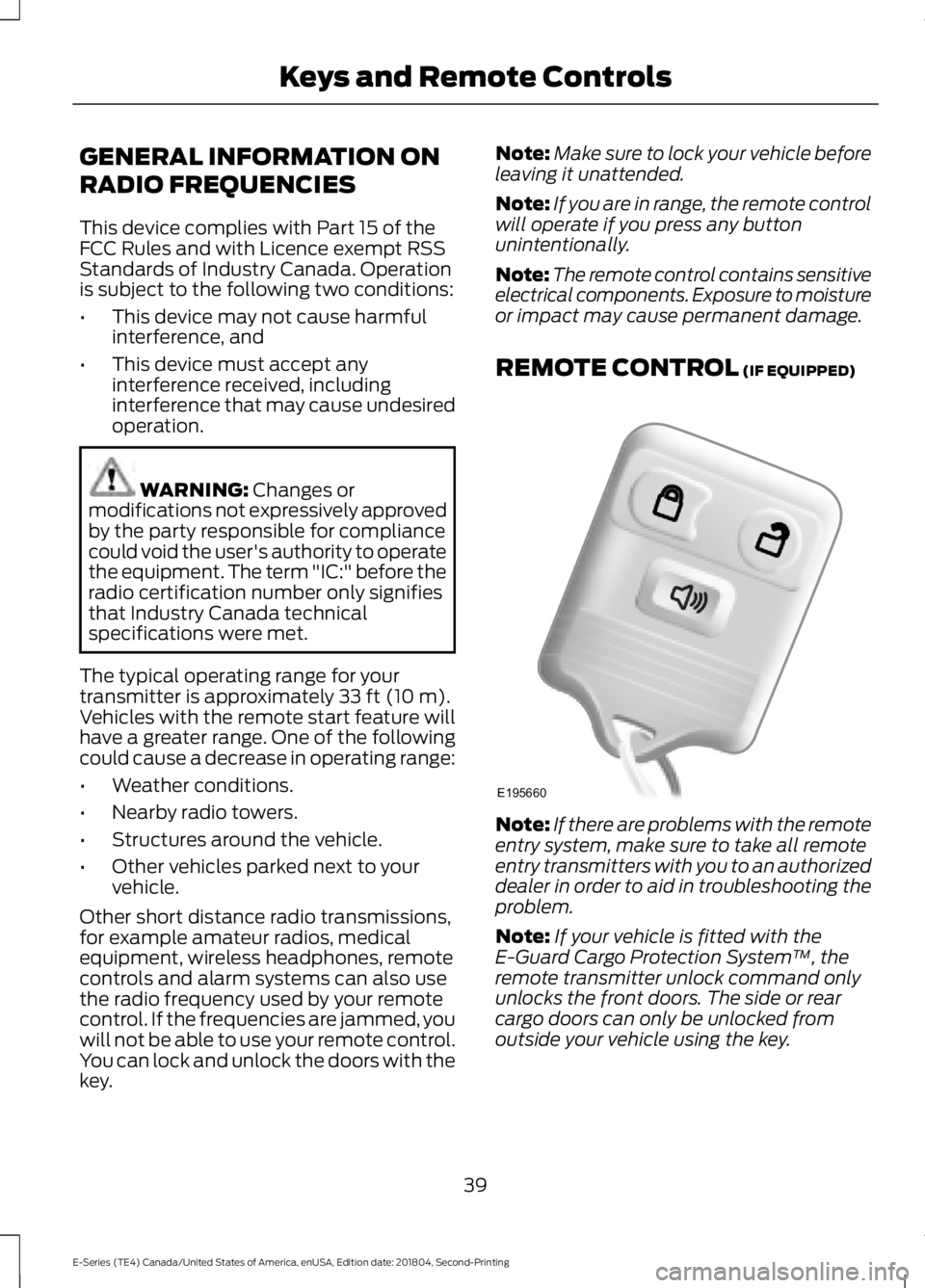
REMOTE CONTROL (IF EQUIPPED)
Note:If there are problems with the remoteentry system, make sure to take all remoteentry transmitters with you to an authorizeddealer in order to aid in troubleshooting theproblem.
Note:If your vehicle is fitted with theE-Guard Cargo Protection System™, theremote transmitter unlock command onlyunlocks the front doors. The side or rearcargo doors can only be unlocked fromoutside your vehicle using the key.
39
E-Series (TE4) Canada/United States of America, enUSA, Edition date: 201804, Second-Printing
Keys and Remote ControlsE195660
Page 60 of 329
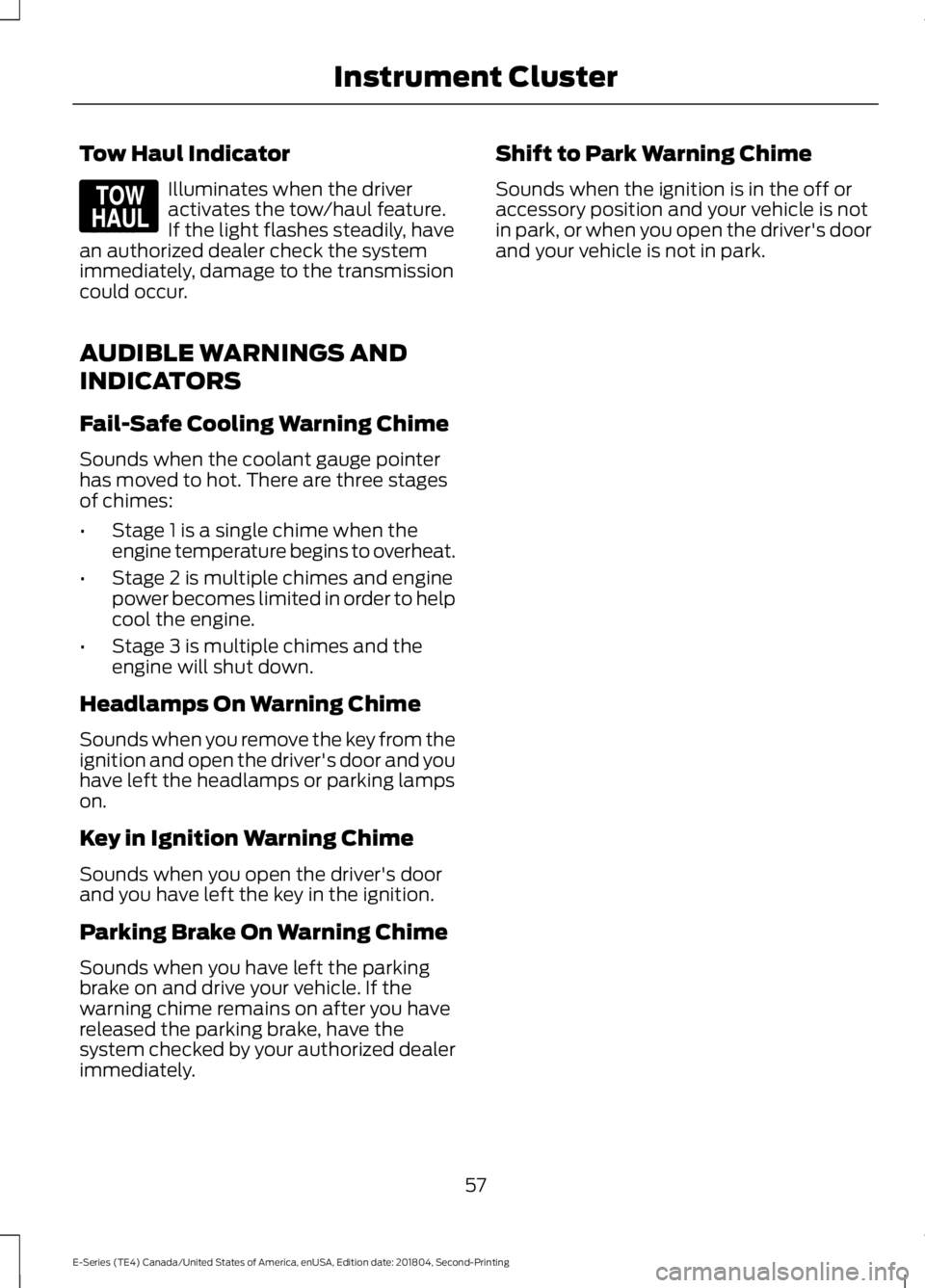
Tow Haul Indicator
Illuminates when the driveractivates the tow/haul feature.If the light flashes steadily, havean authorized dealer check the systemimmediately, damage to the transmissioncould occur.
AUDIBLE WARNINGS AND
INDICATORS
Fail-Safe Cooling Warning Chime
Sounds when the coolant gauge pointerhas moved to hot. There are three stagesof chimes:
•Stage 1 is a single chime when theengine temperature begins to overheat.
•Stage 2 is multiple chimes and enginepower becomes limited in order to helpcool the engine.
•Stage 3 is multiple chimes and theengine will shut down.
Headlamps On Warning Chime
Sounds when you remove the key from theignition and open the driver's door and youhave left the headlamps or parking lampson.
Key in Ignition Warning Chime
Sounds when you open the driver's doorand you have left the key in the ignition.
Parking Brake On Warning Chime
Sounds when you have left the parkingbrake on and drive your vehicle. If thewarning chime remains on after you havereleased the parking brake, have thesystem checked by your authorized dealerimmediately.
Shift to Park Warning Chime
Sounds when the ignition is in the off oraccessory position and your vehicle is notin park, or when you open the driver's doorand your vehicle is not in park.
57
E-Series (TE4) Canada/United States of America, enUSA, Edition date: 201804, Second-Printing
Instrument ClusterE161509
Page 68 of 329
Trailer
ActionMessage
Displays along with a single tone in response to faultssensed by the TBC. See Essential Towing Checks(page 108).
TRAILER BRAKE MODULEFAULT
Displays when a correct trailer connection (a trailerwith electric trailer brakes) is sensed during a givenignition cycle.
TRAILER CONNECTED
Displays when a trailer connection becomes discon-nected, either intentionally or unintentionally, and hasbeen sensed during a given ignition cycle. Disregardthis status if your vehicle is not equipped with a factoryinstalled trailer brake controller. This message mayappear when you use an aftermarket TBC even whenthe trailer is connected.
TRAILER DISCONNECTED
Displays if there are certain faults in the vehicle wiringand trailer wiring or brake system. See EssentialTowing Checks (page 108).
WIRING FAULT ON TRAILER
Transmission
ActionMessage
A reminder to apply the brakes, then shift to park.SHIFT TO PARK
65
E-Series (TE4) Canada/United States of America, enUSA, Edition date: 201804, Second-Printing
Information Displays
Page 78 of 329
Before starting the engine check thefollowing:
•Make sure all occupants have fastenedtheir safety belts.
•Make sure the headlamps andelectrical accessories are off.
•Make sure the parking brake is on.
•Make sure the transmission is in park(P) or neutral (N).
•Turn the ignition key to the on position.
Note:Do not touch the accelerator pedal.
1. Fully press the brake pedal.
2. Turn the key to the start position tostart the engine. Release the key whenthe engine starts.
Note:The engine may continue crankingfor up to 15 seconds or until it starts.
Note:If you cannot start the engine on thefirst try, wait for a short period and try again.
Failure to Start
If you cannot start the engine after threeattempts, wait 10 seconds and follow thisprocedure:
1. Fully press the brake pedal.
2. Fully press the accelerator pedal andhold it there.
3. Start the engine.
Stopping the Engine When YourVehicle is Stationary
1. Shift into park (P) or neutral (N).
2. Turn the key to the off position.
3. Apply the parking brake.
Stopping the Engine When YourVehicle is Moving
WARNING: Switching off theengine when the vehicle is still movingwill result in a loss of brake and steeringassistance. The steering will not lock, buthigher effort will be required. When theignition is switched off, some electricalcircuits, including air bags, warning lampsand indicators may also be off. If theignition was turned off accidentally, youcan shift into neutral (N) and re-start theengine.
1. Put the transmission into neutral (N)and use the brakes to bring your vehicleto a safe stop.
2. When your vehicle has stopped, shiftinto park (P) or neutral (N) and switchthe ignition off.
3. Apply the parking brake.
Guarding Against Exhaust Fumes
WARNING: If you smell exhaustfumes inside your vehicle, have yourvehicle checked by your authorizeddealer immediately. Do not drive yourvehicle if you smell exhaust fumes.Carbon monoxide is present in exhaustfumes. Take precautions to avoid itsdangerous effects.
Important Ventilating Information
If you stop your vehicle and then leave theengine idling for long periods of time, werecommend that you do one of thefollowing:
•Open the windows at least 1 in (3 cm).
•Set your climate control to outside air.
75
E-Series (TE4) Canada/United States of America, enUSA, Edition date: 201804, Second-Printing
Starting and Stopping the Engine
Page 88 of 329
Illumination of the service engine soonindicator, charging system warning light orthe temperature warning light, fluid leaks,strange odors, smoke or loss of enginepower could indicate that the emissioncontrol system is not working properly.
An improperly operating or damagedexhaust system may allow exhaust toenter the vehicle. Have a damaged orimproperly operating exhaust systeminspected and repaired immediately.
Do not make any unauthorized changes toyour vehicle or engine. By law, vehicleowners and anyone who manufactures,repairs, services, sells, leases, tradesvehicles, or supervises a fleet of vehiclesare not permitted to intentionally removean emission control device or prevent itfrom working. Information about yourvehicle’s emission system is on the VehicleEmission Control Information Decallocated on or near the engine. This decalalso lists engine displacement.
Please consult your warranty informationfor complete details.
On-Board Diagnostics (OBD-II)
Your vehicle has a computer known as theon-board diagnostics system (OBD-II) thatmonitors the engine’s emission controlsystem. The system protects theenvironment by making sure that yourvehicle continues to meet governmentemission standards. The OBD-II systemalso assists a service technician in properlyservicing your vehicle.
When the service engine soonindicator illuminates, the OBD-IIsystem has detected amalfunction. Temporary malfunctions maycause the service engine soon indicator toilluminate. Examples are:
1. Your vehicle has run out of fuel—theengine may misfire or run poorly.
2. Poor fuel quality or water in thefuel—the engine may misfire or runpoorly.
3. The fuel fill inlet may not have closedproperly. See Refueling (page 80).
4. Driving through deep water—theelectrical system may be wet.
You can correct these temporarymalfunctions by filling the fuel tank withgood quality fuel, properly closing the fuelfill inlet or letting the electrical system dryout. After three driving cycles without theseor any other temporary malfunctionspresent, the service engine soon indicatorshould stay off the next time you start theengine. A driving cycle consists of a coldengine startup followed by mixed city andhighway driving. No additional vehicleservice is required.
If the service engine soon indicator remainson, have your vehicle serviced at the firstavailable opportunity. Although somemalfunctions detected by the OBD-II maynot have symptoms that are apparent,continued driving with the service enginesoon indicator on can result in increasedemissions, lower fuel economy, reducedengine and transmission smoothness andlead to more costly repairs.
Readiness for Inspection andMaintenance (I/M) Testing
Some state and provincial and localgovernments may haveInspection/Maintenance (I/M) programsto inspect the emission control equipmenton your vehicle. Failure to pass thisinspection could prevent you from gettinga vehicle registration.
If the service engine soonindicator is on or the bulb doesnot work, your vehicle may needservice. See On-Board Diagnostics.
85
E-Series (TE4) Canada/United States of America, enUSA, Edition date: 201804, Second-Printing
Engine Emission Control